08가지치기 나무
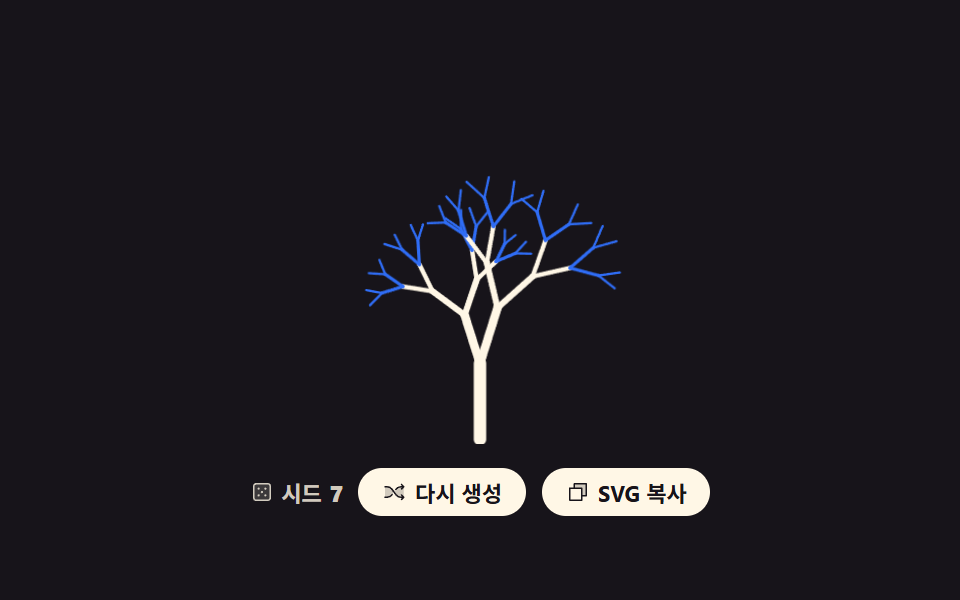
줄기 하나에서 두 가지로 갈라지기를 되풀이하고 갈라질수록 길이와 굵기를 줄입니다.
쓰임환경·기부 페이지의 삽화, 로딩 화면의 자라나는 그림
scaletransform-originstroke-linecap
<main class="stage">
<div class="bt is-demo" id="root">
  <svg class="bt__art" id="art" viewBox="0 0 240 150" role="img" data-label="줄기 하나에서 두 갈래씩 갈라져 자란 나무, 시드 {n}"></svg>
  <div class="bt__bar">
    <p class="bt__seed">
      <svg xmlns="http://www.w3.org/2000/svg" class="bt__ic" viewBox="0 0 256 256" aria-hidden="true"><g fill="currentColor"><path d="M216 64v128a24 24 0 0 1-24 24H64a24 24 0 0 1-24-24V64a24 24 0 0 1 24-24h128a24 24 0 0 1 24 24" opacity=".2"/><path d="M192 32H64a32 32 0 0 0-32 32v128a32 32 0 0 0 32 32h128a32 32 0 0 0 32-32V64a32 32 0 0 0-32-32m16 160a16 16 0 0 1-16 16H64a16 16 0 0 1-16-16V64a16 16 0 0 1 16-16h128a16 16 0 0 1 16 16ZM104 92a12 12 0 1 1-12-12a12 12 0 0 1 12 12m72 0a12 12 0 1 1-12-12a12 12 0 0 1 12 12m-72 72a12 12 0 1 1-12-12a12 12 0 0 1 12 12m36-36a12 12 0 1 1-12-12a12 12 0 0 1 12 12m36 36a12 12 0 1 1-12-12a12 12 0 0 1 12 12"/></g></svg>
      시드 <b id="num">7</b>
    </p>
    <button class="bt__btn" type="button" id="again">
      <svg xmlns="http://www.w3.org/2000/svg" class="bt__ic" viewBox="0 0 256 256" aria-hidden="true"><g fill="currentColor"><path d="M107.14 98.8L128 128l-20.86 29.2A64 64 0 0 1 55.06 184H32V72h23.06a64 64 0 0 1 52.08 26.8m93.8-26.8a64 64 0 0 0-52.08 26.8L128 128l20.86 29.2a64 64 0 0 0 52.08 26.8H232V72Z" opacity=".2"/><path d="M237.66 178.34a8 8 0 0 1 0 11.32l-24 24a8 8 0 0 1-11.32-11.32L212.69 192h-11.75a72.12 72.12 0 0 1-58.59-30.15l-41.72-58.4A56.1 56.1 0 0 0 55.06 80H32a8 8 0 0 1 0-16h23.06a72.12 72.12 0 0 1 58.59 30.15l41.72 58.4A56.1 56.1 0 0 0 200.94 176h11.75l-10.35-10.34a8 8 0 0 1 11.32-11.32ZM143 107a8 8 0 0 0 11.16-1.86l1.2-1.67A56.1 56.1 0 0 1 200.94 80h11.75l-10.35 10.34a8 8 0 0 0 11.32 11.32l24-24a8 8 0 0 0 0-11.32l-24-24a8 8 0 0 0-11.32 11.32L212.69 64h-11.75a72.12 72.12 0 0 0-58.59 30.15l-1.2 1.67A8 8 0 0 0 143 107m-30 42a8 8 0 0 0-11.16 1.86l-1.2 1.67A56.1 56.1 0 0 1 55.06 176H32a8 8 0 0 0 0 16h23.06a72.12 72.12 0 0 0 58.59-30.15l1.2-1.67A8 8 0 0 0 113 149"/></g></svg>
      <span class="bt__label">다시 생성</span>
    </button>
    <button class="bt__btn" type="button" id="copy" data-done="복사됨">
      <svg xmlns="http://www.w3.org/2000/svg" class="bt__ic" viewBox="0 0 256 256" aria-hidden="true"><g fill="currentColor"><path d="M216 40v128h-48V88H88V40Z" opacity=".2"/><path d="M216 32H88a8 8 0 0 0-8 8v40H40a8 8 0 0 0-8 8v128a8 8 0 0 0 8 8h128a8 8 0 0 0 8-8v-40h40a8 8 0 0 0 8-8V40a8 8 0 0 0-8-8m-56 176H48V96h112Zm48-48h-32V88a8 8 0 0 0-8-8H96V48h112Z"/></g></svg>
      <span class="bt__label">SVG 복사</span>
    </button>
  </div>
</div>
</main>
@use "../../../../site/static/demo-tokens" as *;
// 가지치기 나무 — 가지 하나를 그리고 그 끝에서 자기 자신을 두 번 부른다. 난수는 벌어지는 각도와
// 줄어드는 비율에만 쓴다. 미리보기 루프는 뿌리에서 끝으로 번지며 자랐다 같은 순서로 접히는 것이고,
// 시작 상태와 끝 상태가 둘 다 "접힘" 이라 한 바퀴 끝에서 튀지 않는다.
$duration: $dur-loop;
$easing: cubic-bezier(.7, 0, .85, .4);
$color: $subject-cream;
@include stage($stage-ink);
.bt { display: grid; justify-items: center; gap: $sp-3; width: 100%; }
.bt__art { display: block; width: clamp(176px, 60vw, 320px); height: auto; }
// 여기서만 회전·확대 중심이 요소 한가운데가 아니다 (blog-demo 규칙 8 의 예외 조건 — 붙는 지점이 있는 요소).
// 가지는 제 뿌리에 붙어 있으므로 --ox/--oy(뿌리 좌표)에서 자라야 한다. 한가운데에서 키우면
// 가지가 줄기에서 떨어져 공중에 뜬 채 커진다. view-box 라 이 px 값은 viewBox 좌표다
.bt__seg {
transform-box: view-box;
transform-origin: var(--ox) var(--oy);
}
.bt__line { stroke-linecap: round; }
.bt__line--a { stroke: $color; }
.bt__line--b { stroke: $subject-blue; }
.bt__bar { display: flex; flex-wrap: wrap; align-items: center; justify-content: center; gap: $sp-2; }
.bt__seed {
margin: 0;
display: inline-flex; align-items: center; gap: $sp-1;
color: rgba(255, 247, 230, .8);
font-weight: 700; font-size: clamp(9px, 2.4vw, 11px);
}
.bt__btn {
display: inline-flex; align-items: center; gap: $sp-1;
border: 0; border-radius: $r-pill;
padding: $sp-1 $sp-3;
background: $subject-cream; color: $subject-ink;
font-family: inherit; font-weight: 700; font-size: clamp(9px, 2.4vw, 11px);
cursor: pointer;
}
.bt__btn:focus-visible { outline: 3px solid $subject-blue; outline-offset: 2px; }
.bt__ic { width: 12px; height: 12px; flex: none; }
// ── 미리보기 루프: 「다시 생성」을 눌렀을 때 실제로 자라는 것과 같은 연출을 무한 반복한다.
// 자람은 느리게 시작해 끝에서 빨라지고 접힘은 그 반대라, 프레임당 변화가 가장 큰 순간이
// 「가지가 거의 다 나온」 장면에 온다 — poster 가 빈 화면으로 뽑히지 않는다.
.bt.is-demo .bt__seg {
animation-name: btGrow;
animation-duration: $duration;
animation-timing-function: $easing;
animation-iteration-count: infinite;
animation-fill-mode: backwards;
animation-delay: calc(var(--i) * 70ms);
}
.bt.is-draw .bt__seg {
animation-name: btSprout;
animation-duration: $dur-enter;
animation-timing-function: $ease-out;
animation-iteration-count: 1;
animation-fill-mode: backwards;
animation-delay: calc(var(--i) * 60ms);
}
@keyframes btGrow {
0% { transform: scale(0); animation-timing-function: $easing; }
40% { transform: scale(1); animation-timing-function: linear; }
54% { transform: scale(1); animation-timing-function: $ease-out; }
86% { transform: scale(0); }
100% { transform: scale(0); }
}
@keyframes btSprout {
from { transform: scale(0); }
to { transform: scale(1); }
}
@media (max-width: 340px) {
.bt { gap: $sp-2; }
.bt__ic { width: 10px; height: 10px; }
}
@media (prefers-reduced-motion: reduce) {
.bt.is-demo .bt__seg,
.bt.is-draw .bt__seg { animation: none !important; transform: scale(1) !important; }
}html, body {
margin: 0;
overflow: hidden;
}
.stage {
box-sizing: border-box;
min-height: 100vh;
display: grid;
place-items: center;
margin: 0;
background: #17141a;
font-family: -apple-system, "Segoe UI", "Noto Sans KR", sans-serif;
padding: clamp(8px, 4vw, 24px);
}
.bt {
display: grid;
justify-items: center;
gap: 12px;
width: 100%;
}
.bt__art {
display: block;
width: clamp(176px, 60vw, 320px);
height: auto;
}
.bt__seg {
transform-box: view-box;
transform-origin: var(--ox) var(--oy);
}
.bt__line {
stroke-linecap: round;
}
.bt__line--a {
stroke: #fff7e6;
}
.bt__line--b {
stroke: #2f6df6;
}
.bt__bar {
display: flex;
flex-wrap: wrap;
align-items: center;
justify-content: center;
gap: 8px;
}
.bt__seed {
margin: 0;
display: inline-flex;
align-items: center;
gap: 4px;
color: rgba(255, 247, 230, 0.8);
font-weight: 700;
font-size: clamp(9px, 2.4vw, 11px);
}
.bt__btn {
display: inline-flex;
align-items: center;
gap: 4px;
border: 0;
border-radius: 999px;
padding: 4px 12px;
background: #fff7e6;
color: #17141a;
font-family: inherit;
font-weight: 700;
font-size: clamp(9px, 2.4vw, 11px);
cursor: pointer;
}
.bt__btn:focus-visible {
outline: 3px solid #2f6df6;
outline-offset: 2px;
}
.bt__ic {
width: 12px;
height: 12px;
flex: none;
}
.bt.is-demo .bt__seg {
animation-name: btGrow;
animation-duration: 2s;
animation-timing-function: cubic-bezier(0.7, 0, 0.85, 0.4);
animation-iteration-count: infinite;
animation-fill-mode: backwards;
animation-delay: calc(var(--i) * 70ms);
}
.bt.is-draw .bt__seg {
animation-name: btSprout;
animation-duration: 600ms;
animation-timing-function: ease-out;
animation-iteration-count: 1;
animation-fill-mode: backwards;
animation-delay: calc(var(--i) * 60ms);
}
@keyframes btGrow {
0% {
transform: scale(0);
animation-timing-function: cubic-bezier(0.7, 0, 0.85, 0.4);
}
40% {
transform: scale(1);
animation-timing-function: linear;
}
54% {
transform: scale(1);
animation-timing-function: ease-out;
}
86% {
transform: scale(0);
}
100% {
transform: scale(0);
}
}
@keyframes btSprout {
from {
transform: scale(0);
}
to {
transform: scale(1);
}
}
@media (max-width: 340px) {
.bt {
gap: 8px;
}
.bt__ic {
width: 10px;
height: 10px;
}
}
@media (prefers-reduced-motion: reduce) {
.bt.is-demo .bt__seg,
.bt.is-draw .bt__seg {
animation: none !important;
transform: scale(1) !important;
}
}var root = document.getElementById('root');
var art = document.getElementById('art');
var num = document.getElementById('num');
var DEPTH = 5, ROOT_LEN = 40, ROOT_WIDTH = 6.6;
var seed = 7;
// mulberry32 — 32비트 정수 시드 하나로 언제나 같은 난수열을 돌려준다. 재현 가능한 생성의 뿌리
function mulberry32(a) {
return function () {
a = a + 0x6D2B79F5 | 0;
var t = Math.imul(a ^ a >>> 15, 1 | a);
t = t + Math.imul(t ^ t >>> 7, 61 | t) ^ t;
return ((t ^ t >>> 14) >>> 0) / 4294967296;
};
}
// 가지 하나를 그린 뒤 그 끝에서 자기 자신을 두 번 부르고, 두 자식을 **자기 그룹 안에** 넣는다.
// 자식을 형제로 늘어놓으면 부모가 아직 덜 자란 사이에 자식만 제자리에 떠서 나무가 끊어져 보인다
// (실측: 접히는 구간의 poster 에 줄기 없이 잔가지만 남았다). 겹쳐 두면 부모의 배율이 자식까지 함께 끌고 간다
function branch(x, y, angle, len, width, depth, rand) {
var x2 = x + Math.cos(angle) * len, y2 = y + Math.sin(angle) * len;
var gen = DEPTH - depth;
var inner = '<line class="bt__line bt__line--' + (gen > 3 ? 'b' : 'a') + '" x1="' + x.toFixed(1) +
'" y1="' + y.toFixed(1) + '" x2="' + x2.toFixed(1) + '" y2="' + y2.toFixed(1) +
'" stroke-width="' + width.toFixed(2) + '"/>';
if (depth > 0) {
var spread = 0.3 + rand() * 0.34;
inner += branch(x2, y2, angle - spread, len * (0.7 + rand() * 0.12), width * 0.72, depth - 1, rand);
inner += branch(x2, y2, angle + spread, len * (0.7 + rand() * 0.12), width * 0.72, depth - 1, rand);
}
// --ox/--oy 는 그 가지의 뿌리 좌표다. CSS 가 이 점을 transform-origin 으로 받아 거기서 자라게 한다
return '<g class="bt__seg" style="--i:' + gen + ';--ox:' + x.toFixed(1) + 'px;--oy:' + y.toFixed(1) +
'px">' + inner + '</g>';
}
function build() {
var rand = mulberry32(seed);
art.innerHTML = branch(120, 148, -Math.PI / 2, ROOT_LEN, ROOT_WIDTH, DEPTH, rand);
art.setAttribute('aria-label', art.getAttribute('data-label').replace('{n}', seed));
num.textContent = seed;
}
document.getElementById('again').addEventListener('click', function () {
seed = (seed * 7 + 13) % 991 + 1;
build();
root.classList.remove('is-demo');
root.classList.remove('is-draw');
void art.getBoundingClientRect().width; // 한 번 읽어 리플로를 일으켜야 같은 애니메이션이 처음부터 다시 돈다
root.classList.add('is-draw');
});
var copyBtn = document.getElementById('copy');
copyBtn.addEventListener('click', function () {
var label = copyBtn.querySelector('.bt__label');
var before = label.textContent;
if (navigator.clipboard && navigator.clipboard.writeText) {
navigator.clipboard.writeText(art.outerHTML).catch(function () {});
}
label.textContent = copyBtn.getAttribute('data-done');
setTimeout(function () { label.textContent = before; }, 1200);
});
build();// BranchingTree — vanilla 판(run/293/demo/08-generative-branching-tree/index.html) 의 React 포트.
// 가지 하나를 그린 뒤 그 끝에서 자기 자신을 두 번 부른다. 난수는 벌어지는 각도와 줄어드는 비율에만 쓴다.
// 시드·깊이·뿌리 길이·굵기는 vanilla 와 같은 값이다.
import { useMemo, useRef, useState } from "react";
import type { CSSProperties } from "react";
import styles from "./BranchingTree.module.scss";
export type BranchingTreeProps = {
duration?: number;
easing?: string;
color?: string;
label?: string;
seedText?: string;
regenerateText?: string;
copyText?: string;
copiedText?: string;
};
type Vars = CSSProperties & { "--duration"?: string; "--easing"?: string; "--color"?: string };
// useRef 는 T | null 을 돌려준다. 처음부터 값이 있고 절대 비지 않는 상자는 이렇게 좁혀 쓴다
type Box<T> = { current: T };
// 가지 하나와 그 끝에서 갈라진 자식들. 자식을 배열로 품기 때문에 JSX 도 같은 모양으로 중첩된다
type Branch = { x: number; y: number; x2: number; y2: number; width: number; gen: number; kids: Branch[] };
const DEPTH = 5;
const ROOT_LEN = 40;
const ROOT_WIDTH = 6.6;
// mulberry32 — 32비트 정수 시드 하나로 언제나 같은 난수열을 돌려준다. 재현 가능한 생성의 뿌리
function mulberry32(a: number): () => number {
return function (): number {
a = a + 0x6D2B79F5 | 0;
let t = Math.imul(a ^ a >>> 15, 1 | a);
t = t + Math.imul(t ^ t >>> 7, 61 | t) ^ t;
return ((t ^ t >>> 14) >>> 0) / 4294967296;
};
}
// 난수를 부르는 순서가 곧 무늬다. 벌어지는 각도 → 왼쪽 가지(그 안의 재귀까지) → 오른쪽 가지 순서로
// vanilla 와 똑같이 부른다. 한 번만 어긋나도 같은 시드에서 다른 나무가 나온다
function grow(x: number, y: number, angle: number, len: number, width: number, depth: number, rand: () => number): Branch {
const x2 = x + Math.cos(angle) * len;
const y2 = y + Math.sin(angle) * len;
const gen = DEPTH - depth;
const kids: Branch[] = [];
if (depth > 0) {
const spread = 0.3 + rand() * 0.34;
kids.push(grow(x2, y2, angle - spread, len * (0.7 + rand() * 0.12), width * 0.72, depth - 1, rand));
kids.push(grow(x2, y2, angle + spread, len * (0.7 + rand() * 0.12), width * 0.72, depth - 1, rand));
}
return { x: x, y: y, x2: x2, y2: y2, width: width, gen: gen, kids: kids };
}
// 자식을 **부모 그룹 안에** 넣는다. 형제로 늘어놓으면 부모가 아직 덜 자란 사이에 자식만 제자리에
// 떠서 나무가 끊어져 보인다 (vanilla 실측: 접히는 구간의 poster 에 줄기 없이 잔가지만 남았다).
// 겹쳐 두면 부모의 배율이 자식까지 함께 끌고 간다
function renderBranch(b: Branch, key: string) {
// --ox/--oy 는 그 가지의 뿌리 좌표다. CSS 가 이 점을 transform-origin 으로 받아 거기서 자라게 한다
const vars = { "--i": b.gen, "--ox": `${b.x.toFixed(1)}px`, "--oy": `${b.y.toFixed(1)}px` } as CSSProperties;
return (
<g key={key} className={styles.seg} style={vars}>
<line
className={`${styles.line} ${b.gen > 3 ? styles.lineB : styles.lineA}`}
x1={b.x.toFixed(1)}
y1={b.y.toFixed(1)}
x2={b.x2.toFixed(1)}
y2={b.y2.toFixed(1)}
strokeWidth={b.width.toFixed(2)}
/>
{b.kids.map((kid: Branch, i: number) => renderBranch(kid, `${key}-${i}`))}
</g>
);
}
export default function BranchingTree({
duration = 2000,
easing = "cubic-bezier(.7, 0, .85, .4)",
color = "#fff7e6",
label = "A tree grown by splitting each branch in two, seed {n}",
seedText = "Seed",
regenerateText = "Regenerate",
copyText = "Copy SVG",
copiedText = "Copied",
}: BranchingTreeProps) {
const artRef = useRef<SVGSVGElement | null>(null);
const timerRef = useRef<number>(0) as Box<number>;
const [seed, setSeed] = useState(7);
const [mode, setMode] = useState("demo");
const [copyLabel, setCopyLabel] = useState(copyText);
const vars: Vars = { "--duration": `${duration}ms`, "--easing": easing, "--color": color };
// 시드가 바뀔 때만 다시 계산한다 — 같은 시드면 언제나 같은 나무가 나온다
const tree = useMemo(() => grow(120, 148, -Math.PI / 2, ROOT_LEN, ROOT_WIDTH, DEPTH, mulberry32(seed)), [seed]);
function regenerate(): void {
setSeed((prev: number) => (prev * 7 + 13) % 991 + 1);
setMode("draw");
}
function copySvg(): void {
const art = artRef.current;
if (!art) { return; }
if (navigator.clipboard && navigator.clipboard.writeText) {
navigator.clipboard.writeText(art.outerHTML).catch(function () {});
}
setCopyLabel(copiedText);
clearTimeout(timerRef.current);
timerRef.current = window.setTimeout(() => setCopyLabel(copyText), 1200);
}
const rootClass = `${styles.bt} ${mode === "demo" ? styles.isDemo : styles.isDraw}`;
return (
<div className={rootClass} style={vars}>
<svg
ref={artRef}
className={styles.art}
viewBox="0 0 240 150"
role="img"
aria-label={label.replace("{n}", String(seed))}
>
{renderBranch(tree, "r")}
</svg>
<div className={styles.bar}>
<p className={styles.seed}>{seedText} <b>{seed}</b></p>
<button className={styles.btn} type="button" onClick={regenerate}>{regenerateText}</button>
<button className={styles.btn} type="button" onClick={copySvg}>{copyLabel}</button>
</div>
</div>
);
}08 가지치기 나무 — 측정 누적면적 3.97% · 움직인 프레임 16/23GODRICH 원작 · zip 에 SCSS·React 포함 · CSS 배경 패턴 9종 — 시드 하나로 다시 그리기
이 데모가 속한 글
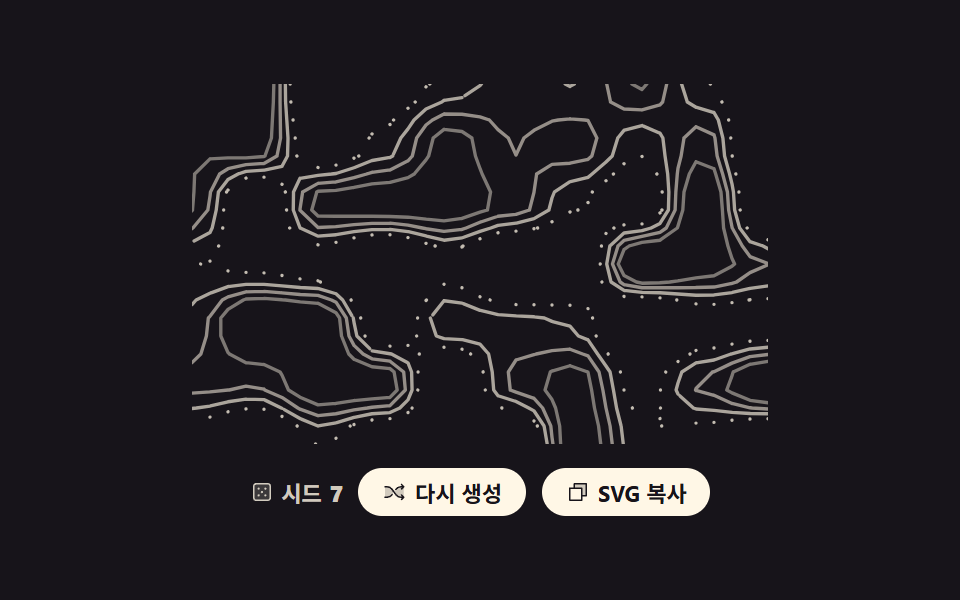 CSS 배경 패턴 9종 — 시드 하나로 다시 그리기css 배경 패턴을 이미지 파일로 깔면 화면마다 같은 그림이 나옵니다. 여기 아홉 개는 숫자 하나(시드)를 넣으면 그 자리에서 무늬를 새로 계산해 SVG 로 뱉고, 같은 숫자를 다시 넣으면 똑같은 그림이 돌아옵니다. 이 글의 데모 전부 보기