06색수차 진폭 값이 감쇠하는 화면 전환
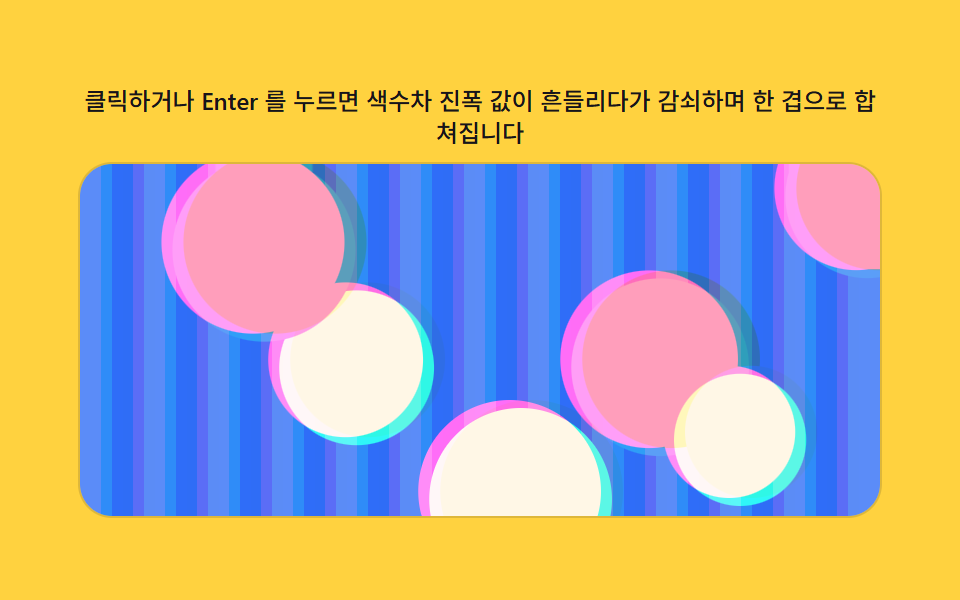
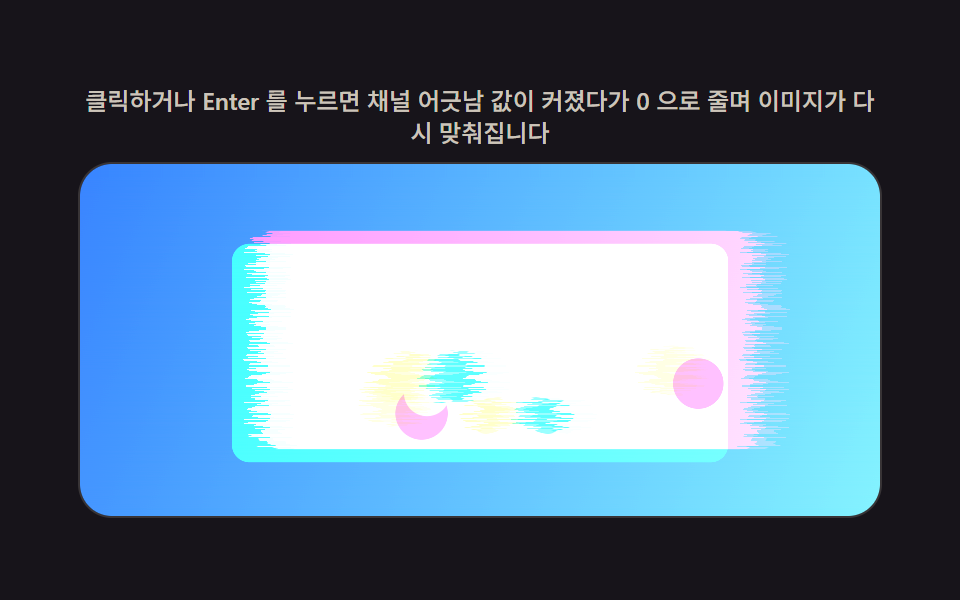
색수차처럼 채널이 벌어지는 진폭 값을 계산해 화면이 흔들리듯 보이게 하다가, 그 값이 시간에 따라 감쇠하며 색이 한 겹으로 합쳐져 안정된다.
쓰임히어로 배경 전환·라이브 스트림 전환 연출
CHROMATIC_DRIFT_AMPLITUDEdxReaseInOut
<main class="stage">
<div class="cd is-demo" id="cd">
  <p class="cd__hint"><span>클릭하거나 Enter 를 누르면 색수차 진폭 값이 흔들리다가 감쇠하며 한 겹으로 합쳐집니다</span></p>
  <div class="cd__panel" id="panel" tabindex="0" role="button" aria-label="색수차 진폭 값이 감쇠하며 안정되는 배경 전환 다시 재생">
    <canvas class="cd__cv" id="cv" aria-hidden="true"></canvas>
  </div>
</div>
</main>
@use "../../../../site/static/demo-tokens" as *;
// 계산 겹(색수차 흔들림 렌더)은 index.html 의 PRECOMPUTE()/RENDER() 에 있다. 여기는 무대·레이아웃만.
$duration: $dur-loop;
$easing: $ease-out;
$color: $subject-ink;
@include stage($stage-yellow);
.cd {
--scene-bg1: #{$subject-blue};
--scene-bg2: #{$subject-blue-light};
--scene-dot1: #{$subject-pink};
--scene-dot2: #{$subject-cream};
--accent: #{$color};
display: flex;
flex-direction: column;
align-items: center;
gap: $sp-2;
width: min(400px, 92vw);
}
.cd__hint {
margin: 0;
color: $subject-ink;
font-size: 12px;
font-weight: 500;
line-height: 1.35;
text-align: center;
}
.cd__panel {
position: relative;
width: 100%;
height: 176px;
border-radius: $r-card;
overflow: hidden;
cursor: pointer;
box-shadow: 0 0 0 1px rgba($subject-ink, .14);
transition: box-shadow $duration $easing;
}
.cd__panel:hover {
box-shadow: 0 0 0 1px $color;
}
.cd__panel:focus-visible {
outline: 2px solid $color;
outline-offset: 2px;
}
.cd__cv {
display: block;
width: 100%;
height: 100%;
}
@media (max-width: 340px) {
.cd__hint { font-size: 11px; }
.cd__panel, .cd__cv { height: 120px; }
}
@media (prefers-reduced-motion: reduce) {
.cd__panel { transition: none; }
}html, body {
margin: 0;
overflow: hidden;
}
.stage {
box-sizing: border-box;
min-height: 100vh;
display: grid;
place-items: center;
margin: 0;
background: #ffd23f;
font-family: -apple-system, "Segoe UI", "Noto Sans KR", sans-serif;
padding: clamp(8px, 4vw, 24px);
}
.cd {
--scene-bg1: #2f6df6;
--scene-bg2: #5b8cf8;
--scene-dot1: #ff9ebb;
--scene-dot2: #fff7e6;
--accent: #17141a;
display: flex;
flex-direction: column;
align-items: center;
gap: 8px;
width: min(400px, 92vw);
}
.cd__hint {
margin: 0;
color: #17141a;
font-size: 12px;
font-weight: 500;
line-height: 1.35;
text-align: center;
}
.cd__panel {
position: relative;
width: 100%;
height: 176px;
border-radius: 16px;
overflow: hidden;
cursor: pointer;
box-shadow: 0 0 0 1px rgba(23, 20, 26, 0.14);
transition: box-shadow 2s ease-out;
}
.cd__panel:hover {
box-shadow: 0 0 0 1px #17141a;
}
.cd__panel:focus-visible {
outline: 2px solid #17141a;
outline-offset: 2px;
}
.cd__cv {
display: block;
width: 100%;
height: 100%;
}
@media (max-width: 340px) {
.cd__hint {
font-size: 11px;
}
.cd__panel, .cd__cv {
height: 120px;
}
}
@media (prefers-reduced-motion: reduce) {
.cd__panel {
transition: none;
}
}(function () {
var root = document.getElementById('cd');
var panel = document.getElementById('panel');
var cv = document.getElementById('cv');
var ctx = cv.getContext('2d');
var reduce = window.matchMedia('(prefers-reduced-motion: reduce)').matches;
var isDemo = true;
// 결정론 난수 — Math.random 을 쓰지 않는다. LCG(선형합동생성기) 하나로 장면을 만든다.
function makeLcg(seed) {
var s = seed >>> 0;
return function () { s = (s * 1664525 + 1013904223) >>> 0; return s / 4294967296; };
}
var css = getComputedStyle(root);
function tok(name, fb) { var v = css.getPropertyValue(name); return v ? (v.trim() || fb) : fb; }
var BG1 = tok('--scene-bg1', '#2f6df6');
var BG2 = tok('--scene-bg2', '#9fc3ff');
var DOT1 = tok('--scene-dot1', '#ff9ebb');
var DOT2 = tok('--scene-dot2', '#fff7e6');
var W = 0, H = 0, dpr = 1;
var buf = document.createElement('canvas');
var bctx = buf.getContext('2d');
// 장면(라이브 스트림 히어로 배경 자리) — 세로 줄무늬 결로 채널 흔들림이 또렷이 드러나게 한다.
function paintScene(bc, w, h, seed) {
var rng = makeLcg(seed);
var stripeW = Math.max(5, w * 0.04);
for (var x = 0; x < w; x += stripeW) {
bc.fillStyle = (Math.floor(x / stripeW) % 2) ? BG1 : BG2;
bc.fillRect(x, 0, stripeW, h);
}
for (var i = 0; i < 6; i++) {
bc.fillStyle = i % 2 ? DOT1 : DOT2;
bc.beginPath();
bc.arc(rng() * w, rng() * h, w * (0.05 + rng() * 0.08), 0, Math.PI * 2);
bc.fill();
}
}
var SEED = 812;
var CHROMATIC_DRIFT_AMPLITUDE = 20;
var data, outImg, iw, ih;
function PRECOMPUTE() {
iw = cv.width; ih = cv.height;
data = bctx.getImageData(0, 0, iw, ih).data;
outImg = ctx.createImageData(iw, ih);
}
function clampI(v, lo, hi) { return v < lo ? lo : (v > hi ? hi : v); }
var PLAY_MS = 720;
var phase = 0;
function RENDER(p) {
phase += 0.42;
var amp = CHROMATIC_DRIFT_AMPLITUDE * dpr * p;
var dxR = Math.round(amp * Math.sin(phase));
var dxB = Math.round(amp * Math.sin(phase + Math.PI));
var dyG = Math.round(amp * 0.4 * Math.sin(phase * 1.3 + 1.1));
var o = outImg.data;
for (var y = 0; y < ih; y++) {
var base = y * iw;
var gy = clampI(y + dyG, 0, ih - 1);
var gBase = gy * iw;
for (var x = 0; x < iw; x++) {
var rx = clampI(x - dxR, 0, iw - 1);
var gx = clampI(x, 0, iw - 1);
var bx = clampI(x - dxB, 0, iw - 1);
var k = (base + x) * 4;
var kr = (base + rx) * 4;
var kg = (gBase + gx) * 4;
var kb = (base + bx) * 4;
o[k] = data[kr];
o[k + 1] = data[kg + 1];
o[k + 2] = data[kb + 2];
o[k + 3] = 255;
}
}
ctx.putImageData(outImg, 0, 0);
}
function fit() {
var r = panel.getBoundingClientRect();
dpr = window.devicePixelRatio || 1;
W = r.width; H = r.height;
cv.width = Math.round(W * dpr); cv.height = Math.round(H * dpr);
buf.width = cv.width; buf.height = cv.height;
paintScene(bctx, buf.width, buf.height, SEED);
PRECOMPUTE();
}
function human() { if (isDemo) { root.classList.remove('is-demo'); isDemo = false; } }
var progress = 0, target = 0, playT0 = 0, playFrom = 0, playing = false;
function easeInOut(t) { return t < 0.5 ? 2 * t * t : 1 - Math.pow(-2 * t + 2, 2) / 2; }
function play() {
human();
playFrom = progress; target = progress < 0.5 ? 1 : 0;
playT0 = 0; playing = true;
}
function stepPlay(now) {
if (!playing) return;
if (!playT0) playT0 = now;
var t = Math.min(1, (now - playT0) / PLAY_MS);
progress = playFrom + (target - playFrom) * easeInOut(t);
if (t >= 1) { playing = false; progress = target; }
}
var DRIVE_PERIOD_MS = 2000;
var driveStart = 0;
function triangle(frac) { return frac < 0.5 ? frac * 2 : 2 - frac * 2; }
function driveTick(now) {
if (!driveStart) driveStart = now;
if (isDemo) {
var frac = ((now - driveStart) % DRIVE_PERIOD_MS) / DRIVE_PERIOD_MS;
progress = triangle(frac);
}
requestAnimationFrame(driveTick);
}
function frame(now) {
stepPlay(now);
RENDER(progress);
requestAnimationFrame(frame);
}
window.addEventListener('resize', fit);
fit();
if (reduce) {
root.classList.add('is-still');
progress = 0; RENDER(progress);
panel.addEventListener('click', function () { human(); progress = progress < 0.5 ? 1 : 0; RENDER(progress); });
panel.addEventListener('keydown', function (e) {
if (e.key === 'Enter' || e.key === ' ') { e.preventDefault(); human(); progress = progress < 0.5 ? 1 : 0; RENDER(progress); }
});
} else {
panel.addEventListener('click', play);
panel.addEventListener('keydown', function (e) {
if (e.key === 'Enter' || e.key === ' ') { e.preventDefault(); play(); }
});
requestAnimationFrame(frame);
requestAnimationFrame(driveTick);
}
})();import { useEffect, useRef } from "react";
import styles from "./ChromaticDrift.module.scss";
export default function ChromaticDrift() {
const rootRef = useRef<HTMLDivElement | null>(null);
const panelRef = useRef<HTMLDivElement | null>(null);
const cvRef = useRef<HTMLCanvasElement | null>(null);
useEffect(() => {
const root = rootRef.current;
const panel = panelRef.current;
const cv = cvRef.current;
if (!root || !panel || !cv) return;
const ctx = cv.getContext("2d");
if (!ctx) return;
const reduce = window.matchMedia("(prefers-reduced-motion: reduce)").matches;
let isDemo = true;
// 결정론 난수 — Math.random 을 쓰지 않는다. LCG(선형합동생성기) 하나로 장면을 만든다.
function makeLcg(seed: number) {
let s = seed >>> 0;
return function () {
s = (s * 1664525 + 1013904223) >>> 0;
return s / 4294967296;
};
}
const css = getComputedStyle(root);
function tok(name: string, fb: string) {
const v = css.getPropertyValue(name);
return v ? v.trim() || fb : fb;
}
const BG1 = tok("--scene-bg1", "#2f6df6");
const BG2 = tok("--scene-bg2", "#9fc3ff");
const DOT1 = tok("--scene-dot1", "#ff9ebb");
const DOT2 = tok("--scene-dot2", "#fff7e6");
let W = 0;
let H = 0;
let dpr = 1;
const buf = document.createElement("canvas");
const bctx = buf.getContext("2d");
if (!bctx) return;
// 장면(라이브 스트림 히어로 배경 자리) — 세로 줄무늬 결로 채널 흔들림이 또렷이 드러나게 한다.
function paintScene(bc: CanvasRenderingContext2D, w: number, h: number, seed: number) {
const rng = makeLcg(seed);
const stripeW = Math.max(5, w * 0.04);
for (let x = 0; x < w; x += stripeW) {
bc.fillStyle = Math.floor(x / stripeW) % 2 ? BG1 : BG2;
bc.fillRect(x, 0, stripeW, h);
}
for (let i = 0; i < 6; i++) {
bc.fillStyle = i % 2 ? DOT1 : DOT2;
bc.beginPath();
bc.arc(rng() * w, rng() * h, w * (0.05 + rng() * 0.08), 0, Math.PI * 2);
bc.fill();
}
}
const SEED = 812;
const CHROMATIC_DRIFT_AMPLITUDE = 20;
let data: Uint8ClampedArray | null = null;
let outImg: ImageData | null = null;
let iw = 0;
let ih = 0;
function PRECOMPUTE() {
iw = cv!.width;
ih = cv!.height;
data = bctx!.getImageData(0, 0, iw, ih).data;
outImg = ctx!.createImageData(iw, ih);
}
function clampI(v: number, lo: number, hi: number) {
return v < lo ? lo : v > hi ? hi : v;
}
const PLAY_MS = 720;
let phase = 0;
function RENDER(p: number) {
phase += 0.42;
const amp = CHROMATIC_DRIFT_AMPLITUDE * dpr * p;
const dxR = Math.round(amp * Math.sin(phase));
const dxB = Math.round(amp * Math.sin(phase + Math.PI));
const dyG = Math.round(amp * 0.4 * Math.sin(phase * 1.3 + 1.1));
const o = outImg!.data;
const d = data!;
for (let y = 0; y < ih; y++) {
const base = y * iw;
const gy = clampI(y + dyG, 0, ih - 1);
const gBase = gy * iw;
for (let x = 0; x < iw; x++) {
const rx = clampI(x - dxR, 0, iw - 1);
const gx = clampI(x, 0, iw - 1);
const bx = clampI(x - dxB, 0, iw - 1);
const k = (base + x) * 4;
const kr = (base + rx) * 4;
const kg = (gBase + gx) * 4;
const kb = (base + bx) * 4;
o[k] = d[kr];
o[k + 1] = d[kg + 1];
o[k + 2] = d[kb + 2];
o[k + 3] = 255;
}
}
ctx!.putImageData(outImg!, 0, 0);
}
function fit() {
const r = panel!.getBoundingClientRect();
dpr = window.devicePixelRatio || 1;
W = r.width;
H = r.height;
cv!.width = Math.round(W * dpr);
cv!.height = Math.round(H * dpr);
buf.width = cv!.width;
buf.height = cv!.height;
paintScene(bctx!, buf.width, buf.height, SEED);
PRECOMPUTE();
}
function human() {
if (isDemo) {
root!.classList.remove("is-demo");
isDemo = false;
}
}
let progress = 0;
let target = 0;
let playT0 = 0;
let playFrom = 0;
let playing = false;
function easeInOut(t: number) {
return t < 0.5 ? 2 * t * t : 1 - Math.pow(-2 * t + 2, 2) / 2;
}
function play() {
human();
playFrom = progress;
target = progress < 0.5 ? 1 : 0;
playT0 = 0;
playing = true;
}
function stepPlay(now: number) {
if (!playing) return;
if (!playT0) playT0 = now;
const t = Math.min(1, (now - playT0) / PLAY_MS);
progress = playFrom + (target - playFrom) * easeInOut(t);
if (t >= 1) {
playing = false;
progress = target;
}
}
const DRIVE_PERIOD_MS = 2000;
let driveStart = 0;
let rafFrame = 0;
let rafDrive = 0;
function triangle(frac: number) {
return frac < 0.5 ? frac * 2 : 2 - frac * 2;
}
function driveTick(now: number) {
if (!driveStart) driveStart = now;
if (isDemo) {
const frac = ((now - driveStart) % DRIVE_PERIOD_MS) / DRIVE_PERIOD_MS;
progress = triangle(frac);
}
rafDrive = requestAnimationFrame(driveTick);
}
function frame(now: number) {
stepPlay(now);
RENDER(progress);
rafFrame = requestAnimationFrame(frame);
}
function onClick() {
play();
}
function onKeyDown(e: Event) {
const ke = e as KeyboardEvent;
if (ke.key === "Enter" || ke.key === " ") {
ke.preventDefault();
play();
}
}
function onClickReduce() {
human();
progress = progress < 0.5 ? 1 : 0;
RENDER(progress);
}
function onKeyDownReduce(e: Event) {
const ke = e as KeyboardEvent;
if (ke.key === "Enter" || ke.key === " ") {
ke.preventDefault();
human();
progress = progress < 0.5 ? 1 : 0;
RENDER(progress);
}
}
window.addEventListener("resize", fit);
fit();
if (reduce) {
root.classList.add("is-still");
progress = 0;
RENDER(progress);
panel.addEventListener("click", onClickReduce);
panel.addEventListener("keydown", onKeyDownReduce);
} else {
panel.addEventListener("click", onClick);
panel.addEventListener("keydown", onKeyDown);
rafFrame = requestAnimationFrame(frame);
rafDrive = requestAnimationFrame(driveTick);
}
return () => {
window.removeEventListener("resize", fit);
cancelAnimationFrame(rafFrame);
cancelAnimationFrame(rafDrive);
if (reduce) {
panel.removeEventListener("click", onClickReduce);
panel.removeEventListener("keydown", onKeyDownReduce);
} else {
panel.removeEventListener("click", onClick);
panel.removeEventListener("keydown", onKeyDown);
}
};
}, []);
return (
<main className={styles.stage}>
<div className={`${styles.root} is-demo`} ref={rootRef}>
<p className={styles.hint}>
<span>클릭하거나 Enter 를 누르면 색수차 진폭 값이 흔들리다가 감쇠하며 한 겹으로 합쳐집니다</span>
</p>
<div
className={styles.panel}
ref={panelRef}
tabIndex={0}
role="button"
aria-label="색수차 진폭 값이 감쇠하며 안정되는 배경 전환 다시 재생"
>
<canvas className={styles.cv} ref={cvRef} aria-hidden="true" />
</div>
</div>
</main>
);
}06 색수차 진폭 값이 감쇠하는 화면 전환 — 측정 누적면적 38.372% · 움직인 프레임 23/23GODRICH 원작 · zip 에 SCSS·React 포함 · 글리치 전환 효과 9가지 — css 글리치 효과 모음
이 데모가 속한 글
 글리치 전환 효과 9가지 — css 글리치 효과 모음css 글리치 효과 를 찾아보면 대부분 필터 하나를 얹고 끝나지만, 화면이 갑자기 다음 내용으로 뚝 끊겨 넘어가면 오류처럼 보인다 — 그래서 오프셋 값 하나로 RGB 채널을 어긋냈다 되돌리는 전환, 노이즈 강도 값으 이 글의 데모 전부 보기