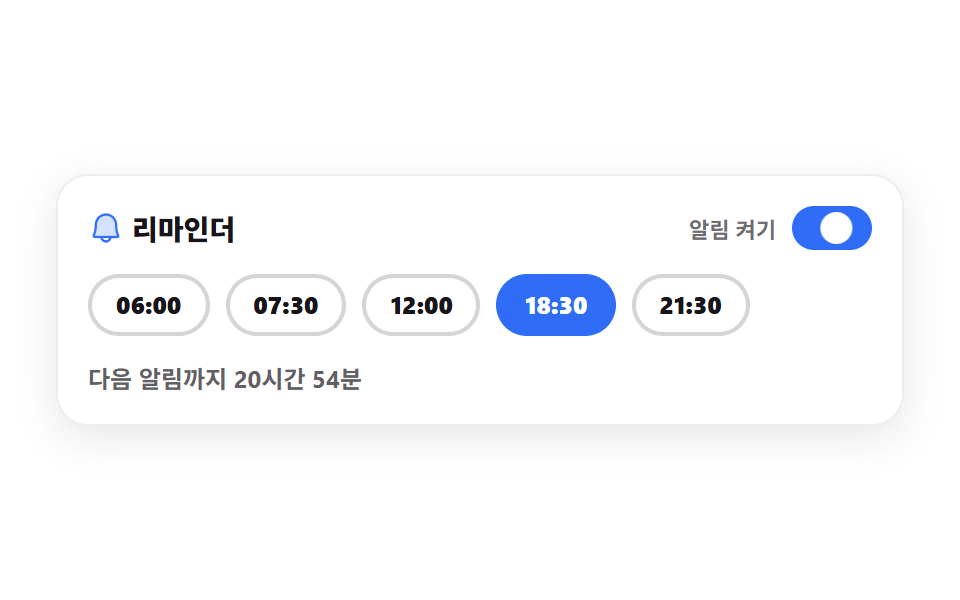
07리마인더 시간 고르기
시간 칩을 하나 고르고 스위치를 켜면 다음 알림까지 남은 시간이 분 단위로 셉니다. 스위치는 role="switch" 와 aria-checked 로 상태를 그대로 알립니다.
쓰임알림 설정 시트, 복약·운동 리마인더 화면
role="switch"aria-checkedaria-pressedlocalStorage
<svg width="0" height="0" style="position:absolute" aria-hidden="true">
  <defs>
    <symbol id="ico-bell" viewBox="0 0 256 256" fill="currentColor"><g><path d="M208 192H48a8 8 0 0 1-6.88-12C47.71 168.6 56 139.81 56 104a72 72 0 0 1 144 0c0 35.82 8.3 64.6 14.9 76a8 8 0 0 1-6.9 12" opacity=".2"/><path d="M221.8 175.94c-5.55-9.56-13.8-36.61-13.8-71.94a80 80 0 1 0-160 0c0 35.34-8.26 62.38-13.81 71.94A16 16 0 0 0 48 200h40.81a40 40 0 0 0 78.38 0H208a16 16 0 0 0 13.8-24.06M128 216a24 24 0 0 1-22.62-16h45.24A24 24 0 0 1 128 216M48 184c7.7-13.24 16-43.92 16-80a64 64 0 1 1 128 0c0 36.05 8.28 66.73 16 80Z"/></g></symbol>
  </defs>
</svg>
<main class="stage">
<div class="rp is-demo" id="rp">
  <div class="rp__card">
    <div class="rp__head">
      <p class="rp__title">
        <svg class="rp__bell" id="bell" aria-hidden="true"><use href="#ico-bell"/></svg>
        <span>리마인더</span>
      </p>
      <span class="rp__swWrap">
        <span class="rp__swText">알림 켜기</span>
        <button class="rp__switch" id="sw" type="button" role="switch" aria-checked="true" aria-label="알림 켜기">
          <span class="rp__knob" aria-hidden="true"></span>
        </button>
      </span>
    </div>
    <div class="rp__chips" id="chips"></div>
    <p class="rp__say" id="say" role="status" aria-live="polite">다음 알림까지 3시간 12분</p>
  </div>
</div>
</main>@use "../../../../site/static/demo-tokens" as *;
// 리마인더 시간 고르기 — 시각 칩은 aria-pressed 로 고른 상태를, 스위치는 role="switch" 와 aria-checked 로
// 켜짐을 그대로 알린다. 남은 시간은 고른 시각이 오늘 지났으면 내일로 넘겨 계산한다.
// 미리보기(.is-demo)는 선택이 칩을 하나씩 건너뛰는 장면을 steps(1, end) 컷으로 재생한다 —
// 여기서는 fill-mode 를 붙이지 않는다. 지연 구간에 보여야 할 그림이 칩의 작성 상태(안 고른 칩) 그대로라,
// backwards 를 붙이면 오히려 아직 차례가 안 온 칩이 전부 켜진 채로 시작한다.
$duration: $dur-loop;
$easing: $ease-spring;
$color: $subject-blue;
@include stage($stage-paper);
.rp { display: flex; width: 100%; max-width: 424px; }
.rp__card {
flex: 1 1 auto; display: flex; flex-direction: column; gap: $sp-3;
border-radius: $r-card; padding: $sp-4; background: $stage-paper;
box-shadow: 0 6px 20px rgba($subject-ink, .1), inset 0 0 0 1px rgba($subject-ink, .08);
}
.rp__head { display: flex; align-items: center; justify-content: space-between; gap: $sp-2; flex-wrap: wrap; }
.rp__title {
display: flex; align-items: center; gap: $sp-1; margin: 0;
font-weight: 800; font-size: clamp(12px, 3.2vw, 14px); color: $subject-ink;
}
// 종은 천장에 매달린 것이라 회전축을 위쪽 중앙에 둔다 (스스로 완결한 아이콘의 scale 과는 다른 경우)
.rp__bell { width: 18px; height: 18px; flex: 0 0 auto; color: $color; transform-origin: 50% 15%; }
.rp__swWrap { display: inline-flex; align-items: center; gap: $sp-2; }
.rp__swText { font-weight: 700; font-size: clamp(9px, 2.4vw, 11px); color: rgba($subject-ink, .62); }
.rp__switch {
position: relative; width: 40px; height: 22px; flex: 0 0 auto; border: 0; border-radius: $r-pill;
padding: 0; background: rgba($subject-ink, .2); cursor: pointer;
}
.rp__switch[aria-checked="true"] { background: $color; }
.rp__knob {
position: absolute; left: 3px; top: 3px; width: 16px; height: 16px; border-radius: 50%;
background: $stage-paper;
}
.rp__switch[aria-checked="true"] .rp__knob { transform: translateX(18px); }
.rp__switch:focus-visible { outline: 2px solid $subject-ink; outline-offset: 2px; }
.rp__chips { display: flex; flex-wrap: wrap; gap: $sp-2; }
.rp__chip {
border: 2px solid rgba($subject-ink, .18); border-radius: $r-pill; padding: $sp-1 $sp-3;
background: transparent; color: $subject-ink; cursor: pointer;
font-family: inherit; font-weight: 800; font-size: clamp(10px, 2.6vw, 12px); line-height: 1.6;
}
.rp__chip[aria-pressed="true"] { border-color: $color; background: $color; color: $stage-paper; }
.rp__chip:focus-visible { outline: 2px solid $subject-ink; outline-offset: 2px; }
.rp__say { margin: 0; font-weight: 700; font-size: clamp(10px, 2.6vw, 12px); color: rgba($subject-ink, .68); }
// ── 격자 미리보기 ───────────────────────────────────────────────
// 칩 하나가 400ms 씩 차례로 켜진다. 값이 단계라 중간값 없이 컷으로 넘긴다.
.rp.is-demo .rp__chip {
animation-name: rpHop; animation-duration: $duration; animation-timing-function: steps(1, end);
animation-iteration-count: infinite;
animation-delay: calc(var(--i) * 400ms);
}
@keyframes rpHop {
0% { border-color: $color; background-color: $color; color: $stage-paper; }
20% { border-color: rgba($subject-ink, .18); background-color: transparent; color: $subject-ink; }
100% { border-color: rgba($subject-ink, .18); background-color: transparent; color: $subject-ink; }
}
.rp.is-demo .rp__bell {
animation-name: rpRing; animation-duration: $duration; animation-timing-function: $easing;
animation-iteration-count: infinite;
}
@keyframes rpRing {
0% { transform: rotate(0deg); }
10% { transform: rotate(-14deg); }
24% { transform: rotate(12deg); }
38% { transform: rotate(-8deg); }
52% { transform: rotate(6deg); }
70% { transform: rotate(0deg); }
100% { transform: rotate(0deg); }
}
.rp.is-demo .rp__knob {
animation-name: rpKnob; animation-duration: $duration; animation-timing-function: $easing;
animation-iteration-count: infinite;
}
@keyframes rpKnob {
0% { transform: translateX(18px); }
46% { transform: translateX(18px); }
58% { transform: translateX(0); }
84% { transform: translateX(18px); }
100% { transform: translateX(18px); }
}
@media (max-width: 340px) {
.rp__card { padding: $sp-3; gap: $sp-2; }
.rp__chips { gap: $sp-1; }
.rp__chip { padding: $sp-1 $sp-2; }
.rp__switch { width: 32px; height: 18px; }
.rp__knob { width: 12px; height: 12px; }
.rp__switch[aria-checked="true"] .rp__knob { transform: translateX(14px); }
}
// reduce 에서는 종·스위치·칩 순회를 모두 멈추고 고른 시각 한 장만 남긴다
@media (prefers-reduced-motion: reduce) {
.rp.is-demo .rp__chip,
.rp.is-demo .rp__bell,
.rp.is-demo .rp__knob { animation: none !important; }
.rp.is-demo .rp__bell { transform: none !important; }
}html, body {
margin: 0;
overflow: hidden;
}
.stage {
box-sizing: border-box;
min-height: 100vh;
display: grid;
place-items: center;
margin: 0;
background: #ffffff;
font-family: -apple-system, "Segoe UI", "Noto Sans KR", sans-serif;
padding: clamp(8px, 4vw, 24px);
}
.rp {
display: flex;
width: 100%;
max-width: 424px;
}
.rp__card {
flex: 1 1 auto;
display: flex;
flex-direction: column;
gap: 12px;
border-radius: 16px;
padding: 16px;
background: #ffffff;
box-shadow: 0 6px 20px rgba(23, 20, 26, 0.1), inset 0 0 0 1px rgba(23, 20, 26, 0.08);
}
.rp__head {
display: flex;
align-items: center;
justify-content: space-between;
gap: 8px;
flex-wrap: wrap;
}
.rp__title {
display: flex;
align-items: center;
gap: 4px;
margin: 0;
font-weight: 800;
font-size: clamp(12px, 3.2vw, 14px);
color: #17141a;
}
.rp__bell {
width: 18px;
height: 18px;
flex: 0 0 auto;
color: #2f6df6;
transform-origin: 50% 15%;
}
.rp__swWrap {
display: inline-flex;
align-items: center;
gap: 8px;
}
.rp__swText {
font-weight: 700;
font-size: clamp(9px, 2.4vw, 11px);
color: rgba(23, 20, 26, 0.62);
}
.rp__switch {
position: relative;
width: 40px;
height: 22px;
flex: 0 0 auto;
border: 0;
border-radius: 999px;
padding: 0;
background: rgba(23, 20, 26, 0.2);
cursor: pointer;
}
.rp__switch[aria-checked=true] {
background: #2f6df6;
}
.rp__knob {
position: absolute;
left: 3px;
top: 3px;
width: 16px;
height: 16px;
border-radius: 50%;
background: #ffffff;
}
.rp__switch[aria-checked=true] .rp__knob {
transform: translateX(18px);
}
.rp__switch:focus-visible {
outline: 2px solid #17141a;
outline-offset: 2px;
}
.rp__chips {
display: flex;
flex-wrap: wrap;
gap: 8px;
}
.rp__chip {
border: 2px solid rgba(23, 20, 26, 0.18);
border-radius: 999px;
padding: 4px 12px;
background: transparent;
color: #17141a;
cursor: pointer;
font-family: inherit;
font-weight: 800;
font-size: clamp(10px, 2.6vw, 12px);
line-height: 1.6;
}
.rp__chip[aria-pressed=true] {
border-color: #2f6df6;
background: #2f6df6;
color: #ffffff;
}
.rp__chip:focus-visible {
outline: 2px solid #17141a;
outline-offset: 2px;
}
.rp__say {
margin: 0;
font-weight: 700;
font-size: clamp(10px, 2.6vw, 12px);
color: rgba(23, 20, 26, 0.68);
}
.rp.is-demo .rp__chip {
animation-name: rpHop;
animation-duration: 2s;
animation-timing-function: steps(1, end);
animation-iteration-count: infinite;
animation-delay: calc(var(--i) * 400ms);
}
@keyframes rpHop {
0% {
border-color: #2f6df6;
background-color: #2f6df6;
color: #ffffff;
}
20% {
border-color: rgba(23, 20, 26, 0.18);
background-color: transparent;
color: #17141a;
}
100% {
border-color: rgba(23, 20, 26, 0.18);
background-color: transparent;
color: #17141a;
}
}
.rp.is-demo .rp__bell {
animation-name: rpRing;
animation-duration: 2s;
animation-timing-function: cubic-bezier(0.2, 0.8, 0.2, 1);
animation-iteration-count: infinite;
}
@keyframes rpRing {
0% {
transform: rotate(0deg);
}
10% {
transform: rotate(-14deg);
}
24% {
transform: rotate(12deg);
}
38% {
transform: rotate(-8deg);
}
52% {
transform: rotate(6deg);
}
70% {
transform: rotate(0deg);
}
100% {
transform: rotate(0deg);
}
}
.rp.is-demo .rp__knob {
animation-name: rpKnob;
animation-duration: 2s;
animation-timing-function: cubic-bezier(0.2, 0.8, 0.2, 1);
animation-iteration-count: infinite;
}
@keyframes rpKnob {
0% {
transform: translateX(18px);
}
46% {
transform: translateX(18px);
}
58% {
transform: translateX(0);
}
84% {
transform: translateX(18px);
}
100% {
transform: translateX(18px);
}
}
@media (max-width: 340px) {
.rp__card {
padding: 12px;
gap: 8px;
}
.rp__chips {
gap: 4px;
}
.rp__chip {
padding: 4px 8px;
}
.rp__switch {
width: 32px;
height: 18px;
}
.rp__knob {
width: 12px;
height: 12px;
}
.rp__switch[aria-checked=true] .rp__knob {
transform: translateX(14px);
}
}
@media (prefers-reduced-motion: reduce) {
.rp.is-demo .rp__chip,
.rp.is-demo .rp__bell,
.rp.is-demo .rp__knob {
animation: none !important;
}
.rp.is-demo .rp__bell {
transform: none !important;
}
}var STORE = 'godrich-habit-reminder';
var TIMES = ['06:00', '07:30', '12:00', '18:30', '21:30'];
var CHIP_LABEL = '{t} 알림';
var LEFT_TEXT = '다음 알림까지 {h}시간 {m}분';
var OFF_TEXT = '알림이 꺼져 있습니다';
var root = document.getElementById('rp');
var chipBox = document.getElementById('chips');
var sw = document.getElementById('sw');
var sayEl = document.getElementById('say');
var state = { pick: 1, on: true };
var chips = [];
var tick = 0;
function load() {
try {
var raw = window.localStorage.getItem(STORE);
if (raw) { state = JSON.parse(raw); }
} catch (e) { /* 저장소가 막힌 창에서는 기본값 그대로 */ }
}
function save() {
try { window.localStorage.setItem(STORE, JSON.stringify(state)); } catch (e) { /* 저장만 건너뛴다 */ }
}
// 고른 시각이 오늘 이미 지났으면 내일 같은 시각까지를 센다
function minutesLeft(hhmm) {
var parts = hhmm.split(':');
var now = new Date();
var at = new Date(now.getFullYear(), now.getMonth(), now.getDate(), Number(parts[0]), Number(parts[1]), 0, 0);
var diff = Math.round((at.getTime() - now.getTime()) / 60000);
return diff <= 0 ? diff + 24 * 60 : diff;
}
function paint() {
for (var i = 0; i < chips.length; i++) {
chips[i].setAttribute('aria-pressed', i === state.pick ? 'true' : 'false');
}
sw.setAttribute('aria-checked', state.on ? 'true' : 'false');
if (!state.on) { sayEl.textContent = OFF_TEXT; return; }
var left = minutesLeft(TIMES[state.pick]);
sayEl.textContent = LEFT_TEXT.replace('{h}', String(Math.floor(left / 60))).replace('{m}', String(left % 60));
}
function build() {
for (var i = 0; i < TIMES.length; i++) {
var b = document.createElement('button');
b.type = 'button';
b.className = 'rp__chip';
b.style.setProperty('--i', String(i));
b.textContent = TIMES[i];
b.setAttribute('aria-pressed', 'false');
b.setAttribute('aria-label', CHIP_LABEL.replace('{t}', TIMES[i]));
b.setAttribute('data-i', String(i));
chips.push(b);
chipBox.appendChild(b);
}
}
load();
build();
paint();
chipBox.addEventListener('click', function (e) {
var b = e.target.closest ? e.target.closest('.rp__chip') : null;
if (!b) { return; }
root.classList.remove('is-demo');
state.pick = Number(b.getAttribute('data-i'));
save();
paint();
});
sw.addEventListener('click', function () {
root.classList.remove('is-demo');
state.on = !state.on;
save();
paint();
});
tick = window.setInterval(paint, 30000);// ReminderPicker — vanilla 판(run/297/demo/07-habit-reminder-picker/index.html) 의 React 포트.
// 고른 시각이 오늘 이미 지났으면 내일 같은 시각까지를 센다. 값·수치는 vanilla 와 같다.
import { useEffect, useRef, useState } from "react";
import type { CSSProperties } from "react";
import styles from "./ReminderPicker.module.scss";
export type ReminderPickerProps = {
duration?: number;
easing?: string;
color?: string;
};
type Vars = CSSProperties & { "--duration"?: string; "--easing"?: string; "--color"?: string };
type ChipVars = CSSProperties & { "--i"?: string };
// useRef 는 T | null 을 돌려준다. 처음부터 값이 있고 절대 비지 않는 상자는 이렇게 좁혀 쓴다
type Box<T> = { current: T };
const STORE = "godrich-habit-reminder";
const TIMES = ["06:00", "07:30", "12:00", "18:30", "21:30"];
const TITLE = "리마인더";
const SWITCH_TEXT = "알림 켜기";
const CHIP_LABEL = "{t} 알림";
const LEFT_TEXT = "다음 알림까지 {h}시간 {m}분";
const OFF_TEXT = "알림이 꺼져 있습니다";
// 고른 시각이 오늘 이미 지났으면 내일 같은 시각까지를 센다
function minutesLeft(hhmm: string): number {
const parts = hhmm.split(":");
const now = new Date();
const at = new Date(now.getFullYear(), now.getMonth(), now.getDate(), Number(parts[0]), Number(parts[1]), 0, 0);
const diff = Math.round((at.getTime() - now.getTime()) / 60000);
return diff <= 0 ? diff + 24 * 60 : diff;
}
export default function ReminderPicker({
duration = 2000,
easing = "cubic-bezier(.2, .8, .2, 1)",
color = "#2f6df6",
}: ReminderPickerProps) {
const [pick, setPick] = useState(1);
const [on, setOn] = useState(true);
const [now, setNow] = useState(0);
const [demo, setDemo] = useState(true);
const timerRef = useRef<number>(0) as Box<number>;
const vars: Vars = { "--duration": `${duration}ms`, "--easing": easing, "--color": color };
useEffect(() => {
try {
const raw = window.localStorage.getItem(STORE);
if (raw) {
const saved = JSON.parse(raw) as { pick: number; on: boolean };
setPick(saved.pick);
setOn(saved.on);
}
} catch (e) { /* 저장소가 막힌 창에서는 기본값 그대로 */ }
timerRef.current = window.setInterval(() => setNow((n) => n + 1), 30000);
return () => { window.clearInterval(timerRef.current); };
}, []);
function save(nextPick: number, nextOn: boolean) {
try {
window.localStorage.setItem(STORE, JSON.stringify({ pick: nextPick, on: nextOn }));
} catch (e) { /* 저장만 건너뛴다 */ }
}
function choose(i: number) {
setDemo(false);
setPick(i);
save(i, on);
}
function flip() {
setDemo(false);
setOn(!on);
save(pick, !on);
}
const left = minutesLeft(TIMES[pick]);
const say = on
? LEFT_TEXT.replace("{h}", String(Math.floor(left / 60))).replace("{m}", String(left % 60))
: OFF_TEXT;
const cls = [styles.root, demo ? styles.isDemo : ""].filter(Boolean).join(" ");
const chipVars = (i: number): ChipVars => ({ "--i": String(i) });
void now; // 30초마다 다시 그리게 하는 값 — 표시는 minutesLeft 가 그때 다시 계산한다
return (
<main className={styles.stage}>
<svg width="0" height="0" style={{ position: "absolute" }} aria-hidden="true">
<defs>
<symbol id="ico-bell" viewBox="0 0 256 256" fill="currentColor"><g><path d="M208 192H48a8 8 0 0 1-6.88-12C47.71 168.6 56 139.81 56 104a72 72 0 0 1 144 0c0 35.82 8.3 64.6 14.9 76a8 8 0 0 1-6.9 12" opacity=".2"/><path d="M221.8 175.94c-5.55-9.56-13.8-36.61-13.8-71.94a80 80 0 1 0-160 0c0 35.34-8.26 62.38-13.81 71.94A16 16 0 0 0 48 200h40.81a40 40 0 0 0 78.38 0H208a16 16 0 0 0 13.8-24.06M128 216a24 24 0 0 1-22.62-16h45.24A24 24 0 0 1 128 216M48 184c7.7-13.24 16-43.92 16-80a64 64 0 1 1 128 0c0 36.05 8.28 66.73 16 80Z"/></g></symbol>
</defs>
</svg>
<div className={cls} style={vars}>
<div className={styles.card}>
<div className={styles.head}>
<p className={styles.title}>
<svg className={styles.bell} aria-hidden="true"><use href="#ico-bell" /></svg>
<span>{TITLE}</span>
</p>
<span className={styles.swWrap}>
<span className={styles.swText}>{SWITCH_TEXT}</span>
<button
className={styles.switch}
type="button"
role="switch"
aria-checked={on ? "true" : "false"}
aria-label={SWITCH_TEXT}
onClick={flip}
>
<span className={styles.knob} aria-hidden="true" />
</button>
</span>
</div>
<div className={styles.chips}>
{TIMES.map((t, i) => (
<button
className={styles.chip}
key={t}
type="button"
aria-pressed={i === pick ? "true" : "false"}
aria-label={CHIP_LABEL.replace("{t}", t)}
style={chipVars(i)}
onClick={() => choose(i)}
>
{t}
</button>
))}
</div>
<p className={styles.say} role="status" aria-live="polite">{say}</p>
</div>
</div>
</main>
);
}07 리마인더 시간 고르기 — 측정 누적면적 6.332% · 움직인 프레임 19/23GODRICH 원작 · zip 에 SCSS·React 포함 · 습관 트래커 UI 9종 — 잔디 격자부터 공유 카드까지
이 데모가 속한 글
 습관 트래커 UI 9종 — 잔디 격자부터 공유 카드까지습관 트래커는 오늘 한 일을 눌러 기록하고, 그 기록이 쌓인 모양을 한 화면에서 보여 주는 UI입니다. 여기 실은 아홉 개는 라이브러리 없이 바닐라 JS 와 SCSS 로만 짰고, 누르면 그 자리에서 값이 바뀌어 lo 이 글의 데모 전부 보기