03단어별 등장 헤드라인
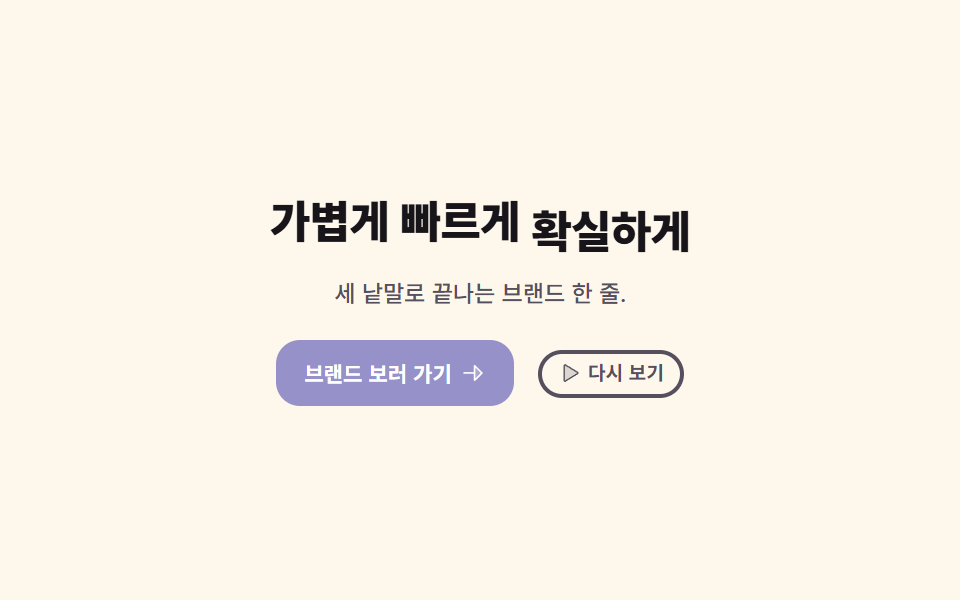
제목이 통째로 나타나지 않고 단어 하나씩 아래에서 올라오며, 가장 중요한 단어 뒤에서는 형광 띠가 왼쪽부터 차올라 그 단어를 덮습니다.
쓰임한 문장으로 승부하는 브랜드 첫 화면
scaleXtransform-originanimation-fill-mode
<main class="stage">
  <section class="hk is-demo" aria-label="브랜드 첫 화면">
    <!-- 낱말마다 span — 각 낱말이 제 상자 안에서 아래로부터 올라온다 -->
    <h1 class="hk__title">
      <span class="hk__word hk__word--1"><span class="hk__wi">가볍게</span></span>
      <span class="hk__word hk__word--2"><span class="hk__wi">빠르게</span></span>
      <span class="hk__key">
        <span class="hk__band" aria-hidden="true"></span>
        <span class="hk__word hk__word--3"><span class="hk__wi">확실하게</span></span>
      </span>
    </h1>

    <p class="hk__lead">세 낱말로 끝나는 브랜드 한 줄.</p>

    <div class="hk__actions">
      <a class="hk__btn" href="#">
        <span>브랜드 보러 가기</span>
        <svg viewBox="0 0 256 256" width="13" height="13" aria-hidden="true" focusable="false" fill="currentColor"><path d="M216,128l-72,72V56Z" opacity="0.2"/><path d="M221.66,122.34l-72-72A8,8,0,0,0,136,56v64H40a8,8,0,0,0,0,16h96v64a8,8,0,0,0,13.66,5.66l72-72A8,8,0,0,0,221.66,122.34ZM152,180.69V75.31L204.69,128Z"/></svg>
      </a>
      <button class="hk__again" type="button">
        <svg viewBox="0 0 256 256" width="11" height="11" aria-hidden="true" focusable="false" fill="currentColor"><path d="M228.23,134.69,84.15,222.81A8,8,0,0,1,72,216.12V39.88a8,8,0,0,1,12.15-6.69l144.08,88.12A7.82,7.82,0,0,1,228.23,134.69Z" opacity="0.2"/><path d="M232.4,114.49,88.32,26.35a16,16,0,0,0-16.2-.3A15.86,15.86,0,0,0,64,39.87V216.13A15.94,15.94,0,0,0,80,232a16.07,16.07,0,0,0,8.36-2.35L232.4,141.51a15.81,15.81,0,0,0,0-27ZM80,215.94V40l143.83,88Z"/></svg>
        <span>다시 보기</span>
      </button>
    </div>
  </section>
</main>@use "../../../../site/static/demo-tokens" as *;
// 275 히어로 팔레트 — 아홉 항목이 같은 값을 쓴다. 괄호 안은 실측 대비비
$hr-ink: $stage-ink; // 크림 위 제목 17.10:1 · 옐로 띠 위 글자 12.63:1
$hr-paper: $stage-paper; // 바이올렛 면 위 글자 6.14:1
$hr-cream: #fdf7ec; // 무대
$hr-stone: #56505e; // 크림 위 보조 글자 7.28:1
$hr-yellow: $stage-yellow; // 형광 띠 (그 위 잉크 글자 12.63:1)
$hr-violet: #9791c9; // 버튼 면 (흰 글자 6.14:1)
$duration: $dur-loop; // 낱말 셋이 올라오고 띠가 차오르는 한 바퀴
$easing: $ease-spring; // 낱말이 올라와 멎을 때의 감속
$color: $hr-yellow; // 이 항목의 강조색 — 형광 띠
@include stage($hr-cream);
.hk {
box-sizing: border-box;
display: flex;
flex-direction: column;
align-items: center;
gap: $sp-4;
width: clamp(288px, 94vw, 432px);
text-align: center;
}
.hk__title {
margin: 0;
color: $hr-ink;
font-weight: 800;
font-size: clamp(17px, 4.6vw, 28px);
line-height: 1.18;
letter-spacing: -.02em;
}
// 낱말 하나가 제 상자 안에서 올라온다 — 상자가 넘치는 부분을 잘라 줘야
// "아래에서 솟는" 것으로 보인다. 아랫여백은 받침이 잘리지 않게 4px 만 벌렸다 되접는다
.hk__word {
position: relative;
z-index: 1;
overflow: hidden;
display: inline-block;
padding-bottom: $sp-1;
margin-bottom: -$sp-1;
vertical-align: bottom;
}
.hk__wi { display: inline-block; }
// 가장 중요한 낱말 뒤에 깔리는 형광 띠. 기본값은 다 차 있는 상태 —
// .is-demo 를 뗀 정적 화면에서도 강조가 보여야 한다
.hk__key { position: relative; display: inline-block; }
.hk__band {
position: absolute;
left: -3px;
right: -3px;
bottom: 3px;
height: .78em;
border-radius: $r-xs;
background: $color;
transform: scaleX(1);
transform-origin: left center; // 왼쪽에서 오른쪽으로 차오른다
}
.hk__lead {
margin: 0;
color: $hr-stone;
font-weight: 500;
font-size: clamp(10px, 2.4vw, 13px);
line-height: 1.35;
}
.hk__actions {
display: flex;
flex-wrap: wrap;
align-items: center;
justify-content: center;
gap: $sp-3;
}
.hk__btn {
display: inline-flex;
align-items: center;
gap: $sp-1;
padding: $sp-2 $sp-3;
border: 2px solid $hr-violet;
border-radius: $r-control;
background: $hr-violet;
color: $hr-paper;
font-weight: 700;
font-size: clamp(10px, 2.2vw, 12px);
line-height: 1;
text-decoration: none;
white-space: nowrap;
}
.hk__again {
display: inline-flex;
align-items: center;
gap: $sp-1;
margin: 0;
padding: $sp-1 $sp-2;
border: 2px solid $hr-stone;
border-radius: $r-pill;
background: transparent;
color: $hr-stone;
font-family: inherit;
font-weight: 700;
font-size: clamp(9px, 2vw, 11px);
line-height: 1.2;
cursor: pointer;
}
// 터치·키보드에서도 같은 표시
.hk__btn:focus-visible,
.hk__again:focus-visible {
outline: 2px solid $hr-violet;
outline-offset: 4px;
}
// ── 자동 재생 ─────────────────────────────────────────────
// animation 단축은 delay 를 0 으로 리셋하므로 낱개 속성으로 쓴다.
// 지연이 걸린 낱말·띠에는 animation-fill-mode: backwards 가 반드시 필요하다 —
// 없으면 0프레임에 완성 상태(다 올라온 낱말·다 찬 띠)가 한 번 번쩍인다
.hk.is-demo .hk__wi {
animation-name: hkRise;
animation-duration: $duration;
animation-timing-function: $easing;
animation-iteration-count: infinite;
animation-fill-mode: backwards;
}
.hk.is-demo .hk__word--2 .hk__wi { animation-delay: .16s; }
.hk.is-demo .hk__word--3 .hk__wi { animation-delay: .32s; }
// 띠는 0.55s 에 시작해 낱말이 내려가기 전에 물러난다 (아래 @keyframes hkBand 주석과 같은 값)
.hk.is-demo .hk__band {
animation-name: hkBand;
animation-duration: $duration;
animation-timing-function: $ease-spring;
animation-iteration-count: infinite;
animation-delay: .55s;
animation-fill-mode: backwards;
}
// 올라오기(0~16%)가 내려가기(72~86%)보다 길어 프레임당 변화는 등장 쪽이 작지만,
// 시차가 0.16s 라 등장 구간에는 두 낱말이 겹쳐 움직인다 — 그래서 poster(앞 장과 가장 크게
// 달라진 장)는 낱말들이 올라와 서는 장면으로 뽑힌다. 실측으로 확인했다
@keyframes hkRise {
0% { transform: translateY(115%); }
16%, 72% { transform: translateY(0); }
86%, 100% { transform: translateY(115%); }
}
// 띠는 낱말이 다 선 뒤(0.55s)에 차올랐다가 낱말이 내려가기 전에 물러난다
@keyframes hkBand {
0% { transform: scaleX(0); }
12%, 50% { transform: scaleX(1); }
60%, 100% { transform: scaleX(0); }
}
// ── "다시 보기" 가 부르는 일회성 등장 ─────────────────────
.hk.is-replay .hk__wi {
animation-name: hkEnter;
animation-duration: $dur-enter;
animation-timing-function: $easing;
animation-iteration-count: 1;
animation-fill-mode: backwards;
}
.hk.is-replay .hk__word--2 .hk__wi { animation-delay: .16s; }
.hk.is-replay .hk__word--3 .hk__wi { animation-delay: .32s; }
.hk.is-replay .hk__band {
animation-name: hkFill;
animation-duration: $dur-enter;
animation-timing-function: $easing;
animation-iteration-count: 1;
animation-delay: .55s;
animation-fill-mode: backwards;
}
@keyframes hkEnter {
from { transform: translateY(115%); }
to { transform: translateY(0); }
}
@keyframes hkFill {
from { transform: scaleX(0); }
to { transform: scaleX(1); }
}
// 좁은 화면 — 한 줄을 유지한 채 글자·간격만 줄인다. 여기서는 간격을 올리지 않는다
@media (max-width: 340px), (max-height: 220px) {
.hk { gap: $sp-2; width: 100%; }
.hk__band { bottom: 2px; }
.hk__actions { gap: $sp-2; }
.hk__btn { padding: $sp-1 $sp-2; }
.hk__again { padding: 0 $sp-2; }
}
@media (prefers-reduced-motion: reduce) {
// .hk.is-demo .hk__wi (0,3,0) 를 이기려면 !important 가 필요하다.
// 움직임만 끄고 낱말과 형광 띠는 그대로 보인다
.hk__wi, .hk__band { animation: none !important; transform: none !important; }
.hk__band { transform: scaleX(1) !important; }
}html, body {
margin: 0;
overflow: hidden;
}
.stage {
box-sizing: border-box;
min-height: 100vh;
display: grid;
place-items: center;
margin: 0;
background: #fdf7ec;
font-family: -apple-system, "Segoe UI", "Noto Sans KR", sans-serif;
padding: clamp(8px, 4vw, 24px);
}
.hk {
box-sizing: border-box;
display: flex;
flex-direction: column;
align-items: center;
gap: 16px;
width: clamp(288px, 94vw, 432px);
text-align: center;
}
.hk__title {
margin: 0;
color: #17141a;
font-weight: 800;
font-size: clamp(17px, 4.6vw, 28px);
line-height: 1.18;
letter-spacing: -0.02em;
}
.hk__word {
position: relative;
z-index: 1;
overflow: hidden;
display: inline-block;
padding-bottom: 4px;
margin-bottom: -4px;
vertical-align: bottom;
}
.hk__wi {
display: inline-block;
}
.hk__key {
position: relative;
display: inline-block;
}
.hk__band {
position: absolute;
left: -3px;
right: -3px;
bottom: 3px;
height: 0.78em;
border-radius: 4px;
background: #ffd23f;
transform: scaleX(1);
transform-origin: left center;
}
.hk__lead {
margin: 0;
color: #56505e;
font-weight: 500;
font-size: clamp(10px, 2.4vw, 13px);
line-height: 1.35;
}
.hk__actions {
display: flex;
flex-wrap: wrap;
align-items: center;
justify-content: center;
gap: 12px;
}
.hk__btn {
display: inline-flex;
align-items: center;
gap: 4px;
padding: 8px 12px;
border: 2px solid #9791c9;
border-radius: 12px;
background: #9791c9;
color: #ffffff;
font-weight: 700;
font-size: clamp(10px, 2.2vw, 12px);
line-height: 1;
text-decoration: none;
white-space: nowrap;
}
.hk__again {
display: inline-flex;
align-items: center;
gap: 4px;
margin: 0;
padding: 4px 8px;
border: 2px solid #56505e;
border-radius: 999px;
background: transparent;
color: #56505e;
font-family: inherit;
font-weight: 700;
font-size: clamp(9px, 2vw, 11px);
line-height: 1.2;
cursor: pointer;
}
.hk__btn:focus-visible,
.hk__again:focus-visible {
outline: 2px solid #9791c9;
outline-offset: 4px;
}
.hk.is-demo .hk__wi {
animation-name: hkRise;
animation-duration: 2s;
animation-timing-function: cubic-bezier(0.2, 0.8, 0.2, 1);
animation-iteration-count: infinite;
animation-fill-mode: backwards;
}
.hk.is-demo .hk__word--2 .hk__wi {
animation-delay: 0.16s;
}
.hk.is-demo .hk__word--3 .hk__wi {
animation-delay: 0.32s;
}
.hk.is-demo .hk__band {
animation-name: hkBand;
animation-duration: 2s;
animation-timing-function: cubic-bezier(0.2, 0.8, 0.2, 1);
animation-iteration-count: infinite;
animation-delay: 0.55s;
animation-fill-mode: backwards;
}
@keyframes hkRise {
0% {
transform: translateY(115%);
}
16%, 72% {
transform: translateY(0);
}
86%, 100% {
transform: translateY(115%);
}
}
@keyframes hkBand {
0% {
transform: scaleX(0);
}
12%, 50% {
transform: scaleX(1);
}
60%, 100% {
transform: scaleX(0);
}
}
.hk.is-replay .hk__wi {
animation-name: hkEnter;
animation-duration: 600ms;
animation-timing-function: cubic-bezier(0.2, 0.8, 0.2, 1);
animation-iteration-count: 1;
animation-fill-mode: backwards;
}
.hk.is-replay .hk__word--2 .hk__wi {
animation-delay: 0.16s;
}
.hk.is-replay .hk__word--3 .hk__wi {
animation-delay: 0.32s;
}
.hk.is-replay .hk__band {
animation-name: hkFill;
animation-duration: 600ms;
animation-timing-function: cubic-bezier(0.2, 0.8, 0.2, 1);
animation-iteration-count: 1;
animation-delay: 0.55s;
animation-fill-mode: backwards;
}
@keyframes hkEnter {
from {
transform: translateY(115%);
}
to {
transform: translateY(0);
}
}
@keyframes hkFill {
from {
transform: scaleX(0);
}
to {
transform: scaleX(1);
}
}
@media (max-width: 340px), (max-height: 220px) {
.hk {
gap: 8px;
width: 100%;
}
.hk__band {
bottom: 2px;
}
.hk__actions {
gap: 8px;
}
.hk__btn {
padding: 4px 8px;
}
.hk__again {
padding: 0 8px;
}
}
@media (prefers-reduced-motion: reduce) {
.hk__wi, .hk__band {
animation: none !important;
transform: none !important;
}
.hk__band {
transform: scaleX(1) !important;
}
}(function () {
var root = document.querySelector('.hk');
var again = root.querySelector('.hk__again');
var band = root.querySelector('.hk__band');
function stopLoop() { root.classList.remove('is-demo'); }
// "다시 보기" 는 등장만 한 번 되풀이한다.
// 클래스를 뗐다 붙이는 사이에 리플로를 한 번 일으켜야 애니메이션이 다시 걸린다
function replay() {
root.classList.remove('is-replay');
void root.offsetWidth;
root.classList.add('is-replay');
}
again.addEventListener('click', function () {
stopLoop();
replay();
});
// 형광 띠가 가장 늦게 끝나므로 그 끝에서 일회성 클래스를 뗀다
band.addEventListener('animationend', function () {
root.classList.remove('is-replay');
});
root.addEventListener('pointerenter', stopLoop);
root.addEventListener('focusin', stopLoop);
})();import { useState } from "react";
import type { CSSProperties, ReactNode } from "react";
import styles from "./HeroKineticHeadline.module.scss";
export type HeroKineticHeadlineProps = {
/** 낱말 단위로 올라올 헤드라인. 마지막 낱말 뒤에 형광 띠가 깔린다 */
words?: string[];
lead?: string;
cta?: string;
again?: string;
sectionLabel?: string;
/** 낱말 셋이 올라오고 띠가 차오르는 한 바퀴(ms) */
duration?: number;
easing?: string;
/** 형광 띠 색 — 잉크 글자와 12.63:1 인 옐로를 권한다 */
color?: string;
};
type Vars = CSSProperties & { "--duration"?: string; "--easing"?: string; "--color"?: string };
const ArrowRightIcon = (): ReactNode => (
<svg viewBox="0 0 256 256" width="13" height="13" aria-hidden="true" focusable="false" fill="currentColor">
<path d="M216,128l-72,72V56Z" opacity="0.2" />
<path d="M221.66,122.34l-72-72A8,8,0,0,0,136,56v64H40a8,8,0,0,0,0,16h96v64a8,8,0,0,0,13.66,5.66l72-72A8,8,0,0,0,221.66,122.34ZM152,180.69V75.31L204.69,128Z" />
</svg>
);
const PlayIcon = (): ReactNode => (
<svg viewBox="0 0 256 256" width="11" height="11" aria-hidden="true" focusable="false" fill="currentColor">
<path d="M228.23,134.69,84.15,222.81A8,8,0,0,1,72,216.12V39.88a8,8,0,0,1,12.15-6.69l144.08,88.12A7.82,7.82,0,0,1,228.23,134.69Z" opacity="0.2" />
<path d="M232.4,114.49,88.32,26.35a16,16,0,0,0-16.2-.3A15.86,15.86,0,0,0,64,39.87V216.13A15.94,15.94,0,0,0,80,232a16.07,16.07,0,0,0,8.36-2.35L232.4,141.51a15.81,15.81,0,0,0,0-27ZM80,215.94V40l143.83,88Z" />
</svg>
);
export default function HeroKineticHeadline({
words = ["가볍게", "빠르게", "확실하게"],
lead = "세 낱말로 끝나는 브랜드 한 줄.",
cta = "브랜드 보러 가기",
again = "다시 보기",
sectionLabel = "브랜드 첫 화면",
duration = 2000,
easing = "cubic-bezier(.2,.8,.2,1)",
color = "#ffd23f",
}: HeroKineticHeadlineProps): ReactNode {
const [loop, setLoop] = useState<boolean>(true);
const [replay, setReplay] = useState<number>(0);
const vars: Vars = { "--duration": `${duration}ms`, "--easing": easing, "--color": color };
const last = words.length - 1;
const tone = [styles.word1, styles.word2, styles.word3];
/* "다시 보기" 는 등장만 한 번 되풀이한다 — key 를 바꿔 제목을 새로 마운트해야
끝난 일회성 애니메이션이 다시 걸린다 */
const onAgain = (): void => {
setLoop(false);
setReplay((n: number) => n + 1);
};
const cls = [styles.hk, loop ? styles.isDemo : "", replay > 0 ? styles.isReplay : ""].filter(Boolean).join(" ");
const word = (w: string, i: number): ReactNode => (
<span className={`${styles.word} ${tone[i % tone.length]}`} key={`${w}-${i}`}>
<span className={styles.wi}>{w}</span>
</span>
);
return (
<section
className={cls}
style={vars}
aria-label={sectionLabel}
onPointerEnter={() => setLoop(false)}
onFocus={() => setLoop(false)}
>
{/* 낱말마다 span — 각 낱말이 제 상자 안에서 아래로부터 올라온다 */}
<h1 className={styles.title} key={replay}>
{words.slice(0, last).map(word)}
<span className={styles.key}>
<span className={styles.band} aria-hidden="true" />
{word(words[last] || "", last)}
</span>
</h1>
<p className={styles.lead}>{lead}</p>
<div className={styles.actions}>
<a className={styles.btn} href="#">
<span>{cta}</span>
<ArrowRightIcon />
</a>
<button className={styles.again} type="button" onClick={onAgain}>
<PlayIcon />
<span>{again}</span>
</button>
</div>
</section>
);
}03 단어별 등장 헤드라인 — 측정 누적면적 3.274% · 움직인 프레임 16/23GODRICH 원작 · zip 에 SCSS·React 포함 · 히어로 섹션 디자인 패턴 9종 — JS 라이브러리 없이
이 데모가 속한 글
 히어로 섹션 디자인 패턴 9종 — JS 라이브러리 없이히어로 섹션 디자인은 사이트를 열자마자 나타나는 첫 화면의 구도를 짜는 일입니다. 여기 아홉 가지는 스플릿·센터 스택·글래스 카드·슬라이더 같은 배치 패턴을 HTML 과 CSS 만으로 짜 둔 것이라, JS 라이브러리 이 글의 데모 전부 보기