03쓰는 만큼 가격이 다시 계산된다
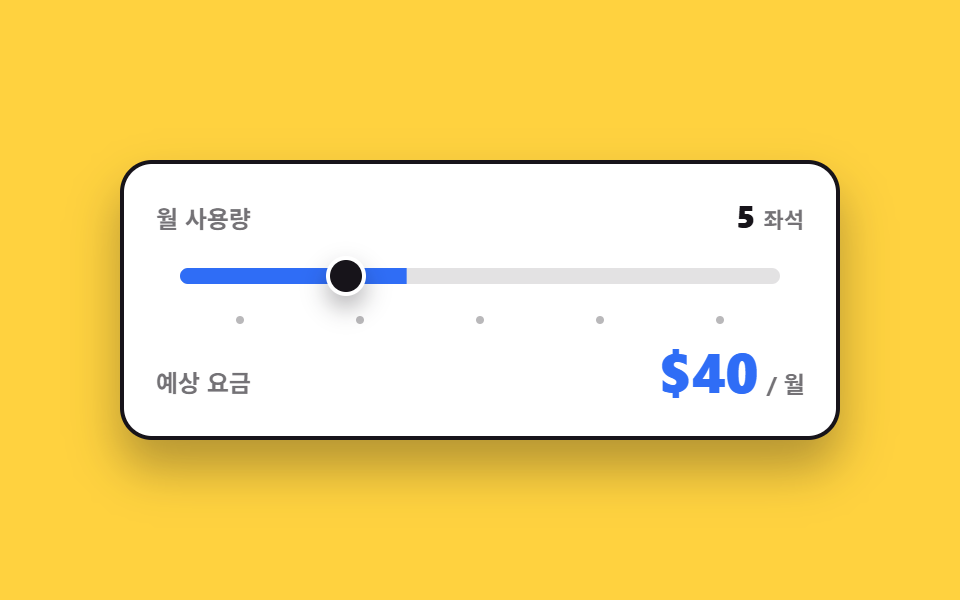
손잡이를 끌면 사용량 눈금이 바뀌면서 그 자리에서 요금이 다시 계산되고, 화면을 못 보는 사람에게는 눈금 숫자 대신 읽을 문장이 따로 전달됩니다.
쓰임좌석 수·API 호출량처럼 쓴 만큼 내는 종량제 요금 안내
aria-valuetextscaleXtransform-origin
<main class="stage">
  <div class="us is-demo">
    <div class="us__row">
      <span class="us__lab">월 사용량</span>
      <span class="us__slot">
        <span class="us__live"><span class="us__n" id="us-seatn">3</span><span class="us__u">좌석</span></span>
        <span class="us__f" data-step="1"><span class="us__n">3</span><span class="us__u">좌석</span></span>
        <span class="us__f" data-step="2"><span class="us__n">5</span><span class="us__u">좌석</span></span>
        <span class="us__f" data-step="3"><span class="us__n">10</span><span class="us__u">좌석</span></span>
        <span class="us__f" data-step="4"><span class="us__n">20</span><span class="us__u">좌석</span></span>
        <span class="us__f" data-step="5"><span class="us__n">50</span><span class="us__u">좌석</span></span>
      </span>
    </div>
    <div class="us__track">
      <span class="us__rail" aria-hidden="true"><span class="us__fill"></span></span>
      <input class="us__range" type="range" min="1" max="5" step="1" value="1" id="us-range" aria-label="월 사용량" aria-valuetext="3 좌석">
      <span class="us__knobrail" aria-hidden="true"><span class="us__knob"></span></span>
    </div>
    <div class="us__ticks" aria-hidden="true">
      <i class="us__tick"></i><i class="us__tick"></i><i class="us__tick"></i><i class="us__tick"></i><i class="us__tick"></i>
    </div>
    <div class="us__row">
      <span class="us__lab">예상 요금</span>
      <span class="us__slot us__slot--fee" aria-live="polite">
        <span class="us__live"><span class="us__n" id="us-fee">$24</span><span class="us__u">/ 월</span></span>
        <span class="us__f" data-step="1"><span class="us__n">$24</span><span class="us__u">/ 월</span></span>
        <span class="us__f" data-step="2"><span class="us__n">$40</span><span class="us__u">/ 월</span></span>
        <span class="us__f" data-step="3"><span class="us__n">$80</span><span class="us__u">/ 월</span></span>
        <span class="us__f" data-step="4"><span class="us__n">$160</span><span class="us__u">/ 월</span></span>
        <span class="us__f" data-step="5"><span class="us__n">$400</span><span class="us__u">/ 월</span></span>
      </span>
    </div>
  </div>
</main>@use "../../../../site/static/demo-tokens" as *;
// 단계(1~5)를 담는 자리 — 등록해 두면 루프에서 단계 사이가 부드럽게 채워진다.
// 요금 숫자 자체는 이 값으로 만들지 않는다 (그건 JS 가 글자로 갈아 끼운다)
@property --p {
syntax: "<number>";
initial-value: 1;
inherits: true;
}
$duration: $dur-quick;
$easing: $ease-spring;
$color: $subject-blue;
@include stage($stage-yellow);
.us {
--p: 1;
box-sizing: border-box;
width: min(360px, 88vw);
display: flex;
flex-direction: column;
gap: $sp-2;
padding: $sp-4;
border: 2px solid $subject-ink;
border-radius: $r-card;
background: $stage-paper;
box-shadow: $shadow-raised;
font-family: -apple-system, "Segoe UI", "Noto Sans KR", sans-serif;
color: $subject-ink;
}
.us__row {
display: flex;
align-items: baseline;
justify-content: space-between;
gap: $sp-2;
}
.us__lab {
font-size: 12px;
line-height: 18px;
font-weight: 700;
opacity: .6;
}
// 값 자리 — 사람이 만진 뒤엔 JS 가 쓰는 .us__live 한 장, 루프에서는 겹쳐 둔 얼굴 다섯 장
.us__slot {
position: relative;
display: flex;
justify-content: flex-end;
transform-origin: right center; // 규칙8: 오른쪽 정렬 금액 — 정렬 변을 고정해야 팝이 자리를 안 흔든다
}
.us__live,
.us__f {
display: flex;
align-items: baseline;
gap: $sp-1;
white-space: nowrap;
}
.us__f {
position: absolute;
right: 0;
top: 0;
opacity: 0;
}
.us__n {
font-size: 16px;
line-height: 20px;
font-weight: 800;
}
.us__u {
font-size: 11px;
line-height: 16px;
font-weight: 700;
opacity: .6;
}
.us__slot--fee .us__n {
color: $color;
font-size: 26px;
line-height: 32px;
}
.us__track {
position: relative;
height: 24px;
}
// 채움은 네이티브 range 위가 아니라 따로 그린 트랙에 그린다 — scaleX 는 폭 계산 없이 0~1 로 끝난다
.us__rail {
position: absolute;
left: 12px;
right: 12px;
top: 8px;
height: 8px;
overflow: hidden;
border-radius: $r-pill;
background: rgba($subject-ink, .12);
}
.us__fill {
position: absolute;
left: 0;
top: 0;
bottom: 0;
width: 100%;
transform-origin: left center; // 규칙8: 슬라이더 채움 좌측 기준
transform: scaleX(calc(var(--p) * .2)); // 단계 1~5 → 0.2~1.0
background: $color;
}
// 진짜 입력은 트랙 위에 투명하게 겹쳐 둔다 — 끌기·클릭·키보드가 전부 살아 있다
.us__range {
position: absolute;
left: 0;
right: 0;
top: 0;
bottom: 0;
width: 100%;
margin: 0;
opacity: 0;
cursor: pointer;
accent-color: $color;
}
.us__knobrail {
position: absolute;
left: 12px;
right: 12px;
top: 0;
bottom: 0;
}
.us__knob {
position: absolute;
top: 50%;
left: calc(100% * (var(--p) - .5) * .2); // 칸 한가운데 — 채움이 덮은 칸의 중심에 선다
width: 20px;
height: 20px;
box-sizing: border-box;
border: 2px solid $stage-paper;
border-radius: 50%;
background: $subject-ink;
box-shadow: $shadow-press;
transform: translate(-50%, -50%);
}
.us__range:focus-visible ~ .us__knobrail .us__knob {
outline: 2px solid $color;
outline-offset: 2px;
}
// 눈금 다섯 칸은 균등 그리드로 — 칸마다 고정 px 로 밀면 실제 폭과 어긋난다
.us__ticks {
display: grid;
grid-template-columns: repeat(5, 1fr);
padding: 0 $sp-3;
}
.us__tick {
justify-self: center;
width: 4px;
height: 4px;
border-radius: 50%;
background: rgba($subject-ink, .3);
}
// ── 사람이 만진 뒤(정적 경로) — 단계는 --p 하나에만 들어 있다 ──
.us:not(.is-demo) .us__fill,
.us:not(.is-demo) .us__knob {
transition-property: transform, left;
transition-duration: $duration;
transition-timing-function: $easing;
}
// ── 자동 루프(2초) — 손잡이와 채움은 1→5 로 부드럽게, 값 얼굴은 컷. 복귀는 86% 에 끝난다 ──
.us.is-demo {
animation-name: us-p;
animation-duration: $dur-loop;
animation-timing-function: $easing;
animation-iteration-count: infinite;
}
@keyframes us-p {
0%, 6% { --p: 1; }
22% { --p: 2; }
38% { --p: 3; }
54% { --p: 4; }
70% { --p: 5; }
74% { --p: 5; animation-timing-function: linear; }
86%, 100% { --p: 1; }
}
.us.is-demo .us__live { opacity: 0; }
.us.is-demo .us__f {
animation-duration: $dur-loop;
animation-timing-function: steps(1, end);
animation-iteration-count: infinite;
}
.us.is-demo .us__f[data-step="1"] { animation-name: us-f1; }
.us.is-demo .us__f[data-step="2"] { animation-name: us-f2; }
.us.is-demo .us__f[data-step="3"] { animation-name: us-f3; }
.us.is-demo .us__f[data-step="4"] { animation-name: us-f4; }
.us.is-demo .us__f[data-step="5"] { animation-name: us-f5; }
// 되돌아가는 구간(74~86%)에서도 얼굴이 손잡이를 따라간다 — --p 가 선형으로 5→1 로 내려가며
// 4·3·2 를 지나는 시각(77·80·83%)에 맞춰 컷한다. 이 컷을 안 두면 손잡이는 왼쪽으로 미끄러지는데
// 숫자만 「50 좌석 · $400」에 멈춰 있는 어긋난 장면이 대표 이미지로 뽑힌다 (242-06 계열)
// 컷은 손잡이가 **눈금과 눈금의 한가운데**를 지나는 순간에 둔다 — step 슬라이더가 실제로 값을 바꾸는
// 지점이 그 중간이기 때문이다. 도착 시각(22·38·54·70%)에 맞추면 미끄러지는 네 프레임 내내 숫자만
// 뒤처져 「손잡이는 5번 눈금, 숫자는 20 좌석」인 어긋난 장면이 대표 이미지로 뽑힌다 (242-06 계열)
@keyframes us-f1 {
0% { opacity: 1; }
14% { opacity: 0; }
84.5% { opacity: 1; }
100% { opacity: 1; }
}
@keyframes us-f2 {
0% { opacity: 0; }
14% { opacity: 1; }
30% { opacity: 0; }
81.5% { opacity: 1; }
84.5% { opacity: 0; }
100% { opacity: 0; }
}
@keyframes us-f3 {
0% { opacity: 0; }
30% { opacity: 1; }
46% { opacity: 0; }
78.5% { opacity: 1; }
81.5% { opacity: 0; }
100% { opacity: 0; }
}
@keyframes us-f4 {
0% { opacity: 0; }
46% { opacity: 1; }
62% { opacity: 0; }
75.5% { opacity: 1; }
78.5% { opacity: 0; }
100% { opacity: 0; }
}
@keyframes us-f5 {
0% { opacity: 0; }
62% { opacity: 1; }
75.5% { opacity: 0; }
100% { opacity: 0; }
}
// 요금이 갈릴 때마다 그 자리가 한 번 튄다 — 컷 옆에 움직인 프레임을 채운다
.us.is-demo .us__slot--fee {
animation-name: us-pop;
animation-duration: $dur-loop;
animation-timing-function: $ease-pop;
animation-iteration-count: infinite;
}
@keyframes us-pop {
0%, 10% { transform: scale(1); }
16% { transform: scale(1.07); }
22%, 26% { transform: scale(1); }
32% { transform: scale(1.07); }
38%, 42% { transform: scale(1); }
48% { transform: scale(1.07); }
54%, 58% { transform: scale(1); }
64% { transform: scale(1.07); }
70%, 82% { transform: scale(1); }
86% { transform: scale(1.05); }
92%, 100% { transform: scale(1); }
}
@media (max-width: 340px) {
.us {
width: min(280px, 90vw);
gap: $sp-1;
padding: $sp-3;
}
.us__lab { font-size: 11px; line-height: 16px; }
.us__n { font-size: 14px; line-height: 18px; }
.us__slot--fee .us__n { font-size: 21px; line-height: 26px; }
.us__track { height: 20px; }
.us__rail { top: 6px; }
.us__knob { width: 16px; height: 16px; }
}
@media (prefers-reduced-motion: reduce) {
.us.is-demo,
.us.is-demo .us__f,
.us.is-demo .us__slot--fee { animation: none !important; }
.us:not(.is-demo) .us__fill,
.us:not(.is-demo) .us__knob { transition: none !important; }
.us.is-demo .us__f[data-step="1"] { opacity: 1; }
}@property --p {
syntax: "<number>";
initial-value: 1;
inherits: true;
}
html, body {
margin: 0;
overflow: hidden;
}
.stage {
box-sizing: border-box;
min-height: 100vh;
display: grid;
place-items: center;
margin: 0;
background: #ffd23f;
font-family: -apple-system, "Segoe UI", "Noto Sans KR", sans-serif;
padding: clamp(8px, 4vw, 24px);
}
.us {
--p: 1;
box-sizing: border-box;
width: min(360px, 88vw);
display: flex;
flex-direction: column;
gap: 8px;
padding: 16px;
border: 2px solid #17141a;
border-radius: 16px;
background: #ffffff;
box-shadow: 0 14px 24px rgba(23, 20, 26, 0.32);
font-family: -apple-system, "Segoe UI", "Noto Sans KR", sans-serif;
color: #17141a;
}
.us__row {
display: flex;
align-items: baseline;
justify-content: space-between;
gap: 8px;
}
.us__lab {
font-size: 12px;
line-height: 18px;
font-weight: 700;
opacity: 0.6;
}
.us__slot {
position: relative;
display: flex;
justify-content: flex-end;
transform-origin: right center;
}
.us__live,
.us__f {
display: flex;
align-items: baseline;
gap: 4px;
white-space: nowrap;
}
.us__f {
position: absolute;
right: 0;
top: 0;
opacity: 0;
}
.us__n {
font-size: 16px;
line-height: 20px;
font-weight: 800;
}
.us__u {
font-size: 11px;
line-height: 16px;
font-weight: 700;
opacity: 0.6;
}
.us__slot--fee .us__n {
color: #2f6df6;
font-size: 26px;
line-height: 32px;
}
.us__track {
position: relative;
height: 24px;
}
.us__rail {
position: absolute;
left: 12px;
right: 12px;
top: 8px;
height: 8px;
overflow: hidden;
border-radius: 999px;
background: rgba(23, 20, 26, 0.12);
}
.us__fill {
position: absolute;
left: 0;
top: 0;
bottom: 0;
width: 100%;
transform-origin: left center;
transform: scaleX(calc(var(--p) * 0.2));
background: #2f6df6;
}
.us__range {
position: absolute;
left: 0;
right: 0;
top: 0;
bottom: 0;
width: 100%;
margin: 0;
opacity: 0;
cursor: pointer;
accent-color: #2f6df6;
}
.us__knobrail {
position: absolute;
left: 12px;
right: 12px;
top: 0;
bottom: 0;
}
.us__knob {
position: absolute;
top: 50%;
left: calc(100% * (var(--p) - 0.5) * 0.2);
width: 20px;
height: 20px;
box-sizing: border-box;
border: 2px solid #ffffff;
border-radius: 50%;
background: #17141a;
box-shadow: 0 6px 12px rgba(23, 20, 26, 0.32);
transform: translate(-50%, -50%);
}
.us__range:focus-visible ~ .us__knobrail .us__knob {
outline: 2px solid #2f6df6;
outline-offset: 2px;
}
.us__ticks {
display: grid;
grid-template-columns: repeat(5, 1fr);
padding: 0 12px;
}
.us__tick {
justify-self: center;
width: 4px;
height: 4px;
border-radius: 50%;
background: rgba(23, 20, 26, 0.3);
}
.us:not(.is-demo) .us__fill,
.us:not(.is-demo) .us__knob {
transition-property: transform, left;
transition-duration: 220ms;
transition-timing-function: cubic-bezier(0.2, 0.8, 0.2, 1);
}
.us.is-demo {
animation-name: us-p;
animation-duration: 2s;
animation-timing-function: cubic-bezier(0.2, 0.8, 0.2, 1);
animation-iteration-count: infinite;
}
@keyframes us-p {
0%, 6% {
--p: 1;
}
22% {
--p: 2;
}
38% {
--p: 3;
}
54% {
--p: 4;
}
70% {
--p: 5;
}
74% {
--p: 5;
animation-timing-function: linear;
}
86%, 100% {
--p: 1;
}
}
.us.is-demo .us__live {
opacity: 0;
}
.us.is-demo .us__f {
animation-duration: 2s;
animation-timing-function: steps(1, end);
animation-iteration-count: infinite;
}
.us.is-demo .us__f[data-step="1"] {
animation-name: us-f1;
}
.us.is-demo .us__f[data-step="2"] {
animation-name: us-f2;
}
.us.is-demo .us__f[data-step="3"] {
animation-name: us-f3;
}
.us.is-demo .us__f[data-step="4"] {
animation-name: us-f4;
}
.us.is-demo .us__f[data-step="5"] {
animation-name: us-f5;
}
@keyframes us-f1 {
0% {
opacity: 1;
}
14% {
opacity: 0;
}
84.5% {
opacity: 1;
}
100% {
opacity: 1;
}
}
@keyframes us-f2 {
0% {
opacity: 0;
}
14% {
opacity: 1;
}
30% {
opacity: 0;
}
81.5% {
opacity: 1;
}
84.5% {
opacity: 0;
}
100% {
opacity: 0;
}
}
@keyframes us-f3 {
0% {
opacity: 0;
}
30% {
opacity: 1;
}
46% {
opacity: 0;
}
78.5% {
opacity: 1;
}
81.5% {
opacity: 0;
}
100% {
opacity: 0;
}
}
@keyframes us-f4 {
0% {
opacity: 0;
}
46% {
opacity: 1;
}
62% {
opacity: 0;
}
75.5% {
opacity: 1;
}
78.5% {
opacity: 0;
}
100% {
opacity: 0;
}
}
@keyframes us-f5 {
0% {
opacity: 0;
}
62% {
opacity: 1;
}
75.5% {
opacity: 0;
}
100% {
opacity: 0;
}
}
.us.is-demo .us__slot--fee {
animation-name: us-pop;
animation-duration: 2s;
animation-timing-function: cubic-bezier(0.2, 1.4, 0.4, 1);
animation-iteration-count: infinite;
}
@keyframes us-pop {
0%, 10% {
transform: scale(1);
}
16% {
transform: scale(1.07);
}
22%, 26% {
transform: scale(1);
}
32% {
transform: scale(1.07);
}
38%, 42% {
transform: scale(1);
}
48% {
transform: scale(1.07);
}
54%, 58% {
transform: scale(1);
}
64% {
transform: scale(1.07);
}
70%, 82% {
transform: scale(1);
}
86% {
transform: scale(1.05);
}
92%, 100% {
transform: scale(1);
}
}
@media (max-width: 340px) {
.us {
width: min(280px, 90vw);
gap: 4px;
padding: 12px;
}
.us__lab {
font-size: 11px;
line-height: 16px;
}
.us__n {
font-size: 14px;
line-height: 18px;
}
.us__slot--fee .us__n {
font-size: 21px;
line-height: 26px;
}
.us__track {
height: 20px;
}
.us__rail {
top: 6px;
}
.us__knob {
width: 16px;
height: 16px;
}
}
@media (prefers-reduced-motion: reduce) {
.us.is-demo,
.us.is-demo .us__f,
.us.is-demo .us__slot--fee {
animation: none !important;
}
.us:not(.is-demo) .us__fill,
.us:not(.is-demo) .us__knob {
transition: none !important;
}
.us.is-demo .us__f[data-step="1"] {
opacity: 1;
}
}// 실제 동작: 진짜 range 입력이다. input 마다 단계(1~5)를 --p 로 넘겨 채움·손잡이 자리를 정하고,
// 좌석 수와 요금 글자는 JS 가 갈아 끼운다(01 처럼 CSS 로 보간하지 않는다).
// 화면을 못 보는 사람에게는 눈금 숫자 대신 aria-valuetext 로 읽을 문장을 준다
var root = document.querySelector('.us');
var range = document.getElementById('us-range');
var seatn = document.getElementById('us-seatn');
var fee = document.getElementById('us-fee');
var SEATS = [3, 5, 10, 20, 50];
function apply(v) {
var seats = SEATS[v - 1];
root.style.setProperty('--p', String(v));
seatn.textContent = String(seats);
fee.textContent = '$' + (seats * 8);
range.setAttribute('aria-valuetext', seats + ' ' + '좌석');
}
range.addEventListener('input', function () {
root.classList.remove('is-demo');
apply(parseInt(range.value, 10));
});import { useState } from "react";
import type { CSSProperties } from "react";
import styles from "./UsageSlider.module.scss";
export type UsageSliderProps = {
usageLabel?: string;
feeLabel?: string;
seatUnit?: string;
unit?: string;
currency?: string;
seats?: number[];
perSeat?: number;
duration?: number;
easing?: string;
color?: string;
};
// React 이벤트 타입은 import 하지 않는다 — 필요한 모양만 여기서 적는다
type RangeEvt = { currentTarget: { value: string } };
type Vars = CSSProperties & {
"--p"?: string;
"--duration"?: string;
"--easing"?: string;
"--color"?: string;
};
export default function UsageSlider({
usageLabel = "Monthly usage",
feeLabel = "Estimated fee",
seatUnit = "seats",
unit = "/ mo",
currency = "$",
seats = [3, 5, 10, 20, 50],
perSeat = 8,
duration = 220,
easing = "cubic-bezier(.2,.8,.2,1)",
color = "#2f6df6",
}: UsageSliderProps) {
const [demo, setDemo] = useState(true);
const [step, setStep] = useState(1);
const now = seats[step - 1];
const vars: Vars = {
"--p": String(step),
"--duration": `${duration}ms`,
"--easing": easing,
"--color": color,
};
// 요금 숫자는 CSS 보간이 아니라 여기서 글자로 만든다
function fee(n: number) {
return `${currency}${n * perSeat}`;
}
function onInput(e: RangeEvt) {
setDemo(false);
setStep(parseInt(e.currentTarget.value, 10));
}
return (
<div className={`${styles.us} ${demo ? styles.isDemo : ""}`} style={vars}>
<div className={styles.row}>
<span className={styles.lab}>{usageLabel}</span>
<span className={styles.slot}>
<span className={styles.live}>
<span className={styles.n}>{now}</span>
<span className={styles.u}>{seatUnit}</span>
</span>
{seats.map((s, i) => (
<span key={s} className={styles.f} data-step={i + 1}>
<span className={styles.n}>{s}</span>
<span className={styles.u}>{seatUnit}</span>
</span>
))}
</span>
</div>
<div className={styles.track}>
<span className={styles.rail} aria-hidden="true">
<span className={styles.fill} />
</span>
<input
className={styles.range}
type="range"
min={1}
max={seats.length}
step={1}
value={step}
aria-label={usageLabel}
aria-valuetext={`${now} ${seatUnit}`}
onChange={onInput}
/>
<span className={styles.knobrail} aria-hidden="true">
<span className={styles.knob} />
</span>
</div>
<div className={styles.ticks} aria-hidden="true">
{seats.map((s) => (
<i key={s} className={styles.tick} />
))}
</div>
<div className={styles.row}>
<span className={styles.lab}>{feeLabel}</span>
<span className={`${styles.slot} ${styles.slotFee}`} aria-live="polite">
<span className={styles.live}>
<span className={styles.n}>{fee(now)}</span>
<span className={styles.u}>{unit}</span>
</span>
{seats.map((s, i) => (
<span key={s} className={styles.f} data-step={i + 1}>
<span className={styles.n}>{fee(s)}</span>
<span className={styles.u}>{unit}</span>
</span>
))}
</span>
</div>
</div>
);
}03 쓰는 만큼 가격이 다시 계산된다 — 측정 누적면적 5.301% · 움직인 프레임 21/23GODRICH 원작 · zip 에 SCSS·React 포함 · 요금제 디자인 인터랙션 9종 — 토글부터 결제 버튼까지
이 데모가 속한 글
 요금제 디자인 인터랙션 9종 — 토글부터 결제 버튼까지요금제 디자인에서 실제로 일하는 건 카드 모양이 아니라 그 위에서 벌어지는 인터랙션입니다. 아홉 개 전부 라이브러리 없이 바닐라 JS와 SCSS로만 돌아가고, 첫 번째는 결제 주기를 바꿀 때 숫자가 진짜 바뀌는 그 이 글의 데모 전부 보기