09길게 눌러 끌면 따라오는 FAB
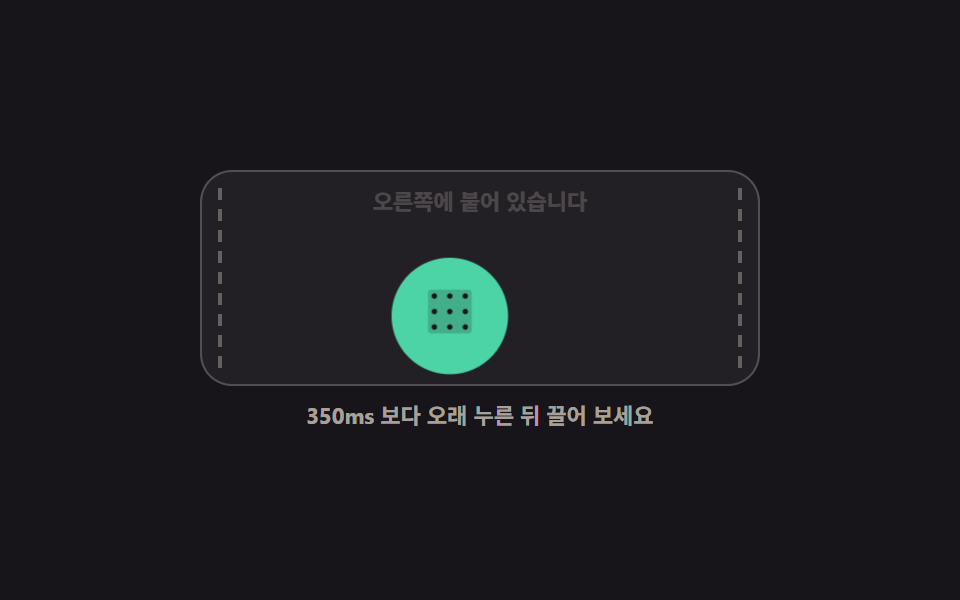
350ms 보다 오래 누르면 붙잡기 상태가 되어 버튼 자체가 손가락을 따라 translate 로 옮겨가고, 놓으면 가까운 쪽 가장자리로 스냅됩니다.
쓰임읽는 중 치워 두고 싶은 고객 문의 버튼, 자리를 옮기는 플로팅 도구
pointerdowntranslateXaria-label
<main class="stage">
  <section class="dg is-demo" id="dg" aria-label="길게 눌러 끌면 옮겨 다니는 FAB">
    <div class="dg__screen" id="dg-screen">
      <span class="dg__guide dg__guide--l" aria-hidden="true"></span>
      <span class="dg__guide dg__guide--r" aria-hidden="true"></span>
      <p class="dg__read" id="dg-read">오른쪽에 붙어 있습니다</p>
      <button class="dg__fab" type="button" id="dg-fab" aria-label="도움말 버튼 위치 옮기기">
        <span aria-hidden="true"><svg viewBox="0 0 256 256" width="1em" height="1em" fill="currentColor"><path d="M224,48V208a16,16,0,0,1-16,16H48a16,16,0,0,1-16-16V48A16,16,0,0,1,48,32H208A16,16,0,0,1,224,48Z" opacity=".2"/><path d="M72,60A12,12,0,1,1,60,48,12,12,0,0,1,72,60Zm56-12a12,12,0,1,0,12,12A12,12,0,0,0,128,48Zm68,24a12,12,0,1,0-12-12A12,12,0,0,0,196,72ZM60,116a12,12,0,1,0,12,12A12,12,0,0,0,60,116Zm68,0a12,12,0,1,0,12,12A12,12,0,0,0,128,116Zm68,0a12,12,0,1,0,12,12A12,12,0,0,0,196,116ZM60,184a12,12,0,1,0,12,12A12,12,0,0,0,60,184Zm68,0a12,12,0,1,0,12,12A12,12,0,0,0,128,184Zm68,0a12,12,0,1,0,12,12A12,12,0,0,0,196,184Z"/></svg></span>
      </button>
    </div>
    <p class="dg__hint" id="dg-hint">350ms 보다 오래 누른 뒤 끌어 보세요</p>
  </section>
</main>
@use "../../../../site/static/demo-tokens" as *;
// 길게 눌러 끌면 따라오는 FAB — 버튼 자체가 translate 로 움직이고 놓으면 가장자리로 스냅
$duration: $dur-base;
$easing: $ease-spring;
$color: $subject-mint;
@include stage($stage-ink);
.dg {
display: grid;
justify-items: center;
gap: $sp-2;
font-family: -apple-system, "Segoe UI", "Noto Sans KR", sans-serif;
}
.dg__screen {
position: relative;
box-sizing: border-box;
width: min(280px, 92vw);
height: 108px;
border: 1px solid rgba(255, 247, 230, .22);
border-radius: $r-card;
background: rgba(255, 247, 230, .05);
overflow: hidden;
}
// 스냅 가이드: 붙잡는 동안에만 살아난다
.dg__guide {
position: absolute;
top: $sp-2;
bottom: $sp-2;
width: 0;
border-left: 2px dashed rgba(255, 247, 230, .3);
opacity: 0;
transition: opacity $dur-instant linear;
}
.dg__guide--l { left: $sp-2; }
.dg__guide--r { right: $sp-2; }
.dg__read {
position: absolute;
left: 0;
right: 0;
top: $sp-2;
margin: 0;
color: rgba(255, 247, 230, .62);
font-size: 11px;
font-weight: 700;
line-height: 1.3;
text-align: center;
}
.dg__fab {
position: absolute;
left: $sp-2;
bottom: $sp-2;
display: inline-grid;
place-items: center;
width: 52px;
height: 52px;
margin: 0;
padding: 0;
border: 0;
border-radius: 50%;
background: $color;
color: $stage-ink;
font-size: 26px;
line-height: 1;
cursor: grab;
transform: translateX(212px);
transition: transform $duration $easing, box-shadow $dur-instant linear;
touch-action: none;
user-select: none;
}
.dg__fab:focus-visible { outline: 3px solid $subject-cream; outline-offset: 3px; }
// 붙잡기 상태 — 끌기 중에는 스냅 전환을 끊어 즉시 따라오게 한다
.dg__fab.is-grab {
cursor: grabbing;
transition: box-shadow $dur-instant linear;
box-shadow: 0 0 0 4px rgba(76, 212, 166, .25), $shadow-raised;
}
.dg__screen.is-holding .dg__guide { opacity: 1; }
.dg__hint {
margin: 0;
color: rgba(255, 247, 230, .62);
font-size: 11px;
font-weight: 700;
line-height: 1.3;
text-align: center;
}
// ── 격자 미리보기 전용 2초 루프: 오른쪽 → 붙잡음 → 왼쪽 → 놓음 → 오른쪽 ──
@keyframes dg-loop-move {
0%, 8% { transform: translateX(212px); }
12% { transform: translateX(212px) scale(1.12); }
42% { transform: translateX(0px) scale(1.12); }
46%, 52% { transform: translateX(0px) scale(1); }
58% { transform: translateX(0px) scale(1.12); }
86% { transform: translateX(212px) scale(1.12); }
90%, 100% { transform: translateX(212px) scale(1); }
}
@keyframes dg-loop-guide-l {
0%, 11% { opacity: 0; }
12%, 44% { opacity: 1; }
46%, 100% { opacity: 0; }
}
@keyframes dg-loop-guide-r {
0%, 11% { opacity: 0; }
12%, 88% { opacity: 1; }
90%, 100% { opacity: 0; }
}
@keyframes dg-loop-read {
0%, 11% { opacity: 1; }
12%, 43% { opacity: .3; }
44%, 57% { opacity: 1; }
58%, 87% { opacity: .3; }
88%, 100% { opacity: 1; }
}
.dg.is-demo {
.dg__fab {
animation-name: dg-loop-move;
animation-duration: $dur-loop;
animation-timing-function: $easing;
animation-iteration-count: infinite;
}
.dg__guide--l {
animation-name: dg-loop-guide-l;
animation-duration: $dur-loop;
animation-timing-function: steps(1, end);
animation-iteration-count: infinite;
}
.dg__guide--r {
animation-name: dg-loop-guide-r;
animation-duration: $dur-loop;
animation-timing-function: steps(1, end);
animation-iteration-count: infinite;
}
.dg__read {
animation-name: dg-loop-read;
animation-duration: $dur-loop;
animation-timing-function: steps(1, end);
animation-iteration-count: infinite;
}
}
@media (max-width: 340px) {
.dg__screen { height: 96px; }
.dg__fab { width: 44px; height: 44px; font-size: 22px; }
.dg__read { font-size: 10px; }
}
@media (prefers-reduced-motion: reduce) {
.dg.is-demo .dg__fab,
.dg.is-demo .dg__guide--l,
.dg.is-demo .dg__guide--r,
.dg.is-demo .dg__read { animation: none !important; transform: none !important; }
// 붙잡힌 순간의 결과만 남긴다 — 큰 상태로 왼쪽에 멈춘다
.dg.is-demo .dg__fab { transform: translateX(0px) scale(1.12) !important; }
.dg.is-demo .dg__guide--l { opacity: 1 !important; }
.dg.is-demo .dg__guide--r { opacity: 0 !important; }
.dg.is-demo .dg__read { opacity: 1 !important; }
}html, body {
margin: 0;
overflow: hidden;
}
.stage {
box-sizing: border-box;
min-height: 100vh;
display: grid;
place-items: center;
margin: 0;
background: #17141a;
font-family: -apple-system, "Segoe UI", "Noto Sans KR", sans-serif;
padding: clamp(8px, 4vw, 24px);
}
.dg {
display: grid;
justify-items: center;
gap: 8px;
font-family: -apple-system, "Segoe UI", "Noto Sans KR", sans-serif;
}
.dg__screen {
position: relative;
box-sizing: border-box;
width: min(280px, 92vw);
height: 108px;
border: 1px solid rgba(255, 247, 230, 0.22);
border-radius: 16px;
background: rgba(255, 247, 230, 0.05);
overflow: hidden;
}
.dg__guide {
position: absolute;
top: 8px;
bottom: 8px;
width: 0;
border-left: 2px dashed rgba(255, 247, 230, 0.3);
opacity: 0;
transition: opacity 140ms linear;
}
.dg__guide--l {
left: 8px;
}
.dg__guide--r {
right: 8px;
}
.dg__read {
position: absolute;
left: 0;
right: 0;
top: 8px;
margin: 0;
color: rgba(255, 247, 230, 0.62);
font-size: 11px;
font-weight: 700;
line-height: 1.3;
text-align: center;
}
.dg__fab {
position: absolute;
left: 8px;
bottom: 8px;
display: inline-grid;
place-items: center;
width: 52px;
height: 52px;
margin: 0;
padding: 0;
border: 0;
border-radius: 50%;
background: #4cd4a6;
color: #17141a;
font-size: 26px;
line-height: 1;
cursor: grab;
transform: translateX(212px);
transition: transform 300ms cubic-bezier(0.2, 0.8, 0.2, 1), box-shadow 140ms linear;
touch-action: none;
user-select: none;
}
.dg__fab:focus-visible {
outline: 3px solid #fff7e6;
outline-offset: 3px;
}
.dg__fab.is-grab {
cursor: grabbing;
transition: box-shadow 140ms linear;
box-shadow: 0 0 0 4px rgba(76, 212, 166, 0.25), 0 14px 24px rgba(23, 20, 26, 0.32);
}
.dg__screen.is-holding .dg__guide {
opacity: 1;
}
.dg__hint {
margin: 0;
color: rgba(255, 247, 230, 0.62);
font-size: 11px;
font-weight: 700;
line-height: 1.3;
text-align: center;
}
@keyframes dg-loop-move {
0%, 8% {
transform: translateX(212px);
}
12% {
transform: translateX(212px) scale(1.12);
}
42% {
transform: translateX(0px) scale(1.12);
}
46%, 52% {
transform: translateX(0px) scale(1);
}
58% {
transform: translateX(0px) scale(1.12);
}
86% {
transform: translateX(212px) scale(1.12);
}
90%, 100% {
transform: translateX(212px) scale(1);
}
}
@keyframes dg-loop-guide-l {
0%, 11% {
opacity: 0;
}
12%, 44% {
opacity: 1;
}
46%, 100% {
opacity: 0;
}
}
@keyframes dg-loop-guide-r {
0%, 11% {
opacity: 0;
}
12%, 88% {
opacity: 1;
}
90%, 100% {
opacity: 0;
}
}
@keyframes dg-loop-read {
0%, 11% {
opacity: 1;
}
12%, 43% {
opacity: 0.3;
}
44%, 57% {
opacity: 1;
}
58%, 87% {
opacity: 0.3;
}
88%, 100% {
opacity: 1;
}
}
.dg.is-demo .dg__fab {
animation-name: dg-loop-move;
animation-duration: 2s;
animation-timing-function: cubic-bezier(0.2, 0.8, 0.2, 1);
animation-iteration-count: infinite;
}
.dg.is-demo .dg__guide--l {
animation-name: dg-loop-guide-l;
animation-duration: 2s;
animation-timing-function: steps(1, end);
animation-iteration-count: infinite;
}
.dg.is-demo .dg__guide--r {
animation-name: dg-loop-guide-r;
animation-duration: 2s;
animation-timing-function: steps(1, end);
animation-iteration-count: infinite;
}
.dg.is-demo .dg__read {
animation-name: dg-loop-read;
animation-duration: 2s;
animation-timing-function: steps(1, end);
animation-iteration-count: infinite;
}
@media (max-width: 340px) {
.dg__screen {
height: 96px;
}
.dg__fab {
width: 44px;
height: 44px;
font-size: 22px;
}
.dg__read {
font-size: 10px;
}
}
@media (prefers-reduced-motion: reduce) {
.dg.is-demo .dg__fab,
.dg.is-demo .dg__guide--l,
.dg.is-demo .dg__guide--r,
.dg.is-demo .dg__read {
animation: none !important;
transform: none !important;
}
.dg.is-demo .dg__fab {
transform: translateX(0px) scale(1.12) !important;
}
.dg.is-demo .dg__guide--l {
opacity: 1 !important;
}
.dg.is-demo .dg__guide--r {
opacity: 0 !important;
}
.dg.is-demo .dg__read {
opacity: 1 !important;
}
}// 제스처 FAB: 길게 누르면 붙잡고, 끌면 버튼 자체가 움직이며, 놓으면 가까운 가장자리로 스냅된다
var dg = document.getElementById('dg');
var dgFab = document.getElementById('dg-fab');
var dgScreen = document.getElementById('dg-screen');
var dgRead = document.getElementById('dg-read');
var dgHold = null; // 길게 누름 타이머
var dgGrab = false; // 붙잡기 상태
function dgSide(x) {
var box = dgScreen.getBoundingClientRect();
return x < box.left + box.width / 2 ? 'left' : 'right';
}
function dgSnap(x) {
var side = dgSide(x);
var box = dgScreen.getBoundingClientRect();
var maxX = box.width - dgFab.offsetWidth - 8;
dgFab.style.transform = 'translateX(' + (side === 'left' ? 0 : maxX) + 'px)';
dgRead.textContent = side === 'left' ? '왼쪽에 붙어 있습니다' : '오른쪽에 붙어 있습니다';
}
function dgClearHold() {
window.clearTimeout(dgHold);
dgHold = null;
}
dgFab.addEventListener('pointerdown', function (e) {
dg.classList.remove('is-demo');
dgHold = window.setTimeout(function () {
dgGrab = true;
dgFab.classList.add('is-grab');
dgScreen.classList.add('is-holding');
try { dgFab.setPointerCapture(e.pointerId); } catch (err) { }
dgRead.textContent = '붙잡았습니다 · 놓으면 스냅';
}, 350);
});
dgFab.addEventListener('pointermove', function (e) {
if (!dgGrab) return;
var box = dgScreen.getBoundingClientRect();
var maxX = box.width - dgFab.offsetWidth - 8;
var x = Math.min(Math.max(e.clientX - box.left - dgFab.offsetWidth / 2, 0), maxX);
dgFab.style.transform = 'translateX(' + x + 'px)';
});
dgFab.addEventListener('pointerup', function (e) {
dgClearHold();
dgScreen.classList.remove('is-holding');
if (!dgGrab) return;
dgGrab = false;
dgFab.classList.remove('is-grab');
dgSnap(e.clientX);
});
dgFab.addEventListener('keydown', function (e) {
dg.classList.remove('is-demo');
var box = dgScreen.getBoundingClientRect();
var maxX = box.width - dgFab.offsetWidth - 8;
if (e.key === 'ArrowLeft') dgFab.style.transform = 'translateX(0px)';
if (e.key === 'ArrowRight') dgFab.style.transform = 'translateX(' + maxX + 'px)';
});import { useEffect, useRef, useState } from "react";
import type { CSSProperties, PointerEvent } from "react";
import styles from "./DragMoveFab.module.scss";
export type DragMoveFabProps = {
fabLabel?: string;
leftRead?: string;
rightRead?: string;
grabbedRead?: string;
hint?: string;
groupLabel?: string;
/** 붙잡기로 넘어가는 길게 누름 시간(ms) */
holdMs?: number;
/** 격자 미리보기용 2초 자동 루프. 사람이 손대면 꺼진다 */
demo?: boolean;
duration?: number;
easing?: string;
color?: string;
};
type Vars = CSSProperties & { "--duration"?: string; "--easing"?: string; "--color"?: string };
// ambient 에 KeyboardEvent 가 없다 — 쓰는 필드만 로컬로 선언한다
type KeyEvt = { key: string; currentTarget: HTMLButtonElement };
type Box = { left: number; width: number; maxX: number };
/** 화면 안쪽 여백 — 스냅 자리는 양 끝에서 이만큼 떨어진다 */
const EDGE = 8;
function Dots() {
return (
<svg viewBox="0 0 256 256" width="1em" height="1em" fill="currentColor">
<path d="M224,48V208a16,16,0,0,1-16,16H48a16,16,0,0,1-16-16V48A16,16,0,0,1,48,32H208A16,16,0,0,1,224,48Z" opacity=".2" />
<path d="M72,60A12,12,0,1,1,60,48,12,12,0,0,1,72,60Zm56-12a12,12,0,1,0,12,12A12,12,0,0,0,128,48Zm68,24a12,12,0,1,0-12-12A12,12,0,0,0,196,72ZM60,116a12,12,0,1,0,12,12A12,12,0,0,0,60,116Zm68,0a12,12,0,1,0,12,12A12,12,0,0,0,128,116Zm68,0a12,12,0,1,0,12,12A12,12,0,0,0,196,116ZM60,184a12,12,0,1,0,12,12A12,12,0,0,0,60,184Zm68,0a12,12,0,1,0,12,12A12,12,0,0,0,128,184Zm68,0a12,12,0,1,0,12,12A12,12,0,0,0,196,184Z" />
</svg>
);
}
export default function DragMoveFab({
fabLabel = "Move the help button",
leftRead = "Docked on the left",
rightRead = "Docked on the right",
grabbedRead = "Grabbed · release to snap",
hint = "Press for longer than 350ms, then drag",
groupLabel = "FAB you press and hold to drag around",
holdMs = 350,
demo = true,
duration = 300,
easing = "cubic-bezier(.2,.8,.2,1)",
color = "#4cd4a6",
}: DragMoveFabProps) {
const [tx, setTx] = useState<number | null>(null); // null 이면 CSS 기본 자리(오른쪽)
const [grab, setGrab] = useState(false);
const [holding, setHolding] = useState(false);
const [live, setLive] = useState(demo);
const [read, setRead] = useState(rightRead);
const screenRef = useRef<HTMLDivElement>(null);
const holdT = useRef<number>(null);
useEffect(() => () => {
if (holdT.current !== null) window.clearTimeout(holdT.current);
}, []);
function clearHold() {
if (holdT.current !== null) {
window.clearTimeout(holdT.current);
holdT.current = null;
}
}
function bounds(fab: HTMLButtonElement): Box | null {
const screen = screenRef.current;
if (!screen) return null;
const box = screen.getBoundingClientRect();
return { left: box.left, width: box.width, maxX: box.width - fab.offsetWidth - EDGE };
}
// 길게 누름이 채워져야 붙잡기로 넘어간다 — 짧은 누름은 그냥 클릭이다
function down(e: PointerEvent<HTMLButtonElement>) {
setLive(false);
const fab = e.currentTarget;
const pid: number = e.pointerId;
clearHold();
holdT.current = window.setTimeout(() => {
setGrab(true);
setHolding(true);
try { fab.setPointerCapture(pid); } catch { /* 캡처를 못 해도 끌기는 된다 */ }
setRead(grabbedRead);
}, holdMs);
}
function move(e: PointerEvent<HTMLButtonElement>) {
if (!grab) return;
const fab = e.currentTarget;
const b = bounds(fab);
if (!b) return;
setTx(Math.min(Math.max(e.clientX - b.left - fab.offsetWidth / 2, 0), b.maxX));
}
// 놓으면 가까운 가장자리로 스냅된다
function up(e: PointerEvent<HTMLButtonElement>) {
clearHold();
setHolding(false);
if (!grab) return;
setGrab(false);
const b = bounds(e.currentTarget);
if (!b) return;
const left = e.clientX < b.left + b.width / 2;
setTx(left ? 0 : b.maxX);
setRead(left ? leftRead : rightRead);
}
// 키보드 경로 — vanilla 판은 transform 만 바꾸지만 읽어주는 문구도 같이 맞춘다
function key(e: KeyEvt) {
setLive(false);
const b = bounds(e.currentTarget);
if (!b) return;
if (e.key === "ArrowLeft") { setTx(0); setRead(leftRead); }
if (e.key === "ArrowRight") { setTx(b.maxX); setRead(rightRead); }
}
const vars: Vars = { "--duration": `${duration}ms`, "--easing": easing, "--color": color };
const fabStyle: CSSProperties = tx === null ? {} : { transform: `translateX(${tx}px)` };
const cls = [styles.dg, live ? styles.isDemo : ""].filter(Boolean).join(" ");
const screenCls = [styles.screen, holding ? styles.isHolding : ""].filter(Boolean).join(" ");
const fabCls = [styles.fab, grab ? styles.isGrab : ""].filter(Boolean).join(" ");
return (
<section className={cls} style={vars} aria-label={groupLabel}>
<div className={screenCls} ref={screenRef}>
<span className={[styles.guide, styles.guideL].join(" ")} aria-hidden="true" />
<span className={[styles.guide, styles.guideR].join(" ")} aria-hidden="true" />
<p className={styles.read} aria-live="polite">{read}</p>
<button
className={fabCls}
style={fabStyle}
type="button"
aria-label={fabLabel}
onPointerDown={down}
onPointerMove={move}
onPointerUp={up}
onKeyDown={key}
>
<span aria-hidden="true"><Dots /></span>
</button>
</div>
<p className={styles.hint}>{hint}</p>
</section>
);
}09 길게 눌러 끌면 따라오는 FAB — 측정 누적면적 10.568% · 움직인 프레임 21/23GODRICH 원작 · zip 에 SCSS·React 포함 · 플로팅 버튼 아이콘 버튼 패턴 9종 — 누르고 끌고 펼쳐지는
이 데모가 속한 글
 플로팅 버튼 아이콘 버튼 패턴 9종 — 누르고 끌고 펼쳐지는플로팅 버튼은 화면 한 귀퉁이에 떠 있으면서 그 화면의 대표 동작 하나를 맡는 둥근 버튼입니다. 아홉 개 대부분 글자 없이 그림 하나로 말을 걸어야 하므로, 무엇을 하는 버튼인지 보조기기에도 들리게 이름을 달았습니다 이 글의 데모 전부 보기