04밀기 페이더 슬라이더
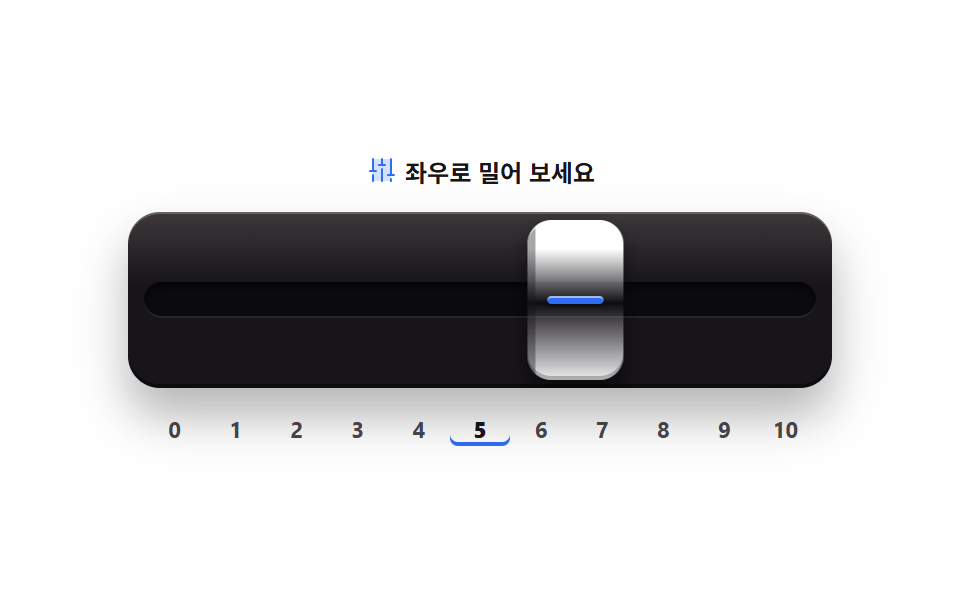
채널 페이더를 좌우로 밀면 끝에서 쿠션 이징으로 살짝 눌렸다 멈춥니다. 값은 눈금 아래 숫자로도 표시됩니다.
쓰임믹서 콘솔 채널 조절, 키오스크 화면 밝기·음량 바
role="slider"aria-valuenowpointerdowntranslateX
<svg width="0" height="0" style="position:absolute" aria-hidden="true">
  <defs>
    <symbol id="ico-faders" viewBox="0 0 256 256" fill="currentColor"><g><path d="M200 40v176H56V40Z" opacity=".2"/><path d="M136 120v96a8 8 0 0 1-16 0v-96a8 8 0 0 1 16 0m64 72a8 8 0 0 0-8 8v16a8 8 0 0 0 16 0v-16a8 8 0 0 0-8-8m24-32h-16V40a8 8 0 0 0-16 0v120h-16a8 8 0 0 0 0 16h48a8 8 0 0 0 0-16m-168 0a8 8 0 0 0-8 8v48a8 8 0 0 0 16 0v-48a8 8 0 0 0-8-8m24-32H64V40a8 8 0 0 0-16 0v88H32a8 8 0 0 0 0 16h48a8 8 0 0 0 0-16m72-48h-16V40a8 8 0 0 0-16 0v40h-16a8 8 0 0 0 0 16h48a8 8 0 0 0 0-16"/></g></symbol>
  </defs>
</svg>
<main class="stage">
<div class="pf is-demo" id="pf">
  <p class="pf__hint">
    <svg class="pf__ico" aria-hidden="true"><use href="#ico-faders"/></svg>
    <span>좌우로 밀어 보세요</span>
  </p>
  <button class="pf__well" id="well" type="button" role="slider" tabindex="0"
          aria-label="채널 페이더" aria-orientation="horizontal"
          aria-valuemin="0" aria-valuemax="10" aria-valuenow="5">
    <span class="pf__slot"></span>
    <span class="pf__capWrap" id="capWrap"><span class="pf__cap"><i class="pf__stripe"></i></span></span>
  </button>
  <div class="pf__scale" aria-hidden="true">
    <span class="pf__num">0</span><span class="pf__num">1</span><span class="pf__num">2</span><span class="pf__num">3</span><span class="pf__num">4</span><span class="pf__num">5</span><span class="pf__num">6</span><span class="pf__num">7</span><span class="pf__num">8</span><span class="pf__num">9</span><span class="pf__num">10</span>
  </div>
</div>
</main>
@use "../../../../site/static/demo-tokens" as *;
// 밀기 페이더 슬라이더 — 믹서 채널 페이더를 좌우로 민다. 끝에 닿으면 쿠션 이징($easing)으로
// 캡이 살짝 눌렸다(scaleX) 멈춘다. 값은 눈금 아래 숫자 0 부터 10 까지 + aria-valuenow 로 읽힌다.
// 재질감은 그라디언트 하이라이트와 inset 그림자로: 잉크 패널 위 크림빛 캡, 가운데 파란 줄.
// .is-demo 루프는 캡이 왼쪽 끝에서 오른쪽 끝으로 갔다 돌아오고 양 끝에서 눌린다(2초 한 바퀴).
// 사람이 포인터나 키로 만지면 JS 가 .is-demo 를 뗀다.
$duration: $dur-quick;
$easing: $ease-spring;
$color: $stage-paper;
@include stage($stage-paper);
.pf { display: flex; flex-direction: column; align-items: center; gap: $sp-3; width: 100%; max-width: 352px; }
.pf__hint {
display: flex; align-items: center; gap: $sp-1; margin: 0;
font-weight: 700; font-size: clamp(10px, 2.8vw, 12px); color: $subject-ink;
}
.pf__ico { width: 16px; height: 16px; flex: 0 0 auto; color: $subject-blue; }
// 채널 패널 — 잉크 몸체에 위에서 비친 하이라이트 한 줄
.pf__well {
position: relative; overflow: hidden; width: 100%; height: clamp(72px, 20vw, 88px);
border: 0; border-radius: $r-card; padding: 0; cursor: grab; touch-action: none;
background: linear-gradient(180deg, rgba($subject-cream, .16), rgba($subject-cream, 0) 42%), $subject-ink;
box-shadow: $shadow-raised, inset 0 1px 0 rgba($subject-cream, .22), inset 0 -2px 0 rgba(0, 0, 0, .45);
}
.pf__well:focus-visible { outline: 2px solid $subject-blue; outline-offset: 2px; }
.pf__well:active { cursor: grabbing; }
// 홈이 팬 슬롯 — 페이더 캡이 다니는 길
.pf__slot {
position: absolute; left: $sp-2; right: $sp-2; top: 50%; height: clamp(14px, 4vw, 18px);
transform: translateY(-50%); border-radius: $r-pill;
background: rgba(0, 0, 0, .5);
box-shadow: inset 0 2px 4px rgba(0, 0, 0, .7), inset 0 -1px 0 rgba($subject-cream, .14);
}
// 캡 래퍼는 슬롯 전체 폭. translateX 의 % 기준을 슬롯 폭으로 잡기 위해 분리했다
.pf__capWrap {
position: absolute; left: $sp-2; right: $sp-2; top: $sp-1; bottom: $sp-1;
transform: translateX(calc(var(--x, 0px)));
}
.pf__cap {
position: absolute; left: 0; top: 0; width: 48px; height: 100%;
border-radius: $r-control;
background:
linear-gradient(90deg, rgba($subject-ink, .38) 0 4px, rgba($subject-ink, 0) 4px 10px),
linear-gradient(180deg, rgba($stage-paper, 1) 0 18%, rgba($subject-ink, .22) 52%, rgba($stage-paper, .92) 100%);
box-shadow: 0 6px 10px rgba(0, 0, 0, .5), inset 0 1px 0 rgba(255, 255, 255, .9), inset 0 -2px 0 rgba(0, 0, 0, .25);
transition: transform $duration $easing;
}
// 캡은 스스로 완결한 요소라 눌림(scaleX)도 자기 중심에서 일어난다
.pf__cap.is-press { transform: scaleX(.82); }
.pf__stripe {
position: absolute; left: 10px; right: 10px; top: 50%; height: 4px;
transform: translateY(-50%); border-radius: $r-pill;
background: $subject-blue; box-shadow: inset 0 1px 0 rgba($subject-cream, .55), 0 1px 2px rgba(0, 0, 0, .4);
}
// 눈금 아래 숫자 — 값은 여기에도 표시된다(색만이 아니라 숫자로)
.pf__scale { display: flex; width: 100%; padding: 0 $sp-2; box-sizing: border-box; }
.pf__num {
flex: 1; text-align: center; margin: 0; border-radius: $r-xs;
font-weight: 700; font-size: clamp(9px, 2.4vw, 11px); line-height: 1.6; color: rgba($subject-ink, .78);
}
.pf__num.is-on { font-weight: 800; color: $subject-ink; box-shadow: inset 0 -2px 0 $subject-blue; }
// ── 미리보기 루프(2초 한 바퀴) ─────────────────────────────────────
// 이동(래퍼)과 쿠션 눌림(캡)을 분리: 래퍼를 scaleX 하면 끝에 있는 캡이 중심쪽으로 밀려
// 눌림이 아니라 옆걸음처럼 보인다. 낱개 속성으로 쓴다(단축은 delay 를 0 으로 리셋한다).
.pf.is-demo .pf__capWrap {
animation-name: pfTravel; animation-duration: $dur-loop;
animation-timing-function: $easing; animation-iteration-count: infinite;
}
.pf.is-demo .pf__cap {
animation-name: pfCushion; animation-duration: $dur-loop;
animation-timing-function: $easing; animation-iteration-count: infinite;
}
@keyframes pfTravel {
0% { transform: translateX(0); }
5% { transform: translateX(0); }
44% { transform: translateX(calc(100% - 48px)); }
55% { transform: translateX(calc(100% - 48px)); }
89% { transform: translateX(0); }
100% { transform: translateX(0); }
}
@keyframes pfCushion {
0% { transform: scaleX(1); }
3% { transform: scaleX(.82); }
9% { transform: scaleX(1); }
44% { transform: scaleX(1); }
48% { transform: scaleX(.82); }
54% { transform: scaleX(1); }
89% { transform: scaleX(1); }
93% { transform: scaleX(.82); }
97% { transform: scaleX(1); }
100% { transform: scaleX(1); }
}
@media (max-width: 340px) {
.pf { gap: $sp-2; }
.pf__well { height: 64px; }
.pf__slot { height: 12px; }
}
// reduce 에서는 루프를 끄고 가운데 값의 정적 한 장으로 둔다
@media (prefers-reduced-motion: reduce) {
.pf.is-demo .pf__capWrap { animation: none !important; }
.pf.is-demo .pf__cap { animation: none !important; }
.pf__cap { transition: none !important; }
}html, body {
margin: 0;
overflow: hidden;
}
.stage {
box-sizing: border-box;
min-height: 100vh;
display: grid;
place-items: center;
margin: 0;
background: #ffffff;
font-family: -apple-system, "Segoe UI", "Noto Sans KR", sans-serif;
padding: clamp(8px, 4vw, 24px);
}
.pf {
display: flex;
flex-direction: column;
align-items: center;
gap: 12px;
width: 100%;
max-width: 352px;
}
.pf__hint {
display: flex;
align-items: center;
gap: 4px;
margin: 0;
font-weight: 700;
font-size: clamp(10px, 2.8vw, 12px);
color: #17141a;
}
.pf__ico {
width: 16px;
height: 16px;
flex: 0 0 auto;
color: #2f6df6;
}
.pf__well {
position: relative;
overflow: hidden;
width: 100%;
height: clamp(72px, 20vw, 88px);
border: 0;
border-radius: 16px;
padding: 0;
cursor: grab;
touch-action: none;
background: linear-gradient(180deg, rgba(255, 247, 230, 0.16), rgba(255, 247, 230, 0) 42%), #17141a;
box-shadow: 0 14px 24px rgba(23, 20, 26, 0.32), inset 0 1px 0 rgba(255, 247, 230, 0.22), inset 0 -2px 0 rgba(0, 0, 0, 0.45);
}
.pf__well:focus-visible {
outline: 2px solid #2f6df6;
outline-offset: 2px;
}
.pf__well:active {
cursor: grabbing;
}
.pf__slot {
position: absolute;
left: 8px;
right: 8px;
top: 50%;
height: clamp(14px, 4vw, 18px);
transform: translateY(-50%);
border-radius: 999px;
background: rgba(0, 0, 0, 0.5);
box-shadow: inset 0 2px 4px rgba(0, 0, 0, 0.7), inset 0 -1px 0 rgba(255, 247, 230, 0.14);
}
.pf__capWrap {
position: absolute;
left: 8px;
right: 8px;
top: 4px;
bottom: 4px;
transform: translateX(calc(var(--x, 0px)));
}
.pf__cap {
position: absolute;
left: 0;
top: 0;
width: 48px;
height: 100%;
border-radius: 12px;
background: linear-gradient(90deg, rgba(23, 20, 26, 0.38) 0 4px, rgba(23, 20, 26, 0) 4px 10px), linear-gradient(180deg, white 0 18%, rgba(23, 20, 26, 0.22) 52%, rgba(255, 255, 255, 0.92) 100%);
box-shadow: 0 6px 10px rgba(0, 0, 0, 0.5), inset 0 1px 0 rgba(255, 255, 255, 0.9), inset 0 -2px 0 rgba(0, 0, 0, 0.25);
transition: transform 220ms cubic-bezier(0.2, 0.8, 0.2, 1);
}
.pf__cap.is-press {
transform: scaleX(0.82);
}
.pf__stripe {
position: absolute;
left: 10px;
right: 10px;
top: 50%;
height: 4px;
transform: translateY(-50%);
border-radius: 999px;
background: #2f6df6;
box-shadow: inset 0 1px 0 rgba(255, 247, 230, 0.55), 0 1px 2px rgba(0, 0, 0, 0.4);
}
.pf__scale {
display: flex;
width: 100%;
padding: 0 8px;
box-sizing: border-box;
}
.pf__num {
flex: 1;
text-align: center;
margin: 0;
border-radius: 4px;
font-weight: 700;
font-size: clamp(9px, 2.4vw, 11px);
line-height: 1.6;
color: rgba(23, 20, 26, 0.78);
}
.pf__num.is-on {
font-weight: 800;
color: #17141a;
box-shadow: inset 0 -2px 0 #2f6df6;
}
.pf.is-demo .pf__capWrap {
animation-name: pfTravel;
animation-duration: 2s;
animation-timing-function: cubic-bezier(0.2, 0.8, 0.2, 1);
animation-iteration-count: infinite;
}
.pf.is-demo .pf__cap {
animation-name: pfCushion;
animation-duration: 2s;
animation-timing-function: cubic-bezier(0.2, 0.8, 0.2, 1);
animation-iteration-count: infinite;
}
@keyframes pfTravel {
0% {
transform: translateX(0);
}
5% {
transform: translateX(0);
}
44% {
transform: translateX(calc(100% - 48px));
}
55% {
transform: translateX(calc(100% - 48px));
}
89% {
transform: translateX(0);
}
100% {
transform: translateX(0);
}
}
@keyframes pfCushion {
0% {
transform: scaleX(1);
}
3% {
transform: scaleX(0.82);
}
9% {
transform: scaleX(1);
}
44% {
transform: scaleX(1);
}
48% {
transform: scaleX(0.82);
}
54% {
transform: scaleX(1);
}
89% {
transform: scaleX(1);
}
93% {
transform: scaleX(0.82);
}
97% {
transform: scaleX(1);
}
100% {
transform: scaleX(1);
}
}
@media (max-width: 340px) {
.pf {
gap: 8px;
}
.pf__well {
height: 64px;
}
.pf__slot {
height: 12px;
}
}
@media (prefers-reduced-motion: reduce) {
.pf.is-demo .pf__capWrap {
animation: none !important;
}
.pf.is-demo .pf__cap {
animation: none !important;
}
.pf__cap {
transition: none !important;
}
}(function () {
var root = document.getElementById('pf');
var well = document.getElementById('well');
var wrap = document.getElementById('capWrap');
var cap = wrap.querySelector('.pf__cap');
var nums = [].slice.call(document.querySelectorAll('.pf__num'));
var MIN = 0, MAX = 10;
var value = 5;
var lastPx = 0;
var pressTimer = 0;
function travel() { return Math.max(0, wrap.clientWidth - cap.offsetWidth); }
function human() { root.classList.remove('is-demo'); }
function cushion() {
cap.classList.add('is-press');
clearTimeout(pressTimer);
pressTimer = setTimeout(function () { cap.classList.remove('is-press'); }, 180);
}
function apply(px) {
wrap.style.setProperty('--x', px + 'px');
lastPx = px;
value = travel() > 0 ? Math.round(px / travel() * MAX) : 0;
well.setAttribute('aria-valuenow', String(value));
nums.forEach(function (n, i) { n.classList.toggle('is-on', i === value); });
}
apply(value / MAX * travel());
var startX = 0, startPx = 0;
well.addEventListener('pointerdown', function (e) {
human();
well.setPointerCapture(e.pointerId);
startX = e.clientX;
startPx = lastPx;
e.preventDefault();
});
well.addEventListener('pointermove', function (e) {
if (!well.hasPointerCapture(e.pointerId)) { return; }
var t = travel();
var px = Math.min(t, Math.max(0, startPx + (e.clientX - startX)));
if ((px === 0 && lastPx > 0) || (px === t && lastPx < t)) { cushion(); }
apply(px);
});
well.addEventListener('pointerup', function (e) {
if (well.hasPointerCapture(e.pointerId)) { well.releasePointerCapture(e.pointerId); }
});
well.addEventListener('keydown', function (e) {
var next = null;
if (e.key === 'ArrowRight' || e.key === 'ArrowUp') { next = Math.min(MAX, value + 1); }
else if (e.key === 'ArrowLeft' || e.key === 'ArrowDown') { next = Math.max(MIN, value - 1); }
else if (e.key === 'Home') { next = MIN; }
else if (e.key === 'End') { next = MAX; }
if (next === null) { return; }
e.preventDefault();
human();
if (next === MIN || next === MAX) { cushion(); }
apply(next / MAX * travel());
});
})();// PushFader — vanilla 판(run/013/demo/04-skeuo-push-slider) 의 React 포트.
// 좌우 드래그·화살표로 캡을 밀고 끝에서 쿠션 눌림이 일어난다. 값·타이밍은 vanilla 와 같다.
// duration·easing·color 는 props 로 받아 CSS 변수로 들어간다(기본값은 vanilla 의 토큰값).
import { useEffect, useRef, useState } from "react";
import type { CSSProperties, PointerEvent as ReactPointerEvent } from "react";
import styles from "./PushFader.module.scss";
export type PushFaderProps = {
duration?: number;
easing?: string;
color?: string;
};
type Vars = CSSProperties & { "--duration"?: string; "--easing"?: string; "--color"?: string };
type WrapRef = { current: HTMLSpanElement | null };
type DragState = { current: { startX: number; startPx: number; lastPx: number; active: boolean } };
type PtrEvt = ReactPointerEvent<HTMLButtonElement>;
type KeyEvt = { key: string; preventDefault(): void };
const MAX = 10;
const CAP_W = 48; // .cap 의 고정 폭(vanilla 와 같은 값)
const HINT = "좌우로 밀어 보세요";
const ARIA_LABEL = "채널 페이더";
export default function PushFader({
duration = 220,
easing = "cubic-bezier(.2, .8, .2, 1)",
color = "#ffffff",
}: PushFaderProps) {
const wrapRef = useRef(null) as WrapRef;
const drag = useRef({ startX: 0, startPx: 0, lastPx: 0, active: false }) as DragState;
const [demo, setDemo] = useState(true);
const [value, setValue] = useState(5);
const [press, setPress] = useState(false);
const vars: Vars = { "--duration": `${duration}ms`, "--easing": easing, "--color": color };
function travelPx(): number {
const wrap = wrapRef.current;
return wrap ? Math.max(0, wrap.clientWidth - CAP_W) : 0;
}
function applyPx(px: number) {
const wrap = wrapRef.current;
if (wrap) { wrap.style.setProperty("--x", `${px}px`); }
drag.current.lastPx = px;
const t = travelPx();
setValue(t > 0 ? Math.round((px / t) * MAX) : 0);
}
function cushion() {
setPress(true);
window.setTimeout(() => { setPress(false); }, 180);
}
useEffect(() => {
applyPx((5 / MAX) * travelPx());
}, []);
function onPointerDown(e: PtrEvt) {
setDemo(false);
drag.current = { startX: e.clientX, startPx: drag.current.lastPx, lastPx: drag.current.lastPx, active: true };
e.currentTarget.setPointerCapture(e.pointerId);
e.preventDefault();
}
function onPointerMove(e: PtrEvt) {
if (!drag.current.active) { return; }
const t = travelPx();
const px = Math.min(t, Math.max(0, drag.current.startPx + (e.clientX - drag.current.startX)));
if ((px === 0 && drag.current.lastPx > 0) || (px === t && drag.current.lastPx < t)) { cushion(); }
applyPx(px);
}
function onPointerUp(e: PtrEvt) {
if (!drag.current.active) { return; }
drag.current.active = false;
if (e.currentTarget.hasPointerCapture(e.pointerId)) { e.currentTarget.releasePointerCapture(e.pointerId); }
}
function onKeyDown(e: KeyEvt) {
let next: number | null = null;
if (e.key === "ArrowRight" || e.key === "ArrowUp") { next = Math.min(MAX, value + 1); }
else if (e.key === "ArrowLeft" || e.key === "ArrowDown") { next = Math.max(0, value - 1); }
else if (e.key === "Home") { next = 0; }
else if (e.key === "End") { next = MAX; }
if (next === null) { return; }
e.preventDefault();
setDemo(false);
if (next === 0 || next === MAX) { cushion(); }
applyPx((next / MAX) * travelPx());
}
const nums: number[] = [];
for (let i = 0; i <= MAX; i++) { nums.push(i); }
const cls = [styles.root, demo ? styles.isDemo : ""].filter(Boolean).join(" ");
return (
<main className={styles.stage}>
<svg width="0" height="0" style={{ position: "absolute" }} aria-hidden="true">
<defs>
<symbol id="ico-faders" viewBox="0 0 256 256" fill="currentColor"><g><path d="M200 40v176H56V40Z" opacity=".2"/><path d="M136 120v96a8 8 0 0 1-16 0v-96a8 8 0 0 1 16 0m64 72a8 8 0 0 0-8 8v16a8 8 0 0 0 16 0v-16a8 8 0 0 0-8-8m24-32h-16V40a8 8 0 0 0-16 0v120h-16a8 8 0 0 0 0 16h48a8 8 0 0 0 0-16m-168 0a8 8 0 0 0-8 8v48a8 8 0 0 0 16 0v-48a8 8 0 0 0-8-8m24-32H64V40a8 8 0 0 0-16 0v88H32a8 8 0 0 0 0 16h48a8 8 0 0 0 0-16m72-48h-16V40a8 8 0 0 0-16 0v40h-16a8 8 0 0 0 0 16h48a8 8 0 0 0 0-16"/></g></symbol>
</defs>
</svg>
<div className={cls} style={vars}>
<p className={styles.hint}>
<svg className={styles.ico} aria-hidden="true"><use href="#ico-faders" /></svg>
<span>{HINT}</span>
</p>
<button
className={styles.well}
type="button"
role="slider"
tabIndex={0}
aria-label={ARIA_LABEL}
aria-orientation="horizontal"
aria-valuemin={0}
aria-valuemax={MAX}
aria-valuenow={value}
onPointerDown={onPointerDown}
onPointerMove={onPointerMove}
onPointerUp={onPointerUp}
onKeyDown={onKeyDown}
>
<span className={styles.slot} />
<span className={styles.capWrap} ref={wrapRef}>
<span className={press ? `${styles.cap} ${styles.press}` : styles.cap}>
<i className={styles.stripe} />
</span>
</span>
</button>
<div className={styles.scale} aria-hidden="true">
{nums.map((n) => (
<span key={n} className={n === value ? `${styles.num} ${styles.on}` : styles.num}>{n}</span>
))}
</div>
</div>
</main>
);
}04 밀기 페이더 슬라이더 — 측정 누적면적 16.537% · 움직인 프레임 23/23GODRICH 원작 · zip 에 SCSS·React 포함 · CSS 스위치 버튼 9종 — 실물처럼 눌리는 레버·다이얼·이젝트
이 데모가 속한 글
 CSS 스위치 버튼 9종 — 실물처럼 눌리는 레버·다이얼·이젝트css 스위치 버튼은 화면에서 켜고 끄는 스위치를 실물 레버·로커·다이얼처럼 보이게 만든 버튼입니다. 여기 아홉 개는 라이브러리 없이 SCSS 와 짧은 JS 로만 짰고, 누르면 그 자리에서 기울고 돌고 튀어나오며 화 이 글의 데모 전부 보기