09폭에 따라 보이는 장수가 바뀌는 슬라이더
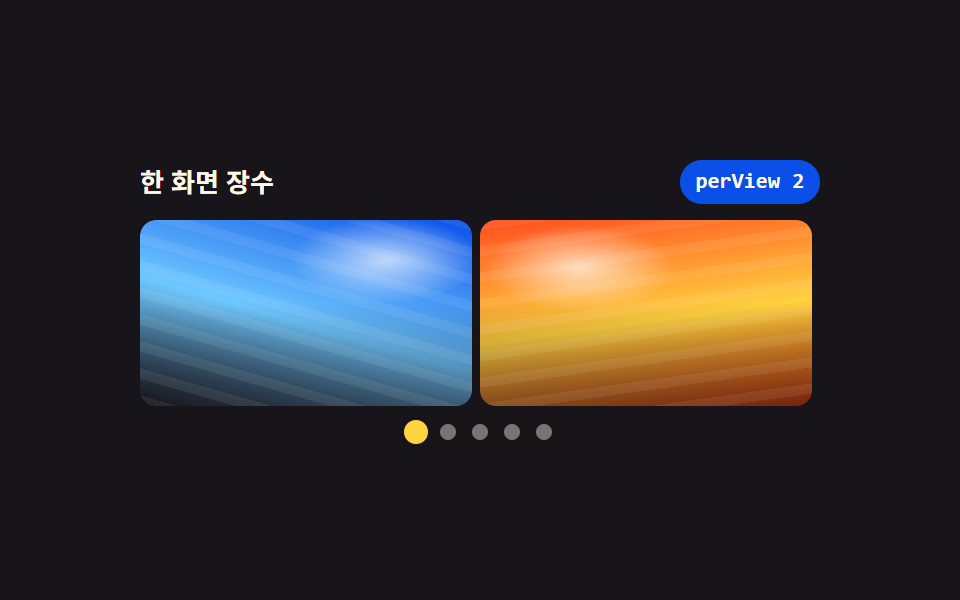
matchMedia 가 폭을 읽어 한 화면에 1·2·3장을 정하고, 사진마다 aspect-ratio 를 고정해 장수가 바뀌어도 높이가 튀지 않는다.
쓰임관련 상품 줄, 블로그 추천 글 카드 줄
aspect-ratiomatchMediaflex-basis
<main class="stage">
<section class="rp is-demo" id="rp" role="region" aria-roledescription="carousel" aria-label="폭에 따라 장수가 바뀌는 사진 슬라이더" tabindex="0">
  <header class="rp__bar">
    <span class="rp__title">한 화면 장수</span>
    <span class="rp__chip" id="chip">perView 2</span>
  </header>
  <div class="rp__frame" id="frame">
    <ul class="rp__track" id="track">
      <li class="rp__slide" role="group" aria-roledescription="slide" aria-label="6장 중 1장"><span class="rp__ph rp__ph--a" role="img" aria-label="새벽 부두의 컨테이너"></span></li>
      <li class="rp__slide" role="group" aria-roledescription="slide" aria-label="6장 중 2장"><span class="rp__ph rp__ph--b" role="img" aria-label="노을 진 사막 능선"></span></li>
      <li class="rp__slide" role="group" aria-roledescription="slide" aria-label="6장 중 3장"><span class="rp__ph rp__ph--c" role="img" aria-label="비 온 뒤 도심 골목"></span></li>
      <li class="rp__slide" role="group" aria-roledescription="slide" aria-label="6장 중 4장"><span class="rp__ph rp__ph--d" role="img" aria-label="눈 덮인 자작나무 숲"></span></li>
      <li class="rp__slide" role="group" aria-roledescription="slide" aria-label="6장 중 5장"><span class="rp__ph rp__ph--e" role="img" aria-label="한낮의 수영장 물결"></span></li>
      <li class="rp__slide" role="group" aria-roledescription="slide" aria-label="6장 중 6장"><span class="rp__ph rp__ph--f" role="img" aria-label="밤 열차의 창가 불빛"></span></li>
    </ul>
  </div>
  <nav class="rp__dots" aria-label="구간 고르기">
    <button class="rp__dot" type="button" aria-current="true" aria-label="1번째 구간 보기"></button>
    <button class="rp__dot" type="button" aria-current="false" aria-label="2번째 구간 보기"></button>
    <button class="rp__dot" type="button" aria-current="false" aria-label="3번째 구간 보기"></button>
    <button class="rp__dot" type="button" aria-current="false" aria-label="4번째 구간 보기"></button>
    <button class="rp__dot" type="button" aria-current="false" aria-label="5번째 구간 보기"></button>
    <button class="rp__dot" type="button" aria-current="false" aria-label="6번째 구간 보기"></button>
  </nav>
</section>
</main>@use "../../../../site/static/demo-tokens" as *;
// 폭에 따라 한 화면 장수(perView)가 바뀌는 슬라이더.
// 장수는 matchMedia 가 정해 `--per` 로 내려보내고, 슬라이드 폭은 flex-basis: calc(100% / var(--per)) 하나로 따라간다.
// 사진은 aspect-ratio 로 비율이 묶여 있어 1장에서 3장으로 바뀌어도 트랙 높이가 튀지 않는다.
// 한 칸 이동량도 100% 가 아니라 100% / per 이다 — 장수가 바뀌면 걸음 폭도 같이 바뀐다.
// 사진 자리는 FLUX 이미지가 들어올 자리다 (run/082/_이미지후보.07.json) — 지금은 토큰 그라디언트 합성.
$duration: $dur-base;
$easing: $ease-spring;
$color: $subject-blue-deep;
@include stage($stage-ink);
@mixin scene($top, $mid, $low, $angle, $sunx, $suny) {
background:
radial-gradient(40% 32% at $sunx $suny, rgba(255, 255, 255, .68), rgba(255, 255, 255, 0) 72%),
repeating-linear-gradient($angle, rgba(255, 255, 255, .07) 0 5px, rgba(255, 255, 255, 0) 5px 13px),
linear-gradient(180deg, rgba(255, 255, 255, 0) 44%, rgba($stage-ink, .46) 100%),
linear-gradient($angle, $top 0%, $mid 54%, $low 100%);
}
.rp {
box-sizing: border-box;
display: flex; flex-direction: column; gap: $sp-2;
width: min(100%, 340px);
--per: 1;
}
.rp:focus-visible { outline: 2px solid $subject-blue-light; outline-offset: 4px; border-radius: $r-card; }
.rp__bar { display: flex; align-items: center; gap: $sp-2; }
.rp__title { flex: 1 1 auto; color: $subject-cream; font-weight: 700; font-size: 13px; line-height: 1.3; }
.rp__chip {
flex: 0 0 auto; padding: $sp-1 $sp-2; border-radius: $r-pill;
background: $color; color: $subject-cream;
font-family: ui-monospace, SFMono-Regular, Consolas, monospace;
font-weight: 700; font-size: 11px; line-height: 1.3;
}
.rp__frame { overflow: hidden; border-radius: $r-sm; }
.rp__track {
display: flex; margin: 0; padding: 0; list-style: none;
transform: translate3d(0, 0, 0); // JS 가 처음 놓는 값과 같은 항등 변환 — 첫 칠에 헛 transition 이 안 생긴다
transition: transform $duration $easing;
will-change: transform;
}
// 폭의 유일한 출처는 --per 하나다. 간격은 gap 이 아니라 슬라이드 안쪽 여백으로 — flex-basis 계산이 흔들리지 않는다
.rp__slide {
box-sizing: border-box;
flex-grow: 0; flex-shrink: 0;
flex-basis: calc(100% / var(--per));
padding-right: $sp-1;
}
.rp__ph {
display: block; width: 100%; aspect-ratio: 16 / 9;
border-radius: $r-sm;
}
.rp__ph--a { @include scene($subject-blue-deep, $subject-sky, $stage-ink, 196deg, 74%, 22%); }
.rp__ph--b { @include scene($stage-orange, $stage-yellow, $subject-orange-deep, 172deg, 30%, 26%); }
.rp__ph--c { @include scene($stage-ink, $subject-blue-light, $tick-panel, 208deg, 58%, 18%); }
.rp__ph--d { @include scene($subject-sky, $subject-cream, $chart-3, 184deg, 44%, 30%); }
.rp__ph--e { @include scene($subject-mint, $subject-sky, $chart-1, 160deg, 66%, 34%); }
.rp__ph--f { @include scene($tick-panel, $subject-lilac, $stage-ink, 214deg, 36%, 20%); }
.rp__dots { display: flex; justify-content: center; gap: $sp-2; }
.rp__dot {
flex: 0 0 auto; width: 8px; height: 8px; margin: 0; padding: 0;
border: 0; border-radius: 50%; background: rgba($subject-cream, .42);
cursor: pointer; transform-origin: 50% 50%;
transition: transform $dur-quick $easing, background $dur-quick $easing;
}
.rp__dot[aria-current="true"] { background: $stage-yellow; transform: scale(1.5); }
.rp__dot:focus-visible { outline: 2px solid $subject-cream; outline-offset: 3px; }
.rp__dot[hidden] { display: none; }
// 좁은 화면 — perView 1 이 되는 구간. 트랙 폭을 줄여 16:9 사진이 320×200 무대에 들어온다
@media (max-width: 340px) {
.rp { width: min(100%, 228px); gap: $sp-1; }
.rp__title { font-size: 11px; }
.rp__chip { font-size: 10px; padding: 0 $sp-1; }
.rp__dots { gap: $sp-1; }
}
@media (prefers-reduced-motion: reduce) {
.rp__track, .rp__dot { transition: none !important; }
}html, body {
margin: 0;
overflow: hidden;
}
.stage {
box-sizing: border-box;
min-height: 100vh;
display: grid;
place-items: center;
margin: 0;
background: #17141a;
font-family: -apple-system, "Segoe UI", "Noto Sans KR", sans-serif;
padding: clamp(8px, 4vw, 24px);
}
.rp {
box-sizing: border-box;
display: flex;
flex-direction: column;
gap: 8px;
width: min(100%, 340px);
--per: 1;
}
.rp:focus-visible {
outline: 2px solid #5b8cf8;
outline-offset: 4px;
border-radius: 16px;
}
.rp__bar {
display: flex;
align-items: center;
gap: 8px;
}
.rp__title {
flex: 1 1 auto;
color: #fff7e6;
font-weight: 700;
font-size: 13px;
line-height: 1.3;
}
.rp__chip {
flex: 0 0 auto;
padding: 4px 8px;
border-radius: 999px;
background: #0a4fe8;
color: #fff7e6;
font-family: ui-monospace, SFMono-Regular, Consolas, monospace;
font-weight: 700;
font-size: 11px;
line-height: 1.3;
}
.rp__frame {
overflow: hidden;
border-radius: 8px;
}
.rp__track {
display: flex;
margin: 0;
padding: 0;
list-style: none;
transform: translate3d(0, 0, 0);
transition: transform 300ms cubic-bezier(0.2, 0.8, 0.2, 1);
will-change: transform;
}
.rp__slide {
box-sizing: border-box;
flex-grow: 0;
flex-shrink: 0;
flex-basis: calc(100% / var(--per));
padding-right: 4px;
}
.rp__ph {
display: block;
width: 100%;
aspect-ratio: 16/9;
border-radius: 8px;
}
.rp__ph--a {
background: radial-gradient(40% 32% at 74% 22%, rgba(255, 255, 255, 0.68), rgba(255, 255, 255, 0) 72%), repeating-linear-gradient(196deg, rgba(255, 255, 255, 0.07) 0 5px, rgba(255, 255, 255, 0) 5px 13px), linear-gradient(180deg, rgba(255, 255, 255, 0) 44%, rgba(23, 20, 26, 0.46) 100%), linear-gradient(196deg, #0a4fe8 0%, #6ec8ff 54%, #17141a 100%);
}
.rp__ph--b {
background: radial-gradient(40% 32% at 30% 26%, rgba(255, 255, 255, 0.68), rgba(255, 255, 255, 0) 72%), repeating-linear-gradient(172deg, rgba(255, 255, 255, 0.07) 0 5px, rgba(255, 255, 255, 0) 5px 13px), linear-gradient(180deg, rgba(255, 255, 255, 0) 44%, rgba(23, 20, 26, 0.46) 100%), linear-gradient(172deg, #ff4d1f 0%, #ffd23f 54%, #c93000 100%);
}
.rp__ph--c {
background: radial-gradient(40% 32% at 58% 18%, rgba(255, 255, 255, 0.68), rgba(255, 255, 255, 0) 72%), repeating-linear-gradient(208deg, rgba(255, 255, 255, 0.07) 0 5px, rgba(255, 255, 255, 0) 5px 13px), linear-gradient(180deg, rgba(255, 255, 255, 0) 44%, rgba(23, 20, 26, 0.46) 100%), linear-gradient(208deg, #17141a 0%, #5b8cf8 54%, #231f28 100%);
}
.rp__ph--d {
background: radial-gradient(40% 32% at 44% 30%, rgba(255, 255, 255, 0.68), rgba(255, 255, 255, 0) 72%), repeating-linear-gradient(184deg, rgba(255, 255, 255, 0.07) 0 5px, rgba(255, 255, 255, 0) 5px 13px), linear-gradient(180deg, rgba(255, 255, 255, 0) 44%, rgba(23, 20, 26, 0.46) 100%), linear-gradient(184deg, #6ec8ff 0%, #fff7e6 54%, #2b9d74 100%);
}
.rp__ph--e {
background: radial-gradient(40% 32% at 66% 34%, rgba(255, 255, 255, 0.68), rgba(255, 255, 255, 0) 72%), repeating-linear-gradient(160deg, rgba(255, 255, 255, 0.07) 0 5px, rgba(255, 255, 255, 0) 5px 13px), linear-gradient(180deg, rgba(255, 255, 255, 0) 44%, rgba(23, 20, 26, 0.46) 100%), linear-gradient(160deg, #4cd4a6 0%, #6ec8ff 54%, #2f6df6 100%);
}
.rp__ph--f {
background: radial-gradient(40% 32% at 36% 20%, rgba(255, 255, 255, 0.68), rgba(255, 255, 255, 0) 72%), repeating-linear-gradient(214deg, rgba(255, 255, 255, 0.07) 0 5px, rgba(255, 255, 255, 0) 5px 13px), linear-gradient(180deg, rgba(255, 255, 255, 0) 44%, rgba(23, 20, 26, 0.46) 100%), linear-gradient(214deg, #231f28 0%, #b9a0ff 54%, #17141a 100%);
}
.rp__dots {
display: flex;
justify-content: center;
gap: 8px;
}
.rp__dot {
flex: 0 0 auto;
width: 8px;
height: 8px;
margin: 0;
padding: 0;
border: 0;
border-radius: 50%;
background: rgba(255, 247, 230, 0.42);
cursor: pointer;
transform-origin: 50% 50%;
transition: transform 220ms cubic-bezier(0.2, 0.8, 0.2, 1), background 220ms cubic-bezier(0.2, 0.8, 0.2, 1);
}
.rp__dot[aria-current=true] {
background: #ffd23f;
transform: scale(1.5);
}
.rp__dot:focus-visible {
outline: 2px solid #fff7e6;
outline-offset: 3px;
}
.rp__dot[hidden] {
display: none;
}
@media (max-width: 340px) {
.rp {
width: min(100%, 228px);
gap: 4px;
}
.rp__title {
font-size: 11px;
}
.rp__chip {
font-size: 10px;
padding: 0 4px;
}
.rp__dots {
gap: 4px;
}
}
@media (prefers-reduced-motion: reduce) {
.rp__track, .rp__dot {
transition: none !important;
}
}var root = document.getElementById('rp');
var track = document.getElementById('track');
var chip = document.getElementById('chip');
var dots = [].slice.call(document.querySelectorAll('.rp__dot'));
var total = track.children.length;
var index = 0, per = 1, timer = 0;
// 폭은 matchMedia 가 읽는다. resize 마다 재는 것과 달리 경계를 넘을 때만 한 번 불린다
var wide = window.matchMedia('(min-width: 640px)');
var mid = window.matchMedia('(min-width: 420px)');
function maxIndex() { return Math.max(0, total - per); }
function paint() {
root.style.setProperty('--per', per);
chip.textContent = 'perView ' + per;
index = Math.min(index, maxIndex());
track.style.transform = 'translate3d(' + (-index * (100 / per)) + '%, 0, 0)';
dots.forEach(function (dot, i) {
dot.hidden = i > maxIndex();
dot.setAttribute('aria-current', i === index ? 'true' : 'false');
});
[].slice.call(track.children).forEach(function (slide, i) {
slide.setAttribute('aria-hidden', (i >= index && i < index + per) ? 'false' : 'true');
});
}
function measure() {
per = wide.matches ? 3 : (mid.matches ? 2 : 1);
paint();
}
function show(next) { index = Math.max(0, Math.min(maxIndex(), next)); paint(); }
function stopDemo() { root.classList.remove('is-demo'); clearInterval(timer); }
wide.addEventListener('change', measure);
mid.addEventListener('change', measure);
dots.forEach(function (dot, i) { dot.addEventListener('click', function () { stopDemo(); show(i); }); });
root.addEventListener('keydown', function (e) {
if (e.key !== 'ArrowRight' && e.key !== 'ArrowLeft') { return; }
stopDemo(); show(index + (e.key === 'ArrowRight' ? 1 : -1));
});
measure();
if (root.classList.contains('is-demo')) {
timer = setInterval(function () {
show(index >= maxIndex() ? 0 : index + 1);
}, 620);
}// ResponsivePerViewSlider — vanilla 판(run/082/demo/09-slider-responsive-aspect-perview/index.html) 의 React 포트.
// matchMedia 가 폭을 읽어 한 화면 장수(perView)를 1·2·3 으로 정하고, 그 값을 --per 로 내려보낸다.
// 슬라이드 폭은 flex-basis: calc(100% / var(--per)) 하나로 따라가고, 사진은 aspect-ratio 로 높이가 묶여 있다.
// 한 걸음 이동량도 100% 가 아니라 100% / per 이다 — 장수가 바뀌면 걸음 폭도 같이 바뀐다.
import { useEffect, useRef, useState } from "react";
import type { CSSProperties } from "react";
import styles from "./ResponsivePerViewSlider.module.scss";
export type ResponsivePerViewSliderProps = {
duration?: number;
easing?: string;
color?: string;
};
type Vars = CSSProperties & { "--duration"?: string; "--easing"?: string; "--color"?: string; "--per"?: number };
// useRef<T> 는 T | null 을 돌려준다 — ambient 타입에 맞춰 상자 타입을 따로 둔다
type Box<T> = { current: T | null };
const REGION_LABEL = "폭에 따라 장수가 바뀌는 사진 슬라이더";
const TITLE = "한 화면 장수";
const DOTS_LABEL = "구간 고르기";
const PHOTOS = [
{ tone: "a", alt: "새벽 부두의 컨테이너", slide: "6장 중 1장", dot: "1번째 구간 보기" },
{ tone: "b", alt: "노을 진 사막 능선", slide: "6장 중 2장", dot: "2번째 구간 보기" },
{ tone: "c", alt: "비 온 뒤 도심 골목", slide: "6장 중 3장", dot: "3번째 구간 보기" },
{ tone: "d", alt: "눈 덮인 자작나무 숲", slide: "6장 중 4장", dot: "4번째 구간 보기" },
{ tone: "e", alt: "한낮의 수영장 물결", slide: "6장 중 5장", dot: "5번째 구간 보기" },
{ tone: "f", alt: "밤 열차의 창가 불빛", slide: "6장 중 6장", dot: "6번째 구간 보기" },
];
const WIDE = "(min-width: 640px)";
const MID = "(min-width: 420px)";
export default function ResponsivePerViewSlider(props: ResponsivePerViewSliderProps) {
const duration = props.duration ?? 300;
const easing = props.easing ?? "cubic-bezier(.2, .8, .2, 1)";
const color = props.color ?? "#0a4fe8";
const [per, setPer] = useState<number>(1);
const [index, setIndex] = useState<number>(0);
const [preview, setPreview] = useState<boolean>(true);
const perRef = useRef<number>(1) as Box<number>;
const indexRef = useRef<number>(0) as Box<number>;
useEffect(() => {
perRef.current = per;
indexRef.current = index;
}, [per, index]);
// 폭은 matchMedia 가 읽는다. resize 마다 재는 것과 달리 경계를 넘을 때만 한 번 불린다
useEffect(() => {
const wide = window.matchMedia(WIDE);
const mid = window.matchMedia(MID);
const measure = () => {
setPer(wide.matches ? 3 : (mid.matches ? 2 : 1));
};
measure();
wide.addEventListener("change", measure);
mid.addEventListener("change", measure);
return () => {
wide.removeEventListener("change", measure);
mid.removeEventListener("change", measure);
};
}, []);
const maxIndex = Math.max(0, PHOTOS.length - per);
useEffect(() => {
setIndex((prev) => Math.min(prev, Math.max(0, PHOTOS.length - per)));
}, [per]);
useEffect(() => {
if (!preview) {
return;
}
const id = window.setInterval(() => {
const at = indexRef.current ?? 0;
const top = Math.max(0, PHOTOS.length - (perRef.current ?? 1));
setIndex(at >= top ? 0 : at + 1);
}, 620);
return () => {
window.clearInterval(id);
};
}, [preview]);
const go = (next: number) => {
setIndex(Math.max(0, Math.min(maxIndex, next)));
};
const vars: Vars = { "--duration": duration + "ms", "--easing": easing, "--color": color, "--per": per };
return (
<main className={styles.stage}>
<section
className={styles.root}
style={vars}
role="region"
aria-roledescription="carousel"
aria-label={REGION_LABEL}
tabIndex={0}
onKeyDown={(e: { key: string }) => {
if (e.key !== "ArrowRight" && e.key !== "ArrowLeft") {
return;
}
setPreview(false);
go(index + (e.key === "ArrowRight" ? 1 : -1));
}}
>
<header className={styles.bar}>
<span className={styles.title}>{TITLE}</span>
<span className={styles.chip}>perView {per}</span>
</header>
<div className={styles.frame}>
<ul
className={styles.track}
style={{ transform: "translate3d(" + -index * (100 / per) + "%, 0, 0)" }}
>
{PHOTOS.map((photo, i) => (
<li
className={styles.slide}
key={photo.tone}
role="group"
aria-roledescription="slide"
aria-label={photo.slide}
aria-hidden={i >= index && i < index + per ? "false" : "true"}
>
<span className={styles.ph + " " + styles["ph--" + photo.tone]} role="img" aria-label={photo.alt} />
</li>
))}
</ul>
</div>
<nav className={styles.dots} aria-label={DOTS_LABEL}>
{PHOTOS.map((photo, i) => (
<button
className={styles.dot}
key={photo.tone}
type="button"
hidden={i > maxIndex}
aria-current={i === index ? "true" : "false"}
aria-label={photo.dot}
onClick={() => {
setPreview(false);
go(i);
}}
/>
))}
</nav>
</section>
</main>
);
}09 폭에 따라 보이는 장수가 바뀌는 슬라이더 — 측정 누적면적 22.367% · 움직인 프레임 14/23GODRICH 원작 · zip 에 SCSS·React 포함 · 이미지 슬라이드 css 9종 — GSAP 없이 반응형까지
이 데모가 속한 글
 이미지 슬라이드 css 9종 — GSAP 없이 반응형까지이미지 슬라이드 css 는 사진 자리 여러 장을 한 줄로 이어 붙여 화살표·점·손가락으로 한 장씩 보여 주는 화면 부품입니다. GSAP 없이 아홉 개를 직접 짰는데 자바스크립트는 인덱스 숫자 하나만 바꾸고 거리·색· 이 글의 데모 전부 보기