07스크롤 위치 고정 — 위로 이어붙인 높이 값만큼 보정하는 목록
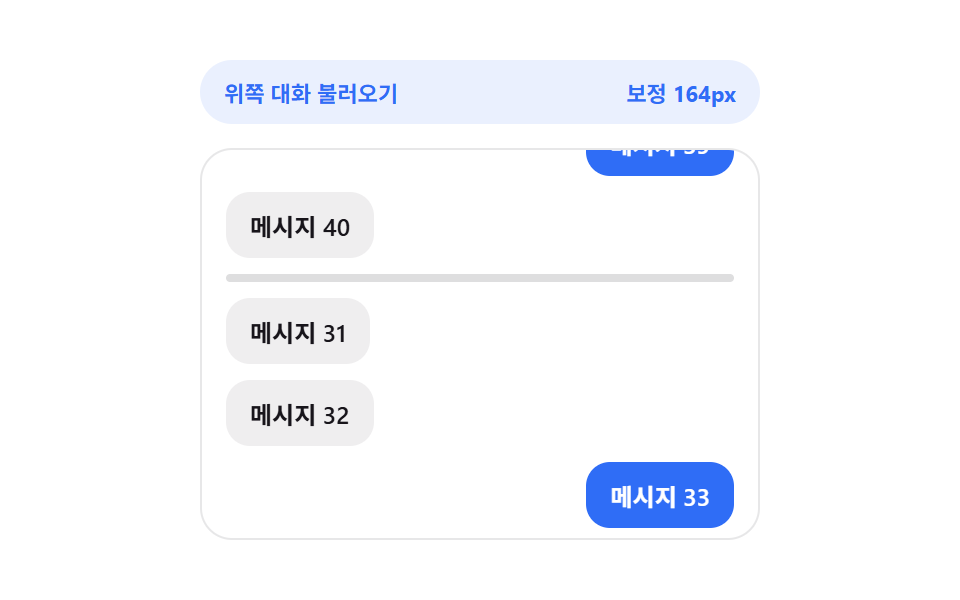
화면 위쪽으로 지난 항목을 불러온 상태가 되면 새로 늘어난 높이 값을 계산해 스크롤 위치 값에 그만큼을 더해, 보던 화면이 밀려 보이지 않게 위치가 그대로 유지됩니다.
쓰임채팅방 과거 대화 불러오기, 댓글 스레드 위로 펼치기
loadOlderOLDER_BATCHscrollHeight
<main class="stage">
<div class="asp is-demo" id="asp">
  <div class="asp__head" id="aspHead">
    <span class="asp__head-label">위쪽 대화 불러오기</span>
    <span class="asp__head-value" id="aspValue">보정 0px</span>
  </div>
  <div class="asp__view" id="aspView">
    <ul class="asp__track" id="aspTrack">
      <li class="asp__anchor" id="aspAnchor" aria-hidden="true"></li>
    </ul>
  </div>
</div>
</main>
@use "../../../../site/static/demo-tokens" as *;
// 스크롤 위치 고정 — loadOlder() 가 위에 추가된 높이 값(scrollHeight 차이)을 계산해
// scrollTop 에 더한다. 앵커 기준 행은 화면에서 밀리지 않고 제자리에 남는다.
$duration: $dur-base;
$easing: $ease-spring;
$color: $subject-blue;
@include stage($stage-paper);
.asp {
display: flex;
flex-direction: column;
gap: $sp-3;
width: min(100%, 280px);
}
.asp__head {
display: flex;
justify-content: space-between;
align-items: center;
padding: $sp-2 $sp-3;
border-radius: $r-pill;
background: rgba(47, 109, 246, .1);
}
.asp__head-label {
font-weight: 700;
font-size: 11px;
color: $subject-blue;
}
.asp__head-value {
font-weight: 700;
font-size: 11px;
color: $subject-blue;
font-variant-numeric: tabular-nums;
}
.asp__view {
box-sizing: border-box;
width: 100%;
height: 196px;
overflow-y: auto;
overflow-x: hidden;
border-radius: $r-card;
border: 1px solid rgba(23, 20, 26, .1);
padding: $sp-3;
scrollbar-width: thin;
}
.asp__track {
list-style: none;
margin: 0;
padding: 0;
display: flex;
flex-direction: column;
gap: $sp-2;
}
.asp__row {
align-self: flex-start;
box-sizing: border-box;
max-width: 82%;
padding: $sp-2 $sp-3;
border-radius: $r-control;
background: rgba(23, 20, 26, .07);
color: $subject-ink;
font-weight: 600;
font-size: 12px;
}
.asp__row--mine {
align-self: flex-end;
background: $color;
color: $stage-paper;
}
.asp__anchor {
flex: 0 0 auto;
height: 4px;
border-radius: $r-pill;
background: rgba(23, 20, 26, .14);
transition: background $duration $easing;
}
.asp__anchor--loading {
background: $color;
}
@media (max-width: 340px) {
.asp { gap: $sp-1; }
.asp__head { padding: $sp-1 $sp-2; }
.asp__view { height: 80px; }
.asp__row { font-size: 11px; padding: $sp-1 $sp-2; }
}
@media (prefers-reduced-motion: reduce) {
.asp__anchor { transition: none !important; }
}html, body {
margin: 0;
overflow: hidden;
}
.stage {
box-sizing: border-box;
min-height: 100vh;
display: grid;
place-items: center;
margin: 0;
background: #ffffff;
font-family: -apple-system, "Segoe UI", "Noto Sans KR", sans-serif;
padding: clamp(8px, 4vw, 24px);
}
.asp {
display: flex;
flex-direction: column;
gap: 12px;
width: min(100%, 280px);
}
.asp__head {
display: flex;
justify-content: space-between;
align-items: center;
padding: 8px 12px;
border-radius: 999px;
background: rgba(47, 109, 246, 0.1);
}
.asp__head-label {
font-weight: 700;
font-size: 11px;
color: #2f6df6;
}
.asp__head-value {
font-weight: 700;
font-size: 11px;
color: #2f6df6;
font-variant-numeric: tabular-nums;
}
.asp__view {
box-sizing: border-box;
width: 100%;
height: 196px;
overflow-y: auto;
overflow-x: hidden;
border-radius: 16px;
border: 1px solid rgba(23, 20, 26, 0.1);
padding: 12px;
scrollbar-width: thin;
}
.asp__track {
list-style: none;
margin: 0;
padding: 0;
display: flex;
flex-direction: column;
gap: 8px;
}
.asp__row {
align-self: flex-start;
box-sizing: border-box;
max-width: 82%;
padding: 8px 12px;
border-radius: 12px;
background: rgba(23, 20, 26, 0.07);
color: #17141a;
font-weight: 600;
font-size: 12px;
}
.asp__row--mine {
align-self: flex-end;
background: #2f6df6;
color: #ffffff;
}
.asp__anchor {
flex: 0 0 auto;
height: 4px;
border-radius: 999px;
background: rgba(23, 20, 26, 0.14);
transition: background 300ms cubic-bezier(0.2, 0.8, 0.2, 1);
}
.asp__anchor--loading {
background: #2f6df6;
}
@media (max-width: 340px) {
.asp {
gap: 4px;
}
.asp__head {
padding: 4px 8px;
}
.asp__view {
height: 80px;
}
.asp__row {
font-size: 11px;
padding: 4px 8px;
}
}
@media (prefers-reduced-motion: reduce) {
.asp__anchor {
transition: none !important;
}
}(function () {
var view = document.getElementById('aspView');
var track = document.getElementById('aspTrack');
var anchor = document.getElementById('aspAnchor');
var valueEl = document.getElementById('aspValue');
var root = document.getElementById('asp');
var OLDER_BATCH = 4;
var LOAD_DELAY_MS = 560;
var MAX_BATCHES = 3;
var seq = 30;
var batches = 0;
var loading = false;
var dir = 1;
var autoplayTimer = null;
function bubble(n, mine) {
var li = document.createElement('li');
li.className = 'asp__row' + (mine ? ' asp__row--mine' : '');
li.textContent = '메시지 ' + String(n).padStart(2, '0');
return li;
}
for (var i = 0; i < 6; i += 1) { seq += 1; track.appendChild(bubble(seq, seq % 3 === 0)); }
// 계산 겹: 위쪽 묶음이 도착하면 늘어나기 직전 높이 값을 저장해 두고, 늘어난 뒤의 높이 값과의
// 차(=위에 추가된 높이)를 scrollTop 에 그대로 더한다 — 앵커 행이 화면에서 한 픽셀도 안 밀린다.
function loadOlder() {
if (loading || batches >= MAX_BATCHES) { return; }
loading = true;
var before = view.scrollHeight;
anchor.classList.add('asp__anchor--loading');
setTimeout(function () {
var frag = document.createDocumentFragment();
for (var n = 0; n < OLDER_BATCH; n += 1) {
seq += 1;
frag.appendChild(bubble(seq, seq % 3 === 0));
}
track.insertBefore(frag, anchor);
var added = view.scrollHeight - before;
view.scrollTop += added; // 위에 붙은 높이 값만큼 보정
valueEl.textContent = '보정 ' + added + 'px';
batches += 1;
loading = false;
anchor.classList.remove('asp__anchor--loading');
}, LOAD_DELAY_MS);
}
function recompute() {
if (view.scrollTop <= 4 && !loading) { loadOlder(); }
}
view.addEventListener('scroll', recompute);
function userTakesOver() {
if (!root.classList.contains('is-demo')) { return; }
root.classList.remove('is-demo');
stopAutoplay();
}
view.addEventListener('wheel', userTakesOver, { passive: true });
view.addEventListener('touchstart', userTakesOver, { passive: true });
function autoplayTick() {
if (batches >= MAX_BATCHES && dir !== 0) {
dir = 0;
setTimeout(function () {
while (track.firstChild !== anchor) { track.removeChild(track.firstChild); }
batches = 0;
view.scrollTop = 0;
dir = 1;
valueEl.textContent = '보정 0px';
}, 700);
return;
}
if (dir === 0 || loading) { return; }
view.scrollTop = Math.max(view.scrollTop - 5, 0); // 위로 올려 과거 묶음 유발
recompute();
}
function stopAutoplay() {
if (autoplayTimer) { clearInterval(autoplayTimer); autoplayTimer = null; }
}
view.scrollTop = view.scrollHeight; // 최신 대화가 보이는 상태로 시작
var reduce = window.matchMedia('(prefers-reduced-motion: reduce)').matches;
if (!reduce) {
autoplayTimer = setInterval(autoplayTick, 60);
}
})();import { useEffect, useRef, useState, useCallback } from "react";
import styles from "./AnchorScrollPreserve.module.scss";
// 스크롤 위치 고정 — loadOlder() 가 위에 추가된 높이 값(scrollHeight 차이)을 계산해
// scrollTop 에 더한다. 앵커 기준 행은 화면에서 밀리지 않고 제자리에 남는다.
const OLDER_BATCH = 4;
const LOAD_DELAY_MS = 560;
const MAX_BATCHES = 3;
export default function AnchorScrollPreserve() {
const rootRef = useRef<HTMLDivElement>(null);
const viewRef = useRef<HTMLDivElement>(null);
const anchorRef = useRef<HTMLLIElement>(null);
const [count, setCount] = useState(30);
const [correction, setCorrection] = useState("보정 0px");
const loadingRef = useRef(false);
const batchesRef = useRef(0);
const dirRef = useRef(1);
const autoplayRef = useRef<number | null>(null);
const countRef = useRef(30);
countRef.current = count;
// 계산 겹: 위쪽 묶음이 도착하면 늘어나기 직전 높이 값을 저장해 두고, 늘어난 뒤의 높이 값과의
// 차(=위에 추가된 높이)를 scrollTop 에 그대로 더한다 — 앵커 행이 한 픽셀도 안 밀린다.
const loadOlder = useCallback(() => {
const view = viewRef.current;
const anchor = anchorRef.current;
if (!view || !anchor || loadingRef.current || (batchesRef.current ?? 0) >= MAX_BATCHES) { return; }
loadingRef.current = true;
const before = view.scrollHeight;
anchor.classList.add(styles["asp__anchor--loading"]);
window.setTimeout(() => {
setCount((prev) => prev + OLDER_BATCH);
// DOM 갱신 뒤 높이 차를 계산해 보정한다
window.requestAnimationFrame(() => {
const added = view.scrollHeight - before;
view.scrollTop += added; // 위에 붙은 높이 값만큼 보정
setCorrection("보정 " + added + "px");
batchesRef.current = (batchesRef.current ?? 0) + 1;
loadingRef.current = false;
anchor.classList.remove(styles["asp__anchor--loading"]);
});
}, LOAD_DELAY_MS);
}, []);
const recompute = useCallback(() => {
const view = viewRef.current;
if (!view) { return; }
if (view.scrollTop <= 4 && !loadingRef.current) { loadOlder(); }
}, [loadOlder]);
useEffect(() => {
const view = viewRef.current;
if (!view) { return; }
view.scrollTop = view.scrollHeight; // 최신 대화가 보이는 상태로 시작
const onScroll = () => recompute();
view.addEventListener("scroll", onScroll);
const takeover = () => {
rootRef.current?.classList.remove(styles["is-demo"]);
if (autoplayRef.current !== null) { window.clearInterval(autoplayRef.current); }
};
view.addEventListener("wheel", takeover, { passive: true });
view.addEventListener("touchstart", takeover, { passive: true });
const reduce = window.matchMedia("(prefers-reduced-motion: reduce)").matches;
if (!reduce) {
autoplayRef.current = window.setInterval(() => {
const v = viewRef.current;
if (!v) { return; }
if ((batchesRef.current ?? 0) >= MAX_BATCHES && dirRef.current !== 0) {
dirRef.current = 0;
window.setTimeout(() => {
setCount(30);
batchesRef.current = 0;
v.scrollTop = 0;
dirRef.current = 1;
setCorrection("보정 0px");
}, 700);
return;
}
if (dirRef.current === 0 || loadingRef.current) { return; }
v.scrollTop = Math.max(v.scrollTop - 5, 0); // 위로 올려 과거 묶음 유발
recompute();
}, 60);
}
return () => {
view.removeEventListener("scroll", onScroll);
view.removeEventListener("wheel", takeover);
view.removeEventListener("touchstart", takeover);
if (autoplayRef.current !== null) { window.clearInterval(autoplayRef.current); }
};
}, [recompute]);
const rowEls = [];
const total = countRef.current ?? 30;
for (let i = 30; i < total; i += 1) {
rowEls.push(
<li
key={i}
className={(i + 1) % 3 === 0 ? `${styles["asp__row"]} ${styles["asp__row--mine"]}` : styles["asp__row"]}
>
메시지 {String(i + 1).padStart(2, "0")}
</li>
);
}
return (
<main className={styles.stage}>
<div ref={rootRef} className={`${styles.asp} ${styles["is-demo"]}`} id="asp">
<div className={styles["asp__head"]}>
<span className={styles["asp__head-label"]}>위쪽 대화 불러오기</span>
<span className={styles["asp__head-value"]}>{correction}</span>
</div>
<div ref={viewRef} className={styles["asp__view"]}>
<ul className={styles["asp__track"]}>
{rowEls}
<li ref={anchorRef} className={styles["asp__anchor"]} aria-hidden="true" />
</ul>
</div>
</div>
</main>
);
}07 스크롤 위치 고정 — 위로 이어붙인 높이 값만큼 보정하는 목록 — 측정 누적면적 23.703% · 움직인 프레임 21/23GODRICH 원작 · zip 에 SCSS·React 포함 · 무한 스크롤 로딩 UI 패턴 9종 — 스피너부터 가상 윈도우까지
이 데모가 속한 글
 무한 스크롤 로딩 UI 패턴 9종 — 스피너부터 가상 윈도우까지무한 스크롤은 스크롤이 끝에 닿을 때마다 다음 목록을 자동으로 불러와 이어 붙이는 방식인데, 아홉 개 중 하나는 남은 스크롤 거리 값으로 로딩 표시의 투명도를 다시 계산하고, 하나는 이전에 늘어난 높이 값만큼 스크롤 이 글의 데모 전부 보기