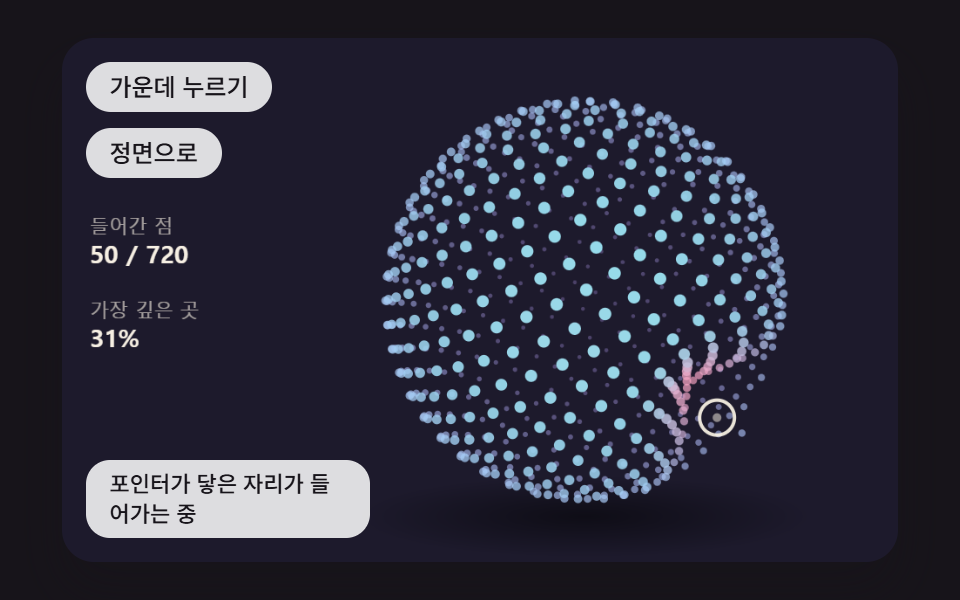
03포인터가 닿은 자리가 움푹 들어갔다 되돌아오는 점 구름 구
황금각 나선으로 점들을 구 표면에 고르게 흩고, 화면에 찍힌 위치가 포인터와 가까운 점일수록 반지름을 줄였다가 감쇠 스프링으로 되돌리며, 깊이에 따라 점 크기와 밝기를 바꾼다.
쓰임데이터·AI 서비스 히어로 장면
POINT_COUNTDENT_RADIUSDENT_SPRING
<main class="stage">
<div class="pc is-demo" id="pc">
  <canvas class="pc__canvas" data-role="canvas" width="480" height="300" tabindex="0" aria-label="포인터가 닿은 자리의 점들이 움푹 들어갔다 스프링처럼 되돌아오는 점 구름 구. 방향키로 돌리고 Enter 로 가운데를 누른다"></canvas>
  <p class="pc__status" data-role="status" aria-live="off">포인터가 닿은 자리가 들어가는 중</p>
  <div class="pc__tools">
    <button class="pc__btn" data-role="poke" type="button">가운데 누르기</button>
    <button class="pc__btn" data-role="home" type="button">정면으로</button>
  </div>
</div>
</main>
@use "../../../../site/static/demo-tokens" as *;
@include stage($stage-ink);
.pc {
position: relative;
width: min(92vw, calc(160vh - 12.8vw));
aspect-ratio: 480 / 300;
margin: 0 auto;
border-radius: $r-card;
overflow: hidden;
box-shadow: $shadow-raised;
background: $subject-ink;
}
.pc__canvas {
display: block;
width: 100%;
height: 100%;
cursor: crosshair;
}
.pc__canvas:focus-visible {
outline: 2px solid rgba(255, 255, 255, .85);
outline-offset: -6px;
}
.pc__status {
position: absolute;
left: $sp-3;
bottom: $sp-3;
box-sizing: border-box;
max-width: 34%;
margin: 0;
padding: $sp-1 $sp-3;
border-radius: $r-control;
background: rgba(255, 255, 255, .85);
color: $subject-ink;
font-weight: 500;
font-size: 11px;
line-height: 1.4;
pointer-events: none;
}
// 판은 오른쪽에 있다 — 버튼은 왼쪽 위 칸에 두고, 좁으면 줄을 바꿔 판을 덮지 않는다
.pc__tools {
position: absolute;
left: $sp-3;
top: $sp-3;
box-sizing: border-box;
max-width: 34%;
display: flex;
flex-wrap: wrap;
gap: $sp-2;
}
.pc__btn {
margin: 0;
padding: $sp-1 $sp-3;
border: 0;
border-radius: $r-pill;
background: rgba(255, 255, 255, .85);
color: $subject-ink;
font: inherit;
font-weight: 500;
font-size: 12px;
line-height: 1.4;
cursor: pointer;
transition: background-color $dur-quick ease-out;
}
.pc__btn:hover {
background: $subject-cream;
}
.pc__btn[aria-pressed="true"] {
background: $subject-mint;
}
.pc__btn:focus-visible {
outline: 2px solid rgba(255, 255, 255, .95);
outline-offset: 2px;
}
// 손가락 가로 끌기는 이 캔버스가 받고, 세로 쓸기는 브라우저에 남겨 페이지 스크롤이 막히지 않게 한다
.pc__canvas { touch-action: pan-y; }
@media (max-width: 340px) {
.pc__btn { font-size: 10px; padding: $sp-1 $sp-2; }
.pc__status { font-size: 10px; padding: $sp-1 $sp-2; }
}
@media (prefers-reduced-motion: reduce) {
.pc__btn { transition: none; }
}html, body {
margin: 0;
overflow: hidden;
}
.stage {
box-sizing: border-box;
min-height: 100vh;
display: grid;
place-items: center;
margin: 0;
background: #17141a;
font-family: -apple-system, "Segoe UI", "Noto Sans KR", sans-serif;
padding: clamp(8px, 4vw, 24px);
}
.pc {
position: relative;
width: min(92vw, 160vh - 12.8vw);
aspect-ratio: 480/300;
margin: 0 auto;
border-radius: 16px;
overflow: hidden;
box-shadow: 0 14px 24px rgba(23, 20, 26, 0.32);
background: #17141a;
}
.pc__canvas {
display: block;
width: 100%;
height: 100%;
cursor: crosshair;
}
.pc__canvas:focus-visible {
outline: 2px solid rgba(255, 255, 255, 0.85);
outline-offset: -6px;
}
.pc__status {
position: absolute;
left: 12px;
bottom: 12px;
box-sizing: border-box;
max-width: 34%;
margin: 0;
padding: 4px 12px;
border-radius: 12px;
background: rgba(255, 255, 255, 0.85);
color: #17141a;
font-weight: 500;
font-size: 11px;
line-height: 1.4;
pointer-events: none;
}
.pc__tools {
position: absolute;
left: 12px;
top: 12px;
box-sizing: border-box;
max-width: 34%;
display: flex;
flex-wrap: wrap;
gap: 8px;
}
.pc__btn {
margin: 0;
padding: 4px 12px;
border: 0;
border-radius: 999px;
background: rgba(255, 255, 255, 0.85);
color: #17141a;
font: inherit;
font-weight: 500;
font-size: 12px;
line-height: 1.4;
cursor: pointer;
transition: background-color 220ms ease-out;
}
.pc__btn:hover {
background: #fff7e6;
}
.pc__btn[aria-pressed=true] {
background: #4cd4a6;
}
.pc__btn:focus-visible {
outline: 2px solid rgba(255, 255, 255, 0.95);
outline-offset: 2px;
}
.pc__canvas {
touch-action: pan-y;
}
@media (max-width: 340px) {
.pc__btn {
font-size: 10px;
padding: 4px 8px;
}
.pc__status {
font-size: 10px;
padding: 4px 8px;
}
}
@media (prefers-reduced-motion: reduce) {
.pc__btn {
transition: none;
}
}(function () {
const root = document.getElementById("pc");
if (!root) return;
const W = 480;
const H = 300;
const FIXED_DT = 16;
const TAU = Math.PI * 2;
const DEG = Math.PI / 180;
// 모형 중심 — 왼쪽 위는 버튼, 왼쪽 아래는 상태 줄이라 모형은 오른쪽으로 비켜 둔다
const CX = 300;
const CY = 150;
// 파스텔 팔레트 — 어두운 무대 위에 밝은 조각을 얹어 명도 차로 경계가 읽힌다
const BG = [29, 26, 44];
const PANEL = [44, 39, 64];
const PAPER = [255, 248, 234];
const PAL = [
[124, 196, 255],
[255, 160, 190],
[126, 226, 192],
[190, 164, 255],
[255, 208, 168],
[246, 228, 140],
[150, 222, 236],
[232, 182, 228],
[196, 220, 160],
];
function clamp(v, lo, hi) { return v < lo ? lo : (v > hi ? hi : v); }
function lerp(a, b, k) { return a + (b - a) * k; }
function smooth(x) { const c = clamp(x, 0, 1); return c * c * (3 - 2 * c); }
function rgba(c, a) {
return 'rgba(' + Math.round(clamp(c[0], 0, 255)) + ',' + Math.round(clamp(c[1], 0, 255)) + ',' + Math.round(clamp(c[2], 0, 255)) + ',' + clamp(a, 0, 1).toFixed(3) + ')';
}
function mix(a, b, k) { return [lerp(a[0], b[0], k), lerp(a[1], b[1], k), lerp(a[2], b[2], k)]; }
function shadeRGB(c, k) { return [c[0] * k, c[1] * k, c[2] * k]; }
// 3차원 계산 — 화면 오른쪽이 +x, 아래가 +y, 화면 안쪽이 +z (화면 쪽을 보는 면은 법선 z 가 음수)
function vadd(a, b) { return [a[0] + b[0], a[1] + b[1], a[2] + b[2]]; }
function vsub(a, b) { return [a[0] - b[0], a[1] - b[1], a[2] - b[2]]; }
function vscale(a, k) { return [a[0] * k, a[1] * k, a[2] * k]; }
function dot(a, b) { return a[0] * b[0] + a[1] * b[1] + a[2] * b[2]; }
function cross(a, b) { return [a[1] * b[2] - a[2] * b[1], a[2] * b[0] - a[0] * b[2], a[0] * b[1] - a[1] * b[0]]; }
function vnorm(a) {
const l = Math.hypot(a[0], a[1], a[2]);
return l > 1e-9 ? [a[0] / l, a[1] / l, a[2] / l] : [0, 0, 0];
}
// 회전 행렬 — 가로축(x)·세로축(y)·깊이축(z) 둘레로 a 라디안
function rotX(a) { const c = Math.cos(a), s = Math.sin(a); return [1, 0, 0, 0, c, -s, 0, s, c]; }
function rotY(a) { const c = Math.cos(a), s = Math.sin(a); return [c, 0, s, 0, 1, 0, -s, 0, c]; }
function rotZ(a) { const c = Math.cos(a), s = Math.sin(a); return [c, -s, 0, s, c, 0, 0, 0, 1]; }
function matMul(a, b) {
return [
a[0] * b[0] + a[1] * b[3] + a[2] * b[6], a[0] * b[1] + a[1] * b[4] + a[2] * b[7], a[0] * b[2] + a[1] * b[5] + a[2] * b[8],
a[3] * b[0] + a[4] * b[3] + a[5] * b[6], a[3] * b[1] + a[4] * b[4] + a[5] * b[7], a[3] * b[2] + a[4] * b[5] + a[5] * b[8],
a[6] * b[0] + a[7] * b[3] + a[8] * b[6], a[6] * b[1] + a[7] * b[4] + a[8] * b[7], a[6] * b[2] + a[7] * b[5] + a[8] * b[8],
];
}
function apply(m, p) {
return [m[0] * p[0] + m[1] * p[1] + m[2] * p[2], m[3] * p[0] + m[4] * p[1] + m[5] * p[2], m[6] * p[0] + m[7] * p[1] + m[8] * p[2]];
}
// 회전 행렬의 역은 전치 — 화면 방향을 모형 좌표로 되돌릴 때 쓴다
function applyT(m, p) {
return [m[0] * p[0] + m[3] * p[1] + m[6] * p[2], m[1] * p[0] + m[4] * p[1] + m[7] * p[2], m[2] * p[0] + m[5] * p[1] + m[8] * p[2]];
}
// 시점 행렬 — 먼저 세로축으로 돌리고(yaw) 그다음 가로축으로 기울인다(pitch)
function viewMatrix(yaw, pitch) { return matMul(rotX(pitch), rotY(yaw)); }
// 원근 나눗셈 — 화면 배율 s = focal / (focal + z). 깊이 z 가 클수록(안쪽) 작아지고 가운데로 모인다
function project(p, focal) {
const s = focal / (focal + p[2]);
return { x: CX + p[0] * s, y: CY + p[1] * s, s: s, z: p[2] };
}
// 빛 — 왼쪽 위 앞에서 비춘다
const LIGHT = vnorm([-0.45, -0.62, -0.64]);
function lambert(n) { return Math.max(0, dot(n, LIGHT)); }
function makeView(yaw, pitch) { return { yaw: yaw, pitch: pitch, yawTo: yaw, pitchTo: pitch, yaw0: yaw, pitch0: pitch }; }
function viewFollow(v, k) {
v.yaw += (v.yawTo - v.yaw) * k;
v.pitch += (v.pitchTo - v.pitch) * k;
}
function viewSnap(v) { v.yaw = v.yawTo; v.pitch = v.pitchTo; }
function viewHome(v) { v.yawTo = v.yaw0; v.pitchTo = v.pitch0; }
function viewGap(v) { return Math.hypot(v.yawTo - v.yaw, v.pitchTo - v.pitch); }
// 포인터 → 목표 각. 모형 중심에서 가로로 벗어난 만큼 yaw, 세로로 벗어난 만큼 pitch (오른쪽을 가리키면 앞면이 오른쪽으로 돈다)
const YAW_RANGE = 1.1;
const PITCH_RANGE = 0.8;
function aimAt(v, px, py) {
v.yawTo = v.yaw0 - clamp((px - CX) / (W / 2), -1, 1) * YAW_RANGE;
v.pitchTo = v.pitch0 + clamp((py - CY) / (H / 2), -1, 1) * PITCH_RANGE;
}
// 방향키 한 번에 돌리는 각
const KEY_STEP = 0.3;
function arrowNudge(ev, v) {
if (ev.key === 'ArrowLeft') {
v.yawTo = clamp(v.yawTo + KEY_STEP, -Math.PI, Math.PI);
}
else if (ev.key === 'ArrowRight') {
v.yawTo = clamp(v.yawTo - KEY_STEP, -Math.PI, Math.PI);
}
else if (ev.key === 'ArrowUp') {
v.pitchTo = clamp(v.pitchTo - KEY_STEP, -1.3, 1.3);
}
else if (ev.key === 'ArrowDown') {
v.pitchTo = clamp(v.pitchTo + KEY_STEP, -1.3, 1.3);
}
else {
return false;
}
ev.preventDefault();
return true;
}
const canvasEl = root.querySelector('[data-role="canvas"]');
const statusEl = root.querySelector('[data-role="status"]');
const ctxRaw = canvasEl ? canvasEl.getContext('2d') : null;
if (!canvasEl || !ctxRaw || !statusEl) {
return;
}
const cv = canvasEl;
const ctx = ctxRaw;
const status = statusEl;
const reduceQuery = window.matchMedia('(prefers-reduced-motion: reduce)');
// 페이지를 연 채 동작 줄이기 설정을 바꿔도 tail 의 change 리스너가 이 값을 다시 읽는다
let still = reduceQuery.matches;
// 자동 시연 중인가 — 사람이 처음 만지는 순간 시연을 멈추고 상태 줄을 읽어 주기 시작한다
let demo = root.classList.contains('is-demo');
function wake() {
if (!demo) {
return;
}
demo = false;
root.classList.remove('is-demo');
status.setAttribute('aria-live', 'polite');
}
function say(text) {
if (status.textContent !== text) {
status.textContent = text;
}
}
function fitCanvas() {
// 배율은 2 에서 자른다 — 배율 3 기기에서 화소가 2.25배로 늘어 프레임마다 일이 그만큼 커지지 않게
const dpr = Math.min(window.devicePixelRatio || 1, 2);
cv.width = Math.round(W * dpr);
cv.height = Math.round(H * dpr);
ctx.setTransform(dpr, 0, 0, dpr, 0, 0);
}
function onResize() {
fitCanvas();
draw();
}
fitCanvas();
window.addEventListener('resize', onResize);
// 화면 좌표(CSS px) → 장면 좌표(480x300). 리사이즈 뒤에도 늘 현재 크기로 다시 잰다
function toScene(ev) {
const r = cv.getBoundingClientRect();
return [((ev.clientX - r.left) / r.width) * W, ((ev.clientY - r.top) / r.height) * H];
}
// 시드 고정 난수 — 같은 시드면 같은 배치가 다시 나온다 (32비트 정수 섞기)
function makeRng(seed) {
let s = seed >>> 0;
return function () {
s = (s + 0x6d2b79f5) >>> 0;
let t = s;
t = Math.imul(t ^ (t >>> 15), t | 1);
t ^= t + Math.imul(t ^ (t >>> 7), t | 61);
return ((t ^ (t >>> 14)) >>> 0) / 4294967296;
};
}
// 화면 투영된 다각형 칠하기
function fillPoly(pts, c, a) {
ctx.beginPath();
ctx.moveTo(pts[0].x, pts[0].y);
for (let i = 1; i < pts.length; i += 1) {
ctx.lineTo(pts[i].x, pts[i].y);
}
ctx.closePath();
ctx.fillStyle = rgba(c, a);
ctx.fill();
// 이웃 면 사이 머리카락 틈을 같은 색 얇은 선으로 메운다
ctx.strokeStyle = rgba(c, a);
ctx.lineWidth = 0.7;
ctx.stroke();
}
// 왼쪽 수치 한 줄 — 이름표 + 값
const LEG_X = 16;
function statRow(y, label, value) {
ctx.textBaseline = 'alphabetic';
ctx.textAlign = 'left';
ctx.fillStyle = rgba(PAPER, 0.6);
ctx.font = '500 11px sans-serif';
ctx.fillText(label, LEG_X, y);
ctx.fillStyle = rgba(PAPER, 0.96);
ctx.font = '700 14px sans-serif';
ctx.fillText(value, LEG_X, y + 17);
}
function clearStage() {
ctx.fillStyle = rgba(BG, 1);
ctx.fillRect(0, 0, W, H);
}
// 바닥 그림자 — 모형 아래 납작한 타원, 모형이 떠 있지 않고 놓여 보이게
function floorShadow(rx, y, a) {
const g = ctx.createRadialGradient(CX, y, 0, CX, y, rx);
g.addColorStop(0, rgba([0, 0, 0], a));
g.addColorStop(1, rgba([0, 0, 0], 0));
ctx.save();
ctx.translate(CX, y);
ctx.scale(1, 0.18);
ctx.translate(-CX, -y);
ctx.fillStyle = g;
ctx.beginPath();
ctx.arc(CX, y, rx, 0, TAU);
ctx.fill();
ctx.restore();
}
const ghost = { x: -1, y: -1, fx: 0, fy: 0, tx: 0, ty: 0, t0: 0, dur: 1, down: false };
function ghostGo(x, y, dur, t) {
ghost.fx = ghost.x < 0 ? x : ghost.x;
ghost.fy = ghost.y < 0 ? y : ghost.y;
ghost.tx = x;
ghost.ty = y;
ghost.t0 = t;
ghost.dur = Math.max(1, dur);
}
function ghostAt(t) {
const e = smooth((t - ghost.t0) / ghost.dur);
ghost.x = lerp(ghost.fx, ghost.tx, e);
ghost.y = lerp(ghost.fy, ghost.ty, e);
}
function drawGhost() {
if (!demo || ghost.x < 0) {
return;
}
ctx.strokeStyle = rgba(PAPER, 0.9);
ctx.lineWidth = 2;
ctx.beginPath();
ctx.arc(ghost.x, ghost.y, ghost.down ? 7 : 10, 0, TAU);
ctx.stroke();
ctx.fillStyle = rgba(PAPER, ghost.down ? 0.9 : 0.5);
ctx.beginPath();
ctx.arc(ghost.x, ghost.y, ghost.down ? 4 : 2.5, 0, TAU);
ctx.fill();
}
// 시연 일정 — 루프 안의 시각(ms) 표를 지날 때마다 한 번씩 부른다
let schedCycle = -1;
let schedIdx = 0;
function runSchedule(t, loop, marks, fire) {
const cyc = Math.floor(t / loop);
const p = t - cyc * loop;
if (cyc !== schedCycle) {
schedCycle = cyc;
schedIdx = 0;
}
while (schedIdx < marks.length && p >= marks[schedIdx]) {
fire(schedIdx, cyc);
schedIdx += 1;
}
}
function fmt(v, d) { return v.toFixed(d); }
function springStep(s, k, d, dt) {
const a = -k * (s.x - s.to) - d * s.v;
s.v += a * dt;
s.x += s.v * dt;
}
// 구 표면의 점 개수
const POINT_COUNT = 720;
// 포인터에서 이 거리(px, 화면) 안의 점이 들어간다
const DENT_RADIUS = 66;
// 들어간 점을 제자리로 당기는 스프링 세기(1/s²)와 감쇠(1/s)
const DENT_SPRING = 140;
const DENT_DAMP = 9;
// 포인터 바로 아래 점은 반지름의 이 비율만큼 들어간다
const DENT_DEPTH = 0.34;
const R = 112;
// 황금각 — 한 바퀴를 황금비로 나눈 작은 쪽 각 π(3 − √5), 이웃 점이 겹치지 않고 고르게 퍼진다
const GOLDEN_ANGLE = Math.PI * (3 - Math.sqrt(5));
const FOCAL = 560;
const VIEW_LERP = 0.06;
// 구가 세로축으로 저절로 도는 빠르기(rad/s)
const SPIN = 0.35;
// 「가운데 누르기」 가 가상 포인터를 가운데에 두는 시간
const POKE_MS = 360;
const DEMO_LOOP = 2000;
const TXT_IDLE = '포인터가 닿은 자리가 들어가는 중';
const homeBtn = root.querySelector('[data-role="home"]');
const pokeBtn = root.querySelector('[data-role="poke"]');
// 황금각 나선 — 높이를 고르게 나누고 점마다 황금각만큼 돌려 놓는다
function goldenSphere(n) {
const out = [];
for (let i = 0; i < n; i += 1) {
const y = 1 - (2 * (i + 0.5)) / n;
const r = Math.sqrt(1 - y * y);
const th = i * GOLDEN_ANGLE;
out.push([r * Math.cos(th), y, r * Math.sin(th)]);
}
return out;
}
const DIRS = goldenSphere(POINT_COUNT);
// 점마다 반지름 배율 스프링 하나 — 1 이 제자리
const springs = DIRS.map(function () { return { x: 1, v: 0, to: 1 }; });
const view = makeView(0, 0.3);
let spin = 0;
let px = -1;
let py = -1;
let pokeMs = 0;
let pointerIn = false;
function report() { say(TXT_IDLE); }
// 포인터 근접 → 목표 반지름. 화면 쪽(z < 0) 점만, 가까울수록 깊게
function dentTarget(p, front, ax, ay) {
if (ax < 0 || !front) {
return 1;
}
const d = Math.hypot(p.x - ax, p.y - ay);
if (d >= DENT_RADIUS) {
return 1;
}
return 1 - DENT_DEPTH * smooth(1 - d / DENT_RADIUS);
}
function matrix() { return matMul(viewMatrix(view.yaw, view.pitch), rotY(spin)); }
function step() {
viewFollow(view, VIEW_LERP);
spin += SPIN * FIXED_DT / 1000;
if (pokeMs > 0) {
pokeMs -= FIXED_DT;
}
const ax = pokeMs > 0 ? CX : px;
const ay = pokeMs > 0 ? CY : py;
const m = matrix();
for (let i = 0; i < DIRS.length; i += 1) {
const q = apply(m, vscale(DIRS[i], R));
springs[i].to = dentTarget(project(q, FOCAL), q[2] < 0, ax, ay);
springStep(springs[i], DENT_SPRING, DENT_DAMP, FIXED_DT / 1000);
}
}
function settle() {
viewSnap(view);
const ax = pokeMs > 0 ? CX : px;
const ay = pokeMs > 0 ? CY : py;
const m = matrix();
for (let i = 0; i < DIRS.length; i += 1) {
const q = apply(m, vscale(DIRS[i], R));
springs[i].to = dentTarget(project(q, FOCAL), q[2] < 0, ax, ay);
springs[i].x = springs[i].to;
springs[i].v = 0;
}
}
function demoTick(t) {
runSchedule(t, DEMO_LOOP, [200, 1050], function (k) {
if (k === 0) {
ghost.x = 190;
ghost.y = 70;
ghostGo(400, 220, 700, t);
}
else {
ghostGo(220, 200, 700, t);
}
report();
});
ghostAt(t);
px = ghost.x;
py = ghost.y;
aimAt(view, CX + (ghost.x - CX) * 0.3, CY + (ghost.y - CY) * 0.3);
}
function draw() {
clearStage();
floorShadow(130, 274, 0.5);
const m = matrix();
const pts = [];
const order = [];
let dented = 0;
let deepest = 0;
for (let i = 0; i < DIRS.length; i += 1) {
const x = springs[i].x;
pts.push(project(apply(m, vscale(DIRS[i], R * x)), FOCAL));
order.push(i);
if (x < 0.98) {
dented += 1;
}
deepest = Math.max(deepest, 1 - x);
}
order.sort(function (a, b) { return pts[b].z - pts[a].z; });
for (let k = 0; k < order.length; k += 1) {
const i = order[k];
const p = pts[i];
const t = clamp((p.z + R) / (2 * R), 0, 1);
const sink = clamp((1 - springs[i].x) / DENT_DEPTH, 0, 1);
ctx.fillStyle = rgba(mix(mix(PAL[6], PAL[3], t), PAL[1], sink), 1 - 0.72 * t);
ctx.beginPath();
ctx.arc(p.x, p.y, (2.9 - 1.6 * t) * p.s, 0, TAU);
ctx.fill();
}
statRow(112, '들어간 점', dented + ' / ' + POINT_COUNT);
statRow(160, '가장 깊은 곳', fmt(deepest * 100, 0) + '%');
drawGhost();
}
function after() {
if (still) {
settle();
}
report();
draw();
}
cv.addEventListener('pointermove', function (ev) {
wake();
pointerIn = true;
const p = toScene(ev);
px = p[0];
py = p[1];
after();
});
cv.addEventListener('pointerleave', function () {
if (!pointerIn) {
return;
}
pointerIn = false;
px = -1;
py = -1;
after();
});
function poke() {
pokeMs = POKE_MS;
after();
// 동작 줄이기에서는 들어간 모양을 보여 준 뒤 다음 입력에서 풀린다
if (still) {
pokeMs = 0;
}
}
cv.addEventListener('pointerdown', function (ev) {
wake();
const p = toScene(ev);
px = p[0];
py = p[1];
after();
});
cv.addEventListener('keydown', function (ev) {
if (arrowNudge(ev, view)) {
wake();
after();
return;
}
if (ev.key === 'Enter' || ev.key === ' ') {
ev.preventDefault();
wake();
poke();
}
else if (ev.key === 'Escape') {
ev.preventDefault();
wake();
viewHome(view);
px = -1;
py = -1;
after();
}
});
if (homeBtn) {
homeBtn.addEventListener('click', function () { wake(); viewHome(view); px = -1; py = -1; after(); });
}
if (pokeBtn) {
pokeBtn.addEventListener('click', function () { wake(); poke(); });
}
report();
let rafId = 0;
let lastTs = -1;
let acc = 0;
let clock = 0;
function frame(ts) {
if (still) {
rafId = 0;
return;
}
if (lastTs < 0) {
lastTs = ts;
}
// 탭이 숨었다 돌아와도 한 번에 100ms 까지만 따라잡는다 — 순간이동 대신 이어서 움직인다
acc += Math.min(ts - lastTs, 100);
lastTs = ts;
let n = 0;
while (acc >= FIXED_DT && n < 6) {
clock += FIXED_DT;
if (demo) {
demoTick(clock);
}
step();
acc -= FIXED_DT;
n += 1;
}
draw();
rafId = window.requestAnimationFrame(frame);
}
function startLoop() {
if (rafId) {
return;
}
lastTs = -1;
acc = 0;
rafId = window.requestAnimationFrame(frame);
}
// 동작 줄이기 설정이 페이지를 연 채 바뀌면 — 켜지면 루프를 멈추고 끝 상태로, 꺼지면 루프를 다시 돈다
function onMotionPref() {
still = reduceQuery.matches;
if (still) {
if (rafId) {
window.cancelAnimationFrame(rafId);
rafId = 0;
}
settle();
report();
draw();
}
else {
startLoop();
}
}
if (typeof reduceQuery.addEventListener === 'function') {
reduceQuery.addEventListener('change', onMotionPref);
}
if (still) {
settle();
draw();
}
else {
startLoop();
}
return function () {
window.cancelAnimationFrame(rafId);
window.removeEventListener('resize', onResize);
if (typeof reduceQuery.removeEventListener === 'function') {
reduceQuery.removeEventListener('change', onMotionPref);
}
};
})();// SpherePointsDent - vanilla 판(03-model3d-sphere-points-dent) 의 React 포트. 같은 계산을 useEffect 안에서 돌린다.
import { useEffect, useRef } from "react";
import styles from "./SpherePointsDent.module.scss";
const cx = (s: string): string => s.split(" ").map((n) => styles[n] ?? n).join(" ");
export default function SpherePointsDent() {
const rootRef = useRef<HTMLDivElement | null>(null);
useEffect(() => {
const rootEl = rootRef.current;
if (!rootEl) return;
const root: HTMLElement = rootEl;
type RGB = [number, number, number];
type V3 = [number, number, number];
type M3 = [number, number, number, number, number, number, number, number, number];
const W = 480;
const H = 300;
const FIXED_DT = 16;
const TAU = Math.PI * 2;
const DEG = Math.PI / 180;
// 모형 중심 — 왼쪽 위는 버튼, 왼쪽 아래는 상태 줄이라 모형은 오른쪽으로 비켜 둔다
const CX = 300;
const CY = 150;
// 파스텔 팔레트 — 어두운 무대 위에 밝은 조각을 얹어 명도 차로 경계가 읽힌다
const BG: RGB = [29, 26, 44];
const PANEL: RGB = [44, 39, 64];
const PAPER: RGB = [255, 248, 234];
const PAL: RGB[] = [
[124, 196, 255],
[255, 160, 190],
[126, 226, 192],
[190, 164, 255],
[255, 208, 168],
[246, 228, 140],
[150, 222, 236],
[232, 182, 228],
[196, 220, 160],
];
function clamp(v: number, lo: number, hi: number): number { return v < lo ? lo : (v > hi ? hi : v); }
function lerp(a: number, b: number, k: number): number { return a + (b - a) * k; }
function smooth(x: number): number { const c = clamp(x, 0, 1); return c * c * (3 - 2 * c); }
function rgba(c: RGB, a: number): string {
return 'rgba(' + Math.round(clamp(c[0], 0, 255)) + ',' + Math.round(clamp(c[1], 0, 255)) + ',' + Math.round(clamp(c[2], 0, 255)) + ',' + clamp(a, 0, 1).toFixed(3) + ')';
}
function mix(a: RGB, b: RGB, k: number): RGB { return [lerp(a[0], b[0], k), lerp(a[1], b[1], k), lerp(a[2], b[2], k)]; }
function shadeRGB(c: RGB, k: number): RGB { return [c[0] * k, c[1] * k, c[2] * k]; }
// 3차원 계산 — 화면 오른쪽이 +x, 아래가 +y, 화면 안쪽이 +z (화면 쪽을 보는 면은 법선 z 가 음수)
function vadd(a: V3, b: V3): V3 { return [a[0] + b[0], a[1] + b[1], a[2] + b[2]]; }
function vsub(a: V3, b: V3): V3 { return [a[0] - b[0], a[1] - b[1], a[2] - b[2]]; }
function vscale(a: V3, k: number): V3 { return [a[0] * k, a[1] * k, a[2] * k]; }
function dot(a: V3, b: V3): number { return a[0] * b[0] + a[1] * b[1] + a[2] * b[2]; }
function cross(a: V3, b: V3): V3 { return [a[1] * b[2] - a[2] * b[1], a[2] * b[0] - a[0] * b[2], a[0] * b[1] - a[1] * b[0]]; }
function vnorm(a: V3): V3 {
const l = Math.hypot(a[0], a[1], a[2]);
return l > 1e-9 ? [a[0] / l, a[1] / l, a[2] / l] : [0, 0, 0];
}
// 회전 행렬 — 가로축(x)·세로축(y)·깊이축(z) 둘레로 a 라디안
function rotX(a: number): M3 { const c = Math.cos(a), s = Math.sin(a); return [1, 0, 0, 0, c, -s, 0, s, c]; }
function rotY(a: number): M3 { const c = Math.cos(a), s = Math.sin(a); return [c, 0, s, 0, 1, 0, -s, 0, c]; }
function rotZ(a: number): M3 { const c = Math.cos(a), s = Math.sin(a); return [c, -s, 0, s, c, 0, 0, 0, 1]; }
function matMul(a: M3, b: M3): M3 {
return [
a[0] * b[0] + a[1] * b[3] + a[2] * b[6], a[0] * b[1] + a[1] * b[4] + a[2] * b[7], a[0] * b[2] + a[1] * b[5] + a[2] * b[8],
a[3] * b[0] + a[4] * b[3] + a[5] * b[6], a[3] * b[1] + a[4] * b[4] + a[5] * b[7], a[3] * b[2] + a[4] * b[5] + a[5] * b[8],
a[6] * b[0] + a[7] * b[3] + a[8] * b[6], a[6] * b[1] + a[7] * b[4] + a[8] * b[7], a[6] * b[2] + a[7] * b[5] + a[8] * b[8],
];
}
function apply(m: M3, p: V3): V3 {
return [m[0] * p[0] + m[1] * p[1] + m[2] * p[2], m[3] * p[0] + m[4] * p[1] + m[5] * p[2], m[6] * p[0] + m[7] * p[1] + m[8] * p[2]];
}
// 회전 행렬의 역은 전치 — 화면 방향을 모형 좌표로 되돌릴 때 쓴다
function applyT(m: M3, p: V3): V3 {
return [m[0] * p[0] + m[3] * p[1] + m[6] * p[2], m[1] * p[0] + m[4] * p[1] + m[7] * p[2], m[2] * p[0] + m[5] * p[1] + m[8] * p[2]];
}
// 시점 행렬 — 먼저 세로축으로 돌리고(yaw) 그다음 가로축으로 기울인다(pitch)
function viewMatrix(yaw: number, pitch: number): M3 { return matMul(rotX(pitch), rotY(yaw)); }
type Proj = { x: number; y: number; s: number; z: number };
// 원근 나눗셈 — 화면 배율 s = focal / (focal + z). 깊이 z 가 클수록(안쪽) 작아지고 가운데로 모인다
function project(p: V3, focal: number): Proj {
const s = focal / (focal + p[2]);
return { x: CX + p[0] * s, y: CY + p[1] * s, s: s, z: p[2] };
}
// 빛 — 왼쪽 위 앞에서 비춘다
const LIGHT: V3 = vnorm([-0.45, -0.62, -0.64]);
function lambert(n: V3): number { return Math.max(0, dot(n, LIGHT)); }
// 시점 추종 — 포인터가 정한 목표 각을 매 스텝 남은 차의 k 만큼 따라간다
type View = { yaw: number; pitch: number; yawTo: number; pitchTo: number; yaw0: number; pitch0: number };
function makeView(yaw: number, pitch: number): View { return { yaw: yaw, pitch: pitch, yawTo: yaw, pitchTo: pitch, yaw0: yaw, pitch0: pitch }; }
function viewFollow(v: View, k: number): void {
v.yaw += (v.yawTo - v.yaw) * k;
v.pitch += (v.pitchTo - v.pitch) * k;
}
function viewSnap(v: View): void { v.yaw = v.yawTo; v.pitch = v.pitchTo; }
function viewHome(v: View): void { v.yawTo = v.yaw0; v.pitchTo = v.pitch0; }
function viewGap(v: View): number { return Math.hypot(v.yawTo - v.yaw, v.pitchTo - v.pitch); }
// 포인터 → 목표 각. 모형 중심에서 가로로 벗어난 만큼 yaw, 세로로 벗어난 만큼 pitch (오른쪽을 가리키면 앞면이 오른쪽으로 돈다)
const YAW_RANGE = 1.1;
const PITCH_RANGE = 0.8;
function aimAt(v: View, px: number, py: number): void {
v.yawTo = v.yaw0 - clamp((px - CX) / (W / 2), -1, 1) * YAW_RANGE;
v.pitchTo = v.pitch0 + clamp((py - CY) / (H / 2), -1, 1) * PITCH_RANGE;
}
// 방향키 한 번에 돌리는 각
const KEY_STEP = 0.3;
function arrowNudge(ev: KeyboardEvent, v: View): boolean {
if (ev.key === 'ArrowLeft') { v.yawTo = clamp(v.yawTo + KEY_STEP, -Math.PI, Math.PI); }
else if (ev.key === 'ArrowRight') { v.yawTo = clamp(v.yawTo - KEY_STEP, -Math.PI, Math.PI); }
else if (ev.key === 'ArrowUp') { v.pitchTo = clamp(v.pitchTo - KEY_STEP, -1.3, 1.3); }
else if (ev.key === 'ArrowDown') { v.pitchTo = clamp(v.pitchTo + KEY_STEP, -1.3, 1.3); }
else { return false; }
ev.preventDefault();
return true;
}
const canvasEl = root.querySelector('[data-role="canvas"]') as HTMLCanvasElement | null;
const statusEl = root.querySelector('[data-role="status"]') as HTMLElement | null;
const ctxRaw = canvasEl ? canvasEl.getContext('2d') : null;
if (!canvasEl || !ctxRaw || !statusEl) { return; }
const cv: HTMLCanvasElement = canvasEl;
const ctx: CanvasRenderingContext2D = ctxRaw;
const status: HTMLElement = statusEl;
const reduceQuery = window.matchMedia('(prefers-reduced-motion: reduce)');
// 페이지를 연 채 동작 줄이기 설정을 바꿔도 tail 의 change 리스너가 이 값을 다시 읽는다
let still = reduceQuery.matches;
// 자동 시연 중인가 — 사람이 처음 만지는 순간 시연을 멈추고 상태 줄을 읽어 주기 시작한다
let demo = root.classList.contains('is-demo');
function wake(): void {
if (!demo) { return; }
demo = false;
root.classList.remove('is-demo');
status.setAttribute('aria-live', 'polite');
}
function say(text: string): void {
if (status.textContent !== text) { status.textContent = text; }
}
function fitCanvas(): void {
// 배율은 2 에서 자른다 — 배율 3 기기에서 화소가 2.25배로 늘어 프레임마다 일이 그만큼 커지지 않게
const dpr = Math.min(window.devicePixelRatio || 1, 2);
cv.width = Math.round(W * dpr);
cv.height = Math.round(H * dpr);
ctx.setTransform(dpr, 0, 0, dpr, 0, 0);
}
function onResize(): void {
fitCanvas();
draw();
}
fitCanvas();
window.addEventListener('resize', onResize);
// 화면 좌표(CSS px) → 장면 좌표(480x300). 리사이즈 뒤에도 늘 현재 크기로 다시 잰다
function toScene(ev: PointerEvent): [number, number] {
const r = cv.getBoundingClientRect();
return [((ev.clientX - r.left) / r.width) * W, ((ev.clientY - r.top) / r.height) * H];
}
// 시드 고정 난수 — 같은 시드면 같은 배치가 다시 나온다 (32비트 정수 섞기)
function makeRng(seed: number): () => number {
let s = seed >>> 0;
return function (): number {
s = (s + 0x6d2b79f5) >>> 0;
let t = s;
t = Math.imul(t ^ (t >>> 15), t | 1);
t ^= t + Math.imul(t ^ (t >>> 7), t | 61);
return ((t ^ (t >>> 14)) >>> 0) / 4294967296;
};
}
// 화면 투영된 다각형 칠하기
function fillPoly(pts: Proj[], c: RGB, a: number): void {
ctx.beginPath();
ctx.moveTo(pts[0].x, pts[0].y);
for (let i = 1; i < pts.length; i += 1) { ctx.lineTo(pts[i].x, pts[i].y); }
ctx.closePath();
ctx.fillStyle = rgba(c, a);
ctx.fill();
// 이웃 면 사이 머리카락 틈을 같은 색 얇은 선으로 메운다
ctx.strokeStyle = rgba(c, a);
ctx.lineWidth = 0.7;
ctx.stroke();
}
// 왼쪽 수치 한 줄 — 이름표 + 값
const LEG_X = 16;
function statRow(y: number, label: string, value: string): void {
ctx.textBaseline = 'alphabetic';
ctx.textAlign = 'left';
ctx.fillStyle = rgba(PAPER, 0.6);
ctx.font = '500 11px sans-serif';
ctx.fillText(label, LEG_X, y);
ctx.fillStyle = rgba(PAPER, 0.96);
ctx.font = '700 14px sans-serif';
ctx.fillText(value, LEG_X, y + 17);
}
function clearStage(): void {
ctx.fillStyle = rgba(BG, 1);
ctx.fillRect(0, 0, W, H);
}
// 바닥 그림자 — 모형 아래 납작한 타원, 모형이 떠 있지 않고 놓여 보이게
function floorShadow(rx: number, y: number, a: number): void {
const g = ctx.createRadialGradient(CX, y, 0, CX, y, rx);
g.addColorStop(0, rgba([0, 0, 0], a));
g.addColorStop(1, rgba([0, 0, 0], 0));
ctx.save();
ctx.translate(CX, y);
ctx.scale(1, 0.18);
ctx.translate(-CX, -y);
ctx.fillStyle = g;
ctx.beginPath();
ctx.arc(CX, y, rx, 0, TAU);
ctx.fill();
ctx.restore();
}
// 시연용 가상 포인터 — 시연 동안만 고리로 그려 무엇이 모형을 움직이는지 보이게 한다
type Ghost = { x: number; y: number; fx: number; fy: number; tx: number; ty: number; t0: number; dur: number; down: boolean };
const ghost: Ghost = { x: -1, y: -1, fx: 0, fy: 0, tx: 0, ty: 0, t0: 0, dur: 1, down: false };
function ghostGo(x: number, y: number, dur: number, t: number): void {
ghost.fx = ghost.x < 0 ? x : ghost.x;
ghost.fy = ghost.y < 0 ? y : ghost.y;
ghost.tx = x;
ghost.ty = y;
ghost.t0 = t;
ghost.dur = Math.max(1, dur);
}
function ghostAt(t: number): void {
const e = smooth((t - ghost.t0) / ghost.dur);
ghost.x = lerp(ghost.fx, ghost.tx, e);
ghost.y = lerp(ghost.fy, ghost.ty, e);
}
function drawGhost(): void {
if (!demo || ghost.x < 0) { return; }
ctx.strokeStyle = rgba(PAPER, 0.9);
ctx.lineWidth = 2;
ctx.beginPath();
ctx.arc(ghost.x, ghost.y, ghost.down ? 7 : 10, 0, TAU);
ctx.stroke();
ctx.fillStyle = rgba(PAPER, ghost.down ? 0.9 : 0.5);
ctx.beginPath();
ctx.arc(ghost.x, ghost.y, ghost.down ? 4 : 2.5, 0, TAU);
ctx.fill();
}
// 시연 일정 — 루프 안의 시각(ms) 표를 지날 때마다 한 번씩 부른다
let schedCycle = -1;
let schedIdx = 0;
function runSchedule(t: number, loop: number, marks: number[], fire: (k: number, cycle: number) => void): void {
const cyc = Math.floor(t / loop);
const p = t - cyc * loop;
if (cyc !== schedCycle) { schedCycle = cyc; schedIdx = 0; }
while (schedIdx < marks.length && p >= marks[schedIdx]) {
fire(schedIdx, cyc);
schedIdx += 1;
}
}
function fmt(v: number, d: number): string { return v.toFixed(d); }
// 감쇠 스프링 — x 가 목표 to 로 당겨지고(k, 1/s²) 속도에 비례해 끌린다(d, 1/s). 속도를 먼저 고치는 반암시 오일러
type Spring = { x: number; v: number; to: number };
function springStep(s: Spring, k: number, d: number, dt: number): void {
const a = -k * (s.x - s.to) - d * s.v;
s.v += a * dt;
s.x += s.v * dt;
}
// 구 표면의 점 개수
const POINT_COUNT = 720;
// 포인터에서 이 거리(px, 화면) 안의 점이 들어간다
const DENT_RADIUS = 66;
// 들어간 점을 제자리로 당기는 스프링 세기(1/s²)와 감쇠(1/s)
const DENT_SPRING = 140;
const DENT_DAMP = 9;
// 포인터 바로 아래 점은 반지름의 이 비율만큼 들어간다
const DENT_DEPTH = 0.34;
const R = 112;
// 황금각 — 한 바퀴를 황금비로 나눈 작은 쪽 각 π(3 − √5), 이웃 점이 겹치지 않고 고르게 퍼진다
const GOLDEN_ANGLE = Math.PI * (3 - Math.sqrt(5));
const FOCAL = 560;
const VIEW_LERP = 0.06;
// 구가 세로축으로 저절로 도는 빠르기(rad/s)
const SPIN = 0.35;
// 「가운데 누르기」 가 가상 포인터를 가운데에 두는 시간
const POKE_MS = 360;
const DEMO_LOOP = 2000;
const TXT_IDLE = '포인터가 닿은 자리가 들어가는 중';
const homeBtn = root.querySelector('[data-role="home"]') as HTMLButtonElement | null;
const pokeBtn = root.querySelector('[data-role="poke"]') as HTMLButtonElement | null;
// 황금각 나선 — 높이를 고르게 나누고 점마다 황금각만큼 돌려 놓는다
function goldenSphere(n: number): V3[] {
const out: V3[] = [];
for (let i = 0; i < n; i += 1) {
const y = 1 - (2 * (i + 0.5)) / n;
const r = Math.sqrt(1 - y * y);
const th = i * GOLDEN_ANGLE;
out.push([r * Math.cos(th), y, r * Math.sin(th)]);
}
return out;
}
const DIRS = goldenSphere(POINT_COUNT);
// 점마다 반지름 배율 스프링 하나 — 1 이 제자리
const springs: Spring[] = DIRS.map(function (): Spring { return { x: 1, v: 0, to: 1 }; });
const view = makeView(0, 0.3);
let spin = 0;
let px = -1;
let py = -1;
let pokeMs = 0;
let pointerIn = false;
function report(): void { say(TXT_IDLE); }
// 포인터 근접 → 목표 반지름. 화면 쪽(z < 0) 점만, 가까울수록 깊게
function dentTarget(p: Proj, front: boolean, ax: number, ay: number): number {
if (ax < 0 || !front) { return 1; }
const d = Math.hypot(p.x - ax, p.y - ay);
if (d >= DENT_RADIUS) { return 1; }
return 1 - DENT_DEPTH * smooth(1 - d / DENT_RADIUS);
}
function matrix(): M3 { return matMul(viewMatrix(view.yaw, view.pitch), rotY(spin)); }
function step(): void {
viewFollow(view, VIEW_LERP);
spin += SPIN * FIXED_DT / 1000;
if (pokeMs > 0) { pokeMs -= FIXED_DT; }
const ax = pokeMs > 0 ? CX : px;
const ay = pokeMs > 0 ? CY : py;
const m = matrix();
for (let i = 0; i < DIRS.length; i += 1) {
const q = apply(m, vscale(DIRS[i], R));
springs[i].to = dentTarget(project(q, FOCAL), q[2] < 0, ax, ay);
springStep(springs[i], DENT_SPRING, DENT_DAMP, FIXED_DT / 1000);
}
}
function settle(): void {
viewSnap(view);
const ax = pokeMs > 0 ? CX : px;
const ay = pokeMs > 0 ? CY : py;
const m = matrix();
for (let i = 0; i < DIRS.length; i += 1) {
const q = apply(m, vscale(DIRS[i], R));
springs[i].to = dentTarget(project(q, FOCAL), q[2] < 0, ax, ay);
springs[i].x = springs[i].to;
springs[i].v = 0;
}
}
function demoTick(t: number): void {
runSchedule(t, DEMO_LOOP, [200, 1050], function (k: number): void {
if (k === 0) { ghost.x = 190; ghost.y = 70; ghostGo(400, 220, 700, t); }
else { ghostGo(220, 200, 700, t); }
report();
});
ghostAt(t);
px = ghost.x;
py = ghost.y;
aimAt(view, CX + (ghost.x - CX) * 0.3, CY + (ghost.y - CY) * 0.3);
}
function draw(): void {
clearStage();
floorShadow(130, 274, 0.5);
const m = matrix();
const pts: Proj[] = [];
const order: number[] = [];
let dented = 0;
let deepest = 0;
for (let i = 0; i < DIRS.length; i += 1) {
const x = springs[i].x;
pts.push(project(apply(m, vscale(DIRS[i], R * x)), FOCAL));
order.push(i);
if (x < 0.98) { dented += 1; }
deepest = Math.max(deepest, 1 - x);
}
order.sort(function (a: number, b: number): number { return pts[b].z - pts[a].z; });
for (let k = 0; k < order.length; k += 1) {
const i = order[k];
const p = pts[i];
const t = clamp((p.z + R) / (2 * R), 0, 1);
const sink = clamp((1 - springs[i].x) / DENT_DEPTH, 0, 1);
ctx.fillStyle = rgba(mix(mix(PAL[6], PAL[3], t), PAL[1], sink), 1 - 0.72 * t);
ctx.beginPath();
ctx.arc(p.x, p.y, (2.9 - 1.6 * t) * p.s, 0, TAU);
ctx.fill();
}
statRow(112, '들어간 점', dented + ' / ' + POINT_COUNT);
statRow(160, '가장 깊은 곳', fmt(deepest * 100, 0) + '%');
drawGhost();
}
function after(): void {
if (still) { settle(); }
report();
draw();
}
cv.addEventListener('pointermove', function (ev: PointerEvent): void {
wake();
pointerIn = true;
const p = toScene(ev);
px = p[0];
py = p[1];
after();
});
cv.addEventListener('pointerleave', function (): void {
if (!pointerIn) { return; }
pointerIn = false;
px = -1;
py = -1;
after();
});
function poke(): void {
pokeMs = POKE_MS;
after();
// 동작 줄이기에서는 들어간 모양을 보여 준 뒤 다음 입력에서 풀린다
if (still) { pokeMs = 0; }
}
cv.addEventListener('pointerdown', function (ev: PointerEvent): void {
wake();
const p = toScene(ev);
px = p[0];
py = p[1];
after();
});
cv.addEventListener('keydown', function (ev: KeyboardEvent): void {
if (arrowNudge(ev, view)) { wake(); after(); return; }
if (ev.key === 'Enter' || ev.key === ' ') { ev.preventDefault(); wake(); poke(); }
else if (ev.key === 'Escape') { ev.preventDefault(); wake(); viewHome(view); px = -1; py = -1; after(); }
});
if (homeBtn) { homeBtn.addEventListener('click', function (): void { wake(); viewHome(view); px = -1; py = -1; after(); }); }
if (pokeBtn) { pokeBtn.addEventListener('click', function (): void { wake(); poke(); }); }
report();
let rafId = 0;
let lastTs = -1;
let acc = 0;
let clock = 0;
function frame(ts: number): void {
if (still) { rafId = 0; return; }
if (lastTs < 0) { lastTs = ts; }
// 탭이 숨었다 돌아와도 한 번에 100ms 까지만 따라잡는다 — 순간이동 대신 이어서 움직인다
acc += Math.min(ts - lastTs, 100);
lastTs = ts;
let n = 0;
while (acc >= FIXED_DT && n < 6) {
clock += FIXED_DT;
if (demo) { demoTick(clock); }
step();
acc -= FIXED_DT;
n += 1;
}
draw();
rafId = window.requestAnimationFrame(frame);
}
function startLoop(): void {
if (rafId) { return; }
lastTs = -1;
acc = 0;
rafId = window.requestAnimationFrame(frame);
}
// 동작 줄이기 설정이 페이지를 연 채 바뀌면 — 켜지면 루프를 멈추고 끝 상태로, 꺼지면 루프를 다시 돈다
function onMotionPref(): void {
still = reduceQuery.matches;
if (still) {
if (rafId) { window.cancelAnimationFrame(rafId); rafId = 0; }
settle();
report();
draw();
} else {
startLoop();
}
}
if (typeof reduceQuery.addEventListener === 'function') { reduceQuery.addEventListener('change', onMotionPref); }
if (still) {
settle();
draw();
} else {
startLoop();
}
return function (): void {
window.cancelAnimationFrame(rafId);
window.removeEventListener('resize', onResize);
if (typeof reduceQuery.removeEventListener === 'function') { reduceQuery.removeEventListener('change', onMotionPref); }
};
}, []);
return (
<div className={cx("pc") + " is-demo"} ref={rootRef}>
<canvas className={cx("pc__canvas")} data-role="canvas" width={480} height={300} tabIndex={0} aria-label="포인터가 닿은 자리의 점들이 움푹 들어갔다 스프링처럼 되돌아오는 점 구름 구. 방향키로 돌리고 Enter 로 가운데를 누른다"></canvas>
<p className={cx("pc__status")} data-role="status" aria-live="off">포인터가 닿은 자리가 들어가는 중</p>
<div className={cx("pc__tools")}>
<button className={cx("pc__btn")} data-role="poke" type="button">가운데 누르기</button>
<button className={cx("pc__btn")} data-role="home" type="button">정면으로</button>
</div>
</div>
);
}03 포인터가 닿은 자리가 움푹 들어갔다 되돌아오는 점 구름 구 — 측정 누적면적 24.134% · 움직인 프레임 23/23GODRICH 원작 · zip 에 SCSS·React 포함 · 3d 웹사이트 만들기 9종 — 마우스를 따라 도는 라이브러리 없는 모형
이 데모가 속한 글
 3d 웹사이트 만들기 9종 — 마우스를 따라 도는 라이브러리 없는 모형3d 웹사이트는 라이브러리 없이 점 좌표와 투영 공식 하나로도 만들어진다 — 02번은 매듭 곡선을 관으로 감싸 마우스 쪽으로 비틀고, 05번은 누르면 상자 덮개가 차례로 스프링처럼 열리며, 08번은 작은 큐브 모형이 이 글의 데모 전부 보기