3d 웹사이트 만들기 9종 — 마우스를 따라 도는 라이브러리 없는 모형
3d 웹사이트는 라이브러리 없이 점 좌표와 투영 공식 하나로도 만들어진다 — 02번은 매듭 곡선을 관으로 감싸 마우스 쪽으로 비틀고, 05번은 누르면 상자 덮개가 차례로 스프링처럼 열리며, 08번은 작은 큐브 모형이 흩어졌다 다시 모인다.
마우스를 대면 돌아보는 3D 모형 아홉 개를 이 화면에서 굴려 보기
 01 model3d-icosa-wire-inertia
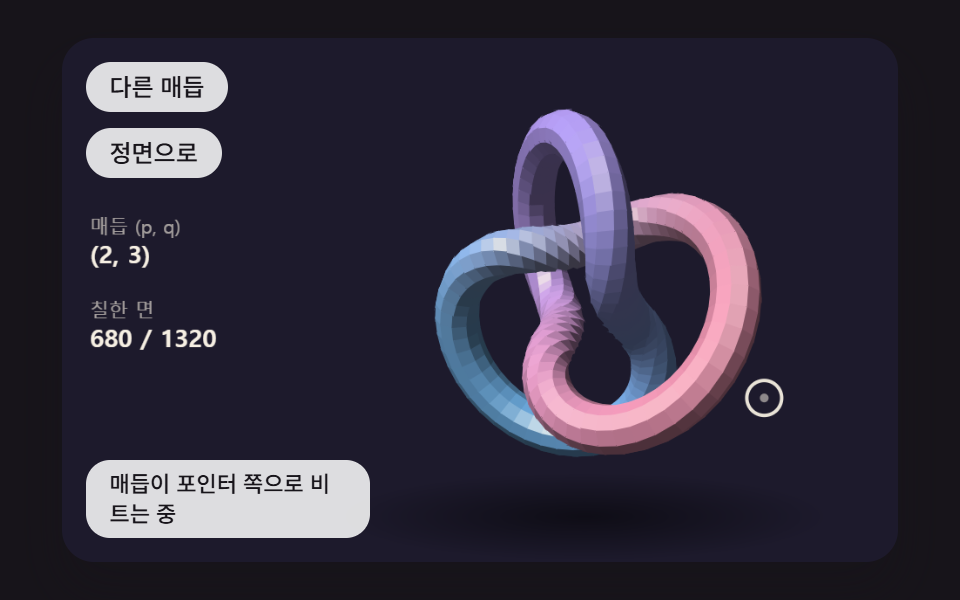 02 model3d-torus-knot-tube
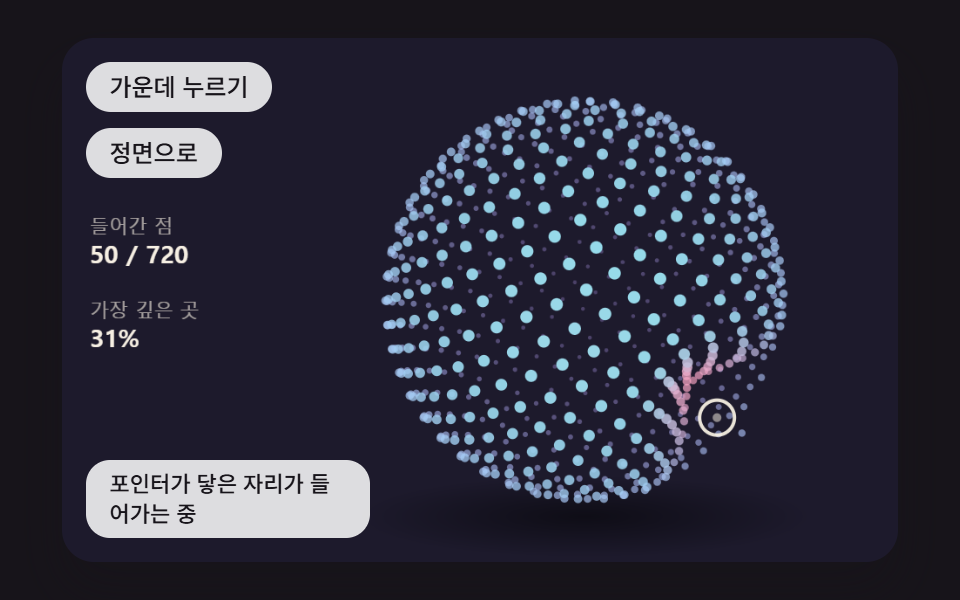 03 model3d-sphere-points-dent
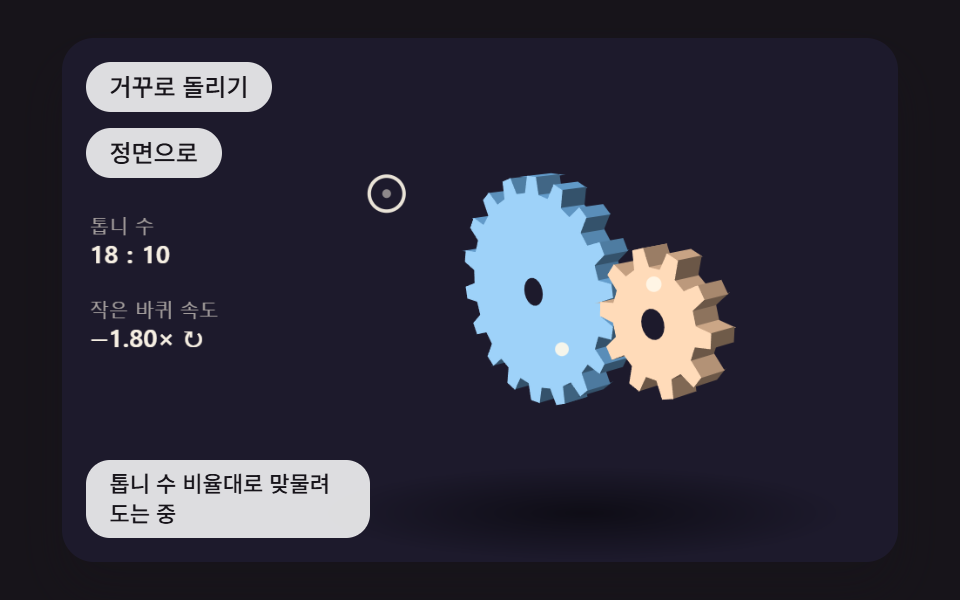 04 model3d-gear-train-mesh
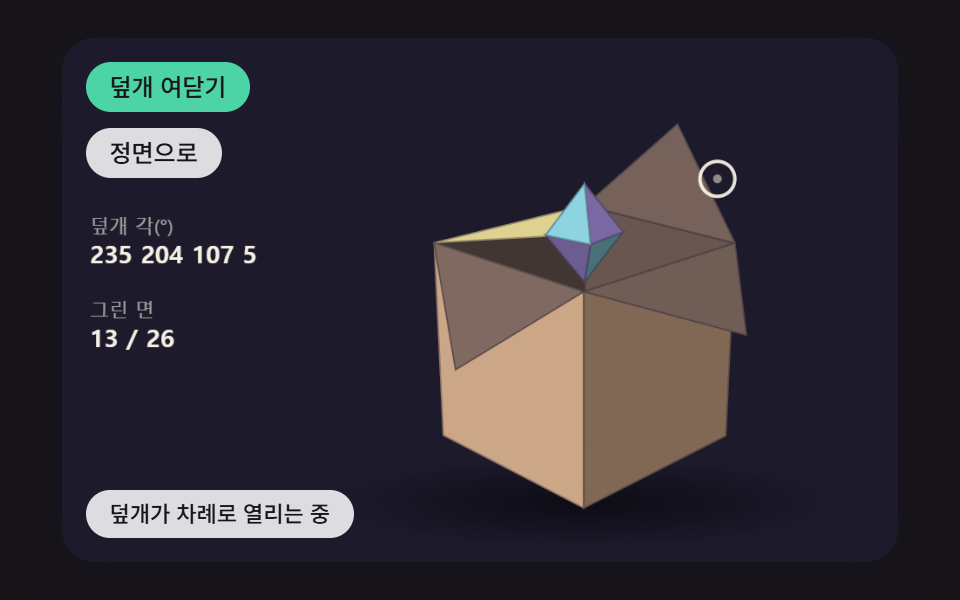 05 model3d-box-lid-spring
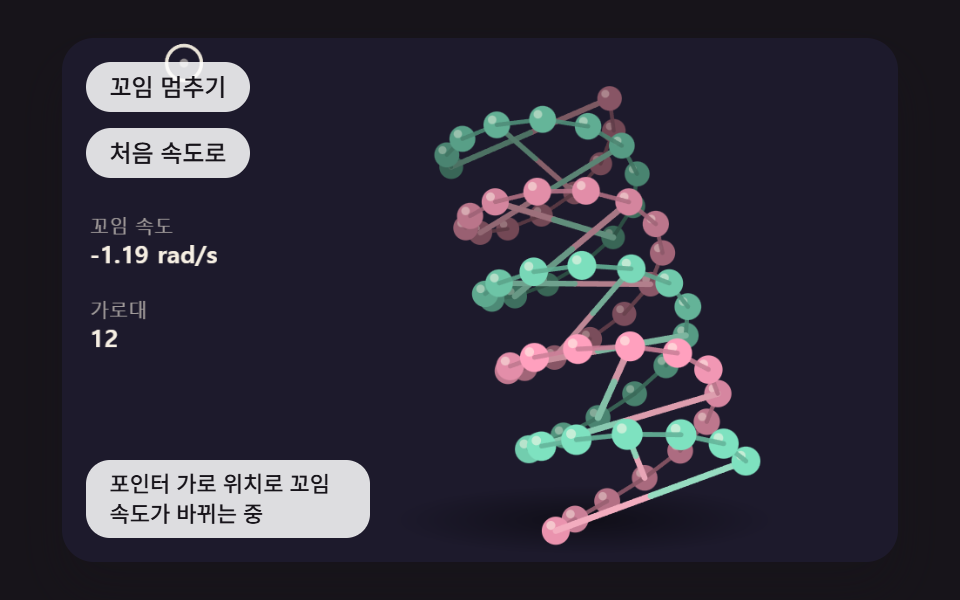 06 model3d-double-helix-twist
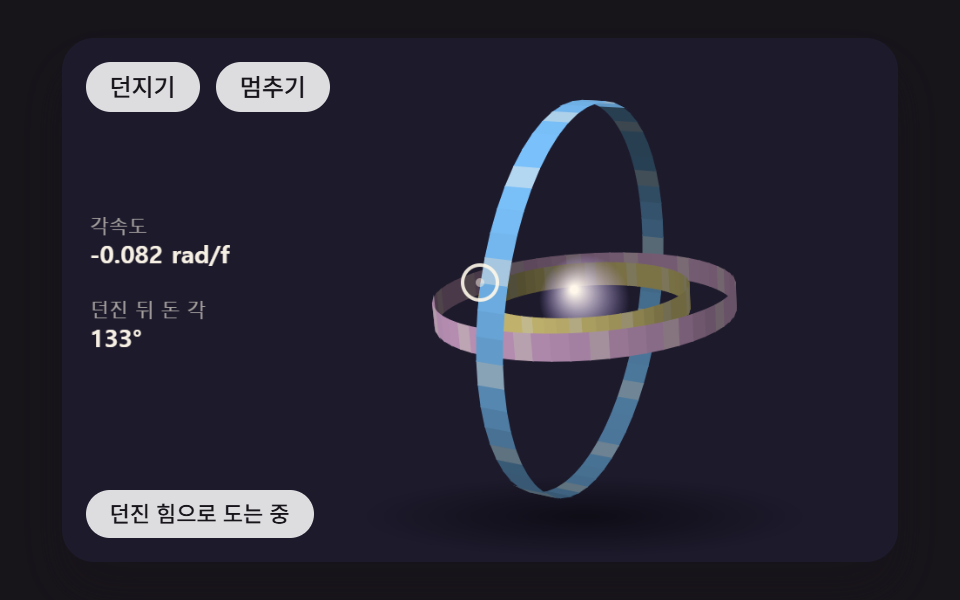 07 model3d-nested-rings-flick
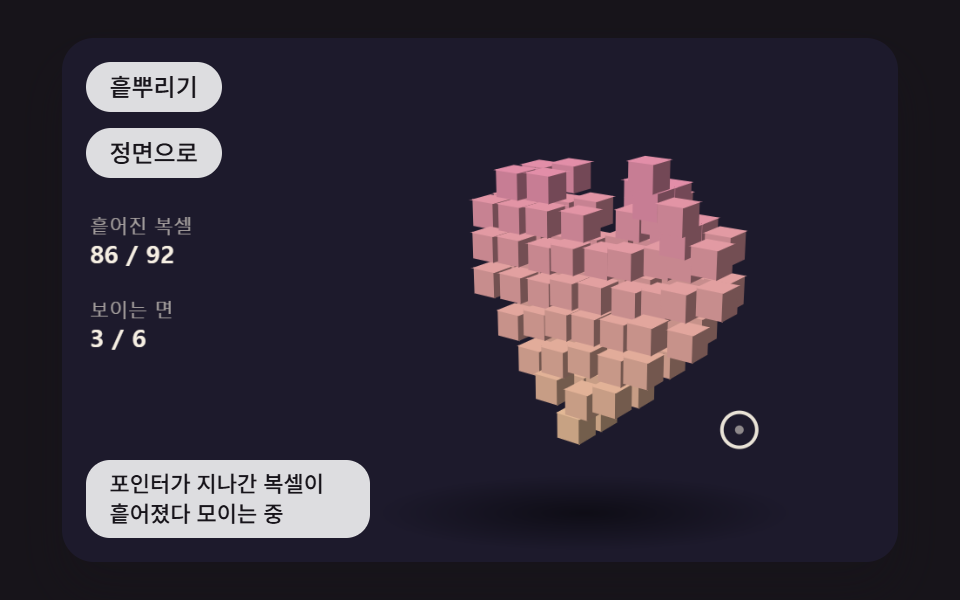 08 model3d-voxel-scatter-reform
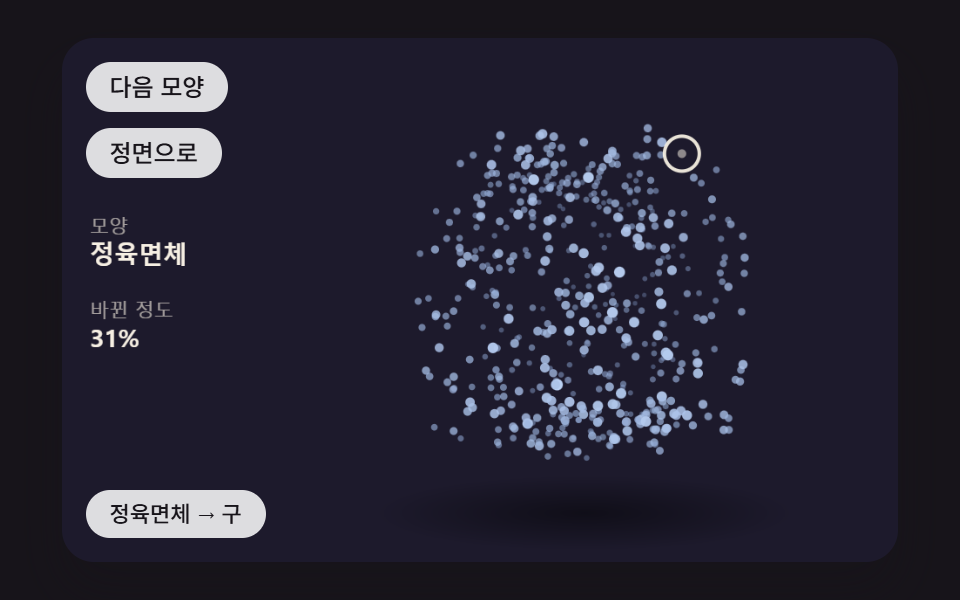 09 model3d-point-morph-shapes
자동 재생 · 눌러서 해당 항목으로 · 전부 한 zip
- 01 마우스 쪽으로 관성을 두고 돌며 깊이만큼 흐려지는 와이어프레임 다면체
- 02 매듭 곡선을 관으로 감싸 마우스를 따라 비트는 토러스 매듭
- 03 포인터가 닿은 자리가 움푹 들어갔다 되돌아오는 점 구름 구
- 04 톱니 수 비율대로 맞물려 돌고 마우스로 시점이 바뀌는 입체 톱니바퀴
- 05 누르면 덮개 네 장이 차례로 스프링처럼 열리는 3D 상자 모형
- 06 마우스 가로 위치에 따라 꼬임 속도가 바뀌는 이중 나선 구슬 모형
- 07 던지듯 끌면 관성으로 돌다 서서히 멈추는 세 겹 고리
- 08 마우스를 대면 흩어졌다 다시 모이는 작은 큐브 모형
- 09 점 구름이 정육면체·구·고리 모양으로 차례로 바뀌며 도는 장면
3d 웹사이트 만들기 9종 — 다면체·매듭·점 구름·톱니·상자·나선·고리·복셀·변신 점
순서는 선만 있는 다면체(01)에서 시작해 면을 칠하는 관(02), 면 없이 점만 찍는 구(03)로 그리는 방식을 바꾸고, 두 물체가 맞물리는 톱니(04)와 경첩으로 열리는 상자(05)에서 부품끼리의 관계를 다룬다. 06·07 은 회전 속도 자체를 포인터가 정하는 모형이고, 08·09 는 모형을 이루는 조각이 흩어지거나 다른 모양으로 갈아타는 장면이다. 아홉 개 모두 <canvas> 2D 위에 다각형·원·선을 칠할 뿐이고, 화소를 읽어 오는 getImageData 는 한 번도 부르지 않는다.
이 데모가 직접 계산하는 것과 계산하지 않는 것
직접 하는 일은 다섯 가지로 정리된다. 점마다 회전 행렬을 곱하고, 깊이로 나눠 화면 좌표를 얻고, 먼 것부터 칠할 순서를 정렬하고, 법선이 화면을 등진 면을 거르고, 법선과 빛 방향의 내적으로 밝기를 매긴다. 화소마다 깊이를 비교하는 깊이 버퍼, 그림자 계산, 표면 무늬 입히기는 하지 않으므로, 이것을 범용 3D 엔진으로 여기면 곤란하다. 대신 모형 하나를 첫 화면에서 돌리는 데 필요한 만큼은 이 다섯 가지로 충분하다는 것을 아홉 모형이 보여 준다.
480×300 무대를 2초 동안 찍어 잰 움직임
캡처는 480×300 무대에서 2초에 걸쳐 스물네 장을 뜨고 앞뒤 두 장의 차이를 세는 방식이라, 프레임 칸의 분모가 23 이 된다.
| 모형 | 누적면적 | 움직인 프레임 | 강도 평균 |
|---|---|---|---|
| 01 관성 와이어프레임 | 21.1% | 23/23 | 83.3 |
| 02 토러스 매듭 관 | 20.7% | 23/23 | 62.2 |
| 03 점 구름 함몰 | 24.1% | 23/23 | 85.4 |
| 04 맞물린 톱니 | 10.6% | 23/23 | 93.6 |
| 05 상자 덮개 스프링 | 20.7% | 23/23 | 62.7 |
| 06 이중 나선 꼬임 | 18.1% | 23/23 | 81.3 |
| 07 세 겹 고리 던지기 | 23.7% | 23/23 | 84.6 |
| 08 복셀 흩어짐 | 11.9% | 23/23 | 58.2 |
| 09 점 변신 | 20.5% | 23/23 | 84.7 |
아홉 개가 모두 23장 내내 움직였고 10% 아래로 떨어진 모형은 없다. 다만 누적면적은 가장 큰 03 도 24.1% 로, 캔버스 특수효과 편이 장면에 두는 목표 30% 에는 아홉 개 모두 못 미친다. 모형이 무대 가운데 일부만 차지하고 나머지는 빈 배경이라 바뀌는 화소가 모형 둘레 안에 머물기 때문이다. 04 와 08 이 특히 낮은데, 04 는 제자리에서 도는 톱니의 이 가장자리만 화소가 바뀌고 08 은 복셀이 흩어지는 순간 말고는 하트가 거의 제자리에 있다.
어떤 첫 화면에 어떤 모형을 올리나
브랜드를 상징하는 물건 하나를 띄우고 싶은 랜딩이라면 01 의 다면체가 가장 가볍고, 포트폴리오처럼 형태 자체를 보여 주고 싶은 곳에는 02 의 매듭이 맞다. 데이터나 AI 서비스의 히어로는 03 의 점 구름, 「이렇게 작동합니다」 섹션은 04 의 톱니가 어울린다. 상품 공개나 선물 이벤트 화면은 05 의 상자, 바이오·헬스케어 첫 화면은 06 의 나선이 주제와 바로 이어진다. 07 은 손으로 던져 보는 재미가 있어 대기 화면 장식에 좋고, 08 은 게임 소개나 이벤트 페이지, 09 는 서비스 단계를 하나씩 바꿔 보여 주는 배경 자리에 들어간다.
3d 웹사이트 레퍼런스로 옆에 두고 보기 좋도록, 아홉 모형은 무거운 장면 대신 무대 오른쪽에 물건 하나만 세워 포인터 쪽으로 돌린다. 모형 중심은 (300, 150) 이라 왼쪽 위 버튼과 왼쪽 아래 상태 줄을 비켜 간다.
평평한 화면 위의 점은 어떻게 앞뒤 깊이를 가진 모형처럼 보이는가?
모든 모형은 같은 좌표계를 쓴다. 화면 오른쪽이 +x, 아래가 +y, 화면 안쪽이 +z 이고, 그래서 화면을 보는 면은 법선의 z 가 음수다. 점을 돌리는 것은 rotX·rotY·rotZ 세 회전 행렬이고, 시점 행렬 viewMatrix(yaw, pitch) 는 세로축으로 먼저 돌린 다음 가로축으로 기울인다.
깊이로 나누면 먼 점이 작아지고 가운데로 모인다
돌린 점을 화면에 옮기는 일은 아래 project 한 함수가 맡는다. 배율 s = focal ÷ (focal + z) 이라 z 가 클수록 s 가 작아지고, 화면 좌표가 모형 중심 쪽으로 끌려 들어간다. 01 의 기본값 FOCAL_PX 600 에서 외접구 반지름 110px 인 다면체의 가장 가까운 꼭짓점은 600/490 = 1.224배, 가장 먼 꼭짓점은 600/710 = 0.845배가 되어 앞뒤 크기 차가 1.45배 난다.
    // 원근 나눗셈 — 화면 배율 s = focal / (focal + z). 깊이 z 가 클수록(안쪽) 작아지고 가운데로 모인다
    function project(p, focal) {
        const s = focal / (focal + p[2]);
        return { x: CX + p[0] * s, y: CY + p[1] * s, s: s, z: p[2] };
    }
    // 빛 — 왼쪽 위 앞에서 비춘다
    const LIGHT = vnorm([-0.45, -0.62, -0.64]);
    function lambert(n) { return Math.max(0, dot(n, LIGHT)); }
크기만으로는 모자라서 순서와 밝기를 더한다
배율만 바꾸면 겹친 부분에서 뒤가 앞을 덮을 수 있다. 그래서 09 를 뺀 여덟 모형은 그리기 전에 깊이로 정렬해 먼 것부터 칠하고(04 는 옆면과 바퀴 순서로 두 번), 01·02·04·05·08 은 법선이 화면을 등진 면을 아예 건너뛴다. 07 은 고리 안쪽 면을 거르지 않고 어둡게 칠한다. 칠하는 면의 밝기는 왼쪽 위 앞에서 오는 빛 LIGHT 와 법선의 내적을 0 아래로 자른 lambert 값으로 정해, 같은 색이라도 빛을 마주한 면은 밝고 비스듬한 면은 어둡다.
포인터 위치가 회전각이 되고, 모형이 그 각을 부드럽게 뒤따라가는 길
포인터 좌표는 getBoundingClientRect 로 캔버스 안의 비율을 구해 480×300 장면 좌표로 바꾼다. 01·02·04·05·08·09 에서는 그 점이 모형 중심에서 가로로 얼마나 벗어났는지(−1~1)에 YAW_RANGE 1.1 rad 를, 세로로 벗어난 정도에 PITCH_RANGE 0.8 rad 를 곱한 것이 목표 각이고, 04 는 벗어남에 0.45 를, 05·08 은 0.4 를 먼저 곱해 덜 돌린다. 03 은 포인터를 함몰 자리로, 06 은 꼬임 속도로, 07 은 끌기로 쓰므로 이 목표 각을 포인터에서 얻지 않는다. 06·07 을 뺀 일곱 모형은 목표 각으로 바로 뛰지 않고 viewFollow 가 16ms 스텝마다 남은 차이에 비율 k 를 곱한 만큼만 다가간다.
    function viewFollow(v, k) {
        v.yaw += (v.yawTo - v.yaw) * k;
        v.pitch += (v.pitchTo - v.pitch) * k;
    }
    function viewSnap(v) { v.yaw = v.yawTo; v.pitch = v.pitchTo; }
    function viewHome(v) { v.yawTo = v.yaw0; v.pitchTo = v.pitch0; }
    function viewGap(v) { return Math.hypot(v.yawTo - v.yaw, v.pitchTo - v.pitch); }
    // 포인터 → 목표 각. 모형 중심에서 가로로 벗어난 만큼 yaw, 세로로 벗어난 만큼 pitch (오른쪽을 가리키면 앞면이 오른쪽으로 돈다)
    const YAW_RANGE = 1.1;
    const PITCH_RANGE = 0.8;
    function aimAt(v, px, py) {
        v.yawTo = v.yaw0 - clamp((px - CX) / (W / 2), -1, 1) * YAW_RANGE;
        v.pitchTo = v.pitch0 + clamp((py - CY) / (H / 2), -1, 1) * PITCH_RANGE;
    }
프레임이 아니라 16ms 고정 스텝으로 센다
requestAnimationFrame 이 넘겨주는 시각 차를 쌓아 두고(한 프레임에 100ms 까지만), 쌓인 시간에서 16ms 를 꺼낼 수 있을 때마다 step() 을 한 번씩, 한 프레임에 최대 여섯 번 돌린 뒤 draw() 를 부른다. 그래서 따라가는 빠르기나 마찰이 화면 주사율에 따라 달라지지 않는다. 방향키도 같은 목표 각을 움직이는데, 01~05·08·09 는 한 번 누를 때마다 KEY_STEP 0.3 rad 씩 돌리고, 06 은 방향키를 꼬임 속도와 기울기에, 07 은 ←/→ 를 던지기에 쓴다.
01마우스 쪽으로 관성을 두고 돌며 깊이만큼 흐려지는 와이어프레임 다면체
꼭짓점 12개를 (0, ±1, ±φ) 세 벌로 놓으면 원래 좌표에서 거리가 2 인 쌍 30개가 모서리, 서로 다 이웃한 세 점 20묶음이 면이 되고, 모형은 포인터가 정한 목표 각을 16ms 마다 남은 차의 8% 씩 좁혀 차가 10% 로 줄기까지 28스텝, 448ms 가 걸린다. 모서리는 먼 것부터 그리면서 깊이에 따라 굵기와 투명도를 깎아, 깊이 값이 끝까지 간 뒤쪽에서는 굵기와 투명도가 둘 다 25% 만 남는다. 랜딩 첫 화면의 브랜드 오브젝트로 두기 좋고, 렌더에서는 누적면적 21.1%·강도 83.3·23/23 프레임이 나왔다.
<main class="stage">
<div class="pc is-demo" id="pc">
  <canvas class="pc__canvas" data-role="canvas" width="480" height="300" tabindex="0" aria-label="포인터 쪽으로 관성을 두고 돌아보며 먼 모서리일수록 가늘고 흐려지는 와이어프레임 정이십면체. 방향키로 돌리고 Enter 로 정면, Space 로 깊이 흐림을 끄고 켠다"></canvas>
  <p class="pc__status" data-role="status" aria-live="off">포인터 쪽으로 늦게 돌아보는 중</p>
  <div class="pc__tools">
    <button class="pc__btn" data-role="home" type="button">정면으로</button>
    <button class="pc__btn" data-role="fade" type="button" aria-pressed="false">깊이 흐림 끄기</button>
  </div>
</div>
</main>
@use "../../../../site/static/demo-tokens" as *;
@include stage($stage-ink);
.pc {
position: relative;
width: min(92vw, calc(160vh - 12.8vw));
aspect-ratio: 480 / 300;
margin: 0 auto;
border-radius: $r-card;
overflow: hidden;
box-shadow: $shadow-raised;
background: $subject-ink;
}
.pc__canvas {
display: block;
width: 100%;
height: 100%;
cursor: crosshair;
}
.pc__canvas:focus-visible {
outline: 2px solid rgba(255, 255, 255, .85);
outline-offset: -6px;
}
.pc__status {
position: absolute;
left: $sp-3;
bottom: $sp-3;
box-sizing: border-box;
max-width: 34%;
margin: 0;
padding: $sp-1 $sp-3;
border-radius: $r-control;
background: rgba(255, 255, 255, .85);
color: $subject-ink;
font-weight: 500;
font-size: 11px;
line-height: 1.4;
pointer-events: none;
}
// 판은 오른쪽에 있다 — 버튼은 왼쪽 위 칸에 두고, 좁으면 줄을 바꿔 판을 덮지 않는다
.pc__tools {
position: absolute;
left: $sp-3;
top: $sp-3;
box-sizing: border-box;
max-width: 34%;
display: flex;
flex-wrap: wrap;
gap: $sp-2;
}
.pc__btn {
margin: 0;
padding: $sp-1 $sp-3;
border: 0;
border-radius: $r-pill;
background: rgba(255, 255, 255, .85);
color: $subject-ink;
font: inherit;
font-weight: 500;
font-size: 12px;
line-height: 1.4;
cursor: pointer;
transition: background-color $dur-quick ease-out;
}
.pc__btn:hover {
background: $subject-cream;
}
.pc__btn[aria-pressed="true"] {
background: $subject-mint;
}
.pc__btn:focus-visible {
outline: 2px solid rgba(255, 255, 255, .95);
outline-offset: 2px;
}
// 손가락 가로 끌기는 이 캔버스가 받고, 세로 쓸기는 브라우저에 남겨 페이지 스크롤이 막히지 않게 한다
.pc__canvas { touch-action: pan-y; }
@media (max-width: 340px) {
.pc__btn { font-size: 10px; padding: $sp-1 $sp-2; }
.pc__status { font-size: 10px; padding: $sp-1 $sp-2; }
}
@media (prefers-reduced-motion: reduce) {
.pc__btn { transition: none; }
}html, body {
margin: 0;
overflow: hidden;
}
.stage {
box-sizing: border-box;
min-height: 100vh;
display: grid;
place-items: center;
margin: 0;
background: #17141a;
font-family: -apple-system, "Segoe UI", "Noto Sans KR", sans-serif;
padding: clamp(8px, 4vw, 24px);
}
.pc {
position: relative;
width: min(92vw, 160vh - 12.8vw);
aspect-ratio: 480/300;
margin: 0 auto;
border-radius: 16px;
overflow: hidden;
box-shadow: 0 14px 24px rgba(23, 20, 26, 0.32);
background: #17141a;
}
.pc__canvas {
display: block;
width: 100%;
height: 100%;
cursor: crosshair;
}
.pc__canvas:focus-visible {
outline: 2px solid rgba(255, 255, 255, 0.85);
outline-offset: -6px;
}
.pc__status {
position: absolute;
left: 12px;
bottom: 12px;
box-sizing: border-box;
max-width: 34%;
margin: 0;
padding: 4px 12px;
border-radius: 12px;
background: rgba(255, 255, 255, 0.85);
color: #17141a;
font-weight: 500;
font-size: 11px;
line-height: 1.4;
pointer-events: none;
}
.pc__tools {
position: absolute;
left: 12px;
top: 12px;
box-sizing: border-box;
max-width: 34%;
display: flex;
flex-wrap: wrap;
gap: 8px;
}
.pc__btn {
margin: 0;
padding: 4px 12px;
border: 0;
border-radius: 999px;
background: rgba(255, 255, 255, 0.85);
color: #17141a;
font: inherit;
font-weight: 500;
font-size: 12px;
line-height: 1.4;
cursor: pointer;
transition: background-color 220ms ease-out;
}
.pc__btn:hover {
background: #fff7e6;
}
.pc__btn[aria-pressed=true] {
background: #4cd4a6;
}
.pc__btn:focus-visible {
outline: 2px solid rgba(255, 255, 255, 0.95);
outline-offset: 2px;
}
.pc__canvas {
touch-action: pan-y;
}
@media (max-width: 340px) {
.pc__btn {
font-size: 10px;
padding: 4px 8px;
}
.pc__status {
font-size: 10px;
padding: 4px 8px;
}
}
@media (prefers-reduced-motion: reduce) {
.pc__btn {
transition: none;
}
}(function () {
const root = document.getElementById("pc");
if (!root) return;
const W = 480;
const H = 300;
const FIXED_DT = 16;
const TAU = Math.PI * 2;
const DEG = Math.PI / 180;
// 모형 중심 — 왼쪽 위는 버튼, 왼쪽 아래는 상태 줄이라 모형은 오른쪽으로 비켜 둔다
const CX = 300;
const CY = 150;
// 파스텔 팔레트 — 어두운 무대 위에 밝은 조각을 얹어 명도 차로 경계가 읽힌다
const BG = [29, 26, 44];
const PANEL = [44, 39, 64];
const PAPER = [255, 248, 234];
const PAL = [
[124, 196, 255],
[255, 160, 190],
[126, 226, 192],
[190, 164, 255],
[255, 208, 168],
[246, 228, 140],
[150, 222, 236],
[232, 182, 228],
[196, 220, 160],
];
function clamp(v, lo, hi) { return v < lo ? lo : (v > hi ? hi : v); }
function lerp(a, b, k) { return a + (b - a) * k; }
function smooth(x) { const c = clamp(x, 0, 1); return c * c * (3 - 2 * c); }
function rgba(c, a) {
return 'rgba(' + Math.round(clamp(c[0], 0, 255)) + ',' + Math.round(clamp(c[1], 0, 255)) + ',' + Math.round(clamp(c[2], 0, 255)) + ',' + clamp(a, 0, 1).toFixed(3) + ')';
}
function mix(a, b, k) { return [lerp(a[0], b[0], k), lerp(a[1], b[1], k), lerp(a[2], b[2], k)]; }
function shadeRGB(c, k) { return [c[0] * k, c[1] * k, c[2] * k]; }
// 3차원 계산 — 화면 오른쪽이 +x, 아래가 +y, 화면 안쪽이 +z (화면 쪽을 보는 면은 법선 z 가 음수)
function vadd(a, b) { return [a[0] + b[0], a[1] + b[1], a[2] + b[2]]; }
function vsub(a, b) { return [a[0] - b[0], a[1] - b[1], a[2] - b[2]]; }
function vscale(a, k) { return [a[0] * k, a[1] * k, a[2] * k]; }
function dot(a, b) { return a[0] * b[0] + a[1] * b[1] + a[2] * b[2]; }
function cross(a, b) { return [a[1] * b[2] - a[2] * b[1], a[2] * b[0] - a[0] * b[2], a[0] * b[1] - a[1] * b[0]]; }
function vnorm(a) {
const l = Math.hypot(a[0], a[1], a[2]);
return l > 1e-9 ? [a[0] / l, a[1] / l, a[2] / l] : [0, 0, 0];
}
// 회전 행렬 — 가로축(x)·세로축(y)·깊이축(z) 둘레로 a 라디안
function rotX(a) { const c = Math.cos(a), s = Math.sin(a); return [1, 0, 0, 0, c, -s, 0, s, c]; }
function rotY(a) { const c = Math.cos(a), s = Math.sin(a); return [c, 0, s, 0, 1, 0, -s, 0, c]; }
function rotZ(a) { const c = Math.cos(a), s = Math.sin(a); return [c, -s, 0, s, c, 0, 0, 0, 1]; }
function matMul(a, b) {
return [
a[0] * b[0] + a[1] * b[3] + a[2] * b[6], a[0] * b[1] + a[1] * b[4] + a[2] * b[7], a[0] * b[2] + a[1] * b[5] + a[2] * b[8],
a[3] * b[0] + a[4] * b[3] + a[5] * b[6], a[3] * b[1] + a[4] * b[4] + a[5] * b[7], a[3] * b[2] + a[4] * b[5] + a[5] * b[8],
a[6] * b[0] + a[7] * b[3] + a[8] * b[6], a[6] * b[1] + a[7] * b[4] + a[8] * b[7], a[6] * b[2] + a[7] * b[5] + a[8] * b[8],
];
}
function apply(m, p) {
return [m[0] * p[0] + m[1] * p[1] + m[2] * p[2], m[3] * p[0] + m[4] * p[1] + m[5] * p[2], m[6] * p[0] + m[7] * p[1] + m[8] * p[2]];
}
// 회전 행렬의 역은 전치 — 화면 방향을 모형 좌표로 되돌릴 때 쓴다
function applyT(m, p) {
return [m[0] * p[0] + m[3] * p[1] + m[6] * p[2], m[1] * p[0] + m[4] * p[1] + m[7] * p[2], m[2] * p[0] + m[5] * p[1] + m[8] * p[2]];
}
// 시점 행렬 — 먼저 세로축으로 돌리고(yaw) 그다음 가로축으로 기울인다(pitch)
function viewMatrix(yaw, pitch) { return matMul(rotX(pitch), rotY(yaw)); }
// 원근 나눗셈 — 화면 배율 s = focal / (focal + z). 깊이 z 가 클수록(안쪽) 작아지고 가운데로 모인다
function project(p, focal) {
const s = focal / (focal + p[2]);
return { x: CX + p[0] * s, y: CY + p[1] * s, s: s, z: p[2] };
}
// 빛 — 왼쪽 위 앞에서 비춘다
const LIGHT = vnorm([-0.45, -0.62, -0.64]);
function lambert(n) { return Math.max(0, dot(n, LIGHT)); }
function makeView(yaw, pitch) { return { yaw: yaw, pitch: pitch, yawTo: yaw, pitchTo: pitch, yaw0: yaw, pitch0: pitch }; }
function viewFollow(v, k) {
v.yaw += (v.yawTo - v.yaw) * k;
v.pitch += (v.pitchTo - v.pitch) * k;
}
function viewSnap(v) { v.yaw = v.yawTo; v.pitch = v.pitchTo; }
function viewHome(v) { v.yawTo = v.yaw0; v.pitchTo = v.pitch0; }
function viewGap(v) { return Math.hypot(v.yawTo - v.yaw, v.pitchTo - v.pitch); }
// 포인터 → 목표 각. 모형 중심에서 가로로 벗어난 만큼 yaw, 세로로 벗어난 만큼 pitch (오른쪽을 가리키면 앞면이 오른쪽으로 돈다)
const YAW_RANGE = 1.1;
const PITCH_RANGE = 0.8;
function aimAt(v, px, py) {
v.yawTo = v.yaw0 - clamp((px - CX) / (W / 2), -1, 1) * YAW_RANGE;
v.pitchTo = v.pitch0 + clamp((py - CY) / (H / 2), -1, 1) * PITCH_RANGE;
}
// 방향키 한 번에 돌리는 각
const KEY_STEP = 0.3;
function arrowNudge(ev, v) {
if (ev.key === 'ArrowLeft') {
v.yawTo = clamp(v.yawTo + KEY_STEP, -Math.PI, Math.PI);
}
else if (ev.key === 'ArrowRight') {
v.yawTo = clamp(v.yawTo - KEY_STEP, -Math.PI, Math.PI);
}
else if (ev.key === 'ArrowUp') {
v.pitchTo = clamp(v.pitchTo - KEY_STEP, -1.3, 1.3);
}
else if (ev.key === 'ArrowDown') {
v.pitchTo = clamp(v.pitchTo + KEY_STEP, -1.3, 1.3);
}
else {
return false;
}
ev.preventDefault();
return true;
}
const canvasEl = root.querySelector('[data-role="canvas"]');
const statusEl = root.querySelector('[data-role="status"]');
const ctxRaw = canvasEl ? canvasEl.getContext('2d') : null;
if (!canvasEl || !ctxRaw || !statusEl) {
return;
}
const cv = canvasEl;
const ctx = ctxRaw;
const status = statusEl;
const reduceQuery = window.matchMedia('(prefers-reduced-motion: reduce)');
// 페이지를 연 채 동작 줄이기 설정을 바꿔도 tail 의 change 리스너가 이 값을 다시 읽는다
let still = reduceQuery.matches;
// 자동 시연 중인가 — 사람이 처음 만지는 순간 시연을 멈추고 상태 줄을 읽어 주기 시작한다
let demo = root.classList.contains('is-demo');
function wake() {
if (!demo) {
return;
}
demo = false;
root.classList.remove('is-demo');
status.setAttribute('aria-live', 'polite');
}
function say(text) {
if (status.textContent !== text) {
status.textContent = text;
}
}
function fitCanvas() {
// 배율은 2 에서 자른다 — 배율 3 기기에서 화소가 2.25배로 늘어 프레임마다 일이 그만큼 커지지 않게
const dpr = Math.min(window.devicePixelRatio || 1, 2);
cv.width = Math.round(W * dpr);
cv.height = Math.round(H * dpr);
ctx.setTransform(dpr, 0, 0, dpr, 0, 0);
}
function onResize() {
fitCanvas();
draw();
}
fitCanvas();
window.addEventListener('resize', onResize);
// 화면 좌표(CSS px) → 장면 좌표(480x300). 리사이즈 뒤에도 늘 현재 크기로 다시 잰다
function toScene(ev) {
const r = cv.getBoundingClientRect();
return [((ev.clientX - r.left) / r.width) * W, ((ev.clientY - r.top) / r.height) * H];
}
// 시드 고정 난수 — 같은 시드면 같은 배치가 다시 나온다 (32비트 정수 섞기)
function makeRng(seed) {
let s = seed >>> 0;
return function () {
s = (s + 0x6d2b79f5) >>> 0;
let t = s;
t = Math.imul(t ^ (t >>> 15), t | 1);
t ^= t + Math.imul(t ^ (t >>> 7), t | 61);
return ((t ^ (t >>> 14)) >>> 0) / 4294967296;
};
}
// 화면 투영된 다각형 칠하기
function fillPoly(pts, c, a) {
ctx.beginPath();
ctx.moveTo(pts[0].x, pts[0].y);
for (let i = 1; i < pts.length; i += 1) {
ctx.lineTo(pts[i].x, pts[i].y);
}
ctx.closePath();
ctx.fillStyle = rgba(c, a);
ctx.fill();
// 이웃 면 사이 머리카락 틈을 같은 색 얇은 선으로 메운다
ctx.strokeStyle = rgba(c, a);
ctx.lineWidth = 0.7;
ctx.stroke();
}
// 왼쪽 수치 한 줄 — 이름표 + 값
const LEG_X = 16;
function statRow(y, label, value) {
ctx.textBaseline = 'alphabetic';
ctx.textAlign = 'left';
ctx.fillStyle = rgba(PAPER, 0.6);
ctx.font = '500 11px sans-serif';
ctx.fillText(label, LEG_X, y);
ctx.fillStyle = rgba(PAPER, 0.96);
ctx.font = '700 14px sans-serif';
ctx.fillText(value, LEG_X, y + 17);
}
function clearStage() {
ctx.fillStyle = rgba(BG, 1);
ctx.fillRect(0, 0, W, H);
}
// 바닥 그림자 — 모형 아래 납작한 타원, 모형이 떠 있지 않고 놓여 보이게
function floorShadow(rx, y, a) {
const g = ctx.createRadialGradient(CX, y, 0, CX, y, rx);
g.addColorStop(0, rgba([0, 0, 0], a));
g.addColorStop(1, rgba([0, 0, 0], 0));
ctx.save();
ctx.translate(CX, y);
ctx.scale(1, 0.18);
ctx.translate(-CX, -y);
ctx.fillStyle = g;
ctx.beginPath();
ctx.arc(CX, y, rx, 0, TAU);
ctx.fill();
ctx.restore();
}
const ghost = { x: -1, y: -1, fx: 0, fy: 0, tx: 0, ty: 0, t0: 0, dur: 1, down: false };
function ghostGo(x, y, dur, t) {
ghost.fx = ghost.x < 0 ? x : ghost.x;
ghost.fy = ghost.y < 0 ? y : ghost.y;
ghost.tx = x;
ghost.ty = y;
ghost.t0 = t;
ghost.dur = Math.max(1, dur);
}
function ghostAt(t) {
const e = smooth((t - ghost.t0) / ghost.dur);
ghost.x = lerp(ghost.fx, ghost.tx, e);
ghost.y = lerp(ghost.fy, ghost.ty, e);
}
function drawGhost() {
if (!demo || ghost.x < 0) {
return;
}
ctx.strokeStyle = rgba(PAPER, 0.9);
ctx.lineWidth = 2;
ctx.beginPath();
ctx.arc(ghost.x, ghost.y, ghost.down ? 7 : 10, 0, TAU);
ctx.stroke();
ctx.fillStyle = rgba(PAPER, ghost.down ? 0.9 : 0.5);
ctx.beginPath();
ctx.arc(ghost.x, ghost.y, ghost.down ? 4 : 2.5, 0, TAU);
ctx.fill();
}
// 시연 일정 — 루프 안의 시각(ms) 표를 지날 때마다 한 번씩 부른다
let schedCycle = -1;
let schedIdx = 0;
function runSchedule(t, loop, marks, fire) {
const cyc = Math.floor(t / loop);
const p = t - cyc * loop;
if (cyc !== schedCycle) {
schedCycle = cyc;
schedIdx = 0;
}
while (schedIdx < marks.length && p >= marks[schedIdx]) {
fire(schedIdx, cyc);
schedIdx += 1;
}
}
function fmt(v, d) { return v.toFixed(d); }
// 남은 각도 차를 매 스텝 이 비율만큼 줄인다 — 클수록 포인터에 바짝 붙어 돈다
const ROT_LERP = 0.08;
// 초점 거리(px) — 화면 배율 = FOCAL_PX / (FOCAL_PX + 깊이). 작을수록 앞뒤 크기 차가 커진다
const FOCAL_PX = 600;
// 가장 먼 모서리에서 굵기·투명도를 덜어 내는 비율 — 0 이면 앞뒤가 같은 선
const DEPTH_FADE = 0.75;
// 외접구 반지름(px)
const R = 110;
// 황금비 — 정이십면체 꼭짓점 좌표 (0, ±1, ±φ) 의 φ
const PHI = (1 + Math.sqrt(5)) / 2;
const LINE_W = 3.4;
const DEMO_LOOP = 2000;
const TXT_IDLE = '포인터 쪽으로 늦게 돌아보는 중';
const TXT_HOME = '정면으로 돌아가는 중';
const homeBtn = root.querySelector('[data-role="home"]');
const fadeBtn = root.querySelector('[data-role="fade"]');
    // 꼭짓점 12개 — (0, ±1, ±φ) 를 x·y·z 자리로 돌려 세 벌 만든다
    function icosaRaw() {
        const out = [];
        for (let i = 0; i < 4; i += 1) {
            const a = i & 1 ? 1 : -1;
            const b = i & 2 ? PHI : -PHI;
            out.push([0, a, b]);
            out.push([a, b, 0]);
            out.push([b, 0, a]);
        }
        return out;
    }
    const RAW = icosaRaw();
    const VERTS = RAW.map(function (p) { return vscale(vnorm(p), R); });
    // 모서리 30개 — 원래 좌표에서 거리가 2 인 꼭짓점 쌍
    const EDGES = [];
    for (let i = 0; i < RAW.length; i += 1) {
        for (let j = i + 1; j < RAW.length; j += 1) {
            const d = vsub(RAW[i], RAW[j]);
            if (Math.abs(dot(d, d) - 4) < 1e-6) {
                EDGES.push([i, j]);
            }
        }
    }
// 면 20개 — 서로 모두 이웃인 세 꼭짓점
const FACES = [];
function linked(a, b) {
for (let k = 0; k < EDGES.length; k += 1) {
if ((EDGES[k][0] === a && EDGES[k][1] === b) || (EDGES[k][0] === b && EDGES[k][1] === a)) {
return true;
}
}
return false;
}
for (let i = 0; i < 12; i += 1) {
for (let j = i + 1; j < 12; j += 1) {
for (let k = j + 1; k < 12; k += 1) {
if (linked(i, j) && linked(j, k) && linked(i, k)) {
FACES.push([i, j, k]);
}
}
}
}
const view = makeView(0.35, 0.25);
let fadeOn = true;
let pointerIn = false;
function fade() { return fadeOn ? DEPTH_FADE : 0; }
// 깊이 0~1 — 0 이 가장 가까운 쪽, 1 이 가장 먼 쪽
function depthT(z) { return clamp((z + R) / (2 * R), 0, 1); }
function report() {
say(Math.abs(view.yawTo - view.yaw0) + Math.abs(view.pitchTo - view.pitch0) < 1e-3 ? TXT_HOME : TXT_IDLE);
}
function step() { viewFollow(view, ROT_LERP); }
function settle() { viewSnap(view); }
function demoTick(t) {
runSchedule(t, DEMO_LOOP, [200, 850, 1450], function (k) {
if (k === 0) {
ghostGo(440, 70, 240, t);
}
else if (k === 1) {
ghostGo(190, 240, 240, t);
}
else {
ghostGo(450, 245, 240, t);
}
report();
});
ghostAt(t);
aimAt(view, ghost.x, ghost.y);
}
function draw() {
clearStage();
floorShadow(130, 272, 0.55);
const m = viewMatrix(view.yaw, view.pitch);
const rv = VERTS.map(function (p) { return apply(m, p); });
const pv = rv.map(function (p) { return project(p, FOCAL_PX); });
// 화면 쪽 면만 아주 옅게 — 선 사이가 비어 보이지 않게 빛 방향 내적으로 밝기를 준다
for (let f = 0; f < FACES.length; f += 1) {
const a = rv[FACES[f][0]], b = rv[FACES[f][1]], c = rv[FACES[f][2]];
let n = vnorm(cross(vsub(b, a), vsub(c, a)));
const mid = vscale(vadd(vadd(a, b), c), 1 / 3);
if (dot(n, mid) < 0) {
n = vscale(n, -1);
}
if (n[2] >= 0) {
continue;
}
fillPoly([pv[FACES[f][0]], pv[FACES[f][1]], pv[FACES[f][2]]], mix(PAL[3], PAPER, 0.15), 0.05 + 0.16 * lambert(n));
}
// 모서리 — 먼 것부터 그려 가까운 선이 위에 오게
const order = EDGES.map(function (_e, i) { return i; });
const zm = EDGES.map(function (e) { return (rv[e[0]][2] + rv[e[1]][2]) / 2; });
order.sort(function (a, b) { return zm[b] - zm[a]; });
ctx.lineCap = 'round';
for (let k = 0; k < order.length; k += 1) {
const e = EDGES[order[k]];
const t = depthT(zm[order[k]]);
const keep = 1 - fade() * t;
ctx.strokeStyle = rgba(mix(PAL[0], PAL[3], t), keep);
ctx.lineWidth = LINE_W * keep * pv[e[0]].s;
ctx.beginPath();
ctx.moveTo(pv[e[0]].x, pv[e[0]].y);
ctx.lineTo(pv[e[1]].x, pv[e[1]].y);
ctx.stroke();
}
for (let i = 0; i < pv.length; i += 1) {
const t = depthT(rv[i][2]);
ctx.fillStyle = rgba(mix(PAPER, PAL[3], t), 1 - fade() * t);
ctx.beginPath();
ctx.arc(pv[i].x, pv[i].y, 4.2 * pv[i].s * (1 - 0.5 * fade() * t), 0, TAU);
ctx.fill();
}
statRow(112, '남은 각도 차', fmt(viewGap(view) / DEG, 1) + '°');
statRow(160, '앞 · 뒤 배율', fmt(FOCAL_PX / (FOCAL_PX - R), 2) + '× · ' + fmt(FOCAL_PX / (FOCAL_PX + R), 2) + '×');
drawGhost();
}
function after() {
if (still) {
settle();
}
report();
draw();
}
cv.addEventListener('pointermove', function (ev) {
wake();
pointerIn = true;
const p = toScene(ev);
aimAt(view, p[0], p[1]);
after();
});
cv.addEventListener('pointerleave', function () {
if (!pointerIn) {
return;
}
pointerIn = false;
viewHome(view);
after();
});
cv.addEventListener('pointerdown', function (ev) {
wake();
const p = toScene(ev);
aimAt(view, p[0], p[1]);
after();
});
cv.addEventListener('keydown', function (ev) {
if (arrowNudge(ev, view)) {
wake();
after();
return;
}
if (ev.key === 'Enter' || ev.key === 'Escape') {
ev.preventDefault();
wake();
viewHome(view);
after();
}
else if (ev.key === ' ') {
ev.preventDefault();
wake();
toggleFade();
}
});
function toggleFade() {
fadeOn = !fadeOn;
if (fadeBtn) {
fadeBtn.setAttribute('aria-pressed', fadeOn ? 'false' : 'true');
}
after();
}
if (homeBtn) {
homeBtn.addEventListener('click', function () { wake(); viewHome(view); after(); });
}
if (fadeBtn) {
fadeBtn.addEventListener('click', function () { wake(); toggleFade(); });
}
report();
let rafId = 0;
let lastTs = -1;
let acc = 0;
let clock = 0;
function frame(ts) {
if (still) {
rafId = 0;
return;
}
if (lastTs < 0) {
lastTs = ts;
}
// 탭이 숨었다 돌아와도 한 번에 100ms 까지만 따라잡는다 — 순간이동 대신 이어서 움직인다
acc += Math.min(ts - lastTs, 100);
lastTs = ts;
let n = 0;
while (acc >= FIXED_DT && n < 6) {
clock += FIXED_DT;
if (demo) {
demoTick(clock);
}
step();
acc -= FIXED_DT;
n += 1;
}
draw();
rafId = window.requestAnimationFrame(frame);
}
function startLoop() {
if (rafId) {
return;
}
lastTs = -1;
acc = 0;
rafId = window.requestAnimationFrame(frame);
}
// 동작 줄이기 설정이 페이지를 연 채 바뀌면 — 켜지면 루프를 멈추고 끝 상태로, 꺼지면 루프를 다시 돈다
function onMotionPref() {
still = reduceQuery.matches;
if (still) {
if (rafId) {
window.cancelAnimationFrame(rafId);
rafId = 0;
}
settle();
report();
draw();
}
else {
startLoop();
}
}
if (typeof reduceQuery.addEventListener === 'function') {
reduceQuery.addEventListener('change', onMotionPref);
}
if (still) {
settle();
draw();
}
else {
startLoop();
}
return function () {
window.cancelAnimationFrame(rafId);
window.removeEventListener('resize', onResize);
if (typeof reduceQuery.removeEventListener === 'function') {
reduceQuery.removeEventListener('change', onMotionPref);
}
};
})();// IcosaWireInertia - vanilla 판(01-model3d-icosa-wire-inertia) 의 React 포트. 같은 계산을 useEffect 안에서 돌린다.
import { useEffect, useRef } from "react";
import styles from "./IcosaWireInertia.module.scss";
const cx = (s: string): string => s.split(" ").map((n) => styles[n] ?? n).join(" ");
export default function IcosaWireInertia() {
const rootRef = useRef<HTMLDivElement | null>(null);
useEffect(() => {
const rootEl = rootRef.current;
if (!rootEl) return;
const root: HTMLElement = rootEl;
type RGB = [number, number, number];
type V3 = [number, number, number];
type M3 = [number, number, number, number, number, number, number, number, number];
const W = 480;
const H = 300;
const FIXED_DT = 16;
const TAU = Math.PI * 2;
const DEG = Math.PI / 180;
// 모형 중심 — 왼쪽 위는 버튼, 왼쪽 아래는 상태 줄이라 모형은 오른쪽으로 비켜 둔다
const CX = 300;
const CY = 150;
// 파스텔 팔레트 — 어두운 무대 위에 밝은 조각을 얹어 명도 차로 경계가 읽힌다
const BG: RGB = [29, 26, 44];
const PANEL: RGB = [44, 39, 64];
const PAPER: RGB = [255, 248, 234];
const PAL: RGB[] = [
[124, 196, 255],
[255, 160, 190],
[126, 226, 192],
[190, 164, 255],
[255, 208, 168],
[246, 228, 140],
[150, 222, 236],
[232, 182, 228],
[196, 220, 160],
];
function clamp(v: number, lo: number, hi: number): number { return v < lo ? lo : (v > hi ? hi : v); }
function lerp(a: number, b: number, k: number): number { return a + (b - a) * k; }
function smooth(x: number): number { const c = clamp(x, 0, 1); return c * c * (3 - 2 * c); }
function rgba(c: RGB, a: number): string {
return 'rgba(' + Math.round(clamp(c[0], 0, 255)) + ',' + Math.round(clamp(c[1], 0, 255)) + ',' + Math.round(clamp(c[2], 0, 255)) + ',' + clamp(a, 0, 1).toFixed(3) + ')';
}
function mix(a: RGB, b: RGB, k: number): RGB { return [lerp(a[0], b[0], k), lerp(a[1], b[1], k), lerp(a[2], b[2], k)]; }
function shadeRGB(c: RGB, k: number): RGB { return [c[0] * k, c[1] * k, c[2] * k]; }
// 3차원 계산 — 화면 오른쪽이 +x, 아래가 +y, 화면 안쪽이 +z (화면 쪽을 보는 면은 법선 z 가 음수)
function vadd(a: V3, b: V3): V3 { return [a[0] + b[0], a[1] + b[1], a[2] + b[2]]; }
function vsub(a: V3, b: V3): V3 { return [a[0] - b[0], a[1] - b[1], a[2] - b[2]]; }
function vscale(a: V3, k: number): V3 { return [a[0] * k, a[1] * k, a[2] * k]; }
function dot(a: V3, b: V3): number { return a[0] * b[0] + a[1] * b[1] + a[2] * b[2]; }
function cross(a: V3, b: V3): V3 { return [a[1] * b[2] - a[2] * b[1], a[2] * b[0] - a[0] * b[2], a[0] * b[1] - a[1] * b[0]]; }
function vnorm(a: V3): V3 {
const l = Math.hypot(a[0], a[1], a[2]);
return l > 1e-9 ? [a[0] / l, a[1] / l, a[2] / l] : [0, 0, 0];
}
// 회전 행렬 — 가로축(x)·세로축(y)·깊이축(z) 둘레로 a 라디안
function rotX(a: number): M3 { const c = Math.cos(a), s = Math.sin(a); return [1, 0, 0, 0, c, -s, 0, s, c]; }
function rotY(a: number): M3 { const c = Math.cos(a), s = Math.sin(a); return [c, 0, s, 0, 1, 0, -s, 0, c]; }
function rotZ(a: number): M3 { const c = Math.cos(a), s = Math.sin(a); return [c, -s, 0, s, c, 0, 0, 0, 1]; }
function matMul(a: M3, b: M3): M3 {
return [
a[0] * b[0] + a[1] * b[3] + a[2] * b[6], a[0] * b[1] + a[1] * b[4] + a[2] * b[7], a[0] * b[2] + a[1] * b[5] + a[2] * b[8],
a[3] * b[0] + a[4] * b[3] + a[5] * b[6], a[3] * b[1] + a[4] * b[4] + a[5] * b[7], a[3] * b[2] + a[4] * b[5] + a[5] * b[8],
a[6] * b[0] + a[7] * b[3] + a[8] * b[6], a[6] * b[1] + a[7] * b[4] + a[8] * b[7], a[6] * b[2] + a[7] * b[5] + a[8] * b[8],
];
}
function apply(m: M3, p: V3): V3 {
return [m[0] * p[0] + m[1] * p[1] + m[2] * p[2], m[3] * p[0] + m[4] * p[1] + m[5] * p[2], m[6] * p[0] + m[7] * p[1] + m[8] * p[2]];
}
// 회전 행렬의 역은 전치 — 화면 방향을 모형 좌표로 되돌릴 때 쓴다
function applyT(m: M3, p: V3): V3 {
return [m[0] * p[0] + m[3] * p[1] + m[6] * p[2], m[1] * p[0] + m[4] * p[1] + m[7] * p[2], m[2] * p[0] + m[5] * p[1] + m[8] * p[2]];
}
// 시점 행렬 — 먼저 세로축으로 돌리고(yaw) 그다음 가로축으로 기울인다(pitch)
function viewMatrix(yaw: number, pitch: number): M3 { return matMul(rotX(pitch), rotY(yaw)); }
type Proj = { x: number; y: number; s: number; z: number };
// 원근 나눗셈 — 화면 배율 s = focal / (focal + z). 깊이 z 가 클수록(안쪽) 작아지고 가운데로 모인다
function project(p: V3, focal: number): Proj {
const s = focal / (focal + p[2]);
return { x: CX + p[0] * s, y: CY + p[1] * s, s: s, z: p[2] };
}
// 빛 — 왼쪽 위 앞에서 비춘다
const LIGHT: V3 = vnorm([-0.45, -0.62, -0.64]);
function lambert(n: V3): number { return Math.max(0, dot(n, LIGHT)); }
// 시점 추종 — 포인터가 정한 목표 각을 매 스텝 남은 차의 k 만큼 따라간다
type View = { yaw: number; pitch: number; yawTo: number; pitchTo: number; yaw0: number; pitch0: number };
function makeView(yaw: number, pitch: number): View { return { yaw: yaw, pitch: pitch, yawTo: yaw, pitchTo: pitch, yaw0: yaw, pitch0: pitch }; }
function viewFollow(v: View, k: number): void {
v.yaw += (v.yawTo - v.yaw) * k;
v.pitch += (v.pitchTo - v.pitch) * k;
}
function viewSnap(v: View): void { v.yaw = v.yawTo; v.pitch = v.pitchTo; }
function viewHome(v: View): void { v.yawTo = v.yaw0; v.pitchTo = v.pitch0; }
function viewGap(v: View): number { return Math.hypot(v.yawTo - v.yaw, v.pitchTo - v.pitch); }
// 포인터 → 목표 각. 모형 중심에서 가로로 벗어난 만큼 yaw, 세로로 벗어난 만큼 pitch (오른쪽을 가리키면 앞면이 오른쪽으로 돈다)
const YAW_RANGE = 1.1;
const PITCH_RANGE = 0.8;
function aimAt(v: View, px: number, py: number): void {
v.yawTo = v.yaw0 - clamp((px - CX) / (W / 2), -1, 1) * YAW_RANGE;
v.pitchTo = v.pitch0 + clamp((py - CY) / (H / 2), -1, 1) * PITCH_RANGE;
}
// 방향키 한 번에 돌리는 각
const KEY_STEP = 0.3;
function arrowNudge(ev: KeyboardEvent, v: View): boolean {
if (ev.key === 'ArrowLeft') { v.yawTo = clamp(v.yawTo + KEY_STEP, -Math.PI, Math.PI); }
else if (ev.key === 'ArrowRight') { v.yawTo = clamp(v.yawTo - KEY_STEP, -Math.PI, Math.PI); }
else if (ev.key === 'ArrowUp') { v.pitchTo = clamp(v.pitchTo - KEY_STEP, -1.3, 1.3); }
else if (ev.key === 'ArrowDown') { v.pitchTo = clamp(v.pitchTo + KEY_STEP, -1.3, 1.3); }
else { return false; }
ev.preventDefault();
return true;
}
const canvasEl = root.querySelector('[data-role="canvas"]') as HTMLCanvasElement | null;
const statusEl = root.querySelector('[data-role="status"]') as HTMLElement | null;
const ctxRaw = canvasEl ? canvasEl.getContext('2d') : null;
if (!canvasEl || !ctxRaw || !statusEl) { return; }
const cv: HTMLCanvasElement = canvasEl;
const ctx: CanvasRenderingContext2D = ctxRaw;
const status: HTMLElement = statusEl;
const reduceQuery = window.matchMedia('(prefers-reduced-motion: reduce)');
// 페이지를 연 채 동작 줄이기 설정을 바꿔도 tail 의 change 리스너가 이 값을 다시 읽는다
let still = reduceQuery.matches;
// 자동 시연 중인가 — 사람이 처음 만지는 순간 시연을 멈추고 상태 줄을 읽어 주기 시작한다
let demo = root.classList.contains('is-demo');
function wake(): void {
if (!demo) { return; }
demo = false;
root.classList.remove('is-demo');
status.setAttribute('aria-live', 'polite');
}
function say(text: string): void {
if (status.textContent !== text) { status.textContent = text; }
}
function fitCanvas(): void {
// 배율은 2 에서 자른다 — 배율 3 기기에서 화소가 2.25배로 늘어 프레임마다 일이 그만큼 커지지 않게
const dpr = Math.min(window.devicePixelRatio || 1, 2);
cv.width = Math.round(W * dpr);
cv.height = Math.round(H * dpr);
ctx.setTransform(dpr, 0, 0, dpr, 0, 0);
}
function onResize(): void {
fitCanvas();
draw();
}
fitCanvas();
window.addEventListener('resize', onResize);
// 화면 좌표(CSS px) → 장면 좌표(480x300). 리사이즈 뒤에도 늘 현재 크기로 다시 잰다
function toScene(ev: PointerEvent): [number, number] {
const r = cv.getBoundingClientRect();
return [((ev.clientX - r.left) / r.width) * W, ((ev.clientY - r.top) / r.height) * H];
}
// 시드 고정 난수 — 같은 시드면 같은 배치가 다시 나온다 (32비트 정수 섞기)
function makeRng(seed: number): () => number {
let s = seed >>> 0;
return function (): number {
s = (s + 0x6d2b79f5) >>> 0;
let t = s;
t = Math.imul(t ^ (t >>> 15), t | 1);
t ^= t + Math.imul(t ^ (t >>> 7), t | 61);
return ((t ^ (t >>> 14)) >>> 0) / 4294967296;
};
}
// 화면 투영된 다각형 칠하기
function fillPoly(pts: Proj[], c: RGB, a: number): void {
ctx.beginPath();
ctx.moveTo(pts[0].x, pts[0].y);
for (let i = 1; i < pts.length; i += 1) { ctx.lineTo(pts[i].x, pts[i].y); }
ctx.closePath();
ctx.fillStyle = rgba(c, a);
ctx.fill();
// 이웃 면 사이 머리카락 틈을 같은 색 얇은 선으로 메운다
ctx.strokeStyle = rgba(c, a);
ctx.lineWidth = 0.7;
ctx.stroke();
}
// 왼쪽 수치 한 줄 — 이름표 + 값
const LEG_X = 16;
function statRow(y: number, label: string, value: string): void {
ctx.textBaseline = 'alphabetic';
ctx.textAlign = 'left';
ctx.fillStyle = rgba(PAPER, 0.6);
ctx.font = '500 11px sans-serif';
ctx.fillText(label, LEG_X, y);
ctx.fillStyle = rgba(PAPER, 0.96);
ctx.font = '700 14px sans-serif';
ctx.fillText(value, LEG_X, y + 17);
}
function clearStage(): void {
ctx.fillStyle = rgba(BG, 1);
ctx.fillRect(0, 0, W, H);
}
// 바닥 그림자 — 모형 아래 납작한 타원, 모형이 떠 있지 않고 놓여 보이게
function floorShadow(rx: number, y: number, a: number): void {
const g = ctx.createRadialGradient(CX, y, 0, CX, y, rx);
g.addColorStop(0, rgba([0, 0, 0], a));
g.addColorStop(1, rgba([0, 0, 0], 0));
ctx.save();
ctx.translate(CX, y);
ctx.scale(1, 0.18);
ctx.translate(-CX, -y);
ctx.fillStyle = g;
ctx.beginPath();
ctx.arc(CX, y, rx, 0, TAU);
ctx.fill();
ctx.restore();
}
// 시연용 가상 포인터 — 시연 동안만 고리로 그려 무엇이 모형을 움직이는지 보이게 한다
type Ghost = { x: number; y: number; fx: number; fy: number; tx: number; ty: number; t0: number; dur: number; down: boolean };
const ghost: Ghost = { x: -1, y: -1, fx: 0, fy: 0, tx: 0, ty: 0, t0: 0, dur: 1, down: false };
function ghostGo(x: number, y: number, dur: number, t: number): void {
ghost.fx = ghost.x < 0 ? x : ghost.x;
ghost.fy = ghost.y < 0 ? y : ghost.y;
ghost.tx = x;
ghost.ty = y;
ghost.t0 = t;
ghost.dur = Math.max(1, dur);
}
function ghostAt(t: number): void {
const e = smooth((t - ghost.t0) / ghost.dur);
ghost.x = lerp(ghost.fx, ghost.tx, e);
ghost.y = lerp(ghost.fy, ghost.ty, e);
}
function drawGhost(): void {
if (!demo || ghost.x < 0) { return; }
ctx.strokeStyle = rgba(PAPER, 0.9);
ctx.lineWidth = 2;
ctx.beginPath();
ctx.arc(ghost.x, ghost.y, ghost.down ? 7 : 10, 0, TAU);
ctx.stroke();
ctx.fillStyle = rgba(PAPER, ghost.down ? 0.9 : 0.5);
ctx.beginPath();
ctx.arc(ghost.x, ghost.y, ghost.down ? 4 : 2.5, 0, TAU);
ctx.fill();
}
// 시연 일정 — 루프 안의 시각(ms) 표를 지날 때마다 한 번씩 부른다
let schedCycle = -1;
let schedIdx = 0;
function runSchedule(t: number, loop: number, marks: number[], fire: (k: number, cycle: number) => void): void {
const cyc = Math.floor(t / loop);
const p = t - cyc * loop;
if (cyc !== schedCycle) { schedCycle = cyc; schedIdx = 0; }
while (schedIdx < marks.length && p >= marks[schedIdx]) {
fire(schedIdx, cyc);
schedIdx += 1;
}
}
function fmt(v: number, d: number): string { return v.toFixed(d); }
// 남은 각도 차를 매 스텝 이 비율만큼 줄인다 — 클수록 포인터에 바짝 붙어 돈다
const ROT_LERP = 0.08;
// 초점 거리(px) — 화면 배율 = FOCAL_PX / (FOCAL_PX + 깊이). 작을수록 앞뒤 크기 차가 커진다
const FOCAL_PX = 600;
// 가장 먼 모서리에서 굵기·투명도를 덜어 내는 비율 — 0 이면 앞뒤가 같은 선
const DEPTH_FADE = 0.75;
// 외접구 반지름(px)
const R = 110;
// 황금비 — 정이십면체 꼭짓점 좌표 (0, ±1, ±φ) 의 φ
const PHI = (1 + Math.sqrt(5)) / 2;
const LINE_W = 3.4;
const DEMO_LOOP = 2000;
const TXT_IDLE = '포인터 쪽으로 늦게 돌아보는 중';
const TXT_HOME = '정면으로 돌아가는 중';
const homeBtn = root.querySelector('[data-role="home"]') as HTMLButtonElement | null;
const fadeBtn = root.querySelector('[data-role="fade"]') as HTMLButtonElement | null;
// 꼭짓점 12개 — (0, ±1, ±φ) 를 x·y·z 자리로 돌려 세 벌 만든다
function icosaRaw(): V3[] {
const out: V3[] = [];
for (let i = 0; i < 4; i += 1) {
const a = i & 1 ? 1 : -1;
const b = i & 2 ? PHI : -PHI;
out.push([0, a, b]);
out.push([a, b, 0]);
out.push([b, 0, a]);
}
return out;
}
const RAW = icosaRaw();
const VERTS: V3[] = RAW.map(function (p: V3): V3 { return vscale(vnorm(p), R); });
// 모서리 30개 — 원래 좌표에서 거리가 2 인 꼭짓점 쌍
const EDGES: [number, number][] = [];
for (let i = 0; i < RAW.length; i += 1) {
for (let j = i + 1; j < RAW.length; j += 1) {
const d = vsub(RAW[i], RAW[j]);
if (Math.abs(dot(d, d) - 4) < 1e-6) { EDGES.push([i, j]); }
}
}
// 면 20개 — 서로 모두 이웃인 세 꼭짓점
const FACES: [number, number, number][] = [];
function linked(a: number, b: number): boolean {
for (let k = 0; k < EDGES.length; k += 1) {
if ((EDGES[k][0] === a && EDGES[k][1] === b) || (EDGES[k][0] === b && EDGES[k][1] === a)) { return true; }
}
return false;
}
for (let i = 0; i < 12; i += 1) {
for (let j = i + 1; j < 12; j += 1) {
for (let k = j + 1; k < 12; k += 1) {
if (linked(i, j) && linked(j, k) && linked(i, k)) { FACES.push([i, j, k]); }
}
}
}
const view = makeView(0.35, 0.25);
let fadeOn = true;
let pointerIn = false;
function fade(): number { return fadeOn ? DEPTH_FADE : 0; }
// 깊이 0~1 — 0 이 가장 가까운 쪽, 1 이 가장 먼 쪽
function depthT(z: number): number { return clamp((z + R) / (2 * R), 0, 1); }
function report(): void {
say(Math.abs(view.yawTo - view.yaw0) + Math.abs(view.pitchTo - view.pitch0) < 1e-3 ? TXT_HOME : TXT_IDLE);
}
function step(): void { viewFollow(view, ROT_LERP); }
function settle(): void { viewSnap(view); }
function demoTick(t: number): void {
runSchedule(t, DEMO_LOOP, [200, 850, 1450], function (k: number): void {
if (k === 0) { ghostGo(440, 70, 240, t); }
else if (k === 1) { ghostGo(190, 240, 240, t); }
else { ghostGo(450, 245, 240, t); }
report();
});
ghostAt(t);
aimAt(view, ghost.x, ghost.y);
}
function draw(): void {
clearStage();
floorShadow(130, 272, 0.55);
const m = viewMatrix(view.yaw, view.pitch);
const rv: V3[] = VERTS.map(function (p: V3): V3 { return apply(m, p); });
const pv: Proj[] = rv.map(function (p: V3): Proj { return project(p, FOCAL_PX); });
// 화면 쪽 면만 아주 옅게 — 선 사이가 비어 보이지 않게 빛 방향 내적으로 밝기를 준다
for (let f = 0; f < FACES.length; f += 1) {
const a = rv[FACES[f][0]], b = rv[FACES[f][1]], c = rv[FACES[f][2]];
let n = vnorm(cross(vsub(b, a), vsub(c, a)));
const mid = vscale(vadd(vadd(a, b), c), 1 / 3);
if (dot(n, mid) < 0) { n = vscale(n, -1); }
if (n[2] >= 0) { continue; }
fillPoly([pv[FACES[f][0]], pv[FACES[f][1]], pv[FACES[f][2]]], mix(PAL[3], PAPER, 0.15), 0.05 + 0.16 * lambert(n));
}
// 모서리 — 먼 것부터 그려 가까운 선이 위에 오게
const order = EDGES.map(function (_e: [number, number], i: number): number { return i; });
const zm = EDGES.map(function (e: [number, number]): number { return (rv[e[0]][2] + rv[e[1]][2]) / 2; });
order.sort(function (a: number, b: number): number { return zm[b] - zm[a]; });
ctx.lineCap = 'round';
for (let k = 0; k < order.length; k += 1) {
const e = EDGES[order[k]];
const t = depthT(zm[order[k]]);
const keep = 1 - fade() * t;
ctx.strokeStyle = rgba(mix(PAL[0], PAL[3], t), keep);
ctx.lineWidth = LINE_W * keep * pv[e[0]].s;
ctx.beginPath();
ctx.moveTo(pv[e[0]].x, pv[e[0]].y);
ctx.lineTo(pv[e[1]].x, pv[e[1]].y);
ctx.stroke();
}
for (let i = 0; i < pv.length; i += 1) {
const t = depthT(rv[i][2]);
ctx.fillStyle = rgba(mix(PAPER, PAL[3], t), 1 - fade() * t);
ctx.beginPath();
ctx.arc(pv[i].x, pv[i].y, 4.2 * pv[i].s * (1 - 0.5 * fade() * t), 0, TAU);
ctx.fill();
}
statRow(112, '남은 각도 차', fmt(viewGap(view) / DEG, 1) + '°');
statRow(160, '앞 · 뒤 배율', fmt(FOCAL_PX / (FOCAL_PX - R), 2) + '× · ' + fmt(FOCAL_PX / (FOCAL_PX + R), 2) + '×');
drawGhost();
}
function after(): void {
if (still) { settle(); }
report();
draw();
}
cv.addEventListener('pointermove', function (ev: PointerEvent): void {
wake();
pointerIn = true;
const p = toScene(ev);
aimAt(view, p[0], p[1]);
after();
});
cv.addEventListener('pointerleave', function (): void {
if (!pointerIn) { return; }
pointerIn = false;
viewHome(view);
after();
});
cv.addEventListener('pointerdown', function (ev: PointerEvent): void {
wake();
const p = toScene(ev);
aimAt(view, p[0], p[1]);
after();
});
cv.addEventListener('keydown', function (ev: KeyboardEvent): void {
if (arrowNudge(ev, view)) { wake(); after(); return; }
if (ev.key === 'Enter' || ev.key === 'Escape') { ev.preventDefault(); wake(); viewHome(view); after(); }
else if (ev.key === ' ') { ev.preventDefault(); wake(); toggleFade(); }
});
function toggleFade(): void {
fadeOn = !fadeOn;
if (fadeBtn) { fadeBtn.setAttribute('aria-pressed', fadeOn ? 'false' : 'true'); }
after();
}
if (homeBtn) { homeBtn.addEventListener('click', function (): void { wake(); viewHome(view); after(); }); }
if (fadeBtn) { fadeBtn.addEventListener('click', function (): void { wake(); toggleFade(); }); }
report();
let rafId = 0;
let lastTs = -1;
let acc = 0;
let clock = 0;
function frame(ts: number): void {
if (still) { rafId = 0; return; }
if (lastTs < 0) { lastTs = ts; }
// 탭이 숨었다 돌아와도 한 번에 100ms 까지만 따라잡는다 — 순간이동 대신 이어서 움직인다
acc += Math.min(ts - lastTs, 100);
lastTs = ts;
let n = 0;
while (acc >= FIXED_DT && n < 6) {
clock += FIXED_DT;
if (demo) { demoTick(clock); }
step();
acc -= FIXED_DT;
n += 1;
}
draw();
rafId = window.requestAnimationFrame(frame);
}
function startLoop(): void {
if (rafId) { return; }
lastTs = -1;
acc = 0;
rafId = window.requestAnimationFrame(frame);
}
// 동작 줄이기 설정이 페이지를 연 채 바뀌면 — 켜지면 루프를 멈추고 끝 상태로, 꺼지면 루프를 다시 돈다
function onMotionPref(): void {
still = reduceQuery.matches;
if (still) {
if (rafId) { window.cancelAnimationFrame(rafId); rafId = 0; }
settle();
report();
draw();
} else {
startLoop();
}
}
if (typeof reduceQuery.addEventListener === 'function') { reduceQuery.addEventListener('change', onMotionPref); }
if (still) {
settle();
draw();
} else {
startLoop();
}
return function (): void {
window.cancelAnimationFrame(rafId);
window.removeEventListener('resize', onResize);
if (typeof reduceQuery.removeEventListener === 'function') { reduceQuery.removeEventListener('change', onMotionPref); }
};
}, []);
return (
<div className={cx("pc") + " is-demo"} ref={rootRef}>
<canvas className={cx("pc__canvas")} data-role="canvas" width={480} height={300} tabIndex={0} aria-label="포인터 쪽으로 관성을 두고 돌아보며 먼 모서리일수록 가늘고 흐려지는 와이어프레임 정이십면체. 방향키로 돌리고 Enter 로 정면, Space 로 깊이 흐림을 끄고 켠다"></canvas>
<p className={cx("pc__status")} data-role="status" aria-live="off">포인터 쪽으로 늦게 돌아보는 중</p>
<div className={cx("pc__tools")}>
<button className={cx("pc__btn")} data-role="home" type="button">정면으로</button>
<button className={cx("pc__btn")} data-role="fade" type="button" aria-pressed="false">깊이 흐림 끄기</button>
</div>
</div>
);
}01 · 마우스 쪽으로 관성을 두고 돌며 깊이만큼 흐려지는 와이어프레임 다면체 — 측정 누적면적 21.065% · 움직인 프레임 23/23GODRICH 원작 · zip 에 SCSS·React 포함 · 비밀번호 보기
// 꼭짓점 12개 — (0, ±1, ±φ) 를 x·y·z 자리로 돌려 세 벌 만든다
function icosaRaw() {
const out = [];
for (let i = 0; i < 4; i += 1) {
const a = i & 1 ? 1 : -1;
const b = i & 2 ? PHI : -PHI;
out.push([0, a, b]);
out.push([a, b, 0]);
out.push([b, 0, a]);
}
return out;
}
const RAW = icosaRaw();
const VERTS = RAW.map(function (p) { return vscale(vnorm(p), R); });
// 모서리 30개 — 원래 좌표에서 거리가 2 인 꼭짓점 쌍
const EDGES = [];
for (let i = 0; i < RAW.length; i += 1) {
for (let j = i + 1; j < RAW.length; j += 1) {
const d = vsub(RAW[i], RAW[j]);
if (Math.abs(dot(d, d) - 4) < 1e-6) {
EDGES.push([i, j]);
}
}
}
02매듭 곡선을 관으로 감싸 마우스를 따라 비트는 토러스 매듭
(2, 3) 매듭 곡선 위 132곳마다 접선, 곡률 쪽 법선, 둘에 수직인 세 번째 축으로 틀을 세우고 둘레 10점을 반지름 13px 로 둘러 면 1,320장짜리 관을 짓는다. 법선이 화면을 등진 면을 거르고 남은 면만 깊이 평균순으로 칠하므로 기본 시점에서는 683장만 그려지고, 누르거나 「다른 매듭」 을 고르면 (3, 5)·(2, 5) 로 관을 다시 만든다. 포트폴리오 히어로처럼 형태가 곧 볼거리인 자리에 맞고, 누적면적 20.7%·강도 62.2·23/23 프레임으로 측정됐다.
<main class="stage">
<div class="pc is-demo" id="pc">
  <canvas class="pc__canvas" data-role="canvas" width="480" height="300" tabindex="0" aria-label="매듭 곡선을 관으로 감싸 포인터 쪽으로 비트는 토러스 매듭. 방향키로 돌리고 Enter 나 누르기로 다른 매듭을 고른다"></canvas>
  <p class="pc__status" data-role="status" aria-live="off">매듭이 포인터 쪽으로 비트는 중</p>
  <div class="pc__tools">
    <button class="pc__btn" data-role="knot" type="button">다른 매듭</button>
    <button class="pc__btn" data-role="home" type="button">정면으로</button>
  </div>
</div>
</main>
@use "../../../../site/static/demo-tokens" as *;
@include stage($stage-ink);
.pc {
position: relative;
width: min(92vw, calc(160vh - 12.8vw));
aspect-ratio: 480 / 300;
margin: 0 auto;
border-radius: $r-card;
overflow: hidden;
box-shadow: $shadow-raised;
background: $subject-ink;
}
.pc__canvas {
display: block;
width: 100%;
height: 100%;
cursor: crosshair;
}
.pc__canvas:focus-visible {
outline: 2px solid rgba(255, 255, 255, .85);
outline-offset: -6px;
}
.pc__status {
position: absolute;
left: $sp-3;
bottom: $sp-3;
box-sizing: border-box;
max-width: 34%;
margin: 0;
padding: $sp-1 $sp-3;
border-radius: $r-control;
background: rgba(255, 255, 255, .85);
color: $subject-ink;
font-weight: 500;
font-size: 11px;
line-height: 1.4;
pointer-events: none;
}
// 판은 오른쪽에 있다 — 버튼은 왼쪽 위 칸에 두고, 좁으면 줄을 바꿔 판을 덮지 않는다
.pc__tools {
position: absolute;
left: $sp-3;
top: $sp-3;
box-sizing: border-box;
max-width: 34%;
display: flex;
flex-wrap: wrap;
gap: $sp-2;
}
.pc__btn {
margin: 0;
padding: $sp-1 $sp-3;
border: 0;
border-radius: $r-pill;
background: rgba(255, 255, 255, .85);
color: $subject-ink;
font: inherit;
font-weight: 500;
font-size: 12px;
line-height: 1.4;
cursor: pointer;
transition: background-color $dur-quick ease-out;
}
.pc__btn:hover {
background: $subject-cream;
}
.pc__btn[aria-pressed="true"] {
background: $subject-mint;
}
.pc__btn:focus-visible {
outline: 2px solid rgba(255, 255, 255, .95);
outline-offset: 2px;
}
// 손가락 가로 끌기는 이 캔버스가 받고, 세로 쓸기는 브라우저에 남겨 페이지 스크롤이 막히지 않게 한다
.pc__canvas { touch-action: pan-y; }
@media (max-width: 340px) {
.pc__btn { font-size: 10px; padding: $sp-1 $sp-2; }
.pc__status { font-size: 10px; padding: $sp-1 $sp-2; }
}
@media (prefers-reduced-motion: reduce) {
.pc__btn { transition: none; }
}html, body {
margin: 0;
overflow: hidden;
}
.stage {
box-sizing: border-box;
min-height: 100vh;
display: grid;
place-items: center;
margin: 0;
background: #17141a;
font-family: -apple-system, "Segoe UI", "Noto Sans KR", sans-serif;
padding: clamp(8px, 4vw, 24px);
}
.pc {
position: relative;
width: min(92vw, 160vh - 12.8vw);
aspect-ratio: 480/300;
margin: 0 auto;
border-radius: 16px;
overflow: hidden;
box-shadow: 0 14px 24px rgba(23, 20, 26, 0.32);
background: #17141a;
}
.pc__canvas {
display: block;
width: 100%;
height: 100%;
cursor: crosshair;
}
.pc__canvas:focus-visible {
outline: 2px solid rgba(255, 255, 255, 0.85);
outline-offset: -6px;
}
.pc__status {
position: absolute;
left: 12px;
bottom: 12px;
box-sizing: border-box;
max-width: 34%;
margin: 0;
padding: 4px 12px;
border-radius: 12px;
background: rgba(255, 255, 255, 0.85);
color: #17141a;
font-weight: 500;
font-size: 11px;
line-height: 1.4;
pointer-events: none;
}
.pc__tools {
position: absolute;
left: 12px;
top: 12px;
box-sizing: border-box;
max-width: 34%;
display: flex;
flex-wrap: wrap;
gap: 8px;
}
.pc__btn {
margin: 0;
padding: 4px 12px;
border: 0;
border-radius: 999px;
background: rgba(255, 255, 255, 0.85);
color: #17141a;
font: inherit;
font-weight: 500;
font-size: 12px;
line-height: 1.4;
cursor: pointer;
transition: background-color 220ms ease-out;
}
.pc__btn:hover {
background: #fff7e6;
}
.pc__btn[aria-pressed=true] {
background: #4cd4a6;
}
.pc__btn:focus-visible {
outline: 2px solid rgba(255, 255, 255, 0.95);
outline-offset: 2px;
}
.pc__canvas {
touch-action: pan-y;
}
@media (max-width: 340px) {
.pc__btn {
font-size: 10px;
padding: 4px 8px;
}
.pc__status {
font-size: 10px;
padding: 4px 8px;
}
}
@media (prefers-reduced-motion: reduce) {
.pc__btn {
transition: none;
}
}(function () {
const root = document.getElementById("pc");
if (!root) return;
const W = 480;
const H = 300;
const FIXED_DT = 16;
const TAU = Math.PI * 2;
const DEG = Math.PI / 180;
// 모형 중심 — 왼쪽 위는 버튼, 왼쪽 아래는 상태 줄이라 모형은 오른쪽으로 비켜 둔다
const CX = 300;
const CY = 150;
// 파스텔 팔레트 — 어두운 무대 위에 밝은 조각을 얹어 명도 차로 경계가 읽힌다
const BG = [29, 26, 44];
const PANEL = [44, 39, 64];
const PAPER = [255, 248, 234];
const PAL = [
[124, 196, 255],
[255, 160, 190],
[126, 226, 192],
[190, 164, 255],
[255, 208, 168],
[246, 228, 140],
[150, 222, 236],
[232, 182, 228],
[196, 220, 160],
];
function clamp(v, lo, hi) { return v < lo ? lo : (v > hi ? hi : v); }
function lerp(a, b, k) { return a + (b - a) * k; }
function smooth(x) { const c = clamp(x, 0, 1); return c * c * (3 - 2 * c); }
function rgba(c, a) {
return 'rgba(' + Math.round(clamp(c[0], 0, 255)) + ',' + Math.round(clamp(c[1], 0, 255)) + ',' + Math.round(clamp(c[2], 0, 255)) + ',' + clamp(a, 0, 1).toFixed(3) + ')';
}
function mix(a, b, k) { return [lerp(a[0], b[0], k), lerp(a[1], b[1], k), lerp(a[2], b[2], k)]; }
function shadeRGB(c, k) { return [c[0] * k, c[1] * k, c[2] * k]; }
// 3차원 계산 — 화면 오른쪽이 +x, 아래가 +y, 화면 안쪽이 +z (화면 쪽을 보는 면은 법선 z 가 음수)
function vadd(a, b) { return [a[0] + b[0], a[1] + b[1], a[2] + b[2]]; }
function vsub(a, b) { return [a[0] - b[0], a[1] - b[1], a[2] - b[2]]; }
function vscale(a, k) { return [a[0] * k, a[1] * k, a[2] * k]; }
function dot(a, b) { return a[0] * b[0] + a[1] * b[1] + a[2] * b[2]; }
function cross(a, b) { return [a[1] * b[2] - a[2] * b[1], a[2] * b[0] - a[0] * b[2], a[0] * b[1] - a[1] * b[0]]; }
function vnorm(a) {
const l = Math.hypot(a[0], a[1], a[2]);
return l > 1e-9 ? [a[0] / l, a[1] / l, a[2] / l] : [0, 0, 0];
}
// 회전 행렬 — 가로축(x)·세로축(y)·깊이축(z) 둘레로 a 라디안
function rotX(a) { const c = Math.cos(a), s = Math.sin(a); return [1, 0, 0, 0, c, -s, 0, s, c]; }
function rotY(a) { const c = Math.cos(a), s = Math.sin(a); return [c, 0, s, 0, 1, 0, -s, 0, c]; }
function rotZ(a) { const c = Math.cos(a), s = Math.sin(a); return [c, -s, 0, s, c, 0, 0, 0, 1]; }
function matMul(a, b) {
return [
a[0] * b[0] + a[1] * b[3] + a[2] * b[6], a[0] * b[1] + a[1] * b[4] + a[2] * b[7], a[0] * b[2] + a[1] * b[5] + a[2] * b[8],
a[3] * b[0] + a[4] * b[3] + a[5] * b[6], a[3] * b[1] + a[4] * b[4] + a[5] * b[7], a[3] * b[2] + a[4] * b[5] + a[5] * b[8],
a[6] * b[0] + a[7] * b[3] + a[8] * b[6], a[6] * b[1] + a[7] * b[4] + a[8] * b[7], a[6] * b[2] + a[7] * b[5] + a[8] * b[8],
];
}
function apply(m, p) {
return [m[0] * p[0] + m[1] * p[1] + m[2] * p[2], m[3] * p[0] + m[4] * p[1] + m[5] * p[2], m[6] * p[0] + m[7] * p[1] + m[8] * p[2]];
}
// 회전 행렬의 역은 전치 — 화면 방향을 모형 좌표로 되돌릴 때 쓴다
function applyT(m, p) {
return [m[0] * p[0] + m[3] * p[1] + m[6] * p[2], m[1] * p[0] + m[4] * p[1] + m[7] * p[2], m[2] * p[0] + m[5] * p[1] + m[8] * p[2]];
}
// 시점 행렬 — 먼저 세로축으로 돌리고(yaw) 그다음 가로축으로 기울인다(pitch)
function viewMatrix(yaw, pitch) { return matMul(rotX(pitch), rotY(yaw)); }
// 원근 나눗셈 — 화면 배율 s = focal / (focal + z). 깊이 z 가 클수록(안쪽) 작아지고 가운데로 모인다
function project(p, focal) {
const s = focal / (focal + p[2]);
return { x: CX + p[0] * s, y: CY + p[1] * s, s: s, z: p[2] };
}
// 빛 — 왼쪽 위 앞에서 비춘다
const LIGHT = vnorm([-0.45, -0.62, -0.64]);
function lambert(n) { return Math.max(0, dot(n, LIGHT)); }
function makeView(yaw, pitch) { return { yaw: yaw, pitch: pitch, yawTo: yaw, pitchTo: pitch, yaw0: yaw, pitch0: pitch }; }
function viewFollow(v, k) {
v.yaw += (v.yawTo - v.yaw) * k;
v.pitch += (v.pitchTo - v.pitch) * k;
}
function viewSnap(v) { v.yaw = v.yawTo; v.pitch = v.pitchTo; }
function viewHome(v) { v.yawTo = v.yaw0; v.pitchTo = v.pitch0; }
function viewGap(v) { return Math.hypot(v.yawTo - v.yaw, v.pitchTo - v.pitch); }
// 포인터 → 목표 각. 모형 중심에서 가로로 벗어난 만큼 yaw, 세로로 벗어난 만큼 pitch (오른쪽을 가리키면 앞면이 오른쪽으로 돈다)
const YAW_RANGE = 1.1;
const PITCH_RANGE = 0.8;
function aimAt(v, px, py) {
v.yawTo = v.yaw0 - clamp((px - CX) / (W / 2), -1, 1) * YAW_RANGE;
v.pitchTo = v.pitch0 + clamp((py - CY) / (H / 2), -1, 1) * PITCH_RANGE;
}
// 방향키 한 번에 돌리는 각
const KEY_STEP = 0.3;
function arrowNudge(ev, v) {
if (ev.key === 'ArrowLeft') {
v.yawTo = clamp(v.yawTo + KEY_STEP, -Math.PI, Math.PI);
}
else if (ev.key === 'ArrowRight') {
v.yawTo = clamp(v.yawTo - KEY_STEP, -Math.PI, Math.PI);
}
else if (ev.key === 'ArrowUp') {
v.pitchTo = clamp(v.pitchTo - KEY_STEP, -1.3, 1.3);
}
else if (ev.key === 'ArrowDown') {
v.pitchTo = clamp(v.pitchTo + KEY_STEP, -1.3, 1.3);
}
else {
return false;
}
ev.preventDefault();
return true;
}
const canvasEl = root.querySelector('[data-role="canvas"]');
const statusEl = root.querySelector('[data-role="status"]');
const ctxRaw = canvasEl ? canvasEl.getContext('2d') : null;
if (!canvasEl || !ctxRaw || !statusEl) {
return;
}
const cv = canvasEl;
const ctx = ctxRaw;
const status = statusEl;
const reduceQuery = window.matchMedia('(prefers-reduced-motion: reduce)');
// 페이지를 연 채 동작 줄이기 설정을 바꿔도 tail 의 change 리스너가 이 값을 다시 읽는다
let still = reduceQuery.matches;
// 자동 시연 중인가 — 사람이 처음 만지는 순간 시연을 멈추고 상태 줄을 읽어 주기 시작한다
let demo = root.classList.contains('is-demo');
function wake() {
if (!demo) {
return;
}
demo = false;
root.classList.remove('is-demo');
status.setAttribute('aria-live', 'polite');
}
function say(text) {
if (status.textContent !== text) {
status.textContent = text;
}
}
function fitCanvas() {
// 배율은 2 에서 자른다 — 배율 3 기기에서 화소가 2.25배로 늘어 프레임마다 일이 그만큼 커지지 않게
const dpr = Math.min(window.devicePixelRatio || 1, 2);
cv.width = Math.round(W * dpr);
cv.height = Math.round(H * dpr);
ctx.setTransform(dpr, 0, 0, dpr, 0, 0);
}
function onResize() {
fitCanvas();
draw();
}
fitCanvas();
window.addEventListener('resize', onResize);
// 화면 좌표(CSS px) → 장면 좌표(480x300). 리사이즈 뒤에도 늘 현재 크기로 다시 잰다
function toScene(ev) {
const r = cv.getBoundingClientRect();
return [((ev.clientX - r.left) / r.width) * W, ((ev.clientY - r.top) / r.height) * H];
}
// 시드 고정 난수 — 같은 시드면 같은 배치가 다시 나온다 (32비트 정수 섞기)
function makeRng(seed) {
let s = seed >>> 0;
return function () {
s = (s + 0x6d2b79f5) >>> 0;
let t = s;
t = Math.imul(t ^ (t >>> 15), t | 1);
t ^= t + Math.imul(t ^ (t >>> 7), t | 61);
return ((t ^ (t >>> 14)) >>> 0) / 4294967296;
};
}
// 화면 투영된 다각형 칠하기
function fillPoly(pts, c, a) {
ctx.beginPath();
ctx.moveTo(pts[0].x, pts[0].y);
for (let i = 1; i < pts.length; i += 1) {
ctx.lineTo(pts[i].x, pts[i].y);
}
ctx.closePath();
ctx.fillStyle = rgba(c, a);
ctx.fill();
// 이웃 면 사이 머리카락 틈을 같은 색 얇은 선으로 메운다
ctx.strokeStyle = rgba(c, a);
ctx.lineWidth = 0.7;
ctx.stroke();
}
// 왼쪽 수치 한 줄 — 이름표 + 값
const LEG_X = 16;
function statRow(y, label, value) {
ctx.textBaseline = 'alphabetic';
ctx.textAlign = 'left';
ctx.fillStyle = rgba(PAPER, 0.6);
ctx.font = '500 11px sans-serif';
ctx.fillText(label, LEG_X, y);
ctx.fillStyle = rgba(PAPER, 0.96);
ctx.font = '700 14px sans-serif';
ctx.fillText(value, LEG_X, y + 17);
}
function clearStage() {
ctx.fillStyle = rgba(BG, 1);
ctx.fillRect(0, 0, W, H);
}
// 바닥 그림자 — 모형 아래 납작한 타원, 모형이 떠 있지 않고 놓여 보이게
function floorShadow(rx, y, a) {
const g = ctx.createRadialGradient(CX, y, 0, CX, y, rx);
g.addColorStop(0, rgba([0, 0, 0], a));
g.addColorStop(1, rgba([0, 0, 0], 0));
ctx.save();
ctx.translate(CX, y);
ctx.scale(1, 0.18);
ctx.translate(-CX, -y);
ctx.fillStyle = g;
ctx.beginPath();
ctx.arc(CX, y, rx, 0, TAU);
ctx.fill();
ctx.restore();
}
const ghost = { x: -1, y: -1, fx: 0, fy: 0, tx: 0, ty: 0, t0: 0, dur: 1, down: false };
function ghostGo(x, y, dur, t) {
ghost.fx = ghost.x < 0 ? x : ghost.x;
ghost.fy = ghost.y < 0 ? y : ghost.y;
ghost.tx = x;
ghost.ty = y;
ghost.t0 = t;
ghost.dur = Math.max(1, dur);
}
function ghostAt(t) {
const e = smooth((t - ghost.t0) / ghost.dur);
ghost.x = lerp(ghost.fx, ghost.tx, e);
ghost.y = lerp(ghost.fy, ghost.ty, e);
}
function drawGhost() {
if (!demo || ghost.x < 0) {
return;
}
ctx.strokeStyle = rgba(PAPER, 0.9);
ctx.lineWidth = 2;
ctx.beginPath();
ctx.arc(ghost.x, ghost.y, ghost.down ? 7 : 10, 0, TAU);
ctx.stroke();
ctx.fillStyle = rgba(PAPER, ghost.down ? 0.9 : 0.5);
ctx.beginPath();
ctx.arc(ghost.x, ghost.y, ghost.down ? 4 : 2.5, 0, TAU);
ctx.fill();
}
// 시연 일정 — 루프 안의 시각(ms) 표를 지날 때마다 한 번씩 부른다
let schedCycle = -1;
let schedIdx = 0;
function runSchedule(t, loop, marks, fire) {
const cyc = Math.floor(t / loop);
const p = t - cyc * loop;
if (cyc !== schedCycle) {
schedCycle = cyc;
schedIdx = 0;
}
while (schedIdx < marks.length && p >= marks[schedIdx]) {
fire(schedIdx, cyc);
schedIdx += 1;
}
}
function fmt(v, d) { return v.toFixed(d); }
// (p, q) 토러스 매듭 — 고리 둘레를 KNOT_P 번 돌 동안 관 안팎을 KNOT_Q 번 넘나든다 (서로소여야 한 줄로 닫힌다)
const KNOT_P = 2;
const KNOT_Q = 3;
// 관 반지름(px)
const TUBE_R = 13;
// 곡선 단위 → px. 곡선 반지름이 1 ~ 3 이라 바깥 끝은 3 × KNOT_SCALE
const KNOT_SCALE = 32;
// 곡선 방향 칸 수 × 관 둘레 칸 수 = 면 수
const SEG_U = 132;
const SEG_V = 10;
const FOCAL = 520;
const VIEW_LERP = 0.07;
// 매듭이 제 깊이축 둘레로 저절로 도는 빠르기(rad/s)
const SPIN = 0.5;
// 「다른 매듭」 이 차례로 고르는 (p, q)
const KNOTS = [[KNOT_P, KNOT_Q], [3, 5], [2, 5]];
const DEMO_LOOP = 2000;
const TXT_IDLE = '매듭이 포인터 쪽으로 비트는 중';
const homeBtn = root.querySelector('[data-role="home"]');
const knotBtn = root.querySelector('[data-role="knot"]');
// 곡선 위 한 점 — r = 2 + cos(qφ) 인 원을 p 배 각으로 돌고 깊이는 −sin(qφ)
    function knotAt(p, q, phi) {
        const r = 2 + Math.cos(q * phi);
        return [r * Math.cos(p * phi) * KNOT_SCALE, r * Math.sin(p * phi) * KNOT_SCALE, -Math.sin(q * phi) * KNOT_SCALE];
    }
    // 관 만들기 — 점마다 접선 T, 곡률 쪽 법선 N, 둘 다에 수직인 B 로 틀을 세우고 둘레 점을 고리로 두른다
    function buildTube(p, q) {
        const verts = [];
        const ringDir = [];
        const h = TAU / SEG_U / 4;
        for (let i = 0; i < SEG_U; i += 1) {
            const phi = (i / SEG_U) * TAU;
            const c = knotAt(p, q, phi);
            const a = knotAt(p, q, phi - h);
            const b = knotAt(p, q, phi + h);
            const tng = vnorm(vsub(b, a));
            const accel = vadd(vsub(b, c), vsub(a, c));
            const nrm = vnorm(vsub(accel, vscale(tng, dot(accel, tng))));
            const bin = cross(tng, nrm);
            for (let j = 0; j < SEG_V; j += 1) {
                const v = (j / SEG_V) * TAU;
                const dir = vadd(vscale(nrm, Math.cos(v)), vscale(bin, Math.sin(v)));
                ringDir.push(dir);
                verts.push(vadd(c, vscale(dir, TUBE_R)));
            }
        }
// 면 법선 — 이웃한 두 고리의 둘레 방향 넷을 더해 정규화
const normals = [];
const hue = [];
for (let i = 0; i < SEG_U; i += 1) {
const i2 = (i + 1) % SEG_U;
for (let j = 0; j < SEG_V; j += 1) {
const j2 = (j + 1) % SEG_V;
normals.push(vnorm(vadd(vadd(ringDir[i * SEG_V + j], ringDir[i * SEG_V + j2]), vadd(ringDir[i2 * SEG_V + j], ringDir[i2 * SEG_V + j2]))));
hue.push(i / SEG_U);
}
}
return { verts: verts, normals: normals, hue: hue };
}
let knotIdx = 0;
let tube = buildTube(KNOTS[0][0], KNOTS[0][1]);
const view = makeView(0.3, 0.35);
let spin = 0;
let pointerIn = false;
let shown = 0;
// 하이라이트 반사 방향 — 빛과 시선(화면 쪽 −z)의 가운데
const HALF = vnorm(vadd(LIGHT, [0, 0, -1]));
function report() { say(TXT_IDLE); }
function step() {
viewFollow(view, VIEW_LERP);
spin += SPIN * FIXED_DT / 1000;
}
function settle() { viewSnap(view); }
function demoTick(t) {
runSchedule(t, DEMO_LOOP, [200, 900, 1500], function (k) {
if (k === 0) {
ghostGo(450, 230, 300, t);
}
else if (k === 1) {
ghostGo(180, 70, 300, t);
}
else {
ghostGo(420, 60, 300, t);
}
report();
});
ghostAt(t);
aimAt(view, ghost.x, ghost.y);
}
function knotColor(u) {
const x = u * 3;
const i = Math.floor(x) % 3;
const cols = [PAL[1], PAL[3], PAL[0]];
return mix(cols[i], cols[(i + 1) % 3], smooth(x - Math.floor(x)));
}
function draw() {
clearStage();
floorShadow(140, 274, 0.5);
        const m = matMul(viewMatrix(view.yaw, view.pitch), rotZ(spin));
        const rv = tube.verts.map(function (p) { return apply(m, p); });
        const pv = rv.map(function (p) { return project(p, FOCAL); });
        const faceN = [];
        const faceZ = [];
        const order = [];
        for (let i = 0; i < SEG_U; i += 1) {
            const i2 = (i + 1) % SEG_U;
            for (let j = 0; j < SEG_V; j += 1) {
                const j2 = (j + 1) % SEG_V;
                const f = i * SEG_V + j;
                const n = apply(m, tube.normals[f]);
                faceN.push(n);
                faceZ.push((rv[i * SEG_V + j][2] + rv[i * SEG_V + j2][2] + rv[i2 * SEG_V + j][2] + rv[i2 * SEG_V + j2][2]) / 4);
                // 화면을 등진 면(법선 z > 0)은 건너뛴다 — 관 안쪽 면이 앞으로 비쳐 나오지 않는다
                if (n[2] < 0.05) {
                    order.push(f);
                }
            }
        }
shown = order.length;
// 먼 면부터 가까운 면 순서로 — 매듭이 제 몸을 넘어가는 곳에서 앞 가닥이 뒤 가닥을 덮는다
order.sort(function (a, b) { return faceZ[b] - faceZ[a]; });
for (let k = 0; k < order.length; k += 1) {
const f = order[k];
const i = Math.floor(f / SEG_V);
const j = f % SEG_V;
const i2 = (i + 1) % SEG_U;
const j2 = (j + 1) % SEG_V;
const n = faceN[f];
const diff = 0.3 + 0.7 * lambert(n);
const spec = Math.pow(Math.max(0, dot(n, HALF)), 28);
const base = knotColor(tube.hue[f]);
const c = mix(shadeRGB(base, diff), PAPER, spec * 0.7);
fillPoly([pv[i * SEG_V + j], pv[i * SEG_V + j2], pv[i2 * SEG_V + j2], pv[i2 * SEG_V + j]], c, 1);
}
statRow(112, '매듭 (p, q)', '(' + KNOTS[knotIdx][0] + ', ' + KNOTS[knotIdx][1] + ')');
statRow(160, '칠한 면', shown + ' / ' + (SEG_U * SEG_V));
drawGhost();
}
function after() {
if (still) {
settle();
}
report();
draw();
}
function nextKnot() {
knotIdx = (knotIdx + 1) % KNOTS.length;
tube = buildTube(KNOTS[knotIdx][0], KNOTS[knotIdx][1]);
after();
}
cv.addEventListener('pointermove', function (ev) {
wake();
pointerIn = true;
const p = toScene(ev);
aimAt(view, p[0], p[1]);
after();
});
cv.addEventListener('pointerleave', function () {
if (!pointerIn) {
return;
}
pointerIn = false;
viewHome(view);
after();
});
cv.addEventListener('pointerdown', function () { wake(); nextKnot(); });
cv.addEventListener('keydown', function (ev) {
if (arrowNudge(ev, view)) {
wake();
after();
return;
}
if (ev.key === 'Enter' || ev.key === ' ') {
ev.preventDefault();
wake();
nextKnot();
}
else if (ev.key === 'Escape') {
ev.preventDefault();
wake();
viewHome(view);
after();
}
});
if (homeBtn) {
homeBtn.addEventListener('click', function () { wake(); viewHome(view); after(); });
}
if (knotBtn) {
knotBtn.addEventListener('click', function () { wake(); nextKnot(); });
}
report();
let rafId = 0;
let lastTs = -1;
let acc = 0;
let clock = 0;
function frame(ts) {
if (still) {
rafId = 0;
return;
}
if (lastTs < 0) {
lastTs = ts;
}
// 탭이 숨었다 돌아와도 한 번에 100ms 까지만 따라잡는다 — 순간이동 대신 이어서 움직인다
acc += Math.min(ts - lastTs, 100);
lastTs = ts;
let n = 0;
while (acc >= FIXED_DT && n < 6) {
clock += FIXED_DT;
if (demo) {
demoTick(clock);
}
step();
acc -= FIXED_DT;
n += 1;
}
draw();
rafId = window.requestAnimationFrame(frame);
}
function startLoop() {
if (rafId) {
return;
}
lastTs = -1;
acc = 0;
rafId = window.requestAnimationFrame(frame);
}
// 동작 줄이기 설정이 페이지를 연 채 바뀌면 — 켜지면 루프를 멈추고 끝 상태로, 꺼지면 루프를 다시 돈다
function onMotionPref() {
still = reduceQuery.matches;
if (still) {
if (rafId) {
window.cancelAnimationFrame(rafId);
rafId = 0;
}
settle();
report();
draw();
}
else {
startLoop();
}
}
if (typeof reduceQuery.addEventListener === 'function') {
reduceQuery.addEventListener('change', onMotionPref);
}
if (still) {
settle();
draw();
}
else {
startLoop();
}
return function () {
window.cancelAnimationFrame(rafId);
window.removeEventListener('resize', onResize);
if (typeof reduceQuery.removeEventListener === 'function') {
reduceQuery.removeEventListener('change', onMotionPref);
}
};
})();// TorusKnotTube - vanilla 판(02-model3d-torus-knot-tube) 의 React 포트. 같은 계산을 useEffect 안에서 돌린다.
import { useEffect, useRef } from "react";
import styles from "./TorusKnotTube.module.scss";
const cx = (s: string): string => s.split(" ").map((n) => styles[n] ?? n).join(" ");
export default function TorusKnotTube() {
const rootRef = useRef<HTMLDivElement | null>(null);
useEffect(() => {
const rootEl = rootRef.current;
if (!rootEl) return;
const root: HTMLElement = rootEl;
type RGB = [number, number, number];
type V3 = [number, number, number];
type M3 = [number, number, number, number, number, number, number, number, number];
const W = 480;
const H = 300;
const FIXED_DT = 16;
const TAU = Math.PI * 2;
const DEG = Math.PI / 180;
// 모형 중심 — 왼쪽 위는 버튼, 왼쪽 아래는 상태 줄이라 모형은 오른쪽으로 비켜 둔다
const CX = 300;
const CY = 150;
// 파스텔 팔레트 — 어두운 무대 위에 밝은 조각을 얹어 명도 차로 경계가 읽힌다
const BG: RGB = [29, 26, 44];
const PANEL: RGB = [44, 39, 64];
const PAPER: RGB = [255, 248, 234];
const PAL: RGB[] = [
[124, 196, 255],
[255, 160, 190],
[126, 226, 192],
[190, 164, 255],
[255, 208, 168],
[246, 228, 140],
[150, 222, 236],
[232, 182, 228],
[196, 220, 160],
];
function clamp(v: number, lo: number, hi: number): number { return v < lo ? lo : (v > hi ? hi : v); }
function lerp(a: number, b: number, k: number): number { return a + (b - a) * k; }
function smooth(x: number): number { const c = clamp(x, 0, 1); return c * c * (3 - 2 * c); }
function rgba(c: RGB, a: number): string {
return 'rgba(' + Math.round(clamp(c[0], 0, 255)) + ',' + Math.round(clamp(c[1], 0, 255)) + ',' + Math.round(clamp(c[2], 0, 255)) + ',' + clamp(a, 0, 1).toFixed(3) + ')';
}
function mix(a: RGB, b: RGB, k: number): RGB { return [lerp(a[0], b[0], k), lerp(a[1], b[1], k), lerp(a[2], b[2], k)]; }
function shadeRGB(c: RGB, k: number): RGB { return [c[0] * k, c[1] * k, c[2] * k]; }
// 3차원 계산 — 화면 오른쪽이 +x, 아래가 +y, 화면 안쪽이 +z (화면 쪽을 보는 면은 법선 z 가 음수)
function vadd(a: V3, b: V3): V3 { return [a[0] + b[0], a[1] + b[1], a[2] + b[2]]; }
function vsub(a: V3, b: V3): V3 { return [a[0] - b[0], a[1] - b[1], a[2] - b[2]]; }
function vscale(a: V3, k: number): V3 { return [a[0] * k, a[1] * k, a[2] * k]; }
function dot(a: V3, b: V3): number { return a[0] * b[0] + a[1] * b[1] + a[2] * b[2]; }
function cross(a: V3, b: V3): V3 { return [a[1] * b[2] - a[2] * b[1], a[2] * b[0] - a[0] * b[2], a[0] * b[1] - a[1] * b[0]]; }
function vnorm(a: V3): V3 {
const l = Math.hypot(a[0], a[1], a[2]);
return l > 1e-9 ? [a[0] / l, a[1] / l, a[2] / l] : [0, 0, 0];
}
// 회전 행렬 — 가로축(x)·세로축(y)·깊이축(z) 둘레로 a 라디안
function rotX(a: number): M3 { const c = Math.cos(a), s = Math.sin(a); return [1, 0, 0, 0, c, -s, 0, s, c]; }
function rotY(a: number): M3 { const c = Math.cos(a), s = Math.sin(a); return [c, 0, s, 0, 1, 0, -s, 0, c]; }
function rotZ(a: number): M3 { const c = Math.cos(a), s = Math.sin(a); return [c, -s, 0, s, c, 0, 0, 0, 1]; }
function matMul(a: M3, b: M3): M3 {
return [
a[0] * b[0] + a[1] * b[3] + a[2] * b[6], a[0] * b[1] + a[1] * b[4] + a[2] * b[7], a[0] * b[2] + a[1] * b[5] + a[2] * b[8],
a[3] * b[0] + a[4] * b[3] + a[5] * b[6], a[3] * b[1] + a[4] * b[4] + a[5] * b[7], a[3] * b[2] + a[4] * b[5] + a[5] * b[8],
a[6] * b[0] + a[7] * b[3] + a[8] * b[6], a[6] * b[1] + a[7] * b[4] + a[8] * b[7], a[6] * b[2] + a[7] * b[5] + a[8] * b[8],
];
}
function apply(m: M3, p: V3): V3 {
return [m[0] * p[0] + m[1] * p[1] + m[2] * p[2], m[3] * p[0] + m[4] * p[1] + m[5] * p[2], m[6] * p[0] + m[7] * p[1] + m[8] * p[2]];
}
// 회전 행렬의 역은 전치 — 화면 방향을 모형 좌표로 되돌릴 때 쓴다
function applyT(m: M3, p: V3): V3 {
return [m[0] * p[0] + m[3] * p[1] + m[6] * p[2], m[1] * p[0] + m[4] * p[1] + m[7] * p[2], m[2] * p[0] + m[5] * p[1] + m[8] * p[2]];
}
// 시점 행렬 — 먼저 세로축으로 돌리고(yaw) 그다음 가로축으로 기울인다(pitch)
function viewMatrix(yaw: number, pitch: number): M3 { return matMul(rotX(pitch), rotY(yaw)); }
type Proj = { x: number; y: number; s: number; z: number };
// 원근 나눗셈 — 화면 배율 s = focal / (focal + z). 깊이 z 가 클수록(안쪽) 작아지고 가운데로 모인다
function project(p: V3, focal: number): Proj {
const s = focal / (focal + p[2]);
return { x: CX + p[0] * s, y: CY + p[1] * s, s: s, z: p[2] };
}
// 빛 — 왼쪽 위 앞에서 비춘다
const LIGHT: V3 = vnorm([-0.45, -0.62, -0.64]);
function lambert(n: V3): number { return Math.max(0, dot(n, LIGHT)); }
// 시점 추종 — 포인터가 정한 목표 각을 매 스텝 남은 차의 k 만큼 따라간다
type View = { yaw: number; pitch: number; yawTo: number; pitchTo: number; yaw0: number; pitch0: number };
function makeView(yaw: number, pitch: number): View { return { yaw: yaw, pitch: pitch, yawTo: yaw, pitchTo: pitch, yaw0: yaw, pitch0: pitch }; }
function viewFollow(v: View, k: number): void {
v.yaw += (v.yawTo - v.yaw) * k;
v.pitch += (v.pitchTo - v.pitch) * k;
}
function viewSnap(v: View): void { v.yaw = v.yawTo; v.pitch = v.pitchTo; }
function viewHome(v: View): void { v.yawTo = v.yaw0; v.pitchTo = v.pitch0; }
function viewGap(v: View): number { return Math.hypot(v.yawTo - v.yaw, v.pitchTo - v.pitch); }
// 포인터 → 목표 각. 모형 중심에서 가로로 벗어난 만큼 yaw, 세로로 벗어난 만큼 pitch (오른쪽을 가리키면 앞면이 오른쪽으로 돈다)
const YAW_RANGE = 1.1;
const PITCH_RANGE = 0.8;
function aimAt(v: View, px: number, py: number): void {
v.yawTo = v.yaw0 - clamp((px - CX) / (W / 2), -1, 1) * YAW_RANGE;
v.pitchTo = v.pitch0 + clamp((py - CY) / (H / 2), -1, 1) * PITCH_RANGE;
}
// 방향키 한 번에 돌리는 각
const KEY_STEP = 0.3;
function arrowNudge(ev: KeyboardEvent, v: View): boolean {
if (ev.key === 'ArrowLeft') { v.yawTo = clamp(v.yawTo + KEY_STEP, -Math.PI, Math.PI); }
else if (ev.key === 'ArrowRight') { v.yawTo = clamp(v.yawTo - KEY_STEP, -Math.PI, Math.PI); }
else if (ev.key === 'ArrowUp') { v.pitchTo = clamp(v.pitchTo - KEY_STEP, -1.3, 1.3); }
else if (ev.key === 'ArrowDown') { v.pitchTo = clamp(v.pitchTo + KEY_STEP, -1.3, 1.3); }
else { return false; }
ev.preventDefault();
return true;
}
const canvasEl = root.querySelector('[data-role="canvas"]') as HTMLCanvasElement | null;
const statusEl = root.querySelector('[data-role="status"]') as HTMLElement | null;
const ctxRaw = canvasEl ? canvasEl.getContext('2d') : null;
if (!canvasEl || !ctxRaw || !statusEl) { return; }
const cv: HTMLCanvasElement = canvasEl;
const ctx: CanvasRenderingContext2D = ctxRaw;
const status: HTMLElement = statusEl;
const reduceQuery = window.matchMedia('(prefers-reduced-motion: reduce)');
// 페이지를 연 채 동작 줄이기 설정을 바꿔도 tail 의 change 리스너가 이 값을 다시 읽는다
let still = reduceQuery.matches;
// 자동 시연 중인가 — 사람이 처음 만지는 순간 시연을 멈추고 상태 줄을 읽어 주기 시작한다
let demo = root.classList.contains('is-demo');
function wake(): void {
if (!demo) { return; }
demo = false;
root.classList.remove('is-demo');
status.setAttribute('aria-live', 'polite');
}
function say(text: string): void {
if (status.textContent !== text) { status.textContent = text; }
}
function fitCanvas(): void {
// 배율은 2 에서 자른다 — 배율 3 기기에서 화소가 2.25배로 늘어 프레임마다 일이 그만큼 커지지 않게
const dpr = Math.min(window.devicePixelRatio || 1, 2);
cv.width = Math.round(W * dpr);
cv.height = Math.round(H * dpr);
ctx.setTransform(dpr, 0, 0, dpr, 0, 0);
}
function onResize(): void {
fitCanvas();
draw();
}
fitCanvas();
window.addEventListener('resize', onResize);
// 화면 좌표(CSS px) → 장면 좌표(480x300). 리사이즈 뒤에도 늘 현재 크기로 다시 잰다
function toScene(ev: PointerEvent): [number, number] {
const r = cv.getBoundingClientRect();
return [((ev.clientX - r.left) / r.width) * W, ((ev.clientY - r.top) / r.height) * H];
}
// 시드 고정 난수 — 같은 시드면 같은 배치가 다시 나온다 (32비트 정수 섞기)
function makeRng(seed: number): () => number {
let s = seed >>> 0;
return function (): number {
s = (s + 0x6d2b79f5) >>> 0;
let t = s;
t = Math.imul(t ^ (t >>> 15), t | 1);
t ^= t + Math.imul(t ^ (t >>> 7), t | 61);
return ((t ^ (t >>> 14)) >>> 0) / 4294967296;
};
}
// 화면 투영된 다각형 칠하기
function fillPoly(pts: Proj[], c: RGB, a: number): void {
ctx.beginPath();
ctx.moveTo(pts[0].x, pts[0].y);
for (let i = 1; i < pts.length; i += 1) { ctx.lineTo(pts[i].x, pts[i].y); }
ctx.closePath();
ctx.fillStyle = rgba(c, a);
ctx.fill();
// 이웃 면 사이 머리카락 틈을 같은 색 얇은 선으로 메운다
ctx.strokeStyle = rgba(c, a);
ctx.lineWidth = 0.7;
ctx.stroke();
}
// 왼쪽 수치 한 줄 — 이름표 + 값
const LEG_X = 16;
function statRow(y: number, label: string, value: string): void {
ctx.textBaseline = 'alphabetic';
ctx.textAlign = 'left';
ctx.fillStyle = rgba(PAPER, 0.6);
ctx.font = '500 11px sans-serif';
ctx.fillText(label, LEG_X, y);
ctx.fillStyle = rgba(PAPER, 0.96);
ctx.font = '700 14px sans-serif';
ctx.fillText(value, LEG_X, y + 17);
}
function clearStage(): void {
ctx.fillStyle = rgba(BG, 1);
ctx.fillRect(0, 0, W, H);
}
// 바닥 그림자 — 모형 아래 납작한 타원, 모형이 떠 있지 않고 놓여 보이게
function floorShadow(rx: number, y: number, a: number): void {
const g = ctx.createRadialGradient(CX, y, 0, CX, y, rx);
g.addColorStop(0, rgba([0, 0, 0], a));
g.addColorStop(1, rgba([0, 0, 0], 0));
ctx.save();
ctx.translate(CX, y);
ctx.scale(1, 0.18);
ctx.translate(-CX, -y);
ctx.fillStyle = g;
ctx.beginPath();
ctx.arc(CX, y, rx, 0, TAU);
ctx.fill();
ctx.restore();
}
// 시연용 가상 포인터 — 시연 동안만 고리로 그려 무엇이 모형을 움직이는지 보이게 한다
type Ghost = { x: number; y: number; fx: number; fy: number; tx: number; ty: number; t0: number; dur: number; down: boolean };
const ghost: Ghost = { x: -1, y: -1, fx: 0, fy: 0, tx: 0, ty: 0, t0: 0, dur: 1, down: false };
function ghostGo(x: number, y: number, dur: number, t: number): void {
ghost.fx = ghost.x < 0 ? x : ghost.x;
ghost.fy = ghost.y < 0 ? y : ghost.y;
ghost.tx = x;
ghost.ty = y;
ghost.t0 = t;
ghost.dur = Math.max(1, dur);
}
function ghostAt(t: number): void {
const e = smooth((t - ghost.t0) / ghost.dur);
ghost.x = lerp(ghost.fx, ghost.tx, e);
ghost.y = lerp(ghost.fy, ghost.ty, e);
}
function drawGhost(): void {
if (!demo || ghost.x < 0) { return; }
ctx.strokeStyle = rgba(PAPER, 0.9);
ctx.lineWidth = 2;
ctx.beginPath();
ctx.arc(ghost.x, ghost.y, ghost.down ? 7 : 10, 0, TAU);
ctx.stroke();
ctx.fillStyle = rgba(PAPER, ghost.down ? 0.9 : 0.5);
ctx.beginPath();
ctx.arc(ghost.x, ghost.y, ghost.down ? 4 : 2.5, 0, TAU);
ctx.fill();
}
// 시연 일정 — 루프 안의 시각(ms) 표를 지날 때마다 한 번씩 부른다
let schedCycle = -1;
let schedIdx = 0;
function runSchedule(t: number, loop: number, marks: number[], fire: (k: number, cycle: number) => void): void {
const cyc = Math.floor(t / loop);
const p = t - cyc * loop;
if (cyc !== schedCycle) { schedCycle = cyc; schedIdx = 0; }
while (schedIdx < marks.length && p >= marks[schedIdx]) {
fire(schedIdx, cyc);
schedIdx += 1;
}
}
function fmt(v: number, d: number): string { return v.toFixed(d); }
// (p, q) 토러스 매듭 — 고리 둘레를 KNOT_P 번 돌 동안 관 안팎을 KNOT_Q 번 넘나든다 (서로소여야 한 줄로 닫힌다)
const KNOT_P = 2;
const KNOT_Q = 3;
// 관 반지름(px)
const TUBE_R = 13;
// 곡선 단위 → px. 곡선 반지름이 1 ~ 3 이라 바깥 끝은 3 × KNOT_SCALE
const KNOT_SCALE = 32;
// 곡선 방향 칸 수 × 관 둘레 칸 수 = 면 수
const SEG_U = 132;
const SEG_V = 10;
const FOCAL = 520;
const VIEW_LERP = 0.07;
// 매듭이 제 깊이축 둘레로 저절로 도는 빠르기(rad/s)
const SPIN = 0.5;
// 「다른 매듭」 이 차례로 고르는 (p, q)
const KNOTS: [number, number][] = [[KNOT_P, KNOT_Q], [3, 5], [2, 5]];
const DEMO_LOOP = 2000;
const TXT_IDLE = '매듭이 포인터 쪽으로 비트는 중';
const homeBtn = root.querySelector('[data-role="home"]') as HTMLButtonElement | null;
const knotBtn = root.querySelector('[data-role="knot"]') as HTMLButtonElement | null;
// 곡선 위 한 점 — r = 2 + cos(qφ) 인 원을 p 배 각으로 돌고 깊이는 −sin(qφ)
function knotAt(p: number, q: number, phi: number): V3 {
const r = 2 + Math.cos(q * phi);
return [r * Math.cos(p * phi) * KNOT_SCALE, r * Math.sin(p * phi) * KNOT_SCALE, -Math.sin(q * phi) * KNOT_SCALE];
}
type Tube = { verts: V3[]; normals: V3[]; hue: number[] };
// 관 만들기 — 점마다 접선 T, 곡률 쪽 법선 N, 둘 다에 수직인 B 로 틀을 세우고 둘레 점을 고리로 두른다
function buildTube(p: number, q: number): Tube {
const verts: V3[] = [];
const ringDir: V3[] = [];
const h = TAU / SEG_U / 4;
for (let i = 0; i < SEG_U; i += 1) {
const phi = (i / SEG_U) * TAU;
const c = knotAt(p, q, phi);
const a = knotAt(p, q, phi - h);
const b = knotAt(p, q, phi + h);
const tng = vnorm(vsub(b, a));
const accel = vadd(vsub(b, c), vsub(a, c));
const nrm = vnorm(vsub(accel, vscale(tng, dot(accel, tng))));
const bin = cross(tng, nrm);
for (let j = 0; j < SEG_V; j += 1) {
const v = (j / SEG_V) * TAU;
const dir = vadd(vscale(nrm, Math.cos(v)), vscale(bin, Math.sin(v)));
ringDir.push(dir);
verts.push(vadd(c, vscale(dir, TUBE_R)));
}
}
// 면 법선 — 이웃한 두 고리의 둘레 방향 넷을 더해 정규화
const normals: V3[] = [];
const hue: number[] = [];
for (let i = 0; i < SEG_U; i += 1) {
const i2 = (i + 1) % SEG_U;
for (let j = 0; j < SEG_V; j += 1) {
const j2 = (j + 1) % SEG_V;
normals.push(vnorm(vadd(vadd(ringDir[i * SEG_V + j], ringDir[i * SEG_V + j2]), vadd(ringDir[i2 * SEG_V + j], ringDir[i2 * SEG_V + j2]))));
hue.push(i / SEG_U);
}
}
return { verts: verts, normals: normals, hue: hue };
}
let knotIdx = 0;
let tube = buildTube(KNOTS[0][0], KNOTS[0][1]);
const view = makeView(0.3, 0.35);
let spin = 0;
let pointerIn = false;
let shown = 0;
// 하이라이트 반사 방향 — 빛과 시선(화면 쪽 −z)의 가운데
const HALF: V3 = vnorm(vadd(LIGHT, [0, 0, -1]));
function report(): void { say(TXT_IDLE); }
function step(): void {
viewFollow(view, VIEW_LERP);
spin += SPIN * FIXED_DT / 1000;
}
function settle(): void { viewSnap(view); }
function demoTick(t: number): void {
runSchedule(t, DEMO_LOOP, [200, 900, 1500], function (k: number): void {
if (k === 0) { ghostGo(450, 230, 300, t); }
else if (k === 1) { ghostGo(180, 70, 300, t); }
else { ghostGo(420, 60, 300, t); }
report();
});
ghostAt(t);
aimAt(view, ghost.x, ghost.y);
}
function knotColor(u: number): RGB {
const x = u * 3;
const i = Math.floor(x) % 3;
const cols: RGB[] = [PAL[1], PAL[3], PAL[0]];
return mix(cols[i], cols[(i + 1) % 3], smooth(x - Math.floor(x)));
}
function draw(): void {
clearStage();
floorShadow(140, 274, 0.5);
const m = matMul(viewMatrix(view.yaw, view.pitch), rotZ(spin));
const rv: V3[] = tube.verts.map(function (p: V3): V3 { return apply(m, p); });
const pv: Proj[] = rv.map(function (p: V3): Proj { return project(p, FOCAL); });
const faceN: V3[] = [];
const faceZ: number[] = [];
const order: number[] = [];
for (let i = 0; i < SEG_U; i += 1) {
const i2 = (i + 1) % SEG_U;
for (let j = 0; j < SEG_V; j += 1) {
const j2 = (j + 1) % SEG_V;
const f = i * SEG_V + j;
const n = apply(m, tube.normals[f]);
faceN.push(n);
faceZ.push((rv[i * SEG_V + j][2] + rv[i * SEG_V + j2][2] + rv[i2 * SEG_V + j][2] + rv[i2 * SEG_V + j2][2]) / 4);
// 화면을 등진 면(법선 z > 0)은 건너뛴다 — 관 안쪽 면이 앞으로 비쳐 나오지 않는다
if (n[2] < 0.05) { order.push(f); }
}
}
shown = order.length;
// 먼 면부터 가까운 면 순서로 — 매듭이 제 몸을 넘어가는 곳에서 앞 가닥이 뒤 가닥을 덮는다
order.sort(function (a: number, b: number): number { return faceZ[b] - faceZ[a]; });
for (let k = 0; k < order.length; k += 1) {
const f = order[k];
const i = Math.floor(f / SEG_V);
const j = f % SEG_V;
const i2 = (i + 1) % SEG_U;
const j2 = (j + 1) % SEG_V;
const n = faceN[f];
const diff = 0.3 + 0.7 * lambert(n);
const spec = Math.pow(Math.max(0, dot(n, HALF)), 28);
const base = knotColor(tube.hue[f]);
const c = mix(shadeRGB(base, diff), PAPER, spec * 0.7);
fillPoly([pv[i * SEG_V + j], pv[i * SEG_V + j2], pv[i2 * SEG_V + j2], pv[i2 * SEG_V + j]], c, 1);
}
statRow(112, '매듭 (p, q)', '(' + KNOTS[knotIdx][0] + ', ' + KNOTS[knotIdx][1] + ')');
statRow(160, '칠한 면', shown + ' / ' + (SEG_U * SEG_V));
drawGhost();
}
function after(): void {
if (still) { settle(); }
report();
draw();
}
function nextKnot(): void {
knotIdx = (knotIdx + 1) % KNOTS.length;
tube = buildTube(KNOTS[knotIdx][0], KNOTS[knotIdx][1]);
after();
}
cv.addEventListener('pointermove', function (ev: PointerEvent): void {
wake();
pointerIn = true;
const p = toScene(ev);
aimAt(view, p[0], p[1]);
after();
});
cv.addEventListener('pointerleave', function (): void {
if (!pointerIn) { return; }
pointerIn = false;
viewHome(view);
after();
});
cv.addEventListener('pointerdown', function (): void { wake(); nextKnot(); });
cv.addEventListener('keydown', function (ev: KeyboardEvent): void {
if (arrowNudge(ev, view)) { wake(); after(); return; }
if (ev.key === 'Enter' || ev.key === ' ') { ev.preventDefault(); wake(); nextKnot(); }
else if (ev.key === 'Escape') { ev.preventDefault(); wake(); viewHome(view); after(); }
});
if (homeBtn) { homeBtn.addEventListener('click', function (): void { wake(); viewHome(view); after(); }); }
if (knotBtn) { knotBtn.addEventListener('click', function (): void { wake(); nextKnot(); }); }
report();
let rafId = 0;
let lastTs = -1;
let acc = 0;
let clock = 0;
function frame(ts: number): void {
if (still) { rafId = 0; return; }
if (lastTs < 0) { lastTs = ts; }
// 탭이 숨었다 돌아와도 한 번에 100ms 까지만 따라잡는다 — 순간이동 대신 이어서 움직인다
acc += Math.min(ts - lastTs, 100);
lastTs = ts;
let n = 0;
while (acc >= FIXED_DT && n < 6) {
clock += FIXED_DT;
if (demo) { demoTick(clock); }
step();
acc -= FIXED_DT;
n += 1;
}
draw();
rafId = window.requestAnimationFrame(frame);
}
function startLoop(): void {
if (rafId) { return; }
lastTs = -1;
acc = 0;
rafId = window.requestAnimationFrame(frame);
}
// 동작 줄이기 설정이 페이지를 연 채 바뀌면 — 켜지면 루프를 멈추고 끝 상태로, 꺼지면 루프를 다시 돈다
function onMotionPref(): void {
still = reduceQuery.matches;
if (still) {
if (rafId) { window.cancelAnimationFrame(rafId); rafId = 0; }
settle();
report();
draw();
} else {
startLoop();
}
}
if (typeof reduceQuery.addEventListener === 'function') { reduceQuery.addEventListener('change', onMotionPref); }
if (still) {
settle();
draw();
} else {
startLoop();
}
return function (): void {
window.cancelAnimationFrame(rafId);
window.removeEventListener('resize', onResize);
if (typeof reduceQuery.removeEventListener === 'function') { reduceQuery.removeEventListener('change', onMotionPref); }
};
}, []);
return (
<div className={cx("pc") + " is-demo"} ref={rootRef}>
<canvas className={cx("pc__canvas")} data-role="canvas" width={480} height={300} tabIndex={0} aria-label="매듭 곡선을 관으로 감싸 포인터 쪽으로 비트는 토러스 매듭. 방향키로 돌리고 Enter 나 누르기로 다른 매듭을 고른다"></canvas>
<p className={cx("pc__status")} data-role="status" aria-live="off">매듭이 포인터 쪽으로 비트는 중</p>
<div className={cx("pc__tools")}>
<button className={cx("pc__btn")} data-role="knot" type="button">다른 매듭</button>
<button className={cx("pc__btn")} data-role="home" type="button">정면으로</button>
</div>
</div>
);
}02 · 매듭 곡선을 관으로 감싸 마우스를 따라 비트는 토러스 매듭 — 측정 누적면적 20.738% · 움직인 프레임 23/23GODRICH 원작 · zip 에 SCSS·React 포함 · 비밀번호 보기
function knotAt(p, q, phi) {
const r = 2 + Math.cos(q * phi);
return [r * Math.cos(p * phi) * KNOT_SCALE, r * Math.sin(p * phi) * KNOT_SCALE, -Math.sin(q * phi) * KNOT_SCALE];
}
// 관 만들기 — 점마다 접선 T, 곡률 쪽 법선 N, 둘 다에 수직인 B 로 틀을 세우고 둘레 점을 고리로 두른다
function buildTube(p, q) {
const verts = [];
const ringDir = [];
const h = TAU / SEG_U / 4;
for (let i = 0; i < SEG_U; i += 1) {
const phi = (i / SEG_U) * TAU;
const c = knotAt(p, q, phi);
const a = knotAt(p, q, phi - h);
const b = knotAt(p, q, phi + h);
const tng = vnorm(vsub(b, a));
const accel = vadd(vsub(b, c), vsub(a, c));
const nrm = vnorm(vsub(accel, vscale(tng, dot(accel, tng))));
const bin = cross(tng, nrm);
for (let j = 0; j < SEG_V; j += 1) {
const v = (j / SEG_V) * TAU;
const dir = vadd(vscale(nrm, Math.cos(v)), vscale(bin, Math.sin(v)));
ringDir.push(dir);
verts.push(vadd(c, vscale(dir, TUBE_R)));
}
}
const m = matMul(viewMatrix(view.yaw, view.pitch), rotZ(spin));
const rv = tube.verts.map(function (p) { return apply(m, p); });
const pv = rv.map(function (p) { return project(p, FOCAL); });
const faceN = [];
const faceZ = [];
const order = [];
for (let i = 0; i < SEG_U; i += 1) {
const i2 = (i + 1) % SEG_U;
for (let j = 0; j < SEG_V; j += 1) {
const j2 = (j + 1) % SEG_V;
const f = i * SEG_V + j;
const n = apply(m, tube.normals[f]);
faceN.push(n);
faceZ.push((rv[i * SEG_V + j][2] + rv[i * SEG_V + j2][2] + rv[i2 * SEG_V + j][2] + rv[i2 * SEG_V + j2][2]) / 4);
// 화면을 등진 면(법선 z > 0)은 건너뛴다 — 관 안쪽 면이 앞으로 비쳐 나오지 않는다
if (n[2] < 0.05) {
order.push(f);
}
}
}
03포인터가 닿은 자리가 움푹 들어갔다 되돌아오는 점 구름 구
점 720개를 높이는 고르게 나누고 점마다 황금각 137.508° 씩 돌려 구 표면에 펴 두고, 화면 쪽 점 가운데 투영 위치가 포인터에서 66px 안에 든 것만 반지름을 최대 34% 까지 줄인다. 되돌아오는 힘은 감쇠비 0.38 스프링이라 가장 깊이 들어간 점이 제자리를 26.1% 넘어 바깥으로 부풀었다가 880ms 에 자리를 잡는다. 데이터나 AI 서비스 히어로에 어울리며, 렌더 값은 누적면적 24.1%·강도 85.4·23/23 프레임이다.
<main class="stage">
<div class="pc is-demo" id="pc">
  <canvas class="pc__canvas" data-role="canvas" width="480" height="300" tabindex="0" aria-label="포인터가 닿은 자리의 점들이 움푹 들어갔다 스프링처럼 되돌아오는 점 구름 구. 방향키로 돌리고 Enter 로 가운데를 누른다"></canvas>
  <p class="pc__status" data-role="status" aria-live="off">포인터가 닿은 자리가 들어가는 중</p>
  <div class="pc__tools">
    <button class="pc__btn" data-role="poke" type="button">가운데 누르기</button>
    <button class="pc__btn" data-role="home" type="button">정면으로</button>
  </div>
</div>
</main>
@use "../../../../site/static/demo-tokens" as *;
@include stage($stage-ink);
.pc {
position: relative;
width: min(92vw, calc(160vh - 12.8vw));
aspect-ratio: 480 / 300;
margin: 0 auto;
border-radius: $r-card;
overflow: hidden;
box-shadow: $shadow-raised;
background: $subject-ink;
}
.pc__canvas {
display: block;
width: 100%;
height: 100%;
cursor: crosshair;
}
.pc__canvas:focus-visible {
outline: 2px solid rgba(255, 255, 255, .85);
outline-offset: -6px;
}
.pc__status {
position: absolute;
left: $sp-3;
bottom: $sp-3;
box-sizing: border-box;
max-width: 34%;
margin: 0;
padding: $sp-1 $sp-3;
border-radius: $r-control;
background: rgba(255, 255, 255, .85);
color: $subject-ink;
font-weight: 500;
font-size: 11px;
line-height: 1.4;
pointer-events: none;
}
// 판은 오른쪽에 있다 — 버튼은 왼쪽 위 칸에 두고, 좁으면 줄을 바꿔 판을 덮지 않는다
.pc__tools {
position: absolute;
left: $sp-3;
top: $sp-3;
box-sizing: border-box;
max-width: 34%;
display: flex;
flex-wrap: wrap;
gap: $sp-2;
}
.pc__btn {
margin: 0;
padding: $sp-1 $sp-3;
border: 0;
border-radius: $r-pill;
background: rgba(255, 255, 255, .85);
color: $subject-ink;
font: inherit;
font-weight: 500;
font-size: 12px;
line-height: 1.4;
cursor: pointer;
transition: background-color $dur-quick ease-out;
}
.pc__btn:hover {
background: $subject-cream;
}
.pc__btn[aria-pressed="true"] {
background: $subject-mint;
}
.pc__btn:focus-visible {
outline: 2px solid rgba(255, 255, 255, .95);
outline-offset: 2px;
}
// 손가락 가로 끌기는 이 캔버스가 받고, 세로 쓸기는 브라우저에 남겨 페이지 스크롤이 막히지 않게 한다
.pc__canvas { touch-action: pan-y; }
@media (max-width: 340px) {
.pc__btn { font-size: 10px; padding: $sp-1 $sp-2; }
.pc__status { font-size: 10px; padding: $sp-1 $sp-2; }
}
@media (prefers-reduced-motion: reduce) {
.pc__btn { transition: none; }
}html, body {
margin: 0;
overflow: hidden;
}
.stage {
box-sizing: border-box;
min-height: 100vh;
display: grid;
place-items: center;
margin: 0;
background: #17141a;
font-family: -apple-system, "Segoe UI", "Noto Sans KR", sans-serif;
padding: clamp(8px, 4vw, 24px);
}
.pc {
position: relative;
width: min(92vw, 160vh - 12.8vw);
aspect-ratio: 480/300;
margin: 0 auto;
border-radius: 16px;
overflow: hidden;
box-shadow: 0 14px 24px rgba(23, 20, 26, 0.32);
background: #17141a;
}
.pc__canvas {
display: block;
width: 100%;
height: 100%;
cursor: crosshair;
}
.pc__canvas:focus-visible {
outline: 2px solid rgba(255, 255, 255, 0.85);
outline-offset: -6px;
}
.pc__status {
position: absolute;
left: 12px;
bottom: 12px;
box-sizing: border-box;
max-width: 34%;
margin: 0;
padding: 4px 12px;
border-radius: 12px;
background: rgba(255, 255, 255, 0.85);
color: #17141a;
font-weight: 500;
font-size: 11px;
line-height: 1.4;
pointer-events: none;
}
.pc__tools {
position: absolute;
left: 12px;
top: 12px;
box-sizing: border-box;
max-width: 34%;
display: flex;
flex-wrap: wrap;
gap: 8px;
}
.pc__btn {
margin: 0;
padding: 4px 12px;
border: 0;
border-radius: 999px;
background: rgba(255, 255, 255, 0.85);
color: #17141a;
font: inherit;
font-weight: 500;
font-size: 12px;
line-height: 1.4;
cursor: pointer;
transition: background-color 220ms ease-out;
}
.pc__btn:hover {
background: #fff7e6;
}
.pc__btn[aria-pressed=true] {
background: #4cd4a6;
}
.pc__btn:focus-visible {
outline: 2px solid rgba(255, 255, 255, 0.95);
outline-offset: 2px;
}
.pc__canvas {
touch-action: pan-y;
}
@media (max-width: 340px) {
.pc__btn {
font-size: 10px;
padding: 4px 8px;
}
.pc__status {
font-size: 10px;
padding: 4px 8px;
}
}
@media (prefers-reduced-motion: reduce) {
.pc__btn {
transition: none;
}
}(function () {
const root = document.getElementById("pc");
if (!root) return;
const W = 480;
const H = 300;
const FIXED_DT = 16;
const TAU = Math.PI * 2;
const DEG = Math.PI / 180;
// 모형 중심 — 왼쪽 위는 버튼, 왼쪽 아래는 상태 줄이라 모형은 오른쪽으로 비켜 둔다
const CX = 300;
const CY = 150;
// 파스텔 팔레트 — 어두운 무대 위에 밝은 조각을 얹어 명도 차로 경계가 읽힌다
const BG = [29, 26, 44];
const PANEL = [44, 39, 64];
const PAPER = [255, 248, 234];
const PAL = [
[124, 196, 255],
[255, 160, 190],
[126, 226, 192],
[190, 164, 255],
[255, 208, 168],
[246, 228, 140],
[150, 222, 236],
[232, 182, 228],
[196, 220, 160],
];
function clamp(v, lo, hi) { return v < lo ? lo : (v > hi ? hi : v); }
function lerp(a, b, k) { return a + (b - a) * k; }
function smooth(x) { const c = clamp(x, 0, 1); return c * c * (3 - 2 * c); }
function rgba(c, a) {
return 'rgba(' + Math.round(clamp(c[0], 0, 255)) + ',' + Math.round(clamp(c[1], 0, 255)) + ',' + Math.round(clamp(c[2], 0, 255)) + ',' + clamp(a, 0, 1).toFixed(3) + ')';
}
function mix(a, b, k) { return [lerp(a[0], b[0], k), lerp(a[1], b[1], k), lerp(a[2], b[2], k)]; }
function shadeRGB(c, k) { return [c[0] * k, c[1] * k, c[2] * k]; }
// 3차원 계산 — 화면 오른쪽이 +x, 아래가 +y, 화면 안쪽이 +z (화면 쪽을 보는 면은 법선 z 가 음수)
function vadd(a, b) { return [a[0] + b[0], a[1] + b[1], a[2] + b[2]]; }
function vsub(a, b) { return [a[0] - b[0], a[1] - b[1], a[2] - b[2]]; }
function vscale(a, k) { return [a[0] * k, a[1] * k, a[2] * k]; }
function dot(a, b) { return a[0] * b[0] + a[1] * b[1] + a[2] * b[2]; }
function cross(a, b) { return [a[1] * b[2] - a[2] * b[1], a[2] * b[0] - a[0] * b[2], a[0] * b[1] - a[1] * b[0]]; }
function vnorm(a) {
const l = Math.hypot(a[0], a[1], a[2]);
return l > 1e-9 ? [a[0] / l, a[1] / l, a[2] / l] : [0, 0, 0];
}
// 회전 행렬 — 가로축(x)·세로축(y)·깊이축(z) 둘레로 a 라디안
function rotX(a) { const c = Math.cos(a), s = Math.sin(a); return [1, 0, 0, 0, c, -s, 0, s, c]; }
function rotY(a) { const c = Math.cos(a), s = Math.sin(a); return [c, 0, s, 0, 1, 0, -s, 0, c]; }
function rotZ(a) { const c = Math.cos(a), s = Math.sin(a); return [c, -s, 0, s, c, 0, 0, 0, 1]; }
function matMul(a, b) {
return [
a[0] * b[0] + a[1] * b[3] + a[2] * b[6], a[0] * b[1] + a[1] * b[4] + a[2] * b[7], a[0] * b[2] + a[1] * b[5] + a[2] * b[8],
a[3] * b[0] + a[4] * b[3] + a[5] * b[6], a[3] * b[1] + a[4] * b[4] + a[5] * b[7], a[3] * b[2] + a[4] * b[5] + a[5] * b[8],
a[6] * b[0] + a[7] * b[3] + a[8] * b[6], a[6] * b[1] + a[7] * b[4] + a[8] * b[7], a[6] * b[2] + a[7] * b[5] + a[8] * b[8],
];
}
function apply(m, p) {
return [m[0] * p[0] + m[1] * p[1] + m[2] * p[2], m[3] * p[0] + m[4] * p[1] + m[5] * p[2], m[6] * p[0] + m[7] * p[1] + m[8] * p[2]];
}
// 회전 행렬의 역은 전치 — 화면 방향을 모형 좌표로 되돌릴 때 쓴다
function applyT(m, p) {
return [m[0] * p[0] + m[3] * p[1] + m[6] * p[2], m[1] * p[0] + m[4] * p[1] + m[7] * p[2], m[2] * p[0] + m[5] * p[1] + m[8] * p[2]];
}
// 시점 행렬 — 먼저 세로축으로 돌리고(yaw) 그다음 가로축으로 기울인다(pitch)
function viewMatrix(yaw, pitch) { return matMul(rotX(pitch), rotY(yaw)); }
// 원근 나눗셈 — 화면 배율 s = focal / (focal + z). 깊이 z 가 클수록(안쪽) 작아지고 가운데로 모인다
function project(p, focal) {
const s = focal / (focal + p[2]);
return { x: CX + p[0] * s, y: CY + p[1] * s, s: s, z: p[2] };
}
// 빛 — 왼쪽 위 앞에서 비춘다
const LIGHT = vnorm([-0.45, -0.62, -0.64]);
function lambert(n) { return Math.max(0, dot(n, LIGHT)); }
function makeView(yaw, pitch) { return { yaw: yaw, pitch: pitch, yawTo: yaw, pitchTo: pitch, yaw0: yaw, pitch0: pitch }; }
function viewFollow(v, k) {
v.yaw += (v.yawTo - v.yaw) * k;
v.pitch += (v.pitchTo - v.pitch) * k;
}
function viewSnap(v) { v.yaw = v.yawTo; v.pitch = v.pitchTo; }
function viewHome(v) { v.yawTo = v.yaw0; v.pitchTo = v.pitch0; }
function viewGap(v) { return Math.hypot(v.yawTo - v.yaw, v.pitchTo - v.pitch); }
// 포인터 → 목표 각. 모형 중심에서 가로로 벗어난 만큼 yaw, 세로로 벗어난 만큼 pitch (오른쪽을 가리키면 앞면이 오른쪽으로 돈다)
const YAW_RANGE = 1.1;
const PITCH_RANGE = 0.8;
function aimAt(v, px, py) {
v.yawTo = v.yaw0 - clamp((px - CX) / (W / 2), -1, 1) * YAW_RANGE;
v.pitchTo = v.pitch0 + clamp((py - CY) / (H / 2), -1, 1) * PITCH_RANGE;
}
// 방향키 한 번에 돌리는 각
const KEY_STEP = 0.3;
function arrowNudge(ev, v) {
if (ev.key === 'ArrowLeft') {
v.yawTo = clamp(v.yawTo + KEY_STEP, -Math.PI, Math.PI);
}
else if (ev.key === 'ArrowRight') {
v.yawTo = clamp(v.yawTo - KEY_STEP, -Math.PI, Math.PI);
}
else if (ev.key === 'ArrowUp') {
v.pitchTo = clamp(v.pitchTo - KEY_STEP, -1.3, 1.3);
}
else if (ev.key === 'ArrowDown') {
v.pitchTo = clamp(v.pitchTo + KEY_STEP, -1.3, 1.3);
}
else {
return false;
}
ev.preventDefault();
return true;
}
const canvasEl = root.querySelector('[data-role="canvas"]');
const statusEl = root.querySelector('[data-role="status"]');
const ctxRaw = canvasEl ? canvasEl.getContext('2d') : null;
if (!canvasEl || !ctxRaw || !statusEl) {
return;
}
const cv = canvasEl;
const ctx = ctxRaw;
const status = statusEl;
const reduceQuery = window.matchMedia('(prefers-reduced-motion: reduce)');
// 페이지를 연 채 동작 줄이기 설정을 바꿔도 tail 의 change 리스너가 이 값을 다시 읽는다
let still = reduceQuery.matches;
// 자동 시연 중인가 — 사람이 처음 만지는 순간 시연을 멈추고 상태 줄을 읽어 주기 시작한다
let demo = root.classList.contains('is-demo');
function wake() {
if (!demo) {
return;
}
demo = false;
root.classList.remove('is-demo');
status.setAttribute('aria-live', 'polite');
}
function say(text) {
if (status.textContent !== text) {
status.textContent = text;
}
}
function fitCanvas() {
// 배율은 2 에서 자른다 — 배율 3 기기에서 화소가 2.25배로 늘어 프레임마다 일이 그만큼 커지지 않게
const dpr = Math.min(window.devicePixelRatio || 1, 2);
cv.width = Math.round(W * dpr);
cv.height = Math.round(H * dpr);
ctx.setTransform(dpr, 0, 0, dpr, 0, 0);
}
function onResize() {
fitCanvas();
draw();
}
fitCanvas();
window.addEventListener('resize', onResize);
// 화면 좌표(CSS px) → 장면 좌표(480x300). 리사이즈 뒤에도 늘 현재 크기로 다시 잰다
function toScene(ev) {
const r = cv.getBoundingClientRect();
return [((ev.clientX - r.left) / r.width) * W, ((ev.clientY - r.top) / r.height) * H];
}
// 시드 고정 난수 — 같은 시드면 같은 배치가 다시 나온다 (32비트 정수 섞기)
function makeRng(seed) {
let s = seed >>> 0;
return function () {
s = (s + 0x6d2b79f5) >>> 0;
let t = s;
t = Math.imul(t ^ (t >>> 15), t | 1);
t ^= t + Math.imul(t ^ (t >>> 7), t | 61);
return ((t ^ (t >>> 14)) >>> 0) / 4294967296;
};
}
// 화면 투영된 다각형 칠하기
function fillPoly(pts, c, a) {
ctx.beginPath();
ctx.moveTo(pts[0].x, pts[0].y);
for (let i = 1; i < pts.length; i += 1) {
ctx.lineTo(pts[i].x, pts[i].y);
}
ctx.closePath();
ctx.fillStyle = rgba(c, a);
ctx.fill();
// 이웃 면 사이 머리카락 틈을 같은 색 얇은 선으로 메운다
ctx.strokeStyle = rgba(c, a);
ctx.lineWidth = 0.7;
ctx.stroke();
}
// 왼쪽 수치 한 줄 — 이름표 + 값
const LEG_X = 16;
function statRow(y, label, value) {
ctx.textBaseline = 'alphabetic';
ctx.textAlign = 'left';
ctx.fillStyle = rgba(PAPER, 0.6);
ctx.font = '500 11px sans-serif';
ctx.fillText(label, LEG_X, y);
ctx.fillStyle = rgba(PAPER, 0.96);
ctx.font = '700 14px sans-serif';
ctx.fillText(value, LEG_X, y + 17);
}
function clearStage() {
ctx.fillStyle = rgba(BG, 1);
ctx.fillRect(0, 0, W, H);
}
// 바닥 그림자 — 모형 아래 납작한 타원, 모형이 떠 있지 않고 놓여 보이게
function floorShadow(rx, y, a) {
const g = ctx.createRadialGradient(CX, y, 0, CX, y, rx);
g.addColorStop(0, rgba([0, 0, 0], a));
g.addColorStop(1, rgba([0, 0, 0], 0));
ctx.save();
ctx.translate(CX, y);
ctx.scale(1, 0.18);
ctx.translate(-CX, -y);
ctx.fillStyle = g;
ctx.beginPath();
ctx.arc(CX, y, rx, 0, TAU);
ctx.fill();
ctx.restore();
}
const ghost = { x: -1, y: -1, fx: 0, fy: 0, tx: 0, ty: 0, t0: 0, dur: 1, down: false };
function ghostGo(x, y, dur, t) {
ghost.fx = ghost.x < 0 ? x : ghost.x;
ghost.fy = ghost.y < 0 ? y : ghost.y;
ghost.tx = x;
ghost.ty = y;
ghost.t0 = t;
ghost.dur = Math.max(1, dur);
}
function ghostAt(t) {
const e = smooth((t - ghost.t0) / ghost.dur);
ghost.x = lerp(ghost.fx, ghost.tx, e);
ghost.y = lerp(ghost.fy, ghost.ty, e);
}
function drawGhost() {
if (!demo || ghost.x < 0) {
return;
}
ctx.strokeStyle = rgba(PAPER, 0.9);
ctx.lineWidth = 2;
ctx.beginPath();
ctx.arc(ghost.x, ghost.y, ghost.down ? 7 : 10, 0, TAU);
ctx.stroke();
ctx.fillStyle = rgba(PAPER, ghost.down ? 0.9 : 0.5);
ctx.beginPath();
ctx.arc(ghost.x, ghost.y, ghost.down ? 4 : 2.5, 0, TAU);
ctx.fill();
}
// 시연 일정 — 루프 안의 시각(ms) 표를 지날 때마다 한 번씩 부른다
let schedCycle = -1;
let schedIdx = 0;
function runSchedule(t, loop, marks, fire) {
const cyc = Math.floor(t / loop);
const p = t - cyc * loop;
if (cyc !== schedCycle) {
schedCycle = cyc;
schedIdx = 0;
}
while (schedIdx < marks.length && p >= marks[schedIdx]) {
fire(schedIdx, cyc);
schedIdx += 1;
}
}
function fmt(v, d) { return v.toFixed(d); }
function springStep(s, k, d, dt) {
const a = -k * (s.x - s.to) - d * s.v;
s.v += a * dt;
s.x += s.v * dt;
}
// 구 표면의 점 개수
const POINT_COUNT = 720;
// 포인터에서 이 거리(px, 화면) 안의 점이 들어간다
const DENT_RADIUS = 66;
// 들어간 점을 제자리로 당기는 스프링 세기(1/s²)와 감쇠(1/s)
const DENT_SPRING = 140;
const DENT_DAMP = 9;
// 포인터 바로 아래 점은 반지름의 이 비율만큼 들어간다
const DENT_DEPTH = 0.34;
const R = 112;
// 황금각 — 한 바퀴를 황금비로 나눈 작은 쪽 각 π(3 − √5), 이웃 점이 겹치지 않고 고르게 퍼진다
const GOLDEN_ANGLE = Math.PI * (3 - Math.sqrt(5));
const FOCAL = 560;
const VIEW_LERP = 0.06;
// 구가 세로축으로 저절로 도는 빠르기(rad/s)
const SPIN = 0.35;
// 「가운데 누르기」 가 가상 포인터를 가운데에 두는 시간
const POKE_MS = 360;
const DEMO_LOOP = 2000;
const TXT_IDLE = '포인터가 닿은 자리가 들어가는 중';
const homeBtn = root.querySelector('[data-role="home"]');
const pokeBtn = root.querySelector('[data-role="poke"]');
    // 황금각 나선 — 높이를 고르게 나누고 점마다 황금각만큼 돌려 놓는다
    function goldenSphere(n) {
        const out = [];
        for (let i = 0; i < n; i += 1) {
            const y = 1 - (2 * (i + 0.5)) / n;
            const r = Math.sqrt(1 - y * y);
            const th = i * GOLDEN_ANGLE;
            out.push([r * Math.cos(th), y, r * Math.sin(th)]);
        }
        return out;
    }
const DIRS = goldenSphere(POINT_COUNT);
// 점마다 반지름 배율 스프링 하나 — 1 이 제자리
const springs = DIRS.map(function () { return { x: 1, v: 0, to: 1 }; });
const view = makeView(0, 0.3);
let spin = 0;
let px = -1;
let py = -1;
let pokeMs = 0;
let pointerIn = false;
function report() { say(TXT_IDLE); }
    // 포인터 근접 → 목표 반지름. 화면 쪽(z < 0) 점만, 가까울수록 깊게
    function dentTarget(p, front, ax, ay) {
        if (ax < 0 || !front) {
            return 1;
        }
        const d = Math.hypot(p.x - ax, p.y - ay);
        if (d >= DENT_RADIUS) {
            return 1;
        }
        return 1 - DENT_DEPTH * smooth(1 - d / DENT_RADIUS);
}
function matrix() { return matMul(viewMatrix(view.yaw, view.pitch), rotY(spin)); }
function step() {
viewFollow(view, VIEW_LERP);
spin += SPIN * FIXED_DT / 1000;
if (pokeMs > 0) {
pokeMs -= FIXED_DT;
}
const ax = pokeMs > 0 ? CX : px;
const ay = pokeMs > 0 ? CY : py;
const m = matrix();
for (let i = 0; i < DIRS.length; i += 1) {
const q = apply(m, vscale(DIRS[i], R));
springs[i].to = dentTarget(project(q, FOCAL), q[2] < 0, ax, ay);
springStep(springs[i], DENT_SPRING, DENT_DAMP, FIXED_DT / 1000);
}
}
function settle() {
viewSnap(view);
const ax = pokeMs > 0 ? CX : px;
const ay = pokeMs > 0 ? CY : py;
const m = matrix();
for (let i = 0; i < DIRS.length; i += 1) {
const q = apply(m, vscale(DIRS[i], R));
springs[i].to = dentTarget(project(q, FOCAL), q[2] < 0, ax, ay);
springs[i].x = springs[i].to;
springs[i].v = 0;
}
}
function demoTick(t) {
runSchedule(t, DEMO_LOOP, [200, 1050], function (k) {
if (k === 0) {
ghost.x = 190;
ghost.y = 70;
ghostGo(400, 220, 700, t);
}
else {
ghostGo(220, 200, 700, t);
}
report();
});
ghostAt(t);
px = ghost.x;
py = ghost.y;
aimAt(view, CX + (ghost.x - CX) * 0.3, CY + (ghost.y - CY) * 0.3);
}
function draw() {
clearStage();
floorShadow(130, 274, 0.5);
const m = matrix();
const pts = [];
const order = [];
let dented = 0;
let deepest = 0;
for (let i = 0; i < DIRS.length; i += 1) {
const x = springs[i].x;
pts.push(project(apply(m, vscale(DIRS[i], R * x)), FOCAL));
order.push(i);
if (x < 0.98) {
dented += 1;
}
deepest = Math.max(deepest, 1 - x);
}
order.sort(function (a, b) { return pts[b].z - pts[a].z; });
for (let k = 0; k < order.length; k += 1) {
const i = order[k];
const p = pts[i];
const t = clamp((p.z + R) / (2 * R), 0, 1);
const sink = clamp((1 - springs[i].x) / DENT_DEPTH, 0, 1);
ctx.fillStyle = rgba(mix(mix(PAL[6], PAL[3], t), PAL[1], sink), 1 - 0.72 * t);
ctx.beginPath();
ctx.arc(p.x, p.y, (2.9 - 1.6 * t) * p.s, 0, TAU);
ctx.fill();
}
statRow(112, '들어간 점', dented + ' / ' + POINT_COUNT);
statRow(160, '가장 깊은 곳', fmt(deepest * 100, 0) + '%');
drawGhost();
}
function after() {
if (still) {
settle();
}
report();
draw();
}
cv.addEventListener('pointermove', function (ev) {
wake();
pointerIn = true;
const p = toScene(ev);
px = p[0];
py = p[1];
after();
});
cv.addEventListener('pointerleave', function () {
if (!pointerIn) {
return;
}
pointerIn = false;
px = -1;
py = -1;
after();
});
function poke() {
pokeMs = POKE_MS;
after();
// 동작 줄이기에서는 들어간 모양을 보여 준 뒤 다음 입력에서 풀린다
if (still) {
pokeMs = 0;
}
}
cv.addEventListener('pointerdown', function (ev) {
wake();
const p = toScene(ev);
px = p[0];
py = p[1];
after();
});
cv.addEventListener('keydown', function (ev) {
if (arrowNudge(ev, view)) {
wake();
after();
return;
}
if (ev.key === 'Enter' || ev.key === ' ') {
ev.preventDefault();
wake();
poke();
}
else if (ev.key === 'Escape') {
ev.preventDefault();
wake();
viewHome(view);
px = -1;
py = -1;
after();
}
});
if (homeBtn) {
homeBtn.addEventListener('click', function () { wake(); viewHome(view); px = -1; py = -1; after(); });
}
if (pokeBtn) {
pokeBtn.addEventListener('click', function () { wake(); poke(); });
}
report();
let rafId = 0;
let lastTs = -1;
let acc = 0;
let clock = 0;
function frame(ts) {
if (still) {
rafId = 0;
return;
}
if (lastTs < 0) {
lastTs = ts;
}
// 탭이 숨었다 돌아와도 한 번에 100ms 까지만 따라잡는다 — 순간이동 대신 이어서 움직인다
acc += Math.min(ts - lastTs, 100);
lastTs = ts;
let n = 0;
while (acc >= FIXED_DT && n < 6) {
clock += FIXED_DT;
if (demo) {
demoTick(clock);
}
step();
acc -= FIXED_DT;
n += 1;
}
draw();
rafId = window.requestAnimationFrame(frame);
}
function startLoop() {
if (rafId) {
return;
}
lastTs = -1;
acc = 0;
rafId = window.requestAnimationFrame(frame);
}
// 동작 줄이기 설정이 페이지를 연 채 바뀌면 — 켜지면 루프를 멈추고 끝 상태로, 꺼지면 루프를 다시 돈다
function onMotionPref() {
still = reduceQuery.matches;
if (still) {
if (rafId) {
window.cancelAnimationFrame(rafId);
rafId = 0;
}
settle();
report();
draw();
}
else {
startLoop();
}
}
if (typeof reduceQuery.addEventListener === 'function') {
reduceQuery.addEventListener('change', onMotionPref);
}
if (still) {
settle();
draw();
}
else {
startLoop();
}
return function () {
window.cancelAnimationFrame(rafId);
window.removeEventListener('resize', onResize);
if (typeof reduceQuery.removeEventListener === 'function') {
reduceQuery.removeEventListener('change', onMotionPref);
}
};
})();// SpherePointsDent - vanilla 판(03-model3d-sphere-points-dent) 의 React 포트. 같은 계산을 useEffect 안에서 돌린다.
import { useEffect, useRef } from "react";
import styles from "./SpherePointsDent.module.scss";
const cx = (s: string): string => s.split(" ").map((n) => styles[n] ?? n).join(" ");
export default function SpherePointsDent() {
const rootRef = useRef<HTMLDivElement | null>(null);
useEffect(() => {
const rootEl = rootRef.current;
if (!rootEl) return;
const root: HTMLElement = rootEl;
type RGB = [number, number, number];
type V3 = [number, number, number];
type M3 = [number, number, number, number, number, number, number, number, number];
const W = 480;
const H = 300;
const FIXED_DT = 16;
const TAU = Math.PI * 2;
const DEG = Math.PI / 180;
// 모형 중심 — 왼쪽 위는 버튼, 왼쪽 아래는 상태 줄이라 모형은 오른쪽으로 비켜 둔다
const CX = 300;
const CY = 150;
// 파스텔 팔레트 — 어두운 무대 위에 밝은 조각을 얹어 명도 차로 경계가 읽힌다
const BG: RGB = [29, 26, 44];
const PANEL: RGB = [44, 39, 64];
const PAPER: RGB = [255, 248, 234];
const PAL: RGB[] = [
[124, 196, 255],
[255, 160, 190],
[126, 226, 192],
[190, 164, 255],
[255, 208, 168],
[246, 228, 140],
[150, 222, 236],
[232, 182, 228],
[196, 220, 160],
];
function clamp(v: number, lo: number, hi: number): number { return v < lo ? lo : (v > hi ? hi : v); }
function lerp(a: number, b: number, k: number): number { return a + (b - a) * k; }
function smooth(x: number): number { const c = clamp(x, 0, 1); return c * c * (3 - 2 * c); }
function rgba(c: RGB, a: number): string {
return 'rgba(' + Math.round(clamp(c[0], 0, 255)) + ',' + Math.round(clamp(c[1], 0, 255)) + ',' + Math.round(clamp(c[2], 0, 255)) + ',' + clamp(a, 0, 1).toFixed(3) + ')';
}
function mix(a: RGB, b: RGB, k: number): RGB { return [lerp(a[0], b[0], k), lerp(a[1], b[1], k), lerp(a[2], b[2], k)]; }
function shadeRGB(c: RGB, k: number): RGB { return [c[0] * k, c[1] * k, c[2] * k]; }
// 3차원 계산 — 화면 오른쪽이 +x, 아래가 +y, 화면 안쪽이 +z (화면 쪽을 보는 면은 법선 z 가 음수)
function vadd(a: V3, b: V3): V3 { return [a[0] + b[0], a[1] + b[1], a[2] + b[2]]; }
function vsub(a: V3, b: V3): V3 { return [a[0] - b[0], a[1] - b[1], a[2] - b[2]]; }
function vscale(a: V3, k: number): V3 { return [a[0] * k, a[1] * k, a[2] * k]; }
function dot(a: V3, b: V3): number { return a[0] * b[0] + a[1] * b[1] + a[2] * b[2]; }
function cross(a: V3, b: V3): V3 { return [a[1] * b[2] - a[2] * b[1], a[2] * b[0] - a[0] * b[2], a[0] * b[1] - a[1] * b[0]]; }
function vnorm(a: V3): V3 {
const l = Math.hypot(a[0], a[1], a[2]);
return l > 1e-9 ? [a[0] / l, a[1] / l, a[2] / l] : [0, 0, 0];
}
// 회전 행렬 — 가로축(x)·세로축(y)·깊이축(z) 둘레로 a 라디안
function rotX(a: number): M3 { const c = Math.cos(a), s = Math.sin(a); return [1, 0, 0, 0, c, -s, 0, s, c]; }
function rotY(a: number): M3 { const c = Math.cos(a), s = Math.sin(a); return [c, 0, s, 0, 1, 0, -s, 0, c]; }
function rotZ(a: number): M3 { const c = Math.cos(a), s = Math.sin(a); return [c, -s, 0, s, c, 0, 0, 0, 1]; }
function matMul(a: M3, b: M3): M3 {
return [
a[0] * b[0] + a[1] * b[3] + a[2] * b[6], a[0] * b[1] + a[1] * b[4] + a[2] * b[7], a[0] * b[2] + a[1] * b[5] + a[2] * b[8],
a[3] * b[0] + a[4] * b[3] + a[5] * b[6], a[3] * b[1] + a[4] * b[4] + a[5] * b[7], a[3] * b[2] + a[4] * b[5] + a[5] * b[8],
a[6] * b[0] + a[7] * b[3] + a[8] * b[6], a[6] * b[1] + a[7] * b[4] + a[8] * b[7], a[6] * b[2] + a[7] * b[5] + a[8] * b[8],
];
}
function apply(m: M3, p: V3): V3 {
return [m[0] * p[0] + m[1] * p[1] + m[2] * p[2], m[3] * p[0] + m[4] * p[1] + m[5] * p[2], m[6] * p[0] + m[7] * p[1] + m[8] * p[2]];
}
// 회전 행렬의 역은 전치 — 화면 방향을 모형 좌표로 되돌릴 때 쓴다
function applyT(m: M3, p: V3): V3 {
return [m[0] * p[0] + m[3] * p[1] + m[6] * p[2], m[1] * p[0] + m[4] * p[1] + m[7] * p[2], m[2] * p[0] + m[5] * p[1] + m[8] * p[2]];
}
// 시점 행렬 — 먼저 세로축으로 돌리고(yaw) 그다음 가로축으로 기울인다(pitch)
function viewMatrix(yaw: number, pitch: number): M3 { return matMul(rotX(pitch), rotY(yaw)); }
type Proj = { x: number; y: number; s: number; z: number };
// 원근 나눗셈 — 화면 배율 s = focal / (focal + z). 깊이 z 가 클수록(안쪽) 작아지고 가운데로 모인다
function project(p: V3, focal: number): Proj {
const s = focal / (focal + p[2]);
return { x: CX + p[0] * s, y: CY + p[1] * s, s: s, z: p[2] };
}
// 빛 — 왼쪽 위 앞에서 비춘다
const LIGHT: V3 = vnorm([-0.45, -0.62, -0.64]);
function lambert(n: V3): number { return Math.max(0, dot(n, LIGHT)); }
// 시점 추종 — 포인터가 정한 목표 각을 매 스텝 남은 차의 k 만큼 따라간다
type View = { yaw: number; pitch: number; yawTo: number; pitchTo: number; yaw0: number; pitch0: number };
function makeView(yaw: number, pitch: number): View { return { yaw: yaw, pitch: pitch, yawTo: yaw, pitchTo: pitch, yaw0: yaw, pitch0: pitch }; }
function viewFollow(v: View, k: number): void {
v.yaw += (v.yawTo - v.yaw) * k;
v.pitch += (v.pitchTo - v.pitch) * k;
}
function viewSnap(v: View): void { v.yaw = v.yawTo; v.pitch = v.pitchTo; }
function viewHome(v: View): void { v.yawTo = v.yaw0; v.pitchTo = v.pitch0; }
function viewGap(v: View): number { return Math.hypot(v.yawTo - v.yaw, v.pitchTo - v.pitch); }
// 포인터 → 목표 각. 모형 중심에서 가로로 벗어난 만큼 yaw, 세로로 벗어난 만큼 pitch (오른쪽을 가리키면 앞면이 오른쪽으로 돈다)
const YAW_RANGE = 1.1;
const PITCH_RANGE = 0.8;
function aimAt(v: View, px: number, py: number): void {
v.yawTo = v.yaw0 - clamp((px - CX) / (W / 2), -1, 1) * YAW_RANGE;
v.pitchTo = v.pitch0 + clamp((py - CY) / (H / 2), -1, 1) * PITCH_RANGE;
}
// 방향키 한 번에 돌리는 각
const KEY_STEP = 0.3;
function arrowNudge(ev: KeyboardEvent, v: View): boolean {
if (ev.key === 'ArrowLeft') { v.yawTo = clamp(v.yawTo + KEY_STEP, -Math.PI, Math.PI); }
else if (ev.key === 'ArrowRight') { v.yawTo = clamp(v.yawTo - KEY_STEP, -Math.PI, Math.PI); }
else if (ev.key === 'ArrowUp') { v.pitchTo = clamp(v.pitchTo - KEY_STEP, -1.3, 1.3); }
else if (ev.key === 'ArrowDown') { v.pitchTo = clamp(v.pitchTo + KEY_STEP, -1.3, 1.3); }
else { return false; }
ev.preventDefault();
return true;
}
const canvasEl = root.querySelector('[data-role="canvas"]') as HTMLCanvasElement | null;
const statusEl = root.querySelector('[data-role="status"]') as HTMLElement | null;
const ctxRaw = canvasEl ? canvasEl.getContext('2d') : null;
if (!canvasEl || !ctxRaw || !statusEl) { return; }
const cv: HTMLCanvasElement = canvasEl;
const ctx: CanvasRenderingContext2D = ctxRaw;
const status: HTMLElement = statusEl;
const reduceQuery = window.matchMedia('(prefers-reduced-motion: reduce)');
// 페이지를 연 채 동작 줄이기 설정을 바꿔도 tail 의 change 리스너가 이 값을 다시 읽는다
let still = reduceQuery.matches;
// 자동 시연 중인가 — 사람이 처음 만지는 순간 시연을 멈추고 상태 줄을 읽어 주기 시작한다
let demo = root.classList.contains('is-demo');
function wake(): void {
if (!demo) { return; }
demo = false;
root.classList.remove('is-demo');
status.setAttribute('aria-live', 'polite');
}
function say(text: string): void {
if (status.textContent !== text) { status.textContent = text; }
}
function fitCanvas(): void {
// 배율은 2 에서 자른다 — 배율 3 기기에서 화소가 2.25배로 늘어 프레임마다 일이 그만큼 커지지 않게
const dpr = Math.min(window.devicePixelRatio || 1, 2);
cv.width = Math.round(W * dpr);
cv.height = Math.round(H * dpr);
ctx.setTransform(dpr, 0, 0, dpr, 0, 0);
}
function onResize(): void {
fitCanvas();
draw();
}
fitCanvas();
window.addEventListener('resize', onResize);
// 화면 좌표(CSS px) → 장면 좌표(480x300). 리사이즈 뒤에도 늘 현재 크기로 다시 잰다
function toScene(ev: PointerEvent): [number, number] {
const r = cv.getBoundingClientRect();
return [((ev.clientX - r.left) / r.width) * W, ((ev.clientY - r.top) / r.height) * H];
}
// 시드 고정 난수 — 같은 시드면 같은 배치가 다시 나온다 (32비트 정수 섞기)
function makeRng(seed: number): () => number {
let s = seed >>> 0;
return function (): number {
s = (s + 0x6d2b79f5) >>> 0;
let t = s;
t = Math.imul(t ^ (t >>> 15), t | 1);
t ^= t + Math.imul(t ^ (t >>> 7), t | 61);
return ((t ^ (t >>> 14)) >>> 0) / 4294967296;
};
}
// 화면 투영된 다각형 칠하기
function fillPoly(pts: Proj[], c: RGB, a: number): void {
ctx.beginPath();
ctx.moveTo(pts[0].x, pts[0].y);
for (let i = 1; i < pts.length; i += 1) { ctx.lineTo(pts[i].x, pts[i].y); }
ctx.closePath();
ctx.fillStyle = rgba(c, a);
ctx.fill();
// 이웃 면 사이 머리카락 틈을 같은 색 얇은 선으로 메운다
ctx.strokeStyle = rgba(c, a);
ctx.lineWidth = 0.7;
ctx.stroke();
}
// 왼쪽 수치 한 줄 — 이름표 + 값
const LEG_X = 16;
function statRow(y: number, label: string, value: string): void {
ctx.textBaseline = 'alphabetic';
ctx.textAlign = 'left';
ctx.fillStyle = rgba(PAPER, 0.6);
ctx.font = '500 11px sans-serif';
ctx.fillText(label, LEG_X, y);
ctx.fillStyle = rgba(PAPER, 0.96);
ctx.font = '700 14px sans-serif';
ctx.fillText(value, LEG_X, y + 17);
}
function clearStage(): void {
ctx.fillStyle = rgba(BG, 1);
ctx.fillRect(0, 0, W, H);
}
// 바닥 그림자 — 모형 아래 납작한 타원, 모형이 떠 있지 않고 놓여 보이게
function floorShadow(rx: number, y: number, a: number): void {
const g = ctx.createRadialGradient(CX, y, 0, CX, y, rx);
g.addColorStop(0, rgba([0, 0, 0], a));
g.addColorStop(1, rgba([0, 0, 0], 0));
ctx.save();
ctx.translate(CX, y);
ctx.scale(1, 0.18);
ctx.translate(-CX, -y);
ctx.fillStyle = g;
ctx.beginPath();
ctx.arc(CX, y, rx, 0, TAU);
ctx.fill();
ctx.restore();
}
// 시연용 가상 포인터 — 시연 동안만 고리로 그려 무엇이 모형을 움직이는지 보이게 한다
type Ghost = { x: number; y: number; fx: number; fy: number; tx: number; ty: number; t0: number; dur: number; down: boolean };
const ghost: Ghost = { x: -1, y: -1, fx: 0, fy: 0, tx: 0, ty: 0, t0: 0, dur: 1, down: false };
function ghostGo(x: number, y: number, dur: number, t: number): void {
ghost.fx = ghost.x < 0 ? x : ghost.x;
ghost.fy = ghost.y < 0 ? y : ghost.y;
ghost.tx = x;
ghost.ty = y;
ghost.t0 = t;
ghost.dur = Math.max(1, dur);
}
function ghostAt(t: number): void {
const e = smooth((t - ghost.t0) / ghost.dur);
ghost.x = lerp(ghost.fx, ghost.tx, e);
ghost.y = lerp(ghost.fy, ghost.ty, e);
}
function drawGhost(): void {
if (!demo || ghost.x < 0) { return; }
ctx.strokeStyle = rgba(PAPER, 0.9);
ctx.lineWidth = 2;
ctx.beginPath();
ctx.arc(ghost.x, ghost.y, ghost.down ? 7 : 10, 0, TAU);
ctx.stroke();
ctx.fillStyle = rgba(PAPER, ghost.down ? 0.9 : 0.5);
ctx.beginPath();
ctx.arc(ghost.x, ghost.y, ghost.down ? 4 : 2.5, 0, TAU);
ctx.fill();
}
// 시연 일정 — 루프 안의 시각(ms) 표를 지날 때마다 한 번씩 부른다
let schedCycle = -1;
let schedIdx = 0;
function runSchedule(t: number, loop: number, marks: number[], fire: (k: number, cycle: number) => void): void {
const cyc = Math.floor(t / loop);
const p = t - cyc * loop;
if (cyc !== schedCycle) { schedCycle = cyc; schedIdx = 0; }
while (schedIdx < marks.length && p >= marks[schedIdx]) {
fire(schedIdx, cyc);
schedIdx += 1;
}
}
function fmt(v: number, d: number): string { return v.toFixed(d); }
// 감쇠 스프링 — x 가 목표 to 로 당겨지고(k, 1/s²) 속도에 비례해 끌린다(d, 1/s). 속도를 먼저 고치는 반암시 오일러
type Spring = { x: number; v: number; to: number };
function springStep(s: Spring, k: number, d: number, dt: number): void {
const a = -k * (s.x - s.to) - d * s.v;
s.v += a * dt;
s.x += s.v * dt;
}
// 구 표면의 점 개수
const POINT_COUNT = 720;
// 포인터에서 이 거리(px, 화면) 안의 점이 들어간다
const DENT_RADIUS = 66;
// 들어간 점을 제자리로 당기는 스프링 세기(1/s²)와 감쇠(1/s)
const DENT_SPRING = 140;
const DENT_DAMP = 9;
// 포인터 바로 아래 점은 반지름의 이 비율만큼 들어간다
const DENT_DEPTH = 0.34;
const R = 112;
// 황금각 — 한 바퀴를 황금비로 나눈 작은 쪽 각 π(3 − √5), 이웃 점이 겹치지 않고 고르게 퍼진다
const GOLDEN_ANGLE = Math.PI * (3 - Math.sqrt(5));
const FOCAL = 560;
const VIEW_LERP = 0.06;
// 구가 세로축으로 저절로 도는 빠르기(rad/s)
const SPIN = 0.35;
// 「가운데 누르기」 가 가상 포인터를 가운데에 두는 시간
const POKE_MS = 360;
const DEMO_LOOP = 2000;
const TXT_IDLE = '포인터가 닿은 자리가 들어가는 중';
const homeBtn = root.querySelector('[data-role="home"]') as HTMLButtonElement | null;
const pokeBtn = root.querySelector('[data-role="poke"]') as HTMLButtonElement | null;
// 황금각 나선 — 높이를 고르게 나누고 점마다 황금각만큼 돌려 놓는다
function goldenSphere(n: number): V3[] {
const out: V3[] = [];
for (let i = 0; i < n; i += 1) {
const y = 1 - (2 * (i + 0.5)) / n;
const r = Math.sqrt(1 - y * y);
const th = i * GOLDEN_ANGLE;
out.push([r * Math.cos(th), y, r * Math.sin(th)]);
}
return out;
}
const DIRS = goldenSphere(POINT_COUNT);
// 점마다 반지름 배율 스프링 하나 — 1 이 제자리
const springs: Spring[] = DIRS.map(function (): Spring { return { x: 1, v: 0, to: 1 }; });
const view = makeView(0, 0.3);
let spin = 0;
let px = -1;
let py = -1;
let pokeMs = 0;
let pointerIn = false;
function report(): void { say(TXT_IDLE); }
// 포인터 근접 → 목표 반지름. 화면 쪽(z < 0) 점만, 가까울수록 깊게
function dentTarget(p: Proj, front: boolean, ax: number, ay: number): number {
if (ax < 0 || !front) { return 1; }
const d = Math.hypot(p.x - ax, p.y - ay);
if (d >= DENT_RADIUS) { return 1; }
return 1 - DENT_DEPTH * smooth(1 - d / DENT_RADIUS);
}
function matrix(): M3 { return matMul(viewMatrix(view.yaw, view.pitch), rotY(spin)); }
function step(): void {
viewFollow(view, VIEW_LERP);
spin += SPIN * FIXED_DT / 1000;
if (pokeMs > 0) { pokeMs -= FIXED_DT; }
const ax = pokeMs > 0 ? CX : px;
const ay = pokeMs > 0 ? CY : py;
const m = matrix();
for (let i = 0; i < DIRS.length; i += 1) {
const q = apply(m, vscale(DIRS[i], R));
springs[i].to = dentTarget(project(q, FOCAL), q[2] < 0, ax, ay);
springStep(springs[i], DENT_SPRING, DENT_DAMP, FIXED_DT / 1000);
}
}
function settle(): void {
viewSnap(view);
const ax = pokeMs > 0 ? CX : px;
const ay = pokeMs > 0 ? CY : py;
const m = matrix();
for (let i = 0; i < DIRS.length; i += 1) {
const q = apply(m, vscale(DIRS[i], R));
springs[i].to = dentTarget(project(q, FOCAL), q[2] < 0, ax, ay);
springs[i].x = springs[i].to;
springs[i].v = 0;
}
}
function demoTick(t: number): void {
runSchedule(t, DEMO_LOOP, [200, 1050], function (k: number): void {
if (k === 0) { ghost.x = 190; ghost.y = 70; ghostGo(400, 220, 700, t); }
else { ghostGo(220, 200, 700, t); }
report();
});
ghostAt(t);
px = ghost.x;
py = ghost.y;
aimAt(view, CX + (ghost.x - CX) * 0.3, CY + (ghost.y - CY) * 0.3);
}
function draw(): void {
clearStage();
floorShadow(130, 274, 0.5);
const m = matrix();
const pts: Proj[] = [];
const order: number[] = [];
let dented = 0;
let deepest = 0;
for (let i = 0; i < DIRS.length; i += 1) {
const x = springs[i].x;
pts.push(project(apply(m, vscale(DIRS[i], R * x)), FOCAL));
order.push(i);
if (x < 0.98) { dented += 1; }
deepest = Math.max(deepest, 1 - x);
}
order.sort(function (a: number, b: number): number { return pts[b].z - pts[a].z; });
for (let k = 0; k < order.length; k += 1) {
const i = order[k];
const p = pts[i];
const t = clamp((p.z + R) / (2 * R), 0, 1);
const sink = clamp((1 - springs[i].x) / DENT_DEPTH, 0, 1);
ctx.fillStyle = rgba(mix(mix(PAL[6], PAL[3], t), PAL[1], sink), 1 - 0.72 * t);
ctx.beginPath();
ctx.arc(p.x, p.y, (2.9 - 1.6 * t) * p.s, 0, TAU);
ctx.fill();
}
statRow(112, '들어간 점', dented + ' / ' + POINT_COUNT);
statRow(160, '가장 깊은 곳', fmt(deepest * 100, 0) + '%');
drawGhost();
}
function after(): void {
if (still) { settle(); }
report();
draw();
}
cv.addEventListener('pointermove', function (ev: PointerEvent): void {
wake();
pointerIn = true;
const p = toScene(ev);
px = p[0];
py = p[1];
after();
});
cv.addEventListener('pointerleave', function (): void {
if (!pointerIn) { return; }
pointerIn = false;
px = -1;
py = -1;
after();
});
function poke(): void {
pokeMs = POKE_MS;
after();
// 동작 줄이기에서는 들어간 모양을 보여 준 뒤 다음 입력에서 풀린다
if (still) { pokeMs = 0; }
}
cv.addEventListener('pointerdown', function (ev: PointerEvent): void {
wake();
const p = toScene(ev);
px = p[0];
py = p[1];
after();
});
cv.addEventListener('keydown', function (ev: KeyboardEvent): void {
if (arrowNudge(ev, view)) { wake(); after(); return; }
if (ev.key === 'Enter' || ev.key === ' ') { ev.preventDefault(); wake(); poke(); }
else if (ev.key === 'Escape') { ev.preventDefault(); wake(); viewHome(view); px = -1; py = -1; after(); }
});
if (homeBtn) { homeBtn.addEventListener('click', function (): void { wake(); viewHome(view); px = -1; py = -1; after(); }); }
if (pokeBtn) { pokeBtn.addEventListener('click', function (): void { wake(); poke(); }); }
report();
let rafId = 0;
let lastTs = -1;
let acc = 0;
let clock = 0;
function frame(ts: number): void {
if (still) { rafId = 0; return; }
if (lastTs < 0) { lastTs = ts; }
// 탭이 숨었다 돌아와도 한 번에 100ms 까지만 따라잡는다 — 순간이동 대신 이어서 움직인다
acc += Math.min(ts - lastTs, 100);
lastTs = ts;
let n = 0;
while (acc >= FIXED_DT && n < 6) {
clock += FIXED_DT;
if (demo) { demoTick(clock); }
step();
acc -= FIXED_DT;
n += 1;
}
draw();
rafId = window.requestAnimationFrame(frame);
}
function startLoop(): void {
if (rafId) { return; }
lastTs = -1;
acc = 0;
rafId = window.requestAnimationFrame(frame);
}
// 동작 줄이기 설정이 페이지를 연 채 바뀌면 — 켜지면 루프를 멈추고 끝 상태로, 꺼지면 루프를 다시 돈다
function onMotionPref(): void {
still = reduceQuery.matches;
if (still) {
if (rafId) { window.cancelAnimationFrame(rafId); rafId = 0; }
settle();
report();
draw();
} else {
startLoop();
}
}
if (typeof reduceQuery.addEventListener === 'function') { reduceQuery.addEventListener('change', onMotionPref); }
if (still) {
settle();
draw();
} else {
startLoop();
}
return function (): void {
window.cancelAnimationFrame(rafId);
window.removeEventListener('resize', onResize);
if (typeof reduceQuery.removeEventListener === 'function') { reduceQuery.removeEventListener('change', onMotionPref); }
};
}, []);
return (
<div className={cx("pc") + " is-demo"} ref={rootRef}>
<canvas className={cx("pc__canvas")} data-role="canvas" width={480} height={300} tabIndex={0} aria-label="포인터가 닿은 자리의 점들이 움푹 들어갔다 스프링처럼 되돌아오는 점 구름 구. 방향키로 돌리고 Enter 로 가운데를 누른다"></canvas>
<p className={cx("pc__status")} data-role="status" aria-live="off">포인터가 닿은 자리가 들어가는 중</p>
<div className={cx("pc__tools")}>
<button className={cx("pc__btn")} data-role="poke" type="button">가운데 누르기</button>
<button className={cx("pc__btn")} data-role="home" type="button">정면으로</button>
</div>
</div>
);
}03 · 포인터가 닿은 자리가 움푹 들어갔다 되돌아오는 점 구름 구 — 측정 누적면적 24.134% · 움직인 프레임 23/23GODRICH 원작 · zip 에 SCSS·React 포함 · 비밀번호 보기
// 황금각 나선 — 높이를 고르게 나누고 점마다 황금각만큼 돌려 놓는다
function goldenSphere(n) {
const out = [];
for (let i = 0; i < n; i += 1) {
const y = 1 - (2 * (i + 0.5)) / n;
const r = Math.sqrt(1 - y * y);
const th = i * GOLDEN_ANGLE;
out.push([r * Math.cos(th), y, r * Math.sin(th)]);
}
return out;
}
// 포인터 근접 → 목표 반지름. 화면 쪽(z < 0) 점만, 가까울수록 깊게
function dentTarget(p, front, ax, ay) {
if (ax < 0 || !front) {
return 1;
}
const d = Math.hypot(p.x - ax, p.y - ay);
if (d >= DENT_RADIUS) {
return 1;
}
return 1 - DENT_DEPTH * smooth(1 - d / DENT_RADIUS);
04톱니 수 비율대로 맞물려 돌고 마우스로 시점이 바뀌는 입체 톱니바퀴
톱니 18개 큰 바퀴와 10개 작은 바퀴의 윤곽을 앞뒤로 9px 씩 밀어 두께 18px 의 입체로 만들고, 작은 바퀴 각을 큰 바퀴 각 × 18/10 의 반대 부호로 두어 큰 바퀴가 톱니 하나(20°) 돌 때 작은 바퀴는 −36°, 곧 자기 톱니 하나만큼 돈다. 작은 바퀴는 반 톱니 18° 를 더한 위상에서 출발해 큰 바퀴를 마주 보는 자리가 홈이 되고, 피치 원 위 선속도는 두 바퀴 모두 56.7px/s 로 같다. 서비스 작동 원리를 보여 주는 섹션에 맞고, 측정은 누적면적 10.6%·강도 93.6·23/23 프레임이다.
<main class="stage">
<div class="pc is-demo" id="pc">
  <canvas class="pc__canvas" data-role="canvas" width="480" height="300" tabindex="0" aria-label="톱니 18개와 10개 바퀴가 톱니 수 비율대로 맞물려 도는 입체 톱니바퀴. 포인터나 방향키로 시점을 바꾸고 Enter 로 방향을 뒤집고 Space 로 멈춘다"></canvas>
  <p class="pc__status" data-role="status" aria-live="off">톱니 수 비율대로 맞물려 도는 중</p>
  <div class="pc__tools">
    <button class="pc__btn" data-role="reverse" type="button" aria-pressed="false">거꾸로 돌리기</button>
    <button class="pc__btn" data-role="home" type="button">정면으로</button>
  </div>
</div>
</main>
@use "../../../../site/static/demo-tokens" as *;
@include stage($stage-ink);
.pc {
position: relative;
width: min(92vw, calc(160vh - 12.8vw));
aspect-ratio: 480 / 300;
margin: 0 auto;
border-radius: $r-card;
overflow: hidden;
box-shadow: $shadow-raised;
background: $subject-ink;
}
.pc__canvas {
display: block;
width: 100%;
height: 100%;
cursor: crosshair;
}
.pc__canvas:focus-visible {
outline: 2px solid rgba(255, 255, 255, .85);
outline-offset: -6px;
}
.pc__status {
position: absolute;
left: $sp-3;
bottom: $sp-3;
box-sizing: border-box;
max-width: 34%;
margin: 0;
padding: $sp-1 $sp-3;
border-radius: $r-control;
background: rgba(255, 255, 255, .85);
color: $subject-ink;
font-weight: 500;
font-size: 11px;
line-height: 1.4;
pointer-events: none;
}
// 판은 오른쪽에 있다 — 버튼은 왼쪽 위 칸에 두고, 좁으면 줄을 바꿔 판을 덮지 않는다
.pc__tools {
position: absolute;
left: $sp-3;
top: $sp-3;
box-sizing: border-box;
max-width: 34%;
display: flex;
flex-wrap: wrap;
gap: $sp-2;
}
.pc__btn {
margin: 0;
padding: $sp-1 $sp-3;
border: 0;
border-radius: $r-pill;
background: rgba(255, 255, 255, .85);
color: $subject-ink;
font: inherit;
font-weight: 500;
font-size: 12px;
line-height: 1.4;
cursor: pointer;
transition: background-color $dur-quick ease-out;
}
.pc__btn:hover {
background: $subject-cream;
}
.pc__btn[aria-pressed="true"] {
background: $subject-mint;
}
.pc__btn:focus-visible {
outline: 2px solid rgba(255, 255, 255, .95);
outline-offset: 2px;
}
// 손가락 가로 끌기는 이 캔버스가 받고, 세로 쓸기는 브라우저에 남겨 페이지 스크롤이 막히지 않게 한다
.pc__canvas { touch-action: pan-y; }
@media (max-width: 340px) {
.pc__btn { font-size: 10px; padding: $sp-1 $sp-2; }
.pc__status { font-size: 10px; padding: $sp-1 $sp-2; }
}
@media (prefers-reduced-motion: reduce) {
.pc__btn { transition: none; }
}html, body {
margin: 0;
overflow: hidden;
}
.stage {
box-sizing: border-box;
min-height: 100vh;
display: grid;
place-items: center;
margin: 0;
background: #17141a;
font-family: -apple-system, "Segoe UI", "Noto Sans KR", sans-serif;
padding: clamp(8px, 4vw, 24px);
}
.pc {
position: relative;
width: min(92vw, 160vh - 12.8vw);
aspect-ratio: 480/300;
margin: 0 auto;
border-radius: 16px;
overflow: hidden;
box-shadow: 0 14px 24px rgba(23, 20, 26, 0.32);
background: #17141a;
}
.pc__canvas {
display: block;
width: 100%;
height: 100%;
cursor: crosshair;
}
.pc__canvas:focus-visible {
outline: 2px solid rgba(255, 255, 255, 0.85);
outline-offset: -6px;
}
.pc__status {
position: absolute;
left: 12px;
bottom: 12px;
box-sizing: border-box;
max-width: 34%;
margin: 0;
padding: 4px 12px;
border-radius: 12px;
background: rgba(255, 255, 255, 0.85);
color: #17141a;
font-weight: 500;
font-size: 11px;
line-height: 1.4;
pointer-events: none;
}
.pc__tools {
position: absolute;
left: 12px;
top: 12px;
box-sizing: border-box;
max-width: 34%;
display: flex;
flex-wrap: wrap;
gap: 8px;
}
.pc__btn {
margin: 0;
padding: 4px 12px;
border: 0;
border-radius: 999px;
background: rgba(255, 255, 255, 0.85);
color: #17141a;
font: inherit;
font-weight: 500;
font-size: 12px;
line-height: 1.4;
cursor: pointer;
transition: background-color 220ms ease-out;
}
.pc__btn:hover {
background: #fff7e6;
}
.pc__btn[aria-pressed=true] {
background: #4cd4a6;
}
.pc__btn:focus-visible {
outline: 2px solid rgba(255, 255, 255, 0.95);
outline-offset: 2px;
}
.pc__canvas {
touch-action: pan-y;
}
@media (max-width: 340px) {
.pc__btn {
font-size: 10px;
padding: 4px 8px;
}
.pc__status {
font-size: 10px;
padding: 4px 8px;
}
}
@media (prefers-reduced-motion: reduce) {
.pc__btn {
transition: none;
}
}(function () {
const root = document.getElementById("pc");
if (!root) return;
const W = 480;
const H = 300;
const FIXED_DT = 16;
const TAU = Math.PI * 2;
const DEG = Math.PI / 180;
// 모형 중심 — 왼쪽 위는 버튼, 왼쪽 아래는 상태 줄이라 모형은 오른쪽으로 비켜 둔다
const CX = 300;
const CY = 150;
// 파스텔 팔레트 — 어두운 무대 위에 밝은 조각을 얹어 명도 차로 경계가 읽힌다
const BG = [29, 26, 44];
const PANEL = [44, 39, 64];
const PAPER = [255, 248, 234];
const PAL = [
[124, 196, 255],
[255, 160, 190],
[126, 226, 192],
[190, 164, 255],
[255, 208, 168],
[246, 228, 140],
[150, 222, 236],
[232, 182, 228],
[196, 220, 160],
];
function clamp(v, lo, hi) { return v < lo ? lo : (v > hi ? hi : v); }
function lerp(a, b, k) { return a + (b - a) * k; }
function smooth(x) { const c = clamp(x, 0, 1); return c * c * (3 - 2 * c); }
function rgba(c, a) {
return 'rgba(' + Math.round(clamp(c[0], 0, 255)) + ',' + Math.round(clamp(c[1], 0, 255)) + ',' + Math.round(clamp(c[2], 0, 255)) + ',' + clamp(a, 0, 1).toFixed(3) + ')';
}
function mix(a, b, k) { return [lerp(a[0], b[0], k), lerp(a[1], b[1], k), lerp(a[2], b[2], k)]; }
function shadeRGB(c, k) { return [c[0] * k, c[1] * k, c[2] * k]; }
// 3차원 계산 — 화면 오른쪽이 +x, 아래가 +y, 화면 안쪽이 +z (화면 쪽을 보는 면은 법선 z 가 음수)
function vadd(a, b) { return [a[0] + b[0], a[1] + b[1], a[2] + b[2]]; }
function vsub(a, b) { return [a[0] - b[0], a[1] - b[1], a[2] - b[2]]; }
function vscale(a, k) { return [a[0] * k, a[1] * k, a[2] * k]; }
function dot(a, b) { return a[0] * b[0] + a[1] * b[1] + a[2] * b[2]; }
function cross(a, b) { return [a[1] * b[2] - a[2] * b[1], a[2] * b[0] - a[0] * b[2], a[0] * b[1] - a[1] * b[0]]; }
function vnorm(a) {
const l = Math.hypot(a[0], a[1], a[2]);
return l > 1e-9 ? [a[0] / l, a[1] / l, a[2] / l] : [0, 0, 0];
}
// 회전 행렬 — 가로축(x)·세로축(y)·깊이축(z) 둘레로 a 라디안
function rotX(a) { const c = Math.cos(a), s = Math.sin(a); return [1, 0, 0, 0, c, -s, 0, s, c]; }
function rotY(a) { const c = Math.cos(a), s = Math.sin(a); return [c, 0, s, 0, 1, 0, -s, 0, c]; }
function rotZ(a) { const c = Math.cos(a), s = Math.sin(a); return [c, -s, 0, s, c, 0, 0, 0, 1]; }
function matMul(a, b) {
return [
a[0] * b[0] + a[1] * b[3] + a[2] * b[6], a[0] * b[1] + a[1] * b[4] + a[2] * b[7], a[0] * b[2] + a[1] * b[5] + a[2] * b[8],
a[3] * b[0] + a[4] * b[3] + a[5] * b[6], a[3] * b[1] + a[4] * b[4] + a[5] * b[7], a[3] * b[2] + a[4] * b[5] + a[5] * b[8],
a[6] * b[0] + a[7] * b[3] + a[8] * b[6], a[6] * b[1] + a[7] * b[4] + a[8] * b[7], a[6] * b[2] + a[7] * b[5] + a[8] * b[8],
];
}
function apply(m, p) {
return [m[0] * p[0] + m[1] * p[1] + m[2] * p[2], m[3] * p[0] + m[4] * p[1] + m[5] * p[2], m[6] * p[0] + m[7] * p[1] + m[8] * p[2]];
}
// 회전 행렬의 역은 전치 — 화면 방향을 모형 좌표로 되돌릴 때 쓴다
function applyT(m, p) {
return [m[0] * p[0] + m[3] * p[1] + m[6] * p[2], m[1] * p[0] + m[4] * p[1] + m[7] * p[2], m[2] * p[0] + m[5] * p[1] + m[8] * p[2]];
}
// 시점 행렬 — 먼저 세로축으로 돌리고(yaw) 그다음 가로축으로 기울인다(pitch)
function viewMatrix(yaw, pitch) { return matMul(rotX(pitch), rotY(yaw)); }
// 원근 나눗셈 — 화면 배율 s = focal / (focal + z). 깊이 z 가 클수록(안쪽) 작아지고 가운데로 모인다
function project(p, focal) {
const s = focal / (focal + p[2]);
return { x: CX + p[0] * s, y: CY + p[1] * s, s: s, z: p[2] };
}
// 빛 — 왼쪽 위 앞에서 비춘다
const LIGHT = vnorm([-0.45, -0.62, -0.64]);
function lambert(n) { return Math.max(0, dot(n, LIGHT)); }
function makeView(yaw, pitch) { return { yaw: yaw, pitch: pitch, yawTo: yaw, pitchTo: pitch, yaw0: yaw, pitch0: pitch }; }
function viewFollow(v, k) {
v.yaw += (v.yawTo - v.yaw) * k;
v.pitch += (v.pitchTo - v.pitch) * k;
}
function viewSnap(v) { v.yaw = v.yawTo; v.pitch = v.pitchTo; }
function viewHome(v) { v.yawTo = v.yaw0; v.pitchTo = v.pitch0; }
function viewGap(v) { return Math.hypot(v.yawTo - v.yaw, v.pitchTo - v.pitch); }
// 포인터 → 목표 각. 모형 중심에서 가로로 벗어난 만큼 yaw, 세로로 벗어난 만큼 pitch (오른쪽을 가리키면 앞면이 오른쪽으로 돈다)
const YAW_RANGE = 1.1;
const PITCH_RANGE = 0.8;
function aimAt(v, px, py) {
v.yawTo = v.yaw0 - clamp((px - CX) / (W / 2), -1, 1) * YAW_RANGE;
v.pitchTo = v.pitch0 + clamp((py - CY) / (H / 2), -1, 1) * PITCH_RANGE;
}
// 방향키 한 번에 돌리는 각
const KEY_STEP = 0.3;
function arrowNudge(ev, v) {
if (ev.key === 'ArrowLeft') {
v.yawTo = clamp(v.yawTo + KEY_STEP, -Math.PI, Math.PI);
}
else if (ev.key === 'ArrowRight') {
v.yawTo = clamp(v.yawTo - KEY_STEP, -Math.PI, Math.PI);
}
else if (ev.key === 'ArrowUp') {
v.pitchTo = clamp(v.pitchTo - KEY_STEP, -1.3, 1.3);
}
else if (ev.key === 'ArrowDown') {
v.pitchTo = clamp(v.pitchTo + KEY_STEP, -1.3, 1.3);
}
else {
return false;
}
ev.preventDefault();
return true;
}
const canvasEl = root.querySelector('[data-role="canvas"]');
const statusEl = root.querySelector('[data-role="status"]');
const ctxRaw = canvasEl ? canvasEl.getContext('2d') : null;
if (!canvasEl || !ctxRaw || !statusEl) {
return;
}
const cv = canvasEl;
const ctx = ctxRaw;
const status = statusEl;
const reduceQuery = window.matchMedia('(prefers-reduced-motion: reduce)');
// 페이지를 연 채 동작 줄이기 설정을 바꿔도 tail 의 change 리스너가 이 값을 다시 읽는다
let still = reduceQuery.matches;
// 자동 시연 중인가 — 사람이 처음 만지는 순간 시연을 멈추고 상태 줄을 읽어 주기 시작한다
let demo = root.classList.contains('is-demo');
function wake() {
if (!demo) {
return;
}
demo = false;
root.classList.remove('is-demo');
status.setAttribute('aria-live', 'polite');
}
function say(text) {
if (status.textContent !== text) {
status.textContent = text;
}
}
function fitCanvas() {
// 배율은 2 에서 자른다 — 배율 3 기기에서 화소가 2.25배로 늘어 프레임마다 일이 그만큼 커지지 않게
const dpr = Math.min(window.devicePixelRatio || 1, 2);
cv.width = Math.round(W * dpr);
cv.height = Math.round(H * dpr);
ctx.setTransform(dpr, 0, 0, dpr, 0, 0);
}
function onResize() {
fitCanvas();
draw();
}
fitCanvas();
window.addEventListener('resize', onResize);
// 화면 좌표(CSS px) → 장면 좌표(480x300). 리사이즈 뒤에도 늘 현재 크기로 다시 잰다
function toScene(ev) {
const r = cv.getBoundingClientRect();
return [((ev.clientX - r.left) / r.width) * W, ((ev.clientY - r.top) / r.height) * H];
}
// 시드 고정 난수 — 같은 시드면 같은 배치가 다시 나온다 (32비트 정수 섞기)
function makeRng(seed) {
let s = seed >>> 0;
return function () {
s = (s + 0x6d2b79f5) >>> 0;
let t = s;
t = Math.imul(t ^ (t >>> 15), t | 1);
t ^= t + Math.imul(t ^ (t >>> 7), t | 61);
return ((t ^ (t >>> 14)) >>> 0) / 4294967296;
};
}
// 화면 투영된 다각형 칠하기
function fillPoly(pts, c, a) {
ctx.beginPath();
ctx.moveTo(pts[0].x, pts[0].y);
for (let i = 1; i < pts.length; i += 1) {
ctx.lineTo(pts[i].x, pts[i].y);
}
ctx.closePath();
ctx.fillStyle = rgba(c, a);
ctx.fill();
// 이웃 면 사이 머리카락 틈을 같은 색 얇은 선으로 메운다
ctx.strokeStyle = rgba(c, a);
ctx.lineWidth = 0.7;
ctx.stroke();
}
// 왼쪽 수치 한 줄 — 이름표 + 값
const LEG_X = 16;
function statRow(y, label, value) {
ctx.textBaseline = 'alphabetic';
ctx.textAlign = 'left';
ctx.fillStyle = rgba(PAPER, 0.6);
ctx.font = '500 11px sans-serif';
ctx.fillText(label, LEG_X, y);
ctx.fillStyle = rgba(PAPER, 0.96);
ctx.font = '700 14px sans-serif';
ctx.fillText(value, LEG_X, y + 17);
}
function clearStage() {
ctx.fillStyle = rgba(BG, 1);
ctx.fillRect(0, 0, W, H);
}
// 바닥 그림자 — 모형 아래 납작한 타원, 모형이 떠 있지 않고 놓여 보이게
function floorShadow(rx, y, a) {
const g = ctx.createRadialGradient(CX, y, 0, CX, y, rx);
g.addColorStop(0, rgba([0, 0, 0], a));
g.addColorStop(1, rgba([0, 0, 0], 0));
ctx.save();
ctx.translate(CX, y);
ctx.scale(1, 0.18);
ctx.translate(-CX, -y);
ctx.fillStyle = g;
ctx.beginPath();
ctx.arc(CX, y, rx, 0, TAU);
ctx.fill();
ctx.restore();
}
const ghost = { x: -1, y: -1, fx: 0, fy: 0, tx: 0, ty: 0, t0: 0, dur: 1, down: false };
function ghostGo(x, y, dur, t) {
ghost.fx = ghost.x < 0 ? x : ghost.x;
ghost.fy = ghost.y < 0 ? y : ghost.y;
ghost.tx = x;
ghost.ty = y;
ghost.t0 = t;
ghost.dur = Math.max(1, dur);
}
function ghostAt(t) {
const e = smooth((t - ghost.t0) / ghost.dur);
ghost.x = lerp(ghost.fx, ghost.tx, e);
ghost.y = lerp(ghost.fy, ghost.ty, e);
}
function drawGhost() {
if (!demo || ghost.x < 0) {
return;
}
ctx.strokeStyle = rgba(PAPER, 0.9);
ctx.lineWidth = 2;
ctx.beginPath();
ctx.arc(ghost.x, ghost.y, ghost.down ? 7 : 10, 0, TAU);
ctx.stroke();
ctx.fillStyle = rgba(PAPER, ghost.down ? 0.9 : 0.5);
ctx.beginPath();
ctx.arc(ghost.x, ghost.y, ghost.down ? 4 : 2.5, 0, TAU);
ctx.fill();
}
// 시연 일정 — 루프 안의 시각(ms) 표를 지날 때마다 한 번씩 부른다
let schedCycle = -1;
let schedIdx = 0;
function runSchedule(t, loop, marks, fire) {
const cyc = Math.floor(t / loop);
const p = t - cyc * loop;
if (cyc !== schedCycle) {
schedCycle = cyc;
schedIdx = 0;
}
while (schedIdx < marks.length && p >= marks[schedIdx]) {
fire(schedIdx, cyc);
schedIdx += 1;
}
}
function fmt(v, d) { return v.toFixed(d); }
// 큰 바퀴·작은 바퀴 톱니 수 — 작은 바퀴는 큰 바퀴 각속도에 TEETH_A / TEETH_B 를 곱해 반대로 돈다
const TEETH_A = 18;
const TEETH_B = 10;
// 톱니 높이(px) — 피치 원 안팎으로 절반씩
const TOOTH_DEPTH = 10;
// 모듈 — 피치 반지름 = GEAR_MODULE × 톱니 수 / 2. 두 바퀴 모듈이 같아야 이 간격이 맞는다
const GEAR_MODULE = 7;
// 바퀴 두께(px) — 윤곽을 앞뒤로 절반씩 밀어낸다
const THICK = 18;
// 큰 바퀴 각속도(rad/s)
const SPIN_A = 0.9;
// 작은 바퀴를 반 톱니만큼 돌려 놓아 큰 바퀴의 이가 작은 바퀴의 홈에 들어가게 한다
const HALF_TOOTH = Math.PI / TEETH_B;
const FOCAL = 600;
const VIEW_LERP = 0.07;
const DEMO_LOOP = 2000;
const TXT_RUN = '톱니 수 비율대로 맞물려 도는 중';
const TXT_STOP = '멈춤 — Space 로 다시 돌리기';
const homeBtn = root.querySelector('[data-role="home"]');
const revBtn = root.querySelector('[data-role="reverse"]');
const RA = GEAR_MODULE * TEETH_A / 2;
const RB = GEAR_MODULE * TEETH_B / 2;
// 두 중심 사이 = 피치 반지름의 합. 큰 바퀴 왼쪽 끝과 작은 바퀴 오른쪽 끝의 가운데가 화면 중심에 오게 왼쪽으로 민다
const SHIFT = -RB;
    // 톱니 윤곽 — 이 하나에 네 점: 뿌리 왼쪽·끝 왼쪽·끝 오른쪽·뿌리 오른쪽 (끝이 뿌리보다 좁은 사다리꼴)
    function gearOutline(teeth, r, phase) {
        const out = [];
        const per = TAU / teeth;
        const r0 = r - TOOTH_DEPTH / 2;
        const r1 = r + TOOTH_DEPTH / 2;
        for (let k = 0; k < teeth; k += 1) {
            const a = phase + k * per;
            const spots = [[-0.28, r0], [-0.15, r1], [0.15, r1], [0.28, r0]];
            for (let s = 0; s < spots.length; s += 1) {
                const th = a + spots[s][0] * per;
                out.push([Math.cos(th) * spots[s][1], Math.sin(th) * spots[s][1]]);
            }
        }
        return out;
    }
    const GEARS = [
        { teeth: TEETH_A, r: RA, cx: SHIFT, outline: gearOutline(TEETH_A, RA, 0), col: PAL[0] },
        { teeth: TEETH_B, r: RB, cx: SHIFT + RA + RB, outline: gearOutline(TEETH_B, RB, Math.PI + HALF_TOOTH), col: PAL[4] },
    ];
const view = makeView(0.55, 0.42);
let angA = 0;
let dir = 1;
let running = true;
let pointerIn = false;
    // 작은 바퀴 각 — 큰 바퀴 각에 톱니 수 비를 곱하고 부호를 뒤집는다
    function angleB(a) { return -a * TEETH_A / TEETH_B; }
    function report() { say(running ? TXT_RUN : TXT_STOP); }
    function step() {
        viewFollow(view, VIEW_LERP);
        if (running) {
            angA += dir * SPIN_A * FIXED_DT / 1000;
        }
    }
function settle() { viewSnap(view); }
function demoTick(t) {
runSchedule(t, DEMO_LOOP, [200, 900, 1500], function (k) {
if (k === 0) {
ghostGo(170, 80, 320, t);
}
else if (k === 1) {
ghostGo(440, 230, 320, t);
}
else {
ghostGo(400, 70, 320, t);
}
report();
});
ghostAt(t);
aimAt(view, CX + (ghost.x - CX) * 0.45, CY + (ghost.y - CY) * 0.45);
}
function gearFaces(g, ang, m) {
const ca = Math.cos(ang), sa = Math.sin(ang);
const n = g.outline.length;
const front = [];
const back = [];
for (let i = 0; i < n; i += 1) {
const x = g.outline[i][0] * ca - g.outline[i][1] * sa + g.cx;
const y = g.outline[i][0] * sa + g.outline[i][1] * ca;
front.push(apply(m, [x, y, -THICK / 2]));
back.push(apply(m, [x, y, THICK / 2]));
}
const pf = front.map(function (p) { return project(p, FOCAL); });
const pb = back.map(function (p) { return project(p, FOCAL); });
const sides = [];
for (let i = 0; i < n; i += 1) {
const j = (i + 1) % n;
// 옆면 법선 = 윤곽 진행 방향 × 두께 방향 — 바깥을 향한다
const nrm = vnorm(cross(vsub(front[j], front[i]), vsub(back[i], front[i])));
if (nrm[2] >= 0) {
continue;
}
sides.push({ pts: [pf[i], pf[j], pb[j], pb[i]], z: (front[i][2] + front[j][2] + back[i][2] + back[j][2]) / 4, c: shadeRGB(g.col, 0.42 + 0.5 * lambert(nrm)) });
}
sides.sort(function (a, b) { return b.z - a.z; });
// 앞뚜껑과 뒤뚜껑 중 화면을 보는 쪽 하나만
const capN = apply(m, [0, 0, -1]);
const useFront = capN[2] < 0;
const capPts = useFront ? pf : pb;
const nn = useFront ? capN : vscale(capN, -1);
const cap = { pts: capPts, z: 0, c: mix(g.col, PAPER, 0.1 + 0.25 * lambert(nn)) };
const zc = useFront ? -THICK / 2 : THICK / 2;
const hub = [];
for (let k = 0; k < 20; k += 1) {
const th = (k / 20) * TAU;
hub.push(project(apply(m, [g.cx + Math.cos(th) * 8, Math.sin(th) * 8, zc]), FOCAL));
}
const mr = g.r * 0.62;
const mark = project(apply(m, [g.cx + Math.cos(ang) * mr, Math.sin(ang) * mr, zc]), FOCAL);
return { sides: sides, cap: cap, hub: hub, mark: mark, z: apply(m, [g.cx, 0, 0])[2] };
}
function draw() {
clearStage();
floorShadow(150, 272, 0.5);
const m = viewMatrix(view.yaw, view.pitch);
const parts = [gearFaces(GEARS[0], angA, m), gearFaces(GEARS[1], angleB(angA), m)];
// 먼 바퀴부터 — 바퀴 안에서는 옆면을 먼 것부터, 마지막에 화면 쪽 뚜껑
parts.sort(function (a, b) { return b.z - a.z; });
for (let g = 0; g < parts.length; g += 1) {
const part = parts[g];
for (let k = 0; k < part.sides.length; k += 1) {
fillPoly(part.sides[k].pts, part.sides[k].c, 1);
}
if (part.cap) {
fillPoly(part.cap.pts, part.cap.c, 1);
}
fillPoly(part.hub, BG, 1);
ctx.fillStyle = rgba(PAPER, 0.9);
ctx.beginPath();
ctx.arc(part.mark.x, part.mark.y, 4 * part.mark.s, 0, TAU);
ctx.fill();
}
statRow(112, '톱니 수', TEETH_A + ' : ' + TEETH_B);
statRow(160, '작은 바퀴 속도', '−' + fmt(TEETH_A / TEETH_B, 2) + '× ' + (dir > 0 ? '↻' : '↺'));
drawGhost();
}
function after() {
if (still) {
settle();
}
report();
draw();
}
function reverse() {
dir = -dir;
// 동작 줄이기에서는 바퀴를 돌리지 않는 대신 반 톱니씩 한 칸 옮겨 방향을 보인다
if (still) {
angA += dir * (TAU / TEETH_A) / 2;
}
if (revBtn) {
revBtn.setAttribute('aria-pressed', dir < 0 ? 'true' : 'false');
}
after();
}
cv.addEventListener('pointermove', function (ev) {
wake();
pointerIn = true;
const p = toScene(ev);
aimAt(view, CX + (p[0] - CX) * 0.45, CY + (p[1] - CY) * 0.45);
after();
});
cv.addEventListener('pointerleave', function () {
if (!pointerIn) {
return;
}
pointerIn = false;
viewHome(view);
after();
});
cv.addEventListener('pointerdown', function () { wake(); reverse(); });
cv.addEventListener('keydown', function (ev) {
if (arrowNudge(ev, view)) {
wake();
after();
return;
}
if (ev.key === 'Enter') {
ev.preventDefault();
wake();
reverse();
}
else if (ev.key === ' ') {
ev.preventDefault();
wake();
running = !running;
after();
}
else if (ev.key === 'Escape') {
ev.preventDefault();
wake();
viewHome(view);
after();
}
});
if (homeBtn) {
homeBtn.addEventListener('click', function () { wake(); viewHome(view); after(); });
}
if (revBtn) {
revBtn.addEventListener('click', function () { wake(); reverse(); });
}
report();
let rafId = 0;
let lastTs = -1;
let acc = 0;
let clock = 0;
function frame(ts) {
if (still) {
rafId = 0;
return;
}
if (lastTs < 0) {
lastTs = ts;
}
// 탭이 숨었다 돌아와도 한 번에 100ms 까지만 따라잡는다 — 순간이동 대신 이어서 움직인다
acc += Math.min(ts - lastTs, 100);
lastTs = ts;
let n = 0;
while (acc >= FIXED_DT && n < 6) {
clock += FIXED_DT;
if (demo) {
demoTick(clock);
}
step();
acc -= FIXED_DT;
n += 1;
}
draw();
rafId = window.requestAnimationFrame(frame);
}
function startLoop() {
if (rafId) {
return;
}
lastTs = -1;
acc = 0;
rafId = window.requestAnimationFrame(frame);
}
// 동작 줄이기 설정이 페이지를 연 채 바뀌면 — 켜지면 루프를 멈추고 끝 상태로, 꺼지면 루프를 다시 돈다
function onMotionPref() {
still = reduceQuery.matches;
if (still) {
if (rafId) {
window.cancelAnimationFrame(rafId);
rafId = 0;
}
settle();
report();
draw();
}
else {
startLoop();
}
}
if (typeof reduceQuery.addEventListener === 'function') {
reduceQuery.addEventListener('change', onMotionPref);
}
if (still) {
settle();
draw();
}
else {
startLoop();
}
return function () {
window.cancelAnimationFrame(rafId);
window.removeEventListener('resize', onResize);
if (typeof reduceQuery.removeEventListener === 'function') {
reduceQuery.removeEventListener('change', onMotionPref);
}
};
})();// GearTrainMesh - vanilla 판(04-model3d-gear-train-mesh) 의 React 포트. 같은 계산을 useEffect 안에서 돌린다.
import { useEffect, useRef } from "react";
import styles from "./GearTrainMesh.module.scss";
const cx = (s: string): string => s.split(" ").map((n) => styles[n] ?? n).join(" ");
export default function GearTrainMesh() {
const rootRef = useRef<HTMLDivElement | null>(null);
useEffect(() => {
const rootEl = rootRef.current;
if (!rootEl) return;
const root: HTMLElement = rootEl;
type RGB = [number, number, number];
type V3 = [number, number, number];
type M3 = [number, number, number, number, number, number, number, number, number];
const W = 480;
const H = 300;
const FIXED_DT = 16;
const TAU = Math.PI * 2;
const DEG = Math.PI / 180;
// 모형 중심 — 왼쪽 위는 버튼, 왼쪽 아래는 상태 줄이라 모형은 오른쪽으로 비켜 둔다
const CX = 300;
const CY = 150;
// 파스텔 팔레트 — 어두운 무대 위에 밝은 조각을 얹어 명도 차로 경계가 읽힌다
const BG: RGB = [29, 26, 44];
const PANEL: RGB = [44, 39, 64];
const PAPER: RGB = [255, 248, 234];
const PAL: RGB[] = [
[124, 196, 255],
[255, 160, 190],
[126, 226, 192],
[190, 164, 255],
[255, 208, 168],
[246, 228, 140],
[150, 222, 236],
[232, 182, 228],
[196, 220, 160],
];
function clamp(v: number, lo: number, hi: number): number { return v < lo ? lo : (v > hi ? hi : v); }
function lerp(a: number, b: number, k: number): number { return a + (b - a) * k; }
function smooth(x: number): number { const c = clamp(x, 0, 1); return c * c * (3 - 2 * c); }
function rgba(c: RGB, a: number): string {
return 'rgba(' + Math.round(clamp(c[0], 0, 255)) + ',' + Math.round(clamp(c[1], 0, 255)) + ',' + Math.round(clamp(c[2], 0, 255)) + ',' + clamp(a, 0, 1).toFixed(3) + ')';
}
function mix(a: RGB, b: RGB, k: number): RGB { return [lerp(a[0], b[0], k), lerp(a[1], b[1], k), lerp(a[2], b[2], k)]; }
function shadeRGB(c: RGB, k: number): RGB { return [c[0] * k, c[1] * k, c[2] * k]; }
// 3차원 계산 — 화면 오른쪽이 +x, 아래가 +y, 화면 안쪽이 +z (화면 쪽을 보는 면은 법선 z 가 음수)
function vadd(a: V3, b: V3): V3 { return [a[0] + b[0], a[1] + b[1], a[2] + b[2]]; }
function vsub(a: V3, b: V3): V3 { return [a[0] - b[0], a[1] - b[1], a[2] - b[2]]; }
function vscale(a: V3, k: number): V3 { return [a[0] * k, a[1] * k, a[2] * k]; }
function dot(a: V3, b: V3): number { return a[0] * b[0] + a[1] * b[1] + a[2] * b[2]; }
function cross(a: V3, b: V3): V3 { return [a[1] * b[2] - a[2] * b[1], a[2] * b[0] - a[0] * b[2], a[0] * b[1] - a[1] * b[0]]; }
function vnorm(a: V3): V3 {
const l = Math.hypot(a[0], a[1], a[2]);
return l > 1e-9 ? [a[0] / l, a[1] / l, a[2] / l] : [0, 0, 0];
}
// 회전 행렬 — 가로축(x)·세로축(y)·깊이축(z) 둘레로 a 라디안
function rotX(a: number): M3 { const c = Math.cos(a), s = Math.sin(a); return [1, 0, 0, 0, c, -s, 0, s, c]; }
function rotY(a: number): M3 { const c = Math.cos(a), s = Math.sin(a); return [c, 0, s, 0, 1, 0, -s, 0, c]; }
function rotZ(a: number): M3 { const c = Math.cos(a), s = Math.sin(a); return [c, -s, 0, s, c, 0, 0, 0, 1]; }
function matMul(a: M3, b: M3): M3 {
return [
a[0] * b[0] + a[1] * b[3] + a[2] * b[6], a[0] * b[1] + a[1] * b[4] + a[2] * b[7], a[0] * b[2] + a[1] * b[5] + a[2] * b[8],
a[3] * b[0] + a[4] * b[3] + a[5] * b[6], a[3] * b[1] + a[4] * b[4] + a[5] * b[7], a[3] * b[2] + a[4] * b[5] + a[5] * b[8],
a[6] * b[0] + a[7] * b[3] + a[8] * b[6], a[6] * b[1] + a[7] * b[4] + a[8] * b[7], a[6] * b[2] + a[7] * b[5] + a[8] * b[8],
];
}
function apply(m: M3, p: V3): V3 {
return [m[0] * p[0] + m[1] * p[1] + m[2] * p[2], m[3] * p[0] + m[4] * p[1] + m[5] * p[2], m[6] * p[0] + m[7] * p[1] + m[8] * p[2]];
}
// 회전 행렬의 역은 전치 — 화면 방향을 모형 좌표로 되돌릴 때 쓴다
function applyT(m: M3, p: V3): V3 {
return [m[0] * p[0] + m[3] * p[1] + m[6] * p[2], m[1] * p[0] + m[4] * p[1] + m[7] * p[2], m[2] * p[0] + m[5] * p[1] + m[8] * p[2]];
}
// 시점 행렬 — 먼저 세로축으로 돌리고(yaw) 그다음 가로축으로 기울인다(pitch)
function viewMatrix(yaw: number, pitch: number): M3 { return matMul(rotX(pitch), rotY(yaw)); }
type Proj = { x: number; y: number; s: number; z: number };
// 원근 나눗셈 — 화면 배율 s = focal / (focal + z). 깊이 z 가 클수록(안쪽) 작아지고 가운데로 모인다
function project(p: V3, focal: number): Proj {
const s = focal / (focal + p[2]);
return { x: CX + p[0] * s, y: CY + p[1] * s, s: s, z: p[2] };
}
// 빛 — 왼쪽 위 앞에서 비춘다
const LIGHT: V3 = vnorm([-0.45, -0.62, -0.64]);
function lambert(n: V3): number { return Math.max(0, dot(n, LIGHT)); }
// 시점 추종 — 포인터가 정한 목표 각을 매 스텝 남은 차의 k 만큼 따라간다
type View = { yaw: number; pitch: number; yawTo: number; pitchTo: number; yaw0: number; pitch0: number };
function makeView(yaw: number, pitch: number): View { return { yaw: yaw, pitch: pitch, yawTo: yaw, pitchTo: pitch, yaw0: yaw, pitch0: pitch }; }
function viewFollow(v: View, k: number): void {
v.yaw += (v.yawTo - v.yaw) * k;
v.pitch += (v.pitchTo - v.pitch) * k;
}
function viewSnap(v: View): void { v.yaw = v.yawTo; v.pitch = v.pitchTo; }
function viewHome(v: View): void { v.yawTo = v.yaw0; v.pitchTo = v.pitch0; }
function viewGap(v: View): number { return Math.hypot(v.yawTo - v.yaw, v.pitchTo - v.pitch); }
// 포인터 → 목표 각. 모형 중심에서 가로로 벗어난 만큼 yaw, 세로로 벗어난 만큼 pitch (오른쪽을 가리키면 앞면이 오른쪽으로 돈다)
const YAW_RANGE = 1.1;
const PITCH_RANGE = 0.8;
function aimAt(v: View, px: number, py: number): void {
v.yawTo = v.yaw0 - clamp((px - CX) / (W / 2), -1, 1) * YAW_RANGE;
v.pitchTo = v.pitch0 + clamp((py - CY) / (H / 2), -1, 1) * PITCH_RANGE;
}
// 방향키 한 번에 돌리는 각
const KEY_STEP = 0.3;
function arrowNudge(ev: KeyboardEvent, v: View): boolean {
if (ev.key === 'ArrowLeft') { v.yawTo = clamp(v.yawTo + KEY_STEP, -Math.PI, Math.PI); }
else if (ev.key === 'ArrowRight') { v.yawTo = clamp(v.yawTo - KEY_STEP, -Math.PI, Math.PI); }
else if (ev.key === 'ArrowUp') { v.pitchTo = clamp(v.pitchTo - KEY_STEP, -1.3, 1.3); }
else if (ev.key === 'ArrowDown') { v.pitchTo = clamp(v.pitchTo + KEY_STEP, -1.3, 1.3); }
else { return false; }
ev.preventDefault();
return true;
}
const canvasEl = root.querySelector('[data-role="canvas"]') as HTMLCanvasElement | null;
const statusEl = root.querySelector('[data-role="status"]') as HTMLElement | null;
const ctxRaw = canvasEl ? canvasEl.getContext('2d') : null;
if (!canvasEl || !ctxRaw || !statusEl) { return; }
const cv: HTMLCanvasElement = canvasEl;
const ctx: CanvasRenderingContext2D = ctxRaw;
const status: HTMLElement = statusEl;
const reduceQuery = window.matchMedia('(prefers-reduced-motion: reduce)');
// 페이지를 연 채 동작 줄이기 설정을 바꿔도 tail 의 change 리스너가 이 값을 다시 읽는다
let still = reduceQuery.matches;
// 자동 시연 중인가 — 사람이 처음 만지는 순간 시연을 멈추고 상태 줄을 읽어 주기 시작한다
let demo = root.classList.contains('is-demo');
function wake(): void {
if (!demo) { return; }
demo = false;
root.classList.remove('is-demo');
status.setAttribute('aria-live', 'polite');
}
function say(text: string): void {
if (status.textContent !== text) { status.textContent = text; }
}
function fitCanvas(): void {
// 배율은 2 에서 자른다 — 배율 3 기기에서 화소가 2.25배로 늘어 프레임마다 일이 그만큼 커지지 않게
const dpr = Math.min(window.devicePixelRatio || 1, 2);
cv.width = Math.round(W * dpr);
cv.height = Math.round(H * dpr);
ctx.setTransform(dpr, 0, 0, dpr, 0, 0);
}
function onResize(): void {
fitCanvas();
draw();
}
fitCanvas();
window.addEventListener('resize', onResize);
// 화면 좌표(CSS px) → 장면 좌표(480x300). 리사이즈 뒤에도 늘 현재 크기로 다시 잰다
function toScene(ev: PointerEvent): [number, number] {
const r = cv.getBoundingClientRect();
return [((ev.clientX - r.left) / r.width) * W, ((ev.clientY - r.top) / r.height) * H];
}
// 시드 고정 난수 — 같은 시드면 같은 배치가 다시 나온다 (32비트 정수 섞기)
function makeRng(seed: number): () => number {
let s = seed >>> 0;
return function (): number {
s = (s + 0x6d2b79f5) >>> 0;
let t = s;
t = Math.imul(t ^ (t >>> 15), t | 1);
t ^= t + Math.imul(t ^ (t >>> 7), t | 61);
return ((t ^ (t >>> 14)) >>> 0) / 4294967296;
};
}
// 화면 투영된 다각형 칠하기
function fillPoly(pts: Proj[], c: RGB, a: number): void {
ctx.beginPath();
ctx.moveTo(pts[0].x, pts[0].y);
for (let i = 1; i < pts.length; i += 1) { ctx.lineTo(pts[i].x, pts[i].y); }
ctx.closePath();
ctx.fillStyle = rgba(c, a);
ctx.fill();
// 이웃 면 사이 머리카락 틈을 같은 색 얇은 선으로 메운다
ctx.strokeStyle = rgba(c, a);
ctx.lineWidth = 0.7;
ctx.stroke();
}
// 왼쪽 수치 한 줄 — 이름표 + 값
const LEG_X = 16;
function statRow(y: number, label: string, value: string): void {
ctx.textBaseline = 'alphabetic';
ctx.textAlign = 'left';
ctx.fillStyle = rgba(PAPER, 0.6);
ctx.font = '500 11px sans-serif';
ctx.fillText(label, LEG_X, y);
ctx.fillStyle = rgba(PAPER, 0.96);
ctx.font = '700 14px sans-serif';
ctx.fillText(value, LEG_X, y + 17);
}
function clearStage(): void {
ctx.fillStyle = rgba(BG, 1);
ctx.fillRect(0, 0, W, H);
}
// 바닥 그림자 — 모형 아래 납작한 타원, 모형이 떠 있지 않고 놓여 보이게
function floorShadow(rx: number, y: number, a: number): void {
const g = ctx.createRadialGradient(CX, y, 0, CX, y, rx);
g.addColorStop(0, rgba([0, 0, 0], a));
g.addColorStop(1, rgba([0, 0, 0], 0));
ctx.save();
ctx.translate(CX, y);
ctx.scale(1, 0.18);
ctx.translate(-CX, -y);
ctx.fillStyle = g;
ctx.beginPath();
ctx.arc(CX, y, rx, 0, TAU);
ctx.fill();
ctx.restore();
}
// 시연용 가상 포인터 — 시연 동안만 고리로 그려 무엇이 모형을 움직이는지 보이게 한다
type Ghost = { x: number; y: number; fx: number; fy: number; tx: number; ty: number; t0: number; dur: number; down: boolean };
const ghost: Ghost = { x: -1, y: -1, fx: 0, fy: 0, tx: 0, ty: 0, t0: 0, dur: 1, down: false };
function ghostGo(x: number, y: number, dur: number, t: number): void {
ghost.fx = ghost.x < 0 ? x : ghost.x;
ghost.fy = ghost.y < 0 ? y : ghost.y;
ghost.tx = x;
ghost.ty = y;
ghost.t0 = t;
ghost.dur = Math.max(1, dur);
}
function ghostAt(t: number): void {
const e = smooth((t - ghost.t0) / ghost.dur);
ghost.x = lerp(ghost.fx, ghost.tx, e);
ghost.y = lerp(ghost.fy, ghost.ty, e);
}
function drawGhost(): void {
if (!demo || ghost.x < 0) { return; }
ctx.strokeStyle = rgba(PAPER, 0.9);
ctx.lineWidth = 2;
ctx.beginPath();
ctx.arc(ghost.x, ghost.y, ghost.down ? 7 : 10, 0, TAU);
ctx.stroke();
ctx.fillStyle = rgba(PAPER, ghost.down ? 0.9 : 0.5);
ctx.beginPath();
ctx.arc(ghost.x, ghost.y, ghost.down ? 4 : 2.5, 0, TAU);
ctx.fill();
}
// 시연 일정 — 루프 안의 시각(ms) 표를 지날 때마다 한 번씩 부른다
let schedCycle = -1;
let schedIdx = 0;
function runSchedule(t: number, loop: number, marks: number[], fire: (k: number, cycle: number) => void): void {
const cyc = Math.floor(t / loop);
const p = t - cyc * loop;
if (cyc !== schedCycle) { schedCycle = cyc; schedIdx = 0; }
while (schedIdx < marks.length && p >= marks[schedIdx]) {
fire(schedIdx, cyc);
schedIdx += 1;
}
}
function fmt(v: number, d: number): string { return v.toFixed(d); }
// 큰 바퀴·작은 바퀴 톱니 수 — 작은 바퀴는 큰 바퀴 각속도에 TEETH_A / TEETH_B 를 곱해 반대로 돈다
const TEETH_A = 18;
const TEETH_B = 10;
// 톱니 높이(px) — 피치 원 안팎으로 절반씩
const TOOTH_DEPTH = 10;
// 모듈 — 피치 반지름 = GEAR_MODULE × 톱니 수 / 2. 두 바퀴 모듈이 같아야 이 간격이 맞는다
const GEAR_MODULE = 7;
// 바퀴 두께(px) — 윤곽을 앞뒤로 절반씩 밀어낸다
const THICK = 18;
// 큰 바퀴 각속도(rad/s)
const SPIN_A = 0.9;
// 작은 바퀴를 반 톱니만큼 돌려 놓아 큰 바퀴의 이가 작은 바퀴의 홈에 들어가게 한다
const HALF_TOOTH = Math.PI / TEETH_B;
const FOCAL = 600;
const VIEW_LERP = 0.07;
const DEMO_LOOP = 2000;
const TXT_RUN = '톱니 수 비율대로 맞물려 도는 중';
const TXT_STOP = '멈춤 — Space 로 다시 돌리기';
const homeBtn = root.querySelector('[data-role="home"]') as HTMLButtonElement | null;
const revBtn = root.querySelector('[data-role="reverse"]') as HTMLButtonElement | null;
const RA = GEAR_MODULE * TEETH_A / 2;
const RB = GEAR_MODULE * TEETH_B / 2;
// 두 중심 사이 = 피치 반지름의 합. 큰 바퀴 왼쪽 끝과 작은 바퀴 오른쪽 끝의 가운데가 화면 중심에 오게 왼쪽으로 민다
const SHIFT = -RB;
type Gear = { teeth: number; r: number; cx: number; outline: [number, number][]; col: RGB };
// 톱니 윤곽 — 이 하나에 네 점: 뿌리 왼쪽·끝 왼쪽·끝 오른쪽·뿌리 오른쪽 (끝이 뿌리보다 좁은 사다리꼴)
function gearOutline(teeth: number, r: number, phase: number): [number, number][] {
const out: [number, number][] = [];
const per = TAU / teeth;
const r0 = r - TOOTH_DEPTH / 2;
const r1 = r + TOOTH_DEPTH / 2;
for (let k = 0; k < teeth; k += 1) {
const a = phase + k * per;
const spots: [number, number][] = [[-0.28, r0], [-0.15, r1], [0.15, r1], [0.28, r0]];
for (let s = 0; s < spots.length; s += 1) {
const th = a + spots[s][0] * per;
out.push([Math.cos(th) * spots[s][1], Math.sin(th) * spots[s][1]]);
}
}
return out;
}
const GEARS: Gear[] = [
{ teeth: TEETH_A, r: RA, cx: SHIFT, outline: gearOutline(TEETH_A, RA, 0), col: PAL[0] },
{ teeth: TEETH_B, r: RB, cx: SHIFT + RA + RB, outline: gearOutline(TEETH_B, RB, Math.PI + HALF_TOOTH), col: PAL[4] },
];
const view = makeView(0.55, 0.42);
let angA = 0;
let dir = 1;
let running = true;
let pointerIn = false;
// 작은 바퀴 각 — 큰 바퀴 각에 톱니 수 비를 곱하고 부호를 뒤집는다
function angleB(a: number): number { return -a * TEETH_A / TEETH_B; }
function report(): void { say(running ? TXT_RUN : TXT_STOP); }
function step(): void {
viewFollow(view, VIEW_LERP);
if (running) { angA += dir * SPIN_A * FIXED_DT / 1000; }
}
function settle(): void { viewSnap(view); }
function demoTick(t: number): void {
runSchedule(t, DEMO_LOOP, [200, 900, 1500], function (k: number): void {
if (k === 0) { ghostGo(170, 80, 320, t); }
else if (k === 1) { ghostGo(440, 230, 320, t); }
else { ghostGo(400, 70, 320, t); }
report();
});
ghostAt(t);
aimAt(view, CX + (ghost.x - CX) * 0.45, CY + (ghost.y - CY) * 0.45);
}
type Face = { pts: Proj[]; z: number; c: RGB };
function gearFaces(g: Gear, ang: number, m: M3): { sides: Face[]; cap: Face | null; hub: Proj[]; mark: Proj; z: number } {
const ca = Math.cos(ang), sa = Math.sin(ang);
const n = g.outline.length;
const front: V3[] = [];
const back: V3[] = [];
for (let i = 0; i < n; i += 1) {
const x = g.outline[i][0] * ca - g.outline[i][1] * sa + g.cx;
const y = g.outline[i][0] * sa + g.outline[i][1] * ca;
front.push(apply(m, [x, y, -THICK / 2]));
back.push(apply(m, [x, y, THICK / 2]));
}
const pf = front.map(function (p: V3): Proj { return project(p, FOCAL); });
const pb = back.map(function (p: V3): Proj { return project(p, FOCAL); });
const sides: Face[] = [];
for (let i = 0; i < n; i += 1) {
const j = (i + 1) % n;
// 옆면 법선 = 윤곽 진행 방향 × 두께 방향 — 바깥을 향한다
const nrm = vnorm(cross(vsub(front[j], front[i]), vsub(back[i], front[i])));
if (nrm[2] >= 0) { continue; }
sides.push({ pts: [pf[i], pf[j], pb[j], pb[i]], z: (front[i][2] + front[j][2] + back[i][2] + back[j][2]) / 4, c: shadeRGB(g.col, 0.42 + 0.5 * lambert(nrm)) });
}
sides.sort(function (a: Face, b: Face): number { return b.z - a.z; });
// 앞뚜껑과 뒤뚜껑 중 화면을 보는 쪽 하나만
const capN = apply(m, [0, 0, -1]);
const useFront = capN[2] < 0;
const capPts = useFront ? pf : pb;
const nn: V3 = useFront ? capN : vscale(capN, -1);
const cap: Face = { pts: capPts, z: 0, c: mix(g.col, PAPER, 0.1 + 0.25 * lambert(nn)) };
const zc = useFront ? -THICK / 2 : THICK / 2;
const hub: Proj[] = [];
for (let k = 0; k < 20; k += 1) {
const th = (k / 20) * TAU;
hub.push(project(apply(m, [g.cx + Math.cos(th) * 8, Math.sin(th) * 8, zc]), FOCAL));
}
const mr = g.r * 0.62;
const mark = project(apply(m, [g.cx + Math.cos(ang) * mr, Math.sin(ang) * mr, zc]), FOCAL);
return { sides: sides, cap: cap, hub: hub, mark: mark, z: apply(m, [g.cx, 0, 0])[2] };
}
function draw(): void {
clearStage();
floorShadow(150, 272, 0.5);
const m = viewMatrix(view.yaw, view.pitch);
const parts = [gearFaces(GEARS[0], angA, m), gearFaces(GEARS[1], angleB(angA), m)];
// 먼 바퀴부터 — 바퀴 안에서는 옆면을 먼 것부터, 마지막에 화면 쪽 뚜껑
parts.sort(function (a, b): number { return b.z - a.z; });
for (let g = 0; g < parts.length; g += 1) {
const part = parts[g];
for (let k = 0; k < part.sides.length; k += 1) { fillPoly(part.sides[k].pts, part.sides[k].c, 1); }
if (part.cap) { fillPoly(part.cap.pts, part.cap.c, 1); }
fillPoly(part.hub, BG, 1);
ctx.fillStyle = rgba(PAPER, 0.9);
ctx.beginPath();
ctx.arc(part.mark.x, part.mark.y, 4 * part.mark.s, 0, TAU);
ctx.fill();
}
statRow(112, '톱니 수', TEETH_A + ' : ' + TEETH_B);
statRow(160, '작은 바퀴 속도', '−' + fmt(TEETH_A / TEETH_B, 2) + '× ' + (dir > 0 ? '↻' : '↺'));
drawGhost();
}
function after(): void {
if (still) { settle(); }
report();
draw();
}
function reverse(): void {
dir = -dir;
// 동작 줄이기에서는 바퀴를 돌리지 않는 대신 반 톱니씩 한 칸 옮겨 방향을 보인다
if (still) { angA += dir * (TAU / TEETH_A) / 2; }
if (revBtn) { revBtn.setAttribute('aria-pressed', dir < 0 ? 'true' : 'false'); }
after();
}
cv.addEventListener('pointermove', function (ev: PointerEvent): void {
wake();
pointerIn = true;
const p = toScene(ev);
aimAt(view, CX + (p[0] - CX) * 0.45, CY + (p[1] - CY) * 0.45);
after();
});
cv.addEventListener('pointerleave', function (): void {
if (!pointerIn) { return; }
pointerIn = false;
viewHome(view);
after();
});
cv.addEventListener('pointerdown', function (): void { wake(); reverse(); });
cv.addEventListener('keydown', function (ev: KeyboardEvent): void {
if (arrowNudge(ev, view)) { wake(); after(); return; }
if (ev.key === 'Enter') { ev.preventDefault(); wake(); reverse(); }
else if (ev.key === ' ') { ev.preventDefault(); wake(); running = !running; after(); }
else if (ev.key === 'Escape') { ev.preventDefault(); wake(); viewHome(view); after(); }
});
if (homeBtn) { homeBtn.addEventListener('click', function (): void { wake(); viewHome(view); after(); }); }
if (revBtn) { revBtn.addEventListener('click', function (): void { wake(); reverse(); }); }
report();
let rafId = 0;
let lastTs = -1;
let acc = 0;
let clock = 0;
function frame(ts: number): void {
if (still) { rafId = 0; return; }
if (lastTs < 0) { lastTs = ts; }
// 탭이 숨었다 돌아와도 한 번에 100ms 까지만 따라잡는다 — 순간이동 대신 이어서 움직인다
acc += Math.min(ts - lastTs, 100);
lastTs = ts;
let n = 0;
while (acc >= FIXED_DT && n < 6) {
clock += FIXED_DT;
if (demo) { demoTick(clock); }
step();
acc -= FIXED_DT;
n += 1;
}
draw();
rafId = window.requestAnimationFrame(frame);
}
function startLoop(): void {
if (rafId) { return; }
lastTs = -1;
acc = 0;
rafId = window.requestAnimationFrame(frame);
}
// 동작 줄이기 설정이 페이지를 연 채 바뀌면 — 켜지면 루프를 멈추고 끝 상태로, 꺼지면 루프를 다시 돈다
function onMotionPref(): void {
still = reduceQuery.matches;
if (still) {
if (rafId) { window.cancelAnimationFrame(rafId); rafId = 0; }
settle();
report();
draw();
} else {
startLoop();
}
}
if (typeof reduceQuery.addEventListener === 'function') { reduceQuery.addEventListener('change', onMotionPref); }
if (still) {
settle();
draw();
} else {
startLoop();
}
return function (): void {
window.cancelAnimationFrame(rafId);
window.removeEventListener('resize', onResize);
if (typeof reduceQuery.removeEventListener === 'function') { reduceQuery.removeEventListener('change', onMotionPref); }
};
}, []);
return (
<div className={cx("pc") + " is-demo"} ref={rootRef}>
<canvas className={cx("pc__canvas")} data-role="canvas" width={480} height={300} tabIndex={0} aria-label="톱니 18개와 10개 바퀴가 톱니 수 비율대로 맞물려 도는 입체 톱니바퀴. 포인터나 방향키로 시점을 바꾸고 Enter 로 방향을 뒤집고 Space 로 멈춘다"></canvas>
<p className={cx("pc__status")} data-role="status" aria-live="off">톱니 수 비율대로 맞물려 도는 중</p>
<div className={cx("pc__tools")}>
<button className={cx("pc__btn")} data-role="reverse" type="button" aria-pressed="false">거꾸로 돌리기</button>
<button className={cx("pc__btn")} data-role="home" type="button">정면으로</button>
</div>
</div>
);
}04 · 톱니 수 비율대로 맞물려 돌고 마우스로 시점이 바뀌는 입체 톱니바퀴 — 측정 누적면적 10.555% · 움직인 프레임 23/23GODRICH 원작 · zip 에 SCSS·React 포함 · 비밀번호 보기
// 톱니 윤곽 — 이 하나에 네 점: 뿌리 왼쪽·끝 왼쪽·끝 오른쪽·뿌리 오른쪽 (끝이 뿌리보다 좁은 사다리꼴)
function gearOutline(teeth, r, phase) {
const out = [];
const per = TAU / teeth;
const r0 = r - TOOTH_DEPTH / 2;
const r1 = r + TOOTH_DEPTH / 2;
for (let k = 0; k < teeth; k += 1) {
const a = phase + k * per;
const spots = [[-0.28, r0], [-0.15, r1], [0.15, r1], [0.28, r0]];
for (let s = 0; s < spots.length; s += 1) {
const th = a + spots[s][0] * per;
out.push([Math.cos(th) * spots[s][1], Math.sin(th) * spots[s][1]]);
}
}
return out;
}
const GEARS = [
{ teeth: TEETH_A, r: RA, cx: SHIFT, outline: gearOutline(TEETH_A, RA, 0), col: PAL[0] },
{ teeth: TEETH_B, r: RB, cx: SHIFT + RA + RB, outline: gearOutline(TEETH_B, RB, Math.PI + HALF_TOOTH), col: PAL[4] },
];
// 작은 바퀴 각 — 큰 바퀴 각에 톱니 수 비를 곱하고 부호를 뒤집는다
function angleB(a) { return -a * TEETH_A / TEETH_B; }
function report() { say(running ? TXT_RUN : TXT_STOP); }
function step() {
viewFollow(view, VIEW_LERP);
if (running) {
angA += dir * SPIN_A * FIXED_DT / 1000;
}
}
05누르면 덮개 네 장이 차례로 스프링처럼 열리는 3D 상자 모형
윗면을 꼭짓점이 가운데로 모이는 삼각형 넷으로 나눈 덮개를 각자 경첩 축 둘레로 들어 올리고, 열림 각은 덮개마다 110ms 씩 늦게 출발하도록 예약한 감쇠비 0.527 스프링으로 적분한다. 한 장은 목표 210° 를 지나 368ms 에 236.7°(12.7% 넘침)까지 갔다가 돌아오고, 출발 예약이 16ms 스텝 단위로 처리돼 실제 출발이 16·112·224·336ms 가 되므로 네 장이 ±2° 안에 머물기 시작하는 시각도 880·976·1,088·1,200ms 로 96·112·112ms 간격을 두고 차례가 난다. 상품 공개나 선물 이벤트 화면에 쓰기 좋으며, 렌더 수치는 누적면적 20.7%·강도 62.7·23/23 프레임이다.
<main class="stage">
<div class="pc is-demo" id="pc">
  <canvas class="pc__canvas" data-role="canvas" width="480" height="300" tabindex="0" aria-label="누르면 덮개 네 장이 차례로 스프링처럼 열리고 안의 보석이 떠오르는 3D 상자. 방향키로 돌리고 Enter 로 덮개를 여닫는다"></canvas>
  <p class="pc__status" data-role="status" aria-live="off">닫힘 — 눌러서 덮개 열기</p>
  <div class="pc__tools">
    <button class="pc__btn" data-role="lid" type="button" aria-pressed="false">덮개 여닫기</button>
    <button class="pc__btn" data-role="home" type="button">정면으로</button>
  </div>
</div>
</main>
@use "../../../../site/static/demo-tokens" as *;
@include stage($stage-ink);
.pc {
position: relative;
width: min(92vw, calc(160vh - 12.8vw));
aspect-ratio: 480 / 300;
margin: 0 auto;
border-radius: $r-card;
overflow: hidden;
box-shadow: $shadow-raised;
background: $subject-ink;
}
.pc__canvas {
display: block;
width: 100%;
height: 100%;
cursor: crosshair;
}
.pc__canvas:focus-visible {
outline: 2px solid rgba(255, 255, 255, .85);
outline-offset: -6px;
}
.pc__status {
position: absolute;
left: $sp-3;
bottom: $sp-3;
box-sizing: border-box;
max-width: 34%;
margin: 0;
padding: $sp-1 $sp-3;
border-radius: $r-control;
background: rgba(255, 255, 255, .85);
color: $subject-ink;
font-weight: 500;
font-size: 11px;
line-height: 1.4;
pointer-events: none;
}
// 판은 오른쪽에 있다 — 버튼은 왼쪽 위 칸에 두고, 좁으면 줄을 바꿔 판을 덮지 않는다
.pc__tools {
position: absolute;
left: $sp-3;
top: $sp-3;
box-sizing: border-box;
max-width: 34%;
display: flex;
flex-wrap: wrap;
gap: $sp-2;
}
.pc__btn {
margin: 0;
padding: $sp-1 $sp-3;
border: 0;
border-radius: $r-pill;
background: rgba(255, 255, 255, .85);
color: $subject-ink;
font: inherit;
font-weight: 500;
font-size: 12px;
line-height: 1.4;
cursor: pointer;
transition: background-color $dur-quick ease-out;
}
.pc__btn:hover {
background: $subject-cream;
}
.pc__btn[aria-pressed="true"] {
background: $subject-mint;
}
.pc__btn:focus-visible {
outline: 2px solid rgba(255, 255, 255, .95);
outline-offset: 2px;
}
// 손가락 가로 끌기는 이 캔버스가 받고, 세로 쓸기는 브라우저에 남겨 페이지 스크롤이 막히지 않게 한다
.pc__canvas { touch-action: pan-y; }
@media (max-width: 340px) {
.pc__btn { font-size: 10px; padding: $sp-1 $sp-2; }
.pc__status { font-size: 10px; padding: $sp-1 $sp-2; }
}
@media (prefers-reduced-motion: reduce) {
.pc__btn { transition: none; }
}html, body {
margin: 0;
overflow: hidden;
}
.stage {
box-sizing: border-box;
min-height: 100vh;
display: grid;
place-items: center;
margin: 0;
background: #17141a;
font-family: -apple-system, "Segoe UI", "Noto Sans KR", sans-serif;
padding: clamp(8px, 4vw, 24px);
}
.pc {
position: relative;
width: min(92vw, 160vh - 12.8vw);
aspect-ratio: 480/300;
margin: 0 auto;
border-radius: 16px;
overflow: hidden;
box-shadow: 0 14px 24px rgba(23, 20, 26, 0.32);
background: #17141a;
}
.pc__canvas {
display: block;
width: 100%;
height: 100%;
cursor: crosshair;
}
.pc__canvas:focus-visible {
outline: 2px solid rgba(255, 255, 255, 0.85);
outline-offset: -6px;
}
.pc__status {
position: absolute;
left: 12px;
bottom: 12px;
box-sizing: border-box;
max-width: 34%;
margin: 0;
padding: 4px 12px;
border-radius: 12px;
background: rgba(255, 255, 255, 0.85);
color: #17141a;
font-weight: 500;
font-size: 11px;
line-height: 1.4;
pointer-events: none;
}
.pc__tools {
position: absolute;
left: 12px;
top: 12px;
box-sizing: border-box;
max-width: 34%;
display: flex;
flex-wrap: wrap;
gap: 8px;
}
.pc__btn {
margin: 0;
padding: 4px 12px;
border: 0;
border-radius: 999px;
background: rgba(255, 255, 255, 0.85);
color: #17141a;
font: inherit;
font-weight: 500;
font-size: 12px;
line-height: 1.4;
cursor: pointer;
transition: background-color 220ms ease-out;
}
.pc__btn:hover {
background: #fff7e6;
}
.pc__btn[aria-pressed=true] {
background: #4cd4a6;
}
.pc__btn:focus-visible {
outline: 2px solid rgba(255, 255, 255, 0.95);
outline-offset: 2px;
}
.pc__canvas {
touch-action: pan-y;
}
@media (max-width: 340px) {
.pc__btn {
font-size: 10px;
padding: 4px 8px;
}
.pc__status {
font-size: 10px;
padding: 4px 8px;
}
}
@media (prefers-reduced-motion: reduce) {
.pc__btn {
transition: none;
}
}(function () {
const root = document.getElementById("pc");
if (!root) return;
const W = 480;
const H = 300;
const FIXED_DT = 16;
const TAU = Math.PI * 2;
const DEG = Math.PI / 180;
// 모형 중심 — 왼쪽 위는 버튼, 왼쪽 아래는 상태 줄이라 모형은 오른쪽으로 비켜 둔다
const CX = 300;
const CY = 150;
// 파스텔 팔레트 — 어두운 무대 위에 밝은 조각을 얹어 명도 차로 경계가 읽힌다
const BG = [29, 26, 44];
const PANEL = [44, 39, 64];
const PAPER = [255, 248, 234];
const PAL = [
[124, 196, 255],
[255, 160, 190],
[126, 226, 192],
[190, 164, 255],
[255, 208, 168],
[246, 228, 140],
[150, 222, 236],
[232, 182, 228],
[196, 220, 160],
];
function clamp(v, lo, hi) { return v < lo ? lo : (v > hi ? hi : v); }
function lerp(a, b, k) { return a + (b - a) * k; }
function smooth(x) { const c = clamp(x, 0, 1); return c * c * (3 - 2 * c); }
function rgba(c, a) {
return 'rgba(' + Math.round(clamp(c[0], 0, 255)) + ',' + Math.round(clamp(c[1], 0, 255)) + ',' + Math.round(clamp(c[2], 0, 255)) + ',' + clamp(a, 0, 1).toFixed(3) + ')';
}
function mix(a, b, k) { return [lerp(a[0], b[0], k), lerp(a[1], b[1], k), lerp(a[2], b[2], k)]; }
function shadeRGB(c, k) { return [c[0] * k, c[1] * k, c[2] * k]; }
// 3차원 계산 — 화면 오른쪽이 +x, 아래가 +y, 화면 안쪽이 +z (화면 쪽을 보는 면은 법선 z 가 음수)
function vadd(a, b) { return [a[0] + b[0], a[1] + b[1], a[2] + b[2]]; }
function vsub(a, b) { return [a[0] - b[0], a[1] - b[1], a[2] - b[2]]; }
function vscale(a, k) { return [a[0] * k, a[1] * k, a[2] * k]; }
function dot(a, b) { return a[0] * b[0] + a[1] * b[1] + a[2] * b[2]; }
function cross(a, b) { return [a[1] * b[2] - a[2] * b[1], a[2] * b[0] - a[0] * b[2], a[0] * b[1] - a[1] * b[0]]; }
function vnorm(a) {
const l = Math.hypot(a[0], a[1], a[2]);
return l > 1e-9 ? [a[0] / l, a[1] / l, a[2] / l] : [0, 0, 0];
}
// 회전 행렬 — 가로축(x)·세로축(y)·깊이축(z) 둘레로 a 라디안
function rotX(a) { const c = Math.cos(a), s = Math.sin(a); return [1, 0, 0, 0, c, -s, 0, s, c]; }
function rotY(a) { const c = Math.cos(a), s = Math.sin(a); return [c, 0, s, 0, 1, 0, -s, 0, c]; }
function rotZ(a) { const c = Math.cos(a), s = Math.sin(a); return [c, -s, 0, s, c, 0, 0, 0, 1]; }
function matMul(a, b) {
return [
a[0] * b[0] + a[1] * b[3] + a[2] * b[6], a[0] * b[1] + a[1] * b[4] + a[2] * b[7], a[0] * b[2] + a[1] * b[5] + a[2] * b[8],
a[3] * b[0] + a[4] * b[3] + a[5] * b[6], a[3] * b[1] + a[4] * b[4] + a[5] * b[7], a[3] * b[2] + a[4] * b[5] + a[5] * b[8],
a[6] * b[0] + a[7] * b[3] + a[8] * b[6], a[6] * b[1] + a[7] * b[4] + a[8] * b[7], a[6] * b[2] + a[7] * b[5] + a[8] * b[8],
];
}
function apply(m, p) {
return [m[0] * p[0] + m[1] * p[1] + m[2] * p[2], m[3] * p[0] + m[4] * p[1] + m[5] * p[2], m[6] * p[0] + m[7] * p[1] + m[8] * p[2]];
}
// 회전 행렬의 역은 전치 — 화면 방향을 모형 좌표로 되돌릴 때 쓴다
function applyT(m, p) {
return [m[0] * p[0] + m[3] * p[1] + m[6] * p[2], m[1] * p[0] + m[4] * p[1] + m[7] * p[2], m[2] * p[0] + m[5] * p[1] + m[8] * p[2]];
}
// 시점 행렬 — 먼저 세로축으로 돌리고(yaw) 그다음 가로축으로 기울인다(pitch)
function viewMatrix(yaw, pitch) { return matMul(rotX(pitch), rotY(yaw)); }
// 원근 나눗셈 — 화면 배율 s = focal / (focal + z). 깊이 z 가 클수록(안쪽) 작아지고 가운데로 모인다
function project(p, focal) {
const s = focal / (focal + p[2]);
return { x: CX + p[0] * s, y: CY + p[1] * s, s: s, z: p[2] };
}
// 빛 — 왼쪽 위 앞에서 비춘다
const LIGHT = vnorm([-0.45, -0.62, -0.64]);
function lambert(n) { return Math.max(0, dot(n, LIGHT)); }
function makeView(yaw, pitch) { return { yaw: yaw, pitch: pitch, yawTo: yaw, pitchTo: pitch, yaw0: yaw, pitch0: pitch }; }
function viewFollow(v, k) {
v.yaw += (v.yawTo - v.yaw) * k;
v.pitch += (v.pitchTo - v.pitch) * k;
}
function viewSnap(v) { v.yaw = v.yawTo; v.pitch = v.pitchTo; }
function viewHome(v) { v.yawTo = v.yaw0; v.pitchTo = v.pitch0; }
function viewGap(v) { return Math.hypot(v.yawTo - v.yaw, v.pitchTo - v.pitch); }
// 포인터 → 목표 각. 모형 중심에서 가로로 벗어난 만큼 yaw, 세로로 벗어난 만큼 pitch (오른쪽을 가리키면 앞면이 오른쪽으로 돈다)
const YAW_RANGE = 1.1;
const PITCH_RANGE = 0.8;
function aimAt(v, px, py) {
v.yawTo = v.yaw0 - clamp((px - CX) / (W / 2), -1, 1) * YAW_RANGE;
v.pitchTo = v.pitch0 + clamp((py - CY) / (H / 2), -1, 1) * PITCH_RANGE;
}
// 방향키 한 번에 돌리는 각
const KEY_STEP = 0.3;
function arrowNudge(ev, v) {
if (ev.key === 'ArrowLeft') {
v.yawTo = clamp(v.yawTo + KEY_STEP, -Math.PI, Math.PI);
}
else if (ev.key === 'ArrowRight') {
v.yawTo = clamp(v.yawTo - KEY_STEP, -Math.PI, Math.PI);
}
else if (ev.key === 'ArrowUp') {
v.pitchTo = clamp(v.pitchTo - KEY_STEP, -1.3, 1.3);
}
else if (ev.key === 'ArrowDown') {
v.pitchTo = clamp(v.pitchTo + KEY_STEP, -1.3, 1.3);
}
else {
return false;
}
ev.preventDefault();
return true;
}
const canvasEl = root.querySelector('[data-role="canvas"]');
const statusEl = root.querySelector('[data-role="status"]');
const ctxRaw = canvasEl ? canvasEl.getContext('2d') : null;
if (!canvasEl || !ctxRaw || !statusEl) {
return;
}
const cv = canvasEl;
const ctx = ctxRaw;
const status = statusEl;
const reduceQuery = window.matchMedia('(prefers-reduced-motion: reduce)');
// 페이지를 연 채 동작 줄이기 설정을 바꿔도 tail 의 change 리스너가 이 값을 다시 읽는다
let still = reduceQuery.matches;
// 자동 시연 중인가 — 사람이 처음 만지는 순간 시연을 멈추고 상태 줄을 읽어 주기 시작한다
let demo = root.classList.contains('is-demo');
function wake() {
if (!demo) {
return;
}
demo = false;
root.classList.remove('is-demo');
status.setAttribute('aria-live', 'polite');
}
function say(text) {
if (status.textContent !== text) {
status.textContent = text;
}
}
function fitCanvas() {
// 배율은 2 에서 자른다 — 배율 3 기기에서 화소가 2.25배로 늘어 프레임마다 일이 그만큼 커지지 않게
const dpr = Math.min(window.devicePixelRatio || 1, 2);
cv.width = Math.round(W * dpr);
cv.height = Math.round(H * dpr);
ctx.setTransform(dpr, 0, 0, dpr, 0, 0);
}
function onResize() {
fitCanvas();
draw();
}
fitCanvas();
window.addEventListener('resize', onResize);
// 화면 좌표(CSS px) → 장면 좌표(480x300). 리사이즈 뒤에도 늘 현재 크기로 다시 잰다
function toScene(ev) {
const r = cv.getBoundingClientRect();
return [((ev.clientX - r.left) / r.width) * W, ((ev.clientY - r.top) / r.height) * H];
}
// 시드 고정 난수 — 같은 시드면 같은 배치가 다시 나온다 (32비트 정수 섞기)
function makeRng(seed) {
let s = seed >>> 0;
return function () {
s = (s + 0x6d2b79f5) >>> 0;
let t = s;
t = Math.imul(t ^ (t >>> 15), t | 1);
t ^= t + Math.imul(t ^ (t >>> 7), t | 61);
return ((t ^ (t >>> 14)) >>> 0) / 4294967296;
};
}
// 화면 투영된 다각형 칠하기
function fillPoly(pts, c, a) {
ctx.beginPath();
ctx.moveTo(pts[0].x, pts[0].y);
for (let i = 1; i < pts.length; i += 1) {
ctx.lineTo(pts[i].x, pts[i].y);
}
ctx.closePath();
ctx.fillStyle = rgba(c, a);
ctx.fill();
// 이웃 면 사이 머리카락 틈을 같은 색 얇은 선으로 메운다
ctx.strokeStyle = rgba(c, a);
ctx.lineWidth = 0.7;
ctx.stroke();
}
// 왼쪽 수치 한 줄 — 이름표 + 값
const LEG_X = 16;
function statRow(y, label, value) {
ctx.textBaseline = 'alphabetic';
ctx.textAlign = 'left';
ctx.fillStyle = rgba(PAPER, 0.6);
ctx.font = '500 11px sans-serif';
ctx.fillText(label, LEG_X, y);
ctx.fillStyle = rgba(PAPER, 0.96);
ctx.font = '700 14px sans-serif';
ctx.fillText(value, LEG_X, y + 17);
}
function clearStage() {
ctx.fillStyle = rgba(BG, 1);
ctx.fillRect(0, 0, W, H);
}
// 바닥 그림자 — 모형 아래 납작한 타원, 모형이 떠 있지 않고 놓여 보이게
function floorShadow(rx, y, a) {
const g = ctx.createRadialGradient(CX, y, 0, CX, y, rx);
g.addColorStop(0, rgba([0, 0, 0], a));
g.addColorStop(1, rgba([0, 0, 0], 0));
ctx.save();
ctx.translate(CX, y);
ctx.scale(1, 0.18);
ctx.translate(-CX, -y);
ctx.fillStyle = g;
ctx.beginPath();
ctx.arc(CX, y, rx, 0, TAU);
ctx.fill();
ctx.restore();
}
const ghost = { x: -1, y: -1, fx: 0, fy: 0, tx: 0, ty: 0, t0: 0, dur: 1, down: false };
function ghostGo(x, y, dur, t) {
ghost.fx = ghost.x < 0 ? x : ghost.x;
ghost.fy = ghost.y < 0 ? y : ghost.y;
ghost.tx = x;
ghost.ty = y;
ghost.t0 = t;
ghost.dur = Math.max(1, dur);
}
function ghostAt(t) {
const e = smooth((t - ghost.t0) / ghost.dur);
ghost.x = lerp(ghost.fx, ghost.tx, e);
ghost.y = lerp(ghost.fy, ghost.ty, e);
}
function drawGhost() {
if (!demo || ghost.x < 0) {
return;
}
ctx.strokeStyle = rgba(PAPER, 0.9);
ctx.lineWidth = 2;
ctx.beginPath();
ctx.arc(ghost.x, ghost.y, ghost.down ? 7 : 10, 0, TAU);
ctx.stroke();
ctx.fillStyle = rgba(PAPER, ghost.down ? 0.9 : 0.5);
ctx.beginPath();
ctx.arc(ghost.x, ghost.y, ghost.down ? 4 : 2.5, 0, TAU);
ctx.fill();
}
// 시연 일정 — 루프 안의 시각(ms) 표를 지날 때마다 한 번씩 부른다
let schedCycle = -1;
let schedIdx = 0;
function runSchedule(t, loop, marks, fire) {
const cyc = Math.floor(t / loop);
const p = t - cyc * loop;
if (cyc !== schedCycle) {
schedCycle = cyc;
schedIdx = 0;
}
while (schedIdx < marks.length && p >= marks[schedIdx]) {
fire(schedIdx, cyc);
schedIdx += 1;
}
}
function fmt(v, d) { return v.toFixed(d); }
function springStep(s, k, d, dt) {
const a = -k * (s.x - s.to) - d * s.v;
s.v += a * dt;
s.x += s.v * dt;
}
// 덮개가 열려 멈추는 각(도) — 90 이면 수직, 180 이면 바깥으로 눕고, 그 너머는 옆면 쪽으로 처진다
const LID_OPEN_DEG = 210;
// 덮개 열림 각 스프링 세기(1/s²)와 감쇠(1/s)
const LID_SPRING = 90;
const LID_DAMP = 10;
// 덮개 i 는 i × FLAP_STAGGER(ms) 늦게 출발한다
const FLAP_STAGGER = 110;
// 상자 반 변(px)
const S = 60;
// 상자 중심을 아래로 내려 열린 덮개가 화면 위로 잘리지 않게
const DROP = 26;
const FOCAL = 620;
const VIEW_LERP = 0.07;
const DEMO_LOOP = 2000;
const TXT_OPEN = '덮개가 차례로 열리는 중';
const TXT_CLOSE = '덮개가 차례로 닫히는 중';
const TXT_SHUT = '닫힘 — 눌러서 덮개 열기';
const homeBtn = root.querySelector('[data-role="home"]');
const lidBtn = root.querySelector('[data-role="lid"]');
const TOP_Y = -S + DROP;
function makeFlap(hx, hz, ax, az, bx, bz) {
return { hinge: [hx, TOP_Y, hz], inward: vnorm([-hx, 0, -hz]), a: [ax, TOP_Y, az], b: [bx, TOP_Y, bz], spring: { x: 0, v: 0, to: 0 }, start: -1 };
}
const flaps = [
makeFlap(0, -S, -S, -S, S, -S),
makeFlap(S, 0, S, -S, S, S),
makeFlap(0, S, S, S, -S, S),
makeFlap(-S, 0, -S, S, -S, -S),
];
const view = makeView(0.6, 0.55);
let open = false;
let lidClock = 0;
let gemSpin = 0;
let shownFaces = 0;
let totalFaces = 0;
let pointerIn = false;
function report() {
let moving = false;
for (let i = 0; i < flaps.length; i += 1) {
if (flaps[i].spring.x > DEG) {
moving = true;
}
}
say(open ? TXT_OPEN : (moving ? TXT_CLOSE : TXT_SHUT));
}
    // 덮개 끝점 — 경첩에서 안쪽으로 S 만큼 뻗은 꼭짓점을 경첩 축 둘레로 θ 만큼 들어 올린다
    function flapTip(f, th) {
        return vadd(f.hinge, vadd(vscale(f.inward, S * Math.cos(th)), [0, -S * Math.sin(th), 0]));
    }
    function setOpen(v) {
        open = v;
        for (let i = 0; i < flaps.length; i += 1) {
            // 닫을 때는 마지막에 연 덮개부터
            const order = open ? i : flaps.length - 1 - i;
            flaps[i].start = lidClock + order * FLAP_STAGGER;
        }
        if (lidBtn) {
            lidBtn.setAttribute('aria-pressed', open ? 'true' : 'false');
        }
    }
    function step() {
        viewFollow(view, VIEW_LERP);
        lidClock += FIXED_DT;
        gemSpin += 1.2 * FIXED_DT / 1000;
        for (let i = 0; i < flaps.length; i += 1) {
            const f = flaps[i];
            if (f.start >= 0 && lidClock >= f.start) {
                f.spring.to = open ? LID_OPEN_DEG * DEG : 0;
            }
            springStep(f.spring, LID_SPRING, LID_DAMP, FIXED_DT / 1000);
            // 닫히다 넘친 덮개는 상자 안으로 들어가지 않고 윗면에서 살짝 튕긴다
            if (f.spring.x < 0) {
                f.spring.x = 0;
                f.spring.v = -f.spring.v * 0.3;
            }
        }
    }
function settle() {
viewSnap(view);
for (let i = 0; i < flaps.length; i += 1) {
flaps[i].spring.to = open ? LID_OPEN_DEG * DEG : 0;
flaps[i].spring.x = flaps[i].spring.to;
flaps[i].spring.v = 0;
}
}
function demoTick(t) {
runSchedule(t, DEMO_LOOP, [200, 1250], function (k) {
if (k === 0) {
setOpen(true);
ghostGo(420, 90, 400, t);
}
else {
setOpen(false);
ghostGo(200, 220, 400, t);
}
report();
});
ghostAt(t);
aimAt(view, CX + (ghost.x - CX) * 0.4, CY + (ghost.y - CY) * 0.4);
}
const OUT = PAL[4];
const INSIDE = mix(PAL[4], BG, 0.55);
// 덮개 겉면 — 벽보다 밝게 해 열린 덮개가 벽과 구분되게
const LID = mix(PAL[5], PAPER, 0.2);
// 면 하나 — 꼭짓점 순서에서 법선을 구하고, 원하는 바깥 방향과 반대면 뒤집는다
function face(pts, want, c) {
let n = vnorm(cross(vsub(pts[1], pts[0]), vsub(pts[2], pts[0])));
if (dot(n, want) < 0) {
n = vscale(n, -1);
}
return { pts: pts, n: n, c: c };
}
function boxFaces() {
const y0 = TOP_Y, y1 = S + DROP;
const e = 0.6;
const fs = [];
// 바깥 네 벽과 바닥 — 법선이 상자 밖을 향한다
fs.push(face([[-S, y0, -S], [S, y0, -S], [S, y1, -S], [-S, y1, -S]], [0, 0, -1], OUT));
fs.push(face([[S, y0, -S], [S, y0, S], [S, y1, S], [S, y1, -S]], [1, 0, 0], OUT));
fs.push(face([[S, y0, S], [-S, y0, S], [-S, y1, S], [S, y1, S]], [0, 0, 1], OUT));
fs.push(face([[-S, y0, S], [-S, y0, -S], [-S, y1, -S], [-S, y1, S]], [-1, 0, 0], OUT));
fs.push(face([[-S, y1, -S], [S, y1, -S], [S, y1, S], [-S, y1, S]], [0, 1, 0], OUT));
// 안쪽 네 벽과 바닥 — 조금 안으로 들이고 법선을 상자 안으로
const s = S - e;
fs.push(face([[-s, y0, -s], [s, y0, -s], [s, y1 - e, -s], [-s, y1 - e, -s]], [0, 0, 1], INSIDE));
fs.push(face([[s, y0, -s], [s, y0, s], [s, y1 - e, s], [s, y1 - e, -s]], [-1, 0, 0], INSIDE));
fs.push(face([[s, y0, s], [-s, y0, s], [-s, y1 - e, s], [s, y1 - e, s]], [0, 0, -1], INSIDE));
fs.push(face([[-s, y0, s], [-s, y0, -s], [-s, y1 - e, -s], [-s, y1 - e, s]], [1, 0, 0], INSIDE));
fs.push(face([[-s, y1 - e, -s], [s, y1 - e, -s], [s, y1 - e, s], [-s, y1 - e, s]], [0, -1, 0], INSIDE));
// 덮개 넷 — 겉(닫혔을 때 위를 보는 쪽)과 속을 두 면으로
for (let i = 0; i < flaps.length; i += 1) {
const f = flaps[i];
const th = f.spring.x;
const tip = flapTip(f, th);
const up = vadd(vscale(f.inward, -Math.sin(th)), [0, -Math.cos(th), 0]);
fs.push(face([f.a, f.b, tip], up, LID));
fs.push(face([f.a, f.b, tip], vscale(up, -1), INSIDE));
}
// 상자 안 보석 — 덮개가 열린 만큼 떠오르는 팔면체
let openAvg = 0;
for (let i = 0; i < flaps.length; i += 1) {
openAvg += clamp(flaps[i].spring.x / (LID_OPEN_DEG * DEG), 0, 1.2);
}
openAvg /= flaps.length;
const gy = lerp(DROP + 10, TOP_Y - 34, smooth(openAvg));
const gr = 22;
const gm = rotY(gemSpin);
const tipU = [0, gy - gr * 1.3, 0];
const tipD = [0, gy + gr * 1.3, 0];
const ring = [];
for (let k = 0; k < 4; k += 1) {
const q = apply(gm, [Math.cos(k * TAU / 4) * gr, 0, Math.sin(k * TAU / 4) * gr]);
ring.push([q[0], gy, q[2]]);
}
for (let k = 0; k < 4; k += 1) {
const a = ring[k], b = ring[(k + 1) % 4];
const mid = vscale(vadd(a, b), 0.5);
fs.push(face([a, b, tipU], vsub(vadd(mid, tipU), [0, 2 * gy, 0]), k % 2 ? PAL[6] : PAL[3]));
fs.push(face([a, b, tipD], vsub(vadd(mid, tipD), [0, 2 * gy, 0]), k % 2 ? PAL[3] : PAL[6]));
}
return fs;
}
function draw() {
clearStage();
floorShadow(150, 266, 0.55);
const m = viewMatrix(view.yaw, view.pitch);
const fs = boxFaces();
totalFaces = fs.length;
const vis = [];
for (let i = 0; i < fs.length; i += 1) {
const n = apply(m, fs[i].n);
// 화면을 등진 면 — 법선의 깊이 성분이 양수면 그리지 않는다
if (n[2] >= 0) {
continue;
}
const rv = fs[i].pts.map(function (p) { return apply(m, p); });
let z = 0;
for (let k = 0; k < rv.length; k += 1) {
z += rv[k][2];
}
vis.push({ pts: rv.map(function (p) { return project(p, FOCAL); }), z: z / rv.length, c: shadeRGB(fs[i].c, 0.5 + 0.5 * lambert(n)) });
}
shownFaces = vis.length;
vis.sort(function (a, b) { return b.z - a.z; });
for (let i = 0; i < vis.length; i += 1) {
fillPoly(vis[i].pts, vis[i].c, 1);
// 모서리 선 — 같은 색 면이 맞닿아도 상자 꼴이 읽히게
ctx.strokeStyle = rgba(BG, 0.35);
ctx.lineWidth = 1;
ctx.stroke();
}
let degs = '';
for (let i = 0; i < flaps.length; i += 1) {
degs += (i ? ' ' : '') + Math.round(flaps[i].spring.x / DEG);
}
statRow(112, '덮개 각(°)', degs);
statRow(160, '그린 면', shownFaces + ' / ' + totalFaces);
drawGhost();
}
function after() {
if (still) {
settle();
}
report();
draw();
}
function toggle() { setOpen(!open); after(); }
cv.addEventListener('pointermove', function (ev) {
wake();
pointerIn = true;
const p = toScene(ev);
aimAt(view, CX + (p[0] - CX) * 0.4, CY + (p[1] - CY) * 0.4);
after();
});
cv.addEventListener('pointerleave', function () {
if (!pointerIn) {
return;
}
pointerIn = false;
viewHome(view);
after();
});
cv.addEventListener('pointerdown', function () { wake(); toggle(); });
cv.addEventListener('keydown', function (ev) {
if (arrowNudge(ev, view)) {
wake();
after();
return;
}
if (ev.key === 'Enter' || ev.key === ' ') {
ev.preventDefault();
wake();
toggle();
}
else if (ev.key === 'Escape') {
ev.preventDefault();
wake();
viewHome(view);
after();
}
});
if (homeBtn) {
homeBtn.addEventListener('click', function () { wake(); viewHome(view); after(); });
}
if (lidBtn) {
lidBtn.addEventListener('click', function () { wake(); toggle(); });
}
report();
let rafId = 0;
let lastTs = -1;
let acc = 0;
let clock = 0;
function frame(ts) {
if (still) {
rafId = 0;
return;
}
if (lastTs < 0) {
lastTs = ts;
}
// 탭이 숨었다 돌아와도 한 번에 100ms 까지만 따라잡는다 — 순간이동 대신 이어서 움직인다
acc += Math.min(ts - lastTs, 100);
lastTs = ts;
let n = 0;
while (acc >= FIXED_DT && n < 6) {
clock += FIXED_DT;
if (demo) {
demoTick(clock);
}
step();
acc -= FIXED_DT;
n += 1;
}
draw();
rafId = window.requestAnimationFrame(frame);
}
function startLoop() {
if (rafId) {
return;
}
lastTs = -1;
acc = 0;
rafId = window.requestAnimationFrame(frame);
}
// 동작 줄이기 설정이 페이지를 연 채 바뀌면 — 켜지면 루프를 멈추고 끝 상태로, 꺼지면 루프를 다시 돈다
function onMotionPref() {
still = reduceQuery.matches;
if (still) {
if (rafId) {
window.cancelAnimationFrame(rafId);
rafId = 0;
}
settle();
report();
draw();
}
else {
startLoop();
}
}
if (typeof reduceQuery.addEventListener === 'function') {
reduceQuery.addEventListener('change', onMotionPref);
}
if (still) {
settle();
draw();
}
else {
startLoop();
}
return function () {
window.cancelAnimationFrame(rafId);
window.removeEventListener('resize', onResize);
if (typeof reduceQuery.removeEventListener === 'function') {
reduceQuery.removeEventListener('change', onMotionPref);
}
};
})();// BoxLidSpring - vanilla 판(05-model3d-box-lid-spring) 의 React 포트. 같은 계산을 useEffect 안에서 돌린다.
import { useEffect, useRef } from "react";
import styles from "./BoxLidSpring.module.scss";
const cx = (s: string): string => s.split(" ").map((n) => styles[n] ?? n).join(" ");
export default function BoxLidSpring() {
const rootRef = useRef<HTMLDivElement | null>(null);
useEffect(() => {
const rootEl = rootRef.current;
if (!rootEl) return;
const root: HTMLElement = rootEl;
type RGB = [number, number, number];
type V3 = [number, number, number];
type M3 = [number, number, number, number, number, number, number, number, number];
const W = 480;
const H = 300;
const FIXED_DT = 16;
const TAU = Math.PI * 2;
const DEG = Math.PI / 180;
// 모형 중심 — 왼쪽 위는 버튼, 왼쪽 아래는 상태 줄이라 모형은 오른쪽으로 비켜 둔다
const CX = 300;
const CY = 150;
// 파스텔 팔레트 — 어두운 무대 위에 밝은 조각을 얹어 명도 차로 경계가 읽힌다
const BG: RGB = [29, 26, 44];
const PANEL: RGB = [44, 39, 64];
const PAPER: RGB = [255, 248, 234];
const PAL: RGB[] = [
[124, 196, 255],
[255, 160, 190],
[126, 226, 192],
[190, 164, 255],
[255, 208, 168],
[246, 228, 140],
[150, 222, 236],
[232, 182, 228],
[196, 220, 160],
];
function clamp(v: number, lo: number, hi: number): number { return v < lo ? lo : (v > hi ? hi : v); }
function lerp(a: number, b: number, k: number): number { return a + (b - a) * k; }
function smooth(x: number): number { const c = clamp(x, 0, 1); return c * c * (3 - 2 * c); }
function rgba(c: RGB, a: number): string {
return 'rgba(' + Math.round(clamp(c[0], 0, 255)) + ',' + Math.round(clamp(c[1], 0, 255)) + ',' + Math.round(clamp(c[2], 0, 255)) + ',' + clamp(a, 0, 1).toFixed(3) + ')';
}
function mix(a: RGB, b: RGB, k: number): RGB { return [lerp(a[0], b[0], k), lerp(a[1], b[1], k), lerp(a[2], b[2], k)]; }
function shadeRGB(c: RGB, k: number): RGB { return [c[0] * k, c[1] * k, c[2] * k]; }
// 3차원 계산 — 화면 오른쪽이 +x, 아래가 +y, 화면 안쪽이 +z (화면 쪽을 보는 면은 법선 z 가 음수)
function vadd(a: V3, b: V3): V3 { return [a[0] + b[0], a[1] + b[1], a[2] + b[2]]; }
function vsub(a: V3, b: V3): V3 { return [a[0] - b[0], a[1] - b[1], a[2] - b[2]]; }
function vscale(a: V3, k: number): V3 { return [a[0] * k, a[1] * k, a[2] * k]; }
function dot(a: V3, b: V3): number { return a[0] * b[0] + a[1] * b[1] + a[2] * b[2]; }
function cross(a: V3, b: V3): V3 { return [a[1] * b[2] - a[2] * b[1], a[2] * b[0] - a[0] * b[2], a[0] * b[1] - a[1] * b[0]]; }
function vnorm(a: V3): V3 {
const l = Math.hypot(a[0], a[1], a[2]);
return l > 1e-9 ? [a[0] / l, a[1] / l, a[2] / l] : [0, 0, 0];
}
// 회전 행렬 — 가로축(x)·세로축(y)·깊이축(z) 둘레로 a 라디안
function rotX(a: number): M3 { const c = Math.cos(a), s = Math.sin(a); return [1, 0, 0, 0, c, -s, 0, s, c]; }
function rotY(a: number): M3 { const c = Math.cos(a), s = Math.sin(a); return [c, 0, s, 0, 1, 0, -s, 0, c]; }
function rotZ(a: number): M3 { const c = Math.cos(a), s = Math.sin(a); return [c, -s, 0, s, c, 0, 0, 0, 1]; }
function matMul(a: M3, b: M3): M3 {
return [
a[0] * b[0] + a[1] * b[3] + a[2] * b[6], a[0] * b[1] + a[1] * b[4] + a[2] * b[7], a[0] * b[2] + a[1] * b[5] + a[2] * b[8],
a[3] * b[0] + a[4] * b[3] + a[5] * b[6], a[3] * b[1] + a[4] * b[4] + a[5] * b[7], a[3] * b[2] + a[4] * b[5] + a[5] * b[8],
a[6] * b[0] + a[7] * b[3] + a[8] * b[6], a[6] * b[1] + a[7] * b[4] + a[8] * b[7], a[6] * b[2] + a[7] * b[5] + a[8] * b[8],
];
}
function apply(m: M3, p: V3): V3 {
return [m[0] * p[0] + m[1] * p[1] + m[2] * p[2], m[3] * p[0] + m[4] * p[1] + m[5] * p[2], m[6] * p[0] + m[7] * p[1] + m[8] * p[2]];
}
// 회전 행렬의 역은 전치 — 화면 방향을 모형 좌표로 되돌릴 때 쓴다
function applyT(m: M3, p: V3): V3 {
return [m[0] * p[0] + m[3] * p[1] + m[6] * p[2], m[1] * p[0] + m[4] * p[1] + m[7] * p[2], m[2] * p[0] + m[5] * p[1] + m[8] * p[2]];
}
// 시점 행렬 — 먼저 세로축으로 돌리고(yaw) 그다음 가로축으로 기울인다(pitch)
function viewMatrix(yaw: number, pitch: number): M3 { return matMul(rotX(pitch), rotY(yaw)); }
type Proj = { x: number; y: number; s: number; z: number };
// 원근 나눗셈 — 화면 배율 s = focal / (focal + z). 깊이 z 가 클수록(안쪽) 작아지고 가운데로 모인다
function project(p: V3, focal: number): Proj {
const s = focal / (focal + p[2]);
return { x: CX + p[0] * s, y: CY + p[1] * s, s: s, z: p[2] };
}
// 빛 — 왼쪽 위 앞에서 비춘다
const LIGHT: V3 = vnorm([-0.45, -0.62, -0.64]);
function lambert(n: V3): number { return Math.max(0, dot(n, LIGHT)); }
// 시점 추종 — 포인터가 정한 목표 각을 매 스텝 남은 차의 k 만큼 따라간다
type View = { yaw: number; pitch: number; yawTo: number; pitchTo: number; yaw0: number; pitch0: number };
function makeView(yaw: number, pitch: number): View { return { yaw: yaw, pitch: pitch, yawTo: yaw, pitchTo: pitch, yaw0: yaw, pitch0: pitch }; }
function viewFollow(v: View, k: number): void {
v.yaw += (v.yawTo - v.yaw) * k;
v.pitch += (v.pitchTo - v.pitch) * k;
}
function viewSnap(v: View): void { v.yaw = v.yawTo; v.pitch = v.pitchTo; }
function viewHome(v: View): void { v.yawTo = v.yaw0; v.pitchTo = v.pitch0; }
function viewGap(v: View): number { return Math.hypot(v.yawTo - v.yaw, v.pitchTo - v.pitch); }
// 포인터 → 목표 각. 모형 중심에서 가로로 벗어난 만큼 yaw, 세로로 벗어난 만큼 pitch (오른쪽을 가리키면 앞면이 오른쪽으로 돈다)
const YAW_RANGE = 1.1;
const PITCH_RANGE = 0.8;
function aimAt(v: View, px: number, py: number): void {
v.yawTo = v.yaw0 - clamp((px - CX) / (W / 2), -1, 1) * YAW_RANGE;
v.pitchTo = v.pitch0 + clamp((py - CY) / (H / 2), -1, 1) * PITCH_RANGE;
}
// 방향키 한 번에 돌리는 각
const KEY_STEP = 0.3;
function arrowNudge(ev: KeyboardEvent, v: View): boolean {
if (ev.key === 'ArrowLeft') { v.yawTo = clamp(v.yawTo + KEY_STEP, -Math.PI, Math.PI); }
else if (ev.key === 'ArrowRight') { v.yawTo = clamp(v.yawTo - KEY_STEP, -Math.PI, Math.PI); }
else if (ev.key === 'ArrowUp') { v.pitchTo = clamp(v.pitchTo - KEY_STEP, -1.3, 1.3); }
else if (ev.key === 'ArrowDown') { v.pitchTo = clamp(v.pitchTo + KEY_STEP, -1.3, 1.3); }
else { return false; }
ev.preventDefault();
return true;
}
const canvasEl = root.querySelector('[data-role="canvas"]') as HTMLCanvasElement | null;
const statusEl = root.querySelector('[data-role="status"]') as HTMLElement | null;
const ctxRaw = canvasEl ? canvasEl.getContext('2d') : null;
if (!canvasEl || !ctxRaw || !statusEl) { return; }
const cv: HTMLCanvasElement = canvasEl;
const ctx: CanvasRenderingContext2D = ctxRaw;
const status: HTMLElement = statusEl;
const reduceQuery = window.matchMedia('(prefers-reduced-motion: reduce)');
// 페이지를 연 채 동작 줄이기 설정을 바꿔도 tail 의 change 리스너가 이 값을 다시 읽는다
let still = reduceQuery.matches;
// 자동 시연 중인가 — 사람이 처음 만지는 순간 시연을 멈추고 상태 줄을 읽어 주기 시작한다
let demo = root.classList.contains('is-demo');
function wake(): void {
if (!demo) { return; }
demo = false;
root.classList.remove('is-demo');
status.setAttribute('aria-live', 'polite');
}
function say(text: string): void {
if (status.textContent !== text) { status.textContent = text; }
}
function fitCanvas(): void {
// 배율은 2 에서 자른다 — 배율 3 기기에서 화소가 2.25배로 늘어 프레임마다 일이 그만큼 커지지 않게
const dpr = Math.min(window.devicePixelRatio || 1, 2);
cv.width = Math.round(W * dpr);
cv.height = Math.round(H * dpr);
ctx.setTransform(dpr, 0, 0, dpr, 0, 0);
}
function onResize(): void {
fitCanvas();
draw();
}
fitCanvas();
window.addEventListener('resize', onResize);
// 화면 좌표(CSS px) → 장면 좌표(480x300). 리사이즈 뒤에도 늘 현재 크기로 다시 잰다
function toScene(ev: PointerEvent): [number, number] {
const r = cv.getBoundingClientRect();
return [((ev.clientX - r.left) / r.width) * W, ((ev.clientY - r.top) / r.height) * H];
}
// 시드 고정 난수 — 같은 시드면 같은 배치가 다시 나온다 (32비트 정수 섞기)
function makeRng(seed: number): () => number {
let s = seed >>> 0;
return function (): number {
s = (s + 0x6d2b79f5) >>> 0;
let t = s;
t = Math.imul(t ^ (t >>> 15), t | 1);
t ^= t + Math.imul(t ^ (t >>> 7), t | 61);
return ((t ^ (t >>> 14)) >>> 0) / 4294967296;
};
}
// 화면 투영된 다각형 칠하기
function fillPoly(pts: Proj[], c: RGB, a: number): void {
ctx.beginPath();
ctx.moveTo(pts[0].x, pts[0].y);
for (let i = 1; i < pts.length; i += 1) { ctx.lineTo(pts[i].x, pts[i].y); }
ctx.closePath();
ctx.fillStyle = rgba(c, a);
ctx.fill();
// 이웃 면 사이 머리카락 틈을 같은 색 얇은 선으로 메운다
ctx.strokeStyle = rgba(c, a);
ctx.lineWidth = 0.7;
ctx.stroke();
}
// 왼쪽 수치 한 줄 — 이름표 + 값
const LEG_X = 16;
function statRow(y: number, label: string, value: string): void {
ctx.textBaseline = 'alphabetic';
ctx.textAlign = 'left';
ctx.fillStyle = rgba(PAPER, 0.6);
ctx.font = '500 11px sans-serif';
ctx.fillText(label, LEG_X, y);
ctx.fillStyle = rgba(PAPER, 0.96);
ctx.font = '700 14px sans-serif';
ctx.fillText(value, LEG_X, y + 17);
}
function clearStage(): void {
ctx.fillStyle = rgba(BG, 1);
ctx.fillRect(0, 0, W, H);
}
// 바닥 그림자 — 모형 아래 납작한 타원, 모형이 떠 있지 않고 놓여 보이게
function floorShadow(rx: number, y: number, a: number): void {
const g = ctx.createRadialGradient(CX, y, 0, CX, y, rx);
g.addColorStop(0, rgba([0, 0, 0], a));
g.addColorStop(1, rgba([0, 0, 0], 0));
ctx.save();
ctx.translate(CX, y);
ctx.scale(1, 0.18);
ctx.translate(-CX, -y);
ctx.fillStyle = g;
ctx.beginPath();
ctx.arc(CX, y, rx, 0, TAU);
ctx.fill();
ctx.restore();
}
// 시연용 가상 포인터 — 시연 동안만 고리로 그려 무엇이 모형을 움직이는지 보이게 한다
type Ghost = { x: number; y: number; fx: number; fy: number; tx: number; ty: number; t0: number; dur: number; down: boolean };
const ghost: Ghost = { x: -1, y: -1, fx: 0, fy: 0, tx: 0, ty: 0, t0: 0, dur: 1, down: false };
function ghostGo(x: number, y: number, dur: number, t: number): void {
ghost.fx = ghost.x < 0 ? x : ghost.x;
ghost.fy = ghost.y < 0 ? y : ghost.y;
ghost.tx = x;
ghost.ty = y;
ghost.t0 = t;
ghost.dur = Math.max(1, dur);
}
function ghostAt(t: number): void {
const e = smooth((t - ghost.t0) / ghost.dur);
ghost.x = lerp(ghost.fx, ghost.tx, e);
ghost.y = lerp(ghost.fy, ghost.ty, e);
}
function drawGhost(): void {
if (!demo || ghost.x < 0) { return; }
ctx.strokeStyle = rgba(PAPER, 0.9);
ctx.lineWidth = 2;
ctx.beginPath();
ctx.arc(ghost.x, ghost.y, ghost.down ? 7 : 10, 0, TAU);
ctx.stroke();
ctx.fillStyle = rgba(PAPER, ghost.down ? 0.9 : 0.5);
ctx.beginPath();
ctx.arc(ghost.x, ghost.y, ghost.down ? 4 : 2.5, 0, TAU);
ctx.fill();
}
// 시연 일정 — 루프 안의 시각(ms) 표를 지날 때마다 한 번씩 부른다
let schedCycle = -1;
let schedIdx = 0;
function runSchedule(t: number, loop: number, marks: number[], fire: (k: number, cycle: number) => void): void {
const cyc = Math.floor(t / loop);
const p = t - cyc * loop;
if (cyc !== schedCycle) { schedCycle = cyc; schedIdx = 0; }
while (schedIdx < marks.length && p >= marks[schedIdx]) {
fire(schedIdx, cyc);
schedIdx += 1;
}
}
function fmt(v: number, d: number): string { return v.toFixed(d); }
// 감쇠 스프링 — x 가 목표 to 로 당겨지고(k, 1/s²) 속도에 비례해 끌린다(d, 1/s). 속도를 먼저 고치는 반암시 오일러
type Spring = { x: number; v: number; to: number };
function springStep(s: Spring, k: number, d: number, dt: number): void {
const a = -k * (s.x - s.to) - d * s.v;
s.v += a * dt;
s.x += s.v * dt;
}
// 덮개가 열려 멈추는 각(도) — 90 이면 수직, 180 이면 바깥으로 눕고, 그 너머는 옆면 쪽으로 처진다
const LID_OPEN_DEG = 210;
// 덮개 열림 각 스프링 세기(1/s²)와 감쇠(1/s)
const LID_SPRING = 90;
const LID_DAMP = 10;
// 덮개 i 는 i × FLAP_STAGGER(ms) 늦게 출발한다
const FLAP_STAGGER = 110;
// 상자 반 변(px)
const S = 60;
// 상자 중심을 아래로 내려 열린 덮개가 화면 위로 잘리지 않게
const DROP = 26;
const FOCAL = 620;
const VIEW_LERP = 0.07;
const DEMO_LOOP = 2000;
const TXT_OPEN = '덮개가 차례로 열리는 중';
const TXT_CLOSE = '덮개가 차례로 닫히는 중';
const TXT_SHUT = '닫힘 — 눌러서 덮개 열기';
const homeBtn = root.querySelector('[data-role="home"]') as HTMLButtonElement | null;
const lidBtn = root.querySelector('[data-role="lid"]') as HTMLButtonElement | null;
const TOP_Y = -S + DROP;
// 덮개 넷 — 경첩(윗면 모서리 가운데)과 안쪽 방향. 앞·오른쪽·뒤·왼쪽 순서로 열린다
type Flap = { hinge: V3; inward: V3; a: V3; b: V3; spring: Spring; start: number };
function makeFlap(hx: number, hz: number, ax: number, az: number, bx: number, bz: number): Flap {
return { hinge: [hx, TOP_Y, hz], inward: vnorm([-hx, 0, -hz]), a: [ax, TOP_Y, az], b: [bx, TOP_Y, bz], spring: { x: 0, v: 0, to: 0 }, start: -1 };
}
const flaps: Flap[] = [
makeFlap(0, -S, -S, -S, S, -S),
makeFlap(S, 0, S, -S, S, S),
makeFlap(0, S, S, S, -S, S),
makeFlap(-S, 0, -S, S, -S, -S),
];
const view = makeView(0.6, 0.55);
let open = false;
let lidClock = 0;
let gemSpin = 0;
let shownFaces = 0;
let totalFaces = 0;
let pointerIn = false;
function report(): void {
let moving = false;
for (let i = 0; i < flaps.length; i += 1) { if (flaps[i].spring.x > DEG) { moving = true; } }
say(open ? TXT_OPEN : (moving ? TXT_CLOSE : TXT_SHUT));
}
// 덮개 끝점 — 경첩에서 안쪽으로 S 만큼 뻗은 꼭짓점을 경첩 축 둘레로 θ 만큼 들어 올린다
function flapTip(f: Flap, th: number): V3 {
return vadd(f.hinge, vadd(vscale(f.inward, S * Math.cos(th)), [0, -S * Math.sin(th), 0]));
}
function setOpen(v: boolean): void {
open = v;
for (let i = 0; i < flaps.length; i += 1) {
// 닫을 때는 마지막에 연 덮개부터
const order = open ? i : flaps.length - 1 - i;
flaps[i].start = lidClock + order * FLAP_STAGGER;
}
if (lidBtn) { lidBtn.setAttribute('aria-pressed', open ? 'true' : 'false'); }
}
function step(): void {
viewFollow(view, VIEW_LERP);
lidClock += FIXED_DT;
gemSpin += 1.2 * FIXED_DT / 1000;
for (let i = 0; i < flaps.length; i += 1) {
const f = flaps[i];
if (f.start >= 0 && lidClock >= f.start) { f.spring.to = open ? LID_OPEN_DEG * DEG : 0; }
springStep(f.spring, LID_SPRING, LID_DAMP, FIXED_DT / 1000);
// 닫히다 넘친 덮개는 상자 안으로 들어가지 않고 윗면에서 살짝 튕긴다
if (f.spring.x < 0) { f.spring.x = 0; f.spring.v = -f.spring.v * 0.3; }
}
}
function settle(): void {
viewSnap(view);
for (let i = 0; i < flaps.length; i += 1) {
flaps[i].spring.to = open ? LID_OPEN_DEG * DEG : 0;
flaps[i].spring.x = flaps[i].spring.to;
flaps[i].spring.v = 0;
}
}
function demoTick(t: number): void {
runSchedule(t, DEMO_LOOP, [200, 1250], function (k: number): void {
if (k === 0) { setOpen(true); ghostGo(420, 90, 400, t); }
else { setOpen(false); ghostGo(200, 220, 400, t); }
report();
});
ghostAt(t);
aimAt(view, CX + (ghost.x - CX) * 0.4, CY + (ghost.y - CY) * 0.4);
}
type Face = { pts: V3[]; n: V3; c: RGB };
const OUT: RGB = PAL[4];
const INSIDE: RGB = mix(PAL[4], BG, 0.55);
// 덮개 겉면 — 벽보다 밝게 해 열린 덮개가 벽과 구분되게
const LID: RGB = mix(PAL[5], PAPER, 0.2);
// 면 하나 — 꼭짓점 순서에서 법선을 구하고, 원하는 바깥 방향과 반대면 뒤집는다
function face(pts: V3[], want: V3, c: RGB): Face {
let n = vnorm(cross(vsub(pts[1], pts[0]), vsub(pts[2], pts[0])));
if (dot(n, want) < 0) { n = vscale(n, -1); }
return { pts: pts, n: n, c: c };
}
function boxFaces(): Face[] {
const y0 = TOP_Y, y1 = S + DROP;
const e = 0.6;
const fs: Face[] = [];
// 바깥 네 벽과 바닥 — 법선이 상자 밖을 향한다
fs.push(face([[-S, y0, -S], [S, y0, -S], [S, y1, -S], [-S, y1, -S]], [0, 0, -1], OUT));
fs.push(face([[S, y0, -S], [S, y0, S], [S, y1, S], [S, y1, -S]], [1, 0, 0], OUT));
fs.push(face([[S, y0, S], [-S, y0, S], [-S, y1, S], [S, y1, S]], [0, 0, 1], OUT));
fs.push(face([[-S, y0, S], [-S, y0, -S], [-S, y1, -S], [-S, y1, S]], [-1, 0, 0], OUT));
fs.push(face([[-S, y1, -S], [S, y1, -S], [S, y1, S], [-S, y1, S]], [0, 1, 0], OUT));
// 안쪽 네 벽과 바닥 — 조금 안으로 들이고 법선을 상자 안으로
const s = S - e;
fs.push(face([[-s, y0, -s], [s, y0, -s], [s, y1 - e, -s], [-s, y1 - e, -s]], [0, 0, 1], INSIDE));
fs.push(face([[s, y0, -s], [s, y0, s], [s, y1 - e, s], [s, y1 - e, -s]], [-1, 0, 0], INSIDE));
fs.push(face([[s, y0, s], [-s, y0, s], [-s, y1 - e, s], [s, y1 - e, s]], [0, 0, -1], INSIDE));
fs.push(face([[-s, y0, s], [-s, y0, -s], [-s, y1 - e, -s], [-s, y1 - e, s]], [1, 0, 0], INSIDE));
fs.push(face([[-s, y1 - e, -s], [s, y1 - e, -s], [s, y1 - e, s], [-s, y1 - e, s]], [0, -1, 0], INSIDE));
// 덮개 넷 — 겉(닫혔을 때 위를 보는 쪽)과 속을 두 면으로
for (let i = 0; i < flaps.length; i += 1) {
const f = flaps[i];
const th = f.spring.x;
const tip = flapTip(f, th);
const up = vadd(vscale(f.inward, -Math.sin(th)), [0, -Math.cos(th), 0]);
fs.push(face([f.a, f.b, tip], up, LID));
fs.push(face([f.a, f.b, tip], vscale(up, -1), INSIDE));
}
// 상자 안 보석 — 덮개가 열린 만큼 떠오르는 팔면체
let openAvg = 0;
for (let i = 0; i < flaps.length; i += 1) { openAvg += clamp(flaps[i].spring.x / (LID_OPEN_DEG * DEG), 0, 1.2); }
openAvg /= flaps.length;
const gy = lerp(DROP + 10, TOP_Y - 34, smooth(openAvg));
const gr = 22;
const gm = rotY(gemSpin);
const tipU: V3 = [0, gy - gr * 1.3, 0];
const tipD: V3 = [0, gy + gr * 1.3, 0];
const ring: V3[] = [];
for (let k = 0; k < 4; k += 1) {
const q = apply(gm, [Math.cos(k * TAU / 4) * gr, 0, Math.sin(k * TAU / 4) * gr]);
ring.push([q[0], gy, q[2]]);
}
for (let k = 0; k < 4; k += 1) {
const a = ring[k], b = ring[(k + 1) % 4];
const mid = vscale(vadd(a, b), 0.5);
fs.push(face([a, b, tipU], vsub(vadd(mid, tipU), [0, 2 * gy, 0]), k % 2 ? PAL[6] : PAL[3]));
fs.push(face([a, b, tipD], vsub(vadd(mid, tipD), [0, 2 * gy, 0]), k % 2 ? PAL[3] : PAL[6]));
}
return fs;
}
function draw(): void {
clearStage();
floorShadow(150, 266, 0.55);
const m = viewMatrix(view.yaw, view.pitch);
const fs = boxFaces();
totalFaces = fs.length;
const vis: { pts: Proj[]; z: number; c: RGB }[] = [];
for (let i = 0; i < fs.length; i += 1) {
const n = apply(m, fs[i].n);
// 화면을 등진 면 — 법선의 깊이 성분이 양수면 그리지 않는다
if (n[2] >= 0) { continue; }
const rv = fs[i].pts.map(function (p: V3): V3 { return apply(m, p); });
let z = 0;
for (let k = 0; k < rv.length; k += 1) { z += rv[k][2]; }
vis.push({ pts: rv.map(function (p: V3): Proj { return project(p, FOCAL); }), z: z / rv.length, c: shadeRGB(fs[i].c, 0.5 + 0.5 * lambert(n)) });
}
shownFaces = vis.length;
vis.sort(function (a, b): number { return b.z - a.z; });
for (let i = 0; i < vis.length; i += 1) {
fillPoly(vis[i].pts, vis[i].c, 1);
// 모서리 선 — 같은 색 면이 맞닿아도 상자 꼴이 읽히게
ctx.strokeStyle = rgba(BG, 0.35);
ctx.lineWidth = 1;
ctx.stroke();
}
let degs = '';
for (let i = 0; i < flaps.length; i += 1) { degs += (i ? ' ' : '') + Math.round(flaps[i].spring.x / DEG); }
statRow(112, '덮개 각(°)', degs);
statRow(160, '그린 면', shownFaces + ' / ' + totalFaces);
drawGhost();
}
function after(): void {
if (still) { settle(); }
report();
draw();
}
function toggle(): void { setOpen(!open); after(); }
cv.addEventListener('pointermove', function (ev: PointerEvent): void {
wake();
pointerIn = true;
const p = toScene(ev);
aimAt(view, CX + (p[0] - CX) * 0.4, CY + (p[1] - CY) * 0.4);
after();
});
cv.addEventListener('pointerleave', function (): void {
if (!pointerIn) { return; }
pointerIn = false;
viewHome(view);
after();
});
cv.addEventListener('pointerdown', function (): void { wake(); toggle(); });
cv.addEventListener('keydown', function (ev: KeyboardEvent): void {
if (arrowNudge(ev, view)) { wake(); after(); return; }
if (ev.key === 'Enter' || ev.key === ' ') { ev.preventDefault(); wake(); toggle(); }
else if (ev.key === 'Escape') { ev.preventDefault(); wake(); viewHome(view); after(); }
});
if (homeBtn) { homeBtn.addEventListener('click', function (): void { wake(); viewHome(view); after(); }); }
if (lidBtn) { lidBtn.addEventListener('click', function (): void { wake(); toggle(); }); }
report();
let rafId = 0;
let lastTs = -1;
let acc = 0;
let clock = 0;
function frame(ts: number): void {
if (still) { rafId = 0; return; }
if (lastTs < 0) { lastTs = ts; }
// 탭이 숨었다 돌아와도 한 번에 100ms 까지만 따라잡는다 — 순간이동 대신 이어서 움직인다
acc += Math.min(ts - lastTs, 100);
lastTs = ts;
let n = 0;
while (acc >= FIXED_DT && n < 6) {
clock += FIXED_DT;
if (demo) { demoTick(clock); }
step();
acc -= FIXED_DT;
n += 1;
}
draw();
rafId = window.requestAnimationFrame(frame);
}
function startLoop(): void {
if (rafId) { return; }
lastTs = -1;
acc = 0;
rafId = window.requestAnimationFrame(frame);
}
// 동작 줄이기 설정이 페이지를 연 채 바뀌면 — 켜지면 루프를 멈추고 끝 상태로, 꺼지면 루프를 다시 돈다
function onMotionPref(): void {
still = reduceQuery.matches;
if (still) {
if (rafId) { window.cancelAnimationFrame(rafId); rafId = 0; }
settle();
report();
draw();
} else {
startLoop();
}
}
if (typeof reduceQuery.addEventListener === 'function') { reduceQuery.addEventListener('change', onMotionPref); }
if (still) {
settle();
draw();
} else {
startLoop();
}
return function (): void {
window.cancelAnimationFrame(rafId);
window.removeEventListener('resize', onResize);
if (typeof reduceQuery.removeEventListener === 'function') { reduceQuery.removeEventListener('change', onMotionPref); }
};
}, []);
return (
<div className={cx("pc") + " is-demo"} ref={rootRef}>
<canvas className={cx("pc__canvas")} data-role="canvas" width={480} height={300} tabIndex={0} aria-label="누르면 덮개 네 장이 차례로 스프링처럼 열리고 안의 보석이 떠오르는 3D 상자. 방향키로 돌리고 Enter 로 덮개를 여닫는다"></canvas>
<p className={cx("pc__status")} data-role="status" aria-live="off">닫힘 — 눌러서 덮개 열기</p>
<div className={cx("pc__tools")}>
<button className={cx("pc__btn")} data-role="lid" type="button" aria-pressed="false">덮개 여닫기</button>
<button className={cx("pc__btn")} data-role="home" type="button">정면으로</button>
</div>
</div>
);
}05 · 누르면 덮개 네 장이 차례로 스프링처럼 열리는 3D 상자 모형 — 측정 누적면적 20.651% · 움직인 프레임 23/23GODRICH 원작 · zip 에 SCSS·React 포함 · 비밀번호 보기
// 덮개 끝점 — 경첩에서 안쪽으로 S 만큼 뻗은 꼭짓점을 경첩 축 둘레로 θ 만큼 들어 올린다
function flapTip(f, th) {
return vadd(f.hinge, vadd(vscale(f.inward, S * Math.cos(th)), [0, -S * Math.sin(th), 0]));
}
function setOpen(v) {
open = v;
for (let i = 0; i < flaps.length; i += 1) {
// 닫을 때는 마지막에 연 덮개부터
const order = open ? i : flaps.length - 1 - i;
flaps[i].start = lidClock + order * FLAP_STAGGER;
}
if (lidBtn) {
lidBtn.setAttribute('aria-pressed', open ? 'true' : 'false');
}
}
function step() {
viewFollow(view, VIEW_LERP);
lidClock += FIXED_DT;
gemSpin += 1.2 * FIXED_DT / 1000;
for (let i = 0; i < flaps.length; i += 1) {
const f = flaps[i];
if (f.start >= 0 && lidClock >= f.start) {
f.spring.to = open ? LID_OPEN_DEG * DEG : 0;
}
springStep(f.spring, LID_SPRING, LID_DAMP, FIXED_DT / 1000);
// 닫히다 넘친 덮개는 상자 안으로 들어가지 않고 윗면에서 살짝 튕긴다
if (f.spring.x < 0) {
f.spring.x = 0;
f.spring.v = -f.spring.v * 0.3;
}
}
}
06마우스 가로 위치에 따라 꼬임 속도가 바뀌는 이중 나선 구슬 모형
두 가닥의 구슬 34쌍을 같은 높이에서 180° 어긋나게 2.5바퀴 감고 세 칸마다 가로대를 걸어, 가로대는 모두 12개다. 꼬임 속도는 포인터의 가로 위치에서 정해 왼쪽 끝 −2.0, 가운데 0.6, 오른쪽 끝 3.2 rad/s 사이를 오가고, 세로 위치는 앞뒤 기울기가 되며, 구슬·등뼈·가로대를 한 목록에 넣어 깊이순으로 그린다. 바이오나 헬스케어 서비스의 첫 화면에 맞고, 누적면적 18.1%·강도 81.3·23/23 프레임으로 측정됐다.
<main class="stage">
<div class="pc is-demo" id="pc">
  <canvas class="pc__canvas" data-role="canvas" width="480" height="300" tabindex="0" aria-label="포인터 가로 위치로 꼬임 속도가, 세로 위치로 기울기가 바뀌는 이중 나선 구슬 모형. ←/→ 로 꼬임 속도, ↑/↓ 로 기울기를 바꾸고 Enter 로 멈춘다"></canvas>
  <p class="pc__status" data-role="status" aria-live="off">포인터 가로 위치로 꼬임 속도가 바뀌는 중</p>
  <div class="pc__tools">
    <button class="pc__btn" data-role="stop" type="button" aria-pressed="false">꼬임 멈추기</button>
    <button class="pc__btn" data-role="home" type="button">처음 속도로</button>
  </div>
</div>
</main>
@use "../../../../site/static/demo-tokens" as *;
@include stage($stage-ink);
.pc {
position: relative;
width: min(92vw, calc(160vh - 12.8vw));
aspect-ratio: 480 / 300;
margin: 0 auto;
border-radius: $r-card;
overflow: hidden;
box-shadow: $shadow-raised;
background: $subject-ink;
}
.pc__canvas {
display: block;
width: 100%;
height: 100%;
cursor: crosshair;
}
.pc__canvas:focus-visible {
outline: 2px solid rgba(255, 255, 255, .85);
outline-offset: -6px;
}
.pc__status {
position: absolute;
left: $sp-3;
bottom: $sp-3;
box-sizing: border-box;
max-width: 34%;
margin: 0;
padding: $sp-1 $sp-3;
border-radius: $r-control;
background: rgba(255, 255, 255, .85);
color: $subject-ink;
font-weight: 500;
font-size: 11px;
line-height: 1.4;
pointer-events: none;
}
// 판은 오른쪽에 있다 — 버튼은 왼쪽 위 칸에 두고, 좁으면 줄을 바꿔 판을 덮지 않는다
.pc__tools {
position: absolute;
left: $sp-3;
top: $sp-3;
box-sizing: border-box;
max-width: 34%;
display: flex;
flex-wrap: wrap;
gap: $sp-2;
}
.pc__btn {
margin: 0;
padding: $sp-1 $sp-3;
border: 0;
border-radius: $r-pill;
background: rgba(255, 255, 255, .85);
color: $subject-ink;
font: inherit;
font-weight: 500;
font-size: 12px;
line-height: 1.4;
cursor: pointer;
transition: background-color $dur-quick ease-out;
}
.pc__btn:hover {
background: $subject-cream;
}
.pc__btn[aria-pressed="true"] {
background: $subject-mint;
}
.pc__btn:focus-visible {
outline: 2px solid rgba(255, 255, 255, .95);
outline-offset: 2px;
}
// 손가락 가로 끌기는 이 캔버스가 받고, 세로 쓸기는 브라우저에 남겨 페이지 스크롤이 막히지 않게 한다
.pc__canvas { touch-action: pan-y; }
@media (max-width: 340px) {
.pc__btn { font-size: 10px; padding: $sp-1 $sp-2; }
.pc__status { font-size: 10px; padding: $sp-1 $sp-2; }
}
@media (prefers-reduced-motion: reduce) {
.pc__btn { transition: none; }
}html, body {
margin: 0;
overflow: hidden;
}
.stage {
box-sizing: border-box;
min-height: 100vh;
display: grid;
place-items: center;
margin: 0;
background: #17141a;
font-family: -apple-system, "Segoe UI", "Noto Sans KR", sans-serif;
padding: clamp(8px, 4vw, 24px);
}
.pc {
position: relative;
width: min(92vw, 160vh - 12.8vw);
aspect-ratio: 480/300;
margin: 0 auto;
border-radius: 16px;
overflow: hidden;
box-shadow: 0 14px 24px rgba(23, 20, 26, 0.32);
background: #17141a;
}
.pc__canvas {
display: block;
width: 100%;
height: 100%;
cursor: crosshair;
}
.pc__canvas:focus-visible {
outline: 2px solid rgba(255, 255, 255, 0.85);
outline-offset: -6px;
}
.pc__status {
position: absolute;
left: 12px;
bottom: 12px;
box-sizing: border-box;
max-width: 34%;
margin: 0;
padding: 4px 12px;
border-radius: 12px;
background: rgba(255, 255, 255, 0.85);
color: #17141a;
font-weight: 500;
font-size: 11px;
line-height: 1.4;
pointer-events: none;
}
.pc__tools {
position: absolute;
left: 12px;
top: 12px;
box-sizing: border-box;
max-width: 34%;
display: flex;
flex-wrap: wrap;
gap: 8px;
}
.pc__btn {
margin: 0;
padding: 4px 12px;
border: 0;
border-radius: 999px;
background: rgba(255, 255, 255, 0.85);
color: #17141a;
font: inherit;
font-weight: 500;
font-size: 12px;
line-height: 1.4;
cursor: pointer;
transition: background-color 220ms ease-out;
}
.pc__btn:hover {
background: #fff7e6;
}
.pc__btn[aria-pressed=true] {
background: #4cd4a6;
}
.pc__btn:focus-visible {
outline: 2px solid rgba(255, 255, 255, 0.95);
outline-offset: 2px;
}
.pc__canvas {
touch-action: pan-y;
}
@media (max-width: 340px) {
.pc__btn {
font-size: 10px;
padding: 4px 8px;
}
.pc__status {
font-size: 10px;
padding: 4px 8px;
}
}
@media (prefers-reduced-motion: reduce) {
.pc__btn {
transition: none;
}
}(function () {
const root = document.getElementById("pc");
if (!root) return;
const W = 480;
const H = 300;
const FIXED_DT = 16;
const TAU = Math.PI * 2;
const DEG = Math.PI / 180;
// 모형 중심 — 왼쪽 위는 버튼, 왼쪽 아래는 상태 줄이라 모형은 오른쪽으로 비켜 둔다
const CX = 300;
const CY = 150;
// 파스텔 팔레트 — 어두운 무대 위에 밝은 조각을 얹어 명도 차로 경계가 읽힌다
const BG = [29, 26, 44];
const PANEL = [44, 39, 64];
const PAPER = [255, 248, 234];
const PAL = [
[124, 196, 255],
[255, 160, 190],
[126, 226, 192],
[190, 164, 255],
[255, 208, 168],
[246, 228, 140],
[150, 222, 236],
[232, 182, 228],
[196, 220, 160],
];
function clamp(v, lo, hi) { return v < lo ? lo : (v > hi ? hi : v); }
function lerp(a, b, k) { return a + (b - a) * k; }
function smooth(x) { const c = clamp(x, 0, 1); return c * c * (3 - 2 * c); }
function rgba(c, a) {
return 'rgba(' + Math.round(clamp(c[0], 0, 255)) + ',' + Math.round(clamp(c[1], 0, 255)) + ',' + Math.round(clamp(c[2], 0, 255)) + ',' + clamp(a, 0, 1).toFixed(3) + ')';
}
function mix(a, b, k) { return [lerp(a[0], b[0], k), lerp(a[1], b[1], k), lerp(a[2], b[2], k)]; }
function shadeRGB(c, k) { return [c[0] * k, c[1] * k, c[2] * k]; }
// 3차원 계산 — 화면 오른쪽이 +x, 아래가 +y, 화면 안쪽이 +z (화면 쪽을 보는 면은 법선 z 가 음수)
function vadd(a, b) { return [a[0] + b[0], a[1] + b[1], a[2] + b[2]]; }
function vsub(a, b) { return [a[0] - b[0], a[1] - b[1], a[2] - b[2]]; }
function vscale(a, k) { return [a[0] * k, a[1] * k, a[2] * k]; }
function dot(a, b) { return a[0] * b[0] + a[1] * b[1] + a[2] * b[2]; }
function cross(a, b) { return [a[1] * b[2] - a[2] * b[1], a[2] * b[0] - a[0] * b[2], a[0] * b[1] - a[1] * b[0]]; }
function vnorm(a) {
const l = Math.hypot(a[0], a[1], a[2]);
return l > 1e-9 ? [a[0] / l, a[1] / l, a[2] / l] : [0, 0, 0];
}
// 회전 행렬 — 가로축(x)·세로축(y)·깊이축(z) 둘레로 a 라디안
function rotX(a) { const c = Math.cos(a), s = Math.sin(a); return [1, 0, 0, 0, c, -s, 0, s, c]; }
function rotY(a) { const c = Math.cos(a), s = Math.sin(a); return [c, 0, s, 0, 1, 0, -s, 0, c]; }
function rotZ(a) { const c = Math.cos(a), s = Math.sin(a); return [c, -s, 0, s, c, 0, 0, 0, 1]; }
function matMul(a, b) {
return [
a[0] * b[0] + a[1] * b[3] + a[2] * b[6], a[0] * b[1] + a[1] * b[4] + a[2] * b[7], a[0] * b[2] + a[1] * b[5] + a[2] * b[8],
a[3] * b[0] + a[4] * b[3] + a[5] * b[6], a[3] * b[1] + a[4] * b[4] + a[5] * b[7], a[3] * b[2] + a[4] * b[5] + a[5] * b[8],
a[6] * b[0] + a[7] * b[3] + a[8] * b[6], a[6] * b[1] + a[7] * b[4] + a[8] * b[7], a[6] * b[2] + a[7] * b[5] + a[8] * b[8],
];
}
function apply(m, p) {
return [m[0] * p[0] + m[1] * p[1] + m[2] * p[2], m[3] * p[0] + m[4] * p[1] + m[5] * p[2], m[6] * p[0] + m[7] * p[1] + m[8] * p[2]];
}
// 회전 행렬의 역은 전치 — 화면 방향을 모형 좌표로 되돌릴 때 쓴다
function applyT(m, p) {
return [m[0] * p[0] + m[3] * p[1] + m[6] * p[2], m[1] * p[0] + m[4] * p[1] + m[7] * p[2], m[2] * p[0] + m[5] * p[1] + m[8] * p[2]];
}
// 시점 행렬 — 먼저 세로축으로 돌리고(yaw) 그다음 가로축으로 기울인다(pitch)
function viewMatrix(yaw, pitch) { return matMul(rotX(pitch), rotY(yaw)); }
// 원근 나눗셈 — 화면 배율 s = focal / (focal + z). 깊이 z 가 클수록(안쪽) 작아지고 가운데로 모인다
function project(p, focal) {
const s = focal / (focal + p[2]);
return { x: CX + p[0] * s, y: CY + p[1] * s, s: s, z: p[2] };
}
// 빛 — 왼쪽 위 앞에서 비춘다
const LIGHT = vnorm([-0.45, -0.62, -0.64]);
function lambert(n) { return Math.max(0, dot(n, LIGHT)); }
function makeView(yaw, pitch) { return { yaw: yaw, pitch: pitch, yawTo: yaw, pitchTo: pitch, yaw0: yaw, pitch0: pitch }; }
function viewFollow(v, k) {
v.yaw += (v.yawTo - v.yaw) * k;
v.pitch += (v.pitchTo - v.pitch) * k;
}
function viewSnap(v) { v.yaw = v.yawTo; v.pitch = v.pitchTo; }
function viewHome(v) { v.yawTo = v.yaw0; v.pitchTo = v.pitch0; }
function viewGap(v) { return Math.hypot(v.yawTo - v.yaw, v.pitchTo - v.pitch); }
// 포인터 → 목표 각. 모형 중심에서 가로로 벗어난 만큼 yaw, 세로로 벗어난 만큼 pitch (오른쪽을 가리키면 앞면이 오른쪽으로 돈다)
const YAW_RANGE = 1.1;
const PITCH_RANGE = 0.8;
function aimAt(v, px, py) {
v.yawTo = v.yaw0 - clamp((px - CX) / (W / 2), -1, 1) * YAW_RANGE;
v.pitchTo = v.pitch0 + clamp((py - CY) / (H / 2), -1, 1) * PITCH_RANGE;
}
// 방향키 한 번에 돌리는 각
const KEY_STEP = 0.3;
function arrowNudge(ev, v) {
if (ev.key === 'ArrowLeft') {
v.yawTo = clamp(v.yawTo + KEY_STEP, -Math.PI, Math.PI);
}
else if (ev.key === 'ArrowRight') {
v.yawTo = clamp(v.yawTo - KEY_STEP, -Math.PI, Math.PI);
}
else if (ev.key === 'ArrowUp') {
v.pitchTo = clamp(v.pitchTo - KEY_STEP, -1.3, 1.3);
}
else if (ev.key === 'ArrowDown') {
v.pitchTo = clamp(v.pitchTo + KEY_STEP, -1.3, 1.3);
}
else {
return false;
}
ev.preventDefault();
return true;
}
const canvasEl = root.querySelector('[data-role="canvas"]');
const statusEl = root.querySelector('[data-role="status"]');
const ctxRaw = canvasEl ? canvasEl.getContext('2d') : null;
if (!canvasEl || !ctxRaw || !statusEl) {
return;
}
const cv = canvasEl;
const ctx = ctxRaw;
const status = statusEl;
const reduceQuery = window.matchMedia('(prefers-reduced-motion: reduce)');
// 페이지를 연 채 동작 줄이기 설정을 바꿔도 tail 의 change 리스너가 이 값을 다시 읽는다
let still = reduceQuery.matches;
// 자동 시연 중인가 — 사람이 처음 만지는 순간 시연을 멈추고 상태 줄을 읽어 주기 시작한다
let demo = root.classList.contains('is-demo');
function wake() {
if (!demo) {
return;
}
demo = false;
root.classList.remove('is-demo');
status.setAttribute('aria-live', 'polite');
}
function say(text) {
if (status.textContent !== text) {
status.textContent = text;
}
}
function fitCanvas() {
// 배율은 2 에서 자른다 — 배율 3 기기에서 화소가 2.25배로 늘어 프레임마다 일이 그만큼 커지지 않게
const dpr = Math.min(window.devicePixelRatio || 1, 2);
cv.width = Math.round(W * dpr);
cv.height = Math.round(H * dpr);
ctx.setTransform(dpr, 0, 0, dpr, 0, 0);
}
function onResize() {
fitCanvas();
draw();
}
fitCanvas();
window.addEventListener('resize', onResize);
// 화면 좌표(CSS px) → 장면 좌표(480x300). 리사이즈 뒤에도 늘 현재 크기로 다시 잰다
function toScene(ev) {
const r = cv.getBoundingClientRect();
return [((ev.clientX - r.left) / r.width) * W, ((ev.clientY - r.top) / r.height) * H];
}
// 시드 고정 난수 — 같은 시드면 같은 배치가 다시 나온다 (32비트 정수 섞기)
function makeRng(seed) {
let s = seed >>> 0;
return function () {
s = (s + 0x6d2b79f5) >>> 0;
let t = s;
t = Math.imul(t ^ (t >>> 15), t | 1);
t ^= t + Math.imul(t ^ (t >>> 7), t | 61);
return ((t ^ (t >>> 14)) >>> 0) / 4294967296;
};
}
// 화면 투영된 다각형 칠하기
function fillPoly(pts, c, a) {
ctx.beginPath();
ctx.moveTo(pts[0].x, pts[0].y);
for (let i = 1; i < pts.length; i += 1) {
ctx.lineTo(pts[i].x, pts[i].y);
}
ctx.closePath();
ctx.fillStyle = rgba(c, a);
ctx.fill();
// 이웃 면 사이 머리카락 틈을 같은 색 얇은 선으로 메운다
ctx.strokeStyle = rgba(c, a);
ctx.lineWidth = 0.7;
ctx.stroke();
}
// 왼쪽 수치 한 줄 — 이름표 + 값
const LEG_X = 16;
function statRow(y, label, value) {
ctx.textBaseline = 'alphabetic';
ctx.textAlign = 'left';
ctx.fillStyle = rgba(PAPER, 0.6);
ctx.font = '500 11px sans-serif';
ctx.fillText(label, LEG_X, y);
ctx.fillStyle = rgba(PAPER, 0.96);
ctx.font = '700 14px sans-serif';
ctx.fillText(value, LEG_X, y + 17);
}
function clearStage() {
ctx.fillStyle = rgba(BG, 1);
ctx.fillRect(0, 0, W, H);
}
// 바닥 그림자 — 모형 아래 납작한 타원, 모형이 떠 있지 않고 놓여 보이게
function floorShadow(rx, y, a) {
const g = ctx.createRadialGradient(CX, y, 0, CX, y, rx);
g.addColorStop(0, rgba([0, 0, 0], a));
g.addColorStop(1, rgba([0, 0, 0], 0));
ctx.save();
ctx.translate(CX, y);
ctx.scale(1, 0.18);
ctx.translate(-CX, -y);
ctx.fillStyle = g;
ctx.beginPath();
ctx.arc(CX, y, rx, 0, TAU);
ctx.fill();
ctx.restore();
}
const ghost = { x: -1, y: -1, fx: 0, fy: 0, tx: 0, ty: 0, t0: 0, dur: 1, down: false };
function ghostGo(x, y, dur, t) {
ghost.fx = ghost.x < 0 ? x : ghost.x;
ghost.fy = ghost.y < 0 ? y : ghost.y;
ghost.tx = x;
ghost.ty = y;
ghost.t0 = t;
ghost.dur = Math.max(1, dur);
}
function ghostAt(t) {
const e = smooth((t - ghost.t0) / ghost.dur);
ghost.x = lerp(ghost.fx, ghost.tx, e);
ghost.y = lerp(ghost.fy, ghost.ty, e);
}
function drawGhost() {
if (!demo || ghost.x < 0) {
return;
}
ctx.strokeStyle = rgba(PAPER, 0.9);
ctx.lineWidth = 2;
ctx.beginPath();
ctx.arc(ghost.x, ghost.y, ghost.down ? 7 : 10, 0, TAU);
ctx.stroke();
ctx.fillStyle = rgba(PAPER, ghost.down ? 0.9 : 0.5);
ctx.beginPath();
ctx.arc(ghost.x, ghost.y, ghost.down ? 4 : 2.5, 0, TAU);
ctx.fill();
}
// 시연 일정 — 루프 안의 시각(ms) 표를 지날 때마다 한 번씩 부른다
let schedCycle = -1;
let schedIdx = 0;
function runSchedule(t, loop, marks, fire) {
const cyc = Math.floor(t / loop);
const p = t - cyc * loop;
if (cyc !== schedCycle) {
schedCycle = cyc;
schedIdx = 0;
}
while (schedIdx < marks.length && p >= marks[schedIdx]) {
fire(schedIdx, cyc);
schedIdx += 1;
}
}
function fmt(v, d) { return v.toFixed(d); }
// 나선이 위에서 아래까지 감기는 바퀴 수
const HELIX_TURNS = 2.5;
// 구슬 몇 칸마다 두 가닥을 가로대로 잇는가
const RUNG_EVERY = 3;
// 포인터가 모형 중심에서 화면 반 폭만큼 벗어났을 때 더해지는 꼬임 속도(rad/s)
const TWIST_GAIN = 2.6;
// 포인터가 가운데 있을 때의 꼬임 속도(rad/s)
const BASE_TWIST = 0.6;
// 가닥 하나의 구슬 수·나선 높이·반지름(px)
const BEADS = 34;
const HELIX_H = 236;
const HELIX_R = 54;
// 포인터 세로 위치 → 앞뒤 기울기 최대(rad)
const TILT_MAX = 0.7;
// 꼬임 속도·기울기가 목표를 따라가는 비율(스텝마다)
const TWIST_LERP = 0.06;
const FOCAL = 560;
const DEMO_LOOP = 2000;
const TXT_IDLE = '포인터 가로 위치로 꼬임 속도가 바뀌는 중';
const TXT_STOP = '꼬임 멈춤';
const homeBtn = root.querySelector('[data-role="home"]');
const stopBtn = root.querySelector('[data-role="stop"]');
let phase = 0;
let twist = BASE_TWIST;
let twistTo = BASE_TWIST;
let tilt = 0.25;
let tiltTo = 0.25;
let paused = false;
let pointerIn = false;
function report() { say(paused ? TXT_STOP : TXT_IDLE); }
    // 포인터 → 꼬임 속도·기울기 목표
    function aimTwist(x, y) {
        twistTo = BASE_TWIST + TWIST_GAIN * clamp((x - CX) / (W / 2), -1, 1);
        tiltTo = clamp((y - CY) / (H / 2), -1, 1) * TILT_MAX;
    }
    function step() {
        twist += (twistTo - twist) * TWIST_LERP;
        tilt += (tiltTo - tilt) * TWIST_LERP;
        if (!paused) {
            phase += twist * FIXED_DT / 1000;
        }
    }
    function settle() { twist = twistTo; tilt = tiltTo; }
function demoTick(t) {
runSchedule(t, DEMO_LOOP, [200, 1100], function (k) {
if (k === 0) {
ghostGo(440, 90, 380, t);
}
else {
ghostGo(170, 220, 380, t);
}
report();
});
ghostAt(t);
aimTwist(ghost.x, ghost.y);
}
// 두 가닥 — 같은 높이에서 각도가 180° 어긋난 두 점
function beads() {
const out = [];
for (let i = 0; i < BEADS; i += 1) {
const u = i / (BEADS - 1);
const a = phase + u * HELIX_TURNS * TAU;
const y = -HELIX_H / 2 + u * HELIX_H;
out.push({ p: [HELIX_R * Math.cos(a), y, HELIX_R * Math.sin(a)], strand: 0 });
out.push({ p: [HELIX_R * Math.cos(a + Math.PI), y, HELIX_R * Math.sin(a + Math.PI)], strand: 1 });
}
return out;
}
function draw() {
clearStage();
floorShadow(110, 276, 0.45);
        // 세로축 둘레 꼬임은 phase 가, 앞뒤 기울기는 가로축 회전이, 살짝 옆으로 누운 자세는 깊이축 회전이 맡는다
        const m = matMul(rotZ(-0.32), rotX(tilt));
        const bs = beads();
        const rv = bs.map(function (b) { return apply(m, b.p); });
        const pv = rv.map(function (p) { return project(p, FOCAL); });
        const cols = [PAL[1], PAL[2]];
        const items = [];
        let rungs = 0;
        for (let i = 0; i < bs.length; i += 1) {
            items.push({ z: rv[i][2], kind: 0, a: pv[i], b: pv[i], ca: cols[bs[i].strand], cb: cols[bs[i].strand] });
            // 같은 가닥 다음 구슬과 잇는 등뼈
            if (i + 2 < bs.length) {
                items.push({ z: (rv[i][2] + rv[i + 2][2]) / 2 + 0.5, kind: 1, a: pv[i], b: pv[i + 2], ca: cols[bs[i].strand], cb: cols[bs[i].strand] });
            }
        }
        for (let i = 0; i < BEADS; i += RUNG_EVERY) {
            const a = 2 * i, b = 2 * i + 1;
            items.push({ z: (rv[a][2] + rv[b][2]) / 2 + 1, kind: 2, a: pv[a], b: pv[b], ca: cols[0], cb: cols[1] });
            rungs += 1;
        }
        // 깊이순 — 먼 구슬·가로대부터
        items.sort(function (p, q) { return q.z - p.z; });
ctx.lineCap = 'round';
for (let k = 0; k < items.length; k += 1) {
const it = items[k];
const t = clamp((it.z + HELIX_R) / (2 * HELIX_R), 0, 1);
const dim = 1 - 0.55 * t;
if (it.kind === 0) {
const r = 7.5 * it.a.s;
ctx.fillStyle = rgba(shadeRGB(it.ca, dim), 1);
ctx.beginPath();
ctx.arc(it.a.x, it.a.y, r, 0, TAU);
ctx.fill();
// 빛 쪽(왼쪽 위) 반짝임
ctx.fillStyle = rgba(PAPER, 0.55 * dim);
ctx.beginPath();
ctx.arc(it.a.x - r * 0.35, it.a.y - r * 0.38, r * 0.32, 0, TAU);
ctx.fill();
}
else if (it.kind === 1) {
ctx.strokeStyle = rgba(shadeRGB(it.ca, dim * 0.8), 0.9);
ctx.lineWidth = 2.4 * it.a.s;
ctx.beginPath();
ctx.moveTo(it.a.x, it.a.y);
ctx.lineTo(it.b.x, it.b.y);
ctx.stroke();
}
else {
const mx = (it.a.x + it.b.x) / 2, my = (it.a.y + it.b.y) / 2;
ctx.lineWidth = 3.4 * it.a.s;
ctx.strokeStyle = rgba(shadeRGB(mix(it.ca, PAPER, 0.25), dim), 1);
ctx.beginPath();
ctx.moveTo(it.a.x, it.a.y);
ctx.lineTo(mx, my);
ctx.stroke();
ctx.strokeStyle = rgba(shadeRGB(mix(it.cb, PAPER, 0.25), dim), 1);
ctx.beginPath();
ctx.moveTo(mx, my);
ctx.lineTo(it.b.x, it.b.y);
ctx.stroke();
}
}
statRow(112, '꼬임 속도', fmt(paused ? 0 : twist, 2) + ' rad/s');
statRow(160, '가로대', String(rungs));
drawGhost();
}
function after() {
if (still) {
settle();
}
report();
draw();
}
function togglePause() {
paused = !paused;
if (stopBtn) {
stopBtn.setAttribute('aria-pressed', paused ? 'true' : 'false');
}
after();
}
function goHome() {
twistTo = BASE_TWIST;
tiltTo = 0.25;
// 동작 줄이기에서는 저절로 돌지 않으니 한 번 눌릴 때마다 반 칸만큼 돌려 꼬임 방향을 보인다
if (still) {
phase += 0.4;
}
after();
}
cv.addEventListener('pointermove', function (ev) {
wake();
pointerIn = true;
const p = toScene(ev);
aimTwist(p[0], p[1]);
after();
});
cv.addEventListener('pointerleave', function () {
if (!pointerIn) {
return;
}
pointerIn = false;
goHome();
});
cv.addEventListener('pointerdown', function () { wake(); togglePause(); });
cv.addEventListener('keydown', function (ev) {
let hit = true;
if (ev.key === 'ArrowRight') {
twistTo = clamp(twistTo + 0.8, -3, 3.4);
if (still) {
phase -= 0.4;
}
}
else if (ev.key === 'ArrowLeft') {
twistTo = clamp(twistTo - 0.8, -3, 3.4);
if (still) {
phase += 0.4;
}
}
else if (ev.key === 'ArrowUp') {
tiltTo = clamp(tiltTo - 0.2, -TILT_MAX, TILT_MAX);
}
else if (ev.key === 'ArrowDown') {
tiltTo = clamp(tiltTo + 0.2, -TILT_MAX, TILT_MAX);
}
else if (ev.key === 'Enter' || ev.key === ' ') {
ev.preventDefault();
wake();
togglePause();
return;
}
else if (ev.key === 'Escape') {
ev.preventDefault();
wake();
goHome();
return;
}
else {
hit = false;
}
if (hit) {
ev.preventDefault();
wake();
after();
}
});
if (homeBtn) {
homeBtn.addEventListener('click', function () { wake(); goHome(); });
}
if (stopBtn) {
stopBtn.addEventListener('click', function () { wake(); togglePause(); });
}
report();
let rafId = 0;
let lastTs = -1;
let acc = 0;
let clock = 0;
function frame(ts) {
if (still) {
rafId = 0;
return;
}
if (lastTs < 0) {
lastTs = ts;
}
// 탭이 숨었다 돌아와도 한 번에 100ms 까지만 따라잡는다 — 순간이동 대신 이어서 움직인다
acc += Math.min(ts - lastTs, 100);
lastTs = ts;
let n = 0;
while (acc >= FIXED_DT && n < 6) {
clock += FIXED_DT;
if (demo) {
demoTick(clock);
}
step();
acc -= FIXED_DT;
n += 1;
}
draw();
rafId = window.requestAnimationFrame(frame);
}
function startLoop() {
if (rafId) {
return;
}
lastTs = -1;
acc = 0;
rafId = window.requestAnimationFrame(frame);
}
// 동작 줄이기 설정이 페이지를 연 채 바뀌면 — 켜지면 루프를 멈추고 끝 상태로, 꺼지면 루프를 다시 돈다
function onMotionPref() {
still = reduceQuery.matches;
if (still) {
if (rafId) {
window.cancelAnimationFrame(rafId);
rafId = 0;
}
settle();
report();
draw();
}
else {
startLoop();
}
}
if (typeof reduceQuery.addEventListener === 'function') {
reduceQuery.addEventListener('change', onMotionPref);
}
if (still) {
settle();
draw();
}
else {
startLoop();
}
return function () {
window.cancelAnimationFrame(rafId);
window.removeEventListener('resize', onResize);
if (typeof reduceQuery.removeEventListener === 'function') {
reduceQuery.removeEventListener('change', onMotionPref);
}
};
})();// DoubleHelixTwist - vanilla 판(06-model3d-double-helix-twist) 의 React 포트. 같은 계산을 useEffect 안에서 돌린다.
import { useEffect, useRef } from "react";
import styles from "./DoubleHelixTwist.module.scss";
const cx = (s: string): string => s.split(" ").map((n) => styles[n] ?? n).join(" ");
export default function DoubleHelixTwist() {
const rootRef = useRef<HTMLDivElement | null>(null);
useEffect(() => {
const rootEl = rootRef.current;
if (!rootEl) return;
const root: HTMLElement = rootEl;
type RGB = [number, number, number];
type V3 = [number, number, number];
type M3 = [number, number, number, number, number, number, number, number, number];
const W = 480;
const H = 300;
const FIXED_DT = 16;
const TAU = Math.PI * 2;
const DEG = Math.PI / 180;
// 모형 중심 — 왼쪽 위는 버튼, 왼쪽 아래는 상태 줄이라 모형은 오른쪽으로 비켜 둔다
const CX = 300;
const CY = 150;
// 파스텔 팔레트 — 어두운 무대 위에 밝은 조각을 얹어 명도 차로 경계가 읽힌다
const BG: RGB = [29, 26, 44];
const PANEL: RGB = [44, 39, 64];
const PAPER: RGB = [255, 248, 234];
const PAL: RGB[] = [
[124, 196, 255],
[255, 160, 190],
[126, 226, 192],
[190, 164, 255],
[255, 208, 168],
[246, 228, 140],
[150, 222, 236],
[232, 182, 228],
[196, 220, 160],
];
function clamp(v: number, lo: number, hi: number): number { return v < lo ? lo : (v > hi ? hi : v); }
function lerp(a: number, b: number, k: number): number { return a + (b - a) * k; }
function smooth(x: number): number { const c = clamp(x, 0, 1); return c * c * (3 - 2 * c); }
function rgba(c: RGB, a: number): string {
return 'rgba(' + Math.round(clamp(c[0], 0, 255)) + ',' + Math.round(clamp(c[1], 0, 255)) + ',' + Math.round(clamp(c[2], 0, 255)) + ',' + clamp(a, 0, 1).toFixed(3) + ')';
}
function mix(a: RGB, b: RGB, k: number): RGB { return [lerp(a[0], b[0], k), lerp(a[1], b[1], k), lerp(a[2], b[2], k)]; }
function shadeRGB(c: RGB, k: number): RGB { return [c[0] * k, c[1] * k, c[2] * k]; }
// 3차원 계산 — 화면 오른쪽이 +x, 아래가 +y, 화면 안쪽이 +z (화면 쪽을 보는 면은 법선 z 가 음수)
function vadd(a: V3, b: V3): V3 { return [a[0] + b[0], a[1] + b[1], a[2] + b[2]]; }
function vsub(a: V3, b: V3): V3 { return [a[0] - b[0], a[1] - b[1], a[2] - b[2]]; }
function vscale(a: V3, k: number): V3 { return [a[0] * k, a[1] * k, a[2] * k]; }
function dot(a: V3, b: V3): number { return a[0] * b[0] + a[1] * b[1] + a[2] * b[2]; }
function cross(a: V3, b: V3): V3 { return [a[1] * b[2] - a[2] * b[1], a[2] * b[0] - a[0] * b[2], a[0] * b[1] - a[1] * b[0]]; }
function vnorm(a: V3): V3 {
const l = Math.hypot(a[0], a[1], a[2]);
return l > 1e-9 ? [a[0] / l, a[1] / l, a[2] / l] : [0, 0, 0];
}
// 회전 행렬 — 가로축(x)·세로축(y)·깊이축(z) 둘레로 a 라디안
function rotX(a: number): M3 { const c = Math.cos(a), s = Math.sin(a); return [1, 0, 0, 0, c, -s, 0, s, c]; }
function rotY(a: number): M3 { const c = Math.cos(a), s = Math.sin(a); return [c, 0, s, 0, 1, 0, -s, 0, c]; }
function rotZ(a: number): M3 { const c = Math.cos(a), s = Math.sin(a); return [c, -s, 0, s, c, 0, 0, 0, 1]; }
function matMul(a: M3, b: M3): M3 {
return [
a[0] * b[0] + a[1] * b[3] + a[2] * b[6], a[0] * b[1] + a[1] * b[4] + a[2] * b[7], a[0] * b[2] + a[1] * b[5] + a[2] * b[8],
a[3] * b[0] + a[4] * b[3] + a[5] * b[6], a[3] * b[1] + a[4] * b[4] + a[5] * b[7], a[3] * b[2] + a[4] * b[5] + a[5] * b[8],
a[6] * b[0] + a[7] * b[3] + a[8] * b[6], a[6] * b[1] + a[7] * b[4] + a[8] * b[7], a[6] * b[2] + a[7] * b[5] + a[8] * b[8],
];
}
function apply(m: M3, p: V3): V3 {
return [m[0] * p[0] + m[1] * p[1] + m[2] * p[2], m[3] * p[0] + m[4] * p[1] + m[5] * p[2], m[6] * p[0] + m[7] * p[1] + m[8] * p[2]];
}
// 회전 행렬의 역은 전치 — 화면 방향을 모형 좌표로 되돌릴 때 쓴다
function applyT(m: M3, p: V3): V3 {
return [m[0] * p[0] + m[3] * p[1] + m[6] * p[2], m[1] * p[0] + m[4] * p[1] + m[7] * p[2], m[2] * p[0] + m[5] * p[1] + m[8] * p[2]];
}
// 시점 행렬 — 먼저 세로축으로 돌리고(yaw) 그다음 가로축으로 기울인다(pitch)
function viewMatrix(yaw: number, pitch: number): M3 { return matMul(rotX(pitch), rotY(yaw)); }
type Proj = { x: number; y: number; s: number; z: number };
// 원근 나눗셈 — 화면 배율 s = focal / (focal + z). 깊이 z 가 클수록(안쪽) 작아지고 가운데로 모인다
function project(p: V3, focal: number): Proj {
const s = focal / (focal + p[2]);
return { x: CX + p[0] * s, y: CY + p[1] * s, s: s, z: p[2] };
}
// 빛 — 왼쪽 위 앞에서 비춘다
const LIGHT: V3 = vnorm([-0.45, -0.62, -0.64]);
function lambert(n: V3): number { return Math.max(0, dot(n, LIGHT)); }
// 시점 추종 — 포인터가 정한 목표 각을 매 스텝 남은 차의 k 만큼 따라간다
type View = { yaw: number; pitch: number; yawTo: number; pitchTo: number; yaw0: number; pitch0: number };
function makeView(yaw: number, pitch: number): View { return { yaw: yaw, pitch: pitch, yawTo: yaw, pitchTo: pitch, yaw0: yaw, pitch0: pitch }; }
function viewFollow(v: View, k: number): void {
v.yaw += (v.yawTo - v.yaw) * k;
v.pitch += (v.pitchTo - v.pitch) * k;
}
function viewSnap(v: View): void { v.yaw = v.yawTo; v.pitch = v.pitchTo; }
function viewHome(v: View): void { v.yawTo = v.yaw0; v.pitchTo = v.pitch0; }
function viewGap(v: View): number { return Math.hypot(v.yawTo - v.yaw, v.pitchTo - v.pitch); }
// 포인터 → 목표 각. 모형 중심에서 가로로 벗어난 만큼 yaw, 세로로 벗어난 만큼 pitch (오른쪽을 가리키면 앞면이 오른쪽으로 돈다)
const YAW_RANGE = 1.1;
const PITCH_RANGE = 0.8;
function aimAt(v: View, px: number, py: number): void {
v.yawTo = v.yaw0 - clamp((px - CX) / (W / 2), -1, 1) * YAW_RANGE;
v.pitchTo = v.pitch0 + clamp((py - CY) / (H / 2), -1, 1) * PITCH_RANGE;
}
// 방향키 한 번에 돌리는 각
const KEY_STEP = 0.3;
function arrowNudge(ev: KeyboardEvent, v: View): boolean {
if (ev.key === 'ArrowLeft') { v.yawTo = clamp(v.yawTo + KEY_STEP, -Math.PI, Math.PI); }
else if (ev.key === 'ArrowRight') { v.yawTo = clamp(v.yawTo - KEY_STEP, -Math.PI, Math.PI); }
else if (ev.key === 'ArrowUp') { v.pitchTo = clamp(v.pitchTo - KEY_STEP, -1.3, 1.3); }
else if (ev.key === 'ArrowDown') { v.pitchTo = clamp(v.pitchTo + KEY_STEP, -1.3, 1.3); }
else { return false; }
ev.preventDefault();
return true;
}
const canvasEl = root.querySelector('[data-role="canvas"]') as HTMLCanvasElement | null;
const statusEl = root.querySelector('[data-role="status"]') as HTMLElement | null;
const ctxRaw = canvasEl ? canvasEl.getContext('2d') : null;
if (!canvasEl || !ctxRaw || !statusEl) { return; }
const cv: HTMLCanvasElement = canvasEl;
const ctx: CanvasRenderingContext2D = ctxRaw;
const status: HTMLElement = statusEl;
const reduceQuery = window.matchMedia('(prefers-reduced-motion: reduce)');
// 페이지를 연 채 동작 줄이기 설정을 바꿔도 tail 의 change 리스너가 이 값을 다시 읽는다
let still = reduceQuery.matches;
// 자동 시연 중인가 — 사람이 처음 만지는 순간 시연을 멈추고 상태 줄을 읽어 주기 시작한다
let demo = root.classList.contains('is-demo');
function wake(): void {
if (!demo) { return; }
demo = false;
root.classList.remove('is-demo');
status.setAttribute('aria-live', 'polite');
}
function say(text: string): void {
if (status.textContent !== text) { status.textContent = text; }
}
function fitCanvas(): void {
// 배율은 2 에서 자른다 — 배율 3 기기에서 화소가 2.25배로 늘어 프레임마다 일이 그만큼 커지지 않게
const dpr = Math.min(window.devicePixelRatio || 1, 2);
cv.width = Math.round(W * dpr);
cv.height = Math.round(H * dpr);
ctx.setTransform(dpr, 0, 0, dpr, 0, 0);
}
function onResize(): void {
fitCanvas();
draw();
}
fitCanvas();
window.addEventListener('resize', onResize);
// 화면 좌표(CSS px) → 장면 좌표(480x300). 리사이즈 뒤에도 늘 현재 크기로 다시 잰다
function toScene(ev: PointerEvent): [number, number] {
const r = cv.getBoundingClientRect();
return [((ev.clientX - r.left) / r.width) * W, ((ev.clientY - r.top) / r.height) * H];
}
// 시드 고정 난수 — 같은 시드면 같은 배치가 다시 나온다 (32비트 정수 섞기)
function makeRng(seed: number): () => number {
let s = seed >>> 0;
return function (): number {
s = (s + 0x6d2b79f5) >>> 0;
let t = s;
t = Math.imul(t ^ (t >>> 15), t | 1);
t ^= t + Math.imul(t ^ (t >>> 7), t | 61);
return ((t ^ (t >>> 14)) >>> 0) / 4294967296;
};
}
// 화면 투영된 다각형 칠하기
function fillPoly(pts: Proj[], c: RGB, a: number): void {
ctx.beginPath();
ctx.moveTo(pts[0].x, pts[0].y);
for (let i = 1; i < pts.length; i += 1) { ctx.lineTo(pts[i].x, pts[i].y); }
ctx.closePath();
ctx.fillStyle = rgba(c, a);
ctx.fill();
// 이웃 면 사이 머리카락 틈을 같은 색 얇은 선으로 메운다
ctx.strokeStyle = rgba(c, a);
ctx.lineWidth = 0.7;
ctx.stroke();
}
// 왼쪽 수치 한 줄 — 이름표 + 값
const LEG_X = 16;
function statRow(y: number, label: string, value: string): void {
ctx.textBaseline = 'alphabetic';
ctx.textAlign = 'left';
ctx.fillStyle = rgba(PAPER, 0.6);
ctx.font = '500 11px sans-serif';
ctx.fillText(label, LEG_X, y);
ctx.fillStyle = rgba(PAPER, 0.96);
ctx.font = '700 14px sans-serif';
ctx.fillText(value, LEG_X, y + 17);
}
function clearStage(): void {
ctx.fillStyle = rgba(BG, 1);
ctx.fillRect(0, 0, W, H);
}
// 바닥 그림자 — 모형 아래 납작한 타원, 모형이 떠 있지 않고 놓여 보이게
function floorShadow(rx: number, y: number, a: number): void {
const g = ctx.createRadialGradient(CX, y, 0, CX, y, rx);
g.addColorStop(0, rgba([0, 0, 0], a));
g.addColorStop(1, rgba([0, 0, 0], 0));
ctx.save();
ctx.translate(CX, y);
ctx.scale(1, 0.18);
ctx.translate(-CX, -y);
ctx.fillStyle = g;
ctx.beginPath();
ctx.arc(CX, y, rx, 0, TAU);
ctx.fill();
ctx.restore();
}
// 시연용 가상 포인터 — 시연 동안만 고리로 그려 무엇이 모형을 움직이는지 보이게 한다
type Ghost = { x: number; y: number; fx: number; fy: number; tx: number; ty: number; t0: number; dur: number; down: boolean };
const ghost: Ghost = { x: -1, y: -1, fx: 0, fy: 0, tx: 0, ty: 0, t0: 0, dur: 1, down: false };
function ghostGo(x: number, y: number, dur: number, t: number): void {
ghost.fx = ghost.x < 0 ? x : ghost.x;
ghost.fy = ghost.y < 0 ? y : ghost.y;
ghost.tx = x;
ghost.ty = y;
ghost.t0 = t;
ghost.dur = Math.max(1, dur);
}
function ghostAt(t: number): void {
const e = smooth((t - ghost.t0) / ghost.dur);
ghost.x = lerp(ghost.fx, ghost.tx, e);
ghost.y = lerp(ghost.fy, ghost.ty, e);
}
function drawGhost(): void {
if (!demo || ghost.x < 0) { return; }
ctx.strokeStyle = rgba(PAPER, 0.9);
ctx.lineWidth = 2;
ctx.beginPath();
ctx.arc(ghost.x, ghost.y, ghost.down ? 7 : 10, 0, TAU);
ctx.stroke();
ctx.fillStyle = rgba(PAPER, ghost.down ? 0.9 : 0.5);
ctx.beginPath();
ctx.arc(ghost.x, ghost.y, ghost.down ? 4 : 2.5, 0, TAU);
ctx.fill();
}
// 시연 일정 — 루프 안의 시각(ms) 표를 지날 때마다 한 번씩 부른다
let schedCycle = -1;
let schedIdx = 0;
function runSchedule(t: number, loop: number, marks: number[], fire: (k: number, cycle: number) => void): void {
const cyc = Math.floor(t / loop);
const p = t - cyc * loop;
if (cyc !== schedCycle) { schedCycle = cyc; schedIdx = 0; }
while (schedIdx < marks.length && p >= marks[schedIdx]) {
fire(schedIdx, cyc);
schedIdx += 1;
}
}
function fmt(v: number, d: number): string { return v.toFixed(d); }
// 나선이 위에서 아래까지 감기는 바퀴 수
const HELIX_TURNS = 2.5;
// 구슬 몇 칸마다 두 가닥을 가로대로 잇는가
const RUNG_EVERY = 3;
// 포인터가 모형 중심에서 화면 반 폭만큼 벗어났을 때 더해지는 꼬임 속도(rad/s)
const TWIST_GAIN = 2.6;
// 포인터가 가운데 있을 때의 꼬임 속도(rad/s)
const BASE_TWIST = 0.6;
// 가닥 하나의 구슬 수·나선 높이·반지름(px)
const BEADS = 34;
const HELIX_H = 236;
const HELIX_R = 54;
// 포인터 세로 위치 → 앞뒤 기울기 최대(rad)
const TILT_MAX = 0.7;
// 꼬임 속도·기울기가 목표를 따라가는 비율(스텝마다)
const TWIST_LERP = 0.06;
const FOCAL = 560;
const DEMO_LOOP = 2000;
const TXT_IDLE = '포인터 가로 위치로 꼬임 속도가 바뀌는 중';
const TXT_STOP = '꼬임 멈춤';
const homeBtn = root.querySelector('[data-role="home"]') as HTMLButtonElement | null;
const stopBtn = root.querySelector('[data-role="stop"]') as HTMLButtonElement | null;
let phase = 0;
let twist = BASE_TWIST;
let twistTo = BASE_TWIST;
let tilt = 0.25;
let tiltTo = 0.25;
let paused = false;
let pointerIn = false;
function report(): void { say(paused ? TXT_STOP : TXT_IDLE); }
// 포인터 → 꼬임 속도·기울기 목표
function aimTwist(x: number, y: number): void {
twistTo = BASE_TWIST + TWIST_GAIN * clamp((x - CX) / (W / 2), -1, 1);
tiltTo = clamp((y - CY) / (H / 2), -1, 1) * TILT_MAX;
}
function step(): void {
twist += (twistTo - twist) * TWIST_LERP;
tilt += (tiltTo - tilt) * TWIST_LERP;
if (!paused) { phase += twist * FIXED_DT / 1000; }
}
function settle(): void { twist = twistTo; tilt = tiltTo; }
function demoTick(t: number): void {
runSchedule(t, DEMO_LOOP, [200, 1100], function (k: number): void {
if (k === 0) { ghostGo(440, 90, 380, t); }
else { ghostGo(170, 220, 380, t); }
report();
});
ghostAt(t);
aimTwist(ghost.x, ghost.y);
}
type Bead = { p: V3; strand: number };
// 두 가닥 — 같은 높이에서 각도가 180° 어긋난 두 점
function beads(): Bead[] {
const out: Bead[] = [];
for (let i = 0; i < BEADS; i += 1) {
const u = i / (BEADS - 1);
const a = phase + u * HELIX_TURNS * TAU;
const y = -HELIX_H / 2 + u * HELIX_H;
out.push({ p: [HELIX_R * Math.cos(a), y, HELIX_R * Math.sin(a)], strand: 0 });
out.push({ p: [HELIX_R * Math.cos(a + Math.PI), y, HELIX_R * Math.sin(a + Math.PI)], strand: 1 });
}
return out;
}
type Item = { z: number; kind: number; a: Proj; b: Proj; ca: RGB; cb: RGB };
function draw(): void {
clearStage();
floorShadow(110, 276, 0.45);
// 세로축 둘레 꼬임은 phase 가, 앞뒤 기울기는 가로축 회전이, 살짝 옆으로 누운 자세는 깊이축 회전이 맡는다
const m = matMul(rotZ(-0.32), rotX(tilt));
const bs = beads();
const rv = bs.map(function (b: Bead): V3 { return apply(m, b.p); });
const pv = rv.map(function (p: V3): Proj { return project(p, FOCAL); });
const cols: RGB[] = [PAL[1], PAL[2]];
const items: Item[] = [];
let rungs = 0;
for (let i = 0; i < bs.length; i += 1) {
items.push({ z: rv[i][2], kind: 0, a: pv[i], b: pv[i], ca: cols[bs[i].strand], cb: cols[bs[i].strand] });
// 같은 가닥 다음 구슬과 잇는 등뼈
if (i + 2 < bs.length) {
items.push({ z: (rv[i][2] + rv[i + 2][2]) / 2 + 0.5, kind: 1, a: pv[i], b: pv[i + 2], ca: cols[bs[i].strand], cb: cols[bs[i].strand] });
}
}
for (let i = 0; i < BEADS; i += RUNG_EVERY) {
const a = 2 * i, b = 2 * i + 1;
items.push({ z: (rv[a][2] + rv[b][2]) / 2 + 1, kind: 2, a: pv[a], b: pv[b], ca: cols[0], cb: cols[1] });
rungs += 1;
}
// 깊이순 — 먼 구슬·가로대부터
items.sort(function (p: Item, q: Item): number { return q.z - p.z; });
ctx.lineCap = 'round';
for (let k = 0; k < items.length; k += 1) {
const it = items[k];
const t = clamp((it.z + HELIX_R) / (2 * HELIX_R), 0, 1);
const dim = 1 - 0.55 * t;
if (it.kind === 0) {
const r = 7.5 * it.a.s;
ctx.fillStyle = rgba(shadeRGB(it.ca, dim), 1);
ctx.beginPath();
ctx.arc(it.a.x, it.a.y, r, 0, TAU);
ctx.fill();
// 빛 쪽(왼쪽 위) 반짝임
ctx.fillStyle = rgba(PAPER, 0.55 * dim);
ctx.beginPath();
ctx.arc(it.a.x - r * 0.35, it.a.y - r * 0.38, r * 0.32, 0, TAU);
ctx.fill();
} else if (it.kind === 1) {
ctx.strokeStyle = rgba(shadeRGB(it.ca, dim * 0.8), 0.9);
ctx.lineWidth = 2.4 * it.a.s;
ctx.beginPath();
ctx.moveTo(it.a.x, it.a.y);
ctx.lineTo(it.b.x, it.b.y);
ctx.stroke();
} else {
const mx = (it.a.x + it.b.x) / 2, my = (it.a.y + it.b.y) / 2;
ctx.lineWidth = 3.4 * it.a.s;
ctx.strokeStyle = rgba(shadeRGB(mix(it.ca, PAPER, 0.25), dim), 1);
ctx.beginPath();
ctx.moveTo(it.a.x, it.a.y);
ctx.lineTo(mx, my);
ctx.stroke();
ctx.strokeStyle = rgba(shadeRGB(mix(it.cb, PAPER, 0.25), dim), 1);
ctx.beginPath();
ctx.moveTo(mx, my);
ctx.lineTo(it.b.x, it.b.y);
ctx.stroke();
}
}
statRow(112, '꼬임 속도', fmt(paused ? 0 : twist, 2) + ' rad/s');
statRow(160, '가로대', String(rungs));
drawGhost();
}
function after(): void {
if (still) { settle(); }
report();
draw();
}
function togglePause(): void {
paused = !paused;
if (stopBtn) { stopBtn.setAttribute('aria-pressed', paused ? 'true' : 'false'); }
after();
}
function goHome(): void {
twistTo = BASE_TWIST;
tiltTo = 0.25;
// 동작 줄이기에서는 저절로 돌지 않으니 한 번 눌릴 때마다 반 칸만큼 돌려 꼬임 방향을 보인다
if (still) { phase += 0.4; }
after();
}
cv.addEventListener('pointermove', function (ev: PointerEvent): void {
wake();
pointerIn = true;
const p = toScene(ev);
aimTwist(p[0], p[1]);
after();
});
cv.addEventListener('pointerleave', function (): void {
if (!pointerIn) { return; }
pointerIn = false;
goHome();
});
cv.addEventListener('pointerdown', function (): void { wake(); togglePause(); });
cv.addEventListener('keydown', function (ev: KeyboardEvent): void {
let hit = true;
if (ev.key === 'ArrowRight') { twistTo = clamp(twistTo + 0.8, -3, 3.4); if (still) { phase -= 0.4; } }
else if (ev.key === 'ArrowLeft') { twistTo = clamp(twistTo - 0.8, -3, 3.4); if (still) { phase += 0.4; } }
else if (ev.key === 'ArrowUp') { tiltTo = clamp(tiltTo - 0.2, -TILT_MAX, TILT_MAX); }
else if (ev.key === 'ArrowDown') { tiltTo = clamp(tiltTo + 0.2, -TILT_MAX, TILT_MAX); }
else if (ev.key === 'Enter' || ev.key === ' ') { ev.preventDefault(); wake(); togglePause(); return; }
else if (ev.key === 'Escape') { ev.preventDefault(); wake(); goHome(); return; }
else { hit = false; }
if (hit) { ev.preventDefault(); wake(); after(); }
});
if (homeBtn) { homeBtn.addEventListener('click', function (): void { wake(); goHome(); }); }
if (stopBtn) { stopBtn.addEventListener('click', function (): void { wake(); togglePause(); }); }
report();
let rafId = 0;
let lastTs = -1;
let acc = 0;
let clock = 0;
function frame(ts: number): void {
if (still) { rafId = 0; return; }
if (lastTs < 0) { lastTs = ts; }
// 탭이 숨었다 돌아와도 한 번에 100ms 까지만 따라잡는다 — 순간이동 대신 이어서 움직인다
acc += Math.min(ts - lastTs, 100);
lastTs = ts;
let n = 0;
while (acc >= FIXED_DT && n < 6) {
clock += FIXED_DT;
if (demo) { demoTick(clock); }
step();
acc -= FIXED_DT;
n += 1;
}
draw();
rafId = window.requestAnimationFrame(frame);
}
function startLoop(): void {
if (rafId) { return; }
lastTs = -1;
acc = 0;
rafId = window.requestAnimationFrame(frame);
}
// 동작 줄이기 설정이 페이지를 연 채 바뀌면 — 켜지면 루프를 멈추고 끝 상태로, 꺼지면 루프를 다시 돈다
function onMotionPref(): void {
still = reduceQuery.matches;
if (still) {
if (rafId) { window.cancelAnimationFrame(rafId); rafId = 0; }
settle();
report();
draw();
} else {
startLoop();
}
}
if (typeof reduceQuery.addEventListener === 'function') { reduceQuery.addEventListener('change', onMotionPref); }
if (still) {
settle();
draw();
} else {
startLoop();
}
return function (): void {
window.cancelAnimationFrame(rafId);
window.removeEventListener('resize', onResize);
if (typeof reduceQuery.removeEventListener === 'function') { reduceQuery.removeEventListener('change', onMotionPref); }
};
}, []);
return (
<div className={cx("pc") + " is-demo"} ref={rootRef}>
<canvas className={cx("pc__canvas")} data-role="canvas" width={480} height={300} tabIndex={0} aria-label="포인터 가로 위치로 꼬임 속도가, 세로 위치로 기울기가 바뀌는 이중 나선 구슬 모형. ←/→ 로 꼬임 속도, ↑/↓ 로 기울기를 바꾸고 Enter 로 멈춘다"></canvas>
<p className={cx("pc__status")} data-role="status" aria-live="off">포인터 가로 위치로 꼬임 속도가 바뀌는 중</p>
<div className={cx("pc__tools")}>
<button className={cx("pc__btn")} data-role="stop" type="button" aria-pressed="false">꼬임 멈추기</button>
<button className={cx("pc__btn")} data-role="home" type="button">처음 속도로</button>
</div>
</div>
);
}06 · 마우스 가로 위치에 따라 꼬임 속도가 바뀌는 이중 나선 구슬 모형 — 측정 누적면적 18.058% · 움직인 프레임 23/23GODRICH 원작 · zip 에 SCSS·React 포함 · 비밀번호 보기
// 포인터 → 꼬임 속도·기울기 목표
function aimTwist(x, y) {
twistTo = BASE_TWIST + TWIST_GAIN * clamp((x - CX) / (W / 2), -1, 1);
tiltTo = clamp((y - CY) / (H / 2), -1, 1) * TILT_MAX;
}
function step() {
twist += (twistTo - twist) * TWIST_LERP;
tilt += (tiltTo - tilt) * TWIST_LERP;
if (!paused) {
phase += twist * FIXED_DT / 1000;
}
}
function settle() { twist = twistTo; tilt = tiltTo; }
// 세로축 둘레 꼬임은 phase 가, 앞뒤 기울기는 가로축 회전이, 살짝 옆으로 누운 자세는 깊이축 회전이 맡는다
const m = matMul(rotZ(-0.32), rotX(tilt));
const bs = beads();
const rv = bs.map(function (b) { return apply(m, b.p); });
const pv = rv.map(function (p) { return project(p, FOCAL); });
const cols = [PAL[1], PAL[2]];
const items = [];
let rungs = 0;
for (let i = 0; i < bs.length; i += 1) {
items.push({ z: rv[i][2], kind: 0, a: pv[i], b: pv[i], ca: cols[bs[i].strand], cb: cols[bs[i].strand] });
// 같은 가닥 다음 구슬과 잇는 등뼈
if (i + 2 < bs.length) {
items.push({ z: (rv[i][2] + rv[i + 2][2]) / 2 + 0.5, kind: 1, a: pv[i], b: pv[i + 2], ca: cols[bs[i].strand], cb: cols[bs[i].strand] });
}
}
for (let i = 0; i < BEADS; i += RUNG_EVERY) {
const a = 2 * i, b = 2 * i + 1;
items.push({ z: (rv[a][2] + rv[b][2]) / 2 + 1, kind: 2, a: pv[a], b: pv[b], ca: cols[0], cb: cols[1] });
rungs += 1;
}
// 깊이순 — 먼 구슬·가로대부터
items.sort(function (p, q) { return q.z - p.z; });
07던지듯 끌면 관성으로 돌다 서서히 멈추는 세 겹 고리
끌기를 놓는 순간의 손 빠르기를 각속도로 바꾸고, 놓은 뒤에는 16ms 마다 0.96 을 곱해 줄이면서 바깥 고리는 세로축, 가운데는 가로축, 안쪽은 깊이축으로 같은 각을 나눠 돌린다. 스텝당 0.1 rad 로 던지면 속도가 5% 로 줄기까지 74스텝(1.18초) 동안 130.8° 를 더 돌고 멈출 때까지는 136.8° 를 도는데, 등비급수 닫힌 식 w·F/(1−F) 가 주는 2.4 rad 와 실측 2.388 rad 가 맞아떨어진다. 만지작거리며 노는 첫 화면이나 기다리는 화면 장식에 어울리고, 렌더에서 누적면적 23.7%·강도 84.6·23/23 프레임이 나왔다.
<main class="stage">
<div class="pc is-demo" id="pc">
  <canvas class="pc__canvas" data-role="canvas" width="480" height="300" tabindex="0" aria-label="끌어서 던지면 관성으로 돌다 마찰로 서서히 멈추는 세 겹 고리. ←/→ 로 던지고 ↑/↓ 로 시점을 바꾸며 Space 로 멈춘다"></canvas>
  <p class="pc__status" data-role="status" aria-live="off">멈춤 — 끌어서 던져 보기</p>
  <div class="pc__tools">
    <button class="pc__btn" data-role="flick" type="button">던지기</button>
    <button class="pc__btn" data-role="stop" type="button">멈추기</button>
  </div>
</div>
</main>
@use "../../../../site/static/demo-tokens" as *;
@include stage($stage-ink);
.pc {
position: relative;
width: min(92vw, calc(160vh - 12.8vw));
aspect-ratio: 480 / 300;
margin: 0 auto;
border-radius: $r-card;
overflow: hidden;
box-shadow: $shadow-raised;
background: $subject-ink;
}
.pc__canvas {
display: block;
width: 100%;
height: 100%;
cursor: crosshair;
}
.pc__canvas:focus-visible {
outline: 2px solid rgba(255, 255, 255, .85);
outline-offset: -6px;
}
.pc__status {
position: absolute;
left: $sp-3;
bottom: $sp-3;
box-sizing: border-box;
max-width: 34%;
margin: 0;
padding: $sp-1 $sp-3;
border-radius: $r-control;
background: rgba(255, 255, 255, .85);
color: $subject-ink;
font-weight: 500;
font-size: 11px;
line-height: 1.4;
pointer-events: none;
}
// 판은 오른쪽에 있다 — 버튼은 왼쪽 위 칸에 두고, 좁으면 줄을 바꿔 판을 덮지 않는다
.pc__tools {
position: absolute;
left: $sp-3;
top: $sp-3;
box-sizing: border-box;
max-width: 34%;
display: flex;
flex-wrap: wrap;
gap: $sp-2;
}
.pc__btn {
margin: 0;
padding: $sp-1 $sp-3;
border: 0;
border-radius: $r-pill;
background: rgba(255, 255, 255, .85);
color: $subject-ink;
font: inherit;
font-weight: 500;
font-size: 12px;
line-height: 1.4;
cursor: pointer;
transition: background-color $dur-quick ease-out;
}
.pc__btn:hover {
background: $subject-cream;
}
.pc__btn[aria-pressed="true"] {
background: $subject-mint;
}
.pc__btn:focus-visible {
outline: 2px solid rgba(255, 255, 255, .95);
outline-offset: 2px;
}
// 손가락 가로 끌기는 이 캔버스가 받고, 세로 쓸기는 브라우저에 남겨 페이지 스크롤이 막히지 않게 한다
.pc__canvas { touch-action: pan-y; }
@media (max-width: 340px) {
.pc__btn { font-size: 10px; padding: $sp-1 $sp-2; }
.pc__status { font-size: 10px; padding: $sp-1 $sp-2; }
}
@media (prefers-reduced-motion: reduce) {
.pc__btn { transition: none; }
}html, body {
margin: 0;
overflow: hidden;
}
.stage {
box-sizing: border-box;
min-height: 100vh;
display: grid;
place-items: center;
margin: 0;
background: #17141a;
font-family: -apple-system, "Segoe UI", "Noto Sans KR", sans-serif;
padding: clamp(8px, 4vw, 24px);
}
.pc {
position: relative;
width: min(92vw, 160vh - 12.8vw);
aspect-ratio: 480/300;
margin: 0 auto;
border-radius: 16px;
overflow: hidden;
box-shadow: 0 14px 24px rgba(23, 20, 26, 0.32);
background: #17141a;
}
.pc__canvas {
display: block;
width: 100%;
height: 100%;
cursor: crosshair;
}
.pc__canvas:focus-visible {
outline: 2px solid rgba(255, 255, 255, 0.85);
outline-offset: -6px;
}
.pc__status {
position: absolute;
left: 12px;
bottom: 12px;
box-sizing: border-box;
max-width: 34%;
margin: 0;
padding: 4px 12px;
border-radius: 12px;
background: rgba(255, 255, 255, 0.85);
color: #17141a;
font-weight: 500;
font-size: 11px;
line-height: 1.4;
pointer-events: none;
}
.pc__tools {
position: absolute;
left: 12px;
top: 12px;
box-sizing: border-box;
max-width: 34%;
display: flex;
flex-wrap: wrap;
gap: 8px;
}
.pc__btn {
margin: 0;
padding: 4px 12px;
border: 0;
border-radius: 999px;
background: rgba(255, 255, 255, 0.85);
color: #17141a;
font: inherit;
font-weight: 500;
font-size: 12px;
line-height: 1.4;
cursor: pointer;
transition: background-color 220ms ease-out;
}
.pc__btn:hover {
background: #fff7e6;
}
.pc__btn[aria-pressed=true] {
background: #4cd4a6;
}
.pc__btn:focus-visible {
outline: 2px solid rgba(255, 255, 255, 0.95);
outline-offset: 2px;
}
.pc__canvas {
touch-action: pan-y;
}
@media (max-width: 340px) {
.pc__btn {
font-size: 10px;
padding: 4px 8px;
}
.pc__status {
font-size: 10px;
padding: 4px 8px;
}
}
@media (prefers-reduced-motion: reduce) {
.pc__btn {
transition: none;
}
}(function () {
const root = document.getElementById("pc");
if (!root) return;
const W = 480;
const H = 300;
const FIXED_DT = 16;
const TAU = Math.PI * 2;
const DEG = Math.PI / 180;
// 모형 중심 — 왼쪽 위는 버튼, 왼쪽 아래는 상태 줄이라 모형은 오른쪽으로 비켜 둔다
const CX = 300;
const CY = 150;
// 파스텔 팔레트 — 어두운 무대 위에 밝은 조각을 얹어 명도 차로 경계가 읽힌다
const BG = [29, 26, 44];
const PANEL = [44, 39, 64];
const PAPER = [255, 248, 234];
const PAL = [
[124, 196, 255],
[255, 160, 190],
[126, 226, 192],
[190, 164, 255],
[255, 208, 168],
[246, 228, 140],
[150, 222, 236],
[232, 182, 228],
[196, 220, 160],
];
function clamp(v, lo, hi) { return v < lo ? lo : (v > hi ? hi : v); }
function lerp(a, b, k) { return a + (b - a) * k; }
function smooth(x) { const c = clamp(x, 0, 1); return c * c * (3 - 2 * c); }
function rgba(c, a) {
return 'rgba(' + Math.round(clamp(c[0], 0, 255)) + ',' + Math.round(clamp(c[1], 0, 255)) + ',' + Math.round(clamp(c[2], 0, 255)) + ',' + clamp(a, 0, 1).toFixed(3) + ')';
}
function mix(a, b, k) { return [lerp(a[0], b[0], k), lerp(a[1], b[1], k), lerp(a[2], b[2], k)]; }
function shadeRGB(c, k) { return [c[0] * k, c[1] * k, c[2] * k]; }
// 3차원 계산 — 화면 오른쪽이 +x, 아래가 +y, 화면 안쪽이 +z (화면 쪽을 보는 면은 법선 z 가 음수)
function vadd(a, b) { return [a[0] + b[0], a[1] + b[1], a[2] + b[2]]; }
function vsub(a, b) { return [a[0] - b[0], a[1] - b[1], a[2] - b[2]]; }
function vscale(a, k) { return [a[0] * k, a[1] * k, a[2] * k]; }
function dot(a, b) { return a[0] * b[0] + a[1] * b[1] + a[2] * b[2]; }
function cross(a, b) { return [a[1] * b[2] - a[2] * b[1], a[2] * b[0] - a[0] * b[2], a[0] * b[1] - a[1] * b[0]]; }
function vnorm(a) {
const l = Math.hypot(a[0], a[1], a[2]);
return l > 1e-9 ? [a[0] / l, a[1] / l, a[2] / l] : [0, 0, 0];
}
// 회전 행렬 — 가로축(x)·세로축(y)·깊이축(z) 둘레로 a 라디안
function rotX(a) { const c = Math.cos(a), s = Math.sin(a); return [1, 0, 0, 0, c, -s, 0, s, c]; }
function rotY(a) { const c = Math.cos(a), s = Math.sin(a); return [c, 0, s, 0, 1, 0, -s, 0, c]; }
function rotZ(a) { const c = Math.cos(a), s = Math.sin(a); return [c, -s, 0, s, c, 0, 0, 0, 1]; }
function matMul(a, b) {
return [
a[0] * b[0] + a[1] * b[3] + a[2] * b[6], a[0] * b[1] + a[1] * b[4] + a[2] * b[7], a[0] * b[2] + a[1] * b[5] + a[2] * b[8],
a[3] * b[0] + a[4] * b[3] + a[5] * b[6], a[3] * b[1] + a[4] * b[4] + a[5] * b[7], a[3] * b[2] + a[4] * b[5] + a[5] * b[8],
a[6] * b[0] + a[7] * b[3] + a[8] * b[6], a[6] * b[1] + a[7] * b[4] + a[8] * b[7], a[6] * b[2] + a[7] * b[5] + a[8] * b[8],
];
}
function apply(m, p) {
return [m[0] * p[0] + m[1] * p[1] + m[2] * p[2], m[3] * p[0] + m[4] * p[1] + m[5] * p[2], m[6] * p[0] + m[7] * p[1] + m[8] * p[2]];
}
// 회전 행렬의 역은 전치 — 화면 방향을 모형 좌표로 되돌릴 때 쓴다
function applyT(m, p) {
return [m[0] * p[0] + m[3] * p[1] + m[6] * p[2], m[1] * p[0] + m[4] * p[1] + m[7] * p[2], m[2] * p[0] + m[5] * p[1] + m[8] * p[2]];
}
// 시점 행렬 — 먼저 세로축으로 돌리고(yaw) 그다음 가로축으로 기울인다(pitch)
function viewMatrix(yaw, pitch) { return matMul(rotX(pitch), rotY(yaw)); }
// 원근 나눗셈 — 화면 배율 s = focal / (focal + z). 깊이 z 가 클수록(안쪽) 작아지고 가운데로 모인다
function project(p, focal) {
const s = focal / (focal + p[2]);
return { x: CX + p[0] * s, y: CY + p[1] * s, s: s, z: p[2] };
}
// 빛 — 왼쪽 위 앞에서 비춘다
const LIGHT = vnorm([-0.45, -0.62, -0.64]);
function lambert(n) { return Math.max(0, dot(n, LIGHT)); }
function makeView(yaw, pitch) { return { yaw: yaw, pitch: pitch, yawTo: yaw, pitchTo: pitch, yaw0: yaw, pitch0: pitch }; }
function viewFollow(v, k) {
v.yaw += (v.yawTo - v.yaw) * k;
v.pitch += (v.pitchTo - v.pitch) * k;
}
function viewSnap(v) { v.yaw = v.yawTo; v.pitch = v.pitchTo; }
function viewHome(v) { v.yawTo = v.yaw0; v.pitchTo = v.pitch0; }
function viewGap(v) { return Math.hypot(v.yawTo - v.yaw, v.pitchTo - v.pitch); }
// 포인터 → 목표 각. 모형 중심에서 가로로 벗어난 만큼 yaw, 세로로 벗어난 만큼 pitch (오른쪽을 가리키면 앞면이 오른쪽으로 돈다)
const YAW_RANGE = 1.1;
const PITCH_RANGE = 0.8;
function aimAt(v, px, py) {
v.yawTo = v.yaw0 - clamp((px - CX) / (W / 2), -1, 1) * YAW_RANGE;
v.pitchTo = v.pitch0 + clamp((py - CY) / (H / 2), -1, 1) * PITCH_RANGE;
}
// 방향키 한 번에 돌리는 각
const KEY_STEP = 0.3;
function arrowNudge(ev, v) {
if (ev.key === 'ArrowLeft') {
v.yawTo = clamp(v.yawTo + KEY_STEP, -Math.PI, Math.PI);
}
else if (ev.key === 'ArrowRight') {
v.yawTo = clamp(v.yawTo - KEY_STEP, -Math.PI, Math.PI);
}
else if (ev.key === 'ArrowUp') {
v.pitchTo = clamp(v.pitchTo - KEY_STEP, -1.3, 1.3);
}
else if (ev.key === 'ArrowDown') {
v.pitchTo = clamp(v.pitchTo + KEY_STEP, -1.3, 1.3);
}
else {
return false;
}
ev.preventDefault();
return true;
}
const canvasEl = root.querySelector('[data-role="canvas"]');
const statusEl = root.querySelector('[data-role="status"]');
const ctxRaw = canvasEl ? canvasEl.getContext('2d') : null;
if (!canvasEl || !ctxRaw || !statusEl) {
return;
}
const cv = canvasEl;
const ctx = ctxRaw;
const status = statusEl;
const reduceQuery = window.matchMedia('(prefers-reduced-motion: reduce)');
// 페이지를 연 채 동작 줄이기 설정을 바꿔도 tail 의 change 리스너가 이 값을 다시 읽는다
let still = reduceQuery.matches;
// 자동 시연 중인가 — 사람이 처음 만지는 순간 시연을 멈추고 상태 줄을 읽어 주기 시작한다
let demo = root.classList.contains('is-demo');
function wake() {
if (!demo) {
return;
}
demo = false;
root.classList.remove('is-demo');
status.setAttribute('aria-live', 'polite');
}
function say(text) {
if (status.textContent !== text) {
status.textContent = text;
}
}
function fitCanvas() {
// 배율은 2 에서 자른다 — 배율 3 기기에서 화소가 2.25배로 늘어 프레임마다 일이 그만큼 커지지 않게
const dpr = Math.min(window.devicePixelRatio || 1, 2);
cv.width = Math.round(W * dpr);
cv.height = Math.round(H * dpr);
ctx.setTransform(dpr, 0, 0, dpr, 0, 0);
}
function onResize() {
fitCanvas();
draw();
}
fitCanvas();
window.addEventListener('resize', onResize);
// 화면 좌표(CSS px) → 장면 좌표(480x300). 리사이즈 뒤에도 늘 현재 크기로 다시 잰다
function toScene(ev) {
const r = cv.getBoundingClientRect();
return [((ev.clientX - r.left) / r.width) * W, ((ev.clientY - r.top) / r.height) * H];
}
// 시드 고정 난수 — 같은 시드면 같은 배치가 다시 나온다 (32비트 정수 섞기)
function makeRng(seed) {
let s = seed >>> 0;
return function () {
s = (s + 0x6d2b79f5) >>> 0;
let t = s;
t = Math.imul(t ^ (t >>> 15), t | 1);
t ^= t + Math.imul(t ^ (t >>> 7), t | 61);
return ((t ^ (t >>> 14)) >>> 0) / 4294967296;
};
}
// 화면 투영된 다각형 칠하기
function fillPoly(pts, c, a) {
ctx.beginPath();
ctx.moveTo(pts[0].x, pts[0].y);
for (let i = 1; i < pts.length; i += 1) {
ctx.lineTo(pts[i].x, pts[i].y);
}
ctx.closePath();
ctx.fillStyle = rgba(c, a);
ctx.fill();
// 이웃 면 사이 머리카락 틈을 같은 색 얇은 선으로 메운다
ctx.strokeStyle = rgba(c, a);
ctx.lineWidth = 0.7;
ctx.stroke();
}
// 왼쪽 수치 한 줄 — 이름표 + 값
const LEG_X = 16;
function statRow(y, label, value) {
ctx.textBaseline = 'alphabetic';
ctx.textAlign = 'left';
ctx.fillStyle = rgba(PAPER, 0.6);
ctx.font = '500 11px sans-serif';
ctx.fillText(label, LEG_X, y);
ctx.fillStyle = rgba(PAPER, 0.96);
ctx.font = '700 14px sans-serif';
ctx.fillText(value, LEG_X, y + 17);
}
function clearStage() {
ctx.fillStyle = rgba(BG, 1);
ctx.fillRect(0, 0, W, H);
}
// 바닥 그림자 — 모형 아래 납작한 타원, 모형이 떠 있지 않고 놓여 보이게
function floorShadow(rx, y, a) {
const g = ctx.createRadialGradient(CX, y, 0, CX, y, rx);
g.addColorStop(0, rgba([0, 0, 0], a));
g.addColorStop(1, rgba([0, 0, 0], 0));
ctx.save();
ctx.translate(CX, y);
ctx.scale(1, 0.18);
ctx.translate(-CX, -y);
ctx.fillStyle = g;
ctx.beginPath();
ctx.arc(CX, y, rx, 0, TAU);
ctx.fill();
ctx.restore();
}
const ghost = { x: -1, y: -1, fx: 0, fy: 0, tx: 0, ty: 0, t0: 0, dur: 1, down: false };
function ghostGo(x, y, dur, t) {
ghost.fx = ghost.x < 0 ? x : ghost.x;
ghost.fy = ghost.y < 0 ? y : ghost.y;
ghost.tx = x;
ghost.ty = y;
ghost.t0 = t;
ghost.dur = Math.max(1, dur);
}
function ghostAt(t) {
const e = smooth((t - ghost.t0) / ghost.dur);
ghost.x = lerp(ghost.fx, ghost.tx, e);
ghost.y = lerp(ghost.fy, ghost.ty, e);
}
function drawGhost() {
if (!demo || ghost.x < 0) {
return;
}
ctx.strokeStyle = rgba(PAPER, 0.9);
ctx.lineWidth = 2;
ctx.beginPath();
ctx.arc(ghost.x, ghost.y, ghost.down ? 7 : 10, 0, TAU);
ctx.stroke();
ctx.fillStyle = rgba(PAPER, ghost.down ? 0.9 : 0.5);
ctx.beginPath();
ctx.arc(ghost.x, ghost.y, ghost.down ? 4 : 2.5, 0, TAU);
ctx.fill();
}
// 시연 일정 — 루프 안의 시각(ms) 표를 지날 때마다 한 번씩 부른다
let schedCycle = -1;
let schedIdx = 0;
function runSchedule(t, loop, marks, fire) {
const cyc = Math.floor(t / loop);
const p = t - cyc * loop;
if (cyc !== schedCycle) {
schedCycle = cyc;
schedIdx = 0;
}
while (schedIdx < marks.length && p >= marks[schedIdx]) {
fire(schedIdx, cyc);
schedIdx += 1;
}
}
function fmt(v, d) { return v.toFixed(d); }
// 끌기 속도(px/스텝) → 각속도(rad/스텝) 배율
const FLICK_GAIN = 0.01;
// 손을 뗀 뒤 매 스텝 각속도에 곱하는 마찰 계수 — 1 에 가까울수록 오래 돈다
const SPIN_FRICTION = 0.96;
// 고리 수 — 바깥부터 세로축·가로축·깊이축
const RING_COUNT = 3;
const RING_R = [112, 86, 60];
const RING_AXIS = ['y', 'x', 'z'];
// 고리 띠 반 높이(px)와 둘레 칸 수
const BAND = 7;
const RING_SEG = 56;
// 각속도 상한(rad/스텝) — 세게 던져도 띠가 끊겨 보일 만큼 빨라지지 않게
const MAX_SPIN = 0.32;
// 각속도가 이 아래로 떨어지면 멈춘 것으로 친다
const STOP_W = 0.0005;
const FOCAL = 600;
const DEMO_LOOP = 2000;
const TXT_SPIN = '던진 힘으로 도는 중';
const TXT_REST = '멈춤 — 끌어서 던져 보기';
const flickBtn = root.querySelector('[data-role="flick"]');
const stopBtn = root.querySelector('[data-role="stop"]');
const view = makeView(0.35, 0.3);
let angle = 0;
let w = 0;
let dragging = false;
let px = 0;
let py = 0;
let lastX = 0;
let lastY = 0;
// 한 번 던진 뒤 돈 각(rad)
let turned = 0;
function report() { say(Math.abs(w) > STOP_W || dragging ? TXT_SPIN : TXT_REST); }
    // 끌기 한 스텝의 움직임 → 부호 있는 빠르기. 가로가 크면 가로 방향, 세로가 크면 세로 방향을 따른다
    function signedSpeed(dx, dy) { return Math.abs(dx) >= Math.abs(dy) ? dx : dy; }
    // 손을 뗀 뒤 한 스텝 — 각속도에 마찰 계수를 곱한다
    function coast(v) {
        const n = v * SPIN_FRICTION;
        return Math.abs(n) < STOP_W ? 0 : n;
    }
    function step() {
        if (dragging) {
            // 끄는 동안은 손 빠르기를 바로 각속도로 — 반쯤만 섞어 손 떨림을 거른다
            const target = clamp(signedSpeed(px - lastX, py - lastY) * FLICK_GAIN, -MAX_SPIN, MAX_SPIN);
            w = lerp(w, target, 0.5);
            lastX = px;
            lastY = py;
        }
        else {
            w = coast(w);
        }
        angle += w;
        turned += Math.abs(w);
    }
function settle() {
// 동작 줄이기 — 남은 회전을 한 번에 더해 멈춘 자리로 바로 간다 (등비급수 합 w / (1 − 마찰))
angle += w * SPIN_FRICTION / (1 - SPIN_FRICTION);
turned += Math.abs(w * SPIN_FRICTION / (1 - SPIN_FRICTION));
w = 0;
viewSnap(view);
}
function grab(x, y) {
dragging = true;
px = lastX = x;
py = lastY = y;
turned = 0;
}
function demoTick(t) {
runSchedule(t, DEMO_LOOP, [200, 440, 1150, 1370], function (k) {
if (k === 0) {
ghost.x = 230;
ghost.y = 150;
ghostGo(430, 160, 240, t);
ghost.down = true;
grab(230, 150);
}
else if (k === 1) {
ghost.down = false;
dragging = false;
}
else if (k === 2) {
ghostGo(240, 140, 220, t);
ghost.down = true;
grab(ghost.x, ghost.y);
}
else {
ghost.down = false;
dragging = false;
}
report();
});
ghostAt(t);
if (dragging) {
px = ghost.x;
py = ghost.y;
}
}
    // 고리 i 의 자세 — 바깥 고리 안에 가운데, 그 안에 안쪽이 매달린 짐벌. 같은 각을 각자 다른 축에 쓴다
    function axisRot(axis, a) { return axis === 'y' ? rotY(a) : (axis === 'x' ? rotX(a) : rotZ(a)); }
    function ringMatrix(i) {
        let m = axisRot(RING_AXIS[0], angle);
        for (let k = 1; k <= i; k += 1) {
            m = matMul(m, axisRot(RING_AXIS[k], angle));
        }
        return m;
    }
function draw() {
clearStage();
floorShadow(130, 274, 0.5);
const vm = viewMatrix(view.yaw, view.pitch);
const quads = [];
const cols = [PAL[0], PAL[7], PAL[5]];
for (let i = 0; i < RING_COUNT; i += 1) {
const m = matMul(vm, ringMatrix(i));
const r = RING_R[i];
for (let k = 0; k < RING_SEG; k += 1) {
const a0 = (k / RING_SEG) * TAU, a1 = ((k + 1) / RING_SEG) * TAU;
const p00 = apply(m, [r * Math.cos(a0), r * Math.sin(a0), -BAND]);
const p10 = apply(m, [r * Math.cos(a1), r * Math.sin(a1), -BAND]);
const p11 = apply(m, [r * Math.cos(a1), r * Math.sin(a1), BAND]);
const p01 = apply(m, [r * Math.cos(a0), r * Math.sin(a0), BAND]);
const am = (a0 + a1) / 2;
const n = apply(m, [Math.cos(am), Math.sin(am), 0]);
// 띠 바깥면이 화면을 보면 밝게, 등지면 고리 안쪽 면이 보이는 것이라 어둡게
const outside = n[2] < 0;
const lit = outside ? 0.45 + 0.55 * lambert(n) : 0.32 + 0.3 * lambert(vscale(n, -1));
const stripe = k % 4 === 0 ? mix(cols[i], PAPER, 0.45) : cols[i];
quads.push({ pts: [project(p00, FOCAL), project(p10, FOCAL), project(p11, FOCAL), project(p01, FOCAL)], z: (p00[2] + p10[2] + p11[2] + p01[2]) / 4, c: shadeRGB(stripe, lit) });
}
}
quads.sort(function (a, b) { return b.z - a.z; });
// 가운데 심 — 먼 띠 다음, 앞 띠 전에 그리면 고리 사이에 끼어 보인다
let coreDone = false;
for (let k = 0; k < quads.length; k += 1) {
if (!coreDone && quads[k].z < 0) {
const g = ctx.createRadialGradient(CX - 6, CY - 6, 2, CX, CY, 26);
g.addColorStop(0, rgba(PAPER, 1));
g.addColorStop(1, rgba(PAL[3], 0.0));
ctx.fillStyle = g;
ctx.beginPath();
ctx.arc(CX, CY, 26, 0, TAU);
ctx.fill();
coreDone = true;
}
fillPoly(quads[k].pts, quads[k].c, 1);
}
statRow(112, '각속도', fmt(w, 3) + ' rad/f');
statRow(160, '던진 뒤 돈 각', fmt(turned / DEG, 0) + '°');
drawGhost();
}
function after() {
if (still && !dragging) {
settle();
}
report();
draw();
}
function flick(v) {
turned = 0;
w = clamp(v, -MAX_SPIN, MAX_SPIN);
after();
}
cv.addEventListener('pointerdown', function (ev) {
wake();
const p = toScene(ev);
grab(p[0], p[1]);
if (cv.setPointerCapture) {
cv.setPointerCapture(ev.pointerId);
}
after();
});
cv.addEventListener('pointermove', function (ev) {
if (!dragging) {
return;
}
const p = toScene(ev);
px = p[0];
py = p[1];
// 동작 줄이기에서는 루프가 없으니 움직인 만큼 바로 돌린다
if (still) {
angle += signedSpeed(px - lastX, py - lastY) * FLICK_GAIN;
lastX = px;
lastY = py;
draw();
}
});
function release() {
if (!dragging) {
return;
}
dragging = false;
after();
}
cv.addEventListener('pointerup', release);
cv.addEventListener('pointercancel', release);
cv.addEventListener('keydown', function (ev) {
if (ev.key === 'ArrowRight') {
ev.preventDefault();
wake();
flick(w + 0.12);
}
else if (ev.key === 'ArrowLeft') {
ev.preventDefault();
wake();
flick(w - 0.12);
}
else if (ev.key === 'ArrowUp' || ev.key === 'ArrowDown') {
arrowNudge(ev, view);
wake();
after();
}
else if (ev.key === 'Enter') {
ev.preventDefault();
wake();
flick(0.16);
}
else if (ev.key === ' ' || ev.key === 'Escape') {
ev.preventDefault();
wake();
w = 0;
after();
}
});
if (flickBtn) {
flickBtn.addEventListener('click', function () { wake(); flick(0.16); });
}
if (stopBtn) {
stopBtn.addEventListener('click', function () { wake(); w = 0; after(); });
}
report();
let rafId = 0;
let lastTs = -1;
let acc = 0;
let clock = 0;
function frame(ts) {
if (still) {
rafId = 0;
return;
}
if (lastTs < 0) {
lastTs = ts;
}
// 탭이 숨었다 돌아와도 한 번에 100ms 까지만 따라잡는다 — 순간이동 대신 이어서 움직인다
acc += Math.min(ts - lastTs, 100);
lastTs = ts;
let n = 0;
while (acc >= FIXED_DT && n < 6) {
clock += FIXED_DT;
if (demo) {
demoTick(clock);
}
step();
acc -= FIXED_DT;
n += 1;
}
draw();
rafId = window.requestAnimationFrame(frame);
}
function startLoop() {
if (rafId) {
return;
}
lastTs = -1;
acc = 0;
rafId = window.requestAnimationFrame(frame);
}
// 동작 줄이기 설정이 페이지를 연 채 바뀌면 — 켜지면 루프를 멈추고 끝 상태로, 꺼지면 루프를 다시 돈다
function onMotionPref() {
still = reduceQuery.matches;
if (still) {
if (rafId) {
window.cancelAnimationFrame(rafId);
rafId = 0;
}
settle();
report();
draw();
}
else {
startLoop();
}
}
if (typeof reduceQuery.addEventListener === 'function') {
reduceQuery.addEventListener('change', onMotionPref);
}
if (still) {
settle();
draw();
}
else {
startLoop();
}
return function () {
window.cancelAnimationFrame(rafId);
window.removeEventListener('resize', onResize);
if (typeof reduceQuery.removeEventListener === 'function') {
reduceQuery.removeEventListener('change', onMotionPref);
}
};
})();// NestedRingsFlick - vanilla 판(07-model3d-nested-rings-flick) 의 React 포트. 같은 계산을 useEffect 안에서 돌린다.
import { useEffect, useRef } from "react";
import styles from "./NestedRingsFlick.module.scss";
const cx = (s: string): string => s.split(" ").map((n) => styles[n] ?? n).join(" ");
export default function NestedRingsFlick() {
const rootRef = useRef<HTMLDivElement | null>(null);
useEffect(() => {
const rootEl = rootRef.current;
if (!rootEl) return;
const root: HTMLElement = rootEl;
type RGB = [number, number, number];
type V3 = [number, number, number];
type M3 = [number, number, number, number, number, number, number, number, number];
const W = 480;
const H = 300;
const FIXED_DT = 16;
const TAU = Math.PI * 2;
const DEG = Math.PI / 180;
// 모형 중심 — 왼쪽 위는 버튼, 왼쪽 아래는 상태 줄이라 모형은 오른쪽으로 비켜 둔다
const CX = 300;
const CY = 150;
// 파스텔 팔레트 — 어두운 무대 위에 밝은 조각을 얹어 명도 차로 경계가 읽힌다
const BG: RGB = [29, 26, 44];
const PANEL: RGB = [44, 39, 64];
const PAPER: RGB = [255, 248, 234];
const PAL: RGB[] = [
[124, 196, 255],
[255, 160, 190],
[126, 226, 192],
[190, 164, 255],
[255, 208, 168],
[246, 228, 140],
[150, 222, 236],
[232, 182, 228],
[196, 220, 160],
];
function clamp(v: number, lo: number, hi: number): number { return v < lo ? lo : (v > hi ? hi : v); }
function lerp(a: number, b: number, k: number): number { return a + (b - a) * k; }
function smooth(x: number): number { const c = clamp(x, 0, 1); return c * c * (3 - 2 * c); }
function rgba(c: RGB, a: number): string {
return 'rgba(' + Math.round(clamp(c[0], 0, 255)) + ',' + Math.round(clamp(c[1], 0, 255)) + ',' + Math.round(clamp(c[2], 0, 255)) + ',' + clamp(a, 0, 1).toFixed(3) + ')';
}
function mix(a: RGB, b: RGB, k: number): RGB { return [lerp(a[0], b[0], k), lerp(a[1], b[1], k), lerp(a[2], b[2], k)]; }
function shadeRGB(c: RGB, k: number): RGB { return [c[0] * k, c[1] * k, c[2] * k]; }
// 3차원 계산 — 화면 오른쪽이 +x, 아래가 +y, 화면 안쪽이 +z (화면 쪽을 보는 면은 법선 z 가 음수)
function vadd(a: V3, b: V3): V3 { return [a[0] + b[0], a[1] + b[1], a[2] + b[2]]; }
function vsub(a: V3, b: V3): V3 { return [a[0] - b[0], a[1] - b[1], a[2] - b[2]]; }
function vscale(a: V3, k: number): V3 { return [a[0] * k, a[1] * k, a[2] * k]; }
function dot(a: V3, b: V3): number { return a[0] * b[0] + a[1] * b[1] + a[2] * b[2]; }
function cross(a: V3, b: V3): V3 { return [a[1] * b[2] - a[2] * b[1], a[2] * b[0] - a[0] * b[2], a[0] * b[1] - a[1] * b[0]]; }
function vnorm(a: V3): V3 {
const l = Math.hypot(a[0], a[1], a[2]);
return l > 1e-9 ? [a[0] / l, a[1] / l, a[2] / l] : [0, 0, 0];
}
// 회전 행렬 — 가로축(x)·세로축(y)·깊이축(z) 둘레로 a 라디안
function rotX(a: number): M3 { const c = Math.cos(a), s = Math.sin(a); return [1, 0, 0, 0, c, -s, 0, s, c]; }
function rotY(a: number): M3 { const c = Math.cos(a), s = Math.sin(a); return [c, 0, s, 0, 1, 0, -s, 0, c]; }
function rotZ(a: number): M3 { const c = Math.cos(a), s = Math.sin(a); return [c, -s, 0, s, c, 0, 0, 0, 1]; }
function matMul(a: M3, b: M3): M3 {
return [
a[0] * b[0] + a[1] * b[3] + a[2] * b[6], a[0] * b[1] + a[1] * b[4] + a[2] * b[7], a[0] * b[2] + a[1] * b[5] + a[2] * b[8],
a[3] * b[0] + a[4] * b[3] + a[5] * b[6], a[3] * b[1] + a[4] * b[4] + a[5] * b[7], a[3] * b[2] + a[4] * b[5] + a[5] * b[8],
a[6] * b[0] + a[7] * b[3] + a[8] * b[6], a[6] * b[1] + a[7] * b[4] + a[8] * b[7], a[6] * b[2] + a[7] * b[5] + a[8] * b[8],
];
}
function apply(m: M3, p: V3): V3 {
return [m[0] * p[0] + m[1] * p[1] + m[2] * p[2], m[3] * p[0] + m[4] * p[1] + m[5] * p[2], m[6] * p[0] + m[7] * p[1] + m[8] * p[2]];
}
// 회전 행렬의 역은 전치 — 화면 방향을 모형 좌표로 되돌릴 때 쓴다
function applyT(m: M3, p: V3): V3 {
return [m[0] * p[0] + m[3] * p[1] + m[6] * p[2], m[1] * p[0] + m[4] * p[1] + m[7] * p[2], m[2] * p[0] + m[5] * p[1] + m[8] * p[2]];
}
// 시점 행렬 — 먼저 세로축으로 돌리고(yaw) 그다음 가로축으로 기울인다(pitch)
function viewMatrix(yaw: number, pitch: number): M3 { return matMul(rotX(pitch), rotY(yaw)); }
type Proj = { x: number; y: number; s: number; z: number };
// 원근 나눗셈 — 화면 배율 s = focal / (focal + z). 깊이 z 가 클수록(안쪽) 작아지고 가운데로 모인다
function project(p: V3, focal: number): Proj {
const s = focal / (focal + p[2]);
return { x: CX + p[0] * s, y: CY + p[1] * s, s: s, z: p[2] };
}
// 빛 — 왼쪽 위 앞에서 비춘다
const LIGHT: V3 = vnorm([-0.45, -0.62, -0.64]);
function lambert(n: V3): number { return Math.max(0, dot(n, LIGHT)); }
// 시점 추종 — 포인터가 정한 목표 각을 매 스텝 남은 차의 k 만큼 따라간다
type View = { yaw: number; pitch: number; yawTo: number; pitchTo: number; yaw0: number; pitch0: number };
function makeView(yaw: number, pitch: number): View { return { yaw: yaw, pitch: pitch, yawTo: yaw, pitchTo: pitch, yaw0: yaw, pitch0: pitch }; }
function viewFollow(v: View, k: number): void {
v.yaw += (v.yawTo - v.yaw) * k;
v.pitch += (v.pitchTo - v.pitch) * k;
}
function viewSnap(v: View): void { v.yaw = v.yawTo; v.pitch = v.pitchTo; }
function viewHome(v: View): void { v.yawTo = v.yaw0; v.pitchTo = v.pitch0; }
function viewGap(v: View): number { return Math.hypot(v.yawTo - v.yaw, v.pitchTo - v.pitch); }
// 포인터 → 목표 각. 모형 중심에서 가로로 벗어난 만큼 yaw, 세로로 벗어난 만큼 pitch (오른쪽을 가리키면 앞면이 오른쪽으로 돈다)
const YAW_RANGE = 1.1;
const PITCH_RANGE = 0.8;
function aimAt(v: View, px: number, py: number): void {
v.yawTo = v.yaw0 - clamp((px - CX) / (W / 2), -1, 1) * YAW_RANGE;
v.pitchTo = v.pitch0 + clamp((py - CY) / (H / 2), -1, 1) * PITCH_RANGE;
}
// 방향키 한 번에 돌리는 각
const KEY_STEP = 0.3;
function arrowNudge(ev: KeyboardEvent, v: View): boolean {
if (ev.key === 'ArrowLeft') { v.yawTo = clamp(v.yawTo + KEY_STEP, -Math.PI, Math.PI); }
else if (ev.key === 'ArrowRight') { v.yawTo = clamp(v.yawTo - KEY_STEP, -Math.PI, Math.PI); }
else if (ev.key === 'ArrowUp') { v.pitchTo = clamp(v.pitchTo - KEY_STEP, -1.3, 1.3); }
else if (ev.key === 'ArrowDown') { v.pitchTo = clamp(v.pitchTo + KEY_STEP, -1.3, 1.3); }
else { return false; }
ev.preventDefault();
return true;
}
const canvasEl = root.querySelector('[data-role="canvas"]') as HTMLCanvasElement | null;
const statusEl = root.querySelector('[data-role="status"]') as HTMLElement | null;
const ctxRaw = canvasEl ? canvasEl.getContext('2d') : null;
if (!canvasEl || !ctxRaw || !statusEl) { return; }
const cv: HTMLCanvasElement = canvasEl;
const ctx: CanvasRenderingContext2D = ctxRaw;
const status: HTMLElement = statusEl;
const reduceQuery = window.matchMedia('(prefers-reduced-motion: reduce)');
// 페이지를 연 채 동작 줄이기 설정을 바꿔도 tail 의 change 리스너가 이 값을 다시 읽는다
let still = reduceQuery.matches;
// 자동 시연 중인가 — 사람이 처음 만지는 순간 시연을 멈추고 상태 줄을 읽어 주기 시작한다
let demo = root.classList.contains('is-demo');
function wake(): void {
if (!demo) { return; }
demo = false;
root.classList.remove('is-demo');
status.setAttribute('aria-live', 'polite');
}
function say(text: string): void {
if (status.textContent !== text) { status.textContent = text; }
}
function fitCanvas(): void {
// 배율은 2 에서 자른다 — 배율 3 기기에서 화소가 2.25배로 늘어 프레임마다 일이 그만큼 커지지 않게
const dpr = Math.min(window.devicePixelRatio || 1, 2);
cv.width = Math.round(W * dpr);
cv.height = Math.round(H * dpr);
ctx.setTransform(dpr, 0, 0, dpr, 0, 0);
}
function onResize(): void {
fitCanvas();
draw();
}
fitCanvas();
window.addEventListener('resize', onResize);
// 화면 좌표(CSS px) → 장면 좌표(480x300). 리사이즈 뒤에도 늘 현재 크기로 다시 잰다
function toScene(ev: PointerEvent): [number, number] {
const r = cv.getBoundingClientRect();
return [((ev.clientX - r.left) / r.width) * W, ((ev.clientY - r.top) / r.height) * H];
}
// 시드 고정 난수 — 같은 시드면 같은 배치가 다시 나온다 (32비트 정수 섞기)
function makeRng(seed: number): () => number {
let s = seed >>> 0;
return function (): number {
s = (s + 0x6d2b79f5) >>> 0;
let t = s;
t = Math.imul(t ^ (t >>> 15), t | 1);
t ^= t + Math.imul(t ^ (t >>> 7), t | 61);
return ((t ^ (t >>> 14)) >>> 0) / 4294967296;
};
}
// 화면 투영된 다각형 칠하기
function fillPoly(pts: Proj[], c: RGB, a: number): void {
ctx.beginPath();
ctx.moveTo(pts[0].x, pts[0].y);
for (let i = 1; i < pts.length; i += 1) { ctx.lineTo(pts[i].x, pts[i].y); }
ctx.closePath();
ctx.fillStyle = rgba(c, a);
ctx.fill();
// 이웃 면 사이 머리카락 틈을 같은 색 얇은 선으로 메운다
ctx.strokeStyle = rgba(c, a);
ctx.lineWidth = 0.7;
ctx.stroke();
}
// 왼쪽 수치 한 줄 — 이름표 + 값
const LEG_X = 16;
function statRow(y: number, label: string, value: string): void {
ctx.textBaseline = 'alphabetic';
ctx.textAlign = 'left';
ctx.fillStyle = rgba(PAPER, 0.6);
ctx.font = '500 11px sans-serif';
ctx.fillText(label, LEG_X, y);
ctx.fillStyle = rgba(PAPER, 0.96);
ctx.font = '700 14px sans-serif';
ctx.fillText(value, LEG_X, y + 17);
}
function clearStage(): void {
ctx.fillStyle = rgba(BG, 1);
ctx.fillRect(0, 0, W, H);
}
// 바닥 그림자 — 모형 아래 납작한 타원, 모형이 떠 있지 않고 놓여 보이게
function floorShadow(rx: number, y: number, a: number): void {
const g = ctx.createRadialGradient(CX, y, 0, CX, y, rx);
g.addColorStop(0, rgba([0, 0, 0], a));
g.addColorStop(1, rgba([0, 0, 0], 0));
ctx.save();
ctx.translate(CX, y);
ctx.scale(1, 0.18);
ctx.translate(-CX, -y);
ctx.fillStyle = g;
ctx.beginPath();
ctx.arc(CX, y, rx, 0, TAU);
ctx.fill();
ctx.restore();
}
// 시연용 가상 포인터 — 시연 동안만 고리로 그려 무엇이 모형을 움직이는지 보이게 한다
type Ghost = { x: number; y: number; fx: number; fy: number; tx: number; ty: number; t0: number; dur: number; down: boolean };
const ghost: Ghost = { x: -1, y: -1, fx: 0, fy: 0, tx: 0, ty: 0, t0: 0, dur: 1, down: false };
function ghostGo(x: number, y: number, dur: number, t: number): void {
ghost.fx = ghost.x < 0 ? x : ghost.x;
ghost.fy = ghost.y < 0 ? y : ghost.y;
ghost.tx = x;
ghost.ty = y;
ghost.t0 = t;
ghost.dur = Math.max(1, dur);
}
function ghostAt(t: number): void {
const e = smooth((t - ghost.t0) / ghost.dur);
ghost.x = lerp(ghost.fx, ghost.tx, e);
ghost.y = lerp(ghost.fy, ghost.ty, e);
}
function drawGhost(): void {
if (!demo || ghost.x < 0) { return; }
ctx.strokeStyle = rgba(PAPER, 0.9);
ctx.lineWidth = 2;
ctx.beginPath();
ctx.arc(ghost.x, ghost.y, ghost.down ? 7 : 10, 0, TAU);
ctx.stroke();
ctx.fillStyle = rgba(PAPER, ghost.down ? 0.9 : 0.5);
ctx.beginPath();
ctx.arc(ghost.x, ghost.y, ghost.down ? 4 : 2.5, 0, TAU);
ctx.fill();
}
// 시연 일정 — 루프 안의 시각(ms) 표를 지날 때마다 한 번씩 부른다
let schedCycle = -1;
let schedIdx = 0;
function runSchedule(t: number, loop: number, marks: number[], fire: (k: number, cycle: number) => void): void {
const cyc = Math.floor(t / loop);
const p = t - cyc * loop;
if (cyc !== schedCycle) { schedCycle = cyc; schedIdx = 0; }
while (schedIdx < marks.length && p >= marks[schedIdx]) {
fire(schedIdx, cyc);
schedIdx += 1;
}
}
function fmt(v: number, d: number): string { return v.toFixed(d); }
// 끌기 속도(px/스텝) → 각속도(rad/스텝) 배율
const FLICK_GAIN = 0.01;
// 손을 뗀 뒤 매 스텝 각속도에 곱하는 마찰 계수 — 1 에 가까울수록 오래 돈다
const SPIN_FRICTION = 0.96;
// 고리 수 — 바깥부터 세로축·가로축·깊이축
const RING_COUNT = 3;
const RING_R = [112, 86, 60];
const RING_AXIS = ['y', 'x', 'z'];
// 고리 띠 반 높이(px)와 둘레 칸 수
const BAND = 7;
const RING_SEG = 56;
// 각속도 상한(rad/스텝) — 세게 던져도 띠가 끊겨 보일 만큼 빨라지지 않게
const MAX_SPIN = 0.32;
// 각속도가 이 아래로 떨어지면 멈춘 것으로 친다
const STOP_W = 0.0005;
const FOCAL = 600;
const DEMO_LOOP = 2000;
const TXT_SPIN = '던진 힘으로 도는 중';
const TXT_REST = '멈춤 — 끌어서 던져 보기';
const flickBtn = root.querySelector('[data-role="flick"]') as HTMLButtonElement | null;
const stopBtn = root.querySelector('[data-role="stop"]') as HTMLButtonElement | null;
const view = makeView(0.35, 0.3);
let angle = 0;
let w = 0;
let dragging = false;
let px = 0;
let py = 0;
let lastX = 0;
let lastY = 0;
// 한 번 던진 뒤 돈 각(rad)
let turned = 0;
function report(): void { say(Math.abs(w) > STOP_W || dragging ? TXT_SPIN : TXT_REST); }
// 끌기 한 스텝의 움직임 → 부호 있는 빠르기. 가로가 크면 가로 방향, 세로가 크면 세로 방향을 따른다
function signedSpeed(dx: number, dy: number): number { return Math.abs(dx) >= Math.abs(dy) ? dx : dy; }
// 손을 뗀 뒤 한 스텝 — 각속도에 마찰 계수를 곱한다
function coast(v: number): number {
const n = v * SPIN_FRICTION;
return Math.abs(n) < STOP_W ? 0 : n;
}
function step(): void {
if (dragging) {
// 끄는 동안은 손 빠르기를 바로 각속도로 — 반쯤만 섞어 손 떨림을 거른다
const target = clamp(signedSpeed(px - lastX, py - lastY) * FLICK_GAIN, -MAX_SPIN, MAX_SPIN);
w = lerp(w, target, 0.5);
lastX = px;
lastY = py;
} else {
w = coast(w);
}
angle += w;
turned += Math.abs(w);
}
function settle(): void {
// 동작 줄이기 — 남은 회전을 한 번에 더해 멈춘 자리로 바로 간다 (등비급수 합 w / (1 − 마찰))
angle += w * SPIN_FRICTION / (1 - SPIN_FRICTION);
turned += Math.abs(w * SPIN_FRICTION / (1 - SPIN_FRICTION));
w = 0;
viewSnap(view);
}
function grab(x: number, y: number): void {
dragging = true;
px = lastX = x;
py = lastY = y;
turned = 0;
}
function demoTick(t: number): void {
runSchedule(t, DEMO_LOOP, [200, 440, 1150, 1370], function (k: number): void {
if (k === 0) { ghost.x = 230; ghost.y = 150; ghostGo(430, 160, 240, t); ghost.down = true; grab(230, 150); }
else if (k === 1) { ghost.down = false; dragging = false; }
else if (k === 2) { ghostGo(240, 140, 220, t); ghost.down = true; grab(ghost.x, ghost.y); }
else { ghost.down = false; dragging = false; }
report();
});
ghostAt(t);
if (dragging) { px = ghost.x; py = ghost.y; }
}
// 고리 i 의 자세 — 바깥 고리 안에 가운데, 그 안에 안쪽이 매달린 짐벌. 같은 각을 각자 다른 축에 쓴다
function axisRot(axis: string, a: number): M3 { return axis === 'y' ? rotY(a) : (axis === 'x' ? rotX(a) : rotZ(a)); }
function ringMatrix(i: number): M3 {
let m = axisRot(RING_AXIS[0], angle);
for (let k = 1; k <= i; k += 1) { m = matMul(m, axisRot(RING_AXIS[k], angle)); }
return m;
}
type Quad = { pts: Proj[]; z: number; c: RGB };
function draw(): void {
clearStage();
floorShadow(130, 274, 0.5);
const vm = viewMatrix(view.yaw, view.pitch);
const quads: Quad[] = [];
const cols: RGB[] = [PAL[0], PAL[7], PAL[5]];
for (let i = 0; i < RING_COUNT; i += 1) {
const m = matMul(vm, ringMatrix(i));
const r = RING_R[i];
for (let k = 0; k < RING_SEG; k += 1) {
const a0 = (k / RING_SEG) * TAU, a1 = ((k + 1) / RING_SEG) * TAU;
const p00 = apply(m, [r * Math.cos(a0), r * Math.sin(a0), -BAND]);
const p10 = apply(m, [r * Math.cos(a1), r * Math.sin(a1), -BAND]);
const p11 = apply(m, [r * Math.cos(a1), r * Math.sin(a1), BAND]);
const p01 = apply(m, [r * Math.cos(a0), r * Math.sin(a0), BAND]);
const am = (a0 + a1) / 2;
const n = apply(m, [Math.cos(am), Math.sin(am), 0]);
// 띠 바깥면이 화면을 보면 밝게, 등지면 고리 안쪽 면이 보이는 것이라 어둡게
const outside = n[2] < 0;
const lit = outside ? 0.45 + 0.55 * lambert(n) : 0.32 + 0.3 * lambert(vscale(n, -1));
const stripe = k % 4 === 0 ? mix(cols[i], PAPER, 0.45) : cols[i];
quads.push({ pts: [project(p00, FOCAL), project(p10, FOCAL), project(p11, FOCAL), project(p01, FOCAL)], z: (p00[2] + p10[2] + p11[2] + p01[2]) / 4, c: shadeRGB(stripe, lit) });
}
}
quads.sort(function (a: Quad, b: Quad): number { return b.z - a.z; });
// 가운데 심 — 먼 띠 다음, 앞 띠 전에 그리면 고리 사이에 끼어 보인다
let coreDone = false;
for (let k = 0; k < quads.length; k += 1) {
if (!coreDone && quads[k].z < 0) {
const g = ctx.createRadialGradient(CX - 6, CY - 6, 2, CX, CY, 26);
g.addColorStop(0, rgba(PAPER, 1));
g.addColorStop(1, rgba(PAL[3], 0.0));
ctx.fillStyle = g;
ctx.beginPath();
ctx.arc(CX, CY, 26, 0, TAU);
ctx.fill();
coreDone = true;
}
fillPoly(quads[k].pts, quads[k].c, 1);
}
statRow(112, '각속도', fmt(w, 3) + ' rad/f');
statRow(160, '던진 뒤 돈 각', fmt(turned / DEG, 0) + '°');
drawGhost();
}
function after(): void {
if (still && !dragging) { settle(); }
report();
draw();
}
function flick(v: number): void {
turned = 0;
w = clamp(v, -MAX_SPIN, MAX_SPIN);
after();
}
cv.addEventListener('pointerdown', function (ev: PointerEvent): void {
wake();
const p = toScene(ev);
grab(p[0], p[1]);
if (cv.setPointerCapture) { cv.setPointerCapture(ev.pointerId); }
after();
});
cv.addEventListener('pointermove', function (ev: PointerEvent): void {
if (!dragging) { return; }
const p = toScene(ev);
px = p[0];
py = p[1];
// 동작 줄이기에서는 루프가 없으니 움직인 만큼 바로 돌린다
if (still) { angle += signedSpeed(px - lastX, py - lastY) * FLICK_GAIN; lastX = px; lastY = py; draw(); }
});
function release(): void {
if (!dragging) { return; }
dragging = false;
after();
}
cv.addEventListener('pointerup', release);
cv.addEventListener('pointercancel', release);
cv.addEventListener('keydown', function (ev: KeyboardEvent): void {
if (ev.key === 'ArrowRight') { ev.preventDefault(); wake(); flick(w + 0.12); }
else if (ev.key === 'ArrowLeft') { ev.preventDefault(); wake(); flick(w - 0.12); }
else if (ev.key === 'ArrowUp' || ev.key === 'ArrowDown') { arrowNudge(ev, view); wake(); after(); }
else if (ev.key === 'Enter') { ev.preventDefault(); wake(); flick(0.16); }
else if (ev.key === ' ' || ev.key === 'Escape') { ev.preventDefault(); wake(); w = 0; after(); }
});
if (flickBtn) { flickBtn.addEventListener('click', function (): void { wake(); flick(0.16); }); }
if (stopBtn) { stopBtn.addEventListener('click', function (): void { wake(); w = 0; after(); }); }
report();
let rafId = 0;
let lastTs = -1;
let acc = 0;
let clock = 0;
function frame(ts: number): void {
if (still) { rafId = 0; return; }
if (lastTs < 0) { lastTs = ts; }
// 탭이 숨었다 돌아와도 한 번에 100ms 까지만 따라잡는다 — 순간이동 대신 이어서 움직인다
acc += Math.min(ts - lastTs, 100);
lastTs = ts;
let n = 0;
while (acc >= FIXED_DT && n < 6) {
clock += FIXED_DT;
if (demo) { demoTick(clock); }
step();
acc -= FIXED_DT;
n += 1;
}
draw();
rafId = window.requestAnimationFrame(frame);
}
function startLoop(): void {
if (rafId) { return; }
lastTs = -1;
acc = 0;
rafId = window.requestAnimationFrame(frame);
}
// 동작 줄이기 설정이 페이지를 연 채 바뀌면 — 켜지면 루프를 멈추고 끝 상태로, 꺼지면 루프를 다시 돈다
function onMotionPref(): void {
still = reduceQuery.matches;
if (still) {
if (rafId) { window.cancelAnimationFrame(rafId); rafId = 0; }
settle();
report();
draw();
} else {
startLoop();
}
}
if (typeof reduceQuery.addEventListener === 'function') { reduceQuery.addEventListener('change', onMotionPref); }
if (still) {
settle();
draw();
} else {
startLoop();
}
return function (): void {
window.cancelAnimationFrame(rafId);
window.removeEventListener('resize', onResize);
if (typeof reduceQuery.removeEventListener === 'function') { reduceQuery.removeEventListener('change', onMotionPref); }
};
}, []);
return (
<div className={cx("pc") + " is-demo"} ref={rootRef}>
<canvas className={cx("pc__canvas")} data-role="canvas" width={480} height={300} tabIndex={0} aria-label="끌어서 던지면 관성으로 돌다 마찰로 서서히 멈추는 세 겹 고리. ←/→ 로 던지고 ↑/↓ 로 시점을 바꾸며 Space 로 멈춘다"></canvas>
<p className={cx("pc__status")} data-role="status" aria-live="off">멈춤 — 끌어서 던져 보기</p>
<div className={cx("pc__tools")}>
<button className={cx("pc__btn")} data-role="flick" type="button">던지기</button>
<button className={cx("pc__btn")} data-role="stop" type="button">멈추기</button>
</div>
</div>
);
}07 · 던지듯 끌면 관성으로 돌다 서서히 멈추는 세 겹 고리 — 측정 누적면적 23.661% · 움직인 프레임 23/23GODRICH 원작 · zip 에 SCSS·React 포함 · 비밀번호 보기
// 끌기 한 스텝의 움직임 → 부호 있는 빠르기. 가로가 크면 가로 방향, 세로가 크면 세로 방향을 따른다
function signedSpeed(dx, dy) { return Math.abs(dx) >= Math.abs(dy) ? dx : dy; }
// 손을 뗀 뒤 한 스텝 — 각속도에 마찰 계수를 곱한다
function coast(v) {
const n = v * SPIN_FRICTION;
return Math.abs(n) < STOP_W ? 0 : n;
}
function step() {
if (dragging) {
// 끄는 동안은 손 빠르기를 바로 각속도로 — 반쯤만 섞어 손 떨림을 거른다
const target = clamp(signedSpeed(px - lastX, py - lastY) * FLICK_GAIN, -MAX_SPIN, MAX_SPIN);
w = lerp(w, target, 0.5);
lastX = px;
lastY = py;
}
else {
w = coast(w);
}
angle += w;
turned += Math.abs(w);
}
// 고리 i 의 자세 — 바깥 고리 안에 가운데, 그 안에 안쪽이 매달린 짐벌. 같은 각을 각자 다른 축에 쓴다
function axisRot(axis, a) { return axis === 'y' ? rotY(a) : (axis === 'x' ? rotX(a) : rotZ(a)); }
function ringMatrix(i) {
let m = axisRot(RING_AXIS[0], angle);
for (let k = 1; k <= i; k += 1) {
m = matMul(m, axisRot(RING_AXIS[k], angle));
}
return m;
}
08마우스를 대면 흩어졌다 다시 모이는 작은 큐브 모형
9×8 문자표의 # 46칸을 두 겹 쌓아 복셀 92개로 하트를 만들고, 투영 위치가 포인터 64px 안에 새로 들어온 복셀에만 바깥 방향 속도를 준 뒤 감쇠비 0.406 스프링으로 제자리에 끌어당긴다. 한 번 밀린 복셀은 192ms 에 가장 먼 38px 까지 나갔다가 1,520ms 부터 1px 안에 머물고, 큐브마다 화면을 보는 면만 서로 다른 밝기로 칠한다. 이벤트 페이지나 게임 소개 히어로에 맞으며, 측정은 누적면적 11.9%·강도 58.2·23/23 프레임이다.
<main class="stage">
<div class="pc is-demo" id="pc">
  <canvas class="pc__canvas" data-role="canvas" width="480" height="300" tabindex="0" aria-label="포인터가 지나가면 흩어졌다 스프링으로 다시 모이는 하트 모양 복셀 모형. 방향키로 돌리고 Enter 로 한꺼번에 흩뿌린다"></canvas>
  <p class="pc__status" data-role="status" aria-live="off">포인터가 지나간 복셀이 흩어졌다 모이는 중</p>
  <div class="pc__tools">
    <button class="pc__btn" data-role="burst" type="button">흩뿌리기</button>
    <button class="pc__btn" data-role="home" type="button">정면으로</button>
  </div>
</div>
</main>
@use "../../../../site/static/demo-tokens" as *;
@include stage($stage-ink);
.pc {
position: relative;
width: min(92vw, calc(160vh - 12.8vw));
aspect-ratio: 480 / 300;
margin: 0 auto;
border-radius: $r-card;
overflow: hidden;
box-shadow: $shadow-raised;
background: $subject-ink;
}
.pc__canvas {
display: block;
width: 100%;
height: 100%;
cursor: crosshair;
}
.pc__canvas:focus-visible {
outline: 2px solid rgba(255, 255, 255, .85);
outline-offset: -6px;
}
.pc__status {
position: absolute;
left: $sp-3;
bottom: $sp-3;
box-sizing: border-box;
max-width: 34%;
margin: 0;
padding: $sp-1 $sp-3;
border-radius: $r-control;
background: rgba(255, 255, 255, .85);
color: $subject-ink;
font-weight: 500;
font-size: 11px;
line-height: 1.4;
pointer-events: none;
}
// 판은 오른쪽에 있다 — 버튼은 왼쪽 위 칸에 두고, 좁으면 줄을 바꿔 판을 덮지 않는다
.pc__tools {
position: absolute;
left: $sp-3;
top: $sp-3;
box-sizing: border-box;
max-width: 34%;
display: flex;
flex-wrap: wrap;
gap: $sp-2;
}
.pc__btn {
margin: 0;
padding: $sp-1 $sp-3;
border: 0;
border-radius: $r-pill;
background: rgba(255, 255, 255, .85);
color: $subject-ink;
font: inherit;
font-weight: 500;
font-size: 12px;
line-height: 1.4;
cursor: pointer;
transition: background-color $dur-quick ease-out;
}
.pc__btn:hover {
background: $subject-cream;
}
.pc__btn[aria-pressed="true"] {
background: $subject-mint;
}
.pc__btn:focus-visible {
outline: 2px solid rgba(255, 255, 255, .95);
outline-offset: 2px;
}
// 손가락 가로 끌기는 이 캔버스가 받고, 세로 쓸기는 브라우저에 남겨 페이지 스크롤이 막히지 않게 한다
.pc__canvas { touch-action: pan-y; }
@media (max-width: 340px) {
.pc__btn { font-size: 10px; padding: $sp-1 $sp-2; }
.pc__status { font-size: 10px; padding: $sp-1 $sp-2; }
}
@media (prefers-reduced-motion: reduce) {
.pc__btn { transition: none; }
}html, body {
margin: 0;
overflow: hidden;
}
.stage {
box-sizing: border-box;
min-height: 100vh;
display: grid;
place-items: center;
margin: 0;
background: #17141a;
font-family: -apple-system, "Segoe UI", "Noto Sans KR", sans-serif;
padding: clamp(8px, 4vw, 24px);
}
.pc {
position: relative;
width: min(92vw, 160vh - 12.8vw);
aspect-ratio: 480/300;
margin: 0 auto;
border-radius: 16px;
overflow: hidden;
box-shadow: 0 14px 24px rgba(23, 20, 26, 0.32);
background: #17141a;
}
.pc__canvas {
display: block;
width: 100%;
height: 100%;
cursor: crosshair;
}
.pc__canvas:focus-visible {
outline: 2px solid rgba(255, 255, 255, 0.85);
outline-offset: -6px;
}
.pc__status {
position: absolute;
left: 12px;
bottom: 12px;
box-sizing: border-box;
max-width: 34%;
margin: 0;
padding: 4px 12px;
border-radius: 12px;
background: rgba(255, 255, 255, 0.85);
color: #17141a;
font-weight: 500;
font-size: 11px;
line-height: 1.4;
pointer-events: none;
}
.pc__tools {
position: absolute;
left: 12px;
top: 12px;
box-sizing: border-box;
max-width: 34%;
display: flex;
flex-wrap: wrap;
gap: 8px;
}
.pc__btn {
margin: 0;
padding: 4px 12px;
border: 0;
border-radius: 999px;
background: rgba(255, 255, 255, 0.85);
color: #17141a;
font: inherit;
font-weight: 500;
font-size: 12px;
line-height: 1.4;
cursor: pointer;
transition: background-color 220ms ease-out;
}
.pc__btn:hover {
background: #fff7e6;
}
.pc__btn[aria-pressed=true] {
background: #4cd4a6;
}
.pc__btn:focus-visible {
outline: 2px solid rgba(255, 255, 255, 0.95);
outline-offset: 2px;
}
.pc__canvas {
touch-action: pan-y;
}
@media (max-width: 340px) {
.pc__btn {
font-size: 10px;
padding: 4px 8px;
}
.pc__status {
font-size: 10px;
padding: 4px 8px;
}
}
@media (prefers-reduced-motion: reduce) {
.pc__btn {
transition: none;
}
}(function () {
const root = document.getElementById("pc");
if (!root) return;
const W = 480;
const H = 300;
const FIXED_DT = 16;
const TAU = Math.PI * 2;
const DEG = Math.PI / 180;
// 모형 중심 — 왼쪽 위는 버튼, 왼쪽 아래는 상태 줄이라 모형은 오른쪽으로 비켜 둔다
const CX = 300;
const CY = 150;
// 파스텔 팔레트 — 어두운 무대 위에 밝은 조각을 얹어 명도 차로 경계가 읽힌다
const BG = [29, 26, 44];
const PANEL = [44, 39, 64];
const PAPER = [255, 248, 234];
const PAL = [
[124, 196, 255],
[255, 160, 190],
[126, 226, 192],
[190, 164, 255],
[255, 208, 168],
[246, 228, 140],
[150, 222, 236],
[232, 182, 228],
[196, 220, 160],
];
function clamp(v, lo, hi) { return v < lo ? lo : (v > hi ? hi : v); }
function lerp(a, b, k) { return a + (b - a) * k; }
function smooth(x) { const c = clamp(x, 0, 1); return c * c * (3 - 2 * c); }
function rgba(c, a) {
return 'rgba(' + Math.round(clamp(c[0], 0, 255)) + ',' + Math.round(clamp(c[1], 0, 255)) + ',' + Math.round(clamp(c[2], 0, 255)) + ',' + clamp(a, 0, 1).toFixed(3) + ')';
}
function mix(a, b, k) { return [lerp(a[0], b[0], k), lerp(a[1], b[1], k), lerp(a[2], b[2], k)]; }
function shadeRGB(c, k) { return [c[0] * k, c[1] * k, c[2] * k]; }
// 3차원 계산 — 화면 오른쪽이 +x, 아래가 +y, 화면 안쪽이 +z (화면 쪽을 보는 면은 법선 z 가 음수)
function vadd(a, b) { return [a[0] + b[0], a[1] + b[1], a[2] + b[2]]; }
function vsub(a, b) { return [a[0] - b[0], a[1] - b[1], a[2] - b[2]]; }
function vscale(a, k) { return [a[0] * k, a[1] * k, a[2] * k]; }
function dot(a, b) { return a[0] * b[0] + a[1] * b[1] + a[2] * b[2]; }
function cross(a, b) { return [a[1] * b[2] - a[2] * b[1], a[2] * b[0] - a[0] * b[2], a[0] * b[1] - a[1] * b[0]]; }
function vnorm(a) {
const l = Math.hypot(a[0], a[1], a[2]);
return l > 1e-9 ? [a[0] / l, a[1] / l, a[2] / l] : [0, 0, 0];
}
// 회전 행렬 — 가로축(x)·세로축(y)·깊이축(z) 둘레로 a 라디안
function rotX(a) { const c = Math.cos(a), s = Math.sin(a); return [1, 0, 0, 0, c, -s, 0, s, c]; }
function rotY(a) { const c = Math.cos(a), s = Math.sin(a); return [c, 0, s, 0, 1, 0, -s, 0, c]; }
function rotZ(a) { const c = Math.cos(a), s = Math.sin(a); return [c, -s, 0, s, c, 0, 0, 0, 1]; }
function matMul(a, b) {
return [
a[0] * b[0] + a[1] * b[3] + a[2] * b[6], a[0] * b[1] + a[1] * b[4] + a[2] * b[7], a[0] * b[2] + a[1] * b[5] + a[2] * b[8],
a[3] * b[0] + a[4] * b[3] + a[5] * b[6], a[3] * b[1] + a[4] * b[4] + a[5] * b[7], a[3] * b[2] + a[4] * b[5] + a[5] * b[8],
a[6] * b[0] + a[7] * b[3] + a[8] * b[6], a[6] * b[1] + a[7] * b[4] + a[8] * b[7], a[6] * b[2] + a[7] * b[5] + a[8] * b[8],
];
}
function apply(m, p) {
return [m[0] * p[0] + m[1] * p[1] + m[2] * p[2], m[3] * p[0] + m[4] * p[1] + m[5] * p[2], m[6] * p[0] + m[7] * p[1] + m[8] * p[2]];
}
// 회전 행렬의 역은 전치 — 화면 방향을 모형 좌표로 되돌릴 때 쓴다
function applyT(m, p) {
return [m[0] * p[0] + m[3] * p[1] + m[6] * p[2], m[1] * p[0] + m[4] * p[1] + m[7] * p[2], m[2] * p[0] + m[5] * p[1] + m[8] * p[2]];
}
// 시점 행렬 — 먼저 세로축으로 돌리고(yaw) 그다음 가로축으로 기울인다(pitch)
function viewMatrix(yaw, pitch) { return matMul(rotX(pitch), rotY(yaw)); }
// 원근 나눗셈 — 화면 배율 s = focal / (focal + z). 깊이 z 가 클수록(안쪽) 작아지고 가운데로 모인다
function project(p, focal) {
const s = focal / (focal + p[2]);
return { x: CX + p[0] * s, y: CY + p[1] * s, s: s, z: p[2] };
}
// 빛 — 왼쪽 위 앞에서 비춘다
const LIGHT = vnorm([-0.45, -0.62, -0.64]);
function lambert(n) { return Math.max(0, dot(n, LIGHT)); }
function makeView(yaw, pitch) { return { yaw: yaw, pitch: pitch, yawTo: yaw, pitchTo: pitch, yaw0: yaw, pitch0: pitch }; }
function viewFollow(v, k) {
v.yaw += (v.yawTo - v.yaw) * k;
v.pitch += (v.pitchTo - v.pitch) * k;
}
function viewSnap(v) { v.yaw = v.yawTo; v.pitch = v.pitchTo; }
function viewHome(v) { v.yawTo = v.yaw0; v.pitchTo = v.pitch0; }
function viewGap(v) { return Math.hypot(v.yawTo - v.yaw, v.pitchTo - v.pitch); }
// 포인터 → 목표 각. 모형 중심에서 가로로 벗어난 만큼 yaw, 세로로 벗어난 만큼 pitch (오른쪽을 가리키면 앞면이 오른쪽으로 돈다)
const YAW_RANGE = 1.1;
const PITCH_RANGE = 0.8;
function aimAt(v, px, py) {
v.yawTo = v.yaw0 - clamp((px - CX) / (W / 2), -1, 1) * YAW_RANGE;
v.pitchTo = v.pitch0 + clamp((py - CY) / (H / 2), -1, 1) * PITCH_RANGE;
}
// 방향키 한 번에 돌리는 각
const KEY_STEP = 0.3;
function arrowNudge(ev, v) {
if (ev.key === 'ArrowLeft') {
v.yawTo = clamp(v.yawTo + KEY_STEP, -Math.PI, Math.PI);
}
else if (ev.key === 'ArrowRight') {
v.yawTo = clamp(v.yawTo - KEY_STEP, -Math.PI, Math.PI);
}
else if (ev.key === 'ArrowUp') {
v.pitchTo = clamp(v.pitchTo - KEY_STEP, -1.3, 1.3);
}
else if (ev.key === 'ArrowDown') {
v.pitchTo = clamp(v.pitchTo + KEY_STEP, -1.3, 1.3);
}
else {
return false;
}
ev.preventDefault();
return true;
}
const canvasEl = root.querySelector('[data-role="canvas"]');
const statusEl = root.querySelector('[data-role="status"]');
const ctxRaw = canvasEl ? canvasEl.getContext('2d') : null;
if (!canvasEl || !ctxRaw || !statusEl) {
return;
}
const cv = canvasEl;
const ctx = ctxRaw;
const status = statusEl;
const reduceQuery = window.matchMedia('(prefers-reduced-motion: reduce)');
// 페이지를 연 채 동작 줄이기 설정을 바꿔도 tail 의 change 리스너가 이 값을 다시 읽는다
let still = reduceQuery.matches;
// 자동 시연 중인가 — 사람이 처음 만지는 순간 시연을 멈추고 상태 줄을 읽어 주기 시작한다
let demo = root.classList.contains('is-demo');
function wake() {
if (!demo) {
return;
}
demo = false;
root.classList.remove('is-demo');
status.setAttribute('aria-live', 'polite');
}
function say(text) {
if (status.textContent !== text) {
status.textContent = text;
}
}
function fitCanvas() {
// 배율은 2 에서 자른다 — 배율 3 기기에서 화소가 2.25배로 늘어 프레임마다 일이 그만큼 커지지 않게
const dpr = Math.min(window.devicePixelRatio || 1, 2);
cv.width = Math.round(W * dpr);
cv.height = Math.round(H * dpr);
ctx.setTransform(dpr, 0, 0, dpr, 0, 0);
}
function onResize() {
fitCanvas();
draw();
}
fitCanvas();
window.addEventListener('resize', onResize);
// 화면 좌표(CSS px) → 장면 좌표(480x300). 리사이즈 뒤에도 늘 현재 크기로 다시 잰다
function toScene(ev) {
const r = cv.getBoundingClientRect();
return [((ev.clientX - r.left) / r.width) * W, ((ev.clientY - r.top) / r.height) * H];
}
// 시드 고정 난수 — 같은 시드면 같은 배치가 다시 나온다 (32비트 정수 섞기)
function makeRng(seed) {
let s = seed >>> 0;
return function () {
s = (s + 0x6d2b79f5) >>> 0;
let t = s;
t = Math.imul(t ^ (t >>> 15), t | 1);
t ^= t + Math.imul(t ^ (t >>> 7), t | 61);
return ((t ^ (t >>> 14)) >>> 0) / 4294967296;
};
}
// 화면 투영된 다각형 칠하기
function fillPoly(pts, c, a) {
ctx.beginPath();
ctx.moveTo(pts[0].x, pts[0].y);
for (let i = 1; i < pts.length; i += 1) {
ctx.lineTo(pts[i].x, pts[i].y);
}
ctx.closePath();
ctx.fillStyle = rgba(c, a);
ctx.fill();
// 이웃 면 사이 머리카락 틈을 같은 색 얇은 선으로 메운다
ctx.strokeStyle = rgba(c, a);
ctx.lineWidth = 0.7;
ctx.stroke();
}
// 왼쪽 수치 한 줄 — 이름표 + 값
const LEG_X = 16;
function statRow(y, label, value) {
ctx.textBaseline = 'alphabetic';
ctx.textAlign = 'left';
ctx.fillStyle = rgba(PAPER, 0.6);
ctx.font = '500 11px sans-serif';
ctx.fillText(label, LEG_X, y);
ctx.fillStyle = rgba(PAPER, 0.96);
ctx.font = '700 14px sans-serif';
ctx.fillText(value, LEG_X, y + 17);
}
function clearStage() {
ctx.fillStyle = rgba(BG, 1);
ctx.fillRect(0, 0, W, H);
}
// 바닥 그림자 — 모형 아래 납작한 타원, 모형이 떠 있지 않고 놓여 보이게
function floorShadow(rx, y, a) {
const g = ctx.createRadialGradient(CX, y, 0, CX, y, rx);
g.addColorStop(0, rgba([0, 0, 0], a));
g.addColorStop(1, rgba([0, 0, 0], 0));
ctx.save();
ctx.translate(CX, y);
ctx.scale(1, 0.18);
ctx.translate(-CX, -y);
ctx.fillStyle = g;
ctx.beginPath();
ctx.arc(CX, y, rx, 0, TAU);
ctx.fill();
ctx.restore();
}
const ghost = { x: -1, y: -1, fx: 0, fy: 0, tx: 0, ty: 0, t0: 0, dur: 1, down: false };
function ghostGo(x, y, dur, t) {
ghost.fx = ghost.x < 0 ? x : ghost.x;
ghost.fy = ghost.y < 0 ? y : ghost.y;
ghost.tx = x;
ghost.ty = y;
ghost.t0 = t;
ghost.dur = Math.max(1, dur);
}
function ghostAt(t) {
const e = smooth((t - ghost.t0) / ghost.dur);
ghost.x = lerp(ghost.fx, ghost.tx, e);
ghost.y = lerp(ghost.fy, ghost.ty, e);
}
function drawGhost() {
if (!demo || ghost.x < 0) {
return;
}
ctx.strokeStyle = rgba(PAPER, 0.9);
ctx.lineWidth = 2;
ctx.beginPath();
ctx.arc(ghost.x, ghost.y, ghost.down ? 7 : 10, 0, TAU);
ctx.stroke();
ctx.fillStyle = rgba(PAPER, ghost.down ? 0.9 : 0.5);
ctx.beginPath();
ctx.arc(ghost.x, ghost.y, ghost.down ? 4 : 2.5, 0, TAU);
ctx.fill();
}
// 시연 일정 — 루프 안의 시각(ms) 표를 지날 때마다 한 번씩 부른다
let schedCycle = -1;
let schedIdx = 0;
function runSchedule(t, loop, marks, fire) {
const cyc = Math.floor(t / loop);
const p = t - cyc * loop;
if (cyc !== schedCycle) {
schedCycle = cyc;
schedIdx = 0;
}
while (schedIdx < marks.length && p >= marks[schedIdx]) {
fire(schedIdx, cyc);
schedIdx += 1;
}
}
function fmt(v, d) { return v.toFixed(d); }
// 복셀 한 칸 변(px)
const VOXEL_SIZE = 17;
// 포인터 반경 안에 새로 든 복셀에 주는 바깥 방향 속도(px/s)
const SCATTER_FORCE = 420;
// 제자리로 끌어당기는 스프링 세기(1/s²)와 감쇠(1/s)
const REFORM_K = 38;
const REFORM_DAMP = 5;
// 포인터 반경(px, 화면)
const SCATTER_RADIUS = 64;
// 격자 문자표 — # 자리에 복셀, 앞뒤 두 겹
const HEART = [
'.##...##.',
'####.####',
'#########',
'#########',
'.#######.',
'..#####..',
'...###...',
'....#....',
];
const LAYERS = 2;
const FOCAL = 620;
const VIEW_LERP = 0.07;
const DEMO_LOOP = 2000;
const TXT_IDLE = '포인터가 지나간 복셀이 흩어졌다 모이는 중';
const homeBtn = root.querySelector('[data-role="home"]');
const burstBtn = root.querySelector('[data-role="burst"]');
function buildVoxels() {
const rnd = makeRng(468);
const out = [];
const cols = HEART[0].length;
for (let r = 0; r < HEART.length; r += 1) {
for (let c = 0; c < cols; c += 1) {
if (HEART[r].charAt(c) !== '#') {
continue;
}
for (let l = 0; l < LAYERS; l += 1) {
const home = [(c - (cols - 1) / 2) * VOXEL_SIZE, (r - (HEART.length - 1) / 2) * VOXEL_SIZE - 6, (l - (LAYERS - 1) / 2) * VOXEL_SIZE];
out.push({ home: home, pos: [home[0], home[1], home[2]], vel: [0, 0, 0], inside: false, kick: rnd() * 2 - 1, row: r });
}
}
}
return out;
}
const voxels = buildVoxels();
// 정육면체 여섯 면의 바깥 법선과 네 꼭짓점(단위 정육면체 −1 ~ 1)
const CUBE_N = [[0, 0, -1], [0, 0, 1], [-1, 0, 0], [1, 0, 0], [0, -1, 0], [0, 1, 0]];
const CUBE_F = [
[[-1, -1, -1], [1, -1, -1], [1, 1, -1], [-1, 1, -1]],
[[1, -1, 1], [-1, -1, 1], [-1, 1, 1], [1, 1, 1]],
[[-1, -1, 1], [-1, -1, -1], [-1, 1, -1], [-1, 1, 1]],
[[1, -1, -1], [1, -1, 1], [1, 1, 1], [1, 1, -1]],
[[-1, -1, 1], [1, -1, 1], [1, -1, -1], [-1, -1, -1]],
[[-1, 1, -1], [1, 1, -1], [1, 1, 1], [-1, 1, 1]],
];
const view = makeView(0.45, 0.32);
let wobble = 0;
let px = -1;
let py = -1;
let pointerIn = false;
function report() { say(TXT_IDLE); }
function matrix() { return matMul(viewMatrix(view.yaw, view.pitch), rotY(Math.sin(wobble) * 0.35)); }
    // 포인터 반경에 새로 든 복셀 — 화면에서 포인터 반대쪽으로 밀고, 시드 값만큼 앞뒤로도 튀긴다
    function scatter(m) {
        for (let i = 0; i < voxels.length; i += 1) {
            const v = voxels[i];
            const q = project(apply(m, v.pos), FOCAL);
            const d = Math.hypot(q.x - px, q.y - py);
            const inside = px >= 0 && d < SCATTER_RADIUS;
            if (inside && !v.inside) {
                const dx = d > 1e-3 ? (q.x - px) / d : 0;
                const dy = d > 1e-3 ? (q.y - py) / d : -1;
                // 화면 방향을 모형 좌표로 되돌린다 — 회전 행렬의 전치
                const dir = applyT(m, vnorm([dx, dy, -0.6 + 0.4 * v.kick]));
                const k = SCATTER_FORCE * (1 - 0.5 * d / SCATTER_RADIUS);
                v.vel = vadd(v.vel, vscale(dir, k));
            }
            v.inside = inside;
        }
    }
    function step() {
        viewFollow(view, VIEW_LERP);
        wobble += 0.9 * FIXED_DT / 1000;
        const m = matrix();
        scatter(m);
        const dt = FIXED_DT / 1000;
        for (let i = 0; i < voxels.length; i += 1) {
            const v = voxels[i];
            // 스프링 귀환 — 가속 = −k(위치 − 제자리) − d·속도
            const a = vsub(vscale(vsub(v.pos, v.home), -REFORM_K), vscale(v.vel, REFORM_DAMP));
            v.vel = vadd(v.vel, vscale(a, dt));
            v.pos = vadd(v.pos, vscale(v.vel, dt));
        }
    }
function settle() {
viewSnap(view);
for (let i = 0; i < voxels.length; i += 1) {
voxels[i].pos = [voxels[i].home[0], voxels[i].home[1], voxels[i].home[2]];
voxels[i].vel = [0, 0, 0];
}
}
function burst() {
for (let i = 0; i < voxels.length; i += 1) {
const v = voxels[i];
const out = vnorm([v.home[0], v.home[1] + 10, v.home[2] - 30 + 20 * v.kick]);
v.vel = vadd(v.vel, vscale(out, SCATTER_FORCE * 1.2));
}
}
function demoTick(t) {
runSchedule(t, DEMO_LOOP, [200, 1100], function (k) {
if (k === 0) {
ghost.x = 190;
ghost.y = 60;
ghostGo(420, 250, 520, t);
}
else {
ghostGo(200, 230, 520, t);
}
report();
});
ghostAt(t);
px = ghost.x;
py = ghost.y;
}
function draw() {
clearStage();
floorShadow(120, 272, 0.5);
const m = matrix();
const h = VOXEL_SIZE / 2 * 0.9;
// 여섯 면 중 화면 쪽(법선 z < 0) 면 — 정육면체는 모두 같은 자세라 한 번만 고른다
const faces = [];
const lit = [];
for (let f = 0; f < 6; f += 1) {
const n = apply(m, CUBE_N[f]);
if (n[2] < 0) {
faces.push(f);
lit.push(0.45 + 0.55 * lambert(n));
}
}
const rv = voxels.map(function (v) { return apply(m, v.pos); });
const order = voxels.map(function (_v, i) { return i; });
order.sort(function (a, b) { return rv[b][2] - rv[a][2]; });
let away = 0;
for (let k = 0; k < order.length; k += 1) {
const v = voxels[order[k]];
const off = vsub(v.pos, v.home);
if (Math.hypot(off[0], off[1], off[2]) > 2) {
away += 1;
}
const base = mix(PAL[1], PAL[4], v.row / (HEART.length - 1));
for (let f = 0; f < faces.length; f += 1) {
const pts = CUBE_F[faces[f]].map(function (c) { return project(apply(m, vadd(v.pos, vscale(c, h))), FOCAL); });
fillPoly(pts, shadeRGB(base, lit[f]), 1);
}
}
statRow(112, '흩어진 복셀', away + ' / ' + voxels.length);
statRow(160, '보이는 면', faces.length + ' / 6');
drawGhost();
}
function after() {
if (still) {
settle();
}
report();
draw();
}
cv.addEventListener('pointermove', function (ev) {
wake();
pointerIn = true;
const p = toScene(ev);
px = p[0];
py = p[1];
aimAt(view, CX + (p[0] - CX) * 0.4, CY + (p[1] - CY) * 0.4);
after();
});
cv.addEventListener('pointerleave', function () {
if (!pointerIn) {
return;
}
pointerIn = false;
px = -1;
py = -1;
viewHome(view);
after();
});
function doBurst() {
burst();
// 동작 줄이기에서는 흩어지는 대신 한 칸 돌려 입력이 들어간 것을 보인다
if (still) {
view.yawTo += 0.5;
}
after();
}
cv.addEventListener('pointerdown', function () { wake(); doBurst(); });
cv.addEventListener('keydown', function (ev) {
if (arrowNudge(ev, view)) {
wake();
after();
return;
}
if (ev.key === 'Enter' || ev.key === ' ') {
ev.preventDefault();
wake();
doBurst();
}
else if (ev.key === 'Escape') {
ev.preventDefault();
wake();
viewHome(view);
after();
}
});
if (homeBtn) {
homeBtn.addEventListener('click', function () { wake(); viewHome(view); after(); });
}
if (burstBtn) {
burstBtn.addEventListener('click', function () { wake(); doBurst(); });
}
report();
let rafId = 0;
let lastTs = -1;
let acc = 0;
let clock = 0;
function frame(ts) {
if (still) {
rafId = 0;
return;
}
if (lastTs < 0) {
lastTs = ts;
}
// 탭이 숨었다 돌아와도 한 번에 100ms 까지만 따라잡는다 — 순간이동 대신 이어서 움직인다
acc += Math.min(ts - lastTs, 100);
lastTs = ts;
let n = 0;
while (acc >= FIXED_DT && n < 6) {
clock += FIXED_DT;
if (demo) {
demoTick(clock);
}
step();
acc -= FIXED_DT;
n += 1;
}
draw();
rafId = window.requestAnimationFrame(frame);
}
function startLoop() {
if (rafId) {
return;
}
lastTs = -1;
acc = 0;
rafId = window.requestAnimationFrame(frame);
}
// 동작 줄이기 설정이 페이지를 연 채 바뀌면 — 켜지면 루프를 멈추고 끝 상태로, 꺼지면 루프를 다시 돈다
function onMotionPref() {
still = reduceQuery.matches;
if (still) {
if (rafId) {
window.cancelAnimationFrame(rafId);
rafId = 0;
}
settle();
report();
draw();
}
else {
startLoop();
}
}
if (typeof reduceQuery.addEventListener === 'function') {
reduceQuery.addEventListener('change', onMotionPref);
}
if (still) {
settle();
draw();
}
else {
startLoop();
}
return function () {
window.cancelAnimationFrame(rafId);
window.removeEventListener('resize', onResize);
if (typeof reduceQuery.removeEventListener === 'function') {
reduceQuery.removeEventListener('change', onMotionPref);
}
};
})();// VoxelScatterReform - vanilla 판(08-model3d-voxel-scatter-reform) 의 React 포트. 같은 계산을 useEffect 안에서 돌린다.
import { useEffect, useRef } from "react";
import styles from "./VoxelScatterReform.module.scss";
const cx = (s: string): string => s.split(" ").map((n) => styles[n] ?? n).join(" ");
export default function VoxelScatterReform() {
const rootRef = useRef<HTMLDivElement | null>(null);
useEffect(() => {
const rootEl = rootRef.current;
if (!rootEl) return;
const root: HTMLElement = rootEl;
type RGB = [number, number, number];
type V3 = [number, number, number];
type M3 = [number, number, number, number, number, number, number, number, number];
const W = 480;
const H = 300;
const FIXED_DT = 16;
const TAU = Math.PI * 2;
const DEG = Math.PI / 180;
// 모형 중심 — 왼쪽 위는 버튼, 왼쪽 아래는 상태 줄이라 모형은 오른쪽으로 비켜 둔다
const CX = 300;
const CY = 150;
// 파스텔 팔레트 — 어두운 무대 위에 밝은 조각을 얹어 명도 차로 경계가 읽힌다
const BG: RGB = [29, 26, 44];
const PANEL: RGB = [44, 39, 64];
const PAPER: RGB = [255, 248, 234];
const PAL: RGB[] = [
[124, 196, 255],
[255, 160, 190],
[126, 226, 192],
[190, 164, 255],
[255, 208, 168],
[246, 228, 140],
[150, 222, 236],
[232, 182, 228],
[196, 220, 160],
];
function clamp(v: number, lo: number, hi: number): number { return v < lo ? lo : (v > hi ? hi : v); }
function lerp(a: number, b: number, k: number): number { return a + (b - a) * k; }
function smooth(x: number): number { const c = clamp(x, 0, 1); return c * c * (3 - 2 * c); }
function rgba(c: RGB, a: number): string {
return 'rgba(' + Math.round(clamp(c[0], 0, 255)) + ',' + Math.round(clamp(c[1], 0, 255)) + ',' + Math.round(clamp(c[2], 0, 255)) + ',' + clamp(a, 0, 1).toFixed(3) + ')';
}
function mix(a: RGB, b: RGB, k: number): RGB { return [lerp(a[0], b[0], k), lerp(a[1], b[1], k), lerp(a[2], b[2], k)]; }
function shadeRGB(c: RGB, k: number): RGB { return [c[0] * k, c[1] * k, c[2] * k]; }
// 3차원 계산 — 화면 오른쪽이 +x, 아래가 +y, 화면 안쪽이 +z (화면 쪽을 보는 면은 법선 z 가 음수)
function vadd(a: V3, b: V3): V3 { return [a[0] + b[0], a[1] + b[1], a[2] + b[2]]; }
function vsub(a: V3, b: V3): V3 { return [a[0] - b[0], a[1] - b[1], a[2] - b[2]]; }
function vscale(a: V3, k: number): V3 { return [a[0] * k, a[1] * k, a[2] * k]; }
function dot(a: V3, b: V3): number { return a[0] * b[0] + a[1] * b[1] + a[2] * b[2]; }
function cross(a: V3, b: V3): V3 { return [a[1] * b[2] - a[2] * b[1], a[2] * b[0] - a[0] * b[2], a[0] * b[1] - a[1] * b[0]]; }
function vnorm(a: V3): V3 {
const l = Math.hypot(a[0], a[1], a[2]);
return l > 1e-9 ? [a[0] / l, a[1] / l, a[2] / l] : [0, 0, 0];
}
// 회전 행렬 — 가로축(x)·세로축(y)·깊이축(z) 둘레로 a 라디안
function rotX(a: number): M3 { const c = Math.cos(a), s = Math.sin(a); return [1, 0, 0, 0, c, -s, 0, s, c]; }
function rotY(a: number): M3 { const c = Math.cos(a), s = Math.sin(a); return [c, 0, s, 0, 1, 0, -s, 0, c]; }
function rotZ(a: number): M3 { const c = Math.cos(a), s = Math.sin(a); return [c, -s, 0, s, c, 0, 0, 0, 1]; }
function matMul(a: M3, b: M3): M3 {
return [
a[0] * b[0] + a[1] * b[3] + a[2] * b[6], a[0] * b[1] + a[1] * b[4] + a[2] * b[7], a[0] * b[2] + a[1] * b[5] + a[2] * b[8],
a[3] * b[0] + a[4] * b[3] + a[5] * b[6], a[3] * b[1] + a[4] * b[4] + a[5] * b[7], a[3] * b[2] + a[4] * b[5] + a[5] * b[8],
a[6] * b[0] + a[7] * b[3] + a[8] * b[6], a[6] * b[1] + a[7] * b[4] + a[8] * b[7], a[6] * b[2] + a[7] * b[5] + a[8] * b[8],
];
}
function apply(m: M3, p: V3): V3 {
return [m[0] * p[0] + m[1] * p[1] + m[2] * p[2], m[3] * p[0] + m[4] * p[1] + m[5] * p[2], m[6] * p[0] + m[7] * p[1] + m[8] * p[2]];
}
// 회전 행렬의 역은 전치 — 화면 방향을 모형 좌표로 되돌릴 때 쓴다
function applyT(m: M3, p: V3): V3 {
return [m[0] * p[0] + m[3] * p[1] + m[6] * p[2], m[1] * p[0] + m[4] * p[1] + m[7] * p[2], m[2] * p[0] + m[5] * p[1] + m[8] * p[2]];
}
// 시점 행렬 — 먼저 세로축으로 돌리고(yaw) 그다음 가로축으로 기울인다(pitch)
function viewMatrix(yaw: number, pitch: number): M3 { return matMul(rotX(pitch), rotY(yaw)); }
type Proj = { x: number; y: number; s: number; z: number };
// 원근 나눗셈 — 화면 배율 s = focal / (focal + z). 깊이 z 가 클수록(안쪽) 작아지고 가운데로 모인다
function project(p: V3, focal: number): Proj {
const s = focal / (focal + p[2]);
return { x: CX + p[0] * s, y: CY + p[1] * s, s: s, z: p[2] };
}
// 빛 — 왼쪽 위 앞에서 비춘다
const LIGHT: V3 = vnorm([-0.45, -0.62, -0.64]);
function lambert(n: V3): number { return Math.max(0, dot(n, LIGHT)); }
// 시점 추종 — 포인터가 정한 목표 각을 매 스텝 남은 차의 k 만큼 따라간다
type View = { yaw: number; pitch: number; yawTo: number; pitchTo: number; yaw0: number; pitch0: number };
function makeView(yaw: number, pitch: number): View { return { yaw: yaw, pitch: pitch, yawTo: yaw, pitchTo: pitch, yaw0: yaw, pitch0: pitch }; }
function viewFollow(v: View, k: number): void {
v.yaw += (v.yawTo - v.yaw) * k;
v.pitch += (v.pitchTo - v.pitch) * k;
}
function viewSnap(v: View): void { v.yaw = v.yawTo; v.pitch = v.pitchTo; }
function viewHome(v: View): void { v.yawTo = v.yaw0; v.pitchTo = v.pitch0; }
function viewGap(v: View): number { return Math.hypot(v.yawTo - v.yaw, v.pitchTo - v.pitch); }
// 포인터 → 목표 각. 모형 중심에서 가로로 벗어난 만큼 yaw, 세로로 벗어난 만큼 pitch (오른쪽을 가리키면 앞면이 오른쪽으로 돈다)
const YAW_RANGE = 1.1;
const PITCH_RANGE = 0.8;
function aimAt(v: View, px: number, py: number): void {
v.yawTo = v.yaw0 - clamp((px - CX) / (W / 2), -1, 1) * YAW_RANGE;
v.pitchTo = v.pitch0 + clamp((py - CY) / (H / 2), -1, 1) * PITCH_RANGE;
}
// 방향키 한 번에 돌리는 각
const KEY_STEP = 0.3;
function arrowNudge(ev: KeyboardEvent, v: View): boolean {
if (ev.key === 'ArrowLeft') { v.yawTo = clamp(v.yawTo + KEY_STEP, -Math.PI, Math.PI); }
else if (ev.key === 'ArrowRight') { v.yawTo = clamp(v.yawTo - KEY_STEP, -Math.PI, Math.PI); }
else if (ev.key === 'ArrowUp') { v.pitchTo = clamp(v.pitchTo - KEY_STEP, -1.3, 1.3); }
else if (ev.key === 'ArrowDown') { v.pitchTo = clamp(v.pitchTo + KEY_STEP, -1.3, 1.3); }
else { return false; }
ev.preventDefault();
return true;
}
const canvasEl = root.querySelector('[data-role="canvas"]') as HTMLCanvasElement | null;
const statusEl = root.querySelector('[data-role="status"]') as HTMLElement | null;
const ctxRaw = canvasEl ? canvasEl.getContext('2d') : null;
if (!canvasEl || !ctxRaw || !statusEl) { return; }
const cv: HTMLCanvasElement = canvasEl;
const ctx: CanvasRenderingContext2D = ctxRaw;
const status: HTMLElement = statusEl;
const reduceQuery = window.matchMedia('(prefers-reduced-motion: reduce)');
// 페이지를 연 채 동작 줄이기 설정을 바꿔도 tail 의 change 리스너가 이 값을 다시 읽는다
let still = reduceQuery.matches;
// 자동 시연 중인가 — 사람이 처음 만지는 순간 시연을 멈추고 상태 줄을 읽어 주기 시작한다
let demo = root.classList.contains('is-demo');
function wake(): void {
if (!demo) { return; }
demo = false;
root.classList.remove('is-demo');
status.setAttribute('aria-live', 'polite');
}
function say(text: string): void {
if (status.textContent !== text) { status.textContent = text; }
}
function fitCanvas(): void {
// 배율은 2 에서 자른다 — 배율 3 기기에서 화소가 2.25배로 늘어 프레임마다 일이 그만큼 커지지 않게
const dpr = Math.min(window.devicePixelRatio || 1, 2);
cv.width = Math.round(W * dpr);
cv.height = Math.round(H * dpr);
ctx.setTransform(dpr, 0, 0, dpr, 0, 0);
}
function onResize(): void {
fitCanvas();
draw();
}
fitCanvas();
window.addEventListener('resize', onResize);
// 화면 좌표(CSS px) → 장면 좌표(480x300). 리사이즈 뒤에도 늘 현재 크기로 다시 잰다
function toScene(ev: PointerEvent): [number, number] {
const r = cv.getBoundingClientRect();
return [((ev.clientX - r.left) / r.width) * W, ((ev.clientY - r.top) / r.height) * H];
}
// 시드 고정 난수 — 같은 시드면 같은 배치가 다시 나온다 (32비트 정수 섞기)
function makeRng(seed: number): () => number {
let s = seed >>> 0;
return function (): number {
s = (s + 0x6d2b79f5) >>> 0;
let t = s;
t = Math.imul(t ^ (t >>> 15), t | 1);
t ^= t + Math.imul(t ^ (t >>> 7), t | 61);
return ((t ^ (t >>> 14)) >>> 0) / 4294967296;
};
}
// 화면 투영된 다각형 칠하기
function fillPoly(pts: Proj[], c: RGB, a: number): void {
ctx.beginPath();
ctx.moveTo(pts[0].x, pts[0].y);
for (let i = 1; i < pts.length; i += 1) { ctx.lineTo(pts[i].x, pts[i].y); }
ctx.closePath();
ctx.fillStyle = rgba(c, a);
ctx.fill();
// 이웃 면 사이 머리카락 틈을 같은 색 얇은 선으로 메운다
ctx.strokeStyle = rgba(c, a);
ctx.lineWidth = 0.7;
ctx.stroke();
}
// 왼쪽 수치 한 줄 — 이름표 + 값
const LEG_X = 16;
function statRow(y: number, label: string, value: string): void {
ctx.textBaseline = 'alphabetic';
ctx.textAlign = 'left';
ctx.fillStyle = rgba(PAPER, 0.6);
ctx.font = '500 11px sans-serif';
ctx.fillText(label, LEG_X, y);
ctx.fillStyle = rgba(PAPER, 0.96);
ctx.font = '700 14px sans-serif';
ctx.fillText(value, LEG_X, y + 17);
}
function clearStage(): void {
ctx.fillStyle = rgba(BG, 1);
ctx.fillRect(0, 0, W, H);
}
// 바닥 그림자 — 모형 아래 납작한 타원, 모형이 떠 있지 않고 놓여 보이게
function floorShadow(rx: number, y: number, a: number): void {
const g = ctx.createRadialGradient(CX, y, 0, CX, y, rx);
g.addColorStop(0, rgba([0, 0, 0], a));
g.addColorStop(1, rgba([0, 0, 0], 0));
ctx.save();
ctx.translate(CX, y);
ctx.scale(1, 0.18);
ctx.translate(-CX, -y);
ctx.fillStyle = g;
ctx.beginPath();
ctx.arc(CX, y, rx, 0, TAU);
ctx.fill();
ctx.restore();
}
// 시연용 가상 포인터 — 시연 동안만 고리로 그려 무엇이 모형을 움직이는지 보이게 한다
type Ghost = { x: number; y: number; fx: number; fy: number; tx: number; ty: number; t0: number; dur: number; down: boolean };
const ghost: Ghost = { x: -1, y: -1, fx: 0, fy: 0, tx: 0, ty: 0, t0: 0, dur: 1, down: false };
function ghostGo(x: number, y: number, dur: number, t: number): void {
ghost.fx = ghost.x < 0 ? x : ghost.x;
ghost.fy = ghost.y < 0 ? y : ghost.y;
ghost.tx = x;
ghost.ty = y;
ghost.t0 = t;
ghost.dur = Math.max(1, dur);
}
function ghostAt(t: number): void {
const e = smooth((t - ghost.t0) / ghost.dur);
ghost.x = lerp(ghost.fx, ghost.tx, e);
ghost.y = lerp(ghost.fy, ghost.ty, e);
}
function drawGhost(): void {
if (!demo || ghost.x < 0) { return; }
ctx.strokeStyle = rgba(PAPER, 0.9);
ctx.lineWidth = 2;
ctx.beginPath();
ctx.arc(ghost.x, ghost.y, ghost.down ? 7 : 10, 0, TAU);
ctx.stroke();
ctx.fillStyle = rgba(PAPER, ghost.down ? 0.9 : 0.5);
ctx.beginPath();
ctx.arc(ghost.x, ghost.y, ghost.down ? 4 : 2.5, 0, TAU);
ctx.fill();
}
// 시연 일정 — 루프 안의 시각(ms) 표를 지날 때마다 한 번씩 부른다
let schedCycle = -1;
let schedIdx = 0;
function runSchedule(t: number, loop: number, marks: number[], fire: (k: number, cycle: number) => void): void {
const cyc = Math.floor(t / loop);
const p = t - cyc * loop;
if (cyc !== schedCycle) { schedCycle = cyc; schedIdx = 0; }
while (schedIdx < marks.length && p >= marks[schedIdx]) {
fire(schedIdx, cyc);
schedIdx += 1;
}
}
function fmt(v: number, d: number): string { return v.toFixed(d); }
// 복셀 한 칸 변(px)
const VOXEL_SIZE = 17;
// 포인터 반경 안에 새로 든 복셀에 주는 바깥 방향 속도(px/s)
const SCATTER_FORCE = 420;
// 제자리로 끌어당기는 스프링 세기(1/s²)와 감쇠(1/s)
const REFORM_K = 38;
const REFORM_DAMP = 5;
// 포인터 반경(px, 화면)
const SCATTER_RADIUS = 64;
// 격자 문자표 — # 자리에 복셀, 앞뒤 두 겹
const HEART = [
'.##...##.',
'####.####',
'#########',
'#########',
'.#######.',
'..#####..',
'...###...',
'....#....',
];
const LAYERS = 2;
const FOCAL = 620;
const VIEW_LERP = 0.07;
const DEMO_LOOP = 2000;
const TXT_IDLE = '포인터가 지나간 복셀이 흩어졌다 모이는 중';
const homeBtn = root.querySelector('[data-role="home"]') as HTMLButtonElement | null;
const burstBtn = root.querySelector('[data-role="burst"]') as HTMLButtonElement | null;
type Voxel = { home: V3; pos: V3; vel: V3; inside: boolean; kick: number; row: number };
function buildVoxels(): Voxel[] {
const rnd = makeRng(468);
const out: Voxel[] = [];
const cols = HEART[0].length;
for (let r = 0; r < HEART.length; r += 1) {
for (let c = 0; c < cols; c += 1) {
if (HEART[r].charAt(c) !== '#') { continue; }
for (let l = 0; l < LAYERS; l += 1) {
const home: V3 = [(c - (cols - 1) / 2) * VOXEL_SIZE, (r - (HEART.length - 1) / 2) * VOXEL_SIZE - 6, (l - (LAYERS - 1) / 2) * VOXEL_SIZE];
out.push({ home: home, pos: [home[0], home[1], home[2]], vel: [0, 0, 0], inside: false, kick: rnd() * 2 - 1, row: r });
}
}
}
return out;
}
const voxels = buildVoxels();
// 정육면체 여섯 면의 바깥 법선과 네 꼭짓점(단위 정육면체 −1 ~ 1)
const CUBE_N: V3[] = [[0, 0, -1], [0, 0, 1], [-1, 0, 0], [1, 0, 0], [0, -1, 0], [0, 1, 0]];
const CUBE_F: V3[][] = [
[[-1, -1, -1], [1, -1, -1], [1, 1, -1], [-1, 1, -1]],
[[1, -1, 1], [-1, -1, 1], [-1, 1, 1], [1, 1, 1]],
[[-1, -1, 1], [-1, -1, -1], [-1, 1, -1], [-1, 1, 1]],
[[1, -1, -1], [1, -1, 1], [1, 1, 1], [1, 1, -1]],
[[-1, -1, 1], [1, -1, 1], [1, -1, -1], [-1, -1, -1]],
[[-1, 1, -1], [1, 1, -1], [1, 1, 1], [-1, 1, 1]],
];
const view = makeView(0.45, 0.32);
let wobble = 0;
let px = -1;
let py = -1;
let pointerIn = false;
function report(): void { say(TXT_IDLE); }
function matrix(): M3 { return matMul(viewMatrix(view.yaw, view.pitch), rotY(Math.sin(wobble) * 0.35)); }
// 포인터 반경에 새로 든 복셀 — 화면에서 포인터 반대쪽으로 밀고, 시드 값만큼 앞뒤로도 튀긴다
function scatter(m: M3): void {
for (let i = 0; i < voxels.length; i += 1) {
const v = voxels[i];
const q = project(apply(m, v.pos), FOCAL);
const d = Math.hypot(q.x - px, q.y - py);
const inside = px >= 0 && d < SCATTER_RADIUS;
if (inside && !v.inside) {
const dx = d > 1e-3 ? (q.x - px) / d : 0;
const dy = d > 1e-3 ? (q.y - py) / d : -1;
// 화면 방향을 모형 좌표로 되돌린다 — 회전 행렬의 전치
const dir = applyT(m, vnorm([dx, dy, -0.6 + 0.4 * v.kick]));
const k = SCATTER_FORCE * (1 - 0.5 * d / SCATTER_RADIUS);
v.vel = vadd(v.vel, vscale(dir, k));
}
v.inside = inside;
}
}
function step(): void {
viewFollow(view, VIEW_LERP);
wobble += 0.9 * FIXED_DT / 1000;
const m = matrix();
scatter(m);
const dt = FIXED_DT / 1000;
for (let i = 0; i < voxels.length; i += 1) {
const v = voxels[i];
// 스프링 귀환 — 가속 = −k(위치 − 제자리) − d·속도
const a = vsub(vscale(vsub(v.pos, v.home), -REFORM_K), vscale(v.vel, REFORM_DAMP));
v.vel = vadd(v.vel, vscale(a, dt));
v.pos = vadd(v.pos, vscale(v.vel, dt));
}
}
function settle(): void {
viewSnap(view);
for (let i = 0; i < voxels.length; i += 1) {
voxels[i].pos = [voxels[i].home[0], voxels[i].home[1], voxels[i].home[2]];
voxels[i].vel = [0, 0, 0];
}
}
function burst(): void {
for (let i = 0; i < voxels.length; i += 1) {
const v = voxels[i];
const out = vnorm([v.home[0], v.home[1] + 10, v.home[2] - 30 + 20 * v.kick]);
v.vel = vadd(v.vel, vscale(out, SCATTER_FORCE * 1.2));
}
}
function demoTick(t: number): void {
runSchedule(t, DEMO_LOOP, [200, 1100], function (k: number): void {
if (k === 0) { ghost.x = 190; ghost.y = 60; ghostGo(420, 250, 520, t); }
else { ghostGo(200, 230, 520, t); }
report();
});
ghostAt(t);
px = ghost.x;
py = ghost.y;
}
function draw(): void {
clearStage();
floorShadow(120, 272, 0.5);
const m = matrix();
const h = VOXEL_SIZE / 2 * 0.9;
// 여섯 면 중 화면 쪽(법선 z < 0) 면 — 정육면체는 모두 같은 자세라 한 번만 고른다
const faces: number[] = [];
const lit: number[] = [];
for (let f = 0; f < 6; f += 1) {
const n = apply(m, CUBE_N[f]);
if (n[2] < 0) { faces.push(f); lit.push(0.45 + 0.55 * lambert(n)); }
}
const rv = voxels.map(function (v: Voxel): V3 { return apply(m, v.pos); });
const order = voxels.map(function (_v: Voxel, i: number): number { return i; });
order.sort(function (a: number, b: number): number { return rv[b][2] - rv[a][2]; });
let away = 0;
for (let k = 0; k < order.length; k += 1) {
const v = voxels[order[k]];
const off = vsub(v.pos, v.home);
if (Math.hypot(off[0], off[1], off[2]) > 2) { away += 1; }
const base = mix(PAL[1], PAL[4], v.row / (HEART.length - 1));
for (let f = 0; f < faces.length; f += 1) {
const pts = CUBE_F[faces[f]].map(function (c: V3): Proj { return project(apply(m, vadd(v.pos, vscale(c, h))), FOCAL); });
fillPoly(pts, shadeRGB(base, lit[f]), 1);
}
}
statRow(112, '흩어진 복셀', away + ' / ' + voxels.length);
statRow(160, '보이는 면', faces.length + ' / 6');
drawGhost();
}
function after(): void {
if (still) { settle(); }
report();
draw();
}
cv.addEventListener('pointermove', function (ev: PointerEvent): void {
wake();
pointerIn = true;
const p = toScene(ev);
px = p[0];
py = p[1];
aimAt(view, CX + (p[0] - CX) * 0.4, CY + (p[1] - CY) * 0.4);
after();
});
cv.addEventListener('pointerleave', function (): void {
if (!pointerIn) { return; }
pointerIn = false;
px = -1;
py = -1;
viewHome(view);
after();
});
function doBurst(): void {
burst();
// 동작 줄이기에서는 흩어지는 대신 한 칸 돌려 입력이 들어간 것을 보인다
if (still) { view.yawTo += 0.5; }
after();
}
cv.addEventListener('pointerdown', function (): void { wake(); doBurst(); });
cv.addEventListener('keydown', function (ev: KeyboardEvent): void {
if (arrowNudge(ev, view)) { wake(); after(); return; }
if (ev.key === 'Enter' || ev.key === ' ') { ev.preventDefault(); wake(); doBurst(); }
else if (ev.key === 'Escape') { ev.preventDefault(); wake(); viewHome(view); after(); }
});
if (homeBtn) { homeBtn.addEventListener('click', function (): void { wake(); viewHome(view); after(); }); }
if (burstBtn) { burstBtn.addEventListener('click', function (): void { wake(); doBurst(); }); }
report();
let rafId = 0;
let lastTs = -1;
let acc = 0;
let clock = 0;
function frame(ts: number): void {
if (still) { rafId = 0; return; }
if (lastTs < 0) { lastTs = ts; }
// 탭이 숨었다 돌아와도 한 번에 100ms 까지만 따라잡는다 — 순간이동 대신 이어서 움직인다
acc += Math.min(ts - lastTs, 100);
lastTs = ts;
let n = 0;
while (acc >= FIXED_DT && n < 6) {
clock += FIXED_DT;
if (demo) { demoTick(clock); }
step();
acc -= FIXED_DT;
n += 1;
}
draw();
rafId = window.requestAnimationFrame(frame);
}
function startLoop(): void {
if (rafId) { return; }
lastTs = -1;
acc = 0;
rafId = window.requestAnimationFrame(frame);
}
// 동작 줄이기 설정이 페이지를 연 채 바뀌면 — 켜지면 루프를 멈추고 끝 상태로, 꺼지면 루프를 다시 돈다
function onMotionPref(): void {
still = reduceQuery.matches;
if (still) {
if (rafId) { window.cancelAnimationFrame(rafId); rafId = 0; }
settle();
report();
draw();
} else {
startLoop();
}
}
if (typeof reduceQuery.addEventListener === 'function') { reduceQuery.addEventListener('change', onMotionPref); }
if (still) {
settle();
draw();
} else {
startLoop();
}
return function (): void {
window.cancelAnimationFrame(rafId);
window.removeEventListener('resize', onResize);
if (typeof reduceQuery.removeEventListener === 'function') { reduceQuery.removeEventListener('change', onMotionPref); }
};
}, []);
return (
<div className={cx("pc") + " is-demo"} ref={rootRef}>
<canvas className={cx("pc__canvas")} data-role="canvas" width={480} height={300} tabIndex={0} aria-label="포인터가 지나가면 흩어졌다 스프링으로 다시 모이는 하트 모양 복셀 모형. 방향키로 돌리고 Enter 로 한꺼번에 흩뿌린다"></canvas>
<p className={cx("pc__status")} data-role="status" aria-live="off">포인터가 지나간 복셀이 흩어졌다 모이는 중</p>
<div className={cx("pc__tools")}>
<button className={cx("pc__btn")} data-role="burst" type="button">흩뿌리기</button>
<button className={cx("pc__btn")} data-role="home" type="button">정면으로</button>
</div>
</div>
);
}08 · 마우스를 대면 흩어졌다 다시 모이는 작은 큐브 모형 — 측정 누적면적 11.915% · 움직인 프레임 23/23GODRICH 원작 · zip 에 SCSS·React 포함 · 비밀번호 보기
// 포인터 반경에 새로 든 복셀 — 화면에서 포인터 반대쪽으로 밀고, 시드 값만큼 앞뒤로도 튀긴다
function scatter(m) {
for (let i = 0; i < voxels.length; i += 1) {
const v = voxels[i];
const q = project(apply(m, v.pos), FOCAL);
const d = Math.hypot(q.x - px, q.y - py);
const inside = px >= 0 && d < SCATTER_RADIUS;
if (inside && !v.inside) {
const dx = d > 1e-3 ? (q.x - px) / d : 0;
const dy = d > 1e-3 ? (q.y - py) / d : -1;
// 화면 방향을 모형 좌표로 되돌린다 — 회전 행렬의 전치
const dir = applyT(m, vnorm([dx, dy, -0.6 + 0.4 * v.kick]));
const k = SCATTER_FORCE * (1 - 0.5 * d / SCATTER_RADIUS);
v.vel = vadd(v.vel, vscale(dir, k));
}
v.inside = inside;
}
}
function step() {
viewFollow(view, VIEW_LERP);
wobble += 0.9 * FIXED_DT / 1000;
const m = matrix();
scatter(m);
const dt = FIXED_DT / 1000;
for (let i = 0; i < voxels.length; i += 1) {
const v = voxels[i];
// 스프링 귀환 — 가속 = −k(위치 − 제자리) − d·속도
const a = vsub(vscale(vsub(v.pos, v.home), -REFORM_K), vscale(v.vel, REFORM_DAMP));
v.vel = vadd(v.vel, vscale(a, dt));
v.pos = vadd(v.pos, vscale(v.vel, dt));
}
}
09점 구름이 정육면체·구·고리 모양으로 차례로 바뀌며 도는 장면
정육면체·구·고리 표면에 520점씩 시드로 뽑아 높이순으로 줄 세운 뒤 같은 순번의 점끼리 짝지어 900ms 동안 위치와 색을 보간한다. 그 사이에 얹는 흔들림의 폭은 14·sin(π·진행률) 이라 출발과 도착에서 0, 시간 25% 지점에서 2.73px, 50% 지점에서 14px 가 되고, 포인터는 모형 전체의 시점을 돌린다. 서비스 단계를 하나씩 바꿔 보여 주는 배경에 쓰기 좋고, 렌더 값은 누적면적 20.5%·강도 84.7·23/23 프레임이다.
<main class="stage">
<div class="pc is-demo" id="pc">
  <canvas class="pc__canvas" data-role="canvas" width="480" height="300" tabindex="0" aria-label="점 구름이 정육면체·구·고리 모양으로 차례로 바뀌며 도는 장면. 방향키로 시점을 돌리고 Enter 로 다음 모양, 1·2·3 으로 모양을 고른다"></canvas>
  <p class="pc__status" data-role="status" aria-live="off">정육면체</p>
  <div class="pc__tools">
    <button class="pc__btn" data-role="next" type="button">다음 모양</button>
    <button class="pc__btn" data-role="home" type="button">정면으로</button>
  </div>
</div>
</main>
@use "../../../../site/static/demo-tokens" as *;
@include stage($stage-ink);
.pc {
position: relative;
width: min(92vw, calc(160vh - 12.8vw));
aspect-ratio: 480 / 300;
margin: 0 auto;
border-radius: $r-card;
overflow: hidden;
box-shadow: $shadow-raised;
background: $subject-ink;
}
.pc__canvas {
display: block;
width: 100%;
height: 100%;
cursor: crosshair;
}
.pc__canvas:focus-visible {
outline: 2px solid rgba(255, 255, 255, .85);
outline-offset: -6px;
}
.pc__status {
position: absolute;
left: $sp-3;
bottom: $sp-3;
box-sizing: border-box;
max-width: 34%;
margin: 0;
padding: $sp-1 $sp-3;
border-radius: $r-control;
background: rgba(255, 255, 255, .85);
color: $subject-ink;
font-weight: 500;
font-size: 11px;
line-height: 1.4;
pointer-events: none;
}
// 판은 오른쪽에 있다 — 버튼은 왼쪽 위 칸에 두고, 좁으면 줄을 바꿔 판을 덮지 않는다
.pc__tools {
position: absolute;
left: $sp-3;
top: $sp-3;
box-sizing: border-box;
max-width: 34%;
display: flex;
flex-wrap: wrap;
gap: $sp-2;
}
.pc__btn {
margin: 0;
padding: $sp-1 $sp-3;
border: 0;
border-radius: $r-pill;
background: rgba(255, 255, 255, .85);
color: $subject-ink;
font: inherit;
font-weight: 500;
font-size: 12px;
line-height: 1.4;
cursor: pointer;
transition: background-color $dur-quick ease-out;
}
.pc__btn:hover {
background: $subject-cream;
}
.pc__btn[aria-pressed="true"] {
background: $subject-mint;
}
.pc__btn:focus-visible {
outline: 2px solid rgba(255, 255, 255, .95);
outline-offset: 2px;
}
// 손가락 가로 끌기는 이 캔버스가 받고, 세로 쓸기는 브라우저에 남겨 페이지 스크롤이 막히지 않게 한다
.pc__canvas { touch-action: pan-y; }
@media (max-width: 340px) {
.pc__btn { font-size: 10px; padding: $sp-1 $sp-2; }
.pc__status { font-size: 10px; padding: $sp-1 $sp-2; }
}
@media (prefers-reduced-motion: reduce) {
.pc__btn { transition: none; }
}html, body {
margin: 0;
overflow: hidden;
}
.stage {
box-sizing: border-box;
min-height: 100vh;
display: grid;
place-items: center;
margin: 0;
background: #17141a;
font-family: -apple-system, "Segoe UI", "Noto Sans KR", sans-serif;
padding: clamp(8px, 4vw, 24px);
}
.pc {
position: relative;
width: min(92vw, 160vh - 12.8vw);
aspect-ratio: 480/300;
margin: 0 auto;
border-radius: 16px;
overflow: hidden;
box-shadow: 0 14px 24px rgba(23, 20, 26, 0.32);
background: #17141a;
}
.pc__canvas {
display: block;
width: 100%;
height: 100%;
cursor: crosshair;
}
.pc__canvas:focus-visible {
outline: 2px solid rgba(255, 255, 255, 0.85);
outline-offset: -6px;
}
.pc__status {
position: absolute;
left: 12px;
bottom: 12px;
box-sizing: border-box;
max-width: 34%;
margin: 0;
padding: 4px 12px;
border-radius: 12px;
background: rgba(255, 255, 255, 0.85);
color: #17141a;
font-weight: 500;
font-size: 11px;
line-height: 1.4;
pointer-events: none;
}
.pc__tools {
position: absolute;
left: 12px;
top: 12px;
box-sizing: border-box;
max-width: 34%;
display: flex;
flex-wrap: wrap;
gap: 8px;
}
.pc__btn {
margin: 0;
padding: 4px 12px;
border: 0;
border-radius: 999px;
background: rgba(255, 255, 255, 0.85);
color: #17141a;
font: inherit;
font-weight: 500;
font-size: 12px;
line-height: 1.4;
cursor: pointer;
transition: background-color 220ms ease-out;
}
.pc__btn:hover {
background: #fff7e6;
}
.pc__btn[aria-pressed=true] {
background: #4cd4a6;
}
.pc__btn:focus-visible {
outline: 2px solid rgba(255, 255, 255, 0.95);
outline-offset: 2px;
}
.pc__canvas {
touch-action: pan-y;
}
@media (max-width: 340px) {
.pc__btn {
font-size: 10px;
padding: 4px 8px;
}
.pc__status {
font-size: 10px;
padding: 4px 8px;
}
}
@media (prefers-reduced-motion: reduce) {
.pc__btn {
transition: none;
}
}(function () {
const root = document.getElementById("pc");
if (!root) return;
const W = 480;
const H = 300;
const FIXED_DT = 16;
const TAU = Math.PI * 2;
const DEG = Math.PI / 180;
// 모형 중심 — 왼쪽 위는 버튼, 왼쪽 아래는 상태 줄이라 모형은 오른쪽으로 비켜 둔다
const CX = 300;
const CY = 150;
// 파스텔 팔레트 — 어두운 무대 위에 밝은 조각을 얹어 명도 차로 경계가 읽힌다
const BG = [29, 26, 44];
const PANEL = [44, 39, 64];
const PAPER = [255, 248, 234];
const PAL = [
[124, 196, 255],
[255, 160, 190],
[126, 226, 192],
[190, 164, 255],
[255, 208, 168],
[246, 228, 140],
[150, 222, 236],
[232, 182, 228],
[196, 220, 160],
];
function clamp(v, lo, hi) { return v < lo ? lo : (v > hi ? hi : v); }
function lerp(a, b, k) { return a + (b - a) * k; }
function smooth(x) { const c = clamp(x, 0, 1); return c * c * (3 - 2 * c); }
function rgba(c, a) {
return 'rgba(' + Math.round(clamp(c[0], 0, 255)) + ',' + Math.round(clamp(c[1], 0, 255)) + ',' + Math.round(clamp(c[2], 0, 255)) + ',' + clamp(a, 0, 1).toFixed(3) + ')';
}
function mix(a, b, k) { return [lerp(a[0], b[0], k), lerp(a[1], b[1], k), lerp(a[2], b[2], k)]; }
function shadeRGB(c, k) { return [c[0] * k, c[1] * k, c[2] * k]; }
// 3차원 계산 — 화면 오른쪽이 +x, 아래가 +y, 화면 안쪽이 +z (화면 쪽을 보는 면은 법선 z 가 음수)
function vadd(a, b) { return [a[0] + b[0], a[1] + b[1], a[2] + b[2]]; }
function vsub(a, b) { return [a[0] - b[0], a[1] - b[1], a[2] - b[2]]; }
function vscale(a, k) { return [a[0] * k, a[1] * k, a[2] * k]; }
function dot(a, b) { return a[0] * b[0] + a[1] * b[1] + a[2] * b[2]; }
function cross(a, b) { return [a[1] * b[2] - a[2] * b[1], a[2] * b[0] - a[0] * b[2], a[0] * b[1] - a[1] * b[0]]; }
function vnorm(a) {
const l = Math.hypot(a[0], a[1], a[2]);
return l > 1e-9 ? [a[0] / l, a[1] / l, a[2] / l] : [0, 0, 0];
}
// 회전 행렬 — 가로축(x)·세로축(y)·깊이축(z) 둘레로 a 라디안
function rotX(a) { const c = Math.cos(a), s = Math.sin(a); return [1, 0, 0, 0, c, -s, 0, s, c]; }
function rotY(a) { const c = Math.cos(a), s = Math.sin(a); return [c, 0, s, 0, 1, 0, -s, 0, c]; }
function rotZ(a) { const c = Math.cos(a), s = Math.sin(a); return [c, -s, 0, s, c, 0, 0, 0, 1]; }
function matMul(a, b) {
return [
a[0] * b[0] + a[1] * b[3] + a[2] * b[6], a[0] * b[1] + a[1] * b[4] + a[2] * b[7], a[0] * b[2] + a[1] * b[5] + a[2] * b[8],
a[3] * b[0] + a[4] * b[3] + a[5] * b[6], a[3] * b[1] + a[4] * b[4] + a[5] * b[7], a[3] * b[2] + a[4] * b[5] + a[5] * b[8],
a[6] * b[0] + a[7] * b[3] + a[8] * b[6], a[6] * b[1] + a[7] * b[4] + a[8] * b[7], a[6] * b[2] + a[7] * b[5] + a[8] * b[8],
];
}
function apply(m, p) {
return [m[0] * p[0] + m[1] * p[1] + m[2] * p[2], m[3] * p[0] + m[4] * p[1] + m[5] * p[2], m[6] * p[0] + m[7] * p[1] + m[8] * p[2]];
}
// 회전 행렬의 역은 전치 — 화면 방향을 모형 좌표로 되돌릴 때 쓴다
function applyT(m, p) {
return [m[0] * p[0] + m[3] * p[1] + m[6] * p[2], m[1] * p[0] + m[4] * p[1] + m[7] * p[2], m[2] * p[0] + m[5] * p[1] + m[8] * p[2]];
}
// 시점 행렬 — 먼저 세로축으로 돌리고(yaw) 그다음 가로축으로 기울인다(pitch)
function viewMatrix(yaw, pitch) { return matMul(rotX(pitch), rotY(yaw)); }
// 원근 나눗셈 — 화면 배율 s = focal / (focal + z). 깊이 z 가 클수록(안쪽) 작아지고 가운데로 모인다
function project(p, focal) {
const s = focal / (focal + p[2]);
return { x: CX + p[0] * s, y: CY + p[1] * s, s: s, z: p[2] };
}
// 빛 — 왼쪽 위 앞에서 비춘다
const LIGHT = vnorm([-0.45, -0.62, -0.64]);
function lambert(n) { return Math.max(0, dot(n, LIGHT)); }
function makeView(yaw, pitch) { return { yaw: yaw, pitch: pitch, yawTo: yaw, pitchTo: pitch, yaw0: yaw, pitch0: pitch }; }
function viewFollow(v, k) {
v.yaw += (v.yawTo - v.yaw) * k;
v.pitch += (v.pitchTo - v.pitch) * k;
}
function viewSnap(v) { v.yaw = v.yawTo; v.pitch = v.pitchTo; }
function viewHome(v) { v.yawTo = v.yaw0; v.pitchTo = v.pitch0; }
function viewGap(v) { return Math.hypot(v.yawTo - v.yaw, v.pitchTo - v.pitch); }
// 포인터 → 목표 각. 모형 중심에서 가로로 벗어난 만큼 yaw, 세로로 벗어난 만큼 pitch (오른쪽을 가리키면 앞면이 오른쪽으로 돈다)
const YAW_RANGE = 1.1;
const PITCH_RANGE = 0.8;
function aimAt(v, px, py) {
v.yawTo = v.yaw0 - clamp((px - CX) / (W / 2), -1, 1) * YAW_RANGE;
v.pitchTo = v.pitch0 + clamp((py - CY) / (H / 2), -1, 1) * PITCH_RANGE;
}
// 방향키 한 번에 돌리는 각
const KEY_STEP = 0.3;
function arrowNudge(ev, v) {
if (ev.key === 'ArrowLeft') {
v.yawTo = clamp(v.yawTo + KEY_STEP, -Math.PI, Math.PI);
}
else if (ev.key === 'ArrowRight') {
v.yawTo = clamp(v.yawTo - KEY_STEP, -Math.PI, Math.PI);
}
else if (ev.key === 'ArrowUp') {
v.pitchTo = clamp(v.pitchTo - KEY_STEP, -1.3, 1.3);
}
else if (ev.key === 'ArrowDown') {
v.pitchTo = clamp(v.pitchTo + KEY_STEP, -1.3, 1.3);
}
else {
return false;
}
ev.preventDefault();
return true;
}
const canvasEl = root.querySelector('[data-role="canvas"]');
const statusEl = root.querySelector('[data-role="status"]');
const ctxRaw = canvasEl ? canvasEl.getContext('2d') : null;
if (!canvasEl || !ctxRaw || !statusEl) {
return;
}
const cv = canvasEl;
const ctx = ctxRaw;
const status = statusEl;
const reduceQuery = window.matchMedia('(prefers-reduced-motion: reduce)');
// 페이지를 연 채 동작 줄이기 설정을 바꿔도 tail 의 change 리스너가 이 값을 다시 읽는다
let still = reduceQuery.matches;
// 자동 시연 중인가 — 사람이 처음 만지는 순간 시연을 멈추고 상태 줄을 읽어 주기 시작한다
let demo = root.classList.contains('is-demo');
function wake() {
if (!demo) {
return;
}
demo = false;
root.classList.remove('is-demo');
status.setAttribute('aria-live', 'polite');
}
function say(text) {
if (status.textContent !== text) {
status.textContent = text;
}
}
function fitCanvas() {
// 배율은 2 에서 자른다 — 배율 3 기기에서 화소가 2.25배로 늘어 프레임마다 일이 그만큼 커지지 않게
const dpr = Math.min(window.devicePixelRatio || 1, 2);
cv.width = Math.round(W * dpr);
cv.height = Math.round(H * dpr);
ctx.setTransform(dpr, 0, 0, dpr, 0, 0);
}
function onResize() {
fitCanvas();
draw();
}
fitCanvas();
window.addEventListener('resize', onResize);
// 화면 좌표(CSS px) → 장면 좌표(480x300). 리사이즈 뒤에도 늘 현재 크기로 다시 잰다
function toScene(ev) {
const r = cv.getBoundingClientRect();
return [((ev.clientX - r.left) / r.width) * W, ((ev.clientY - r.top) / r.height) * H];
}
// 시드 고정 난수 — 같은 시드면 같은 배치가 다시 나온다 (32비트 정수 섞기)
function makeRng(seed) {
let s = seed >>> 0;
return function () {
s = (s + 0x6d2b79f5) >>> 0;
let t = s;
t = Math.imul(t ^ (t >>> 15), t | 1);
t ^= t + Math.imul(t ^ (t >>> 7), t | 61);
return ((t ^ (t >>> 14)) >>> 0) / 4294967296;
};
}
// 화면 투영된 다각형 칠하기
function fillPoly(pts, c, a) {
ctx.beginPath();
ctx.moveTo(pts[0].x, pts[0].y);
for (let i = 1; i < pts.length; i += 1) {
ctx.lineTo(pts[i].x, pts[i].y);
}
ctx.closePath();
ctx.fillStyle = rgba(c, a);
ctx.fill();
// 이웃 면 사이 머리카락 틈을 같은 색 얇은 선으로 메운다
ctx.strokeStyle = rgba(c, a);
ctx.lineWidth = 0.7;
ctx.stroke();
}
// 왼쪽 수치 한 줄 — 이름표 + 값
const LEG_X = 16;
function statRow(y, label, value) {
ctx.textBaseline = 'alphabetic';
ctx.textAlign = 'left';
ctx.fillStyle = rgba(PAPER, 0.6);
ctx.font = '500 11px sans-serif';
ctx.fillText(label, LEG_X, y);
ctx.fillStyle = rgba(PAPER, 0.96);
ctx.font = '700 14px sans-serif';
ctx.fillText(value, LEG_X, y + 17);
}
function clearStage() {
ctx.fillStyle = rgba(BG, 1);
ctx.fillRect(0, 0, W, H);
}
// 바닥 그림자 — 모형 아래 납작한 타원, 모형이 떠 있지 않고 놓여 보이게
function floorShadow(rx, y, a) {
const g = ctx.createRadialGradient(CX, y, 0, CX, y, rx);
g.addColorStop(0, rgba([0, 0, 0], a));
g.addColorStop(1, rgba([0, 0, 0], 0));
ctx.save();
ctx.translate(CX, y);
ctx.scale(1, 0.18);
ctx.translate(-CX, -y);
ctx.fillStyle = g;
ctx.beginPath();
ctx.arc(CX, y, rx, 0, TAU);
ctx.fill();
ctx.restore();
}
const ghost = { x: -1, y: -1, fx: 0, fy: 0, tx: 0, ty: 0, t0: 0, dur: 1, down: false };
function ghostGo(x, y, dur, t) {
ghost.fx = ghost.x < 0 ? x : ghost.x;
ghost.fy = ghost.y < 0 ? y : ghost.y;
ghost.tx = x;
ghost.ty = y;
ghost.t0 = t;
ghost.dur = Math.max(1, dur);
}
function ghostAt(t) {
const e = smooth((t - ghost.t0) / ghost.dur);
ghost.x = lerp(ghost.fx, ghost.tx, e);
ghost.y = lerp(ghost.fy, ghost.ty, e);
}
function drawGhost() {
if (!demo || ghost.x < 0) {
return;
}
ctx.strokeStyle = rgba(PAPER, 0.9);
ctx.lineWidth = 2;
ctx.beginPath();
ctx.arc(ghost.x, ghost.y, ghost.down ? 7 : 10, 0, TAU);
ctx.stroke();
ctx.fillStyle = rgba(PAPER, ghost.down ? 0.9 : 0.5);
ctx.beginPath();
ctx.arc(ghost.x, ghost.y, ghost.down ? 4 : 2.5, 0, TAU);
ctx.fill();
}
// 시연 일정 — 루프 안의 시각(ms) 표를 지날 때마다 한 번씩 부른다
let schedCycle = -1;
let schedIdx = 0;
function runSchedule(t, loop, marks, fire) {
const cyc = Math.floor(t / loop);
const p = t - cyc * loop;
if (cyc !== schedCycle) {
schedCycle = cyc;
schedIdx = 0;
}
while (schedIdx < marks.length && p >= marks[schedIdx]) {
fire(schedIdx, cyc);
schedIdx += 1;
}
}
function fmt(v, d) { return v.toFixed(d); }
// 한 모양에서 다음 모양으로 바뀌는 시간(ms)
const MORPH_MS = 900;
const SHAPE_ORDER = ['cube', 'sphere', 'torus'];
// 바뀌는 사이에 얹는 흔들림 최대 폭(px) — 가운데(진행 50%)에서 가장 크다
const NOISE_AMP = 14;
// 점 개수 — 세 모양이 같은 개수라 i 번째 점끼리 짝이 된다
const N = 520;
const SIZE = 92;
const FOCAL = 560;
const VIEW_LERP = 0.07;
// 저절로 도는 빠르기(rad/s)
const SPIN = 0.45;
// 노이즈 마디 간격(ms) — 마디마다 새 값, 사이는 부드럽게 잇는다
const NOISE_STEP = 140;
const DEMO_LOOP = 2000;
const SHAPE_LABEL = { cube: '정육면체', sphere: '구', torus: '고리' };
const SHAPE_COL = { cube: PAL[0], sphere: PAL[7], torus: PAL[2] };
const homeBtn = root.querySelector('[data-role="home"]');
const nextBtn = root.querySelector('[data-role="next"]');
// 모양마다 시드 고정으로 표면 점을 뽑고 높이(y)순으로 줄 세운다 — i 번째 점끼리 높이가 비슷해 옆으로만 옮겨 간다
    function sample(name, seed) {
        const rnd = makeRng(seed);
        const out = [];
        for (let i = 0; i < N; i += 1) {
            if (name === 'cube') {
                const f = Math.floor(rnd() * 6);
                const u = rnd() * 2 - 1, v = rnd() * 2 - 1, s = f % 2 ? 1 : -1;
                const a = SIZE * 0.78;
                out.push(f < 2 ? [u * a, v * a, s * a] : (f < 4 ? [s * a, u * a, v * a] : [u * a, s * a, v * a]));
            }
            else if (name === 'sphere') {
                const y = 1 - (2 * (i + 0.5)) / N;
                const r = Math.sqrt(1 - y * y);
                const th = i * Math.PI * (3 - Math.sqrt(5));
                out.push([r * Math.cos(th) * SIZE, y * SIZE, r * Math.sin(th) * SIZE]);
            }
            else {
                const u = rnd() * TAU, v = rnd() * TAU;
                const big = SIZE * 0.8, small = SIZE * 0.3;
                out.push([(big + small * Math.cos(v)) * Math.cos(u), small * Math.sin(v), (big + small * Math.cos(v)) * Math.sin(u)]);
            }
        }
        out.sort(function (a, b) { return a[1] - b[1]; });
        return out;
    }
const SHAPES = SHAPE_ORDER.map(function (n, i) { return sample(n, 468 + i * 101); });
    // 점마다 정수 해시 → −1 ~ 1. 같은 점·같은 마디면 늘 같은 값
    function hash(i, k) {
        let h = Math.imul(i, 374761393) ^ Math.imul(k, 668265263);
        h = Math.imul(h ^ (h >>> 13), 1274126177);
        return (((h ^ (h >>> 16)) >>> 0) / 4294967296) * 2 - 1;
    }
    // 값 노이즈 — 마디 값 둘을 smoothstep 으로 잇는다
    function noise(i, ms) {
        const x = ms / NOISE_STEP;
        const k = Math.floor(x);
        return lerp(hash(i, k), hash(i, k + 1), smooth(x - k));
    }
const view = makeView(0.3, 0.35);
let spin = 0;
let cur = 0;
let next = 1;
let morphMs = -1;
let noiseClock = 0;
let pointerIn = false;
function easeInOutCubic(x) { const c = clamp(x, 0, 1); return c < 0.5 ? 4 * c * c * c : 1 - Math.pow(-2 * c + 2, 3) / 2; }
function progress() { return morphMs < 0 ? 0 : easeInOutCubic(morphMs / MORPH_MS); }
function report() {
say(morphMs >= 0 ? SHAPE_LABEL[SHAPE_ORDER[cur]] + ' → ' + SHAPE_LABEL[SHAPE_ORDER[next]] : SHAPE_LABEL[SHAPE_ORDER[cur]]);
}
function startMorph(to) {
if (morphMs >= 0) {
cur = next;
}
next = to;
morphMs = 0;
}
function step() {
viewFollow(view, VIEW_LERP);
spin += SPIN * FIXED_DT / 1000;
noiseClock += FIXED_DT;
if (morphMs >= 0) {
morphMs += FIXED_DT;
if (morphMs >= MORPH_MS) {
cur = next;
next = (cur + 1) % SHAPE_ORDER.length;
morphMs = -1;
report();
}
}
}
function settle() {
viewSnap(view);
if (morphMs >= 0) {
cur = next;
next = (cur + 1) % SHAPE_ORDER.length;
morphMs = -1;
}
}
function demoTick(t) {
runSchedule(t, DEMO_LOOP, [200, 1100], function (k) {
// 바뀌는 중이면 도착할 모양의 다음으로 — 출발점과 도착점이 같아지지 않게
startMorph(((morphMs >= 0 ? next : cur) + 1) % SHAPE_ORDER.length);
if (k === 0) {
ghostGo(430, 80, 500, t);
}
else {
ghostGo(190, 230, 500, t);
}
report();
});
ghostAt(t);
aimAt(view, ghost.x, ghost.y);
}
function draw() {
clearStage();
floorShadow(120, 272, 0.45);
const m = matMul(viewMatrix(view.yaw, view.pitch), rotY(spin));
const e = progress();
const a = SHAPES[cur], b = SHAPES[next];
// 흔들림은 출발·도착에서 0, 가운데에서 NOISE_AMP — sin(π·진행률)
const amp = morphMs < 0 ? 0 : NOISE_AMP * Math.sin(Math.PI * e);
const col = mix(SHAPE_COL[SHAPE_ORDER[cur]], SHAPE_COL[SHAPE_ORDER[next]], e);
for (let i = 0; i < N; i += 1) {
let p = [lerp(a[i][0], b[i][0], e), lerp(a[i][1], b[i][1], e), lerp(a[i][2], b[i][2], e)];
if (amp > 0) {
p = vadd(p, vscale([noise(i, noiseClock), noise(i + 7919, noiseClock), noise(i + 15881, noiseClock)], amp));
}
const q = project(apply(m, p), FOCAL);
const t = clamp((q.z + SIZE) / (2 * SIZE), 0, 1);
ctx.fillStyle = rgba(mix(mix(col, PAPER, 0.3 * (1 - t)), BG, 0.25 * t), 1 - 0.65 * t);
ctx.beginPath();
ctx.arc(q.x, q.y, (2.7 - 1.3 * t) * q.s, 0, TAU);
ctx.fill();
}
statRow(112, '모양', SHAPE_LABEL[SHAPE_ORDER[morphMs >= 0 && e > 0.5 ? next : cur]]);
statRow(160, '바뀐 정도', fmt(e * 100, 0) + '%');
drawGhost();
}
function after() {
if (still) {
settle();
}
report();
draw();
}
function goNext() { startMorph((morphMs >= 0 ? next + 1 : cur + 1) % SHAPE_ORDER.length); after(); }
function goShape(i) {
if (i === cur && morphMs < 0) {
return;
}
startMorph(i);
after();
}
cv.addEventListener('pointermove', function (ev) {
wake();
pointerIn = true;
const p = toScene(ev);
aimAt(view, p[0], p[1]);
after();
});
cv.addEventListener('pointerleave', function () {
if (!pointerIn) {
return;
}
pointerIn = false;
viewHome(view);
after();
});
cv.addEventListener('pointerdown', function () { wake(); goNext(); });
cv.addEventListener('keydown', function (ev) {
if (arrowNudge(ev, view)) {
wake();
after();
return;
}
if (ev.key === 'Enter' || ev.key === ' ') {
ev.preventDefault();
wake();
goNext();
}
else if (ev.key === '1' || ev.key === '2' || ev.key === '3') {
ev.preventDefault();
wake();
goShape(Number(ev.key) - 1);
}
else if (ev.key === 'Escape') {
ev.preventDefault();
wake();
viewHome(view);
after();
}
});
if (homeBtn) {
homeBtn.addEventListener('click', function () { wake(); viewHome(view); after(); });
}
if (nextBtn) {
nextBtn.addEventListener('click', function () { wake(); goNext(); });
}
report();
let rafId = 0;
let lastTs = -1;
let acc = 0;
let clock = 0;
function frame(ts) {
if (still) {
rafId = 0;
return;
}
if (lastTs < 0) {
lastTs = ts;
}
// 탭이 숨었다 돌아와도 한 번에 100ms 까지만 따라잡는다 — 순간이동 대신 이어서 움직인다
acc += Math.min(ts - lastTs, 100);
lastTs = ts;
let n = 0;
while (acc >= FIXED_DT && n < 6) {
clock += FIXED_DT;
if (demo) {
demoTick(clock);
}
step();
acc -= FIXED_DT;
n += 1;
}
draw();
rafId = window.requestAnimationFrame(frame);
}
function startLoop() {
if (rafId) {
return;
}
lastTs = -1;
acc = 0;
rafId = window.requestAnimationFrame(frame);
}
// 동작 줄이기 설정이 페이지를 연 채 바뀌면 — 켜지면 루프를 멈추고 끝 상태로, 꺼지면 루프를 다시 돈다
function onMotionPref() {
still = reduceQuery.matches;
if (still) {
if (rafId) {
window.cancelAnimationFrame(rafId);
rafId = 0;
}
settle();
report();
draw();
}
else {
startLoop();
}
}
if (typeof reduceQuery.addEventListener === 'function') {
reduceQuery.addEventListener('change', onMotionPref);
}
if (still) {
settle();
draw();
}
else {
startLoop();
}
return function () {
window.cancelAnimationFrame(rafId);
window.removeEventListener('resize', onResize);
if (typeof reduceQuery.removeEventListener === 'function') {
reduceQuery.removeEventListener('change', onMotionPref);
}
};
})();// PointMorphShapes - vanilla 판(09-model3d-point-morph-shapes) 의 React 포트. 같은 계산을 useEffect 안에서 돌린다.
import { useEffect, useRef } from "react";
import styles from "./PointMorphShapes.module.scss";
const cx = (s: string): string => s.split(" ").map((n) => styles[n] ?? n).join(" ");
export default function PointMorphShapes() {
const rootRef = useRef<HTMLDivElement | null>(null);
useEffect(() => {
const rootEl = rootRef.current;
if (!rootEl) return;
const root: HTMLElement = rootEl;
type RGB = [number, number, number];
type V3 = [number, number, number];
type M3 = [number, number, number, number, number, number, number, number, number];
const W = 480;
const H = 300;
const FIXED_DT = 16;
const TAU = Math.PI * 2;
const DEG = Math.PI / 180;
// 모형 중심 — 왼쪽 위는 버튼, 왼쪽 아래는 상태 줄이라 모형은 오른쪽으로 비켜 둔다
const CX = 300;
const CY = 150;
// 파스텔 팔레트 — 어두운 무대 위에 밝은 조각을 얹어 명도 차로 경계가 읽힌다
const BG: RGB = [29, 26, 44];
const PANEL: RGB = [44, 39, 64];
const PAPER: RGB = [255, 248, 234];
const PAL: RGB[] = [
[124, 196, 255],
[255, 160, 190],
[126, 226, 192],
[190, 164, 255],
[255, 208, 168],
[246, 228, 140],
[150, 222, 236],
[232, 182, 228],
[196, 220, 160],
];
function clamp(v: number, lo: number, hi: number): number { return v < lo ? lo : (v > hi ? hi : v); }
function lerp(a: number, b: number, k: number): number { return a + (b - a) * k; }
function smooth(x: number): number { const c = clamp(x, 0, 1); return c * c * (3 - 2 * c); }
function rgba(c: RGB, a: number): string {
return 'rgba(' + Math.round(clamp(c[0], 0, 255)) + ',' + Math.round(clamp(c[1], 0, 255)) + ',' + Math.round(clamp(c[2], 0, 255)) + ',' + clamp(a, 0, 1).toFixed(3) + ')';
}
function mix(a: RGB, b: RGB, k: number): RGB { return [lerp(a[0], b[0], k), lerp(a[1], b[1], k), lerp(a[2], b[2], k)]; }
function shadeRGB(c: RGB, k: number): RGB { return [c[0] * k, c[1] * k, c[2] * k]; }
// 3차원 계산 — 화면 오른쪽이 +x, 아래가 +y, 화면 안쪽이 +z (화면 쪽을 보는 면은 법선 z 가 음수)
function vadd(a: V3, b: V3): V3 { return [a[0] + b[0], a[1] + b[1], a[2] + b[2]]; }
function vsub(a: V3, b: V3): V3 { return [a[0] - b[0], a[1] - b[1], a[2] - b[2]]; }
function vscale(a: V3, k: number): V3 { return [a[0] * k, a[1] * k, a[2] * k]; }
function dot(a: V3, b: V3): number { return a[0] * b[0] + a[1] * b[1] + a[2] * b[2]; }
function cross(a: V3, b: V3): V3 { return [a[1] * b[2] - a[2] * b[1], a[2] * b[0] - a[0] * b[2], a[0] * b[1] - a[1] * b[0]]; }
function vnorm(a: V3): V3 {
const l = Math.hypot(a[0], a[1], a[2]);
return l > 1e-9 ? [a[0] / l, a[1] / l, a[2] / l] : [0, 0, 0];
}
// 회전 행렬 — 가로축(x)·세로축(y)·깊이축(z) 둘레로 a 라디안
function rotX(a: number): M3 { const c = Math.cos(a), s = Math.sin(a); return [1, 0, 0, 0, c, -s, 0, s, c]; }
function rotY(a: number): M3 { const c = Math.cos(a), s = Math.sin(a); return [c, 0, s, 0, 1, 0, -s, 0, c]; }
function rotZ(a: number): M3 { const c = Math.cos(a), s = Math.sin(a); return [c, -s, 0, s, c, 0, 0, 0, 1]; }
function matMul(a: M3, b: M3): M3 {
return [
a[0] * b[0] + a[1] * b[3] + a[2] * b[6], a[0] * b[1] + a[1] * b[4] + a[2] * b[7], a[0] * b[2] + a[1] * b[5] + a[2] * b[8],
a[3] * b[0] + a[4] * b[3] + a[5] * b[6], a[3] * b[1] + a[4] * b[4] + a[5] * b[7], a[3] * b[2] + a[4] * b[5] + a[5] * b[8],
a[6] * b[0] + a[7] * b[3] + a[8] * b[6], a[6] * b[1] + a[7] * b[4] + a[8] * b[7], a[6] * b[2] + a[7] * b[5] + a[8] * b[8],
];
}
function apply(m: M3, p: V3): V3 {
return [m[0] * p[0] + m[1] * p[1] + m[2] * p[2], m[3] * p[0] + m[4] * p[1] + m[5] * p[2], m[6] * p[0] + m[7] * p[1] + m[8] * p[2]];
}
// 회전 행렬의 역은 전치 — 화면 방향을 모형 좌표로 되돌릴 때 쓴다
function applyT(m: M3, p: V3): V3 {
return [m[0] * p[0] + m[3] * p[1] + m[6] * p[2], m[1] * p[0] + m[4] * p[1] + m[7] * p[2], m[2] * p[0] + m[5] * p[1] + m[8] * p[2]];
}
// 시점 행렬 — 먼저 세로축으로 돌리고(yaw) 그다음 가로축으로 기울인다(pitch)
function viewMatrix(yaw: number, pitch: number): M3 { return matMul(rotX(pitch), rotY(yaw)); }
type Proj = { x: number; y: number; s: number; z: number };
// 원근 나눗셈 — 화면 배율 s = focal / (focal + z). 깊이 z 가 클수록(안쪽) 작아지고 가운데로 모인다
function project(p: V3, focal: number): Proj {
const s = focal / (focal + p[2]);
return { x: CX + p[0] * s, y: CY + p[1] * s, s: s, z: p[2] };
}
// 빛 — 왼쪽 위 앞에서 비춘다
const LIGHT: V3 = vnorm([-0.45, -0.62, -0.64]);
function lambert(n: V3): number { return Math.max(0, dot(n, LIGHT)); }
// 시점 추종 — 포인터가 정한 목표 각을 매 스텝 남은 차의 k 만큼 따라간다
type View = { yaw: number; pitch: number; yawTo: number; pitchTo: number; yaw0: number; pitch0: number };
function makeView(yaw: number, pitch: number): View { return { yaw: yaw, pitch: pitch, yawTo: yaw, pitchTo: pitch, yaw0: yaw, pitch0: pitch }; }
function viewFollow(v: View, k: number): void {
v.yaw += (v.yawTo - v.yaw) * k;
v.pitch += (v.pitchTo - v.pitch) * k;
}
function viewSnap(v: View): void { v.yaw = v.yawTo; v.pitch = v.pitchTo; }
function viewHome(v: View): void { v.yawTo = v.yaw0; v.pitchTo = v.pitch0; }
function viewGap(v: View): number { return Math.hypot(v.yawTo - v.yaw, v.pitchTo - v.pitch); }
// 포인터 → 목표 각. 모형 중심에서 가로로 벗어난 만큼 yaw, 세로로 벗어난 만큼 pitch (오른쪽을 가리키면 앞면이 오른쪽으로 돈다)
const YAW_RANGE = 1.1;
const PITCH_RANGE = 0.8;
function aimAt(v: View, px: number, py: number): void {
v.yawTo = v.yaw0 - clamp((px - CX) / (W / 2), -1, 1) * YAW_RANGE;
v.pitchTo = v.pitch0 + clamp((py - CY) / (H / 2), -1, 1) * PITCH_RANGE;
}
// 방향키 한 번에 돌리는 각
const KEY_STEP = 0.3;
function arrowNudge(ev: KeyboardEvent, v: View): boolean {
if (ev.key === 'ArrowLeft') { v.yawTo = clamp(v.yawTo + KEY_STEP, -Math.PI, Math.PI); }
else if (ev.key === 'ArrowRight') { v.yawTo = clamp(v.yawTo - KEY_STEP, -Math.PI, Math.PI); }
else if (ev.key === 'ArrowUp') { v.pitchTo = clamp(v.pitchTo - KEY_STEP, -1.3, 1.3); }
else if (ev.key === 'ArrowDown') { v.pitchTo = clamp(v.pitchTo + KEY_STEP, -1.3, 1.3); }
else { return false; }
ev.preventDefault();
return true;
}
const canvasEl = root.querySelector('[data-role="canvas"]') as HTMLCanvasElement | null;
const statusEl = root.querySelector('[data-role="status"]') as HTMLElement | null;
const ctxRaw = canvasEl ? canvasEl.getContext('2d') : null;
if (!canvasEl || !ctxRaw || !statusEl) { return; }
const cv: HTMLCanvasElement = canvasEl;
const ctx: CanvasRenderingContext2D = ctxRaw;
const status: HTMLElement = statusEl;
const reduceQuery = window.matchMedia('(prefers-reduced-motion: reduce)');
// 페이지를 연 채 동작 줄이기 설정을 바꿔도 tail 의 change 리스너가 이 값을 다시 읽는다
let still = reduceQuery.matches;
// 자동 시연 중인가 — 사람이 처음 만지는 순간 시연을 멈추고 상태 줄을 읽어 주기 시작한다
let demo = root.classList.contains('is-demo');
function wake(): void {
if (!demo) { return; }
demo = false;
root.classList.remove('is-demo');
status.setAttribute('aria-live', 'polite');
}
function say(text: string): void {
if (status.textContent !== text) { status.textContent = text; }
}
function fitCanvas(): void {
// 배율은 2 에서 자른다 — 배율 3 기기에서 화소가 2.25배로 늘어 프레임마다 일이 그만큼 커지지 않게
const dpr = Math.min(window.devicePixelRatio || 1, 2);
cv.width = Math.round(W * dpr);
cv.height = Math.round(H * dpr);
ctx.setTransform(dpr, 0, 0, dpr, 0, 0);
}
function onResize(): void {
fitCanvas();
draw();
}
fitCanvas();
window.addEventListener('resize', onResize);
// 화면 좌표(CSS px) → 장면 좌표(480x300). 리사이즈 뒤에도 늘 현재 크기로 다시 잰다
function toScene(ev: PointerEvent): [number, number] {
const r = cv.getBoundingClientRect();
return [((ev.clientX - r.left) / r.width) * W, ((ev.clientY - r.top) / r.height) * H];
}
// 시드 고정 난수 — 같은 시드면 같은 배치가 다시 나온다 (32비트 정수 섞기)
function makeRng(seed: number): () => number {
let s = seed >>> 0;
return function (): number {
s = (s + 0x6d2b79f5) >>> 0;
let t = s;
t = Math.imul(t ^ (t >>> 15), t | 1);
t ^= t + Math.imul(t ^ (t >>> 7), t | 61);
return ((t ^ (t >>> 14)) >>> 0) / 4294967296;
};
}
// 화면 투영된 다각형 칠하기
function fillPoly(pts: Proj[], c: RGB, a: number): void {
ctx.beginPath();
ctx.moveTo(pts[0].x, pts[0].y);
for (let i = 1; i < pts.length; i += 1) { ctx.lineTo(pts[i].x, pts[i].y); }
ctx.closePath();
ctx.fillStyle = rgba(c, a);
ctx.fill();
// 이웃 면 사이 머리카락 틈을 같은 색 얇은 선으로 메운다
ctx.strokeStyle = rgba(c, a);
ctx.lineWidth = 0.7;
ctx.stroke();
}
// 왼쪽 수치 한 줄 — 이름표 + 값
const LEG_X = 16;
function statRow(y: number, label: string, value: string): void {
ctx.textBaseline = 'alphabetic';
ctx.textAlign = 'left';
ctx.fillStyle = rgba(PAPER, 0.6);
ctx.font = '500 11px sans-serif';
ctx.fillText(label, LEG_X, y);
ctx.fillStyle = rgba(PAPER, 0.96);
ctx.font = '700 14px sans-serif';
ctx.fillText(value, LEG_X, y + 17);
}
function clearStage(): void {
ctx.fillStyle = rgba(BG, 1);
ctx.fillRect(0, 0, W, H);
}
// 바닥 그림자 — 모형 아래 납작한 타원, 모형이 떠 있지 않고 놓여 보이게
function floorShadow(rx: number, y: number, a: number): void {
const g = ctx.createRadialGradient(CX, y, 0, CX, y, rx);
g.addColorStop(0, rgba([0, 0, 0], a));
g.addColorStop(1, rgba([0, 0, 0], 0));
ctx.save();
ctx.translate(CX, y);
ctx.scale(1, 0.18);
ctx.translate(-CX, -y);
ctx.fillStyle = g;
ctx.beginPath();
ctx.arc(CX, y, rx, 0, TAU);
ctx.fill();
ctx.restore();
}
// 시연용 가상 포인터 — 시연 동안만 고리로 그려 무엇이 모형을 움직이는지 보이게 한다
type Ghost = { x: number; y: number; fx: number; fy: number; tx: number; ty: number; t0: number; dur: number; down: boolean };
const ghost: Ghost = { x: -1, y: -1, fx: 0, fy: 0, tx: 0, ty: 0, t0: 0, dur: 1, down: false };
function ghostGo(x: number, y: number, dur: number, t: number): void {
ghost.fx = ghost.x < 0 ? x : ghost.x;
ghost.fy = ghost.y < 0 ? y : ghost.y;
ghost.tx = x;
ghost.ty = y;
ghost.t0 = t;
ghost.dur = Math.max(1, dur);
}
function ghostAt(t: number): void {
const e = smooth((t - ghost.t0) / ghost.dur);
ghost.x = lerp(ghost.fx, ghost.tx, e);
ghost.y = lerp(ghost.fy, ghost.ty, e);
}
function drawGhost(): void {
if (!demo || ghost.x < 0) { return; }
ctx.strokeStyle = rgba(PAPER, 0.9);
ctx.lineWidth = 2;
ctx.beginPath();
ctx.arc(ghost.x, ghost.y, ghost.down ? 7 : 10, 0, TAU);
ctx.stroke();
ctx.fillStyle = rgba(PAPER, ghost.down ? 0.9 : 0.5);
ctx.beginPath();
ctx.arc(ghost.x, ghost.y, ghost.down ? 4 : 2.5, 0, TAU);
ctx.fill();
}
// 시연 일정 — 루프 안의 시각(ms) 표를 지날 때마다 한 번씩 부른다
let schedCycle = -1;
let schedIdx = 0;
function runSchedule(t: number, loop: number, marks: number[], fire: (k: number, cycle: number) => void): void {
const cyc = Math.floor(t / loop);
const p = t - cyc * loop;
if (cyc !== schedCycle) { schedCycle = cyc; schedIdx = 0; }
while (schedIdx < marks.length && p >= marks[schedIdx]) {
fire(schedIdx, cyc);
schedIdx += 1;
}
}
function fmt(v: number, d: number): string { return v.toFixed(d); }
// 한 모양에서 다음 모양으로 바뀌는 시간(ms)
const MORPH_MS = 900;
// 바뀌는 차례 — 정육면체 → 구 → 고리 → 다시 정육면체
type ShapeName = 'cube' | 'sphere' | 'torus';
const SHAPE_ORDER: ShapeName[] = ['cube', 'sphere', 'torus'];
// 바뀌는 사이에 얹는 흔들림 최대 폭(px) — 가운데(진행 50%)에서 가장 크다
const NOISE_AMP = 14;
// 점 개수 — 세 모양이 같은 개수라 i 번째 점끼리 짝이 된다
const N = 520;
const SIZE = 92;
const FOCAL = 560;
const VIEW_LERP = 0.07;
// 저절로 도는 빠르기(rad/s)
const SPIN = 0.45;
// 노이즈 마디 간격(ms) — 마디마다 새 값, 사이는 부드럽게 잇는다
const NOISE_STEP = 140;
const DEMO_LOOP = 2000;
const SHAPE_LABEL: { [k in ShapeName]: string } = { cube: '정육면체', sphere: '구', torus: '고리' };
const SHAPE_COL: { [k in ShapeName]: RGB } = { cube: PAL[0], sphere: PAL[7], torus: PAL[2] };
const homeBtn = root.querySelector('[data-role="home"]') as HTMLButtonElement | null;
const nextBtn = root.querySelector('[data-role="next"]') as HTMLButtonElement | null;
// 모양마다 시드 고정으로 표면 점을 뽑고 높이(y)순으로 줄 세운다 — i 번째 점끼리 높이가 비슷해 옆으로만 옮겨 간다
function sample(name: ShapeName, seed: number): V3[] {
const rnd = makeRng(seed);
const out: V3[] = [];
for (let i = 0; i < N; i += 1) {
if (name === 'cube') {
const f = Math.floor(rnd() * 6);
const u = rnd() * 2 - 1, v = rnd() * 2 - 1, s = f % 2 ? 1 : -1;
const a = SIZE * 0.78;
out.push(f < 2 ? [u * a, v * a, s * a] : (f < 4 ? [s * a, u * a, v * a] : [u * a, s * a, v * a]));
} else if (name === 'sphere') {
const y = 1 - (2 * (i + 0.5)) / N;
const r = Math.sqrt(1 - y * y);
const th = i * Math.PI * (3 - Math.sqrt(5));
out.push([r * Math.cos(th) * SIZE, y * SIZE, r * Math.sin(th) * SIZE]);
} else {
const u = rnd() * TAU, v = rnd() * TAU;
const big = SIZE * 0.8, small = SIZE * 0.3;
out.push([(big + small * Math.cos(v)) * Math.cos(u), small * Math.sin(v), (big + small * Math.cos(v)) * Math.sin(u)]);
}
}
out.sort(function (a: V3, b: V3): number { return a[1] - b[1]; });
return out;
}
const SHAPES: V3[][] = SHAPE_ORDER.map(function (n: ShapeName, i: number): V3[] { return sample(n, 468 + i * 101); });
// 점마다 정수 해시 → −1 ~ 1. 같은 점·같은 마디면 늘 같은 값
function hash(i: number, k: number): number {
let h = Math.imul(i, 374761393) ^ Math.imul(k, 668265263);
h = Math.imul(h ^ (h >>> 13), 1274126177);
return (((h ^ (h >>> 16)) >>> 0) / 4294967296) * 2 - 1;
}
// 값 노이즈 — 마디 값 둘을 smoothstep 으로 잇는다
function noise(i: number, ms: number): number {
const x = ms / NOISE_STEP;
const k = Math.floor(x);
return lerp(hash(i, k), hash(i, k + 1), smooth(x - k));
}
const view = makeView(0.3, 0.35);
let spin = 0;
let cur = 0;
let next = 1;
let morphMs = -1;
let noiseClock = 0;
let pointerIn = false;
function easeInOutCubic(x: number): number { const c = clamp(x, 0, 1); return c < 0.5 ? 4 * c * c * c : 1 - Math.pow(-2 * c + 2, 3) / 2; }
function progress(): number { return morphMs < 0 ? 0 : easeInOutCubic(morphMs / MORPH_MS); }
function report(): void {
say(morphMs >= 0 ? SHAPE_LABEL[SHAPE_ORDER[cur]] + ' → ' + SHAPE_LABEL[SHAPE_ORDER[next]] : SHAPE_LABEL[SHAPE_ORDER[cur]]);
}
function startMorph(to: number): void {
if (morphMs >= 0) { cur = next; }
next = to;
morphMs = 0;
}
function step(): void {
viewFollow(view, VIEW_LERP);
spin += SPIN * FIXED_DT / 1000;
noiseClock += FIXED_DT;
if (morphMs >= 0) {
morphMs += FIXED_DT;
if (morphMs >= MORPH_MS) { cur = next; next = (cur + 1) % SHAPE_ORDER.length; morphMs = -1; report(); }
}
}
function settle(): void {
viewSnap(view);
if (morphMs >= 0) { cur = next; next = (cur + 1) % SHAPE_ORDER.length; morphMs = -1; }
}
function demoTick(t: number): void {
runSchedule(t, DEMO_LOOP, [200, 1100], function (k: number): void {
// 바뀌는 중이면 도착할 모양의 다음으로 — 출발점과 도착점이 같아지지 않게
startMorph(((morphMs >= 0 ? next : cur) + 1) % SHAPE_ORDER.length);
if (k === 0) { ghostGo(430, 80, 500, t); } else { ghostGo(190, 230, 500, t); }
report();
});
ghostAt(t);
aimAt(view, ghost.x, ghost.y);
}
function draw(): void {
clearStage();
floorShadow(120, 272, 0.45);
const m = matMul(viewMatrix(view.yaw, view.pitch), rotY(spin));
const e = progress();
const a = SHAPES[cur], b = SHAPES[next];
// 흔들림은 출발·도착에서 0, 가운데에서 NOISE_AMP — sin(π·진행률)
const amp = morphMs < 0 ? 0 : NOISE_AMP * Math.sin(Math.PI * e);
const col = mix(SHAPE_COL[SHAPE_ORDER[cur]], SHAPE_COL[SHAPE_ORDER[next]], e);
for (let i = 0; i < N; i += 1) {
let p: V3 = [lerp(a[i][0], b[i][0], e), lerp(a[i][1], b[i][1], e), lerp(a[i][2], b[i][2], e)];
if (amp > 0) { p = vadd(p, vscale([noise(i, noiseClock), noise(i + 7919, noiseClock), noise(i + 15881, noiseClock)], amp)); }
const q = project(apply(m, p), FOCAL);
const t = clamp((q.z + SIZE) / (2 * SIZE), 0, 1);
ctx.fillStyle = rgba(mix(mix(col, PAPER, 0.3 * (1 - t)), BG, 0.25 * t), 1 - 0.65 * t);
ctx.beginPath();
ctx.arc(q.x, q.y, (2.7 - 1.3 * t) * q.s, 0, TAU);
ctx.fill();
}
statRow(112, '모양', SHAPE_LABEL[SHAPE_ORDER[morphMs >= 0 && e > 0.5 ? next : cur]]);
statRow(160, '바뀐 정도', fmt(e * 100, 0) + '%');
drawGhost();
}
function after(): void {
if (still) { settle(); }
report();
draw();
}
function goNext(): void { startMorph((morphMs >= 0 ? next + 1 : cur + 1) % SHAPE_ORDER.length); after(); }
function goShape(i: number): void {
if (i === cur && morphMs < 0) { return; }
startMorph(i);
after();
}
cv.addEventListener('pointermove', function (ev: PointerEvent): void {
wake();
pointerIn = true;
const p = toScene(ev);
aimAt(view, p[0], p[1]);
after();
});
cv.addEventListener('pointerleave', function (): void {
if (!pointerIn) { return; }
pointerIn = false;
viewHome(view);
after();
});
cv.addEventListener('pointerdown', function (): void { wake(); goNext(); });
cv.addEventListener('keydown', function (ev: KeyboardEvent): void {
if (arrowNudge(ev, view)) { wake(); after(); return; }
if (ev.key === 'Enter' || ev.key === ' ') { ev.preventDefault(); wake(); goNext(); }
else if (ev.key === '1' || ev.key === '2' || ev.key === '3') { ev.preventDefault(); wake(); goShape(Number(ev.key) - 1); }
else if (ev.key === 'Escape') { ev.preventDefault(); wake(); viewHome(view); after(); }
});
if (homeBtn) { homeBtn.addEventListener('click', function (): void { wake(); viewHome(view); after(); }); }
if (nextBtn) { nextBtn.addEventListener('click', function (): void { wake(); goNext(); }); }
report();
let rafId = 0;
let lastTs = -1;
let acc = 0;
let clock = 0;
function frame(ts: number): void {
if (still) { rafId = 0; return; }
if (lastTs < 0) { lastTs = ts; }
// 탭이 숨었다 돌아와도 한 번에 100ms 까지만 따라잡는다 — 순간이동 대신 이어서 움직인다
acc += Math.min(ts - lastTs, 100);
lastTs = ts;
let n = 0;
while (acc >= FIXED_DT && n < 6) {
clock += FIXED_DT;
if (demo) { demoTick(clock); }
step();
acc -= FIXED_DT;
n += 1;
}
draw();
rafId = window.requestAnimationFrame(frame);
}
function startLoop(): void {
if (rafId) { return; }
lastTs = -1;
acc = 0;
rafId = window.requestAnimationFrame(frame);
}
// 동작 줄이기 설정이 페이지를 연 채 바뀌면 — 켜지면 루프를 멈추고 끝 상태로, 꺼지면 루프를 다시 돈다
function onMotionPref(): void {
still = reduceQuery.matches;
if (still) {
if (rafId) { window.cancelAnimationFrame(rafId); rafId = 0; }
settle();
report();
draw();
} else {
startLoop();
}
}
if (typeof reduceQuery.addEventListener === 'function') { reduceQuery.addEventListener('change', onMotionPref); }
if (still) {
settle();
draw();
} else {
startLoop();
}
return function (): void {
window.cancelAnimationFrame(rafId);
window.removeEventListener('resize', onResize);
if (typeof reduceQuery.removeEventListener === 'function') { reduceQuery.removeEventListener('change', onMotionPref); }
};
}, []);
return (
<div className={cx("pc") + " is-demo"} ref={rootRef}>
<canvas className={cx("pc__canvas")} data-role="canvas" width={480} height={300} tabIndex={0} aria-label="점 구름이 정육면체·구·고리 모양으로 차례로 바뀌며 도는 장면. 방향키로 시점을 돌리고 Enter 로 다음 모양, 1·2·3 으로 모양을 고른다"></canvas>
<p className={cx("pc__status")} data-role="status" aria-live="off">정육면체</p>
<div className={cx("pc__tools")}>
<button className={cx("pc__btn")} data-role="next" type="button">다음 모양</button>
<button className={cx("pc__btn")} data-role="home" type="button">정면으로</button>
</div>
</div>
);
}09 · 점 구름이 정육면체·구·고리 모양으로 차례로 바뀌며 도는 장면 — 측정 누적면적 20.519% · 움직인 프레임 23/23GODRICH 원작 · zip 에 SCSS·React 포함 · 비밀번호 보기
function sample(name, seed) {
const rnd = makeRng(seed);
const out = [];
for (let i = 0; i < N; i += 1) {
if (name === 'cube') {
const f = Math.floor(rnd() * 6);
const u = rnd() * 2 - 1, v = rnd() * 2 - 1, s = f % 2 ? 1 : -1;
const a = SIZE * 0.78;
out.push(f < 2 ? [u * a, v * a, s * a] : (f < 4 ? [s * a, u * a, v * a] : [u * a, s * a, v * a]));
}
else if (name === 'sphere') {
const y = 1 - (2 * (i + 0.5)) / N;
const r = Math.sqrt(1 - y * y);
const th = i * Math.PI * (3 - Math.sqrt(5));
out.push([r * Math.cos(th) * SIZE, y * SIZE, r * Math.sin(th) * SIZE]);
}
else {
const u = rnd() * TAU, v = rnd() * TAU;
const big = SIZE * 0.8, small = SIZE * 0.3;
out.push([(big + small * Math.cos(v)) * Math.cos(u), small * Math.sin(v), (big + small * Math.cos(v)) * Math.sin(u)]);
}
}
out.sort(function (a, b) { return a[1] - b[1]; });
return out;
}
// 점마다 정수 해시 → −1 ~ 1. 같은 점·같은 마디면 늘 같은 값
function hash(i, k) {
let h = Math.imul(i, 374761393) ^ Math.imul(k, 668265263);
h = Math.imul(h ^ (h >>> 13), 1274126177);
return (((h ^ (h >>> 16)) >>> 0) / 4294967296) * 2 - 1;
}
// 값 노이즈 — 마디 값 둘을 smoothstep 으로 잇는다
function noise(i, ms) {
const x = ms / NOISE_STEP;
const k = Math.floor(x);
return lerp(hash(i, k), hash(i, k + 1), smooth(x - k));
}
점을 수천 개로 늘리고 카메라를 바짝 대고 뒷면이 앞으로 돌 때 — 입체 착시가 깨지는 지점
아래는 소스 함수를 직접 불러 확인한 값과 소스의 식에서 다시 계산한 값이다. 기종별 프레임 소요 시간은 재지 않았다.
점 수를 늘리면 정렬과 투영이 그만큼 늘어난다
03 은 그릴 때마다 720점을 모두 투영하고 깊이로 정렬하며, 09 는 520점을 정렬 없이 투명도와 크기만으로 앞뒤를 드러낸다. 점을 수천 개로 늘리면 투영 계산과 정렬 비교가 함께 불어나므로, 많이 쓰고 싶다면 09 처럼 정렬을 빼는 쪽이 먼저 떠오르는 선택지다. 다만 정렬을 빼면 겹친 점의 앞뒤가 섞여 보인다.
초점 거리를 모형 반지름 가까이 줄이면 배율이 터진다
배율의 분모가 focal + z 이고 가장 가까운 꼭짓점의 z 는 −R 이라, FOCAL_PX 를 반지름 110 쪽으로 줄이면 분모가 0 에 다가가 가까운 쪽 배율이 걷잡을 수 없이 커진다. 300 만 되어도 가까운 꼭짓점이 1.579배로, 600 일 때의 1.224배보다 확연히 튀어나와 보인다.
비율을 프레임마다 곱하면 주사율 따라 빠르기가 달라진다
01 의 따라가기나 07 의 마찰을 rAF 프레임마다 곱하면 프레임이 두 배 잦은 화면에서 두 배 빨리 따라가고, 던진 고리가 멈추는 거리도 달라진다. 이 소스는 16ms 고정 스텝에서만 곱해서 그런 차이가 생기지 않는다.
깊이 평균으로 정렬하면 서로 파고드는 순간에 앞뒤가 틀린다
정렬 단위는 면이나 물체 하나의 평균 깊이라 화소마다 깊이를 비교하지 않는다. 04 는 바퀴 하나를 한 덩어리로 정렬하므로 두 바퀴 축이 크게 기울어 앞뒤가 엇갈리는 시점에서는 맞물린 자리의 앞뒤가 틀릴 수 있고, 08 은 흩어지는 복셀끼리 서로 관통하는 순간 한 프레임 앞뒤가 뒤바뀔 수 있다. 02 에서 정렬을 빼면 매듭이 제 몸을 넘어가는 곳에서 뒤 가닥이 앞 가닥을 덮는다.
뒷면을 거르기만 하면 열린 상자 안이 빈다
05 가 바깥 벽만 만들고 뒷면을 거르면 덮개가 열렸을 때 상자 안쪽이 비어 뒤 배경이 보인다. 그래서 0.6px 안으로 들인 안쪽 벽 넷과 바닥을 법선을 안쪽으로 해서 따로 두고, 기본 시점 열린 상태에서는 26면 가운데 13면을 그린다. 06 은 반대로 거르지 않는 대신 가로대 깊이에 +1, 등뼈에 +0.5 를 더해 같은 깊이의 구슬과 정렬이 흔들려 깜박이지 않게 한다.
움직인 위치로 거리를 다시 재면 점이 떤다
03 이 함몰된 뒤의 위치로 포인터와의 거리를 재면 들어간 점이 포인터에서 멀어져 튀어나오고, 다시 가까워져 들어가기를 되풀이한다. 그래서 거리는 함몰 전 반지름 R 로 투영한 위치에서 잰다. 08 도 반경 안에 있는 동안 매 스텝 속도를 주면 포인터를 대고만 있어도 복셀이 끝없이 빨라지므로 반경에 새로 든 순간에만 밀고, 화면 방향은 applyT 로 회전을 되돌려 모형 좌표에 더한다.
짝을 잘못 지으면 맞물림도 변신도 엉킨다
04 에서 반 톱니 위상을 빼면 이와 이가 정면으로 겹쳐 서로 파고든다. 09 에서 두 모양의 점을 아무 순서로 짝지으면 점이 화면을 가로질러 엉켜 한 덩어리 구름이 되기 때문에 높이순으로 줄 세운 뒤 짝짓는다. 02 의 (p, q) 도 짝이 맞아야 해서, 2 와 4 처럼 서로소가 아니면 곡선이 한 줄로 닫히지 않고 고리 여러 개로 갈라진다.
아홉 모형의 바닐라 index.html·style.scss 와 같은 계산을 tsx 로 옮긴 리액트 판은 한 압축 파일에 들어 있고, 풀 때 묻는 비밀번호에는 ndnyxvuv 을 넣으면 된다. 3d 웹사이트 제작에 바로 가져다 쓸 때는 모형 중심 CX·CY 와 상수 몇 줄만 내 화면에 맞추면 된다.
따라가는 빠르기·초점 거리·마찰을 바꿔 보는 변형과 마우스 없이도 돌릴 수 있게 하는 접근성
| 이름 | 값 | 느낌 |
|---|---|---|
| 따라가는 빠르기 올리기 | 01 ROT_LERP 0.08 → 0.2 | 남은 각도 차가 처음의 10% 로 줄기까지 28스텝(448ms)이던 것이 11스텝(176ms)으로 짧아진다. 모형이 포인터에 거의 붙어 돌고, 그만큼 손 떨림도 덜 걸러져 화면에 묻어난다. |
| 초점 거리 줄이기 | 01 FOCAL_PX 600 → 300 | 반지름 110px 기준 가까운·먼 꼭짓점 배율이 1.224·0.845배에서 1.579·0.732배로 바뀌어 앞뒤 차가 1.45배에서 2.16배가 된다. 원근이 과장되어 가까운 모서리가 화면 밖으로 밀려 나오는 것처럼 보인다. |
| 마찰 줄이기 | 07 SPIN_FRICTION 0.96 → 0.99 | 스텝당 0.1 rad 로 던졌을 때 5% 까지 74스텝(1.18초)·130.8° 이던 것이 299스텝(4.78초)·539° 로 늘고, 멈출 때까지 도는 각은 136.8° 에서 564° 가 된다. 한 번 던진 고리가 한 바퀴 반을 넘게 이어 돈다. |
키보드와 화면 읽기 프로그램으로 다루는 법
캔버스 9개에는 모두 tabindex="0" 과 한국어 aria-label 이 있어 포커스가 들어가고, <button> 도 모형마다 두 개씩 실제 버튼으로 둔다. 방향키는 01~05·08·09 에서 시점을 돌리고, 06 에서는 ←/→ 가 꼬임 속도를 ±0.8, ↑/↓ 가 기울기를 ±0.2 바꾸며, 07 에서는 ←/→ 가 각속도를 ±0.12 더하는 던지기, ↑/↓ 가 시점이다. 01 의 「깊이 흐림 끄기」, 04 의 「거꾸로 돌리기」, 05 의 「덮개 여닫기」, 06 의 「꼬임 멈추기」 는 aria-pressed 로 켜짐과 꺼짐을 알린다. 상태 줄은 자동 시연 동안 aria-live="off" 로 조용하다가 사람이 처음 포인터나 키, 버튼을 건드리면 polite 로 바뀌어 그 뒤의 변화만 읽는다.
움직임 줄이기 설정을 켰을 때
prefers-reduced-motion 은 아홉 모형 모두 matchMedia 로 읽고, 거기에 change 리스너를 하나씩 달아 페이지를 연 채로 설정을 바꿔도 곧바로 따라간다. 켜지는 순간 onMotionPref 가 돌던 프레임 루프를 멈추고 settle() 로 끝 상태를 만든 뒤 한 번 그리며, 꺼지면 루프를 다시 시작한다. 줄이기 상태에서도 입력은 받아서 누를 때마다 after() 가 끝 상태로 계산해 바로 다시 그리므로, 시점을 돌리거나 덮개를 여닫은 결과가 움직임 없이 화면에 남는다.
저절로 돌던 02 의 매듭 자전, 03 의 구 자전, 04 의 톱니, 06 의 꼬임, 09 의 자전은 이 상태에서 멈춰 있다. 그 대신 04 의 Enter 는 반 톱니 한 칸, 06 의 ←/→ 는 위상 ±0.4, 08 의 흩뿌리기는 시점 yaw +0.5 로 바뀌어 입력이 화면에 보이게 하고, 07 은 끄는 만큼 바로 돌고 놓으면 남은 회전을 등비급수 합으로 한 번에 더한다.
3d 웹사이트 예시처럼 보이려면 라이브러리를 꼭 깔아야 하는가?
모형 하나를 포인터 쪽으로 돌리는 정도라면 깔지 않아도 된다. 이 편의 아홉 모형은 라이브러리·CDN·WebGL 없이 CanvasRenderingContext2D 의 경로 채우기·원·선과 requestAnimationFrame, 포인터 이벤트만 쓰고, 회전과 투영은 3×3 행렬 곱과 나눗셈 한 번이다. 이 편의 viewMatrix 도 세로축 회전을 먼저, 가로축 기울기를 나중에 곱하는데, 행렬 곱의 순서는 MDN 의 웹을 위한 행렬 수학 문서에서 더 살펴볼 수 있다.
필요가 달라지는 지점은 앞 절에 적은 한계와 겹친다. 면이 수천 장이고 서로 파고드는 장면, 화소마다 깊이를 비교해야 맞는 장면, 표면에 사진을 입혀야 하는 장면은 이 다섯 가지 계산의 범위를 넘는다. 모형이 첫 화면의 물건 하나이고 면 수가 이 편 정도라면 소스 한 파일을 붙이는 쪽이 받는 파일도 적고 고칠 곳도 눈에 보인다.
CSS transform 만으로 카드와 큐브를 돌리는 방법은 마우스를 따라오는 CSS 3D 회전 장면 9종 에, 캔버스 투영으로 관람차나 지형 같은 세계 장면 전체를 그리는 쪽은 마우스를 따라 도는 입체 씬 에, 회전 행렬로 윗면을 읽어 내는 쪽은 주사위 굴리기 9가지 에 있다. 깊이 층을 겹친 배경은 깊이 층 3D 장면, 화소마다 거리를 재 그리는 3D 는 레이 마칭 9종, 이 편이 품질 기준으로 삼은 계산 장면은 캔버스 특수효과 9종 이다.
3D 모형을 내 첫 화면에 올릴 때 사람들이 자주 묻는 것
자바스크립트 3d 모형을 내 로고 모양으로 바꾸려면 어디를 고치나?
가장 손이 덜 가는 곳은 08 이다. 문자표 HEART 의 # 자리를 내 로고 윤곽으로 바꾸면 그 칸마다 복셀이 쌓이고, 흩어짐과 귀환은 그대로 따라온다. 선으로 된 로고라면 01 의 icosaRaw 가 돌려주는 꼭짓점 목록과 모서리 쌍 EDGES 를 내 좌표로 바꾸고, 점으로 채운 로고라면 09 의 sample 에 모양 하나를 더한다.
휴대폰 터치로도 모형이 도는가?
돈다. 아홉 모형 모두 마우스와 터치를 함께 받는 pointermove·pointerdown 으로 입력을 읽고, style.css 의 touch-action: pan-y 가 세로 끌기는 페이지 스크롤에 남겨 둔다. 07 은 끌기 도중 손가락이 캔버스를 벗어나도 놓치지 않도록 setPointerCapture 로 포인터를 붙잡는다.
포인터를 치우면 모형은 어떻게 되나?
01·02·04·05·08·09 는 pointerleave 를 받으면 viewHome 으로 목표 각을 기본 시점에 되돌리고, 08 은 흩는 위치도 함께 지운다. 03 은 포인터 좌표만 지워 함몰이 스프링으로 부풀었다 가라앉을 뿐 시점은 그대로 두고, 06 은 goHome() 으로 꼬임 속도를 처음 값 0.6 rad/s 로, 기울기를 처음 값 0.25 로 되돌린다. 07 은 손을 뗀 뒤의 관성이 곧 이 모형의 동작이라 떠나기를 따로 받지 않고, 던진 만큼 돌다가 마찰로 멈춘다.
이런 글이랑 어울려요
 인터랙션아이소메트릭 디자인 — 진짜 등각투영 행렬로 짓는 3D 다이오라마 씬 9종
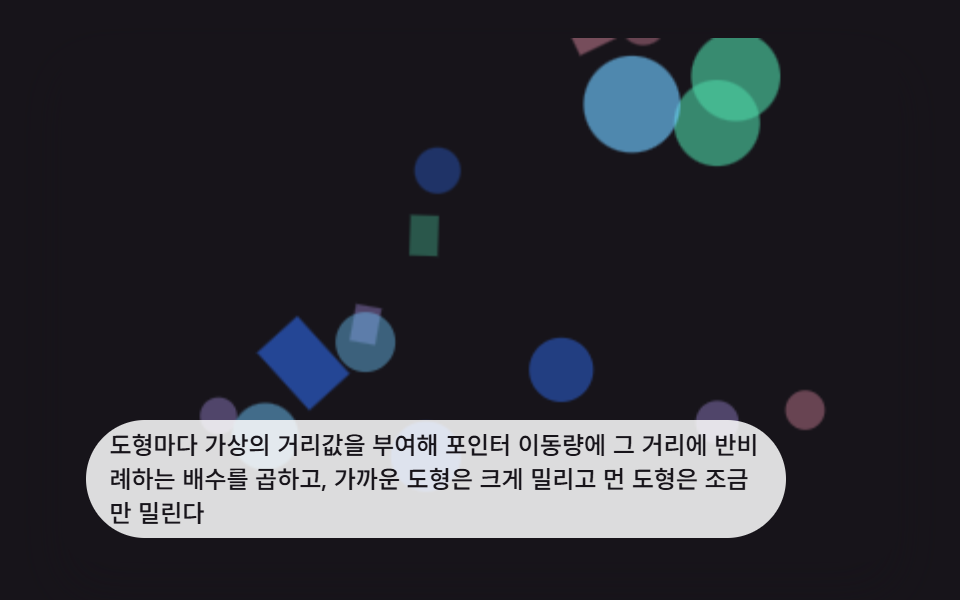 인터랙션css 배경 애니메이션 효과 9가지 — 깊이 층 3D 장면
 인터랙션비눗방울 효과 9종 — 막 두께 색·터짐·두 방울 붙기 계산
 인터랙션마우스 이펙트 9가지 — 커서부터 드래그까지
 인터랙션공유하기 버튼 UI 9종 — 붙이면 실제로 복사되는
 인터랙션키보드 단축키 UI 9종 — 키캡부터 도움말 시트까지
 인터랙션마우스를 따라오는 CSS 3D 회전 장면 9종
 인터랙션마우스 따라다니는 효과 9종 — 커서를 쫓는 글씨·빛·파티클
 인터랙션css 3d 회전 장면 9종 — 마우스를 따라 도는 입체 씬 (CSS+캔버스)
 인터랙션css popover 9가지 — 앵커에서 열리고 가장자리에서 뒤집히는 팝오버