09배경지 내보내기 — 그린 무늬를 반복 타일로
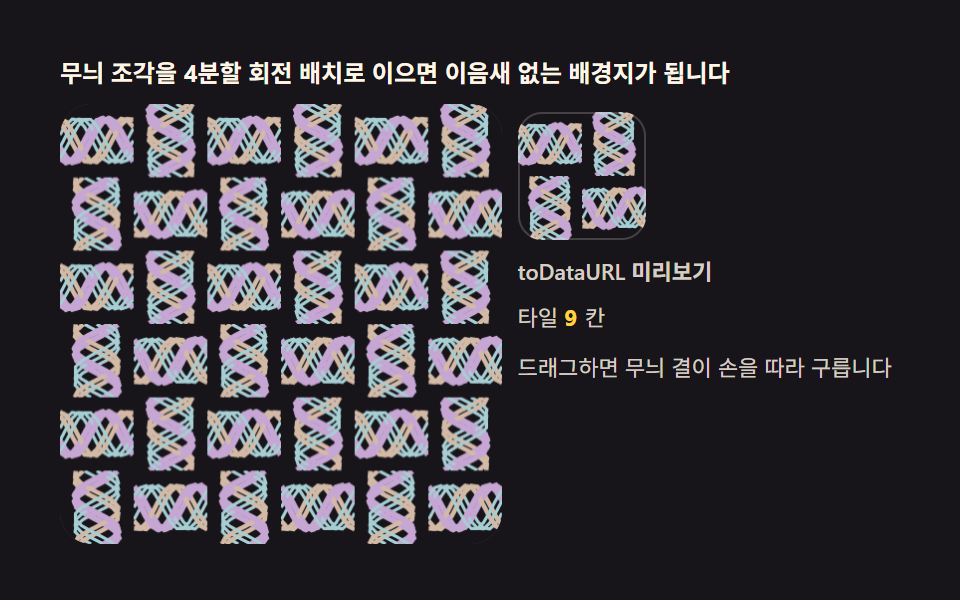
완성된 원을 toDataURL 로 PNG 로 내보내고, 반복 배경에서는 네 모서리가 이어지도록 원을 네 조각으로 나눠 배치합니다. 그린 결과가 곧 쓸 수 있는 배경지가 됩니다.
쓰임배경 패턴, 다운로드 제공
toDataURLfillRect
<main class="stage">
<div class="kt" id="kt">
  <p class="kt__hint">무늬 조각을 4분할 회전 배치로 이으면 이음새 없는 배경지가 됩니다</p>
  <div class="kt__row">
    <div class="kt__field" id="field" role="application" aria-label="배경지 타일 실험판" tabindex="0">
      <canvas class="kt__cv" id="cv"></canvas>
    </div>
    <div class="kt__side">
      <div class="kt__tile" id="tile" role="img" aria-label="내보낸 타일 미리보기"></div>
      <span class="kt__lab">toDataURL 미리보기</span>
      <p class="kt__meta">타일 <b id="cells">9</b>칸</p>
      <p class="kt__meta">드래그하면 무늬 결이 손을 따라 구릅니다</p>
    </div>
  </div>
</div>
</main>
@use "../../../../site/static/demo-tokens" as *;
// 배경지 타일 내보내기(09) — rAF 캔버스 데모. 무늬 한 조각(타일)을 4분할 회전 배치로
// 짜 이으면 이어짐 새 없는 배경지가 된다. 잉크 무대 위 파스텔 빛살.
$duration: $dur-loop;
$easing: $ease-out;
$color: $subject-cream;
@include stage($stage-ink);
.kt {
--stage: #{$stage-ink};
--c1: #a6ced3; // 청록 파스텔 — 타일 결 첫째
--c2: #d3baa6; // 황토 파스텔 — 타일 결 둘째
--c3: #c6a6d3; // 보라 파스텔 — 타일 결 셋째
display: flex; flex-direction: column; gap: $sp-2;
width: 100%; max-width: 420px;
}
.kt__hint {
margin: 0; font-weight: 700; font-size: clamp(10px, 2.8vw, 12px); line-height: 1.35;
color: $subject-cream;
}
.kt__row { display: flex; gap: $sp-2; align-items: stretch; }
.kt__field {
position: relative; overflow: hidden;
flex: 0 0 auto;
width: clamp(176px, 46vw, 232px);
height: clamp(176px, 46vw, 232px);
border-radius: $r-card;
background: rgba($subject-cream, .04);
box-shadow: inset 0 0 0 1px rgba($subject-cream, .14);
cursor: crosshair; touch-action: none;
}
.kt__field:focus-visible { outline: 2px solid $color; outline-offset: 2px; }
.kt__cv { display: block; width: 100%; height: 100%; }
.kt__side {
flex: 1; min-width: 0;
display: flex; flex-direction: column; gap: $sp-2;
padding-top: $sp-1;
}
.kt__tile {
width: 64px; height: 64px;
border-radius: $r-control;
box-shadow: inset 0 0 0 1px rgba($subject-cream, .2);
background-size: cover;
}
.kt__lab { font-weight: 600; font-size: clamp(9px, 2.4vw, 11px); line-height: 1.4; color: rgba($subject-cream, .82); }
.kt__meta { margin: 0; font-size: clamp(9px, 2.4vw, 11px); line-height: 1.5; color: rgba($subject-cream, .82); }
.kt__meta b { font-weight: 700; color: $stage-yellow; font-variant-numeric: tabular-nums; margin-right: $sp-1; }
@media (max-width: 340px) {
.kt { gap: $sp-1; }
.kt__field { width: 150px; height: 150px; }
.kt__tile { width: 48px; height: 48px; }
.kt__meta { font-size: 8px; }
}
// reduce — 루프가 안 돈다. 완성 배경지 한 장이 남는다.
@media (prefers-reduced-motion: reduce) {
.kt.is-still .kt__field { cursor: default !important; }
}html, body {
margin: 0;
overflow: hidden;
}
.stage {
box-sizing: border-box;
min-height: 100vh;
display: grid;
place-items: center;
margin: 0;
background: #17141a;
font-family: -apple-system, "Segoe UI", "Noto Sans KR", sans-serif;
padding: clamp(8px, 4vw, 24px);
}
.kt {
--stage: #17141a;
--c1: #a6ced3;
--c2: #d3baa6;
--c3: #c6a6d3;
display: flex;
flex-direction: column;
gap: 8px;
width: 100%;
max-width: 420px;
}
.kt__hint {
margin: 0;
font-weight: 700;
font-size: clamp(10px, 2.8vw, 12px);
line-height: 1.35;
color: #fff7e6;
}
.kt__row {
display: flex;
gap: 8px;
align-items: stretch;
}
.kt__field {
position: relative;
overflow: hidden;
flex: 0 0 auto;
width: clamp(176px, 46vw, 232px);
height: clamp(176px, 46vw, 232px);
border-radius: 16px;
background: rgba(255, 247, 230, 0.04);
box-shadow: inset 0 0 0 1px rgba(255, 247, 230, 0.14);
cursor: crosshair;
touch-action: none;
}
.kt__field:focus-visible {
outline: 2px solid #fff7e6;
outline-offset: 2px;
}
.kt__cv {
display: block;
width: 100%;
height: 100%;
}
.kt__side {
flex: 1;
min-width: 0;
display: flex;
flex-direction: column;
gap: 8px;
padding-top: 4px;
}
.kt__tile {
width: 64px;
height: 64px;
border-radius: 12px;
box-shadow: inset 0 0 0 1px rgba(255, 247, 230, 0.2);
background-size: cover;
}
.kt__lab {
font-weight: 600;
font-size: clamp(9px, 2.4vw, 11px);
line-height: 1.4;
color: rgba(255, 247, 230, 0.82);
}
.kt__meta {
margin: 0;
font-size: clamp(9px, 2.4vw, 11px);
line-height: 1.5;
color: rgba(255, 247, 230, 0.82);
}
.kt__meta b {
font-weight: 700;
color: #ffd23f;
font-variant-numeric: tabular-nums;
margin-right: 4px;
}
@media (max-width: 340px) {
.kt {
gap: 4px;
}
.kt__field {
width: 150px;
height: 150px;
}
.kt__tile {
width: 48px;
height: 48px;
}
.kt__meta {
font-size: 8px;
}
}
@media (prefers-reduced-motion: reduce) {
.kt.is-still .kt__field {
cursor: default !important;
}
}// 배경지 타일 내보내기 — 사분면 조각(q)을 타일 캔버스의 네 칸에 0/90/180/270도로
// 돌려 놓는다. 이웃 타일과 맞닿는 가장자리가 짝 반사라 어느 방향으로 반복해도
// 이음새가 없다. 완성 타일은 toDataURL 로 짜서 오른쪽 미리보기 배경에 실제로 심는다 —
// 내보낸 결과를 화면에서 바로 보는 게 이 데모의 낙점이다.
(function () {
var root = document.getElementById('kt');
var field = document.getElementById('field');
var cv = document.getElementById('cv');
var tile = document.getElementById('tile');
var cells = document.getElementById('cells');
if (!root || !field || !cv || !tile || !cells) return;
var ctx = cv.getContext('2d');
var css = getComputedStyle(root);
var C1 = css.getPropertyValue('--c1').trim();
var C2 = css.getPropertyValue('--c2').trim();
var C3 = css.getPropertyValue('--c3').trim();
var STAGE = css.getPropertyValue('--stage').trim();
var NX = 3, NY = 3; // 타일 격자 3×3
cells.textContent = String(NX * NY);
var W = 0, H = 0, dpr = 1;
var S = 0; // 사분면 한 변 (css px)
var q = null, qc = null; // 사분면 캔버스
var tw = null, tc = null; // 타일(2S×2S) 캔버스
function fit() {
W = field.clientWidth; H = field.clientHeight;
dpr = Math.min(2, window.devicePixelRatio || 1);
cv.width = Math.round(W * dpr); cv.height = Math.round(H * dpr);
var tileS = Math.min(W, H) / NX; // 타일 한 변 = 사분면 두 개
S = tileS / 2;
q = document.createElement('canvas');
q.width = Math.max(2, Math.round(S * dpr)); q.height = q.width;
qc = q.getContext('2d');
tw = document.createElement('canvas');
tw.width = q.width * 2; tw.height = q.height * 2;
tc = tw.getContext('2d');
render(0);
}
// 사분면 무늬 — 파라미터 곡선 결. p(0~1) 가 흐르면 결의 위상이 구른다
function paintQuadrant(p) {
qc.setTransform(1, 0, 0, 1, 0, 0);
qc.clearRect(0, 0, q.width, q.height);
qc.scale(dpr, dpr);
for (var i = 0; i < 7; i++) {
var ph = i * 1.9 + p * 6.28;
qc.strokeStyle = [C1, C2, C3][i % 3];
qc.lineWidth = 1.6 + (i % 3) * 0.7;
qc.beginPath();
for (var s = 0; s <= 12; s++) {
var x = S * s / 12;
var y = S * (0.2 + 0.6 * (0.5 + 0.5 * Math.sin(s * 0.55 + ph)));
if (s === 0) qc.moveTo(x, y); else qc.lineTo(x, y);
}
qc.stroke();
}
}
// 4분할 회전 배치 — 좌상(0도)·우상(90)·우하(180)·좌하(270). 변환 행렬이 곧 회전
function assembleTile() {
var qd = q.width; // 사분면 device px — 정사각형
tc.setTransform(1, 0, 0, 1, 0, 0);
tc.clearRect(0, 0, tw.width, tw.height);
tc.drawImage(q, 0, 0); // 좌상 0도
tc.setTransform(0, 1, -1, 0, qd * 2, 0); tc.drawImage(q, 0, 0); // 우상 90도
tc.setTransform(-1, 0, 0, -1, qd * 2, qd * 2); tc.drawImage(q, 0, 0); // 우하 180도
tc.setTransform(0, -1, 1, 0, 0, qd * 2); tc.drawImage(q, 0, 0); // 좌하 270도
tc.setTransform(1, 0, 0, 1, 0, 0);
}
function render(p) {
paintQuadrant(p);
assembleTile();
ctx.setTransform(dpr, 0, 0, dpr, 0, 0);
ctx.fillStyle = STAGE;
ctx.fillRect(0, 0, W, H);
var tileS = S * 2;
for (var gy = 0; gy < NY; gy++) {
for (var gx = 0; gx < NX; gx++) {
ctx.drawImage(tw, gx * tileS, gy * tileS, tileS, tileS);
}
}
// 내보내기 — 완성 타일을 데이터 URL 로 짜서 미리보기 배경에 심는다
var url = tw.toDataURL('image/png');
tile.style.backgroundImage = 'url(' + url + ')';
}
var reduce = window.matchMedia('(prefers-reduced-motion: reduce)').matches;
var t = 0, last = 0, drag = false, dragP = null;
function toLocal(e) {
var b = field.getBoundingClientRect();
return [e.clientX - b.left, e.clientY - b.top];
}
field.addEventListener('pointerdown', function (e) {
drag = true; dragP = toLocal(e);
if (field.setPointerCapture) { try { field.setPointerCapture(e.pointerId); } catch (err) { /* 무시 */ } }
});
field.addEventListener('pointermove', function (e) {
if (!drag || !dragP) return;
var p = toLocal(e);
render(Math.max(0, Math.min(1, p[0] / W)));
dragP = p;
});
field.addEventListener('pointerup', function () { drag = false; dragP = null; });
field.addEventListener('pointercancel', function () { drag = false; dragP = null; });
function step(now) {
var dt = Math.min(64, now - last) / 1000; last = now;
if (!drag) {
t += dt;
render(0.5 + 0.48 * Math.sin(t * 0.19));
}
requestAnimationFrame(step);
}
fit();
window.addEventListener('resize', fit);
if (reduce) {
// 정지 한 장 — p = 0.35 배경지 + 미리보기
render(0.35);
root.classList.add('is-still');
} else {
last = performance.now();
requestAnimationFrame(step);
}
})();// KaleidoWallpaperTileExport — vanilla 판(run/331/demo/09-kaleido-wallpaper-tile-export/index.html) 의 React 포트.
// 사분면 조각(q)을 타일 캔버스의 네 칸에 0/90/180/270도로 돌려 놓는다. 이웃 타일과
// 맞닿는 가장자리가 짝 반사라 어느 방향으로 반복해도 이음새가 없다. 완성 타일은
// toDataURL 로 짜서 오른쪽 미리보기 배경에 실제로 심는다 — 내보낸 결과를 화면에서
// 바로 보는 게 이 데모의 낙점이다. q/tw 두 캔버스 분리 + 4분할 회전 행렬 배치는
// vanilla 와 1:1. 값·수치는 vanilla 와 같다.
// 움직임은 전부 캔버스 rAF 루프가 그리므로 CSS 애니메이션이 없다.
// reduce 에서는 루프를 돌리지 않고 p = 0.35 배경지 한 장만 남긴다(.isStill).
import { useEffect, useRef, useState } from "react";
import type { CSSProperties, PointerEvent } from "react";
import styles from "./KaleidoWallpaperTileExport.module.scss";
export type KaleidoWallpaperTileExportProps = {
duration?: string;
easing?: string;
color?: string;
};
type Vars = CSSProperties & { "--duration"?: string; "--easing"?: string; "--color"?: string };
// useRef 는 T | null 을 돌려준다. 처음부터 값이 있고 절대 비지 않는 상자는 이렇게 좁혀 쓴다
type Box<T> = { current: T };
const STAGE = "#17141a"; // 무대 잉크
const C1 = "#a6ced3"; // 청록 파스텔 — 타일 결 첫째
const C2 = "#d3baa6"; // 황토 파스텔 — 타일 결 둘째
const C3 = "#c6a6d3"; // 보라 파스텔 — 타일 결 셋째
const NX = 3, NY = 3; // 타일 격자 3×3
const HINT = "무늬 조각을 4분할 회전 배치로 이으면 이음새 없는 배경지가 됩니다";
const ARIA_FIELD = "배경지 타일 실험판";
const TILE_ARIA = "내보낸 타일 미리보기";
const PREVIEW_LABEL = "toDataURL 미리보기";
const TILE_TEXT = "타일";
const CELL_UNIT = "칸";
const DRAG_TEXT = "드래그하면 무늬 결이 손을 따라 구릅니다";
export default function KaleidoWallpaperTileExport({
duration = "2s",
easing = "ease-out",
color = "#fff7e6"
}: KaleidoWallpaperTileExportProps) {
const fieldRef = useRef<HTMLDivElement | null>(null);
const cvRef = useRef<HTMLCanvasElement | null>(null);
const tileRef = useRef<HTMLDivElement | null>(null);
const ctxRef = useRef<CanvasRenderingContext2D | null>(null);
// q(사분면)·tw(타일) 캔버스 분리 — vanilla 와 1:1
const qRef = useRef<HTMLCanvasElement | null>(null);
const qcRef = useRef<CanvasRenderingContext2D | null>(null);
const twRef = useRef<HTMLCanvasElement | null>(null);
const tcRef = useRef<CanvasRenderingContext2D | null>(null);
const stRef = useRef({
W: 0, H: 0, dpr: 1, S: 0,
t: 0, drag: false
}) as Box<{
W: number; H: number; dpr: number; S: number;
t: number; drag: boolean;
}>;
const lastRef = useRef(0) as Box<number>;
const rafRef = useRef(0) as Box<number>;
const [still, setStill] = useState(false);
function reduced(): boolean {
return window.matchMedia("(prefers-reduced-motion: reduce)").matches;
}
function fit(): void {
const st = stRef.current;
const field = fieldRef.current, cv = cvRef.current;
if (!field || !cv) return;
const ctx = cv.getContext("2d");
if (!ctx) return;
st.W = field.clientWidth; st.H = field.clientHeight;
st.dpr = Math.min(2, window.devicePixelRatio || 1);
cv.width = Math.round(st.W * st.dpr); cv.height = Math.round(st.H * st.dpr);
const tileS = Math.min(st.W, st.H) / NX; // 타일 한 변 = 사분면 두 개
st.S = tileS / 2;
const q = document.createElement("canvas");
q.width = Math.max(2, Math.round(st.S * st.dpr)); q.height = q.width;
qRef.current = q;
qcRef.current = q.getContext("2d");
const tw = document.createElement("canvas");
tw.width = q.width * 2; tw.height = q.height * 2;
twRef.current = tw;
tcRef.current = tw.getContext("2d");
ctxRef.current = ctx;
render(0);
}
// 사분면 무늬 — 파라미터 곡선 결. p(0~1) 가 흐르면 결의 위상이 구른다
function paintQuadrant(p: number): void {
const st = stRef.current;
const qc = qcRef.current, q = qRef.current;
if (!qc || !q) return;
qc.setTransform(1, 0, 0, 1, 0, 0);
qc.clearRect(0, 0, q.width, q.height);
qc.scale(st.dpr, st.dpr);
const cols = [C1, C2, C3];
for (let i = 0; i < 7; i++) {
const ph = i * 1.9 + p * 6.28;
qc.strokeStyle = cols[i % 3];
qc.lineWidth = 1.6 + (i % 3) * 0.7;
qc.beginPath();
for (let s = 0; s <= 12; s++) {
const x = st.S * s / 12;
const y = st.S * (0.2 + 0.6 * (0.5 + 0.5 * Math.sin(s * 0.55 + ph)));
if (s === 0) qc.moveTo(x, y); else qc.lineTo(x, y);
}
qc.stroke();
}
}
// 4분할 회전 배치 — 좌상(0도)·우상(90)·우하(180)·좌하(270). 변환 행렬이 곧 회전
function assembleTile(): void {
const q = qRef.current, tw = twRef.current, tc = tcRef.current;
if (!q || !tw || !tc) return;
const qd = q.width; // 사분면 device px — 정사각형
tc.setTransform(1, 0, 0, 1, 0, 0);
tc.clearRect(0, 0, tw.width, tw.height);
tc.drawImage(q, 0, 0); // 좌상 0도
tc.setTransform(0, 1, -1, 0, qd * 2, 0); tc.drawImage(q, 0, 0); // 우상 90도
tc.setTransform(-1, 0, 0, -1, qd * 2, qd * 2); tc.drawImage(q, 0, 0); // 우하 180도
tc.setTransform(0, -1, 1, 0, 0, qd * 2); tc.drawImage(q, 0, 0); // 좌하 270도
tc.setTransform(1, 0, 0, 1, 0, 0);
}
function render(p: number): void {
const st = stRef.current;
const ctx = ctxRef.current, tw = twRef.current, tile = tileRef.current;
if (!ctx || !tw) return;
paintQuadrant(p);
assembleTile();
ctx.setTransform(st.dpr, 0, 0, st.dpr, 0, 0);
ctx.fillStyle = STAGE;
ctx.fillRect(0, 0, st.W, st.H);
const tileS = st.S * 2;
for (let gy = 0; gy < NY; gy++) {
for (let gx = 0; gx < NX; gx++) {
ctx.drawImage(tw, gx * tileS, gy * tileS, tileS, tileS);
}
}
// 내보내기 — 완성 타일을 데이터 URL 로 짜서 미리보기 배경에 심는다
const url = tw.toDataURL("image/png");
if (tile) tile.style.backgroundImage = "url(" + url + ")";
}
function step(now: number): void {
const st = stRef.current;
const dt = Math.min(64, now - lastRef.current) / 1000; lastRef.current = now;
if (!st.drag) {
st.t += dt;
render(0.5 + 0.48 * Math.sin(st.t * 0.19));
}
rafRef.current = requestAnimationFrame(step);
}
function toLocal(e: PointerEvent<HTMLDivElement>): [number, number] {
const b = e.currentTarget.getBoundingClientRect();
return [e.clientX - b.left, e.clientY - b.top];
}
function onPointerDown(e: PointerEvent<HTMLDivElement>): void {
const st = stRef.current;
st.drag = true;
toLocal(e);
try { e.currentTarget.setPointerCapture(e.pointerId); } catch { /* 무시 */ }
}
function onPointerMove(e: PointerEvent<HTMLDivElement>): void {
const st = stRef.current;
if (!st.drag) return;
const p = toLocal(e);
render(Math.max(0, Math.min(1, p[0] / st.W)));
}
function onPointerUp(): void {
const st = stRef.current;
st.drag = false;
}
useEffect(() => {
fit();
function onResize(): void { fit(); }
window.addEventListener("resize", onResize);
if (reduced()) {
// 정지 한 장 — p = 0.35 배경지 + 미리보기
render(0.35);
setStill(true);
} else {
lastRef.current = performance.now();
rafRef.current = requestAnimationFrame(step);
}
return () => {
window.removeEventListener("resize", onResize);
cancelAnimationFrame(rafRef.current);
};
// eslint-disable-next-line react-hooks/exhaustive-deps
}, []);
const rootCls = still ? styles.kt + " " + styles.isStill : styles.kt;
return (
<main className={styles.stage}>
<div className={rootCls} style={{ "--duration": duration, "--easing": easing, "--color": color } as Vars}>
<p className={styles.hint}>{HINT}</p>
<div className={styles.row}>
<div
className={styles.field}
ref={fieldRef}
role="application"
aria-label={ARIA_FIELD}
tabIndex={0}
onPointerDown={onPointerDown}
onPointerMove={onPointerMove}
onPointerUp={onPointerUp}
onPointerCancel={onPointerUp}
>
<canvas className={styles.cv} ref={cvRef}></canvas>
</div>
<div className={styles.side}>
<div className={styles.tile} ref={tileRef} role="img" aria-label={TILE_ARIA}></div>
<span className={styles.lab}>{PREVIEW_LABEL}</span>
<p className={styles.meta}>{TILE_TEXT} <b>{NX * NY}</b>{CELL_UNIT}</p>
<p className={styles.meta}>{DRAG_TEXT}</p>
</div>
</div>
</div>
</main>
);
}09 배경지 내보내기 — 그린 무늬를 반복 타일로 — 측정 누적면적 25.892% · 움직인 프레임 23/23GODRICH 원작 · zip 에 SCSS·React 포함 · 만화경 그리기 — 대칭 반사 각도로 그리는 캔버스 9종
이 데모가 속한 글
 만화경 그리기 — 대칭 반사 각도로 그리는 캔버스 9종선 하나를 그리면 반사 행렬이 남은 칸을 전부 채웁니다. 거울 각도·대칭 차수·색상 환색을 직접 바꾸는 만화경 그리기 도구 — 라이브러리 없이 캔버스 한 장, 코드는 비밀번호 zip으로 드립니다. 이 글은 만화경 그 이 글의 데모 전부 보기