02플랫폼 자동 전환 키캡
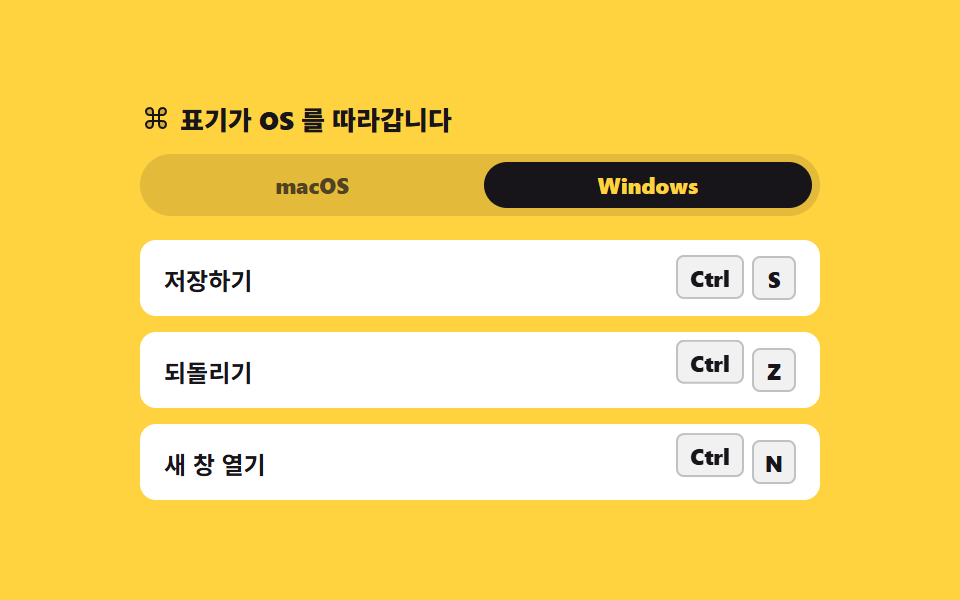
맥에서는 ⌘, 윈도우에서는 Ctrl 로 같은 단축키가 다르게 보입니다. 감지는 userAgentData 를 먼저 보고 없으면 예전 속성으로 내려가며, 토글로 손수 바꿀 수도 있습니다.
쓰임크로스 플랫폼 웹앱의 메뉴 단축키 표기, 설정 화면
userAgentDatasteps(1, end)aria-pressed
<svg width="0" height="0" style="position:absolute" aria-hidden="true">
<defs>
<symbol id="command" viewBox="0 0 256 256" fill="currentColor"><path d="M208,76h0a28,28,0,0,1-28,28H152V76a28,28,0,0,1,28-28h0A28,28,0,0,1,208,76ZM76,48h0A28,28,0,0,0,48,76h0a28,28,0,0,0,28,28h28V76A28,28,0,0,0,76,48ZM180,152H152v28a28,28,0,0,0,28,28h0a28,28,0,0,0,28-28h0A28,28,0,0,0,180,152ZM48,180h0a28,28,0,0,0,28,28h0a28,28,0,0,0,28-28V152H76A28,28,0,0,0,48,180Z" opacity="0.2"/><path d="M180,144H160V112h20a36,36,0,1,0-36-36V96H112V76a36,36,0,1,0-36,36H96v32H76a36,36,0,1,0,36,36V160h32v20a36,36,0,1,0,36-36ZM160,76a20,20,0,1,1,20,20H160ZM56,76a20,20,0,0,1,40,0V96H76A20,20,0,0,1,56,76ZM96,180a20,20,0,1,1-20-20H96Zm16-68h32v32H112Zm68,88a20,20,0,0,1-20-20V160h20a20,20,0,0,1,0,40Z"/></symbol>
</defs>
</svg>
<main class="stage">
<div class="pf is-demo" id="pf" data-platform="win">
<div class="pf__head">
<p class="pf__title"><svg class="pf__ico" aria-hidden="true"><use href="#command"/></svg><span>표기가 OS 를 따라갑니다</span></p>
<div class="pf__switch" role="group" aria-label="표기할 운영체제">
<button type="button" class="pf__opt" data-os="mac" aria-pressed="false">macOS</button>
<button type="button" class="pf__opt" data-os="win" aria-pressed="true">Windows</button>
</div>
</div>
<ul class="pf__list">
<li class="pf__row">
<span class="pf__act">저장하기</span>
<span class="pf__keys"><kbd class="pf__mod"><span class="pf__mac">⌘</span><span class="pf__win">Ctrl</span></kbd><kbd class="pf__key">S</kbd></span>
</li>
<li class="pf__row">
<span class="pf__act">되돌리기</span>
<span class="pf__keys"><kbd class="pf__mod"><span class="pf__mac">⌘</span><span class="pf__win">Ctrl</span></kbd><kbd class="pf__key">Z</kbd></span>
</li>
<li class="pf__row">
<span class="pf__act">새 창 열기</span>
<span class="pf__keys"><kbd class="pf__mod"><span class="pf__mac">⌘</span><span class="pf__win">Ctrl</span></kbd><kbd class="pf__key">N</kbd></span>
</li>
</ul>
</div>
</main>@use "../../../../site/static/demo-tokens" as *;
// 플랫폼 자동 전환 키캡 — 같은 단축키를 맥에서는 ⌘, 윈도우에서는 Ctrl 로 적는다.
// 두 표기는 같은 격자 칸(grid-area: 1 / 1)에 겹쳐 두고 visibility 로만 고른다.
// 폭이 넓은 Ctrl 쪽에 min-width 를 맞춰 두어 표기가 바뀌어도 줄이 흔들리지 않는다.
// 격자 미리보기(.is-demo)는 1초마다 두 표기를 steps(1, end) 로 컷 교체하고, 바뀌는 키캡만 살짝 튀어오른다.
$duration: $dur-quick;
$easing: $ease-pop;
$color: $subject-ink;
@include stage($stage-yellow);
.pf { display: flex; flex-direction: column; gap: $sp-3; width: min(100%, 340px); }
.pf__head { display: flex; flex-direction: column; gap: $sp-2; }
.pf__title {
display: flex; align-items: center; gap: $sp-1; margin: 0;
font-weight: 800; font-size: clamp(11px, 3vw, 13px); color: $subject-ink;
}
.pf__ico { width: 16px; height: 16px; color: $subject-ink; }
.pf__switch { display: grid; grid-template-columns: repeat(2, 1fr); gap: $sp-1; padding: $sp-1; background: rgba(23, 20, 26, .12); border-radius: $r-pill; }
.pf__opt {
border: 0; cursor: pointer; background: transparent; color: rgba(23, 20, 26, .72);
border-radius: $r-pill; padding: $sp-1 $sp-2; font-family: inherit;
font-weight: 800; font-size: clamp(10px, 2.8vw, 11px); line-height: 1.4;
transition: background $duration $ease-spring, color $duration $ease-spring;
}
.pf__opt[aria-pressed="true"] { background: $color; color: $stage-yellow; }
.pf__opt:focus-visible { outline: 3px solid $subject-blue; outline-offset: 2px; }
.pf__list { list-style: none; margin: 0; padding: 0; display: flex; flex-direction: column; gap: $sp-2; }
.pf__row {
display: flex; align-items: center; justify-content: space-between; gap: $sp-2;
background: $stage-paper; border-radius: $r-sm; padding: $sp-2 $sp-3;
}
.pf__act { font-weight: 700; font-size: clamp(11px, 3vw, 12px); color: $subject-ink; }
.pf__keys { display: flex; align-items: center; gap: $sp-1; }
.pf__mod, .pf__key {
display: grid; place-items: center; box-sizing: border-box; height: 22px;
border-radius: $r-xs; border: 1px solid rgba(23, 20, 26, .22);
background: rgba(23, 20, 26, .06); color: $subject-ink;
font-family: inherit; font-weight: 800; font-size: 11px; line-height: 1;
}
.pf__key { min-width: 22px; padding: 0 $sp-1; }
// Ctrl(넓은 쪽) 폭으로 고정 — 표기가 바뀌어도 줄 전체가 밀리지 않는다
.pf__mod { position: relative; min-width: 34px; padding: 0 $sp-1; }
.pf__mod span { grid-area: 1 / 1; }
.pf[data-platform="win"] .pf__mac { visibility: hidden; }
.pf[data-platform="mac"] .pf__win { visibility: hidden; }
// ── 격자 미리보기 루프: Windows(0~1s) → macOS(1~2s). 컷만 두면 움직인 프레임이 모자라
// 바뀐 키캡이 곧바로 4px 튀어오르는 보조 움직임을 붙인다 (252 실측: 컷 + transform).
.pf.is-demo .pf__mac,
.pf.is-demo .pf__win {
animation-duration: $dur-loop; animation-timing-function: steps(1, end);
animation-iteration-count: infinite; animation-fill-mode: backwards;
}
.pf.is-demo .pf__mac { animation-name: pfShowLate; }
.pf.is-demo .pf__win { animation-name: pfShowEarly; }
// 복귀(mac → win)도 루프 안에서 보이게 90% 지점에 둔다 — 24프레임의 마지막 장은 95.8% 지점이라
// 96% 뒤에 둔 복귀는 gif 에도 측정에도 안 잡힌다 (242 실측)
@keyframes pfShowEarly {
0%, 44% { visibility: visible; }
45%, 89% { visibility: hidden; }
90%, 100% { visibility: visible; }
}
@keyframes pfShowLate {
0%, 44% { visibility: hidden; }
45%, 89% { visibility: visible; }
90%, 100% { visibility: hidden; }
}
.pf.is-demo .pf__mod {
animation-name: pfPop; animation-duration: $dur-loop; animation-timing-function: $easing;
animation-iteration-count: infinite; animation-fill-mode: backwards;
}
.pf.is-demo .pf__row:nth-child(1) .pf__mod { animation-delay: 0ms; }
.pf.is-demo .pf__row:nth-child(2) .pf__mod { animation-delay: 80ms; }
.pf.is-demo .pf__row:nth-child(3) .pf__mod { animation-delay: 160ms; }
@keyframes pfPop {
0%, 37% { transform: translateY(0); }
45% { transform: translateY(-4px); }
53%, 82% { transform: translateY(0); }
90% { transform: translateY(-4px); }
98%, 100% { transform: translateY(0); }
}
// 두 토글 버튼도 같은 박자로 눌린 쪽이 바뀐다
.pf.is-demo .pf__opt {
animation-duration: $dur-loop; animation-timing-function: steps(1, end);
animation-iteration-count: infinite; animation-fill-mode: backwards;
}
.pf.is-demo .pf__opt[data-os="win"] { animation-name: pfOptEarly; }
.pf.is-demo .pf__opt[data-os="mac"] { animation-name: pfOptLate; }
@keyframes pfOptEarly {
0%, 44% { background: $color; color: $stage-yellow; }
45%, 89% { background: transparent; color: rgba(23, 20, 26, .72); }
90%, 100% { background: $color; color: $stage-yellow; }
}
@keyframes pfOptLate {
0%, 44% { background: transparent; color: rgba(23, 20, 26, .72); }
45%, 89% { background: $color; color: $stage-yellow; }
90%, 100% { background: transparent; color: rgba(23, 20, 26, .72); }
}
@media (max-width: 340px) {
.pf { gap: $sp-2; }
.pf__row { padding: $sp-1 $sp-2; }
.pf__list { gap: $sp-1; }
}
@media (prefers-reduced-motion: reduce) {
.pf.is-demo .pf__mac,
.pf.is-demo .pf__win,
.pf.is-demo .pf__mod,
.pf.is-demo .pf__opt { animation: none !important; }
.pf.is-demo .pf__mac { visibility: hidden !important; }
.pf__opt { transition: none !important; }
}html, body {
margin: 0;
overflow: hidden;
}
.stage {
box-sizing: border-box;
min-height: 100vh;
display: grid;
place-items: center;
margin: 0;
background: #ffd23f;
font-family: -apple-system, "Segoe UI", "Noto Sans KR", sans-serif;
padding: clamp(8px, 4vw, 24px);
}
.pf {
display: flex;
flex-direction: column;
gap: 12px;
width: min(100%, 340px);
}
.pf__head {
display: flex;
flex-direction: column;
gap: 8px;
}
.pf__title {
display: flex;
align-items: center;
gap: 4px;
margin: 0;
font-weight: 800;
font-size: clamp(11px, 3vw, 13px);
color: #17141a;
}
.pf__ico {
width: 16px;
height: 16px;
color: #17141a;
}
.pf__switch {
display: grid;
grid-template-columns: repeat(2, 1fr);
gap: 4px;
padding: 4px;
background: rgba(23, 20, 26, 0.12);
border-radius: 999px;
}
.pf__opt {
border: 0;
cursor: pointer;
background: transparent;
color: rgba(23, 20, 26, 0.72);
border-radius: 999px;
padding: 4px 8px;
font-family: inherit;
font-weight: 800;
font-size: clamp(10px, 2.8vw, 11px);
line-height: 1.4;
transition: background 220ms cubic-bezier(0.2, 0.8, 0.2, 1), color 220ms cubic-bezier(0.2, 0.8, 0.2, 1);
}
.pf__opt[aria-pressed=true] {
background: #17141a;
color: #ffd23f;
}
.pf__opt:focus-visible {
outline: 3px solid #2f6df6;
outline-offset: 2px;
}
.pf__list {
list-style: none;
margin: 0;
padding: 0;
display: flex;
flex-direction: column;
gap: 8px;
}
.pf__row {
display: flex;
align-items: center;
justify-content: space-between;
gap: 8px;
background: #ffffff;
border-radius: 8px;
padding: 8px 12px;
}
.pf__act {
font-weight: 700;
font-size: clamp(11px, 3vw, 12px);
color: #17141a;
}
.pf__keys {
display: flex;
align-items: center;
gap: 4px;
}
.pf__mod, .pf__key {
display: grid;
place-items: center;
box-sizing: border-box;
height: 22px;
border-radius: 4px;
border: 1px solid rgba(23, 20, 26, 0.22);
background: rgba(23, 20, 26, 0.06);
color: #17141a;
font-family: inherit;
font-weight: 800;
font-size: 11px;
line-height: 1;
}
.pf__key {
min-width: 22px;
padding: 0 4px;
}
.pf__mod {
position: relative;
min-width: 34px;
padding: 0 4px;
}
.pf__mod span {
grid-area: 1/1;
}
.pf[data-platform=win] .pf__mac {
visibility: hidden;
}
.pf[data-platform=mac] .pf__win {
visibility: hidden;
}
.pf.is-demo .pf__mac,
.pf.is-demo .pf__win {
animation-duration: 2s;
animation-timing-function: steps(1, end);
animation-iteration-count: infinite;
animation-fill-mode: backwards;
}
.pf.is-demo .pf__mac {
animation-name: pfShowLate;
}
.pf.is-demo .pf__win {
animation-name: pfShowEarly;
}
@keyframes pfShowEarly {
0%, 44% {
visibility: visible;
}
45%, 89% {
visibility: hidden;
}
90%, 100% {
visibility: visible;
}
}
@keyframes pfShowLate {
0%, 44% {
visibility: hidden;
}
45%, 89% {
visibility: visible;
}
90%, 100% {
visibility: hidden;
}
}
.pf.is-demo .pf__mod {
animation-name: pfPop;
animation-duration: 2s;
animation-timing-function: cubic-bezier(0.2, 1.4, 0.4, 1);
animation-iteration-count: infinite;
animation-fill-mode: backwards;
}
.pf.is-demo .pf__row:nth-child(1) .pf__mod {
animation-delay: 0ms;
}
.pf.is-demo .pf__row:nth-child(2) .pf__mod {
animation-delay: 80ms;
}
.pf.is-demo .pf__row:nth-child(3) .pf__mod {
animation-delay: 160ms;
}
@keyframes pfPop {
0%, 37% {
transform: translateY(0);
}
45% {
transform: translateY(-4px);
}
53%, 82% {
transform: translateY(0);
}
90% {
transform: translateY(-4px);
}
98%, 100% {
transform: translateY(0);
}
}
.pf.is-demo .pf__opt {
animation-duration: 2s;
animation-timing-function: steps(1, end);
animation-iteration-count: infinite;
animation-fill-mode: backwards;
}
.pf.is-demo .pf__opt[data-os=win] {
animation-name: pfOptEarly;
}
.pf.is-demo .pf__opt[data-os=mac] {
animation-name: pfOptLate;
}
@keyframes pfOptEarly {
0%, 44% {
background: #17141a;
color: #ffd23f;
}
45%, 89% {
background: transparent;
color: rgba(23, 20, 26, 0.72);
}
90%, 100% {
background: #17141a;
color: #ffd23f;
}
}
@keyframes pfOptLate {
0%, 44% {
background: transparent;
color: rgba(23, 20, 26, 0.72);
}
45%, 89% {
background: #17141a;
color: #ffd23f;
}
90%, 100% {
background: transparent;
color: rgba(23, 20, 26, 0.72);
}
}
@media (max-width: 340px) {
.pf {
gap: 8px;
}
.pf__row {
padding: 4px 8px;
}
.pf__list {
gap: 4px;
}
}
@media (prefers-reduced-motion: reduce) {
.pf.is-demo .pf__mac,
.pf.is-demo .pf__win,
.pf.is-demo .pf__mod,
.pf.is-demo .pf__opt {
animation: none !important;
}
.pf.is-demo .pf__mac {
visibility: hidden !important;
}
.pf__opt {
transition: none !important;
}
}var pf = document.getElementById('pf');
var opts = Array.prototype.slice.call(document.querySelectorAll('.pf__opt'));
function applyPlatform(os) {
pf.setAttribute('data-platform', os);
for (var i = 0; i < opts.length; i++) {
opts[i].setAttribute('aria-pressed', opts[i].getAttribute('data-os') === os ? 'true' : 'false');
}
}
// userAgentData.platform 이 있으면 그걸 먼저 보고, 없는 브라우저에서는 예전 navigator.platform 으로 내려간다
function detectPlatform() {
var data = navigator.userAgentData;
var name = (data && data.platform) || navigator.platform || '';
return /mac|iphone|ipad|ipod/i.test(name) ? 'mac' : 'win';
}
opts.forEach(function (btn) {
btn.addEventListener('click', function () {
pf.classList.remove('is-demo');
applyPlatform(btn.getAttribute('data-os'));
});
});
applyPlatform(detectPlatform());// PlatformKeycap — vanilla 판(run/288/demo/02-kbd-platform-switch/index.html) 의 React 포트.
// userAgentData.platform 을 먼저 보고, 없는 브라우저에서는 예전 navigator.platform 으로 내려간다.
import { useEffect, useState } from "react";
import type { CSSProperties } from "react";
import styles from "./PlatformKeycap.module.scss";
export type PlatformKeycapProps = {
/** 격자 미리보기용 2초 자동 루프. 사람이 토글을 누르면 꺼진다 */
demo?: boolean;
duration?: number;
easing?: string;
color?: string;
};
type Vars = CSSProperties & { "--duration"?: string; "--easing"?: string; "--color"?: string };
/** navigator.userAgentData 는 아직 타입이 없는 브라우저가 있어 여기서 직접 좁혀 쓴다 */
type UaData = { platform?: string };
const ROWS: { action: string; letter: string }[] = [
{ action: "저장하기", letter: "S" },
{ action: "되돌리기", letter: "Z" },
{ action: "새 창 열기", letter: "N" },
];
function detectPlatform(): string {
const data = (navigator as unknown as { userAgentData?: UaData }).userAgentData;
const name = (data && data.platform) || navigator.platform || "";
return /mac|iphone|ipad|ipod/i.test(name) ? "mac" : "win";
}
export default function PlatformKeycap({
demo = true,
duration = 220,
easing = "cubic-bezier(.2, 1.4, .4, 1)",
color = "#17141a",
}: PlatformKeycapProps) {
const [live, setLive] = useState(demo);
const [platform, setPlatform] = useState("win");
const vars: Vars = { "--duration": `${duration}ms`, "--easing": easing, "--color": color };
useEffect(() => {
setPlatform(detectPlatform());
}, []);
function applyPlatform(os: string) {
setLive(false);
setPlatform(os);
}
const cls = [styles.root, live ? styles.isDemo : ""].filter(Boolean).join(" ");
return (
<main className={styles.stage} style={vars}>
<svg width="0" height="0" style={{ position: "absolute" }} aria-hidden="true">
<defs>
<symbol id="command" viewBox="0 0 256 256" fill="currentColor">
<path d="M208,76h0a28,28,0,0,1-28,28H152V76a28,28,0,0,1,28-28h0A28,28,0,0,1,208,76ZM76,48h0A28,28,0,0,0,48,76h0a28,28,0,0,0,28,28h28V76A28,28,0,0,0,76,48ZM180,152H152v28a28,28,0,0,0,28,28h0a28,28,0,0,0,28-28h0A28,28,0,0,0,180,152ZM48,180h0a28,28,0,0,0,28,28h0a28,28,0,0,0,28-28V152H76A28,28,0,0,0,48,180Z" opacity="0.2" />
<path d="M180,144H160V112h20a36,36,0,1,0-36-36V96H112V76a36,36,0,1,0-36,36H96v32H76a36,36,0,1,0,36,36V160h32v20a36,36,0,1,0,36-36ZM160,76a20,20,0,1,1,20,20H160ZM56,76a20,20,0,0,1,40,0V96H76A20,20,0,0,1,56,76ZM96,180a20,20,0,1,1-20-20H96Zm16-68h32v32H112Zm68,88a20,20,0,0,1-20-20V160h20a20,20,0,0,1,0,40Z" />
</symbol>
</defs>
</svg>
<div className={cls} data-platform={platform}>
<div className={styles.head}>
<p className={styles.title}>
<svg className={styles.ico} aria-hidden="true"><use href="#command" /></svg>
<span>표기가 OS 를 따라갑니다</span>
</p>
<div className={styles.switch} role="group" aria-label="표기할 운영체제">
<button type="button" className={styles.opt} data-os="mac" aria-pressed={platform === "mac"} onClick={() => applyPlatform("mac")}>
macOS
</button>
<button type="button" className={styles.opt} data-os="win" aria-pressed={platform === "win"} onClick={() => applyPlatform("win")}>
Windows
</button>
</div>
</div>
<ul className={styles.list}>
{ROWS.map((row) => (
<li className={styles.row} key={row.letter}>
<span className={styles.act}>{row.action}</span>
<span className={styles.keys}>
<kbd className={styles.mod}>
<span className={styles.mac}>{"⌘"}</span>
<span className={styles.win}>Ctrl</span>
</kbd>
<kbd className={styles.key}>{row.letter}</kbd>
</span>
</li>
))}
</ul>
</div>
</main>
);
}02 플랫폼 자동 전환 키캡 — 측정 누적면적 6.392% · 움직인 프레임 11/23GODRICH 원작 · zip 에 SCSS·React 포함 · 키보드 단축키 UI 9종 — 키캡부터 도움말 시트까지
이 데모가 속한 글
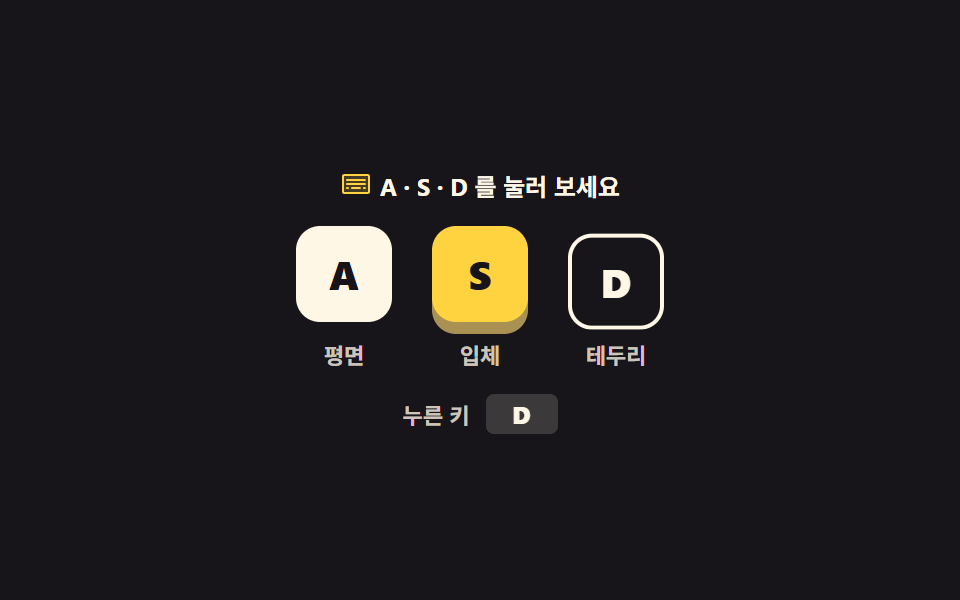 키보드 단축키 UI 9종 — 키캡부터 도움말 시트까지단축키 UI는 키보드로 화면을 다루게 하는 키캡·표시·안내를 짜는 일입니다. 여기 아홉 가지는 키캡 세 스타일부터 플랫폼 자동 전환·녹화·충돌 표·도움말 시트까지 CSS 와 약간의 JS 로 만들어 둔 것이라, 붙여 이 글의 데모 전부 보기