01유휴 화면
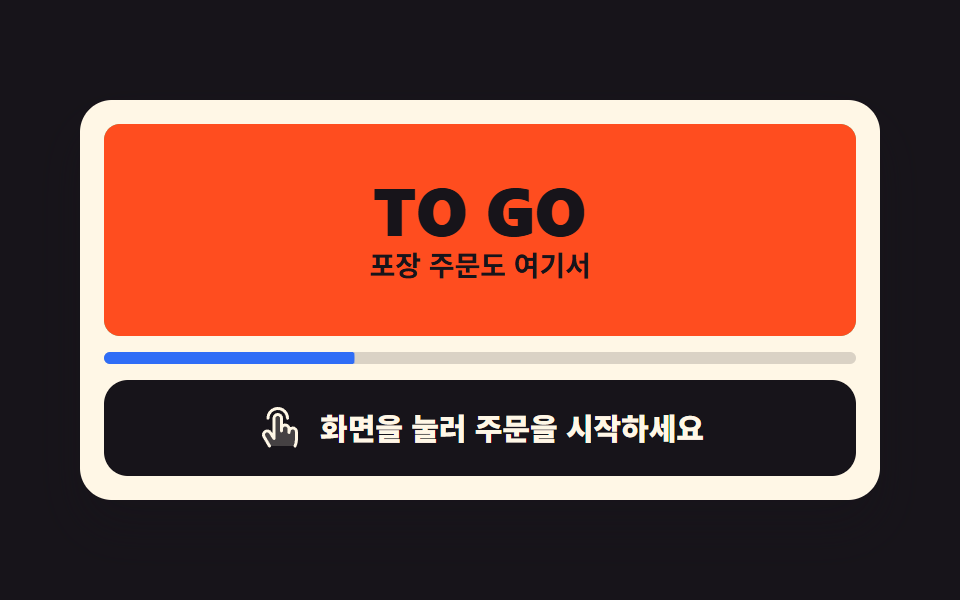
아무도 만지지 않는 동안 광고 세 장이 컷으로 갈리고 남은 시간 막대가 차오릅니다. 화면을 누르면 광고가 멈추고 메뉴 고르는 칸으로 넘어갑니다.
쓰임매장 문 앞 주문 단말의 대기 화면, 전시장 안내 단말
steps(1, end)scaleXanimation-delay

<main class="stage">
<div class="ka is-demo" id="ka">
  <button type="button" class="ka__attract" id="attract" aria-label="화면을 눌러 주문을 시작하세요">
    <span class="ka__promo" aria-hidden="true">
      <span class="ka__slide ka__slide--a"><b class="ka__big">20%</b><i class="ka__sub">오늘의 커피 할인</i></span>
      <span class="ka__slide ka__slide--b"><b class="ka__big">NEW</b><i class="ka__sub">시즌 라떼 나왔어요</i></span>
      <span class="ka__slide ka__slide--c"><b class="ka__big">TO GO</b><i class="ka__sub">포장 주문도 여기서</i></span>
    </span>
    <span class="ka__bar" aria-hidden="true"><i class="ka__fill"></i></span>
    <span class="ka__cta">
      <svg xmlns="http://www.w3.org/2000/svg" viewBox="0 0 256 256" fill="currentColor" class="ka__ico" aria-hidden="true"><path d="M216,148v36c0,24-8,40-8,40H72L42.68,174a20,20,0,0,1,34.64-20L96,184V76a20,20,0,0,1,40,0v56a20,20,0,0,1,40,0v16a20,20,0,0,1,40,0Z" opacity="0.2"/><path d="M56,76a60,60,0,0,1,120,0,8,8,0,0,1-16,0,44,44,0,0,0-88,0,8,8,0,1,1-16,0Zm140,44a27.9,27.9,0,0,0-13.36,3.39A28,28,0,0,0,144,106.7V76a28,28,0,0,0-56,0v80l-3.82-6.13a28,28,0,0,0-48.41,28.17l29.32,50A8,8,0,1,0,78.89,220L49.6,170a12,12,0,1,1,20.78-12l.14.23,18.68,30A8,8,0,0,0,104,184V76a12,12,0,0,1,24,0v68a8,8,0,1,0,16,0V132a12,12,0,0,1,24,0v20a8,8,0,0,0,16,0v-4a12,12,0,0,1,24,0v36c0,21.61-7.1,36.3-7.16,36.42a8,8,0,0,0,3.58,10.73A7.9,7.9,0,0,0,208,232a8,8,0,0,0,7.16-4.42c.37-.73,8.85-18,8.85-43.58V148A28,28,0,0,0,196,120Z"/></svg>
      <span class="ka__ctaText">화면을 눌러 주문을 시작하세요</span>
    </span>
  </button>
  <div class="ka__order" id="order" hidden>
    <p class="ka__head" id="head" tabindex="-1">무엇을 드릴까요</p>
    <ul class="ka__tiles">
      <li><button type="button" class="ka__tile">커피</button></li>
      <li><button type="button" class="ka__tile">홍차</button></li>
      <li><button type="button" class="ka__tile">디저트</button></li>
      <li><button type="button" class="ka__tile">세트</button></li>
    </ul>
    <button type="button" class="ka__back" id="back">처음 화면으로</button>
  </div>
</div>
</main>@use "../../../../site/static/demo-tokens" as *;
// 유휴 화면 — 아무도 안 만지는 동안 광고가 스스로 돌고, 손이 닿으면 주문 화면으로 넘어간다.
// 슬라이드 교체는 steps(1, end) 컷이다. opacity 로 서서히 교차하면 24장 표본의 중간 프레임이
// 두 광고가 반투명하게 겹친 유령이 되고 그 장이 poster 로 뽑힌다.
// 컷만 있으면 움직인 프레임이 두세 장으로 떨어지므로, 남은 시간을 알리는 막대(scaleX)와
// 손 아이콘의 위아래 흔들림을 같은 2초 시계에 붙여 칸을 채운다.
$duration: $dur-loop;
$easing: $ease-spring;
$color: $subject-blue;
@include stage($stage-ink);
.ka { width: 100%; max-width: 400px; }
.ka__attract {
display: block; width: 100%; padding: $sp-3; margin: 0; cursor: pointer;
border: 0; border-radius: $r-card; background: $subject-cream; text-align: left;
font-family: inherit; color: $subject-ink; box-shadow: $shadow-raised;
}
.ka__attract:focus-visible { outline: 3px solid $color; outline-offset: 3px; }
// display 를 준 요소는 UA 의 [hidden]{display:none} 을 이긴다 — 두 화면이 겹쳐 서는 것을 여기서 막는다
.ka [hidden] { display: none; }
.ka__promo {
position: relative; display: block; overflow: hidden;
height: clamp(64px, 22vw, 112px); border-radius: $r-sm;
}
.ka__slide {
position: absolute; inset: 0; display: grid; place-content: center; gap: $sp-1;
text-align: center; opacity: 0; color: $subject-ink;
}
.ka__slide--a { background: $stage-yellow; opacity: 1; }
.ka__slide--b { background: $subject-mint; }
.ka__slide--c { background: $stage-orange; }
.ka__big { font-weight: 800; font-size: clamp(20px, 7vw, 34px); line-height: 1; font-style: normal; }
.ka__sub { font-weight: 700; font-size: clamp(11px, 3vw, 14px); line-height: 1.2; font-style: normal; }
.ka__bar {
display: block; height: 6px; margin: $sp-2 0; border-radius: $r-pill;
background: rgba(23, 20, 26, .16); overflow: hidden;
}
// 채움 막대는 왼쪽 변이 시작점이라 transform-origin 을 왼쪽에 둔다 (붙는 지점이 있는 요소)
.ka__fill {
display: block; height: 100%; border-radius: $r-pill; background: $color;
transform: scaleX(0); transform-origin: left center;
}
.ka__cta {
display: flex; align-items: center; justify-content: center; gap: $sp-2;
padding: $sp-3 $sp-2; border-radius: $r-control;
background: $subject-ink; color: $subject-cream;
font-weight: 800; font-size: clamp(12px, 3.2vw, 15px);
}
.ka__ico { width: clamp(18px, 5vw, 24px); height: clamp(18px, 5vw, 24px); flex: 0 0 auto; }
.ka__ctaText { line-height: 1.2; }
.ka__order { padding: $sp-3; border-radius: $r-card; background: $subject-cream; box-shadow: $shadow-raised; }
.ka__head {
margin: 0 0 $sp-2; font-weight: 800; font-size: clamp(13px, 3.6vw, 17px); color: $subject-ink;
}
.ka__head:focus-visible { outline: 3px solid $color; outline-offset: 2px; }
.ka__tiles {
display: grid; grid-template-columns: repeat(2, 1fr); gap: $sp-2;
margin: 0 0 $sp-2; padding: 0; list-style: none;
}
// 버튼 격자는 width:100% 를 못 박는다 — 버튼은 fit-content 라 1fr 칸이 내용 폭으로 접힌다
.ka__tile {
width: 100%; padding: $sp-3 $sp-2; cursor: pointer;
border: 2px solid rgba(23, 20, 26, .18); border-radius: $r-control;
background: $stage-paper; color: $subject-ink;
font-family: inherit; font-weight: 800; font-size: clamp(12px, 3.2vw, 15px);
}
.ka__tile:focus-visible { outline: 3px solid $color; outline-offset: 2px; }
.ka__back {
width: 100%; padding: $sp-2; cursor: pointer; border: 0; border-radius: $r-control;
background: $subject-ink; color: $subject-cream;
font-family: inherit; font-weight: 700; font-size: clamp(11px, 3vw, 13px);
}
.ka__back:focus-visible { outline: 3px solid $color; outline-offset: 2px; }
// ── 미리보기 루프 ────────────────────────────────────────────────
// 광고 세 장이 2초를 3등분해 컷으로 갈린다. 세 애니메이션이 같은 2초 시계를 쓰므로 어긋나지 않는다.
.ka.is-demo .ka__slide {
animation-name: kaSlide; animation-duration: $duration;
animation-timing-function: steps(1, end); animation-iteration-count: infinite;
animation-fill-mode: backwards;
}
.ka.is-demo .ka__slide--b { animation-delay: calc(#{$duration} / -3 * 2); }
.ka.is-demo .ka__slide--c { animation-delay: calc(#{$duration} / -3); }
@keyframes kaSlide {
0% { opacity: 1; }
33.34%, 100% { opacity: 0; }
}
.ka.is-demo .ka__fill {
animation-name: kaFill; animation-duration: $duration;
animation-timing-function: linear; animation-iteration-count: infinite;
}
@keyframes kaFill {
0% { transform: scaleX(0); }
33.33% { transform: scaleX(1); }
33.34% { transform: scaleX(0); }
66.66% { transform: scaleX(1); }
66.67% { transform: scaleX(0); }
100% { transform: scaleX(1); }
}
// 아이콘은 자기 중심에서 흔들린다 — 누르라는 손짓이라 위아래로만 움직인다
.ka.is-demo .ka__ico {
animation-name: kaTap; animation-duration: $duration;
animation-timing-function: $easing; animation-iteration-count: infinite;
}
@keyframes kaTap {
0%, 100% { transform: translateY(0); }
16% { transform: translateY(5px); }
32% { transform: translateY(0); }
48% { transform: translateY(5px); }
64% { transform: translateY(0); }
}
// 폰 폭에서 쓸 수 있는 세로는 174px 남짓이다. 주문 칸(머리말 + 타일 네 칸 + 되돌아가기)이
// 그 안에 들어오도록 간격과 안쪽 여백만 줄인다 — 누르는 칸의 가로 폭은 그대로 둔다
@media (max-width: 340px) {
.ka__attract, .ka__order { padding: $sp-2; }
.ka__cta { padding: $sp-2; }
.ka__head { margin-bottom: $sp-1; }
.ka__tiles { gap: $sp-1; margin-bottom: $sp-1; }
.ka__tile { padding: $sp-2 $sp-1; }
}
@media (prefers-reduced-motion: reduce) {
.ka.is-demo .ka__slide,
.ka.is-demo .ka__fill,
.ka.is-demo .ka__ico { animation: none !important; }
// 움직임 없이 첫 광고와 3분의 1쯤 찬 막대를 세워 둔다
.ka.is-demo .ka__slide--a { opacity: 1 !important; }
.ka.is-demo .ka__slide--b,
.ka.is-demo .ka__slide--c { opacity: 0 !important; }
.ka.is-demo .ka__fill { transform: scaleX(.34) !important; }
}html, body {
margin: 0;
overflow: hidden;
}
.stage {
box-sizing: border-box;
min-height: 100vh;
display: grid;
place-items: center;
margin: 0;
background: #17141a;
font-family: -apple-system, "Segoe UI", "Noto Sans KR", sans-serif;
padding: clamp(8px, 4vw, 24px);
}
.ka {
width: 100%;
max-width: 400px;
}
.ka__attract {
display: block;
width: 100%;
padding: 12px;
margin: 0;
cursor: pointer;
border: 0;
border-radius: 16px;
background: #fff7e6;
text-align: left;
font-family: inherit;
color: #17141a;
box-shadow: 0 14px 24px rgba(23, 20, 26, 0.32);
}
.ka__attract:focus-visible {
outline: 3px solid #2f6df6;
outline-offset: 3px;
}
.ka [hidden] {
display: none;
}
.ka__promo {
position: relative;
display: block;
overflow: hidden;
height: clamp(64px, 22vw, 112px);
border-radius: 8px;
}
.ka__slide {
position: absolute;
inset: 0;
display: grid;
place-content: center;
gap: 4px;
text-align: center;
opacity: 0;
color: #17141a;
}
.ka__slide--a {
background: #ffd23f;
opacity: 1;
}
.ka__slide--b {
background: #4cd4a6;
}
.ka__slide--c {
background: #ff4d1f;
}
.ka__big {
font-weight: 800;
font-size: clamp(20px, 7vw, 34px);
line-height: 1;
font-style: normal;
}
.ka__sub {
font-weight: 700;
font-size: clamp(11px, 3vw, 14px);
line-height: 1.2;
font-style: normal;
}
.ka__bar {
display: block;
height: 6px;
margin: 8px 0;
border-radius: 999px;
background: rgba(23, 20, 26, 0.16);
overflow: hidden;
}
.ka__fill {
display: block;
height: 100%;
border-radius: 999px;
background: #2f6df6;
transform: scaleX(0);
transform-origin: left center;
}
.ka__cta {
display: flex;
align-items: center;
justify-content: center;
gap: 8px;
padding: 12px 8px;
border-radius: 12px;
background: #17141a;
color: #fff7e6;
font-weight: 800;
font-size: clamp(12px, 3.2vw, 15px);
}
.ka__ico {
width: clamp(18px, 5vw, 24px);
height: clamp(18px, 5vw, 24px);
flex: 0 0 auto;
}
.ka__ctaText {
line-height: 1.2;
}
.ka__order {
padding: 12px;
border-radius: 16px;
background: #fff7e6;
box-shadow: 0 14px 24px rgba(23, 20, 26, 0.32);
}
.ka__head {
margin: 0 0 8px;
font-weight: 800;
font-size: clamp(13px, 3.6vw, 17px);
color: #17141a;
}
.ka__head:focus-visible {
outline: 3px solid #2f6df6;
outline-offset: 2px;
}
.ka__tiles {
display: grid;
grid-template-columns: repeat(2, 1fr);
gap: 8px;
margin: 0 0 8px;
padding: 0;
list-style: none;
}
.ka__tile {
width: 100%;
padding: 12px 8px;
cursor: pointer;
border: 2px solid rgba(23, 20, 26, 0.18);
border-radius: 12px;
background: #ffffff;
color: #17141a;
font-family: inherit;
font-weight: 800;
font-size: clamp(12px, 3.2vw, 15px);
}
.ka__tile:focus-visible {
outline: 3px solid #2f6df6;
outline-offset: 2px;
}
.ka__back {
width: 100%;
padding: 8px;
cursor: pointer;
border: 0;
border-radius: 12px;
background: #17141a;
color: #fff7e6;
font-family: inherit;
font-weight: 700;
font-size: clamp(11px, 3vw, 13px);
}
.ka__back:focus-visible {
outline: 3px solid #2f6df6;
outline-offset: 2px;
}
.ka.is-demo .ka__slide {
animation-name: kaSlide;
animation-duration: 2s;
animation-timing-function: steps(1, end);
animation-iteration-count: infinite;
animation-fill-mode: backwards;
}
.ka.is-demo .ka__slide--b {
animation-delay: calc(2s / -3 * 2);
}
.ka.is-demo .ka__slide--c {
animation-delay: calc(2s / -3);
}
@keyframes kaSlide {
0% {
opacity: 1;
}
33.34%, 100% {
opacity: 0;
}
}
.ka.is-demo .ka__fill {
animation-name: kaFill;
animation-duration: 2s;
animation-timing-function: linear;
animation-iteration-count: infinite;
}
@keyframes kaFill {
0% {
transform: scaleX(0);
}
33.33% {
transform: scaleX(1);
}
33.34% {
transform: scaleX(0);
}
66.66% {
transform: scaleX(1);
}
66.67% {
transform: scaleX(0);
}
100% {
transform: scaleX(1);
}
}
.ka.is-demo .ka__ico {
animation-name: kaTap;
animation-duration: 2s;
animation-timing-function: cubic-bezier(0.2, 0.8, 0.2, 1);
animation-iteration-count: infinite;
}
@keyframes kaTap {
0%, 100% {
transform: translateY(0);
}
16% {
transform: translateY(5px);
}
32% {
transform: translateY(0);
}
48% {
transform: translateY(5px);
}
64% {
transform: translateY(0);
}
}
@media (max-width: 340px) {
.ka__attract, .ka__order {
padding: 8px;
}
.ka__cta {
padding: 8px;
}
.ka__head {
margin-bottom: 4px;
}
.ka__tiles {
gap: 4px;
margin-bottom: 4px;
}
.ka__tile {
padding: 8px 4px;
}
}
@media (prefers-reduced-motion: reduce) {
.ka.is-demo .ka__slide,
.ka.is-demo .ka__fill,
.ka.is-demo .ka__ico {
animation: none !important;
}
.ka.is-demo .ka__slide--a {
opacity: 1 !important;
}
.ka.is-demo .ka__slide--b,
.ka.is-demo .ka__slide--c {
opacity: 0 !important;
}
.ka.is-demo .ka__fill {
transform: scaleX(0.34) !important;
}
}var ka = document.getElementById('ka');
var attract = document.getElementById('attract');
var order = document.getElementById('order');
var back = document.getElementById('back');
var head = document.getElementById('head');
// 유휴 화면은 "아무도 안 만질 때 스스로 도는 화면"이다. 손이 닿는 순간 광고를 멈추고 주문 화면으로 넘긴다.
// 미리보기 루프(.is-demo)는 CSS 키프레임이 돌리고, 사람이 누르면 여기서 루프를 떼고 화면을 바꾼다.
function start() {
ka.classList.remove('is-demo');
attract.hidden = true;
order.hidden = false;
head.focus({ preventScroll: true });
}
function home() {
order.hidden = true;
attract.hidden = false;
attract.focus({ preventScroll: true });
}
attract.addEventListener('click', start);
back.addEventListener('click', function (e) { e.stopPropagation(); home(); });// AttractIdleScreen — vanilla 판(run/298/demo/01-kiosk-attract-idle-loop/index.html) 의 React 포트.
// 유휴 화면은 "아무도 안 만질 때 스스로 도는 화면"이다. 손이 닿는 순간 광고를 멈추고 주문 화면으로 넘긴다.
// 미리보기 루프(.isDemo)는 CSS 키프레임이 돌리고, 사람이 누르면 여기서 루프를 떼고 화면을 바꾼다.
// 두 화면은 hidden 속성 하나로 갈린다 — 모듈의 `.root [hidden] { display: none; }` 이
// display 를 준 요소에서도 UA 기본값을 이겨 준다(안 그러면 두 화면이 겹쳐 선다). 값·수치는 vanilla 와 같다.
import { useEffect, useRef, useState } from "react";
import type { CSSProperties } from "react";
import styles from "./AttractIdleScreen.module.scss";
export type AttractIdleScreenProps = {
duration?: number;
easing?: string;
color?: string;
};
type Vars = CSSProperties & {
"--duration"?: string;
"--easing"?: string;
"--color"?: string;
};
// ambient 타입에는 React 이벤트 제네릭이 없다 — 핸들러가 실제로 쓰는 것만 지역 타입으로 적는다
type StopEvt = { stopPropagation(): void };
const CTA_LABEL = "화면을 눌러 주문을 시작하세요";
const ORDER_HEAD = "무엇을 드릴까요";
const BACK_LABEL = "처음 화면으로";
const SLIDES: { cls: string; big: string; sub: string }[] = [
{ cls: "slideA", big: "20%", sub: "오늘의 커피 할인" },
{ cls: "slideB", big: "NEW", sub: "시즌 라떼 나왔어요" },
{ cls: "slideC", big: "TO GO", sub: "포장 주문도 여기서" },
];
const TILES: string[] = ["커피", "홍차", "디저트", "세트"];
export default function AttractIdleScreen({
duration = 2000,
easing = "cubic-bezier(.2, .8, .2, 1)",
color = "#2f6df6",
}: AttractIdleScreenProps) {
const attractRef = useRef<HTMLButtonElement | null>(null);
const headRef = useRef<HTMLParagraphElement | null>(null);
// 첫 렌더에는 초점을 옮기지 않는다 — 사람이 만진 뒤부터가 화면 전환이다
const touchedRef = useRef<boolean>(false);
const [ordering, setOrdering] = useState(false);
const [demo, setDemo] = useState(true);
const vars: Vars = { "--duration": `${duration}ms`, "--easing": easing, "--color": color };
useEffect(() => {
if (!touchedRef.current) return;
const target = ordering ? headRef.current : attractRef.current;
if (target) target.focus({ preventScroll: true });
}, [ordering]);
function start(): void {
touchedRef.current = true;
setDemo(false);
setOrdering(true);
}
function home(event: StopEvt): void {
event.stopPropagation();
touchedRef.current = true;
setOrdering(false);
}
const cls = [styles.root, demo ? styles.isDemo : ""].filter(Boolean).join(" ");
return (
<main className={styles.stage}>
<div className={cls} style={vars}>
<button
type="button"
className={styles.attract}
ref={attractRef}
hidden={ordering}
aria-label={CTA_LABEL}
onClick={start}
>
<span className={styles.promo} aria-hidden="true">
{SLIDES.map((slide) => (
<span key={slide.cls} className={`${styles.slide} ${styles[slide.cls]}`}>
<b className={styles.big}>{slide.big}</b>
<i className={styles.sub}>{slide.sub}</i>
</span>
))}
</span>
<span className={styles.bar} aria-hidden="true"><i className={styles.fill}></i></span>
<span className={styles.cta}>
<svg xmlns="http://www.w3.org/2000/svg" viewBox="0 0 256 256" fill="currentColor" className={styles.ico} aria-hidden="true"><path d="M216,148v36c0,24-8,40-8,40H72L42.68,174a20,20,0,0,1,34.64-20L96,184V76a20,20,0,0,1,40,0v56a20,20,0,0,1,40,0v16a20,20,0,0,1,40,0Z" opacity="0.2"/><path d="M56,76a60,60,0,0,1,120,0,8,8,0,0,1-16,0,44,44,0,0,0-88,0,8,8,0,1,1-16,0Zm140,44a27.9,27.9,0,0,0-13.36,3.39A28,28,0,0,0,144,106.7V76a28,28,0,0,0-56,0v80l-3.82-6.13a28,28,0,0,0-48.41,28.17l29.32,50A8,8,0,1,0,78.89,220L49.6,170a12,12,0,1,1,20.78-12l.14.23,18.68,30A8,8,0,0,0,104,184V76a12,12,0,0,1,24,0v68a8,8,0,1,0,16,0V132a12,12,0,0,1,24,0v20a8,8,0,0,0,16,0v-4a12,12,0,0,1,24,0v36c0,21.61-7.1,36.3-7.16,36.42a8,8,0,0,0,3.58,10.73A7.9,7.9,0,0,0,208,232a8,8,0,0,0,7.16-4.42c.37-.73,8.85-18,8.85-43.58V148A28,28,0,0,0,196,120Z"/></svg>
<span className={styles.ctaText}>{CTA_LABEL}</span>
</span>
</button>
<div className={styles.order} hidden={!ordering}>
<p className={styles.head} ref={headRef} tabIndex={-1}>{ORDER_HEAD}</p>
<ul className={styles.tiles}>
{TILES.map((tile) => (
<li key={tile}><button type="button" className={styles.tile}>{tile}</button></li>
))}
</ul>
<button type="button" className={styles.back} onClick={home}>{BACK_LABEL}</button>
</div>
</div>
</main>
);
}01 유휴 화면 — 측정 누적면적 29.122% · 움직인 프레임 23/23GODRICH 원작 · zip 에 SCSS·React 포함 · 키오스크 UI 디자인 9종 — 손가락 기준으로 키운 주문 화면
이 데모가 속한 글
 키오스크 UI 디자인 9종 — 손가락 기준으로 키운 주문 화면키오스크 UI 디자인은 서서 쓰는 큰 화면을 손가락 기준으로 키운 주문 흐름으로 짜는 일입니다. 여기 아홉 화면은 유휴 광고부터 언어 고르기·메뉴 타일·품절 칸·호출판·되돌아가기까지, 붙여 넣으면 바로 도는 형태로 이 글의 데모 전부 보기