06세트 권유 칸
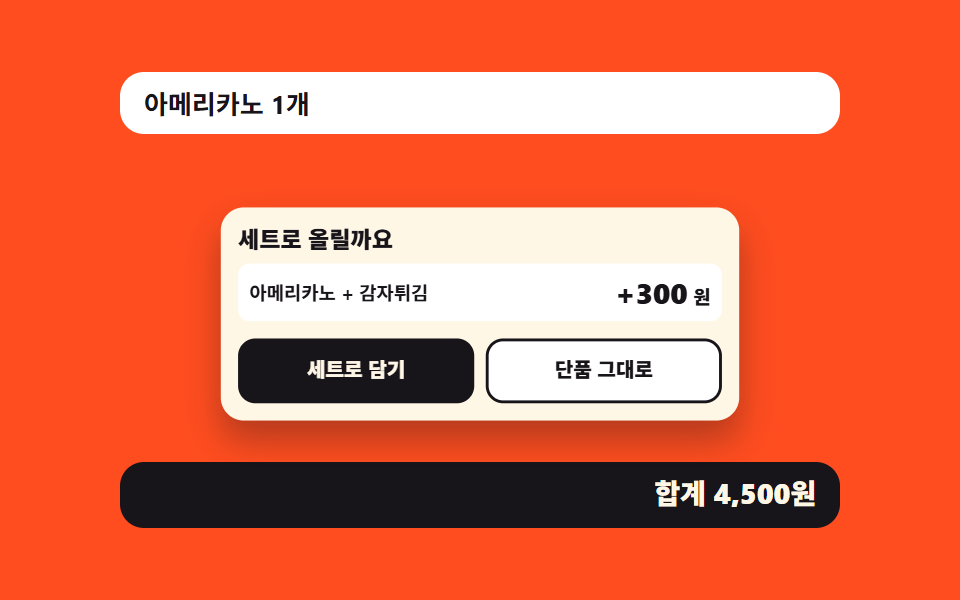
단품을 고른 뒤 세트 카드가 튀어오르고 차액이 숫자 칸을 굴려 올라갑니다. 그냥 단품으로 가기 버튼을 세트 버튼과 같은 크기로 나란히 둡니다.
쓰임단품을 고른 뒤 세트로 올리는 칸, 사이드 추가를 묻는 칸
overflow: hiddentranslateYaria-live
<main class="stage">
<div class="ku is-demo" id="ku">
  <p class="ku__order" id="orderLine">아메리카노 1개</p>
  <div class="ku__sheet" id="sheet">
    <p class="ku__title">세트로 올릴까요</p>
    <div class="ku__combo">
      <span class="ku__items">아메리카노 + 감자튀김</span>
      <span class="ku__diff" aria-label="세트 차액 +1,500원">
        <span class="ku__odo" aria-hidden="true"><span class="ku__roll"><b>+300</b><b>+600</b><b>+900</b><b>+1,200</b><b>+1,500</b></span></span>
        <b class="ku__won" aria-hidden="true">원</b>
      </span>
    </div>
    <div class="ku__btns">
      <button type="button" class="ku__btn ku__btn--yes" id="yes">세트로 담기</button>
      <button type="button" class="ku__btn ku__btn--no" id="no">단품 그대로</button>
    </div>
  </div>
  <p class="ku__sum" id="sum" tabindex="-1" aria-live="polite">합계 4,500원</p>
</div>
</main>
@use "../../../../site/static/demo-tokens" as *;
// 세트 권유 칸 — 단품을 고른 뒤 뜨는 권유 카드. 거절 버튼을 작게 만들지 않는 것이 이 부품의 주장이라
// 두 버튼은 repeat(2, 1fr) 격자에 width:100% 로 선다 (버튼은 fit-content 라 100% 를 못 박지 않으면 칸이 접힌다).
//
// 무대가 오렌지라 크림 작은 글자는 AA 에 못 미친다. 그래서 카드·주문 줄은 크림/흰 바탕을 깔고 그 위에 먹 글자를 쓴다
// (대비 실측은 run/298/_probe/대비.06.json).
//
// 미리보기 루프는 등장(팝)과 차액 숫자의 굴림만 돌린다. 카드가 닫히는 것은 이 부품의 주제이지만
// 루프에서 퇴장을 재현하면 poster 가 빈 화면이 된다 — 닫기는 사람이 눌렀을 때 JS 가 한다.
$duration: $dur-loop;
$easing: $ease-pop;
$color: $subject-ink;
@include stage($stage-orange);
.ku { width: 100%; max-width: 360px; display: grid; gap: $sp-2; }
// display 를 지정한 요소는 UA 기본 [hidden]{display:none} 을 이긴다 — 닫은 카드가 자리를 그대로 차지한다
.ku [hidden] { display: none; }
.ku__order {
margin: 0; padding: $sp-2 $sp-3; border-radius: $r-control;
background: $stage-paper; color: $subject-ink;
font-weight: 700; font-size: clamp(11px, 3vw, 13px); line-height: 1.2;
}
.ku__sheet {
padding: clamp(8px, 3.4vw, 12px); border-radius: $r-card;
background: $subject-cream; color: $subject-ink; box-shadow: $shadow-raised;
// 카드는 자기 중심에서 튀어오른다 — transform-origin 기본값(50% 50%)
transform-origin: 50% 50%;
}
.ku__title {
margin: 0 0 $sp-2; font-weight: 800; font-size: clamp(13px, 3.6vw, 16px); line-height: 1.2;
}
.ku__combo {
display: flex; align-items: center; justify-content: space-between; gap: $sp-2;
margin: 0 0 $sp-3; padding: clamp(4px, 2.4vw, 8px); border-radius: $r-sm;
background: $stage-paper;
}
.ku__items { font-weight: 700; font-size: clamp(11px, 3vw, 13px); line-height: 1.2; }
.ku__diff {
display: flex; align-items: baseline; flex: 0 0 auto;
font-weight: 800; font-size: clamp(15px, 4.4vw, 20px); line-height: 1.2; color: $subject-ink;
}
.ku__won { padding-left: $sp-1; font-weight: 800; font-size: clamp(11px, 3vw, 13px); }
// 오도미터 — 숫자 칸 높이만큼만 열린 창을 두고, 세로로 쌓은 금액 줄을 translateY 로 밀어 올린다.
// 창 높이(1.2em)와 줄 높이(1.2)가 같아야 한 줄만 보인다. 다섯 줄이므로 -80% 가 마지막 줄(1,500)이다.
.ku__odo { display: block; overflow: hidden; height: 1.2em; }
.ku__roll { display: block; transform: translateY(-80%); }
// 줄마다 자릿수가 다르다(300 · 1,500) — 오른쪽에 맞춰야 굴리는 동안 단위(원)와 사이가 벌어지지 않는다
.ku__roll b { display: block; text-align: right; font-weight: 800; line-height: 1.2; }
.ku__btns { display: grid; grid-template-columns: repeat(2, 1fr); gap: $sp-2; }
// 버튼 격자는 width:100% 를 못 박는다 — 두 칸의 넓이가 같아야 "거절도 같은 크기" 라는 주장이 성립한다
.ku__btn {
width: 100%; padding: clamp(8px, 3vw, 12px) $sp-2; cursor: pointer;
border: 2px solid $subject-ink; border-radius: $r-control;
font-family: inherit; font-weight: 800; font-size: clamp(11px, 3.2vw, 14px); line-height: 1.2;
}
.ku__btn--yes { background: $subject-ink; color: $subject-cream; }
.ku__btn--no { background: $stage-paper; color: $subject-ink; }
.ku__btn:focus-visible { outline: 3px solid $stage-paper; outline-offset: 3px; }
.ku__sum {
margin: 0; padding: $sp-2 $sp-3; border-radius: $r-control;
background: $subject-ink; color: $subject-cream; text-align: right;
font-weight: 800; font-size: clamp(12px, 3.2vw, 14px); line-height: 1.2;
}
.ku__sum:focus-visible { outline: 3px solid $stage-paper; outline-offset: 2px; }
// ── 미리보기 루프 ────────────────────────────────────────────────
// ① 카드가 $ease-pop 으로 자기 중심에서 튀어오른다 ② 차액 숫자가 숫자 칸을 굴려 올라간다.
// 복귀(86%)는 steps(1, end) 컷이다 — 되돌아가는 움직임을 보여 주면 "값이 다시 내려간다" 로 읽힌다.
// 마지막 프레임이 2초의 95.8% 지점이므로 복귀는 90% 안에 끝낸다.
.ku.is-demo .ku__sheet {
animation-name: kuPop; animation-duration: $duration;
animation-timing-function: $easing; animation-iteration-count: infinite;
animation-fill-mode: backwards;
}
@keyframes kuPop {
0% { transform: translateY(8px) scale(.72); animation-timing-function: $ease-pop; }
26% { transform: translateY(0) scale(1); animation-timing-function: steps(1, end); }
86% { transform: translateY(8px) scale(.72); }
100% { transform: translateY(8px) scale(.72); }
}
.ku.is-demo .ku__roll {
animation-name: kuRoll; animation-duration: $duration;
animation-timing-function: $ease-out; animation-iteration-count: infinite;
animation-fill-mode: backwards;
}
@keyframes kuRoll {
0% { transform: translateY(0); }
24% { transform: translateY(0); animation-timing-function: $ease-out; }
64% { transform: translateY(-80%); animation-timing-function: steps(1, end); }
86% { transform: translateY(0); }
100% { transform: translateY(0); }
}
@media (max-width: 340px) {
// 폰에서 쓸 수 있는 세로는 174px 남짓이다 — 좁은 화면에서는 간격을 올리지 않고 내린다
.ku { gap: $sp-1; }
.ku__order, .ku__sum { padding: $sp-1 $sp-2; }
.ku__title { margin: 0 0 $sp-1; }
.ku__combo { margin: 0 0 $sp-2; }
}
@media (prefers-reduced-motion: reduce) {
.ku.is-demo .ku__sheet,
.ku.is-demo .ku__roll { animation: none !important; }
// 움직임 없이 다 펼쳐진 카드와 최종 차액(1,500)을 세워 둔다
.ku.is-demo .ku__sheet { transform: translateY(0) scale(1) !important; }
.ku.is-demo .ku__roll { transform: translateY(-80%) !important; }
}html, body {
margin: 0;
overflow: hidden;
}
.stage {
box-sizing: border-box;
min-height: 100vh;
display: grid;
place-items: center;
margin: 0;
background: #ff4d1f;
font-family: -apple-system, "Segoe UI", "Noto Sans KR", sans-serif;
padding: clamp(8px, 4vw, 24px);
}
.ku {
width: 100%;
max-width: 360px;
display: grid;
gap: 8px;
}
.ku [hidden] {
display: none;
}
.ku__order {
margin: 0;
padding: 8px 12px;
border-radius: 12px;
background: #ffffff;
color: #17141a;
font-weight: 700;
font-size: clamp(11px, 3vw, 13px);
line-height: 1.2;
}
.ku__sheet {
padding: clamp(8px, 3.4vw, 12px);
border-radius: 16px;
background: #fff7e6;
color: #17141a;
box-shadow: 0 14px 24px rgba(23, 20, 26, 0.32);
transform-origin: 50% 50%;
}
.ku__title {
margin: 0 0 8px;
font-weight: 800;
font-size: clamp(13px, 3.6vw, 16px);
line-height: 1.2;
}
.ku__combo {
display: flex;
align-items: center;
justify-content: space-between;
gap: 8px;
margin: 0 0 12px;
padding: clamp(4px, 2.4vw, 8px);
border-radius: 8px;
background: #ffffff;
}
.ku__items {
font-weight: 700;
font-size: clamp(11px, 3vw, 13px);
line-height: 1.2;
}
.ku__diff {
display: flex;
align-items: baseline;
flex: 0 0 auto;
font-weight: 800;
font-size: clamp(15px, 4.4vw, 20px);
line-height: 1.2;
color: #17141a;
}
.ku__won {
padding-left: 4px;
font-weight: 800;
font-size: clamp(11px, 3vw, 13px);
}
.ku__odo {
display: block;
overflow: hidden;
height: 1.2em;
}
.ku__roll {
display: block;
transform: translateY(-80%);
}
.ku__roll b {
display: block;
text-align: right;
font-weight: 800;
line-height: 1.2;
}
.ku__btns {
display: grid;
grid-template-columns: repeat(2, 1fr);
gap: 8px;
}
.ku__btn {
width: 100%;
padding: clamp(8px, 3vw, 12px) 8px;
cursor: pointer;
border: 2px solid #17141a;
border-radius: 12px;
font-family: inherit;
font-weight: 800;
font-size: clamp(11px, 3.2vw, 14px);
line-height: 1.2;
}
.ku__btn--yes {
background: #17141a;
color: #fff7e6;
}
.ku__btn--no {
background: #ffffff;
color: #17141a;
}
.ku__btn:focus-visible {
outline: 3px solid #ffffff;
outline-offset: 3px;
}
.ku__sum {
margin: 0;
padding: 8px 12px;
border-radius: 12px;
background: #17141a;
color: #fff7e6;
text-align: right;
font-weight: 800;
font-size: clamp(12px, 3.2vw, 14px);
line-height: 1.2;
}
.ku__sum:focus-visible {
outline: 3px solid #ffffff;
outline-offset: 2px;
}
.ku.is-demo .ku__sheet {
animation-name: kuPop;
animation-duration: 2s;
animation-timing-function: cubic-bezier(0.2, 1.4, 0.4, 1);
animation-iteration-count: infinite;
animation-fill-mode: backwards;
}
@keyframes kuPop {
0% {
transform: translateY(8px) scale(0.72);
animation-timing-function: cubic-bezier(0.2, 1.4, 0.4, 1);
}
26% {
transform: translateY(0) scale(1);
animation-timing-function: steps(1, end);
}
86% {
transform: translateY(8px) scale(0.72);
}
100% {
transform: translateY(8px) scale(0.72);
}
}
.ku.is-demo .ku__roll {
animation-name: kuRoll;
animation-duration: 2s;
animation-timing-function: ease-out;
animation-iteration-count: infinite;
animation-fill-mode: backwards;
}
@keyframes kuRoll {
0% {
transform: translateY(0);
}
24% {
transform: translateY(0);
animation-timing-function: ease-out;
}
64% {
transform: translateY(-80%);
animation-timing-function: steps(1, end);
}
86% {
transform: translateY(0);
}
100% {
transform: translateY(0);
}
}
@media (max-width: 340px) {
.ku {
gap: 4px;
}
.ku__order, .ku__sum {
padding: 4px 8px;
}
.ku__title {
margin: 0 0 4px;
}
.ku__combo {
margin: 0 0 8px;
}
}
@media (prefers-reduced-motion: reduce) {
.ku.is-demo .ku__sheet,
.ku.is-demo .ku__roll {
animation: none !important;
}
.ku.is-demo .ku__sheet {
transform: translateY(0) scale(1) !important;
}
.ku.is-demo .ku__roll {
transform: translateY(-80%) !important;
}
}var ku = document.getElementById('ku');
var sheet = document.getElementById('sheet');
var orderLine = document.getElementById('orderLine');
var sum = document.getElementById('sum');
var yes = document.getElementById('yes');
var no = document.getElementById('no');
// 권유 칸의 주장은 "거절 버튼을 작게 만들지 않는다" 다. 두 버튼은 같은 1fr 칸에 width:100% 로 서므로
// 어느 쪽을 고르든 손가락이 닿는 넓이가 같다. 고르고 나면 카드만 닫히고 주문 줄과 합계는 남는다.
var SUM_LABEL = '합계 {n}원';
var SINGLE_LINE = '아메리카노 1개';
var COMBO_LINE = '아메리카노 세트 1개';
var BASE = 4500;
var DIFF = 1500;
function money(n) {
return String(n).replace(/\B(?=(\d{3})+$)/g, ',');
}
function settle(add) {
ku.classList.remove('is-demo');
var total = BASE + (add ? DIFF : 0);
orderLine.textContent = add ? COMBO_LINE : SINGLE_LINE;
sum.textContent = SUM_LABEL.replace('{n}', money(total));
sheet.hidden = true;
sum.focus({ preventScroll: true });
}
yes.addEventListener('click', function () { settle(true); });
no.addEventListener('click', function () { settle(false); });// ComboUpsellSheet — vanilla 판(run/298/demo/06-kiosk-combo-upsell-sheet/index.html) 의 React 포트.
// 권유 칸의 주장은 "거절 버튼을 작게 만들지 않는다" 다. 두 버튼은 같은 1fr 칸에 width:100% 로 서므로
// 어느 쪽을 고르든 손가락이 닿는 넓이가 같다. 고르고 나면 카드만 닫히고 주문 줄과 합계는 남는다.
// 닫기는 hidden 속성이고, 짝 scss 의 `.root [hidden] { display: none }` 이 UA 기본을 대신한다 —
// 그 규칙이 없으면 display 를 지정한 카드가 닫힌 뒤에도 자리를 그대로 차지한다.
import { useRef, useState } from "react";
import type { CSSProperties } from "react";
import styles from "./ComboUpsellSheet.module.scss";
export type ComboUpsellSheetProps = {
duration?: number;
easing?: string;
color?: string;
};
type Vars = CSSProperties & {
"--duration"?: string;
"--easing"?: string;
"--color"?: string;
};
const SUM_LABEL = "합계 {n}원";
const SINGLE_LINE = "아메리카노 1개";
const COMBO_LINE = "아메리카노 세트 1개";
const SHEET_TITLE = "세트로 올릴까요";
const ITEMS_LINE = "아메리카노 + 감자튀김";
const DIFF_LABEL = "세트 차액 +1,500원";
const WON = "원";
const YES_LABEL = "세트로 담기";
const NO_LABEL = "단품 그대로";
const ROLL_STEPS = ["+300", "+600", "+900", "+1,200", "+1,500"];
const BASE = 4500;
const DIFF = 1500;
function money(n: number): string {
return String(n).replace(/\B(?=(\d{3})+$)/g, ",");
}
export default function ComboUpsellSheet({
duration = 2000,
easing = "cubic-bezier(.2, 1.4, .4, 1)",
color = "#17141a",
}: ComboUpsellSheetProps) {
const sumRef = useRef<HTMLParagraphElement | null>(null);
const [demo, setDemo] = useState(true);
const [closed, setClosed] = useState(false);
const [combo, setCombo] = useState(false);
const [total, setTotal] = useState(BASE);
const vars: Vars = { "--duration": `${duration}ms`, "--easing": easing, "--color": color };
function settle(add: boolean): void {
setDemo(false);
setCombo(add);
setTotal(BASE + (add ? DIFF : 0));
setClosed(true);
const sum = sumRef.current;
if (sum) sum.focus({ preventScroll: true });
}
const cls = [styles.root, demo ? styles.isDemo : ""].filter(Boolean).join(" ");
return (
<main className={styles.stage}>
<div className={cls} style={vars}>
<p className={styles.order}>{combo ? COMBO_LINE : SINGLE_LINE}</p>
<div className={styles.sheet} hidden={closed}>
<p className={styles.title}>{SHEET_TITLE}</p>
<div className={styles.combo}>
<span className={styles.items}>{ITEMS_LINE}</span>
<span className={styles.diff} aria-label={DIFF_LABEL}>
<span className={styles.odo} aria-hidden="true">
<span className={styles.roll}>
{ROLL_STEPS.map((step) => (
<b key={step}>{step}</b>
))}
</span>
</span>
<b className={styles.won} aria-hidden="true">{WON}</b>
</span>
</div>
<div className={styles.btns}>
<button type="button" className={`${styles.btn} ${styles.btnYes}`} onClick={() => settle(true)}>{YES_LABEL}</button>
<button type="button" className={`${styles.btn} ${styles.btnNo}`} onClick={() => settle(false)}>{NO_LABEL}</button>
</div>
</div>
<p className={styles.sum} ref={sumRef} tabIndex={-1} aria-live="polite">
{SUM_LABEL.replace("{n}", money(total))}
</p>
</div>
</main>
);
}06 세트 권유 칸 — 측정 누적면적 34.771% · 움직인 프레임 17/23GODRICH 원작 · zip 에 SCSS·React 포함 · 키오스크 UI 디자인 9종 — 손가락 기준으로 키운 주문 화면
이 데모가 속한 글
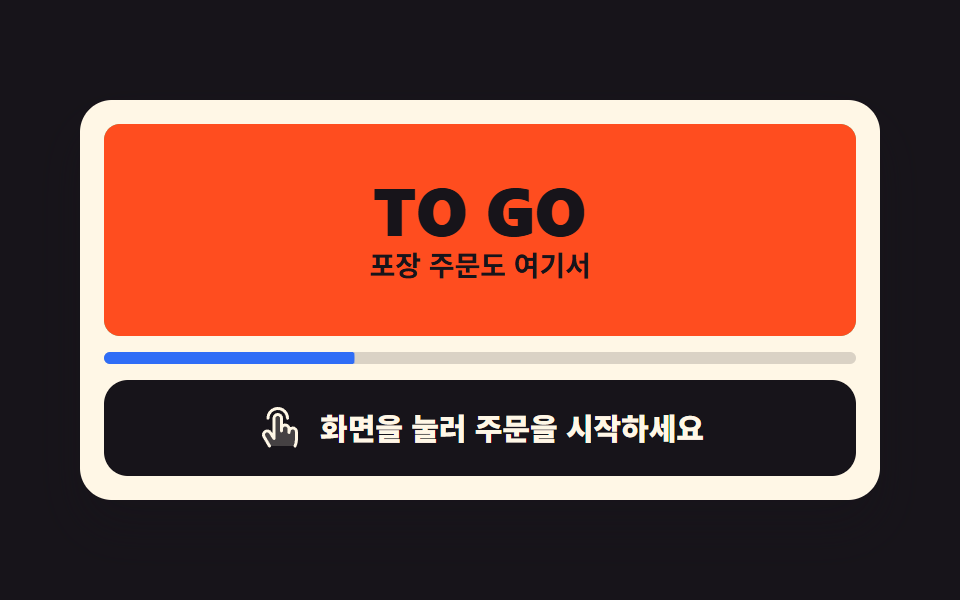 키오스크 UI 디자인 9종 — 손가락 기준으로 키운 주문 화면키오스크 UI 디자인은 서서 쓰는 큰 화면을 손가락 기준으로 키운 주문 흐름으로 짜는 일입니다. 여기 아홉 화면은 유휴 광고부터 언어 고르기·메뉴 타일·품절 칸·호출판·되돌아가기까지, 붙여 넣으면 바로 도는 형태로 이 글의 데모 전부 보기