07클릭 값이 로드 시점을 계산하는 iframe 지연 로딩
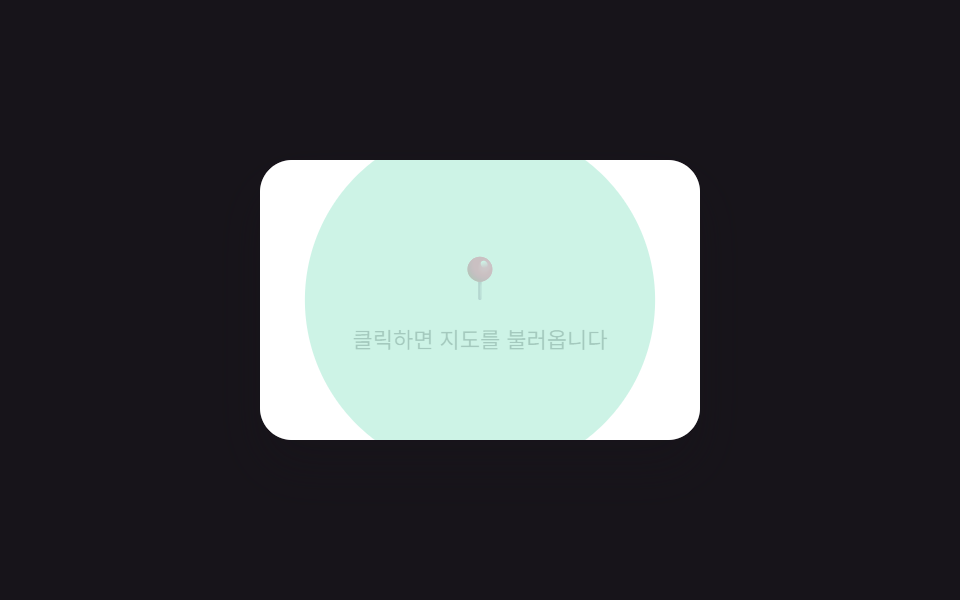
클릭 여부 값을 계산해 클릭 전에는 지도·소셜 embed 자리에 정적 안내만 두고, 클릭한 순간에만 그 자리를 실제 iframe으로 바꾼다.
쓰임매장 위치 지도·소셜 포스트 임베드
RIPPLE_DURATION_MSLOAD_DELAY_MSmaxDistanceToCorner
<main class="stage">
<div class="lic is-demo" id="lic">
  <div class="lic__frame" id="licFrame" tabindex="0" role="button" aria-label="지도 임베드 불러오기">
    <div class="lic__notice" id="licNotice">
      <span class="lic__pin">📍</span>
      <p class="lic__text">클릭하면 지도를 불러옵니다</p>
    </div>
    <svg class="lic__ripple" id="licRipple" aria-hidden="true">
      <circle id="licRippleCircle" cx="0" cy="0" r="0"></circle>
    </svg>
    <div class="lic__embed" id="licEmbed">
      <svg viewBox="0 0 220 140" width="100%" height="100%" preserveAspectRatio="none">
        <rect width="220" height="140" fill="#d8ead8"></rect>
        <path d="M0 90 L60 70 L120 96 L160 60 L220 84 L220 140 L0 140 Z" fill="#bfe0c4"></path>
        <path d="M0 40 L220 55" stroke="#f4d878" stroke-width="6"></path>
        <path d="M40 0 L70 140" stroke="#f4d878" stroke-width="5"></path>
        <circle cx="118" cy="66" r="7" fill="#e6564a"></circle>
        <circle cx="118" cy="66" r="3" fill="#fff"></circle>
      </svg>
    </div>
  </div>
</div>
</main>
@use "../../../../site/static/demo-tokens" as *;
// 클릭 지점에서 프레임 모서리까지의 최대 거리 값을 리플 반지름 목표로 계산한다.
// 클릭 전에는 정적 안내만, 클릭한 순간에만 실제(가짜) 임베드로 전환한다.
$duration: $dur-enter;
$easing: $ease-out;
$color: $subject-mint;
@include stage($stage-ink);
.lic {
display: flex;
align-items: center;
justify-content: center;
}
.lic__frame {
position: relative;
box-sizing: border-box;
width: 220px;
height: 140px;
border-radius: $r-card;
overflow: hidden;
background: $stage-paper;
cursor: pointer;
outline: none;
box-shadow: $shadow-raised;
}
.lic__frame:focus-visible {
box-shadow: 0 0 0 3px rgba(76, 212, 166, .5);
}
.lic__notice {
position: absolute;
inset: 0;
display: flex;
flex-direction: column;
align-items: center;
justify-content: center;
gap: $sp-2;
background: $stage-paper;
transition: opacity $dur-quick $ease-out;
}
.lic__pin { font-size: 22px; }
.lic__text {
margin: 0;
font-size: 11px;
color: $stage-ink;
opacity: .7;
}
.lic__ripple {
position: absolute;
inset: 0;
width: 100%;
height: 100%;
opacity: 0;
pointer-events: none;
}
.lic__ripple--active { opacity: 1; }
.lic__ripple circle {
fill: rgba(76, 212, 166, .28);
}
.lic__embed {
position: absolute;
inset: 0;
opacity: 0;
}
.lic__frame--loading .lic__notice { opacity: .35; }
.lic__frame--loaded .lic__notice { opacity: 0; pointer-events: none; }
.lic__frame--loaded .lic__embed {
opacity: 1;
transition: opacity $duration $easing;
}
@media (max-width: 340px) {
.lic__frame { width: 170px; height: 110px; }
}
@media (prefers-reduced-motion: reduce) {
.lic__notice, .lic__embed { transition: none !important; }
.lic__ripple { display: none; }
}html, body {
margin: 0;
overflow: hidden;
}
.stage {
box-sizing: border-box;
min-height: 100vh;
display: grid;
place-items: center;
margin: 0;
background: #17141a;
font-family: -apple-system, "Segoe UI", "Noto Sans KR", sans-serif;
padding: clamp(8px, 4vw, 24px);
}
.lic {
display: flex;
align-items: center;
justify-content: center;
}
.lic__frame {
position: relative;
box-sizing: border-box;
width: 220px;
height: 140px;
border-radius: 16px;
overflow: hidden;
background: #ffffff;
cursor: pointer;
outline: none;
box-shadow: 0 14px 24px rgba(23, 20, 26, 0.32);
}
.lic__frame:focus-visible {
box-shadow: 0 0 0 3px rgba(76, 212, 166, 0.5);
}
.lic__notice {
position: absolute;
inset: 0;
display: flex;
flex-direction: column;
align-items: center;
justify-content: center;
gap: 8px;
background: #ffffff;
transition: opacity 220ms ease-out;
}
.lic__pin {
font-size: 22px;
}
.lic__text {
margin: 0;
font-size: 11px;
color: #17141a;
opacity: 0.7;
}
.lic__ripple {
position: absolute;
inset: 0;
width: 100%;
height: 100%;
opacity: 0;
pointer-events: none;
}
.lic__ripple--active {
opacity: 1;
}
.lic__ripple circle {
fill: rgba(76, 212, 166, 0.28);
}
.lic__embed {
position: absolute;
inset: 0;
opacity: 0;
}
.lic__frame--loading .lic__notice {
opacity: 0.35;
}
.lic__frame--loaded .lic__notice {
opacity: 0;
pointer-events: none;
}
.lic__frame--loaded .lic__embed {
opacity: 1;
transition: opacity 600ms ease-out;
}
@media (max-width: 340px) {
.lic__frame {
width: 170px;
height: 110px;
}
}
@media (prefers-reduced-motion: reduce) {
.lic__notice, .lic__embed {
transition: none !important;
}
.lic__ripple {
display: none;
}
}(function () {
var root = document.getElementById('lic');
var frame = document.getElementById('licFrame');
var ripple = document.getElementById('licRipple');
var rippleCircle = document.getElementById('licRippleCircle');
var RIPPLE_DURATION_MS = 520;
var LOAD_DELAY_MS = 340;
var CYCLE_GAP_MS = 2400;
var loaded = false;
// 계산 겹: 클릭 지점에서 프레임 네 모서리까지의 최대 거리(피타고라스) 를
// 리플 반지름 목표값으로 계산해, 실제 지점에서 시작하는 원이 프레임을 덮는다.
function maxDistanceToCorner(x, y, w, h) {
var dTL = Math.sqrt(x * x + y * y);
var dTR = Math.sqrt((w - x) * (w - x) + y * y);
var dBL = Math.sqrt(x * x + (h - y) * (h - y));
var dBR = Math.sqrt((w - x) * (w - x) + (h - y) * (h - y));
return Math.max(dTL, dTR, dBL, dBR);
}
function runRipple(x, y, onDone) {
var rect = frame.getBoundingClientRect();
var targetR = maxDistanceToCorner(x, y, rect.width, rect.height);
rippleCircle.setAttribute('cx', String(x));
rippleCircle.setAttribute('cy', String(y));
rippleCircle.setAttribute('r', '0');
ripple.classList.add('lic__ripple--active');
var start = performance.now();
function step(now) {
var progress = Math.min((now - start) / RIPPLE_DURATION_MS, 1);
rippleCircle.setAttribute('r', String(targetR * progress));
if (progress < 1) {
requestAnimationFrame(step);
} else {
ripple.classList.remove('lic__ripple--active');
onDone();
}
}
requestAnimationFrame(step);
}
function loadEmbed(x, y) {
if (loaded) { return; }
loaded = true;
frame.classList.add('lic__frame--loading');
runRipple(x, y, function () {
setTimeout(function () {
frame.classList.remove('lic__frame--loading');
frame.classList.add('lic__frame--loaded');
frame.setAttribute('aria-label', '지도 임베드 로드됨');
}, LOAD_DELAY_MS);
});
}
function resetEmbed() {
loaded = false;
frame.classList.remove('lic__frame--loading', 'lic__frame--loaded');
frame.setAttribute('aria-label', '지도 임베드 불러오기');
}
frame.addEventListener('click', function (e) {
root.classList.remove('is-demo');
if (loaded) { return; }
var rect = frame.getBoundingClientRect();
loadEmbed(e.clientX - rect.left, e.clientY - rect.top);
});
frame.addEventListener('keydown', function (e) {
if (e.key === 'Enter' || e.key === ' ') {
e.preventDefault();
root.classList.remove('is-demo');
if (loaded) { return; }
var rect = frame.getBoundingClientRect();
loadEmbed(rect.width / 2, rect.height / 2);
}
});
var reduce = window.matchMedia('(prefers-reduced-motion: reduce)').matches;
if (reduce) {
root.classList.remove('is-demo');
loaded = true;
frame.classList.add('lic__frame--loaded');
frame.setAttribute('aria-label', '지도 임베드 로드됨');
} else {
(function loop() {
resetEmbed();
setTimeout(function () {
if (!root.classList.contains('is-demo')) { return; }
loadEmbed(110, 70);
setTimeout(function () {
if (root.classList.contains('is-demo')) { loop(); }
}, CYCLE_GAP_MS);
}, 700);
})();
}
})();import { useEffect, useRef, useCallback, useState } from "react";
import styles from "./IframeClickToLoad.module.scss";
// 클릭 지점에서 프레임 네 모서리까지의 최대 거리(피타고라스) 를 리플 반지름
// 목표값으로 계산해, 실제 클릭 지점에서 시작하는 원이 프레임을 덮는다.
const RIPPLE_DURATION_MS = 520;
const LOAD_DELAY_MS = 340;
const CYCLE_GAP_MS = 2400;
type Box<T> = { current: T };
function useBox<T>(initial: T): Box<T> {
return useRef(initial) as unknown as Box<T>;
}
function maxDistanceToCorner(x: number, y: number, w: number, h: number): number {
const dTL = Math.sqrt(x * x + y * y);
const dTR = Math.sqrt((w - x) * (w - x) + y * y);
const dBL = Math.sqrt(x * x + (h - y) * (h - y));
const dBR = Math.sqrt((w - x) * (w - x) + (h - y) * (h - y));
return Math.max(dTL, dTR, dBL, dBR);
}
export default function IframeClickToLoad() {
const rootRef = useRef<HTMLDivElement>(null);
const frameRef = useRef<HTMLDivElement>(null);
const [demo, setDemo] = useState(true);
const [rippleActive, setRippleActive] = useState(false);
const [circle, setCircle] = useState({ cx: 0, cy: 0, r: 0 });
const [loading, setLoading] = useState(false);
const [loaded, setLoaded] = useState(false);
const loadedRef = useBox<boolean>(false);
const runRipple = useCallback((x: number, y: number, onDone: () => void) => {
const rect = frameRef.current?.getBoundingClientRect();
const w = rect ? rect.width : 220;
const h = rect ? rect.height : 140;
const targetR = maxDistanceToCorner(x, y, w, h);
setCircle({ cx: x, cy: y, r: 0 });
setRippleActive(true);
const start = performance.now();
function step(now: number) {
const progress = Math.min((now - start) / RIPPLE_DURATION_MS, 1);
setCircle({ cx: x, cy: y, r: targetR * progress });
if (progress < 1) {
requestAnimationFrame(step);
} else {
setRippleActive(false);
onDone();
}
}
requestAnimationFrame(step);
}, []);
const loadEmbed = useCallback((x: number, y: number) => {
if (loadedRef.current) { return; }
loadedRef.current = true;
setLoaded(false);
setLoading(true);
runRipple(x, y, () => {
window.setTimeout(() => {
setLoading(false);
setLoaded(true);
}, LOAD_DELAY_MS);
});
}, [loadedRef, runRipple]);
const resetEmbed = useCallback(() => {
loadedRef.current = false;
setLoading(false);
setLoaded(false);
}, [loadedRef]);
const onClick = useCallback((e: { clientX: number; clientY: number }) => {
setDemo(false);
if (loadedRef.current) { return; }
const rect = frameRef.current?.getBoundingClientRect();
const x = rect ? e.clientX - rect.left : 110;
const y = rect ? e.clientY - rect.top : 70;
loadEmbed(x, y);
}, [loadedRef, loadEmbed]);
useEffect(() => {
const frame = frameRef.current;
function onKeyDown(e: KeyboardEvent) {
if (e.key === "Enter" || e.key === " ") {
e.preventDefault();
setDemo(false);
if (loadedRef.current) { return; }
const rect = frame?.getBoundingClientRect();
loadEmbed(rect ? rect.width / 2 : 110, rect ? rect.height / 2 : 70);
}
}
frame?.addEventListener("keydown", onKeyDown);
return () => frame?.removeEventListener("keydown", onKeyDown);
}, [loadedRef, loadEmbed]);
useEffect(() => {
const reduce = window.matchMedia("(prefers-reduced-motion: reduce)").matches;
if (reduce) {
setDemo(false);
loadedRef.current = true;
setLoaded(true);
return;
}
let cancelled = false;
let t1: number | null = null;
let t2: number | null = null;
function loop() {
if (cancelled) { return; }
resetEmbed();
t1 = window.setTimeout(() => {
if (cancelled || !rootRef.current?.classList.contains(styles["is-demo"])) { return; }
loadEmbed(110, 70);
t2 = window.setTimeout(() => {
if (!cancelled && rootRef.current?.classList.contains(styles["is-demo"])) { loop(); }
}, CYCLE_GAP_MS);
}, 700);
}
loop();
return () => {
cancelled = true;
if (t1 !== null) { window.clearTimeout(t1); }
if (t2 !== null) { window.clearTimeout(t2); }
};
// eslint-disable-next-line react-hooks/exhaustive-deps
}, []);
const frameClass = [
styles.lic__frame,
loading ? styles["lic__frame--loading"] : "",
loaded ? styles["lic__frame--loaded"] : "",
].join(" ").trim();
return (
<main className={styles.stage}>
<div ref={rootRef} className={`${styles.lic} ${demo ? styles["is-demo"] : ""}`}>
<div
ref={frameRef}
className={frameClass}
tabIndex={0}
role="button"
aria-label={loaded ? "지도 임베드 로드됨" : "지도 임베드 불러오기"}
onClick={onClick}
>
<div className={styles["lic__notice"]}>
<span className={styles["lic__pin"]}>{"📍"}</span>
<p className={styles["lic__text"]}>클릭하면 지도를 불러옵니다</p>
</div>
<svg className={`${styles["lic__ripple"]} ${rippleActive ? styles["lic__ripple--active"] : ""}`} aria-hidden="true">
<circle cx={circle.cx} cy={circle.cy} r={circle.r} />
</svg>
<div className={styles["lic__embed"]}>
<svg viewBox="0 0 220 140" width="100%" height="100%" preserveAspectRatio="none">
<rect width={220} height={140} fill="#d8ead8" />
<path d="M0 90 L60 70 L120 96 L160 60 L220 84 L220 140 L0 140 Z" fill="#bfe0c4" />
<path d="M0 40 L220 55" stroke="#f4d878" strokeWidth={6} />
<path d="M40 0 L70 140" stroke="#f4d878" strokeWidth={5} />
<circle cx={118} cy={66} r={7} fill="#e6564a" />
<circle cx={118} cy={66} r={3} fill="#fff" />
</svg>
</div>
</div>
</div>
</main>
);
}07 클릭 값이 로드 시점을 계산하는 iframe 지연 로딩 — 측정 누적면적 21.261% · 움직인 프레임 10/23GODRICH 원작 · zip 에 SCSS·React 포함 · 이미지 지연 로딩 9종 — 레이지 로딩 자리표시자 모음
이 데모가 속한 글
 이미지 지연 로딩 9종 — 레이지 로딩 자리표시자 모음이미지 지연 로딩 아홉 가지 가운데 하나는 스크롤 위치 값으로 교차 비율을 계산해 이미지를 페이드인시키고, 하나는 클릭 여부 값으로 로드 시점을 계산해 지도 iframe 자리를 실제 화면으로 바꾸며, 하나는 유휴 시 이 글의 데모 전부 보기