08스크롤 값이 임계치를 계산하는 아래 섹션 지연 로딩
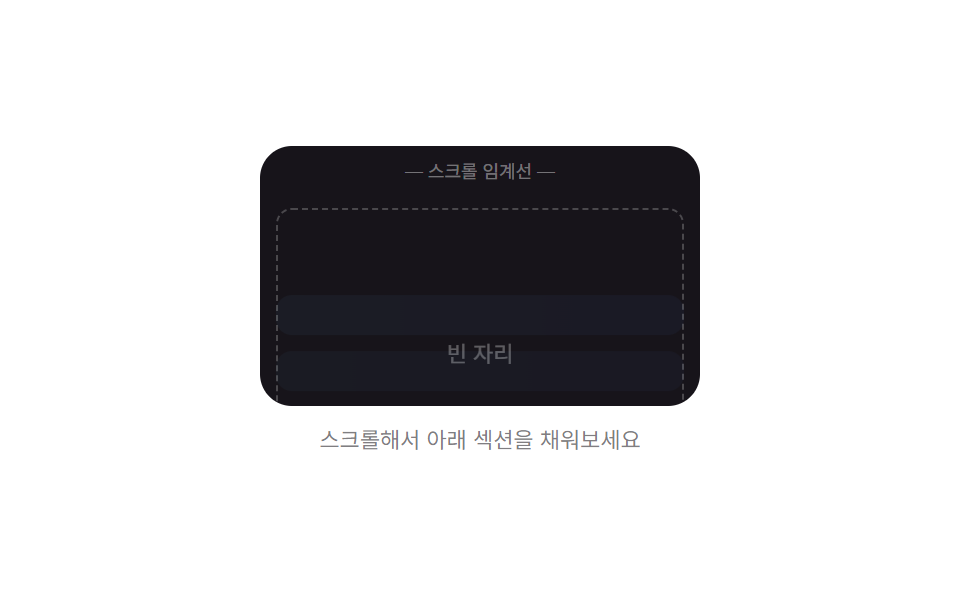
스크롤 값이 정해 둔 임계치를 넘었는지 계산해, 넘기 전에는 빈 자리로 남겨 둔 아래 섹션을 넘는 순간에만 실제 내용으로 채운다.
쓰임긴 소개 페이지·요금제 비교 아래 섹션
SCROLL_THRESHOLD_PXAUTOSCROLL_STEP_PXcheckThreshold
<main class="stage">
<div class="lsr is-demo" id="lsr">
  <div class="lsr__view" id="lsrView">
    <div class="lsr__pad"></div>
    <p class="lsr__mark">— 스크롤 임계선 —</p>
    <div class="lsr__section" id="lsrSection">
      <div class="lsr__empty" id="lsrEmpty">빈 자리</div>
      <div class="lsr__content" id="lsrContent">
        <div class="lsr__row"></div>
        <div class="lsr__row"></div>
        <div class="lsr__row"></div>
      </div>
    </div>
  </div>
  <p class="lsr__hint">스크롤해서 아래 섹션을 채워보세요</p>
</div>
</main>
@use "../../../../site/static/demo-tokens" as *;
// 스크롤 컨테이너의 scrollTop 값을 정해 둔 임계치(px)와 비교해 넘어선
// 순간에만 아래 섹션이 빈 자리에서 실제 내용으로 바뀐다.
$duration: $dur-enter;
$easing: $ease-out;
$color: $subject-sky;
@include stage($stage-paper);
.lsr {
display: flex;
flex-direction: column;
align-items: center;
gap: $sp-2;
}
.lsr__view {
width: 220px;
height: 130px;
overflow-y: auto;
border-radius: $r-card;
background: $stage-ink;
scroll-behavior: auto;
}
.lsr__pad {
height: 90px;
}
.lsr__mark {
margin: 0;
padding: $sp-1 0;
text-align: center;
font-size: 9px;
color: rgba(255, 255, 255, .4);
}
.lsr__section {
position: relative;
height: 160px;
}
.lsr__empty {
position: absolute;
inset: $sp-2;
display: flex;
align-items: center;
justify-content: center;
border: 1px dashed rgba(255, 255, 255, .25);
border-radius: $r-sm;
color: rgba(255, 255, 255, .35);
font-size: 11px;
transition: opacity $dur-quick $ease-out;
}
.lsr__content {
position: absolute;
inset: $sp-2;
display: flex;
flex-direction: column;
justify-content: center;
gap: $sp-2;
opacity: 0;
transform: translateY(10px);
transition: opacity $duration $easing, transform $duration $easing;
pointer-events: none;
}
.lsr__row {
height: 20px;
border-radius: $r-sm;
background: linear-gradient(90deg, $subject-sky, $subject-blue-light);
}
.lsr__row:nth-child(2) { transition-delay: 60ms; opacity: .85; }
.lsr__row:nth-child(3) { transition-delay: 120ms; opacity: .7; }
.lsr__section--filled .lsr__empty { opacity: 0; }
.lsr__section--filled .lsr__content {
opacity: 1;
transform: translateY(0);
}
.lsr__hint {
margin: 0;
color: rgba(23, 20, 26, .55);
font-size: 11px;
}
@media (max-width: 340px) {
.lsr__view { width: 180px; height: 110px; }
.lsr__pad { height: 70px; }
.lsr__section { height: 130px; }
}
@media (prefers-reduced-motion: reduce) {
.lsr__empty, .lsr__content { transition: none !important; }
}html, body {
margin: 0;
overflow: hidden;
}
.stage {
box-sizing: border-box;
min-height: 100vh;
display: grid;
place-items: center;
margin: 0;
background: #ffffff;
font-family: -apple-system, "Segoe UI", "Noto Sans KR", sans-serif;
padding: clamp(8px, 4vw, 24px);
}
.lsr {
display: flex;
flex-direction: column;
align-items: center;
gap: 8px;
}
.lsr__view {
width: 220px;
height: 130px;
overflow-y: auto;
border-radius: 16px;
background: #17141a;
scroll-behavior: auto;
}
.lsr__pad {
height: 90px;
}
.lsr__mark {
margin: 0;
padding: 4px 0;
text-align: center;
font-size: 9px;
color: rgba(255, 255, 255, 0.4);
}
.lsr__section {
position: relative;
height: 160px;
}
.lsr__empty {
position: absolute;
inset: 8px;
display: flex;
align-items: center;
justify-content: center;
border: 1px dashed rgba(255, 255, 255, 0.25);
border-radius: 8px;
color: rgba(255, 255, 255, 0.35);
font-size: 11px;
transition: opacity 220ms ease-out;
}
.lsr__content {
position: absolute;
inset: 8px;
display: flex;
flex-direction: column;
justify-content: center;
gap: 8px;
opacity: 0;
transform: translateY(10px);
transition: opacity 600ms ease-out, transform 600ms ease-out;
pointer-events: none;
}
.lsr__row {
height: 20px;
border-radius: 8px;
background: linear-gradient(90deg, #6ec8ff, #5b8cf8);
}
.lsr__row:nth-child(2) {
transition-delay: 60ms;
opacity: 0.85;
}
.lsr__row:nth-child(3) {
transition-delay: 120ms;
opacity: 0.7;
}
.lsr__section--filled .lsr__empty {
opacity: 0;
}
.lsr__section--filled .lsr__content {
opacity: 1;
transform: translateY(0);
}
.lsr__hint {
margin: 0;
color: rgba(23, 20, 26, 0.55);
font-size: 11px;
}
@media (max-width: 340px) {
.lsr__view {
width: 180px;
height: 110px;
}
.lsr__pad {
height: 70px;
}
.lsr__section {
height: 130px;
}
}
@media (prefers-reduced-motion: reduce) {
.lsr__empty, .lsr__content {
transition: none !important;
}
}(function () {
var root = document.getElementById('lsr');
var view = document.getElementById('lsrView');
var section = document.getElementById('lsrSection');
var SCROLL_THRESHOLD_PX = 86;
var AUTOSCROLL_STEP_PX = 2.2;
var CYCLE_GAP_MS = 1400;
var filled = false;
var userActive = false;
// 계산 겹: 스크롤 컨테이너의 scrollTop 값을 정해 둔 임계치(px)와 비교해,
// 넘어선 순간에만 filled 상태로 바뀐다(넘기 전엔 빈 자리 유지).
function checkThreshold() {
var over = view.scrollTop >= SCROLL_THRESHOLD_PX;
if (over && !filled) {
filled = true;
section.classList.add('lsr__section--filled');
} else if (!over && filled) {
filled = false;
section.classList.remove('lsr__section--filled');
}
}
view.addEventListener('scroll', checkThreshold);
function takeover() {
if (userActive) { return; }
userActive = true;
root.classList.remove('is-demo');
}
view.addEventListener('wheel', takeover, { passive: true });
view.addEventListener('touchstart', takeover, { passive: true });
var reduce = window.matchMedia('(prefers-reduced-motion: reduce)').matches;
var raf = null;
var loopTimer = null;
function autoScrollTo(target, onDone) {
function step() {
if (userActive) { return; }
var cur = view.scrollTop;
var next = cur + (target > cur ? AUTOSCROLL_STEP_PX : -AUTOSCROLL_STEP_PX);
if ((target > cur && next >= target) || (target < cur && next <= target)) {
view.scrollTop = target;
checkThreshold();
onDone();
return;
}
view.scrollTop = next;
checkThreshold();
raf = requestAnimationFrame(step);
}
raf = requestAnimationFrame(step);
}
if (reduce) {
root.classList.remove('is-demo');
view.scrollTop = SCROLL_THRESHOLD_PX + 20;
checkThreshold();
} else {
(function loop() {
if (userActive) { return; }
view.scrollTop = 0;
checkThreshold();
loopTimer = setTimeout(function () {
if (userActive) { return; }
autoScrollTo(140, function () {
loopTimer = setTimeout(function () {
if (!userActive && root.classList.contains('is-demo')) { loop(); }
}, CYCLE_GAP_MS);
});
}, 500);
})();
}
})();import { useEffect, useRef, useCallback, useState } from "react";
import styles from "./SectionRevealBelowFold.module.scss";
// 스크롤 컨테이너의 scrollTop 값을 정해 둔 임계치(px)와 비교해 넘어선
// 순간에만 아래 섹션이 빈 자리에서 실제 내용으로 바뀐다.
const SCROLL_THRESHOLD_PX = 86;
const AUTOSCROLL_STEP_PX = 2.2;
const CYCLE_GAP_MS = 1400;
type Box<T> = { current: T };
function useBox<T>(initial: T): Box<T> {
return useRef(initial) as unknown as Box<T>;
}
export default function SectionRevealBelowFold() {
const rootRef = useRef<HTMLDivElement>(null);
const viewRef = useRef<HTMLDivElement>(null);
const [demo, setDemo] = useState(true);
const [filled, setFilled] = useState(false);
const userActiveRef = useBox<boolean>(false);
const rafRef = useBox<number | null>(null);
const checkThreshold = useCallback(() => {
const view = viewRef.current;
if (!view) { return; }
const over = view.scrollTop >= SCROLL_THRESHOLD_PX;
setFilled((prev) => (prev === over ? prev : over));
}, []);
const takeover = useCallback(() => {
if (userActiveRef.current) { return; }
userActiveRef.current = true;
setDemo(false);
}, [userActiveRef]);
const autoScrollTo = useCallback((target: number, onDone: () => void) => {
function step() {
const view = viewRef.current;
if (userActiveRef.current || !view) { return; }
const cur = view.scrollTop;
const next = cur + (target > cur ? AUTOSCROLL_STEP_PX : -AUTOSCROLL_STEP_PX);
if ((target > cur && next >= target) || (target < cur && next <= target)) {
view.scrollTop = target;
checkThreshold();
onDone();
return;
}
view.scrollTop = next;
checkThreshold();
rafRef.current = requestAnimationFrame(step);
}
rafRef.current = requestAnimationFrame(step);
}, [checkThreshold, rafRef, userActiveRef]);
useEffect(() => {
const view = viewRef.current;
view?.addEventListener("scroll", checkThreshold);
view?.addEventListener("wheel", takeover, { passive: true });
view?.addEventListener("touchstart", takeover, { passive: true });
return () => {
view?.removeEventListener("scroll", checkThreshold);
view?.removeEventListener("wheel", takeover);
view?.removeEventListener("touchstart", takeover);
};
}, [checkThreshold, takeover]);
useEffect(() => {
const reduce = window.matchMedia("(prefers-reduced-motion: reduce)").matches;
const view = viewRef.current;
if (reduce) {
setDemo(false);
if (view) { view.scrollTop = SCROLL_THRESHOLD_PX + 20; }
checkThreshold();
return;
}
let cancelled = false;
let t1: number | null = null;
let t2: number | null = null;
function loop() {
if (userActiveRef.current || cancelled) { return; }
if (view) { view.scrollTop = 0; }
checkThreshold();
t1 = window.setTimeout(() => {
if (userActiveRef.current || cancelled) { return; }
autoScrollTo(140, () => {
t2 = window.setTimeout(() => {
if (!userActiveRef.current && !cancelled && rootRef.current?.classList.contains(styles["is-demo"])) { loop(); }
}, CYCLE_GAP_MS);
});
}, 500);
}
loop();
return () => {
cancelled = true;
if (t1 !== null) { window.clearTimeout(t1); }
if (t2 !== null) { window.clearTimeout(t2); }
if (rafRef.current !== null) { cancelAnimationFrame(rafRef.current); }
};
// eslint-disable-next-line react-hooks/exhaustive-deps
}, []);
return (
<main className={styles.stage}>
<div ref={rootRef} className={`${styles.lsr} ${demo ? styles["is-demo"] : ""}`}>
<div ref={viewRef} className={styles["lsr__view"]}>
<div className={styles["lsr__pad"]} />
<p className={styles["lsr__mark"]}>{"— 스크롤 임계선 —"}</p>
<div className={`${styles["lsr__section"]} ${filled ? styles["lsr__section--filled"] : ""}`}>
<div className={styles["lsr__empty"]}>빈 자리</div>
<div className={styles["lsr__content"]}>
<div className={styles["lsr__row"]} />
<div className={styles["lsr__row"]} />
<div className={styles["lsr__row"]} />
</div>
</div>
</div>
<p className={styles["lsr__hint"]}>스크롤해서 아래 섹션을 채워보세요</p>
</div>
</main>
);
}08 스크롤 값이 임계치를 계산하는 아래 섹션 지연 로딩 — 측정 누적면적 16.765% · 움직인 프레임 12/23GODRICH 원작 · zip 에 SCSS·React 포함 · 이미지 지연 로딩 9종 — 레이지 로딩 자리표시자 모음
이 데모가 속한 글
 이미지 지연 로딩 9종 — 레이지 로딩 자리표시자 모음이미지 지연 로딩 아홉 가지 가운데 하나는 스크롤 위치 값으로 교차 비율을 계산해 이미지를 페이드인시키고, 하나는 클릭 여부 값으로 로드 시점을 계산해 지도 iframe 자리를 실제 화면으로 바꾸며, 하나는 유휴 시 이 글의 데모 전부 보기