03새로고침 뒤 바뀐 행만 훑는 풀 투 리프레시
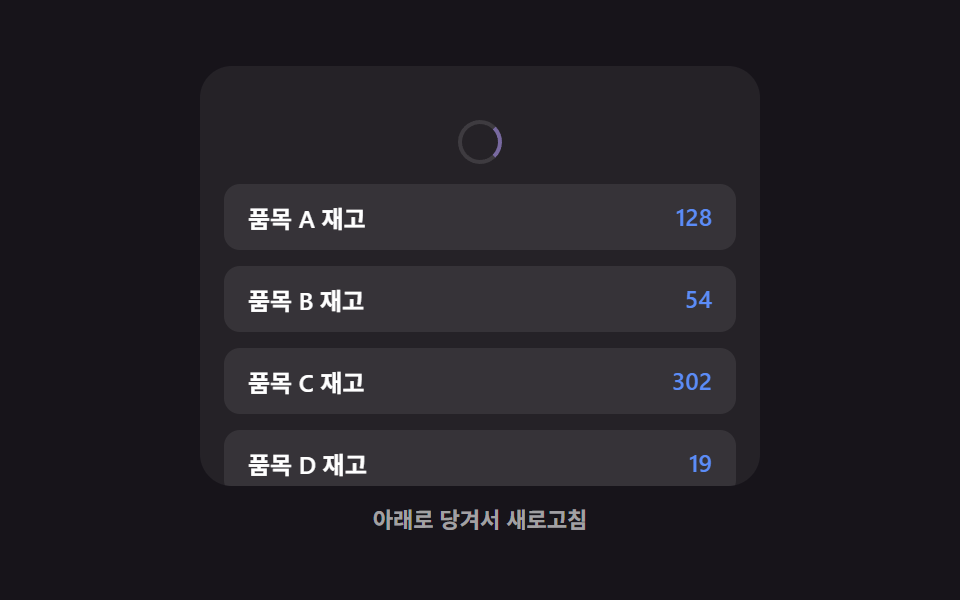
당겨서 새로고침을 마치면 목록 전체가 다시 그려지는 대신, 값이 바뀐 행에만 짧은 하이라이트 스윕이 지나가 무엇이 갱신됐는지 보여준다 (353의 당김 동작·아이콘·탄성 자체를 다루는 시연과 다른 초점 — 여긴 놓은 뒤의 결과 표시만 다룬다).
쓰임실시간 시세·재고처럼 값만 바뀌는 목록
applyPullsweepRowcomputeChanged
<main class="stage">
<div class="ptr is-demo" id="ptr">
  <div class="ptr__view" id="ptrView">
    <div class="ptr__zone" id="ptrZone">
      <div class="ptr__indicator" id="ptrIndicator" aria-hidden="true">
        <span class="ptr__spinner" id="ptrSpinner"></span>
      </div>
      <ul class="ptr__list" id="ptrList">
        <li class="ptr__row" data-row="0"><span class="ptr__label">품목 A 재고</span><span class="ptr__value" id="ptrVal0">128</span></li>
        <li class="ptr__row" data-row="1"><span class="ptr__label">품목 B 재고</span><span class="ptr__value" id="ptrVal1">54</span></li>
        <li class="ptr__row" data-row="2"><span class="ptr__label">품목 C 재고</span><span class="ptr__value" id="ptrVal2">302</span></li>
        <li class="ptr__row" data-row="3"><span class="ptr__label">품목 D 재고</span><span class="ptr__value" id="ptrVal3">19</span></li>
        <li class="ptr__row" data-row="4"><span class="ptr__label">품목 E 재고</span><span class="ptr__value" id="ptrVal4">77</span></li>
      </ul>
    </div>
  </div>
  <p class="ptr__hint" id="ptrHint" aria-live="polite">아래로 당겨서 새로고침</p>
</div>
</main>
@use "../../../../site/static/demo-tokens" as *;
// 변수 3개
$duration: $dur-enter;
$easing: $ease-spring;
$color: $subject-lilac;
// 계산 겹: index.html 의 applyPull() 이 저항 곡선으로 당김 표시량을 만들고,
// 놓았을 때 새로고침되면 computeChanged() 로 실제 값이 달라진 행만 골라 훑는다.
@include stage($stage-ink);
.ptr {
width: min(100%, 280px);
display: flex;
flex-direction: column;
gap: $sp-2;
align-items: center;
}
.ptr__view {
box-sizing: border-box;
width: 100%;
height: 210px;
overflow: hidden;
border-radius: $r-card;
background: rgba(255, 255, 255, .06);
touch-action: none;
}
.ptr__zone {
--pull-px: 0px;
box-sizing: border-box;
padding: $sp-3;
transform: translateY(var(--pull-px));
transition: transform $duration $easing;
&.is-dragging {
transition: none;
}
}
.ptr__indicator {
display: flex;
justify-content: center;
height: 28px;
margin-bottom: $sp-1;
opacity: 0;
}
.ptr__spinner {
--spin-deg: 0deg;
width: 18px;
height: 18px;
border-radius: $r-pill;
border: 2px solid rgba(255, 255, 255, .2);
border-top-color: $color;
transform: rotate(var(--spin-deg));
}
.ptr__list {
list-style: none;
margin: 0;
padding: 0;
display: flex;
flex-direction: column;
gap: $sp-2;
}
.ptr__row {
box-sizing: border-box;
position: relative;
overflow: hidden;
display: flex;
justify-content: space-between;
padding: $sp-2 $sp-3;
border-radius: $r-sm;
background: rgba(255, 255, 255, .08);
color: $stage-paper;
font-weight: 600;
font-size: 12px;
&.is-swept::after {
content: "";
position: absolute;
inset: 0;
background: linear-gradient(90deg, transparent, rgba($color, .38), transparent);
transform: translateX(-140%);
animation-name: ptrSweep;
animation-duration: $duration;
animation-timing-function: $ease-out;
}
}
.ptr__value {
color: $subject-blue-light;
}
@keyframes ptrSweep {
to { transform: translateX(140%); }
}
.ptr__hint {
margin: 0;
color: rgba(255, 255, 255, .6);
font-weight: 600;
font-size: 11px;
}
@media (max-width: 340px) {
.ptr { gap: $sp-1; }
.ptr__view { height: 130px; }
.ptr__row { padding: $sp-1 $sp-2; font-size: 11px; }
.ptr__hint { font-size: 10px; }
}
// reduce: 실사용 경로 적용 — 당김 스프링·스침 트윈만 멈춘다. 새로고침 계산·값 갱신은 그대로 동작
@media (prefers-reduced-motion: reduce) {
.ptr__zone { transition: none; }
.ptr__row.is-swept::after { animation: none; opacity: 0; }
}html, body {
margin: 0;
overflow: hidden;
}
.stage {
box-sizing: border-box;
min-height: 100vh;
display: grid;
place-items: center;
margin: 0;
background: #17141a;
font-family: -apple-system, "Segoe UI", "Noto Sans KR", sans-serif;
padding: clamp(8px, 4vw, 24px);
}
.ptr {
width: min(100%, 280px);
display: flex;
flex-direction: column;
gap: 8px;
align-items: center;
}
.ptr__view {
box-sizing: border-box;
width: 100%;
height: 210px;
overflow: hidden;
border-radius: 16px;
background: rgba(255, 255, 255, 0.06);
touch-action: none;
}
.ptr__zone {
--pull-px: 0px;
box-sizing: border-box;
padding: 12px;
transform: translateY(var(--pull-px));
transition: transform 600ms cubic-bezier(0.2, 0.8, 0.2, 1);
}
.ptr__zone.is-dragging {
transition: none;
}
.ptr__indicator {
display: flex;
justify-content: center;
height: 28px;
margin-bottom: 4px;
opacity: 0;
}
.ptr__spinner {
--spin-deg: 0deg;
width: 18px;
height: 18px;
border-radius: 999px;
border: 2px solid rgba(255, 255, 255, 0.2);
border-top-color: #b9a0ff;
transform: rotate(var(--spin-deg));
}
.ptr__list {
list-style: none;
margin: 0;
padding: 0;
display: flex;
flex-direction: column;
gap: 8px;
}
.ptr__row {
box-sizing: border-box;
position: relative;
overflow: hidden;
display: flex;
justify-content: space-between;
padding: 8px 12px;
border-radius: 8px;
background: rgba(255, 255, 255, 0.08);
color: #ffffff;
font-weight: 600;
font-size: 12px;
}
.ptr__row.is-swept::after {
content: "";
position: absolute;
inset: 0;
background: linear-gradient(90deg, transparent, rgba(185, 160, 255, 0.38), transparent);
transform: translateX(-140%);
animation-name: ptrSweep;
animation-duration: 600ms;
animation-timing-function: ease-out;
}
.ptr__value {
color: #5b8cf8;
}
@keyframes ptrSweep {
to {
transform: translateX(140%);
}
}
.ptr__hint {
margin: 0;
color: rgba(255, 255, 255, 0.6);
font-weight: 600;
font-size: 11px;
}
@media (max-width: 340px) {
.ptr {
gap: 4px;
}
.ptr__view {
height: 130px;
}
.ptr__row {
padding: 4px 8px;
font-size: 11px;
}
.ptr__hint {
font-size: 10px;
}
}
@media (prefers-reduced-motion: reduce) {
.ptr__zone {
transition: none;
}
.ptr__row.is-swept::after {
animation: none;
opacity: 0;
}
}(function () {
var MAX_PULL_PX = 64; // 당김 표시량 상한
var DAMPING = 90; // 저항 곡선 상수 — 클수록 손가락 이동량이 그대로 반영된다
var RELEASE_THRESHOLD_PX = 46; // 이 표시량을 넘기고 놓으면 새로고침
var AUTO_TICK_MS = 40;
var AUTO_PULL_STEP = 6;
var AUTO_HOLD_MS = 160;
var AUTO_WAIT_MS = 900;
var SWEEP_STAGGER_MS = 90;
var SET_A = [128, 54, 302, 19, 77];
var SET_B = [128, 61, 302, 24, 77];
var root = document.getElementById('ptr');
var view = document.getElementById('ptrView');
var zone = document.getElementById('ptrZone');
var indicator = document.getElementById('ptrIndicator');
var spinner = document.getElementById('ptrSpinner');
var list = document.getElementById('ptrList');
var hint = document.getElementById('ptrHint');
var rows = Array.prototype.slice.call(list.querySelectorAll('.ptr__row'));
var values = SET_A.slice();
var currentIsA = true;
var lastDisplayed = 0;
function renderValues() {
values.forEach(function (v, i) {
document.getElementById('ptrVal' + i).textContent = String(v);
});
}
renderValues();
// 계산 겹: 원시 당김량(raw)을 지수 감쇠 저항 곡선으로 눌러 표시량을 만든다 —
// 처음엔 손가락을 따라오다가 당길수록 점점 덜 늘어난다.
function applyPull(raw) {
var displayed = MAX_PULL_PX * (1 - Math.exp(-raw / DAMPING));
zone.style.setProperty('--pull-px', displayed.toFixed(1) + 'px');
spinner.style.setProperty('--spin-deg', (displayed / MAX_PULL_PX * 320).toFixed(1) + 'deg');
indicator.style.opacity = Math.min(1, displayed / (RELEASE_THRESHOLD_PX * 0.7)).toFixed(2);
lastDisplayed = displayed;
return displayed;
}
function computeChanged(oldVals, newVals) {
var idx = [];
for (var i = 0; i < oldVals.length; i += 1) {
if (oldVals[i] !== newVals[i]) { idx.push(i); }
}
return idx;
}
function sweepRow(row, delayMs) {
row.classList.remove('is-swept');
void row.offsetWidth; // 리플로우 강제 — 클래스를 다시 붙여도 애니메이션이 처음부터 재생되게
row.style.animationDelay = delayMs + 'ms';
row.classList.add('is-swept');
}
function refresh() {
var next = currentIsA ? SET_B : SET_A;
var changed = computeChanged(values, next);
values = next.slice();
currentIsA = !currentIsA;
renderValues();
hint.textContent = changed.length ? '값이 바뀐 행만 훑습니다' : '변경된 행이 없습니다';
changed.forEach(function (idx, order) {
sweepRow(rows[idx], order * SWEEP_STAGGER_MS);
});
}
var dragging = false;
var startY = 0;
function human() {
if (root.classList.contains('is-demo')) {
root.classList.remove('is-demo');
if (timer) { window.clearInterval(timer); timer = null; }
}
}
view.addEventListener('pointerdown', function (e) {
human();
if (view.scrollTop > 0) { return; }
dragging = true;
startY = e.clientY;
zone.classList.add('is-dragging');
});
view.addEventListener('pointermove', function (e) {
if (!dragging) { return; }
var raw = Math.max(0, e.clientY - startY);
applyPull(raw);
});
window.addEventListener('pointerup', function () {
if (!dragging) { return; }
dragging = false;
zone.classList.remove('is-dragging');
var wasEnough = lastDisplayed >= RELEASE_THRESHOLD_PX;
applyPull(0);
if (wasEnough) { refresh(); }
});
var timer = null;
var raw = 0;
var phase = 'pull';
function autoTick() {
if (phase === 'pull') {
raw += AUTO_PULL_STEP;
var displayed = applyPull(raw);
if (displayed >= RELEASE_THRESHOLD_PX) {
phase = 'hold';
window.setTimeout(function () {
refresh();
applyPull(0);
phase = 'wait';
window.setTimeout(function () {
raw = 0;
phase = 'pull';
}, AUTO_WAIT_MS);
}, AUTO_HOLD_MS);
}
}
}
var reduce = window.matchMedia('(prefers-reduced-motion: reduce)').matches;
if (!reduce) {
timer = window.setInterval(autoTick, AUTO_TICK_MS);
} else {
// reduce: 실사용 경로 적용 — 자동 당김 루프와 스침 애니메이션을 멈추고 최신 값만 보여준다
hint.textContent = '아래로 당겨서 새로고침';
}
})();// PullToRefresh — vanilla 판(run/381/demo/03-pull-to-refresh/index.html)의 React 포트.
// 원시 당김량(raw)을 지수 감쇠 저항 곡선으로 눌러 표시량을 만들고, 놓았을 때 새로고침되면
// computeChanged() 로 실제 값이 달라진 행만 골라 훑는다.
import { useEffect, useRef } from "react";
import type { CSSProperties } from "react";
import styles from "./PullToRefresh.module.scss";
export type PullToRefreshProps = {
duration?: string;
easing?: string;
color?: string;
};
type Vars = CSSProperties & { "--duration"?: string; "--easing"?: string; "--color"?: string };
const LABELS = ["품목 A 재고", "품목 B 재고", "품목 C 재고", "품목 D 재고", "품목 E 재고"];
const SET_A = [128, 54, 302, 19, 77];
export default function PullToRefresh({
duration = "600ms", // vanilla $duration: $dur-enter
easing = "cubic-bezier(.2, .8, .2, 1)", // vanilla $easing: $ease-spring
color = "#b9a0ff", // vanilla $color: $subject-lilac
}: PullToRefreshProps) {
const rootRef = useRef<HTMLDivElement | null>(null);
useEffect(() => {
const root = rootRef.current;
if (!root) return;
const view = root.querySelector<HTMLDivElement>('[data-role="view"]');
const zone = root.querySelector<HTMLDivElement>('[data-role="zone"]');
const indicator = root.querySelector<HTMLDivElement>('[data-role="indicator"]');
const spinner = root.querySelector<HTMLSpanElement>('[data-role="spinner"]');
const list = root.querySelector<HTMLUListElement>('[data-role="list"]');
const hint = root.querySelector<HTMLParagraphElement>('[data-role="hint"]');
if (!view || !zone || !indicator || !spinner || !list || !hint) return;
const rows = Array.prototype.slice.call(list.querySelectorAll("[data-row]")) as HTMLLIElement[];
const MAX_PULL_PX = 64; // 당김 표시량 상한
const DAMPING = 90; // 저항 곡선 상수 — 클수록 손가락 이동량이 그대로 반영된다
const RELEASE_THRESHOLD_PX = 46; // 이 표시량을 넘기고 놓으면 새로고침
const AUTO_TICK_MS = 40;
const AUTO_PULL_STEP = 6;
const AUTO_HOLD_MS = 160;
const AUTO_WAIT_MS = 900;
const SWEEP_STAGGER_MS = 90;
const SET_B = [128, 61, 302, 24, 77];
let values = SET_A.slice();
let currentIsA = true;
let lastDisplayed = 0;
function renderValues(): void {
values.forEach((v, i) => {
const cell = rows[i].querySelector<HTMLSpanElement>("[data-value]");
if (cell) cell.textContent = String(v);
});
}
renderValues();
// 계산 겹: 원시 당김량(raw)을 지수 감쇠 저항 곡선으로 눌러 표시량을 만든다 —
// 처음엔 손가락을 따라오다가 당길수록 점점 덜 늘어난다.
function applyPull(raw: number): number {
const displayed = MAX_PULL_PX * (1 - Math.exp(-raw / DAMPING));
zone!.style.setProperty("--pull-px", displayed.toFixed(1) + "px");
spinner!.style.setProperty("--spin-deg", ((displayed / MAX_PULL_PX) * 320).toFixed(1) + "deg");
indicator!.style.opacity = Math.min(1, displayed / (RELEASE_THRESHOLD_PX * 0.7)).toFixed(2);
lastDisplayed = displayed;
return displayed;
}
function computeChanged(oldVals: number[], newVals: number[]): number[] {
const idx: number[] = [];
for (let i = 0; i < oldVals.length; i += 1) {
if (oldVals[i] !== newVals[i]) {
idx.push(i);
}
}
return idx;
}
function sweepRow(row: HTMLLIElement, delayMs: number): void {
row.classList.remove("is-swept");
void row.offsetWidth; // 리플로우 강제 — 클래스를 다시 붙여도 애니메이션이 처음부터 재생되게
row.style.animationDelay = delayMs + "ms";
row.classList.add("is-swept");
}
function refresh(): void {
const next = currentIsA ? SET_B : SET_A;
const changed = computeChanged(values, next);
values = next.slice();
currentIsA = !currentIsA;
renderValues();
hint!.textContent = changed.length ? "값이 바뀐 행만 훑습니다" : "변경된 행이 없습니다";
changed.forEach((idx, order) => {
sweepRow(rows[idx], order * SWEEP_STAGGER_MS);
});
}
let dragging = false;
let startY = 0;
function human(): void {
if (root!.classList.contains("is-demo")) {
root!.classList.remove("is-demo");
if (timer) {
window.clearInterval(timer);
timer = null;
}
}
}
function onPointerDown(e: PointerEvent): void {
human();
if (view!.scrollTop > 0) return;
dragging = true;
startY = e.clientY;
zone!.classList.add("is-dragging");
}
function onPointerMove(e: PointerEvent): void {
if (!dragging) return;
const raw = Math.max(0, e.clientY - startY);
applyPull(raw);
}
function onPointerUp(): void {
if (!dragging) return;
dragging = false;
zone!.classList.remove("is-dragging");
const wasEnough = lastDisplayed >= RELEASE_THRESHOLD_PX;
applyPull(0);
if (wasEnough) refresh();
}
view.addEventListener("pointerdown", onPointerDown);
view.addEventListener("pointermove", onPointerMove);
window.addEventListener("pointerup", onPointerUp);
let timer: number | null = null;
let raw = 0;
let phase: "pull" | "hold" | "wait" = "pull";
function autoTick(): void {
if (phase === "pull") {
raw += AUTO_PULL_STEP;
const displayed = applyPull(raw);
if (displayed >= RELEASE_THRESHOLD_PX) {
phase = "hold";
window.setTimeout(() => {
refresh();
applyPull(0);
phase = "wait";
window.setTimeout(() => {
raw = 0;
phase = "pull";
}, AUTO_WAIT_MS);
}, AUTO_HOLD_MS);
}
}
}
const reduce = window.matchMedia("(prefers-reduced-motion: reduce)").matches;
if (!reduce) {
timer = window.setInterval(autoTick, AUTO_TICK_MS);
} else {
// reduce: 실사용 경로 적용 — 자동 당김 루프와 스침 애니메이션을 멈추고 최신 값만 보여준다
hint.textContent = "아래로 당겨서 새로고침";
}
return () => {
view.removeEventListener("pointerdown", onPointerDown);
view.removeEventListener("pointermove", onPointerMove);
window.removeEventListener("pointerup", onPointerUp);
if (timer) {
window.clearInterval(timer);
}
};
}, []);
const vars: Vars = { "--duration": duration, "--easing": easing, "--color": color };
return (
<main className={styles.stage}>
<div className={`${styles.ptr} is-demo`} ref={rootRef} style={vars}>
<div className={styles.ptr__view} data-role="view">
<div className={styles.ptr__zone} data-role="zone">
<div className={styles.ptr__indicator} data-role="indicator" aria-hidden="true">
<span className={styles.ptr__spinner} data-role="spinner" />
</div>
<ul className={styles.ptr__list} data-role="list">
{LABELS.map((label, i) => (
<li className={styles.ptr__row} data-row={i} key={i}>
<span className={styles.ptr__label}>{label}</span>
<span className={styles.ptr__value} data-value>
{SET_A[i]}
</span>
</li>
))}
</ul>
</div>
</div>
<p className={styles.ptr__hint} data-role="hint" aria-live="polite">
아래로 당겨서 새로고침
</p>
</div>
</main>
);
}03 새로고침 뒤 바뀐 행만 훑는 풀 투 리프레시 — 측정 누적면적 29.576% · 움직인 프레임 12/23GODRICH 원작 · zip 에 SCSS·React 포함 · 무한 스크롤 구현 9종 — 리스트·테이블 UI 기본 패턴
이 데모가 속한 글
 무한 스크롤 구현 9종 — 리스트·테이블 UI 기본 패턴무한 스크롤 구현 아홉 가지 중 하나는 새로 붙는 행이 로딩 스피너 없이 순서대로 미끄러져 들어오고, 하나는 정렬 버튼을 누르면 행들이 실제로 자리를 맞바꾸며 이동하고, 하나는 가로로 스크롤할 때 얼어붙은 첫 칸에만 이 글의 데모 전부 보기