07포인터 조각 — 갈고리로 깊이를 누르고 끌어올린다
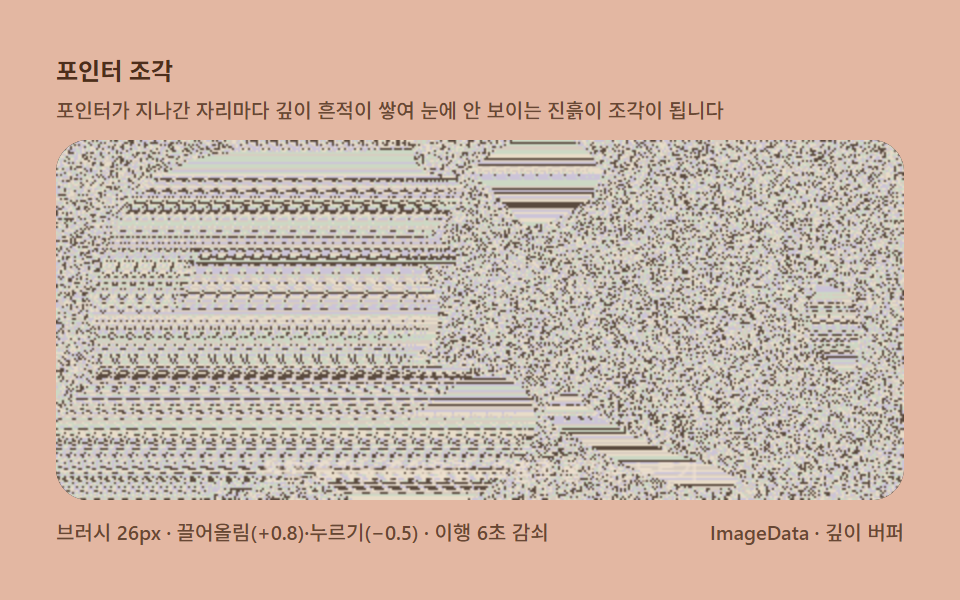
포인터가 지나가는 자리마다 깊이 지도에 흔적을 더하고 빼면 눈에 보이지 않는 진흙을 만지는 촉감으로 조각이 쌓이는데, 결과를 확인하려면 눈을 늦춰야 하는 반전 인터랙션입니다.
쓰임놀이 위젯, 창작 도구
pointermoveImageDatarequestAnimationFrame
<main class="stage">
<div class="me is-demo" id="meRoot">
  <p class="me__hint">
    <span>포인터 조각</span>
    <span class="me__desc">포인터가 지나간 자리마다 깊이 흔적이 쌓여 눈에 안 보이는 진흙이 조각이 됩니다</span>
  </p>
  <div class="me__field" role="application" aria-label="깊이 조각 판" tabindex="0">
    <canvas class="me__cv" id="meCv"></canvas>
  </div>
  <div class="me__bar">
    <span class="me__meta">브러시 26px · 끌어올림(+0.8)·누르기(−0.5) · 이행 6초 감쇠</span>
    <span class="me__meta me__meta--dim">ImageData · 깊이 버퍼</span>
  </div>
</div>
</main>
@use "../../../../site/static/demo-tokens" as *;
// 포인터 조각(07) — keyframes 없음. sculpt 버퍼의 감쇠와 브러시가 전부다.
// 무대 오렌지 — 작업장 톤(파스텔 점토).
$me-stage: #e3b7a2;
@include stage($me-stage);
$me-panel: #2d2522; // 조각 판 바닥 — 어두운 갈색 먹(노이즈가 잘 뜬다)
$me-text: #4d2e1c; // 라벨 글자 — 진한 갈색 잉크
$me-p0: #e8dcc8; // 노이즈 파스텔 1 — 크림
$me-p1: #d8ccc0; // 노이즈 파스텔 2 — 웜 그레이
$me-p2: #ccc4d8; // 노이즈 파스텔 3 — 라일락
$me-p3: #ccd8c4; // 노이즈 파스텔 4 — 세이지
$me-p4: #5a4a3e; // 노이즈 어두운 칸 — 저채도 갈색
$duration: $dur-loop;
$easing: $ease-out;
$color: $me-p0;
.me {
--me-p0: #{$me-p0};
--me-p1: #{$me-p1};
--me-p2: #{$me-p2};
--me-p3: #{$me-p3};
--me-p4: #{$me-p4};
display: flex; flex-direction: column; gap: $sp-2;
width: 100%; max-width: 424px;
}
.me__hint {
display: flex; flex-direction: column; gap: 0; margin: 0;
font-weight: 700; font-size: clamp(10px, 2.8vw, 12px); line-height: 1.35;
color: $me-text;
}
.me__desc {
margin-top: $sp-1;
font-weight: 500; font-size: clamp(9px, 2.4vw, 10px); line-height: 1.4;
color: rgba($me-text, .82);
}
.me__field {
position: relative; height: 180px;
border-radius: $r-card; overflow: hidden;
background: $me-panel;
box-shadow: inset 0 0 0 1px rgba($me-text, .22);
cursor: crosshair;
touch-action: none;
}
.me__field:focus-visible { outline: 2px solid $me-p0; outline-offset: 2px; }
.me__cv { display: block; width: 100%; height: 100%; }
.me__bar { display: flex; align-items: baseline; justify-content: space-between; gap: $sp-2; }
.me__meta { font-size: 10px; font-weight: 500; color: rgba($me-text, .82); }
@media (max-width: 340px) {
.me { gap: $sp-1; }
.me__field { height: 100px; }
.me__meta--dim { display: none; }
}
// reduce — 조각 한 점만 남은 정지 판.
@media (prefers-reduced-motion: reduce) {
.me.is-still .me__field { cursor: default; }
}html, body {
margin: 0;
overflow: hidden;
}
.stage {
box-sizing: border-box;
min-height: 100vh;
display: grid;
place-items: center;
margin: 0;
background: #e3b7a2;
font-family: -apple-system, "Segoe UI", "Noto Sans KR", sans-serif;
padding: clamp(8px, 4vw, 24px);
}
.me {
--me-p0: #e8dcc8;
--me-p1: #d8ccc0;
--me-p2: #ccc4d8;
--me-p3: #ccd8c4;
--me-p4: #5a4a3e;
display: flex;
flex-direction: column;
gap: 8px;
width: 100%;
max-width: 424px;
}
.me__hint {
display: flex;
flex-direction: column;
gap: 0;
margin: 0;
font-weight: 700;
font-size: clamp(10px, 2.8vw, 12px);
line-height: 1.35;
color: #4d2e1c;
}
.me__desc {
margin-top: 4px;
font-weight: 500;
font-size: clamp(9px, 2.4vw, 10px);
line-height: 1.4;
color: rgba(77, 46, 28, 0.82);
}
.me__field {
position: relative;
height: 180px;
border-radius: 16px;
overflow: hidden;
background: #2d2522;
box-shadow: inset 0 0 0 1px rgba(77, 46, 28, 0.22);
cursor: crosshair;
touch-action: none;
}
.me__field:focus-visible {
outline: 2px solid #e8dcc8;
outline-offset: 2px;
}
.me__cv {
display: block;
width: 100%;
height: 100%;
}
.me__bar {
display: flex;
align-items: baseline;
justify-content: space-between;
gap: 8px;
}
.me__meta {
font-size: 10px;
font-weight: 500;
color: rgba(77, 46, 28, 0.82);
}
@media (max-width: 340px) {
.me {
gap: 4px;
}
.me__field {
height: 100px;
}
.me__meta--dim {
display: none;
}
}
@media (prefers-reduced-motion: reduce) {
.me.is-still .me__field {
cursor: default;
}
}// 포인터 조각(07) — 깊이 지도를 손으로 만지는 항목.
// sculpt 버퍼(Float32Array)에 포인터가 지나간 자리의 깊이를 더하고 빼고,
// 흔적은 6초에 걸쳐 지수 감쇠로 스며든다. 눈에는 아무 변화가 없다가
// 눈을 늦추는 순간 진흙 위에 쌓인 조각이 떠오른다 — 결과 확인 자체가 반전.
// 왼쪽 끌기는 끌어올림(+0.8), 오른쪽 끌기는 누르기(−0.5).
(function () {
// ── 변형 상수 블록 ──
var BRUSH = 26; // 브러시 지름(px)
var LIFT = 0.8; // 끌어올림(왼쪽 끌기) — 한 번 스치면 올라가는 깊이 계수
var PRESS = 0.5; // 누르기(오른쪽 끌기)
var DECAY = 6; // 이행 감쇠(초) — 흔적이 스며드는 시간
var MAXSHIFT = 10; // 최대 시프트(px)
// ─────────────────
var root = document.getElementById('meRoot');
var cvEl = document.getElementById('meCv');
if (!root || !cvEl) return;
var fieldEl = cvEl.parentElement;
var css = getComputedStyle(root);
function tokRGB(name) {
var s = css.getPropertyValue(name).trim();
var hx = s.length === 4
? s.charAt(1) + s.charAt(1) + s.charAt(2) + s.charAt(2) + s.charAt(3) + s.charAt(3)
: s.slice(1);
return [parseInt(hx.slice(0, 2), 16), parseInt(hx.slice(2, 4), 16), parseInt(hx.slice(4, 6), 16)];
}
var PAL = [];
for (var i = 0; i < 5; i++) PAL.push(tokRGB('--me-p' + i));
function baseIdx(x, y) {
var h = (Math.imul(x + 11, 374761393) + Math.imul(y + 7, 668265263)) >>> 0;
h ^= h >>> 13;
h = Math.imul(h, 1274126177) >>> 0;
h ^= h >>> 16;
return ((h % PAL.length) + PAL.length) % PAL.length;
}
var ctx = cvEl.getContext('2d');
var W = 0, H = 0, img = null, sculpt = null;
function fit() {
var r = fieldEl.getBoundingClientRect();
W = Math.round(r.width); H = Math.round(r.height);
cvEl.width = W; cvEl.height = H;
img = ctx.createImageData(W, H);
sculpt = new Float32Array(W * H); // 리사이즈의 흔적 리셋은 감수한다
}
// 브러시 — 선분 (x0,y0)→(x1,y1) 을 따라 반지름 r 원뿔로 찍는다
function brush(x0, y0, x1, y1, amount, r) {
r = r || BRUSH / 2;
var dist = Math.hypot(x1 - x0, y1 - y0);
var steps = Math.max(1, Math.ceil(dist / (r * 0.4)));
for (var i = 0; i <= steps; i++) {
var bx = x0 + (x1 - x0) * (i / steps);
var by = y0 + (y1 - y0) * (i / steps);
var x0i = Math.max(0, Math.floor(bx - r)), x1i = Math.min(W - 1, Math.ceil(bx + r));
var y0i = Math.max(0, Math.floor(by - r)), y1i = Math.min(H - 1, Math.ceil(by + r));
for (var yy = y0i; yy <= y1i; yy++) {
for (var xx = x0i; xx <= x1i; xx++) {
var dx = xx - bx, dy = yy - by;
var dd = Math.sqrt(dx * dx + dy * dy);
if (dd >= r) continue;
var fall = 1 - dd / r; // 원뿔 falloff — 가장자리는 얕게
var idx = yy * W + xx;
var v = sculpt[idx] + amount * fall;
sculpt[idx] = v < 0 ? 0 : (v > 1 ? 1 : v);
}
}
}
}
function draw() {
var d = img.data, x, y, di;
var col = new Int32Array(W);
for (y = 0; y < H; y++) {
var row = y * W;
for (x = 0; x < W; x++) {
var s = Math.round(sculpt[row + x] * MAXSHIFT);
if (s <= 0) {
col[x] = baseIdx(x, y);
} else {
var from = x - s;
col[x] = from >= 0 ? col[from] : baseIdx(from + W, y);
}
}
for (x = 0; x < W; x++) {
var c = PAL[col[x]];
di = (y * W + x) * 4;
d[di] = c[0]; d[di + 1] = c[1]; d[di + 2] = c[2]; d[di + 3] = 255;
}
}
ctx.putImageData(img, 0, 0);
if (root.classList.contains('is-demo')) {
ctx.fillStyle = 'rgba(240, 224, 208, 0.85)';
ctx.font = '500 11px "Segoe UI", sans-serif';
ctx.textAlign = 'center';
ctx.fillText('왼쪽 끌기는 끌어올림 · 오른쪽 끌기는 누르기', W / 2, H - 10);
}
}
// ── 사람 입력 — 왼쪽/오른쪽 끌기 ──
var mode = 0, lastX = null, lastY = null;
function localXY(ev) {
var r = fieldEl.getBoundingClientRect();
return [ev.clientX - r.left, ev.clientY - r.top];
}
fieldEl.addEventListener('contextmenu', function (ev) { ev.preventDefault(); });
fieldEl.addEventListener('pointerdown', function (ev) {
ev.preventDefault();
root.classList.remove('is-demo'); // 첫 손질에서 격자 연출을 물린다
mode = ev.button === 2 ? -1 : 1; // 오른쪽 버튼 = 누르기
var p = localXY(ev); lastX = p[0]; lastY = p[1];
fieldEl.setPointerCapture(ev.pointerId);
});
fieldEl.addEventListener('pointermove', function (ev) {
if (!mode) return;
var p = localXY(ev);
if (lastX !== null) {
brush(lastX, lastY, p[0], p[1], mode > 0 ? LIFT : -PRESS);
}
lastX = p[0]; lastY = p[1];
});
function endStroke() { mode = 0; lastX = null; lastY = null; }
fieldEl.addEventListener('pointerup', endStroke);
fieldEl.addEventListener('pointercancel', endStroke);
var reduce = window.matchMedia('(prefers-reduced-motion: reduce)').matches;
var t0 = -1, lastNow = -1, HOOKS = 5, prevXs = [], prevYs = [];
function frame(now) {
if (t0 < 0) { t0 = now; lastNow = now; }
var dt = Math.min(0.05, (now - lastNow) / 1000 || 0.016);
lastNow = now;
var t = (now - t0) / 1000;
// 격자 연출(.is-demo) — 갈고리 5개(리사주 궤적)가 판을 넓게 쓸고 다닌다
if (root.classList.contains('is-demo')) {
var RX = [0.40, 0.30, 0.44, 0.36, 0.24];
var RY = [0.36, 0.44, 0.24, 0.30, 0.40];
var CY = [0.5, 0.3, 0.7, 0.5, 0.5];
for (var g = 0; g < HOOKS; g++) {
var ph = t * 2.6 + g * 1.26;
var bx = W / 2 + Math.cos(ph) * W * RX[g];
var by = H * CY[g] + Math.sin(ph * 2 + g) * H * RY[g];
if (prevXs[g] !== null && prevXs[g] !== undefined) {
var amt = Math.sin(t * 1.9 + g) > -0.25 ? LIFT : -PRESS;
brush(prevXs[g], prevYs[g], bx, by, amt, 20 + (g % 3) * 5);
}
prevXs[g] = bx; prevYs[g] = by;
}
}
// 이행 감쇠 — 흔적이 6초에 걸쳐 스며든다
var k = Math.exp(-dt / DECAY);
for (var i = 0; i < sculpt.length; i++) {
if (sculpt[i] !== 0) sculpt[i] *= k;
}
draw();
requestAnimationFrame(frame);
}
window.addEventListener('resize', function () {
fit();
if (reduce) draw();
});
fit();
if (reduce) {
// reduce — 조각 한 점(브러시 자국 몇 개)만 남긴 정지 판
brush(W * 0.36, H * 0.5, W * 0.64, H * 0.5, LIFT);
brush(W * 0.5, H * 0.3, W * 0.5, H * 0.7, LIFT);
draw();
root.classList.add('is-still');
} else {
requestAnimationFrame(frame);
}
})();// MagicEyePointerDepthSculpt — vanilla 판(run/325/demo/07-magic-eye-pointer-depth-sculpt/index.html) 의 React 포트.
// 깊이 지도를 손으로 만지는 항목. sculpt 버퍼(Float32Array)에 포인터가 지나간 자리의 깊이를
// 더하고 빼고, 흔적은 6초에 걸쳐 지수 감쇠로 스며든다. 눈에는 아무 변화가 없다가
// 눈을 늦추는 순간 진흙 위에 쌓인 조각이 떠오른다 — 결과 확인 자체가 반전.
// 왼쪽 끌기는 끌어올림(+0.8), 오른쪽 끌기는 누르기(−0.5).
import { useEffect, useRef, useState } from "react";
import type { CSSProperties } from "react";
import styles from "./MagicEyePointerDepthSculpt.module.scss";
export type MagicEyePointerDepthSculptProps = {
duration?: string;
easing?: string;
color?: string;
brush?: number; // 브러시 지름(px)
lift?: number; // 끌어올림(왼쪽 끌기) — 한 번 스치면 올라가는 깊이 계수
press?: number; // 누르기(오른쪽 끌기)
decay?: number; // 이행 감쇠(초) — 흔적이 스며드는 시간
maxshift?: number; // 최대 시프트(px)
};
// ── 변형 상수(기본값) — vanilla 판과 동일 ──
const BRUSH = 26; // 브러시 지름(px)
const LIFT = 0.8; // 끌어올림(왼쪽 끌기)
const PRESS = 0.5; // 누르기(오른쪽 끌기)
const DECAY = 6; // 이행 감쇠(초)
const MAXSHIFT = 10; // 최대 시프트(px)
const HOOKS = 5; // 격자 연출 갈고리 수
type Vars = CSSProperties & { "--duration"?: string; "--easing"?: string; "--color"?: string };
type Box<T> = { current: T };
type RGB = [number, number, number];
const FIELD_LABEL = "깊이 조각 판";
const META_LEFT = "브러시 26px · 끌어올림(+0.8)·누르기(−0.5) · 이행 6초 감쇠";
const META_RIGHT = "ImageData · 깊이 버퍼";
const HINT_TITLE = "포인터 조각";
const HINT_DESC = "포인터가 지나간 자리마다 깊이 흔적이 쌓여 눈에 안 보이는 진흙이 조각이 됩니다";
const GUIDE = "왼쪽 끌기는 끌어올림 · 오른쪽 끌기는 누르기";
// 격자 연출 갈고리 — 리사주 궤적 계수
const RX = [0.40, 0.30, 0.44, 0.36, 0.24];
const RY = [0.36, 0.44, 0.24, 0.30, 0.40];
const CYc = [0.5, 0.3, 0.7, 0.5, 0.5];
export default function MagicEyePointerDepthSculpt({
duration = "2s",
easing = "ease-out",
color = "#e8dcc8",
brush = BRUSH,
lift = LIFT,
press = PRESS,
decay = DECAY,
maxshift = MAXSHIFT
}: MagicEyePointerDepthSculptProps) {
const rootRef = useRef<HTMLDivElement | null>(null);
const fieldRef = useRef<HTMLDivElement | null>(null);
const cvRef = useRef<HTMLCanvasElement | null>(null);
const ctxRef = useRef<CanvasRenderingContext2D | null>(null);
const palRef = useRef<RGB[] | null>(null);
const imgRef = useRef<ImageData | null>(null);
const sculptRef = useRef<Float32Array | null>(null);
const wRef = useRef(0) as Box<number>;
const hRef = useRef(0) as Box<number>;
const rafRef = useRef(0) as Box<number>;
const demoRef = useRef(true) as Box<boolean>;
const modeRef = useRef(0) as Box<number>;
const lastXRef = useRef<number | null>(null) as Box<number | null>;
const lastYRef = useRef<number | null>(null) as Box<number | null>;
const prevXsRef = useRef<(number | null)[]>([]) as Box<(number | null)[]>;
const prevYsRef = useRef<(number | null)[]>([]) as Box<(number | null)[]>;
const [still, setStill] = useState(false);
const vars: Vars = { "--duration": duration, "--easing": easing, "--color": color };
function reduced(): boolean {
return window.matchMedia("(prefers-reduced-motion: reduce)").matches;
}
function tokRGB(root: HTMLDivElement, name: string): RGB {
const s = getComputedStyle(root).getPropertyValue(name).trim();
const hx = s.length === 4
? s.charAt(1) + s.charAt(1) + s.charAt(2) + s.charAt(2) + s.charAt(3) + s.charAt(3)
: s.slice(1);
return [parseInt(hx.slice(0, 2), 16), parseInt(hx.slice(2, 4), 16), parseInt(hx.slice(4, 6), 16)];
}
function baseIdx(x: number, y: number): number {
const pal = palRef.current;
if (!pal) return 0;
let h = (Math.imul(x + 11, 374761393) + Math.imul(y + 7, 668265263)) >>> 0;
h ^= h >>> 13;
h = Math.imul(h, 1274126177) >>> 0;
h ^= h >>> 16;
return ((h % pal.length) + pal.length) % pal.length;
}
function fit(): void {
const field = fieldRef.current;
const cv = cvRef.current;
const ctx = ctxRef.current;
if (!field || !cv || !ctx) return;
const r = field.getBoundingClientRect();
wRef.current = Math.round(r.width);
hRef.current = Math.round(r.height);
cv.width = wRef.current;
cv.height = hRef.current;
imgRef.current = ctx.createImageData(wRef.current, hRef.current);
sculptRef.current = new Float32Array(wRef.current * hRef.current); // 리사이즈의 흔적 리셋은 감수한다
}
// 브러시 — 선분 (x0,y0)→(x1,y1) 을 따라 반지름 r 원뿔로 찍는다
function brushStroke(x0: number, y0: number, x1: number, y1: number, amount: number, r2?: number): void {
const sculpt = sculptRef.current;
const W = wRef.current, H = hRef.current;
if (!sculpt) return;
const r = r2 || brush / 2;
const dist = Math.hypot(x1 - x0, y1 - y0);
const steps = Math.max(1, Math.ceil(dist / (r * 0.4)));
for (let i = 0; i <= steps; i++) {
const bx = x0 + (x1 - x0) * (i / steps);
const by = y0 + (y1 - y0) * (i / steps);
const x0i = Math.max(0, Math.floor(bx - r)), x1i = Math.min(W - 1, Math.ceil(bx + r));
const y0i = Math.max(0, Math.floor(by - r)), y1i = Math.min(H - 1, Math.ceil(by + r));
for (let yy = y0i; yy <= y1i; yy++) {
for (let xx = x0i; xx <= x1i; xx++) {
const dx = xx - bx, dy = yy - by;
const dd = Math.sqrt(dx * dx + dy * dy);
if (dd >= r) continue;
const fall = 1 - dd / r; // 원뿔 falloff — 가장자리는 얕게
const idx = yy * W + xx;
const v = sculpt[idx] + amount * fall;
sculpt[idx] = v < 0 ? 0 : (v > 1 ? 1 : v);
}
}
}
}
function draw(): void {
const ctx = ctxRef.current;
const img = imgRef.current;
const pal = palRef.current;
const sculpt = sculptRef.current;
const W = wRef.current, H = hRef.current;
if (!ctx || !img || !pal || !sculpt) return;
const d = img.data;
const col = new Int32Array(W);
for (let y = 0; y < H; y++) {
const row = y * W;
for (let x = 0; x < W; x++) {
const s = Math.round(sculpt[row + x] * maxshift);
if (s <= 0) {
col[x] = baseIdx(x, y);
} else {
const from = x - s;
col[x] = from >= 0 ? col[from] : baseIdx(from + W, y);
}
}
for (let x = 0; x < W; x++) {
const c = pal[col[x]];
const di = (y * W + x) * 4;
d[di] = c[0]; d[di + 1] = c[1]; d[di + 2] = c[2]; d[di + 3] = 255;
}
}
ctx.putImageData(img, 0, 0);
if (demoRef.current) {
ctx.fillStyle = "rgba(240, 224, 208, 0.85)";
ctx.font = '500 11px "Segoe UI", sans-serif';
ctx.textAlign = "center";
ctx.fillText(GUIDE, W / 2, H - 10);
}
}
let t0 = -1;
let lastNow = -1;
function frame(now: number): void {
const sculpt = sculptRef.current;
const W = wRef.current, H = hRef.current;
if (t0 < 0) { t0 = now; lastNow = now; }
const dt = Math.min(0.05, (now - lastNow) / 1000 || 0.016);
lastNow = now;
const t = (now - t0) / 1000;
// 격자 연출(demoRef 참) — 갈고리 5개(리사주 궤적)가 판을 넓게 쓸고 다닌다
if (demoRef.current && sculpt) {
for (let g = 0; g < HOOKS; g++) {
const ph = t * 2.6 + g * 1.26;
const bx = W / 2 + Math.cos(ph) * W * RX[g];
const by = H * CYc[g] + Math.sin(ph * 2 + g) * H * RY[g];
const prevX = prevXsRef.current[g];
if (prevX !== null && prevX !== undefined) {
const amt = Math.sin(t * 1.9 + g) > -0.25 ? lift : -press;
brushStroke(prevX, prevYsRef.current[g] as number, bx, by, amt, 20 + (g % 3) * 5);
}
prevXsRef.current[g] = bx;
prevYsRef.current[g] = by;
}
}
// 이행 감쇠 — 흔적이 6초에 걸쳐 스며든다
if (sculpt) {
const k = Math.exp(-dt / decay);
for (let i = 0; i < sculpt.length; i++) {
if (sculpt[i] !== 0) sculpt[i] *= k;
}
}
draw();
rafRef.current = requestAnimationFrame(frame);
}
useEffect(() => {
const root = rootRef.current;
const cv = cvRef.current;
const field = fieldRef.current;
if (!root || !cv || !field) return;
const pal: RGB[] = [];
for (let i = 0; i < 5; i++) pal.push(tokRGB(root, "--me-p" + i));
palRef.current = pal;
ctxRef.current = cv.getContext("2d");
fit();
// ── 사람 입력 — 왼쪽/오른쪽 끌기 ──
const fld: HTMLDivElement = field;
function localXY(ev: PointerEvent): [number, number] {
const r = fld.getBoundingClientRect();
return [ev.clientX - r.left, ev.clientY - r.top];
}
function onContext(ev: MouseEvent): void { ev.preventDefault(); }
function onPointerDown(ev: PointerEvent): void {
ev.preventDefault();
demoRef.current = false; // 첫 손질에서 격자 연출을 물린다
modeRef.current = ev.button === 2 ? -1 : 1; // 오른쪽 버튼 = 누르기
const p = localXY(ev); lastXRef.current = p[0]; lastYRef.current = p[1];
try { fld.setPointerCapture(ev.pointerId); } catch { /* 캡처 실패는 무시 */ }
}
function onPointerMove(ev: PointerEvent): void {
if (!modeRef.current) return;
const p = localXY(ev);
if (lastXRef.current !== null) {
brushStroke(lastXRef.current, lastYRef.current as number, p[0], p[1], modeRef.current > 0 ? lift : -press);
}
lastXRef.current = p[0]; lastYRef.current = p[1];
}
function endStroke(): void { modeRef.current = 0; lastXRef.current = null; lastYRef.current = null; }
field.addEventListener("contextmenu", onContext);
field.addEventListener("pointerdown", onPointerDown);
field.addEventListener("pointermove", onPointerMove);
field.addEventListener("pointerup", endStroke);
field.addEventListener("pointercancel", endStroke);
function onResize(): void {
fit();
if (reduced()) draw();
}
window.addEventListener("resize", onResize);
if (reduced()) {
// reduce — 조각 한 점(브러시 자국 몇 개)만 남긴 정지 판
const W = wRef.current, H = hRef.current;
brushStroke(W * 0.36, H * 0.5, W * 0.64, H * 0.5, lift);
brushStroke(W * 0.5, H * 0.3, W * 0.5, H * 0.7, lift);
draw();
setStill(true);
} else {
t0 = -1;
lastNow = -1;
prevXsRef.current = [];
prevYsRef.current = [];
rafRef.current = requestAnimationFrame(frame);
}
return () => {
field.removeEventListener("contextmenu", onContext);
field.removeEventListener("pointerdown", onPointerDown);
field.removeEventListener("pointermove", onPointerMove);
field.removeEventListener("pointerup", endStroke);
field.removeEventListener("pointercancel", endStroke);
window.removeEventListener("resize", onResize);
cancelAnimationFrame(rafRef.current);
};
// eslint-disable-next-line react-hooks/exhaustive-deps
}, [brush, lift, press, decay, maxshift]);
const rootCls = still ? `${styles.root} ${styles.isStill}` : `${styles.root} ${styles.isDemo}`;
return (
<main className={styles.stage}>
<div className={rootCls} ref={rootRef} style={vars}>
<p className={styles.hint}>
<span>{HINT_TITLE}</span>
<span className={styles.desc}>{HINT_DESC}</span>
</p>
<div
className={styles.field}
ref={fieldRef}
role="application"
aria-label={FIELD_LABEL}
tabIndex={0}
>
<canvas className={styles.cv} ref={cvRef}></canvas>
</div>
<div className={styles.bar}>
<span className={styles.meta}>{META_LEFT}</span>
<span className={styles.metaDim}>{META_RIGHT}</span>
</div>
</div>
</main>
);
}07 포인터 조각 — 갈고리로 깊이를 누르고 끌어올린다 — 측정 누적면적 34.71% · 움직인 프레임 23/23GODRICH 원작 · zip 에 SCSS·React 포함 · 매직아이 9종 — 깊이 지도를 주사선 밀기 한 겹으로 짜는 스테레오그램 캔버스
이 데모가 속한 글
 매직아이 9종 — 깊이 지도를 주사선 밀기 한 겹으로 짜는 스테레오그램 캔버스픽셀의 밝기를 깊이로 읽어 같은 줄 안에서 몇 픽셀 밀어 붙이면 평면 무늬 속에 입체가 숨습니다. 라이브러리 없이 복붙으로 가져가는 숨은그림 엔진입니다. 매직아이 그림 한 장을 채우는 일이 이미지 없이 계산만으로 되 이 글의 데모 전부 보기