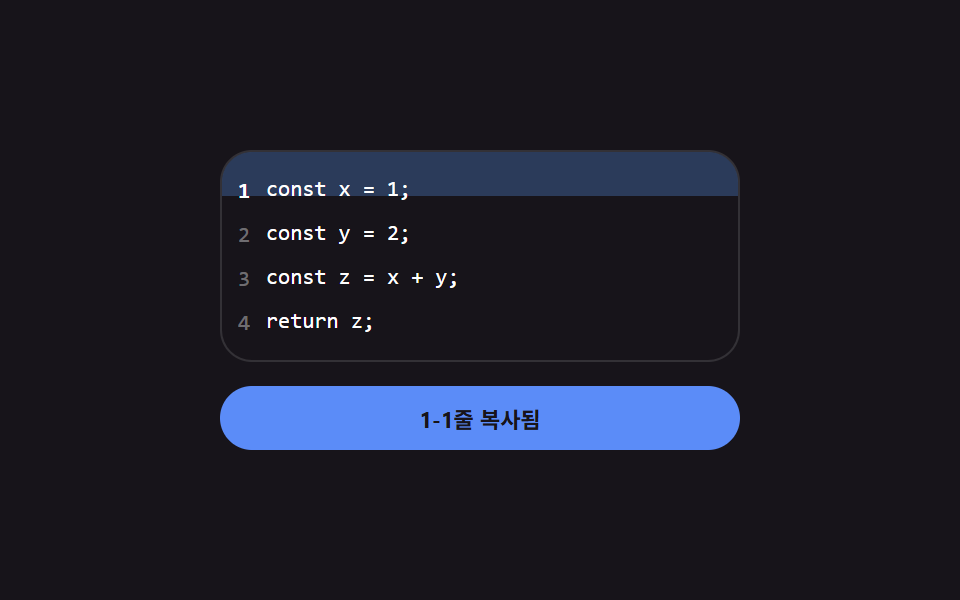
09클립보드 복사 — 성공 상태 값에 따라 라벨이 잠시 바뀌는 기본 버튼
복사가 끝난 상태가 되면 라벨이 완료 표시로 바뀌는 계산이 실행되고, 일정 시간이 지나 그 값이 초기화되면 원래 라벨로 되돌아갑니다.
쓰임코드 블록 옆 복사 버튼, 공유 링크 복사
--top--hdata-n
<main class="stage">
<div class="cc is-demo" id="cc">
  <div class="cc__code" id="ccCode">
    <div class="cc__row"><button class="cc__num" type="button" data-n="1">1</button><span class="cc__line">const x = 1;</span></div>
    <div class="cc__row"><button class="cc__num" type="button" data-n="2">2</button><span class="cc__line">const y = 2;</span></div>
    <div class="cc__row"><button class="cc__num" type="button" data-n="3">3</button><span class="cc__line">const z = x + y;</span></div>
    <div class="cc__row"><button class="cc__num" type="button" data-n="4">4</button><span class="cc__line">return z;</span></div>
    <span class="cc__sweep" id="ccSweep"></span>
  </div>
  <button class="cc__label" id="ccLabel" type="button">범위를 선택하면 복사됩니다</button>
</div>
</main>
@use "../../../../site/static/demo-tokens" as *;
// 코드 줄 범위 복사 — sweep 의 위치·높이(--top·--h)는 시작·끝 줄 번호 값의 차이로 매번 다시 구한다.
// navigator.clipboard 는 호출하지 않는다 — 라벨 전환으로 복사 성공을 흉내만 낸다.
$duration: $dur-quick;
$easing: $ease-pop;
$color: $subject-blue-light;
@include stage($stage-ink);
.cc {
display: flex;
flex-direction: column;
gap: $sp-3;
width: min(100%, 260px);
}
.cc__code {
position: relative;
border-radius: $r-card;
background: $subject-ink;
border: 1px solid rgba(255, 255, 255, .12);
padding: $sp-2 0;
overflow: hidden;
}
.cc__row {
position: relative;
z-index: 2;
display: flex;
align-items: center;
height: 22px;
}
.cc__num {
flex: 0 0 22px;
height: 22px;
border: 0;
background: transparent;
color: rgba(255, 255, 255, .38);
font-family: monospace;
font-size: 11px;
cursor: pointer;
}
.cc__num--sel { color: $stage-paper; font-weight: 700; }
.cc__line {
height: 22px;
line-height: 22px;
font-family: monospace;
font-size: 11px;
color: $stage-paper;
white-space: nowrap;
}
.cc__sweep {
position: absolute;
left: 0;
right: 0;
top: var(--top, 0);
height: var(--h, 22px);
background: rgba(94, 160, 255, 0);
transition: top $duration $easing, height $duration $easing, background $duration $easing;
z-index: 1;
}
.cc__sweep--on { background: rgba(94, 160, 255, .28); }
.cc__label {
border: 0;
border-radius: $r-pill;
padding: $sp-2 $sp-4;
background: rgba(255, 255, 255, .1);
color: $stage-paper;
font-family: inherit;
font-weight: 700;
font-size: 11px;
cursor: pointer;
transition: background $duration $easing, color $duration $easing;
}
.cc__label--done { background: $color; color: $subject-ink; }
@media (max-width: 340px) {
.cc__line, .cc__num { font-size: 10px; }
}
@media (prefers-reduced-motion: reduce) {
.cc__sweep, .cc__label { transition: none !important; }
}html, body {
margin: 0;
overflow: hidden;
}
.stage {
box-sizing: border-box;
min-height: 100vh;
display: grid;
place-items: center;
margin: 0;
background: #17141a;
font-family: -apple-system, "Segoe UI", "Noto Sans KR", sans-serif;
padding: clamp(8px, 4vw, 24px);
}
.cc {
display: flex;
flex-direction: column;
gap: 12px;
width: min(100%, 260px);
}
.cc__code {
position: relative;
border-radius: 16px;
background: #17141a;
border: 1px solid rgba(255, 255, 255, 0.12);
padding: 8px 0;
overflow: hidden;
}
.cc__row {
position: relative;
z-index: 2;
display: flex;
align-items: center;
height: 22px;
}
.cc__num {
flex: 0 0 22px;
height: 22px;
border: 0;
background: transparent;
color: rgba(255, 255, 255, 0.38);
font-family: monospace;
font-size: 11px;
cursor: pointer;
}
.cc__num--sel {
color: #ffffff;
font-weight: 700;
}
.cc__line {
height: 22px;
line-height: 22px;
font-family: monospace;
font-size: 11px;
color: #ffffff;
white-space: nowrap;
}
.cc__sweep {
position: absolute;
left: 0;
right: 0;
top: var(--top, 0);
height: var(--h, 22px);
background: rgba(94, 160, 255, 0);
transition: top 220ms cubic-bezier(0.2, 1.4, 0.4, 1), height 220ms cubic-bezier(0.2, 1.4, 0.4, 1), background 220ms cubic-bezier(0.2, 1.4, 0.4, 1);
z-index: 1;
}
.cc__sweep--on {
background: rgba(94, 160, 255, 0.28);
}
.cc__label {
border: 0;
border-radius: 999px;
padding: 8px 16px;
background: rgba(255, 255, 255, 0.1);
color: #ffffff;
font-family: inherit;
font-weight: 700;
font-size: 11px;
cursor: pointer;
transition: background 220ms cubic-bezier(0.2, 1.4, 0.4, 1), color 220ms cubic-bezier(0.2, 1.4, 0.4, 1);
}
.cc__label--done {
background: #5b8cf8;
color: #17141a;
}
@media (max-width: 340px) {
.cc__line, .cc__num {
font-size: 10px;
}
}
@media (prefers-reduced-motion: reduce) {
.cc__sweep, .cc__label {
transition: none !important;
}
}(function () {
var root = document.getElementById('cc');
var nums = Array.prototype.slice.call(document.querySelectorAll('.cc__num'));
var sweep = document.getElementById('ccSweep');
var label = document.getElementById('ccLabel');
var LINE_H = 22;
var anchor = null;
var resetTimer = null;
var autoplay = null;
// 계산 겹: 시작 줄과 끝 줄 값의 차이로 범위 높이·위치를 다시 구해 sweep 을 그 자리에 놓는다.
// 실 클립보드 API 는 호출하지 않고 복사 성공 상태만 라벨 전환으로 흉내낸다.
function range(a, b) {
var lo = Math.min(a, b);
var hi = Math.max(a, b);
return { top: (lo - 1) * LINE_H, height: (hi - lo + 1) * LINE_H, lo: lo, hi: hi };
}
function select(startN, endN) {
var r = range(startN, endN);
sweep.style.setProperty('--top', r.top + 'px');
sweep.style.setProperty('--h', r.height + 'px');
sweep.classList.add('cc__sweep--on');
nums.forEach(function (btn) {
var n = Number(btn.getAttribute('data-n'));
btn.classList.toggle('cc__num--sel', n >= r.lo && n <= r.hi);
});
label.textContent = r.lo + '-' + r.hi + '줄 복사됨';
label.classList.add('cc__label--done');
clearTimeout(resetTimer);
resetTimer = setTimeout(function () {
label.textContent = '범위를 선택하면 복사됩니다';
label.classList.remove('cc__label--done');
}, 900);
}
nums.forEach(function (btn) {
btn.addEventListener('click', function () {
root.classList.remove('is-demo');
stopAutoplay();
var n = Number(btn.getAttribute('data-n'));
if (anchor === null) { anchor = n; select(n, n); }
else { select(anchor, n); anchor = null; }
});
});
function stopAutoplay() { if (autoplay) { clearInterval(autoplay); autoplay = null; } }
var script = [[1, 1], [2, 3], [1, 4]];
var reduce = window.matchMedia('(prefers-reduced-motion: reduce)').matches;
if (!reduce) {
var i = 0;
autoplay = setInterval(function () {
var pair = script[i % script.length];
select(pair[0], pair[1]);
i += 1;
}, 680);
}
})();import { useEffect, useRef, useState } from "react";
import type { CSSProperties } from "react";
import styles from "./CopyToClipboard.module.scss";
// 코드 줄 범위 복사 — sweep 의 위치·높이는 시작·끝 줄 번호 값의 차이로 매번 다시 구한다(계산 겹).
// navigator.clipboard 는 호출하지 않는다 — 라벨 전환으로 복사 성공만 흉내낸다.
const LINE_H = 22;
const LINES = ["const x = 1;", "const y = 2;", "const z = x + y;", "return z;"];
const IDLE_LABEL = "범위를 선택하면 복사됩니다";
const SCRIPT: [number, number][] = [[1, 1], [2, 3], [1, 4]];
type Range = { top: number; height: number; lo: number; hi: number };
function range(a: number, b: number): Range {
const lo = Math.min(a, b);
const hi = Math.max(a, b);
return { top: (lo - 1) * LINE_H, height: (hi - lo + 1) * LINE_H, lo, hi };
}
export default function CopyToClipboard() {
const rootRef = useRef<HTMLDivElement>(null);
const [sel, setSel] = useState<Range | null>(null);
const [label, setLabel] = useState(IDLE_LABEL);
const [labelDone, setLabelDone] = useState(false);
const anchorRef = useRef<number | null>(null);
const resetTimerRef = useRef<number | null>(null);
const autoplayRef = useRef<number | null>(null);
function select(startN: number, endN: number) {
const r = range(startN, endN);
setSel(r);
setLabel(r.lo + "-" + r.hi + "줄 복사됨");
setLabelDone(true);
if (resetTimerRef.current) window.clearTimeout(resetTimerRef.current);
resetTimerRef.current = window.setTimeout(() => {
setLabel(IDLE_LABEL);
setLabelDone(false);
}, 900);
}
function stopAutoplay() {
if (autoplayRef.current) {
window.clearInterval(autoplayRef.current);
autoplayRef.current = null;
}
}
useEffect(() => {
const reduce = window.matchMedia("(prefers-reduced-motion: reduce)").matches;
if (!reduce) {
let i = 0;
autoplayRef.current = window.setInterval(() => {
const pair = SCRIPT[i % SCRIPT.length];
select(pair[0], pair[1]);
i += 1;
}, 680);
}
return () => {
stopAutoplay();
if (resetTimerRef.current) window.clearTimeout(resetTimerRef.current);
};
// eslint-disable-next-line react-hooks/exhaustive-deps
}, []);
function onNumClick(n: number) {
rootRef.current?.classList.remove(styles["is-demo"]);
stopAutoplay();
if (anchorRef.current === null) {
anchorRef.current = n;
select(n, n);
} else {
select(anchorRef.current, n);
anchorRef.current = null;
}
}
return (
<main className={styles.stage}>
<div ref={rootRef} className={`${styles.cc} ${styles["is-demo"]}`}>
<div className={styles.cc__code}>
{LINES.map((text, i) => {
const n = i + 1;
const inRange = !!sel && n >= sel.lo && n <= sel.hi;
return (
<div key={n} className={styles.cc__row}>
<button
className={`${styles.cc__num} ${inRange ? styles["cc__num--sel"] : ""}`}
type="button"
onClick={() => onNumClick(n)}
>
{n}
</button>
<span className={styles.cc__line}>{text}</span>
</div>
);
})}
<span
className={`${styles.cc__sweep} ${sel ? styles["cc__sweep--on"] : ""}`}
style={{ "--top": (sel?.top ?? 0) + "px", "--h": (sel?.height ?? 22) + "px" } as CSSProperties}
/>
</div>
<button className={`${styles.cc__label} ${labelDone ? styles["cc__label--done"] : ""}`} type="button">
{label}
</button>
</div>
</main>
);
}09 클립보드 복사 — 성공 상태 값에 따라 라벨이 잠시 바뀌는 기본 버튼 — 측정 누적면적 21.3% · 움직인 프레임 8/23GODRICH 원작 · zip 에 SCSS·React 포함 · 마이크로 인터랙션 사이트 UI 패턴 9종 — 토스트부터 스크롤 스파이까지
이 데모가 속한 글
 마이크로 인터랙션 사이트 UI 패턴 9종 — 토스트부터 스크롤 스파이까지마이크로 인터랙션 사이트에 흔한 아홉 개 중 하나는 알림이 쌓인 순서 값으로 사라지는 시점을 다시 구해 뒤 알림 위치를 당기고, 하나는 스크롤된 위치에서 각 제목의 겹침 비율 값을 비교해 활성 항목을 바꾸며, 또 하 이 글의 데모 전부 보기