02단계마다 키를 맞추는 폼 높이 전환
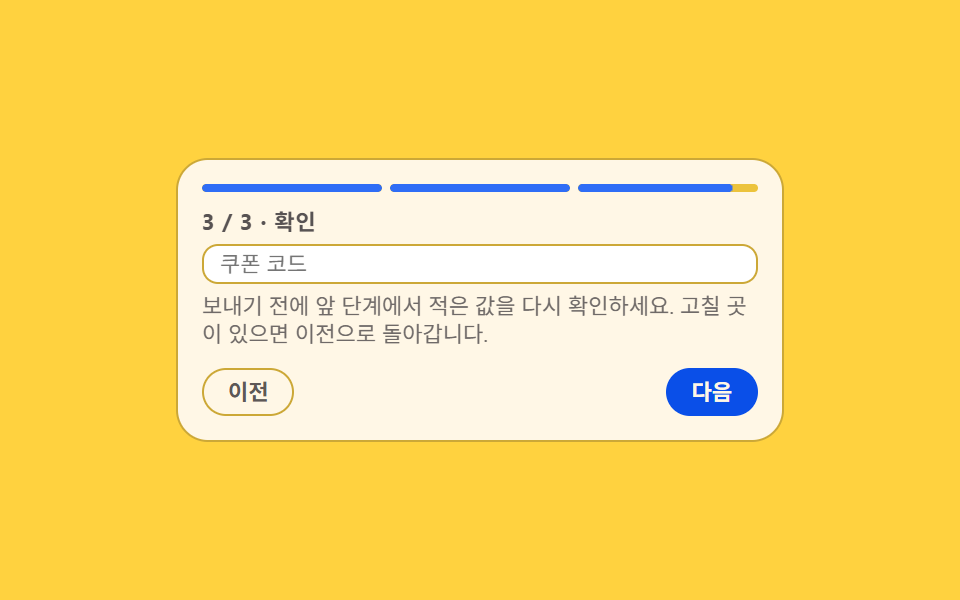
단계마다 칸 수가 달라 상자가 툭툭 튀는 문제를 길이형으로 등록한 --h 하나로 잡아, 다음 단계의 실제 높이를 재어 그 값까지 상자가 흐르게 합니다.
쓰임칸 수가 들쭉날쭉한 신청 폼, 단계마다 안내문 길이가 다른 설문
@property--hrole="progressbar"
<main class="stage">
  <section class="ah is-demo" id="ah" aria-label="칸 수가 다른 단계를 잇는 신청 폼">
    <div class="ah__bar" id="ah-bar" role="progressbar" aria-valuemin="1" aria-valuemax="3" aria-valuenow="1" aria-label="단계 진행">
      <span class="ah__seg" data-seg="1"><span class="ah__seg-f"></span></span>
      <span class="ah__seg" data-seg="2"><span class="ah__seg-f"></span></span>
      <span class="ah__seg" data-seg="3"><span class="ah__seg-f"></span></span>
    </div>
    <div class="ah__box" id="ah-box">
      <div class="ah__panel is-on" data-step="1">
        <p class="ah__t">1 / 3 · 계정</p>
        <input class="ah__f" type="text" placeholder="이메일">
        <input class="ah__f" type="text" placeholder="비밀번호">
      </div>
      <div class="ah__panel" data-step="2">
        <p class="ah__t">2 / 3 · 배송</p>
        <input class="ah__f" type="text" placeholder="받는 사람">
        <input class="ah__f" type="text" placeholder="주소">
        <input class="ah__f" type="text" placeholder="연락처">
      </div>
      <div class="ah__panel" data-step="3">
        <p class="ah__t">3 / 3 · 확인</p>
        <input class="ah__f" type="text" placeholder="쿠폰 코드">
        <p class="ah__note">보내기 전에 앞 단계에서 적은 값을 다시 확인하세요. 고칠 곳이 있으면 이전으로 돌아갑니다.</p>
      </div>
    </div>
    <div class="ah__foot">
      <button class="ah__btn" type="button" id="ah-prev">이전</button>
      <button class="ah__btn ah__btn--go" type="button" id="ah-next">다음</button>
    </div>
  </section>
</main>@use "sass:color";
@use "../../../../site/static/demo-tokens" as *;
$duration: $dur-base;
$easing: $ease-spring;
$color: $subject-blue;
@include stage($stage-yellow);
$line: color.mix($subject-ink, $stage-yellow, 22%);
$soft: color.mix($subject-ink, $stage-yellow, 8%);
// 단계마다 다른 상자 높이. 길이형으로 등록해야 보간된다 —
// 등록하지 않은 커스텀 속성은 중간값이 없어 높이가 툭 튄다
@property --h {
syntax: "<length>";
inherits: true;
initial-value: 63px;
}
// 패널 셋의 실측 높이(측정값과 맞춰 둔 루프용 값)
$h1: 63px;
$h2: 87px;
$h3: 70px;
.ah {
box-sizing: border-box;
width: min(304px, 92vw);
padding: $sp-3;
border: 1px solid $line;
border-radius: $r-card;
background: $subject-cream;
color: $subject-ink;
font-family: -apple-system, "Segoe UI", "Noto Sans KR", sans-serif;
font-size: 12px;
line-height: 1.3;
}
// ── 진행 막대 ─────────────────────────────────────
.ah__bar {
display: grid;
grid-template-columns: repeat(3, 1fr);
gap: $sp-1;
margin-bottom: $sp-2;
}
.ah__seg {
height: 4px;
border-radius: $r-pill;
background: $soft;
overflow: hidden;
}
.ah__seg-f {
display: block;
height: 100%;
border-radius: inherit;
background: $color;
transform: scaleX(0);
transform-origin: left center; // 규칙8: 단계 막대 좌측에서 채움
transition: transform $duration $easing;
}
// 정적(사람이 조작하는) 경로 — .is-demo 를 떼도 진행 상태가 보여야 한다
.ah__seg.is-done .ah__seg-f { transform: scaleX(1); }
// ── 높이가 흐르는 상자 ─────────────────────────────
.ah__box {
--h: #{$h1};
display: grid;
align-items: start;
height: var(--h);
overflow: hidden;
transition: --h $duration $easing;
}
.ah__panel {
display: grid;
grid-area: 1 / 1;
align-content: start;
gap: $sp-1;
opacity: 0;
visibility: hidden;
}
.ah__panel.is-on { opacity: 1; visibility: visible; }
.ah__t {
margin: 0;
color: rgba($subject-ink, .72);
font-size: 11px;
font-weight: 700;
letter-spacing: .04em;
}
.ah__f {
box-sizing: border-box;
width: 100%;
height: 20px;
margin: 0;
padding: 0 $sp-2;
border: 1px solid $line;
border-radius: $r-sm;
background: $stage-paper;
color: $subject-ink;
font-family: inherit;
font-size: 11px;
line-height: 1.3;
}
.ah__f:focus-visible { outline: 2px solid $color; outline-offset: 2px; }
.ah__note {
margin: 0;
color: color.mix($subject-ink, $subject-cream, 62%);
font-size: 11px;
line-height: 1.25;
}
// ── 발판 ─────────────────────────────────────────
.ah__foot {
display: grid;
grid-template-columns: auto auto;
justify-content: space-between;
gap: $sp-2;
margin-top: $sp-2;
}
.ah__btn {
margin: 0;
padding: $sp-1 $sp-3;
border: 1px solid $line;
border-radius: $r-pill;
background: transparent;
color: color.mix($subject-ink, $subject-cream, 70%);
font-family: inherit;
font-size: 11px;
font-weight: 700;
line-height: 1.3;
cursor: pointer;
}
.ah__btn--go { border-color: $subject-blue-deep; background: $subject-blue-deep; color: $subject-cream; }
.ah__btn:focus-visible { outline: 2px solid $color; outline-offset: 2px; }
// ── 격자 미리보기 전용 2초 루프 ─────────────────────
// --h 는 등록돼 있으니 키프레임 사이가 보간된다(상자가 흐른다).
// 패널 교체만 steps(1, end) 로 한 프레임에 자른다 — 반투명 유령 금지
@keyframes ah-h {
0%, 18% { --h: #{$h1}; }
30%, 46% { --h: #{$h2}; }
58%, 72% { --h: #{$h3}; }
86%, 100% { --h: #{$h1}; }
}
@keyframes ah-p1 {
0%, 17% { opacity: 1; visibility: visible; }
18%, 71% { opacity: 0; visibility: hidden; }
72%, 100% { opacity: 1; visibility: visible; }
}
@keyframes ah-p2 {
0%, 17% { opacity: 0; visibility: hidden; }
18%, 45% { opacity: 1; visibility: visible; }
46%, 100% { opacity: 0; visibility: hidden; }
}
@keyframes ah-p3 {
0%, 45% { opacity: 0; visibility: hidden; }
46%, 71% { opacity: 1; visibility: visible; }
72%, 100% { opacity: 0; visibility: hidden; }
}
@keyframes ah-seg2 {
0%, 17% { transform: scaleX(0); }
18% { transform: scaleX(0); }
30%, 71% { transform: scaleX(1); }
84%, 100% { transform: scaleX(0); }
}
@keyframes ah-seg3 {
0%, 45% { transform: scaleX(0); }
46% { transform: scaleX(0); }
58%, 71% { transform: scaleX(1); }
84%, 100% { transform: scaleX(0); }
}
.ah.is-demo {
// 루프 중에는 전환을 끈다 — 전환이 살아 있으면 캐스케이드에서 애니메이션을 덮는다
.ah__box, .ah__seg-f { transition: none; }
.ah__box {
animation-name: ah-h;
animation-duration: $dur-loop;
animation-timing-function: $easing;
animation-iteration-count: infinite;
}
.ah__panel[data-step="1"] { animation-name: ah-p1; }
.ah__panel[data-step="2"] { animation-name: ah-p2; }
.ah__panel[data-step="3"] { animation-name: ah-p3; }
.ah__panel {
animation-duration: $dur-loop;
animation-timing-function: steps(1, end);
animation-iteration-count: infinite;
}
.ah__seg[data-seg="2"] .ah__seg-f { animation-name: ah-seg2; }
.ah__seg[data-seg="3"] .ah__seg-f { animation-name: ah-seg3; }
.ah__seg[data-seg="2"] .ah__seg-f,
.ah__seg[data-seg="3"] .ah__seg-f {
animation-duration: $dur-loop;
animation-timing-function: $easing;
animation-iteration-count: infinite;
}
}
@media (max-width: 340px) {
.ah { padding: $sp-2; font-size: 11px; }
.ah__btn { padding: 0 $sp-2; }
.ah__note { font-size: 10px; }
}
@media (prefers-reduced-motion: reduce) {
.ah.is-demo .ah__box,
.ah.is-demo .ah__panel,
.ah.is-demo .ah__seg-f { animation: none !important; transition: none !important; }
// 움직임만 끄고 진행 상태는 남긴다 — 칸 셋짜리 2단계에 맞춰진 상자
.ah.is-demo .ah__box { --h: #{$h2} !important; }
.ah.is-demo .ah__panel[data-step="1"],
.ah.is-demo .ah__panel[data-step="3"] { opacity: 0 !important; visibility: hidden !important; }
.ah.is-demo .ah__panel[data-step="2"] { opacity: 1 !important; visibility: visible !important; }
.ah.is-demo .ah__seg[data-seg="1"] .ah__seg-f,
.ah.is-demo .ah__seg[data-seg="2"] .ah__seg-f { transform: scaleX(1) !important; }
.ah.is-demo .ah__seg[data-seg="3"] .ah__seg-f { transform: scaleX(0) !important; }
}html, body {
margin: 0;
overflow: hidden;
}
.stage {
box-sizing: border-box;
min-height: 100vh;
display: grid;
place-items: center;
margin: 0;
background: #ffd23f;
font-family: -apple-system, "Segoe UI", "Noto Sans KR", sans-serif;
padding: clamp(8px, 4vw, 24px);
}
@property --h {
syntax: "<length>";
inherits: true;
initial-value: 63px;
}
.ah {
box-sizing: border-box;
width: min(304px, 92vw);
padding: 12px;
border: 1px solid rgb(79.9843137255%, 65.9607843137%, 21.5137254902%);
border-radius: 16px;
background: #fff7e6;
color: #17141a;
font-family: -apple-system, "Segoe UI", "Noto Sans KR", sans-serif;
font-size: 12px;
line-height: 1.3;
}
.ah__bar {
display: grid;
grid-template-columns: repeat(3, 1fr);
gap: 4px;
margin-bottom: 8px;
}
.ah__seg {
height: 4px;
border-radius: 999px;
background: rgb(92.7215686275%, 76.3921568627%, 23.5450980392%);
overflow: hidden;
}
.ah__seg-f {
display: block;
height: 100%;
border-radius: inherit;
background: #2f6df6;
transform: scaleX(0);
transform-origin: left center;
transition: transform 300ms cubic-bezier(0.2, 0.8, 0.2, 1);
}
.ah__seg.is-done .ah__seg-f {
transform: scaleX(1);
}
.ah__box {
--h: 63px;
display: grid;
align-items: start;
height: var(--h);
overflow: hidden;
transition: --h 300ms cubic-bezier(0.2, 0.8, 0.2, 1);
}
.ah__panel {
display: grid;
grid-area: 1/1;
align-content: start;
gap: 4px;
opacity: 0;
visibility: hidden;
}
.ah__panel.is-on {
opacity: 1;
visibility: visible;
}
.ah__t {
margin: 0;
color: rgba(23, 20, 26, 0.72);
font-size: 11px;
font-weight: 700;
letter-spacing: 0.04em;
}
.ah__f {
box-sizing: border-box;
width: 100%;
height: 20px;
margin: 0;
padding: 0 8px;
border: 1px solid rgb(79.9843137255%, 65.9607843137%, 21.5137254902%);
border-radius: 8px;
background: #ffffff;
color: #17141a;
font-family: inherit;
font-size: 11px;
line-height: 1.3;
}
.ah__f:focus-visible {
outline: 2px solid #2f6df6;
outline-offset: 2px;
}
.ah__note {
margin: 0;
color: rgb(43.5921568627%, 41.6705882353%, 40.5960784314%);
font-size: 11px;
line-height: 1.25;
}
.ah__foot {
display: grid;
grid-template-columns: auto auto;
justify-content: space-between;
gap: 8px;
margin-top: 8px;
}
.ah__btn {
margin: 0;
padding: 4px 12px;
border: 1px solid rgb(79.9843137255%, 65.9607843137%, 21.5137254902%);
border-radius: 999px;
background: transparent;
color: rgb(36.3137254902%, 34.5490196078%, 34.1960784314%);
font-family: inherit;
font-size: 11px;
font-weight: 700;
line-height: 1.3;
cursor: pointer;
}
.ah__btn--go {
border-color: #0a4fe8;
background: #0a4fe8;
color: #fff7e6;
}
.ah__btn:focus-visible {
outline: 2px solid #2f6df6;
outline-offset: 2px;
}
@keyframes ah-h {
0%, 18% {
--h: 63px;
}
30%, 46% {
--h: 87px;
}
58%, 72% {
--h: 70px;
}
86%, 100% {
--h: 63px;
}
}
@keyframes ah-p1 {
0%, 17% {
opacity: 1;
visibility: visible;
}
18%, 71% {
opacity: 0;
visibility: hidden;
}
72%, 100% {
opacity: 1;
visibility: visible;
}
}
@keyframes ah-p2 {
0%, 17% {
opacity: 0;
visibility: hidden;
}
18%, 45% {
opacity: 1;
visibility: visible;
}
46%, 100% {
opacity: 0;
visibility: hidden;
}
}
@keyframes ah-p3 {
0%, 45% {
opacity: 0;
visibility: hidden;
}
46%, 71% {
opacity: 1;
visibility: visible;
}
72%, 100% {
opacity: 0;
visibility: hidden;
}
}
@keyframes ah-seg2 {
0%, 17% {
transform: scaleX(0);
}
18% {
transform: scaleX(0);
}
30%, 71% {
transform: scaleX(1);
}
84%, 100% {
transform: scaleX(0);
}
}
@keyframes ah-seg3 {
0%, 45% {
transform: scaleX(0);
}
46% {
transform: scaleX(0);
}
58%, 71% {
transform: scaleX(1);
}
84%, 100% {
transform: scaleX(0);
}
}
.ah.is-demo .ah__box, .ah.is-demo .ah__seg-f {
transition: none;
}
.ah.is-demo .ah__box {
animation-name: ah-h;
animation-duration: 2s;
animation-timing-function: cubic-bezier(0.2, 0.8, 0.2, 1);
animation-iteration-count: infinite;
}
.ah.is-demo .ah__panel[data-step="1"] {
animation-name: ah-p1;
}
.ah.is-demo .ah__panel[data-step="2"] {
animation-name: ah-p2;
}
.ah.is-demo .ah__panel[data-step="3"] {
animation-name: ah-p3;
}
.ah.is-demo .ah__panel {
animation-duration: 2s;
animation-timing-function: steps(1, end);
animation-iteration-count: infinite;
}
.ah.is-demo .ah__seg[data-seg="2"] .ah__seg-f {
animation-name: ah-seg2;
}
.ah.is-demo .ah__seg[data-seg="3"] .ah__seg-f {
animation-name: ah-seg3;
}
.ah.is-demo .ah__seg[data-seg="2"] .ah__seg-f,
.ah.is-demo .ah__seg[data-seg="3"] .ah__seg-f {
animation-duration: 2s;
animation-timing-function: cubic-bezier(0.2, 0.8, 0.2, 1);
animation-iteration-count: infinite;
}
@media (max-width: 340px) {
.ah {
padding: 8px;
font-size: 11px;
}
.ah__btn {
padding: 0 8px;
}
.ah__note {
font-size: 10px;
}
}
@media (prefers-reduced-motion: reduce) {
.ah.is-demo .ah__box,
.ah.is-demo .ah__panel,
.ah.is-demo .ah__seg-f {
animation: none !important;
transition: none !important;
}
.ah.is-demo .ah__box {
--h: 87px !important;
}
.ah.is-demo .ah__panel[data-step="1"],
.ah.is-demo .ah__panel[data-step="3"] {
opacity: 0 !important;
visibility: hidden !important;
}
.ah.is-demo .ah__panel[data-step="2"] {
opacity: 1 !important;
visibility: visible !important;
}
.ah.is-demo .ah__seg[data-seg="1"] .ah__seg-f,
.ah.is-demo .ah__seg[data-seg="2"] .ah__seg-f {
transform: scaleX(1) !important;
}
.ah.is-demo .ah__seg[data-seg="3"] .ah__seg-f {
transform: scaleX(0) !important;
}
}// 실제 동작: 단계를 바꿀 때마다 그 패널의 실제 높이를 재서 --h 에 넣는다.
// --h 는 길이형으로 등록돼 있어 상자가 그 값까지 흐른다(짐작한 고정 높이가 아니다).
var ah = document.getElementById('ah');
var ahBox = document.getElementById('ah-box');
var ahBar = document.getElementById('ah-bar');
var ahPanels = [].slice.call(ah.querySelectorAll('.ah__panel'));
var ahSegs = [].slice.call(ah.querySelectorAll('.ah__seg'));
var ahStep = 1;
function ahGo(n) {
ahStep = Math.max(1, Math.min(ahPanels.length, n));
ahPanels.forEach(function (p, i) { p.classList.toggle('is-on', i + 1 === ahStep); });
ahSegs.forEach(function (s, i) { s.classList.toggle('is-done', i + 1 <= ahStep); });
var h = Math.ceil(ahPanels[ahStep - 1].getBoundingClientRect().height);
ahBox.style.setProperty('--h', h + 'px');
ahBar.setAttribute('aria-valuenow', String(ahStep));
}
function ahMove(d) { ah.classList.remove('is-demo'); ahGo(ahStep + d); }
document.getElementById('ah-next').addEventListener('click', function () { ahMove(1); });
document.getElementById('ah-prev').addEventListener('click', function () { ahMove(-1); });
ah.addEventListener('keydown', function (e) {
if (e.key === 'ArrowRight') { e.preventDefault(); ahMove(1); }
if (e.key === 'ArrowLeft') { e.preventDefault(); ahMove(-1); }
});
ahGo(1);import { useCallback, useEffect, useRef, useState } from "react";
import type { CSSProperties } from "react";
import styles from "./AutoHeightTransition.module.scss";
export type AutoHeightStep = {
/** "1 / 3 · Account" */
title: string;
/** placeholder of each field on this step */
fields: string[];
note?: string;
};
export type AutoHeightTransitionProps = {
steps?: AutoHeightStep[];
prevLabel?: string;
nextLabel?: string;
groupLabel?: string;
progressLabel?: string;
/** 격자 미리보기용 2초 자동 루프. 사람이 손대면 꺼진다 */
demo?: boolean;
duration?: number;
easing?: string;
color?: string;
};
type KeyEvt = { key: string; preventDefault(): void };
type Box<T> = { current: T };
const DEFAULT_STEPS: AutoHeightStep[] = [
{ title: "1 / 3 · Account", fields: ["Email", "Password"] },
{ title: "2 / 3 · Delivery", fields: ["Recipient", "Address", "Phone"] },
{
title: "3 / 3 · Review",
fields: ["Coupon code"],
note: "Check what you typed on earlier steps before sending. Go back if something needs a fix.",
},
];
export default function AutoHeightTransition({
steps = DEFAULT_STEPS,
prevLabel = "Back",
nextLabel = "Next",
groupLabel = "Application form with uneven field counts",
progressLabel = "Step progress",
demo = true,
duration = 300,
easing = "cubic-bezier(.2,.8,.2,1)",
color = "#2f6df6",
}: AutoHeightTransitionProps) {
const [step, setStep] = useState(1);
const [live, setLive] = useState(demo);
const [h, setH] = useState<number | null>(null);
const panels = useRef<HTMLDivElement[]>([]) as Box<HTMLDivElement[]>;
// 다음 패널의 실제 높이를 재서 --h 에 넣는다 — 짐작한 고정 높이가 아니다
const measure = useCallback((n: number) => {
const el = panels.current[n - 1];
if (el) setH(Math.ceil(el.getBoundingClientRect().height));
}, []);
useEffect(() => {
measure(step);
}, [measure, step]);
function move(d: number) {
setLive(false);
setStep((p) => Math.max(1, Math.min(steps.length, p + d)));
}
function onKey(e: KeyEvt) {
if (e.key === "ArrowRight") {
e.preventDefault();
move(1);
}
if (e.key === "ArrowLeft") {
e.preventDefault();
move(-1);
}
}
const vars: CSSProperties = {
"--duration": `${duration}ms`,
"--easing": easing,
"--color": color,
};
const boxVars: CSSProperties = h === null ? {} : { "--h": `${h}px` };
const cls = [styles.ah, live ? styles.isDemo : ""].filter(Boolean).join(" ");
return (
<section className={cls} style={vars} aria-label={groupLabel} onKeyDown={onKey}>
<div
className={styles.bar}
role="progressbar"
aria-valuemin={1}
aria-valuemax={steps.length}
aria-valuenow={step}
aria-label={progressLabel}
>
{steps.map((s, i) => (
<span
key={s.title}
className={[styles.seg, i + 1 <= step ? styles.isDone : ""].filter(Boolean).join(" ")}
data-seg={i + 1}
>
<span className={styles.segF} />
</span>
))}
</div>
<div className={styles.box} style={boxVars}>
{steps.map((s, i) => (
<div
key={s.title}
className={[styles.panel, i + 1 === step ? styles.isOn : ""].filter(Boolean).join(" ")}
data-step={i + 1}
ref={(el: HTMLDivElement | null) => {
if (el) panels.current[i] = el;
}}
>
<p className={styles.t}>{s.title}</p>
{s.fields.map((f) => (
<input key={f} className={styles.f} type="text" placeholder={f} />
))}
{s.note ? <p className={styles.note}>{s.note}</p> : null}
</div>
))}
</div>
<div className={styles.foot}>
<button className={styles.btn} type="button" onClick={() => move(-1)}>
{prevLabel}
</button>
<button className={[styles.btn, styles.btnGo].join(" ")} type="button" onClick={() => move(1)}>
{nextLabel}
</button>
</div>
</section>
);
}02 단계마다 키를 맞추는 폼 높이 전환 — 측정 누적면적 22.462% · 움직인 프레임 10/23GODRICH 원작 · zip 에 SCSS·React 포함 · 회원가입 단계 ui 9가지 — 갈라지고 이어서 쓰는 폼
이 데모가 속한 글
 회원가입 단계 ui 9가지 — 갈라지고 이어서 쓰는 폼회원가입 단계 ui는 한 번에 다 보여 주지 않고 몇 장의 화면으로 쪼개어 순서대로 받아 내는 입력 방식입니다. 아홉 개 전부 값을 실제로 읽고 검사하고 저장하며, 칸을 채우지 않으면 다음 장으로 안 넘어가고 탭을 이 글의 데모 전부 보기