01포트 달린 노드 상자
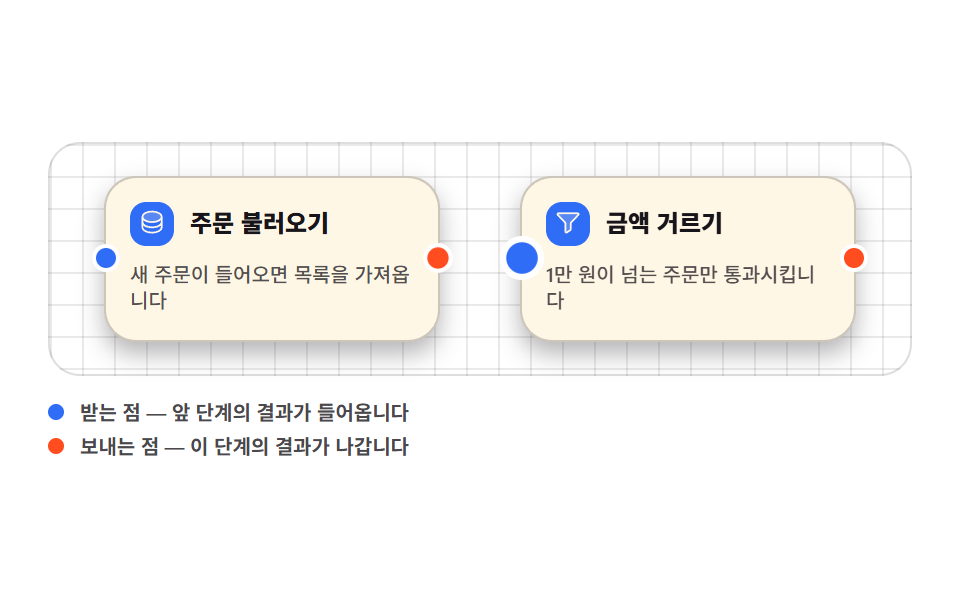
상자 왼쪽에 받는 점, 오른쪽에 보내는 점을 두고 점 위에 커서를 올리면 그 점만 커져, 어디를 잡아야 선이 나오는지 알려 줍니다.
쓰임자동화 편집기, 노코드 빌더의 기본 블록
transform-origin: 50% 50%aria-describedbygrid-template-columns

<main class="stage">
<div class="ng is-demo" id="ng">
  <div class="ng__canvas">

    <div class="ng__node">
      <div class="ng__head">
        <span class="ng__ico" aria-hidden="true"><svg xmlns="http://www.w3.org/2000/svg" viewBox="0 0 256 256" fill="currentColor"><path d="M216,80c0,26.51-39.4,48-88,48S40,106.51,40,80s39.4-48,88-48S216,53.49,216,80Z" opacity="0.2"/><path d="M128,24C74.17,24,32,48.6,32,80v96c0,31.4,42.17,56,96,56s96-24.6,96-56V80C224,48.6,181.83,24,128,24Zm80,104c0,9.62-7.88,19.43-21.61,26.92C170.93,163.35,150.19,168,128,168s-42.93-4.65-58.39-13.08C55.88,147.43,48,137.62,48,128V111.36c17.06,15,46.23,24.64,80,24.64s62.94-9.68,80-24.64ZM69.61,53.08C85.07,44.65,105.81,40,128,40s42.93,4.65,58.39,13.08C200.12,60.57,208,70.38,208,80s-7.88,19.43-21.61,26.92C170.93,115.35,150.19,120,128,120s-42.93-4.65-58.39-13.08C55.88,99.43,48,89.62,48,80S55.88,60.57,69.61,53.08ZM186.39,202.92C170.93,211.35,150.19,216,128,216s-42.93-4.65-58.39-13.08C55.88,195.43,48,185.62,48,176V159.36c17.06,15,46.23,24.64,80,24.64s62.94-9.68,80-24.64V176C208,185.62,200.12,195.43,186.39,202.92Z"/></svg></span>
        <span class="ng__name">주문 불러오기</span>
      </div>
      <p class="ng__body">새 주문이 들어오면 목록을 가져옵니다</p>
      <button type="button" class="ng__port ng__port--in" aria-label="받는 점" aria-describedby="ngHintIn"></button>
      <button type="button" class="ng__port ng__port--out" aria-label="보내는 점" aria-describedby="ngHintOut"></button>
    </div>

    <div class="ng__node">
      <div class="ng__head">
        <span class="ng__ico" aria-hidden="true"><svg xmlns="http://www.w3.org/2000/svg" viewBox="0 0 256 256" fill="currentColor"><path d="M221.9,61.38,152,136v58.65a8,8,0,0,1-3.56,6.66l-32,21.33A8,8,0,0,1,104,216V136L34.1,61.38A8,8,0,0,1,40,48H216A8,8,0,0,1,221.9,61.38Z" opacity="0.2"/><path d="M230.6,49.53A15.81,15.81,0,0,0,216,40H40A16,16,0,0,0,28.19,66.76l.08.09L96,139.17V216a16,16,0,0,0,24.87,13.32l32-21.34A16,16,0,0,0,160,194.66V139.17l67.74-72.32.08-.09A15.8,15.8,0,0,0,230.6,49.53ZM40,56h0Zm106.18,74.58A8,8,0,0,0,144,136v58.66L112,216V136a8,8,0,0,0-2.16-5.47L40,56H216Z"/></svg></span>
        <span class="ng__name">금액 거르기</span>
      </div>
      <p class="ng__body">1만 원이 넘는 주문만 통과시킵니다</p>
      <button type="button" class="ng__port ng__port--in" aria-label="받는 점" aria-describedby="ngHintIn"></button>
      <button type="button" class="ng__port ng__port--out" aria-label="보내는 점" aria-describedby="ngHintOut"></button>
    </div>

  </div>

  <ul class="ng__legend">
    <li class="ng__hint" id="ngHintIn"><i class="ng__dot ng__dot--in" aria-hidden="true"></i>받는 점 — 앞 단계의 결과가 들어옵니다</li>
    <li class="ng__hint" id="ngHintOut"><i class="ng__dot ng__dot--out" aria-hidden="true"></i>보내는 점 — 이 단계의 결과가 나갑니다</li>
  </ul>
</div>
</main>@use "../../../../site/static/demo-tokens" as *;
$duration: $dur-loop;
$easing: $ease-pop;
$color: $subject-blue;
@include stage($stage-paper);
.ng { box-sizing: border-box; width: min(100%, 432px); display: flex; flex-direction: column; gap: $sp-3; }
// 격자 바닥 — 노드가 놓인 캔버스
.ng__canvas {
position: relative; box-sizing: border-box;
display: flex; align-items: center; justify-content: center;
gap: $sp-10; padding: $sp-4;
border: 1px solid rgba(23, 20, 26, .14); border-radius: $r-card;
background-color: $stage-paper;
background-image: linear-gradient(to right, rgba(23, 20, 26, .09) 1px, transparent 1px),
linear-gradient(to bottom, rgba(23, 20, 26, .09) 1px, transparent 1px);
background-size: 16px 16px;
}
.ng__node {
position: relative; box-sizing: border-box;
width: clamp(104px, 36vw, 168px);
padding: $sp-3;
background: $subject-cream;
border: 1px solid rgba(23, 20, 26, .22);
border-radius: $r-card;
box-shadow: $shadow-press;
}
// 머리는 [아이콘 | 이름] 두 칸 — 이름이 길어져도 아이콘 칸은 안 눌린다
.ng__head { display: grid; grid-template-columns: auto 1fr; align-items: center; gap: $sp-2; }
.ng__ico {
display: inline-flex; align-items: center; justify-content: center;
width: 22px; height: 22px; border-radius: $r-sm;
background: $color; color: $subject-cream; flex: 0 0 auto;
}
.ng__ico svg { width: 64%; height: 64%; }
.ng__name { font-weight: 800; font-size: clamp(10px, 3vw, 12px); line-height: 1.2; color: $subject-ink; }
.ng__body {
margin: $sp-2 0 0; font-weight: 500; font-size: clamp(8px, 2.4vw, 10px);
line-height: 1.35; color: rgba(23, 20, 26, .74);
}
// 포트 — 왼쪽 변에 받는 점, 오른쪽 변에 보내는 점
.ng__port {
position: absolute; top: 50%;
width: 14px; height: 14px; padding: 0;
border: 2px solid $stage-paper; border-radius: 50%; cursor: pointer;
// 포트는 스스로 완결한 점이다 — 커질 때 옆으로 밀리지 않게 자기 중심에서 (blog-demo 규칙 8)
transform-origin: 50% 50%;
transform: translateY(-50%) scale(1);
transition: transform $dur-quick $easing;
}
.ng__port--in { left: -7px; background: $color; }
.ng__port--out { right: -7px; background: $stage-orange; }
.ng__port:hover,
.ng__port:focus-visible { transform: translateY(-50%) scale(1.5); }
.ng__legend { list-style: none; margin: 0; padding: 0; display: grid; gap: $sp-1; }
.ng__hint {
display: flex; align-items: center; gap: $sp-2;
font-weight: 600; font-size: clamp(8px, 2.4vw, 10px); line-height: 1.3;
color: rgba(23, 20, 26, .78);
}
.ng__dot { width: 8px; height: 8px; border-radius: 50%; flex: 0 0 auto; }
.ng__dot--in { background: $color; }
.ng__dot--out { background: $stage-orange; }
// ── 미리보기 루프: 네 점이 차례로 부푼다 (2s 주기, 마지막 점은 1.12s 에 끝난다)
.ng.is-demo .ng__port {
animation-name: ngPortPulse; animation-duration: $duration;
animation-timing-function: $easing; animation-iteration-count: infinite;
animation-fill-mode: backwards;
}
.ng.is-demo .ng__node:nth-child(1) .ng__port--in { animation-delay: 0ms; }
.ng.is-demo .ng__node:nth-child(1) .ng__port--out { animation-delay: 200ms; }
.ng.is-demo .ng__node:nth-child(2) .ng__port--in { animation-delay: 400ms; }
.ng.is-demo .ng__node:nth-child(2) .ng__port--out { animation-delay: 600ms; }
@keyframes ngPortPulse {
0% { transform: translateY(-50%) scale(1); }
12% { transform: translateY(-50%) scale(1.55); }
26% { transform: translateY(-50%) scale(1); }
100% { transform: translateY(-50%) scale(1); }
}
// ── 320×200 폰 (값은 내리기만 한다 — 올리면 세로가 넘친다)
@media (max-width: 340px), (max-height: 220px) {
.ng { gap: $sp-2; }
.ng__canvas { gap: $sp-2; padding: $sp-2; }
.ng__node { padding: $sp-2; }
.ng__ico { width: 18px; height: 18px; }
.ng__body { margin-top: $sp-1; }
}
@media (prefers-reduced-motion: reduce) {
.ng.is-demo .ng__port { animation-name: none !important; transform: translateY(-50%) scale(1) !important; }
.ng__port { transition: none !important; }
}html, body {
margin: 0;
overflow: hidden;
}
.stage {
box-sizing: border-box;
min-height: 100vh;
display: grid;
place-items: center;
margin: 0;
background: #ffffff;
font-family: -apple-system, "Segoe UI", "Noto Sans KR", sans-serif;
padding: clamp(8px, 4vw, 24px);
}
.ng {
box-sizing: border-box;
width: min(100%, 432px);
display: flex;
flex-direction: column;
gap: 12px;
}
.ng__canvas {
position: relative;
box-sizing: border-box;
display: flex;
align-items: center;
justify-content: center;
gap: 40px;
padding: 16px;
border: 1px solid rgba(23, 20, 26, 0.14);
border-radius: 16px;
background-color: #ffffff;
background-image: linear-gradient(to right, rgba(23, 20, 26, 0.09) 1px, transparent 1px), linear-gradient(to bottom, rgba(23, 20, 26, 0.09) 1px, transparent 1px);
background-size: 16px 16px;
}
.ng__node {
position: relative;
box-sizing: border-box;
width: clamp(104px, 36vw, 168px);
padding: 12px;
background: #fff7e6;
border: 1px solid rgba(23, 20, 26, 0.22);
border-radius: 16px;
box-shadow: 0 6px 12px rgba(23, 20, 26, 0.32);
}
.ng__head {
display: grid;
grid-template-columns: auto 1fr;
align-items: center;
gap: 8px;
}
.ng__ico {
display: inline-flex;
align-items: center;
justify-content: center;
width: 22px;
height: 22px;
border-radius: 8px;
background: #2f6df6;
color: #fff7e6;
flex: 0 0 auto;
}
.ng__ico svg {
width: 64%;
height: 64%;
}
.ng__name {
font-weight: 800;
font-size: clamp(10px, 3vw, 12px);
line-height: 1.2;
color: #17141a;
}
.ng__body {
margin: 8px 0 0;
font-weight: 500;
font-size: clamp(8px, 2.4vw, 10px);
line-height: 1.35;
color: rgba(23, 20, 26, 0.74);
}
.ng__port {
position: absolute;
top: 50%;
width: 14px;
height: 14px;
padding: 0;
border: 2px solid #ffffff;
border-radius: 50%;
cursor: pointer;
transform-origin: 50% 50%;
transform: translateY(-50%) scale(1);
transition: transform 220ms cubic-bezier(0.2, 1.4, 0.4, 1);
}
.ng__port--in {
left: -7px;
background: #2f6df6;
}
.ng__port--out {
right: -7px;
background: #ff4d1f;
}
.ng__port:hover,
.ng__port:focus-visible {
transform: translateY(-50%) scale(1.5);
}
.ng__legend {
list-style: none;
margin: 0;
padding: 0;
display: grid;
gap: 4px;
}
.ng__hint {
display: flex;
align-items: center;
gap: 8px;
font-weight: 600;
font-size: clamp(8px, 2.4vw, 10px);
line-height: 1.3;
color: rgba(23, 20, 26, 0.78);
}
.ng__dot {
width: 8px;
height: 8px;
border-radius: 50%;
flex: 0 0 auto;
}
.ng__dot--in {
background: #2f6df6;
}
.ng__dot--out {
background: #ff4d1f;
}
.ng.is-demo .ng__port {
animation-name: ngPortPulse;
animation-duration: 2s;
animation-timing-function: cubic-bezier(0.2, 1.4, 0.4, 1);
animation-iteration-count: infinite;
animation-fill-mode: backwards;
}
.ng.is-demo .ng__node:nth-child(1) .ng__port--in {
animation-delay: 0ms;
}
.ng.is-demo .ng__node:nth-child(1) .ng__port--out {
animation-delay: 200ms;
}
.ng.is-demo .ng__node:nth-child(2) .ng__port--in {
animation-delay: 400ms;
}
.ng.is-demo .ng__node:nth-child(2) .ng__port--out {
animation-delay: 600ms;
}
@keyframes ngPortPulse {
0% {
transform: translateY(-50%) scale(1);
}
12% {
transform: translateY(-50%) scale(1.55);
}
26% {
transform: translateY(-50%) scale(1);
}
100% {
transform: translateY(-50%) scale(1);
}
}
@media (max-width: 340px), (max-height: 220px) {
.ng {
gap: 8px;
}
.ng__canvas {
gap: 8px;
padding: 8px;
}
.ng__node {
padding: 8px;
}
.ng__ico {
width: 18px;
height: 18px;
}
.ng__body {
margin-top: 4px;
}
}
@media (prefers-reduced-motion: reduce) {
.ng.is-demo .ng__port {
animation-name: none !important;
transform: translateY(-50%) scale(1) !important;
}
.ng__port {
transition: none !important;
}
}// 사람이 점을 만지는 순간 미리보기 루프를 끄고 hover/:focus-visible 경로로 넘긴다
var ng = document.getElementById('ng');
var ports = document.querySelectorAll('.ng__port');
function wake() { ng.classList.remove('is-demo'); }
for (var i = 0; i < ports.length; i++) {
ports[i].addEventListener('pointerenter', wake);
ports[i].addEventListener('focus', wake);
ports[i].addEventListener('click', wake);
}import { useState } from "react";
import styles from "./NodeBoxPorts.module.scss";
export type NodeBoxPortsProps = { duration?: number; easing?: string; color?: string };
type NodeSpec = { name: string; body: string; icon: string };
type PortSpec = { kind: string; label: string; hintId: string };
const NODES: NodeSpec[] = [
{ name: "주문 불러오기", body: "새 주문이 들어오면 목록을 가져옵니다", icon: "database" },
{ name: "금액 거르기", body: "1만 원이 넘는 주문만 통과시킵니다", icon: "funnel" },
];
const PORTS: PortSpec[] = [
{ kind: "in", label: "받는 점", hintId: "ngHintIn" },
{ kind: "out", label: "보내는 점", hintId: "ngHintOut" },
];
const OUT_COLOR = "#ff4d1f";
function glyph(kind: string) {
if (kind === "database") {
return (
<svg xmlns="http://www.w3.org/2000/svg" viewBox="0 0 256 256" fill="currentColor"><path d="M216,80c0,26.51-39.4,48-88,48S40,106.51,40,80s39.4-48,88-48S216,53.49,216,80Z" opacity="0.2"/><path d="M128,24C74.17,24,32,48.6,32,80v96c0,31.4,42.17,56,96,56s96-24.6,96-56V80C224,48.6,181.83,24,128,24Zm80,104c0,9.62-7.88,19.43-21.61,26.92C170.93,163.35,150.19,168,128,168s-42.93-4.65-58.39-13.08C55.88,147.43,48,137.62,48,128V111.36c17.06,15,46.23,24.64,80,24.64s62.94-9.68,80-24.64ZM69.61,53.08C85.07,44.65,105.81,40,128,40s42.93,4.65,58.39,13.08C200.12,60.57,208,70.38,208,80s-7.88,19.43-21.61,26.92C170.93,115.35,150.19,120,128,120s-42.93-4.65-58.39-13.08C55.88,99.43,48,89.62,48,80S55.88,60.57,69.61,53.08ZM186.39,202.92C170.93,211.35,150.19,216,128,216s-42.93-4.65-58.39-13.08C55.88,195.43,48,185.62,48,176V159.36c17.06,15,46.23,24.64,80,24.64s62.94-9.68,80-24.64V176C208,185.62,200.12,195.43,186.39,202.92Z"/></svg>
);
}
return (
<svg xmlns="http://www.w3.org/2000/svg" viewBox="0 0 256 256" fill="currentColor"><path d="M221.9,61.38,152,136v58.65a8,8,0,0,1-3.56,6.66l-32,21.33A8,8,0,0,1,104,216V136L34.1,61.38A8,8,0,0,1,40,48H216A8,8,0,0,1,221.9,61.38Z" opacity="0.2"/><path d="M230.6,49.53A15.81,15.81,0,0,0,216,40H40A16,16,0,0,0,28.19,66.76l.08.09L96,139.17V216a16,16,0,0,0,24.87,13.32l32-21.34A16,16,0,0,0,160,194.66V139.17l67.74-72.32.08-.09A15.8,15.8,0,0,0,230.6,49.53ZM40,56h0Zm106.18,74.58A8,8,0,0,0,144,136v58.66L112,216V136a8,8,0,0,0-2.16-5.47L40,56H216Z"/></svg>
);
}
export default function NodeBoxPorts({
duration = 2000,
easing = "cubic-bezier(.2,1.4,.4,1)",
color = "#2f6df6",
}: NodeBoxPortsProps) {
const [demo, setDemo] = useState(true);
const wake = () => setDemo(false);
return (
<main className={styles.stage}>
<div className={styles.ng}>
<div className={styles.canvas}>
{NODES.map((n, i) => (
<div className={styles.node} key={n.name}>
<div className={styles.head}>
<span className={styles.ico} aria-hidden="true" style={{ background: color }}>{glyph(n.icon)}</span>
<span className={styles.name}>{n.name}</span>
</div>
<p className={styles.body}>{n.body}</p>
{PORTS.map((p, j) => (
<button
key={p.kind}
type="button"
className={`${styles.port} ${p.kind === "in" ? styles.portIn : styles.portOut}`}
aria-label={p.label}
aria-describedby={p.hintId}
style={{
background: p.kind === "in" ? color : OUT_COLOR,
...(demo
? {
animationName: "ngPortPulse",
animationDuration: `${duration}ms`,
animationTimingFunction: easing,
animationIterationCount: "infinite",
animationFillMode: "backwards",
animationDelay: `${(i * 2 + j) * 200}ms`,
}
: {}),
}}
onPointerEnter={wake}
onFocus={wake}
onClick={wake}
/>
))}
</div>
))}
</div>
<ul className={styles.legend}>
<li className={styles.hint} id="ngHintIn">
<i className={styles.dot} style={{ background: color }} aria-hidden="true" />받는 점 — 앞 단계의 결과가 들어옵니다
</li>
<li className={styles.hint} id="ngHintOut">
<i className={styles.dot} style={{ background: OUT_COLOR }} aria-hidden="true" />보내는 점 — 이 단계의 결과가 나갑니다
</li>
</ul>
</div>
</main>
);
}01 포트 달린 노드 상자 — 측정 누적면적 0.79% · 움직인 프레임 12/23GODRICH 원작 · zip 에 SCSS·React 포함 · 플로우차트 UI 9종 — 노드를 선으로 잇는 화면
이 데모가 속한 글
 플로우차트 UI 9종 — 노드를 선으로 잇는 화면플로우차트 UI 는 상자를 늘어놓고 선으로 이어 「무엇 다음에 무엇이 오는지」를 눈으로 보여 주는 화면입니다. 여기 모은 아홉 벌은 n8n·피그마 같은 편집기의 그 화면을 라이브러리 없이 바닐라 JS 와 SCSS 로 이 글의 데모 전부 보기