09탭 값이 바뀌면 겹쳐 지나가는 필터 목록
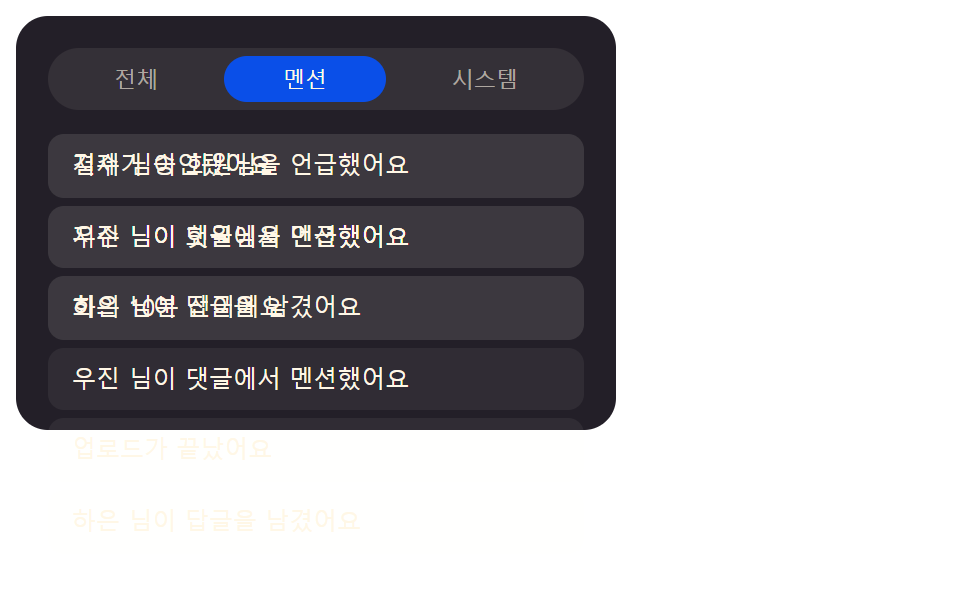
전체·멘션·시스템 탭 값이 바뀌면 이전 목록의 투명도 값과 위치 값을 함께 줄이면서 새 필터 결과의 투명도 값을 올려 겹쳐 지나가듯 바꾼다.
쓰임알림 종류별 탭이 있는 알림 센터
selectTabfilterCountCATS
<main class="stage">
  <div class="tf is-demo" id="tf">
    <div class="tf__tabs" role="tablist" aria-label="알림 종류">
      <button class="tf__tab" id="tfTabAll" role="tab" type="button" aria-selected="true" aria-controls="tfBody" tabindex="0" data-cat="all">전체</button>
      <button class="tf__tab" id="tfTabMention" role="tab" type="button" aria-selected="false" aria-controls="tfBody" tabindex="-1" data-cat="mention">멘션</button>
      <button class="tf__tab" id="tfTabSystem" role="tab" type="button" aria-selected="false" aria-controls="tfBody" tabindex="-1" data-cat="system">시스템</button>
    </div>
    <div class="tf__body" id="tfBody" role="tabpanel">
      <ul class="tf__list tf__list--a" id="tfListA" role="list"></ul>
      <ul class="tf__list tf__list--b" id="tfListB" role="list" hidden></ul>
    </div>
    <p class="tf__sr" id="tfSr" aria-live="polite"></p>
  </div>
</main>
@use "../../../../site/static/demo-tokens" as *;
// 계산 겹: index.html selectTab() 이 필터 결과(항목 수) 를 새 층에 채운 뒤, 이전 층은
// opacity·translateY 를 함께 줄이고 새 층은 opacity·translateY 를 함께 올리며 겹쳐
// 지나간다 — 두 층(list--a/--b)을 앞뒤로 번갈아 써서 반쯤 섞인 유령 프레임을 피한다.
.stage { @include stage($stage-ink); }
.tf {
width: min(100%, 300px);
background: $tick-panel;
border-radius: $r-card;
padding: $sp-4;
box-sizing: border-box;
display: flex;
flex-direction: column;
gap: $sp-3;
}
.tf__tabs { display: flex; gap: $sp-1; background: rgba($subject-cream, .08); border-radius: $r-pill; padding: $sp-1; }
.tf__tab {
flex: 1 1 auto;
border: none;
background: transparent;
color: rgba($subject-cream, .6);
font-size: 11px;
border-radius: $r-pill;
padding: $sp-1 $sp-2;
cursor: pointer;
}
.tf__tab[aria-selected="true"] { background: $subject-blue-deep; color: $subject-cream; }
.tf__body { position: relative; min-height: 132px; }
.tf__list {
position: absolute;
inset: 0;
list-style: none;
margin: 0;
padding: 0;
display: flex;
flex-direction: column;
gap: $sp-1;
opacity: 1;
transform: translateY(0);
transition: opacity $dur-base $ease-out, transform $dur-base $ease-out;
}
.tf__list--out { opacity: 0; transform: translateY(-10px); }
.tf__item {
border-radius: $r-sm;
background: rgba($subject-cream, .06);
color: $subject-cream;
font-size: 12px;
line-height: 1.3; // 로케일마다 다른 기본 줄높이(ja normal ≈ 1.67)를 한 값으로 고정 — 480×300 언어팩 넘침(BD14) 방지, 실측 2026-09-24
padding: $sp-2 $sp-3;
box-sizing: border-box;
}
.tf__sr {
position: absolute; width: 1px; height: 1px; overflow: hidden;
clip: rect(0 0 0 0); margin: -1px; padding: 0; border: 0;
}
@media (max-width: 340px) {
.tf { width: 100%; }
.tf__body { min-height: 108px; }
.tf__list { max-height: 108px; overflow-y: auto; }
}
@media (prefers-reduced-motion: reduce) {
.tf__list { transition: none; }
}.stage html, .stage body {
margin: 0;
overflow: hidden;
}
.stage .stage {
box-sizing: border-box;
min-height: 100vh;
display: grid;
place-items: center;
margin: 0;
background: #17141a;
font-family: -apple-system, "Segoe UI", "Noto Sans KR", sans-serif;
padding: clamp(8px, 4vw, 24px);
}
.tf {
width: min(100%, 300px);
background: #231f28;
border-radius: 16px;
padding: 16px;
box-sizing: border-box;
display: flex;
flex-direction: column;
gap: 12px;
}
.tf__tabs {
display: flex;
gap: 4px;
background: rgba(255, 247, 230, 0.08);
border-radius: 999px;
padding: 4px;
}
.tf__tab {
flex: 1 1 auto;
border: none;
background: transparent;
color: rgba(255, 247, 230, 0.6);
font-size: 11px;
border-radius: 999px;
padding: 4px 8px;
cursor: pointer;
}
.tf__tab[aria-selected=true] {
background: #0a4fe8;
color: #fff7e6;
}
.tf__body {
position: relative;
min-height: 132px;
}
.tf__list {
position: absolute;
inset: 0;
list-style: none;
margin: 0;
padding: 0;
display: flex;
flex-direction: column;
gap: 4px;
opacity: 1;
transform: translateY(0);
transition: opacity 300ms ease-out, transform 300ms ease-out;
}
.tf__list--out {
opacity: 0;
transform: translateY(-10px);
}
.tf__item {
border-radius: 8px;
background: rgba(255, 247, 230, 0.06);
color: #fff7e6;
font-size: 12px;
line-height: 1.3;
padding: 8px 12px;
box-sizing: border-box;
}
.tf__sr {
position: absolute;
width: 1px;
height: 1px;
overflow: hidden;
clip: rect(0 0 0 0);
margin: -1px;
padding: 0;
border: 0;
}
@media (max-width: 340px) {
.tf {
width: 100%;
}
.tf__body {
min-height: 108px;
}
.tf__list {
max-height: 108px;
overflow-y: auto;
}
}
@media (prefers-reduced-motion: reduce) {
.tf__list {
transition: none;
}
}(function () {
"use strict";
var ITEMS = [
{ name: "결제가 승인됐어요", cat: "system" },
{ name: "지수 님이 회원님을 언급했어요", cat: "mention" },
{ name: "회의 10분 전이에요", cat: "system" },
{ name: "우진 님이 댓글에서 멘션했어요", cat: "mention" },
{ name: "업로드가 끝났어요", cat: "system" },
{ name: "하은 님이 답글을 남겼어요", cat: "mention" }
];
var CATS = ["all", "mention", "system"];
var LABEL = { all: "전체", mention: "멘션", system: "시스템" };
var root = document.getElementById("tf");
var tabs = Array.prototype.slice.call(root.querySelectorAll(".tf__tab"));
var body = document.getElementById("tfBody");
var listA = document.getElementById("tfListA");
var listB = document.getElementById("tfListB");
var sr = document.getElementById("tfSr");
var reduce = window.matchMedia("(prefers-reduced-motion: reduce)").matches;
var synthetic = false;
function human() {
if (synthetic) return;
if (root.classList.contains("is-demo")) root.classList.remove("is-demo");
}
function makeRow(name) {
var li = document.createElement("li");
li.className = "tf__item";
li.setAttribute("role", "listitem");
li.textContent = name;
return li;
}
// 계산 겹: 필터 결과 값(항목 수)에 따라 목록을 채운 뒤, 이전 목록은 위로 이동하며(opacity·
// translateY 를 함께) 빠지고 새 목록은 아래에서 올라오며 들어온다 — 두 층(list--a/--b)을
// 번갈아 앞뒤로 써서 정지 사진 한 장이 "반쯤 섞인 유령"처럼 안 보이게 한다(item 07 과 같은
// 원리, 탭 값이 바뀔 때마다 앞/뒤 층을 서로 바꿔 끼운다).
var front = listA, back = listB, active = "all";
function filterCount(cat) {
return cat === "all" ? ITEMS.length : ITEMS.filter(function (it) { return it.cat === cat; }).length;
}
function fill(el, cat) {
el.innerHTML = "";
var rows = cat === "all" ? ITEMS : ITEMS.filter(function (it) { return it.cat === cat; });
rows.forEach(function (it) { el.appendChild(makeRow(it.name)); });
return rows.length;
}
function selectTab(cat, viaKeyboard) {
if (cat === active) return;
var incoming = back;
var outgoing = front;
var n = fill(incoming, cat);
incoming.style.transition = "none";
incoming.style.opacity = "0";
incoming.style.transform = "translateY(12px)";
incoming.removeAttribute("hidden");
// 강제 리플로우 뒤 다음 프레임에서 최종 값을 건다 — 시작 값(0)이 한 번 그려지기 전에
// 끝 값(1)으로 바로 덮으면 전환이 안 보인다(실측 2026-09-24, 항목 08 과 같은 원인).
void incoming.offsetHeight;
incoming.style.transition = "";
requestAnimationFrame(function () {
requestAnimationFrame(function () {
outgoing.classList.add("tf__list--out");
incoming.style.opacity = "1";
incoming.style.transform = "translateY(0)";
});
});
window.setTimeout(function () {
outgoing.setAttribute("hidden", "");
outgoing.classList.remove("tf__list--out");
outgoing.style.opacity = "";
outgoing.style.transform = "";
incoming.style.opacity = "";
incoming.style.transform = "";
front = incoming; back = outgoing;
}, reduce ? 0 : 260);
tabs.forEach(function (t) {
var on = t.dataset.cat === cat;
t.setAttribute("aria-selected", on ? "true" : "false");
t.tabIndex = on ? 0 : -1;
});
active = cat;
sr.textContent = LABEL[cat] + " " + n + "건";
if (viaKeyboard) {
var el = tabs.filter(function (t) { return t.dataset.cat === cat; })[0];
if (el) el.focus({ preventScroll: true });
}
}
tabs.forEach(function (t) {
t.addEventListener("click", function () {
human();
selectTab(t.dataset.cat, false);
});
});
root.querySelector(".tf__tabs").addEventListener("keydown", function (e) {
if (e.key !== "ArrowRight" && e.key !== "ArrowLeft") return;
human();
var idx = CATS.indexOf(active);
var next = e.key === "ArrowRight" ? (idx + 1) % CATS.length : (idx - 1 + CATS.length) % CATS.length;
e.preventDefault();
selectTab(CATS[next], true);
});
fill(front, "all");
sr.textContent = LABEL.all + " " + filterCount("all") + "건";
if (reduce) {
// 정지 상태만 보인다 — 전환 없이 탭 값만 최종으로 확정
} else {
var idx = 0;
function loop() {
if (!root.classList.contains("is-demo")) return;
synthetic = true;
idx = (idx + 1) % CATS.length;
selectTab(CATS[idx], false);
synthetic = false;
window.setTimeout(loop, 1500);
}
window.setTimeout(loop, 800);
}
})();// NotifTabFilterCrossfade — vanilla 판(run/405/demo/09-.../index.html) 의 React 포트.
// 계산 겹: 필터 결과 값(항목 수)에 따라 목록을 채운 뒤, 이전 목록은 위로 이동하며(opacity·
// translateY 를 함께) 빠지고 새 목록은 아래에서 올라오며 들어온다 — 두 층을 번갈아 앞뒤로
// 써서 front/back 역할은 JS 변수로만 바꾸고(정적 CSS 클래스로 고정하지 않는다 — 항목 07 과
// 달리 여기선 두 DOM 노드가 역할을 서로 바꿔 끼우므로 인라인 스타일로 관리해야 한다).
import { useEffect, useRef, useState } from "react";
import styles from "./NotifTabFilterCrossfade.module.scss";
type Box<T> = { current: T };
type KeyEvt = { key: string; preventDefault(): void };
type Cat = "all" | "mention" | "system";
type Item = { name: string; cat: Exclude<Cat, "all"> };
const ITEMS: Item[] = [
{ name: "결제가 승인됐어요", cat: "system" },
{ name: "지수 님이 회원님을 언급했어요", cat: "mention" },
{ name: "회의 10분 전이에요", cat: "system" },
{ name: "우진 님이 댓글에서 멘션했어요", cat: "mention" },
{ name: "업로드가 끝났어요", cat: "system" },
{ name: "하은 님이 답글을 남겼어요", cat: "mention" },
];
const CATS: Cat[] = ["all", "mention", "system"];
const LABEL: { [k in Cat]: string } = { all: "전체", mention: "멘션", system: "시스템" };
export default function NotifTabFilterCrossfade() {
const [isDemo, setIsDemo] = useState(true);
const [active, setActive] = useState<Cat>("all");
const isDemoRef = useRef(true) as unknown as Box<boolean>;
const synthRef = useRef(false) as unknown as Box<boolean>;
const rootRef = useRef(null) as unknown as Box<HTMLDivElement>;
const tabRefs = {
all: useRef(null) as unknown as Box<HTMLButtonElement>,
mention: useRef(null) as unknown as Box<HTMLButtonElement>,
system: useRef(null) as unknown as Box<HTMLButtonElement>,
};
const listARef = useRef(null) as unknown as Box<HTMLUListElement>;
const listBRef = useRef(null) as unknown as Box<HTMLUListElement>;
const srRef = useRef(null) as unknown as Box<HTMLParagraphElement>;
const frontRef = useRef(null) as unknown as Box<HTMLUListElement>;
const backRef = useRef(null) as unknown as Box<HTMLUListElement>;
const activeRef = useRef<Cat>("all") as unknown as Box<Cat>;
const reduceRef = useRef(false) as unknown as Box<boolean>;
const loopTimerRef = useRef(0) as unknown as Box<number>;
const swapTimerRef = useRef(0) as unknown as Box<number>;
function human() {
if (synthRef.current) return;
if (isDemoRef.current) { isDemoRef.current = false; setIsDemo(false); }
}
function makeRow(name: string): HTMLLIElement {
const li = document.createElement("li");
li.className = styles.item;
li.setAttribute("role", "listitem");
li.textContent = name;
return li;
}
function fill(el: HTMLUListElement, cat: Cat): number {
el.innerHTML = "";
const rows = cat === "all" ? ITEMS : ITEMS.filter((it) => it.cat === cat);
rows.forEach((it) => { el.appendChild(makeRow(it.name)); });
return rows.length;
}
function selectTab(cat: Cat, viaKeyboard: boolean) {
if (cat === activeRef.current) return;
const reduce = reduceRef.current;
const incoming = backRef.current, outgoing = frontRef.current;
if (!incoming || !outgoing) return;
const n = fill(incoming, cat);
incoming.style.transition = "none";
incoming.style.opacity = "0";
incoming.style.transform = "translateY(12px)";
incoming.removeAttribute("hidden");
void incoming.offsetHeight;
incoming.style.transition = "";
requestAnimationFrame(() => {
requestAnimationFrame(() => {
outgoing.classList.add(styles.listOut);
incoming.style.opacity = "1";
incoming.style.transform = "translateY(0)";
});
});
window.clearTimeout(swapTimerRef.current);
swapTimerRef.current = window.setTimeout(() => {
outgoing.setAttribute("hidden", "");
outgoing.classList.remove(styles.listOut);
outgoing.style.opacity = "";
outgoing.style.transform = "";
incoming.style.opacity = "";
incoming.style.transform = "";
frontRef.current = incoming;
backRef.current = outgoing;
}, reduce ? 0 : 260);
activeRef.current = cat;
setActive(cat);
if (srRef.current) srRef.current.textContent = LABEL[cat] + " " + n + "건";
if (viaKeyboard) {
const el = tabRefs[cat].current;
if (el) el.focus({ preventScroll: true });
}
}
function onTabClick(cat: Cat) {
human();
selectTab(cat, false);
}
function onTabsKeyDown(e: KeyEvt) {
if (e.key !== "ArrowRight" && e.key !== "ArrowLeft") return;
human();
const idx = CATS.indexOf(activeRef.current);
const next = e.key === "ArrowRight" ? (idx + 1) % CATS.length : (idx - 1 + CATS.length) % CATS.length;
e.preventDefault();
selectTab(CATS[next], true);
}
useEffect(() => {
const reduce = window.matchMedia("(prefers-reduced-motion: reduce)").matches;
reduceRef.current = reduce;
frontRef.current = listARef.current;
backRef.current = listBRef.current;
const front = frontRef.current;
if (!front) return;
fill(front, "all");
if (srRef.current) srRef.current.textContent = LABEL.all + " " + ITEMS.length + "건";
if (reduce) {
// 정지 상태만 보인다 — 전환 없이 탭 값만 최종으로 확정
} else {
let idx = 0;
function loop() {
if (!isDemoRef.current) return;
synthRef.current = true;
idx = (idx + 1) % CATS.length;
selectTab(CATS[idx], false);
synthRef.current = false;
loopTimerRef.current = window.setTimeout(loop, 1500);
}
loopTimerRef.current = window.setTimeout(loop, 800);
}
return () => { window.clearTimeout(loopTimerRef.current); window.clearTimeout(swapTimerRef.current); };
// eslint-disable-next-line react-hooks/exhaustive-deps
}, []);
return (
<main className={styles.stage}>
<div className={styles.tf + " " + (isDemo ? styles.isDemo : "")} ref={rootRef}>
<div className={styles.tabs} role="tablist" aria-label="알림 종류" onKeyDown={onTabsKeyDown}>
<button className={styles.tab} role="tab" type="button" aria-selected={active === "all"}
aria-controls="tfBody" tabIndex={active === "all" ? 0 : -1} ref={tabRefs.all}
onClick={() => onTabClick("all")}>전체</button>
<button className={styles.tab} role="tab" type="button" aria-selected={active === "mention"}
aria-controls="tfBody" tabIndex={active === "mention" ? 0 : -1} ref={tabRefs.mention}
onClick={() => onTabClick("mention")}>멘션</button>
<button className={styles.tab} role="tab" type="button" aria-selected={active === "system"}
aria-controls="tfBody" tabIndex={active === "system" ? 0 : -1} ref={tabRefs.system}
onClick={() => onTabClick("system")}>시스템</button>
</div>
<div className={styles.body} id="tfBody" role="tabpanel">
<ul className={styles.list} role="list" ref={listARef} />
<ul className={styles.list} role="list" ref={listBRef} hidden />
</div>
<p className={styles.sr} aria-live="polite" ref={srRef} />
</div>
</main>
);
}09 탭 값이 바뀌면 겹쳐 지나가는 필터 목록 — 측정 누적면적 20.828% · 움직인 프레임 11/23GODRICH 원작 · zip 에 SCSS·React 포함 · css 알림 애니메이션 9가지 — 알림 패널 뱃지 정리
이 데모가 속한 글
 css 알림 애니메이션 9가지 — 알림 패널 뱃지 정리css 알림 애니메이션 아홉 가지를 한 패널에 모았다. 「알림이 몇 개 남았나요?」 라는 질문에 이 패널은 미확인 값 하나로 답한다. 3번은 그 값이 0이 되는 순간 뱃지를 고리 모양으로 되돌리고, 6번은 같은 값이 이 글의 데모 전부 보기