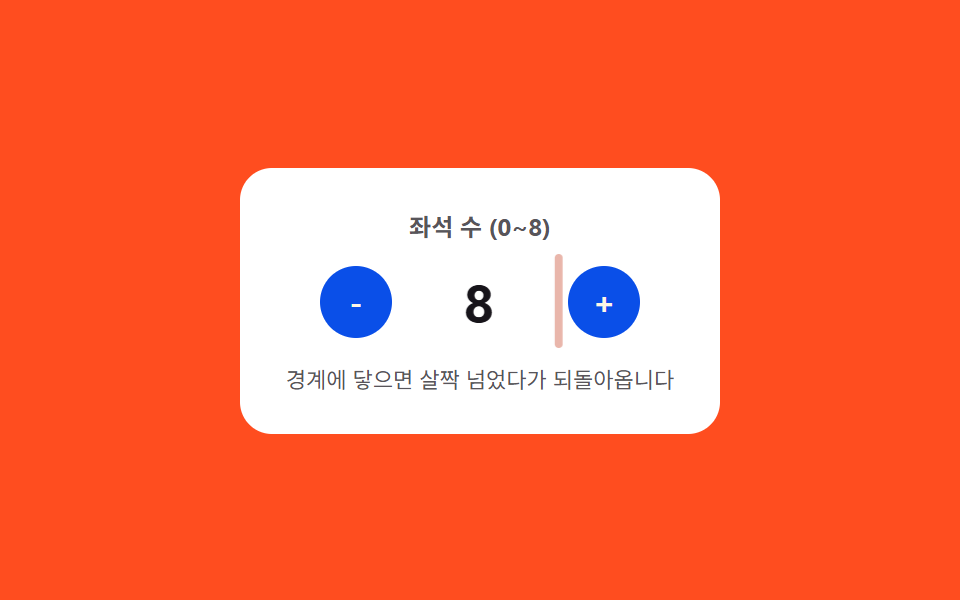
03한계 바운스 — 값이 상한이나 하한을 살짝 넘었다가 스프링 곡선을 따라 되돌아오는 스텝퍼
값이 정해진 상한이나 하한에 닿은 상태가 되면 그 경계를 살짝 넘어선 자리까지 갔다가 스프링 곡선을 따라 경계 값으로 되돌아오고, 경계 안쪽에서는 이 곡선이 적용되지 않습니다.
쓰임재고 수량이 제한된 상품 폼, 나이·인원 입력창
AMPLITUDE=10FREQ=16autoplayTick
<main class="stage">
<div class="nspcb is-demo" id="nspcb">
  <div class="nspcb__panel">
    <span class="nspcb__label">좌석 수 (0~8)</span>
    <div class="nspcb__row">
      <button class="nspcb__btn" id="nspcbMinus" type="button" aria-label="좌석 줄이기">-</button>
      <span class="nspcb__valueWrap">
        <span class="nspcb__edge" id="nspcbEdgeLeft"></span>
        <span class="nspcb__value" id="nspcbValue">4</span>
        <span class="nspcb__edge" id="nspcbEdgeRight"></span>
      </span>
      <button class="nspcb__btn" id="nspcbPlus" type="button" aria-label="좌석 늘리기">+</button>
    </div>
    <span class="nspcb__hint">경계에 닿으면 살짝 넘었다가 되돌아옵니다</span>
  </div>
</div>
</main>
@use "../../../../site/static/demo-tokens" as *;
// 계산 겹: 경계(0·8)에 닿는 순간부터 지난 시간(t)에 감쇠 사인파를 매 프레임 계산해
// translateX 에 대입한다 — 목표를 살짝 넘었다가 스프링 곡선을 따라 되돌아온다.
$duration: $dur-quick;
$easing: $ease-elastic;
$color: $error;
@include stage($stage-orange);
.stage { position: relative; }
.nspcb {
width: min(240px, 70vw);
}
.nspcb__panel {
display: flex;
flex-direction: column;
align-items: center;
gap: $sp-3;
padding: $sp-5;
border-radius: $r-card;
background: $stage-paper;
}
.nspcb__label {
color: rgba($subject-ink, .72);
font-weight: 700;
font-size: 12px;
}
.nspcb__row {
display: flex;
align-items: center;
gap: $sp-4;
}
.nspcb__btn {
width: 36px;
height: 36px;
border: 0;
border-radius: $r-pill;
background: $subject-blue-deep;
color: $subject-cream;
font-family: inherit;
font-weight: 700;
font-size: 16px;
line-height: 1;
display: grid;
place-items: center;
cursor: pointer;
}
.nspcb__valueWrap {
position: relative;
display: inline-flex;
align-items: center;
min-width: 56px;
justify-content: center;
will-change: transform;
}
.nspcb__value {
color: $subject-ink;
font-weight: 700;
font-size: 26px;
font-variant-numeric: tabular-nums;
}
.nspcb__edge {
position: absolute;
top: -6px;
bottom: -6px;
width: 4px;
border-radius: $r-xs;
background: $color;
opacity: 0;
}
.nspcb__edge:first-child { left: -14px; }
.nspcb__edge:last-child { right: -14px; }
.nspcb__hint {
color: rgba($subject-ink, .72);
font-size: 11px;
text-align: center;
}
@media (max-width: 340px) {
.nspcb__panel { padding: $sp-4; gap: $sp-2; }
.nspcb__btn { width: 32px; height: 32px; font-size: 14px; }
.nspcb__value { font-size: 22px; }
}
@media (prefers-reduced-motion: reduce) {
.nspcb__valueWrap { transition: none !important; }
}html, body {
margin: 0;
overflow: hidden;
}
.stage {
box-sizing: border-box;
min-height: 100vh;
display: grid;
place-items: center;
margin: 0;
background: #ff4d1f;
font-family: -apple-system, "Segoe UI", "Noto Sans KR", sans-serif;
padding: clamp(8px, 4vw, 24px);
}
.stage {
position: relative;
}
.nspcb {
width: min(240px, 70vw);
}
.nspcb__panel {
display: flex;
flex-direction: column;
align-items: center;
gap: 12px;
padding: 20px;
border-radius: 16px;
background: #ffffff;
}
.nspcb__label {
color: rgba(23, 20, 26, 0.72);
font-weight: 700;
font-size: 12px;
}
.nspcb__row {
display: flex;
align-items: center;
gap: 16px;
}
.nspcb__btn {
width: 36px;
height: 36px;
border: 0;
border-radius: 999px;
background: #0a4fe8;
color: #fff7e6;
font-family: inherit;
font-weight: 700;
font-size: 16px;
line-height: 1;
display: grid;
place-items: center;
cursor: pointer;
}
.nspcb__valueWrap {
position: relative;
display: inline-flex;
align-items: center;
min-width: 56px;
justify-content: center;
will-change: transform;
}
.nspcb__value {
color: #17141a;
font-weight: 700;
font-size: 26px;
font-variant-numeric: tabular-nums;
}
.nspcb__edge {
position: absolute;
top: -6px;
bottom: -6px;
width: 4px;
border-radius: 4px;
background: #c2361a;
opacity: 0;
}
.nspcb__edge:first-child {
left: -14px;
}
.nspcb__edge:last-child {
right: -14px;
}
.nspcb__hint {
color: rgba(23, 20, 26, 0.72);
font-size: 11px;
text-align: center;
}
@media (max-width: 340px) {
.nspcb__panel {
padding: 16px;
gap: 8px;
}
.nspcb__btn {
width: 32px;
height: 32px;
font-size: 14px;
}
.nspcb__value {
font-size: 22px;
}
}
@media (prefers-reduced-motion: reduce) {
.nspcb__valueWrap {
transition: none !important;
}
}(function () {
var root = document.getElementById('nspcb');
var valueEl = document.getElementById('nspcbValue');
var wrapEl = valueEl.parentNode;
var minusBtn = document.getElementById('nspcbMinus');
var plusBtn = document.getElementById('nspcbPlus');
var edgeLeft = document.getElementById('nspcbEdgeLeft');
var edgeRight = document.getElementById('nspcbEdgeRight');
var MIN = 0, MAX = 8;
var value = 4;
var raf = null;
function render() { valueEl.textContent = String(value); }
// 계산 겹: 경계에 닿는 순간부터 지난 시간(t)에 감쇠 사인파를 매 프레임 계산해
// translateX 에 대입한다 — 목표 지점을 살짝 넘었다가 스프링 곡선으로 되돌아온다.
var AMPLITUDE = 10, FREQ = 16, DECAY = 10;
function overshoot(tSec) {
if (tSec <= 0) { return 0; }
return AMPLITUDE * Math.sin(tSec * FREQ) * Math.exp(-DECAY * tSec);
}
function bounce(dir) {
var edge = dir > 0 ? edgeRight : edgeLeft;
var start = performance.now();
if (raf) { cancelAnimationFrame(raf); }
function frame(now) {
var t = (now - start) / 1000;
var px = dir * overshoot(t);
wrapEl.style.transform = 'translateX(' + px.toFixed(2) + 'px)';
var op = Math.max(0, 1 - t / 0.4);
edge.style.opacity = op.toFixed(3);
if (t < 0.45) {
raf = requestAnimationFrame(frame);
} else {
wrapEl.style.transform = 'translateX(0px)';
edge.style.opacity = '0';
raf = null;
}
}
raf = requestAnimationFrame(frame);
}
function step(dir) {
var next = value + dir;
if (next > MAX || next < MIN) {
bounce(dir);
return;
}
value = next;
render();
}
function wireReal(btn, dir) {
btn.addEventListener('click', function () {
root.classList.remove('is-demo'); stopAutoplay();
step(dir);
});
}
wireReal(minusBtn, -1);
wireReal(plusBtn, 1);
var seq = [1, 1, 1, 1, 1, 1, 1, -1, -1, -1, -1, -1, -1, -1, -1, -1];
var idx = 0;
var autoplayTimer = null;
function autoplayTick() {
step(seq[idx % seq.length]);
idx += 1;
}
function stopAutoplay() { if (autoplayTimer) { clearInterval(autoplayTimer); autoplayTimer = null; } }
var reduce = window.matchMedia('(prefers-reduced-motion: reduce)').matches;
if (!reduce) {
autoplayTimer = setInterval(autoplayTick, 260);
}
render();
})();import { useEffect, useRef } from "react";
import styles from "./NumberStepperMinMaxClampBounce.module.scss";
export type NumberStepperMinMaxClampBounceProps = {
color?: string;
};
export default function NumberStepperMinMaxClampBounce({
color = "#c2361a",
}: NumberStepperMinMaxClampBounceProps) {
const rootRef = useRef<HTMLDivElement | null>(null);
useEffect(() => {
const root = rootRef.current;
if (!root) return;
const valueEl = root.querySelector<HTMLSpanElement>(`.${styles.value}`);
const wrapEl = root.querySelector<HTMLSpanElement>(`.${styles.valueWrap}`);
const minusBtn = root.querySelector<HTMLButtonElement>(`.${styles.btnMinus}`);
const plusBtn = root.querySelector<HTMLButtonElement>(`.${styles.btnPlus}`);
const edgeLeft = root.querySelector<HTMLSpanElement>(`.${styles.edgeLeft}`);
const edgeRight = root.querySelector<HTMLSpanElement>(`.${styles.edgeRight}`);
if (!valueEl || !wrapEl || !minusBtn || !plusBtn || !edgeLeft || !edgeRight) return;
const MIN = 0, MAX = 8;
let value = 4;
let raf: number | null = null;
function render() { valueEl!.textContent = String(value); }
// 계산 겹: 경계에 닿는 순간부터 지난 시간(t)에 감쇠 사인파를 매 프레임 계산해
// translateX 에 대입한다 — 목표 지점을 살짝 넘었다가 스프링 곡선으로 되돌아온다.
const AMPLITUDE = 10, FREQ = 16, DECAY = 10;
function overshoot(tSec: number) {
if (tSec <= 0) { return 0; }
return AMPLITUDE * Math.sin(tSec * FREQ) * Math.exp(-DECAY * tSec);
}
function bounce(dir: number) {
const edge = dir > 0 ? edgeRight! : edgeLeft!;
const start = performance.now();
if (raf) { cancelAnimationFrame(raf); }
function frame(now: number) {
const t = (now - start) / 1000;
const px = dir * overshoot(t);
wrapEl!.style.transform = "translateX(" + px.toFixed(2) + "px)";
const op = Math.max(0, 1 - t / 0.4);
edge.style.opacity = op.toFixed(3);
if (t < 0.45) {
raf = requestAnimationFrame(frame);
} else {
wrapEl!.style.transform = "translateX(0px)";
edge.style.opacity = "0";
raf = null;
}
}
raf = requestAnimationFrame(frame);
}
function step(dir: number) {
const next = value + dir;
if (next > MAX || next < MIN) {
bounce(dir);
return;
}
value = next;
render();
}
function wireReal(btn: HTMLButtonElement, dir: number) {
const onClick = () => {
root!.classList.remove(styles.isDemo);
stopAutoplay();
step(dir);
};
btn.addEventListener("click", onClick);
return () => btn.removeEventListener("click", onClick);
}
const cleanMinus = wireReal(minusBtn, -1);
const cleanPlus = wireReal(plusBtn, 1);
const seq = [1, 1, 1, 1, 1, 1, 1, -1, -1, -1, -1, -1, -1, -1, -1, -1];
let idx = 0;
let autoplayTimer: ReturnType<typeof setInterval> | null = null;
function autoplayTick() {
step(seq[idx % seq.length]);
idx += 1;
}
function stopAutoplay() {
if (autoplayTimer) { clearInterval(autoplayTimer); autoplayTimer = null; }
}
const reduce = window.matchMedia("(prefers-reduced-motion: reduce)").matches;
if (!reduce) {
autoplayTimer = setInterval(autoplayTick, 260);
}
render();
return () => {
stopAutoplay();
if (raf) cancelAnimationFrame(raf);
cleanMinus();
cleanPlus();
};
}, []);
return (
<div ref={rootRef} className={`${styles.stage} ${styles.isDemo}`} style={{ ["--color" as string]: color }}>
<div className={styles.panel}>
<span className={styles.label}>좌석 수 (0~8)</span>
<div className={styles.row}>
<button className={`${styles.btn} ${styles.btnMinus}`} type="button" aria-label="좌석 줄이기">-</button>
<span className={styles.valueWrap}>
<span className={`${styles.edge} ${styles.edgeLeft}`} />
<span className={styles.value}>4</span>
<span className={`${styles.edge} ${styles.edgeRight}`} />
</span>
<button className={`${styles.btn} ${styles.btnPlus}`} type="button" aria-label="좌석 늘리기">+</button>
</div>
<span className={styles.hint}>경계에 닿으면 살짝 넘었다가 되돌아옵니다</span>
</div>
</div>
);
}03 한계 바운스 — 값이 상한이나 하한을 살짝 넘었다가 스프링 곡선을 따라 되돌아오는 스텝퍼 — 측정 누적면적 0.547% · 움직인 프레임 15/23GODRICH 원작 · zip 에 SCSS·React 포함 · 숫자 스텝퍼 UI 패턴 9종 — 길게 누를수록 빨라지는 것부터 눈금에 붙는 것까지
이 데모가 속한 글
 숫자 스텝퍼 UI 패턴 9종 — 길게 누를수록 빨라지는 것부터 눈금에 붙는 것까지숫자 스텝퍼는 버튼이나 드래그로 값을 하나씩 늘리고 줄이는 입력 장치인데, 아홉 개 중 하나는 눌린 상태가 길어질수록 값이 바뀌는 간격이 점점 짧아지고, 하나는 값이 상한에 닿으면 그 지점을 살짝 넘었다가 스프링 곡 이 글의 데모 전부 보기