05진행률 스트립
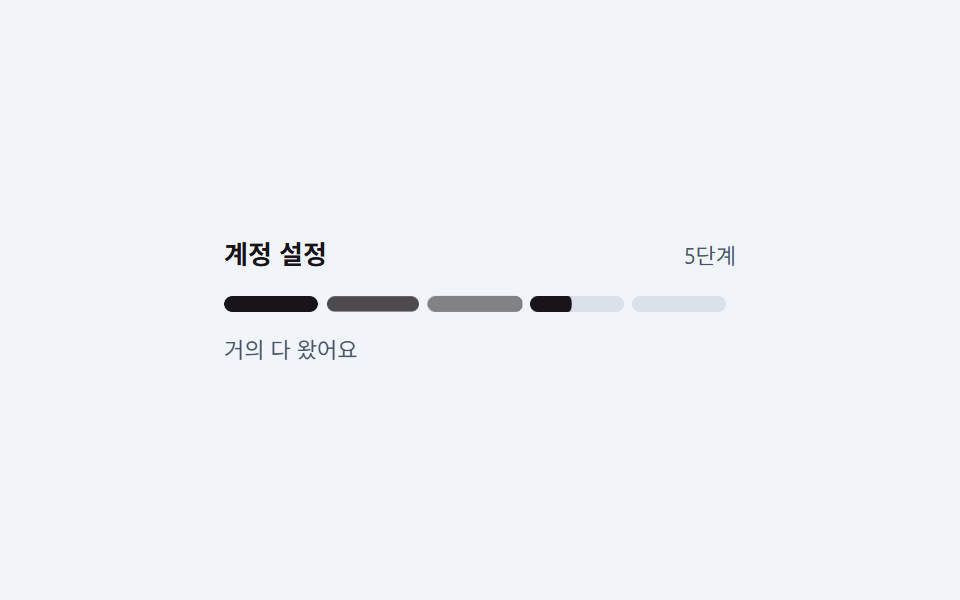
단계 다섯 칸이 가로줄로 놓이고 채워진 칸이 왼쪽부터 하나씩 늘면서, 방금 찬 칸만 잠깐 밝아졌다가 가라앉아 어디까지 왔는지가 눈에 남습니다.
쓰임가입 절차 상단 진행 표시, 설문·주문 단계 표시
5칸 세그먼트채워진 칸 점등radius 999
<main class="stage is-demo">
  <div class="wrap">
    <div class="head">
      <span class="h">계정 설정</span>
      <span class="p">5단계</span>
    </div>
    <div class="strip" aria-label="설정 진행 단계">
      <span class="seg s1"><i class="fill"></i><i class="flash"></i></span>
      <span class="seg s2"><i class="fill"></i><i class="flash"></i></span>
      <span class="seg s3"><i class="fill"></i><i class="flash"></i></span>
      <span class="seg s4"><i class="fill"></i><i class="flash"></i></span>
      <span class="seg s5"><i class="fill"></i><i class="flash"></i></span>
    </div>
    <p class="cap">거의 다 왔어요</p>
  </div>
</main>
@use "../../../../site/static/demo-tokens" as *;
// ── 변수 3개 ──────────────────────────────────────────
$duration: $dur-loop; // 2s — 다섯 칸이 왼쪽부터 차례로 차는 한 바퀴
$easing: $ease-out;
$color: $subject-ink; // 잉크 계열 — 흰 바탕에서 본문·표시 모두 대비를 번다
@include stage(#f1f5f9);
.wrap { box-sizing: border-box; width: min(100%, 256px); }
.head { display: flex; align-items: baseline; justify-content: space-between; gap: $sp-2; }
.h { font-size: 13px; font-weight: 700; color: $subject-ink; }
.p { font-size: 11px; color: #475569; }
.strip { display: flex; gap: $sp-1; margin: $sp-3 0 0; }
// 칸은 균등분배(flex:1 1 0)가 아니라 고정 폭이다. 채움이 scaleX 인 지오메트리에서
// 균등분배를 섞으면 실제 렌더 폭이 계산값과 어긋난다 (BD19)
.seg {
position: relative;
flex: 0 0 auto;
width: 47px;
height: 8px;
border-radius: $r-pill;
background: #dbe1e8;
overflow: hidden;
scale: 1; // 3차 탄성 개별 속성 중립 자세 — seg 자체는 지금까지 애니메이션이 없었다
}
// ⛔ 낱개 속성으로 쓴다 — .s2~.s5 의 animation-delay 가 아래에서 재정의되므로
// 단축을 쓰면 이 규칙에서 리셋된다
.stage.is-demo .seg {
animation-name: seg-pop;
animation-duration: $duration;
animation-timing-function: $ease-lerp-settle;
animation-iteration-count: infinite;
}
.strip .s2 { animation-delay: .2s; }
.strip .s3 { animation-delay: .4s; }
.strip .s4 { animation-delay: .6s; }
.strip .s5 { animation-delay: .8s; }
// 채움 — width 가 아니라 scaleX. 칸마다 시차를 둬 왼쪽부터 하나씩 찬다
.fill {
position: absolute; inset: 0;
border-radius: $r-pill;
background: $color;
transform: scaleX(0);
transform-origin: left center; // 규칙8: 칸 왼쪽부터 순차 채움
}
// 방금 찬 칸만 잠깐 밝아졌다 가라앉는다
.flash {
position: absolute; inset: 0;
border-radius: $r-pill;
background: #fff;
opacity: 0;
}
// ⛔ 낱개 속성으로 쓴다. `animation:` 단축으로 쓰면 아래 .s2~.s5 의 animation-delay 가
// 같이 초기화돼 다섯 칸이 한꺼번에 찬다 (실측 2026-09-11)
.stage.is-demo .fill {
animation-name: fill;
animation-duration: $duration;
animation-timing-function: $easing;
animation-iteration-count: infinite;
}
.stage.is-demo .flash {
animation-name: flash;
animation-duration: $duration;
animation-timing-function: $easing;
animation-iteration-count: infinite;
}
.s2 .fill, .s2 .flash { animation-delay: .2s; }
.s3 .fill, .s3 .flash { animation-delay: .4s; }
.s4 .fill, .s4 .flash { animation-delay: .6s; }
.s5 .fill, .s5 .flash { animation-delay: .8s; }
.cap { margin: $sp-3 0 0; font-size: 11px; color: #475569; }
// 한 겹(채움 오버슛 + 캡션 감쇠 진자) — 2026-09-15 형태 2차
// 칸을 꽉 채운 뒤 1.15 로 살짝 넘치려다 overflow:hidden 에 클립되는 탄성.
// s5 마지막 칸은 .8s 딜레이 + 16% ≈ $duration 의 40~48% 지점에 차니
// cap-bob 도 40% 피크로 맞춘다
@keyframes fill {
0% { transform: scaleX(0); }
13% { transform: scaleX(1.15); }
16%, 100% { transform: scaleX(1); }
}
// 마지막 칸이 차는 순간 "거의 다 왔어요" 가 한 번 가볍게 들렸다 가라앉는다
.stage.is-demo .cap {
animation: cap-bob $duration $ease-lerp-settle infinite;
}
@keyframes cap-bob {
0%, 30% { transform: translateY(0); }
40% { transform: translateY(-2px); }
55% { transform: translateY(1px); }
70%, 100% { transform: translateY(0); }
}
@keyframes flash {
0%, 8% { opacity: 0; }
16% { opacity: .55; }
34%,100% { opacity: 0; }
}
// 3차: 칸(.seg)이 채워지는 시점(각자 delay + 16% 지점)에 개별 속성(scale:)으로
// 통째로 한 번 탄성 팝. fill 은 내부 자식(scaleX)이라 이 층과 축이 달라
// 순수 병렬 합성 — 47px 칸 + 4px 갭 안에서 안 겹치는 상한 1.06
@keyframes seg-pop {
0%, 13% { scale: 1; }
16% { scale: 1.06; }
24% { scale: .98; }
32%, 100% { scale: 1; }
}
@media (prefers-reduced-motion: reduce) {
.stage.is-demo .fill { animation: none; transform: scaleX(1); }
.stage.is-demo .flash { animation: none; opacity: 0; }
.stage.is-demo .cap { animation: none; }
.stage.is-demo .seg { animation: none; scale: 1; }
}html, body {
margin: 0;
overflow: hidden;
}
.stage {
box-sizing: border-box;
min-height: 100vh;
display: grid;
place-items: center;
margin: 0;
background: #f1f5f9;
font-family: -apple-system, "Segoe UI", "Noto Sans KR", sans-serif;
padding: clamp(8px, 4vw, 24px);
}
.wrap {
box-sizing: border-box;
width: min(100%, 256px);
}
.head {
display: flex;
align-items: baseline;
justify-content: space-between;
gap: 8px;
}
.h {
font-size: 13px;
font-weight: 700;
color: #17141a;
}
.p {
font-size: 11px;
color: #475569;
}
.strip {
display: flex;
gap: 4px;
margin: 12px 0 0;
}
.seg {
position: relative;
flex: 0 0 auto;
width: 47px;
height: 8px;
border-radius: 999px;
background: #dbe1e8;
overflow: hidden;
scale: 1;
}
.stage.is-demo .seg {
animation-name: seg-pop;
animation-duration: 2s;
animation-timing-function: linear(0, 0.051, 0.176, 0.341, 0.518, 0.685, 0.831, 0.947, 1.032, 1.087, 1.117, 1.126, 1.121, 1.105, 1.085, 1.062, 1.041, 1.022, 1.008, 0.997, 1);
animation-iteration-count: infinite;
}
.strip .s2 {
animation-delay: 0.2s;
}
.strip .s3 {
animation-delay: 0.4s;
}
.strip .s4 {
animation-delay: 0.6s;
}
.strip .s5 {
animation-delay: 0.8s;
}
.fill {
position: absolute;
inset: 0;
border-radius: 999px;
background: #17141a;
transform: scaleX(0);
transform-origin: left center;
}
.flash {
position: absolute;
inset: 0;
border-radius: 999px;
background: #fff;
opacity: 0;
}
.stage.is-demo .fill {
animation-name: fill;
animation-duration: 2s;
animation-timing-function: ease-out;
animation-iteration-count: infinite;
}
.stage.is-demo .flash {
animation-name: flash;
animation-duration: 2s;
animation-timing-function: ease-out;
animation-iteration-count: infinite;
}
.s2 .fill, .s2 .flash {
animation-delay: 0.2s;
}
.s3 .fill, .s3 .flash {
animation-delay: 0.4s;
}
.s4 .fill, .s4 .flash {
animation-delay: 0.6s;
}
.s5 .fill, .s5 .flash {
animation-delay: 0.8s;
}
.cap {
margin: 12px 0 0;
font-size: 11px;
color: #475569;
}
@keyframes fill {
0% {
transform: scaleX(0);
}
13% {
transform: scaleX(1.15);
}
16%, 100% {
transform: scaleX(1);
}
}
.stage.is-demo .cap {
animation: cap-bob 2s linear(0, 0.051, 0.176, 0.341, 0.518, 0.685, 0.831, 0.947, 1.032, 1.087, 1.117, 1.126, 1.121, 1.105, 1.085, 1.062, 1.041, 1.022, 1.008, 0.997, 1) infinite;
}
@keyframes cap-bob {
0%, 30% {
transform: translateY(0);
}
40% {
transform: translateY(-2px);
}
55% {
transform: translateY(1px);
}
70%, 100% {
transform: translateY(0);
}
}
@keyframes flash {
0%, 8% {
opacity: 0;
}
16% {
opacity: 0.55;
}
34%, 100% {
opacity: 0;
}
}
@keyframes seg-pop {
0%, 13% {
scale: 1;
}
16% {
scale: 1.06;
}
24% {
scale: 0.98;
}
32%, 100% {
scale: 1;
}
}
@media (prefers-reduced-motion: reduce) {
.stage.is-demo .fill {
animation: none;
transform: scaleX(1);
}
.stage.is-demo .flash {
animation: none;
opacity: 0;
}
.stage.is-demo .cap {
animation: none;
}
.stage.is-demo .seg {
animation: none;
scale: 1;
}
}import type { CSSProperties } from "react";
import styles from "./ProgressStrip.module.scss";
export type ProgressStripProps = {
duration?: number;
easing?: string;
color?: string;
title?: string;
caption?: string;
steps?: number;
/** 칸 사이 시차 (ms) */
stagger?: number;
};
export default function ProgressStrip({
duration = 2000,
easing = "ease-out",
color = "#17141a",
title = "Account setup",
caption = "Almost there",
steps = 5,
stagger = 200,
}: ProgressStripProps) {
const vars: CSSProperties = {
"--duration": `${duration}ms`,
"--easing": easing,
"--color": color,
} as CSSProperties;
return (
<div className={styles.wrap} style={vars}>
<div className={styles.head}>
<span className={styles.h}>{title}</span>
<span className={styles.p}>{steps} steps</span>
</div>
<div className={styles.strip} aria-label={title}>
{Array.from({ length: steps }, (_, i) => {
// 시차는 인라인으로. scss 에서 animation 단축 속성을 쓰면 이 값이 리셋된다
const delay = { animationDelay: `${stagger * i}ms` } as CSSProperties;
return (
<span className={styles.seg} key={i}>
<i className={styles.fill} style={delay} />
<i className={styles.flash} style={delay} />
</span>
);
})}
</div>
<p className={styles.cap}>{caption}</p>
</div>
);
}05 진행률 스트립 — 측정 누적면적 1.842% · 움직인 프레임 18/23GODRICH 원작 · zip 에 SCSS·React 포함 · 웹 온보딩 UI 9종 — 복붙하면 되는 투어 위젯 코드
이 데모가 속한 글
 웹 온보딩 UI 9종 — 복붙하면 되는 투어 위젯 코드웹 온보딩 ui 는 가입을 막 끝낸 사람에게 "이제 뭘 누르면 되는지"를 화면 위에서 직접 가리켜 주는 안내 부품입니다. 체크리스트, 스포트라이트, 단계 툴팁처럼 종류가 정해져 있어서 골라 붙이면 됩니다. 아홉 개를 이 글의 데모 전부 보기