웹 온보딩 UI 9종 — 복붙하면 되는 투어 위젯 코드
웹 온보딩 ui 는 가입을 막 끝낸 사람에게 "이제 뭘 누르면 되는지"를 화면 위에서 직접 가리켜 주는 안내 부품입니다. 체크리스트, 스포트라이트, 단계 툴팁처럼 종류가 정해져 있어서 골라 붙이면 됩니다. 아홉 개를 실제로 돌려보고 모았습니다.
 01 tour-welcome-modal-stepper
 02 tour-checklist-progress-card
 03 tour-coachmark-spotlight
 04 tour-tooltip-step-carousel
 05 tour-progress-strip-steps
 06 tour-hint-balloon-nudge
 07 tour-feature-highlight-pulse
 08 tour-empty-state-guide-card
 09 tour-completion-confetti
자동 재생 · 눌러서 해당 항목으로 · 전부 한 zip
- 01 환영 모달 스텝퍼
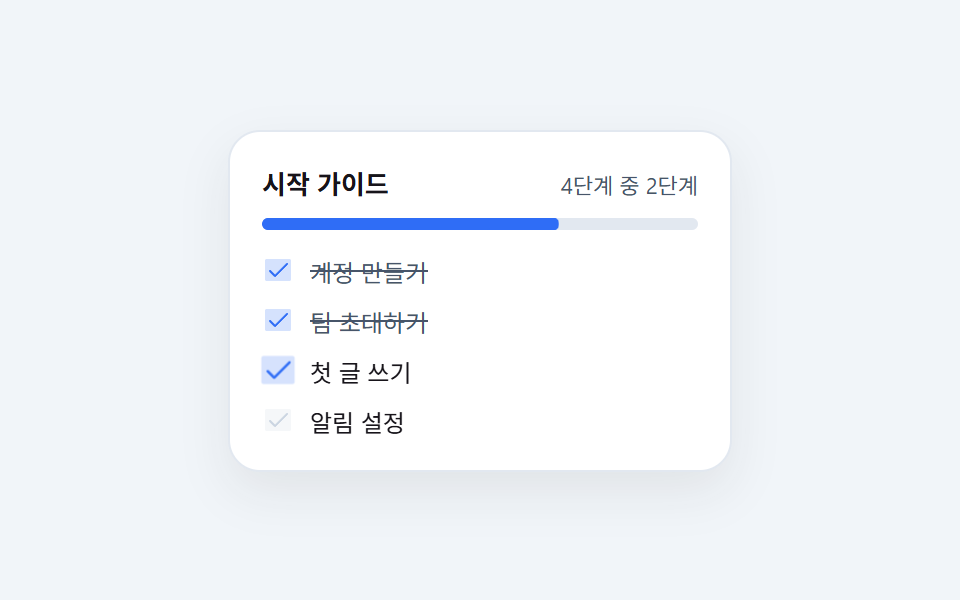
- 02 체크리스트 진행 카드
- 03 코치마크 스포트라이트
- 04 단계 툴팁 투어
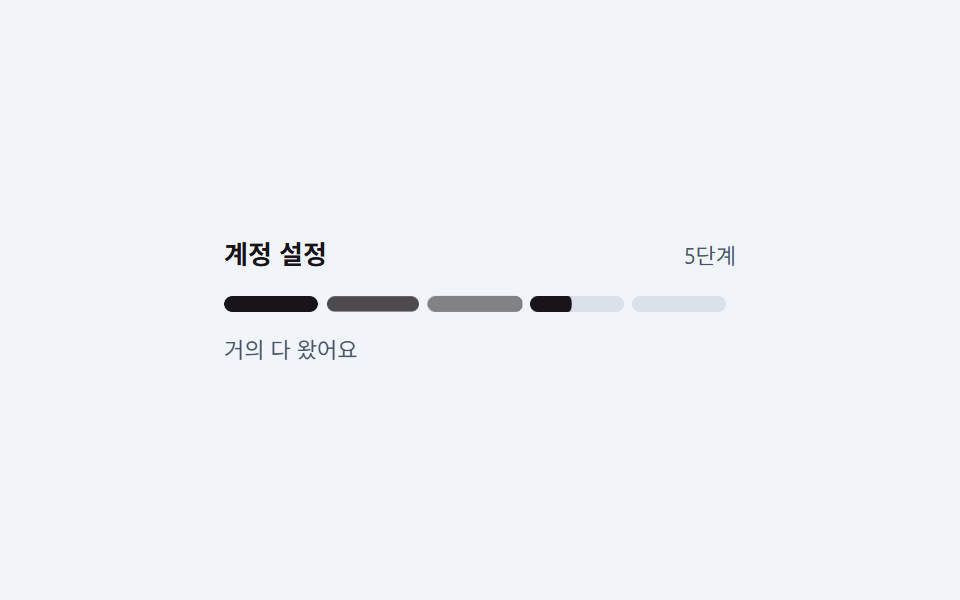
- 05 진행률 스트립
- 06 힌트 풍선
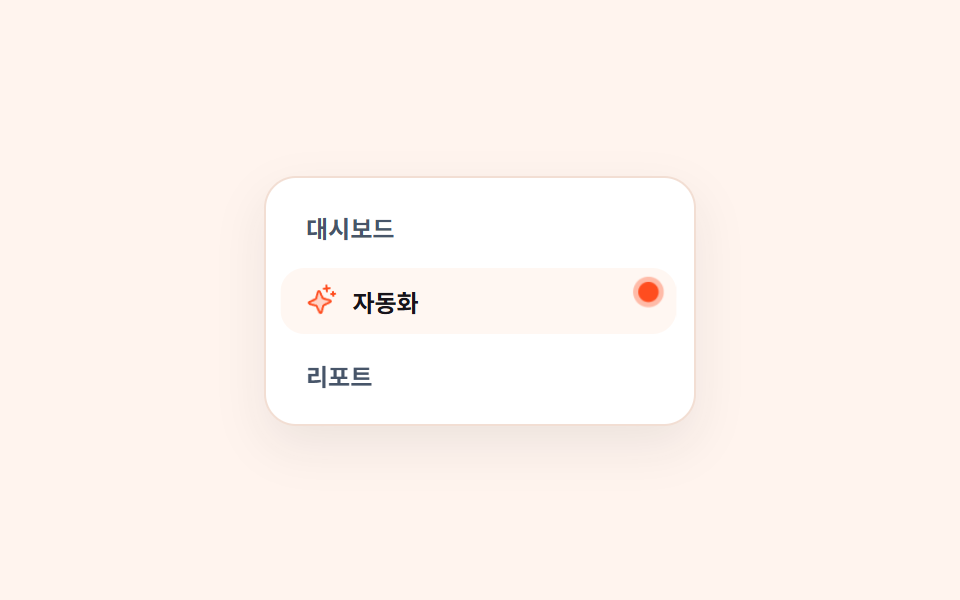
- 07 기능 하이라이트 펄스 배지
- 08 빈 상태 안내 카드
- 09 완료 축하 컨페티
순서는 인기순이 아니라 새로 가입한 사람이 실제로 마주치는 차례입니다. 첫 화면에서 환영 모달(01)을 보고, 남은 할 일을 체크리스트(02)로 받습니다. 버튼을 못 찾으면 코치마크(03)가 화면을 어둡게 덮고 한 곳만 비추며, 여러 단계를 짚어야 하면 프로덕트 투어 방식의 툴팁 투어(04)가 다음·이전으로 넘어갑니다. 어디까지 왔는지는 진행률 스트립(05)이 알려주고, 안 쓰는 기능 옆에는 힌트 풍선(06)과 펄스 배지(07)가 붙습니다. 아직 아무것도 없는 목록에는 빈 상태 카드(08)가 대신 서 있고, 다 끝나면 컨페티(09)가 터집니다. 투어가 끝난 뒤 상태를 표로 남기는 부분은 태그 UI 디자인가 이어받고, 그 전에 먼저 보여야 할 동의 띠는 쿠키 동의 배너 UI에 있습니다.
01환영 모달 스텝퍼
온보딩 화면 디자인에서 무엇이 보이나
모달이 아래에서 18px 떠오르며 열리고, 아래쪽 점 세 개 중 현재 단계만 가로로 펴져 알약이 됩니다. 뒤에 같은 step 키프레임을 120ms 늦게 따라가는 옅은 ::after 잔상이 깔리고, 손 아이콘은 위 꼭지를 축으로 -14°→10°→-6°→3° 로 감쇠하며 흔들립니다.
<main class="stage is-demo">
  <div class="modal" role="dialog" aria-label="환영 안내">
    <span class="ico" aria-hidden="true"><svg xmlns="http://www.w3.org/2000/svg" viewBox="0 0 256 256" fill="currentColor"><path d="M184,213.27A80,80,0,0,1,74.7,184l-40-69.32a20,20,0,0,1,34.64-20L55.08,70A20,20,0,0,1,89.73,50l6.92,12h0a20,20,0,0,1,34.64-20l30,52A20,20,0,0,1,196,74l17.31,30A80,80,0,0,1,184,213.27Z" opacity="0.2"/><path d="M220.17,100,202.86,70a28,28,0,0,0-38.24-10.25,27.69,27.69,0,0,0-9,8.34L138.2,38a28,28,0,0,0-48.48,0A28,28,0,0,0,48.15,74l1.59,2.76A27.67,27.67,0,0,0,38,80.41a28,28,0,0,0-10.24,38.25l40,69.32a87.47,87.47,0,0,0,53.43,41,88.56,88.56,0,0,0,22.92,3,88,88,0,0,0,76.06-132Zm-6.66,62.64A72,72,0,0,1,81.62,180l-40-69.32a12,12,0,0,1,20.78-12L81.63,132a8,8,0,1,0,13.85-8L62,66A12,12,0,1,1,82.78,54L114,108a8,8,0,1,0,13.85-8L103.57,58h0a12,12,0,1,1,20.78-12l33.42,57.9a48,48,0,0,0-5.54,60.6,8,8,0,0,0,13.24-9A32,32,0,0,1,172.78,112a8,8,0,0,0,2.13-10.4L168.23,90A12,12,0,1,1,189,78l17.31,30A71.56,71.56,0,0,1,213.51,162.62ZM184.25,31.71A8,8,0,0,1,194,26a59.62,59.62,0,0,1,36.53,28l.33.57a8,8,0,1,1-13.85,8l-.33-.57a43.67,43.67,0,0,0-26.8-20.5A8,8,0,0,1,184.25,31.71ZM80.89,237a8,8,0,0,1-11.23,1.33A119.56,119.56,0,0,1,40.06,204a8,8,0,0,1,13.86-8,103.67,103.67,0,0,0,25.64,29.72A8,8,0,0,1,80.89,237Z"/></svg></span>
    <p class="t">환영합니다</p>
    <p class="s">3단계로 시작해요</p>
    <div class="dots" aria-hidden="true"><i class="d1"></i><i class="d2"></i><i class="d3"></i></div>
  </div>
</main>
@use "../../../../site/static/demo-tokens" as *;
// ── 변수 3개 ──────────────────────────────────────────
$duration: $dur-loop; // 2s — 모달 등장 1회 + 점 세 칸 순회 1바퀴
$easing: $ease-spring;
$color: $subject-blue; // 브랜드 색 하나 (밝은-신뢰 톤)
@include stage(#eef3fb);
.modal {
box-sizing: border-box;
width: min(100%, 232px);
padding: $sp-4;
border-radius: $r-card;
background: #fff;
border: 1px solid #dbe4f0;
box-shadow: 0 10px 24px rgba(23, 20, 26, .10);
text-align: center;
// 시작 자세 — 아래에서 18px. 애니메이션이 꺼져도 제자리로 보이게 translate 0 이 기본
transform: translateY(0);
}
.stage.is-demo .modal { animation: rise $duration $easing infinite; }
.ico {
display: inline-flex;
width: 28px; height: 28px;
color: $color;
rotate: 0deg; // 개별 속성 중립 자세 — 3차 진자가 꺼져도 기울지 않는다
}
.ico svg { width: 100%; height: 100%; display: block; }
.t {
margin: $sp-2 0 0;
font-size: 15px; font-weight: 700;
color: $subject-ink; // 본문 잉크 — 파스텔 바탕에서 대비를 버는 유일한 길
}
.s {
margin: $sp-1 0 0;
font-size: 12px;
color: #475569;
}
.dots {
display: flex; justify-content: center; align-items: center;
gap: $sp-2;
margin: $sp-4 0 0;
}
.dots i {
display: block;
position: relative; // 잔상 ::after 의 좌표 기준 — 오프셋 없으니 레이아웃 불변
width: 20px; height: 8px;
border-radius: $r-pill;
background: #cbd5e1;
// 기본은 점(20px 의 40% = 8px). 활성 단계만 가로로 펴져 알약이 된다
transform: scaleX(.4);
}
// ⛔ 여기서 `animation:` 단축 속성을 쓰면 아래 .d2·.d3 의 animation-delay 가 같이 리셋된다
// (단축 속성은 안 적은 하위 속성을 초기값으로 되돌린다 — 실측 2026-09-11: 세 점이 동시에 켜졌다).
// 시차를 다른 규칙에 둘 땐 반드시 낱개 속성으로 쓴다
.stage.is-demo .dots i {
animation-name: step, dot-pop; // 3차: steps(1) 점 전환 위에 탄성 lerp 를 곱합성 (scale:)
animation-duration: $duration;
animation-timing-function: steps(1, end), $ease-lerp-settle;
animation-iteration-count: infinite;
}
.stage.is-demo .d2 { animation-delay: calc(#{$duration} / 3); }
.stage.is-demo .d3 { animation-delay: calc(#{$duration} / 3 * 2); }
// 한 겹(도트 잔상 + 아이콘 감쇠 진자) — 2026-09-15 형태 2차
// 잔상: dot 이 알약→점 으로 되돌아올 때 같은 keyframes 을 120ms 늦게 따라가는
// 옅은 복제. steps(1) 원본 시맨틱은 그대로 두고 뒤에 깔기만 한다
.dots i::after {
content: "";
position: absolute; inset: 0;
border-radius: $r-pill;
background: $color;
opacity: .35;
transform: scaleX(.4);
}
.stage.is-demo .dots i::after {
animation-name: step;
animation-duration: $duration;
animation-timing-function: steps(1, end);
animation-iteration-count: infinite;
}
.stage.is-demo .d2::after { animation-delay: calc(#{$duration} / 3); }
.stage.is-demo .d3::after { animation-delay: calc(#{$duration} / 3 * 2); }
// 아이콘 감쇠 진자 — 환영 손짓. transform-origin 을 위 꼭지로 두고
// 회전 감쇠 진폭(-14° → 10° → -6° → 3°)이 갈수록 작아진다
.stage.is-demo .ico {
animation: ico-pendulum $duration $ease-lerp-settle infinite,
ico-swing $duration $ease-lerp-settle infinite;
transform-origin: 50% 0%;
rotate: 0deg;
}
@keyframes ico-pendulum {
0%, 6% { transform: rotate(0); }
18% { transform: rotate(-14deg); }
38% { transform: rotate(10deg); }
56% { transform: rotate(-6deg); }
74% { transform: rotate(3deg); }
88%,100%{ transform: rotate(0); }
}
// 한 겹 3차 — 개별 변환 속성(rotate:)의 위상 어긋난 미세 진자.
// 2차 진자(transform)와 감쇠 비율은 같지만 극값 시점을 뒤로 민 하모닉이라
// 두 회전이 곱해지며 손짓이 살아 있는 구간이 길어진다
@keyframes ico-swing {
0% { rotate: 0deg; }
14% { rotate: 5deg; }
36% { rotate: -3.1deg; }
56% { rotate: 1.75deg; }
76% { rotate: -.8deg; }
90%, 100% { rotate: 0deg; }
}
@keyframes rise {
0% { transform: translateY(18px); opacity: 0; }
18% { transform: translateY(0); opacity: 1; }
100% { transform: translateY(0); opacity: 1; }
}
// 한 칸당 1/3 주기만 활성. steps(1) 로 딱딱 끊어 "지금 몇 번째" 가 분명해진다
@keyframes step {
0% { transform: scaleX(1); background: $color; }
33.33% { transform: scaleX(.4); background: #cbd5e1; }
100% { transform: scaleX(.4); background: #cbd5e1; }
}
// 3차: 활성 전환 순간의 탄성 lerp — 개별 속성(scale:)이라 step 의 scaleX 와
// 곱합성된다 (1.18 피크 = 알약이 잠깐 부풀었다 정렬). 이웃 점과 갭(8px) 안에서
// 겹치지 않는 상한
@keyframes dot-pop {
0% { scale: 1; }
5% { scale: 1.18; }
13% { scale: .93; }
21% { scale: 1.04; }
29%, 100% { scale: 1; }
}
@media (prefers-reduced-motion: reduce) {
.stage.is-demo .modal { animation: none; transform: none; opacity: 1; }
.stage.is-demo .dots i, .stage.is-demo .dots i::after { animation: none; }
.stage.is-demo .ico { animation: none; rotate: 0deg; }
.stage.is-demo .d1 { transform: scaleX(1); background: $color; }
.stage.is-demo .dots i::after { opacity: 0; }
}html, body {
margin: 0;
overflow: hidden;
}
.stage {
box-sizing: border-box;
min-height: 100vh;
display: grid;
place-items: center;
margin: 0;
background: #eef3fb;
font-family: -apple-system, "Segoe UI", "Noto Sans KR", sans-serif;
padding: clamp(8px, 4vw, 24px);
}
.modal {
box-sizing: border-box;
width: min(100%, 232px);
padding: 16px;
border-radius: 16px;
background: #fff;
border: 1px solid #dbe4f0;
box-shadow: 0 10px 24px rgba(23, 20, 26, 0.1);
text-align: center;
transform: translateY(0);
}
.stage.is-demo .modal {
animation: rise 2s cubic-bezier(0.2, 0.8, 0.2, 1) infinite;
}
.ico {
display: inline-flex;
width: 28px;
height: 28px;
color: #2f6df6;
rotate: 0deg;
}
.ico svg {
width: 100%;
height: 100%;
display: block;
}
.t {
margin: 8px 0 0;
font-size: 15px;
font-weight: 700;
color: #17141a;
}
.s {
margin: 4px 0 0;
font-size: 12px;
color: #475569;
}
.dots {
display: flex;
justify-content: center;
align-items: center;
gap: 8px;
margin: 16px 0 0;
}
.dots i {
display: block;
position: relative;
width: 20px;
height: 8px;
border-radius: 999px;
background: #cbd5e1;
transform: scaleX(0.4);
}
.stage.is-demo .dots i {
animation-name: step, dot-pop;
animation-duration: 2s;
animation-timing-function: steps(1, end), linear(0, 0.051, 0.176, 0.341, 0.518, 0.685, 0.831, 0.947, 1.032, 1.087, 1.117, 1.126, 1.121, 1.105, 1.085, 1.062, 1.041, 1.022, 1.008, 0.997, 1);
animation-iteration-count: infinite;
}
.stage.is-demo .d2 {
animation-delay: calc(2s / 3);
}
.stage.is-demo .d3 {
animation-delay: calc(2s / 3 * 2);
}
.dots i::after {
content: "";
position: absolute;
inset: 0;
border-radius: 999px;
background: #2f6df6;
opacity: 0.35;
transform: scaleX(0.4);
}
.stage.is-demo .dots i::after {
animation-name: step;
animation-duration: 2s;
animation-timing-function: steps(1, end);
animation-iteration-count: infinite;
}
.stage.is-demo .d2::after {
animation-delay: calc(2s / 3);
}
.stage.is-demo .d3::after {
animation-delay: calc(2s / 3 * 2);
}
.stage.is-demo .ico {
animation: ico-pendulum 2s linear(0, 0.051, 0.176, 0.341, 0.518, 0.685, 0.831, 0.947, 1.032, 1.087, 1.117, 1.126, 1.121, 1.105, 1.085, 1.062, 1.041, 1.022, 1.008, 0.997, 1) infinite, ico-swing 2s linear(0, 0.051, 0.176, 0.341, 0.518, 0.685, 0.831, 0.947, 1.032, 1.087, 1.117, 1.126, 1.121, 1.105, 1.085, 1.062, 1.041, 1.022, 1.008, 0.997, 1) infinite;
transform-origin: 50% 0%;
rotate: 0deg;
}
@keyframes ico-pendulum {
0%, 6% {
transform: rotate(0);
}
18% {
transform: rotate(-14deg);
}
38% {
transform: rotate(10deg);
}
56% {
transform: rotate(-6deg);
}
74% {
transform: rotate(3deg);
}
88%, 100% {
transform: rotate(0);
}
}
@keyframes ico-swing {
0% {
rotate: 0deg;
}
14% {
rotate: 5deg;
}
36% {
rotate: -3.1deg;
}
56% {
rotate: 1.75deg;
}
76% {
rotate: -0.8deg;
}
90%, 100% {
rotate: 0deg;
}
}
@keyframes rise {
0% {
transform: translateY(18px);
opacity: 0;
}
18% {
transform: translateY(0);
opacity: 1;
}
100% {
transform: translateY(0);
opacity: 1;
}
}
@keyframes step {
0% {
transform: scaleX(1);
background: #2f6df6;
}
33.33% {
transform: scaleX(0.4);
background: #cbd5e1;
}
100% {
transform: scaleX(0.4);
background: #cbd5e1;
}
}
@keyframes dot-pop {
0% {
scale: 1;
}
5% {
scale: 1.18;
}
13% {
scale: 0.93;
}
21% {
scale: 1.04;
}
29%, 100% {
scale: 1;
}
}
@media (prefers-reduced-motion: reduce) {
.stage.is-demo .modal {
animation: none;
transform: none;
opacity: 1;
}
.stage.is-demo .dots i, .stage.is-demo .dots i::after {
animation: none;
}
.stage.is-demo .ico {
animation: none;
rotate: 0deg;
}
.stage.is-demo .d1 {
transform: scaleX(1);
background: #2f6df6;
}
.stage.is-demo .dots i::after {
opacity: 0;
}
}import type { CSSProperties } from "react";
import styles from "./WelcomeModalStepper.module.scss";
export type WelcomeModalStepperProps = {
duration?: number;
easing?: string;
color?: string;
title?: string;
subtitle?: string;
steps?: number;
};
export default function WelcomeModalStepper({
duration = 2000,
easing = "cubic-bezier(.2, .8, .2, 1)",
color = "#2f6df6",
title = "Welcome aboard",
subtitle = "Start in 3 steps",
steps = 3,
}: WelcomeModalStepperProps) {
const vars: CSSProperties = {
"--duration": `${duration}ms`,
"--easing": easing,
"--color": color,
} as CSSProperties;
return (
<div className={styles.modal} style={vars} role="dialog" aria-label="Welcome dialog">
<span className={styles.ico} aria-hidden="true">
<svg xmlns="http://www.w3.org/2000/svg" viewBox="0 0 256 256" fill="currentColor">
<path d="M184,213.27A80,80,0,0,1,74.7,184l-40-69.32a20,20,0,0,1,34.64-20L55.08,70A20,20,0,0,1,89.73,50l6.92,12h0a20,20,0,0,1,34.64-20l30,52A20,20,0,0,1,196,74l17.31,30A80,80,0,0,1,184,213.27Z" opacity="0.2" />
<path d="M220.17,100,202.86,70a28,28,0,0,0-38.24-10.25,27.69,27.69,0,0,0-9,8.34L138.2,38a28,28,0,0,0-48.48,0A28,28,0,0,0,48.15,74l1.59,2.76A27.67,27.67,0,0,0,38,80.41a28,28,0,0,0-10.24,38.25l40,69.32a87.47,87.47,0,0,0,53.43,41,88.56,88.56,0,0,0,22.92,3,88,88,0,0,0,76.06-132Zm-6.66,62.64A72,72,0,0,1,81.62,180l-40-69.32a12,12,0,0,1,20.78-12L81.63,132a8,8,0,1,0,13.85-8L62,66A12,12,0,1,1,82.78,54L114,108a8,8,0,1,0,13.85-8L103.57,58h0a12,12,0,1,1,20.78-12l33.42,57.9a48,48,0,0,0-5.54,60.6,8,8,0,0,0,13.24-9A32,32,0,0,1,172.78,112a8,8,0,0,0,2.13-10.4L168.23,90A12,12,0,1,1,189,78l17.31,30A71.56,71.56,0,0,1,213.51,162.62ZM184.25,31.71A8,8,0,0,1,194,26a59.62,59.62,0,0,1,36.53,28l.33.57a8,8,0,1,1-13.85,8l-.33-.57a43.67,43.67,0,0,0-26.8-20.5A8,8,0,0,1,184.25,31.71ZM80.89,237a8,8,0,0,1-11.23,1.33A119.56,119.56,0,0,1,40.06,204a8,8,0,0,1,13.86-8,103.67,103.67,0,0,0,25.64,29.72A8,8,0,0,1,80.89,237Z" />
</svg>
</span>
<p className={styles.t}>{title}</p>
<p className={styles.s}>{subtitle}</p>
<div className={styles.dots} aria-hidden="true">
{Array.from({ length: steps }, (_, i) => (
// 시차는 인라인 변수로. className 에 animation 단축 속성을 다시 쓰면 이 지연이 리셋된다
<i key={i} style={{ animationDelay: `${(duration / steps) * i}ms` } as CSSProperties} />
))}
</div>
</div>
);
}01 · 환영 모달 스텝퍼 — 측정 누적면적 23.541% · 움직인 프레임 23/23GODRICH 원작 · zip 에 SCSS·React 포함 · 비밀번호 보기
코드에서 볼 곳
점을 넓히는 것은 width 가 아니라 scaleX 라서 글자 위치가 밀리지 않습니다.
.dots i {
  width: 20px; height: 8px;
  border-radius: $r-pill;
  background: #cbd5e1;
  transform: scaleX(.4);
  animation-name: step;
  animation-duration: $duration;
  animation-timing-function: steps(1, end);
  animation-iteration-count: infinite;
}
.d2 { animation-delay: calc(#{$duration} / 3); }
@keyframes step {
  0%     { transform: scaleX(1); background: $color; }
  33.33% { transform: scaleX(.4); background: #cbd5e1; }
}
02체크리스트 진행 카드
화면에서 일어나는 일
남은 할 일 두 줄이 반 주기씩 어긋나 체크되고, 글자에는 취소선이 왼쪽부터 그어집니다. 막대 뒤에 120ms 늦은 옅은 복제가 트레일로 남고, 체크는 1.22→0.92→1.06→1 로 튀었다 되돌아오며 정착합니다.
<main class="stage is-demo">
  <div class="card">
    <div class="head">
      <span class="h">시작 가이드</span>
      <span class="p">4단계 중 2단계</span>
    </div>
    <div class="bar" aria-hidden="true"><i></i></div>
    <ul class="list" aria-label="시작 가이드 할 일">
      <li class="row is-done">
        <span class="box" aria-hidden="true"><svg xmlns="http://www.w3.org/2000/svg" viewBox="0 0 256 256" fill="currentColor"><path d="M232,56V200a16,16,0,0,1-16,16H40a16,16,0,0,1-16-16V56A16,16,0,0,1,40,40H216A16,16,0,0,1,232,56Z" opacity="0.2"/><path d="M205.66,85.66l-96,96a8,8,0,0,1-11.32,0l-40-40a8,8,0,0,1,11.32-11.32L104,164.69l90.34-90.35a8,8,0,0,1,11.32,11.32Z"/></svg></span>
        <span class="lb">계정 만들기<i class="ln" aria-hidden="true"></i></span>
      </li>
      <li class="row is-done">
        <span class="box" aria-hidden="true"><svg xmlns="http://www.w3.org/2000/svg" viewBox="0 0 256 256" fill="currentColor"><path d="M232,56V200a16,16,0,0,1-16,16H40a16,16,0,0,1-16-16V56A16,16,0,0,1,40,40H216A16,16,0,0,1,232,56Z" opacity="0.2"/><path d="M205.66,85.66l-96,96a8,8,0,0,1-11.32,0l-40-40a8,8,0,0,1,11.32-11.32L104,164.69l90.34-90.35a8,8,0,0,1,11.32,11.32Z"/></svg></span>
        <span class="lb">팀 초대하기<i class="ln" aria-hidden="true"></i></span>
      </li>
      <li class="row r3">
        <span class="box" aria-hidden="true"><svg xmlns="http://www.w3.org/2000/svg" viewBox="0 0 256 256" fill="currentColor"><path d="M232,56V200a16,16,0,0,1-16,16H40a16,16,0,0,1-16-16V56A16,16,0,0,1,40,40H216A16,16,0,0,1,232,56Z" opacity="0.2"/><path d="M205.66,85.66l-96,96a8,8,0,0,1-11.32,0l-40-40a8,8,0,0,1,11.32-11.32L104,164.69l90.34-90.35a8,8,0,0,1,11.32,11.32Z"/></svg></span>
        <span class="lb">첫 글 쓰기<i class="ln" aria-hidden="true"></i></span>
      </li>
      <li class="row r4">
        <span class="box" aria-hidden="true"><svg xmlns="http://www.w3.org/2000/svg" viewBox="0 0 256 256" fill="currentColor"><path d="M232,56V200a16,16,0,0,1-16,16H40a16,16,0,0,1-16-16V56A16,16,0,0,1,40,40H216A16,16,0,0,1,232,56Z" opacity="0.2"/><path d="M205.66,85.66l-96,96a8,8,0,0,1-11.32,0l-40-40a8,8,0,0,1,11.32-11.32L104,164.69l90.34-90.35a8,8,0,0,1,11.32,11.32Z"/></svg></span>
        <span class="lb">알림 설정<i class="ln" aria-hidden="true"></i></span>
      </li>
    </ul>
  </div>
</main>@use "../../../../site/static/demo-tokens" as *;
// ── 변수 3개 ──────────────────────────────────────────
$duration: $dur-loop; // 2s — 3번째 줄 → 4번째 줄이 차례로 체크되는 한 바퀴
$easing: $ease-spring;
$color: $subject-blue;
@include stage(#f1f5f9);
.card {
box-sizing: border-box;
width: min(100%, 252px);
padding: $sp-4;
border-radius: $r-card;
background: #fff;
border: 1px solid #e2e8f0;
box-shadow: 0 10px 24px rgba(23, 20, 26, .08);
}
.head { display: flex; align-items: baseline; justify-content: space-between; gap: $sp-2; }
.h { font-size: 13px; font-weight: 700; color: $subject-ink; }
.p { font-size: 11px; color: #475569; }
// 진행 막대 — 채움은 scaleX 라 레이아웃을 다시 계산하지 않는다
.bar {
position: relative;
height: 6px;
margin: $sp-2 0 $sp-3;
border-radius: $r-pill;
background: #e2e8f0;
overflow: hidden;
}
.bar i {
position: absolute; inset: 0;
border-radius: $r-pill;
background: $color;
transform: scaleX(.5);
transform-origin: left center; // 규칙8: 진행 막대 왼쪽 채움
}
.stage.is-demo .bar i { animation: fill $duration $easing infinite; }
// 한 겹(진행 막대 잔상) — 2026-09-15 형태 2차
// 막대가 밀려날 때 120ms 늦은 옅은 복제가 트레일로 남는다 (같은 fill keyframes)
.bar::after {
content: "";
position: absolute; inset: 0;
border-radius: $r-pill;
background: $color;
opacity: .3;
transform: scaleX(.5);
transform-origin: left center;
}
.stage.is-demo .bar::after { animation: fill $duration $easing infinite; animation-delay: 120ms; }
.list { margin: 0; padding: 0; list-style: none; display: grid; gap: $sp-2; }
.row { display: flex; align-items: center; gap: $sp-2; }
.box {
display: block;
width: 16px; height: 16px;
flex: 0 0 auto;
color: #cbd5e1;
}
.box svg { width: 100%; height: 100%; display: block; }
.lb {
position: relative;
font-size: 12px;
color: $subject-ink;
}
// 취소선 — width 가 아니라 scaleX. 왼쪽에서 오른쪽으로 그어진다
.ln {
position: absolute; left: 0; right: 0; top: 50%;
height: 1px;
background: #475569;
transform: scaleX(0);
transform-origin: left center; // 규칙8: 취소선 왼쪽 그어짐
}
// 이미 끝난 두 줄은 정지 상태 — 대조군
.is-done .box { color: $color; }
.is-done .lb { color: #475569; }
.is-done .ln { transform: scaleX(1); }
.stage.is-demo .r3 .box {
animation-name: tick, box-pop; // 3차: 감쇠 스프링(transform) 위에 개별 속성(scale:) 탄성을 곱합성
animation-duration: $duration;
animation-timing-function: $easing, $ease-lerp-settle;
animation-iteration-count: infinite;
}
.stage.is-demo .r3 .ln { animation: strike $duration $easing infinite; }
.stage.is-demo .r4 .box {
animation-name: tick, box-pop;
animation-duration: $duration;
animation-timing-function: $easing, $ease-lerp-settle;
animation-iteration-count: infinite;
animation-delay: calc(#{$duration} / 2); // 값 1개는 두 애니메이션에 모두 반복 적용된다
}
.stage.is-demo .r4 .ln { animation: strike $duration $easing infinite; animation-delay: calc(#{$duration} / 2); }
@keyframes fill {
0%, 10% { transform: scaleX(.5); }
40%, 55% { transform: scaleX(.75); }
85%, 100% { transform: scaleX(1); }
}
// 한 겹(체크 감쇠 스프링) — 2026-09-15 형태 2차
// 한 번 커졌다 끝나던 scale 을 감쇠 진동(γ≈.5) 시퀀스로 재설계 —
// 1.22 → .92 → 1.06 → 1 로 튀었다 되돌아오며 정착
@keyframes tick {
0%, 12% { color: #cbd5e1; transform: scale(1); }
20% { color: $color; transform: scale(1.22); }
28% { color: $color; transform: scale(.92); }
34% { color: $color; transform: scale(1.06); }
40%, 100% { color: $color; transform: scale(1); }
}
@keyframes strike {
0%, 18% { transform: scaleX(0); }
44%, 100% { transform: scaleX(1); }
}
// 3차: 체크 순간 상자를 한 번 더 탄성으로 튀긴다 — 개별 속성(scale:)이라
// tick 의 transform: scale(1.22) 과 곱합성 (피크 1.22 * 1.14 = 1.39).
// 시점은 tick 의 피크(20%)에 맞춰 두 진동이 겹쳐 폭발적으로 튀게 한다
@keyframes box-pop {
0%, 16% { scale: 1; }
20% { scale: 1.14; }
28% { scale: .97; }
36% { scale: 1.02; }
42%, 100% { scale: 1; }
}
@media (prefers-reduced-motion: reduce) {
.stage.is-demo .bar i, .stage.is-demo .bar::after,
.stage.is-demo .r3 .box, .stage.is-demo .r3 .ln,
.stage.is-demo .r4 .box, .stage.is-demo .r4 .ln { animation: none; }
.stage.is-demo .bar i { transform: scaleX(1); }
.stage.is-demo .bar::after { opacity: 0; }
.stage.is-demo .r3 .box, .stage.is-demo .r4 .box { color: $color; scale: 1; }
.stage.is-demo .r3 .ln, .stage.is-demo .r4 .ln { transform: scaleX(1); }
}html, body {
margin: 0;
overflow: hidden;
}
.stage {
box-sizing: border-box;
min-height: 100vh;
display: grid;
place-items: center;
margin: 0;
background: #f1f5f9;
font-family: -apple-system, "Segoe UI", "Noto Sans KR", sans-serif;
padding: clamp(8px, 4vw, 24px);
}
.card {
box-sizing: border-box;
width: min(100%, 252px);
padding: 16px;
border-radius: 16px;
background: #fff;
border: 1px solid #e2e8f0;
box-shadow: 0 10px 24px rgba(23, 20, 26, 0.08);
}
.head {
display: flex;
align-items: baseline;
justify-content: space-between;
gap: 8px;
}
.h {
font-size: 13px;
font-weight: 700;
color: #17141a;
}
.p {
font-size: 11px;
color: #475569;
}
.bar {
position: relative;
height: 6px;
margin: 8px 0 12px;
border-radius: 999px;
background: #e2e8f0;
overflow: hidden;
}
.bar i {
position: absolute;
inset: 0;
border-radius: 999px;
background: #2f6df6;
transform: scaleX(0.5);
transform-origin: left center;
}
.stage.is-demo .bar i {
animation: fill 2s cubic-bezier(0.2, 0.8, 0.2, 1) infinite;
}
.bar::after {
content: "";
position: absolute;
inset: 0;
border-radius: 999px;
background: #2f6df6;
opacity: 0.3;
transform: scaleX(0.5);
transform-origin: left center;
}
.stage.is-demo .bar::after {
animation: fill 2s cubic-bezier(0.2, 0.8, 0.2, 1) infinite;
animation-delay: 120ms;
}
.list {
margin: 0;
padding: 0;
list-style: none;
display: grid;
gap: 8px;
}
.row {
display: flex;
align-items: center;
gap: 8px;
}
.box {
display: block;
width: 16px;
height: 16px;
flex: 0 0 auto;
color: #cbd5e1;
}
.box svg {
width: 100%;
height: 100%;
display: block;
}
.lb {
position: relative;
font-size: 12px;
color: #17141a;
}
.ln {
position: absolute;
left: 0;
right: 0;
top: 50%;
height: 1px;
background: #475569;
transform: scaleX(0);
transform-origin: left center;
}
.is-done .box {
color: #2f6df6;
}
.is-done .lb {
color: #475569;
}
.is-done .ln {
transform: scaleX(1);
}
.stage.is-demo .r3 .box {
animation-name: tick, box-pop;
animation-duration: 2s;
animation-timing-function: cubic-bezier(0.2, 0.8, 0.2, 1), linear(0, 0.051, 0.176, 0.341, 0.518, 0.685, 0.831, 0.947, 1.032, 1.087, 1.117, 1.126, 1.121, 1.105, 1.085, 1.062, 1.041, 1.022, 1.008, 0.997, 1);
animation-iteration-count: infinite;
}
.stage.is-demo .r3 .ln {
animation: strike 2s cubic-bezier(0.2, 0.8, 0.2, 1) infinite;
}
.stage.is-demo .r4 .box {
animation-name: tick, box-pop;
animation-duration: 2s;
animation-timing-function: cubic-bezier(0.2, 0.8, 0.2, 1), linear(0, 0.051, 0.176, 0.341, 0.518, 0.685, 0.831, 0.947, 1.032, 1.087, 1.117, 1.126, 1.121, 1.105, 1.085, 1.062, 1.041, 1.022, 1.008, 0.997, 1);
animation-iteration-count: infinite;
animation-delay: calc(2s / 2);
}
.stage.is-demo .r4 .ln {
animation: strike 2s cubic-bezier(0.2, 0.8, 0.2, 1) infinite;
animation-delay: calc(2s / 2);
}
@keyframes fill {
0%, 10% {
transform: scaleX(0.5);
}
40%, 55% {
transform: scaleX(0.75);
}
85%, 100% {
transform: scaleX(1);
}
}
@keyframes tick {
0%, 12% {
color: #cbd5e1;
transform: scale(1);
}
20% {
color: #2f6df6;
transform: scale(1.22);
}
28% {
color: #2f6df6;
transform: scale(0.92);
}
34% {
color: #2f6df6;
transform: scale(1.06);
}
40%, 100% {
color: #2f6df6;
transform: scale(1);
}
}
@keyframes strike {
0%, 18% {
transform: scaleX(0);
}
44%, 100% {
transform: scaleX(1);
}
}
@keyframes box-pop {
0%, 16% {
scale: 1;
}
20% {
scale: 1.14;
}
28% {
scale: 0.97;
}
36% {
scale: 1.02;
}
42%, 100% {
scale: 1;
}
}
@media (prefers-reduced-motion: reduce) {
.stage.is-demo .bar i, .stage.is-demo .bar::after,
.stage.is-demo .r3 .box, .stage.is-demo .r3 .ln,
.stage.is-demo .r4 .box, .stage.is-demo .r4 .ln {
animation: none;
}
.stage.is-demo .bar i {
transform: scaleX(1);
}
.stage.is-demo .bar::after {
opacity: 0;
}
.stage.is-demo .r3 .box, .stage.is-demo .r4 .box {
color: #2f6df6;
scale: 1;
}
.stage.is-demo .r3 .ln, .stage.is-demo .r4 .ln {
transform: scaleX(1);
}
}import type { CSSProperties } from "react";
import styles from "./ChecklistProgressCard.module.scss";
const Check = () => (
<svg xmlns="http://www.w3.org/2000/svg" viewBox="0 0 256 256" fill="currentColor">
<path d="M232,56V200a16,16,0,0,1-16,16H40a16,16,0,0,1-16-16V56A16,16,0,0,1,40,40H216A16,16,0,0,1,232,56Z" opacity="0.2" />
<path d="M205.66,85.66l-96,96a8,8,0,0,1-11.32,0l-40-40a8,8,0,0,1,11.32-11.32L104,164.69l90.34-90.35a8,8,0,0,1,11.32,11.32Z" />
</svg>
);
export type ChecklistProgressCardProps = {
duration?: number;
easing?: string;
color?: string;
title?: string;
caption?: string;
/** 이미 끝난 항목 (정지 상태) */
done?: string[];
/** 이 데모에서 차례로 체크되는 항목 */
running?: string[];
};
export default function ChecklistProgressCard({
duration = 2000,
easing = "cubic-bezier(.2, .8, .2, 1)",
color = "#2f6df6",
title = "Getting started",
caption = "2 of 4 done",
done = ["Create account", "Invite your team"],
running = ["Write first post", "Set up alerts"],
}: ChecklistProgressCardProps) {
const vars: CSSProperties = {
"--duration": `${duration}ms`,
"--easing": easing,
"--color": color,
} as CSSProperties;
return (
<div className={styles.card} style={vars}>
<div className={styles.head}>
<span className={styles.h}>{title}</span>
<span className={styles.p}>{caption}</span>
</div>
<div className={styles.bar} aria-hidden="true"><i /></div>
<ul className={styles.list} aria-label={title}>
{done.map((label) => (
<li key={label} className={`${styles.row} ${styles.isDone}`}>
<span className={styles.box} aria-hidden="true"><Check /></span>
<span className={styles.lb}>{label}<i className={styles.ln} aria-hidden="true" /></span>
</li>
))}
{running.map((label, i) => {
// 줄마다 반 주기씩 늦게 체크된다. 지연은 style 로 — scss 에서 단축 속성을 쓰지 않는 이유
const delay = { animationDelay: `${(duration / 2) * i}ms` } as CSSProperties;
return (
<li key={label} className={styles.row}>
<span className={`${styles.box} ${styles.tick}`} style={delay} aria-hidden="true"><Check /></span>
<span className={styles.lb}>{label}<i className={`${styles.ln} ${styles.strike}`} style={delay} aria-hidden="true" /></span>
</li>
);
})}
</ul>
</div>
);
}02 · 체크리스트 진행 카드 — 측정 누적면적 0.872% · 움직인 프레임 17/23GODRICH 원작 · zip 에 SCSS·React 포함 · 비밀번호 보기
코드 읽는 법
카드 맨 위 막대는 50%에서 75%를 거쳐 100%까지 같은 박자로 늘어납니다.
.bar i {
  position: absolute; inset: 0;
  background: $color;
  transform: scaleX(.5);
  transform-origin: left center;
}
@keyframes fill {
  0%, 10%   { transform: scaleX(.5); }
  40%, 55%  { transform: scaleX(.75); }
  85%, 100% { transform: scaleX(1); }
}
@keyframes strike {
  0%, 18%   { transform: scaleX(0); }
  44%, 100% { transform: scaleX(1); }
}
03코치마크 스포트라이트
어떤 움직임인가
화면을 덮은 막에 구멍이 하나만 뚫려 대상 버튼을 비추고, 그 구멍이 왼쪽 버튼에서 오른쪽 카드로 옮겨갑니다. 풍선은 아래 꼭지를 축으로 -2.5°→1.8°→-1° 로 감쇠해 흔들리고, 스포트가 버튼에 앉는 구간에만 더하기 아이콘이 탄성 팝합니다.
<main class="stage is-demo">
  <div class="screen">
    <div class="app" aria-hidden="true">
      <span class="btn"><span class="pi"><svg xmlns="http://www.w3.org/2000/svg" viewBox="0 0 256 256" fill="currentColor"><path d="M216,56V200a16,16,0,0,1-16,16H56a16,16,0,0,1-16-16V56A16,16,0,0,1,56,40H200A16,16,0,0,1,216,56Z" opacity="0.2"/><path d="M224,128a8,8,0,0,1-8,8H136v80a8,8,0,0,1-16,0V136H40a8,8,0,0,1,0-16h80V40a8,8,0,0,1,16,0v80h80A8,8,0,0,1,224,128Z"/></svg></span>새 프로젝트</span>
      <span class="tile">보고서</span>
    </div>
    <div class="spot" aria-hidden="true"><i class="ring"></i></div>
    <p class="tip">여기서 시작하세요</p>
  </div>
</main>
@use "../../../../site/static/demo-tokens" as *;
// ── 변수 3개 ──────────────────────────────────────────
$duration: $dur-loop; // 2s — 구멍이 버튼 → 카드로 갔다가 돌아오는 한 바퀴
$easing: $ease-spring;
$color: $subject-blue;
@include stage($stage-ink);
// 안내를 받는 쪽 화면. 9999px 그림자를 이 상자 안으로 자른다
.screen {
position: relative;
box-sizing: border-box;
width: min(100%, 280px);
height: 148px;
border-radius: $r-card;
background: #fff;
overflow: hidden;
}
.app { display: flex; align-items: center; gap: $sp-3; padding: $sp-4; }
.btn {
box-sizing: border-box;
display: inline-flex; align-items: center; justify-content: center; gap: $sp-1;
width: 112px; height: 32px;
border-radius: $r-control;
background: $color;
color: #fff;
font-size: 11px; font-weight: 700;
}
.pi { display: block; width: 14px; height: 14px; }
.pi svg { width: 100%; height: 100%; display: block; }
.tile {
box-sizing: border-box;
display: inline-flex; align-items: center; justify-content: center;
width: 92px; height: 32px;
border-radius: $r-control;
background: #f1f5f9;
border: 1px solid #e2e8f0;
font-size: 11px; font-weight: 600;
color: $subject-ink;
}
// 스포트라이트 — 구멍은 이 상자, 막은 바깥으로 퍼지는 거대한 box-shadow 하나
.spot {
position: absolute;
left: 12px; top: 12px;
width: 120px; height: 40px;
border-radius: $r-control;
box-shadow: 0 0 0 9999px rgba(23, 20, 26, .74);
transform-origin: left center; // 규칙8: 목표폭 scaleX 좌표 보간
transform: translateX(0) scaleX(1);
scale: 1; // 3차 탄성 개별 속성 — move 와 분리 합성. 꺼져도 1 이 기본
}
// 3차: spot 이 move 의 각 정차점(0~18% / 50~68%)에 앉는 순간 탄성 lerp 로
// 한 번 눌렸다 펴진다. move 는 transform 을, 이 층은 scale: 을 쓰므로 병렬 합성
.stage.is-demo .spot {
animation: move $duration $easing infinite,
spot-land $duration $ease-lerp-settle infinite;
}
.ring {
position: absolute; inset: 0;
border: 2px solid #fff;
border-radius: inherit;
opacity: 0;
}
.stage.is-demo .ring { animation: ping $duration $easing infinite; }
.tip {
position: absolute; left: 0; right: 0; bottom: $sp-4;
margin: 0;
text-align: center;
font-size: 12px; font-weight: 600;
color: #fff;
}
// 한 겹(풍선 감쇠 진자 + 더하기 아이콘 탄성) — 2026-09-15 형태 2차
// 풍선이 아래 꼭지를 축으로 살짝 흔들리며 주의를 끈다 (-2.5° → 1.8° → -1° → 0)
.stage.is-demo .tip {
animation: tip-pendulum $duration $ease-lerp-settle infinite,
tip-wobble $duration $ease-lerp-settle infinite;
transform-origin: bottom center;
rotate: 0deg;
}
@keyframes tip-pendulum {
0%, 10% { transform: rotate(0); }
20% { transform: rotate(-2.5deg); }
40% { transform: rotate(1.8deg); }
60% { transform: rotate(-1deg); }
80%,100% { transform: rotate(0); }
}
// 3차: 개별 속성(rotate:) 위상 어긋난 미세 진자 — 2차 진자와 곱이 아니라
// 더해져(회전은 합연산) 풍선이 흔들리는 시간이 길게 번진다
@keyframes tip-wobble {
0%, 4% { rotate: 0deg; }
16% { rotate: 1.4deg; }
34% { rotate: -1deg; }
52% { rotate: .55deg; }
70%, 100% { rotate: 0deg; }
}
// 스포트가 버튼에 앉는 구간(0~30%)에만 + 아이콘이 탄성 팝 —
// 카드 구간(50~68%)은 정지 상태로 쉰다
.stage.is-demo .pi {
animation-name: pi-spring;
animation-duration: $duration;
animation-timing-function: $ease-lerp-settle;
animation-iteration-count: infinite;
}
@keyframes pi-spring {
0%, 6% { transform: scale(1); }
10% { transform: scale(1.25); }
20% { transform: scale(.9); }
26% { transform: scale(1.05); }
30%, 100% { transform: scale(1); }
}
// 왼쪽 버튼(120px) → 오른쪽 카드(100px). 폭이 아니라 scaleX 로 줄인다
@keyframes move {
0%, 18% { transform: translateX(0) scaleX(1); }
50%, 68% { transform: translateX(124px) scaleX(.8333); }
100% { transform: translateX(0) scaleX(1); }
}
// 3차: move 가 정차하는 두 구간(0~18%·50~68%)의 시작점에서 개별 속성(scale:)
// 탄성이 한 번 튄다. move 는 transform 이라 scale: 과 곱합성돼 "쿵" 하고 앉는 느낌
@keyframes spot-land {
0% { scale: 1; }
4% { scale: 1.1; }
11% { scale: .96; }
18%, 46% { scale: 1; }
50% { scale: 1.1; }
57% { scale: .96; }
64%, 100% { scale: 1; }
}
// 구멍이 자리에 앉을 때마다 링이 한 번씩 퍼진다
@keyframes ping {
0%, 10% { opacity: .9; transform: scale(1); }
30% { opacity: 0; transform: scale(1.18); }
50%, 60% { opacity: .9; transform: scale(1); }
80%, 100% { opacity: 0; transform: scale(1.18); }
}
@media (prefers-reduced-motion: reduce) {
.stage.is-demo .spot { animation: none; scale: 1; }
.stage.is-demo .ring { animation: none; opacity: .9; }
.stage.is-demo .tip { animation: none; rotate: 0deg; }
.stage.is-demo .pi { animation: none; }
}html, body {
margin: 0;
overflow: hidden;
}
.stage {
box-sizing: border-box;
min-height: 100vh;
display: grid;
place-items: center;
margin: 0;
background: #17141a;
font-family: -apple-system, "Segoe UI", "Noto Sans KR", sans-serif;
padding: clamp(8px, 4vw, 24px);
}
.screen {
position: relative;
box-sizing: border-box;
width: min(100%, 280px);
height: 148px;
border-radius: 16px;
background: #fff;
overflow: hidden;
}
.app {
display: flex;
align-items: center;
gap: 12px;
padding: 16px;
}
.btn {
box-sizing: border-box;
display: inline-flex;
align-items: center;
justify-content: center;
gap: 4px;
width: 112px;
height: 32px;
border-radius: 12px;
background: #2f6df6;
color: #fff;
font-size: 11px;
font-weight: 700;
}
.pi {
display: block;
width: 14px;
height: 14px;
}
.pi svg {
width: 100%;
height: 100%;
display: block;
}
.tile {
box-sizing: border-box;
display: inline-flex;
align-items: center;
justify-content: center;
width: 92px;
height: 32px;
border-radius: 12px;
background: #f1f5f9;
border: 1px solid #e2e8f0;
font-size: 11px;
font-weight: 600;
color: #17141a;
}
.spot {
position: absolute;
left: 12px;
top: 12px;
width: 120px;
height: 40px;
border-radius: 12px;
box-shadow: 0 0 0 9999px rgba(23, 20, 26, 0.74);
transform-origin: left center;
transform: translateX(0) scaleX(1);
scale: 1;
}
.stage.is-demo .spot {
animation: move 2s cubic-bezier(0.2, 0.8, 0.2, 1) infinite, spot-land 2s linear(0, 0.051, 0.176, 0.341, 0.518, 0.685, 0.831, 0.947, 1.032, 1.087, 1.117, 1.126, 1.121, 1.105, 1.085, 1.062, 1.041, 1.022, 1.008, 0.997, 1) infinite;
}
.ring {
position: absolute;
inset: 0;
border: 2px solid #fff;
border-radius: inherit;
opacity: 0;
}
.stage.is-demo .ring {
animation: ping 2s cubic-bezier(0.2, 0.8, 0.2, 1) infinite;
}
.tip {
position: absolute;
left: 0;
right: 0;
bottom: 16px;
margin: 0;
text-align: center;
font-size: 12px;
font-weight: 600;
color: #fff;
}
.stage.is-demo .tip {
animation: tip-pendulum 2s linear(0, 0.051, 0.176, 0.341, 0.518, 0.685, 0.831, 0.947, 1.032, 1.087, 1.117, 1.126, 1.121, 1.105, 1.085, 1.062, 1.041, 1.022, 1.008, 0.997, 1) infinite, tip-wobble 2s linear(0, 0.051, 0.176, 0.341, 0.518, 0.685, 0.831, 0.947, 1.032, 1.087, 1.117, 1.126, 1.121, 1.105, 1.085, 1.062, 1.041, 1.022, 1.008, 0.997, 1) infinite;
transform-origin: bottom center;
rotate: 0deg;
}
@keyframes tip-pendulum {
0%, 10% {
transform: rotate(0);
}
20% {
transform: rotate(-2.5deg);
}
40% {
transform: rotate(1.8deg);
}
60% {
transform: rotate(-1deg);
}
80%, 100% {
transform: rotate(0);
}
}
@keyframes tip-wobble {
0%, 4% {
rotate: 0deg;
}
16% {
rotate: 1.4deg;
}
34% {
rotate: -1deg;
}
52% {
rotate: 0.55deg;
}
70%, 100% {
rotate: 0deg;
}
}
.stage.is-demo .pi {
animation-name: pi-spring;
animation-duration: 2s;
animation-timing-function: linear(0, 0.051, 0.176, 0.341, 0.518, 0.685, 0.831, 0.947, 1.032, 1.087, 1.117, 1.126, 1.121, 1.105, 1.085, 1.062, 1.041, 1.022, 1.008, 0.997, 1);
animation-iteration-count: infinite;
}
@keyframes pi-spring {
0%, 6% {
transform: scale(1);
}
10% {
transform: scale(1.25);
}
20% {
transform: scale(0.9);
}
26% {
transform: scale(1.05);
}
30%, 100% {
transform: scale(1);
}
}
@keyframes move {
0%, 18% {
transform: translateX(0) scaleX(1);
}
50%, 68% {
transform: translateX(124px) scaleX(0.8333);
}
100% {
transform: translateX(0) scaleX(1);
}
}
@keyframes spot-land {
0% {
scale: 1;
}
4% {
scale: 1.1;
}
11% {
scale: 0.96;
}
18%, 46% {
scale: 1;
}
50% {
scale: 1.1;
}
57% {
scale: 0.96;
}
64%, 100% {
scale: 1;
}
}
@keyframes ping {
0%, 10% {
opacity: 0.9;
transform: scale(1);
}
30% {
opacity: 0;
transform: scale(1.18);
}
50%, 60% {
opacity: 0.9;
transform: scale(1);
}
80%, 100% {
opacity: 0;
transform: scale(1.18);
}
}
@media (prefers-reduced-motion: reduce) {
.stage.is-demo .spot {
animation: none;
scale: 1;
}
.stage.is-demo .ring {
animation: none;
opacity: 0.9;
}
.stage.is-demo .tip {
animation: none;
rotate: 0deg;
}
.stage.is-demo .pi {
animation: none;
}
}import type { CSSProperties } from "react";
import styles from "./CoachmarkSpotlight.module.scss";
export type CoachmarkSpotlightProps = {
duration?: number;
easing?: string;
color?: string;
buttonLabel?: string;
tileLabel?: string;
tip?: string;
};
export default function CoachmarkSpotlight({
duration = 2000,
easing = "cubic-bezier(.2, .8, .2, 1)",
color = "#2f6df6",
buttonLabel = "New project",
tileLabel = "Reports",
tip = "Start right here",
}: CoachmarkSpotlightProps) {
const vars: CSSProperties = {
"--duration": `${duration}ms`,
"--easing": easing,
"--color": color,
} as CSSProperties;
return (
<div className={styles.screen} style={vars}>
<div className={styles.app} aria-hidden="true">
<span className={styles.btn}>
<span className={styles.pi}>
<svg xmlns="http://www.w3.org/2000/svg" viewBox="0 0 256 256" fill="currentColor">
<path d="M216,56V200a16,16,0,0,1-16,16H56a16,16,0,0,1-16-16V56A16,16,0,0,1,56,40H200A16,16,0,0,1,216,56Z" opacity="0.2" />
<path d="M224,128a8,8,0,0,1-8,8H136v80a8,8,0,0,1-16,0V136H40a8,8,0,0,1,0-16h80V40a8,8,0,0,1,16,0v80h80A8,8,0,0,1,224,128Z" />
</svg>
</span>
{buttonLabel}
</span>
<span className={styles.tile}>{tileLabel}</span>
</div>
{/* 구멍 하나 + 바깥으로 퍼지는 거대한 box-shadow 가 막 전체를 만든다 */}
<div className={styles.spot} aria-hidden="true"><i className={styles.ring} /></div>
<p className={styles.tip}>{tip}</p>
</div>
);
}03 · 코치마크 스포트라이트 — 측정 누적면적 8.648% · 움직인 프레임 23/23GODRICH 원작 · zip 에 SCSS·React 포함 · 비밀번호 보기
어디를 바꾸면 되나
막은 따로 그린 요소가 아니라 구멍 하나에 건 box-shadow 의 9999px 퍼짐입니다.
.spot {
  position: absolute;
  left: 12px; top: 12px;
  width: 120px; height: 40px;
  border-radius: $r-control;
  box-shadow: 0 0 0 9999px rgba(23, 20, 26, .74);
  transform-origin: left center;
}
@keyframes move {
  0%, 18%  { transform: translateX(0) scaleX(1); }
  50%, 68% { transform: translateX(124px) scaleX(.8333); }
  100%     { transform: translateX(0) scaleX(1); }
}
04단계 툴팁 투어
무엇이 보이나
칸이 넘어갈 때마다 "다음" 버튼만 눌린 티를 내고 툴팁이 옆으로 미끄러지는데, 마지막 장에서 처음으로 돌아갈 때 뒤로 되감기지 않습니다. 버튼은 눌린 뒤 0.88→1.08 로 되튕기고, 슬라이드가 도착한 시점에 카운터가 1.3→0.95 로 팡 하고 튑니다.
<main class="stage is-demo">
  <div class="tour">
    <div class="view">
      <!-- 슬라이드 3장 + 맨 뒤에 1번 장의 복제 1장.
           마지막에서 처음으로 돌아올 때 되감지 않고 같은 방향으로 계속 간다 -->
      <div class="track" aria-hidden="true">
        <div class="slide"><b>1 / 3</b><p>프로젝트를 먼저 만듭니다</p></div>
        <div class="slide"><b>2 / 3</b><p>팀원을 초대합니다</p></div>
        <div class="slide"><b>3 / 3</b><p>첫 배포를 눌러봅니다</p></div>
        <div class="slide"><b>1 / 3</b><p>프로젝트를 먼저 만듭니다</p></div>
      </div>
    </div>
    <div class="nav">
      <span class="nb" role="img" aria-label="이전 단계"><svg xmlns="http://www.w3.org/2000/svg" viewBox="0 0 256 256" fill="currentColor"><path d="M160,48V208L80,128Z" opacity="0.2"/><path d="M163.06,40.61a8,8,0,0,0-8.72,1.73l-80,80a8,8,0,0,0,0,11.32l80,80A8,8,0,0,0,168,208V48A8,8,0,0,0,163.06,40.61ZM152,188.69,91.31,128,152,67.31Z"/></svg></span>
      <span class="nb nb--go" role="img" aria-label="다음 단계"><svg xmlns="http://www.w3.org/2000/svg" viewBox="0 0 256 256" fill="currentColor"><path d="M176,128,96,208V48Z" opacity="0.2"/><path d="M181.66,122.34l-80-80A8,8,0,0,0,88,48V208a8,8,0,0,0,13.66,5.66l80-80A8,8,0,0,0,181.66,122.34ZM104,188.69V67.31L164.69,128Z"/></svg></span>
    </div>
  </div>
</main>
@use "../../../../site/static/demo-tokens" as *;
// ── 변수 3개 ──────────────────────────────────────────
$duration: $dur-loop; // 2s — 1 → 2 → 3 → 1(복제) 네 칸이 한 바퀴
$easing: $ease-spring;
$color: $subject-blue;
@include stage($stage-ink);
.tour {
box-sizing: border-box;
width: min(100%, 264px);
}
// 창은 고정, 안쪽 줄만 움직인다 (051 교훈: 스크롤 상자와 트랙을 분리)
.view {
overflow: hidden;
border-radius: $r-card;
}
.track {
display: flex;
width: 400%; // 슬라이드 4장(3장 + 1번 복제)
transform: translateX(0);
}
.stage.is-demo .track { animation: walk $duration $easing infinite; }
.slide {
box-sizing: border-box;
width: 25%;
flex: 0 0 25%; // gap 을 쓰지 않는다 — 4장 사이 gap 은 3개뿐이라 -75% 가 어긋난다 (BD15)
padding: $sp-4;
background: #241f29;
color: #fff;
}
.slide b {
display: block;
font-size: 11px; font-weight: 700;
color: $subject-blue-light; // 어두운 슬라이드 면 위 파란 글자 — $subject-blue 는 3.56:1
}
.slide p {
margin: $sp-2 0 0;
font-size: 13px; font-weight: 600;
line-height: 1.4;
}
.nav { display: flex; justify-content: flex-end; gap: $sp-2; margin: $sp-3 0 0; }
.nb {
display: inline-flex; align-items: center; justify-content: center;
width: 28px; height: 28px;
border-radius: $r-control;
background: #332c3a;
color: #cbd5e1;
}
.nb svg { width: 16px; height: 16px; display: block; }
.nb--go { background: $color; color: #fff; }
.stage.is-demo .nb--go {
animation: press $duration $easing infinite,
nb-jitter $duration $ease-spring infinite; // 3차: 개별 속성(translate:) 지터
translate: 0 0; // 중립 자세 — 꺼져도 제자리
}
// 한 겹(버튼 감쇠 반동 + 카운터 탄성 팝) — 2026-09-15 형태 2차
// 찌그러짐(.88) 뒤 1.08 → .97 로 되튕기며 정착. 세 구간 모두 같은 패턴,
// 시점만 25% 간격 오프셋
@keyframes press {
0%, 16% { transform: scale(1); }
20% { transform: scale(.88); }
24% { transform: scale(1.08); }
28%, 41% { transform: scale(1); }
45% { transform: scale(.88); }
49% { transform: scale(1.08); }
53%, 66% { transform: scale(1); }
70% { transform: scale(.88); }
74% { transform: scale(1.08); }
78%, 100% { transform: scale(1); }
}
// 카운터(1/3 b) 팝 — 트랙의 도착 시점(16%/41%/66%/91%) 뒤 8% 폭의 팝.
// 네 b 가 동시에 움직이지만 뷰 밖 슬라이드는 보이지 않으니 화면상
// "도착한 슬라이드의 카운터가 팡" 으로만 보인다
.stage.is-demo .slide b {
animation: cnt-pop $duration $ease-lerp-settle infinite;
}
@keyframes cnt-pop {
0%, 16% { transform: scale(1); }
20% { transform: scale(1.3); }
24% { transform: scale(.95); }
28%, 41% { transform: scale(1); }
45% { transform: scale(1.3); }
49% { transform: scale(.95); }
53%, 66% { transform: scale(1); }
70% { transform: scale(1.3); }
74% { transform: scale(.95); }
78%, 91% { transform: scale(1); }
95% { transform: scale(1.3); }
98%, 100% { transform: scale(1); }
}
// 네 칸을 같은 방향으로. -75% 에 서 있는 4번 장은 1번 장과 같은 그림이라
// 다음 바퀴가 0% 에서 다시 시작해도 이음매가 보이지 않는다
@keyframes walk {
0%, 16% { transform: translateX(0); }
25%, 41% { transform: translateX(-25%); }
50%, 66% { transform: translateX(-50%); }
75%, 100% { transform: translateX(-75%); }
}
// 칸이 넘어가는 순간마다 "다음" 버튼이 눌린 티를 낸다
@keyframes press {
0%, 16% { transform: scale(1); }
20% { transform: scale(.88); }
24%, 41% { transform: scale(1); }
45% { transform: scale(.88); }
49%, 66% { transform: scale(1); }
70% { transform: scale(.88); }
74%, 100% { transform: scale(1); }
}
// 3차: press 가 찌그러지는 세 순간(20/45/70%)에 개별 속성(translate:)으로
// 1~2px 지터를 얹는다 — 탭이 눌리며 살짝 흔들리다 멈추는 손맛. scale 과 별개 축이라
// 순수 병렬 합성(자리 이동 + 크기 변화가 동시에)
@keyframes nb-jitter {
0%, 18% { translate: 0 0; }
20% { translate: -1.5px 0; }
21.5% { translate: 1.5px 0; }
23%, 43% { translate: 0 0; }
45% { translate: -1.5px 0; }
46.5% { translate: 1.5px 0; }
48%, 68% { translate: 0 0; }
70% { translate: -1.5px 0; }
71.5% { translate: 1.5px 0; }
73%, 100% { translate: 0 0; }
}
@media (prefers-reduced-motion: reduce) {
.stage.is-demo .track { animation: none; transform: translateX(0); }
.stage.is-demo .nb--go { animation: none; translate: 0 0; }
.stage.is-demo .slide b { animation: none; }
}html, body {
margin: 0;
overflow: hidden;
}
.stage {
box-sizing: border-box;
min-height: 100vh;
display: grid;
place-items: center;
margin: 0;
background: #17141a;
font-family: -apple-system, "Segoe UI", "Noto Sans KR", sans-serif;
padding: clamp(8px, 4vw, 24px);
}
.tour {
box-sizing: border-box;
width: min(100%, 264px);
}
.view {
overflow: hidden;
border-radius: 16px;
}
.track {
display: flex;
width: 400%;
transform: translateX(0);
}
.stage.is-demo .track {
animation: walk 2s cubic-bezier(0.2, 0.8, 0.2, 1) infinite;
}
.slide {
box-sizing: border-box;
width: 25%;
flex: 0 0 25%;
padding: 16px;
background: #241f29;
color: #fff;
}
.slide b {
display: block;
font-size: 11px;
font-weight: 700;
color: #5b8cf8;
}
.slide p {
margin: 8px 0 0;
font-size: 13px;
font-weight: 600;
line-height: 1.4;
}
.nav {
display: flex;
justify-content: flex-end;
gap: 8px;
margin: 12px 0 0;
}
.nb {
display: inline-flex;
align-items: center;
justify-content: center;
width: 28px;
height: 28px;
border-radius: 12px;
background: #332c3a;
color: #cbd5e1;
}
.nb svg {
width: 16px;
height: 16px;
display: block;
}
.nb--go {
background: #2f6df6;
color: #fff;
}
.stage.is-demo .nb--go {
animation: press 2s cubic-bezier(0.2, 0.8, 0.2, 1) infinite, nb-jitter 2s cubic-bezier(0.2, 0.8, 0.2, 1) infinite;
translate: 0 0;
}
@keyframes press {
0%, 16% {
transform: scale(1);
}
20% {
transform: scale(0.88);
}
24% {
transform: scale(1.08);
}
28%, 41% {
transform: scale(1);
}
45% {
transform: scale(0.88);
}
49% {
transform: scale(1.08);
}
53%, 66% {
transform: scale(1);
}
70% {
transform: scale(0.88);
}
74% {
transform: scale(1.08);
}
78%, 100% {
transform: scale(1);
}
}
.stage.is-demo .slide b {
animation: cnt-pop 2s linear(0, 0.051, 0.176, 0.341, 0.518, 0.685, 0.831, 0.947, 1.032, 1.087, 1.117, 1.126, 1.121, 1.105, 1.085, 1.062, 1.041, 1.022, 1.008, 0.997, 1) infinite;
}
@keyframes cnt-pop {
0%, 16% {
transform: scale(1);
}
20% {
transform: scale(1.3);
}
24% {
transform: scale(0.95);
}
28%, 41% {
transform: scale(1);
}
45% {
transform: scale(1.3);
}
49% {
transform: scale(0.95);
}
53%, 66% {
transform: scale(1);
}
70% {
transform: scale(1.3);
}
74% {
transform: scale(0.95);
}
78%, 91% {
transform: scale(1);
}
95% {
transform: scale(1.3);
}
98%, 100% {
transform: scale(1);
}
}
@keyframes walk {
0%, 16% {
transform: translateX(0);
}
25%, 41% {
transform: translateX(-25%);
}
50%, 66% {
transform: translateX(-50%);
}
75%, 100% {
transform: translateX(-75%);
}
}
@keyframes press {
0%, 16% {
transform: scale(1);
}
20% {
transform: scale(0.88);
}
24%, 41% {
transform: scale(1);
}
45% {
transform: scale(0.88);
}
49%, 66% {
transform: scale(1);
}
70% {
transform: scale(0.88);
}
74%, 100% {
transform: scale(1);
}
}
@keyframes nb-jitter {
0%, 18% {
translate: 0 0;
}
20% {
translate: -1.5px 0;
}
21.5% {
translate: 1.5px 0;
}
23%, 43% {
translate: 0 0;
}
45% {
translate: -1.5px 0;
}
46.5% {
translate: 1.5px 0;
}
48%, 68% {
translate: 0 0;
}
70% {
translate: -1.5px 0;
}
71.5% {
translate: 1.5px 0;
}
73%, 100% {
translate: 0 0;
}
}
@media (prefers-reduced-motion: reduce) {
.stage.is-demo .track {
animation: none;
transform: translateX(0);
}
.stage.is-demo .nb--go {
animation: none;
translate: 0 0;
}
.stage.is-demo .slide b {
animation: none;
}
}import { useEffect, useState } from "react";
import type { CSSProperties } from "react";
import styles from "./SteppedTooltipTour.module.scss";
const CaretLeft = () => (
<svg xmlns="http://www.w3.org/2000/svg" viewBox="0 0 256 256" fill="currentColor">
<path d="M160,48V208L80,128Z" opacity="0.2" />
<path d="M163.06,40.61a8,8,0,0,0-8.72,1.73l-80,80a8,8,0,0,0,0,11.32l80,80A8,8,0,0,0,168,208V48A8,8,0,0,0,163.06,40.61ZM152,188.69,91.31,128,152,67.31Z" />
</svg>
);
const CaretRight = () => (
<svg xmlns="http://www.w3.org/2000/svg" viewBox="0 0 256 256" fill="currentColor">
<path d="M176,128,96,208V48Z" opacity="0.2" />
<path d="M181.66,122.34l-80-80A8,8,0,0,0,88,48V208a8,8,0,0,0,13.66,5.66l80-80A8,8,0,0,0,181.66,122.34ZM104,188.69V67.31L164.69,128Z" />
</svg>
);
export type SteppedTooltipTourProps = {
duration?: number;
easing?: string;
color?: string;
steps?: string[];
/** 0 이면 자동 진행 없음 */
autoPlayMs?: number;
};
export default function SteppedTooltipTour({
duration = 420,
easing = "cubic-bezier(.2, .8, .2, 1)",
color = "#2f6df6",
steps = ["Create a project first", "Invite your teammates", "Hit your first deploy"],
autoPlayMs = 1400,
}: SteppedTooltipTourProps) {
// 마지막 뒤에 1번 슬라이드를 한 장 더 붙인다. 끝에서 처음으로 갈 때
// 뒤로 되감지 않고 같은 방향으로 한 칸 더 가면 되고, 그림이 같으니 이음매가 안 보인다
const slides = steps.concat(steps.length > 0 ? [steps[0]] : []);
const clone = steps.length;
const [i, setI] = useState(0);
const [anim, setAnim] = useState(true);
const next = () => { setAnim(true); setI((v) => (v >= clone ? v : v + 1)); };
const prev = () => {
// 0 에서 뒤로 가면 먼저 복제 슬라이드로 순간 이동한다 (그림이 같아 티가 안 난다)
if (i === 0) { setAnim(false); setI(clone); } else { setAnim(true); setI((v) => v - 1); }
};
// 전환 없이 자리만 옮긴 다음 프레임에 다시 전환을 켠다
useEffect(() => {
if (anim) return;
const id = requestAnimationFrame(() => {
setAnim(true);
if (i === clone) setI(clone - 1);
});
return () => cancelAnimationFrame(id);
}, [anim, i, clone]);
useEffect(() => {
if (!autoPlayMs) return;
const id = setTimeout(next, autoPlayMs);
return () => clearTimeout(id);
}, [i, autoPlayMs]);
// 복제 슬라이드에 도착했으면 전환을 끄고 진짜 0번으로 돌려놓는다
const onEnd = () => { if (i === clone) { setAnim(false); setI(0); } };
const vars: CSSProperties = {
"--duration": `${duration}ms`,
"--easing": easing,
"--color": color,
"--count": slides.length,
} as CSSProperties;
const track: CSSProperties = {
width: `${slides.length * 100}%`,
transform: `translateX(-${(100 / slides.length) * i}%)`,
transition: anim ? `transform ${duration}ms ${easing}` : "none",
};
return (
<div className={styles.tour} style={vars}>
<div className={styles.view}>
<div className={styles.track} style={track} onTransitionEnd={onEnd}>
{slides.map((text, n) => (
<div className={styles.slide} key={n} style={{ width: `${100 / slides.length}%`, flex: `0 0 ${100 / slides.length}%` }}>
<b>{(n % steps.length) + 1} / {steps.length}</b>
<p>{text}</p>
</div>
))}
</div>
</div>
<div className={styles.nav}>
<button type="button" className={styles.nb} onClick={prev} aria-label="Previous step"><CaretLeft /></button>
<button type="button" className={`${styles.nb} ${styles.go}`} onClick={next} aria-label="Next step"><CaretRight /></button>
</div>
</div>
);
}04 · 단계 툴팁 투어 — 측정 누적면적 2.407% · 움직인 프레임 14/23GODRICH 원작 · zip 에 SCSS·React 포함 · 비밀번호 보기
코드에서 볼 곳
맨 뒤에 1번 장을 한 장 더 붙여두고 같은 방향으로 한 칸 더 가기 때문입니다.
// 슬라이드는 3장이 아니라 4장이다 — 맨 뒤 한 장은 1번 장의 복제
.track { display: flex; width: 400%; }
.slide { width: 25%; flex: 0 0 25%; }
@keyframes walk {
  0%,   16% { transform: translateX(0); }
  25%,  41% { transform: translateX(-25%); }
  50%,  66% { transform: translateX(-50%); }
  75%, 100% { transform: translateX(-75%); }
}
05진행률 스트립
화면에서 일어나는 일
다섯 칸이 왼쪽부터 0.2초씩 늦게 차오르고, 방금 찬 칸만 흰 막이 잠깐 덮였다 걷힙니다. 칸을 채우는 막대가 1.15 까지 넘치려다 클립되는 오버슛을 보이고, 마지막 칸이 차는 순간 캡션이 2px 들렸다 가라앉습니다.
<main class="stage is-demo">
  <div class="wrap">
    <div class="head">
      <span class="h">계정 설정</span>
      <span class="p">5단계</span>
    </div>
    <div class="strip" aria-label="설정 진행 단계">
      <span class="seg s1"><i class="fill"></i><i class="flash"></i></span>
      <span class="seg s2"><i class="fill"></i><i class="flash"></i></span>
      <span class="seg s3"><i class="fill"></i><i class="flash"></i></span>
      <span class="seg s4"><i class="fill"></i><i class="flash"></i></span>
      <span class="seg s5"><i class="fill"></i><i class="flash"></i></span>
    </div>
    <p class="cap">거의 다 왔어요</p>
  </div>
</main>
@use "../../../../site/static/demo-tokens" as *;
// ── 변수 3개 ──────────────────────────────────────────
$duration: $dur-loop; // 2s — 다섯 칸이 왼쪽부터 차례로 차는 한 바퀴
$easing: $ease-out;
$color: $subject-ink; // 잉크 계열 — 흰 바탕에서 본문·표시 모두 대비를 번다
@include stage(#f1f5f9);
.wrap { box-sizing: border-box; width: min(100%, 256px); }
.head { display: flex; align-items: baseline; justify-content: space-between; gap: $sp-2; }
.h { font-size: 13px; font-weight: 700; color: $subject-ink; }
.p { font-size: 11px; color: #475569; }
.strip { display: flex; gap: $sp-1; margin: $sp-3 0 0; }
// 칸은 균등분배(flex:1 1 0)가 아니라 고정 폭이다. 채움이 scaleX 인 지오메트리에서
// 균등분배를 섞으면 실제 렌더 폭이 계산값과 어긋난다 (BD19)
.seg {
position: relative;
flex: 0 0 auto;
width: 47px;
height: 8px;
border-radius: $r-pill;
background: #dbe1e8;
overflow: hidden;
scale: 1; // 3차 탄성 개별 속성 중립 자세 — seg 자체는 지금까지 애니메이션이 없었다
}
// ⛔ 낱개 속성으로 쓴다 — .s2~.s5 의 animation-delay 가 아래에서 재정의되므로
// 단축을 쓰면 이 규칙에서 리셋된다
.stage.is-demo .seg {
animation-name: seg-pop;
animation-duration: $duration;
animation-timing-function: $ease-lerp-settle;
animation-iteration-count: infinite;
}
.strip .s2 { animation-delay: .2s; }
.strip .s3 { animation-delay: .4s; }
.strip .s4 { animation-delay: .6s; }
.strip .s5 { animation-delay: .8s; }
// 채움 — width 가 아니라 scaleX. 칸마다 시차를 둬 왼쪽부터 하나씩 찬다
.fill {
position: absolute; inset: 0;
border-radius: $r-pill;
background: $color;
transform: scaleX(0);
transform-origin: left center; // 규칙8: 칸 왼쪽부터 순차 채움
}
// 방금 찬 칸만 잠깐 밝아졌다 가라앉는다
.flash {
position: absolute; inset: 0;
border-radius: $r-pill;
background: #fff;
opacity: 0;
}
// ⛔ 낱개 속성으로 쓴다. `animation:` 단축으로 쓰면 아래 .s2~.s5 의 animation-delay 가
// 같이 초기화돼 다섯 칸이 한꺼번에 찬다 (실측 2026-09-11)
.stage.is-demo .fill {
animation-name: fill;
animation-duration: $duration;
animation-timing-function: $easing;
animation-iteration-count: infinite;
}
.stage.is-demo .flash {
animation-name: flash;
animation-duration: $duration;
animation-timing-function: $easing;
animation-iteration-count: infinite;
}
.s2 .fill, .s2 .flash { animation-delay: .2s; }
.s3 .fill, .s3 .flash { animation-delay: .4s; }
.s4 .fill, .s4 .flash { animation-delay: .6s; }
.s5 .fill, .s5 .flash { animation-delay: .8s; }
.cap { margin: $sp-3 0 0; font-size: 11px; color: #475569; }
// 한 겹(채움 오버슛 + 캡션 감쇠 진자) — 2026-09-15 형태 2차
// 칸을 꽉 채운 뒤 1.15 로 살짝 넘치려다 overflow:hidden 에 클립되는 탄성.
// s5 마지막 칸은 .8s 딜레이 + 16% ≈ $duration 의 40~48% 지점에 차니
// cap-bob 도 40% 피크로 맞춘다
@keyframes fill {
0% { transform: scaleX(0); }
13% { transform: scaleX(1.15); }
16%, 100% { transform: scaleX(1); }
}
// 마지막 칸이 차는 순간 "거의 다 왔어요" 가 한 번 가볍게 들렸다 가라앉는다
.stage.is-demo .cap {
animation: cap-bob $duration $ease-lerp-settle infinite;
}
@keyframes cap-bob {
0%, 30% { transform: translateY(0); }
40% { transform: translateY(-2px); }
55% { transform: translateY(1px); }
70%, 100% { transform: translateY(0); }
}
@keyframes flash {
0%, 8% { opacity: 0; }
16% { opacity: .55; }
34%,100% { opacity: 0; }
}
// 3차: 칸(.seg)이 채워지는 시점(각자 delay + 16% 지점)에 개별 속성(scale:)으로
// 통째로 한 번 탄성 팝. fill 은 내부 자식(scaleX)이라 이 층과 축이 달라
// 순수 병렬 합성 — 47px 칸 + 4px 갭 안에서 안 겹치는 상한 1.06
@keyframes seg-pop {
0%, 13% { scale: 1; }
16% { scale: 1.06; }
24% { scale: .98; }
32%, 100% { scale: 1; }
}
@media (prefers-reduced-motion: reduce) {
.stage.is-demo .fill { animation: none; transform: scaleX(1); }
.stage.is-demo .flash { animation: none; opacity: 0; }
.stage.is-demo .cap { animation: none; }
.stage.is-demo .seg { animation: none; scale: 1; }
}html, body {
margin: 0;
overflow: hidden;
}
.stage {
box-sizing: border-box;
min-height: 100vh;
display: grid;
place-items: center;
margin: 0;
background: #f1f5f9;
font-family: -apple-system, "Segoe UI", "Noto Sans KR", sans-serif;
padding: clamp(8px, 4vw, 24px);
}
.wrap {
box-sizing: border-box;
width: min(100%, 256px);
}
.head {
display: flex;
align-items: baseline;
justify-content: space-between;
gap: 8px;
}
.h {
font-size: 13px;
font-weight: 700;
color: #17141a;
}
.p {
font-size: 11px;
color: #475569;
}
.strip {
display: flex;
gap: 4px;
margin: 12px 0 0;
}
.seg {
position: relative;
flex: 0 0 auto;
width: 47px;
height: 8px;
border-radius: 999px;
background: #dbe1e8;
overflow: hidden;
scale: 1;
}
.stage.is-demo .seg {
animation-name: seg-pop;
animation-duration: 2s;
animation-timing-function: linear(0, 0.051, 0.176, 0.341, 0.518, 0.685, 0.831, 0.947, 1.032, 1.087, 1.117, 1.126, 1.121, 1.105, 1.085, 1.062, 1.041, 1.022, 1.008, 0.997, 1);
animation-iteration-count: infinite;
}
.strip .s2 {
animation-delay: 0.2s;
}
.strip .s3 {
animation-delay: 0.4s;
}
.strip .s4 {
animation-delay: 0.6s;
}
.strip .s5 {
animation-delay: 0.8s;
}
.fill {
position: absolute;
inset: 0;
border-radius: 999px;
background: #17141a;
transform: scaleX(0);
transform-origin: left center;
}
.flash {
position: absolute;
inset: 0;
border-radius: 999px;
background: #fff;
opacity: 0;
}
.stage.is-demo .fill {
animation-name: fill;
animation-duration: 2s;
animation-timing-function: ease-out;
animation-iteration-count: infinite;
}
.stage.is-demo .flash {
animation-name: flash;
animation-duration: 2s;
animation-timing-function: ease-out;
animation-iteration-count: infinite;
}
.s2 .fill, .s2 .flash {
animation-delay: 0.2s;
}
.s3 .fill, .s3 .flash {
animation-delay: 0.4s;
}
.s4 .fill, .s4 .flash {
animation-delay: 0.6s;
}
.s5 .fill, .s5 .flash {
animation-delay: 0.8s;
}
.cap {
margin: 12px 0 0;
font-size: 11px;
color: #475569;
}
@keyframes fill {
0% {
transform: scaleX(0);
}
13% {
transform: scaleX(1.15);
}
16%, 100% {
transform: scaleX(1);
}
}
.stage.is-demo .cap {
animation: cap-bob 2s linear(0, 0.051, 0.176, 0.341, 0.518, 0.685, 0.831, 0.947, 1.032, 1.087, 1.117, 1.126, 1.121, 1.105, 1.085, 1.062, 1.041, 1.022, 1.008, 0.997, 1) infinite;
}
@keyframes cap-bob {
0%, 30% {
transform: translateY(0);
}
40% {
transform: translateY(-2px);
}
55% {
transform: translateY(1px);
}
70%, 100% {
transform: translateY(0);
}
}
@keyframes flash {
0%, 8% {
opacity: 0;
}
16% {
opacity: 0.55;
}
34%, 100% {
opacity: 0;
}
}
@keyframes seg-pop {
0%, 13% {
scale: 1;
}
16% {
scale: 1.06;
}
24% {
scale: 0.98;
}
32%, 100% {
scale: 1;
}
}
@media (prefers-reduced-motion: reduce) {
.stage.is-demo .fill {
animation: none;
transform: scaleX(1);
}
.stage.is-demo .flash {
animation: none;
opacity: 0;
}
.stage.is-demo .cap {
animation: none;
}
.stage.is-demo .seg {
animation: none;
scale: 1;
}
}import type { CSSProperties } from "react";
import styles from "./ProgressStrip.module.scss";
export type ProgressStripProps = {
duration?: number;
easing?: string;
color?: string;
title?: string;
caption?: string;
steps?: number;
/** 칸 사이 시차 (ms) */
stagger?: number;
};
export default function ProgressStrip({
duration = 2000,
easing = "ease-out",
color = "#17141a",
title = "Account setup",
caption = "Almost there",
steps = 5,
stagger = 200,
}: ProgressStripProps) {
const vars: CSSProperties = {
"--duration": `${duration}ms`,
"--easing": easing,
"--color": color,
} as CSSProperties;
return (
<div className={styles.wrap} style={vars}>
<div className={styles.head}>
<span className={styles.h}>{title}</span>
<span className={styles.p}>{steps} steps</span>
</div>
<div className={styles.strip} aria-label={title}>
{Array.from({ length: steps }, (_, i) => {
// 시차는 인라인으로. scss 에서 animation 단축 속성을 쓰면 이 값이 리셋된다
const delay = { animationDelay: `${stagger * i}ms` } as CSSProperties;
return (
<span className={styles.seg} key={i}>
<i className={styles.fill} style={delay} />
<i className={styles.flash} style={delay} />
</span>
);
})}
</div>
<p className={styles.cap}>{caption}</p>
</div>
);
}05 · 진행률 스트립 — 측정 누적면적 1.842% · 움직인 프레임 18/23GODRICH 원작 · zip 에 SCSS·React 포함 · 비밀번호 보기
코드 읽는 법
칸은 균등 분배가 아니라 47px 고정 폭이라서 채움 비율이 계산과 어긋나지 않습니다.
.seg { flex: 0 0 auto; width: 47px; height: 8px; overflow: hidden; }
.fill {
  position: absolute; inset: 0;
  background: $color;
  transform: scaleX(0);
  transform-origin: left center;
  animation-name: fill;
  animation-duration: $duration;
}
.s2 .fill { animation-delay: .2s; }
.s3 .fill { animation-delay: .4s; }
@keyframes fill {
  0%        { transform: scaleX(0); }
  16%, 100% { transform: scaleX(1); }
}
06힌트 풍선
어떤 움직임인가
말풍선이 대상 버튼 위에서 4px씩 위아래로 천천히 흔들립니다. 전구 아이콘이 위 고정 축으로 13°→-8°→4.5°→-2° 감쇠 진자를 그리며, 말풍선이 뜰 때 1.38→0.88→1.07 로 통통 튑니다.
<main class="stage is-demo">
  <div class="wrap">
    <p class="hint">
      <span class="bi" aria-hidden="true"><svg xmlns="http://www.w3.org/2000/svg" viewBox="0 0 256 256" fill="currentColor"><path d="M208,104a79.86,79.86,0,0,1-30.59,62.92A24.29,24.29,0,0,0,168,186v6a8,8,0,0,1-8,8H96a8,8,0,0,1-8-8v-6a24.11,24.11,0,0,0-9.3-19A79.87,79.87,0,0,1,48,104.45C47.76,61.09,82.72,25,126.07,24A80,80,0,0,1,208,104Z" opacity="0.2"/><path d="M176,232a8,8,0,0,1-8,8H88a8,8,0,0,1,0-16h80A8,8,0,0,1,176,232Zm40-128a87.55,87.55,0,0,1-33.64,69.21A16.24,16.24,0,0,0,176,186v6a16,16,0,0,1-16,16H96a16,16,0,0,1-16-16v-6a16,16,0,0,0-6.23-12.66A87.59,87.59,0,0,1,40,104.49C39.74,56.83,78.26,17.14,125.88,16A88,88,0,0,1,216,104Zm-16,0a72,72,0,0,0-73.74-72c-39,.92-70.47,33.39-70.26,72.39a71.65,71.65,0,0,0,27.64,56.3A32,32,0,0,1,96,186v6h64v-6a32.15,32.15,0,0,1,12.47-25.35A71.65,71.65,0,0,0,200,104Zm-16.11-9.34a57.6,57.6,0,0,0-46.56-46.55,8,8,0,0,0-2.66,15.78c16.57,2.79,30.63,16.85,33.44,33.45A8,8,0,0,0,176,104a9,9,0,0,0,1.35-.11A8,8,0,0,0,183.89,94.66Z"/></svg></span>
      <span class="tx">단축키로 더 빨라요</span>
    </p>
    <span class="target" aria-hidden="true">필터</span>
  </div>
</main>
@use "../../../../site/static/demo-tokens" as *;
// ── 변수 3개 ──────────────────────────────────────────
$duration: $dur-loop; // 2s — 위아래 4px 한 왕복
$easing: $ease-spring;
$color: $subject-mint; // 큐트 계열 — 배경으로만. 글자는 잉크
@include stage(#eaf6f1);
.wrap { display: grid; justify-items: center; gap: $sp-3; }
// 말풍선 — 꼬리는 ::after 로 붙은 한 몸이라 흔들려도 따로 놀지 않는다
.hint {
position: relative;
box-sizing: border-box;
margin: 0;
max-width: 232px;
display: inline-flex; align-items: center; gap: $sp-2;
padding: $sp-2 $sp-3;
border-radius: $r-control;
background: $color;
color: $subject-ink; // 민트 위 잉크 — 민트를 글자색으로 쓰면 대비가 안 나온다
transform: translateY(0);
transform-origin: 50% 100%; // 꼬리 끝이 축 — 몸통이 매달려 흔들린다
}
.hint::after {
content: "";
position: absolute;
left: 50%; bottom: -6px;
width: 12px; height: 12px;
background: $color;
transform: translateX(-50%) rotate(45deg);
border-bottom-right-radius: $r-xs;
}
.stage.is-demo .hint { animation: nudge $duration $ease-lerp-settle infinite; }
// 한 겹(전구 아이콘 탄성 lerp) — 2026-09-15 형태 2차. 말풍선이 뜰 때 아이콘이 통통 튀어 시선을 잡는다
// 한 겹 더(감쇠 진자 rotate — 개별 속성) — bi-spring(scale) 과 병렬 합성. 매달린 전구가 진폭 13→8→4.5→2→0 으로 감쇠해 멈춘다
.stage.is-demo .bi {
transform-origin: 50% 12%; // 위 고정 — 풍선 아래 매달림
rotate: 0deg; // 중립 자세
animation: bi-spring $duration $ease-lerp-settle infinite, swing $duration ease-in-out infinite;
}
.bi { display: block; width: 16px; height: 16px; flex: 0 0 auto; }
.bi svg { width: 100%; height: 100%; display: block; }
.tx { font-size: 12px; font-weight: 700; line-height: 1.3; }
.target {
display: inline-flex; align-items: center; justify-content: center;
padding: $sp-2 $sp-4;
border-radius: $r-control;
background: #fff;
border: 1px solid #cfe3da;
font-size: 12px; font-weight: 600;
color: #475569;
scale: 1; // 중립 자세 — 애니메이션 꺼져도 원형
}
// 한 겹(칩 탄성 pop — 개별 속성 scale) — 힌트 nudge 20% 정점에 맞춘 delay 로 튀어오른다
.stage.is-demo .target { animation: pop $duration $ease-spring infinite .4s; }
// 한 겹(감쇠 진자 회전 결합) — 2026-09-15 형태 2차. 상하 왕복에 회전 감쇠 진동(γ≈.5)을 얹어 꼬리를 축으로 살아난다
@keyframes nudge {
0%, 100% { transform: translateY(0) rotate(0); }
20% { transform: translateY(-4px) rotate(-1.5deg); }
45% { transform: translateY(0) rotate(1deg); }
70% { transform: translateY(-1px) rotate(-.5deg); }
88% { transform: translateY(0) rotate(0); }
}
@keyframes bi-spring {
0% { transform: scale(1); }
25% { transform: scale(1.22); }
45% { transform: scale(.9); }
62% { transform: scale(1.06); }
78%,100% { transform: scale(1); }
}
// 한 겹(개별 속성 키프레임 — rotate/scale 만. 기존 transform 키프레임은 건드리지 않는다)
// 감쇠 진자 — 진폭 비율 1 → .62 → .35 → .15 → 0. 키프레임은 극값에 찍고 easing 은 구간 사이
@keyframes swing {
0% { rotate: 0deg; }
8% { rotate: 13deg; }
28% { rotate: -8deg; }
48% { rotate: 4.5deg; }
66% { rotate: -2deg; }
80%, 100% { rotate: 0deg; }
}
// 탄성 lerp — 칩이 활성 순간 1.38 로 튀어오르고 0.88 → 1.07 → 1 로 안착
@keyframes pop {
0% { scale: 1; }
6% { scale: 1.38; }
16% { scale: .88; }
28% { scale: 1.07; }
38%, 100% { scale: 1; }
}
@media (prefers-reduced-motion: reduce) {
.stage.is-demo .hint { animation: none; transform: none; }
.stage.is-demo .bi { animation: none; transform: none; rotate: 0deg; }
.stage.is-demo .target { animation: none; scale: 1; }
}html, body {
margin: 0;
overflow: hidden;
}
.stage {
box-sizing: border-box;
min-height: 100vh;
display: grid;
place-items: center;
margin: 0;
background: #eaf6f1;
font-family: -apple-system, "Segoe UI", "Noto Sans KR", sans-serif;
padding: clamp(8px, 4vw, 24px);
}
.wrap {
display: grid;
justify-items: center;
gap: 12px;
}
.hint {
position: relative;
box-sizing: border-box;
margin: 0;
max-width: 232px;
display: inline-flex;
align-items: center;
gap: 8px;
padding: 8px 12px;
border-radius: 12px;
background: #4cd4a6;
color: #17141a;
transform: translateY(0);
transform-origin: 50% 100%;
}
.hint::after {
content: "";
position: absolute;
left: 50%;
bottom: -6px;
width: 12px;
height: 12px;
background: #4cd4a6;
transform: translateX(-50%) rotate(45deg);
border-bottom-right-radius: 4px;
}
.stage.is-demo .hint {
animation: nudge 2s linear(0, 0.051, 0.176, 0.341, 0.518, 0.685, 0.831, 0.947, 1.032, 1.087, 1.117, 1.126, 1.121, 1.105, 1.085, 1.062, 1.041, 1.022, 1.008, 0.997, 1) infinite;
}
.stage.is-demo .bi {
transform-origin: 50% 12%;
rotate: 0deg;
animation: bi-spring 2s linear(0, 0.051, 0.176, 0.341, 0.518, 0.685, 0.831, 0.947, 1.032, 1.087, 1.117, 1.126, 1.121, 1.105, 1.085, 1.062, 1.041, 1.022, 1.008, 0.997, 1) infinite, swing 2s ease-in-out infinite;
}
.bi {
display: block;
width: 16px;
height: 16px;
flex: 0 0 auto;
}
.bi svg {
width: 100%;
height: 100%;
display: block;
}
.tx {
font-size: 12px;
font-weight: 700;
line-height: 1.3;
}
.target {
display: inline-flex;
align-items: center;
justify-content: center;
padding: 8px 16px;
border-radius: 12px;
background: #fff;
border: 1px solid #cfe3da;
font-size: 12px;
font-weight: 600;
color: #475569;
scale: 1;
}
.stage.is-demo .target {
animation: pop 2s cubic-bezier(0.2, 0.8, 0.2, 1) infinite 0.4s;
}
@keyframes nudge {
0%, 100% {
transform: translateY(0) rotate(0);
}
20% {
transform: translateY(-4px) rotate(-1.5deg);
}
45% {
transform: translateY(0) rotate(1deg);
}
70% {
transform: translateY(-1px) rotate(-0.5deg);
}
88% {
transform: translateY(0) rotate(0);
}
}
@keyframes bi-spring {
0% {
transform: scale(1);
}
25% {
transform: scale(1.22);
}
45% {
transform: scale(0.9);
}
62% {
transform: scale(1.06);
}
78%, 100% {
transform: scale(1);
}
}
@keyframes swing {
0% {
rotate: 0deg;
}
8% {
rotate: 13deg;
}
28% {
rotate: -8deg;
}
48% {
rotate: 4.5deg;
}
66% {
rotate: -2deg;
}
80%, 100% {
rotate: 0deg;
}
}
@keyframes pop {
0% {
scale: 1;
}
6% {
scale: 1.38;
}
16% {
scale: 0.88;
}
28% {
scale: 1.07;
}
38%, 100% {
scale: 1;
}
}
@media (prefers-reduced-motion: reduce) {
.stage.is-demo .hint {
animation: none;
transform: none;
}
.stage.is-demo .bi {
animation: none;
transform: none;
rotate: 0deg;
}
.stage.is-demo .target {
animation: none;
scale: 1;
}
}import type { CSSProperties } from "react";
import styles from "./HintBalloon.module.scss";
export type HintBalloonProps = {
duration?: number;
easing?: string;
color?: string;
text?: string;
targetLabel?: string;
};
export default function HintBalloon({
duration = 2000,
easing = "cubic-bezier(.2, .8, .2, 1)",
color = "#4cd4a6",
text = "Shortcuts make it faster",
targetLabel = "Filter",
}: HintBalloonProps) {
const vars: CSSProperties = {
"--duration": `${duration}ms`,
"--easing": easing,
"--color": color,
} as CSSProperties;
return (
<div className={styles.wrap} style={vars}>
{/* 꼬리는 ::after 라 말풍선과 한 몸으로 움직인다 — 따로 두면 흔들릴 때 떨어져 보인다 */}
<p className={styles.hint}>
<span className={styles.bi} aria-hidden="true">
<svg xmlns="http://www.w3.org/2000/svg" viewBox="0 0 256 256" fill="currentColor">
<path d="M208,104a79.86,79.86,0,0,1-30.59,62.92A24.29,24.29,0,0,0,168,186v6a8,8,0,0,1-8,8H96a8,8,0,0,1-8-8v-6a24.11,24.11,0,0,0-9.3-19A79.87,79.87,0,0,1,48,104.45C47.76,61.09,82.72,25,126.07,24A80,80,0,0,1,208,104Z" opacity="0.2" />
<path d="M176,232a8,8,0,0,1-8,8H88a8,8,0,0,1,0-16h80A8,8,0,0,1,176,232Zm40-128a87.55,87.55,0,0,1-33.64,69.21A16.24,16.24,0,0,0,176,186v6a16,16,0,0,1-16,16H96a16,16,0,0,1-16-16v-6a16,16,0,0,0-6.23-12.66A87.59,87.59,0,0,1,40,104.49C39.74,56.83,78.26,17.14,125.88,16A88,88,0,0,1,216,104Zm-16,0a72,72,0,0,0-73.74-72c-39,.92-70.47,33.39-70.26,72.39a71.65,71.65,0,0,0,27.64,56.3A32,32,0,0,1,96,186v6h64v-6a32.15,32.15,0,0,1,12.47-25.35A71.65,71.65,0,0,0,200,104Zm-16.11-9.34a57.6,57.6,0,0,0-46.56-46.55,8,8,0,0,0-2.66,15.78c16.57,2.79,30.63,16.85,33.44,33.45A8,8,0,0,0,176,104a9,9,0,0,0,1.35-.11A8,8,0,0,0,183.89,94.66Z" />
</svg>
</span>
<span className={styles.tx}>{text}</span>
</p>
<span className={styles.target}>{targetLabel}</span>
</div>
);
}06 · 힌트 풍선 — 측정 누적면적 4.122% · 움직인 프레임 22/23GODRICH 원작 · zip 에 SCSS·React 포함 · 비밀번호 보기
어디를 바꾸면 되나
아래 삼각 꼬리를 별도 요소가 아니라 ::after 로 붙여 본체와 한 몸으로 움직이게 했습니다.
.hint {
  position: relative;
  background: $color;
  transform: translateY(0);
}
.hint::after {
  content: "";
  position: absolute;
  left: 50%; bottom: -6px;
  width: 12px; height: 12px;
  background: $color;
  transform: translateX(-50%) rotate(45deg);
}
@keyframes nudge {
  0%, 100% { transform: translateY(0); }
  50%      { transform: translateY(-4px); }
}
07기능 하이라이트 펄스 배지
무엇이 보이나
메뉴 오른쪽 위 점 뒤에서 링이 2.4배까지 퍼지며 사라집니다. 반짝 아이콘이 ±10° 에서 감쇠해 멈추고, 점은 1.24s 딜레이의 두 번째 팝(1.32→0.86→1.06)으로 이중 맥박을 만듭니다.
<main class="stage is-demo">
  <ul class="menu" aria-label="사이드 메뉴">
    <li class="mi">대시보드</li>
    <li class="mi mi--new">
      <span class="si" aria-hidden="true"><svg xmlns="http://www.w3.org/2000/svg" viewBox="0 0 256 256" fill="currentColor"><path d="M194.82,151.43l-55.09,20.3-20.3,55.09a7.92,7.92,0,0,1-14.86,0l-20.3-55.09-55.09-20.3a7.92,7.92,0,0,1,0-14.86l55.09-20.3,20.3-55.09a7.92,7.92,0,0,1,14.86,0l20.3,55.09,55.09,20.3A7.92,7.92,0,0,1,194.82,151.43Z" opacity="0.2"/><path d="M197.58,129.06,146,110l-19-51.62a15.92,15.92,0,0,0-29.88,0L78,110l-51.62,19a15.92,15.92,0,0,0,0,29.88L78,178l19,51.62a15.92,15.92,0,0,0,29.88,0L146,178l51.62-19a15.92,15.92,0,0,0,0-29.88ZM137,164.22a8,8,0,0,0-4.74,4.74L112,223.85,91.78,169A8,8,0,0,0,87,164.22L32.15,144,87,123.78A8,8,0,0,0,91.78,119L112,64.15,132.22,119a8,8,0,0,0,4.74,4.74L191.85,144ZM144,40a8,8,0,0,1,8-8h16V16a8,8,0,0,1,16,0V32h16a8,8,0,0,1,0,16H184V64a8,8,0,0,1-16,0V48H152A8,8,0,0,1,144,40ZM248,88a8,8,0,0,1-8,8h-8v8a8,8,0,0,1-16,0V96h-8a8,8,0,0,1,0-16h8V72a8,8,0,0,1,16,0v8h8A8,8,0,0,1,248,88Z"/></svg></span>
      <span class="lb">자동화</span>
      <span class="dot" role="img" aria-label="새 기능"><i class="ring" aria-hidden="true"></i></span>
    </li>
    <li class="mi">리포트</li>
  </ul>
</main>
@use "../../../../site/static/demo-tokens" as *;
// ── 변수 3개 ──────────────────────────────────────────
$duration: $dur-loop; // 2s — 링 한 번 퍼짐
$easing: $ease-out;
$color: $stage-orange; // 주황 — 점·링 같은 표식 전용. 글자색으로는 쓰지 않는다
@include stage(#fff4ee);
.menu {
box-sizing: border-box;
width: min(100%, 216px);
margin: 0; padding: $sp-2;
list-style: none;
display: grid; gap: $sp-1;
border-radius: $r-card;
background: #fff;
border: 1px solid #f2ded3;
box-shadow: 0 10px 24px rgba(23, 20, 26, .08);
}
.mi {
position: relative;
display: flex; align-items: center; gap: $sp-2;
padding: $sp-2 $sp-3;
border-radius: $r-control;
font-size: 12px; font-weight: 600;
color: #475569;
}
.mi--new { background: #fff7f2; color: $subject-ink; }
.si { display: block; width: 16px; height: 16px; flex: 0 0 auto; color: $color; }
.si svg { width: 100%; height: 100%; display: block; }
.lb { flex: 1 1 auto; }
// 한 겹(반짝 아이콘 감쇠 진자 — 개별 속성 rotate) — 줄에 매달린 스파클이 ±10deg 에서 감쇠해 멈춘다
.si { transform-origin: 50% 8%; rotate: 0deg; } // 위 고정 중립 자세
.stage.is-demo .si { animation: swing $duration $ease-spring infinite; }
// 점은 절대 위치 — 줄 안에 자리를 차지하지 않으니 링이 퍼져도 글줄이 밀리지 않는다
.dot {
position: absolute;
right: 10px; top: 8px;
width: 8px; height: 8px;
border-radius: 50%;
background: $color;
}
.ring {
position: absolute; inset: 0;
border-radius: 50%;
background: $color;
opacity: .55;
transform: scale(1);
}
.stage.is-demo .ring { animation: pulse $duration $easing infinite; }
// 한 겹(점 탄성 lerp + 자동화 줄 감쇠 흔들림) — 2026-09-15 형태 2차. 점과 링이 같은 2s 주기로 맞물려 심장박동 리듬을 만든다
// 한 겹 더(점 탄성 pop — 개별 속성 scale, 콤마 확장) — dot-throb 62% 소등 뒤 1.24s 에 두 번째 박동. 곱이 아닌 이중 맥박
.stage.is-demo .dot { animation: dot-throb $duration $ease-lerp-settle infinite, pop $duration $ease-spring infinite 1.24s; }
.stage.is-demo .mi--new { animation: row-sway $duration $ease-lerp-settle infinite; }
@keyframes dot-throb {
0% { transform: scale(1); }
15% { transform: scale(1.35); }
32% { transform: scale(.88); }
48% { transform: scale(1.1); }
62%,100% { transform: scale(1); }
}
@keyframes row-sway {
0% { transform: translateX(0); }
12% { transform: translateX(1.5px); }
26% { transform: translateX(-1px); }
40% { transform: translateX(.5px); }
55%,100% { transform: translateX(0); }
}
// 한 겹(개별 속성 키프레임) — 기존 transform 키프레임과 병렬 합성
// 감쇠 진자 ±10deg — 매달린 스파클. 진폭 비율 1 → .6 → .3 → .12 → 0
@keyframes swing {
0% { rotate: 0deg; }
8% { rotate: 10deg; }
28% { rotate: -6deg; }
48% { rotate: 3deg; }
66% { rotate: -1.2deg; }
80%, 100% { rotate: 0deg; }
}
// 탄성 lerp — 1.32 → .86 → 1.06 → 1
@keyframes pop {
0% { scale: 1; }
6% { scale: 1.32; }
16% { scale: .86; }
28% { scale: 1.06; }
38%, 100% { scale: 1; }
}
@keyframes pulse {
0% { opacity: .55; transform: scale(1); }
70%, 100% { opacity: 0; transform: scale(2.4); }
}
@media (prefers-reduced-motion: reduce) {
.stage.is-demo .ring { animation: none; opacity: 0; }
.stage.is-demo .dot { animation: none; transform: none; scale: 1; }
.stage.is-demo .mi--new { animation: none; transform: none; }
.stage.is-demo .si { animation: none; rotate: 0deg; }
}html, body {
margin: 0;
overflow: hidden;
}
.stage {
box-sizing: border-box;
min-height: 100vh;
display: grid;
place-items: center;
margin: 0;
background: #fff4ee;
font-family: -apple-system, "Segoe UI", "Noto Sans KR", sans-serif;
padding: clamp(8px, 4vw, 24px);
}
.menu {
box-sizing: border-box;
width: min(100%, 216px);
margin: 0;
padding: 8px;
list-style: none;
display: grid;
gap: 4px;
border-radius: 16px;
background: #fff;
border: 1px solid #f2ded3;
box-shadow: 0 10px 24px rgba(23, 20, 26, 0.08);
}
.mi {
position: relative;
display: flex;
align-items: center;
gap: 8px;
padding: 8px 12px;
border-radius: 12px;
font-size: 12px;
font-weight: 600;
color: #475569;
}
.mi--new {
background: #fff7f2;
color: #17141a;
}
.si {
display: block;
width: 16px;
height: 16px;
flex: 0 0 auto;
color: #ff4d1f;
}
.si svg {
width: 100%;
height: 100%;
display: block;
}
.lb {
flex: 1 1 auto;
}
.si {
transform-origin: 50% 8%;
rotate: 0deg;
}
.stage.is-demo .si {
animation: swing 2s cubic-bezier(0.2, 0.8, 0.2, 1) infinite;
}
.dot {
position: absolute;
right: 10px;
top: 8px;
width: 8px;
height: 8px;
border-radius: 50%;
background: #ff4d1f;
}
.ring {
position: absolute;
inset: 0;
border-radius: 50%;
background: #ff4d1f;
opacity: 0.55;
transform: scale(1);
}
.stage.is-demo .ring {
animation: pulse 2s ease-out infinite;
}
.stage.is-demo .dot {
animation: dot-throb 2s linear(0, 0.051, 0.176, 0.341, 0.518, 0.685, 0.831, 0.947, 1.032, 1.087, 1.117, 1.126, 1.121, 1.105, 1.085, 1.062, 1.041, 1.022, 1.008, 0.997, 1) infinite, pop 2s cubic-bezier(0.2, 0.8, 0.2, 1) infinite 1.24s;
}
.stage.is-demo .mi--new {
animation: row-sway 2s linear(0, 0.051, 0.176, 0.341, 0.518, 0.685, 0.831, 0.947, 1.032, 1.087, 1.117, 1.126, 1.121, 1.105, 1.085, 1.062, 1.041, 1.022, 1.008, 0.997, 1) infinite;
}
@keyframes dot-throb {
0% {
transform: scale(1);
}
15% {
transform: scale(1.35);
}
32% {
transform: scale(0.88);
}
48% {
transform: scale(1.1);
}
62%, 100% {
transform: scale(1);
}
}
@keyframes row-sway {
0% {
transform: translateX(0);
}
12% {
transform: translateX(1.5px);
}
26% {
transform: translateX(-1px);
}
40% {
transform: translateX(0.5px);
}
55%, 100% {
transform: translateX(0);
}
}
@keyframes swing {
0% {
rotate: 0deg;
}
8% {
rotate: 10deg;
}
28% {
rotate: -6deg;
}
48% {
rotate: 3deg;
}
66% {
rotate: -1.2deg;
}
80%, 100% {
rotate: 0deg;
}
}
@keyframes pop {
0% {
scale: 1;
}
6% {
scale: 1.32;
}
16% {
scale: 0.86;
}
28% {
scale: 1.06;
}
38%, 100% {
scale: 1;
}
}
@keyframes pulse {
0% {
opacity: 0.55;
transform: scale(1);
}
70%, 100% {
opacity: 0;
transform: scale(2.4);
}
}
@media (prefers-reduced-motion: reduce) {
.stage.is-demo .ring {
animation: none;
opacity: 0;
}
.stage.is-demo .dot {
animation: none;
transform: none;
scale: 1;
}
.stage.is-demo .mi--new {
animation: none;
transform: none;
}
.stage.is-demo .si {
animation: none;
rotate: 0deg;
}
}import type { CSSProperties } from "react";
import styles from "./FeatureHighlightPulse.module.scss";
export type FeatureHighlightPulseProps = {
duration?: number;
easing?: string;
color?: string;
items?: string[];
/** 펄스 배지를 붙일 항목의 순번 (0부터) */
highlightIndex?: number;
badgeLabel?: string;
};
export default function FeatureHighlightPulse({
duration = 2000,
easing = "ease-out",
color = "#ff4d1f",
items = ["Dashboard", "Automation", "Reports"],
highlightIndex = 1,
badgeLabel = "New feature",
}: FeatureHighlightPulseProps) {
const vars: CSSProperties = {
"--duration": `${duration}ms`,
"--easing": easing,
"--color": color,
} as CSSProperties;
return (
<ul className={styles.menu} style={vars} aria-label="Side menu">
{items.map((label, i) =>
i === highlightIndex ? (
<li className={`${styles.mi} ${styles.isNew}`} key={label}>
<span className={styles.si} aria-hidden="true">
<svg xmlns="http://www.w3.org/2000/svg" viewBox="0 0 256 256" fill="currentColor">
<path d="M194.82,151.43l-55.09,20.3-20.3,55.09a7.92,7.92,0,0,1-14.86,0l-20.3-55.09-55.09-20.3a7.92,7.92,0,0,1,0-14.86l55.09-20.3,20.3-55.09a7.92,7.92,0,0,1,14.86,0l20.3,55.09,55.09,20.3A7.92,7.92,0,0,1,194.82,151.43Z" opacity="0.2" />
<path d="M197.58,129.06,146,110l-19-51.62a15.92,15.92,0,0,0-29.88,0L78,110l-51.62,19a15.92,15.92,0,0,0,0,29.88L78,178l19,51.62a15.92,15.92,0,0,0,29.88,0L146,178l51.62-19a15.92,15.92,0,0,0,0-29.88ZM137,164.22a8,8,0,0,0-4.74,4.74L112,223.85,91.78,169A8,8,0,0,0,87,164.22L32.15,144,87,123.78A8,8,0,0,0,91.78,119L112,64.15,132.22,119a8,8,0,0,0,4.74,4.74L191.85,144ZM144,40a8,8,0,0,1,8-8h16V16a8,8,0,0,1,16,0V32h16a8,8,0,0,1,0,16H184V64a8,8,0,0,1-16,0V48H152A8,8,0,0,1,144,40ZM248,88a8,8,0,0,1-8,8h-8v8a8,8,0,0,1-16,0V96h-8a8,8,0,0,1,0-16h8V72a8,8,0,0,1,16,0v8h8A8,8,0,0,1,248,88Z" />
</svg>
</span>
<span className={styles.lb}>{label}</span>
{/* 점은 absolute — 줄 안에 자리를 차지하지 않으니 링이 퍼져도 글줄이 안 밀린다 */}
<span className={styles.dot} role="img" aria-label={badgeLabel}>
<i className={styles.ring} aria-hidden="true" />
</span>
</li>
) : (
<li className={styles.mi} key={label}>{label}</li>
)
)}
</ul>
);
}07 · 기능 하이라이트 펄스 배지 — 측정 누적면적 0.577% · 움직인 프레임 23/23GODRICH 원작 · zip 에 SCSS·React 포함 · 비밀번호 보기
코드에서 볼 곳
점을 position: absolute 로 띄워 줄 안에 자리를 차지하지 않게 하면 링이 아무리 커져도 글줄 간격이 흔들리지 않습니다.
.dot {
  position: absolute;
  right: 10px; top: 8px;
  width: 8px; height: 8px;
  border-radius: 50%;
  background: $color;
}
.ring {
  position: absolute; inset: 0;
  border-radius: 50%;
  background: $color;
  opacity: .55;
}
@keyframes pulse {
  0%        { opacity: .55; transform: scale(1); }
  70%, 100% { opacity: 0;   transform: scale(2.4); }
}
08빈 상태 안내 카드
화면에서 일어나는 일
점선 테두리가 한 방향으로 천천히 흐릅니다. 폴더 아이콘이 아래 끝을 축으로 8°→-4.8°→2.4°→-0.8° 진자로 흔들리고, CTA 는 1.08 까지만 절제된 팝을 얹습니다.
<main class="stage is-demo">
  <div class="empty">
    <svg class="edge" viewBox="0 0 240 128" preserveAspectRatio="none" aria-hidden="true">
      <rect x="1" y="1" width="238" height="126" rx="16" ry="16"
            fill="none" stroke="#e8a8c0" stroke-width="2" stroke-dasharray="10 8"/>
    </svg>
    <span class="fi" aria-hidden="true"><svg xmlns="http://www.w3.org/2000/svg" viewBox="0 0 256 256" fill="currentColor"><path d="M208,88v24H69.77a8,8,0,0,0-7.59,5.47L32,208V64a8,8,0,0,1,8-8H93.33a8,8,0,0,1,4.8,1.6L128,80h72A8,8,0,0,1,208,88Z" opacity="0.2"/><path d="M245,110.64A16,16,0,0,0,232,104H216V88a16,16,0,0,0-16-16H130.67L102.94,51.2a16.14,16.14,0,0,0-9.6-3.2H40A16,16,0,0,0,24,64V208a8,8,0,0,0,8,8H211.1a8,8,0,0,0,7.59-5.47l28.49-85.47A16.05,16.05,0,0,0,245,110.64ZM93.34,64,123.2,86.4A8,8,0,0,0,128,88h72v16H69.77a16,16,0,0,0-15.18,10.94L40,158.7V64Zm112,136H43.1l26.67-80H232Z"/></svg></span>
    <p class="tt">첫 프로젝트를 추가하세요</p>
    <span class="cta">프로젝트 만들기</span>
  </div>
</main>
@use "../../../../site/static/demo-tokens" as *;
// ── 변수 3개 ──────────────────────────────────────────
$duration: $dur-loop; // 2s — 점선이 한 눈금(18px) 흐르는 한 바퀴
$easing: linear; // 점선 흐름은 등속이어야 이음매가 안 보인다
$color: $subject-pink; // 큐트 계열 — 테두리·아이콘 전용
@include stage(#fdf0f4);
.empty {
position: relative;
box-sizing: border-box;
width: 240px;
max-width: 100%;
height: 128px;
display: grid; place-content: center; justify-items: center;
gap: $sp-1;
padding: $sp-3;
border-radius: $r-card;
background: #fff;
}
// 점선 테두리 — border-style: dashed 는 흐르게 할 수 없다. SVG stroke-dashoffset 으로
.edge {
position: absolute; inset: 0;
width: 100%; height: 100%;
border-radius: $r-card;
}
.stage.is-demo .edge rect { animation: flow $duration $easing infinite; }
.fi {
display: block; width: 24px; height: 24px; color: $color;
transform-origin: 50% 100%; // 아래 끝이 축 — 매달린 진자
}
.fi svg { width: 100%; height: 100%; display: block; }
// 한 겹(폴더 진자 + CTA 호흡) — 2026-09-15 형태 2차. 점선 카드 안이 매달린 폴더와 절제된 호흡으로 살아 낸다
// 한 겹 더(진자 rotate · CTA pop — 개별 속성, 콤마 확장) — fi-pendulum 은 회전 방향이 좌우 섞여 진자 감쇠가 안 보인다.
// rotate: 로 순수 감쇠 진자(우→좌→… 8→-4.8→2.4→-.8→0)를 얹고, CTA 는 breathe 위에 절제된 pop 1.08
.stage.is-demo .fi {
animation: fi-pendulum $duration $ease-lerp-settle infinite, swing $duration ease-in-out infinite;
}
.stage.is-demo .cta {
animation: cta-breathe $duration $ease-lerp-settle infinite, cta-pop $duration $ease-spring infinite .2s;
}
.tt {
margin: $sp-1 0 0;
font-size: 12px; font-weight: 700;
color: $subject-ink; // 분홍 바탕에서 읽히는 건 잉크뿐이다
text-align: center;
}
.cta {
display: inline-flex; align-items: center; justify-content: center;
margin: $sp-1 0 0;
padding: $sp-2 $sp-4;
border-radius: $r-pill;
background: $subject-ink;
color: #fff;
font-size: 11px; font-weight: 700;
}
// dasharray 10+8 = 18. 한 주기에 정확히 18 을 흘려야 이음매가 안 생긴다
@keyframes flow {
from { stroke-dashoffset: 0; }
to { stroke-dashoffset: -18; }
}
// 한 겹(감쇠 진자 ±6deg 이내 — 카드 안에서 자기 자리를 벗어나지 않는다)
@keyframes fi-pendulum {
0% { transform: rotate(0); }
18% { transform: rotate(-6deg); }
38% { transform: rotate(4deg); }
58% { transform: rotate(-2deg); }
78% { transform: rotate(1deg); }
92%,100% { transform: rotate(0); }
}
@keyframes cta-breathe {
0% { transform: scale(1); }
30% { transform: scale(1.04); }
55% { transform: scale(.99); }
75%,100% { transform: scale(1); }
}
// 한 겹(개별 속성 키프레임) — 기존 transform 키프레임과 병렬 합성
// 순수 감쇠 진자 — 한 방향에서 시작해 8 → -4.8 → 2.4 → -.8 → 0. fi-pendulum 과 달리 감쇠곡선이 읽힌다
@keyframes swing {
0% { rotate: 0deg; }
8% { rotate: 8deg; }
28% { rotate: -4.8deg; }
48% { rotate: 2.4deg; }
66% { rotate: -.8deg; }
80%, 100% { rotate: 0deg; }
}
// 절제된 탄성 pop — CTA 답게 1.08 까지만. breathe 정점(30%=.6s) 뒤 .8s 지점에서 한 번
@keyframes cta-pop {
0% { scale: 1; }
6% { scale: 1.08; }
16% { scale: .96; }
28% { scale: 1.02; }
38%, 100% { scale: 1; }
}
@media (prefers-reduced-motion: reduce) {
.stage.is-demo .edge rect { animation: none; }
.stage.is-demo .fi { animation: none; transform: none; rotate: 0deg; }
.stage.is-demo .cta { animation: none; transform: none; scale: 1; }
}html, body {
margin: 0;
overflow: hidden;
}
.stage {
box-sizing: border-box;
min-height: 100vh;
display: grid;
place-items: center;
margin: 0;
background: #fdf0f4;
font-family: -apple-system, "Segoe UI", "Noto Sans KR", sans-serif;
padding: clamp(8px, 4vw, 24px);
}
.empty {
position: relative;
box-sizing: border-box;
width: 240px;
max-width: 100%;
height: 128px;
display: grid;
place-content: center;
justify-items: center;
gap: 4px;
padding: 12px;
border-radius: 16px;
background: #fff;
}
.edge {
position: absolute;
inset: 0;
width: 100%;
height: 100%;
border-radius: 16px;
}
.stage.is-demo .edge rect {
animation: flow 2s linear infinite;
}
.fi {
display: block;
width: 24px;
height: 24px;
color: #ff9ebb;
transform-origin: 50% 100%;
}
.fi svg {
width: 100%;
height: 100%;
display: block;
}
.stage.is-demo .fi {
animation: fi-pendulum 2s linear(0, 0.051, 0.176, 0.341, 0.518, 0.685, 0.831, 0.947, 1.032, 1.087, 1.117, 1.126, 1.121, 1.105, 1.085, 1.062, 1.041, 1.022, 1.008, 0.997, 1) infinite, swing 2s ease-in-out infinite;
}
.stage.is-demo .cta {
animation: cta-breathe 2s linear(0, 0.051, 0.176, 0.341, 0.518, 0.685, 0.831, 0.947, 1.032, 1.087, 1.117, 1.126, 1.121, 1.105, 1.085, 1.062, 1.041, 1.022, 1.008, 0.997, 1) infinite, cta-pop 2s cubic-bezier(0.2, 0.8, 0.2, 1) infinite 0.2s;
}
.tt {
margin: 4px 0 0;
font-size: 12px;
font-weight: 700;
color: #17141a;
text-align: center;
}
.cta {
display: inline-flex;
align-items: center;
justify-content: center;
margin: 4px 0 0;
padding: 8px 16px;
border-radius: 999px;
background: #17141a;
color: #fff;
font-size: 11px;
font-weight: 700;
}
@keyframes flow {
from {
stroke-dashoffset: 0;
}
to {
stroke-dashoffset: -18;
}
}
@keyframes fi-pendulum {
0% {
transform: rotate(0);
}
18% {
transform: rotate(-6deg);
}
38% {
transform: rotate(4deg);
}
58% {
transform: rotate(-2deg);
}
78% {
transform: rotate(1deg);
}
92%, 100% {
transform: rotate(0);
}
}
@keyframes cta-breathe {
0% {
transform: scale(1);
}
30% {
transform: scale(1.04);
}
55% {
transform: scale(0.99);
}
75%, 100% {
transform: scale(1);
}
}
@keyframes swing {
0% {
rotate: 0deg;
}
8% {
rotate: 8deg;
}
28% {
rotate: -4.8deg;
}
48% {
rotate: 2.4deg;
}
66% {
rotate: -0.8deg;
}
80%, 100% {
rotate: 0deg;
}
}
@keyframes cta-pop {
0% {
scale: 1;
}
6% {
scale: 1.08;
}
16% {
scale: 0.96;
}
28% {
scale: 1.02;
}
38%, 100% {
scale: 1;
}
}
@media (prefers-reduced-motion: reduce) {
.stage.is-demo .edge rect {
animation: none;
}
.stage.is-demo .fi {
animation: none;
transform: none;
rotate: 0deg;
}
.stage.is-demo .cta {
animation: none;
transform: none;
scale: 1;
}
}import type { CSSProperties } from "react";
import styles from "./EmptyStateGuideCard.module.scss";
export type EmptyStateGuideCardProps = {
duration?: number;
easing?: string;
color?: string;
title?: string;
ctaLabel?: string;
onCta?: () => void;
};
// dasharray 10 + 8 = 18. 한 주기에 정확히 18 을 흘려야 이음매가 안 생긴다
const DASH = 18;
export default function EmptyStateGuideCard({
duration = 2000,
easing = "linear",
color = "#ff9ebb",
title = "Add your first project",
ctaLabel = "Create project",
onCta,
}: EmptyStateGuideCardProps) {
const vars: CSSProperties = {
"--duration": `${duration}ms`,
"--easing": easing,
"--color": color,
"--dash": `${-DASH}`,
} as CSSProperties;
return (
<div className={styles.empty} style={vars}>
{/* border-style: dashed 는 흐르게 할 수 없다. SVG stroke-dashoffset 으로 흘린다 */}
<svg className={styles.edge} viewBox="0 0 240 128" preserveAspectRatio="none" aria-hidden="true">
<rect
x="1" y="1" width="238" height="126" rx="16" ry="16"
fill="none" stroke="#e8a8c0" strokeWidth="2" strokeDasharray="10 8"
/>
</svg>
<span className={styles.fi} aria-hidden="true">
<svg xmlns="http://www.w3.org/2000/svg" viewBox="0 0 256 256" fill="currentColor">
<path d="M208,88v24H69.77a8,8,0,0,0-7.59,5.47L32,208V64a8,8,0,0,1,8-8H93.33a8,8,0,0,1,4.8,1.6L128,80h72A8,8,0,0,1,208,88Z" opacity="0.2" />
<path d="M245,110.64A16,16,0,0,0,232,104H216V88a16,16,0,0,0-16-16H130.67L102.94,51.2a16.14,16.14,0,0,0-9.6-3.2H40A16,16,0,0,0,24,64V208a8,8,0,0,0,8,8H211.1a8,8,0,0,0,7.59-5.47l28.49-85.47A16.05,16.05,0,0,0,245,110.64ZM93.34,64,123.2,86.4A8,8,0,0,0,128,88h72v16H69.77a16,16,0,0,0-15.18,10.94L40,158.7V64Zm112,136H43.1l26.67-80H232Z" />
</svg>
</span>
<p className={styles.tt}>{title}</p>
<button type="button" className={styles.cta} onClick={onCta}>{ctaLabel}</button>
</div>
);
}08 · 빈 상태 안내 카드 — 측정 누적면적 2.603% · 움직인 프레임 23/23GODRICH 원작 · zip 에 SCSS·React 포함 · 비밀번호 보기
코드 읽는 법
border-style: dashed 는 흐르게 만들 수 없어서 SVG rect 의 stroke-dashoffset 을 옮겼고, 한 주기에 정확히 한 눈금(10+8=18)만 흘려 이음매를 없앴습니다.
// 테두리는 border: dashed 가 아니라 SVG rect 의 stroke-dasharray: 10 8
.edge rect {
  animation-name: flow;
  animation-duration: $duration;
  animation-timing-function: linear;
  animation-iteration-count: infinite;
}
@keyframes flow {
  from { stroke-dashoffset: 0; }
  to   { stroke-dashoffset: -18; }
}
09완료 축하 컨페티
어떤 움직임인가
주황 도장이 한 번 눌렸다 튀어 오르고 조각 열두 개가 위에서 떨어집니다. 도장은 쾅 찍히며 -6°→4°→-2° 로 비틀린 뒤 착지 시점부터 3.5°→-2°→1° 감쇠로 제자리를 잡고, 메시지가 같은 박자로 튑니다.
<main class="stage is-demo">
  <div class="scene">
    <div class="bits" aria-hidden="true">
      <i class="b b1"></i><i class="b b2"></i><i class="b b3"></i><i class="b b4"></i>
      <i class="b b5"></i><i class="b b6"></i><i class="b b7"></i><i class="b b8"></i>
      <i class="b b9"></i><i class="b b10"></i><i class="b b11"></i><i class="b b12"></i>
    </div>
    <span class="seal" role="img" aria-label="온보딩 완료">
      <svg xmlns="http://www.w3.org/2000/svg" viewBox="0 0 256 256" fill="currentColor"><path d="M232,56V200a16,16,0,0,1-16,16H40a16,16,0,0,1-16-16V56A16,16,0,0,1,40,40H216A16,16,0,0,1,232,56Z" opacity="0.2"/><path d="M205.66,85.66l-96,96a8,8,0,0,1-11.32,0l-40-40a8,8,0,0,1,11.32-11.32L104,164.69l90.34-90.35a8,8,0,0,1,11.32,11.32Z"/></svg>
    </span>
    <p class="msg">모두 끝났어요</p>
  </div>
</main>
@use "../../../../site/static/demo-tokens" as *;
// ── 변수 3개 ──────────────────────────────────────────
$duration: $dur-loop; // 2s — 도장 한 번 + 조각 열두 개가 떨어지는 한 바퀴
$easing: $ease-pop;
$color: $stage-orange;
@include stage(#fff4ee);
// 조각이 밖으로 나가지 않게 자른다 — 안 자르면 scrollHeight 가 늘어 BD8 이 막는다
.scene {
position: relative;
box-sizing: border-box;
width: min(100%, 240px);
height: 152px;
overflow: hidden;
display: grid; place-content: center; justify-items: center;
gap: $sp-2;
}
.seal {
display: inline-flex; align-items: center; justify-content: center;
width: 56px; height: 56px;
border-radius: 50%;
background: $color;
color: #fff;
transform: scale(1);
}
.seal svg { width: 30px; height: 30px; display: block; }
// 한 겹(도장 착지 감쇠 진자 settle — 개별 속성 rotate, 콤마 확장) — stamp 52% 착지 뒤 56% 부터
// 3.5 → -2 → 1 → 0 으로 비틀렸다 제자리를 잡는다. delay 없는 요소라 단축+콤마 OK
.seal { transform-origin: 50% 50%; rotate: 0deg; }
.stage.is-demo .seal { animation: stamp $duration $easing infinite, settle $duration ease-in-out infinite; }
// 한 겹(도장 감쇠 진자 회전 + 메시지 탄성 팝) — 2026-09-15 형태 2차. 쾅 찍히며 비틀리고, 26% 찍힘 시점에 메시지가 같이 튄다
.stage.is-demo .msg { animation: msg-pop $duration $ease-lerp-settle infinite; }
.msg {
margin: 0;
font-size: 13px; font-weight: 700;
color: $subject-ink; // 주황 위 흰 글자는 대비가 안 나온다 — 글자는 바탕 위 잉크로
}
.bits { position: absolute; inset: 0; }
.b {
position: absolute;
top: -12px;
width: 6px; height: 10px;
border-radius: $r-xs;
opacity: 0;
}
// 열두 조각 — 가로 위치·각도·시차가 전부 다르다. 같이 뿌려진 티가 나면 가짜로 보인다
.b1 { left: 6%; background: $color; animation-delay: 0s; --r: 24deg; }
.b2 { left: 16%; background: $subject-pink; animation-delay: .09s; --r: -38deg; }
.b3 { left: 26%; background: $subject-blue; animation-delay: .21s; --r: 61deg; }
.b4 { left: 34%; background: $subject-mint; animation-delay: .05s; --r: -17deg; }
.b5 { left: 44%; background: $color; animation-delay: .33s; --r: 44deg; }
.b6 { left: 52%; background: $subject-lilac; animation-delay: .14s; --r: -55deg; }
.b7 { left: 61%; background: $subject-blue; animation-delay: .27s; --r: 12deg; }
.b8 { left: 69%; background: $subject-mint; animation-delay: .4s; --r: -29deg; }
.b9 { left: 77%; background: $color; animation-delay: .17s; --r: 71deg; }
.b10 { left: 85%; background: $subject-pink; animation-delay: .3s; --r: -46deg; }
.b11 { left: 92%; background: $subject-sky; animation-delay: .11s; --r: 33deg; }
.b12 { left: 47%; background: $subject-sky; animation-delay: .45s; --r: -63deg; }
.stage.is-demo .b { animation-name: fall; animation-duration: $duration; animation-timing-function: $easing; animation-iteration-count: infinite; }
// 한 겹(기존 scale 압축에 rotate 결합 — 도장이 찍히며 비틀린다)
@keyframes stamp {
0% { transform: scale(1) rotate(0); }
10% { transform: scale(.8) rotate(-6deg); }
26% { transform: scale(1.12) rotate(4deg); }
36% { transform: scale(.98) rotate(-2deg); }
44% { transform: scale(1.02) rotate(1deg); }
52%, 100% { transform: scale(1) rotate(0); }
}
@keyframes msg-pop {
0% { transform: scale(1); }
15% { transform: scale(.96); }
30% { transform: scale(1.06); }
42% { transform: scale(.99); }
52%,100% { transform: scale(1); }
}
// 한 겹(개별 속성 키프레임) — 기존 stamp(transform) 와 병렬 합성
// 감쇠 진자 settle — 도장이 찍힌 뒤(56%~) 비틀림이 3.5 → -2 → 1 → 0 으로 감쇠해 자리를 잡는다
@keyframes settle {
0%, 56% { rotate: 0deg; }
62% { rotate: 3.5deg; }
74% { rotate: -2deg; }
85% { rotate: 1deg; }
93%, 100% { rotate: 0deg; }
}
@keyframes fall {
0% { opacity: 0; transform: translateY(0) rotate(0deg); }
12% { opacity: 1; }
78% { opacity: 1; }
100% { opacity: 0; transform: translateY(168px) rotate(var(--r)); }
}
@media (prefers-reduced-motion: reduce) {
.stage.is-demo .seal { animation: none; transform: none; rotate: 0deg; }
.stage.is-demo .msg { animation: none; transform: none; }
.stage.is-demo .b { animation: none; opacity: 0; }
}html, body {
margin: 0;
overflow: hidden;
}
.stage {
box-sizing: border-box;
min-height: 100vh;
display: grid;
place-items: center;
margin: 0;
background: #fff4ee;
font-family: -apple-system, "Segoe UI", "Noto Sans KR", sans-serif;
padding: clamp(8px, 4vw, 24px);
}
.scene {
position: relative;
box-sizing: border-box;
width: min(100%, 240px);
height: 152px;
overflow: hidden;
display: grid;
place-content: center;
justify-items: center;
gap: 8px;
}
.seal {
display: inline-flex;
align-items: center;
justify-content: center;
width: 56px;
height: 56px;
border-radius: 50%;
background: #ff4d1f;
color: #fff;
transform: scale(1);
}
.seal svg {
width: 30px;
height: 30px;
display: block;
}
.seal {
transform-origin: 50% 50%;
rotate: 0deg;
}
.stage.is-demo .seal {
animation: stamp 2s cubic-bezier(0.2, 1.4, 0.4, 1) infinite, settle 2s ease-in-out infinite;
}
.stage.is-demo .msg {
animation: msg-pop 2s linear(0, 0.051, 0.176, 0.341, 0.518, 0.685, 0.831, 0.947, 1.032, 1.087, 1.117, 1.126, 1.121, 1.105, 1.085, 1.062, 1.041, 1.022, 1.008, 0.997, 1) infinite;
}
.msg {
margin: 0;
font-size: 13px;
font-weight: 700;
color: #17141a;
}
.bits {
position: absolute;
inset: 0;
}
.b {
position: absolute;
top: -12px;
width: 6px;
height: 10px;
border-radius: 4px;
opacity: 0;
}
.b1 {
left: 6%;
background: #ff4d1f;
animation-delay: 0s;
--r: 24deg;
}
.b2 {
left: 16%;
background: #ff9ebb;
animation-delay: 0.09s;
--r: -38deg;
}
.b3 {
left: 26%;
background: #2f6df6;
animation-delay: 0.21s;
--r: 61deg;
}
.b4 {
left: 34%;
background: #4cd4a6;
animation-delay: 0.05s;
--r: -17deg;
}
.b5 {
left: 44%;
background: #ff4d1f;
animation-delay: 0.33s;
--r: 44deg;
}
.b6 {
left: 52%;
background: #b9a0ff;
animation-delay: 0.14s;
--r: -55deg;
}
.b7 {
left: 61%;
background: #2f6df6;
animation-delay: 0.27s;
--r: 12deg;
}
.b8 {
left: 69%;
background: #4cd4a6;
animation-delay: 0.4s;
--r: -29deg;
}
.b9 {
left: 77%;
background: #ff4d1f;
animation-delay: 0.17s;
--r: 71deg;
}
.b10 {
left: 85%;
background: #ff9ebb;
animation-delay: 0.3s;
--r: -46deg;
}
.b11 {
left: 92%;
background: #6ec8ff;
animation-delay: 0.11s;
--r: 33deg;
}
.b12 {
left: 47%;
background: #6ec8ff;
animation-delay: 0.45s;
--r: -63deg;
}
.stage.is-demo .b {
animation-name: fall;
animation-duration: 2s;
animation-timing-function: cubic-bezier(0.2, 1.4, 0.4, 1);
animation-iteration-count: infinite;
}
@keyframes stamp {
0% {
transform: scale(1) rotate(0);
}
10% {
transform: scale(0.8) rotate(-6deg);
}
26% {
transform: scale(1.12) rotate(4deg);
}
36% {
transform: scale(0.98) rotate(-2deg);
}
44% {
transform: scale(1.02) rotate(1deg);
}
52%, 100% {
transform: scale(1) rotate(0);
}
}
@keyframes msg-pop {
0% {
transform: scale(1);
}
15% {
transform: scale(0.96);
}
30% {
transform: scale(1.06);
}
42% {
transform: scale(0.99);
}
52%, 100% {
transform: scale(1);
}
}
@keyframes settle {
0%, 56% {
rotate: 0deg;
}
62% {
rotate: 3.5deg;
}
74% {
rotate: -2deg;
}
85% {
rotate: 1deg;
}
93%, 100% {
rotate: 0deg;
}
}
@keyframes fall {
0% {
opacity: 0;
transform: translateY(0) rotate(0deg);
}
12% {
opacity: 1;
}
78% {
opacity: 1;
}
100% {
opacity: 0;
transform: translateY(168px) rotate(var(--r));
}
}
@media (prefers-reduced-motion: reduce) {
.stage.is-demo .seal {
animation: none;
transform: none;
rotate: 0deg;
}
.stage.is-demo .msg {
animation: none;
transform: none;
}
.stage.is-demo .b {
animation: none;
opacity: 0;
}
}import type { CSSProperties } from "react";
import styles from "./CompletionConfetti.module.scss";
export type CompletionConfettiProps = {
duration?: number;
easing?: string;
color?: string;
message?: string;
label?: string;
};
// 조각마다 가로 위치·색·각도·시차가 다르다. 같은 순간에 같은 각도로 뿌려지면 가짜로 보인다
const BITS: { left: number; bg: string; delay: number; rotate: number }[] = [
{ left: 6, bg: "#ff4d1f", delay: 0, rotate: 24 },
{ left: 16, bg: "#ff9ebb", delay: 90, rotate: -38 },
{ left: 26, bg: "#2f6df6", delay: 210, rotate: 61 },
{ left: 34, bg: "#4cd4a6", delay: 50, rotate: -17 },
{ left: 44, bg: "#ff4d1f", delay: 330, rotate: 44 },
{ left: 52, bg: "#b9a0ff", delay: 140, rotate: -55 },
{ left: 61, bg: "#2f6df6", delay: 270, rotate: 12 },
{ left: 69, bg: "#4cd4a6", delay: 400, rotate: -29 },
{ left: 77, bg: "#ff4d1f", delay: 170, rotate: 71 },
{ left: 85, bg: "#ff9ebb", delay: 300, rotate: -46 },
{ left: 92, bg: "#6ec8ff", delay: 110, rotate: 33 },
{ left: 47, bg: "#6ec8ff", delay: 450, rotate: -63 },
];
export default function CompletionConfetti({
duration = 2000,
easing = "cubic-bezier(.2, 1.4, .4, 1)",
color = "#ff4d1f",
message = "All done",
label = "Onboarding complete",
}: CompletionConfettiProps) {
const vars: CSSProperties = {
"--duration": `${duration}ms`,
"--easing": easing,
"--color": color,
} as CSSProperties;
return (
<div className={styles.scene} style={vars}>
<div className={styles.bits} aria-hidden="true">
{BITS.map((b, i) => (
<i
key={i}
className={styles.b}
style={{
left: `${b.left}%`,
background: b.bg,
animationDelay: `${b.delay}ms`,
"--r": `${b.rotate}deg`,
} as CSSProperties}
/>
))}
</div>
<span className={styles.seal} role="img" aria-label={label}>
<svg xmlns="http://www.w3.org/2000/svg" viewBox="0 0 256 256" fill="currentColor">
<path d="M232,56V200a16,16,0,0,1-16,16H40a16,16,0,0,1-16-16V56A16,16,0,0,1,40,40H216A16,16,0,0,1,232,56Z" opacity="0.2" />
<path d="M205.66,85.66l-96,96a8,8,0,0,1-11.32,0l-40-40a8,8,0,0,1,11.32-11.32L104,164.69l90.34-90.35a8,8,0,0,1,11.32,11.32Z" />
</svg>
</span>
<p className={styles.msg}>{message}</p>
</div>
);
}09 · 완료 축하 컨페티 — 측정 누적면적 5.094% · 움직인 프레임 21/23GODRICH 원작 · zip 에 SCSS·React 포함 · 비밀번호 보기
어디를 바꾸면 되나
조각마다 가로 위치·색·기울기·출발 시각이 전부 달라서 한 번에 뿌려진 티가 나지 않습니다.
.b {
  position: absolute;
  top: -12px;
  width: 6px; height: 10px;
  border-radius: $r-xs;
  opacity: 0;
}
.b3 { left: 26%; animation-delay: .21s; --r: 61deg; }
.b8 { left: 69%; animation-delay: .4s;  --r: -29deg; }
@keyframes fall {
  0%   { opacity: 0; transform: translateY(0) rotate(0deg); }
  12%  { opacity: 1; }
  78%  { opacity: 1; }
  100% { opacity: 0; transform: translateY(168px) rotate(var(--r)); }
}
어디서 깨지는가 — 시차를 준 줄이 통째로 무시된다
01번 점 세 개와 05번 칸 다섯 개를 처음 돌렸을 때 시차가 하나도 먹지 않았습니다. 세 점이 동시에 켜지고 다섯 칸이 한꺼번에 찼습니다. 원인은 animation-delay 를 낮은 특이도의 규칙에 따로 떼어 적고, 공통 규칙에서는 animation: fill 2s ease-out infinite 처럼 단축 속성을 쓴 것이었습니다. 단축 속성은 값을 명시하지 않은 하위 속성을 전부 초기값으로 되돌리기 때문에, 특이도가 높은 공통 규칙이 이기면서 지연이 0s 로 리셋됩니다. 브라우저에서 실제로 재보니 다섯 칸의 animationDelay 가 전부 0s 로 찍혔습니다. 공통 규칙을 animation-name·animation-duration·animation-timing-function·animation-iteration-count 낱개로 풀어 쓰자 지연이 살아났고, 05번의 움직인 프레임이 23장 중 8장에서 18장으로 늘었습니다. 시차를 다른 규칙이나 인라인 style 로 넘길 계획이라면 그 요소에는 animation 단축 속성을 절대 쓰지 않는 편이 안전합니다.
두 번째로 걸린 것은 05번 진행률 스트립의 칸 폭이었습니다. 처음에는 다섯 칸을 flex: 1 1 0 으로 균등 분배해 두고 채움만 scaleX 로 늘렸는데, 검사 단계에서 이 조합이 그대로 막혔습니다. 균등 분배는 칸의 실제 렌더링 폭을 컨테이너 사정에 맡기기 때문에, 채움 비율을 고정 수치로 계산하는 지오메트리와는 언제든 어긋날 수 있습니다. 폭이 78px 일 줄 알고 짠 채움이 실제로는 62px 짜리 칸 위에서 돌면 비율이 통째로 틀어집니다. 그래서 칸을 flex: 0 0 auto 에 47px 고정 폭으로 바꿨습니다. 480px 짜리 데모 화면에서는 두 방식이 똑같아 보입니다. 문제는 화면이 좁아질 때가 아니라, 채움을 짤 때 가정한 폭과 실제로 렌더링된 폭이 다를 때 드러납니다.
09번 컨페티는 또 다른 이유로 한 번 되돌렸습니다. 조각 열두 개를 상자 위쪽 바깥(top: -12px)에서 출발시켜 168px 아래까지 떨어뜨렸더니, 그 경계 상자가 데모 화면 높이에 그대로 더해져 격자의 09번 칸에 스크롤바가 생겼습니다. 화면 안에 들어가는지를 재는 기준은 scrollHeight 인데, transform 으로 밀려난 요소도 이 값에 잡힙니다. overflow: hidden 이든 clip 이든 상자를 실제로 잘라주지 않으면 숫자가 줄지 않습니다. 조각을 담는 .scene 에 overflow: hidden 을 걸자 값이 제자리로 돌아왔습니다.
아이콘은 손으로 그리지 않고 Phosphor Duotone 여덟 종을 받아 SVG 를 그대로 인라인했습니다. 처음 부른 Iconify 주소는 여덟 번 모두 403 을 돌려주었고, jsdelivr 의 @phosphor-icons/core 경로로 바꾸자 한 번에 전부 내려받았습니다. 파일에 박아 넣었으니 런타임에 외부를 부르는 곳은 여전히 없습니다. <div> 를 겹치거나 border-radius 로 흉내 낸 아이콘은 크기를 조금만 키워도 어긋나는데, 진짜 SVG 는 width 만 바꾸면 됩니다. 마지막으로 아홉 개의 움직임을 재보면 07번 펄스 배지가 누적면적 0.58% 로 가장 작습니다. 8px 점과 그 뒤에서 퍼지는 링이 전부라 화면에서 실제로 변하는 넓이가 그만큼 작습니다. 환영 화면에 광택을 더하고 싶다면 ai 랜딩페이지 오브 디자인 키트의 발광 섹션을 첫 스텝퍼에 얹는 조합도 됩니다. 압축을 풀 때 넣는 비밀번호는 gs9cg6k2 이며, 받은 zip 이름 그대로 치면 폴더 아홉 개가 통째로 열립니다.
접근성
밝은 톤 온보딩에서 제일 자주 깨지는 것은 움직임이 아니라 글자 대비입니다. 파스텔과 주황은 눈에는 예쁘지만 흰 바탕에서 본문 기준을 넘기지 못합니다. 그래서 아홉 개 전부 글자는 잉크(#17141a)나 슬레이트(#475569)로 고정하고, 파스텔은 배경·테두리·점에만 썼습니다. 아래는 실제로 쓴 조합을 WCAG 2.1 상대휘도 공식으로 계산한 값입니다.
| 글자 | 바탕 | 대비 | 본문(4.5:1) |
|---|---|---|---|
잉크 #17141a |
흰 카드 #ffffff |
18.24:1 | 통과 |
잉크 #17141a |
민트 풍선 #4cd4a6 |
9.79:1 | 통과 |
슬레이트 #475569 |
흰 카드 #ffffff |
7.58:1 | 통과 |
브랜드 블루 #2f6df6 |
흰 카드 #ffffff |
4.53:1 | 통과(간당간당) |
흰 글자 #ffffff |
주황 도장 #ff4d1f |
3.32:1 | 미달 — 큰 글자만 |
민트 #4cd4a6 |
흰 카드 #ffffff |
1.86:1 | 미달 — 장식 전용 |
09번 완료 화면의 "모두 끝났어요"를 주황 도장 안에 흰 글자로 넣지 않고 바탕 위 잉크로 뺀 이유가 이 표의 3.32:1 입니다. 움직임 쪽은 아홉 개 모두 prefers-reduced-motion: reduce 에서 마지막 상태로 멈춥니다. 03번은 구멍이 첫 대상에 선 채로, 05번은 다섯 칸이 다 찬 채로, 09번은 조각이 아예 떨어지지 않고 도장만 남습니다. 설정값의 의미는 MDN 의 prefers-reduced-motion 문서 와 WCAG 대비 기준 문서 에 정리돼 있습니다.
FAQ
앱 온보딩 ui 처럼 코치마크의 어두운 막은 화면 전체를 덮는 div 를 따로 만들어야 하나요?
아닙니다. 03번처럼 구멍이 될 요소 하나에 box-shadow: 0 0 0 9999px 를 걸면 그 바깥이 통째로 막이 됩니다. 부모에 overflow: hidden 만 걸어두면 막이 화면 밖으로 새지 않습니다. 막용 요소를 따로 두면 구멍 위치를 옮길 때마다 두 요소를 같이 계산해야 해서 오히려 어긋나기 쉽습니다. 온보딩이 끝나 갈 사람을 맞는 결제 화면 구성은 장바구니 UI에서 다음 장면으로 다룹니다.
투어 슬라이드를 복제하지 않고 마지막에서 처음으로 그냥 돌리면 안 되나요?
돌아가기는 합니다. 다만 화면이 오른쪽으로 세 칸 갔다가 왼쪽으로 세 칸 되감기며 순간이동한 것처럼 보입니다. 04번은 1번 장의 복제를 맨 뒤에 붙여 늘 같은 방향으로만 가고, 마지막에 서는 복제 장이 1번 장과 같은 그림이라 다음 바퀴가 0%에서 다시 시작해도 이음매가 보이지 않습니다. 비슷한 루프 처리는 CSS 툴팁 말풍선 편에서도 다뤘습니다.
진행률 막대는 width 로 늘리면 안 되나요?
동작은 합니다. 대신 width 는 값이 바뀔 때마다 레이아웃을 다시 계산해서, 02번처럼 카드 안에 글줄이 여럿 있으면 막대가 자랄 때 아래 줄까지 함께 흔들릴 수 있습니다. transform: scaleX() 와 transform-origin: left center 는 합성 단계에서만 처리돼 주변이 밀리지 않습니다. 막대 자체를 더 다루는 법은 진행 막대·게이지 CSS 에 있습니다.
이런 글이랑 어울려요
 피드백CSS 버튼 눌림 효과 9종 — 한 줄 복붙으로
 피드백CSS 키프레임 애니메이션 9종 — 한 줄 복붙으로
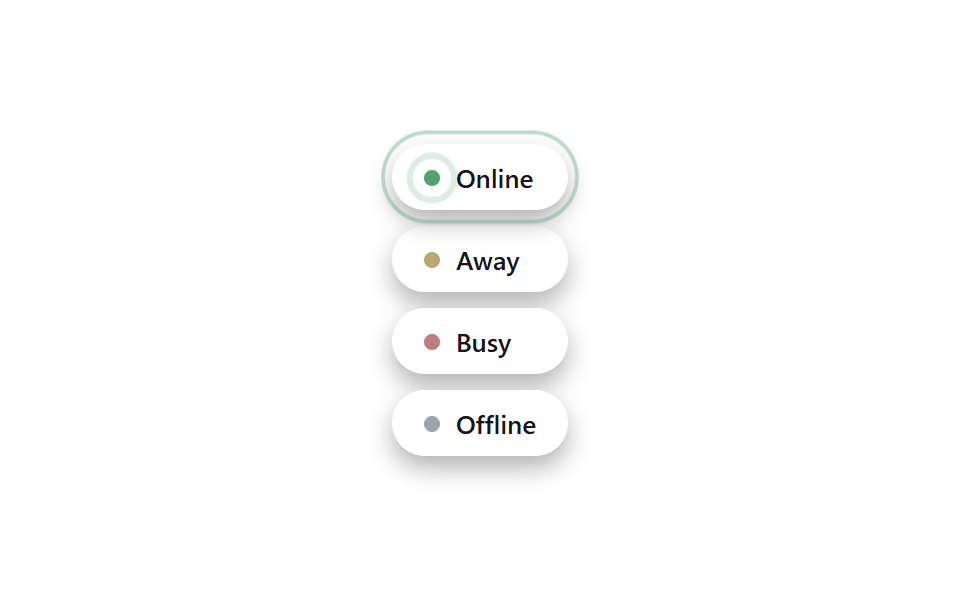 피드백태그 UI 디자인 9종 — 상태·우선순위·인증 배지 코드
 피드백CSS 다크모드 토글 애니메이션 9종 — 한 줄 복붙으로
 피드백바이브코딩 마이크로 인터랙션 9종 — 한 줄 복붙으로
 피드백CSS 배경 애니메이션 9종 — 한 줄 복붙으로
 피드백CSS 숫자 증가 애니메이션 9종 — 한 줄 복붙으로
 피드백채팅 말풍선 CSS 애니메이션 9종 — 한 줄 복붙으로
 피드백CSS 글자 그라데이션 반짝이는 텍스트 9종 — 한 줄 복붙으로
 피드백CSS 토글 스위치 9종 — 한 줄 복붙으로