06힌트 풍선
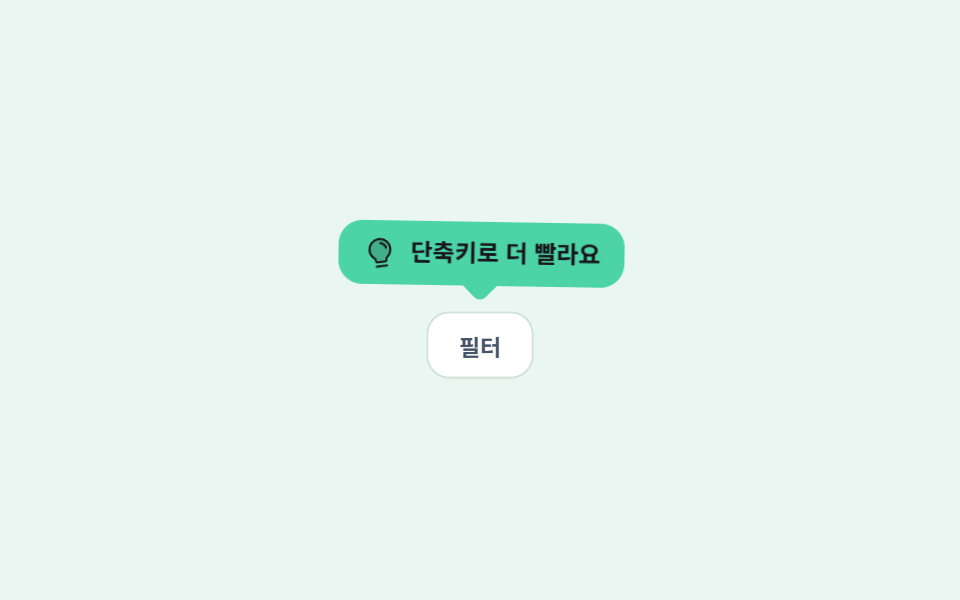
민트색 말풍선이 아이콘 옆에서 4px씩 위아래로 천천히 흔들리고, 아래쪽 삼각 꼬리가 풍선과 한 몸으로 같이 움직여 꼬리가 떨어져 보이지 않습니다.
쓰임잘 안 쓰이는 버튼 옆 안내, 설정 화면의 작은 도움말
translateY 4px꼬리 일체형radius 12
<main class="stage is-demo">
  <div class="wrap">
    <p class="hint">
      <span class="bi" aria-hidden="true"><svg xmlns="http://www.w3.org/2000/svg" viewBox="0 0 256 256" fill="currentColor"><path d="M208,104a79.86,79.86,0,0,1-30.59,62.92A24.29,24.29,0,0,0,168,186v6a8,8,0,0,1-8,8H96a8,8,0,0,1-8-8v-6a24.11,24.11,0,0,0-9.3-19A79.87,79.87,0,0,1,48,104.45C47.76,61.09,82.72,25,126.07,24A80,80,0,0,1,208,104Z" opacity="0.2"/><path d="M176,232a8,8,0,0,1-8,8H88a8,8,0,0,1,0-16h80A8,8,0,0,1,176,232Zm40-128a87.55,87.55,0,0,1-33.64,69.21A16.24,16.24,0,0,0,176,186v6a16,16,0,0,1-16,16H96a16,16,0,0,1-16-16v-6a16,16,0,0,0-6.23-12.66A87.59,87.59,0,0,1,40,104.49C39.74,56.83,78.26,17.14,125.88,16A88,88,0,0,1,216,104Zm-16,0a72,72,0,0,0-73.74-72c-39,.92-70.47,33.39-70.26,72.39a71.65,71.65,0,0,0,27.64,56.3A32,32,0,0,1,96,186v6h64v-6a32.15,32.15,0,0,1,12.47-25.35A71.65,71.65,0,0,0,200,104Zm-16.11-9.34a57.6,57.6,0,0,0-46.56-46.55,8,8,0,0,0-2.66,15.78c16.57,2.79,30.63,16.85,33.44,33.45A8,8,0,0,0,176,104a9,9,0,0,0,1.35-.11A8,8,0,0,0,183.89,94.66Z"/></svg></span>
      <span class="tx">단축키로 더 빨라요</span>
    </p>
    <span class="target" aria-hidden="true">필터</span>
  </div>
</main>
@use "../../../../site/static/demo-tokens" as *;
// ── 변수 3개 ──────────────────────────────────────────
$duration: $dur-loop; // 2s — 위아래 4px 한 왕복
$easing: $ease-spring;
$color: $subject-mint; // 큐트 계열 — 배경으로만. 글자는 잉크
@include stage(#eaf6f1);
.wrap { display: grid; justify-items: center; gap: $sp-3; }
// 말풍선 — 꼬리는 ::after 로 붙은 한 몸이라 흔들려도 따로 놀지 않는다
.hint {
position: relative;
box-sizing: border-box;
margin: 0;
max-width: 232px;
display: inline-flex; align-items: center; gap: $sp-2;
padding: $sp-2 $sp-3;
border-radius: $r-control;
background: $color;
color: $subject-ink; // 민트 위 잉크 — 민트를 글자색으로 쓰면 대비가 안 나온다
transform: translateY(0);
transform-origin: 50% 100%; // 꼬리 끝이 축 — 몸통이 매달려 흔들린다
}
.hint::after {
content: "";
position: absolute;
left: 50%; bottom: -6px;
width: 12px; height: 12px;
background: $color;
transform: translateX(-50%) rotate(45deg);
border-bottom-right-radius: $r-xs;
}
.stage.is-demo .hint { animation: nudge $duration $ease-lerp-settle infinite; }
// 한 겹(전구 아이콘 탄성 lerp) — 2026-09-15 형태 2차. 말풍선이 뜰 때 아이콘이 통통 튀어 시선을 잡는다
// 한 겹 더(감쇠 진자 rotate — 개별 속성) — bi-spring(scale) 과 병렬 합성. 매달린 전구가 진폭 13→8→4.5→2→0 으로 감쇠해 멈춘다
.stage.is-demo .bi {
transform-origin: 50% 12%; // 위 고정 — 풍선 아래 매달림
rotate: 0deg; // 중립 자세
animation: bi-spring $duration $ease-lerp-settle infinite, swing $duration ease-in-out infinite;
}
.bi { display: block; width: 16px; height: 16px; flex: 0 0 auto; }
.bi svg { width: 100%; height: 100%; display: block; }
.tx { font-size: 12px; font-weight: 700; line-height: 1.3; }
.target {
display: inline-flex; align-items: center; justify-content: center;
padding: $sp-2 $sp-4;
border-radius: $r-control;
background: #fff;
border: 1px solid #cfe3da;
font-size: 12px; font-weight: 600;
color: #475569;
scale: 1; // 중립 자세 — 애니메이션 꺼져도 원형
}
// 한 겹(칩 탄성 pop — 개별 속성 scale) — 힌트 nudge 20% 정점에 맞춘 delay 로 튀어오른다
.stage.is-demo .target { animation: pop $duration $ease-spring infinite .4s; }
// 한 겹(감쇠 진자 회전 결합) — 2026-09-15 형태 2차. 상하 왕복에 회전 감쇠 진동(γ≈.5)을 얹어 꼬리를 축으로 살아난다
@keyframes nudge {
0%, 100% { transform: translateY(0) rotate(0); }
20% { transform: translateY(-4px) rotate(-1.5deg); }
45% { transform: translateY(0) rotate(1deg); }
70% { transform: translateY(-1px) rotate(-.5deg); }
88% { transform: translateY(0) rotate(0); }
}
@keyframes bi-spring {
0% { transform: scale(1); }
25% { transform: scale(1.22); }
45% { transform: scale(.9); }
62% { transform: scale(1.06); }
78%,100% { transform: scale(1); }
}
// 한 겹(개별 속성 키프레임 — rotate/scale 만. 기존 transform 키프레임은 건드리지 않는다)
// 감쇠 진자 — 진폭 비율 1 → .62 → .35 → .15 → 0. 키프레임은 극값에 찍고 easing 은 구간 사이
@keyframes swing {
0% { rotate: 0deg; }
8% { rotate: 13deg; }
28% { rotate: -8deg; }
48% { rotate: 4.5deg; }
66% { rotate: -2deg; }
80%, 100% { rotate: 0deg; }
}
// 탄성 lerp — 칩이 활성 순간 1.38 로 튀어오르고 0.88 → 1.07 → 1 로 안착
@keyframes pop {
0% { scale: 1; }
6% { scale: 1.38; }
16% { scale: .88; }
28% { scale: 1.07; }
38%, 100% { scale: 1; }
}
@media (prefers-reduced-motion: reduce) {
.stage.is-demo .hint { animation: none; transform: none; }
.stage.is-demo .bi { animation: none; transform: none; rotate: 0deg; }
.stage.is-demo .target { animation: none; scale: 1; }
}html, body {
margin: 0;
overflow: hidden;
}
.stage {
box-sizing: border-box;
min-height: 100vh;
display: grid;
place-items: center;
margin: 0;
background: #eaf6f1;
font-family: -apple-system, "Segoe UI", "Noto Sans KR", sans-serif;
padding: clamp(8px, 4vw, 24px);
}
.wrap {
display: grid;
justify-items: center;
gap: 12px;
}
.hint {
position: relative;
box-sizing: border-box;
margin: 0;
max-width: 232px;
display: inline-flex;
align-items: center;
gap: 8px;
padding: 8px 12px;
border-radius: 12px;
background: #4cd4a6;
color: #17141a;
transform: translateY(0);
transform-origin: 50% 100%;
}
.hint::after {
content: "";
position: absolute;
left: 50%;
bottom: -6px;
width: 12px;
height: 12px;
background: #4cd4a6;
transform: translateX(-50%) rotate(45deg);
border-bottom-right-radius: 4px;
}
.stage.is-demo .hint {
animation: nudge 2s linear(0, 0.051, 0.176, 0.341, 0.518, 0.685, 0.831, 0.947, 1.032, 1.087, 1.117, 1.126, 1.121, 1.105, 1.085, 1.062, 1.041, 1.022, 1.008, 0.997, 1) infinite;
}
.stage.is-demo .bi {
transform-origin: 50% 12%;
rotate: 0deg;
animation: bi-spring 2s linear(0, 0.051, 0.176, 0.341, 0.518, 0.685, 0.831, 0.947, 1.032, 1.087, 1.117, 1.126, 1.121, 1.105, 1.085, 1.062, 1.041, 1.022, 1.008, 0.997, 1) infinite, swing 2s ease-in-out infinite;
}
.bi {
display: block;
width: 16px;
height: 16px;
flex: 0 0 auto;
}
.bi svg {
width: 100%;
height: 100%;
display: block;
}
.tx {
font-size: 12px;
font-weight: 700;
line-height: 1.3;
}
.target {
display: inline-flex;
align-items: center;
justify-content: center;
padding: 8px 16px;
border-radius: 12px;
background: #fff;
border: 1px solid #cfe3da;
font-size: 12px;
font-weight: 600;
color: #475569;
scale: 1;
}
.stage.is-demo .target {
animation: pop 2s cubic-bezier(0.2, 0.8, 0.2, 1) infinite 0.4s;
}
@keyframes nudge {
0%, 100% {
transform: translateY(0) rotate(0);
}
20% {
transform: translateY(-4px) rotate(-1.5deg);
}
45% {
transform: translateY(0) rotate(1deg);
}
70% {
transform: translateY(-1px) rotate(-0.5deg);
}
88% {
transform: translateY(0) rotate(0);
}
}
@keyframes bi-spring {
0% {
transform: scale(1);
}
25% {
transform: scale(1.22);
}
45% {
transform: scale(0.9);
}
62% {
transform: scale(1.06);
}
78%, 100% {
transform: scale(1);
}
}
@keyframes swing {
0% {
rotate: 0deg;
}
8% {
rotate: 13deg;
}
28% {
rotate: -8deg;
}
48% {
rotate: 4.5deg;
}
66% {
rotate: -2deg;
}
80%, 100% {
rotate: 0deg;
}
}
@keyframes pop {
0% {
scale: 1;
}
6% {
scale: 1.38;
}
16% {
scale: 0.88;
}
28% {
scale: 1.07;
}
38%, 100% {
scale: 1;
}
}
@media (prefers-reduced-motion: reduce) {
.stage.is-demo .hint {
animation: none;
transform: none;
}
.stage.is-demo .bi {
animation: none;
transform: none;
rotate: 0deg;
}
.stage.is-demo .target {
animation: none;
scale: 1;
}
}import type { CSSProperties } from "react";
import styles from "./HintBalloon.module.scss";
export type HintBalloonProps = {
duration?: number;
easing?: string;
color?: string;
text?: string;
targetLabel?: string;
};
export default function HintBalloon({
duration = 2000,
easing = "cubic-bezier(.2, .8, .2, 1)",
color = "#4cd4a6",
text = "Shortcuts make it faster",
targetLabel = "Filter",
}: HintBalloonProps) {
const vars: CSSProperties = {
"--duration": `${duration}ms`,
"--easing": easing,
"--color": color,
} as CSSProperties;
return (
<div className={styles.wrap} style={vars}>
{/* 꼬리는 ::after 라 말풍선과 한 몸으로 움직인다 — 따로 두면 흔들릴 때 떨어져 보인다 */}
<p className={styles.hint}>
<span className={styles.bi} aria-hidden="true">
<svg xmlns="http://www.w3.org/2000/svg" viewBox="0 0 256 256" fill="currentColor">
<path d="M208,104a79.86,79.86,0,0,1-30.59,62.92A24.29,24.29,0,0,0,168,186v6a8,8,0,0,1-8,8H96a8,8,0,0,1-8-8v-6a24.11,24.11,0,0,0-9.3-19A79.87,79.87,0,0,1,48,104.45C47.76,61.09,82.72,25,126.07,24A80,80,0,0,1,208,104Z" opacity="0.2" />
<path d="M176,232a8,8,0,0,1-8,8H88a8,8,0,0,1,0-16h80A8,8,0,0,1,176,232Zm40-128a87.55,87.55,0,0,1-33.64,69.21A16.24,16.24,0,0,0,176,186v6a16,16,0,0,1-16,16H96a16,16,0,0,1-16-16v-6a16,16,0,0,0-6.23-12.66A87.59,87.59,0,0,1,40,104.49C39.74,56.83,78.26,17.14,125.88,16A88,88,0,0,1,216,104Zm-16,0a72,72,0,0,0-73.74-72c-39,.92-70.47,33.39-70.26,72.39a71.65,71.65,0,0,0,27.64,56.3A32,32,0,0,1,96,186v6h64v-6a32.15,32.15,0,0,1,12.47-25.35A71.65,71.65,0,0,0,200,104Zm-16.11-9.34a57.6,57.6,0,0,0-46.56-46.55,8,8,0,0,0-2.66,15.78c16.57,2.79,30.63,16.85,33.44,33.45A8,8,0,0,0,176,104a9,9,0,0,0,1.35-.11A8,8,0,0,0,183.89,94.66Z" />
</svg>
</span>
<span className={styles.tx}>{text}</span>
</p>
<span className={styles.target}>{targetLabel}</span>
</div>
);
}06 힌트 풍선 — 측정 누적면적 4.122% · 움직인 프레임 22/23GODRICH 원작 · zip 에 SCSS·React 포함 · 웹 온보딩 UI 9종 — 복붙하면 되는 투어 위젯 코드
이 데모가 속한 글
 웹 온보딩 UI 9종 — 복붙하면 되는 투어 위젯 코드웹 온보딩 ui 는 가입을 막 끝낸 사람에게 "이제 뭘 누르면 되는지"를 화면 위에서 직접 가리켜 주는 안내 부품입니다. 체크리스트, 스포트라이트, 단계 툴팁처럼 종류가 정해져 있어서 골라 붙이면 됩니다. 아홉 개를 이 글의 데모 전부 보기