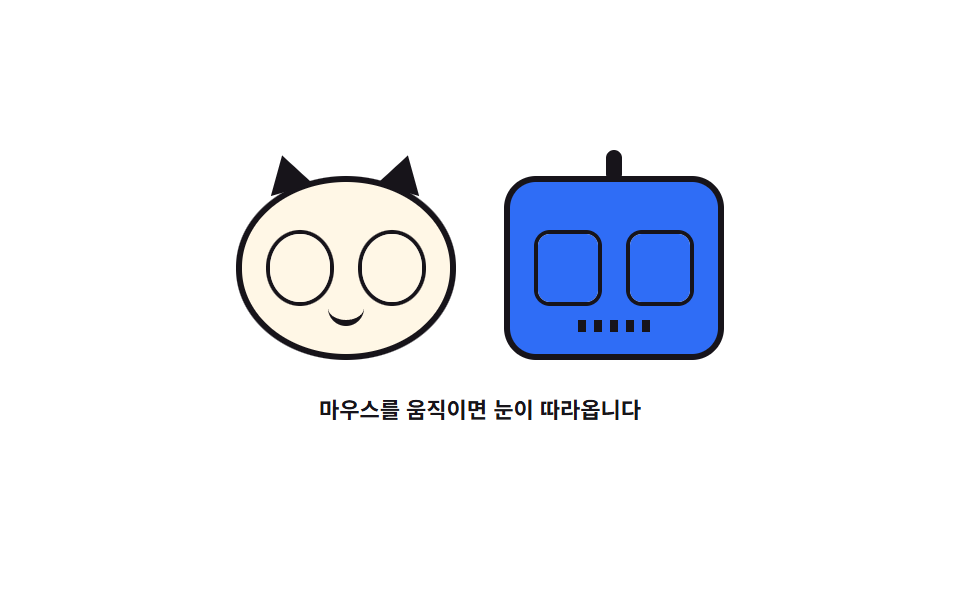
04눈으로 커서를 쫓는 캐릭터
고양이와 로봇의 눈동자가 커서 쪽으로 돌아가고 가끔 눈을 깜빡입니다.
쓰임404 페이지의 마스코트, 회원가입 폼 옆의 캐릭터
Math.atan2scaleYsteps
<main class="stage">
<div class="ey is-demo" id="ey">
  <div class="ey__row" id="row" role="img" aria-label="고양이와 로봇이 눈동자로 커서를 따라보는 그림">
    <div class="ey__face ey__face--cat">
      <span class="ey__ear ey__ear--l" aria-hidden="true"></span>
      <span class="ey__ear ey__ear--r" aria-hidden="true"></span>
      <span class="ey__eye"><span class="ey__pupil"></span><span class="ey__lid" aria-hidden="true"></span></span>
      <span class="ey__eye"><span class="ey__pupil"></span><span class="ey__lid" aria-hidden="true"></span></span>
      <span class="ey__mouth" aria-hidden="true"></span>
    </div>
    <div class="ey__face ey__face--bot">
      <span class="ey__ant" aria-hidden="true"></span>
      <span class="ey__eye ey__eye--wide"><span class="ey__pupil ey__pupil--bar"></span><span class="ey__lid" aria-hidden="true"></span></span>
      <span class="ey__eye ey__eye--wide"><span class="ey__pupil ey__pupil--bar"></span><span class="ey__lid" aria-hidden="true"></span></span>
      <span class="ey__grill" aria-hidden="true"></span>
    </div>
  </div>
  <p class="ey__hint">마우스를 움직이면 눈이 따라옵니다</p>
</div>
</main>
@use "../../../../site/static/demo-tokens" as *;
// 눈으로 커서를 쫓는 캐릭터 — 실제 시선은 JS 가 눈 중심에서 커서까지의 각도(Math.atan2)를 재고
// 그 방향으로 눈동자를 반지름의 22% 만큼 내보낸다.
// 격자 미리보기(.is-demo)는 커서가 왼쪽 끝에서 오른쪽 끝으로 지나간 것과 같은 폭을 @keyframes 로 왕복시키고,
// 깜빡임은 눈꺼풀을 세로로 덮었다 여는 별도 타이머다.
$duration: $dur-loop;
$easing: $ease-spring;
$color: $subject-ink;
@include stage($stage-paper);
.ey { display: grid; justify-items: center; gap: $sp-4; width: 100%; }
.ey__row { display: flex; align-items: center; justify-content: center; gap: $sp-6; }
.ey__row:focus-visible { outline: 3px solid $subject-blue; outline-offset: $sp-2; border-radius: $r-card; }
.ey__face {
position: relative; box-sizing: border-box;
display: flex; align-items: center; justify-content: center; gap: $sp-3;
width: clamp(88px, 23vw, 112px); height: clamp(72px, 19vw, 92px);
padding: $sp-3;
}
.ey__face--cat { background: $subject-cream; border-radius: 50%; border: 3px solid $color; }
.ey__face--bot { background: $subject-blue; border-radius: $r-card; border: 3px solid $color; }
// 귀는 얼굴 원 위에 얹은 삼각형 두 개 — 회전 원점을 꼭짓점에 두면 붙는 자리가 흔들리지 않는다
.ey__ear {
position: absolute; top: -14px; width: 0; height: 0;
border-left: 11px solid transparent; border-right: 11px solid transparent;
border-bottom: 18px solid $color;
}
.ey__ear--l { left: 14%; transform: rotate(-16deg); transform-origin: 50% 100%; }
.ey__ear--r { right: 14%; transform: rotate(16deg); transform-origin: 50% 100%; }
.ey__ant {
position: absolute; top: -16px; left: 50%;
width: 8px; height: 16px; margin-left: -4px;
background: $color; border-radius: $r-pill;
}
.ey__eye {
position: relative; overflow: hidden;
width: clamp(26px, 7vw, 34px); height: clamp(26px, 7vw, 34px);
background: $stage-paper; border-radius: 50%; border: 2px solid $color;
}
.ey__eye--wide { border-radius: $r-sm; }
.ey__pupil {
position: absolute; left: 50%; top: 50%;
width: 42%; height: 42%; margin: -21% 0 0 -21%;
background: $color; border-radius: 50%;
}
.ey__pupil--bar { width: 30%; margin-left: -15%; border-radius: $r-xs; }
// 눈꺼풀은 눈 위를 덮는 판이다. 위에서 내려오도록 원점을 윗변에 둔다 (붙는 지점이 있는 요소)
.ey__lid {
position: absolute; inset: 0;
background: $subject-cream;
transform: scaleY(0);
transform-origin: 50% 0;
}
.ey__face--bot .ey__lid { background: $subject-blue; }
.ey__mouth {
position: absolute; bottom: 16%; left: 50%;
width: 18px; height: 8px; margin-left: -9px;
border-bottom: 3px solid $color; border-radius: 0 0 $r-pill $r-pill;
}
.ey__grill {
position: absolute; bottom: 12%; left: 50%;
width: 36px; height: 6px; margin-left: -18px;
background: repeating-linear-gradient(90deg, $color 0 4px, transparent 4px 8px);
}
.ey__hint { margin: 0; color: $color; font-weight: 700; font-size: clamp(9px, 2.4vw, 11px); }
// ── 미리보기 루프: 커서가 화면 왼쪽 끝 → 오른쪽 끝으로 지나간 것과 같은 폭(반지름 22%)을 왕복한다.
// 두 캐릭터는 서 있는 자리가 달라 같은 커서를 봐도 각도가 다르다 — 고양이가 먼저 끝까지 돌아간다
.ey.is-demo .ey__pupil,
.ey.is-demo .ey__lid {
animation-duration: $duration;
animation-timing-function: $easing;
animation-iteration-count: infinite;
}
.ey.is-demo .ey__face--cat .ey__pupil { animation-name: eyLookCat; }
.ey.is-demo .ey__face--bot .ey__pupil { animation-name: eyLookBot; }
.ey.is-demo .ey__lid { animation-name: eyBlink; animation-timing-function: steps(1, end); }
@keyframes eyLookCat {
0%, 6% { transform: translate(-3px, 3px); }
46%, 60% { transform: translate(7.5px, -2px); }
94%, 100% { transform: translate(-3px, 3px); }
}
// 로봇은 고양이보다 오른쪽에 서 있어 같은 커서를 더 일찍 끝까지 본다 — 위상이 어긋나 있다
@keyframes eyLookBot {
0%, 4% { transform: translate(-6.5px, 2.6px); }
22%, 72% { transform: translate(6.5px, -1px); }
96%, 100% { transform: translate(-6.5px, 2.6px); }
}
// 깜빡임은 한 프레임에 덮고 한 프레임에 여는 컷이다 — 반쯤 감긴 유령 프레임이 생기지 않는다
@keyframes eyBlink {
0%, 50% { transform: scaleY(0); }
54% { transform: scaleY(1); }
58%, 100% { transform: scaleY(0); }
}
@media (max-width: 340px) {
.ey { gap: $sp-3; }
.ey__row { gap: $sp-4; }
.ey__face { padding: $sp-2; gap: $sp-2; }
}
@media (prefers-reduced-motion: reduce) {
.ey.is-demo .ey__pupil,
.ey.is-demo .ey__lid { animation: none !important; }
// 눈은 뜬 채로, 시선은 가운데를 본 상태로 세운다
.ey.is-demo .ey__pupil { transform: translate(0, 0) !important; }
.ey.is-demo .ey__lid { transform: scaleY(0) !important; }
}html, body {
margin: 0;
overflow: hidden;
}
.stage {
box-sizing: border-box;
min-height: 100vh;
display: grid;
place-items: center;
margin: 0;
background: #ffffff;
font-family: -apple-system, "Segoe UI", "Noto Sans KR", sans-serif;
padding: clamp(8px, 4vw, 24px);
}
.ey {
display: grid;
justify-items: center;
gap: 16px;
width: 100%;
}
.ey__row {
display: flex;
align-items: center;
justify-content: center;
gap: 24px;
}
.ey__row:focus-visible {
outline: 3px solid #2f6df6;
outline-offset: 8px;
border-radius: 16px;
}
.ey__face {
position: relative;
box-sizing: border-box;
display: flex;
align-items: center;
justify-content: center;
gap: 12px;
width: clamp(88px, 23vw, 112px);
height: clamp(72px, 19vw, 92px);
padding: 12px;
}
.ey__face--cat {
background: #fff7e6;
border-radius: 50%;
border: 3px solid #17141a;
}
.ey__face--bot {
background: #2f6df6;
border-radius: 16px;
border: 3px solid #17141a;
}
.ey__ear {
position: absolute;
top: -14px;
width: 0;
height: 0;
border-left: 11px solid transparent;
border-right: 11px solid transparent;
border-bottom: 18px solid #17141a;
}
.ey__ear--l {
left: 14%;
transform: rotate(-16deg);
transform-origin: 50% 100%;
}
.ey__ear--r {
right: 14%;
transform: rotate(16deg);
transform-origin: 50% 100%;
}
.ey__ant {
position: absolute;
top: -16px;
left: 50%;
width: 8px;
height: 16px;
margin-left: -4px;
background: #17141a;
border-radius: 999px;
}
.ey__eye {
position: relative;
overflow: hidden;
width: clamp(26px, 7vw, 34px);
height: clamp(26px, 7vw, 34px);
background: #ffffff;
border-radius: 50%;
border: 2px solid #17141a;
}
.ey__eye--wide {
border-radius: 8px;
}
.ey__pupil {
position: absolute;
left: 50%;
top: 50%;
width: 42%;
height: 42%;
margin: -21% 0 0 -21%;
background: #17141a;
border-radius: 50%;
}
.ey__pupil--bar {
width: 30%;
margin-left: -15%;
border-radius: 4px;
}
.ey__lid {
position: absolute;
inset: 0;
background: #fff7e6;
transform: scaleY(0);
transform-origin: 50% 0;
}
.ey__face--bot .ey__lid {
background: #2f6df6;
}
.ey__mouth {
position: absolute;
bottom: 16%;
left: 50%;
width: 18px;
height: 8px;
margin-left: -9px;
border-bottom: 3px solid #17141a;
border-radius: 0 0 999px 999px;
}
.ey__grill {
position: absolute;
bottom: 12%;
left: 50%;
width: 36px;
height: 6px;
margin-left: -18px;
background: repeating-linear-gradient(90deg, #17141a 0 4px, transparent 4px 8px);
}
.ey__hint {
margin: 0;
color: #17141a;
font-weight: 700;
font-size: clamp(9px, 2.4vw, 11px);
}
.ey.is-demo .ey__pupil,
.ey.is-demo .ey__lid {
animation-duration: 2s;
animation-timing-function: cubic-bezier(0.2, 0.8, 0.2, 1);
animation-iteration-count: infinite;
}
.ey.is-demo .ey__face--cat .ey__pupil {
animation-name: eyLookCat;
}
.ey.is-demo .ey__face--bot .ey__pupil {
animation-name: eyLookBot;
}
.ey.is-demo .ey__lid {
animation-name: eyBlink;
animation-timing-function: steps(1, end);
}
@keyframes eyLookCat {
0%, 6% {
transform: translate(-3px, 3px);
}
46%, 60% {
transform: translate(7.5px, -2px);
}
94%, 100% {
transform: translate(-3px, 3px);
}
}
@keyframes eyLookBot {
0%, 4% {
transform: translate(-6.5px, 2.6px);
}
22%, 72% {
transform: translate(6.5px, -1px);
}
96%, 100% {
transform: translate(-6.5px, 2.6px);
}
}
@keyframes eyBlink {
0%, 50% {
transform: scaleY(0);
}
54% {
transform: scaleY(1);
}
58%, 100% {
transform: scaleY(0);
}
}
@media (max-width: 340px) {
.ey {
gap: 12px;
}
.ey__row {
gap: 16px;
}
.ey__face {
padding: 8px;
gap: 8px;
}
}
@media (prefers-reduced-motion: reduce) {
.ey.is-demo .ey__pupil,
.ey.is-demo .ey__lid {
animation: none !important;
}
.ey.is-demo .ey__pupil {
transform: translate(0, 0) !important;
}
.ey.is-demo .ey__lid {
transform: scaleY(0) !important;
}
}var ey = document.getElementById('ey');
var row = document.getElementById('row');
var eyes = Array.prototype.slice.call(document.querySelectorAll('.ey__eye'));
// 눈마다 자기 중심에서 커서까지의 각도를 재고, 그 방향으로 눈동자를 반지름만큼만 내보낸다
function look(clientX, clientY) {
for (var i = 0; i < eyes.length; i++) {
var eye = eyes[i];
var pupil = eye.firstElementChild;
var r = eye.getBoundingClientRect();
var angle = Math.atan2(clientY - (r.top + r.height / 2), clientX - (r.left + r.width / 2));
var reach = Math.min(r.width, r.height) * 0.22;
pupil.style.transform = 'translate(' + (Math.cos(angle) * reach).toFixed(1) + 'px, ' + (Math.sin(angle) * reach).toFixed(1) + 'px)';
}
}
window.addEventListener('pointermove', function (e) {
ey.classList.remove('is-demo');
look(e.clientX, e.clientY);
});
// 키보드 경로: 화살표로 시선을 네 방향으로 보낸다 (포인터가 없어도 같은 각도를 본다)
row.setAttribute('tabindex', '0');
row.addEventListener('keydown', function (e) {
var r = row.getBoundingClientRect();
var spots = {
ArrowLeft: [r.left - 60, r.top + r.height / 2],
ArrowRight: [r.right + 60, r.top + r.height / 2],
ArrowUp: [r.left + r.width / 2, r.top - 60],
ArrowDown: [r.left + r.width / 2, r.bottom + 60]
};
var spot = spots[e.key];
if (!spot) { return; }
e.preventDefault();
ey.classList.remove('is-demo');
look(spot[0], spot[1]);
});// EyesFollow — vanilla 판(run/290/demo/04-pointer-3d-eyes-follow/index.html) 의 React 포트.
// 눈마다 자기 중심에서 커서까지의 각도를 재고, 그 방향으로 눈동자를 반지름의 22% 만큼 내보낸다.
// 포인터가 없어도 화살표 키가 같은 각도를 만들어 준다. 값·수치는 vanilla 와 같다.
import { useCallback, useEffect, useRef, useState } from "react";
import type { CSSProperties } from "react";
import styles from "./EyesFollow.module.scss";
export type EyesFollowProps = {
duration?: number;
easing?: string;
color?: string;
};
type Vars = CSSProperties & { "--duration"?: string; "--easing"?: string; "--color"?: string };
// useRef 는 T | null 을 돌려준다. 처음부터 값이 있고 절대 비지 않는 상자는 이렇게 좁혀 쓴다
type Box<T> = { current: T };
// 키보드 이벤트는 ambient react 타입에 없다 — 쓰는 두 가지만 지역 타입으로 적는다
type KeyEvt = { key: string; preventDefault(): void };
const EYE_COUNT = 4;
const ROW_LABEL = "고양이와 로봇이 눈동자로 커서를 따라보는 그림";
const HINT = "마우스를 움직이면 눈이 따라옵니다";
// 화살표가 시선을 보내는 지점은 상자 밖 60px
const KEY_REACH = 60;
export default function EyesFollow({
duration = 2000,
easing = "cubic-bezier(.2, .8, .2, 1)",
color = "#17141a",
}: EyesFollowProps) {
const rowRef = useRef<HTMLDivElement | null>(null);
const eyesRef = useRef<(HTMLSpanElement | null)[]>(new Array(EYE_COUNT).fill(null)) as Box<(HTMLSpanElement | null)[]>;
const [demo, setDemo] = useState(true);
const vars: Vars = { "--duration": `${duration}ms`, "--easing": easing, "--color": color };
// 눈마다 자기 중심에서 커서까지의 각도를 재고, 그 방향으로 눈동자를 반지름만큼만 내보낸다
const look = useCallback((clientX: number, clientY: number): void => {
for (let i = 0; i < eyesRef.current.length; i++) {
const eye = eyesRef.current[i];
if (!eye) continue;
const pupil = eye.firstElementChild as HTMLElement | null;
if (!pupil) continue;
const r = eye.getBoundingClientRect();
const angle = Math.atan2(clientY - (r.top + r.height / 2), clientX - (r.left + r.width / 2));
const reach = Math.min(r.width, r.height) * 0.22;
pupil.style.transform =
"translate(" + (Math.cos(angle) * reach).toFixed(1) + "px, " + (Math.sin(angle) * reach).toFixed(1) + "px)";
}
}, []);
useEffect(() => {
function onMove(event: PointerEvent): void {
setDemo(false);
look(event.clientX, event.clientY);
}
window.addEventListener("pointermove", onMove);
return () => window.removeEventListener("pointermove", onMove);
}, [look]);
function setEye(index: number) {
return (el: HTMLSpanElement | null): void => {
eyesRef.current[index] = el;
};
}
// 키보드 경로: 화살표로 시선을 네 방향으로 보낸다 (포인터가 없어도 같은 각도를 본다)
function onKeyDown(event: KeyEvt): void {
const row = rowRef.current;
if (!row) return;
const r = row.getBoundingClientRect();
const spots: { [key: string]: [number, number] } = {
ArrowLeft: [r.left - KEY_REACH, r.top + r.height / 2],
ArrowRight: [r.right + KEY_REACH, r.top + r.height / 2],
ArrowUp: [r.left + r.width / 2, r.top - KEY_REACH],
ArrowDown: [r.left + r.width / 2, r.bottom + KEY_REACH],
};
const spot = spots[event.key];
if (!spot) return;
event.preventDefault();
setDemo(false);
look(spot[0], spot[1]);
}
const cls = [styles.root, demo ? styles.isDemo : ""].filter(Boolean).join(" ");
return (
<main className={styles.stage}>
<div className={cls} style={vars}>
<div className={styles.row} ref={rowRef} role="img" aria-label={ROW_LABEL} tabIndex={0} onKeyDown={onKeyDown}>
<div className={`${styles.face} ${styles.faceCat}`}>
<span className={`${styles.ear} ${styles.earL}`} aria-hidden="true"></span>
<span className={`${styles.ear} ${styles.earR}`} aria-hidden="true"></span>
<span className={styles.eye} ref={setEye(0)}>
<span className={styles.pupil}></span>
<span className={styles.lid} aria-hidden="true"></span>
</span>
<span className={styles.eye} ref={setEye(1)}>
<span className={styles.pupil}></span>
<span className={styles.lid} aria-hidden="true"></span>
</span>
<span className={styles.mouth} aria-hidden="true"></span>
</div>
<div className={`${styles.face} ${styles.faceBot}`}>
<span className={styles.ant} aria-hidden="true"></span>
<span className={`${styles.eye} ${styles.eyeWide}`} ref={setEye(2)}>
<span className={`${styles.pupil} ${styles.pupilBar}`}></span>
<span className={styles.lid} aria-hidden="true"></span>
</span>
<span className={`${styles.eye} ${styles.eyeWide}`} ref={setEye(3)}>
<span className={`${styles.pupil} ${styles.pupilBar}`}></span>
<span className={styles.lid} aria-hidden="true"></span>
</span>
<span className={styles.grill} aria-hidden="true"></span>
</div>
</div>
<p className={styles.hint}>{HINT}</p>
</div>
</main>
);
}04 눈으로 커서를 쫓는 캐릭터 — 측정 누적면적 2.572% · 움직인 프레임 20/23GODRICH 원작 · zip 에 SCSS·React 포함 · 마우스를 따라오는 CSS 3D 회전 장면 9종
이 데모가 속한 글
 마우스를 따라오는 CSS 3D 회전 장면 9종마우스를 따라오는 효과는 화면 위 요소가 포인터 위치에 반응해 도는 CSS 3D 회전 장면입니다. CSS 3D 회전을 perspective 와 transform-style: preserve-3d, 바닐라 자바스크립트 이 글의 데모 전부 보기