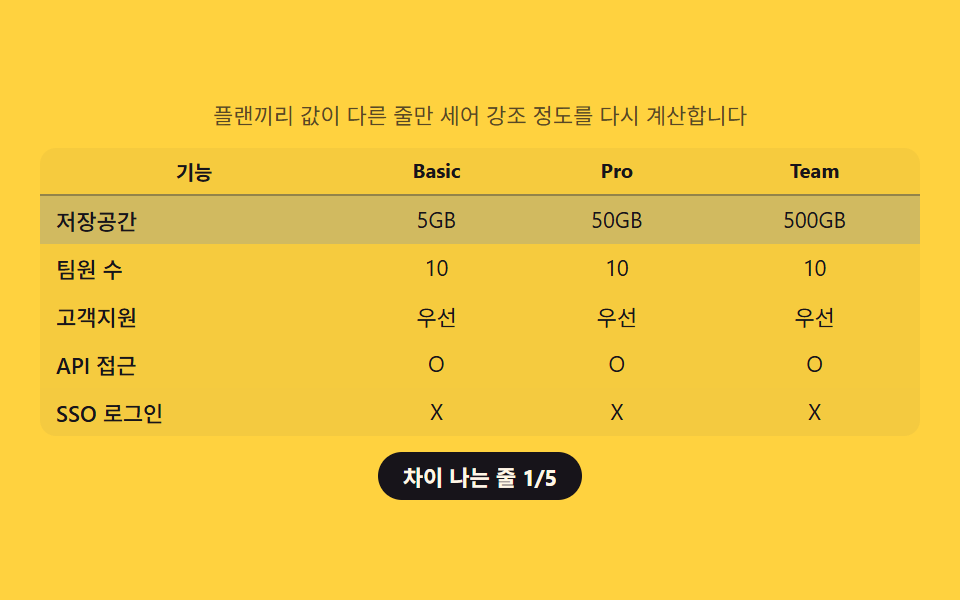
02비교표 — 플랜끼리 값이 다른 줄만 세어 강조하는 표
플랜마다 같은 항목의 값을 서로 대조해 실제로 차이가 나는 줄이 몇 개인지 세고, 그 개수에 비례해 차이 나는 줄의 강조 정도를 정합니다.
쓰임기능 비교표, 플랜별 상세 스펙 페이지
--diff-alphaquerySelectorAllscope="row"
<main class="stage">
<section class="panel">
  <p class="hint">플랜끼리 값이 다른 줄만 세어 강조 정도를 다시 계산합니다</p>
  <table class="cmp">
    <caption class="cmpCaption">플랜 비교</caption>
    <thead>
      <tr>
        <th scope="col">기능</th>
        <th scope="col">Basic</th>
        <th scope="col">Pro</th>
        <th scope="col">Team</th>
      </tr>
    </thead>
    <tbody id="rows">
      <tr data-row="storage"><th scope="row">저장공간</th><td class="v v0"></td><td class="v v1"></td><td class="v v2"></td></tr>
      <tr data-row="seats"><th scope="row">팀원 수</th><td class="v v0"></td><td class="v v1"></td><td class="v v2"></td></tr>
      <tr data-row="support"><th scope="row">고객지원</th><td class="v v0"></td><td class="v v1"></td><td class="v v2"></td></tr>
      <tr data-row="api"><th scope="row">API 접근</th><td class="v v0"></td><td class="v v1"></td><td class="v v2"></td></tr>
      <tr data-row="sso"><th scope="row">SSO 로그인</th><td class="v v0"></td><td class="v v1"></td><td class="v v2"></td></tr>
    </tbody>
  </table>
  <p class="chip" id="diffChip">차이 나는 줄 0/5</p>
</section>
</main>
@use "../../../../site/static/demo-tokens" as *;
$duration: $dur-base;
$easing: $ease-out;
$color: $subject-ink;
@include stage($stage-yellow);
.panel {
width: 100%;
max-width: 440px;
display: flex;
flex-direction: column;
align-items: center;
gap: $sp-2;
}
.hint {
margin: 0;
padding: 0 $sp-2;
text-align: center;
font-weight: 400;
font-size: 11px;
line-height: 1.4;
color: rgba($subject-ink, .72);
}
.cmp {
width: 100%;
border-collapse: collapse;
background: rgba($subject-ink, .04);
border-radius: $r-sm;
overflow: hidden;
}
.cmpCaption {
display: none;
}
.cmp th,
.cmp td {
padding: $sp-1 $sp-2;
text-align: center;
font-weight: 400;
font-size: 11px;
color: $subject-ink;
}
.cmp thead th {
font-weight: 700;
font-size: 10px;
border-bottom: 1px solid rgba($subject-ink, .18);
}
.cmp tbody th {
text-align: left;
font-weight: 500;
}
.cmp tbody tr {
background: rgba($subject-blue, var(--diff-alpha, 0));
transition: background $duration $easing;
}
.chip {
margin: 0;
padding: $sp-1 $sp-3;
border-radius: $r-pill;
background: $color;
color: $subject-cream;
font-weight: 700;
font-size: 11px;
}
@media (max-width: 340px) {
.panel { max-width: 300px; gap: $sp-1; }
.hint { font-size: 9px; }
.cmp th, .cmp td { padding: $sp-1; font-size: 9px; }
}
@media (prefers-reduced-motion: reduce) {
.cmp tbody tr {
transition: none;
}
}html, body {
margin: 0;
overflow: hidden;
}
.stage {
box-sizing: border-box;
min-height: 100vh;
display: grid;
place-items: center;
margin: 0;
background: #ffd23f;
font-family: -apple-system, "Segoe UI", "Noto Sans KR", sans-serif;
padding: clamp(8px, 4vw, 24px);
}
.panel {
width: 100%;
max-width: 440px;
display: flex;
flex-direction: column;
align-items: center;
gap: 8px;
}
.hint {
margin: 0;
padding: 0 8px;
text-align: center;
font-weight: 400;
font-size: 11px;
line-height: 1.4;
color: rgba(23, 20, 26, 0.72);
}
.cmp {
width: 100%;
border-collapse: collapse;
background: rgba(23, 20, 26, 0.04);
border-radius: 8px;
overflow: hidden;
}
.cmpCaption {
display: none;
}
.cmp th,
.cmp td {
padding: 4px 8px;
text-align: center;
font-weight: 400;
font-size: 11px;
color: #17141a;
}
.cmp thead th {
font-weight: 700;
font-size: 10px;
border-bottom: 1px solid rgba(23, 20, 26, 0.18);
}
.cmp tbody th {
text-align: left;
font-weight: 500;
}
.cmp tbody tr {
background: rgba(47, 109, 246, var(--diff-alpha, 0));
transition: background 300ms ease-out;
}
.chip {
margin: 0;
padding: 4px 12px;
border-radius: 999px;
background: #17141a;
color: #fff7e6;
font-weight: 700;
font-size: 11px;
}
@media (max-width: 340px) {
.panel {
max-width: 300px;
gap: 4px;
}
.hint {
font-size: 9px;
}
.cmp th, .cmp td {
padding: 4px;
font-size: 9px;
}
}
@media (prefers-reduced-motion: reduce) {
.cmp tbody tr {
transition: none;
}
}// 비교표(02) — 플랜 세 줄의 값을 서로 대조해 실제로 다른 줄의 개수(diffCount)를 세고,
// 그 개수를 전체 줄 수로 나눈 비율로 강조 배경의 알파를 다시 계산한다(계산 한 겹).
// 자동 시연은 3가지 시나리오를 900ms 마다 돌려 diffCount 가 매번 달라지는 것을 보여준다.
(function () {
var rowsEl = document.getElementById('rows');
var chip = document.getElementById('diffChip');
if (!rowsEl || !chip) return;
var reduce = window.matchMedia('(prefers-reduced-motion: reduce)').matches;
var SCENARIOS = [
{ storage: ['5GB', '50GB', '500GB'], seats: ['1', '10', '∞'], support: ['이메일', '우선', '전담'], api: ['X', 'O', 'O'], sso: ['X', 'X', 'O'] },
{ storage: ['5GB', '50GB', '500GB'], seats: ['10', '10', '10'], support: ['우선', '우선', '우선'], api: ['X', 'O', 'O'], sso: ['X', 'X', 'O'] },
{ storage: ['5GB', '50GB', '500GB'], seats: ['10', '10', '10'], support: ['우선', '우선', '우선'], api: ['O', 'O', 'O'], sso: ['X', 'X', 'X'] }
];
var ROW_KEYS = ['storage', 'seats', 'support', 'api', 'sso'];
function allEqual(arr) {
return arr.every(function (v) { return v === arr[0]; });
}
function apply(scenario) {
var diffCount = 0;
ROW_KEYS.forEach(function (key) {
var values = scenario[key];
var tr = rowsEl.querySelector('tr[data-row="' + key + '"]');
if (!tr) return;
var cells = tr.querySelectorAll('.v');
cells.forEach(function (cell, i) { cell.textContent = values[i]; });
var differs = !allEqual(values);
if (differs) diffCount += 1;
tr.classList.toggle('is-diff', differs);
tr.style.setProperty('--diff-alpha', differs ? String(.12 + (diffCount / ROW_KEYS.length) * .35) : '0');
});
chip.textContent = '차이 나는 줄 ' + diffCount + '/' + ROW_KEYS.length;
}
apply(SCENARIOS[0]);
if (!reduce) {
var idx = 0;
setInterval(function () {
idx = (idx + 1) % SCENARIOS.length;
apply(SCENARIOS[idx]);
}, 900);
}
})();// PricingComparisonTable — vanilla 판(run/339/demo/02-pricing-comparison-table/index.html) 의 React 포트.
// 플랜 세 줄의 값을 서로 대조해 실제로 다른 줄의 개수(diffCount)를 세고, 그 개수를 전체 줄 수로
// 나눈 비율로 강조 배경의 알파를 다시 계산한다(계산 한 겹).
import { useEffect, useRef } from "react";
import styles from "./PricingComparisonTable.module.scss";
export type PricingComparisonTableProps = {
duration?: string;
easing?: string;
color?: string;
};
const HINT = "플랜끼리 값이 다른 줄만 세어 강조 정도를 다시 계산합니다";
const CAPTION = "플랜 비교";
type RowKey = "storage" | "seats" | "support" | "api" | "sso";
const ROW_LABELS: { key: RowKey; label: string }[] = [
{ key: "storage", label: "저장공간" },
{ key: "seats", label: "팀원 수" },
{ key: "support", label: "고객지원" },
{ key: "api", label: "API 접근" },
{ key: "sso", label: "SSO 로그인" }
];
type Scenario = Record<RowKey, string[]>;
const SCENARIOS: Scenario[] = [
{ storage: ["5GB", "50GB", "500GB"], seats: ["1", "10", "∞"], support: ["이메일", "우선", "전담"], api: ["X", "O", "O"], sso: ["X", "X", "O"] },
{ storage: ["5GB", "50GB", "500GB"], seats: ["10", "10", "10"], support: ["우선", "우선", "우선"], api: ["X", "O", "O"], sso: ["X", "X", "O"] },
{ storage: ["5GB", "50GB", "500GB"], seats: ["10", "10", "10"], support: ["우선", "우선", "우선"], api: ["O", "O", "O"], sso: ["X", "X", "X"] }
];
const ROW_KEYS: RowKey[] = ["storage", "seats", "support", "api", "sso"];
function allEqual(arr: string[]): boolean {
return arr.every((v) => v === arr[0]);
}
export default function PricingComparisonTable({
duration = "300ms",
easing = "ease-out",
color = "#17141a"
}: PricingComparisonTableProps) {
const rowRefs = useRef<Record<string, HTMLTableRowElement | null>>({});
const chipRef = useRef<HTMLParagraphElement | null>(null);
useEffect(() => {
const chip = chipRef.current;
if (!chip) return;
const reduce = window.matchMedia("(prefers-reduced-motion: reduce)").matches;
function apply(scenario: Scenario): void {
let diffCount = 0;
ROW_KEYS.forEach((key) => {
const values = scenario[key];
const tr = rowRefs.current![key];
if (!tr) return;
const cells = tr.querySelectorAll("." + styles.v);
cells.forEach((cell, i) => {
cell.textContent = values[i];
});
const differs = !allEqual(values);
if (differs) diffCount += 1;
tr.classList.toggle(styles.isDiff, differs);
tr.style.setProperty("--diff-alpha", differs ? String(0.12 + (diffCount / ROW_KEYS.length) * 0.35) : "0");
});
chip!.textContent = "차이 나는 줄 " + diffCount + "/" + ROW_KEYS.length;
}
apply(SCENARIOS[0]);
let timer = 0;
if (!reduce) {
let idx = 0;
timer = window.setInterval(() => {
idx = (idx + 1) % SCENARIOS.length;
apply(SCENARIOS[idx]);
}, 900);
}
return () => {
if (timer) window.clearInterval(timer);
};
// eslint-disable-next-line react-hooks/exhaustive-deps
}, []);
return (
<main className={styles.stage}>
<section className={styles.panel}>
<p className={styles.hint}>{HINT}</p>
<table className={styles.cmp}>
<caption className={styles.cmpCaption}>{CAPTION}</caption>
<thead>
<tr>
<th scope="col">기능</th>
<th scope="col">Basic</th>
<th scope="col">Pro</th>
<th scope="col">Team</th>
</tr>
</thead>
<tbody>
{ROW_LABELS.map((row) => (
<tr
key={row.key}
ref={(el: HTMLTableRowElement | null) => {
rowRefs.current![row.key] = el;
}}
>
<th scope="row">{row.label}</th>
<td className={styles.v} />
<td className={styles.v} />
<td className={styles.v} />
</tr>
))}
</tbody>
</table>
<p className={styles.chip} ref={chipRef}>
차이 나는 줄 0/5
</p>
</section>
</main>
);
}02 비교표 — 플랜끼리 값이 다른 줄만 세어 강조하는 표 — 측정 누적면적 29.956% · 움직인 프레임 7/23GODRICH 원작 · zip 에 SCSS·React 포함 · 가격표 디자인 UI 9종 — 연/월 전환·할인율까지 계산해서 보여주는
이 데모가 속한 글
 가격표 디자인 UI 9종 — 연/월 전환·할인율까지 계산해서 보여주는연/월 전환이 바뀔 때마다 플랜마다 가격을 다시 계산해 보여주고, 할인 배지는 원가와 할인가 차이를 직접 구하고, 기업 문의 섹션은 사용량 값으로 예상 비용을 즉석에서 계산하는 가격표 페이지 9종입니다. 가격표 디자 이 글의 데모 전부 보기