06다중 선택 콤보박스
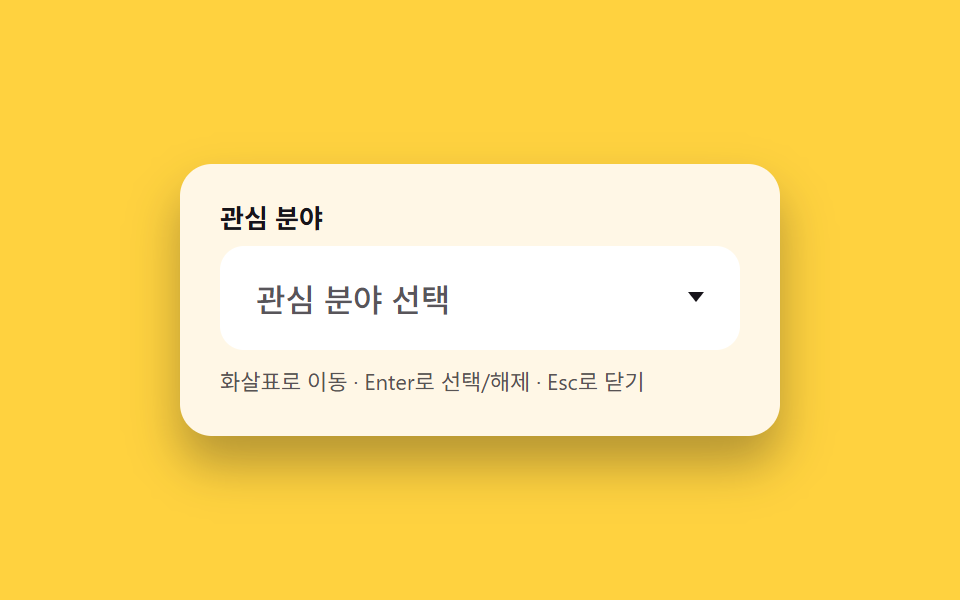
입력창을 누르면 체크 가능한 목록이 열리고, 고른 항목마다 칩이 입력창 안에 쌓입니다.
쓰임관심 분야 다중 선택, 배송 옵션 여러 개 고르기
체크박스 목록선택 칩 표시키보드로 토글
<main class="stage">
  <div class="multi is-demo" id="wrap">
    <span class="multi__label" id="multi-label">관심 분야</span>
    <button type="button" class="multi__trigger" id="trigger"
            aria-haspopup="listbox" aria-expanded="false" aria-controls="multi-listbox"
            aria-labelledby="multi-label trigger" aria-describedby="multi-hint">
      <span class="multi__chips" id="chips">
        <span class="multi__placeholder" id="placeholder">관심 분야 선택</span>
      </span>
      <span class="multi__chevron" aria-hidden="true"></span>
    </button>
    <ul class="multi__listbox" id="multi-listbox" role="listbox" aria-multiselectable="true" aria-label="관심 분야 목록" tabindex="-1" hidden>
      <li role="option" id="multi-opt-0" class="multi__option" data-value="design" data-label="디자인" aria-selected="false">
        <span class="multi__check" aria-hidden="true"></span> 디자인
      </li>
      <li role="option" id="multi-opt-1" class="multi__option" data-value="dev" data-label="개발" aria-selected="false">
        <span class="multi__check" aria-hidden="true"></span> 개발
      </li>
      <li role="option" id="multi-opt-2" class="multi__option" data-value="marketing" data-label="마케팅" aria-selected="false">
        <span class="multi__check" aria-hidden="true"></span> 마케팅
      </li>
      <li role="option" id="multi-opt-3" class="multi__option" data-value="planning" data-label="기획" aria-selected="false">
        <span class="multi__check" aria-hidden="true"></span> 기획
      </li>
    </ul>
    <p class="multi__hint" id="multi-hint">화살표로 이동 · Enter로 선택/해제 · Esc로 닫기</p>
  </div>
</main>@use "../../../../site/static/demo-tokens" as *;
// ── 변수 3개 ──────────────────────────────────────────
$duration: $dur-quick; // 목록 열림 · 칩 등장 시간
$easing: $ease-pop; // 칩이 톡 튀어나오는 느낌
$color: $subject-pink; // 밝고 귀여운 포인트 색
// ── 데모 무대 ──────────────────────────────────────────
@include stage($stage-yellow);
.multi {
box-sizing: border-box;
position: relative;
width: min(300px, 88vw);
background: $subject-cream;
border-radius: $r-card;
padding: $sp-5;
box-shadow: $shadow-raised;
&__label {
display: block;
margin: 0 0 $sp-2;
font-weight: 700;
font-size: 13px;
line-height: 1;
font-family: inherit;
color: $stage-ink;
}
&__trigger {
box-sizing: border-box;
width: 100%;
display: flex;
align-items: center;
gap: $sp-2;
border: 2px solid transparent;
border-radius: $r-control;
padding: $sp-3 $sp-4;
background: #fff;
font-family: inherit;
font-size: clamp(14px, 4vw, 16px);
color: $stage-ink;
text-align: left;
cursor: pointer;
transition: border-color $duration $easing;
&:focus-visible { outline: none; border-color: $color; }
&[aria-expanded="true"] { border-color: $color; }
}
&__chips {
display: flex;
flex-wrap: wrap;
align-items: center;
gap: $sp-1;
flex: 1 1 auto;
min-width: 0;
min-height: 20px;
}
&__placeholder {
color: rgba($stage-ink, .72);
font-weight: 500;
}
&__chip {
display: inline-flex;
align-items: center;
background: $color;
color: #fff;
border-radius: $r-pill;
padding: $sp-1 $sp-2;
font-size: 12px;
font-weight: 700;
font-family: inherit;
animation: chip-pop $duration $easing both;
}
&__chevron {
flex: 0 0 auto;
width: 0;
height: 0;
border-left: 4px solid transparent;
border-right: 4px solid transparent;
border-top: 5px solid currentColor;
transition: transform $duration $easing;
}
&__trigger[aria-expanded="true"] &__chevron { transform: rotate(180deg); }
&__listbox {
position: absolute;
top: calc(100% + #{$sp-1});
left: $sp-5;
right: $sp-5;
max-height: 200px;
overflow-y: auto;
margin: 0;
padding: $sp-1;
list-style: none;
background: #fff;
border-radius: $r-sm;
box-shadow: $shadow-raised;
z-index: 10;
transform-origin: top; // 규칙8: 트리거 아래변에서 펼침
opacity: 0;
transform: scaleY(.92) translateY(-4px);
pointer-events: none;
&.is-open {
opacity: 1;
transform: scaleY(1) translateY(0);
pointer-events: auto;
transition: opacity $duration $easing, transform $duration $easing;
}
}
&__option {
display: flex;
align-items: center;
gap: $sp-2;
padding: $sp-2 $sp-3;
border-radius: $r-xs;
font-size: 13px;
font-weight: 500;
font-family: inherit;
color: $stage-ink;
cursor: pointer;
&--active { background: rgba($color, .18); }
}
&__check {
box-sizing: border-box;
flex: 0 0 auto;
position: relative;
width: 14px;
height: 14px;
border-radius: $r-xs;
border: 2px solid rgba($stage-ink, .3);
background: #fff;
transition: background $duration $easing, border-color $duration $easing;
}
&__option[aria-selected="true"] &__check {
background: $color;
border-color: $color;
}
&__option[aria-selected="true"] &__check::after {
content: "";
position: absolute;
left: 3px;
top: -1px;
width: 4px;
height: 8px;
border-right: 2px solid #fff;
border-bottom: 2px solid #fff;
transform: rotate(40deg);
}
&__hint {
margin: $sp-2 0 0;
font-size: 11px;
line-height: 1.4;
font-family: inherit;
color: rgba($stage-ink, .72);
}
}
@keyframes chip-pop {
0% { transform: scale(.5); opacity: 0; }
70% { transform: scale(1.06); opacity: 1; }
100% { transform: scale(1); opacity: 1; }
}
@media (prefers-reduced-motion: reduce) {
.multi__listbox { transition: none !important; }
.multi__trigger, .multi__chevron, .multi__check { transition: none; }
.multi__chip { animation: none; }
}html, body {
margin: 0;
overflow: hidden;
}
.stage {
box-sizing: border-box;
min-height: 100vh;
display: grid;
place-items: center;
margin: 0;
background: #ffd23f;
font-family: -apple-system, "Segoe UI", "Noto Sans KR", sans-serif;
padding: clamp(8px, 4vw, 24px);
}
.multi {
box-sizing: border-box;
position: relative;
width: min(300px, 88vw);
background: #fff7e6;
border-radius: 16px;
padding: 20px;
box-shadow: 0 14px 24px rgba(23, 20, 26, 0.32);
}
.multi__label {
display: block;
margin: 0 0 8px;
font-weight: 700;
font-size: 13px;
line-height: 1;
font-family: inherit;
color: #17141a;
}
.multi__trigger {
box-sizing: border-box;
width: 100%;
display: flex;
align-items: center;
gap: 8px;
border: 2px solid transparent;
border-radius: 12px;
padding: 12px 16px;
background: #fff;
font-family: inherit;
font-size: clamp(14px, 4vw, 16px);
color: #17141a;
text-align: left;
cursor: pointer;
transition: border-color 220ms cubic-bezier(0.2, 1.4, 0.4, 1);
}
.multi__trigger:focus-visible {
outline: none;
border-color: #ff9ebb;
}
.multi__trigger[aria-expanded=true] {
border-color: #ff9ebb;
}
.multi__chips {
display: flex;
flex-wrap: wrap;
align-items: center;
gap: 4px;
flex: 1 1 auto;
min-width: 0;
min-height: 20px;
}
.multi__placeholder {
color: rgba(23, 20, 26, 0.72);
font-weight: 500;
}
.multi__chip {
display: inline-flex;
align-items: center;
background: #ff9ebb;
color: #fff;
border-radius: 999px;
padding: 4px 8px;
font-size: 12px;
font-weight: 700;
font-family: inherit;
animation: chip-pop 220ms cubic-bezier(0.2, 1.4, 0.4, 1) both;
}
.multi__chevron {
flex: 0 0 auto;
width: 0;
height: 0;
border-left: 4px solid transparent;
border-right: 4px solid transparent;
border-top: 5px solid currentColor;
transition: transform 220ms cubic-bezier(0.2, 1.4, 0.4, 1);
}
.multi__trigger[aria-expanded=true] .multi__chevron {
transform: rotate(180deg);
}
.multi__listbox {
position: absolute;
top: calc(100% + 4px);
left: 20px;
right: 20px;
max-height: 200px;
overflow-y: auto;
margin: 0;
padding: 4px;
list-style: none;
background: #fff;
border-radius: 8px;
box-shadow: 0 14px 24px rgba(23, 20, 26, 0.32);
z-index: 10;
transform-origin: top;
opacity: 0;
transform: scaleY(0.92) translateY(-4px);
pointer-events: none;
}
.multi__listbox.is-open {
opacity: 1;
transform: scaleY(1) translateY(0);
pointer-events: auto;
transition: opacity 220ms cubic-bezier(0.2, 1.4, 0.4, 1), transform 220ms cubic-bezier(0.2, 1.4, 0.4, 1);
}
.multi__option {
display: flex;
align-items: center;
gap: 8px;
padding: 8px 12px;
border-radius: 4px;
font-size: 13px;
font-weight: 500;
font-family: inherit;
color: #17141a;
cursor: pointer;
}
.multi__option--active {
background: rgba(255, 158, 187, 0.18);
}
.multi__check {
box-sizing: border-box;
flex: 0 0 auto;
position: relative;
width: 14px;
height: 14px;
border-radius: 4px;
border: 2px solid rgba(23, 20, 26, 0.3);
background: #fff;
transition: background 220ms cubic-bezier(0.2, 1.4, 0.4, 1), border-color 220ms cubic-bezier(0.2, 1.4, 0.4, 1);
}
.multi__option[aria-selected=true] .multi__check {
background: #ff9ebb;
border-color: #ff9ebb;
}
.multi__option[aria-selected=true] .multi__check::after {
content: "";
position: absolute;
left: 3px;
top: -1px;
width: 4px;
height: 8px;
border-right: 2px solid #fff;
border-bottom: 2px solid #fff;
transform: rotate(40deg);
}
.multi__hint {
margin: 8px 0 0;
font-size: 11px;
line-height: 1.4;
font-family: inherit;
color: rgba(23, 20, 26, 0.72);
}
@keyframes chip-pop {
0% {
transform: scale(0.5);
opacity: 0;
}
70% {
transform: scale(1.06);
opacity: 1;
}
100% {
transform: scale(1);
opacity: 1;
}
}
@media (prefers-reduced-motion: reduce) {
.multi__listbox {
transition: none !important;
}
.multi__trigger, .multi__chevron, .multi__check {
transition: none;
}
.multi__chip {
animation: none;
}
}(function () {
var wrap = document.getElementById('wrap');
var trigger = document.getElementById('trigger');
var listbox = document.getElementById('multi-listbox');
var chips = document.getElementById('chips');
var placeholder = document.getElementById('placeholder');
var options = Array.prototype.slice.call(listbox.querySelectorAll('.multi__option'));
var selected = []; // data-value 배열, 옵션 순서 유지
var active = 0;
var open = false;
var hideTimer = null;
function highlight(i) {
active = i;
options.forEach(function (o, idx) { o.classList.toggle('multi__option--active', idx === i); });
trigger.setAttribute('aria-activedescendant', options[i].id);
}
function openListbox() {
if (open) return;
open = true;
clearTimeout(hideTimer);
listbox.hidden = false;
void listbox.offsetWidth;
listbox.classList.add('is-open');
trigger.setAttribute('aria-expanded', 'true');
highlight(active);
}
function closeListbox(returnFocus) {
if (!open) return;
open = false;
listbox.classList.remove('is-open');
trigger.setAttribute('aria-expanded', 'false');
trigger.removeAttribute('aria-activedescendant');
options.forEach(function (o) { o.classList.remove('multi__option--active'); });
hideTimer = setTimeout(function () { if (!open) listbox.hidden = true; }, 220);
if (returnFocus) trigger.focus({ preventScroll: true });
}
function renderChips() {
chips.innerHTML = '';
if (!selected.length) {
chips.appendChild(placeholder);
return;
}
options.forEach(function (o) {
if (selected.indexOf(o.dataset.value) === -1) return;
var chip = document.createElement('span');
chip.className = 'multi__chip';
chip.textContent = o.dataset.label;
chips.appendChild(chip);
});
}
function toggleOption(i) {
var o = options[i];
var isSel = o.getAttribute('aria-selected') === 'true';
o.setAttribute('aria-selected', String(!isSel));
if (isSel) selected = selected.filter(function (v) { return v !== o.dataset.value; });
else selected.push(o.dataset.value);
renderChips();
}
trigger.addEventListener('click', function () {
if (open) closeListbox(true); else openListbox();
});
trigger.addEventListener('keydown', function (e) {
if (!open) {
if (e.key === 'ArrowDown' || e.key === 'ArrowUp' || e.key === 'Enter' || e.key === ' ') {
e.preventDefault();
openListbox();
}
return;
}
if (e.key === 'ArrowDown') { e.preventDefault(); highlight((active + 1) % options.length); }
else if (e.key === 'ArrowUp') { e.preventDefault(); highlight((active - 1 + options.length) % options.length); }
else if (e.key === 'Enter' || e.key === ' ') { e.preventDefault(); toggleOption(active); }
else if (e.key === 'Escape') { e.preventDefault(); closeListbox(true); }
else if (e.key === 'Tab') { closeListbox(false); }
});
options.forEach(function (o, idx) {
o.addEventListener('click', function () { highlight(idx); toggleOption(idx); });
o.addEventListener('pointerenter', function () { highlight(idx); });
});
document.addEventListener('pointerdown', function (e) {
if (open && !wrap.contains(e.target)) closeListbox(false);
});
renderChips();
// ── 실사용자가 손대면 데모를 영구 정지 ──
wrap.addEventListener('pointerdown', stopDemo, true);
wrap.addEventListener('keydown', stopDemo, true);
function stopDemo() {
if (!wrap.classList.contains('is-demo')) return;
wrap.classList.remove('is-demo');
clearTimeout(demoTimer);
}
// ── 자동 데모 루프: 실제 openListbox·toggleOption·closeListbox 경로를 그대로 돈다 ──
var demoTimer = null;
function demoLoop() {
var steps = [
[function () { openListbox(); }, 500],
[function () { highlight(0); toggleOption(0); }, 550],
[function () { highlight(1); toggleOption(1); }, 900],
[function () { highlight(0); toggleOption(0); }, 300],
[function () { highlight(1); toggleOption(1); }, 300],
[function () { closeListbox(false); }, 500]
];
var i = 0;
function next() {
if (!wrap.classList.contains('is-demo')) return;
if (i >= steps.length) { demoTimer = setTimeout(demoLoop, 300); return; }
var s = steps[i++];
s[0]();
demoTimer = setTimeout(next, s[1]);
}
next();
}
demoTimer = setTimeout(demoLoop, 500);
})();import { useEffect, useRef, useState } from "react";
import styles from "./MultiSelectCombobox.module.scss";
type Option = { value: string; label: string };
const OPTIONS: Option[] = [
{ value: "design", label: "디자인" },
{ value: "dev", label: "개발" },
{ value: "marketing", label: "마케팅" },
{ value: "planning", label: "기획" },
];
export default function MultiSelectCombobox() {
const [open, setOpen] = useState(false);
const [active, setActive] = useState(0);
const [selected, setSelected] = useState<string[]>([]);
const wrapRef = useRef<HTMLDivElement>(null);
const triggerRef = useRef<HTMLButtonElement>(null);
const openList = () => setOpen(true);
const closeList = (returnFocus: boolean) => {
setOpen(false);
if (returnFocus) triggerRef.current?.focus({ preventScroll: true });
};
const toggleOption = (i: number) => {
const value = OPTIONS[i].value;
setSelected((prev) =>
prev.indexOf(value) > -1 ? prev.filter((v) => v !== value) : [...prev, value]
);
};
const onTriggerKeyDown = (e: any) => {
if (!open) {
if (["ArrowDown", "ArrowUp", "Enter", " "].indexOf(e.key) !== -1) {
e.preventDefault();
openList();
}
return;
}
if (e.key === "ArrowDown") {
e.preventDefault();
setActive((a) => (a + 1) % OPTIONS.length);
} else if (e.key === "ArrowUp") {
e.preventDefault();
setActive((a) => (a - 1 + OPTIONS.length) % OPTIONS.length);
} else if (e.key === "Enter" || e.key === " ") {
e.preventDefault();
toggleOption(active);
} else if (e.key === "Escape") {
e.preventDefault();
closeList(true);
}
};
useEffect(() => {
if (!open) return;
const onDocPointerDown = (e: PointerEvent) => {
if (wrapRef.current && !wrapRef.current.contains(e.target as Node)) closeList(false);
};
document.addEventListener("pointerdown", onDocPointerDown);
return () => document.removeEventListener("pointerdown", onDocPointerDown);
}, [open]);
const chips = OPTIONS.filter((o) => selected.indexOf(o.value) > -1);
return (
<div className={styles.multi} ref={wrapRef}>
<span className={styles.label} id="multi-label">관심 분야</span>
<button
ref={triggerRef}
type="button"
className={styles.trigger}
aria-haspopup="listbox"
aria-expanded={open}
aria-controls="multi-listbox"
aria-labelledby="multi-label multi-trigger"
aria-describedby="multi-hint"
id="multi-trigger"
aria-activedescendant={open ? `multi-opt-${active}` : undefined}
onClick={() => (open ? closeList(true) : openList())}
onKeyDown={onTriggerKeyDown}
>
<span className={styles.chips}>
{chips.length === 0 ? (
<span className={styles.placeholder}>관심 분야 선택</span>
) : (
chips.map((c) => (
<span key={c.value} className={styles.chip}>{c.label}</span>
))
)}
</span>
<span className={styles.chevron + (open ? " " + styles.chevronOpen : "")} aria-hidden="true" />
</button>
{open && (
<ul className={styles.listbox} id="multi-listbox" role="listbox" aria-multiselectable="true" aria-label="관심 분야 목록">
{OPTIONS.map((o, i) => {
const isSelected = selected.indexOf(o.value) > -1;
return (
<li
key={o.value}
id={`multi-opt-${i}`}
role="option"
aria-selected={isSelected}
className={styles.option + (i === active ? " " + styles.optionActive : "")}
onClick={() => {
setActive(i);
toggleOption(i);
}}
onPointerEnter={() => setActive(i)}
>
<span className={styles.check + (isSelected ? " " + styles.checkOn : "")} aria-hidden="true" />
{o.label}
</li>
);
})}
</ul>
)}
<p className={styles.hint} id="multi-hint">화살표로 이동 · Enter로 선택/해제 · Esc로 닫기</p>
</div>
);
}06 다중 선택 콤보박스 — 측정 누적면적 18.629% · 움직인 프레임 13/23GODRICH 원작 · zip 에 SCSS·React 포함 · 회원가입 폼 디자인 입력창 9가지 — 붙이면 바로 되는 코드
이 데모가 속한 글
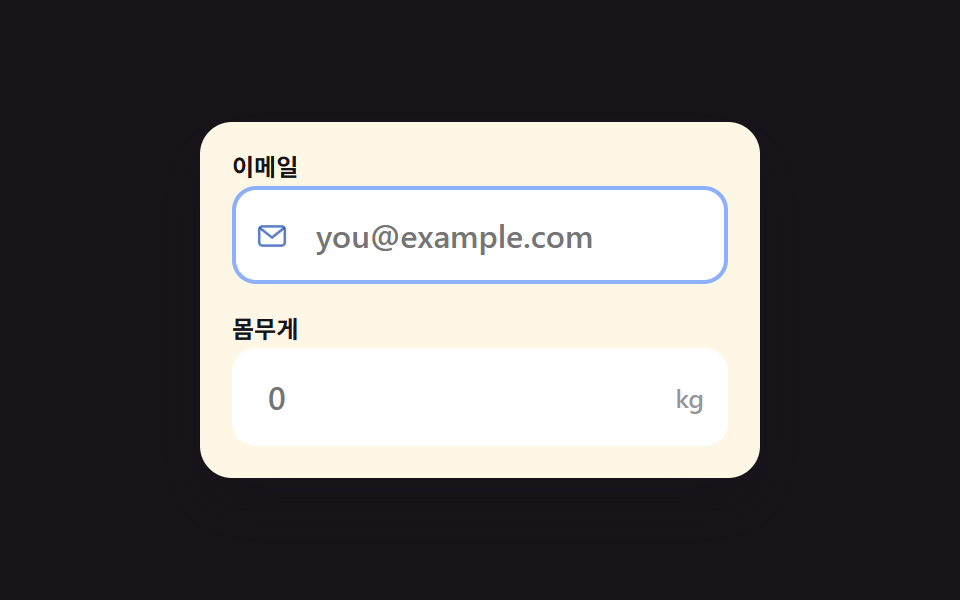 회원가입 폼 디자인 입력창 9가지 — 붙이면 바로 되는 코드회원가입 폼 디자인에서 사람이 처음으로 손대는 곳은 버튼이 아니라 입력창입니다. 여기 아홉 개는 이메일 칸부터 지우기 버튼까지 회원가입 화면에 실제로 들어가는 입력창이고, 코드를 붙이면 그대로 움직입니다. 이 글의 데모 전부 보기