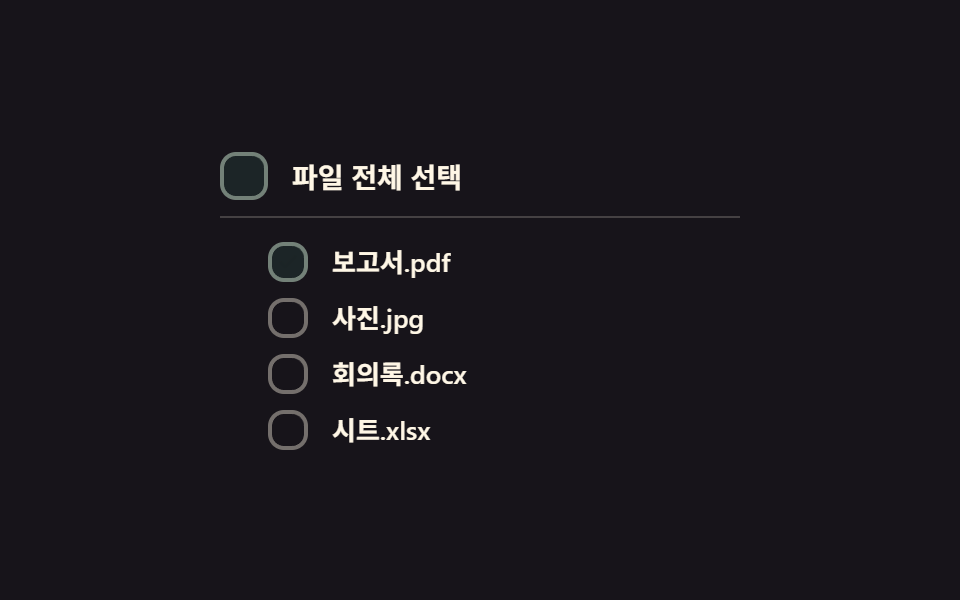
05전체선택 계단 전환 — 상위 박스의 전체선택 값이 켜지면 하위 박스들의 체크 값이 순서대로 짧은 간격을 두고 바뀌는 방식
상위 전체선택 값이 켜지는 순간 하위 박스들의 체크 값이 위에서부터 짧은 간격을 두고 차례로 바뀝니다.
쓰임전체선택 버튼이 있는 표, 일괄 처리를 앞둔 항목 목록
STAGGER_MSindeterminatetransition-delay
<main class="stage">
<div class="cba is-demo" id="cba">
  <label class="cba__row cba__row--parent">
    <input type="checkbox" class="cba__input" id="cbaParent">
    <span class="cba__box" id="cbaParentBox" aria-hidden="true">
      <svg viewBox="0 0 20 20" width="14" height="14">
        <path class="cba__check" d="M4 10.5l3.5 3.5L16 5.5" fill="none" stroke="currentColor" stroke-width="2.6" stroke-linecap="round" stroke-linejoin="round"/>
        <line class="cba__dash" x1="5" y1="10" x2="15" y2="10" stroke="currentColor" stroke-width="2.6" stroke-linecap="round"/>
      </svg>
    </span>
    <span class="cba__text">파일 전체 선택</span>
  </label>
  <div class="cba__children" id="cbaChildren">
    <label class="cba__row"><input type="checkbox" class="cba__input"><span class="cba__box" aria-hidden="true"><svg viewBox="0 0 20 20" width="12" height="12"><path d="M4 10.5l3.5 3.5L16 5.5" fill="none" stroke="currentColor" stroke-width="2.6" stroke-linecap="round" stroke-linejoin="round"/></svg></span><span class="cba__text">보고서.pdf</span></label>
    <label class="cba__row"><input type="checkbox" class="cba__input"><span class="cba__box" aria-hidden="true"><svg viewBox="0 0 20 20" width="12" height="12"><path d="M4 10.5l3.5 3.5L16 5.5" fill="none" stroke="currentColor" stroke-width="2.6" stroke-linecap="round" stroke-linejoin="round"/></svg></span><span class="cba__text">사진.jpg</span></label>
    <label class="cba__row"><input type="checkbox" class="cba__input"><span class="cba__box" aria-hidden="true"><svg viewBox="0 0 20 20" width="12" height="12"><path d="M4 10.5l3.5 3.5L16 5.5" fill="none" stroke="currentColor" stroke-width="2.6" stroke-linecap="round" stroke-linejoin="round"/></svg></span><span class="cba__text">회의록.docx</span></label>
    <label class="cba__row"><input type="checkbox" class="cba__input"><span class="cba__box" aria-hidden="true"><svg viewBox="0 0 20 20" width="12" height="12"><path d="M4 10.5l3.5 3.5L16 5.5" fill="none" stroke="currentColor" stroke-width="2.6" stroke-linecap="round" stroke-linejoin="round"/></svg></span><span class="cba__text">시트.xlsx</span></label>
  </div>
</div>
</main>
@use "../../../../site/static/demo-tokens" as *;
// 계산 겹: index.html 이 자식 박스마다 transition-delay 를 인덱스 × STAGGER_MS 로 계산해 심는다 —
// 부모 값이 바뀌는 순간 모든 자식의 checked 값은 동시에 바뀌지만, 화면의 배경색 전환은
// 그 계산된 지연만큼씩 늦게 시작해 계단처럼 보인다.
@include stage($stage-ink);
.cba {
display: grid;
gap: $sp-3;
width: 100%;
max-width: 260px;
}
.cba__row {
display: flex;
align-items: center;
gap: $sp-3;
cursor: pointer;
user-select: none;
}
.cba__row--parent {
padding-bottom: $sp-2;
border-bottom: 1px solid rgba($subject-cream, .2);
}
.cba__children {
display: grid;
gap: $sp-2;
padding-left: $sp-6;
}
.cba__input {
position: absolute;
width: 1px;
height: 1px;
opacity: 0;
pointer-events: none;
}
.cba__box {
flex: 0 0 auto;
width: 20px;
height: 20px;
border-radius: $r-sm;
border: 2px solid rgba($subject-cream, .4);
background: transparent;
color: transparent;
display: grid;
place-items: center;
box-sizing: border-box;
transition: background-color $dur-base $ease-out, border-color $dur-base $ease-out, color $dur-base $ease-out;
}
.cba__row--parent .cba__box {
width: 24px;
height: 24px;
}
.cba__check, .cba__dash {
opacity: 0;
transition: opacity $dur-quick $ease-out;
}
.cba__box--on {
background: $subject-mint;
border-color: $subject-mint;
color: $subject-ink;
.cba__check { opacity: 1; }
}
.cba__box--mixed {
border-color: $subject-mint;
.cba__dash { opacity: 1; }
}
.cba__input:focus-visible + .cba__box {
outline: 2px solid $subject-blue-light;
outline-offset: 2px;
}
.cba__text {
color: $subject-cream;
font-size: 13px;
font-weight: 600;
}
.cba__row--parent .cba__text {
font-size: 14px;
font-weight: 700;
}
@media (max-width: 340px) {
.cba__children { padding-left: $sp-4; }
.cba__text { font-size: 12px; }
}
@media (prefers-reduced-motion: reduce) {
.cba__box, .cba__check, .cba__dash { transition: none; }
}html, body {
margin: 0;
overflow: hidden;
}
.stage {
box-sizing: border-box;
min-height: 100vh;
display: grid;
place-items: center;
margin: 0;
background: #17141a;
font-family: -apple-system, "Segoe UI", "Noto Sans KR", sans-serif;
padding: clamp(8px, 4vw, 24px);
}
.cba {
display: grid;
gap: 12px;
width: 100%;
max-width: 260px;
}
.cba__row {
display: flex;
align-items: center;
gap: 12px;
cursor: pointer;
user-select: none;
}
.cba__row--parent {
padding-bottom: 8px;
border-bottom: 1px solid rgba(255, 247, 230, 0.2);
}
.cba__children {
display: grid;
gap: 8px;
padding-left: 24px;
}
.cba__input {
position: absolute;
width: 1px;
height: 1px;
opacity: 0;
pointer-events: none;
}
.cba__box {
flex: 0 0 auto;
width: 20px;
height: 20px;
border-radius: 8px;
border: 2px solid rgba(255, 247, 230, 0.4);
background: transparent;
color: transparent;
display: grid;
place-items: center;
box-sizing: border-box;
transition: background-color 300ms ease-out, border-color 300ms ease-out, color 300ms ease-out;
}
.cba__row--parent .cba__box {
width: 24px;
height: 24px;
}
.cba__check, .cba__dash {
opacity: 0;
transition: opacity 220ms ease-out;
}
.cba__box--on {
background: #4cd4a6;
border-color: #4cd4a6;
color: #17141a;
}
.cba__box--on .cba__check {
opacity: 1;
}
.cba__box--mixed {
border-color: #4cd4a6;
}
.cba__box--mixed .cba__dash {
opacity: 1;
}
.cba__input:focus-visible + .cba__box {
outline: 2px solid #5b8cf8;
outline-offset: 2px;
}
.cba__text {
color: #fff7e6;
font-size: 13px;
font-weight: 600;
}
.cba__row--parent .cba__text {
font-size: 14px;
font-weight: 700;
}
@media (max-width: 340px) {
.cba__children {
padding-left: 16px;
}
.cba__text {
font-size: 12px;
}
}
@media (prefers-reduced-motion: reduce) {
.cba__box, .cba__check, .cba__dash {
transition: none;
}
}(function () {
var STAGGER_MS = 90; // 계산 겹 상수: 하위 박스가 한 칸씩 늦게 바뀌는 간격
var CYCLE_MS = 700; // 자동 루프가 전체선택을 켜고 끄는 간격
var reduce = window.matchMedia('(prefers-reduced-motion: reduce)').matches;
var root = document.getElementById('cba');
var parent = document.getElementById('cbaParent');
var parentBox = document.getElementById('cbaParentBox');
var childrenWrap = document.getElementById('cbaChildren');
var childInputs = Array.prototype.slice.call(childrenWrap.querySelectorAll('.cba__input'));
var childBoxes = Array.prototype.slice.call(childrenWrap.querySelectorAll('.cba__box'));
var isDemo = true;
function human() {
if (isDemo) { root.classList.remove('is-demo'); isDemo = false; }
}
// 계산 겹: 각 자식 박스의 transition-delay 를 인덱스 × STAGGER_MS 로 만든다 — 값 자체는
// 동시에 바뀌지만 화면에 드러나는 시점이 계단처럼 순서를 갖는다
childBoxes.forEach(function (b, i) {
b.style.setProperty('transition-delay', (i * STAGGER_MS) + 'ms');
});
function paintParent() {
var count = childInputs.filter(function (c) { return c.checked; }).length;
var all = count === childInputs.length, none = count === 0;
parent.checked = all;
parent.indeterminate = !all && !none;
parentBox.classList.toggle('cba__box--on', all);
parentBox.classList.toggle('cba__box--mixed', !all && !none);
}
function paintChildren() {
childInputs.forEach(function (c, i) { childBoxes[i].classList.toggle('cba__box--on', c.checked); });
}
childInputs.forEach(function (c) {
c.addEventListener('change', function () { human(); paintChildren(); paintParent(); });
});
parent.addEventListener('change', function () {
human();
var next = parent.checked;
childInputs.forEach(function (c) { c.checked = next; });
paintChildren();
paintParent();
});
var cycleStart = 0;
var lastState = false;
function loop(ts) {
if (!cycleStart) cycleStart = ts;
if (isDemo) {
var step = Math.floor((ts - cycleStart) / CYCLE_MS) % 2 === 1;
if (step !== lastState) {
lastState = step;
childInputs.forEach(function (c) { c.checked = step; });
paintChildren();
paintParent();
}
}
requestAnimationFrame(loop);
}
requestAnimationFrame(loop);
})();// SelectAllCascade — vanilla 판(run/368/demo/05-custom-checkbox-select-all-cascade/index.html) 의 React 포트.
// 각 자식 박스의 transition-delay 를 인덱스 × STAGGER_MS 로 계산해 심는다 — 값 자체는 동시에
// 바뀌지만 화면에 드러나는 시점이 계단처럼 순서를 갖는다.
import { useEffect, useRef } from "react";
import styles from "./SelectAllCascade.module.scss";
type Box<T> = { current: T };
const CHILDREN = [
{ id: "child0", label: "보고서.pdf" },
{ id: "child1", label: "사진.jpg" },
{ id: "child2", label: "회의록.docx" },
{ id: "child3", label: "시트.xlsx" },
];
export default function SelectAllCascade() {
const rootRef = useRef(null) as unknown as Box<HTMLDivElement>;
const parentRef = useRef(null) as unknown as Box<HTMLInputElement>;
const parentBoxRef = useRef(null) as unknown as Box<HTMLSpanElement>;
const childRefs = useRef([null, null, null, null]) as unknown as Box<(HTMLInputElement | null)[]>;
const childBoxRefs = useRef([null, null, null, null]) as unknown as Box<(HTMLSpanElement | null)[]>;
useEffect(() => {
const STAGGER_MS = 90; // 계산 겹 상수: 하위 박스가 한 칸씩 늦게 바뀌는 간격
const CYCLE_MS = 700; // 자동 루프가 전체선택을 켜고 끄는 간격
const reduce = window.matchMedia("(prefers-reduced-motion: reduce)").matches;
const root = rootRef.current;
const parent = parentRef.current;
const parentBox = parentBoxRef.current;
const childInputs = childRefs.current;
const childBoxes = childBoxRefs.current;
if (!root || !parent || !parentBox) return;
let isDemo = true;
function human() {
if (isDemo) { root!.classList.remove(styles.isDemo); isDemo = false; }
}
// 계산 겹: 각 자식 박스의 transition-delay 를 인덱스 × STAGGER_MS 로 만든다
childBoxes.forEach((b, i) => {
if (b) b.style.setProperty("transition-delay", i * STAGGER_MS + "ms");
});
function paintChildren() {
childInputs.forEach((c, i) => { childBoxes[i]?.classList.toggle(styles.boxOn, c ? c.checked : false); });
}
function paintParent() {
const count = childInputs.filter((c) => c?.checked).length;
const all = count === childInputs.length, none = count === 0;
parent!.checked = all;
parent!.indeterminate = !all && !none;
parentBox!.classList.toggle(styles.boxOn, all);
parentBox!.classList.toggle(styles.boxMixed, !all && !none);
}
const childHandlers = childInputs.map((c) => {
const fn = () => { human(); paintChildren(); paintParent(); };
c?.addEventListener("change", fn);
return fn;
});
function onParentChange() {
human();
const next = parent!.checked;
childInputs.forEach((c) => { if (c) c.checked = next; });
paintChildren();
paintParent();
}
parent.addEventListener("change", onParentChange);
let cycleStart = 0;
let lastState = false;
let rafId = 0;
function loop(ts: number) {
if (!cycleStart) cycleStart = ts;
if (isDemo) {
const step = Math.floor((ts - cycleStart) / CYCLE_MS) % 2 === 1;
if (step !== lastState) {
lastState = step;
childInputs.forEach((c) => { if (c) c.checked = step; });
paintChildren();
paintParent();
}
}
rafId = requestAnimationFrame(loop);
}
rafId = requestAnimationFrame(loop);
return () => {
childInputs.forEach((c, i) => c?.removeEventListener("change", childHandlers[i]));
parent.removeEventListener("change", onParentChange);
cancelAnimationFrame(rafId);
};
}, []);
return (
<main className={styles.stage}>
<div className={styles.cba + " " + styles.isDemo} ref={rootRef}>
<label className={styles.cbaRow + " " + styles.cbaRowParent}>
<input type="checkbox" className={styles.cbaInput} ref={parentRef} />
<span className={styles.cbaBox} ref={parentBoxRef} aria-hidden="true">
<svg viewBox="0 0 20 20" width={14} height={14}>
<path className={styles.cbaCheck} d="M4 10.5l3.5 3.5L16 5.5" fill="none" stroke="currentColor" strokeWidth={2.6} strokeLinecap="round" strokeLinejoin="round" />
<line className={styles.cbaDash} x1={5} y1={10} x2={15} y2={10} stroke="currentColor" strokeWidth={2.6} strokeLinecap="round" />
</svg>
</span>
<span className={styles.cbaText}>파일 전체 선택</span>
</label>
<div className={styles.cbaChildren}>
{CHILDREN.map((c, i) => (
<label className={styles.cbaRow} key={c.id}>
<input
type="checkbox"
className={styles.cbaInput}
ref={(el: HTMLInputElement | null) => { childRefs.current[i] = el; }}
/>
<span
className={styles.cbaBox}
ref={(el: HTMLSpanElement | null) => { childBoxRefs.current[i] = el; }}
aria-hidden="true"
>
<svg viewBox="0 0 20 20" width={12} height={12}>
<path d="M4 10.5l3.5 3.5L16 5.5" fill="none" stroke="currentColor" strokeWidth={2.6} strokeLinecap="round" strokeLinejoin="round" />
</svg>
</span>
<span className={styles.cbaText}>{c.label}</span>
</label>
))}
</div>
</div>
</main>
);
}05 전체선택 계단 전환 — 상위 박스의 전체선택 값이 켜지면 하위 박스들의 체크 값이 순서대로 짧은 간격을 두고 바뀌는 방식 — 측정 누적면적 2.429% · 움직인 프레임 20/23GODRICH 원작 · zip 에 SCSS·React 포함 · 커스텀 체크박스 9종 — 체크 값으로 바뀌는 아홉 가지 방식
이 데모가 속한 글
 커스텀 체크박스 9종 — 체크 값으로 바뀌는 아홉 가지 방식커스텀 체크박스 아홉 종을 값 기준으로 나누면, 아홉 가지 중 하나는 체크 값이 켜지면 체크 표시의 선 길이 값이 0에서 끝까지 그려지고, 하나는 같은 값이 바뀌는 순간 박스의 크기 값이 잠깐 커졌다가 튕기듯 가라앉 이 글의 데모 전부 보기