02가로 스플리터
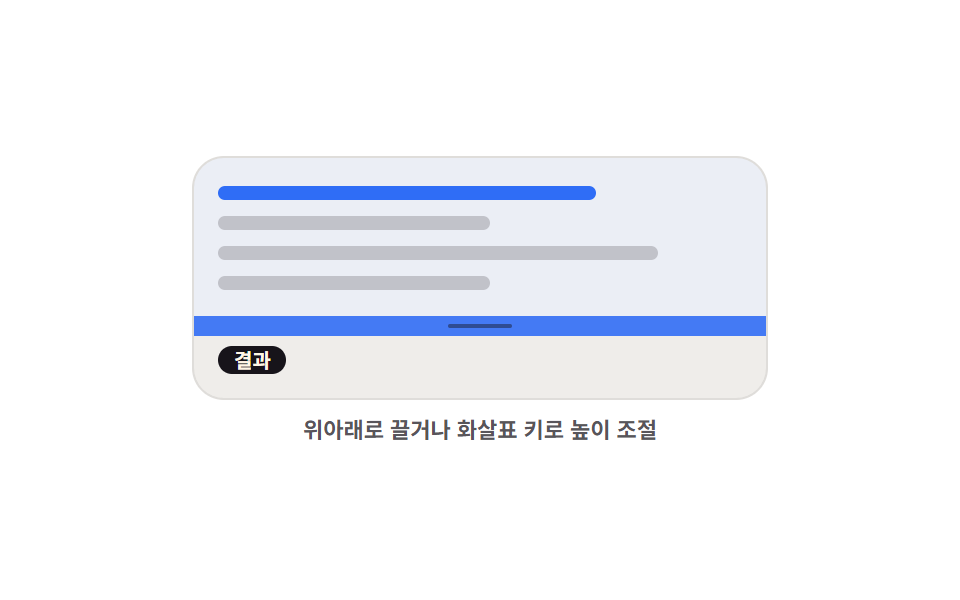
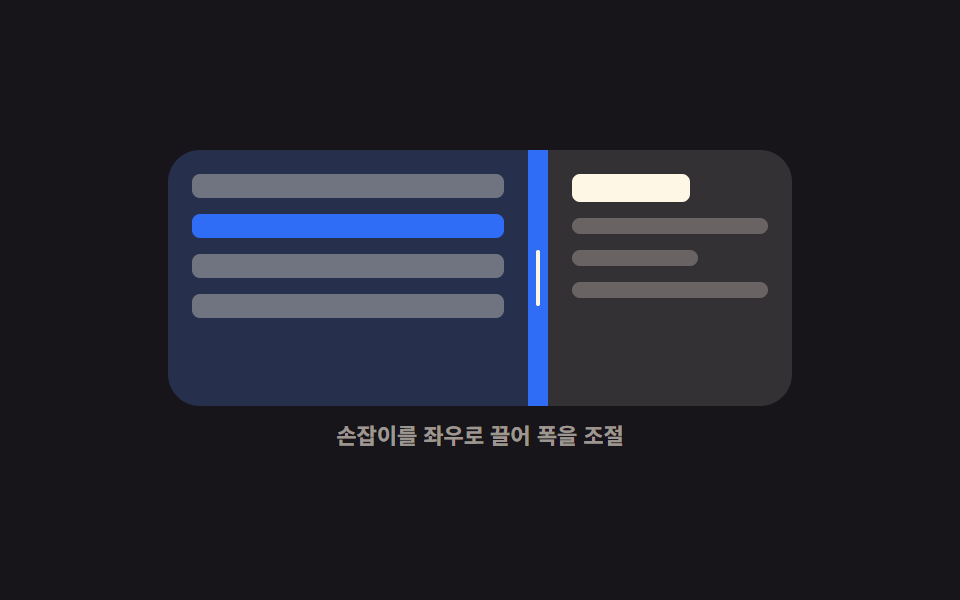
손잡이를 위아래로 끌면 위쪽 편집 영역과 아래쪽 결과 영역의 높이가 반대로 주고받으며, 위아래 화살표 키로도 같은 만큼 움직입니다.
쓰임코드와 실행 결과를 위아래로 놓는 플레이그라운드·쿼리 콘솔을 만들 때
pointermoveclamparia-orientation
<main class="stage">
  <div class="hs is-demo" id="hs-root">
    <div class="hs__box" id="hs-box">
      <section class="hs__pane hs__pane--code" aria-label="편집 영역">
        <span class="hs__tok hs__tok--a"></span>
        <span class="hs__tok hs__tok--b"></span>
        <span class="hs__tok hs__tok--c"></span>
        <span class="hs__tok hs__tok--b"></span>
      </section>
      <div class="hs__bar" id="hs-bar" role="separator" tabindex="0"
           aria-orientation="horizontal" aria-label="편집 영역 높이" aria-valuemin="20" aria-valuemax="80" aria-valuenow="50">
        <i class="hs__grip" aria-hidden="true"></i>
      </div>
      <section class="hs__pane hs__pane--out" aria-label="결과 영역">
        <span class="hs__chip">결과</span>
        <span class="hs__bars"><i></i><i></i><i></i><i></i><i></i></span>
      </section>
    </div>
    <p class="hs__cap">위아래로 끌거나 화살표 키로 높이 조절</p>
  </div>
</main>
@use "../../../../site/static/demo-tokens" as *;
$duration: $dur-quick;
$easing: $ease-spring;
$color: $subject-blue;
@include stage($stage-paper);
@property --splitY {
syntax: "<percentage>";
inherits: true;
initial-value: 50%;
}
.hs {
--splitY: 50%;
width: min(288px, 86vw);
display: flex;
flex-direction: column;
gap: $sp-2;
}
.hs__box {
display: grid;
grid-template-rows: var(--splitY) 10px 1fr;
height: clamp(112px, 40vh, 132px);
border-radius: $r-card;
overflow: hidden;
border: 1px solid rgba(23, 20, 26, .12);
background: #fbf9f5;
}
.hs__pane {
box-sizing: border-box;
display: flex;
flex-direction: column;
justify-content: center;
gap: $sp-2;
padding: $sp-2 $sp-3;
overflow: hidden;
}
.hs__pane--code { background: rgba(47, 109, 246, .08); }
.hs__pane--out {
align-items: flex-start;
justify-content: center;
background: rgba(23, 20, 26, .05);
}
.hs__tok {
flex: 0 0 auto;
height: 7px;
border-radius: $r-xs;
background: rgba(23, 20, 26, .2);
}
.hs__tok--a { width: 72%; background: $color; }
.hs__tok--b { width: 52%; }
.hs__tok--c { width: 84%; }
.hs__chip {
flex: 0 0 auto;
padding: 0 $sp-2;
border-radius: $r-pill;
background: $subject-ink;
color: $subject-cream;
font-size: 10px;
line-height: 14px;
font-weight: 700;
}
.hs__bars {
display: flex;
align-items: flex-end;
gap: $sp-1;
height: 24px;
}
.hs__bars i {
display: block;
width: 12px;
border-radius: $r-xs $r-xs 0 0;
background: $color;
}
.hs__bars i:nth-child(1) { height: 40%; }
.hs__bars i:nth-child(2) { height: 76%; }
.hs__bars i:nth-child(3) { height: 56%; }
.hs__bars i:nth-child(4) { height: 96%; background: $subject-ink; }
.hs__bars i:nth-child(5) { height: 64%; }
.hs__bar {
display: grid;
place-items: center;
background: rgba(23, 20, 26, .1);
cursor: row-resize;
touch-action: none;
transition: background $duration $easing;
}
.hs__grip {
display: block;
width: 32px;
height: 2px;
border-radius: $r-pill;
background: rgba(23, 20, 26, .45);
transition: transform $duration $easing;
}
.hs__bar:hover,
.hs.is-drag .hs__bar { background: $color; }
.hs__bar:hover .hs__grip,
.hs.is-drag .hs__grip { transform: scaleX(1.4); background: #ffffff; }
.hs__bar:focus-visible { outline: 2px solid $subject-ink; outline-offset: -2px; }
.hs__cap {
margin: 0;
font-size: 11px;
line-height: 14px;
font-weight: 600;
color: rgba(23, 20, 26, .72); // AA 4.5 (blog-design)
text-align: center;
}
// ── 자동 루프: 위 칸이 커졌다 작아졌다. 86% 에 제자리 ──
.hs.is-demo { animation: hs-split $dur-loop $easing infinite; }
@keyframes hs-split {
0%, 8% { --splitY: 50%; }
34% { --splitY: 76%; }
62% { --splitY: 24%; }
86%, 100% { --splitY: 50%; }
}
.hs.is-demo .hs__bar { animation: hs-hot $dur-loop $easing infinite; }
@keyframes hs-hot {
0%, 8% { background: rgba(23, 20, 26, .1); }
20%, 74% { background: $subject-blue; }
86%, 100% { background: rgba(23, 20, 26, .1); }
}
@media (prefers-reduced-motion: reduce) {
.hs.is-demo,
.hs.is-demo .hs__bar { animation: none !important; }
.hs__bar, .hs__grip { transition: none; }
}
@media (max-width: 340px) {
.hs__box { height: 108px; }
.hs__pane { padding: $sp-1 $sp-2; }
}html, body {
margin: 0;
overflow: hidden;
}
.stage {
box-sizing: border-box;
min-height: 100vh;
display: grid;
place-items: center;
margin: 0;
background: #ffffff;
font-family: -apple-system, "Segoe UI", "Noto Sans KR", sans-serif;
padding: clamp(8px, 4vw, 24px);
}
@property --splitY {
syntax: "<percentage>";
inherits: true;
initial-value: 50%;
}
.hs {
--splitY: 50%;
width: min(288px, 86vw);
display: flex;
flex-direction: column;
gap: 8px;
}
.hs__box {
display: grid;
grid-template-rows: var(--splitY) 10px 1fr;
height: clamp(112px, 40vh, 132px);
border-radius: 16px;
overflow: hidden;
border: 1px solid rgba(23, 20, 26, 0.12);
background: #fbf9f5;
}
.hs__pane {
box-sizing: border-box;
display: flex;
flex-direction: column;
justify-content: center;
gap: 8px;
padding: 8px 12px;
overflow: hidden;
}
.hs__pane--code {
background: rgba(47, 109, 246, 0.08);
}
.hs__pane--out {
align-items: flex-start;
justify-content: center;
background: rgba(23, 20, 26, 0.05);
}
.hs__tok {
flex: 0 0 auto;
height: 7px;
border-radius: 4px;
background: rgba(23, 20, 26, 0.2);
}
.hs__tok--a {
width: 72%;
background: #2f6df6;
}
.hs__tok--b {
width: 52%;
}
.hs__tok--c {
width: 84%;
}
.hs__chip {
flex: 0 0 auto;
padding: 0 8px;
border-radius: 999px;
background: #17141a;
color: #fff7e6;
font-size: 10px;
line-height: 14px;
font-weight: 700;
}
.hs__bars {
display: flex;
align-items: flex-end;
gap: 4px;
height: 24px;
}
.hs__bars i {
display: block;
width: 12px;
border-radius: 4px 4px 0 0;
background: #2f6df6;
}
.hs__bars i:nth-child(1) {
height: 40%;
}
.hs__bars i:nth-child(2) {
height: 76%;
}
.hs__bars i:nth-child(3) {
height: 56%;
}
.hs__bars i:nth-child(4) {
height: 96%;
background: #17141a;
}
.hs__bars i:nth-child(5) {
height: 64%;
}
.hs__bar {
display: grid;
place-items: center;
background: rgba(23, 20, 26, 0.1);
cursor: row-resize;
touch-action: none;
transition: background 220ms cubic-bezier(0.2, 0.8, 0.2, 1);
}
.hs__grip {
display: block;
width: 32px;
height: 2px;
border-radius: 999px;
background: rgba(23, 20, 26, 0.45);
transition: transform 220ms cubic-bezier(0.2, 0.8, 0.2, 1);
}
.hs__bar:hover,
.hs.is-drag .hs__bar {
background: #2f6df6;
}
.hs__bar:hover .hs__grip,
.hs.is-drag .hs__grip {
transform: scaleX(1.4);
background: #ffffff;
}
.hs__bar:focus-visible {
outline: 2px solid #17141a;
outline-offset: -2px;
}
.hs__cap {
margin: 0;
font-size: 11px;
line-height: 14px;
font-weight: 600;
color: rgba(23, 20, 26, 0.72);
text-align: center;
}
.hs.is-demo {
animation: hs-split 2s cubic-bezier(0.2, 0.8, 0.2, 1) infinite;
}
@keyframes hs-split {
0%, 8% {
--splitY: 50%;
}
34% {
--splitY: 76%;
}
62% {
--splitY: 24%;
}
86%, 100% {
--splitY: 50%;
}
}
.hs.is-demo .hs__bar {
animation: hs-hot 2s cubic-bezier(0.2, 0.8, 0.2, 1) infinite;
}
@keyframes hs-hot {
0%, 8% {
background: rgba(23, 20, 26, 0.1);
}
20%, 74% {
background: #2f6df6;
}
86%, 100% {
background: rgba(23, 20, 26, 0.1);
}
}
@media (prefers-reduced-motion: reduce) {
.hs.is-demo,
.hs.is-demo .hs__bar {
animation: none !important;
}
.hs__bar, .hs__grip {
transition: none;
}
}
@media (max-width: 340px) {
.hs__box {
height: 108px;
}
.hs__pane {
padding: 4px 8px;
}
}// 실제 동작: 포인터 Y 델타 → 위 트랙 높이(--splitY). 최소 40px 을 clamp 로 지킨다.
var root = document.getElementById('hs-root');
var box = document.getElementById('hs-box');
var bar = document.getElementById('hs-bar');
var MIN = 40, BAR = 10, dragging = false;
function clamp(v, lo, hi) { return Math.max(lo, Math.min(v, hi)); }
function set(pct) {
var h = box.clientHeight;
var v = clamp(pct, MIN / h * 100, (h - MIN - BAR) / h * 100);
root.style.setProperty('--splitY', v.toFixed(1) + '%');
bar.setAttribute('aria-valuenow', String(Math.round(v)));
}
function stop() { root.classList.remove('is-demo'); }
bar.addEventListener('pointerdown', function (e) {
stop();
dragging = true;
bar.setPointerCapture(e.pointerId);
root.classList.add('is-drag');
e.preventDefault();
});
bar.addEventListener('pointermove', function (e) {
if (!dragging) return;
set((e.clientY - box.getBoundingClientRect().top) / box.clientHeight * 100);
});
function drop() { dragging = false; root.classList.remove('is-drag'); }
bar.addEventListener('pointerup', drop);
bar.addEventListener('pointercancel', drop);
bar.addEventListener('keydown', function (e) {
var d = e.key === 'ArrowUp' ? -5 : e.key === 'ArrowDown' ? 5 : 0;
if (!d) return;
stop();
set(Number(bar.getAttribute('aria-valuenow')) + d);
bar.focus({ preventScroll: true });
e.preventDefault();
});import { useRef, useState } from "react";
import type { CSSProperties } from "react";
import styles from "./HorizontalSplitter.module.scss";
export type HorizontalSplitterProps = {
start?: number;
minHeight?: number;
duration?: number;
easing?: string;
color?: string;
};
type PEvt = { clientY: number; pointerId: number; preventDefault(): void; currentTarget: { setPointerCapture(id: number): void } };
type KeyEvt = { key: string; preventDefault(): void };
type Vars = CSSProperties & { "--splitY"?: string; "--duration"?: string; "--easing"?: string; "--color"?: string };
const BAR = 10;
function clamp(v: number, lo: number, hi: number): number { return Math.max(lo, Math.min(v, hi)); }
export default function HorizontalSplitter({
start = 50,
minHeight = 40,
duration = 220,
easing = "cubic-bezier(.2,.8,.2,1)",
color = "#2f6df6",
}: HorizontalSplitterProps) {
const [split, setSplit] = useState(start);
const [drag, setDrag] = useState(false);
const boxRef = useRef<HTMLDivElement>(null);
function set(pct: number): void {
const box = boxRef.current;
if (!box) return;
const h = box.clientHeight;
setSplit(clamp(pct, (minHeight / h) * 100, ((h - minHeight - BAR) / h) * 100));
}
function onDown(e: PEvt): void {
setDrag(true);
e.currentTarget.setPointerCapture(e.pointerId);
e.preventDefault();
}
function onMove(e: PEvt): void {
const box = boxRef.current;
if (!drag || !box) return;
set(((e.clientY - box.getBoundingClientRect().top) / box.clientHeight) * 100);
}
function onUp(): void { setDrag(false); }
function onKey(e: KeyEvt): void {
const d = e.key === "ArrowUp" ? -5 : e.key === "ArrowDown" ? 5 : 0;
if (!d) return;
set(split + d);
e.preventDefault();
}
const vars: Vars = {
"--splitY": `${split.toFixed(1)}%`,
"--duration": `${duration}ms`,
"--easing": easing,
"--color": color,
};
return (
<div className={drag ? `${styles.hs} ${styles.isDrag}` : styles.hs} style={vars}>
<div className={styles.box} ref={boxRef}>
<section className={`${styles.pane} ${styles.paneCode}`} aria-label="Editor area">
<span className={`${styles.tok} ${styles.tokA}`} />
<span className={`${styles.tok} ${styles.tokB}`} />
<span className={`${styles.tok} ${styles.tokC}`} />
<span className={`${styles.tok} ${styles.tokB}`} />
</section>
<div
className={styles.bar}
role="separator"
tabIndex={0}
aria-orientation="horizontal"
aria-label="Editor area height"
aria-valuemin={20}
aria-valuemax={80}
aria-valuenow={Math.round(split)}
onPointerDown={onDown}
onPointerMove={onMove}
onPointerUp={onUp}
onPointerCancel={onUp}
onKeyDown={onKey}
>
<i className={styles.grip} aria-hidden="true" />
</div>
<section className={`${styles.pane} ${styles.paneOut}`} aria-label="Result area">
<span className={styles.chip}>Result</span>
<span className={styles.bars}>
<i /><i /><i /><i /><i />
</span>
</section>
</div>
<p className={styles.cap}>Drag up and down, or use the arrow keys</p>
</div>
);
}02 가로 스플리터 — 측정 누적면적 17.602% · 움직인 프레임 18/23GODRICH 원작 · zip 에 SCSS·React 포함 · CSS 화면 분할 패널 9종 — 드래그로 폭이 따라오는
이 데모가 속한 글
 CSS 화면 분할 패널 9종 — 드래그로 폭이 따라오는css 화면 분할은 한 화면을 두세 칸으로 나누고 그 경계선을 잡아 끌어 각 칸의 크기를 바꾸는 배치 방식입니다. 아홉 개 중 여덟은 경계선 하나만 옮겨도 옆 칸이 같이 줄고, 하나는 상자가 좁아지는 순간 좌우가 위 이 글의 데모 전부 보기