07경로 지도 따라가기
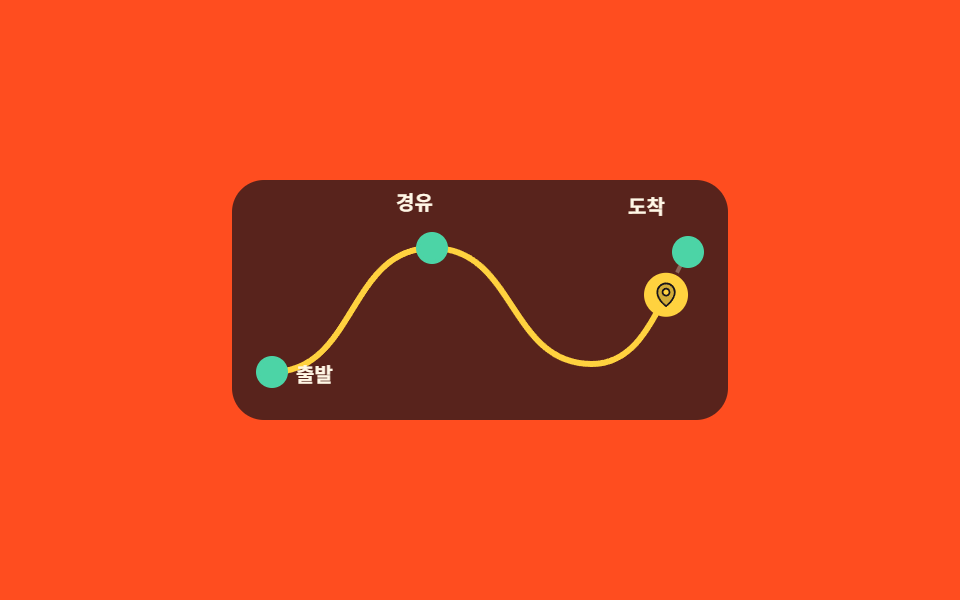
지도에 흐리게 깔린 점선 위로 진한 선이 출발지부터 그어지고 같은 곡선을 표식이 따라 달리며, 지나친 지점만 불이 켜집니다.
쓰임여행 일정·배송 추적·회사 연혁처럼 '어디를 거쳐 왔는가'를 순서대로 보여주는 구간
stroke-dashoffsetoffset-pathoffset-distance
<main class="stage">
  <div class="rm is-demo">
    <div class="rm__scroller">
      <div class="rm__pad">
        <div class="rm__pin">
          <div class="rm__map">
            <svg class="rm__svg" viewBox="0 0 248 120" width="248" height="120" aria-hidden="true">
              <path class="rm__guide" d="M20 96C62 96 58 34 100 34C142 34 138 92 180 92C206 92 214 60 228 36" pathLength="100"/>
              <path class="rm__line" d="M20 96C62 96 58 34 100 34C142 34 138 92 180 92C206 92 214 60 228 36" pathLength="100"/>
            </svg>
            <span class="rm__stop rm__stop--1"></span>
            <span class="rm__stop rm__stop--2"></span>
            <span class="rm__stop rm__stop--3"></span>
            <span class="rm__mark">
              <svg viewBox="0 0 256 256" width="14" height="14" aria-hidden="true"><g fill="currentColor"><path d="M128 24a80 80 0 0 0-80 80c0 72 80 128 80 128s80-56 80-128a80 80 0 0 0-80-80m0 112a32 32 0 1 1 32-32a32 32 0 0 1-32 32" opacity=".2"/><path d="M128 64a40 40 0 1 0 40 40a40 40 0 0 0-40-40m0 64a24 24 0 1 1 24-24a24 24 0 0 1-24 24m0-112a88.1 88.1 0 0 0-88 88c0 31.4 14.51 64.68 42 96.25a254.2 254.2 0 0 0 41.45 38.3a8 8 0 0 0 9.18 0a254.2 254.2 0 0 0 41.37-38.3c27.45-31.57 42-64.85 42-96.25a88.1 88.1 0 0 0-88-88m0 206c-16.53-13-72-60.75-72-118a72 72 0 0 1 144 0c0 57.23-55.47 105-72 118"/></g></svg>
            </span>
            <span class="rm__name rm__name--1">출발</span>
            <span class="rm__name rm__name--2">경유</span>
            <span class="rm__name rm__name--3">도착</span>
          </div>
        </div>
      </div>
    </div>
  </div>
</main>@use "../../../../site/static/demo-tokens" as *;
// ── 변수 3개 ──────────────────────────────────────────
$duration: 1s; // alternate 라 한 바퀴는 2s
$easing: linear;
$color: $subject-cream;
$route: "M20 96C62 96 58 34 100 34C142 34 138 92 180 92C206 92 214 60 228 36";
@include stage($stage-orange);
.rm {
--h: clamp(148px, 58vh, 176px);
width: min(340px, 92vw);
}
.rm__scroller {
height: var(--h);
overflow-y: auto;
scrollbar-width: none;
&::-webkit-scrollbar { display: none; }
}
// ⚠ 여기는 padding-bottom 이 아니라 height 다. sticky 가 붙어 있을 수 있는 범위는 부모의
// **콘텐츠 박스**라, padding 으로만 늘린 자리는 안 쳐준다 — 창이 곧바로 위로 흘러나간다 (실측)
.rm__pad { height: calc(var(--h) * 2.2); }
.rm__pin {
position: sticky;
top: 0;
display: grid;
place-items: center;
height: var(--h);
}
.rm__map {
position: relative;
width: 248px;
height: 120px;
border-radius: $r-card;
background: rgba(23, 20, 26, .72);
}
.rm__svg { position: absolute; top: 0; left: 0; }
.rm__guide {
fill: none;
stroke: rgba(255, 247, 230, .3);
stroke-width: 2;
stroke-dasharray: 3 3;
}
// ── 실제 동작 ① 경로가 그어진다.
// pathLength="100" 을 박아 두면 길이를 몰라도 dashoffset 을 100 → 0 으로 쓸 수 있다 ──
.rm__line {
fill: none;
stroke: $stage-yellow;
stroke-width: 3;
stroke-linecap: round;
stroke-dasharray: 100;
stroke-dashoffset: 100;
animation-name: rm-draw;
animation-duration: 1s;
animation-timing-function: $easing;
animation-fill-mode: both;
animation-timeline: scroll(nearest block);
}
@keyframes rm-draw {
from { stroke-dashoffset: 100; }
to { stroke-dashoffset: 0; }
}
// ── 실제 동작 ② 표식은 같은 곡선 위를 달린다.
// offset-path 가 경로를 받고 offset-distance 가 그 위의 위치다 ──
.rm__mark {
position: absolute;
top: 0;
left: 0;
display: grid;
place-items: center;
width: 22px;
height: 22px;
border-radius: 50%;
background: $stage-yellow;
color: $subject-ink;
offset-path: path($route);
offset-distance: 0%;
offset-rotate: 0deg;
animation-name: rm-run;
animation-duration: 1s;
animation-timing-function: $easing;
animation-fill-mode: both;
animation-timeline: scroll(nearest block);
}
@keyframes rm-run {
from { offset-distance: 0%; }
to { offset-distance: 100%; }
}
// 지나친 지점만 불이 켜진다 — 구간을 어긋나게 줘서 순서대로 들어온다
.rm__stop {
position: absolute;
width: 12px;
height: 12px;
border: 2px solid rgba(255, 247, 230, .5);
border-radius: 50%;
background: rgba(23, 20, 26, .9);
animation-name: rm-lit;
animation-duration: 1s;
animation-timing-function: $easing;
animation-fill-mode: both;
animation-timeline: scroll(nearest block);
}
.rm__stop--1 { left: 12px; top: 88px; animation-range: 0% 12%; }
.rm__stop--2 { left: 92px; top: 26px; animation-range: 34% 46%; }
.rm__stop--3 { left: 220px; top: 28px; animation-range: 84% 96%; }
@keyframes rm-lit {
from { border-color: rgba(255, 247, 230, .5); background: rgba(23, 20, 26, .9); }
to { border-color: $subject-mint; background: $subject-mint; }
}
.rm__name {
position: absolute;
color: $color;
font-size: 10px;
line-height: 14px;
font-weight: 700;
}
.rm__name--1 { left: 32px; top: 90px; }
.rm__name--2 { left: 82px; top: 4px; }
.rm__name--3 { left: 198px; top: 6px; }
// ── 격자 미리보기 루프 — 같은 진행을 시간으로 돌렸다 되감는다 ──
.rm.is-demo .rm__line,
.rm.is-demo .rm__mark,
.rm.is-demo .rm__stop {
animation-duration: $duration;
animation-direction: alternate;
animation-iteration-count: infinite;
animation-timeline: auto;
}
// 미리보기에서는 구간 대신 키프레임 자리로 순서를 준다 — 시차를 delay 로 주면
// 2초 캡처 구간과 주기가 어긋나 gif 가 이어지지 않는다
.rm.is-demo .rm__stop--1 { animation-name: rm-lit-a; }
.rm.is-demo .rm__stop--2 { animation-name: rm-lit-b; }
.rm.is-demo .rm__stop--3 { animation-name: rm-lit-c; }
@keyframes rm-lit-a {
0%, 8% { border-color: rgba(255, 247, 230, .5); background: rgba(23, 20, 26, .9); }
12%, 100% { border-color: $subject-mint; background: $subject-mint; }
}
@keyframes rm-lit-b {
0%, 36% { border-color: rgba(255, 247, 230, .5); background: rgba(23, 20, 26, .9); }
42%, 100% { border-color: $subject-mint; background: $subject-mint; }
}
@keyframes rm-lit-c {
0%, 84% { border-color: rgba(255, 247, 230, .5); background: rgba(23, 20, 26, .9); }
90%, 100% { border-color: $subject-mint; background: $subject-mint; }
}
@media (prefers-reduced-motion: reduce) {
.rm__line { animation: none !important; stroke-dashoffset: 0; }
.rm__mark { animation: none !important; offset-distance: 100%; }
.rm__stop { animation: none !important; border-color: $subject-mint; background: $subject-mint; }
}html, body {
margin: 0;
overflow: hidden;
}
.stage {
box-sizing: border-box;
min-height: 100vh;
display: grid;
place-items: center;
margin: 0;
background: #ff4d1f;
font-family: -apple-system, "Segoe UI", "Noto Sans KR", sans-serif;
padding: clamp(8px, 4vw, 24px);
}
.rm {
--h: clamp(148px, 58vh, 176px);
width: min(340px, 92vw);
}
.rm__scroller {
height: var(--h);
overflow-y: auto;
scrollbar-width: none;
}
.rm__scroller::-webkit-scrollbar {
display: none;
}
.rm__pad {
height: calc(var(--h) * 2.2);
}
.rm__pin {
position: sticky;
top: 0;
display: grid;
place-items: center;
height: var(--h);
}
.rm__map {
position: relative;
width: 248px;
height: 120px;
border-radius: 16px;
background: rgba(23, 20, 26, 0.72);
}
.rm__svg {
position: absolute;
top: 0;
left: 0;
}
.rm__guide {
fill: none;
stroke: rgba(255, 247, 230, 0.3);
stroke-width: 2;
stroke-dasharray: 3 3;
}
.rm__line {
fill: none;
stroke: #ffd23f;
stroke-width: 3;
stroke-linecap: round;
stroke-dasharray: 100;
stroke-dashoffset: 100;
animation-name: rm-draw;
animation-duration: 1s;
animation-timing-function: linear;
animation-fill-mode: both;
animation-timeline: scroll(nearest block);
}
@keyframes rm-draw {
from {
stroke-dashoffset: 100;
}
to {
stroke-dashoffset: 0;
}
}
.rm__mark {
position: absolute;
top: 0;
left: 0;
display: grid;
place-items: center;
width: 22px;
height: 22px;
border-radius: 50%;
background: #ffd23f;
color: #17141a;
offset-path: path("M20 96C62 96 58 34 100 34C142 34 138 92 180 92C206 92 214 60 228 36");
offset-distance: 0%;
offset-rotate: 0deg;
animation-name: rm-run;
animation-duration: 1s;
animation-timing-function: linear;
animation-fill-mode: both;
animation-timeline: scroll(nearest block);
}
@keyframes rm-run {
from {
offset-distance: 0%;
}
to {
offset-distance: 100%;
}
}
.rm__stop {
position: absolute;
width: 12px;
height: 12px;
border: 2px solid rgba(255, 247, 230, 0.5);
border-radius: 50%;
background: rgba(23, 20, 26, 0.9);
animation-name: rm-lit;
animation-duration: 1s;
animation-timing-function: linear;
animation-fill-mode: both;
animation-timeline: scroll(nearest block);
}
.rm__stop--1 {
left: 12px;
top: 88px;
animation-range: 0% 12%;
}
.rm__stop--2 {
left: 92px;
top: 26px;
animation-range: 34% 46%;
}
.rm__stop--3 {
left: 220px;
top: 28px;
animation-range: 84% 96%;
}
@keyframes rm-lit {
from {
border-color: rgba(255, 247, 230, 0.5);
background: rgba(23, 20, 26, 0.9);
}
to {
border-color: #4cd4a6;
background: #4cd4a6;
}
}
.rm__name {
position: absolute;
color: #fff7e6;
font-size: 10px;
line-height: 14px;
font-weight: 700;
}
.rm__name--1 {
left: 32px;
top: 90px;
}
.rm__name--2 {
left: 82px;
top: 4px;
}
.rm__name--3 {
left: 198px;
top: 6px;
}
.rm.is-demo .rm__line,
.rm.is-demo .rm__mark,
.rm.is-demo .rm__stop {
animation-duration: 1s;
animation-direction: alternate;
animation-iteration-count: infinite;
animation-timeline: auto;
}
.rm.is-demo .rm__stop--1 {
animation-name: rm-lit-a;
}
.rm.is-demo .rm__stop--2 {
animation-name: rm-lit-b;
}
.rm.is-demo .rm__stop--3 {
animation-name: rm-lit-c;
}
@keyframes rm-lit-a {
0%, 8% {
border-color: rgba(255, 247, 230, 0.5);
background: rgba(23, 20, 26, 0.9);
}
12%, 100% {
border-color: #4cd4a6;
background: #4cd4a6;
}
}
@keyframes rm-lit-b {
0%, 36% {
border-color: rgba(255, 247, 230, 0.5);
background: rgba(23, 20, 26, 0.9);
}
42%, 100% {
border-color: #4cd4a6;
background: #4cd4a6;
}
}
@keyframes rm-lit-c {
0%, 84% {
border-color: rgba(255, 247, 230, 0.5);
background: rgba(23, 20, 26, 0.9);
}
90%, 100% {
border-color: #4cd4a6;
background: #4cd4a6;
}
}
@media (prefers-reduced-motion: reduce) {
.rm__line {
animation: none !important;
stroke-dashoffset: 0;
}
.rm__mark {
animation: none !important;
offset-distance: 100%;
}
.rm__stop {
animation: none !important;
border-color: #4cd4a6;
background: #4cd4a6;
}
}// 실제 동작은 CSS 만: 선은 stroke-dashoffset, 표식은 offset-path 위의 offset-distance,
// 둘 다 animation-timeline: scroll() 이 끌고 간다.
var r = document.querySelector('.rm');
var s = r.querySelector('.rm__scroller');
function stopDemo(){ r.classList.remove('is-demo'); }
r.addEventListener('pointerdown', stopDemo);
s.addEventListener('scroll', stopDemo, { passive: true });import type { CSSProperties, ReactNode } from "react";
import styles from "./RouteMapProgress.module.scss";
export type RouteMapProgressProps = {
stops?: string[];
preview?: boolean;
duration?: number;
easing?: string;
color?: string;
};
type Vars = CSSProperties & { "--duration"?: string; "--easing"?: string; "--color"?: string };
const ROUTE = "M20 96C62 96 58 34 100 34C142 34 138 92 180 92C206 92 214 60 228 36";
const IconPin = (): ReactNode => (
<svg viewBox="0 0 256 256" width="14" height="14" aria-hidden="true"><g fill="currentColor"><path d="M128 24a80 80 0 0 0-80 80c0 72 80 128 80 128s80-56 80-128a80 80 0 0 0-80-80m0 112a32 32 0 1 1 32-32a32 32 0 0 1-32 32" opacity=".2"/><path d="M128 64a40 40 0 1 0 40 40a40 40 0 0 0-40-40m0 64a24 24 0 1 1 24-24a24 24 0 0 1-24 24m0-112a88.1 88.1 0 0 0-88 88c0 31.4 14.51 64.68 42 96.25a254.2 254.2 0 0 0 41.45 38.3a8 8 0 0 0 9.18 0a254.2 254.2 0 0 0 41.37-38.3c27.45-31.57 42-64.85 42-96.25a88.1 88.1 0 0 0-88-88m0 206c-16.53-13-72-60.75-72-118a72 72 0 0 1 144 0c0 57.23-55.47 105-72 118"/></g></svg>
);
export default function RouteMapProgress({
stops = ["Start", "Stop", "Arrive"],
preview = true,
duration = 1000,
easing = "linear",
color = "#fff7e6",
}: RouteMapProgressProps): ReactNode {
const vars: Vars = { "--duration": `${duration}ms`, "--easing": easing, "--color": color };
const cls = preview ? `${styles.rm} ${styles.isDemo}` : styles.rm;
return (
<div className={cls} style={vars}>
<div className={styles.scroller}>
<div className={styles.pad}>
<div className={styles.pin}>
<div className={styles.map}>
<svg className={styles.svg} viewBox="0 0 248 120" width="248" height="120" aria-hidden="true">
<path className={styles.guide} d={ROUTE} pathLength="100" />
<path className={styles.line} d={ROUTE} pathLength="100" />
</svg>
{stops.map((s: string, i: number): ReactNode => (
<span className={`${styles.stop} ${styles[`stop${i + 1}`]}`} key={s} />
))}
<span className={styles.mark}><IconPin /></span>
{stops.map((s: string, i: number): ReactNode => (
<span className={`${styles.name} ${styles[`name${i + 1}`]}`} key={s}>{s}</span>
))}
</div>
</div>
</div>
</div>
</div>
);
}07 경로 지도 따라가기 — 측정 누적면적 3.755% · 움직인 프레임 23/23GODRICH 원작 · zip 에 SCSS·React 포함 · 스크롤 스토리텔링 섹션 9종 — 복붙하는 CSS 장면 구성
이 데모가 속한 글
 스크롤 스토리텔링 섹션 9종 — 복붙하는 CSS 장면 구성스크롤 스토리텔링은 스크롤 위치를 시간축 삼아 한 구간 안의 장면을 차례로 바꾸는 구성입니다. 여기 아홉 개는 효과가 아니라 장면을 짜는 방식이 서로 다르고, 전부 라이브러리 없이 CSS만으로 돕니다. 이 글의 데모 전부 보기