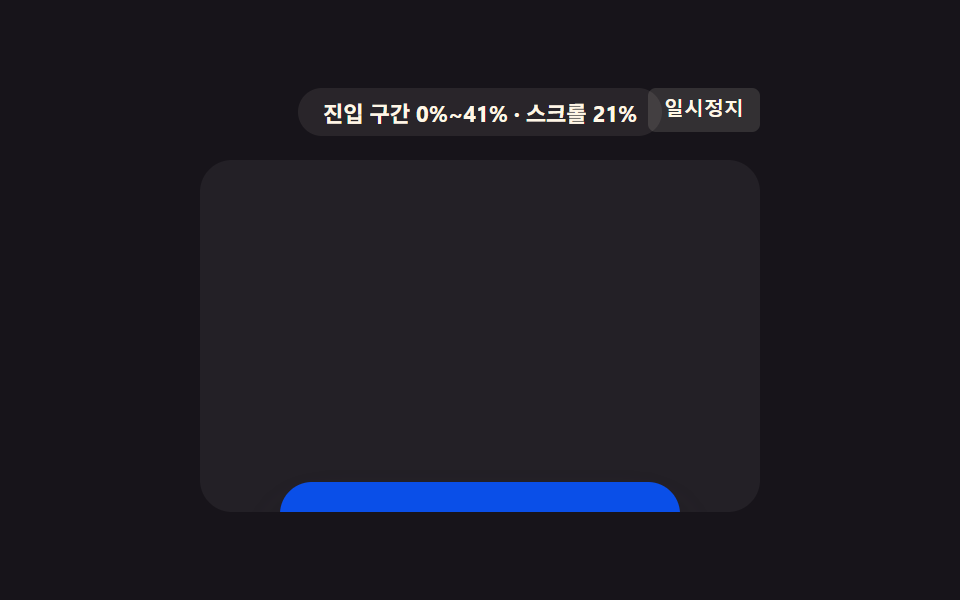
06기울기 값이 끝에서 풀리는 패널
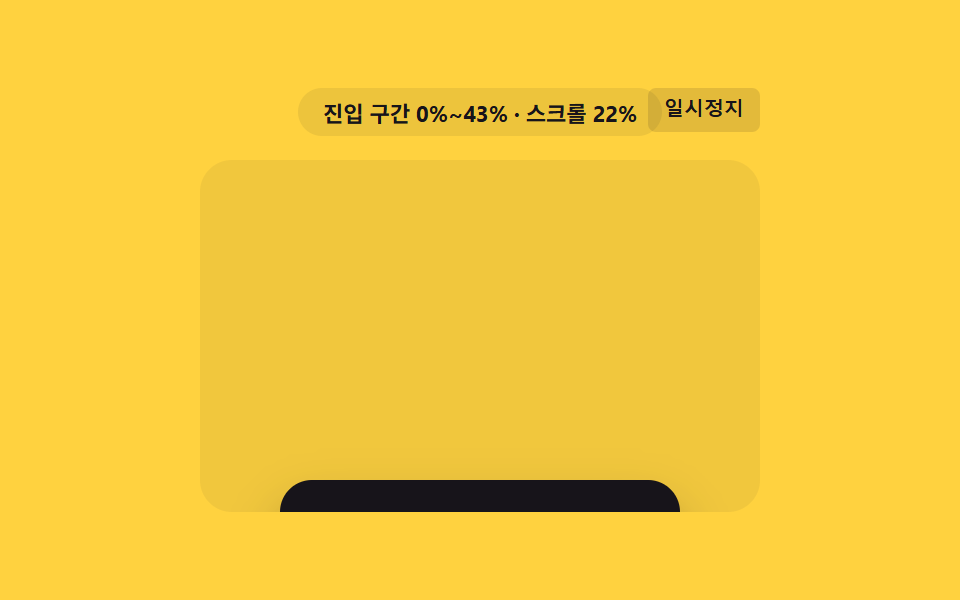
구간 값이 시작 지점에 가까울수록 패널의 기울기 값이 크게 남아 있다가, 값이 끝에 닿는 순간 기울기 값이 0으로 풀리며 반듯하게 정렬된다.
쓰임가격표 패널 기울임 정렬
skewXanimation-range: entrysspShear
<main class="stage">
<div class="ssp is-demo" id="sspRoot">
  <div class="ssp__badge" id="sspBadge">진입 구간 0%~0%</div>
  <button class="ssp__ctrl" id="sspCtrl" type="button">일시정지</button>
  <div class="ssp__view" id="sspView">
    <div class="ssp__track" id="sspTrack">
      <div class="ssp__spacer ssp__spacer--top"></div>
      <div class="ssp__panel" id="sspPanel">
        <span class="ssp__label">요금제</span>
      </div>
      <div class="ssp__spacer ssp__spacer--bottom"></div>
    </div>
  </div>
</div>
</main>
@use "../../../../site/static/demo-tokens" as *;
// 핵심: animation-timeline: view() + animation-range: entry 로 기울기 값을 진입
// 구간 값(0~1)에 직접 묶는다 — 시작 지점에 가까울수록 기울어져 있다가 구간 값이
// 끝에 닿는 순간 0으로 풀린다. 미지원 환경은 교차 비율로 같은 기울기 값을 계산한다.
$duration: $dur-loop;
$easing: linear;
$color: $subject-ink;
@include stage($stage-yellow);
.ssp {
position: relative;
width: min(100%, 280px);
display: flex;
flex-direction: column;
align-items: center;
gap: $sp-3;
}
.ssp__badge {
padding: $sp-1 $sp-3;
border-radius: $r-pill;
background: rgba(23, 20, 26, .08);
color: $subject-ink;
font-weight: 700;
font-size: 11px;
font-variant-numeric: tabular-nums;
}
.ssp__ctrl {
position: absolute;
top: 0;
right: 0;
border: 0;
border-radius: $r-xs;
padding: $sp-1 $sp-2;
background: rgba(23, 20, 26, .12);
color: $subject-ink;
font-weight: 600;
font-size: 10px;
line-height: 1.4;
cursor: pointer;
}
.ssp__ctrl:focus-visible { outline: 2px solid $subject-ink; outline-offset: 2px; }
.ssp__view {
box-sizing: border-box;
width: 100%;
height: 176px;
overflow-y: auto;
overflow-x: hidden;
border-radius: $r-card;
background: rgba(23, 20, 26, .06);
scrollbar-width: thin;
}
.ssp__track {
display: flex;
flex-direction: column;
align-items: center;
}
.ssp__spacer--top { height: 190px; flex: 0 0 auto; }
.ssp__spacer--bottom { height: 40px; flex: 0 0 auto; }
.ssp__panel {
flex: 0 0 auto;
box-sizing: border-box;
width: 200px;
height: 76px;
display: grid;
place-items: center;
border-radius: $r-card;
background: $color;
box-shadow: $shadow-raised;
transform: skewX(-18deg);
}
.ssp__label {
color: $subject-cream;
font-weight: 700;
font-size: 14px;
display: inline-block;
transform: skewX(18deg);
}
.supports-vt .ssp__panel {
animation-name: sspShear;
animation-duration: 1s;
animation-timing-function: linear;
animation-fill-mode: both;
animation-timeline: view();
animation-range: entry;
}
@keyframes sspShear {
0% { transform: skewX(-18deg); }
100% { transform: skewX(0deg); }
}
@media (max-width: 340px) {
.ssp { gap: $sp-2; }
.ssp__view { height: 130px; }
.ssp__spacer--top { height: 130px; }
.ssp__spacer--bottom { height: 26px; }
.ssp__panel { width: 168px; height: 60px; }
}
@media (prefers-reduced-motion: reduce) {
.ssp__panel { animation: none !important; transform: skewX(0deg) !important; }
}html, body {
margin: 0;
overflow: hidden;
}
.stage {
box-sizing: border-box;
min-height: 100vh;
display: grid;
place-items: center;
margin: 0;
background: #ffd23f;
font-family: -apple-system, "Segoe UI", "Noto Sans KR", sans-serif;
padding: clamp(8px, 4vw, 24px);
}
.ssp {
position: relative;
width: min(100%, 280px);
display: flex;
flex-direction: column;
align-items: center;
gap: 12px;
}
.ssp__badge {
padding: 4px 12px;
border-radius: 999px;
background: rgba(23, 20, 26, 0.08);
color: #17141a;
font-weight: 700;
font-size: 11px;
font-variant-numeric: tabular-nums;
}
.ssp__ctrl {
position: absolute;
top: 0;
right: 0;
border: 0;
border-radius: 4px;
padding: 4px 8px;
background: rgba(23, 20, 26, 0.12);
color: #17141a;
font-weight: 600;
font-size: 10px;
line-height: 1.4;
cursor: pointer;
}
.ssp__ctrl:focus-visible {
outline: 2px solid #17141a;
outline-offset: 2px;
}
.ssp__view {
box-sizing: border-box;
width: 100%;
height: 176px;
overflow-y: auto;
overflow-x: hidden;
border-radius: 16px;
background: rgba(23, 20, 26, 0.06);
scrollbar-width: thin;
}
.ssp__track {
display: flex;
flex-direction: column;
align-items: center;
}
.ssp__spacer--top {
height: 190px;
flex: 0 0 auto;
}
.ssp__spacer--bottom {
height: 40px;
flex: 0 0 auto;
}
.ssp__panel {
flex: 0 0 auto;
box-sizing: border-box;
width: 200px;
height: 76px;
display: grid;
place-items: center;
border-radius: 16px;
background: #17141a;
box-shadow: 0 14px 24px rgba(23, 20, 26, 0.32);
transform: skewX(-18deg);
}
.ssp__label {
color: #fff7e6;
font-weight: 700;
font-size: 14px;
display: inline-block;
transform: skewX(18deg);
}
.supports-vt .ssp__panel {
animation-name: sspShear;
animation-duration: 1s;
animation-timing-function: linear;
animation-fill-mode: both;
animation-timeline: view();
animation-range: entry;
}
@keyframes sspShear {
0% {
transform: skewX(-18deg);
}
100% {
transform: skewX(0deg);
}
}
@media (max-width: 340px) {
.ssp {
gap: 8px;
}
.ssp__view {
height: 130px;
}
.ssp__spacer--top {
height: 130px;
}
.ssp__spacer--bottom {
height: 26px;
}
.ssp__panel {
width: 168px;
height: 60px;
}
}
@media (prefers-reduced-motion: reduce) {
.ssp__panel {
animation: none !important;
transform: skewX(0deg) !important;
}
}(function () {
var supportsVt = CSS.supports('animation-timeline: view()');
var root = document.getElementById('sspRoot');
var view = document.getElementById('sspView');
var panel = document.getElementById('sspPanel');
var badge = document.getElementById('sspBadge');
var ctrl = document.getElementById('sspCtrl');
root.classList.add(supportsVt ? 'supports-vt' : 'no-vt');
// 계산 한 겹: 요소 높이·뷰포트 높이에서 진입 구간(시작~끝 %) 값을 구해 배지에 표시한다.
function entryRangePct() {
var elH = panel.offsetHeight;
var viewH = view.clientHeight;
return Math.round(Math.min(100, (elH / viewH) * 100));
}
var rangeEnd = entryRangePct();
var rangeText = '진입 구간 0%~' + rangeEnd + '%';
var SKEW_START = -18;
function render(ratio) {
if (!supportsVt) {
var skew = SKEW_START * (1 - ratio);
panel.style.transform = 'skewX(' + skew.toFixed(1) + 'deg)';
}
badge.textContent = rangeText + ' · 진행 ' + Math.round(ratio * 100) + '%';
}
var lastRatio = 0;
if (!supportsVt) {
var STEPS = [];
for (var s = 0; s <= 50; s += 1) { STEPS.push(s / 50); }
var io = new IntersectionObserver(function (entries) {
entries.forEach(function (entry) {
lastRatio = entry.intersectionRatio;
render(lastRatio);
});
}, { root: view, threshold: STEPS });
io.observe(panel);
} else {
badge.textContent = rangeText;
}
view.addEventListener('scroll', function () {
if (supportsVt) {
var max = view.scrollHeight - view.clientHeight;
var p = max > 0 ? Math.min(1, Math.max(0, view.scrollTop / max)) : 0;
badge.textContent = rangeText + ' · 스크롤 ' + Math.round(p * 100) + '%';
}
}, { passive: true });
var playing = true;
var frame = 0;
var PERIOD = 66;
function tick() {
if (playing) {
frame += 1;
var max = view.scrollHeight - view.clientHeight;
var t = frame % (PERIOD * 2);
var f = t < PERIOD ? (t / PERIOD) : ((PERIOD * 2 - t) / PERIOD);
view.scrollTop = f * max;
}
requestAnimationFrame(tick);
}
requestAnimationFrame(tick);
function stopAuto() {
if (root.classList.contains('is-demo')) { root.classList.remove('is-demo'); }
playing = false;
ctrl.textContent = '재생';
}
view.addEventListener('wheel', stopAuto, { passive: true });
view.addEventListener('touchstart', stopAuto, { passive: true });
ctrl.addEventListener('click', function () {
playing = !playing;
ctrl.textContent = playing ? '일시정지' : '재생';
if (playing) { root.classList.add('is-demo'); }
});
ctrl.addEventListener('keydown', function (e) {
if (e.key === 'r' || e.key === 'R') {
frame = 0;
view.scrollTop = 0;
lastRatio = 0;
render(0);
playing = true;
root.classList.add('is-demo');
ctrl.textContent = '일시정지';
}
});
window.addEventListener('resize', function () {
rangeEnd = entryRangePct();
rangeText = '진입 구간 0%~' + rangeEnd + '%';
});
var reduce = window.matchMedia('(prefers-reduced-motion: reduce)').matches;
if (reduce) {
playing = false;
root.classList.remove('is-demo');
lastRatio = 1;
render(1);
panel.style.transform = 'skewX(0deg)';
badge.textContent = rangeText + ' · 최종 상태';
}
})();import { useEffect, useRef, useState } from "react";
import styles from "./SkewShearPanel.module.scss";
// 핵심: animation-timeline: view() + animation-range: entry 로 기울기 값을 진입
// 구간 값(0~1)에 직접 묶는다 — 시작 지점에 가까울수록 기울어져 있다가 구간 값이
// 끝에 닿는 순간 0으로 풀린다. 미지원 환경은 교차 비율로 같은 기울기 값을 계산한다.
const SKEW_START = -18;
export default function SkewShearPanel() {
const rootRef = useRef<HTMLDivElement>(null);
const viewRef = useRef<HTMLDivElement>(null);
const panelRef = useRef<HTMLDivElement>(null);
const [badge, setBadge] = useState("진입 구간 0%~0%");
const [demo, setDemo] = useState(true);
const [supportsVt, setSupportsVt] = useState(false);
useEffect(() => {
const view = viewRef.current;
const panel = panelRef.current;
const root = rootRef.current;
if (!view || !panel || !root) { return; }
const vt = CSS.supports("animation-timeline: view()");
setSupportsVt(vt);
function entryRangePct() {
const elH = panel!.offsetHeight;
const viewH = view!.clientHeight;
return Math.round(Math.min(100, (elH / viewH) * 100));
}
let rangeEnd = entryRangePct();
let rangeText = "진입 구간 0%~" + rangeEnd + "%";
function render(ratio: number) {
if (!vt) {
const skew = SKEW_START * (1 - ratio);
panel!.style.transform = "skewX(" + skew.toFixed(1) + "deg)";
}
setBadge(rangeText + " · 진행 " + Math.round(ratio * 100) + "%");
}
let io: IntersectionObserver | null = null;
if (!vt) {
const STEPS: number[] = [];
for (let s = 0; s <= 50; s += 1) { STEPS.push(s / 50); }
io = new IntersectionObserver((entries) => {
entries.forEach((entry) => { render(entry.intersectionRatio); });
}, { root: view, threshold: STEPS });
io.observe(panel);
} else {
setBadge(rangeText);
}
function onScroll() {
if (vt) {
const max = view!.scrollHeight - view!.clientHeight;
const p = max > 0 ? Math.min(1, Math.max(0, view!.scrollTop / max)) : 0;
setBadge(rangeText + " · 스크롤 " + Math.round(p * 100) + "%");
}
}
view.addEventListener("scroll", onScroll, { passive: true });
let playing = true;
let frame = 0;
const PERIOD = 66;
let rafId = 0;
function tick() {
if (playing) {
frame += 1;
const max = view!.scrollHeight - view!.clientHeight;
const t = frame % (PERIOD * 2);
const f = t < PERIOD ? (t / PERIOD) : ((PERIOD * 2 - t) / PERIOD);
view!.scrollTop = f * max;
}
rafId = requestAnimationFrame(tick);
}
rafId = requestAnimationFrame(tick);
function stopAuto() {
setDemo(false);
playing = false;
}
view.addEventListener("wheel", stopAuto, { passive: true });
view.addEventListener("touchstart", stopAuto, { passive: true });
function onClick() {
playing = !playing;
setDemo(playing);
}
function onKeyDown(e: KeyboardEvent) {
if (e.key === "r" || e.key === "R") {
frame = 0;
view!.scrollTop = 0;
render(0);
playing = true;
setDemo(true);
}
}
root.addEventListener("keydown", onKeyDown);
function onResize() {
rangeEnd = entryRangePct();
rangeText = "진입 구간 0%~" + rangeEnd + "%";
}
window.addEventListener("resize", onResize);
const reduce = window.matchMedia("(prefers-reduced-motion: reduce)").matches;
if (reduce) {
playing = false;
setDemo(false);
render(1);
panel.style.transform = "skewX(0deg)";
setBadge(rangeText + " · 최종 상태");
}
const ctrl = root.querySelector("button");
ctrl?.addEventListener("click", onClick);
return () => {
cancelAnimationFrame(rafId);
io?.disconnect();
view.removeEventListener("scroll", onScroll);
view.removeEventListener("wheel", stopAuto);
view.removeEventListener("touchstart", stopAuto);
root.removeEventListener("keydown", onKeyDown);
window.removeEventListener("resize", onResize);
ctrl?.removeEventListener("click", onClick);
};
// eslint-disable-next-line react-hooks/exhaustive-deps
}, []);
return (
<main className={styles.stage}>
<div ref={rootRef} className={`${styles.ssp} ${demo ? styles["is-demo"] : ""} ${supportsVt ? styles["supports-vt"] : styles["no-vt"]}`}>
<div className={styles["ssp__badge"]}>{badge}</div>
<button className={styles["ssp__ctrl"]} type="button">{demo ? "일시정지" : "재생"}</button>
<div ref={viewRef} className={styles["ssp__view"]}>
<div className={styles["ssp__track"]}>
<div className={`${styles["ssp__spacer"]} ${styles["ssp__spacer--top"]}`} />
<div ref={panelRef} className={styles["ssp__panel"]}>
<span className={styles["ssp__label"]}>요금제</span>
</div>
<div className={`${styles["ssp__spacer"]} ${styles["ssp__spacer--bottom"]}`} />
</div>
</div>
</div>
</main>
);
}06 기울기 값이 끝에서 풀리는 패널 — 측정 누적면적 17.512% · 움직인 프레임 23/23GODRICH 원작 · zip 에 SCSS·React 포함 · css 스크롤 애니메이션 효과 9가지 — 뷰포트 구간 값으로 전환
이 데모가 속한 글
 css 스크롤 애니메이션 효과 9가지 — 뷰포트 구간 값으로 전환css 스크롤 애니메이션 효과는 값 하나가 아홉 가지 다른 움직임을 만든다. 화면을 내리면 카드 한 장이 흐릿하게 떠 있다가 점점 또렷해진다. 그 흐림 정도는 스크롤 위치가 아니라 그 요소가 화면을 통과하는 구간 값 이 글의 데모 전부 보기