08모바일 시트 변신 — 화면 좁으면 드롭다운이 바텀시트로 바뀌는 미디어쿼리 전환
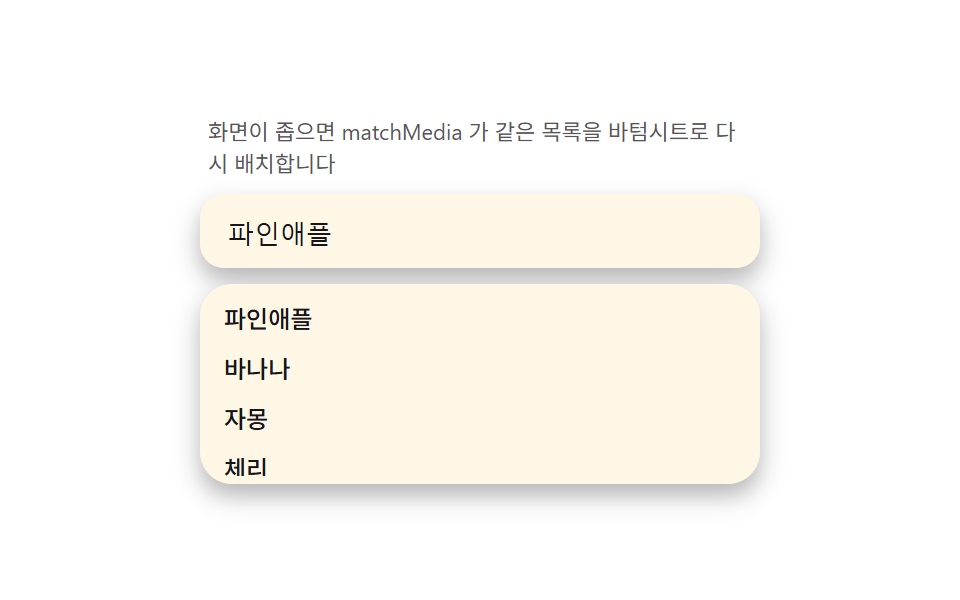
matchMedia 로 뷰포트 폭을 감지해 좁은 화면에서는 같은 목록 DOM 을 바텀시트(하단 고정·상단 손잡이)로 재배치하면, 가상 키보드가 올라와도 visualViewport 높이에 맞춰 시트가 줄어듭니다. 데모 측정은 리사이즈로 모바일 폭을 만들어 두 레이아웃 전환을 한 항목 안에서 담습니다.
쓰임모바일 웹 검색
visualViewporttransitionmatchMedia
<main class="stage">
<div class="ms" id="ms">
  <p class="ms__hint">화면이 좁으면 matchMedia 가 같은 목록을 바텀시트로 다시 배치합니다</p>
  <div class="ms__field">
    <input class="ms__input" type="text" value="파인애플" readonly aria-label="과일 검색">
  </div>
  <div class="ms__sheet" id="msSheet">
    <span class="ms__handle" aria-hidden="true"></span>
    <ul class="ms__list" id="msList" role="listbox" aria-label="제안 목록"></ul>
  </div>
</div>
</main>
@use "../../../../site/static/demo-tokens" as *;
$duration: $dur-base;
$easing: $ease-out;
$color: $subject-blue-deep;
@include stage($stage-paper);
.ms {
width: 100%;
max-width: 280px;
margin: 0 auto;
display: flex;
flex-direction: column;
gap: $sp-2;
}
.ms__hint {
margin: 0;
padding: 0 $sp-1;
font-weight: 400;
font-size: 11px;
line-height: 1.4;
color: rgba($subject-ink, .72);
}
.ms__field {
background: $subject-cream;
border-radius: $r-control;
padding: $sp-2 $sp-3;
box-shadow: $shadow-press;
}
.ms__input {
width: 100%;
border: 0;
outline: 0;
background: transparent;
font-weight: 500;
font-size: 13px;
color: $subject-ink;
}
.ms__sheet {
background: $subject-cream;
border-radius: $r-card;
box-shadow: $shadow-press;
padding: $sp-1;
}
.ms__handle {
display: none;
width: 32px;
height: 4px;
margin: 0 auto $sp-1;
border-radius: $r-xs;
background: rgba($subject-ink, .24);
}
.ms__list {
margin: 0;
padding: 0;
list-style: none;
overflow-y: hidden;
max-height: calc(28px + 64px * var(--kb, 0));
}
.ms__item {
padding: $sp-1 $sp-2;
border-radius: $r-sm;
font-weight: 500;
font-size: 12px;
color: $subject-ink;
}
.is-sheet .ms {
position: relative;
height: 130px;
}
.is-sheet .ms__hint {
display: none;
}
.is-sheet .ms__sheet {
position: absolute;
left: 0;
right: 0;
bottom: 0;
border-bottom-left-radius: 0;
border-bottom-right-radius: 0;
box-shadow: $shadow-raised;
}
.is-sheet .ms__handle {
display: block;
}
@media (max-width: 340px) {
.ms { max-width: 220px; }
.ms__input { font-size: 12px; }
}
@media (prefers-reduced-motion: reduce) {
.ms__list {
transition: none;
}
}html, body {
margin: 0;
overflow: hidden;
}
.stage {
box-sizing: border-box;
min-height: 100vh;
display: grid;
place-items: center;
margin: 0;
background: #ffffff;
font-family: -apple-system, "Segoe UI", "Noto Sans KR", sans-serif;
padding: clamp(8px, 4vw, 24px);
}
.ms {
width: 100%;
max-width: 280px;
margin: 0 auto;
display: flex;
flex-direction: column;
gap: 8px;
}
.ms__hint {
margin: 0;
padding: 0 4px;
font-weight: 400;
font-size: 11px;
line-height: 1.4;
color: rgba(23, 20, 26, 0.72);
}
.ms__field {
background: #fff7e6;
border-radius: 12px;
padding: 8px 12px;
box-shadow: 0 6px 12px rgba(23, 20, 26, 0.32);
}
.ms__input {
width: 100%;
border: 0;
outline: 0;
background: transparent;
font-weight: 500;
font-size: 13px;
color: #17141a;
}
.ms__sheet {
background: #fff7e6;
border-radius: 16px;
box-shadow: 0 6px 12px rgba(23, 20, 26, 0.32);
padding: 4px;
}
.ms__handle {
display: none;
width: 32px;
height: 4px;
margin: 0 auto 4px;
border-radius: 4px;
background: rgba(23, 20, 26, 0.24);
}
.ms__list {
margin: 0;
padding: 0;
list-style: none;
overflow-y: hidden;
max-height: calc(28px + 64px * var(--kb, 0));
}
.ms__item {
padding: 4px 8px;
border-radius: 8px;
font-weight: 500;
font-size: 12px;
color: #17141a;
}
.is-sheet .ms {
position: relative;
height: 130px;
}
.is-sheet .ms__hint {
display: none;
}
.is-sheet .ms__sheet {
position: absolute;
left: 0;
right: 0;
bottom: 0;
border-bottom-left-radius: 0;
border-bottom-right-radius: 0;
box-shadow: 0 14px 24px rgba(23, 20, 26, 0.32);
}
.is-sheet .ms__handle {
display: block;
}
@media (max-width: 340px) {
.ms {
max-width: 220px;
}
.ms__input {
font-size: 12px;
}
}
@media (prefers-reduced-motion: reduce) {
.ms__list {
transition: none;
}
}// 모바일 시트 변신(08) — matchMedia(340px) 로 좁은 화면을 감지해 같은 목록 DOM 을
// 인라인 드롭다운/바텀시트로 재배치한다(root 클래스 토글, 진짜 API). 가상 키보드는
// 정적 캡처에서 실제로 열리지 않으니, window.visualViewport 로 실측한 높이(있으면
// innerHeight 와의 차)를 기본값으로 삼고 그 위에 스크립트로 만든 0→1 목표값을
// lerp(관성 보간)로 뒤쫓게 해 "키보드가 밀어 올리는" 느낌을 재현한다 — 목록의
// max-height 를 --kb 변수로 calc() 에 물린다.
(function () {
var root = document.getElementById('ms');
var sheet = document.getElementById('msSheet');
var list = document.getElementById('msList');
if (!root || !sheet || !list) return;
var WORDS = ['파인애플', '바나나', '자몽', '체리', '수박', '망고'];
list.innerHTML = WORDS.map(function (w) {
return '<li class="ms__item" role="option">' + w + '</li>';
}).join('');
var mq = window.matchMedia('(max-width: 340px)');
function applyLayout(m) { root.classList.toggle('is-sheet', m.matches); }
applyLayout(mq);
if (mq.addEventListener) mq.addEventListener('change', applyLayout);
else if (mq.addListener) mq.addListener(applyLayout);
var vv = window.visualViewport;
function realKbPx() {
if (!vv) return 0;
return Math.max(0, window.innerHeight - vv.height);
}
// 정적 캡처에서는 realKbPx() 가 대부분 0 이라 화면에 보이는 열림·닫힘은
// 아래 목표값 lerp 가 만든다 — 실제 기기에서는 이 값이 목표값을 대신한다.
var current = 0, target = 0;
var lastFlip = 0;
function tick(now) {
if (now - lastFlip > 900) {
target = target === 0 ? 1 : 0;
lastFlip = now;
}
current += (target - current) * 0.12;
sheet.style.setProperty('--kb', current.toFixed(4));
if (playing) requestAnimationFrame(tick);
}
var playing = true;
function stop() {
playing = false;
sheet.style.setProperty('--kb', '0');
}
root.addEventListener('pointerdown', stop);
var reduce = window.matchMedia('(prefers-reduced-motion: reduce)').matches;
if (reduce) {
sheet.style.setProperty('--kb', String(realKbPx() > 0 ? 1 : 0.4));
} else {
requestAnimationFrame(function (t) { lastFlip = t; tick(t); });
}
})();// SearchAutocompleteMobileSheetMorph — vanilla 판(run/335/demo/08-search-autocomplete-mobile-sheet-morph/index.html)
// 의 React 포트. matchMedia(340px) 로 좁은 화면을 감지해 같은 목록 DOM 을 인라인
// 드롭다운/바텀시트로 재배치한다(root 클래스 토글, 진짜 API). visualViewport 로
// 실측한 키보드 높이를 기본값으로 삼고, 그 위에 스크립트가 만든 0→1 목표값을
// lerp(관성 보간)로 뒤쫓게 해 "키보드가 밀어 올리는" 느낌을 재현한다 — 목록의
// max-height 를 --kb 변수로 calc() 에 물린다.
import { useEffect, useRef } from "react";
import styles from "./SearchAutocompleteMobileSheetMorph.module.scss";
export type SearchAutocompleteMobileSheetMorphProps = {
duration?: string;
easing?: string;
color?: string;
};
const HINT = "화면이 좁으면 matchMedia 가 같은 목록을 바텀시트로 다시 배치합니다";
const ARIA_LABEL = "과일 검색";
const LIST_LABEL = "제안 목록";
const WORDS = ["파인애플", "바나나", "자몽", "체리", "수박", "망고"];
export default function SearchAutocompleteMobileSheetMorph({
duration = "300ms",
easing = "ease-out",
color = "#0a4fe8"
}: SearchAutocompleteMobileSheetMorphProps) {
const rootRef = useRef<HTMLDivElement | null>(null);
const sheetRef = useRef<HTMLDivElement | null>(null);
const listRef = useRef<HTMLUListElement | null>(null);
useEffect(() => {
const root = rootRef.current;
const sheet = sheetRef.current;
const list = listRef.current;
if (!root || !sheet || !list) return;
list.innerHTML = WORDS.map((w) => '<li class="' + styles.item + '" role="option">' + w + "</li>").join("");
const mq = window.matchMedia("(max-width: 340px)");
function applyLayout(m: MediaQueryList | MediaQueryListEvent): void {
root!.classList.toggle(styles.isSheet, m.matches);
}
applyLayout(mq);
const mqAny = mq as MediaQueryList & { addListener?: (cb: (m: MediaQueryListEvent) => void) => void; removeListener?: (cb: (m: MediaQueryListEvent) => void) => void };
if (mq.addEventListener) mq.addEventListener("change", applyLayout);
else if (mqAny.addListener) mqAny.addListener(applyLayout);
const vv = window.visualViewport;
function realKbPx(): number {
if (!vv) return 0;
return Math.max(0, window.innerHeight - vv.height);
}
// 정적 캡처에서는 realKbPx() 가 대부분 0 이라 화면에 보이는 열림·닫힘은
// 아래 목표값 lerp 가 만든다 — 실제 기기에서는 이 값이 목표값을 대신한다.
let current = 0;
let target = 0;
let lastFlip = 0;
let playing = true;
let raf = 0;
function tick(now: number): void {
if (now - lastFlip > 900) {
target = target === 0 ? 1 : 0;
lastFlip = now;
}
current += (target - current) * 0.12;
sheet!.style.setProperty("--kb", current.toFixed(4));
if (playing) raf = requestAnimationFrame(tick);
}
function stop(): void {
playing = false;
sheet!.style.setProperty("--kb", "0");
}
root.addEventListener("pointerdown", stop);
const reduce = window.matchMedia("(prefers-reduced-motion: reduce)").matches;
if (reduce) {
sheet.style.setProperty("--kb", String(realKbPx() > 0 ? 1 : 0.4));
} else {
raf = requestAnimationFrame((t) => {
lastFlip = t;
tick(t);
});
}
return () => {
playing = false;
cancelAnimationFrame(raf);
root.removeEventListener("pointerdown", stop);
if (mq.removeEventListener) mq.removeEventListener("change", applyLayout);
else if (mqAny.removeListener) mqAny.removeListener(applyLayout);
};
// eslint-disable-next-line react-hooks/exhaustive-deps
}, []);
return (
<main className={styles.stage}>
<div className={styles.ms} ref={rootRef}>
<p className={styles.hint}>{HINT}</p>
<div className={styles.field}>
<input
className={styles.input}
type="text"
defaultValue="파인애플"
readOnly
aria-label={ARIA_LABEL}
style={{ caretColor: color, transitionDuration: duration, transitionTimingFunction: easing }}
/>
</div>
<div className={styles.sheet} ref={sheetRef}>
<span className={styles.handle} aria-hidden="true" />
<ul className={styles.list} ref={listRef} role="listbox" aria-label={LIST_LABEL} />
</div>
</div>
</main>
);
}08 모바일 시트 변신 — 화면 좁으면 드롭다운이 바텀시트로 바뀌는 미디어쿼리 전환 — 측정 누적면적 29.61% · 움직인 프레임 13/23GODRICH 원작 · zip 에 SCSS·React 포함 · input 자동완성 검색창 — 하이라이트·디바운스·편집거리 계산을 얹은 9종
이 데모가 속한 글
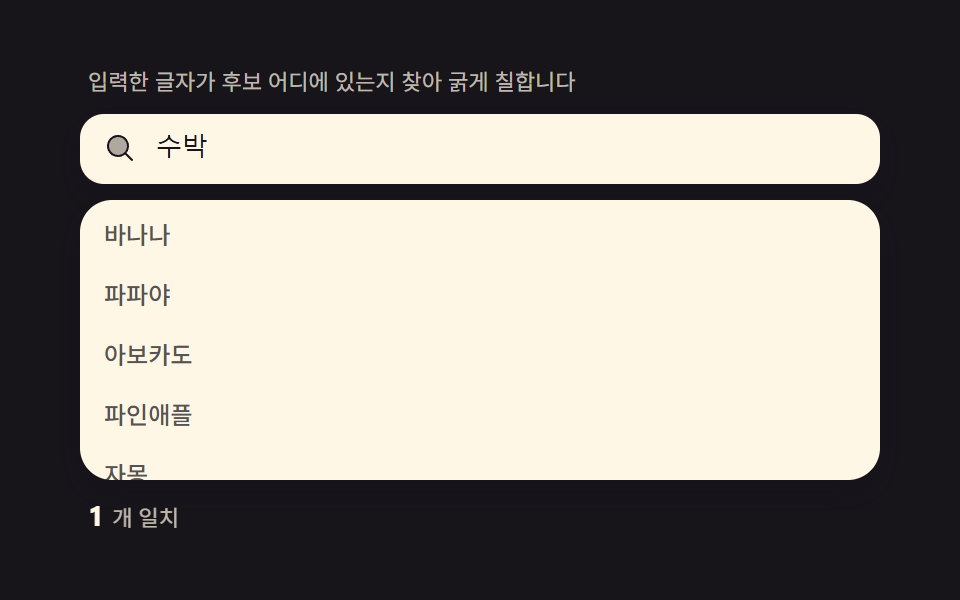 input 자동완성 검색창 — 하이라이트·디바운스·편집거리 계산을 얹은 9종입력한 글자가 제안 항목 안에서 실제로 어디에 있는지 찾아 그 부분만 굵게 칠하고, 300ms 디바운스로 요청을 모아 키보드로도 목록이 순환합니다. 최근 검색·오타 제안·인기 순위 막대까지 — input 자동완성 검 이 글의 데모 전부 보기