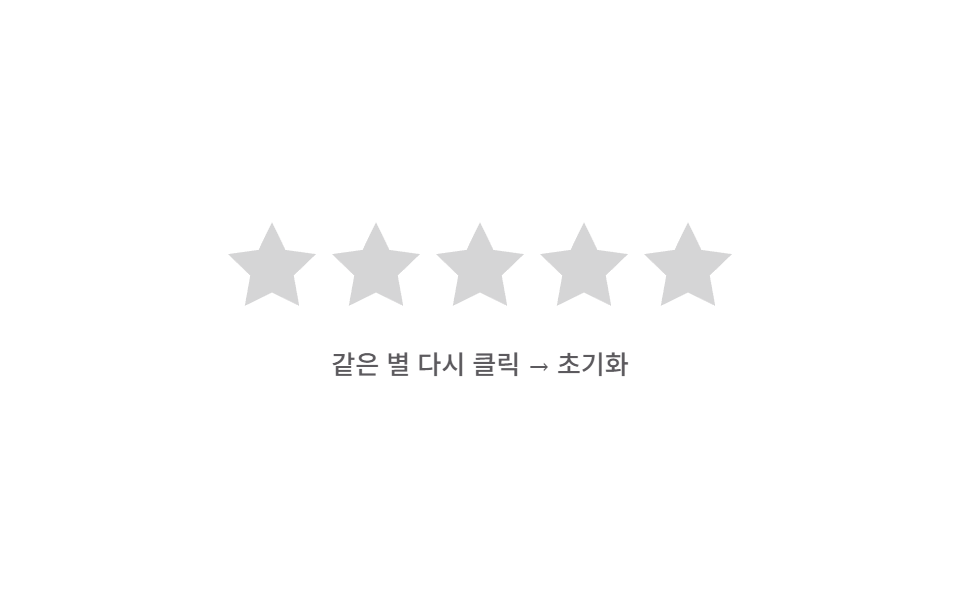
08되돌림 스프링 초기화 — 같은 별을 다시 누른 상태가 되면 채움 값이 0으로 튕기듯 줄어드는 방식
이미 선택된 값과 같은 별이 다시 눌린 상태가 되면 채움 값이 0을 향해 튕기는 움직임 값을 거쳐 줄어들고, 선택 값도 함께 지워집니다.
쓰임실수로 매긴 점수를 지우는 리뷰 폼, 선택을 취소할 수 있는 평가 위젯
reset() — wasFilled 필터srBounce — scale(1)→scale(1.3)→scale(.85)value = 4 (초기값)
<main class="stage">
<div class="sr is-demo" id="sr">
  <div class="sr__row" id="srRow">
    <button class="sr__star" type="button" data-i="1"><svg class="sr__base" viewBox="0 0 24 24"><path d="M12 .587l3.668 7.568 8.332 1.151-6.064 5.828 1.48 8.279L12 19.771l-7.416 3.642 1.48-8.279-6.064-5.828 8.332-1.151z"/></svg><span class="sr__fillclip" data-fc><svg class="sr__fill" viewBox="0 0 24 24"><path d="M12 .587l3.668 7.568 8.332 1.151-6.064 5.828 1.48 8.279L12 19.771l-7.416 3.642 1.48-8.279-6.064-5.828 8.332-1.151z"/></svg></span></button>
    <button class="sr__star" type="button" data-i="2"><svg class="sr__base" viewBox="0 0 24 24"><path d="M12 .587l3.668 7.568 8.332 1.151-6.064 5.828 1.48 8.279L12 19.771l-7.416 3.642 1.48-8.279-6.064-5.828 8.332-1.151z"/></svg><span class="sr__fillclip" data-fc><svg class="sr__fill" viewBox="0 0 24 24"><path d="M12 .587l3.668 7.568 8.332 1.151-6.064 5.828 1.48 8.279L12 19.771l-7.416 3.642 1.48-8.279-6.064-5.828 8.332-1.151z"/></svg></span></button>
    <button class="sr__star" type="button" data-i="3"><svg class="sr__base" viewBox="0 0 24 24"><path d="M12 .587l3.668 7.568 8.332 1.151-6.064 5.828 1.48 8.279L12 19.771l-7.416 3.642 1.48-8.279-6.064-5.828 8.332-1.151z"/></svg><span class="sr__fillclip" data-fc><svg class="sr__fill" viewBox="0 0 24 24"><path d="M12 .587l3.668 7.568 8.332 1.151-6.064 5.828 1.48 8.279L12 19.771l-7.416 3.642 1.48-8.279-6.064-5.828 8.332-1.151z"/></svg></span></button>
    <button class="sr__star" type="button" data-i="4"><svg class="sr__base" viewBox="0 0 24 24"><path d="M12 .587l3.668 7.568 8.332 1.151-6.064 5.828 1.48 8.279L12 19.771l-7.416 3.642 1.48-8.279-6.064-5.828 8.332-1.151z"/></svg><span class="sr__fillclip" data-fc><svg class="sr__fill" viewBox="0 0 24 24"><path d="M12 .587l3.668 7.568 8.332 1.151-6.064 5.828 1.48 8.279L12 19.771l-7.416 3.642 1.48-8.279-6.064-5.828 8.332-1.151z"/></svg></span></button>
    <button class="sr__star" type="button" data-i="5"><svg class="sr__base" viewBox="0 0 24 24"><path d="M12 .587l3.668 7.568 8.332 1.151-6.064 5.828 1.48 8.279L12 19.771l-7.416 3.642 1.48-8.279-6.064-5.828 8.332-1.151z"/></svg><span class="sr__fillclip" data-fc><svg class="sr__fill" viewBox="0 0 24 24"><path d="M12 .587l3.668 7.568 8.332 1.151-6.064 5.828 1.48 8.279L12 19.771l-7.416 3.642 1.48-8.279-6.064-5.828 8.332-1.151z"/></svg></span></button>
  </div>
  <div class="sr__readout"><span id="srHint">같은 별 다시 클릭 → 초기화</span></div>
</div>
</main>
@use "../../../../site/static/demo-tokens" as *;
// 계산 겹: 초기화 순간 이미 채워져 있던 별에만 스프링 이징($ease-elastic, 목표를 넘겼다가
// 되돌아오는 오버슛 곡선)으로 팝 애니메이션을 걸어 "튕기며 사라지는" 느낌을 만든다.
@include stage($stage-paper);
.sr {
display: grid;
gap: $sp-5;
place-items: center;
}
.sr__row { display: flex; gap: $sp-2; }
.sr__star {
position: relative;
width: 44px;
height: 44px;
padding: 0;
border: 0;
background: none;
cursor: pointer;
&--bounce { animation: srBounce $dur-enter $ease-elastic; }
}
.sr__base,
.sr__fill svg {
position: absolute;
inset: 0;
width: 100%;
height: 100%;
}
.sr__base { fill: $subject-ink; opacity: .18; }
.sr__fillclip {
position: absolute;
inset: 0;
width: 0%;
overflow: hidden;
transition: width $dur-base $ease-out;
}
.sr__fill { fill: $subject-blue-deep; }
.sr__readout {
font: 500 13px/1.3 -apple-system, "Segoe UI", "Noto Sans KR", sans-serif;
color: $subject-ink;
opacity: .7;
}
@keyframes srBounce {
0% { transform: scale(1); }
35% { transform: scale(1.3); }
100% { transform: scale(.85); opacity: 0; }
}
@media (max-width: 340px) {
.sr__star { width: 34px; height: 34px; }
.sr__row { gap: $sp-1; }
.sr__readout { font-size: 11px; }
}
@media (prefers-reduced-motion: reduce) {
.sr__fillclip { transition: none; }
.sr__star--bounce { animation: none; }
}html, body {
margin: 0;
overflow: hidden;
}
.stage {
box-sizing: border-box;
min-height: 100vh;
display: grid;
place-items: center;
margin: 0;
background: #ffffff;
font-family: -apple-system, "Segoe UI", "Noto Sans KR", sans-serif;
padding: clamp(8px, 4vw, 24px);
}
.sr {
display: grid;
gap: 20px;
place-items: center;
}
.sr__row {
display: flex;
gap: 8px;
}
.sr__star {
position: relative;
width: 44px;
height: 44px;
padding: 0;
border: 0;
background: none;
cursor: pointer;
}
.sr__star--bounce {
animation: srBounce 600ms cubic-bezier(0.34, 1.56, 0.64, 1);
}
.sr__base,
.sr__fill svg {
position: absolute;
inset: 0;
width: 100%;
height: 100%;
}
.sr__base {
fill: #17141a;
opacity: 0.18;
}
.sr__fillclip {
position: absolute;
inset: 0;
width: 0%;
overflow: hidden;
transition: width 300ms ease-out;
}
.sr__fill {
fill: #0a4fe8;
}
.sr__readout {
font: 500 13px/1.3 -apple-system, "Segoe UI", "Noto Sans KR", sans-serif;
color: #17141a;
opacity: 0.7;
}
@keyframes srBounce {
0% {
transform: scale(1);
}
35% {
transform: scale(1.3);
}
100% {
transform: scale(0.85);
opacity: 0;
}
}
@media (max-width: 340px) {
.sr__star {
width: 34px;
height: 34px;
}
.sr__row {
gap: 4px;
}
.sr__readout {
font-size: 11px;
}
}
@media (prefers-reduced-motion: reduce) {
.sr__fillclip {
transition: none;
}
.sr__star--bounce {
animation: none;
}
}(function () {
var root = document.getElementById('sr');
var stars = Array.prototype.slice.call(document.querySelectorAll('.sr__star'));
var value = 4;
function paint(v) {
stars.forEach(function (s, idx) {
var starVal = Math.max(0, Math.min(1, v - idx));
s.querySelector('[data-fc]').style.width = (starVal * 100).toFixed(1) + '%';
});
}
// 계산 겹: 초기화가 일어나면 채움 값을 0으로 보내는 동시에, 이미 채워졌던 별에만
// 스프링 이징(퇴장 전 오버슛)이 걸린 팝 애니메이션 클래스를 씌운다.
function reset() {
var wasFilled = stars.filter(function (s, idx) { return idx < value; });
value = 0;
paint(value);
wasFilled.forEach(function (s) { s.classList.add('sr__star--bounce'); });
setTimeout(function () {
wasFilled.forEach(function (s) { s.classList.remove('sr__star--bounce'); });
}, 620);
}
stars.forEach(function (s) {
var i = Number(s.getAttribute('data-i'));
s.addEventListener('click', function () {
root.classList.remove('is-demo'); stopAutoplay();
if (i === value) reset(); else { value = i; paint(value); }
});
});
paint(value);
// 자동 루프: 값을 채운 뒤 같은 별을 다시 누른 상태를 흉내내 스프링 초기화를 반복해 보여준다.
var phase = 0;
var autoTimer = null;
function autoTick() {
if (phase === 0) { value = 4; paint(value); }
else if (phase === 1) { reset(); }
phase = (phase + 1) % 3;
}
var reduce = window.matchMedia('(prefers-reduced-motion: reduce)').matches;
function stopAutoplay() { if (autoTimer) { clearInterval(autoTimer); autoTimer = null; } }
if (!reduce) { autoTimer = setInterval(autoTick, 700); autoTick(); }
})();import { useEffect, useRef } from "react";
import styles from "./ResetClearSpring.module.scss";
const STAR_PATH =
"M12 .587l3.668 7.568 8.332 1.151-6.064 5.828 1.48 8.279L12 19.771l-7.416 3.642 1.48-8.279-6.064-5.828 8.332-1.151z";
export default function ResetClearSpring() {
const rootRef = useRef<HTMLDivElement | null>(null);
useEffect(() => {
const root = rootRef.current;
if (!root) return;
const stars = Array.prototype.slice.call(
root.querySelectorAll(`.${styles.star}`)
) as HTMLElement[];
let value = 4;
function paint(v: number) {
stars.forEach((s, idx) => {
const starVal = Math.max(0, Math.min(1, v - idx));
s.querySelector<HTMLElement>(`.${styles.fillclip}`)!.style.width = (starVal * 100).toFixed(1) + "%";
});
}
// 계산 겹: 초기화가 일어나면 채움 값을 0으로 보내는 동시에, 이미 채워졌던 별에만
// 스프링 이징(퇴장 전 오버슛)이 걸린 팝 애니메이션 클래스를 씌운다.
function reset() {
const wasFilled = stars.filter((_s, idx) => idx < value);
value = 0;
paint(value);
wasFilled.forEach((s) => s.classList.add(styles.bounce));
window.setTimeout(() => {
wasFilled.forEach((s) => s.classList.remove(styles.bounce));
}, 620);
}
const clickHandlers: Array<() => void> = [];
stars.forEach((s, idx) => {
const i = idx + 1;
const handler = () => {
stopAutoplay();
if (i === value) reset(); else { value = i; paint(value); }
};
clickHandlers.push(handler);
s.addEventListener("click", handler);
});
paint(value);
// 자동 루프: 값을 채운 뒤 같은 별을 다시 누른 상태를 흉내내 스프링 초기화를 반복해 보여준다.
let phase = 0;
let autoTimer: number | null = null;
function autoTick() {
if (phase === 0) { value = 4; paint(value); }
else if (phase === 1) { reset(); }
phase = (phase + 1) % 3;
}
function stopAutoplay() { if (autoTimer !== null) { window.clearInterval(autoTimer); autoTimer = null; } }
const reduce = window.matchMedia("(prefers-reduced-motion: reduce)").matches;
if (!reduce) { autoTimer = window.setInterval(autoTick, 700); autoTick(); }
return () => {
stopAutoplay();
stars.forEach((s, idx) => s.removeEventListener("click", clickHandlers[idx]));
};
}, []);
return (
<div ref={rootRef} className={styles.stage}>
<div className={styles.sr}>
<div className={styles.row}>
{[1, 2, 3, 4, 5].map((i) => (
<button key={i} type="button" className={styles.star}>
<svg className={styles.base} viewBox="0 0 24 24"><path d={STAR_PATH} /></svg>
<span className={styles.fillclip}>
<svg className={styles.fill} viewBox="0 0 24 24"><path d={STAR_PATH} /></svg>
</span>
</button>
))}
</div>
<div className={styles.readout}>같은 별 다시 클릭 → 초기화</div>
</div>
</div>
);
}08 되돌림 스프링 초기화 — 같은 별을 다시 누른 상태가 되면 채움 값이 0으로 튕기듯 줄어드는 방식 — 측정 누적면적 4.791% · 움직인 프레임 9/23GODRICH 원작 · zip 에 SCSS·React 포함 · 별점 UI 9종 — 채움 값이 상태에 따라 바뀌는 방식
이 데모가 속한 글
 별점 UI 9종 — 채움 값이 상태에 따라 바뀌는 방식별점 UI는 별 아이콘으로 점수를 매기거나 매겨진 평균 점수를 보여주는 입력 장치인데, 아홉 개 중 하나는 손가락이 움직인 가로 값을 따라 채움 값이 바로 바뀌고, 하나는 평균 값의 소수점 부분이 별 하나의 채움 너 이 글의 데모 전부 보기