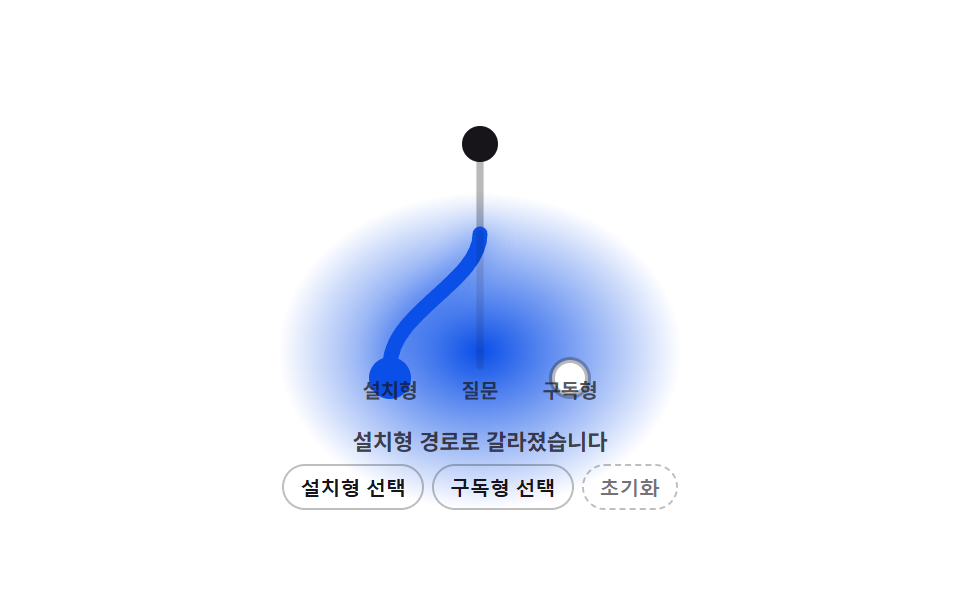
04고른 답에 따라 경로 선이 갈라지는 단계 표시
선택지에 따라 곧게 이어지던 경로 선이 두 갈래로 갈라지는 모양으로 다시 그려진다.
쓰임설문 분기 진행 표시
STEP_BRANCH_MORPH_MSbuildPathapplyMorph
<main class="stage">
<div class="bm is-demo" id="bm">
  <svg class="bm__svg" id="bmSvg" viewBox="0 0 100 100" role="img" aria-label="설문 분기 경로">
    <path class="bm__trunk" d="M50 12 L50 42" />
    <path class="bm__branch bm__branch--a" id="pathA" d="M50 42 C50 58 50 68 50 86" />
    <path class="bm__branch bm__branch--b" id="pathB" d="M50 42 C50 58 50 68 50 86" />
    <circle class="bm__dot bm__dot--start" cx="50" cy="12" r="6" />
    <circle class="bm__dot bm__dot--a" id="dotA" cx="20" cy="90" r="6" />
    <circle class="bm__dot bm__dot--b" id="dotB" cx="80" cy="90" r="6" />
  </svg>
  <div class="bm__labels">
    <span class="bm__labelStart">질문</span>
    <span class="bm__labelA">설치형</span>
    <span class="bm__labelB">구독형</span>
  </div>
  <p class="bm__status" id="bmStatus" aria-live="polite">답을 고르면 경로가 갈라집니다</p>
  <div class="bm__controls">
    <button type="button" class="bm__btn" id="bmA">설치형 선택</button>
    <button type="button" class="bm__btn" id="bmB">구독형 선택</button>
    <button type="button" class="bm__btn bm__btn--ghost" id="bmReset">초기화</button>
  </div>
</div>
</main>
@use "../../../../site/static/demo-tokens" as *;
// 핵심: 분기 경로는 CSS 트랜지션이 아니라 JS 가 매 프레임 SVG path `d` 의 제어점 x좌표를
// lerp(fromX, targetX, easeOutCubic(t)) 로 계산해 다시 쓴 값이다 — 직선(50)에서 좌우(20/80)로
// 좌표 자체가 보간되며 형태가 바뀐다.
$duration: $dur-quick;
$easing: $ease-out;
$color: $stage-ink;
@include stage($stage-paper);
.bm {
--bm-progress: 0;
display: grid;
gap: $sp-1;
justify-items: center;
width: min(85vw, 260px);
border-radius: $r-sm;
background: radial-gradient(140px 110px at 50% 62%, rgba(10, 79, 232, var(--bm-progress)) 0%, rgba(10, 79, 232, 0) 72%);
}
.bm__svg {
width: 150px;
aspect-ratio: 1 / 1;
overflow: visible;
margin-top: $sp-2;
}
.bm__trunk {
fill: none;
stroke: rgba(23, 20, 26, .3);
stroke-width: 2.4;
stroke-linecap: round;
}
.bm__branch {
fill: none;
stroke: rgba(23, 20, 26, .22);
stroke-width: 2.4;
stroke-linecap: round;
}
.bm__branch.is-chosen { stroke: $subject-blue-deep; stroke-width: 3; }
.bm__branch.is-dim { stroke: rgba(23, 20, 26, .12); }
.bm__dot { fill: $stage-ink; }
.bm__dot--start { fill: $stage-ink; }
.bm__dot--a, .bm__dot--b { fill: $stage-paper; stroke: rgba(23, 20, 26, .3); stroke-width: 2; }
.bm__dot--a.is-chosen, .bm__dot--b.is-chosen { fill: $subject-blue-deep; stroke: $subject-blue-deep; }
.bm__labels {
position: relative;
width: 150px;
height: 0;
}
.bm__labelStart, .bm__labelA, .bm__labelB {
position: absolute;
transform: translate(-50%, -140%);
font-size: 10px;
font-weight: 700;
color: rgba(23, 20, 26, .7);
white-space: nowrap;
}
.bm__labelStart { left: 50%; top: -100%; }
.bm__labelA { left: 20%; top: -12%; }
.bm__labelB { left: 80%; top: -12%; }
.bm__status {
margin: 0;
font-size: 11px;
color: rgba(23, 20, 26, .78);
font-weight: 600;
min-height: 14px;
text-align: center;
}
.bm__controls { display: flex; gap: $sp-1; flex-wrap: wrap; justify-content: center; }
.bm__btn {
border: 1px solid rgba(23, 20, 26, .28);
background: transparent;
color: $stage-ink;
border-radius: $r-control;
padding: $sp-1 $sp-2;
font-size: 10px;
font-weight: 600;
cursor: pointer;
}
.bm__btn--ghost { border-style: dashed; color: rgba(23, 20, 26, .6); }
.bm__btn:focus-visible {
outline: 2px solid $subject-blue-deep;
outline-offset: 2px;
}
@media (max-width: 340px) {
.bm { width: min(94vw, 240px); }
.bm__svg { width: 108px; margin-top: $sp-1; }
.bm__labels { width: 108px; }
.bm__labelStart, .bm__labelA, .bm__labelB { font-size: 9px; }
}
@media (prefers-reduced-motion: reduce) {
.bm__branch { transition: none; }
}html, body {
margin: 0;
overflow: hidden;
}
.stage {
box-sizing: border-box;
min-height: 100vh;
display: grid;
place-items: center;
margin: 0;
background: #ffffff;
font-family: -apple-system, "Segoe UI", "Noto Sans KR", sans-serif;
padding: clamp(8px, 4vw, 24px);
}
.bm {
--bm-progress: 0;
display: grid;
gap: 4px;
justify-items: center;
width: min(85vw, 260px);
border-radius: 8px;
background: radial-gradient(140px 110px at 50% 62%, rgba(10, 79, 232, var(--bm-progress)) 0%, rgba(10, 79, 232, 0) 72%);
}
.bm__svg {
width: 150px;
aspect-ratio: 1/1;
overflow: visible;
margin-top: 8px;
}
.bm__trunk {
fill: none;
stroke: rgba(23, 20, 26, 0.3);
stroke-width: 2.4;
stroke-linecap: round;
}
.bm__branch {
fill: none;
stroke: rgba(23, 20, 26, 0.22);
stroke-width: 2.4;
stroke-linecap: round;
}
.bm__branch.is-chosen {
stroke: #0a4fe8;
stroke-width: 3;
}
.bm__branch.is-dim {
stroke: rgba(23, 20, 26, 0.12);
}
.bm__dot {
fill: #17141a;
}
.bm__dot--start {
fill: #17141a;
}
.bm__dot--a, .bm__dot--b {
fill: #ffffff;
stroke: rgba(23, 20, 26, 0.3);
stroke-width: 2;
}
.bm__dot--a.is-chosen, .bm__dot--b.is-chosen {
fill: #0a4fe8;
stroke: #0a4fe8;
}
.bm__labels {
position: relative;
width: 150px;
height: 0;
}
.bm__labelStart, .bm__labelA, .bm__labelB {
position: absolute;
transform: translate(-50%, -140%);
font-size: 10px;
font-weight: 700;
color: rgba(23, 20, 26, 0.7);
white-space: nowrap;
}
.bm__labelStart {
left: 50%;
top: -100%;
}
.bm__labelA {
left: 20%;
top: -12%;
}
.bm__labelB {
left: 80%;
top: -12%;
}
.bm__status {
margin: 0;
font-size: 11px;
color: rgba(23, 20, 26, 0.78);
font-weight: 600;
min-height: 14px;
text-align: center;
}
.bm__controls {
display: flex;
gap: 4px;
flex-wrap: wrap;
justify-content: center;
}
.bm__btn {
border: 1px solid rgba(23, 20, 26, 0.28);
background: transparent;
color: #17141a;
border-radius: 12px;
padding: 4px 8px;
font-size: 10px;
font-weight: 600;
cursor: pointer;
}
.bm__btn--ghost {
border-style: dashed;
color: rgba(23, 20, 26, 0.6);
}
.bm__btn:focus-visible {
outline: 2px solid #0a4fe8;
outline-offset: 2px;
}
@media (max-width: 340px) {
.bm {
width: min(94vw, 240px);
}
.bm__svg {
width: 108px;
margin-top: 4px;
}
.bm__labels {
width: 108px;
}
.bm__labelStart, .bm__labelA, .bm__labelB {
font-size: 9px;
}
}
@media (prefers-reduced-motion: reduce) {
.bm__branch {
transition: none;
}
}(function () {
var STEP_BRANCH_MORPH_MS = 420;
var CENTER_X = 50;
var TARGET_A_X = 20;
var TARGET_B_X = 80;
var MAX_OFFSET = TARGET_B_X - CENTER_X; // 표시 레이어 정규화 기준(로직 무관)
var root = document.getElementById('bm');
var status = document.getElementById('bmStatus');
var pathA = document.getElementById('pathA');
var pathB = document.getElementById('pathB');
var dotA = document.getElementById('dotA');
var dotB = document.getElementById('dotB');
var btnA = document.getElementById('bmA');
var btnB = document.getElementById('bmB');
var btnReset = document.getElementById('bmReset');
var reduce = window.matchMedia('(prefers-reduced-motion: reduce)').matches;
var choice = null; // null | 'a' | 'b'
var progress = { a: 0, b: 0 }; // 각 경로의 중심 이탈률(0~1) — 굵기·글로우·배경 톤이 여기서 파생
function clamp(v, lo, hi) { return Math.max(lo, Math.min(hi, v)); }
function lerp(a, b, t) { return a + (b - a) * t; }
function easeOutCubic(t) { return 1 - Math.pow(1 - t, 3); }
function buildPath(midX, endX) {
return 'M50 42 C50 58 ' + midX.toFixed(2) + ' 68 ' + endX.toFixed(2) + ' 86';
}
function paintProgress() {
root.style.setProperty('--bm-progress', Math.max(progress.a, progress.b).toFixed(3));
}
function applyMorph(key, pathEl, targetX, fromX) {
if (reduce) {
pathEl.setAttribute('d', buildPath(targetX, targetX));
progress[key] = clamp(Math.abs(targetX - CENTER_X) / MAX_OFFSET, 0, 1);
paintProgress();
return;
}
var start = null;
function step(now) {
if (start === null) start = now;
var t = clamp((now - start) / STEP_BRANCH_MORPH_MS, 0, 1);
var eased = easeOutCubic(t);
var x = lerp(fromX, targetX, eased);
pathEl.setAttribute('d', buildPath(x, x));
var travelled = clamp(Math.abs(x - CENTER_X) / MAX_OFFSET, 0, 1);
progress[key] = travelled;
pathEl.style.strokeWidth = (2.4 + travelled * 2.6).toFixed(2);
pathEl.style.filter = travelled > 0.04
? 'drop-shadow(0 0 ' + (travelled * 5.5).toFixed(1) + 'px rgba(10, 79, 232, ' + (travelled * 0.55).toFixed(2) + '))'
: 'none';
paintProgress();
if (t < 1) requestAnimationFrame(step);
}
requestAnimationFrame(step);
}
function currentX(pathEl) {
var d = pathEl.getAttribute('d');
var m = /C50 58 ([\-0-9.]+) 68/.exec(d);
return m ? parseFloat(m[1]) : CENTER_X;
}
function setChoice(next) {
choice = next;
var aTarget = next === 'a' ? TARGET_A_X : CENTER_X;
var bTarget = next === 'b' ? TARGET_B_X : CENTER_X;
applyMorph('a', pathA, aTarget, currentX(pathA));
applyMorph('b', pathB, bTarget, currentX(pathB));
pathA.classList.toggle('is-chosen', next === 'a');
pathA.classList.toggle('is-dim', next === 'b');
pathB.classList.toggle('is-chosen', next === 'b');
pathB.classList.toggle('is-dim', next === 'a');
dotA.classList.toggle('is-chosen', next === 'a');
dotB.classList.toggle('is-chosen', next === 'b');
status.textContent = next === null ? '답을 고르면 경로가 갈라집니다'
: (next === 'a' ? '설치형 경로로 갈라졌습니다' : '구독형 경로로 갈라졌습니다');
}
btnA.addEventListener('click', function () { root.classList.remove('is-demo'); setChoice(choice === 'a' ? null : 'a'); });
btnB.addEventListener('click', function () { root.classList.remove('is-demo'); setChoice(choice === 'b' ? null : 'b'); });
btnReset.addEventListener('click', function () { root.classList.remove('is-demo'); setChoice(null); });
root.addEventListener('keydown', function (e) {
if (e.key === 'ArrowRight') { root.classList.remove('is-demo'); setChoice('b'); e.preventDefault(); }
else if (e.key === 'ArrowLeft') { root.classList.remove('is-demo'); setChoice('a'); e.preventDefault(); }
});
var DEMO_SCHEDULE = [
{ t: 0.20, c: 'a' },
{ t: 0.70, c: 'b' },
{ t: 1.20, c: 'a' },
{ t: 1.70, c: 'b' }
];
var startTime = null;
var demoIdx = -1;
function tick(now) {
if (startTime === null) startTime = now;
var t = (now - startTime) / 1000 % 2;
if (root.classList.contains('is-demo')) {
if (t < DEMO_SCHEDULE[0].t && demoIdx !== -1) demoIdx = -1;
for (var i = 0; i < DEMO_SCHEDULE.length; i++) {
if (t >= DEMO_SCHEDULE[i].t && demoIdx < i) { setChoice(DEMO_SCHEDULE[i].c); demoIdx = i; }
}
}
requestAnimationFrame(tick);
}
requestAnimationFrame(tick);
})();// StepBranchPathMorph — vanilla 판(04-step-precision-branch-path-morph) 의 React 포트.
// 값 하나: 선택에 따라 갈라지는 경로는 CSS 트랜지션이 아니라 매 프레임 SVG path `d` 의
// 제어점 x좌표를 lerp(fromX, targetX, easeOutCubic(t)) 로 다시 써서 얻는다 — 좌표 자체가 보간된다.
import { useEffect, useRef, useState } from "react";
import styles from "./StepBranchPathMorph.module.scss";
type Box<T> = { current: T };
type Choice = "a" | "b" | null;
const STEP_BRANCH_MORPH_MS = 420;
const CENTER_X = 50;
const TARGET_A_X = 20;
const TARGET_B_X = 80;
const MAX_OFFSET = TARGET_B_X - CENTER_X; // 표시 레이어 정규화 기준(로직 무관)
function clamp(v: number, lo: number, hi: number): number {
return Math.max(lo, Math.min(hi, v));
}
function lerp(a: number, b: number, t: number): number {
return a + (b - a) * t;
}
function easeOutCubic(t: number): number {
return 1 - Math.pow(1 - t, 3);
}
function buildPath(midX: number, endX: number): string {
return "M50 42 C50 58 " + midX.toFixed(2) + " 68 " + endX.toFixed(2) + " 86";
}
function currentX(pathEl: SVGPathElement | null): number {
if (!pathEl) return CENTER_X;
const d = pathEl.getAttribute("d") || "";
const m = /C50 58 ([\-0-9.]+) 68/.exec(d);
return m ? parseFloat(m[1]) : CENTER_X;
}
export default function StepBranchPathMorph() {
const [choice, setChoiceState] = useState<Choice>(null);
const [reduce, setReduce] = useState(false);
const choiceRef = useRef<Choice>(null) as Box<Choice>;
const demoRef = useRef<boolean>(true) as Box<boolean>;
const rootRef = useRef<HTMLDivElement | null>(null);
const pathARef = useRef<SVGPathElement | null>(null);
const pathBRef = useRef<SVGPathElement | null>(null);
const dotARef = useRef<SVGCircleElement | null>(null);
const dotBRef = useRef<SVGCircleElement | null>(null);
const frameRef = useRef<number>(0) as Box<number>;
const progressRef = useRef<{ a: number; b: number }>({ a: 0, b: 0 }) as Box<{ a: number; b: number }>;
useEffect(() => {
setReduce(window.matchMedia("(prefers-reduced-motion: reduce)").matches);
}, []);
function paintProgress(): void {
const root = rootRef.current;
if (!root) return;
root.style.setProperty("--bm-progress", Math.max(progressRef.current.a, progressRef.current.b).toFixed(3));
}
function applyMorph(key: "a" | "b", pathEl: SVGPathElement | null, targetX: number, fromX: number): void {
if (!pathEl) return;
if (reduce) {
pathEl.setAttribute("d", buildPath(targetX, targetX));
progressRef.current[key] = clamp(Math.abs(targetX - CENTER_X) / MAX_OFFSET, 0, 1);
paintProgress();
return;
}
let start = 0;
function step(now: number): void {
if (start === 0) start = now;
const t = clamp((now - start) / STEP_BRANCH_MORPH_MS, 0, 1);
const eased = easeOutCubic(t);
const x = lerp(fromX, targetX, eased);
if (pathEl) {
pathEl.setAttribute("d", buildPath(x, x));
const travelled = clamp(Math.abs(x - CENTER_X) / MAX_OFFSET, 0, 1);
progressRef.current[key] = travelled;
pathEl.style.strokeWidth = (2.4 + travelled * 2.6).toFixed(2);
pathEl.style.filter = travelled > 0.04
? "drop-shadow(0 0 " + (travelled * 5.5).toFixed(1) + "px rgba(10, 79, 232, " + (travelled * 0.55).toFixed(2) + "))"
: "none";
paintProgress();
}
if (t < 1) requestAnimationFrame(step);
}
requestAnimationFrame(step);
}
function setChoice(next: Choice): void {
choiceRef.current = next;
setChoiceState(next);
const aTarget = next === "a" ? TARGET_A_X : CENTER_X;
const bTarget = next === "b" ? TARGET_B_X : CENTER_X;
applyMorph("a", pathARef.current, aTarget, currentX(pathARef.current));
applyMorph("b", pathBRef.current, bTarget, currentX(pathBRef.current));
}
function stopDemo(): void { demoRef.current = false; }
useEffect(() => {
let startTime = 0;
let demoIdx = -1;
const schedule: Array<{ t: number; c: Choice }> = [
{ t: 0.20, c: "a" },
{ t: 0.70, c: "b" },
{ t: 1.20, c: "a" },
{ t: 1.70, c: "b" }
];
function tick(now: number): void {
if (startTime === 0) startTime = now;
const t = ((now - startTime) / 1000) % 2;
if (demoRef.current) {
if (t < schedule[0].t && demoIdx !== -1) demoIdx = -1;
for (let i = 0; i < schedule.length; i++) {
if (t >= schedule[i].t && demoIdx < i) { setChoice(schedule[i].c); demoIdx = i; }
}
}
frameRef.current = requestAnimationFrame(tick);
}
frameRef.current = requestAnimationFrame(tick);
return () => cancelAnimationFrame(frameRef.current);
// eslint-disable-next-line react-hooks/exhaustive-deps
}, [reduce]);
function onKeyDown(e: { key: string; preventDefault: () => void }): void {
if (e.key === "ArrowRight") { stopDemo(); setChoice("b"); e.preventDefault(); }
else if (e.key === "ArrowLeft") { stopDemo(); setChoice("a"); e.preventDefault(); }
}
const statusText = choice === null
? "답을 고르면 경로가 갈라집니다"
: choice === "a" ? "설치형 경로로 갈라졌습니다" : "구독형 경로로 갈라졌습니다";
return (
<main className={styles.stage}>
<div className={styles.bm} ref={rootRef} onKeyDown={onKeyDown}>
<svg className={styles.svg} viewBox="0 0 100 100" role="img" aria-label="설문 분기 경로">
<path className={styles.trunk} d="M50 12 L50 42" />
<path
className={[styles.branch, choice === "a" ? styles.branchChosen : "", choice === "b" ? styles.branchDim : ""].join(" ")}
ref={pathARef}
d="M50 42 C50 58 50 68 50 86"
/>
<path
className={[styles.branch, choice === "b" ? styles.branchChosen : "", choice === "a" ? styles.branchDim : ""].join(" ")}
ref={pathBRef}
d="M50 42 C50 58 50 68 50 86"
/>
<circle className={styles.dotStart} cx={50} cy={12} r={6} />
<circle className={[styles.dot, choice === "a" ? styles.dotChosen : ""].join(" ")} ref={dotARef} cx={20} cy={90} r={6} />
<circle className={[styles.dot, choice === "b" ? styles.dotChosen : ""].join(" ")} ref={dotBRef} cx={80} cy={90} r={6} />
</svg>
<div className={styles.labels}>
<span className={styles.labelStart}>질문</span>
<span className={styles.labelA}>설치형</span>
<span className={styles.labelB}>구독형</span>
</div>
<p className={styles.status} aria-live="polite">{statusText}</p>
<div className={styles.controls}>
<button type="button" className={styles.btn} onClick={() => { stopDemo(); setChoice(choice === "a" ? null : "a"); }}>설치형 선택</button>
<button type="button" className={styles.btn} onClick={() => { stopDemo(); setChoice(choice === "b" ? null : "b"); }}>구독형 선택</button>
<button type="button" className={[styles.btn, styles.btnGhost].join(" ")} onClick={() => { stopDemo(); setChoice(null); }}>초기화</button>
</div>
</div>
</main>
);
}04 고른 답에 따라 경로 선이 갈라지는 단계 표시 — 측정 누적면적 15.582% · 움직인 프레임 23/23GODRICH 원작 · zip 에 SCSS·React 포함 · 진행 단계 ui 9가지 — 스텝 인디케이터를 물리 계산으로 다듬기
이 데모가 속한 글
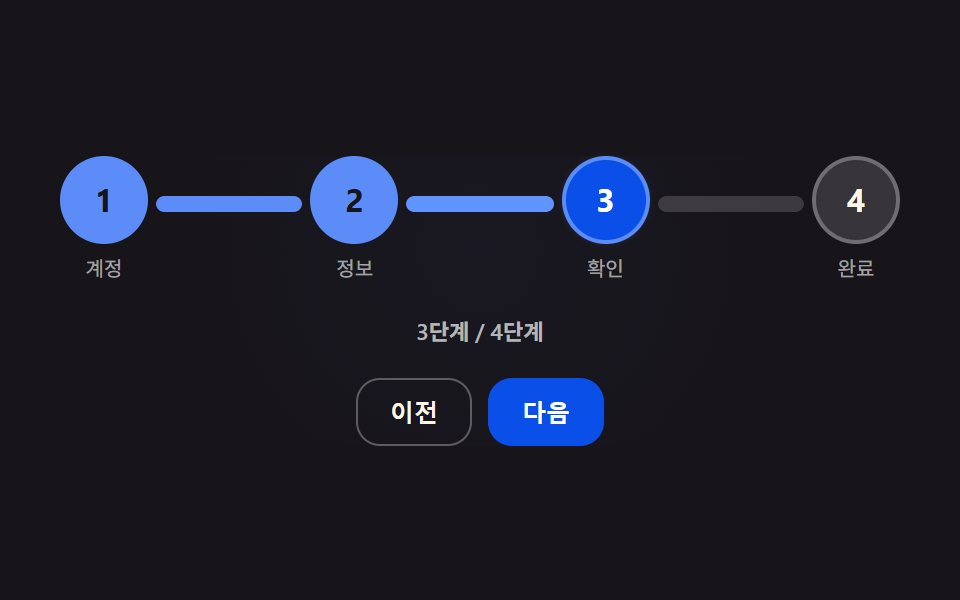 진행 단계 ui 9가지 — 스텝 인디케이터를 물리 계산으로 다듬기진행 단계 ui 아홉 가지를 한 페이지에 모았다. 디자이너는 03번 체크 표시가 그려지는 순간을 마음에 들어 했고, 개발자는 05번의 마찰 값 하나 때문에 스크러버가 매번 다른 자리에서 멈춰 애를 먹었다. 09번에서 이 글의 데모 전부 보기