03고른 답에 따라 갈라지는 단계 경로
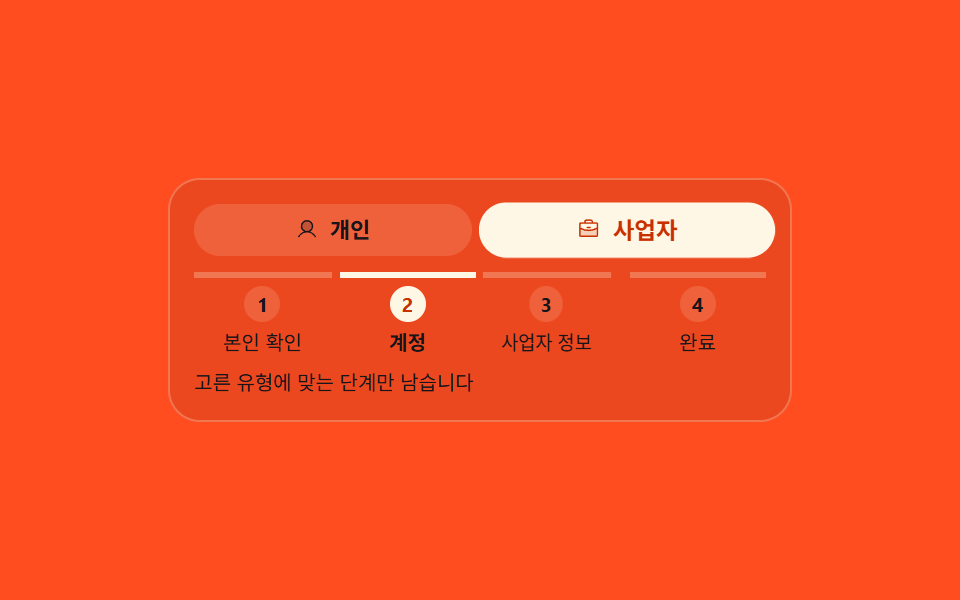
개인과 사업자 중 무엇을 고르느냐에 따라 남은 단계 목록 자체가 세 칸에서 네 칸으로 다시 그려지고, 지금 서 있는 칸에만 aria-current 가 step 으로 붙습니다.
쓰임개인·법인으로 갈리는 가입 절차, 답에 따라 문항이 늘어나는 설문
aria-currentradiogroupsteps(1, end)
<main class="stage">
  <section class="bp is-demo" id="bp" aria-label="고른 답에 따라 갈라지는 가입 단계">
    <div class="bp__pick" role="radiogroup" aria-label="가입 유형">
      <label class="bp__opt">
        <input class="bp__r" type="radio" name="bp-kind" value="personal">
        <span class="bp__opt-b" data-opt="personal">
          <span class="bp__opt-i" aria-hidden="true"><svg viewBox="0 0 256 256" width="1em" height="1em" fill="currentColor"><g><path d="M192 96a64 64 0 1 1-64-64a64 64 0 0 1 64 64" opacity=".2"/><path d="M230.92 212c-15.23-26.33-38.7-45.21-66.09-54.16a72 72 0 1 0-73.66 0c-27.39 8.94-50.86 27.82-66.09 54.16a8 8 0 1 0 13.85 8c18.84-32.56 52.14-52 89.07-52s70.23 19.44 89.07 52a8 8 0 1 0 13.85-8M72 96a56 56 0 1 1 56 56a56.06 56.06 0 0 1-56-56"/></g></svg></span>
          <span class="bp__opt-t">개인</span>
        </span>
      </label>
      <label class="bp__opt">
        <input class="bp__r" type="radio" name="bp-kind" value="business" checked>
        <span class="bp__opt-b" data-opt="business">
          <span class="bp__opt-i" aria-hidden="true"><svg viewBox="0 0 256 256" width="1em" height="1em" fill="currentColor"><g><path d="M224 118.31V200a8 8 0 0 1-8 8H40a8 8 0 0 1-8-8v-81.69A191.14 191.14 0 0 0 128 144a191.1 191.1 0 0 0 96-25.69" opacity=".2"/><path d="M104 112a8 8 0 0 1 8-8h32a8 8 0 0 1 0 16h-32a8 8 0 0 1-8-8m128-40v128a16 16 0 0 1-16 16H40a16 16 0 0 1-16-16V72a16 16 0 0 1 16-16h40v-8a24 24 0 0 1 24-24h48a24 24 0 0 1 24 24v8h40a16 16 0 0 1 16 16M96 56h64v-8a8 8 0 0 0-8-8h-48a8 8 0 0 0-8 8ZM40 72v41.62A184.1 184.1 0 0 0 128 136a184 184 0 0 0 88-22.39V72Zm176 128v-68.37A200.25 200.25 0 0 1 128 152a200.2 200.2 0 0 1-88-20.36V200z"/></g></svg></span>
          <span class="bp__opt-t">사업자</span>
        </span>
      </label>
    </div>
    <ol class="bp__steps" id="bp-steps"></ol>
    <p class="bp__note">고른 유형에 맞는 단계만 남습니다</p>
  </section>
  <template id="bp-src">
    <li data-k="all">본인 확인</li>
    <li data-k="all">계정</li>
    <li data-k="biz">사업자 정보</li>
    <li data-k="all">완료</li>
  </template>
</main>@use "sass:color";
@use "../../../../site/static/demo-tokens" as *;
$duration: $dur-quick;
$easing: $ease-spring;
$color: $subject-cream;
@include stage($stage-orange);
$card: color.mix($subject-ink, $stage-orange, 8%);
$line: color.mix($subject-cream, $card, 26%);
$soft: color.mix($subject-cream, $card, 14%);
$mute: color.mix($subject-cream, $card, 66%);
.bp {
box-sizing: border-box;
width: min(312px, 92vw);
padding: $sp-3;
border: 1px solid $line;
border-radius: $r-card;
background: $card;
color: $color;
font-family: -apple-system, "Segoe UI", "Noto Sans KR", sans-serif;
font-size: 12px;
line-height: 1.3;
}
// ── 갈림길을 고르는 라디오 ──────────────────────────
.bp__pick {
display: grid;
grid-template-columns: repeat(2, 1fr);
gap: $sp-2;
}
.bp__opt {
position: relative;
display: block;
cursor: pointer;
}
// 라디오 자체는 감추되 초점은 그대로 받는다 — 화살표 키 이동이 네이티브로 돈다
.bp__r {
position: absolute;
width: 1px;
height: 1px;
margin: 0;
opacity: 0;
}
.bp__opt-b {
display: flex;
align-items: center;
justify-content: center;
gap: $sp-1;
height: 26px;
border-radius: $r-pill;
background: $soft;
color: $subject-ink;
font-size: 11px;
font-weight: 700;
line-height: 1.3;
}
.bp__opt-i { display: inline-flex; width: 13px; height: 13px; }
// 정적(사람이 고르는) 경로 — .is-demo 를 떼도 고른 값이 보여야 한다
.bp__r:checked + .bp__opt-b { background: $color; color: $subject-orange-deep; }
.bp__r:focus-visible + .bp__opt-b { outline: 2px solid $color; outline-offset: 2px; }
// ── 다시 그려지는 단계 목록 ─────────────────────────
// 번호는 CSS counter 가 센다 — 칸이 하나 빠지면 뒤 칸 번호가 저절로 당겨진다
.bp__steps {
display: grid;
grid-template-columns: repeat(3, 1fr);
gap: $sp-1;
counter-reset: bps;
margin: $sp-2 0 0;
padding: 0;
list-style: none;
}
.bp__s {
display: grid;
align-content: start;
justify-items: center;
gap: $sp-1;
counter-increment: bps;
padding: $sp-1 0 0;
border-top: 3px solid $line;
}
.bp__s::before {
content: counter(bps);
display: grid;
place-items: center;
width: 18px;
height: 18px;
border-radius: 50%;
background: $soft;
color: $subject-ink;
font-size: 10px;
font-weight: 700;
line-height: 1;
}
.bp__l {
color: $subject-ink;
font-size: 10px;
line-height: 1.2;
text-align: center;
}
.bp__s[aria-current="step"] { border-top-color: $color; }
.bp__s[aria-current="step"]::before { background: $color; color: $subject-orange-deep; }
.bp__s[aria-current="step"] .bp__l { color: $subject-ink; font-weight: 700; }
.bp__note {
margin: $sp-2 0 0;
color: $subject-ink;
font-size: 10px;
line-height: 1.3;
}
// ── 격자 미리보기 전용 2초 루프 ─────────────────────
// 고른 값과 칸 수는 steps(1, end) 로 한 프레임에 컷,
// 새로 끼어드는 칸만 translateX·scaleX 로 보조 움직임을 준다
@keyframes bp-cols {
0%, 29% { grid-template-columns: repeat(3, 1fr); }
30%, 69% { grid-template-columns: repeat(4, 1fr); }
70%, 100% { grid-template-columns: repeat(3, 1fr); }
}
@keyframes bp-biz {
0%, 29% { display: none; }
30%, 69% { display: grid; }
70%, 100% { display: none; }
}
@keyframes bp-biz-in {
0%, 30% { transform: translateX(-12px) scaleX(.72); }
44%, 69% { transform: translateX(0) scaleX(1); }
70%, 100% { transform: translateX(-12px) scaleX(.72); }
}
@keyframes bp-pick-p {
0%, 29% { background: $color; color: $subject-orange-deep; }
30%, 69% { background: $soft; color: $subject-ink; }
70%, 100% { background: $color; color: $subject-orange-deep; }
}
@keyframes bp-pick-b {
0%, 29% { background: $soft; color: $subject-ink; }
30%, 69% { background: $color; color: $subject-orange-deep; }
70%, 100% { background: $soft; color: $subject-ink; }
}
@keyframes bp-pop-b {
0%, 30% { transform: scale(1); }
37% { transform: scale(1.07); }
47%, 100% { transform: scale(1); }
}
@keyframes bp-pop-p {
0%, 70% { transform: scale(1); }
77% { transform: scale(1.07); }
87%, 100% { transform: scale(1); }
}
.bp.is-demo {
.bp__steps {
animation-name: bp-cols;
animation-duration: $dur-loop;
animation-timing-function: steps(1, end);
animation-iteration-count: infinite;
}
.bp__s--biz {
animation-name: bp-biz, bp-biz-in;
animation-duration: $dur-loop, $dur-loop;
animation-timing-function: steps(1, end), $easing;
animation-iteration-count: infinite, infinite;
}
.bp__opt-b[data-opt="personal"] {
animation-name: bp-pick-p, bp-pop-p;
animation-duration: $dur-loop, $dur-loop;
animation-timing-function: steps(1, end), $easing;
animation-iteration-count: infinite, infinite;
}
.bp__opt-b[data-opt="business"] {
animation-name: bp-pick-b, bp-pop-b;
animation-duration: $dur-loop, $dur-loop;
animation-timing-function: steps(1, end), $easing;
animation-iteration-count: infinite, infinite;
}
}
@media (max-width: 340px) {
.bp { padding: $sp-2; font-size: 11px; }
.bp__pick { gap: $sp-1; }
.bp__opt-b { gap: 0; font-size: 10px; }
.bp__note { font-size: 9px; }
}
@media (prefers-reduced-motion: reduce) {
.bp.is-demo .bp__steps,
.bp.is-demo .bp__s--biz,
.bp.is-demo .bp__opt-b { animation: none !important; transform: none !important; }
// 움직임만 끄고 고른 값과 그에 맞는 칸 수는 남긴다 — 사업자(네 칸)
.bp.is-demo .bp__steps { grid-template-columns: repeat(4, 1fr) !important; }
.bp.is-demo .bp__s--biz { display: grid !important; }
.bp.is-demo .bp__opt-b[data-opt="business"] { background: $color !important; color: $subject-orange-deep !important; }
.bp.is-demo .bp__opt-b[data-opt="personal"] { background: $soft !important; color: $subject-ink !important; }
}html, body {
margin: 0;
overflow: hidden;
}
.stage {
box-sizing: border-box;
min-height: 100vh;
display: grid;
place-items: center;
margin: 0;
background: #ff4d1f;
font-family: -apple-system, "Segoe UI", "Noto Sans KR", sans-serif;
padding: clamp(8px, 4vw, 24px);
}
.bp {
box-sizing: border-box;
width: min(312px, 92vw);
padding: 12px;
border: 1px solid rgb(94.6139607843%, 46.2061176471%, 32.3309803922%);
border-radius: 16px;
background: rgb(92.7215686275%, 28.4078431373%, 12%);
color: #fff7e6;
font-family: -apple-system, "Segoe UI", "Noto Sans KR", sans-serif;
font-size: 12px;
line-height: 1.3;
}
.bp__pick {
display: grid;
grid-template-columns: repeat(2, 1fr);
gap: 8px;
}
.bp__opt {
position: relative;
display: block;
cursor: pointer;
}
.bp__r {
position: absolute;
width: 1px;
height: 1px;
margin: 0;
opacity: 0;
}
.bp__opt-b {
display: flex;
align-items: center;
justify-content: center;
gap: 4px;
height: 26px;
border-radius: 999px;
background: rgb(93.7405490196%, 37.9915294118%, 22.9474509804%);
color: #17141a;
font-size: 11px;
font-weight: 700;
line-height: 1.3;
}
.bp__opt-i {
display: inline-flex;
width: 13px;
height: 13px;
}
.bp__r:checked + .bp__opt-b {
background: #fff7e6;
color: #c93000;
}
.bp__r:focus-visible + .bp__opt-b {
outline: 2px solid #fff7e6;
outline-offset: 2px;
}
.bp__steps {
display: grid;
grid-template-columns: repeat(3, 1fr);
gap: 4px;
counter-reset: bps;
margin: 8px 0 0;
padding: 0;
list-style: none;
}
.bp__s {
display: grid;
align-content: start;
justify-items: center;
gap: 4px;
counter-increment: bps;
padding: 4px 0 0;
border-top: 3px solid rgb(94.6139607843%, 46.2061176471%, 32.3309803922%);
}
.bp__s::before {
content: counter(bps);
display: grid;
place-items: center;
width: 18px;
height: 18px;
border-radius: 50%;
background: rgb(93.7405490196%, 37.9915294118%, 22.9474509804%);
color: #17141a;
font-size: 10px;
font-weight: 700;
line-height: 1;
}
.bp__l {
color: #17141a;
font-size: 10px;
line-height: 1.2;
text-align: center;
}
.bp__s[aria-current=step] {
border-top-color: #fff7e6;
}
.bp__s[aria-current=step]::before {
background: #fff7e6;
color: #c93000;
}
.bp__s[aria-current=step] .bp__l {
color: #17141a;
font-weight: 700;
}
.bp__note {
margin: 8px 0 0;
color: #17141a;
font-size: 10px;
line-height: 1.3;
}
@keyframes bp-cols {
0%, 29% {
grid-template-columns: repeat(3, 1fr);
}
30%, 69% {
grid-template-columns: repeat(4, 1fr);
}
70%, 100% {
grid-template-columns: repeat(3, 1fr);
}
}
@keyframes bp-biz {
0%, 29% {
display: none;
}
30%, 69% {
display: grid;
}
70%, 100% {
display: none;
}
}
@keyframes bp-biz-in {
0%, 30% {
transform: translateX(-12px) scaleX(0.72);
}
44%, 69% {
transform: translateX(0) scaleX(1);
}
70%, 100% {
transform: translateX(-12px) scaleX(0.72);
}
}
@keyframes bp-pick-p {
0%, 29% {
background: #fff7e6;
color: #c93000;
}
30%, 69% {
background: rgb(93.7405490196%, 37.9915294118%, 22.9474509804%);
color: #17141a;
}
70%, 100% {
background: #fff7e6;
color: #c93000;
}
}
@keyframes bp-pick-b {
0%, 29% {
background: rgb(93.7405490196%, 37.9915294118%, 22.9474509804%);
color: #17141a;
}
30%, 69% {
background: #fff7e6;
color: #c93000;
}
70%, 100% {
background: rgb(93.7405490196%, 37.9915294118%, 22.9474509804%);
color: #17141a;
}
}
@keyframes bp-pop-b {
0%, 30% {
transform: scale(1);
}
37% {
transform: scale(1.07);
}
47%, 100% {
transform: scale(1);
}
}
@keyframes bp-pop-p {
0%, 70% {
transform: scale(1);
}
77% {
transform: scale(1.07);
}
87%, 100% {
transform: scale(1);
}
}
.bp.is-demo .bp__steps {
animation-name: bp-cols;
animation-duration: 2s;
animation-timing-function: steps(1, end);
animation-iteration-count: infinite;
}
.bp.is-demo .bp__s--biz {
animation-name: bp-biz, bp-biz-in;
animation-duration: 2s, 2s;
animation-timing-function: steps(1, end), cubic-bezier(0.2, 0.8, 0.2, 1);
animation-iteration-count: infinite, infinite;
}
.bp.is-demo .bp__opt-b[data-opt=personal] {
animation-name: bp-pick-p, bp-pop-p;
animation-duration: 2s, 2s;
animation-timing-function: steps(1, end), cubic-bezier(0.2, 0.8, 0.2, 1);
animation-iteration-count: infinite, infinite;
}
.bp.is-demo .bp__opt-b[data-opt=business] {
animation-name: bp-pick-b, bp-pop-b;
animation-duration: 2s, 2s;
animation-timing-function: steps(1, end), cubic-bezier(0.2, 0.8, 0.2, 1);
animation-iteration-count: infinite, infinite;
}
@media (max-width: 340px) {
.bp {
padding: 8px;
font-size: 11px;
}
.bp__pick {
gap: 4px;
}
.bp__opt-b {
gap: 0;
font-size: 10px;
}
.bp__note {
font-size: 9px;
}
}
@media (prefers-reduced-motion: reduce) {
.bp.is-demo .bp__steps,
.bp.is-demo .bp__s--biz,
.bp.is-demo .bp__opt-b {
animation: none !important;
transform: none !important;
}
.bp.is-demo .bp__steps {
grid-template-columns: repeat(4, 1fr) !important;
}
.bp.is-demo .bp__s--biz {
display: grid !important;
}
.bp.is-demo .bp__opt-b[data-opt=business] {
background: #fff7e6 !important;
color: #c93000 !important;
}
.bp.is-demo .bp__opt-b[data-opt=personal] {
background: rgb(93.7405490196%, 37.9915294118%, 22.9474509804%) !important;
color: #17141a !important;
}
}// 실제 동작: 고른 값으로 단계 배열을 다시 걸러 목록을 통째로 다시 그린다.
// 칸 수가 달라지므로 grid 트랙 수도 배열 길이로 다시 적는다. 번호는 CSS counter 가 센다.
var bp = document.getElementById('bp');
var bpSteps = document.getElementById('bp-steps');
var bpSrc = [].slice.call(document.getElementById('bp-src').content.querySelectorAll('li'));
var bpAt = 2;
function bpDraw() {
var picked = bp.querySelector('.bp__r:checked');
var biz = !!picked && picked.value === 'business';
var list = bpSrc.filter(function (n) { return n.getAttribute('data-k') === 'all' || biz; });
bpSteps.style.gridTemplateColumns = 'repeat(' + list.length + ', 1fr)';
while (bpSteps.firstChild) { bpSteps.removeChild(bpSteps.firstChild); }
list.forEach(function (n, i) {
var li = document.createElement('li');
li.className = 'bp__s';
if (n.getAttribute('data-k') === 'biz') { li.className += ' bp__s--biz'; }
if (i + 1 === bpAt) { li.setAttribute('aria-current', 'step'); }
var lab = document.createElement('span');
lab.className = 'bp__l';
lab.textContent = n.textContent;
li.appendChild(lab);
bpSteps.appendChild(li);
});
}
[].slice.call(bp.querySelectorAll('.bp__r')).forEach(function (r) {
r.addEventListener('change', function () { bp.classList.remove('is-demo'); bpDraw(); });
});
bpDraw();import { useState } from "react";
import type { CSSProperties } from "react";
import styles from "./BranchStepPath.module.scss";
export type BranchStep = {
label: string;
/** "all" = every path, "biz" = only the business path */
kind: "all" | "biz";
};
export type BranchStepPathProps = {
steps?: BranchStep[];
personalLabel?: string;
businessLabel?: string;
pickLabel?: string;
groupLabel?: string;
note?: string;
/** 1-based index of the step the user stands on */
current?: number;
/** 격자 미리보기용 2초 자동 루프. 사람이 손대면 꺼진다 */
demo?: boolean;
duration?: number;
easing?: string;
color?: string;
};
const DEFAULT_STEPS: BranchStep[] = [
{ label: "Verify", kind: "all" },
{ label: "Account", kind: "all" },
{ label: "Business info", kind: "biz" },
{ label: "Done", kind: "all" },
];
function Person() {
return (
<svg viewBox="0 0 256 256" width="1em" height="1em" fill="currentColor">
<g>
<path d="M192 96a64 64 0 1 1-64-64a64 64 0 0 1 64 64" opacity=".2" />
<path d="M230.92 212c-15.23-26.33-38.7-45.21-66.09-54.16a72 72 0 1 0-73.66 0c-27.39 8.94-50.86 27.82-66.09 54.16a8 8 0 1 0 13.85 8c18.84-32.56 52.14-52 89.07-52s70.23 19.44 89.07 52a8 8 0 1 0 13.85-8M72 96a56 56 0 1 1 56 56a56.06 56.06 0 0 1-56-56" />
</g>
</svg>
);
}
function Briefcase() {
return (
<svg viewBox="0 0 256 256" width="1em" height="1em" fill="currentColor">
<g>
<path d="M224 118.31V200a8 8 0 0 1-8 8H40a8 8 0 0 1-8-8v-81.69A191.14 191.14 0 0 0 128 144a191.1 191.1 0 0 0 96-25.69" opacity=".2" />
<path d="M104 112a8 8 0 0 1 8-8h32a8 8 0 0 1 0 16h-32a8 8 0 0 1-8-8m128-40v128a16 16 0 0 1-16 16H40a16 16 0 0 1-16-16V72a16 16 0 0 1 16-16h40v-8a24 24 0 0 1 24-24h48a24 24 0 0 1 24 24v8h40a16 16 0 0 1 16 16M96 56h64v-8a8 8 0 0 0-8-8h-48a8 8 0 0 0-8 8ZM40 72v41.62A184.1 184.1 0 0 0 128 136a184 184 0 0 0 88-22.39V72Zm176 128v-68.37A200.25 200.25 0 0 1 128 152a200.2 200.2 0 0 1-88-20.36V200z" />
</g>
</svg>
);
}
export default function BranchStepPath({
steps = DEFAULT_STEPS,
personalLabel = "Personal",
businessLabel = "Business",
pickLabel = "Account type",
groupLabel = "Signup path that branches on the answer you pick",
note = "Only the steps that fit the type you picked are left",
current = 2,
demo = true,
duration = 220,
easing = "cubic-bezier(.2,.8,.2,1)",
color = "#fff7e6",
}: BranchStepPathProps) {
const [biz, setBiz] = useState(true);
const [live, setLive] = useState(demo);
// 고른 값으로 배열을 다시 걸러 목록을 통째로 다시 그린다
const list = steps.filter((s) => s.kind === "all" || biz);
function pick(next: boolean) {
setLive(false);
setBiz(next);
}
const vars: CSSProperties = { "--duration": `${duration}ms`, "--easing": easing, "--color": color };
const cols: CSSProperties = { gridTemplateColumns: `repeat(${list.length}, 1fr)` };
const cls = [styles.bp, live ? styles.isDemo : ""].filter(Boolean).join(" ");
return (
<section className={cls} style={vars} aria-label={groupLabel}>
<div className={styles.pick} role="radiogroup" aria-label={pickLabel}>
<label className={styles.opt}>
<input
className={styles.r}
type="radio"
name="bp-kind"
value="personal"
checked={!biz}
onChange={() => pick(false)}
/>
<span className={styles.optB} data-opt="personal">
<span className={styles.optI} aria-hidden="true"><Person /></span>
<span>{personalLabel}</span>
</span>
</label>
<label className={styles.opt}>
<input
className={styles.r}
type="radio"
name="bp-kind"
value="business"
checked={biz}
onChange={() => pick(true)}
/>
<span className={styles.optB} data-opt="business">
<span className={styles.optI} aria-hidden="true"><Briefcase /></span>
<span>{businessLabel}</span>
</span>
</label>
</div>
<ol className={styles.steps} style={cols}>
{list.map((s, i) => (
<li
key={s.label}
className={[styles.s, s.kind === "biz" ? styles.sBiz : ""].filter(Boolean).join(" ")}
aria-current={i + 1 === current ? "step" : undefined}
>
<span className={styles.l}>{s.label}</span>
</li>
))}
</ol>
<p className={styles.note}>{note}</p>
</section>
);
}03 고른 답에 따라 갈라지는 단계 경로 — 측정 누적면적 7.863% · 움직인 프레임 11/23GODRICH 원작 · zip 에 SCSS·React 포함 · 회원가입 단계 ui 9가지 — 갈라지고 이어서 쓰는 폼
이 데모가 속한 글
 회원가입 단계 ui 9가지 — 갈라지고 이어서 쓰는 폼회원가입 단계 ui는 한 번에 다 보여 주지 않고 몇 장의 화면으로 쪼개어 순서대로 받아 내는 입력 방식입니다. 아홉 개 전부 값을 실제로 읽고 검사하고 저장하며, 칸을 채우지 않으면 다음 장으로 안 넘어가고 탭을 이 글의 데모 전부 보기