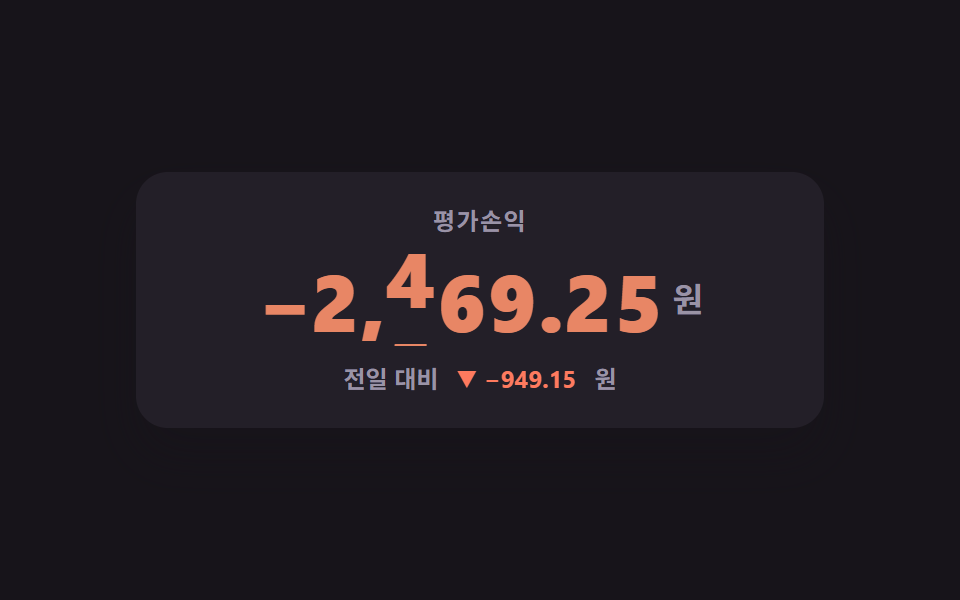
07자릿수가 굴러가는 큰 숫자판
자릿수마다 0부터 9까지 세로로 세워 두고 translateY 로 끌어올리며, 부호와 소수점 자리는 굴리지 않는다
쓰임대시보드 상단 총자산 카드, 누적 거래대금 표시
translateYtabular-numsoverflow
<main class="stage">
<div class="od is-demo" id="od">
  <div class="od__board">
    <p class="od__label">평가손익</p>
    <!-- 자릿수 칸 개수는 고정이다 — 값이 커지거나 작아져도 판이 좌우로 안 튄다.
         구분자(,)와 소수점(.)은 굴리지 않고 제자리에 박혀 있고, 부호 칸만 따로 컷으로 바뀐다. -->
    <p class="od__value">
      <span class="od__sign">
        <span class="od__glyph od__glyph--a" data-signa>−</span>
        <span class="od__glyph od__glyph--b" data-signb>+</span>
      </span>
      <span class="od__digit"><span class="od__strip" data-d="0" style="--d: 1"><span class="od__n">0</span><span class="od__n">1</span><span class="od__n">2</span><span class="od__n">3</span><span class="od__n">4</span><span class="od__n">5</span><span class="od__n">6</span><span class="od__n">7</span><span class="od__n">8</span><span class="od__n">9</span></span></span>
      <span class="od__fixed" data-lead-mark>,</span>
      <span class="od__digit"><span class="od__strip" data-d="1" style="--d: 3"><span class="od__n">0</span><span class="od__n">1</span><span class="od__n">2</span><span class="od__n">3</span><span class="od__n">4</span><span class="od__n">5</span><span class="od__n">6</span><span class="od__n">7</span><span class="od__n">8</span><span class="od__n">9</span></span></span>
      <span class="od__digit"><span class="od__strip" data-d="2" style="--d: 6"><span class="od__n">0</span><span class="od__n">1</span><span class="od__n">2</span><span class="od__n">3</span><span class="od__n">4</span><span class="od__n">5</span><span class="od__n">6</span><span class="od__n">7</span><span class="od__n">8</span><span class="od__n">9</span></span></span>
      <span class="od__digit"><span class="od__strip" data-d="3" style="--d: 9"><span class="od__n">0</span><span class="od__n">1</span><span class="od__n">2</span><span class="od__n">3</span><span class="od__n">4</span><span class="od__n">5</span><span class="od__n">6</span><span class="od__n">7</span><span class="od__n">8</span><span class="od__n">9</span></span></span>
      <span class="od__fixed">.</span>
      <span class="od__digit"><span class="od__strip" data-d="4" style="--d: 2"><span class="od__n">0</span><span class="od__n">1</span><span class="od__n">2</span><span class="od__n">3</span><span class="od__n">4</span><span class="od__n">5</span><span class="od__n">6</span><span class="od__n">7</span><span class="od__n">8</span><span class="od__n">9</span></span></span>
      <span class="od__digit"><span class="od__strip" data-d="5" style="--d: 5"><span class="od__n">0</span><span class="od__n">1</span><span class="od__n">2</span><span class="od__n">3</span><span class="od__n">4</span><span class="od__n">5</span><span class="od__n">6</span><span class="od__n">7</span><span class="od__n">8</span><span class="od__n">9</span></span></span>
      <span class="od__unit">원</span>
    </p>
    <p class="od__delta">
      <span class="od__deltaLabel">전일 대비</span>
      <span class="od__deltaWrap">
        <span class="od__deltaText od__deltaText--a" data-dela>▼ −949.15</span>
        <span class="od__deltaText od__deltaText--b" data-delb>▲ +3,196.75</span>
      </span>
      <span class="od__unit">원</span>
    </p>
  </div>
</div>
</main>@use "../../../../site/static/demo-tokens" as *;
// 오도미터 숫자판 — 평가손익 한 덩어리가 자릿수마다 세로로 굴러간다.
// 278-07 의 카운트업과 갈리는 지점: ① 소수점 두 자리까지 굴리고 ② 음수가 되면 부호 칸이 바뀌고
// ③ 천 단위 구분자와 소수점은 굴리지 않고 제자리에 박혀 있고 ④ 오르내림이 색 방향까지 바꾼다.
// 실사용에서는 시드 PRNG 가 700ms 마다 값을 올렸다 내렸다 하고, 등록한 --d 가 transition 으로
// 이어져 자릿수가 실제로 굴러간다. 미리보기(.is-demo)는 같은 두 번(오름 → 내림)을 CSS 키프레임에 눕혔다.
// 굴림 위치는 숫자라야 보간된다 — 등록하지 않으면 9 에서 0 으로 컷으로 점프한다.
// inherits: false 로 등록했으므로 값은 반드시 자릿수 칸 자신에 올린다 (부모에 걸면 안 먹는다).
@property --d { syntax: "<number>"; inherits: false; initial-value: 0; }
$duration: $dur-loop;
$easing: $ease-out;
// 한 칸의 높이. 굴림 거리는 이 값의 배수다 — 글자 높이와 칸 높이가 같아야 위아래가 안 잘린다
$cell: 1.15em;
@include stage($stage-ink);
.od { display: flex; justify-content: center; width: 100%; }
.od__board {
width: min(100%, 320px); background: $tick-panel; border-radius: $r-card;
box-shadow: $shadow-raised; padding: $sp-4 $sp-3; overflow: hidden; text-align: center;
}
.od__label {
margin: 0 0 $sp-2; font-weight: 700; font-size: clamp(10px, 2.8vw, 12px);
line-height: 1.4; color: $tick-mute; letter-spacing: .06em;
}
// ── 숫자판. 자릿수 칸 개수가 고정이라 값이 커지거나 작아져도 판이 좌우로 안 튄다
.od__value {
margin: 0; display: flex; align-items: center; justify-content: center;
font-weight: 800; font-size: clamp(26px, 9vw, 40px); line-height: 1.15;
font-variant-numeric: tabular-nums; color: $tick-down;
// 값이 오르면 상승색, 내리면 하락색 — 방향은 색만이 아니라 아래 줄의 ▲▼ 와 부호도 같이 말한다
transition: color $dur-base $easing;
}
.od.is-up .od__value { color: $tick-up; }
.od.is-down .od__value { color: $tick-down; }
// 부호 칸 — 두 글자를 같은 칸에 겹쳐 두고 컷으로 갈아 끼운다
.od__sign { display: grid; width: .66em; height: $cell; }
.od__glyph { grid-area: 1 / 1; line-height: 1.15; }
.od:not(.is-demo) .od__glyph--b { opacity: 0; }
// 자릿수 칸 — 0 부터 9 까지 세로로 쌓은 띠를 끌어올린다. 칸은 넘치는 부분을 자른다
.od__digit { display: block; overflow: hidden; width: .64em; height: $cell; }
.od__strip {
display: block;
transform: translateY(calc(var(--d) * -#{$cell}));
// 실사용에서 값이 바뀌면 여기가 굴러간다. 등록한 숫자 속성이라 9 에서 0 으로도 이어서 흐른다
transition: --d $dur-enter $easing;
}
.od__n { display: block; height: $cell; line-height: 1.15; text-align: center; }
// 구분자와 소수점은 굴리지 않는다 — 제자리에 박혀 있어야 자릿수가 어디서 끊기는지 눈이 안 잃는다
.od__fixed { display: block; width: .3em; height: $cell; line-height: 1.15; }
// 앞자리 0 은 흐리게. 칸은 그대로 두고 읽는 자리만 또렷하게 남긴다 (값이 0 을 지날 때 실사용에서 나타난다)
.od__digit.is-lead, .od__fixed.is-lead { opacity: .32; }
.od__unit {
align-self: center; margin-left: $sp-1; font-weight: 700; font-size: .42em;
line-height: 1.4; color: $tick-mute;
}
// ── 전일 대비 한 줄
.od__delta {
margin: $sp-2 0 0; display: flex; align-items: center; justify-content: center; gap: $sp-1;
font-weight: 700; font-size: clamp(10px, 2.8vw, 12px); line-height: 1.4;
font-variant-numeric: tabular-nums;
}
.od__deltaLabel { color: $tick-mute; }
// 두 장을 같은 칸에 겹친다 — 컷 교체라 자릿수가 늘어도 줄이 안 흔들린다
.od__deltaWrap { display: grid; justify-items: center; }
.od__deltaText { grid-area: 1 / 1; }
.od__deltaText--a, .od__deltaText.is-minus { color: $tick-down; }
.od__deltaText--b, .od__deltaText.is-plus { color: $tick-up; }
.od__delta .od__unit { font-size: 1em; margin-left: 0; }
.od:not(.is-demo) .od__deltaText--b { opacity: 0; }
// ── 미리보기 루프(2초): 24~45% 에 값이 오르고(상승색) 60~81% 에 도로 내린다(하락색).
// 자릿수는 오른쪽 끝부터 3% 씩 밀려 굴러간다 — 진짜 오도미터의 자리올림 순서이자,
// 한 프레임에 한두 칸만 굴러 나머지 자리가 읽히게 하는 장치다(poster 가 통째로 흐려지지 않는다).
// 부호 칸과 전일 대비 줄은 굴림이 시작되는 자리(25% · 61%)에서 steps(1, end) 컷으로 갈린다 —
// 실사용과 같은 순서다: JS 가 부호·전일 대비를 즉시 쓰고, 자릿수는 transition 으로 뒤따라 굴러온다.
// 반투명하게 겹친 유령 프레임이 안 생긴다. 되돌림이 81% 에 끝난다: 24프레임의 마지막 장이
// 2초의 95.8% 지점이라 96% 뒤는 샘플이 없다. 색 방향은 루프 안에서 2회 = 초당 1회로
// WCAG 2.3.1(초당 3회 미만) 아래다.
.od.is-demo .od__value { animation-name: odHue; }
.od.is-demo .od__strip[data-d="0"] { animation-name: odRoll0; }
.od.is-demo .od__strip[data-d="1"] { animation-name: odRoll1; }
.od.is-demo .od__strip[data-d="2"] { animation-name: odRoll2; }
.od.is-demo .od__strip[data-d="3"] { animation-name: odRoll3; }
.od.is-demo .od__strip[data-d="4"] { animation-name: odRoll4; }
.od.is-demo .od__strip[data-d="5"] { animation-name: odRoll5; }
.od.is-demo .od__value, .od.is-demo .od__strip {
animation-duration: $duration;
animation-timing-function: $easing;
animation-iteration-count: infinite;
animation-fill-mode: backwards;
}
// −1,369.25 에서 +2,776.65 로 올랐다 도로 내린다. 자릿수마다 굴러갈 곳과 굴러갈 때가 다르다 —
// 오른쪽 끝(odRoll5)이 먼저 떠나고 왼쪽으로 3% 씩 밀린다
@keyframes odRoll5 { 0%, 24% { --d: 5; } 30%, 60% { --d: 5; } 66%, 100% { --d: 5; } }
@keyframes odRoll4 { 0%, 27% { --d: 2; } 33%, 63% { --d: 6; } 69%, 100% { --d: 2; } }
@keyframes odRoll3 { 0%, 30% { --d: 9; } 36%, 66% { --d: 6; } 72%, 100% { --d: 9; } }
@keyframes odRoll2 { 0%, 33% { --d: 6; } 39%, 69% { --d: 7; } 75%, 100% { --d: 6; } }
@keyframes odRoll1 { 0%, 36% { --d: 3; } 42%, 72% { --d: 7; } 78%, 100% { --d: 3; } }
@keyframes odRoll0 { 0%, 39% { --d: 1; } 45%, 75% { --d: 2; } 81%, 100% { --d: 1; } }
@keyframes odHue {
0%, 24% { color: $tick-down; }
45%, 60% { color: $tick-up; }
81%, 100% { color: $tick-down; }
}
// 부호 칸·전일 대비 줄의 컷 — 굴림이 시작되는 프레임에 한 번에 갈린다
.od.is-demo .od__glyph--a, .od.is-demo .od__glyph--b,
.od.is-demo .od__deltaText--a, .od.is-demo .od__deltaText--b {
animation-duration: $duration;
animation-timing-function: steps(1, end);
animation-iteration-count: infinite;
animation-fill-mode: backwards;
}
.od.is-demo .od__glyph--a, .od.is-demo .od__deltaText--a { animation-name: odCutA; }
.od.is-demo .od__glyph--b, .od.is-demo .od__deltaText--b { animation-name: odCutB; }
@keyframes odCutA {
0%, 23% { opacity: 1; }
25%, 59% { opacity: 0; }
61%, 100% { opacity: 1; }
}
@keyframes odCutB {
0%, 23% { opacity: 0; }
25%, 59% { opacity: 1; }
61%, 100% { opacity: 0; }
}
@media (max-width: 340px) {
.od__board { padding: $sp-2; }
.od__label { margin: 0 0 $sp-1; }
.od__delta { margin: $sp-1 0 0; }
}
@media (prefers-reduced-motion: reduce) {
// 굴림과 색 흐름만 멈춘다 — 값은 그 자리에 그대로 서 있고 방향은 ▲▼ 와 부호가 말한다
.od__value { transition: none !important; }
.od__strip { transition: none !important; }
.od.is-demo .od__value, .od.is-demo .od__strip { animation: none !important; }
.od.is-demo .od__glyph--a, .od.is-demo .od__deltaText--a { animation: none !important; opacity: 1 !important; }
.od.is-demo .od__glyph--b, .od.is-demo .od__deltaText--b { animation: none !important; opacity: 0 !important; }
}@property --d {
syntax: "<number>";
inherits: false;
initial-value: 0;
}
html, body {
margin: 0;
overflow: hidden;
}
.stage {
box-sizing: border-box;
min-height: 100vh;
display: grid;
place-items: center;
margin: 0;
background: #17141a;
font-family: -apple-system, "Segoe UI", "Noto Sans KR", sans-serif;
padding: clamp(8px, 4vw, 24px);
}
.od {
display: flex;
justify-content: center;
width: 100%;
}
.od__board {
width: min(100%, 320px);
background: #231f28;
border-radius: 16px;
box-shadow: 0 14px 24px rgba(23, 20, 26, 0.32);
padding: 16px 12px;
overflow: hidden;
text-align: center;
}
.od__label {
margin: 0 0 8px;
font-weight: 700;
font-size: clamp(10px, 2.8vw, 12px);
line-height: 1.4;
color: #9a93a6;
letter-spacing: 0.06em;
}
.od__value {
margin: 0;
display: flex;
align-items: center;
justify-content: center;
font-weight: 800;
font-size: clamp(26px, 9vw, 40px);
line-height: 1.15;
font-variant-numeric: tabular-nums;
color: #ff7a5e;
transition: color 300ms ease-out;
}
.od.is-up .od__value {
color: #3ddc97;
}
.od.is-down .od__value {
color: #ff7a5e;
}
.od__sign {
display: grid;
width: 0.66em;
height: 1.15em;
}
.od__glyph {
grid-area: 1/1;
line-height: 1.15;
}
.od:not(.is-demo) .od__glyph--b {
opacity: 0;
}
.od__digit {
display: block;
overflow: hidden;
width: 0.64em;
height: 1.15em;
}
.od__strip {
display: block;
transform: translateY(calc(var(--d) * -1.15em));
transition: --d 600ms ease-out;
}
.od__n {
display: block;
height: 1.15em;
line-height: 1.15;
text-align: center;
}
.od__fixed {
display: block;
width: 0.3em;
height: 1.15em;
line-height: 1.15;
}
.od__digit.is-lead, .od__fixed.is-lead {
opacity: 0.32;
}
.od__unit {
align-self: center;
margin-left: 4px;
font-weight: 700;
font-size: 0.42em;
line-height: 1.4;
color: #9a93a6;
}
.od__delta {
margin: 8px 0 0;
display: flex;
align-items: center;
justify-content: center;
gap: 4px;
font-weight: 700;
font-size: clamp(10px, 2.8vw, 12px);
line-height: 1.4;
font-variant-numeric: tabular-nums;
}
.od__deltaLabel {
color: #9a93a6;
}
.od__deltaWrap {
display: grid;
justify-items: center;
}
.od__deltaText {
grid-area: 1/1;
}
.od__deltaText--a, .od__deltaText.is-minus {
color: #ff7a5e;
}
.od__deltaText--b, .od__deltaText.is-plus {
color: #3ddc97;
}
.od__delta .od__unit {
font-size: 1em;
margin-left: 0;
}
.od:not(.is-demo) .od__deltaText--b {
opacity: 0;
}
.od.is-demo .od__value {
animation-name: odHue;
}
.od.is-demo .od__strip[data-d="0"] {
animation-name: odRoll0;
}
.od.is-demo .od__strip[data-d="1"] {
animation-name: odRoll1;
}
.od.is-demo .od__strip[data-d="2"] {
animation-name: odRoll2;
}
.od.is-demo .od__strip[data-d="3"] {
animation-name: odRoll3;
}
.od.is-demo .od__strip[data-d="4"] {
animation-name: odRoll4;
}
.od.is-demo .od__strip[data-d="5"] {
animation-name: odRoll5;
}
.od.is-demo .od__value, .od.is-demo .od__strip {
animation-duration: 2s;
animation-timing-function: ease-out;
animation-iteration-count: infinite;
animation-fill-mode: backwards;
}
@keyframes odRoll5 {
0%, 24% {
--d: 5;
}
30%, 60% {
--d: 5;
}
66%, 100% {
--d: 5;
}
}
@keyframes odRoll4 {
0%, 27% {
--d: 2;
}
33%, 63% {
--d: 6;
}
69%, 100% {
--d: 2;
}
}
@keyframes odRoll3 {
0%, 30% {
--d: 9;
}
36%, 66% {
--d: 6;
}
72%, 100% {
--d: 9;
}
}
@keyframes odRoll2 {
0%, 33% {
--d: 6;
}
39%, 69% {
--d: 7;
}
75%, 100% {
--d: 6;
}
}
@keyframes odRoll1 {
0%, 36% {
--d: 3;
}
42%, 72% {
--d: 7;
}
78%, 100% {
--d: 3;
}
}
@keyframes odRoll0 {
0%, 39% {
--d: 1;
}
45%, 75% {
--d: 2;
}
81%, 100% {
--d: 1;
}
}
@keyframes odHue {
0%, 24% {
color: #ff7a5e;
}
45%, 60% {
color: #3ddc97;
}
81%, 100% {
color: #ff7a5e;
}
}
.od.is-demo .od__glyph--a, .od.is-demo .od__glyph--b,
.od.is-demo .od__deltaText--a, .od.is-demo .od__deltaText--b {
animation-duration: 2s;
animation-timing-function: steps(1, end);
animation-iteration-count: infinite;
animation-fill-mode: backwards;
}
.od.is-demo .od__glyph--a, .od.is-demo .od__deltaText--a {
animation-name: odCutA;
}
.od.is-demo .od__glyph--b, .od.is-demo .od__deltaText--b {
animation-name: odCutB;
}
@keyframes odCutA {
0%, 23% {
opacity: 1;
}
25%, 59% {
opacity: 0;
}
61%, 100% {
opacity: 1;
}
}
@keyframes odCutB {
0%, 23% {
opacity: 0;
}
25%, 59% {
opacity: 1;
}
61%, 100% {
opacity: 0;
}
}
@media (max-width: 340px) {
.od__board {
padding: 8px;
}
.od__label {
margin: 0 0 4px;
}
.od__delta {
margin: 4px 0 0;
}
}
@media (prefers-reduced-motion: reduce) {
.od__value {
transition: none !important;
}
.od__strip {
transition: none !important;
}
.od.is-demo .od__value, .od.is-demo .od__strip {
animation: none !important;
}
.od.is-demo .od__glyph--a, .od.is-demo .od__deltaText--a {
animation: none !important;
opacity: 1 !important;
}
.od.is-demo .od__glyph--b, .od.is-demo .od__deltaText--b {
animation: none !important;
opacity: 0 !important;
}
}// 가짜 손익은 시드 PRNG 로 만든다 — 같은 시드면 누가 열어도 같은 흐름이 재현된다.
// 외부 API·키가 필요 없다.
var SEED = 2967;
function mulberry32(a) {
return function () {
a |= 0; a = a + 0x6D2B79F5 | 0;
var t = Math.imul(a ^ a >>> 15, 1 | a);
t = t + Math.imul(t ^ t >>> 7, 61 | t) ^ t;
return ((t ^ t >>> 14) >>> 0) / 4294967296;
};
}
var rand = mulberry32(SEED);
var PREV_CLOSE = -420.10; // 전일 손익 — 아래 줄의 「전일 대비」는 이 값과의 차다
var LIMIT = 9999.99; // 자릿수 칸이 4+2 개라 여기까지만 걷는다
var od = document.getElementById('od');
var strips = [].slice.call(od.querySelectorAll('.od__strip'));
var signA = od.querySelector('[data-signa]');
var deltaA = od.querySelector('[data-dela]');
var leadMark = od.querySelector('[data-lead-mark]');
var value = -1369.25; // HTML 의 첫 화면과 같은 값에서 출발한다
// 278-07 의 카운터와 갈리는 지점: 여기는 소수점 두 자리까지 굴리고, 음수가 되면 부호 칸이 바뀌고,
// 구분자와 소수점은 굴리지 않고 제자리에 있고, 오르내림이 색 방향까지 바꾼다.
function digitsOf(v) {
var s = Math.abs(v).toFixed(2); // 예: 1369.25
var dot = s.indexOf('.');
var whole = s.slice(0, dot);
while (whole.length < 4) { whole = '0' + whole; }
return (whole + s.slice(dot + 1)).split('');
}
// 굴림 위치는 자릿수 칸 자신에 올린다. @property 를 inherits: false 로 등록했으므로
// 부모에 걸면 칸이 못 읽는다 — 262-08 에서 같은 함정을 실측했다
function paint(dir) {
var d = digitsOf(value);
strips.forEach(function (s, i) { s.style.setProperty('--d', d[i]); });
signA.textContent = value < 0 ? '−' : '+';
// 앞자리 0 은 흐리게 — 칸 개수는 그대로 두고 읽는 자리만 또렷하게 남긴다.
// 정수 네 자리 중 마지막 자리는 값이 0 이어도 항상 또렷하게 둔다
var leading = true;
for (var i = 0; i < 3; i++) {
leading = leading && d[i] === '0';
strips[i].parentNode.classList.toggle('is-lead', leading);
}
// 천 단위 구분자는 앞 묶음이 비었을 때만 함께 흐려진다
leadMark.classList.toggle('is-lead', d[0] === '0');
var gap = value - PREV_CLOSE;
var whole = Math.floor(Math.abs(gap)).toLocaleString('en-US');
var frac = Math.abs(gap).toFixed(2).slice(-2);
deltaA.textContent = (gap >= 0 ? '▲ +' : '▼ −') + whole + '.' + frac;
deltaA.className = 'od__deltaText od__deltaText--a ' + (gap >= 0 ? 'is-plus' : 'is-minus');
// 방향이 없는 다시 그리기(탭 복귀)에서는 색을 건드리지 않는다 — 없던 오름·내림을 지어내지 않는다
if (dir === 0) { return; }
od.classList.remove('is-up', 'is-down');
od.classList.add(dir > 0 ? 'is-up' : 'is-down');
}
// 손익은 0 을 가운데 두고 걷는다 — 되돌리는 힘이 있어 한쪽 끝에 붙어 살지 않고 부호가 실제로 뒤집힌다
function step() {
var before = value;
var next = value + (rand() - 0.5) * 3400 - value * 0.22;
if (next > LIMIT) { next = LIMIT; }
if (next < -LIMIT) { next = -LIMIT; }
value = next;
paint(next - before);
}
// 격자 미리보기(.is-demo) 동안에는 CSS 키프레임만 돌고 JS 는 DOM 을 안 건드린다 — 24프레임이 같은
// 순간을 재현해야 측정이 안 흔들린다. 포인터가 닿거나 키보드로 들어오면 그때부터 실제로 굴러간다
function live() { if (od.classList.contains('is-demo')) { od.classList.remove('is-demo'); } }
['pointerdown', 'pointermove', 'focusin'].forEach(function (ev) { od.addEventListener(ev, live); });
// 700ms 간격이면 색 방향이 초당 1.4회 바뀐다 — WCAG 2.3.1(초당 3회 미만) 아래다
var timer = setInterval(function () {
if (od.classList.contains('is-demo')) { return; }
if (document.visibilityState === 'hidden') { return; }
step();
}, 700);
// 탭을 다시 보면 현재 상태를 그대로 다시 그린다 — 안 보이는 동안 갱신을 쌓아 두지 않는다
document.addEventListener('visibilitychange', function () {
if (document.visibilityState === 'visible') { paint(0); }
});
window.addEventListener('pagehide', function () { clearInterval(timer); });// OdometerRoll — vanilla 판(run/296/demo/07-ticker-odometer-roll/index.html) 의 React 포트.
// 평가손익 한 덩어리가 자릿수마다 세로로 굴러간다. 소수점 두 자리까지 굴리고, 음수가 되면 부호 칸이
// 바뀌고, 천 단위 구분자와 소수점은 굴리지 않고 제자리에 있고, 오르내림이 색 방향까지 바꾼다.
import { useEffect, useRef, useState } from "react";
import styles from "./OdometerRoll.module.scss";
export type OdometerRollProps = {
/** 격자 미리보기용 2초 자동 루프. 포인터를 올리거나 키보드로 들어오면 꺼지고 실제 굴림이 시작된다 */
demo?: boolean;
/** 시드 — 같은 값이면 누가 열어도 같은 손익 흐름이 재현된다 */
seed?: number;
/** 갱신 간격(ms). WCAG 2.3.1 은 초당 3회 미만을 요구한다 */
intervalMs?: number;
};
type Box<T> = { current: T };
const PREV_CLOSE = -420.10; // 전일 손익 — 아래 줄의 「전일 대비」는 이 값과의 차다
const LIMIT = 9999.99; // 자릿수 칸이 4+2 개라 여기까지만 걷는다
const START = -1369.25; // 첫 화면 값 — 서버에서 그려도 판이 비지 않는다
const CELLS = [0, 1, 2, 3, 4, 5, 6, 7, 8, 9];
/** 시드 PRNG — 외부 API·키가 필요 없다 */
function mulberry32(a: number) {
return function () {
a |= 0; a = a + 0x6D2B79F5 | 0;
let t = Math.imul(a ^ a >>> 15, 1 | a);
t = t + Math.imul(t ^ t >>> 7, 61 | t) ^ t;
return ((t ^ t >>> 14) >>> 0) / 4294967296;
};
}
/** 정수 네 자리 + 소수 두 자리로 잘라 자릿수 칸에 하나씩 넣는다 */
function digitsOf(v: number): number[] {
const s = Math.abs(v).toFixed(2);
const dot = s.indexOf(".");
let whole = s.slice(0, dot);
while (whole.length < 4) { whole = "0" + whole; }
return (whole + s.slice(dot + 1)).split("").map((c) => Number(c));
}
/** 전일 대비 — 천 단위 구분자는 정수부에만 넣는다 */
function gapText(v: number): string {
const gap = v - PREV_CLOSE;
const whole = Math.floor(Math.abs(gap)).toLocaleString("en-US");
const frac = Math.abs(gap).toFixed(2).slice(-2);
return (gap >= 0 ? "▲ +" : "▼ −") + whole + "." + frac;
}
export default function OdometerRoll({ demo = true, seed = 2967, intervalMs = 700 }: OdometerRollProps) {
const randRef: Box<(() => number) | null> = useRef(null);
if (randRef.current === null) { randRef.current = mulberry32(seed); }
const [value, setValue] = useState(START);
const [dir, setDir] = useState(0);
const [live, setLive] = useState(!demo);
useEffect(() => {
if (!live) { return; }
const id = window.setInterval(() => {
// 탭이 안 보이는 동안은 세지 않는다 — 돌아왔을 때 밀린 갱신이 한꺼번에 터지지 않게
if (document.visibilityState === "hidden") { return; }
setValue((old) => {
const rand = randRef.current as () => number;
// 손익은 0 을 가운데 두고 걷는다 — 되돌리는 힘이 있어 한쪽 끝에 붙어 살지 않고 부호가 실제로 뒤집힌다
let next = old + (rand() - 0.5) * 3400 - old * 0.22;
if (next > LIMIT) { next = LIMIT; }
if (next < -LIMIT) { next = -LIMIT; }
setDir(next - old > 0 ? 1 : -1);
return next;
});
}, intervalMs);
return () => window.clearInterval(id);
}, [live, intervalMs]);
const d = digitsOf(value);
const gap = value - PREV_CLOSE;
// 앞자리 0 은 흐리게 — 칸 개수는 그대로 두고 읽는 자리만 또렷하게 남긴다.
// 정수 네 자리 중 마지막 자리는 값이 0 이어도 항상 또렷하게 둔다
const dim = [0, 1, 2].map((i) => (d.slice(0, i + 1).every((n) => n === 0) ? ` ${styles.isLead}` : ""));
const rootCls = [
styles.root, live ? "" : styles.isDemo,
dir > 0 ? styles.isUp : "", dir < 0 ? styles.isDown : "",
].filter(Boolean).join(" ");
/* 굴림 위치는 자릿수 칸 자신에 올린다. @property 를 inherits: false 로 등록했으므로
부모에 걸면 칸이 못 읽는다 — 262-08 에서 같은 함정을 실측했다 */
const digit = (i: number, extra: string) => (
<span className={styles.digit + extra} key={i}>
<span className={styles.strip} data-d={i} style={{ "--d": d[i] }}>
{CELLS.map((n) => <span className={styles.n} key={n}>{n}</span>)}
</span>
</span>
);
return (
<div
className={rootCls}
onPointerMove={() => setLive(true)}
onPointerDown={() => setLive(true)}
onFocus={() => setLive(true)}
>
<div className={styles.board}>
<p className={styles.label}>평가손익</p>
{/* 자릿수 칸 개수는 고정이다 — 값이 커지거나 작아져도 판이 좌우로 안 튄다 */}
<p className={styles.value}>
<span className={styles.sign}>
<span className={`${styles.glyph} ${styles.glyphA}`}>{value < 0 ? "−" : "+"}</span>
<span className={`${styles.glyph} ${styles.glyphB}`}>+</span>
</span>
{digit(0, dim[0])}
{/* 구분자와 소수점은 굴리지 않고 제자리에 박혀 있다 — 앞 묶음이 비면 같이 흐려진다 */}
<span className={styles.fixed + dim[0]}>,</span>
{digit(1, dim[1])}
{digit(2, dim[2])}
{digit(3, "")}
<span className={styles.fixed}>.</span>
{digit(4, "")}
{digit(5, "")}
<span className={styles.unit}>원</span>
</p>
<p className={styles.delta}>
<span className={styles.deltaLabel}>전일 대비</span>
{/* 두 장을 같은 칸에 겹친다 — 컷 교체라 자릿수가 늘어도 줄이 안 흔들린다 */}
<span className={styles.deltaWrap}>
<span className={`${styles.deltaText} ${styles.deltaA} ${gap >= 0 ? styles.isPlus : styles.isMinus}`}>
{gapText(value)}
</span>
<span className={`${styles.deltaText} ${styles.deltaB}`}>▲ +3,196.75</span>
</span>
<span className={styles.unit}>원</span>
</p>
</div>
</div>
);
}07 자릿수가 굴러가는 큰 숫자판 — 측정 누적면적 3.781% · 움직인 프레임 12/23GODRICH 원작 · zip 에 SCSS·React 포함 · 주식 앱 ui 실시간 시세판 9종 — API 키 없이
이 데모가 속한 글
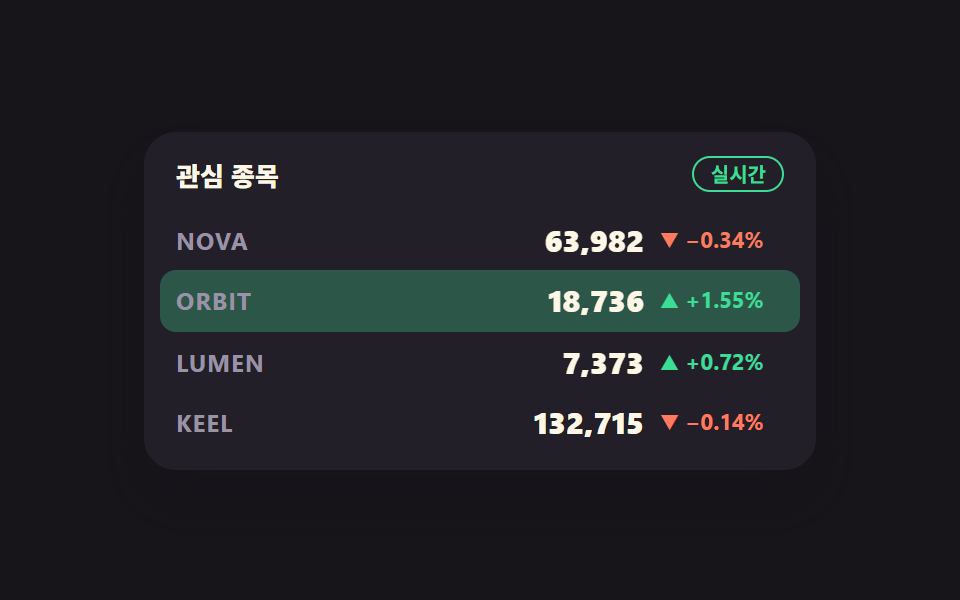 주식 앱 ui 실시간 시세판 9종 — API 키 없이주식 앱 ui 의 시세판은 사람이 새로고침하지 않아도 숫자가 저절로 바뀌는 화면입니다. 값이 오르면 초록으로, 내리면 빨강으로 한 번 번쩍인 뒤 잠잠해지는 그 장면을 아홉 가지로 만들었고, 증권사 계정도 유료 데이터 이 글의 데모 전부 보기