07랩마다 색 호를 남기는 궤적 링
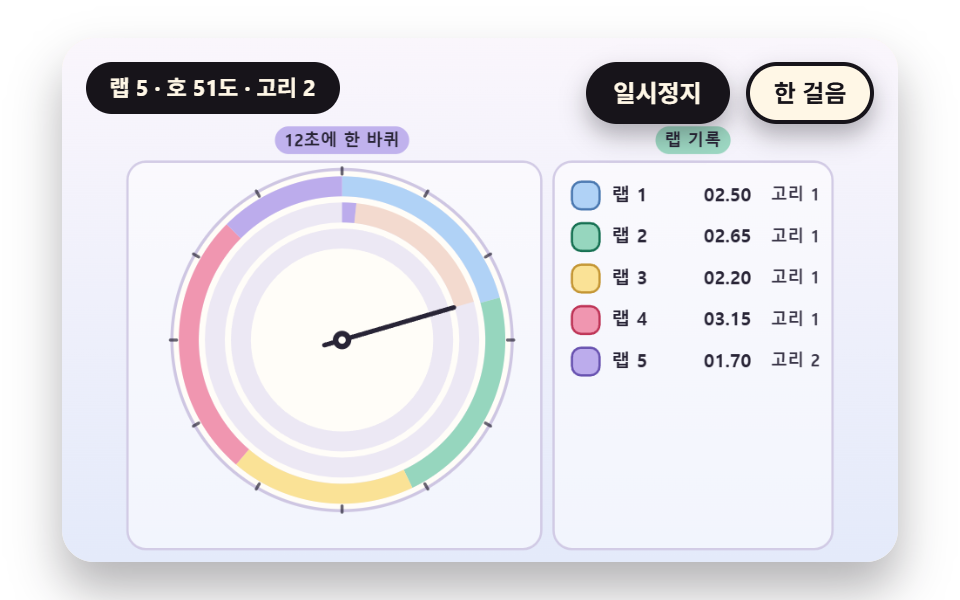
12초에 한 바퀴 도는 문자반에서 랩을 누를 때마다 직전 랩 지점에서 지금까지의 각도 구간을 호로 칠하고 다음 랩은 색을 하나 바꾼다. 구간이 바퀴 경계를 넘으면 둘로 잘라 안쪽 고리로 잇고, 11랩 동안 고리 3까지 쌓이며 랩을 누르는 순간 문자반 바탕이 그 랩의 색으로 번쩍인다.
쓰임구간 비율을 한눈에 보여 주는 요약 링·운동 앱 기록 화면
ARC_SPANRING_STEPTURN_CS
<main class="stage">
<div class="vj is-demo" id="vj">
  <div class="vj__pad" data-role="pad" tabindex="0" role="application" aria-label="스톱워치 시연 무대 — Enter 나 Space 나 R 이나 클릭으로 처음부터, P 로 일시정지, N 으로 한 걸음">
    <canvas class="vj__canvas" data-role="canvas" width="480" height="300" role="img" aria-label="12초에 한 바퀴 도는 문자반에서 랩을 누를 때마다 직전 랩 지점부터 지금까지 각도 구간이 색 호로 남는다. 랩마다 색이 하나씩 바뀌고 한 바퀴를 넘으면 호가 안쪽 고리로 이어지며, 오른쪽 목록이 랩 번호와 구간 시간과 고리 번호를 보인다. 랩을 누르는 순간 문자반 바탕이 그 랩의 색으로 번쩍인다"></canvas>
  </div>
  <p class="vj__status" data-role="status" aria-live="off">스톱워치 시연</p>
  <div class="vj__ctrl">
    <button class="vj__pause" data-role="pause" type="button" aria-pressed="false">일시정지</button>
    <button class="vj__step" data-role="step" type="button">한 걸음</button>
  </div>
  <p class="vj__done" data-role="done" role="status" aria-live="polite"></p>
</div>
</main>
@use "../../../../site/static/demo-tokens" as *;
@include stage($stage-paper);
.vj {
position: relative;
width: min(92vw, calc(160vh - 12.8vw));
aspect-ratio: 480 / 300;
margin: 0 auto;
border-radius: $r-card;
overflow: hidden;
box-shadow: $shadow-raised;
background: $subject-cream;
}
// 무대 상자 — 누르거나 Enter·Space·R 을 치면 처음부터 다시 시작한다. 키보드 포커스도 여기서 받는다(touch-action: none 은 이 상자에만). 무대 밖 터치는 페이지 스크롤 그대로
.vj__pad {
position: absolute;
inset: 0;
border-radius: inherit;
outline: none;
touch-action: none;
cursor: pointer;
}
// 바깥 .vj 가 넘침을 자르므로 포커스 테두리는 안쪽으로 들인다
.vj__pad:focus-visible {
outline: 3px solid $subject-ink;
outline-offset: -3px;
}
.vj__canvas {
position: absolute;
inset: 0;
display: block;
width: 100%;
height: 100%;
}
.vj__ctrl {
position: absolute;
right: $sp-3;
top: $sp-3;
display: flex;
gap: $sp-2;
}
.vj__pause,
.vj__step {
padding: $sp-1 $sp-3;
border: 2px solid $subject-ink;
border-radius: $r-pill;
background: $subject-ink;
color: $subject-cream;
font-family: inherit;
font-weight: 700;
font-size: 12px;
line-height: 1.6;
cursor: pointer;
box-shadow: $shadow-press;
transition: transform $dur-quick $ease-spring;
}
.vj__step {
background: $subject-cream;
color: $subject-ink;
}
// 스크린리더에만 읽히는 완료 알림
.vj__done {
position: absolute;
width: 1px;
height: 1px;
margin: 0;
overflow: hidden;
clip-path: inset(50%);
white-space: nowrap;
}
// 눌린 상태(멈춤) — 바탕과 글자색을 뒤집어 aria-pressed 가 눈에도 보이게
.vj__pause[aria-pressed="true"] {
background: $subject-cream;
color: $subject-ink;
}
.vj__pause:hover,
.vj__step:hover {
transform: translateY(-2px);
}
.vj__pause:active,
.vj__step:active {
transform: translateY(1px);
}
.vj__pause:focus-visible,
.vj__step:focus-visible {
outline: 3px solid $subject-ink;
outline-offset: 3px;
}
// 상태 줄 — 지금 장면의 수치를 글자로. 시연 중에는 aria-live off, 사람이 처음 손대면 polite
.vj__status {
position: absolute;
left: $sp-3;
top: $sp-3;
max-width: calc(100% - 190px);
margin: 0;
padding: $sp-1 $sp-3;
border-radius: $r-pill;
background: $subject-ink;
color: $subject-cream;
font-weight: 700;
font-size: 11px;
line-height: 1.6;
white-space: nowrap;
overflow: hidden;
text-overflow: ellipsis;
pointer-events: none;
}
@media (max-width: 340px) {
.vj__pause,
.vj__step,
.vj__status { font-size: 10px; padding: 0 $sp-2; }
}
// 움직임 줄이기 — 장면은 스크립트가 정지 장면 한 장으로 멈춘다. 버튼도 떠오르지 않게
@media (prefers-reduced-motion: reduce) {
.vj__pause,
.vj__step { transition: none !important; }
.vj__pause:hover,
.vj__pause:active,
.vj__step:hover,
.vj__step:active { transform: none !important; }
}html, body {
margin: 0;
overflow: hidden;
}
.stage {
box-sizing: border-box;
min-height: 100vh;
display: grid;
place-items: center;
margin: 0;
background: #ffffff;
font-family: -apple-system, "Segoe UI", "Noto Sans KR", sans-serif;
padding: clamp(8px, 4vw, 24px);
}
.vj {
position: relative;
width: min(92vw, 160vh - 12.8vw);
aspect-ratio: 480/300;
margin: 0 auto;
border-radius: 16px;
overflow: hidden;
box-shadow: 0 14px 24px rgba(23, 20, 26, 0.32);
background: #fff7e6;
}
.vj__pad {
position: absolute;
inset: 0;
border-radius: inherit;
outline: none;
touch-action: none;
cursor: pointer;
}
.vj__pad:focus-visible {
outline: 3px solid #17141a;
outline-offset: -3px;
}
.vj__canvas {
position: absolute;
inset: 0;
display: block;
width: 100%;
height: 100%;
}
.vj__ctrl {
position: absolute;
right: 12px;
top: 12px;
display: flex;
gap: 8px;
}
.vj__pause,
.vj__step {
padding: 4px 12px;
border: 2px solid #17141a;
border-radius: 999px;
background: #17141a;
color: #fff7e6;
font-family: inherit;
font-weight: 700;
font-size: 12px;
line-height: 1.6;
cursor: pointer;
box-shadow: 0 6px 12px rgba(23, 20, 26, 0.32);
transition: transform 220ms cubic-bezier(0.2, 0.8, 0.2, 1);
}
.vj__step {
background: #fff7e6;
color: #17141a;
}
.vj__done {
position: absolute;
width: 1px;
height: 1px;
margin: 0;
overflow: hidden;
clip-path: inset(50%);
white-space: nowrap;
}
.vj__pause[aria-pressed=true] {
background: #fff7e6;
color: #17141a;
}
.vj__pause:hover,
.vj__step:hover {
transform: translateY(-2px);
}
.vj__pause:active,
.vj__step:active {
transform: translateY(1px);
}
.vj__pause:focus-visible,
.vj__step:focus-visible {
outline: 3px solid #17141a;
outline-offset: 3px;
}
.vj__status {
position: absolute;
left: 12px;
top: 12px;
max-width: calc(100% - 190px);
margin: 0;
padding: 4px 12px;
border-radius: 999px;
background: #17141a;
color: #fff7e6;
font-weight: 700;
font-size: 11px;
line-height: 1.6;
white-space: nowrap;
overflow: hidden;
text-overflow: ellipsis;
pointer-events: none;
}
@media (max-width: 340px) {
.vj__pause,
.vj__step,
.vj__status {
font-size: 10px;
padding: 0 8px;
}
}
@media (prefers-reduced-motion: reduce) {
.vj__pause,
.vj__step {
transition: none !important;
}
.vj__pause:hover,
.vj__pause:active,
.vj__step:hover,
.vj__step:active {
transform: none !important;
}
}(function () {
const root = document.getElementById("vj");
if (!root) return;
// 무대 좌표 — 캔버스 안 계산은 늘 480×300. 화면에 보이는 크기와 상관없다
const W = 480;
const H = 300;
const PI = Math.PI;
const TAU = Math.PI * 2;
function clamp(v, lo, hi) { return v < lo ? lo : (v > hi ? hi : v); }
function lerp(a, b, k) { return a + (b - a) * k; }
function ease(x) { const c = clamp(x, 0, 1); return c * c * (3 - 2 * c); }
// 시드 고정 난수 — 선형 합동 생성기(곱 1664525, 더함 1013904223). 같은 시드면 같은 수열
function seeded(seed) {
let s = (seed >>> 0) || 1;
return function () {
s = (Math.imul(s, 1664525) + 1013904223) >>> 0;
return s / 4294967296;
};
}
// 파스텔 팔레트 — 글자는 늘 INK, 면은 연한 색. 앞섬은 민트, 뒤처짐은 분홍, 바늘은 라벤더·잉크
const BG_TOP = [250, 246, 252];
const BG_BOT = [228, 234, 250];
const FACE = [255, 253, 248];
const FACE_EDGE = [206, 198, 226];
const SKY = [176, 210, 246];
const SKY_DEEP = [74, 120, 176];
const GOLD = [250, 226, 150];
const GOLD_DEEP = [196, 150, 52];
const ROSE = [240, 150, 176];
const ROSE_DEEP = [190, 52, 86];
const MINT = [150, 214, 190];
const MINT_DEEP = [22, 112, 82];
const LAV = [188, 172, 236];
const LAV_DEEP = [104, 82, 176];
const INK = [40, 36, 54];
const PAPER = [250, 246, 240];
function mix(a, b, k) { return [lerp(a[0], b[0], k), lerp(a[1], b[1], k), lerp(a[2], b[2], k)]; }
function rgba(c, a) {
return 'rgba(' + Math.round(clamp(c[0], 0, 255)) + ',' + Math.round(clamp(c[1], 0, 255)) + ',' + Math.round(clamp(c[2], 0, 255)) + ',' + clamp(a, 0, 1).toFixed(3) + ')';
}
// 장면 시계(초)·판 반복 번호·시간표 — 시간표는 (시각, 할 일) 목록이고 시각이 지나면 한 번씩 부른다
// sceneT 는 rAF 타임스탬프 차이(dt, 한 프레임 0.05초 상한)를 쌓은 값 하나뿐이다 — 이 장면의 시간 원천은 이것 하나
let sceneT = 0;
let lap = 0;
let script = [];
let evAt = 0;
// ── 스톱워치 계산 ─────────────────────────────────────────
// 경과 시간은 센티초 정수 하나다. 숫자판의 분·초·센티초도, 문자반의 각도도 이 정수 하나에서만 나온다
const CS_PER_SEC = 100;
const CS_PER_MIN = 6000;
let swStart = 0;
let swStop = -1;
// 장면 시각 t 에서의 경과 센티초 — 시작 전이면 0, 정지 뒤에는 정지 순간 값에 멈춘다
function swCs(t) {
const e = Math.min(t, swStop >= 0 ? swStop : 1e9) - swStart;
return e <= 0 ? 0 : Math.floor(e * CS_PER_SEC + 1e-6);
}
// 랩 — 누른 순간의 누적 센티초 목록. 값은 장면 시각 t 로 계산하므로 프레임 길이와 상관없다
let marks = [];
function pressLap(t) { marks.push(swCs(t)); }
// 랩 구간 = 이번 누적 − 직전 누적
function lapSpan(i) { return marks[i] - (i > 0 ? marks[i - 1] : 0); }
function pad2(n) { return n < 10 ? '0' + n : String(n); }
// 센티초 → [분, 초, 센티초] — 정수 나눗셈만 쓴다
function splitCs(cs) {
const m = Math.floor(cs / CS_PER_MIN);
const r = cs - m * CS_PER_MIN;
const s = Math.floor(r / CS_PER_SEC);
return [m, s, r - s * CS_PER_SEC];
}
function fmtCs(cs) {
const p = splitCs(cs);
return pad2(p[0]) + ':' + pad2(p[1]) + '.' + pad2(p[2]);
}
// 문자반 각도(라디안, 12시가 -π/2) — turnCs 센티초에 한 바퀴
function dialAng(cs, turnCs) { return ((cs % turnCs) / turnCs) * TAU - PI / 2; }
// 스톱워치 장면의 시작 상태 — 매 판 build() 맨 앞에서 부른다
function swReset() {
swStart = 0;
swStop = -1;
marks = [];
}
const canvasEl = root.querySelector('[data-role="canvas"]');
const padEl = root.querySelector('[data-role="pad"]');
const pauseEl = root.querySelector('[data-role="pause"]');
const statusEl = root.querySelector('[data-role="status"]');
const stepEl = root.querySelector('[data-role="step"]');
const doneEl = root.querySelector('[data-role="done"]');
const ctxRaw = canvasEl ? canvasEl.getContext('2d') : null;
if (!canvasEl || !ctxRaw || !pauseEl || !padEl || !stepEl || !doneEl) {
return;
}
const cv = canvasEl;
const ctx = ctxRaw;
const pauseBtn = pauseEl;
const stepBtn = stepEl;
const doneP = doneEl;
const pad = padEl;
// 외부 웹폰트는 부르지 않는다 — 기기에 있는 글꼴 목록만
const FONT_STACK = 'system-ui, -apple-system, "Segoe UI", "Noto Sans KR", sans-serif';
let dpr = 1;
function fitCanvas() {
// 배율은 2 에서 자른다 — 배율 3 기기에서 화소가 2.25배로 늘지 않게
dpr = Math.min(window.devicePixelRatio || 1, 2);
cv.width = Math.round(W * dpr);
cv.height = Math.round(H * dpr);
ctx.setTransform(dpr, 0, 0, dpr, 0, 0);
}
const VIEW_S = 0.88;
function skyFill(top, bot) {
ctx.setTransform(dpr, 0, 0, dpr, 0, 0);
const g = ctx.createLinearGradient(0, 0, 0, H);
g.addColorStop(0, rgba(top, 1));
g.addColorStop(1, rgba(bot, 1));
ctx.fillStyle = g;
ctx.fillRect(0, 0, W, H);
// 위쪽 일시정지·상태 알약이 덮는 띠를 비우려고 장면 전체를 VIEW_S 배로 줄여 아래 가운데에 붙인다 — 이 줄 뒤에 그리는 것은 모두 줄어든 좌표계
ctx.translate(W / 2, H - 3);
ctx.scale(VIEW_S, VIEW_S);
ctx.translate(-W / 2, -(H - 3));
}
function disc(x, y, r, c, a) {
if (r <= 0.2 || a <= 0) {
return;
}
ctx.beginPath();
ctx.arc(x, y, r, 0, TAU);
ctx.fillStyle = rgba(c, a);
ctx.fill();
}
function ring(x, y, r, width, c, a) {
if (r <= 0.2 || a <= 0) {
return;
}
ctx.beginPath();
ctx.arc(x, y, r, 0, TAU);
ctx.lineWidth = width;
ctx.strokeStyle = rgba(c, a);
ctx.stroke();
}
function oval(x, y, rx, ry, c, a) {
if (rx <= 0.2 || ry <= 0.1 || a <= 0) {
return;
}
ctx.beginPath();
ctx.ellipse(x, y, rx, ry, 0, 0, TAU);
ctx.fillStyle = rgba(c, a);
ctx.fill();
}
function seg(x1, y1, x2, y2, width, c, a) {
if (a <= 0) {
return;
}
ctx.beginPath();
ctx.moveTo(x1, y1);
ctx.lineTo(x2, y2);
ctx.lineWidth = width;
ctx.lineCap = 'round';
ctx.strokeStyle = rgba(c, a);
ctx.stroke();
}
function box(x, y, w, h, r, c, a) {
if (w <= 0.2 || h <= 0.2 || a <= 0) {
return;
}
ctx.beginPath();
ctx.roundRect(x, y, w, h, Math.max(0, Math.min(r, w / 2, h / 2)));
ctx.fillStyle = rgba(c, a);
ctx.fill();
}
function outline(x, y, w, h, r, width, c, a) {
if (w <= 0.2 || h <= 0.2 || a <= 0) {
return;
}
ctx.beginPath();
ctx.roundRect(x, y, w, h, Math.max(0, Math.min(r, w / 2, h / 2)));
ctx.lineWidth = width;
ctx.strokeStyle = rgba(c, a);
ctx.stroke();
}
function text(s, x, y, c, a, px, weight, align) {
ctx.font = weight + ' ' + px + 'px ' + FONT_STACK;
ctx.textAlign = align;
ctx.textBaseline = 'middle';
ctx.fillStyle = rgba(c, a);
ctx.fillText(s, x, y);
}
// 글자 이름표 — 바탕 알약 위에 글자
function tag(s, x, y, bg, fg, px, align) {
ctx.font = '700 ' + px + 'px ' + FONT_STACK;
const w = ctx.measureText(s).width + px * 1.1;
const left = align === 'center' ? x - w / 2 : (align === 'right' ? x - w : x);
box(left, y - px * 0.82, w, px * 1.64, px * 0.82, bg, 0.92);
text(s, left + w / 2, y + 0.5, fg, 1, px, 700, 'center');
}
// ── 공통 틀 ───────────────────────────────────────────────
let shownStatus = '';
function pushStatus(s) {
if (!statusEl || s === shownStatus) {
return;
}
shownStatus = s;
statusEl.textContent = s;
}
let paused = false;
const reduceQuery = window.matchMedia('(prefers-reduced-motion: reduce)');
// 페이지를 연 채 움직임 줄이기 설정을 바꿔도 change 리스너가 다시 읽는다
let still = reduceQuery.matches;
// 자동 시연 표시 — 사람이 처음 손대면 떼고 상태 줄을 polite 로 켠다
let demo = root.classList.contains('is-demo');
const off = new AbortController();
function wake() {
if (!demo) {
return;
}
demo = false;
root.classList.remove('is-demo');
if (statusEl) {
statusEl.setAttribute('aria-live', 'polite');
}
}
// 한 판 시연이 끝났음을 스크린리더에 한 번만 알린다 — 판이 되풀이돼도 다시 읽지 않는다
let doneSaid = false;
function checkDone() {
if (!doneSaid && sceneT >= RESULT_S) {
doneSaid = true;
doneP.textContent = statusText();
}
}
function advance(dt) {
sceneT += dt;
while (evAt < script.length && script[evAt].t <= sceneT) {
const ev = script[evAt];
evAt += 1;
ev.f();
}
if (sceneT >= LAP_S) {
lap += 1;
begin();
return;
}
update(dt);
}
// 첫 판은 START_S 만큼 앞서 시작한다 — 바늘이 이미 도는 장면에서 보인다
function runTo(t) {
while (sceneT < t - 1e-6) {
advance(Math.min(1 / 30, t - sceneT));
}
}
function begin() {
sceneT = 0;
evAt = 0;
script = [];
build();
if (lap === 0 && !still) {
runTo(START_S);
}
}
const DT_MAX = 0.05;
function showNow() {
draw();
pushStatus(statusText());
checkDone();
}
let rafId = 0;
let lastTs = -1;
function frame(ts) {
if (still || paused) {
rafId = 0;
return;
}
if (lastTs < 0) {
lastTs = ts;
}
const dt = Math.min((ts - lastTs) / 1000, DT_MAX);
lastTs = ts;
if (dt > 0) {
advance(dt);
}
showNow();
rafId = window.requestAnimationFrame(frame);
}
function startLoop() {
if (rafId) {
return;
}
// 멈췄던 사이의 시간을 첫 프레임 dt 로 넘기지 않는다
lastTs = -1;
rafId = window.requestAnimationFrame(frame);
}
function stopLoop() {
if (rafId) {
window.cancelAnimationFrame(rafId);
rafId = 0;
}
}
// 움직임 줄이기 — 루프 없이 한 판의 멈춘 한 장. 시간표의 REST_S 초 장면에서 멈춘다
function showRest() {
stopLoop();
sceneT = 0;
evAt = 0;
script = [];
build();
runTo(REST_S);
doneSaid = false;
showNow();
}
function play() {
begin();
showNow();
if (!paused) {
startLoop();
}
}
function togglePause() {
paused = !paused;
pauseBtn.setAttribute('aria-pressed', paused ? 'true' : 'false');
wake();
if (paused) {
stopLoop();
}
else if (!still) {
startLoop();
}
}
// 다시 — 시간표를 처음부터 다시. 움직임 줄이기에서는 멈춘 한 장
function restart() {
lap += 1;
doneSaid = false;
if (still) {
showRest();
return;
}
begin();
showNow();
if (!paused) {
startLoop();
}
}
// 한 걸음 — 멈춘 채 시간표의 다음 일 하나까지 시계를 보낸다. 더 부를 일이 없으면 판을 다시 연다
function stepOnce() {
wake();
if (!paused) {
paused = true;
pauseBtn.setAttribute('aria-pressed', 'true');
stopLoop();
}
if (evAt >= script.length) {
restart();
return;
}
runTo(script[evAt].t + 0.05);
showNow();
}
pauseBtn.addEventListener('click', togglePause, { signal: off.signal });
stepBtn.addEventListener('click', stepOnce, { signal: off.signal });
// 키보드 — 무대에 포커스가 있을 때만. Enter·Space·R 은 처음부터 다시, P 는 일시정지, N 은 한 걸음
pad.addEventListener('keydown', function (e) {
if (e.altKey || e.ctrlKey || e.metaKey) {
return;
}
const k = e.key;
if (k === 'Enter' || k === ' ') {
e.preventDefault();
wake();
restart();
}
else if (k === 'p' || k === 'P') {
togglePause();
}
else if (k === 'n' || k === 'N') {
stepOnce();
}
else if (k === 'r' || k === 'R') {
wake();
restart();
}
}, { signal: off.signal });
// 마우스·터치 — 무대를 누르면 처음부터 다시
pad.addEventListener('click', function () {
wake();
restart();
}, { signal: off.signal });
// 탭이 숨으면 멈추고, 돌아오면 시계를 다시 맞춰 시작 — 숨은 동안의 몇 초가 한 프레임에 몰리지 않게
document.addEventListener('visibilitychange', function () {
if (document.hidden) {
stopLoop();
}
else if (!paused && !still) {
startLoop();
}
}, { signal: off.signal });
// 설정이 바뀌면 — 켜지면 결과 한 장, 꺼지면 다시 움직인다
reduceQuery.addEventListener('change', function () {
still = reduceQuery.matches;
if (still) {
showRest();
}
else {
lap = 0;
play();
}
}, { signal: off.signal });
window.addEventListener('resize', function () {
fitCanvas();
showNow();
}, { signal: off.signal });
// ── 문자반·숫자판 도구 ─────────────────────────────────────
const PEACH = [250, 204, 170];
const PEACH_DEEP = [176, 92, 40];
// 안쪽에서 바깥쪽으로 — 눈금 ticks 개, majorEvery 번째마다 굵게, labelEvery 번째마다 숫자
function dialFace(cx, cy, R, ticks, majorEvery, labels, labelEvery) {
disc(cx, cy + 3, R + 3, INK, 0.1);
disc(cx, cy, R + 3, FACE_EDGE, 1);
disc(cx, cy, R, FACE, 1);
for (let i = 0; i < ticks; i += 1) {
const a = (i / ticks) * TAU - PI / 2;
const major = i % majorEvery === 0;
const r0 = R * (major ? 0.82 : 0.9);
const r1 = R * 0.96;
seg(cx + Math.cos(a) * r0, cy + Math.sin(a) * r0, cx + Math.cos(a) * r1, cy + Math.sin(a) * r1, major ? 2.4 : 1.2, INK, major ? 0.85 : 0.45);
if (labels.length > 0 && i % labelEvery === 0) {
const k = Math.floor(i / labelEvery);
if (k < labels.length) {
text(labels[k], cx + Math.cos(a) * R * 0.66, cy + Math.sin(a) * R * 0.66, INK, 0.9, Math.max(9, Math.round(R * 0.15)), 700, 'center');
}
}
}
}
function handAt(cx, cy, ang, len, tail, width, c, a) {
seg(cx - Math.cos(ang) * tail, cy - Math.sin(ang) * tail, cx + Math.cos(ang) * len, cy + Math.sin(ang) * len, width, c, a);
}
function hub(cx, cy, r, c) {
disc(cx, cy, r, c, 1);
disc(cx, cy, r * 0.4, FACE, 1);
}
// 12시에서 ang 까지 칠하는 부채꼴
function wedge(cx, cy, r, ang, c, a) {
if (ang <= -PI / 2 + 0.002) {
return;
}
ctx.beginPath();
ctx.moveTo(cx, cy);
ctx.arc(cx, cy, r, -PI / 2, ang);
ctx.closePath();
ctx.fillStyle = rgba(c, a);
ctx.fill();
}
function arcBand(cx, cy, r, a0, a1, width, c, a) {
if (a1 - a0 < 0.0005 || a <= 0) {
return;
}
ctx.beginPath();
ctx.arc(cx, cy, r, a0, a1);
ctx.lineWidth = width;
ctx.lineCap = 'butt';
ctx.strokeStyle = rgba(c, a);
ctx.stroke();
}
function panel(x, y, w, h, c, a) {
box(x, y, w, h, 12, c, a);
outline(x, y, w, h, 12, 1.5, FACE_EDGE, 0.9);
}
// 한 글자씩 같은 칸에 가운데 맞춰 찍는다 — 숫자 폭이 달라도 자릿수가 흔들리지 않는다(tabular)
function digitsRow(s, cx, y, cellW, px, c, a) {
let total = 0;
for (let i = 0; i < s.length; i += 1) {
total += (s[i] === ':' || s[i] === '.') ? cellW * 0.55 : cellW;
}
let x = cx - total / 2;
for (let i = 0; i < s.length; i += 1) {
const w = (s[i] === ':' || s[i] === '.') ? cellW * 0.55 : cellW;
text(s[i], x + w / 2, y, c, a, px, 800, 'center');
x += w;
}
}
// ── 07 랩마다 색 호를 남기는 궤적 링 ─────────────────────────
// 랩 구간 [직전 누적, 이번 누적] 을 문자반 각도로 바꿔 호로 칠한다. 한 바퀴(TURN_CS)를 넘으면 구간을 잘라 안쪽 링(RING_STEP 만큼 작은 반지름)으로 잇는다
const TURN_CS = 1200;
const RING_STEP = 17;
const RING_R0 = 100;
const ARC_W = 13;
const GAPS = [1.9, 2.6, 2.1, 3.0, 1.7, 2.4, 2.8, 2.2, 3.1, 2.0, 2.5];
const LAP_S = 29.0;
const START_S = 13.5;
const REST_S = 14.9;
const RESULT_S = 27.0;
const CX = 150;
const CY = 156;
let pressT = [];
function build() {
swReset();
pressT = [];
let t = 0.6;
for (let i = 0; i < GAPS.length; i += 1) {
t += GAPS[i] + ((lap * 3 + i * 5) % 4) * 0.05;
const tt = t;
pressT.push(tt);
script.push({ t: tt, f: function () { pressLap(tt); } });
}
}
function update(dt) { if (dt < 0) {
return;
} }
function colorOf(i) {
const k = i % 6;
if (k === 0) {
return [SKY, SKY_DEEP];
}
if (k === 1) {
return [MINT, MINT_DEEP];
}
if (k === 2) {
return [GOLD, GOLD_DEEP];
}
if (k === 3) {
return [ROSE, ROSE_DEEP];
}
if (k === 4) {
return [LAV, LAV_DEEP];
}
return [PEACH, PEACH_DEEP];
}
// 구간 [c0, c1] 을 바퀴 경계에서 잘라 (고리 순번 0부터, 시작각, 끝각) 목록으로
function ARC_SPAN(c0, c1) {
const out = [];
let s = c0;
while (s < c1) {
const ring = Math.floor(s / TURN_CS);
const e = Math.min(c1, (ring + 1) * TURN_CS);
out.push({ ring: ring, a0: dialAng(s, TURN_CS), a1: ((e - ring * TURN_CS) / TURN_CS) * TAU - PI / 2 });
s = e;
}
return out;
}
function paintSpan(c0, c1, col, a) {
const arcs = ARC_SPAN(c0, c1);
for (let i = 0; i < arcs.length; i += 1) {
arcBand(CX, CY, RING_R0 - arcs[i].ring * RING_STEP, arcs[i].a0, arcs[i].a1, ARC_W, col, a);
}
}
function ringOf(cs) { return Math.floor((cs - 1) / TURN_CS) + 1; }
function draw() {
skyFill(BG_TOP, BG_BOT);
panel(10, 40, 270, 252, [255, 255, 255], 0.5);
panel(288, 40, 182, 252, [255, 255, 255], 0.5);
disc(CX, CY, RING_R0 + 12, FACE_EDGE, 1);
disc(CX, CY, RING_R0 + 10, FACE, 1);
// 랩을 누른 순간 문자반 바탕이 그 랩의 색으로 번쩍 — 세기는 누른 뒤 시간 q 에서 0.55 × e^(−q/0.25)
if (marks.length > 0) {
disc(CX, CY, RING_R0 + 10, colorOf(marks.length - 1)[0], 0.55 * Math.exp(-(sceneT - pressT[marks.length - 1]) / 0.25));
}
for (let k = 0; k < 3; k += 1) {
ring(CX, CY, RING_R0 - k * RING_STEP, ARC_W, [236, 232, 244], 1);
}
for (let i = 0; i < 12; i += 1) {
const a = (i / 12) * TAU - PI / 2;
seg(CX + Math.cos(a) * 108, CY + Math.sin(a) * 108, CX + Math.cos(a) * 112, CY + Math.sin(a) * 112, 2, INK, 0.7);
}
const n = marks.length;
for (let i = 0; i < n; i += 1) {
paintSpan(i > 0 ? marks[i - 1] : 0, marks[i], colorOf(i)[0], 1);
}
const now = swCs(sceneT);
paintSpan(n > 0 ? marks[n - 1] : 0, now, colorOf(n)[0], 0.5);
const a = dialAng(now, TURN_CS);
handAt(CX, CY, a, 76, 12, 3, INK, 1);
hub(CX, CY, 6, INK);
tag('{s}초에 한 바퀴'.replace('{s}', String(TURN_CS / CS_PER_SEC)), CX, 26, LAV, INK, 11, 'center');
tag('랩 기록', 379, 26, MINT, INK, 11, 'center');
const first = Math.max(0, n - 8);
for (let i = first; i < n; i += 1) {
const y = 62 + (i - first) * 27;
const c = colorOf(i);
box(300, y - 9, 18, 18, 6, c[0], 1);
outline(300, y - 9, 18, 18, 6, 1.5, c[1], 1);
text('랩 {n}'.replace('{n}', String(i + 1)), 326, y, INK, 1, 12, 800, 'left');
text(fmtCs(lapSpan(i)).slice(3), 386, y, INK, 1, 12, 800, 'left');
text('고리 {r}'.replace('{r}', String(ringOf(marks[i]))), 462, y, INK, 0.9, 11, 700, 'right');
}
}
function statusText() {
const n = marks.length;
if (n === 0) {
return '랩을 기다리는 중 · {t}'.replace('{t}', fmtCs(swCs(sceneT)));
}
const deg = Math.round(lapSpan(n - 1) / TURN_CS * 360);
return '랩 {n} · 호 {d}도 · 고리 {r}'.replace('{n}', String(n)).replace('{d}', String(deg)).replace('{r}', String(ringOf(marks[n - 1])));
}
fitCanvas();
if (still) {
showRest();
}
else {
play();
}
return function () {
stopLoop();
off.abort();
};
})();// LapTrailRingArcPerLap - 같은 항목 vanilla index.html 의 React 판. 같은 계산을 useEffect 안에서 돌린다
import { useEffect, useRef } from "react";
import styles from "./LapTrailRingArcPerLap.module.scss";
const cx = (s: string): string => s.split(" ").map((n) => styles[n] ?? n).join(" ");
export default function LapTrailRingArcPerLap() {
const rootRef = useRef<HTMLDivElement | null>(null);
useEffect(() => {
const rootEl = rootRef.current;
if (!rootEl) return;
const root: HTMLElement = rootEl;
type RGB = [number, number, number];
type RGBA = [number, number, number, number];
// 무대 좌표 — 캔버스 안 계산은 늘 480×300. 화면에 보이는 크기와 상관없다
const W = 480;
const H = 300;
const PI = Math.PI;
const TAU = Math.PI * 2;
function clamp(v: number, lo: number, hi: number): number { return v < lo ? lo : (v > hi ? hi : v); }
function lerp(a: number, b: number, k: number): number { return a + (b - a) * k; }
function ease(x: number): number { const c = clamp(x, 0, 1); return c * c * (3 - 2 * c); }
// 시드 고정 난수 — 선형 합동 생성기(곱 1664525, 더함 1013904223). 같은 시드면 같은 수열
function seeded(seed: number): () => number {
let s = (seed >>> 0) || 1;
return function (): number {
s = (Math.imul(s, 1664525) + 1013904223) >>> 0;
return s / 4294967296;
};
}
// 파스텔 팔레트 — 글자는 늘 INK, 면은 연한 색. 앞섬은 민트, 뒤처짐은 분홍, 바늘은 라벤더·잉크
const BG_TOP: RGB = [250, 246, 252];
const BG_BOT: RGB = [228, 234, 250];
const FACE: RGB = [255, 253, 248];
const FACE_EDGE: RGB = [206, 198, 226];
const SKY: RGB = [176, 210, 246];
const SKY_DEEP: RGB = [74, 120, 176];
const GOLD: RGB = [250, 226, 150];
const GOLD_DEEP: RGB = [196, 150, 52];
const ROSE: RGB = [240, 150, 176];
const ROSE_DEEP: RGB = [190, 52, 86];
const MINT: RGB = [150, 214, 190];
const MINT_DEEP: RGB = [22, 112, 82];
const LAV: RGB = [188, 172, 236];
const LAV_DEEP: RGB = [104, 82, 176];
const INK: RGB = [40, 36, 54];
const PAPER: RGB = [250, 246, 240];
function mix(a: RGB, b: RGB, k: number): RGB { return [lerp(a[0], b[0], k), lerp(a[1], b[1], k), lerp(a[2], b[2], k)]; }
function rgba(c: RGB, a: number): string {
return 'rgba(' + Math.round(clamp(c[0], 0, 255)) + ',' + Math.round(clamp(c[1], 0, 255)) + ',' + Math.round(clamp(c[2], 0, 255)) + ',' + clamp(a, 0, 1).toFixed(3) + ')';
}
// 장면 시계(초)·판 반복 번호·시간표 — 시간표는 (시각, 할 일) 목록이고 시각이 지나면 한 번씩 부른다
// sceneT 는 rAF 타임스탬프 차이(dt, 한 프레임 0.05초 상한)를 쌓은 값 하나뿐이다 — 이 장면의 시간 원천은 이것 하나
let sceneT = 0;
let lap = 0;
type Ev = { t: number; f: () => void };
let script: Ev[] = [];
let evAt = 0;
// ── 스톱워치 계산 ─────────────────────────────────────────
// 경과 시간은 센티초 정수 하나다. 숫자판의 분·초·센티초도, 문자반의 각도도 이 정수 하나에서만 나온다
const CS_PER_SEC = 100;
const CS_PER_MIN = 6000;
let swStart = 0;
let swStop = -1;
// 장면 시각 t 에서의 경과 센티초 — 시작 전이면 0, 정지 뒤에는 정지 순간 값에 멈춘다
function swCs(t: number): number {
const e = Math.min(t, swStop >= 0 ? swStop : 1e9) - swStart;
return e <= 0 ? 0 : Math.floor(e * CS_PER_SEC + 1e-6);
}
// 랩 — 누른 순간의 누적 센티초 목록. 값은 장면 시각 t 로 계산하므로 프레임 길이와 상관없다
let marks: number[] = [];
function pressLap(t: number): void { marks.push(swCs(t)); }
// 랩 구간 = 이번 누적 − 직전 누적
function lapSpan(i: number): number { return marks[i] - (i > 0 ? marks[i - 1] : 0); }
function pad2(n: number): string { return n < 10 ? '0' + n : String(n); }
// 센티초 → [분, 초, 센티초] — 정수 나눗셈만 쓴다
function splitCs(cs: number): [number, number, number] {
const m = Math.floor(cs / CS_PER_MIN);
const r = cs - m * CS_PER_MIN;
const s = Math.floor(r / CS_PER_SEC);
return [m, s, r - s * CS_PER_SEC];
}
function fmtCs(cs: number): string {
const p = splitCs(cs);
return pad2(p[0]) + ':' + pad2(p[1]) + '.' + pad2(p[2]);
}
// 문자반 각도(라디안, 12시가 -π/2) — turnCs 센티초에 한 바퀴
function dialAng(cs: number, turnCs: number): number { return ((cs % turnCs) / turnCs) * TAU - PI / 2; }
// 스톱워치 장면의 시작 상태 — 매 판 build() 맨 앞에서 부른다
function swReset(): void {
swStart = 0;
swStop = -1;
marks = [];
}
const canvasEl = root.querySelector('[data-role="canvas"]') as HTMLCanvasElement | null;
const padEl = root.querySelector('[data-role="pad"]') as HTMLElement | null;
const pauseEl = root.querySelector('[data-role="pause"]') as HTMLButtonElement | null;
const statusEl = root.querySelector('[data-role="status"]') as HTMLElement | null;
const stepEl = root.querySelector('[data-role="step"]') as HTMLButtonElement | null;
const doneEl = root.querySelector('[data-role="done"]') as HTMLElement | null;
const ctxRaw = canvasEl ? canvasEl.getContext('2d') : null;
if (!canvasEl || !ctxRaw || !pauseEl || !padEl || !stepEl || !doneEl) { return; }
const cv: HTMLCanvasElement = canvasEl;
const ctx: CanvasRenderingContext2D = ctxRaw;
const pauseBtn: HTMLButtonElement = pauseEl;
const stepBtn: HTMLButtonElement = stepEl;
const doneP: HTMLElement = doneEl;
const pad: HTMLElement = padEl;
// 외부 웹폰트는 부르지 않는다 — 기기에 있는 글꼴 목록만
const FONT_STACK = 'system-ui, -apple-system, "Segoe UI", "Noto Sans KR", sans-serif';
let dpr = 1;
function fitCanvas(): void {
// 배율은 2 에서 자른다 — 배율 3 기기에서 화소가 2.25배로 늘지 않게
dpr = Math.min(window.devicePixelRatio || 1, 2);
cv.width = Math.round(W * dpr);
cv.height = Math.round(H * dpr);
ctx.setTransform(dpr, 0, 0, dpr, 0, 0);
}
const VIEW_S = 0.88;
function skyFill(top: RGB, bot: RGB): void {
ctx.setTransform(dpr, 0, 0, dpr, 0, 0);
const g = ctx.createLinearGradient(0, 0, 0, H);
g.addColorStop(0, rgba(top, 1));
g.addColorStop(1, rgba(bot, 1));
ctx.fillStyle = g;
ctx.fillRect(0, 0, W, H);
// 위쪽 일시정지·상태 알약이 덮는 띠를 비우려고 장면 전체를 VIEW_S 배로 줄여 아래 가운데에 붙인다 — 이 줄 뒤에 그리는 것은 모두 줄어든 좌표계
ctx.translate(W / 2, H - 3);
ctx.scale(VIEW_S, VIEW_S);
ctx.translate(-W / 2, -(H - 3));
}
function disc(x: number, y: number, r: number, c: RGB, a: number): void {
if (r <= 0.2 || a <= 0) { return; }
ctx.beginPath();
ctx.arc(x, y, r, 0, TAU);
ctx.fillStyle = rgba(c, a);
ctx.fill();
}
function ring(x: number, y: number, r: number, width: number, c: RGB, a: number): void {
if (r <= 0.2 || a <= 0) { return; }
ctx.beginPath();
ctx.arc(x, y, r, 0, TAU);
ctx.lineWidth = width;
ctx.strokeStyle = rgba(c, a);
ctx.stroke();
}
function oval(x: number, y: number, rx: number, ry: number, c: RGB, a: number): void {
if (rx <= 0.2 || ry <= 0.1 || a <= 0) { return; }
ctx.beginPath();
ctx.ellipse(x, y, rx, ry, 0, 0, TAU);
ctx.fillStyle = rgba(c, a);
ctx.fill();
}
function seg(x1: number, y1: number, x2: number, y2: number, width: number, c: RGB, a: number): void {
if (a <= 0) { return; }
ctx.beginPath();
ctx.moveTo(x1, y1);
ctx.lineTo(x2, y2);
ctx.lineWidth = width;
ctx.lineCap = 'round';
ctx.strokeStyle = rgba(c, a);
ctx.stroke();
}
function box(x: number, y: number, w: number, h: number, r: number, c: RGB, a: number): void {
if (w <= 0.2 || h <= 0.2 || a <= 0) { return; }
ctx.beginPath();
ctx.roundRect(x, y, w, h, Math.max(0, Math.min(r, w / 2, h / 2)));
ctx.fillStyle = rgba(c, a);
ctx.fill();
}
function outline(x: number, y: number, w: number, h: number, r: number, width: number, c: RGB, a: number): void {
if (w <= 0.2 || h <= 0.2 || a <= 0) { return; }
ctx.beginPath();
ctx.roundRect(x, y, w, h, Math.max(0, Math.min(r, w / 2, h / 2)));
ctx.lineWidth = width;
ctx.strokeStyle = rgba(c, a);
ctx.stroke();
}
function text(s: string, x: number, y: number, c: RGB, a: number, px: number, weight: number, align: CanvasTextAlign): void {
ctx.font = weight + ' ' + px + 'px ' + FONT_STACK;
ctx.textAlign = align;
ctx.textBaseline = 'middle';
ctx.fillStyle = rgba(c, a);
ctx.fillText(s, x, y);
}
// 글자 이름표 — 바탕 알약 위에 글자
function tag(s: string, x: number, y: number, bg: RGB, fg: RGB, px: number, align: CanvasTextAlign): void {
ctx.font = '700 ' + px + 'px ' + FONT_STACK;
const w = ctx.measureText(s).width + px * 1.1;
const left = align === 'center' ? x - w / 2 : (align === 'right' ? x - w : x);
box(left, y - px * 0.82, w, px * 1.64, px * 0.82, bg, 0.92);
text(s, left + w / 2, y + 0.5, fg, 1, px, 700, 'center');
}
// ── 공통 틀 ───────────────────────────────────────────────
let shownStatus = '';
function pushStatus(s: string): void {
if (!statusEl || s === shownStatus) { return; }
shownStatus = s;
statusEl.textContent = s;
}
let paused = false;
const reduceQuery = window.matchMedia('(prefers-reduced-motion: reduce)');
// 페이지를 연 채 움직임 줄이기 설정을 바꿔도 change 리스너가 다시 읽는다
let still = reduceQuery.matches;
// 자동 시연 표시 — 사람이 처음 손대면 떼고 상태 줄을 polite 로 켠다
let demo = root.classList.contains('is-demo');
const off = new AbortController();
function wake(): void {
if (!demo) { return; }
demo = false;
root.classList.remove('is-demo');
if (statusEl) { statusEl.setAttribute('aria-live', 'polite'); }
}
// 한 판 시연이 끝났음을 스크린리더에 한 번만 알린다 — 판이 되풀이돼도 다시 읽지 않는다
let doneSaid = false;
function checkDone(): void {
if (!doneSaid && sceneT >= RESULT_S) {
doneSaid = true;
doneP.textContent = statusText();
}
}
function advance(dt: number): void {
sceneT += dt;
while (evAt < script.length && script[evAt].t <= sceneT) {
const ev = script[evAt];
evAt += 1;
ev.f();
}
if (sceneT >= LAP_S) { lap += 1; begin(); return; }
update(dt);
}
// 첫 판은 START_S 만큼 앞서 시작한다 — 바늘이 이미 도는 장면에서 보인다
function runTo(t: number): void {
while (sceneT < t - 1e-6) { advance(Math.min(1 / 30, t - sceneT)); }
}
function begin(): void {
sceneT = 0;
evAt = 0;
script = [];
build();
if (lap === 0 && !still) { runTo(START_S); }
}
const DT_MAX = 0.05;
function showNow(): void {
draw();
pushStatus(statusText());
checkDone();
}
let rafId = 0;
let lastTs = -1;
function frame(ts: number): void {
if (still || paused) { rafId = 0; return; }
if (lastTs < 0) { lastTs = ts; }
const dt = Math.min((ts - lastTs) / 1000, DT_MAX);
lastTs = ts;
if (dt > 0) { advance(dt); }
showNow();
rafId = window.requestAnimationFrame(frame);
}
function startLoop(): void {
if (rafId) { return; }
// 멈췄던 사이의 시간을 첫 프레임 dt 로 넘기지 않는다
lastTs = -1;
rafId = window.requestAnimationFrame(frame);
}
function stopLoop(): void {
if (rafId) { window.cancelAnimationFrame(rafId); rafId = 0; }
}
// 움직임 줄이기 — 루프 없이 한 판의 멈춘 한 장. 시간표의 REST_S 초 장면에서 멈춘다
function showRest(): void {
stopLoop();
sceneT = 0;
evAt = 0;
script = [];
build();
runTo(REST_S);
doneSaid = false;
showNow();
}
function play(): void {
begin();
showNow();
if (!paused) { startLoop(); }
}
function togglePause(): void {
paused = !paused;
pauseBtn.setAttribute('aria-pressed', paused ? 'true' : 'false');
wake();
if (paused) { stopLoop(); } else if (!still) { startLoop(); }
}
// 다시 — 시간표를 처음부터 다시. 움직임 줄이기에서는 멈춘 한 장
function restart(): void {
lap += 1;
doneSaid = false;
if (still) { showRest(); return; }
begin();
showNow();
if (!paused) { startLoop(); }
}
// 한 걸음 — 멈춘 채 시간표의 다음 일 하나까지 시계를 보낸다. 더 부를 일이 없으면 판을 다시 연다
function stepOnce(): void {
wake();
if (!paused) {
paused = true;
pauseBtn.setAttribute('aria-pressed', 'true');
stopLoop();
}
if (evAt >= script.length) {
restart();
return;
}
runTo(script[evAt].t + 0.05);
showNow();
}
pauseBtn.addEventListener('click', togglePause, { signal: off.signal });
stepBtn.addEventListener('click', stepOnce, { signal: off.signal });
// 키보드 — 무대에 포커스가 있을 때만. Enter·Space·R 은 처음부터 다시, P 는 일시정지, N 은 한 걸음
pad.addEventListener('keydown', function (e: KeyboardEvent): void {
if (e.altKey || e.ctrlKey || e.metaKey) { return; }
const k = e.key;
if (k === 'Enter' || k === ' ') {
e.preventDefault();
wake();
restart();
} else if (k === 'p' || k === 'P') {
togglePause();
} else if (k === 'n' || k === 'N') {
stepOnce();
} else if (k === 'r' || k === 'R') {
wake();
restart();
}
}, { signal: off.signal });
// 마우스·터치 — 무대를 누르면 처음부터 다시
pad.addEventListener('click', function (): void {
wake();
restart();
}, { signal: off.signal });
// 탭이 숨으면 멈추고, 돌아오면 시계를 다시 맞춰 시작 — 숨은 동안의 몇 초가 한 프레임에 몰리지 않게
document.addEventListener('visibilitychange', function (): void {
if (document.hidden) { stopLoop(); } else if (!paused && !still) { startLoop(); }
}, { signal: off.signal });
// 설정이 바뀌면 — 켜지면 결과 한 장, 꺼지면 다시 움직인다
reduceQuery.addEventListener('change', function (): void {
still = reduceQuery.matches;
if (still) { showRest(); } else { lap = 0; play(); }
}, { signal: off.signal });
window.addEventListener('resize', function (): void {
fitCanvas();
showNow();
}, { signal: off.signal });
// ── 문자반·숫자판 도구 ─────────────────────────────────────
const PEACH: RGB = [250, 204, 170];
const PEACH_DEEP: RGB = [176, 92, 40];
// 안쪽에서 바깥쪽으로 — 눈금 ticks 개, majorEvery 번째마다 굵게, labelEvery 번째마다 숫자
function dialFace(cx: number, cy: number, R: number, ticks: number, majorEvery: number, labels: string[], labelEvery: number): void {
disc(cx, cy + 3, R + 3, INK, 0.1);
disc(cx, cy, R + 3, FACE_EDGE, 1);
disc(cx, cy, R, FACE, 1);
for (let i = 0; i < ticks; i += 1) {
const a = (i / ticks) * TAU - PI / 2;
const major = i % majorEvery === 0;
const r0 = R * (major ? 0.82 : 0.9);
const r1 = R * 0.96;
seg(cx + Math.cos(a) * r0, cy + Math.sin(a) * r0, cx + Math.cos(a) * r1, cy + Math.sin(a) * r1, major ? 2.4 : 1.2, INK, major ? 0.85 : 0.45);
if (labels.length > 0 && i % labelEvery === 0) {
const k = Math.floor(i / labelEvery);
if (k < labels.length) {
text(labels[k], cx + Math.cos(a) * R * 0.66, cy + Math.sin(a) * R * 0.66, INK, 0.9, Math.max(9, Math.round(R * 0.15)), 700, 'center');
}
}
}
}
function handAt(cx: number, cy: number, ang: number, len: number, tail: number, width: number, c: RGB, a: number): void {
seg(cx - Math.cos(ang) * tail, cy - Math.sin(ang) * tail, cx + Math.cos(ang) * len, cy + Math.sin(ang) * len, width, c, a);
}
function hub(cx: number, cy: number, r: number, c: RGB): void {
disc(cx, cy, r, c, 1);
disc(cx, cy, r * 0.4, FACE, 1);
}
// 12시에서 ang 까지 칠하는 부채꼴
function wedge(cx: number, cy: number, r: number, ang: number, c: RGB, a: number): void {
if (ang <= -PI / 2 + 0.002) { return; }
ctx.beginPath();
ctx.moveTo(cx, cy);
ctx.arc(cx, cy, r, -PI / 2, ang);
ctx.closePath();
ctx.fillStyle = rgba(c, a);
ctx.fill();
}
function arcBand(cx: number, cy: number, r: number, a0: number, a1: number, width: number, c: RGB, a: number): void {
if (a1 - a0 < 0.0005 || a <= 0) { return; }
ctx.beginPath();
ctx.arc(cx, cy, r, a0, a1);
ctx.lineWidth = width;
ctx.lineCap = 'butt';
ctx.strokeStyle = rgba(c, a);
ctx.stroke();
}
function panel(x: number, y: number, w: number, h: number, c: RGB, a: number): void {
box(x, y, w, h, 12, c, a);
outline(x, y, w, h, 12, 1.5, FACE_EDGE, 0.9);
}
// 한 글자씩 같은 칸에 가운데 맞춰 찍는다 — 숫자 폭이 달라도 자릿수가 흔들리지 않는다(tabular)
function digitsRow(s: string, cx: number, y: number, cellW: number, px: number, c: RGB, a: number): void {
let total = 0;
for (let i = 0; i < s.length; i += 1) { total += (s[i] === ':' || s[i] === '.') ? cellW * 0.55 : cellW; }
let x = cx - total / 2;
for (let i = 0; i < s.length; i += 1) {
const w = (s[i] === ':' || s[i] === '.') ? cellW * 0.55 : cellW;
text(s[i], x + w / 2, y, c, a, px, 800, 'center');
x += w;
}
}
// ── 07 랩마다 색 호를 남기는 궤적 링 ─────────────────────────
// 랩 구간 [직전 누적, 이번 누적] 을 문자반 각도로 바꿔 호로 칠한다. 한 바퀴(TURN_CS)를 넘으면 구간을 잘라 안쪽 링(RING_STEP 만큼 작은 반지름)으로 잇는다
const TURN_CS = 1200;
const RING_STEP = 17;
const RING_R0 = 100;
const ARC_W = 13;
const GAPS = [1.9, 2.6, 2.1, 3.0, 1.7, 2.4, 2.8, 2.2, 3.1, 2.0, 2.5];
const LAP_S = 29.0;
const START_S = 13.5;
const REST_S = 14.9;
const RESULT_S = 27.0;
const CX = 150;
const CY = 156;
let pressT: number[] = [];
function build(): void {
swReset();
pressT = [];
let t = 0.6;
for (let i = 0; i < GAPS.length; i += 1) {
t += GAPS[i] + ((lap * 3 + i * 5) % 4) * 0.05;
const tt = t;
pressT.push(tt);
script.push({ t: tt, f: function (): void { pressLap(tt); } });
}
}
function update(dt: number): void { if (dt < 0) { return; } }
function colorOf(i: number): RGB[] {
const k = i % 6;
if (k === 0) { return [SKY, SKY_DEEP]; }
if (k === 1) { return [MINT, MINT_DEEP]; }
if (k === 2) { return [GOLD, GOLD_DEEP]; }
if (k === 3) { return [ROSE, ROSE_DEEP]; }
if (k === 4) { return [LAV, LAV_DEEP]; }
return [PEACH, PEACH_DEEP];
}
type Arc = { ring: number; a0: number; a1: number };
// 구간 [c0, c1] 을 바퀴 경계에서 잘라 (고리 순번 0부터, 시작각, 끝각) 목록으로
function ARC_SPAN(c0: number, c1: number): Arc[] {
const out: Arc[] = [];
let s = c0;
while (s < c1) {
const ring = Math.floor(s / TURN_CS);
const e = Math.min(c1, (ring + 1) * TURN_CS);
out.push({ ring: ring, a0: dialAng(s, TURN_CS), a1: ((e - ring * TURN_CS) / TURN_CS) * TAU - PI / 2 });
s = e;
}
return out;
}
function paintSpan(c0: number, c1: number, col: RGB, a: number): void {
const arcs = ARC_SPAN(c0, c1);
for (let i = 0; i < arcs.length; i += 1) {
arcBand(CX, CY, RING_R0 - arcs[i].ring * RING_STEP, arcs[i].a0, arcs[i].a1, ARC_W, col, a);
}
}
function ringOf(cs: number): number { return Math.floor((cs - 1) / TURN_CS) + 1; }
function draw(): void {
skyFill(BG_TOP, BG_BOT);
panel(10, 40, 270, 252, [255, 255, 255], 0.5);
panel(288, 40, 182, 252, [255, 255, 255], 0.5);
disc(CX, CY, RING_R0 + 12, FACE_EDGE, 1);
disc(CX, CY, RING_R0 + 10, FACE, 1);
// 랩을 누른 순간 문자반 바탕이 그 랩의 색으로 번쩍 — 세기는 누른 뒤 시간 q 에서 0.55 × e^(−q/0.25)
if (marks.length > 0) {
disc(CX, CY, RING_R0 + 10, colorOf(marks.length - 1)[0], 0.55 * Math.exp(-(sceneT - pressT[marks.length - 1]) / 0.25));
}
for (let k = 0; k < 3; k += 1) { ring(CX, CY, RING_R0 - k * RING_STEP, ARC_W, [236, 232, 244], 1); }
for (let i = 0; i < 12; i += 1) {
const a = (i / 12) * TAU - PI / 2;
seg(CX + Math.cos(a) * 108, CY + Math.sin(a) * 108, CX + Math.cos(a) * 112, CY + Math.sin(a) * 112, 2, INK, 0.7);
}
const n = marks.length;
for (let i = 0; i < n; i += 1) {
paintSpan(i > 0 ? marks[i - 1] : 0, marks[i], colorOf(i)[0], 1);
}
const now = swCs(sceneT);
paintSpan(n > 0 ? marks[n - 1] : 0, now, colorOf(n)[0], 0.5);
const a = dialAng(now, TURN_CS);
handAt(CX, CY, a, 76, 12, 3, INK, 1);
hub(CX, CY, 6, INK);
tag('{s}초에 한 바퀴'.replace('{s}', String(TURN_CS / CS_PER_SEC)), CX, 26, LAV, INK, 11, 'center');
tag('랩 기록', 379, 26, MINT, INK, 11, 'center');
const first = Math.max(0, n - 8);
for (let i = first; i < n; i += 1) {
const y = 62 + (i - first) * 27;
const c = colorOf(i);
box(300, y - 9, 18, 18, 6, c[0], 1);
outline(300, y - 9, 18, 18, 6, 1.5, c[1], 1);
text('랩 {n}'.replace('{n}', String(i + 1)), 326, y, INK, 1, 12, 800, 'left');
text(fmtCs(lapSpan(i)).slice(3), 386, y, INK, 1, 12, 800, 'left');
text('고리 {r}'.replace('{r}', String(ringOf(marks[i]))), 462, y, INK, 0.9, 11, 700, 'right');
}
}
function statusText(): string {
const n = marks.length;
if (n === 0) { return '랩을 기다리는 중 · {t}'.replace('{t}', fmtCs(swCs(sceneT))); }
const deg = Math.round(lapSpan(n - 1) / TURN_CS * 360);
return '랩 {n} · 호 {d}도 · 고리 {r}'.replace('{n}', String(n)).replace('{d}', String(deg)).replace('{r}', String(ringOf(marks[n - 1])));
}
fitCanvas();
if (still) { showRest(); } else { play(); }
return function (): void {
stopLoop();
off.abort();
};
}, []);
return (
<div className={cx("vj") + " is-demo"} ref={rootRef}>
<div className={cx("vj__pad")} data-role="pad" tabIndex={0} role="application" aria-label={'스톱워치 시연 무대 — Enter 나 Space 나 R 이나 클릭으로 처음부터, P 로 일시정지, N 으로 한 걸음'}>
<canvas className={cx("vj__canvas")} data-role="canvas" width={480} height={300} role="img" aria-label={'12초에 한 바퀴 도는 문자반에서 랩을 누를 때마다 직전 랩 지점부터 지금까지 각도 구간이 색 호로 남는다. 랩마다 색이 하나씩 바뀌고 한 바퀴를 넘으면 호가 안쪽 고리로 이어지며, 오른쪽 목록이 랩 번호와 구간 시간과 고리 번호를 보인다. 랩을 누르는 순간 문자반 바탕이 그 랩의 색으로 번쩍인다'}></canvas>
</div>
<p className={cx("vj__status")} data-role="status" aria-live="off">{'스톱워치 시연'}</p>
<div className={cx("vj__ctrl")}>
<button className={cx("vj__pause")} data-role="pause" type="button" aria-pressed="false">{'일시정지'}</button>
<button className={cx("vj__step")} data-role="step" type="button">{'한 걸음'}</button>
</div>
<p className={cx("vj__done")} data-role="done" role="status" aria-live="polite"></p>
</div>
);
}07 랩마다 색 호를 남기는 궤적 링 — 측정 누적면적 9.233% · 움직인 프레임 23/23GODRICH 원작 · zip 에 SCSS·React 포함 · 스톱워치 9종 — 연속으로 도는 초침부터 랩 기록과 기록 비교까지
이 데모가 속한 글
 스톱워치 9종 — 연속으로 도는 초침부터 랩 기록과 기록 비교까지스톱워치는 시간을 어떻게 숫자와 바늘로 바꿀까 — 01번은 정수 센티초 하나로 초침 각도를 정하고, 03번은 랩과 누적 기록을 한 표에서 계산하며, 08번은 이전 기록의 그림자 바늘과 지금 바늘의 차이를 읽는다. 이 글의 데모 전부 보기