09숫자를 넣으면 바늘이 도는 반원 게이지
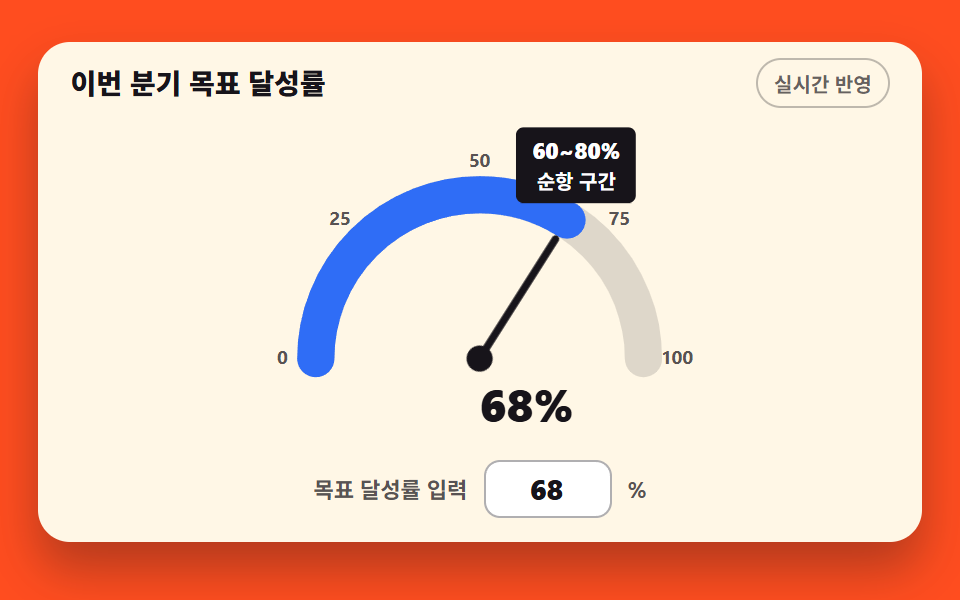
목표 달성률을 입력하면 반원 호가 채워지고 바늘이 rotate 로 그 값의 각도만큼 돈다
쓰임목표 달성률 표시, 할당량 진행 카드
rotatestroke-dasharraytransform-origin
<main class="stage">
<div class="cg is-demo" id="cg">
  <div class="cg__card">
    <div class="cg__head">
      <p class="cg__title">이번 분기 목표 달성률</p>
      <span class="cg__chip">실시간 반영</span>
    </div>
    <div class="cg__plot">
      <svg class="cg__svg" id="gauge" viewBox="0 0 440 176" role="img" aria-label="목표 달성률 반원 게이지, 현재 68%">
        <!-- 눈금 라벨 5개 — 반원 둘레 바깥(반경 106)의 수학 각도 좌표 -->
        <g class="cg__scale">
          <text x="114" y="129">0</text>
          <text x="145" y="54">25</text>
          <text x="220" y="23">50</text>
          <text x="295" y="54">75</text>
          <text x="326" y="129">100</text>
        </g>
        <!-- 트랙(연한 반원) + 값 호. 둘 다 pathLength=100 이라 값% 가 곧 dashoffset -->
        <path class="cg__track" d="M132,126 A88,88 0 0 1 308,126" pathLength="100"></path>
        <path class="cg__arc" id="arc" d="M132,126 A88,88 0 0 1 308,126" pathLength="100"></path>
        <!-- 구간별 투명한 호 — hover 툴팁의 당김줄 (pointer-events: stroke) -->
        <g class="cg__hits" id="hits"></g>
        <!-- 바늘 — 기본 모양은 12시 방향, rotate 로 각도를 잡는다. 원점은 게이지 중심 -->
        <g class="cg__needle" id="needle">
          <path class="cg__pin" d="M220,126 L220,50"></path>
          <circle class="cg__hub" cx="220" cy="126" r="7"></circle>
        </g>
        <!-- 값 라벨 — 미리보기에선 두 장을 steps 로 갈아 끼운다 -->
        <text class="cg__val cg__val--zero" x="220" y="160" aria-hidden="true">0%</text>
        <text class="cg__val cg__val--full" x="220" y="160" aria-hidden="true">68%</text>
        <text class="cg__liveVal" id="liveVal" x="220" y="160">68%</text>
      </svg>
      <div class="cg__tip" id="tip" aria-hidden="true"><strong id="tipRange">60~80%</strong><span id="tipName">순항 구간</span></div>
      <table class="cg__sr">
        <caption>목표 달성률 구간</caption>
        <thead><tr><th>구간</th><th>의미</th></tr></thead>
        <tbody>
          <tr><th scope="row">0~20%</th><td>시작 구간</td></tr>
          <tr><th scope="row">20~40%</th><td>가속 구간</td></tr>
          <tr><th scope="row">40~60%</th><td>중간 체크</td></tr>
          <tr><th scope="row">60~80%</th><td>순항 구간</td></tr>
          <tr><th scope="row">80~100%</th><td>목표 직전</td></tr>
        </tbody>
      </table>
    </div>
    <div class="cg__inputRow">
      <label class="cg__lab" for="valInput">목표 달성률 입력</label>
      <input class="cg__input" id="valInput" type="number" min="0" max="100" step="1" value="68">
      <span class="cg__unit">%</span>
    </div>
  </div>
</div>
</main>@use "../../../../site/static/demo-tokens" as *;
// 반원 게이지 — 실제 사용에선 입력칸의 숫자가 호 채움·바늘 각도·라벨을 즉시 바꾼다.
// 격자 미리보기(.is-demo)는 0 에서 68 로 바늘이 돌고 호가 차는 2초 루프.
// 바늘 회전은 CSS transform: rotate() — SVG 요소의 CSS transform-origin 은 view-box 좌표계를 기준하므로
// 게이지 중심(220px 126px)을 직접 지정한다 (transform-box 를 쓰지 않는 이유가 이것이다).
$duration: $dur-loop;
$easing: $ease-out;
$color: $chart-1;
@include stage($stage-orange);
.cg { display: flex; justify-content: center; width: 100%; padding-bottom: $sp-2; }
.cg__card {
width: min(100%, 420px); background: $subject-cream; border-radius: $r-card;
box-shadow: $shadow-raised; padding: $sp-2 $sp-4 $sp-1;
}
.cg__head { display: flex; align-items: center; justify-content: space-between; gap: $sp-2; margin-bottom: $sp-2; }
.cg__title { margin: 0; font-weight: 800; font-size: clamp(12px, 3vw, 14px); color: $subject-ink; }
.cg__chip {
font-weight: 700; font-size: clamp(9px, 2.4vw, 10px); color: rgba(23, 20, 26, .66);
border: 1px solid rgba(23, 20, 26, .28); border-radius: $r-pill; padding: $sp-1 $sp-2;
}
.cg__plot { position: relative; }
.cg__svg { display: block; width: 100%; height: auto; }
.cg__scale text { fill: rgba(23, 20, 26, .72); font-weight: 700; font-size: 10px; text-anchor: middle; }
.cg__track { fill: none; stroke: rgba(23, 20, 26, .14); stroke-width: 20; stroke-linecap: round; }
.cg__arc {
fill: none; stroke: $color; stroke-width: 20; stroke-linecap: round;
stroke-dasharray: 100; stroke-dashoffset: 32; // 68% 채움 (100 - 68)
}
.cg__hit { fill: none; stroke: transparent; stroke-width: 34; pointer-events: stroke; cursor: pointer; }
.cg__needle { transform-origin: 220px 126px; }
.cg__pin { stroke: $subject-ink; stroke-width: 4; stroke-linecap: round; }
.cg__hub { fill: $subject-ink; }
.cg__val, .cg__liveVal { fill: $subject-ink; font-weight: 800; font-size: 24px; }
.cg__val { display: none; }
.cg__liveVal { display: block; }
// 실사용 전환 — transition 으로 부드럽게 (미리보기 애니메이션이 있을 땐 애니메이션이 이긴다)
.cg:not(.is-demo) .cg__arc { transition: stroke-dashoffset $dur-base $ease-out; }
.cg:not(.is-demo) .cg__needle { transition: transform $dur-base $ease-out; }
// 툴팁 — 구간 호 위에 뜬다. 두 줄로 쌓아 폭을 좁힌다 — 한 줄이면 폭이 눈금 라벨 50·75 와
// 호 꼭대기를 덮는다. transform-origin 은 아래 변(50% 100%) — 툴팁은 참조하는 호에
// 붙는 요소라 중심이 아닌 당김점을 쓴다 (스스로 완결한 요소였다면 중심이어야 한다)
.cg__tip {
position: absolute; transform: translate(-50%, -130%); transform-origin: 50% 100%;
display: flex; flex-direction: column; align-items: center;
background: $subject-ink; color: $stage-paper; border-radius: $r-xs; padding: $sp-1 $sp-2;
font-weight: 700; font-size: 10px; white-space: nowrap; pointer-events: none; opacity: 0;
}
.cg__tip.is-on { opacity: 1; }
.cg__tip strong { font-size: 11px; }
.cg__sr { position: fixed; top: 0; left: -640px; width: 320px; margin: 0; }
// 입력줄 — label 과 input 를 한 줄에. 숫자를 넣으면 즉시 반영된다
.cg__inputRow {
display: flex; align-items: center; justify-content: center; gap: $sp-2; padding: $sp-1 0 $sp-2;
}
.cg__lab { font-weight: 700; font-size: 11px; color: rgba(23, 20, 26, .72); }
.cg__input {
width: 64px; box-sizing: border-box; border: 1px solid rgba(23, 20, 26, .34);
border-radius: $r-sm; background: $stage-paper; color: $subject-ink;
font-family: inherit; font-weight: 800; font-size: 14px; text-align: right;
padding: $sp-1 $sp-2; line-height: 1.4;
}
.cg__input:focus-visible { outline: 3px solid $color; outline-offset: 2px; }
.cg__unit { font-weight: 700; font-size: 11px; color: rgba(23, 20, 26, .72); }
// ── 미리보기 루프: 0~6% 바늘은 왼쪽 끝·호는 비어 있고, 6~58% 에 68 까지 돌며 차오른다.
// 58% 에 값 라벨이 두 장(0%/68%)을 steps(1, end) 컷으로 갈아 끼우고 구간 툴팁이 함께 뜬다 —
// 반투명 겹침이 없고, **완성된 장**이 곧 최대 변화 프레임(poster)이 된다.
// 되돌림은 98% — 24프레임의 마지막 장이 2초의 95.8% 지점이라 그 뒤는 샘플이 없다.
// 루프 안에서 되돌리면 "바늘이 되돌아가는 중인데 라벨만 68%" 인 어긋난 장이 poster 로 뽑힌다
// (실측 2026-09-12: 91.7% 프레임 2.119%).
.cg.is-demo .cg__arc {
animation-name: cgFill;
animation-duration: $duration;
animation-timing-function: $easing;
animation-iteration-count: infinite;
}
@keyframes cgFill {
0%, 6% { stroke-dashoffset: 100; }
58%, 96% { stroke-dashoffset: 32; }
98%, 100% { stroke-dashoffset: 100; }
}
.cg.is-demo .cg__needle {
animation-name: cgSwing;
animation-duration: $duration;
animation-timing-function: $easing;
animation-iteration-count: infinite;
}
@keyframes cgSwing {
0%, 6% { transform: rotate(-90deg); }
58%, 96% { transform: rotate(32.4deg); }
98%, 100% { transform: rotate(-90deg); }
}
.cg.is-demo .cg__liveVal { display: none; }
.cg.is-demo .cg__val { display: block; }
.cg.is-demo .cg__val--zero,
.cg.is-demo .cg__val--full {
animation-duration: $duration;
animation-timing-function: steps(1, end);
animation-iteration-count: infinite;
}
.cg.is-demo .cg__val--zero { animation-name: cgLblZero; }
.cg.is-demo .cg__val--full { animation-name: cgLblFull; }
@keyframes cgLblZero {
0%, 56% { opacity: 1; }
58%, 100% { opacity: 0; }
}
@keyframes cgLblFull {
0%, 56% { opacity: 0; }
58%, 96% { opacity: 1; }
98%, 100% { opacity: 0; }
}
// 구간 툴팁 — 호버에서 쓰는 그대로를 미리보기에서도 값이 확정되는 58% 에 컷으로 띄운다.
// 바늘·호만으로는 프레임마다 변하는 면적이 고만고만해 완성 장면이 poster 로 안 뽑힌다
.cg.is-demo .cg__tip {
animation-name: cgTip;
animation-duration: $duration;
animation-timing-function: steps(1, end);
animation-iteration-count: infinite;
}
@keyframes cgTip {
0%, 56% { opacity: 0; }
58%, 96% { opacity: 1; }
98%, 100% { opacity: 0; }
}
@media (max-width: 340px) {
// 320px 무대의 세로 여유는 174px 뿐 — 헤더·입력줄 여백을 4px 격자 안에서 줄인다.
// 좁은 화면에서는 올리지 않고 내리기만 한다 (118-07 실측: 반올림으로 올리면 BD9 가 깨진다)
.cg { padding-bottom: 0; }
.cg__card { padding: $sp-1 $sp-3 0; }
.cg__head { margin-bottom: $sp-1; }
.cg__inputRow { padding: $sp-1 0 0; }
.cg__val, .cg__liveVal { font-size: 20px; }
.cg__input { font-size: 12px; width: 52px; }
}
@media (prefers-reduced-motion: reduce) {
.cg.is-demo .cg__arc,
.cg.is-demo .cg__needle,
.cg.is-demo .cg__val--zero,
.cg.is-demo .cg__val--full,
.cg.is-demo .cg__tip { animation: none !important; }
// 움직임 없이 68% 를 가리킨 최종 상태로 점프한다
.cg.is-demo .cg__arc { stroke-dashoffset: 32 !important; }
.cg.is-demo .cg__needle { transform: rotate(32.4deg) !important; }
.cg.is-demo .cg__val--zero { opacity: 0 !important; }
.cg.is-demo .cg__val--full { opacity: 1 !important; }
.cg.is-demo .cg__tip { opacity: 1 !important; }
}html, body {
margin: 0;
overflow: hidden;
}
.stage {
box-sizing: border-box;
min-height: 100vh;
display: grid;
place-items: center;
margin: 0;
background: #ff4d1f;
font-family: -apple-system, "Segoe UI", "Noto Sans KR", sans-serif;
padding: clamp(8px, 4vw, 24px);
}
.cg {
display: flex;
justify-content: center;
width: 100%;
padding-bottom: 8px;
}
.cg__card {
width: min(100%, 420px);
background: #fff7e6;
border-radius: 16px;
box-shadow: 0 14px 24px rgba(23, 20, 26, 0.32);
padding: 8px 16px 4px;
}
.cg__head {
display: flex;
align-items: center;
justify-content: space-between;
gap: 8px;
margin-bottom: 8px;
}
.cg__title {
margin: 0;
font-weight: 800;
font-size: clamp(12px, 3vw, 14px);
color: #17141a;
}
.cg__chip {
font-weight: 700;
font-size: clamp(9px, 2.4vw, 10px);
color: rgba(23, 20, 26, 0.66);
border: 1px solid rgba(23, 20, 26, 0.28);
border-radius: 999px;
padding: 4px 8px;
}
.cg__plot {
position: relative;
}
.cg__svg {
display: block;
width: 100%;
height: auto;
}
.cg__scale text {
fill: rgba(23, 20, 26, 0.72);
font-weight: 700;
font-size: 10px;
text-anchor: middle;
}
.cg__track {
fill: none;
stroke: rgba(23, 20, 26, 0.14);
stroke-width: 20;
stroke-linecap: round;
}
.cg__arc {
fill: none;
stroke: #2f6df6;
stroke-width: 20;
stroke-linecap: round;
stroke-dasharray: 100;
stroke-dashoffset: 32;
}
.cg__hit {
fill: none;
stroke: transparent;
stroke-width: 34;
pointer-events: stroke;
cursor: pointer;
}
.cg__needle {
transform-origin: 220px 126px;
}
.cg__pin {
stroke: #17141a;
stroke-width: 4;
stroke-linecap: round;
}
.cg__hub {
fill: #17141a;
}
.cg__val, .cg__liveVal {
fill: #17141a;
font-weight: 800;
font-size: 24px;
}
.cg__val {
display: none;
}
.cg__liveVal {
display: block;
}
.cg:not(.is-demo) .cg__arc {
transition: stroke-dashoffset 300ms ease-out;
}
.cg:not(.is-demo) .cg__needle {
transition: transform 300ms ease-out;
}
.cg__tip {
position: absolute;
transform: translate(-50%, -130%);
transform-origin: 50% 100%;
display: flex;
flex-direction: column;
align-items: center;
background: #17141a;
color: #ffffff;
border-radius: 4px;
padding: 4px 8px;
font-weight: 700;
font-size: 10px;
white-space: nowrap;
pointer-events: none;
opacity: 0;
}
.cg__tip.is-on {
opacity: 1;
}
.cg__tip strong {
font-size: 11px;
}
.cg__sr {
position: fixed;
top: 0;
left: -640px;
width: 320px;
margin: 0;
}
.cg__inputRow {
display: flex;
align-items: center;
justify-content: center;
gap: 8px;
padding: 4px 0 8px;
}
.cg__lab {
font-weight: 700;
font-size: 11px;
color: rgba(23, 20, 26, 0.72);
}
.cg__input {
width: 64px;
box-sizing: border-box;
border: 1px solid rgba(23, 20, 26, 0.34);
border-radius: 8px;
background: #ffffff;
color: #17141a;
font-family: inherit;
font-weight: 800;
font-size: 14px;
text-align: right;
padding: 4px 8px;
line-height: 1.4;
}
.cg__input:focus-visible {
outline: 3px solid #2f6df6;
outline-offset: 2px;
}
.cg__unit {
font-weight: 700;
font-size: 11px;
color: rgba(23, 20, 26, 0.72);
}
.cg.is-demo .cg__arc {
animation-name: cgFill;
animation-duration: 2s;
animation-timing-function: ease-out;
animation-iteration-count: infinite;
}
@keyframes cgFill {
0%, 6% {
stroke-dashoffset: 100;
}
58%, 96% {
stroke-dashoffset: 32;
}
98%, 100% {
stroke-dashoffset: 100;
}
}
.cg.is-demo .cg__needle {
animation-name: cgSwing;
animation-duration: 2s;
animation-timing-function: ease-out;
animation-iteration-count: infinite;
}
@keyframes cgSwing {
0%, 6% {
transform: rotate(-90deg);
}
58%, 96% {
transform: rotate(32.4deg);
}
98%, 100% {
transform: rotate(-90deg);
}
}
.cg.is-demo .cg__liveVal {
display: none;
}
.cg.is-demo .cg__val {
display: block;
}
.cg.is-demo .cg__val--zero,
.cg.is-demo .cg__val--full {
animation-duration: 2s;
animation-timing-function: steps(1, end);
animation-iteration-count: infinite;
}
.cg.is-demo .cg__val--zero {
animation-name: cgLblZero;
}
.cg.is-demo .cg__val--full {
animation-name: cgLblFull;
}
@keyframes cgLblZero {
0%, 56% {
opacity: 1;
}
58%, 100% {
opacity: 0;
}
}
@keyframes cgLblFull {
0%, 56% {
opacity: 0;
}
58%, 96% {
opacity: 1;
}
98%, 100% {
opacity: 0;
}
}
.cg.is-demo .cg__tip {
animation-name: cgTip;
animation-duration: 2s;
animation-timing-function: steps(1, end);
animation-iteration-count: infinite;
}
@keyframes cgTip {
0%, 56% {
opacity: 0;
}
58%, 96% {
opacity: 1;
}
98%, 100% {
opacity: 0;
}
}
@media (max-width: 340px) {
.cg {
padding-bottom: 0;
}
.cg__card {
padding: 4px 12px 0;
}
.cg__head {
margin-bottom: 4px;
}
.cg__inputRow {
padding: 4px 0 0;
}
.cg__val, .cg__liveVal {
font-size: 20px;
}
.cg__input {
font-size: 12px;
width: 52px;
}
}
@media (prefers-reduced-motion: reduce) {
.cg.is-demo .cg__arc,
.cg.is-demo .cg__needle,
.cg.is-demo .cg__val--zero,
.cg.is-demo .cg__val--full,
.cg.is-demo .cg__tip {
animation: none !important;
}
.cg.is-demo .cg__arc {
stroke-dashoffset: 32 !important;
}
.cg.is-demo .cg__needle {
transform: rotate(32.4deg) !important;
}
.cg.is-demo .cg__val--zero {
opacity: 0 !important;
}
.cg.is-demo .cg__val--full {
opacity: 1 !important;
}
.cg.is-demo .cg__tip {
opacity: 1 !important;
}
}var SECTIONS = [
{ lo: 0, hi: 20, name: '시작 구간' },
{ lo: 20, hi: 40, name: '가속 구간' },
{ lo: 40, hi: 60, name: '중간 체크' },
{ lo: 60, hi: 80, name: '순항 구간' },
{ lo: 80, hi: 100, name: '목표 직전' }
];
var CX = 220, CY = 126, R = 88;
var cg = document.getElementById('cg');
var gauge = document.getElementById('gauge');
var arc = document.getElementById('arc');
var needle = document.getElementById('needle');
var liveVal = document.getElementById('liveVal');
var input = document.getElementById('valInput');
var tip = document.getElementById('tip');
var tipRange = document.getElementById('tipRange');
var tipName = document.getElementById('tipName');
// 값 → 바늘 회전각(도). 바늘 기본 모양이 12시라 0% 에서 -90(왼쪽 끝), 100% 에서 +90(오른쪽 끝)
function angleFor(v) { return v * 1.8 - 90; }
// 값 → 반원 위의 수학 각도(도). 0% 가 180(왼쪽), 100% 가 0(오른쪽) — 회전각과 다른 값이라는 점이 함정
function degreeFor(v) { return 180 - v * 1.8; }
// 수학 각도 → viewBox 좌표. SVG 는 y 가 아래로 자라므로 sin 을 **빼야** 위쪽 반원이 나온다.
// 더하면 반원이 통째로 아래로 뒤집혀 눈금 라벨과 어긋난다
function pointAt(deg, radius) {
var rad = deg * Math.PI / 180;
return [CX + radius * Math.cos(rad), CY - radius * Math.sin(rad)];
}
// 툴팁을 한 구간 위에 놓는다 — 호버와 미리보기가 같은 코드를 쓴다.
// 반경은 호 위(R) — 더 안쪽에 두면 바늘을 가린다 (R-32 로 놓았더니 poster 에서 바늘 끝이 덮였다)
function placeTip(sec) {
var mid = pointAt((degreeFor(sec.lo) + degreeFor(sec.hi)) / 2, R);
tip.style.left = (mid[0] / 440 * 100) + '%';
tip.style.top = (mid[1] / 176 * 100) + '%';
tipRange.textContent = sec.lo + '~' + sec.hi + '%';
tipName.textContent = sec.name;
}
// 구간 호 5개를 만들어 깐다 — 투명하지만 stroke 위에서 pointer 이벤트를 받는다
var SVGNS = 'http://www.w3.org/2000/svg';
var hits = document.getElementById('hits');
SECTIONS.forEach(function (sec) {
var p0 = pointAt(degreeFor(sec.lo), R), p1 = pointAt(degreeFor(sec.hi), R);
var path = document.createElementNS(SVGNS, 'path');
path.setAttribute('d', 'M' + p0[0].toFixed(1) + ',' + p0[1].toFixed(1) + ' A' + R + ',' + R + ' 0 0 1 ' + p1[0].toFixed(1) + ',' + p1[1].toFixed(1));
path.setAttribute('class', 'cg__hit');
hits.appendChild(path);
path.addEventListener('pointerenter', function () {
cg.classList.remove('is-demo');
placeTip(sec);
tip.classList.add('is-on');
});
});
hits.addEventListener('pointerleave', function () { tip.classList.remove('is-on'); });
placeTip(SECTIONS[3]); // 미리보기에선 68% 가 속한 순항 구간 위에 미리 놓는다
// 값 하나에 호·바늘·라벨을 맞춘다 — 실사용 경로 (입력 → 즉시 반영)
function applyValue(v) {
v = Math.max(0, Math.min(100, v));
arc.style.strokeDashoffset = String(100 - v);
needle.style.transform = 'rotate(' + angleFor(v).toFixed(1) + 'deg)';
liveVal.textContent = v + '%';
gauge.setAttribute('aria-label', '목표 달성률 반원 게이지, 현재 ' + v + '%');
}
input.addEventListener('input', function () { cg.classList.remove('is-demo'); applyValue(Number(input.value)); });
input.addEventListener('focus', function () { cg.classList.remove('is-demo'); });
applyValue(68);// ChartGaugeNeedle — vanilla 판(run/289/demo/09-chart-draw-gauge-needle/index.html) 의 React 포트.
// 목표 달성률을 입력하면 반원 호가 채워지고 바늘이 그 값의 각도만큼 도는 게이지.
// 사람이 포인터·입력칸을 만지면 미리보기 루프(.isDemo)가 떨어진다.
import { useState } from "react";
import styles from "./ChartGaugeNeedle.module.scss";
export type ChartGaugeNeedleProps = {
/** 격자 미리보기용 2초 자동 루프. 사람이 입력칸을 만지면 꺼진다 */
demo?: boolean;
};
type ChgEvt = { target: { value: string } };
const SECTIONS = [
{ lo: 0, hi: 20, name: "시작 구간" },
{ lo: 20, hi: 40, name: "가속 구간" },
{ lo: 40, hi: 60, name: "중간 체크" },
{ lo: 60, hi: 80, name: "순항 구간" },
{ lo: 80, hi: 100, name: "목표 직전" }
];
const CX = 220, CY = 126, R = 88;
const VW = 440, VH = 176;
const START_V = 68; // 미리보기가 채우는 값
const TIP_SEC = 3; // 미리보기 툴팁이 가리키는 구간 — 60~80%
/** 값 → 바늘 회전각(도). 바늘 기본 모양이 12시라 0% 에서 -90(왼쪽 끝), 100% 에서 +90(오른쪽 끝) */
const angleFor = (v: number) => v * 1.8 - 90;
/** 값 → 반원 위의 수학 각도(도). 0% 가 180(왼쪽), 100% 가 0(오른쪽) — 회전각과 다른 값이라는 점이 함정 */
const degreeFor = (v: number) => 180 - v * 1.8;
/** 수학 각도 → viewBox 좌표. SVG 는 y 가 아래로 자라므로 sin 을 빼야 위쪽 반원이 나온다 */
function pointAt(deg: number, radius: number): [number, number] {
const rad = deg * Math.PI / 180;
return [CX + radius * Math.cos(rad), CY - radius * Math.sin(rad)];
}
/** 구간 호 5개의 path — 투명하지만 stroke 위에서 pointer 이벤트를 받는다 */
function hitPath(sec: { lo: number; hi: number }): string {
const p0 = pointAt(degreeFor(sec.lo), R), p1 = pointAt(degreeFor(sec.hi), R);
return "M" + p0[0].toFixed(1) + "," + p0[1].toFixed(1) + " A" + R + "," + R + " 0 0 1 " + p1[0].toFixed(1) + "," + p1[1].toFixed(1);
}
/** 구간 호 5개의 눈금 라벨 — 반원 둘레 바깥(반경 106)의 좌표 */
const SCALE_POS: [number, number][] = [0, 25, 50, 75, 100].map((v) => pointAt(degreeFor(v), 106));
/** 툴팁을 한 구간 위에 놓는다 — 호버와 미리보기가 같은 계산을 쓴다.
* 반경은 호 위(R) — 더 안쪽에 두면 바늘을 가린다 */
function tipPos(sec: { lo: number; hi: number }): { left: string; top: string } {
const mid = pointAt((degreeFor(sec.lo) + degreeFor(sec.hi)) / 2, R);
return { left: (mid[0] / VW * 100) + "%", top: (mid[1] / VH * 100) + "%" };
}
export default function ChartGaugeNeedle({ demo = true }: ChartGaugeNeedleProps) {
const [live, setLive] = useState(!demo);
const [value, setValue] = useState(START_V);
const [hotSec, setHotSec] = useState<number | null>(null);
const v = Math.max(0, Math.min(100, value));
const shownSec = hotSec == null ? TIP_SEC : hotSec;
const sec = SECTIONS[shownSec];
const rootCls = [styles.root, live ? "" : styles.isDemo].filter(Boolean).join(" ");
return (
<div className={rootCls}>
<div className={styles.card}>
<div className={styles.head}>
<p className={styles.title}>이번 분기 목표 달성률</p>
<span className={styles.chip}>실시간 반영</span>
</div>
<div className={styles.plot}>
<svg
className={styles.svg} viewBox={"0 0 " + VW + " " + VH} role="img"
aria-label={"목표 달성률 반원 게이지, 현재 " + v + "%"}
>
{/* 눈금 라벨 5개 — 반원 둘레 바깥의 수학 각도 좌표 */}
<g className={styles.scale}>
{[0, 25, 50, 75, 100].map((t, i) => (
<text key={t} x={SCALE_POS[i][0].toFixed(1)} y={SCALE_POS[i][1].toFixed(1)}>{t}</text>
))}
</g>
{/* 트랙(연한 반원) + 값 호. 둘 다 pathLength=100 이라 값% 가 곧 dashoffset */}
<path className={styles.track} d="M132,126 A88,88 0 0 1 308,126" pathLength={100} />
<path
className={styles.arc} d="M132,126 A88,88 0 0 1 308,126" pathLength={100}
strokeDasharray={100} strokeDashoffset={live ? 100 - v : undefined}
/>
{/* 구간별 투명한 호 — hover 툴팁의 당김줄 (pointer-events: stroke) */}
<g onPointerLeave={() => setHotSec(null)}>
{SECTIONS.map((s, i) => (
<path key={s.lo} className={styles.hit} d={hitPath(s)}
onPointerEnter={() => { setLive(true); setHotSec(i); }}
/>
))}
</g>
{/* 바늘 — 기본 모양은 12시 방향, rotate 로 각도를 잡는다. 원점은 게이지 중심 */}
<g className={styles.needle} style={{ transform: live ? "rotate(" + angleFor(v).toFixed(1) + "deg)" : undefined }}>
<path className={styles.pin} d="M220,126 L220,50" />
<circle className={styles.hub} cx={220} cy={126} r={7} />
</g>
{/* 값 라벨 — 실사용은 입력값을, 미리보기는 두 장(0%/68%)을 컷으로 갈아 낀다 */}
<text className={[styles.val, styles.valZero].join(" ")} x={220} y={160} aria-hidden="true">0%</text>
<text className={[styles.val, styles.valFull].join(" ")} x={220} y={160} aria-hidden="true">{START_V}%</text>
<text className={styles.liveVal} x={220} y={160}>{v}%</text>
</svg>
{/* 툴팁 — 구간 호 위에 뜬다 */}
<div
className={[styles.tip, hotSec == null ? "" : styles.tipIsOn].filter(Boolean).join(" ")} aria-hidden="true"
style={tipPos(sec)}
>
<strong>{sec.lo}~{sec.hi}%</strong>
<span>{sec.name}</span>
</div>
{/* 스크린리더용 데이터 표 — 화면에 안 보인다 */}
<table className={styles.sr}>
<caption>목표 달성률 구간</caption>
<thead><tr><th scope="col">구간</th><th scope="col">의미</th></tr></thead>
<tbody>
{SECTIONS.map((s) => (
<tr key={s.lo}><th scope="row">{s.lo}~{s.hi}%</th><td>{s.name}</td></tr>
))}
</tbody>
</table>
</div>
<div className={styles.inputRow}>
<label className={styles.lab} htmlFor="gauge-val">목표 달성률 입력</label>
<input
className={styles.input} id="gauge-val" type="number" min={0} max={100} step={1}
value={v}
onChange={(e: ChgEvt) => { setLive(true); setValue(Number(e.target.value) || 0); }}
/>
<span className={styles.unit}>%</span>
</div>
</div>
</div>
);
}09 숫자를 넣으면 바늘이 도는 반원 게이지 — 측정 누적면적 7.21% · 움직인 프레임 13/23GODRICH 원작 · zip 에 SCSS·React 포함 · css 그래프 만들기 SVG로 9종 — 라이브러리 없이
이 데모가 속한 글
 css 그래프 만들기 SVG로 9종 — 라이브러리 없이css 그래프는 숫자를 눈에 보이는 선·막대·면으로 바꾸는 가장 가벼운 방법입니다. 여기 아홉 가지는 선·막대·도넛·레이더·히트맵·스파크라인·누적 영역·트리맵·게이지를 라이브러리 없이 SVG 좌표 계산과 CSS 애니 이 글의 데모 전부 보기