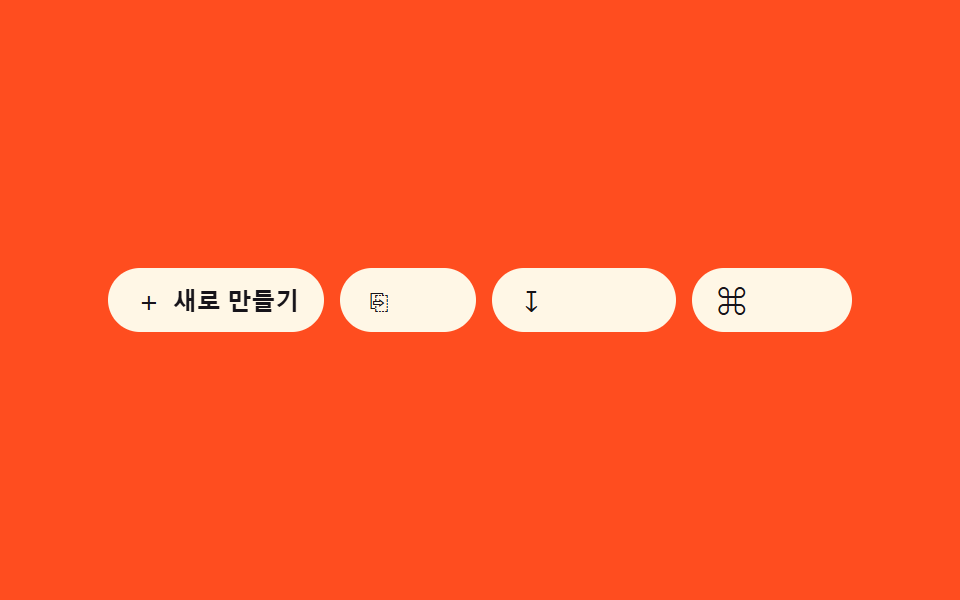
07아이콘 라벨 조합 노출 — 컨테이너 너비 값이 넓어지면 아이콘 버튼의 글자 라벨 너비 값이 0에서 늘어나며 드러나는 방식
컨테이너 너비 값이 기준을 넘으면 아이콘 버튼의 라벨 너비 값이 0에서 실제 글자 너비 값까지 늘어납니다.
쓰임반응형 액션 버튼 묶음, 카드 안 버튼 그룹
dur 400 easeOutCubicclip-path revealmeasured text width
<main class="stage">
<div class="clr is-demo" id="clr" role="group" aria-label="빠른 작업"></div>
</main>
@use "../../../../site/static/demo-tokens" as *;
// 계산 겹: index.html 이 라벨의 실측 텍스트 폭(fullW)을 한 번 재 reveal 트랙 폭에 고정하고,
// easeOutCubic 로 보간한 진행률을 clip-path 로 매 프레임 그린다 — width 는 다시 건드리지 않는다.
@include stage($stage-orange);
.clr {
display: flex;
flex-wrap: wrap;
gap: $sp-2;
max-width: 100%;
}
.clr__btn {
display: flex;
align-items: center;
gap: $sp-1;
appearance: none;
border: none;
border-radius: $r-pill;
background: $subject-cream;
color: $subject-ink;
padding: $sp-2 $sp-3;
cursor: pointer;
flex: 0 0 auto;
&:focus-visible { outline: 2px solid $subject-blue-deep; outline-offset: 2px; }
}
.clr__icon {
font-size: 15px;
line-height: 1;
width: 16px;
text-align: center;
}
.clr__reveal {
display: inline-block;
overflow: hidden;
width: 0;
will-change: clip-path;
}
.clr__label {
display: inline-block;
white-space: nowrap;
font-size: 12px;
font-weight: 600;
opacity: 0;
will-change: opacity;
}
@media (max-width: 340px) {
.clr__btn { padding: $sp-1 $sp-2; }
.clr__label { font-size: 11px; }
}
@media (prefers-reduced-motion: reduce) {
.clr__reveal, .clr__label { transition: none; }
}html, body {
margin: 0;
overflow: hidden;
}
.stage {
box-sizing: border-box;
min-height: 100vh;
display: grid;
place-items: center;
margin: 0;
background: #ff4d1f;
font-family: -apple-system, "Segoe UI", "Noto Sans KR", sans-serif;
padding: clamp(8px, 4vw, 24px);
}
.clr {
display: flex;
flex-wrap: wrap;
gap: 8px;
max-width: 100%;
}
.clr__btn {
display: flex;
align-items: center;
gap: 4px;
appearance: none;
border: none;
border-radius: 999px;
background: #fff7e6;
color: #17141a;
padding: 8px 12px;
cursor: pointer;
flex: 0 0 auto;
}
.clr__btn:focus-visible {
outline: 2px solid #0a4fe8;
outline-offset: 2px;
}
.clr__icon {
font-size: 15px;
line-height: 1;
width: 16px;
text-align: center;
}
.clr__reveal {
display: inline-block;
overflow: hidden;
width: 0;
will-change: clip-path;
}
.clr__label {
display: inline-block;
white-space: nowrap;
font-size: 12px;
font-weight: 600;
opacity: 0;
will-change: opacity;
}
@media (max-width: 340px) {
.clr__btn {
padding: 4px 8px;
}
.clr__label {
font-size: 11px;
}
}
@media (prefers-reduced-motion: reduce) {
.clr__reveal, .clr__label {
transition: none;
}
}(function () {
var ITEMS = [
{ icon: '+', label: '새로 만들기' },
{ icon: '⎘', label: '복제' },
{ icon: '↧', label: '내보내기' },
{ icon: '⌘', label: '단축키' }
];
var CYCLE_MS = 900; // 데모 자동 순회 간격 — 측정 창(2s) 안에 전환이 여러 번 들어오게 짧게 잡음
var reduce = window.matchMedia('(prefers-reduced-motion: reduce)').matches;
var root = document.getElementById('clr');
var isDemo = true;
function human() {
if (isDemo) { root.classList.remove('is-demo'); isDemo = false; }
}
function easeOutCubic(t) { return 1 - Math.pow(1 - t, 3); }
var cells = ITEMS.map(function (item) {
var btn = document.createElement('button');
btn.type = 'button';
btn.className = 'clr__btn';
var icon = document.createElement('span');
icon.className = 'clr__icon';
icon.textContent = item.icon;
icon.setAttribute('aria-hidden', 'true');
var reveal = document.createElement('span');
reveal.className = 'clr__reveal';
var label = document.createElement('span');
label.className = 'clr__label';
label.textContent = item.label;
reveal.appendChild(label);
btn.appendChild(icon);
btn.appendChild(reveal);
root.appendChild(btn);
return { btn: btn, reveal: reveal, label: label, progress: 0, target: 0, raf: 0, fullW: 0 };
});
// 계산 겹: 각 라벨의 실측 텍스트 폭(fullW)을 한 번 재고, reveal 트랙 폭을 그 값에 고정한 뒤
// clip-path 를 0→fullW 사이에서 이징으로 보간해 "덮개를 걷어내는" 진행률로 그린다 — width 자체는
// 다시 애니메이션하지 않는다(레이아웃 트리거는 최초 1회 뿐).
cells.forEach(function (cell) {
cell.fullW = cell.label.getBoundingClientRect().width;
cell.reveal.style.width = cell.fullW + 'px';
});
function render(cell) {
var pct = (1 - cell.progress) * 100;
cell.reveal.style.clipPath = 'inset(0 ' + pct.toFixed(2) + '% 0 0)';
cell.label.style.opacity = String(cell.progress);
}
function animate(cell, to) {
cell.target = to;
var from = cell.progress;
if (reduce) { cell.progress = to; render(cell); return; }
if (cell.raf) cancelAnimationFrame(cell.raf);
var dur = 400, t0 = 0;
function step(ts) {
if (!t0) t0 = ts;
var t = Math.min(1, (ts - t0) / dur);
cell.progress = from + (to - from) * easeOutCubic(t);
render(cell);
if (t < 1) cell.raf = requestAnimationFrame(step);
else cell.raf = 0;
}
cell.raf = requestAnimationFrame(step);
}
cells.forEach(function (cell) {
render(cell);
cell.btn.addEventListener('pointerenter', function () { human(); animate(cell, 1); });
cell.btn.addEventListener('pointerleave', function () { if (!isDemo) animate(cell, 0); });
cell.btn.addEventListener('focus', function () { human(); animate(cell, 1); });
cell.btn.addEventListener('blur', function () { if (!isDemo) animate(cell, 0); });
});
var active = -1;
var start = 0;
function loop(ts) {
if (!start) start = ts;
if (isDemo && !reduce) {
var idx = Math.floor((ts - start) / CYCLE_MS) % cells.length;
if (idx !== active) {
if (active >= 0) animate(cells[active], 0);
active = idx;
animate(cells[active], 1);
}
}
requestAnimationFrame(loop);
}
requestAnimationFrame(loop);
})();import { useEffect, useRef } from 'react';
import styles from './IconLabelComboReveal.module.scss';
type Box<T> = { current: T };
type Item = { icon: string; label: string };
const ITEMS: Item[] = [
{ icon: '+', label: '새로 만들기' },
{ icon: '⎘', label: '복제' },
{ icon: '↧', label: '내보내기' },
{ icon: '⌘', label: '단축키' }
];
const CYCLE_MS = 900; // 데모 자동 순회 간격 — 측정 창(2s) 안에 전환이 여러 번 들어오게 짧게 잡음
type Cell = {
reveal: HTMLSpanElement;
label: HTMLSpanElement;
progress: number;
raf: number;
fullW: number;
};
function easeOutCubic(t: number) { return 1 - Math.pow(1 - t, 3); }
export default function IconLabelComboReveal() {
const rootRef = useRef(null) as unknown as Box<HTMLDivElement>;
const revealRefs = useRef([]) as unknown as Box<HTMLSpanElement[]>;
const labelRefs = useRef([]) as unknown as Box<HTMLSpanElement[]>;
const btnRefs = useRef([]) as unknown as Box<HTMLButtonElement[]>;
useEffect(() => {
const root = rootRef.current;
const reduce = window.matchMedia('(prefers-reduced-motion: reduce)').matches;
let isDemo = true;
function human() {
if (isDemo) { root.classList.remove(styles.isDemo); isDemo = false; }
}
// 계산 겹: 각 라벨의 실측 텍스트 폭(fullW)을 한 번 재고, reveal 트랙 폭을 그 값에 고정한 뒤
// clip-path 를 0→fullW 사이에서 이징으로 보간해 진행률을 그린다 — width 는 다시 애니메이션하지 않는다.
const cells: Cell[] = ITEMS.map((_, i) => {
const reveal = revealRefs.current[i];
const label = labelRefs.current[i];
const fullW = label.getBoundingClientRect().width;
reveal.style.width = fullW + 'px';
return { reveal, label, progress: 0, raf: 0, fullW };
});
function render(cell: Cell) {
const pct = (1 - cell.progress) * 100;
cell.reveal.style.clipPath = `inset(0 ${pct.toFixed(2)}% 0 0)`;
cell.label.style.opacity = String(cell.progress);
}
function animate(cell: Cell, to: number) {
const from = cell.progress;
if (reduce) { cell.progress = to; render(cell); return; }
if (cell.raf) cancelAnimationFrame(cell.raf);
const dur = 400;
let t0 = 0;
function step(ts: number) {
if (!t0) t0 = ts;
const t = Math.min(1, (ts - t0) / dur);
cell.progress = from + (to - from) * easeOutCubic(t);
render(cell);
if (t < 1) cell.raf = requestAnimationFrame(step);
else cell.raf = 0;
}
cell.raf = requestAnimationFrame(step);
}
const cleanups: Array<() => void> = [];
cells.forEach((cell, i) => {
render(cell);
const btn = btnRefs.current[i];
const onEnter = () => { human(); animate(cell, 1); };
const onLeave = () => { if (!isDemo) animate(cell, 0); };
const onFocus = () => { human(); animate(cell, 1); };
const onBlur = () => { if (!isDemo) animate(cell, 0); };
btn.addEventListener('pointerenter', onEnter);
btn.addEventListener('pointerleave', onLeave);
btn.addEventListener('focus', onFocus);
btn.addEventListener('blur', onBlur);
cleanups.push(() => {
btn.removeEventListener('pointerenter', onEnter);
btn.removeEventListener('pointerleave', onLeave);
btn.removeEventListener('focus', onFocus);
btn.removeEventListener('blur', onBlur);
});
});
let active = -1;
let start = 0;
let raf = 0;
function loop(ts: number) {
if (!start) start = ts;
if (isDemo && !reduce) {
const idx = Math.floor((ts - start) / CYCLE_MS) % cells.length;
if (idx !== active) {
if (active >= 0) animate(cells[active], 0);
active = idx;
animate(cells[active], 1);
}
}
raf = requestAnimationFrame(loop);
}
raf = requestAnimationFrame(loop);
return () => {
cancelAnimationFrame(raf);
cells.forEach((cell) => { if (cell.raf) cancelAnimationFrame(cell.raf); });
cleanups.forEach((fn) => fn());
};
}, []);
return (
<div
className={`${styles.clr} ${styles.isDemo}`}
role="group"
aria-label="빠른 작업"
ref={(el: HTMLDivElement | null) => { if (el) rootRef.current = el; }}
>
{ITEMS.map((item, i) => (
<button
key={item.label}
type="button"
className={styles.btn}
ref={(el: HTMLButtonElement | null) => { if (el) btnRefs.current[i] = el; }}
>
<span className={styles.icon} aria-hidden="true">{item.icon}</span>
<span
className={styles.reveal}
ref={(el: HTMLSpanElement | null) => { if (el) revealRefs.current[i] = el; }}
>
<span
className={styles.label}
ref={(el: HTMLSpanElement | null) => { if (el) labelRefs.current[i] = el; }}
>
{item.label}
</span>
</span>
</button>
))}
</div>
);
}07 아이콘 라벨 조합 노출 — 컨테이너 너비 값이 넓어지면 아이콘 버튼의 글자 라벨 너비 값이 0에서 늘어나며 드러나는 방식 — 측정 누적면적 0.602% · 움직인 프레임 9/23GODRICH 원작 · zip 에 SCSS·React 포함 · 토글 버튼 그룹 9종 — 나란히 붙은 버튼이 하나처럼 움직이는 아홉 가지
이 데모가 속한 글
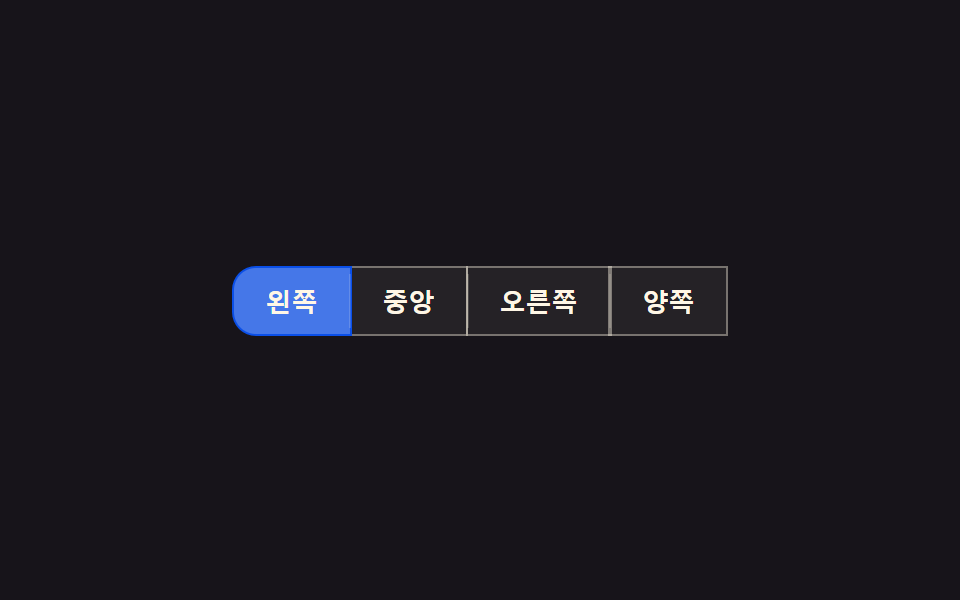 토글 버튼 그룹 9종 — 나란히 붙은 버튼이 하나처럼 움직이는 아홉 가지토글 버튼 그룹 9종을 값 기준으로 나누면, 아홉 가지 중 하나는 활성 버튼 값이 바뀌면 슬라이드 표시자의 위치 값이 실측 좌표를 따라 이동하고, 하나는 그룹 너비 값이 줄어들면 넘치는 버튼이 더보기 값 안으로 접히 이 글의 데모 전부 보기