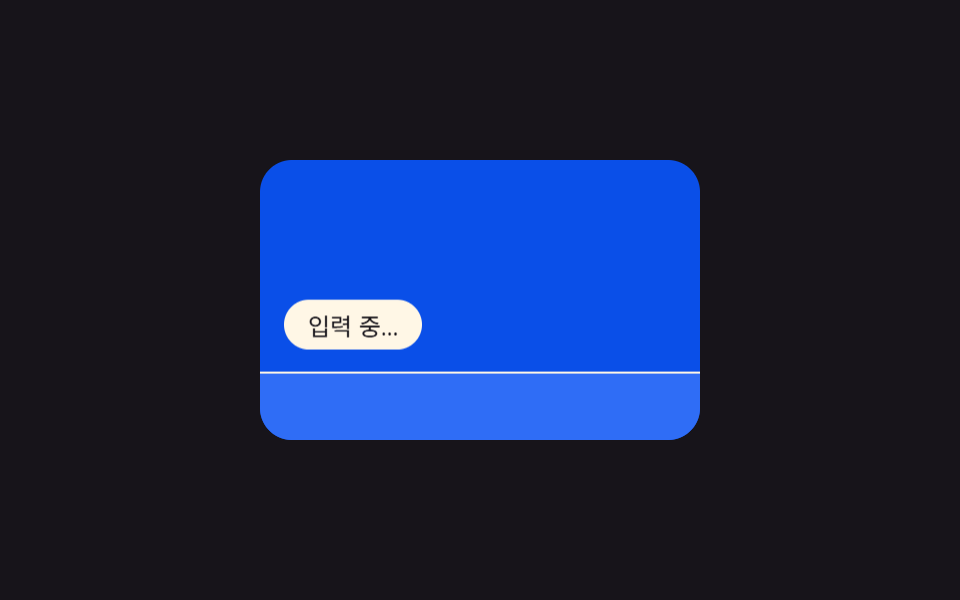
09키보드 바 힌트 — 가상 키보드 높이 값으로 위치를 다시 잡는 표시
모바일 화면에서 가상 키보드가 열린 상태가 되면 키보드가 차지하는 높이 값만큼 입력 표시의 아래쪽 위치를 다시 계산해 키보드 바로 위에 붙입니다.
쓰임모바일 채팅 앱, 반응형 웹 채팅 위젯
translateY(requestAnimationFrametransform
<main class="stage">
<section class="panel">
  <div class="screen">
    <span class="indicator" id="indicator">입력 중…</span>
    <div class="keyboard" id="keyboard"></div>
  </div>
</section>
</main>
@use "../../../../site/static/demo-tokens" as *;
@include stage($stage-ink);
.panel { display: flex; align-items: center; justify-content: center; }
.screen {
position: relative;
width: 220px;
height: 140px;
overflow: hidden;
border-radius: $r-card;
background: $subject-blue-deep;
}
.indicator {
position: absolute;
left: $sp-3;
bottom: $sp-3;
padding: $sp-1 $sp-3;
border-radius: $r-pill;
background: $subject-cream;
color: $subject-ink;
font-size: 12px;
will-change: transform;
}
.keyboard {
position: absolute;
left: 0;
bottom: 0;
width: 100%;
height: 64px;
background: $subject-blue;
border-top: 1px solid $subject-cream;
will-change: transform;
}
@media (prefers-reduced-motion: reduce) {
.indicator, .keyboard { transition: none; }
}html, body {
margin: 0;
overflow: hidden;
}
.stage {
box-sizing: border-box;
min-height: 100vh;
display: grid;
place-items: center;
margin: 0;
background: #17141a;
font-family: -apple-system, "Segoe UI", "Noto Sans KR", sans-serif;
padding: clamp(8px, 4vw, 24px);
}
.panel {
display: flex;
align-items: center;
justify-content: center;
}
.screen {
position: relative;
width: 220px;
height: 140px;
overflow: hidden;
border-radius: 16px;
background: #0a4fe8;
}
.indicator {
position: absolute;
left: 12px;
bottom: 12px;
padding: 4px 12px;
border-radius: 999px;
background: #fff7e6;
color: #17141a;
font-size: 12px;
will-change: transform;
}
.keyboard {
position: absolute;
left: 0;
bottom: 0;
width: 100%;
height: 64px;
background: #2f6df6;
border-top: 1px solid #fff7e6;
will-change: transform;
}
@media (prefers-reduced-motion: reduce) {
.indicator, .keyboard {
transition: none;
}
}// 키보드 열림 표시 이동 — 키보드 높이 값을 시간에 따라 재계산해 표시줄과 키보드를 함께 translateY 로 옮긴다.
// 계산 겹: ease-in-out 진행률 → 키보드 높이 h 재계산 → translateY(둘 다 transform 만 사용, top/height 미변경).
(function () {
var keyboard = document.getElementById('keyboard');
var indicator = document.getElementById('indicator');
if (!keyboard || !indicator) return;
var KB_H = 64;
var CYCLE_MS = 2000;
var OPEN_START = 0.10 * CYCLE_MS;
var OPEN_MS = 360;
var CLOSE_START = 0.62 * CYCLE_MS;
var CLOSE_MS = 360;
function ease(p) {
return p < 0.5 ? 2 * p * p : 1 - Math.pow(-2 * p + 2, 2) / 2;
}
function heightAt(t) {
if (t < OPEN_START) return 0;
if (t < OPEN_START + OPEN_MS) {
return KB_H * ease((t - OPEN_START) / OPEN_MS);
}
if (t < CLOSE_START) return KB_H;
if (t < CLOSE_START + CLOSE_MS) {
return KB_H * (1 - ease((t - CLOSE_START) / CLOSE_MS));
}
return 0;
}
function apply(h) {
keyboard.style.transform = 'translateY(' + (KB_H - h) + 'px)';
indicator.style.transform = 'translateY(' + (-h) + 'px)';
}
var reduce = window.matchMedia('(prefers-reduced-motion: reduce)').matches;
if (reduce) {
apply(KB_H);
return;
}
var start = null;
function frame(ts) {
if (start === null) start = ts;
var t = (ts - start) % CYCLE_MS;
apply(heightAt(t));
requestAnimationFrame(frame);
}
requestAnimationFrame(frame);
})();import { useEffect, useRef } from "react";
import styles from "./TypingKeyboardBarHint.module.scss";
// 키보드 열림 표시 이동 — 키보드 높이 값을 시간에 따라 재계산해 표시줄과 키보드를 함께 translateY 로 옮긴다.
// 계산 겹: ease-in-out 진행률 → 키보드 높이 h 재계산 → translateY(둘 다 transform 만 사용, top/height 미변경).
const KB_H = 64;
const CYCLE_MS = 2000;
const OPEN_START = 0.10 * CYCLE_MS;
const OPEN_MS = 360;
const CLOSE_START = 0.62 * CYCLE_MS;
const CLOSE_MS = 360;
function ease(p: number): number {
return p < 0.5 ? 2 * p * p : 1 - Math.pow(-2 * p + 2, 2) / 2;
}
function heightAt(t: number): number {
if (t < OPEN_START) return 0;
if (t < OPEN_START + OPEN_MS) {
return KB_H * ease((t - OPEN_START) / OPEN_MS);
}
if (t < CLOSE_START) return KB_H;
if (t < CLOSE_START + CLOSE_MS) {
return KB_H * (1 - ease((t - CLOSE_START) / CLOSE_MS));
}
return 0;
}
export default function TypingKeyboardBarHint() {
const keyboardRef = useRef<HTMLDivElement | null>(null);
const indicatorRef = useRef<HTMLSpanElement | null>(null);
useEffect(() => {
const keyboard = keyboardRef.current;
const indicator = indicatorRef.current;
if (!keyboard || !indicator) return;
function apply(h: number) {
keyboard!.style.transform = "translateY(" + (KB_H - h) + "px)";
indicator!.style.transform = "translateY(" + -h + "px)";
}
const reduce = window.matchMedia("(prefers-reduced-motion: reduce)").matches;
if (reduce) {
apply(KB_H);
return;
}
let start: number | null = null;
let raf = 0;
function frame(ts: number) {
if (start === null) start = ts;
const t = (ts - start) % CYCLE_MS;
apply(heightAt(t));
raf = requestAnimationFrame(frame);
}
raf = requestAnimationFrame(frame);
return () => cancelAnimationFrame(raf);
}, []);
return (
<div className={styles.stage}>
<section className={styles.panel}>
<div className={styles.screen}>
<span ref={indicatorRef} className={styles.indicator}>입력 중…</span>
<div ref={keyboardRef} className={styles.keyboard} />
</div>
</section>
</div>
);
}09 키보드 바 힌트 — 가상 키보드 높이 값으로 위치를 다시 잡는 표시 — 측정 누적면적 11.546% · 움직인 프레임 12/23GODRICH 원작 · zip 에 SCSS·React 포함 · 타이핑 인디케이터 UI 9종 — 점 3개부터 그룹 채팅까지
이 데모가 속한 글
 타이핑 인디케이터 UI 9종 — 점 3개부터 그룹 채팅까지타이핑 인디케이터 아홉 개 중 하나는 입력 중이던 시간이 길수록 아바타 테두리가 느리게 뛰고, 하나는 그룹 채팅에서 입력자가 바뀔 때마다 남은 시간 값으로 이름표 폭을 다시 그리고, 또 하나는 진폭 값 배열로 음성 이 글의 데모 전부 보기