06이동 방향 값을 읽어 반대로 도는 슬라이드 전환
직전에 어느 버튼을 눌렀는지 기록한 방향 값을 확인해, 다음 화면으로 갈 땐 한쪽에서, 이전 화면으로 돌아갈 땐 반대쪽에서 들어오도록 같은 코드가 매번 반대 방향으로 슬라이드한다.
쓰임탭 순서 이동, 위저드 단계 이동
--dir::view-transition-old(ds-step)$slide-travel-pct
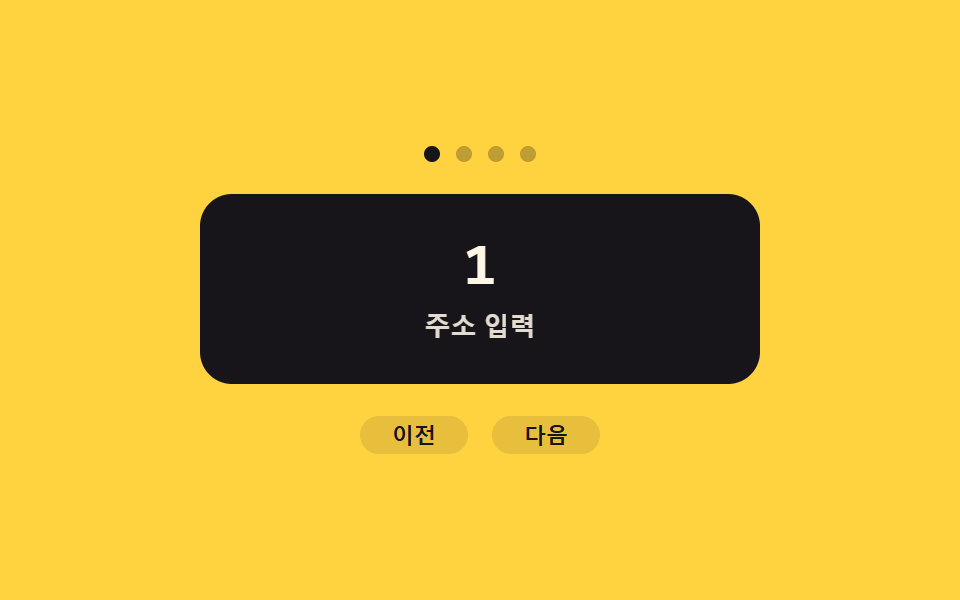
<main class="stage">
<div class="ds is-demo" id="ds">
  <div class="ds__dots" id="dsDots">
    <span class="ds__dot is-active" data-i="0"></span>
    <span class="ds__dot" data-i="1"></span>
    <span class="ds__dot" data-i="2"></span>
    <span class="ds__dot" data-i="3"></span>
  </div>
  <div class="ds__panel" id="dsPanel">
    <p class="ds__num" id="dsNum">1</p>
    <p class="ds__t" id="dsT">주소 입력</p>
  </div>
  <div class="ds__nav">
    <button type="button" class="ds__navBtn" id="dsPrev" aria-label="이전 단계">이전</button>
    <button type="button" class="ds__navBtn" id="dsNext" aria-label="다음 단계">다음</button>
  </div>
</div>
</main>
@use "../../../../site/static/demo-tokens" as *;
// ── 변수 3개 ──────────────────────────────────────────
$duration: $dur-base;
$easing: $ease-out;
$color: $subject-cream;
$slide-travel-pct: 100%;
@include stage($stage-yellow);
:root { --dir: 1; }
.ds { width: min(100%, 280px); display: flex; flex-direction: column; align-items: center; gap: $sp-4; }
.ds__dots { display: flex; gap: $sp-2; }
.ds__dot { width: 8px; height: 8px; border-radius: 50%; background: rgba($subject-ink, .28); }
.ds__dot.is-active { background: $subject-ink; }
.ds__panel {
view-transition-name: ds-step;
position: relative; width: 100%; box-sizing: border-box; overflow: hidden;
background: $subject-ink; border-radius: $r-card; padding: $sp-5 $sp-4;
display: flex; flex-direction: column; align-items: center; gap: $sp-2; text-align: center;
}
.ds__num { margin: 0; font: 700 30px/1 "Space Mono", monospace; color: $color; }
.ds__t { margin: 0; font: 600 13px/1.3 -apple-system, "Segoe UI", sans-serif; color: rgba($color, .88); }
.ds__nav { display: flex; gap: $sp-3; }
.ds__navBtn {
border: none; border-radius: $r-pill; cursor: pointer; background: rgba($subject-ink, .1);
color: $subject-ink; font: 700 11px/1 -apple-system, sans-serif; padding: $sp-1 $sp-4;
}
.ds__navBtn:focus-visible { outline: 2px solid $subject-ink; outline-offset: 2px; }
// 실사용 원리: --dir 값(+1/-1)을 전환 시작 직전에 문서 루트에 심어 두면 view-transition 의사요소
// 트리도 그 커스텀 프로퍼티를 물려받는다 — 그래서 같은 키프레임 한 쌍으로 앞으로 갈 땐 오른쪽에서
// 뒤로 갈 땐 왼쪽에서 들어오는 반대 방향 슬라이드를 만들 수 있다.
::view-transition-old(ds-step) {
animation: ds-out $duration $easing both;
}
::view-transition-new(ds-step) {
animation: ds-in $duration $easing both;
}
@keyframes ds-out {
to { transform: translateX(calc(var(--dir) * -#{$slide-travel-pct})); opacity: 0; }
}
@keyframes ds-in {
from { transform: translateX(calc(var(--dir) * #{$slide-travel-pct})); opacity: 0; }
to { transform: translateX(0); opacity: 1; }
}
@media (max-width: 340px) {
.ds__panel { padding: $sp-4 $sp-3; }
.ds__num { font-size: 24px; }
.ds__t { font-size: 11px; }
}
@media (prefers-reduced-motion: reduce) {
::view-transition-group(*),
::view-transition-old(*),
::view-transition-new(*) { animation: none !important; }
}html, body {
margin: 0;
overflow: hidden;
}
.stage {
box-sizing: border-box;
min-height: 100vh;
display: grid;
place-items: center;
margin: 0;
background: #ffd23f;
font-family: -apple-system, "Segoe UI", "Noto Sans KR", sans-serif;
padding: clamp(8px, 4vw, 24px);
}
:root {
--dir: 1;
}
.ds {
width: min(100%, 280px);
display: flex;
flex-direction: column;
align-items: center;
gap: 16px;
}
.ds__dots {
display: flex;
gap: 8px;
}
.ds__dot {
width: 8px;
height: 8px;
border-radius: 50%;
background: rgba(23, 20, 26, 0.28);
}
.ds__dot.is-active {
background: #17141a;
}
.ds__panel {
view-transition-name: ds-step;
position: relative;
width: 100%;
box-sizing: border-box;
overflow: hidden;
background: #17141a;
border-radius: 16px;
padding: 20px 16px;
display: flex;
flex-direction: column;
align-items: center;
gap: 8px;
text-align: center;
}
.ds__num {
margin: 0;
font: 700 30px/1 "Space Mono", monospace;
color: #fff7e6;
}
.ds__t {
margin: 0;
font: 600 13px/1.3 -apple-system, "Segoe UI", sans-serif;
color: rgba(255, 247, 230, 0.88);
}
.ds__nav {
display: flex;
gap: 12px;
}
.ds__navBtn {
border: none;
border-radius: 999px;
cursor: pointer;
background: rgba(23, 20, 26, 0.1);
color: #17141a;
font: 700 11px/1 -apple-system, sans-serif;
padding: 4px 16px;
}
.ds__navBtn:focus-visible {
outline: 2px solid #17141a;
outline-offset: 2px;
}
::view-transition-old(ds-step) {
animation: ds-out 300ms ease-out both;
}
::view-transition-new(ds-step) {
animation: ds-in 300ms ease-out both;
}
@keyframes ds-out {
to {
transform: translateX(calc(var(--dir) * -100%));
opacity: 0;
}
}
@keyframes ds-in {
from {
transform: translateX(calc(var(--dir) * 100%));
opacity: 0;
}
to {
transform: translateX(0);
opacity: 1;
}
}
@media (max-width: 340px) {
.ds__panel {
padding: 16px 12px;
}
.ds__num {
font-size: 24px;
}
.ds__t {
font-size: 11px;
}
}
@media (prefers-reduced-motion: reduce) {
::view-transition-group(*),
::view-transition-old(*),
::view-transition-new(*) {
animation: none !important;
}
}(function () {
var SUPPORTS_VT = 'startViewTransition' in document;
var root = document.getElementById('ds');
var panel = document.getElementById('dsPanel');
var numEl = document.getElementById('dsNum');
var tEl = document.getElementById('dsT');
var dots = Array.prototype.slice.call(document.querySelectorAll('.ds__dot'));
var prevBtn = document.getElementById('dsPrev');
var nextBtn = document.getElementById('dsNext');
var reduce = window.matchMedia('(prefers-reduced-motion: reduce)').matches;
var STEPS = ['주소 입력', '결제 값 확인', '수령 방법', '완료'];
var idx = 0;
var isDemo = true;
function human() {
if (isDemo) { root.classList.remove('is-demo'); isDemo = false; }
}
function render(newIdx) {
numEl.textContent = String(newIdx + 1);
tEl.textContent = STEPS[newIdx];
dots.forEach(function (d, i) { d.classList.toggle('is-active', i === newIdx); });
idx = newIdx;
}
function change(fn) {
if (SUPPORTS_VT) { document.startViewTransition(fn); }
else { fn(); }
}
function goto(newIdx) {
if (newIdx === idx || newIdx < 0 || newIdx > 3) return;
// 계산 겹: 다음 인덱스 - 현재 인덱스의 부호만 취해 이동 방향 값을 얻는다 (+1 앞으로 · -1 뒤로)
var dir = Math.sign(newIdx - idx) || 1;
document.documentElement.style.setProperty('--dir', String(dir));
change(function () { render(newIdx); });
}
nextBtn.addEventListener('click', function () { human(); goto(idx + 1 > 3 ? 0 : idx + 1); });
prevBtn.addEventListener('click', function () { human(); goto(idx - 1 < 0 ? 3 : idx - 1); });
root.addEventListener('keydown', function (e) {
if (e.key === 'ArrowRight') { human(); goto(idx + 1 > 3 ? 0 : idx + 1); }
else if (e.key === 'ArrowLeft') { human(); goto(idx - 1 < 0 ? 3 : idx - 1); }
});
var seq = [1, 2, 3, 2, 1, 0];
var si = 0;
var HOLD_MS = 900;
function loop() {
if (!isDemo) return;
goto(seq[si % seq.length]);
si++;
window.setTimeout(loop, HOLD_MS);
}
if (!reduce) {
window.setTimeout(loop, HOLD_MS);
} else {
root.classList.remove('is-demo');
}
})();// DirectionAwareSlide — vanilla 판(run/401/demo/06-view-transition-direction-aware-slide/index.html) 의 React 포트.
// 계산 겹: 다음 인덱스 - 현재 인덱스의 부호만 취해 이동 방향 값을 얻는다 (+1 앞으로 · -1 뒤로).
import { useEffect, useRef } from "react";
import styles from "./DirectionAwareSlide.module.scss";
type Box<T> = { current: T };
const STEPS = ["주소 입력", "결제 값 확인", "수령 방법", "완료"];
const SEQ = [1, 2, 3, 2, 1, 0];
const HOLD_MS = 900;
export default function DirectionAwareSlide() {
const rootRef = useRef(null) as unknown as Box<HTMLDivElement>;
const numRef = useRef(null) as unknown as Box<HTMLElement>;
const tRef = useRef(null) as unknown as Box<HTMLElement>;
const dotRefs = useRef([null, null, null, null]) as unknown as Box<(HTMLSpanElement | null)[]>;
const prevBtnRef = useRef(null) as unknown as Box<HTMLButtonElement>;
const nextBtnRef = useRef(null) as unknown as Box<HTMLButtonElement>;
const timerRef = useRef(0) as unknown as Box<number>;
useEffect(() => {
const SUPPORTS_VT = "startViewTransition" in document;
const reduce = window.matchMedia("(prefers-reduced-motion: reduce)").matches;
let isDemo = true;
let idx = 0;
function human() {
if (isDemo) { rootRef.current?.classList.remove(styles.isDemo); isDemo = false; }
}
function render(newIdx: number) {
if (numRef.current) numRef.current.textContent = String(newIdx + 1);
if (tRef.current) tRef.current.textContent = STEPS[newIdx];
dotRefs.current.forEach((d, i) => d?.classList.toggle(styles.isActive, i === newIdx));
idx = newIdx;
}
function change(fn: () => void) {
if (SUPPORTS_VT) { document.startViewTransition(fn); }
else { fn(); }
}
function goto(newIdx: number) {
if (newIdx === idx || newIdx < 0 || newIdx > 3) return;
const dir = Math.sign(newIdx - idx) || 1;
document.documentElement.style.setProperty("--dir", String(dir));
change(() => render(newIdx));
}
function onNext() { human(); goto(idx + 1 > 3 ? 0 : idx + 1); }
function onPrev() { human(); goto(idx - 1 < 0 ? 3 : idx - 1); }
function onKeydown(e: KeyboardEvent) {
if (e.key === "ArrowRight") { human(); goto(idx + 1 > 3 ? 0 : idx + 1); }
else if (e.key === "ArrowLeft") { human(); goto(idx - 1 < 0 ? 3 : idx - 1); }
}
nextBtnRef.current?.addEventListener("click", onNext);
prevBtnRef.current?.addEventListener("click", onPrev);
rootRef.current?.addEventListener("keydown", onKeydown);
let si = 0;
function loop() {
if (!isDemo) return;
goto(SEQ[si % SEQ.length]);
si++;
timerRef.current = window.setTimeout(loop, HOLD_MS);
}
if (!reduce) {
timerRef.current = window.setTimeout(loop, HOLD_MS);
} else {
rootRef.current?.classList.remove(styles.isDemo);
}
return () => {
window.clearTimeout(timerRef.current);
nextBtnRef.current?.removeEventListener("click", onNext);
prevBtnRef.current?.removeEventListener("click", onPrev);
rootRef.current?.removeEventListener("keydown", onKeydown);
};
}, []);
return (
<main className={styles.stage}>
<div className={styles.ds + " " + styles.isDemo} ref={rootRef}>
<div className={styles.dots}>
<span className={styles.dot + " " + styles.isActive} ref={(el: HTMLSpanElement | null) => { dotRefs.current[0] = el; }} />
<span className={styles.dot} ref={(el: HTMLSpanElement | null) => { dotRefs.current[1] = el; }} />
<span className={styles.dot} ref={(el: HTMLSpanElement | null) => { dotRefs.current[2] = el; }} />
<span className={styles.dot} ref={(el: HTMLSpanElement | null) => { dotRefs.current[3] = el; }} />
</div>
<div className={styles.panel}>
<p className={styles.num} ref={numRef}>1</p>
<p className={styles.t} ref={tRef}>주소 입력</p>
</div>
<div className={styles.nav}>
<button type="button" className={styles.navBtn} ref={prevBtnRef} aria-label="이전 단계">이전</button>
<button type="button" className={styles.navBtn} ref={nextBtnRef} aria-label="다음 단계">다음</button>
</div>
</div>
</main>
);
}06 이동 방향 값을 읽어 반대로 도는 슬라이드 전환 — 측정 누적면적 31.792% · 움직인 프레임 6/23GODRICH 원작 · zip 에 SCSS·React 포함 · view transitions api 9가지 — 값 하나로 화면 잇기
이 데모가 속한 글
 view transitions api 9가지 — 값 하나로 화면 잇기화면이 그대로 이어진 것처럼 보이지만 실제로는 직전 화면을 스냅샷 값으로 남겨 다음 화면과 겹쳐 지나간다 — 이름표 값으로 요소를 짝짓고, 지원 여부 값으로 물러나고, 동작 줄임 값으로 지속시간을 끈다. 이 글은 v 이 글의 데모 전부 보기