04카드 셔플·정렬
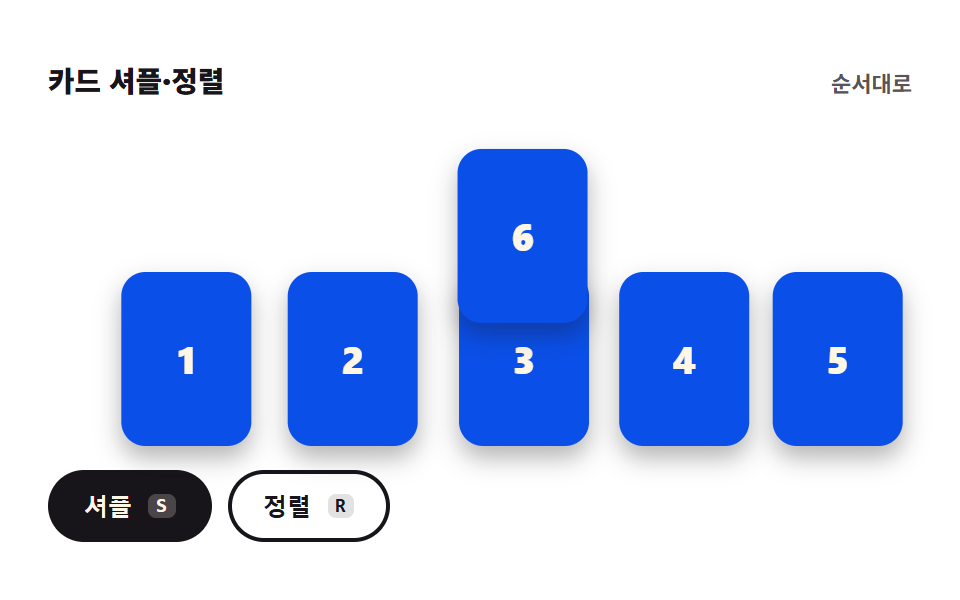
숫자 카드 열이 셔플을 누르면 제자리에서 부드럽게 자리를 바꾸고, 정렬을 누르면 다시 순서대로 돌아옵니다. 움직임은 transform 만 씁니다.
쓰임추첨 순서 정하기, 팀 편성 흔들기
transitiontranslatepointer-events
<main class="stage">
<section class="cs is-demo" id="cs">
  <header class="cs__bar">
    <p class="cs__title">카드 셔플·정렬</p>
    <p class="cs__state" id="csState" role="status">순서대로</p>
  </header>
  <div class="cs__rail" id="csRail" role="list">
    <span class="cs__card" role="listitem" data-value="1">1</span>
    <span class="cs__card" role="listitem" data-value="2">2</span>
    <span class="cs__card" role="listitem" data-value="3">3</span>
    <span class="cs__card" role="listitem" data-value="4">4</span>
    <span class="cs__card" role="listitem" data-value="5">5</span>
    <span class="cs__card" role="listitem" data-value="6">6</span>
  </div>
  <div class="cs__acts">
    <button class="cs__btn" id="csShuffle" type="button" aria-keyshortcuts="S">셔플<kbd class="cs__kbd">S</kbd></button>
    <button class="cs__btn cs__btn--ghost" id="csSort" type="button" aria-keyshortcuts="R">정렬<kbd class="cs__kbd">R</kbd></button>
  </div>
</section>
</main>
@use "../../../../site/static/demo-tokens" as *;
// 카드 셔플·정렬 — 카드 6장은 rail 안에 절대배치되고 자리는 슬롯 번호(--slot)로만 정해진다.
// 한 칸의 폭은 카드 자신의 폭 + 사이 간격이므로 --step 은 100% + 간격 이다(translate 의 % 는 자기 폭 기준).
// 정적 표시: nth-child 가 슬롯 0~5 를 그대로 주므로 JS 없이도 한 줄로 깔린다. JS 는 그 위에 인라인 --slot 을 얹는다.
// .is-demo 미리보기: 카드마다 두 슬롯(--slot ↔ --slotAlt)을 위상만 다르게 왕복한다.
$duration: $dur-loop;
$easing: $ease-spring;
$color: $subject-blue-deep;
@include stage($stage-paper);
.cs { display: flex; flex-direction: column; gap: $sp-3; width: 100%; max-width: 432px; }
.cs__bar { display: flex; align-items: baseline; justify-content: space-between; gap: $sp-2; }
.cs__title { margin: 0; font-weight: 800; font-size: clamp(12px, 3vw, 15px); color: $subject-ink; }
// 흐린 글자는 알파 .72 하한 — 페이퍼 면 위 7.27:1
.cs__state { margin: 0; font-weight: 700; font-size: clamp(9px, 2.4vw, 11px); color: rgba($subject-ink, .72); }
// rail 은 카드보다 1.85배 높다 — 한 장이 줄 위로 떠서 지나갈 자리(--lift)를 rail 안에 두기 위해서다.
// 무대 밖으로 띄우면 320px 에서 잘린다
.cs__rail { position: relative; width: 100%; height: clamp(104px, 33.5vw, 161px); }
.cs__card {
position: absolute; left: 0; bottom: 0;
width: calc((100% - #{$sp-2} * 5) / 6); aspect-ratio: 3 / 4;
--step: calc(100% + #{$sp-2});
--slot: 0;
--slotAlt: 0;
--lift: 0%;
translate: calc(var(--step) * var(--slot)) 0;
transition: translate $dur-enter $easing;
display: grid; place-items: center;
border-radius: $r-control;
background-color: $color; color: $subject-cream; // 진파랑 면 + 크림 글자 5.98:1
box-shadow: $shadow-press;
font-weight: 800; font-size: clamp(14px, 4vw, 22px);
user-select: none;
}
// 카드는 진열물이라 포인터를 받지 않는다 — 조작은 아래 두 버튼이 한다
.cs__card { pointer-events: none; }
// 미리보기는 **줄 전체가 한 칸씩 미는 회전**이다 — 다섯 장이 같은 방향으로 같이 움직이니 서로 겹칠 일이 없고,
// 맨 끝 한 장만 줄 위로 떠서(--lift) 맨 앞자리로 건너간다. 어느 프레임에서도 여섯 장이 다 보인다.
// 시작 시각을 뒤 카드일수록 이르게 둬 간격이 벌어지는 쪽으로만 어긋난다(붙는 쪽으로 어긋나면 닿는다).
.cs__card:nth-child(1) { --slot: 0; --slotAlt: 1; animation-delay: 160ms; }
.cs__card:nth-child(2) { --slot: 1; --slotAlt: 2; animation-delay: 120ms; }
.cs__card:nth-child(3) { --slot: 2; --slotAlt: 3; animation-delay: 80ms; }
.cs__card:nth-child(4) { --slot: 3; --slotAlt: 4; animation-delay: 40ms; }
.cs__card:nth-child(5) { --slot: 4; --slotAlt: 5; animation-delay: 0ms; }
// 건너가는 한 장은 **맨 마지막에 내려앉는다** — 앞자리 카드가 비켜난 뒤라야 두 장이 포개지지 않는다
.cs__card:nth-child(6) { --slot: 5; --slotAlt: 0; --lift: -80%; z-index: 3; animation-delay: 400ms; }
.cs__acts { display: flex; gap: $sp-2; }
.cs__btn {
display: inline-flex; align-items: center; gap: $sp-2;
padding: $sp-2 $sp-4;
border: 2px solid $subject-ink; border-radius: $r-pill;
background-color: $subject-ink; color: $subject-cream;
font-weight: 700; font-size: clamp(10px, 2.6vw, 12px);
cursor: pointer;
}
.cs__btn--ghost { background-color: $stage-paper; color: $subject-ink; }
.cs__btn:focus-visible { outline: 2px solid $color; outline-offset: 2px; }
.cs__kbd {
padding: 0 $sp-1; border-radius: $r-xs;
background-color: rgba($subject-cream, .22); color: inherit;
font-weight: 700; font-size: clamp(8px, 2.2vw, 10px);
}
.cs__btn--ghost .cs__kbd { background-color: rgba($subject-ink, .12); }
// 자리를 옮기는 동안은 버튼이 포인터를 안 받는다 — 연타로 transition 이 겹치는 것을 막는다
.cs.is-moving .cs__btn { pointer-events: none; }
// ── 격자 미리보기 ─────────────────────────────────────────────
// 사람이 버튼을 누르면 .is-demo 가 떨어지고 인라인 --slot 이 그대로 화면이 된다
.cs.is-demo .cs__card {
animation-name: csSwap;
animation-duration: $duration;
animation-timing-function: $easing;
animation-iteration-count: infinite;
animation-fill-mode: both;
}
@keyframes csSwap {
0%, 6% { translate: calc(var(--step) * var(--slot)) 0%; }
26% { translate: calc(var(--step) * (var(--slot) + var(--slotAlt)) / 2) var(--lift); }
46%, 54% { translate: calc(var(--step) * var(--slotAlt)) 0%; }
74% { translate: calc(var(--step) * (var(--slot) + var(--slotAlt)) / 2) var(--lift); }
94%, 100% { translate: calc(var(--step) * var(--slot)) 0%; }
}
@media (max-width: 340px) {
.cs { gap: $sp-2; }
.cs__acts { gap: $sp-1; }
.cs__btn { padding: $sp-1 $sp-2; }
}
// reduce 에서는 자리 이동을 즉시 끝낸다 — 카드는 순서만 바뀌고 미끄러지지 않는다
@media (prefers-reduced-motion: reduce) {
.cs__card { transition: none !important; }
.cs.is-demo .cs__card { animation: none !important; }
}html, body {
margin: 0;
overflow: hidden;
}
.stage {
box-sizing: border-box;
min-height: 100vh;
display: grid;
place-items: center;
margin: 0;
background: #ffffff;
font-family: -apple-system, "Segoe UI", "Noto Sans KR", sans-serif;
padding: clamp(8px, 4vw, 24px);
}
.cs {
display: flex;
flex-direction: column;
gap: 12px;
width: 100%;
max-width: 432px;
}
.cs__bar {
display: flex;
align-items: baseline;
justify-content: space-between;
gap: 8px;
}
.cs__title {
margin: 0;
font-weight: 800;
font-size: clamp(12px, 3vw, 15px);
color: #17141a;
}
.cs__state {
margin: 0;
font-weight: 700;
font-size: clamp(9px, 2.4vw, 11px);
color: rgba(23, 20, 26, 0.72);
}
.cs__rail {
position: relative;
width: 100%;
height: clamp(104px, 33.5vw, 161px);
}
.cs__card {
position: absolute;
left: 0;
bottom: 0;
width: calc((100% - 8px * 5) / 6);
aspect-ratio: 3/4;
--step: calc(100% + 8px);
--slot: 0;
--slotAlt: 0;
--lift: 0%;
translate: calc(var(--step) * var(--slot)) 0;
transition: translate 600ms cubic-bezier(0.2, 0.8, 0.2, 1);
display: grid;
place-items: center;
border-radius: 12px;
background-color: #0a4fe8;
color: #fff7e6;
box-shadow: 0 6px 12px rgba(23, 20, 26, 0.32);
font-weight: 800;
font-size: clamp(14px, 4vw, 22px);
user-select: none;
}
.cs__card {
pointer-events: none;
}
.cs__card:nth-child(1) {
--slot: 0;
--slotAlt: 1;
animation-delay: 160ms;
}
.cs__card:nth-child(2) {
--slot: 1;
--slotAlt: 2;
animation-delay: 120ms;
}
.cs__card:nth-child(3) {
--slot: 2;
--slotAlt: 3;
animation-delay: 80ms;
}
.cs__card:nth-child(4) {
--slot: 3;
--slotAlt: 4;
animation-delay: 40ms;
}
.cs__card:nth-child(5) {
--slot: 4;
--slotAlt: 5;
animation-delay: 0ms;
}
.cs__card:nth-child(6) {
--slot: 5;
--slotAlt: 0;
--lift: -80%;
z-index: 3;
animation-delay: 400ms;
}
.cs__acts {
display: flex;
gap: 8px;
}
.cs__btn {
display: inline-flex;
align-items: center;
gap: 8px;
padding: 8px 16px;
border: 2px solid #17141a;
border-radius: 999px;
background-color: #17141a;
color: #fff7e6;
font-weight: 700;
font-size: clamp(10px, 2.6vw, 12px);
cursor: pointer;
}
.cs__btn--ghost {
background-color: #ffffff;
color: #17141a;
}
.cs__btn:focus-visible {
outline: 2px solid #0a4fe8;
outline-offset: 2px;
}
.cs__kbd {
padding: 0 4px;
border-radius: 4px;
background-color: rgba(255, 247, 230, 0.22);
color: inherit;
font-weight: 700;
font-size: clamp(8px, 2.2vw, 10px);
}
.cs__btn--ghost .cs__kbd {
background-color: rgba(23, 20, 26, 0.12);
}
.cs.is-moving .cs__btn {
pointer-events: none;
}
.cs.is-demo .cs__card {
animation-name: csSwap;
animation-duration: 2s;
animation-timing-function: cubic-bezier(0.2, 0.8, 0.2, 1);
animation-iteration-count: infinite;
animation-fill-mode: both;
}
@keyframes csSwap {
0%, 6% {
translate: calc(var(--step) * var(--slot)) 0%;
}
26% {
translate: calc(var(--step) * (var(--slot) + var(--slotAlt)) / 2) var(--lift);
}
46%, 54% {
translate: calc(var(--step) * var(--slotAlt)) 0%;
}
74% {
translate: calc(var(--step) * (var(--slot) + var(--slotAlt)) / 2) var(--lift);
}
94%, 100% {
translate: calc(var(--step) * var(--slot)) 0%;
}
}
@media (max-width: 340px) {
.cs {
gap: 8px;
}
.cs__acts {
gap: 4px;
}
.cs__btn {
padding: 4px 8px;
}
}
@media (prefers-reduced-motion: reduce) {
.cs__card {
transition: none !important;
}
.cs.is-demo .cs__card {
animation: none !important;
}
}// 카드 셔플·정렬 — 카드의 DOM 순서는 절대 안 바뀐다. 바뀌는 건 슬롯 번호(--slot) 하나뿐이고
// 그 값이 translate 로 풀려 transition 이 자리를 이어 준다(FLIP 방식).
// 이동하는 동안 .is-moving 이 버튼의 pointer-events 를 꺼 연타를 막는다.
(function () {
var MOVE_MS = 600;
var SORTED = '순서대로';
var SHUFFLED = '뒤섞임';
var root = document.getElementById('cs');
var rail = document.getElementById('csRail');
var stateEl = document.getElementById('csState');
var cards = [].slice.call(rail.querySelectorAll('.cs__card'));
var slots = cards.map(function (card, i) { return i; }); // slots[카드 순서] = 슬롯 번호
var moving = false, timer = 0;
function paint() {
for (var i = 0; i < cards.length; i++) {
cards[i].style.setProperty('--slot', String(slots[i]));
cards[i].setAttribute('data-slot', String(slots[i]));
}
}
function lock() {
moving = true;
root.classList.add('is-moving');
window.clearTimeout(timer);
timer = window.setTimeout(function () { moving = false; root.classList.remove('is-moving'); }, MOVE_MS);
}
function shuffle() {
if (moving) { return; }
root.classList.remove('is-demo');
var before = slots.join('');
for (var i = slots.length - 1; i > 0; i--) { // Fisher-Yates
var j = Math.floor(Math.random() * (i + 1));
var t = slots[i]; slots[i] = slots[j]; slots[j] = t;
}
if (slots.join('') === before) { var h = slots[0]; slots[0] = slots[5]; slots[5] = h; }
paint(); lock();
stateEl.textContent = SHUFFLED;
}
function sortBack() {
if (moving) { return; }
root.classList.remove('is-demo');
for (var i = 0; i < slots.length; i++) { slots[i] = i; }
paint(); lock();
stateEl.textContent = SORTED;
}
document.getElementById('csShuffle').addEventListener('click', shuffle);
document.getElementById('csSort').addEventListener('click', sortBack);
document.addEventListener('keydown', function (e) {
var k = (e.key || '').toLowerCase();
if (k === 's') { e.preventDefault(); shuffle(); }
if (k === 'r') { e.preventDefault(); sortBack(); }
});
paint();
})();// CardShuffleSort — vanilla 판(run/080/demo/04-card-shuffle-sort/index.html) 의 React 포트.
// 카드의 렌더 순서는 고정이고 상태로 드는 것은 슬롯 번호 배열 하나뿐이다.
// 슬롯 번호가 인라인 --slot 으로 내려가 CSS 가 translate 로 풀고 transition 이 자리를 이어 준다(FLIP 방식).
import { useEffect, useRef, useState } from "react";
import type { CSSProperties } from "react";
import styles from "./CardShuffleSort.module.scss";
export type CardShuffleSortProps = {
duration?: number;
easing?: string;
accentColor?: string;
};
type Vars = CSSProperties & { "--duration"?: string; "--easing"?: string; "--color"?: string };
type SlotVars = CSSProperties & { "--slot"?: string };
type KeyEvt = { key: string; preventDefault(): void };
type TimerBox = { current: number };
const MOVE_MS = 600;
const VALUES = [1, 2, 3, 4, 5, 6];
const TITLE = "카드 셔플·정렬";
const SORTED = "순서대로";
const SHUFFLED = "뒤섞임";
const SHUFFLE_LABEL = "셔플";
const SORT_LABEL = "정렬";
function shuffled(prev: number[]): number[] {
const next = prev.slice();
for (let i = next.length - 1; i > 0; i--) { // Fisher-Yates
const j = Math.floor(Math.random() * (i + 1));
const t = next[i]; next[i] = next[j]; next[j] = t;
}
if (next.join("") === prev.join("")) {
const h = next[0]; next[0] = next[5]; next[5] = h;
}
return next;
}
export default function CardShuffleSort({
duration = 2000,
easing = "cubic-bezier(.2, .8, .2, 1)",
accentColor = "#0a4fe8",
}: CardShuffleSortProps) {
const [slots, setSlots] = useState<number[]>([0, 1, 2, 3, 4, 5]);
const [state, setState] = useState<string>(SORTED);
const [demo, setDemo] = useState(true);
const [moving, setMoving] = useState(false);
const movingRef = useRef(false) as { current: boolean };
const timerRef = useRef(0) as TimerBox;
const vars: Vars = { "--duration": `${duration}ms`, "--easing": easing, "--color": accentColor };
useEffect(() => {
return () => { window.clearTimeout(timerRef.current); };
}, []);
function lock() {
movingRef.current = true;
setMoving(true);
window.clearTimeout(timerRef.current);
timerRef.current = window.setTimeout(() => { movingRef.current = false; setMoving(false); }, MOVE_MS);
}
function onShuffle() {
if (movingRef.current) { return; }
setDemo(false);
setSlots((prev) => shuffled(prev));
setState(SHUFFLED);
lock();
}
function onSort() {
if (movingRef.current) { return; }
setDemo(false);
setSlots([0, 1, 2, 3, 4, 5]);
setState(SORTED);
lock();
}
useEffect(() => {
function onKey(e: KeyEvt) {
const k = (e.key || "").toLowerCase();
if (k === "s") { e.preventDefault(); onShuffle(); }
if (k === "r") { e.preventDefault(); onSort(); }
}
window.addEventListener("keydown", onKey);
return () => { window.removeEventListener("keydown", onKey); };
});
const cls = [styles.root, demo ? styles.isDemo : "", moving ? styles.isMoving : ""].filter(Boolean).join(" ");
return (
<main className={styles.stage}>
<section className={cls} style={vars}>
<header className={styles.bar}>
<p className={styles.title}>{TITLE}</p>
<p className={styles.state} role="status">{state}</p>
</header>
<div className={styles.rail} role="list">
{VALUES.map((v, i) => {
const slotVars: SlotVars = { "--slot": String(slots[i]) };
return (
<span
key={v}
className={styles.card}
role="listitem"
data-value={v}
data-slot={slots[i]}
style={slotVars}
>
{v}
</span>
);
})}
</div>
<div className={styles.acts}>
<button className={styles.btn} type="button" aria-keyshortcuts="S" onClick={onShuffle}>
{SHUFFLE_LABEL}<kbd className={styles.kbd}>S</kbd>
</button>
<button className={`${styles.btn} ${styles.btnGhost}`} type="button" aria-keyshortcuts="R" onClick={onSort}>
{SORT_LABEL}<kbd className={styles.kbd}>R</kbd>
</button>
</div>
</section>
</main>
);
}04 카드 셔플·정렬 — 측정 누적면적 38.397% · 움직인 프레임 22/23GODRICH 원작 · zip 에 SCSS·React 포함 · 웹 미니게임 만들기 9종 — 계산기·타이머·퍼즐 복붙 코드
이 데모가 속한 글
 웹 미니게임 만들기 9종 — 계산기·타이머·퍼즐 복붙 코드웹 미니게임 만들기는 브라우저에서 바로 손이 가는 작은 놀잇감과 업무 도구를 HTML·CSS·JS 로 짜는 일입니다. 라이브러리 없이 파일 하나로 도는 아홉 개를 아래 격자에 늘어놓았고, 지금 그대로 움직입니다. 이 글의 데모 전부 보기