02Nút quét vệt sáng
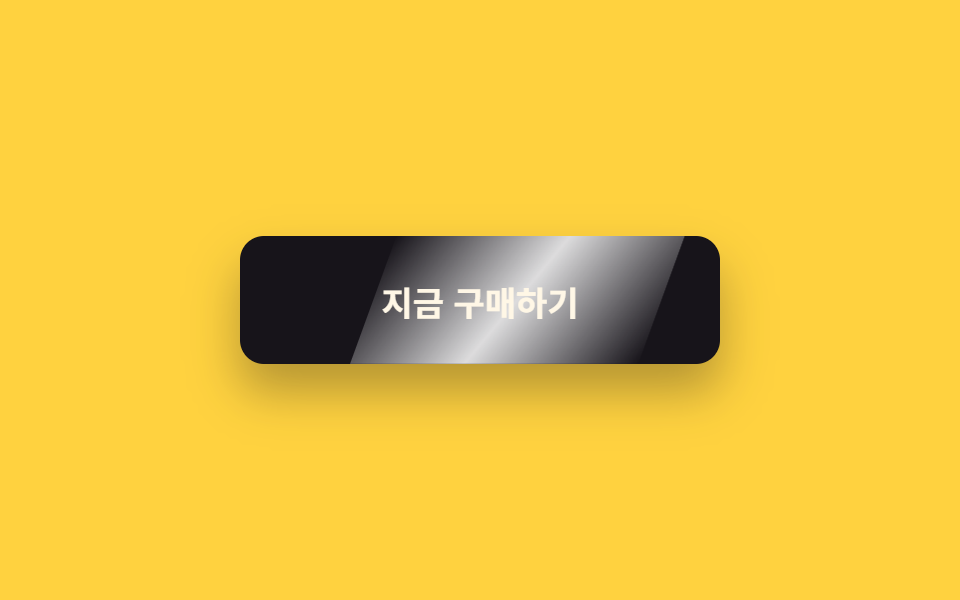
Một dải sáng trắng nghiêng đi qua bên trong overflow: hidden bằng translateX, để lại vệt long lanh như ánh đèn lướt trên thủy tinh.
Dùng choNút thanh toán và mua hàng, nút bấm duy nhất mà banner khuyến mãi muốn bạn nhấn
translateX(±150%)skewX(-20deg)overflow: hidden
<main class="stage is-demo">
  <button class="btn" type="button"><span class="btn__label">Mua ngay</span></button>
</main>
@use "../../../../site/static/demo-tokens" as *;
// ── 변수 3개 ──────────────────────────────────────────
$duration: $dur-loop; // 2s — 스윕 한 주기
$easing: $ease-out;
$color: $subject-ink; // 버튼 바탕
@include stage($stage-yellow);
.btn {
box-sizing: border-box;
position: relative;
width: 240px;
height: 64px;
border: none;
border-radius: $r-control;
background: $color;
color: $subject-cream;
font-family: -apple-system, "Segoe UI", "Noto Sans KR", sans-serif;
font-weight: 700;
font-size: 17px;
cursor: pointer;
overflow: hidden; // 빛 띠가 밖으로 새지 않게
box-shadow: $shadow-raised;
}
.btn__label { position: relative; z-index: 1; }
// 기울어진 흰 빛 띠 — transform 만으로 통과시킨다
.btn::after {
content: "";
position: absolute;
top: 0; bottom: 0;
left: -60%;
width: 60%;
background: linear-gradient(115deg,
transparent 0%, rgba(255, 255, 255, .85) 50%, transparent 100%);
transform: skewX(-20deg) translateX(-10%);
}
// 실사용: 올릴 때마다 한 번 쓸고 지나감
.btn:hover::after { animation: sweep $dur-enter $easing 1; }
.btn:focus-visible { outline: 3px solid $subject-ink; outline-offset: 4px; }
// 격자 미리보기: 2초 루프로 강제 발동
.stage.is-demo .btn::after { animation: sweep $duration $easing infinite; }
@keyframes sweep {
0%, 10% { transform: skewX(-20deg) translateX(-10%); }
55% { transform: skewX(-20deg) translateX(310%); }
100% { transform: skewX(-20deg) translateX(310%); }
}
@media (prefers-reduced-motion: reduce) {
.btn:hover::after, .stage.is-demo .btn::after { animation: none; transform: skewX(-20deg) translateX(-10%); }
}html, body {
margin: 0;
overflow: hidden;
}
.stage {
box-sizing: border-box;
min-height: 100vh;
display: grid;
place-items: center;
margin: 0;
background: #ffd23f;
font-family: -apple-system, "Segoe UI", "Noto Sans KR", sans-serif;
padding: clamp(8px, 4vw, 24px);
}
.btn {
box-sizing: border-box;
position: relative;
width: 240px;
height: 64px;
border: none;
border-radius: 12px;
background: #17141a;
color: #fff7e6;
font-family: -apple-system, "Segoe UI", "Noto Sans KR", sans-serif;
font-weight: 700;
font-size: 17px;
cursor: pointer;
overflow: hidden;
box-shadow: 0 14px 24px rgba(23, 20, 26, 0.32);
}
.btn__label {
position: relative;
z-index: 1;
}
.btn::after {
content: "";
position: absolute;
top: 0;
bottom: 0;
left: -60%;
width: 60%;
background: linear-gradient(115deg, transparent 0%, rgba(255, 255, 255, 0.85) 50%, transparent 100%);
transform: skewX(-20deg) translateX(-10%);
}
.btn:hover::after {
animation: sweep 600ms ease-out 1;
}
.btn:focus-visible {
outline: 3px solid #17141a;
outline-offset: 4px;
}
.stage.is-demo .btn::after {
animation: sweep 2s ease-out infinite;
}
@keyframes sweep {
0%, 10% {
transform: skewX(-20deg) translateX(-10%);
}
55% {
transform: skewX(-20deg) translateX(310%);
}
100% {
transform: skewX(-20deg) translateX(310%);
}
}
@media (prefers-reduced-motion: reduce) {
.btn:hover::after, .stage.is-demo .btn::after {
animation: none;
transform: skewX(-20deg) translateX(-10%);
}
}import type { CSSProperties, ReactNode } from "react";
import styles from "./ShineSweepButton.module.scss";
export type ShineSweepButtonProps = {
duration?: number;
easing?: string;
color?: string;
children?: ReactNode;
};
export default function ShineSweepButton({
duration = 600,
easing = "ease-out",
color = "#17141a",
children = "지금 구매하기",
}: ShineSweepButtonProps) {
const vars: CSSProperties = { "--duration": `${duration}ms`, "--easing": easing, "--color": color } as CSSProperties;
return (
<button className={styles.btn} style={vars} type="button">
<span className={styles.label}>{children}</span>
</button>
);
}02 Nút quét vệt sáng — Diện tích đo được 10.349% · khung hình chuyển động 9/23Nguyên tác GODRICH · SCSS và React nằm trong tệp zip · 9 css button design ideas — dán một file là chạy
Bài viết chứa demo này
 9 css button design ideas — dán một file là chạycss button design là quyết định màu, hình dáng nút và cách nó phản ứng với chuột, chỉ bằng vài dòng code. Muốn nút gradi Xem tất cả demo trong bài này