01Ảnh cursor tùy chỉnh
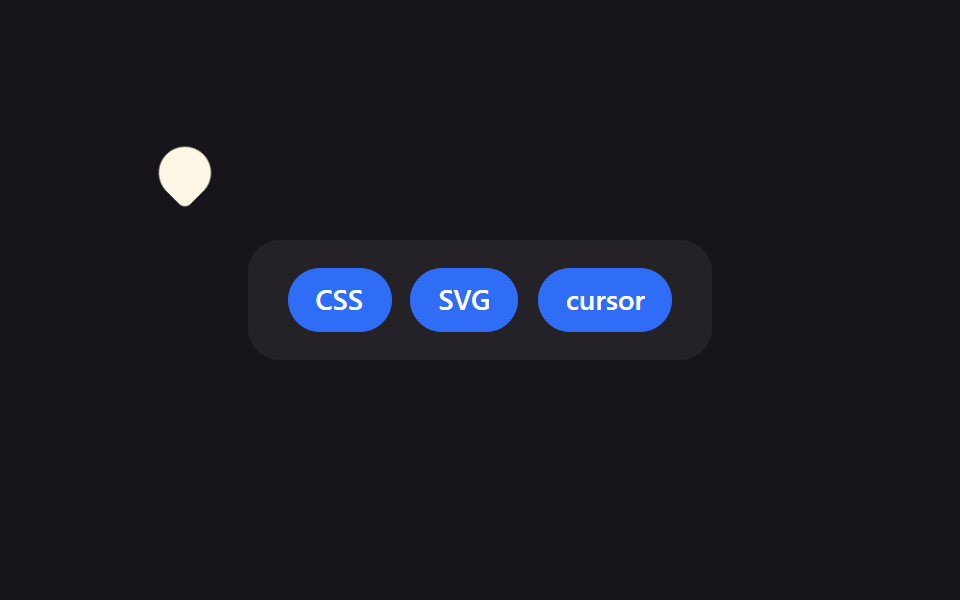
Sân khấu đặt cursor: none để xoá mũi tên mặc định, rồi một phần tử DOM vẽ đúng hình giọt nước bám theo toạ độ con trỏ.
Dùng choTrang landing chiến dịch thương hiệu, site tương tác kiểu game
cursor: nonehotspot 좌표fallback 커서

<main class="stage">
  <div class="board">
    <span class="chip">CSS</span>
    <span class="chip">SVG</span>
    <span class="chip">cursor</span>
  </div>
  <div class="cursor is-demo" aria-hidden="true"></div>
</main>
@use "../../../../site/static/demo-tokens" as *;
$duration: $dur-loop; // 커서가 보드를 한 바퀴 도는 시간
$easing: $ease-spring;
$color: $subject-cream; // 커서 모양 색
@include stage($stage-ink);
.stage { position: relative; overflow: hidden; cursor: none; } // 기본 화살표를 지우고 커스텀 모양만 보인다
.board {
display: flex;
gap: clamp(6px, 2vw, 10px);
padding: clamp(10px, 3vw, 16px) clamp(14px, 4vw, 20px);
background: rgba(255, 255, 255, .06);
border-radius: $r-card;
}
.chip {
padding: clamp(6px, 2vw, 9px) clamp(10px, 3vw, 14px);
border-radius: $r-pill;
background: $subject-blue;
color: #fff;
font-weight: 600; font-size: clamp(11px, 3vw, 14px); line-height: 1; font-family: inherit;
}
// 실제 서비스에서는 이 모양을 SVG 로 그려 cursor: url("cursor.svg") 12 12, auto; 로 쓴다.
// 데모는 헤드리스 렌더에서 OS 커서가 안 보이므로 같은 모양을 DOM 요소로 재현해 움직인다.
.cursor {
position: absolute;
top: 0;
left: 0;
width: 26px;
height: 26px;
border-radius: 50% 50% 50% 4px; // 물방울(핀) 모양 — url() 커서 이미지를 흉내
background: $color;
box-shadow: $shadow-press;
transform: translate(var(--x, 60px), var(--y, 40px)) rotate(-45deg);
pointer-events: none;
&.is-demo { animation: cursor-path $duration $easing infinite; }
}
@keyframes cursor-path {
0% { transform: translate(40px, 30px) rotate(-45deg); }
35% { transform: translate(220px, 60px) rotate(-45deg); }
70% { transform: translate(140px, 140px) rotate(-45deg); }
100% { transform: translate(40px, 30px) rotate(-45deg); }
}
@media (pointer: coarse) {
.cursor { display: none; } // 터치 기기엔 커스텀 커서 개념이 없다
.stage { cursor: auto; }
}
@media (prefers-reduced-motion: reduce) {
.cursor.is-demo { animation: none; transform: translate(40px, 30px) rotate(-45deg); }
}html, body {
margin: 0;
overflow: hidden;
}
.stage {
box-sizing: border-box;
min-height: 100vh;
display: grid;
place-items: center;
margin: 0;
background: #17141a;
font-family: -apple-system, "Segoe UI", "Noto Sans KR", sans-serif;
padding: clamp(8px, 4vw, 24px);
}
.stage {
position: relative;
overflow: hidden;
cursor: none;
}
.board {
display: flex;
gap: clamp(6px, 2vw, 10px);
padding: clamp(10px, 3vw, 16px) clamp(14px, 4vw, 20px);
background: rgba(255, 255, 255, 0.06);
border-radius: 16px;
}
.chip {
padding: clamp(6px, 2vw, 9px) clamp(10px, 3vw, 14px);
border-radius: 999px;
background: #2f6df6;
color: #fff;
font-weight: 600;
font-size: clamp(11px, 3vw, 14px);
line-height: 1;
font-family: inherit;
}
.cursor {
position: absolute;
top: 0;
left: 0;
width: 26px;
height: 26px;
border-radius: 50% 50% 50% 4px;
background: #fff7e6;
box-shadow: 0 6px 12px rgba(23, 20, 26, 0.32);
transform: translate(var(--x, 60px), var(--y, 40px)) rotate(-45deg);
pointer-events: none;
}
.cursor.is-demo {
animation: cursor-path 2s cubic-bezier(0.2, 0.8, 0.2, 1) infinite;
}
@keyframes cursor-path {
0% {
transform: translate(40px, 30px) rotate(-45deg);
}
35% {
transform: translate(220px, 60px) rotate(-45deg);
}
70% {
transform: translate(140px, 140px) rotate(-45deg);
}
100% {
transform: translate(40px, 30px) rotate(-45deg);
}
}
@media (pointer: coarse) {
.cursor {
display: none;
}
.stage {
cursor: auto;
}
}
@media (prefers-reduced-motion: reduce) {
.cursor.is-demo {
animation: none;
transform: translate(40px, 30px) rotate(-45deg);
}
}// 실제 포인터가 움직이면 Tùy chỉnh 커서가 그 좌표를 따라간다. 터치 기기는 pointer:coarse 로 건너뛴다.
if (matchMedia('(pointer: fine)').matches) {
var stage = document.querySelector('.stage');
var cur = document.querySelector('.cursor');
stage.addEventListener('pointermove', function (e) {
var r = stage.getBoundingClientRect();
cur.classList.remove('is-demo');
cur.style.setProperty('--x', (e.clientX - r.left) + 'px');
cur.style.setProperty('--y', (e.clientY - r.top) + 'px');
});
}import { useState } from "react";
import type { CSSProperties, PointerEvent } from "react";
import styles from "./CustomCursorImage.module.scss";
export type CustomCursorImageProps = {
chips?: string[];
duration?: number;
easing?: string;
color?: string;
};
type Vars = CSSProperties & { "--duration"?: string; "--easing"?: string; "--color"?: string };
export default function CustomCursorImage({
chips = ["CSS", "SVG", "cursor"],
duration = 2000,
easing = "cubic-bezier(.2,.8,.2,1)",
color = "#fff7e6",
}: CustomCursorImageProps) {
const [demo, setDemo] = useState(true);
const [pos, setPos] = useState({ x: 60, y: 40 });
const move = (e: PointerEvent<HTMLDivElement>) => {
const r = e.currentTarget.getBoundingClientRect();
setDemo(false);
setPos({ x: e.clientX - r.left, y: e.clientY - r.top });
};
const vars: Vars = { "--duration": `${duration}ms`, "--easing": easing, "--color": color };
return (
<div className={styles.stage} style={vars} onPointerMove={move}>
<div className={styles.board}>
{chips.map((c) => (
<span key={c} className={styles.chip}>{c}</span>
))}
</div>
<div
className={demo ? `${styles.cursor} ${styles.isDemo}` : styles.cursor}
style={demo ? undefined : { transform: `translate(${pos.x}px,${pos.y}px) rotate(-45deg)` }}
aria-hidden="true"
/>
</div>
);
}01 Ảnh cursor tùy chỉnh — Diện tích đo được 5.176% · khung hình chuyển động 23/23Nguyên tác GODRICH · SCSS và React nằm trong tệp zip · 9 hiệu ứng custom cursor css — copy dán một dòng
Bài viết chứa demo này
 9 hiệu ứng custom cursor css — copy dán một dòngCustom cursor css là cách thay mũi tên mặc định của trình duyệt bằng một phần tử tự vẽ, bám theo toạ độ chuột thật qua p Xem tất cả demo trong bài này