9 hiệu ứng custom cursor css — copy dán một dòng
Custom cursor css là cách thay mũi tên mặc định của trình duyệt bằng một phần tử tự vẽ, bám theo toạ độ chuột thật qua pointermove.
 01 cursor-effects-url-cursor
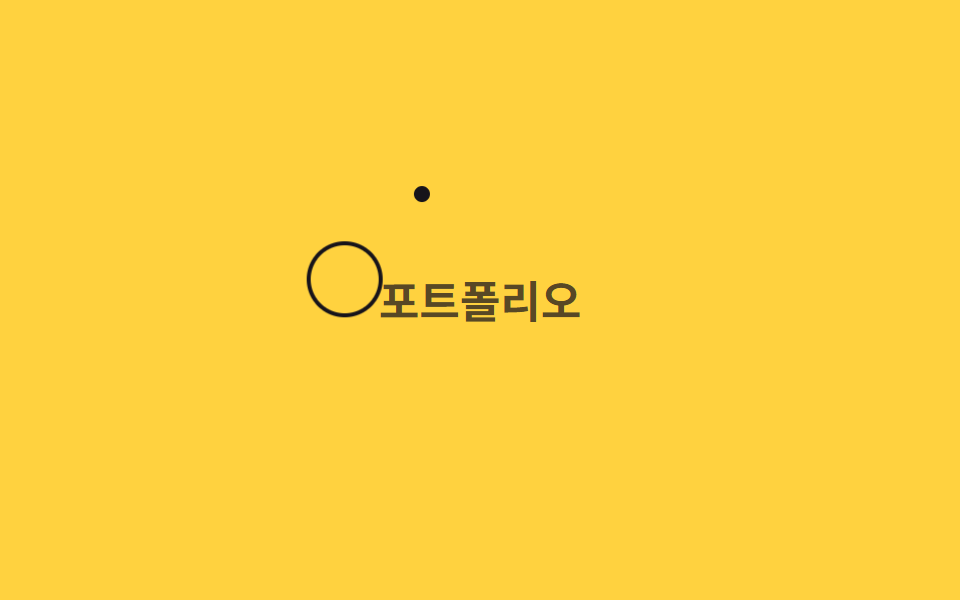 02 cursor-effects-ring-follow
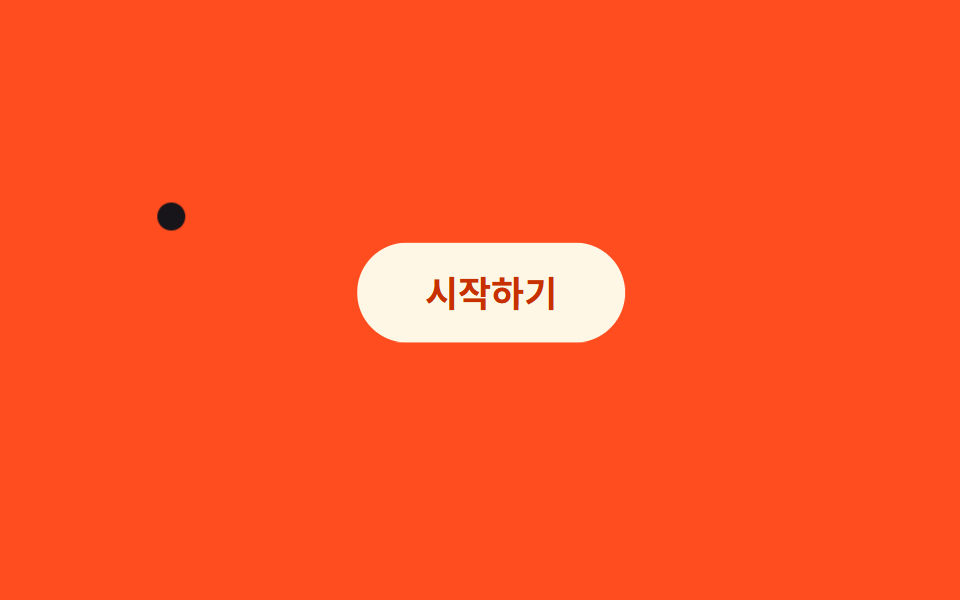 03 cursor-effects-magnetic-btn
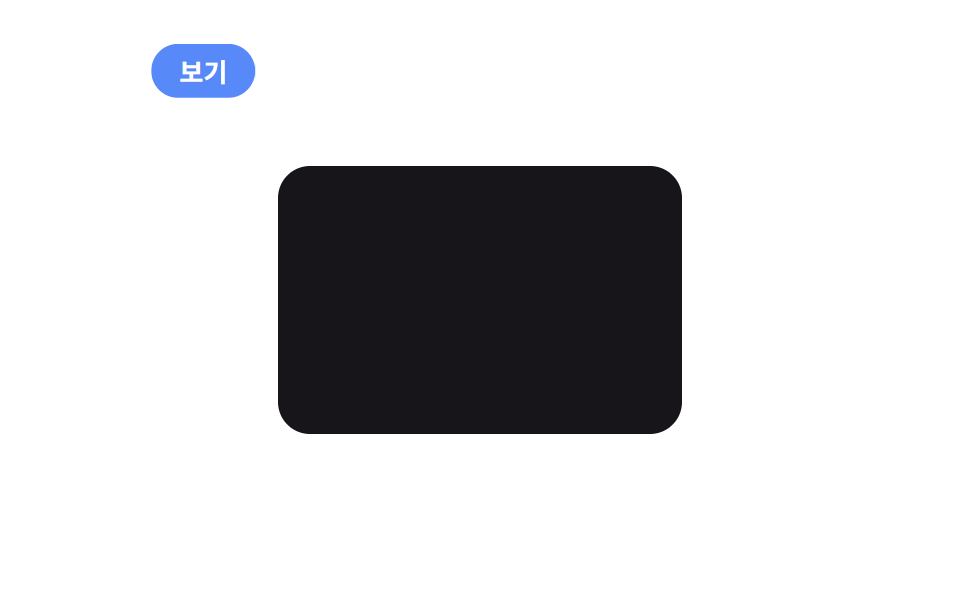 04 cursor-effects-cursor-text-label
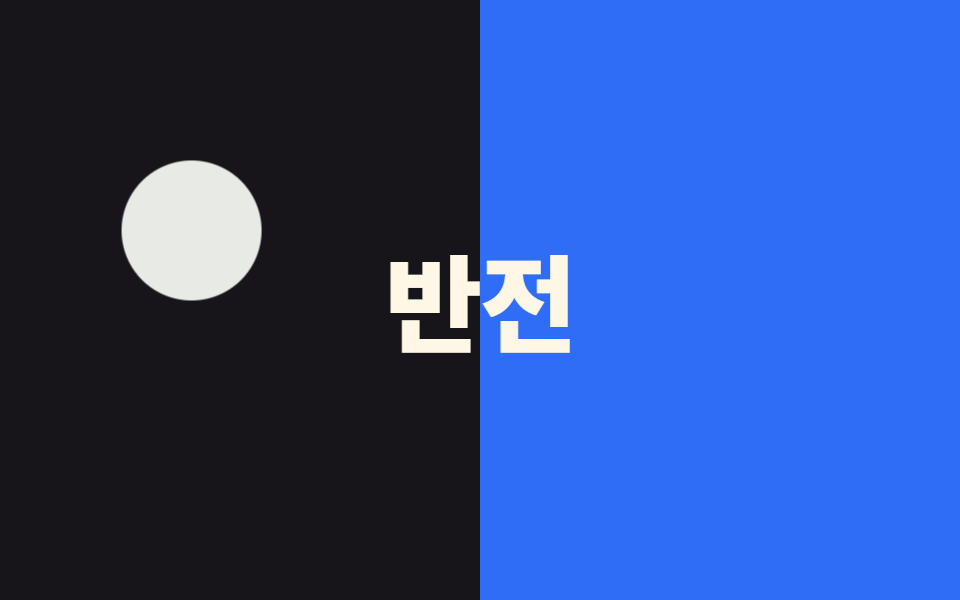 05 cursor-effects-blend-cursor
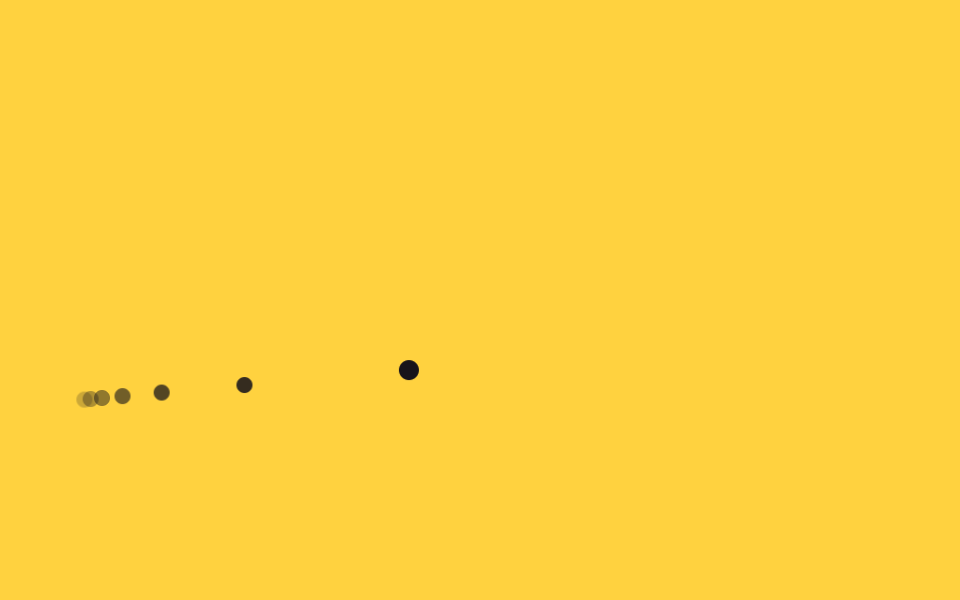 06 cursor-effects-trail-effect
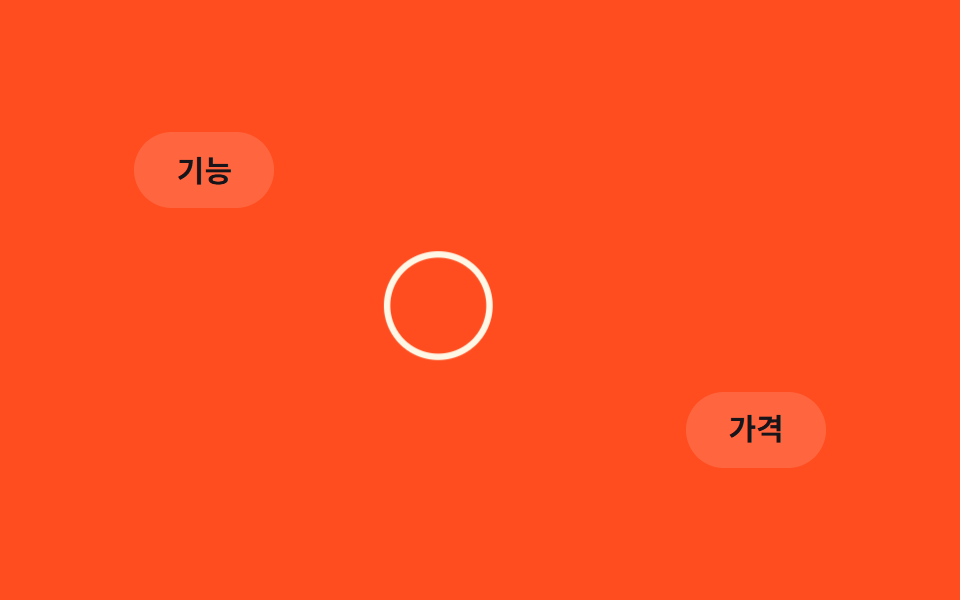 07 cursor-effects-hover-grow-ring
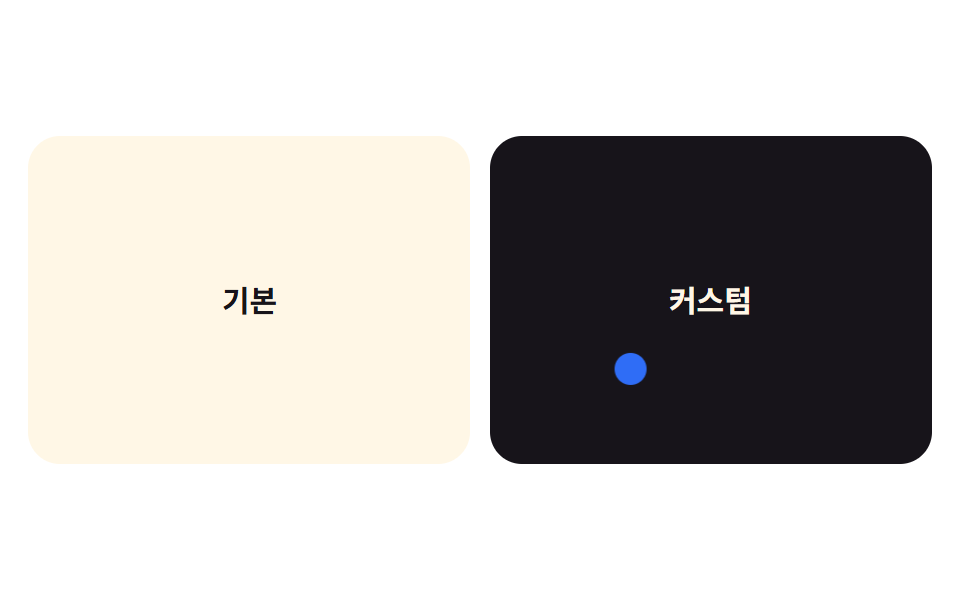 08 cursor-effects-hide-native-cursor
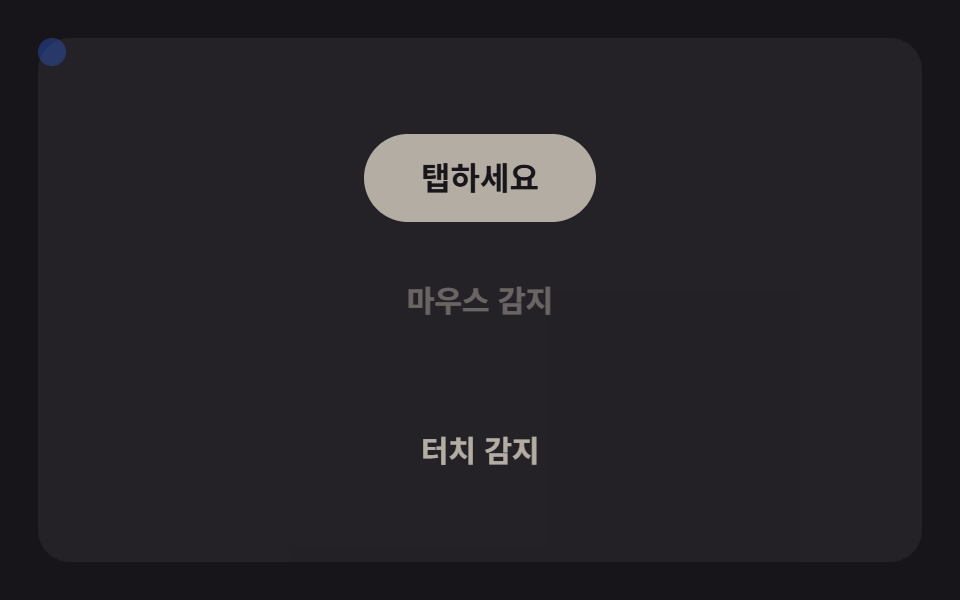 09 cursor-effects-touch-fallback-safe
Tự chạy · bấm ô để tới mục đó · cả 9 trong một zip
- 01 Ảnh cursor tùy chỉnh
- 02 Vòng tròn bám theo con trỏ
- 03 Nút bị hút như nam châm
- 04 Nhãn chữ hiện khi hover
- 05 Con trỏ mix-blend-mode
- 06 Vệt đuôi mờ dần
- 07 Vòng tròn phóng to khi hover
- 08 Ẩn con trỏ mặc định
- 09 Xử lý dự phòng cho thiết bị cảm ứng
Thứ tự chín hiệu ứng đi từ đơn giản đến nặng tính toán. Mục 01 chỉ đổi hình dạng con trỏ, không cần JavaScript nào ngoài việc bám toạ độ. Từ 02 đến 07 mỗi mục thêm một phần tử phản hồi — bám theo, bị hút lại, đổi màu nền, hoặc phóng to khi hover. Mục 08 là nền tảng mà bảy mục phía trên đều ngầm dựa vào: cursor: none. Mục 09 đóng lại bằng phần dự phòng cho thiết bị cảm ứng, và thật ra cả chín demo đều tự tắt qua @media (pointer: coarse), không chỉ riêng mục cuối.
01Ảnh cursor tùy chỉnh
Bạn thấy gì
Thuộc tính cursor trỏ tới một ảnh hoặc SVG qua url(), thay cho mũi tên mặc định bằng một con trỏ mang đúng hình ảnh thương hiệu.
<main class="stage">
  <div class="board">
    <span class="chip">CSS</span>
    <span class="chip">SVG</span>
    <span class="chip">cursor</span>
  </div>
  <div class="cursor is-demo" aria-hidden="true"></div>
</main>
@use "../../../../site/static/demo-tokens" as *;
$duration: $dur-loop; // 커서가 보드를 한 바퀴 도는 시간
$easing: $ease-spring;
$color: $subject-cream; // 커서 모양 색
@include stage($stage-ink);
.stage { position: relative; overflow: hidden; cursor: none; } // 기본 화살표를 지우고 커스텀 모양만 보인다
.board {
display: flex;
gap: clamp(6px, 2vw, 10px);
padding: clamp(10px, 3vw, 16px) clamp(14px, 4vw, 20px);
background: rgba(255, 255, 255, .06);
border-radius: $r-card;
}
.chip {
padding: clamp(6px, 2vw, 9px) clamp(10px, 3vw, 14px);
border-radius: $r-pill;
background: $subject-blue;
color: #fff;
font-weight: 600; font-size: clamp(11px, 3vw, 14px); line-height: 1; font-family: inherit;
}
// 실제 서비스에서는 이 모양을 SVG 로 그려 cursor: url("cursor.svg") 12 12, auto; 로 쓴다.
// 데모는 헤드리스 렌더에서 OS 커서가 안 보이므로 같은 모양을 DOM 요소로 재현해 움직인다.
.cursor {
position: absolute;
top: 0;
left: 0;
width: 26px;
height: 26px;
border-radius: 50% 50% 50% 4px; // 물방울(핀) 모양 — url() 커서 이미지를 흉내
background: $color;
box-shadow: $shadow-press;
transform: translate(var(--x, 60px), var(--y, 40px)) rotate(-45deg);
pointer-events: none;
&.is-demo { animation: cursor-path $duration $easing infinite; }
}
@keyframes cursor-path {
0% { transform: translate(40px, 30px) rotate(-45deg); }
35% { transform: translate(220px, 60px) rotate(-45deg); }
70% { transform: translate(140px, 140px) rotate(-45deg); }
100% { transform: translate(40px, 30px) rotate(-45deg); }
}
@media (pointer: coarse) {
.cursor { display: none; } // 터치 기기엔 커스텀 커서 개념이 없다
.stage { cursor: auto; }
}
@media (prefers-reduced-motion: reduce) {
.cursor.is-demo { animation: none; transform: translate(40px, 30px) rotate(-45deg); }
}html, body {
margin: 0;
overflow: hidden;
}
.stage {
box-sizing: border-box;
min-height: 100vh;
display: grid;
place-items: center;
margin: 0;
background: #17141a;
font-family: -apple-system, "Segoe UI", "Noto Sans KR", sans-serif;
padding: clamp(8px, 4vw, 24px);
}
.stage {
position: relative;
overflow: hidden;
cursor: none;
}
.board {
display: flex;
gap: clamp(6px, 2vw, 10px);
padding: clamp(10px, 3vw, 16px) clamp(14px, 4vw, 20px);
background: rgba(255, 255, 255, 0.06);
border-radius: 16px;
}
.chip {
padding: clamp(6px, 2vw, 9px) clamp(10px, 3vw, 14px);
border-radius: 999px;
background: #2f6df6;
color: #fff;
font-weight: 600;
font-size: clamp(11px, 3vw, 14px);
line-height: 1;
font-family: inherit;
}
.cursor {
position: absolute;
top: 0;
left: 0;
width: 26px;
height: 26px;
border-radius: 50% 50% 50% 4px;
background: #fff7e6;
box-shadow: 0 6px 12px rgba(23, 20, 26, 0.32);
transform: translate(var(--x, 60px), var(--y, 40px)) rotate(-45deg);
pointer-events: none;
}
.cursor.is-demo {
animation: cursor-path 2s cubic-bezier(0.2, 0.8, 0.2, 1) infinite;
}
@keyframes cursor-path {
0% {
transform: translate(40px, 30px) rotate(-45deg);
}
35% {
transform: translate(220px, 60px) rotate(-45deg);
}
70% {
transform: translate(140px, 140px) rotate(-45deg);
}
100% {
transform: translate(40px, 30px) rotate(-45deg);
}
}
@media (pointer: coarse) {
.cursor {
display: none;
}
.stage {
cursor: auto;
}
}
@media (prefers-reduced-motion: reduce) {
.cursor.is-demo {
animation: none;
transform: translate(40px, 30px) rotate(-45deg);
}
}// 실제 포인터가 움직이면 Tùy chỉnh 커서가 그 좌표를 따라간다. 터치 기기는 pointer:coarse 로 건너뛴다.
if (matchMedia('(pointer: fine)').matches) {
var stage = document.querySelector('.stage');
var cur = document.querySelector('.cursor');
stage.addEventListener('pointermove', function (e) {
var r = stage.getBoundingClientRect();
cur.classList.remove('is-demo');
cur.style.setProperty('--x', (e.clientX - r.left) + 'px');
cur.style.setProperty('--y', (e.clientY - r.top) + 'px');
});
}import { useState } from "react";
import type { CSSProperties, PointerEvent } from "react";
import styles from "./CustomCursorImage.module.scss";
export type CustomCursorImageProps = {
chips?: string[];
duration?: number;
easing?: string;
color?: string;
};
type Vars = CSSProperties & { "--duration"?: string; "--easing"?: string; "--color"?: string };
export default function CustomCursorImage({
chips = ["CSS", "SVG", "cursor"],
duration = 2000,
easing = "cubic-bezier(.2,.8,.2,1)",
color = "#fff7e6",
}: CustomCursorImageProps) {
const [demo, setDemo] = useState(true);
const [pos, setPos] = useState({ x: 60, y: 40 });
const move = (e: PointerEvent<HTMLDivElement>) => {
const r = e.currentTarget.getBoundingClientRect();
setDemo(false);
setPos({ x: e.clientX - r.left, y: e.clientY - r.top });
};
const vars: Vars = { "--duration": `${duration}ms`, "--easing": easing, "--color": color };
return (
<div className={styles.stage} style={vars} onPointerMove={move}>
<div className={styles.board}>
{chips.map((c) => (
<span key={c} className={styles.chip}>{c}</span>
))}
</div>
<div
className={demo ? `${styles.cursor} ${styles.isDemo}` : styles.cursor}
style={demo ? undefined : { transform: `translate(${pos.x}px,${pos.y}px) rotate(-45deg)` }}
aria-hidden="true"
/>
</div>
);
}01 · Ảnh cursor tùy chỉnh — Diện tích đo được 5.176% · khung hình chuyển động 23/23Nguyên tác GODRICH · SCSS và React nằm trong tệp zip · Xem mật khẩu
Dùng ở đâu
Bản demo dựng lại hình đó bằng một phần tử DOM vì bản ghi hình không thấy được con trỏ thật của hệ điều hành.
// Trong dự án thật, vẽ hình này thành SVG rồi dùng cursor: url("cursor.svg") 12 12, auto;
// Bản ghi headless không thấy con trỏ của hệ điều hành, nên demo dựng lại đúng hình đó bằng một phần tử DOM và cho nó di chuyển.
.cursor {
  position: absolute;
  top: 0;
  left: 0;
  width: 26px;
  height: 26px;
  border-radius: 50% 50% 50% 4px;
  background: $color;
  box-shadow: $shadow-press;
  transform: translate(var(--x, 60px), var(--y, 40px)) rotate(-45deg);
  pointer-events: none;

  &.is-demo { animation: cursor-path $duration $easing infinite; }
}
02Vòng tròn bám theo con trỏ
Chuyện gì diễn ra trên màn hình
Một chấm nhỏ dịch chuyển ngay lập tức theo toạ độ chuột, còn vòng tròn viền quanh nó có transition riêng nên luôn chậm hơn một nhịp.
<main class="stage">
  <p class="hint">Portfolio</p>
  <div class="dot is-demo" aria-hidden="true"></div>
  <div class="ring is-demo" aria-hidden="true"></div>
</main>
@use "../../../../site/static/demo-tokens" as *;
$duration: $dur-loop; // 점이 경로를 한 바퀴 도는 시간
$easing: $ease-spring;
$color: $subject-ink; // 링 색
@include stage($stage-yellow);
.stage { position: relative; overflow: hidden; cursor: none; }
.hint {
margin: 0;
font-weight: 700; font-size: clamp(16px, 5vw, 22px); line-height: 1.3; font-family: inherit;
color: rgba($stage-ink, .72); // AA: 옐로 면 위 6.06:1
}
.dot,
.ring {
position: absolute;
top: 0;
left: 0;
border-radius: 50%;
pointer-events: none;
}
.dot {
width: 8px;
height: 8px;
background: $color;
}
.ring {
width: 34px;
height: 34px;
margin: -13px 0 0 -13px; // 점과 중심을 맞춘다
border: 2px solid $color;
transition: transform 180ms $easing; // 실제 조작에서 링이 뒤늦게 쫓아오는 이유
}
.dot.is-demo { animation: cursor-path $duration $easing infinite; }
.ring.is-demo { animation: cursor-path $duration $easing infinite; animation-delay: -140ms; }
@keyframes cursor-path {
0% { transform: translate(50px, 40px); }
35% { transform: translate(230px, 70px); }
70% { transform: translate(150px, 150px); }
100% { transform: translate(50px, 40px); }
}
@media (pointer: coarse) {
.dot, .ring { display: none; }
.stage { cursor: auto; }
}
@media (prefers-reduced-motion: reduce) {
.dot.is-demo, .ring.is-demo { animation: none; transform: translate(50px, 40px); }
.ring { transition: none; }
}html, body {
margin: 0;
overflow: hidden;
}
.stage {
box-sizing: border-box;
min-height: 100vh;
display: grid;
place-items: center;
margin: 0;
background: #ffd23f;
font-family: -apple-system, "Segoe UI", "Noto Sans KR", sans-serif;
padding: clamp(8px, 4vw, 24px);
}
.stage {
position: relative;
overflow: hidden;
cursor: none;
}
.hint {
margin: 0;
font-weight: 700;
font-size: clamp(16px, 5vw, 22px);
line-height: 1.3;
font-family: inherit;
color: rgba(23, 20, 26, 0.72);
}
.dot,
.ring {
position: absolute;
top: 0;
left: 0;
border-radius: 50%;
pointer-events: none;
}
.dot {
width: 8px;
height: 8px;
background: #17141a;
}
.ring {
width: 34px;
height: 34px;
margin: -13px 0 0 -13px;
border: 2px solid #17141a;
transition: transform 180ms cubic-bezier(0.2, 0.8, 0.2, 1);
}
.dot.is-demo {
animation: cursor-path 2s cubic-bezier(0.2, 0.8, 0.2, 1) infinite;
}
.ring.is-demo {
animation: cursor-path 2s cubic-bezier(0.2, 0.8, 0.2, 1) infinite;
animation-delay: -140ms;
}
@keyframes cursor-path {
0% {
transform: translate(50px, 40px);
}
35% {
transform: translate(230px, 70px);
}
70% {
transform: translate(150px, 150px);
}
100% {
transform: translate(50px, 40px);
}
}
@media (pointer: coarse) {
.dot, .ring {
display: none;
}
.stage {
cursor: auto;
}
}
@media (prefers-reduced-motion: reduce) {
.dot.is-demo, .ring.is-demo {
animation: none;
transform: translate(50px, 40px);
}
.ring {
transition: none;
}
}// 실제 포인터가 움직이면 점과 링이 같은 좌표를 따라가되 링에는 transition 지연이 있어 뒤처져 보인다.
if (matchMedia('(pointer: fine)').matches) {
var stage = document.querySelector('.stage');
var dot = document.querySelector('.dot');
var ring = document.querySelector('.ring');
stage.addEventListener('pointermove', function (e) {
var r = stage.getBoundingClientRect();
dot.classList.remove('is-demo'); ring.classList.remove('is-demo');
var v = 'translate(' + (e.clientX - r.left) + 'px,' + (e.clientY - r.top) + 'px)';
dot.style.transform = v; ring.style.transform = v;
});
}import { useState } from "react";
import type { CSSProperties, PointerEvent } from "react";
import styles from "./CursorRingFollow.module.scss";
export type CursorRingFollowProps = {
hint?: string;
duration?: number;
easing?: string;
color?: string;
};
type Vars = CSSProperties & { "--duration"?: string; "--easing"?: string; "--color"?: string };
export default function CursorRingFollow({
hint = "포트폴리오",
duration = 2000,
easing = "cubic-bezier(.2,.8,.2,1)",
color = "#17141a",
}: CursorRingFollowProps) {
const [demo, setDemo] = useState(true);
const [pos, setPos] = useState({ x: 50, y: 40 });
const move = (e: PointerEvent<HTMLDivElement>) => {
const r = e.currentTarget.getBoundingClientRect();
setDemo(false);
setPos({ x: e.clientX - r.left, y: e.clientY - r.top });
};
const vars: Vars = { "--duration": `${duration}ms`, "--easing": easing, "--color": color };
const t = `translate(${pos.x}px,${pos.y}px)`;
return (
<div className={styles.stage} style={vars} onPointerMove={move}>
<p className={styles.hint}>{hint}</p>
<div className={demo ? `${styles.dot} ${styles.isDemo}` : styles.dot} style={demo ? undefined : { transform: t }} />
<div className={demo ? `${styles.ring} ${styles.isDemo}` : styles.ring} style={demo ? undefined : { transform: t }} />
</div>
);
}02 · Vòng tròn bám theo con trỏ — Diện tích đo được 4.766% · khung hình chuyển động 23/23Nguyên tác GODRICH · SCSS và React nằm trong tệp zip · Xem mật khẩu
Chỗ dùng
Chính độ trễ 180ms đó tạo cảm giác vòng tròn đang đuổi theo chấm chứ không dính liền vào nó.
.dot,
.ring {
  position: absolute;
  top: 0;
  left: 0;
  border-radius: 50%;
  pointer-events: none;
}

.dot {
  width: 8px;
  height: 8px;
  background: $color;
}

.ring {
  width: 34px;
  height: 34px;
  margin: -13px 0 0 -13px;
  border: 2px solid $color;
  transition: transform 180ms $easing;
}
03Nút bị hút như nam châm
Chuyển động thế nào
Khoảng cách giữa chuột và tâm nút được đo trong pointermove, rồi nút dịch chuyển một phần theo hướng đó — dist càng nhỏ thì giá trị pull (lực hút) càng lớn.
<main class="stage">
  <button class="btn is-demo" type="button">Bắt đầu</button>
  <div class="cursor is-demo" aria-hidden="true"></div>
</main>
@use "../../../../site/static/demo-tokens" as *;
$duration: $dur-loop; // 커서가 버튼을 스치는 한 바퀴
$easing: $ease-spring;
$color: $subject-cream; // 버튼 색
@include stage($stage-orange);
.stage { position: relative; overflow: hidden; cursor: none; }
.btn {
position: relative;
border: 0;
border-radius: $r-pill;
padding: clamp(12px, 3.4vw, 18px) clamp(26px, 7vw, 40px);
font-weight: 700; font-size: clamp(14px, 3.8vw, 18px); line-height: 1; font-family: inherit;
color: $subject-orange-deep; // AA: 크림 면 위 주황 글자 5.04:1
background: $color;
cursor: pointer;
transition: transform 160ms $easing; // 실제 조작에서 버튼이 끌려가는 부드러움
&.is-demo { animation: magnet-pull $duration $easing infinite; }
}
.cursor {
position: absolute;
top: 0;
left: 0;
width: 14px;
height: 14px;
margin: -7px 0 0 -7px;
border-radius: 50%;
background: $stage-ink;
pointer-events: none;
&.is-demo { animation: cursor-path $duration $easing infinite; }
}
@keyframes magnet-pull {
0%, 100% { transform: translate(0, 0); }
35% { transform: translate(12px, -8px); }
55% { transform: translate(0, 0); }
}
@keyframes cursor-path {
0% { transform: translate(30px, 150px); }
35% { transform: translate(150px, 60px); } // 버튼 근처를 스친다
70% { transform: translate(280px, 190px); }
100% { transform: translate(30px, 150px); }
}
@media (pointer: coarse) {
.cursor { display: none; }
.stage { cursor: auto; }
}
@media (prefers-reduced-motion: reduce) {
.btn.is-demo { animation: none; }
.cursor.is-demo { animation: none; transform: translate(30px, 150px); }
.btn { transition: none; }
}html, body {
margin: 0;
overflow: hidden;
}
.stage {
box-sizing: border-box;
min-height: 100vh;
display: grid;
place-items: center;
margin: 0;
background: #ff4d1f;
font-family: -apple-system, "Segoe UI", "Noto Sans KR", sans-serif;
padding: clamp(8px, 4vw, 24px);
}
.stage {
position: relative;
overflow: hidden;
cursor: none;
}
.btn {
position: relative;
border: 0;
border-radius: 999px;
padding: clamp(12px, 3.4vw, 18px) clamp(26px, 7vw, 40px);
font-weight: 700;
font-size: clamp(14px, 3.8vw, 18px);
line-height: 1;
font-family: inherit;
color: #c93000;
background: #fff7e6;
cursor: pointer;
transition: transform 160ms cubic-bezier(0.2, 0.8, 0.2, 1);
}
.btn.is-demo {
animation: magnet-pull 2s cubic-bezier(0.2, 0.8, 0.2, 1) infinite;
}
.cursor {
position: absolute;
top: 0;
left: 0;
width: 14px;
height: 14px;
margin: -7px 0 0 -7px;
border-radius: 50%;
background: #17141a;
pointer-events: none;
}
.cursor.is-demo {
animation: cursor-path 2s cubic-bezier(0.2, 0.8, 0.2, 1) infinite;
}
@keyframes magnet-pull {
0%, 100% {
transform: translate(0, 0);
}
35% {
transform: translate(12px, -8px);
}
55% {
transform: translate(0, 0);
}
}
@keyframes cursor-path {
0% {
transform: translate(30px, 150px);
}
35% {
transform: translate(150px, 60px);
}
70% {
transform: translate(280px, 190px);
}
100% {
transform: translate(30px, 150px);
}
}
@media (pointer: coarse) {
.cursor {
display: none;
}
.stage {
cursor: auto;
}
}
@media (prefers-reduced-motion: reduce) {
.btn.is-demo {
animation: none;
}
.cursor.is-demo {
animation: none;
transform: translate(30px, 150px);
}
.btn {
transition: none;
}
}// 실제 포인터가 버튼 반경 90px 안에 들어오면 거리에 비례해 버튼이 그쪽으로 끌려간다.
if (matchMedia('(pointer: fine)').matches) {
var stage = document.querySelector('.stage'), btn = document.querySelector('.btn'), cur = document.querySelector('.cursor');
stage.addEventListener('pointermove', function (e) {
cur.classList.remove('is-demo'); btn.classList.remove('is-demo');
var r = stage.getBoundingClientRect(), x = e.clientX - r.left, y = e.clientY - r.top;
cur.style.transform = 'translate(' + x + 'px,' + y + 'px)';
var br = btn.getBoundingClientRect(), cx = br.left - r.left + br.width / 2, cy = br.top - r.top + br.height / 2;
var dx = x - cx, dy = y - cy, dist = Math.hypot(dx, dy), pull = dist < 90 ? (90 - dist) / 90 : 0;
btn.style.transform = 'translate(' + (dx * pull * .35) + 'px,' + (dy * pull * .35) + 'px)';
});
}import { useRef, useState } from "react";
import type { CSSProperties, PointerEvent } from "react";
import styles from "./MagneticCursorButton.module.scss";
export type MagneticCursorButtonProps = {
label?: string;
radius?: number;
duration?: number;
easing?: string;
color?: string;
};
type Vars = CSSProperties & { "--duration"?: string; "--easing"?: string; "--color"?: string };
export default function MagneticCursorButton({
label = "시작하기",
radius = 90,
duration = 2000,
easing = "cubic-bezier(.2,.8,.2,1)",
color = "#fff7e6",
}: MagneticCursorButtonProps) {
const btnRef = useRef<HTMLButtonElement>(null);
const [demo, setDemo] = useState(true);
const [cur, setCur] = useState({ x: 30, y: 150 });
const [pull, setPull] = useState({ x: 0, y: 0 });
const move = (e: PointerEvent<HTMLDivElement>) => {
const r = e.currentTarget.getBoundingClientRect();
setDemo(false);
const x = e.clientX - r.left, y = e.clientY - r.top;
setCur({ x, y });
const br = btnRef.current!.getBoundingClientRect();
const cx = br.left - r.left + br.width / 2, cy = br.top - r.top + br.height / 2;
const dx = x - cx, dy = y - cy, dist = Math.hypot(dx, dy), p = dist < radius ? (radius - dist) / radius : 0;
setPull({ x: dx * p * 0.35, y: dy * p * 0.35 });
};
const vars: Vars = { "--duration": `${duration}ms`, "--easing": easing, "--color": color };
return (
<div className={styles.stage} style={vars} onPointerMove={move}>
<button
ref={btnRef}
type="button"
className={demo ? `${styles.btn} ${styles.isDemo}` : styles.btn}
style={demo ? undefined : { transform: `translate(${pull.x}px,${pull.y}px)` }}
>
{label}
</button>
<div
className={demo ? `${styles.cursor} ${styles.isDemo}` : styles.cursor}
style={demo ? undefined : { transform: `translate(${cur.x}px,${cur.y}px)` }}
aria-hidden="true"
/>
</div>
);
}03 · Nút bị hút như nam châm — Diện tích đo được 4.833% · khung hình chuyển động 23/23Nguyên tác GODRICH · SCSS và React nằm trong tệp zip · Xem mật khẩu
Dùng khi nào
Bán kính hút ở đây là 90px, ngoài phạm vi đó nút đứng yên.
// Khi con trỏ thật lọt vào bán kính 90px của nút, nút bị hút về phía đó theo tỉ lệ với khoảng cách.
if (matchMedia('(pointer: fine)').matches) {
  var stage = document.querySelector('.stage'), btn = document.querySelector('.btn'), cur = document.querySelector('.cursor');
  stage.addEventListener('pointermove', function (e) {
    cur.classList.remove('is-demo'); btn.classList.remove('is-demo');
    var r = stage.getBoundingClientRect(), x = e.clientX - r.left, y = e.clientY - r.top;
    cur.style.transform = 'translate(' + x + 'px,' + y + 'px)';
    var br = btn.getBoundingClientRect(), cx = br.left - r.left + br.width / 2, cy = br.top - r.top + br.height / 2;
    var dx = x - cx, dy = y - cy, dist = Math.hypot(dx, dy), pull = dist < 90 ? (90 - dist) / 90 : 0;
    btn.style.transform = 'translate(' + (dx * pull * .35) + 'px,' + (dy * pull * .35) + 'px)';
  });
}
04Nhãn chữ hiện khi hover
Bạn thấy gì
Một bong bóng nhỏ bám theo chuột hiện chữ ngắn như Xem hay Kéo, chỉ hiện lên (đổi opacity) khi con trỏ nằm trong vùng của card, còn lại thì ẩn hẳn.
<main class="stage">
  <div class="card"></div>
  <span class="label is-demo" aria-hidden="true">Xem</span>
</main>
@use "../../../../site/static/demo-tokens" as *;
$duration: $dur-loop; // 라벨이 카드 위를 도는 한 바퀴
$easing: $ease-spring;
$color: $subject-blue; // 라벨 배경색
@include stage($stage-paper);
.stage { position: relative; overflow: hidden; cursor: none; }
.card {
width: clamp(140px, 42vw, 220px);
height: clamp(90px, 28vw, 140px);
border-radius: $r-card;
background: $subject-ink;
}
.label {
  position: absolute;
  top: 0;
  left: 0;
  padding: clamp(5px, 1.6vw, 7px) clamp(10px, 3vw, 14px);
  border-radius: $r-pill;
  background: $color;
  color: #fff;
  font-weight: 700;
  font-size: clamp(11px, 3vw, 13px);
  line-height: 1;
  font-family: inherit;
  opacity: 0;
  transition: opacity 140ms $easing;
  pointer-events: none;
  transform: translate(-50%, -140%);

  &.is-demo {
    animation: label-path $duration $easing infinite,
               label-fade $duration $easing infinite;
  }
}
@keyframes label-path {
0% { transform: translate(calc(-50% + 70px), calc(-140% + 40px)); }
40% { transform: translate(calc(-50% + 150px), calc(-140% + 90px)); }
60% { transform: translate(calc(-50% + 150px), calc(-140% + 90px)); }
100% { transform: translate(calc(-50% + 70px), calc(-140% + 40px)); }
}
@keyframes label-fade {
0%, 100% { opacity: 0; }
30%, 65% { opacity: 1; }
}
@media (pointer: coarse) {
.label { display: none; }
.stage { cursor: auto; }
}
@media (prefers-reduced-motion: reduce) {
.label.is-demo { animation: none; opacity: 0; }
}html, body {
margin: 0;
overflow: hidden;
}
.stage {
box-sizing: border-box;
min-height: 100vh;
display: grid;
place-items: center;
margin: 0;
background: #ffffff;
font-family: -apple-system, "Segoe UI", "Noto Sans KR", sans-serif;
padding: clamp(8px, 4vw, 24px);
}
.stage {
position: relative;
overflow: hidden;
cursor: none;
}
.card {
width: clamp(140px, 42vw, 220px);
height: clamp(90px, 28vw, 140px);
border-radius: 16px;
background: #17141a;
}
.label {
position: absolute;
top: 0;
left: 0;
padding: clamp(5px, 1.6vw, 7px) clamp(10px, 3vw, 14px);
border-radius: 999px;
background: #2f6df6;
color: #fff;
font-weight: 700;
font-size: clamp(11px, 3vw, 13px);
line-height: 1;
font-family: inherit;
opacity: 0;
transition: opacity 140ms cubic-bezier(0.2, 0.8, 0.2, 1);
pointer-events: none;
transform: translate(-50%, -140%);
}
.label.is-demo {
animation: label-path 2s cubic-bezier(0.2, 0.8, 0.2, 1) infinite, label-fade 2s cubic-bezier(0.2, 0.8, 0.2, 1) infinite;
}
@keyframes label-path {
0% {
transform: translate(calc(-50% + 70px), calc(-140% + 40px));
}
40% {
transform: translate(calc(-50% + 150px), calc(-140% + 90px));
}
60% {
transform: translate(calc(-50% + 150px), calc(-140% + 90px));
}
100% {
transform: translate(calc(-50% + 70px), calc(-140% + 40px));
}
}
@keyframes label-fade {
0%, 100% {
opacity: 0;
}
30%, 65% {
opacity: 1;
}
}
@media (pointer: coarse) {
.label {
display: none;
}
.stage {
cursor: auto;
}
}
@media (prefers-reduced-motion: reduce) {
.label.is-demo {
animation: none;
opacity: 0;
}
}// 카드 위에서만 라벨이 보이고, 실제 포인터 좌표를 그대로 따라간다.
if (matchMedia('(pointer: fine)').matches) {
var stage = document.querySelector('.stage'), card = document.querySelector('.card'), label = document.querySelector('.label');
stage.addEventListener('pointermove', function (e) {
label.classList.remove('is-demo');
var r = stage.getBoundingClientRect();
label.style.transform = 'translate(' + (e.clientX - r.left) + 'px,' + (e.clientY - r.top) + 'px)';
label.style.opacity = card.contains(e.target) ? 1 : 0;
});
}import { useRef, useState } from "react";
import type { CSSProperties, PointerEvent } from "react";
import styles from "./CursorTextLabel.module.scss";
export type CursorTextLabelProps = {
label?: string;
duration?: number;
easing?: string;
color?: string;
};
type Vars = CSSProperties & { "--duration"?: string; "--easing"?: string; "--color"?: string };
export default function CursorTextLabel({
label = "보기",
duration = 2000,
easing = "cubic-bezier(.2,.8,.2,1)",
color = "#2f6df6",
}: CursorTextLabelProps) {
const cardRef = useRef<HTMLDivElement>(null);
const [demo, setDemo] = useState(true);
const [pos, setPos] = useState({ x: 0, y: 0, on: false });
const move = (e: PointerEvent<HTMLDivElement>) => {
const r = e.currentTarget.getBoundingClientRect();
setDemo(false);
const on = cardRef.current!.contains(e.target as Node);
setPos({ x: e.clientX - r.left, y: e.clientY - r.top, on });
};
const vars: Vars = { "--duration": `${duration}ms`, "--easing": easing, "--color": color };
return (
<div className={styles.stage} style={vars} onPointerMove={move}>
<div ref={cardRef} className={styles.card} />
<span
className={demo ? `${styles.label} ${styles.isDemo}` : styles.label}
style={demo ? undefined : { transform: `translate(${pos.x}px,${pos.y}px)`, opacity: pos.on ? 1 : 0 }}
aria-hidden="true"
>
{label}
</span>
</div>
);
}04 · Nhãn chữ hiện khi hover — Diện tích đo được 3.302% · khung hình chuyển động 15/23Nguyên tác GODRICH · SCSS và React nằm trong tệp zip · Xem mật khẩu
Dùng ở đâu
Hai keyframes chạy song song — một lo vị trí, một lo độ mờ.
.label {
position: absolute;
top: 0;
left: 0;
padding: clamp(5px, 1.6vw, 7px) clamp(10px, 3vw, 14px);
border-radius: $r-pill;
background: $color;
color: #fff;
font-weight: 700;
font-size: clamp(11px, 3vw, 13px);
line-height: 1;
font-family: inherit;
opacity: 0;
transition: opacity 140ms $easing;
pointer-events: none;
transform: translate(-50%, -140%);
&.is-demo {
animation: label-path $duration $easing infinite,
label-fade $duration $easing infinite;
}
}
05Con trỏ mix-blend-mode
Chuyện gì diễn ra trên màn hình
Một vòng tròn trắng có mix-blend-mode: difference đảo ngược đúng vùng màu nó đang che, nên cùng một con trỏ vừa đọc được trên nền tối vừa đọc được trên nền sáng mà không cần đổi màu bằng JavaScript.
<main class="stage">
  <div class="half half--left"></div>
  <div class="half half--right"></div>
  <p class="banner">Đảo màu</p>
  <div class="cursor is-demo" aria-hidden="true"></div>
</main>
@use "../../../../site/static/demo-tokens" as *;
$duration: $dur-loop; // 원이 두 영역을 오가는 한 바퀴
$easing: $ease-spring;
$color: $stage-paper; // 블렌드 원은 흰색이어야 difference 가 또렷하다
@include stage($stage-ink);
.stage { position: relative; overflow: hidden; cursor: none; }
.half {
position: absolute;
top: 0;
bottom: 0;
width: 50%;
z-index: 0;
}
.half--left { left: 0; background: $stage-ink; }
.half--right { right: 0; background: $subject-blue; }
.banner {
position: relative;
z-index: 1;
margin: 0;
font-weight: 800; font-size: clamp(34px, 11vw, 56px); line-height: 1; font-family: inherit;
color: $subject-cream;
letter-spacing: -.02em;
}
.cursor {
position: absolute;
top: 0;
left: 0;
z-index: 2;
width: 70px;
height: 70px;
margin: -35px 0 0 -35px;
border-radius: 50%;
background: $color;
mix-blend-mode: difference; // 지나가는 배경 색을 반전시킨다
pointer-events: none;
&.is-demo { animation: cursor-path $duration $easing infinite; }
}
@keyframes cursor-path {
0% { transform: translate(80px, 60px); }
35% { transform: translate(280px, 150px); } // 오른쪽 영역으로 넘어간다
70% { transform: translate(120px, 200px); }
100% { transform: translate(80px, 60px); }
}
@media (pointer: coarse) {
.cursor { display: none; }
.stage { cursor: auto; }
}
@media (prefers-reduced-motion: reduce) {
.cursor.is-demo { animation: none; transform: translate(80px, 60px); }
}html, body {
margin: 0;
overflow: hidden;
}
.stage {
box-sizing: border-box;
min-height: 100vh;
display: grid;
place-items: center;
margin: 0;
background: #17141a;
font-family: -apple-system, "Segoe UI", "Noto Sans KR", sans-serif;
padding: clamp(8px, 4vw, 24px);
}
.stage {
position: relative;
overflow: hidden;
cursor: none;
}
.half {
position: absolute;
top: 0;
bottom: 0;
width: 50%;
z-index: 0;
}
.half--left {
left: 0;
background: #17141a;
}
.half--right {
right: 0;
background: #2f6df6;
}
.banner {
position: relative;
z-index: 1;
margin: 0;
font-weight: 800;
font-size: clamp(34px, 11vw, 56px);
line-height: 1;
font-family: inherit;
color: #fff7e6;
letter-spacing: -0.02em;
}
.cursor {
position: absolute;
top: 0;
left: 0;
z-index: 2;
width: 70px;
height: 70px;
margin: -35px 0 0 -35px;
border-radius: 50%;
background: #ffffff;
mix-blend-mode: difference;
pointer-events: none;
}
.cursor.is-demo {
animation: cursor-path 2s cubic-bezier(0.2, 0.8, 0.2, 1) infinite;
}
@keyframes cursor-path {
0% {
transform: translate(80px, 60px);
}
35% {
transform: translate(280px, 150px);
}
70% {
transform: translate(120px, 200px);
}
100% {
transform: translate(80px, 60px);
}
}
@media (pointer: coarse) {
.cursor {
display: none;
}
.stage {
cursor: auto;
}
}
@media (prefers-reduced-motion: reduce) {
.cursor.is-demo {
animation: none;
transform: translate(80px, 60px);
}
}// 실제 포인터가 움직이면 블렌드 원이 그 좌표를 따라가며 지나는 배경 색을 반전시킨다.
if (matchMedia('(pointer: fine)').matches) {
var stage = document.querySelector('.stage'), cur = document.querySelector('.cursor');
stage.addEventListener('pointermove', function (e) {
cur.classList.remove('is-demo');
var r = stage.getBoundingClientRect();
cur.style.transform = 'translate(' + (e.clientX - r.left) + 'px,' + (e.clientY - r.top) + 'px)';
});
}import { useState } from "react";
import type { CSSProperties, PointerEvent } from "react";
import styles from "./BlendModeCursor.module.scss";
export type BlendModeCursorProps = {
text?: string;
duration?: number;
easing?: string;
color?: string;
};
type Vars = CSSProperties & { "--duration"?: string; "--easing"?: string; "--color"?: string };
export default function BlendModeCursor({
text = "반전",
duration = 2000,
easing = "cubic-bezier(.2,.8,.2,1)",
color = "#ffffff",
}: BlendModeCursorProps) {
const [demo, setDemo] = useState(true);
const [pos, setPos] = useState({ x: 80, y: 60 });
const move = (e: PointerEvent<HTMLDivElement>) => {
const r = e.currentTarget.getBoundingClientRect();
setDemo(false);
setPos({ x: e.clientX - r.left, y: e.clientY - r.top });
};
const vars: Vars = { "--duration": `${duration}ms`, "--easing": easing, "--color": color };
return (
<div className={styles.stage} style={vars} onPointerMove={move}>
<div className={`${styles.half} ${styles.halfLeft}`} />
<div className={`${styles.half} ${styles.halfRight}`} />
<p className={styles.banner}>{text}</p>
<div
className={demo ? `${styles.cursor} ${styles.isDemo}` : styles.cursor}
style={demo ? undefined : { transform: `translate(${pos.x}px,${pos.y}px)` }}
aria-hidden="true"
/>
</div>
);
}05 · Con trỏ mix-blend-mode — Diện tích đo được 20.953% · khung hình chuyển động 23/23Nguyên tác GODRICH · SCSS và React nằm trong tệp zip · Xem mật khẩu
Chỗ dùng
Xem MDN về mix-blend-mode để biết các chế độ trộn khác.
.cursor {
  position: absolute;
  top: 0;
  left: 0;
  z-index: 2;
  width: 70px;
  height: 70px;
  margin: -35px 0 0 -35px;
  border-radius: 50%;
  background: $color;
  mix-blend-mode: difference;
  pointer-events: none;

  &.is-demo { animation: cursor-path $duration $easing infinite; }
}
06Vệt đuôi mờ dần
Chuyển động thế nào
Sáu chấm nhỏ chạy cùng một quỹ đạo với chuột thật, nhưng mỗi chấm trễ hơn chấm trước 90ms và mờ dần theo thứ tự — một vòng lặp SCSS @for sinh ra cả sáu quy tắc đó thay vì gõ tay từng dòng.
<main class="stage">
  <div class="trail is-demo" aria-hidden="true">
    <span></span><span></span><span></span><span></span><span></span><span></span>
  </div>
  <div class="cursor is-demo" aria-hidden="true"></div>
</main>
@use "../../../../site/static/demo-tokens" as *;
$duration: $dur-loop; // 경로를 한 바퀴 도는 시간
$easing: $ease-spring;
$color: $subject-ink; // 점 색
@include stage($stage-yellow);
.stage { position: relative; overflow: hidden; cursor: none; }
.cursor {
position: absolute;
top: 0;
left: 0;
width: 10px;
height: 10px;
margin: -5px 0 0 -5px;
border-radius: 50%;
background: $color;
pointer-events: none;
&.is-demo { animation: cursor-path $duration $easing infinite; }
}
.trail span {
position: absolute;
top: 0;
left: 0;
width: 8px;
height: 8px;
margin: -4px 0 0 -4px;
border-radius: 50%;
background: $color;
pointer-events: none;
}
// 점마다 같은 경로를 시차(음수 delay)를 두고 돌아 순간마다 서로 다른 위치에 있게 되고, 그게 꼬리로 보인다.
@for $i from 1 through 6 {
.trail.is-demo span:nth-child(#{$i}) {
opacity: 1 - $i * .13;
animation: cursor-path $duration $easing infinite;
animation-delay: -#{$i * 90}ms;
}
}
@keyframes cursor-path {
0% { transform: translate(40px, 200px); }
30% { transform: translate(140px, 60px); }
60% { transform: translate(260px, 180px); }
100% { transform: translate(40px, 200px); }
}
@media (pointer: coarse) {
.cursor, .trail { display: none; }
.stage { cursor: auto; }
}
@media (prefers-reduced-motion: reduce) {
.cursor.is-demo { animation: none; transform: translate(40px, 200px); }
.trail.is-demo span { animation: none; opacity: 0; }
}html, body {
margin: 0;
overflow: hidden;
}
.stage {
box-sizing: border-box;
min-height: 100vh;
display: grid;
place-items: center;
margin: 0;
background: #ffd23f;
font-family: -apple-system, "Segoe UI", "Noto Sans KR", sans-serif;
padding: clamp(8px, 4vw, 24px);
}
.stage {
position: relative;
overflow: hidden;
cursor: none;
}
.cursor {
position: absolute;
top: 0;
left: 0;
width: 10px;
height: 10px;
margin: -5px 0 0 -5px;
border-radius: 50%;
background: #17141a;
pointer-events: none;
}
.cursor.is-demo {
animation: cursor-path 2s cubic-bezier(0.2, 0.8, 0.2, 1) infinite;
}
.trail span {
position: absolute;
top: 0;
left: 0;
width: 8px;
height: 8px;
margin: -4px 0 0 -4px;
border-radius: 50%;
background: #17141a;
pointer-events: none;
}
.trail.is-demo span:nth-child(1) {
opacity: 0.87;
animation: cursor-path 2s cubic-bezier(0.2, 0.8, 0.2, 1) infinite;
animation-delay: -90ms;
}
.trail.is-demo span:nth-child(2) {
opacity: 0.74;
animation: cursor-path 2s cubic-bezier(0.2, 0.8, 0.2, 1) infinite;
animation-delay: -180ms;
}
.trail.is-demo span:nth-child(3) {
opacity: 0.61;
animation: cursor-path 2s cubic-bezier(0.2, 0.8, 0.2, 1) infinite;
animation-delay: -270ms;
}
.trail.is-demo span:nth-child(4) {
opacity: 0.48;
animation: cursor-path 2s cubic-bezier(0.2, 0.8, 0.2, 1) infinite;
animation-delay: -360ms;
}
.trail.is-demo span:nth-child(5) {
opacity: 0.35;
animation: cursor-path 2s cubic-bezier(0.2, 0.8, 0.2, 1) infinite;
animation-delay: -450ms;
}
.trail.is-demo span:nth-child(6) {
opacity: 0.22;
animation: cursor-path 2s cubic-bezier(0.2, 0.8, 0.2, 1) infinite;
animation-delay: -540ms;
}
@keyframes cursor-path {
0% {
transform: translate(40px, 200px);
}
30% {
transform: translate(140px, 60px);
}
60% {
transform: translate(260px, 180px);
}
100% {
transform: translate(40px, 200px);
}
}
@media (pointer: coarse) {
.cursor, .trail {
display: none;
}
.stage {
cursor: auto;
}
}
@media (prefers-reduced-motion: reduce) {
.cursor.is-demo {
animation: none;
transform: translate(40px, 200px);
}
.trail.is-demo span {
animation: none;
opacity: 0;
}
}// 실제 포인터를 움직이면 맨 앞 점이 그 좌표를 따라간다. 꼬리 점들은 같은 경로를 시차를 두고 도는 채로 남는다.
if (matchMedia('(pointer: fine)').matches) {
var stage = document.querySelector('.stage'), cur = document.querySelector('.cursor');
stage.addEventListener('pointermove', function (e) {
cur.classList.remove('is-demo');
var r = stage.getBoundingClientRect();
cur.style.transform = 'translate(' + (e.clientX - r.left) + 'px,' + (e.clientY - r.top) + 'px)';
});
}import { useState } from "react";
import type { CSSProperties, PointerEvent } from "react";
import styles from "./CursorTrail.module.scss";
export type CursorTrailProps = {
dots?: number;
duration?: number;
easing?: string;
color?: string;
};
type Vars = CSSProperties & { "--duration"?: string; "--easing"?: string; "--color"?: string };
export default function CursorTrail({
dots = 6,
duration = 2000,
easing = "cubic-bezier(.2,.8,.2,1)",
color = "#17141a",
}: CursorTrailProps) {
const [demo, setDemo] = useState(true);
const [pos, setPos] = useState({ x: 40, y: 200 });
const move = (e: PointerEvent<HTMLDivElement>) => {
const r = e.currentTarget.getBoundingClientRect();
setDemo(false);
setPos({ x: e.clientX - r.left, y: e.clientY - r.top });
};
const vars: Vars = { "--duration": `${duration}ms`, "--easing": easing, "--color": color };
return (
<div className={styles.stage} style={vars} onPointerMove={move}>
{demo &&
Array.from({ length: dots }).map((_, i) => (
<span
key={i}
className={styles.trailDot}
style={{ opacity: 1 - (i + 1) * 0.13, animationDelay: `${-(i + 1) * 90}ms` }}
/>
))}
<div
className={demo ? `${styles.cursor} ${styles.isDemo}` : styles.cursor}
style={demo ? undefined : { transform: `translate(${pos.x}px,${pos.y}px)` }}
aria-hidden="true"
/>
</div>
);
}06 · Vệt đuôi mờ dần — Diện tích đo được 2.407% · khung hình chuyển động 23/23Nguyên tác GODRICH · SCSS và React nằm trong tệp zip · Xem mật khẩu
Dùng khi nào
.trail span {
  position: absolute;
  top: 0;
  left: 0;
  width: 8px;
  height: 8px;
  margin: -4px 0 0 -4px;
  border-radius: 50%;
  background: $color;
  pointer-events: none;
}

@for $i from 1 through 6 {
  .trail.is-demo span:nth-child(#{$i}) {
    opacity: 1 - $i * .13;
    animation: cursor-path $duration $easing infinite;
    animation-delay: -#{$i * 90}ms;
  }
}
07Vòng tròn phóng to khi hover
Bạn thấy gì
Bộ chọn :has() theo dõi xem chuột thật có đang nằm trên một link hay không, và nếu có thì phóng vòng tròn lên 1.6 lần — không cần class .hover gắn bằng JavaScript nào cả, thuần một dòng CSS.
<main class="stage">
  <a class="link link--a" href="#">Tính năng</a>
  <a class="link link--b" href="#">Bảng giá</a>
  <div class="cursor-pos is-demo" aria-hidden="true"><div class="ring"></div></div>
</main>
@use "../../../../site/static/demo-tokens" as *;
$duration: $dur-loop; // 링이 두 링크를 도는 한 바퀴
$easing: $ease-spring;
$color: $subject-cream; // 링 색
@include stage($stage-orange);
.stage { position: relative; overflow: hidden; cursor: none; }
.link {
position: absolute;
padding: clamp(8px, 2.4vw, 12px) clamp(16px, 4.4vw, 22px);
border-radius: $r-pill;
background: rgba(255, 255, 255, .14);
color: $subject-ink; // AA: 주황 면(흰 14% 겹침 #d2ada4) 위 5.96:1
font-weight: 700; font-size: clamp(12px, 3.2vw, 15px); line-height: 1; font-family: inherit;
text-decoration: none;
}
.link--a { top: 22%; left: 14%; }
.link--b { bottom: 22%; right: 14%; }
.cursor-pos {
position: absolute;
top: 0;
left: 0;
pointer-events: none;
&.is-demo { animation: cursor-path $duration $easing infinite; }
}
.ring {
width: 30px;
height: 30px;
margin: -15px 0 0 -15px;
border: 2px solid $color;
border-radius: 50%;
transition: transform 180ms $easing;
}
// 실제 조작: 링크 위에 실제 포인터가 있으면 :has() 로 링을 키운다
.stage:has(.link:hover) .ring { transform: scale(1.6); }
.cursor-pos.is-demo .ring { animation: ring-grow $duration $easing infinite; }
@keyframes cursor-path {
0% { transform: translate(90px, 60px); }
40% { transform: translate(90px, 60px); } // link--a 위
50% { transform: translate(300px, 210px); }
90% { transform: translate(300px, 210px); } // link--b 위
100% { transform: translate(90px, 60px); }
}
@keyframes ring-grow {
0%, 100% { transform: scale(1); }
20%, 40% { transform: scale(1.6); }
50%, 70% { transform: scale(1.6); }
80% { transform: scale(1); }
}
@media (pointer: coarse) {
.cursor-pos { display: none; }
.stage { cursor: auto; }
}
@media (prefers-reduced-motion: reduce) {
.cursor-pos.is-demo { animation: none; transform: translate(90px, 60px); }
.cursor-pos.is-demo .ring { animation: none; }
}html, body {
margin: 0;
overflow: hidden;
}
.stage {
box-sizing: border-box;
min-height: 100vh;
display: grid;
place-items: center;
margin: 0;
background: #ff4d1f;
font-family: -apple-system, "Segoe UI", "Noto Sans KR", sans-serif;
padding: clamp(8px, 4vw, 24px);
}
.stage {
position: relative;
overflow: hidden;
cursor: none;
}
.link {
position: absolute;
padding: clamp(8px, 2.4vw, 12px) clamp(16px, 4.4vw, 22px);
border-radius: 999px;
background: rgba(255, 255, 255, 0.14);
color: #17141a;
font-weight: 700;
font-size: clamp(12px, 3.2vw, 15px);
line-height: 1;
font-family: inherit;
text-decoration: none;
}
.link--a {
top: 22%;
left: 14%;
}
.link--b {
bottom: 22%;
right: 14%;
}
.cursor-pos {
position: absolute;
top: 0;
left: 0;
pointer-events: none;
}
.cursor-pos.is-demo {
animation: cursor-path 2s cubic-bezier(0.2, 0.8, 0.2, 1) infinite;
}
.ring {
width: 30px;
height: 30px;
margin: -15px 0 0 -15px;
border: 2px solid #fff7e6;
border-radius: 50%;
transition: transform 180ms cubic-bezier(0.2, 0.8, 0.2, 1);
}
.stage:has(.link:hover) .ring {
transform: scale(1.6);
}
.cursor-pos.is-demo .ring {
animation: ring-grow 2s cubic-bezier(0.2, 0.8, 0.2, 1) infinite;
}
@keyframes cursor-path {
0% {
transform: translate(90px, 60px);
}
40% {
transform: translate(90px, 60px);
}
50% {
transform: translate(300px, 210px);
}
90% {
transform: translate(300px, 210px);
}
100% {
transform: translate(90px, 60px);
}
}
@keyframes ring-grow {
0%, 100% {
transform: scale(1);
}
20%, 40% {
transform: scale(1.6);
}
50%, 70% {
transform: scale(1.6);
}
80% {
transform: scale(1);
}
}
@media (pointer: coarse) {
.cursor-pos {
display: none;
}
.stage {
cursor: auto;
}
}
@media (prefers-reduced-motion: reduce) {
.cursor-pos.is-demo {
animation: none;
transform: translate(90px, 60px);
}
.cursor-pos.is-demo .ring {
animation: none;
}
}// 실제 포인터가 움직이면 링이 좌표를 따라가고, 링크 위에서는 :has() 로 링이 커진다.
if (matchMedia('(pointer: fine)').matches) {
var stage = document.querySelector('.stage'), pos = document.querySelector('.cursor-pos');
stage.addEventListener('pointermove', function (e) {
pos.classList.remove('is-demo');
var r = stage.getBoundingClientRect();
pos.style.transform = 'translate(' + (e.clientX - r.left) + 'px,' + (e.clientY - r.top) + 'px)';
});
}import { useState } from "react";
import type { CSSProperties, PointerEvent } from "react";
import styles from "./HoverGrowRing.module.scss";
export type HoverGrowRingProps = {
links?: string[];
duration?: number;
easing?: string;
color?: string;
};
type Vars = CSSProperties & { "--duration"?: string; "--easing"?: string; "--color"?: string };
export default function HoverGrowRing({
links = ["기능", "가격"],
duration = 2000,
easing = "cubic-bezier(.2,.8,.2,1)",
color = "#fff7e6",
}: HoverGrowRingProps) {
const [demo, setDemo] = useState(true);
const [pos, setPos] = useState({ x: 90, y: 60 });
const [grow, setGrow] = useState(false);
const move = (e: PointerEvent<HTMLDivElement>) => {
setDemo(false);
const r = e.currentTarget.getBoundingClientRect();
setPos({ x: e.clientX - r.left, y: e.clientY - r.top });
setGrow((e.target as HTMLElement).closest("a") !== null);
};
const vars: Vars = { "--duration": `${duration}ms`, "--easing": easing, "--color": color };
return (
<div className={styles.stage} style={vars} onPointerMove={move}>
<a className={`${styles.link} ${styles.linkA}`} href="#">{links[0]}</a>
<a className={`${styles.link} ${styles.linkB}`} href="#">{links[1]}</a>
<div
className={demo ? `${styles.cursorPos} ${styles.isDemo}` : styles.cursorPos}
style={demo ? undefined : { transform: `translate(${pos.x}px,${pos.y}px)` }}
aria-hidden="true"
>
<div className={grow ? `${styles.ring} ${styles.ringGrow}` : styles.ring} />
</div>
</div>
);
}07 · Vòng tròn phóng to khi hover — Diện tích đo được 3.167% · khung hình chuyển động 12/23Nguyên tác GODRICH · SCSS và React nằm trong tệp zip · Xem mật khẩu
Dùng ở đâu
.ring {
  width: 30px;
  height: 30px;
  margin: -15px 0 0 -15px;
  border: 2px solid $color;
  border-radius: 50%;
  transition: transform 180ms $easing;
}

// Dùng :has() để chỉ phóng to vòng khi con trỏ thật đang nằm trên link
.stage:has(.link:hover) .ring { transform: scale(1.6); }

.cursor-pos.is-demo .ring { animation: ring-grow $duration $easing infinite; }
08Ẩn con trỏ mặc định
Chuyện gì diễn ra trên màn hình
cursor: none xoá mũi tên gốc của trình duyệt, nhường chỗ trống đó cho một phần tử con trỏ tự dựng.
<main class="stage">
  <div class="zone zone--default"><span>Mặc định</span></div>
  <div class="zone zone--custom">
    <span>Tùy chỉnh</span>
    <div class="cursor is-demo" aria-hidden="true"></div>
  </div>
</main>
@use "../../../../site/static/demo-tokens" as *;
$duration: $dur-loop; // 점이 오른쪽 영역을 도는 한 바퀴
$easing: $ease-spring;
$color: $subject-blue; // 커스텀 점 색
@include stage($stage-paper);
.stage { display: flex; gap: clamp(6px, 2vw, 10px); padding: clamp(10px, 3vw, 16px); }
.zone {
position: relative;
overflow: hidden;
flex: 1;
min-height: clamp(80px, 34vw, 220px);
border-radius: $r-card;
display: grid;
place-items: center;
font-weight: 700; font-size: clamp(12px, 3.4vw, 15px); line-height: 1; font-family: inherit;
}
.zone--default { background: $subject-cream; color: $stage-ink; cursor: auto; } // 브라우저 기본 화살표
.zone--custom { background: $stage-ink; color: $subject-cream; cursor: none; } // cursor: none 이 이 효과의 전제다
.cursor {
position: absolute;
top: 0;
left: 0;
width: 16px;
height: 16px;
margin: -8px 0 0 -8px;
border-radius: 50%;
background: $color;
pointer-events: none;
&.is-demo { animation: cursor-path $duration $easing infinite; }
}
@keyframes cursor-path {
0% { transform: translate(30px, 30px); }
35% { transform: translate(110px, 90px); }
70% { transform: translate(50px, 130px); }
100% { transform: translate(30px, 30px); }
}
@media (pointer: coarse) {
.cursor { display: none; }
.zone--custom { cursor: auto; }
}
@media (prefers-reduced-motion: reduce) {
.cursor.is-demo { animation: none; transform: translate(30px, 30px); }
}html, body {
margin: 0;
overflow: hidden;
}
.stage {
box-sizing: border-box;
min-height: 100vh;
display: grid;
place-items: center;
margin: 0;
background: #ffffff;
font-family: -apple-system, "Segoe UI", "Noto Sans KR", sans-serif;
padding: clamp(8px, 4vw, 24px);
}
.stage {
display: flex;
gap: clamp(6px, 2vw, 10px);
padding: clamp(10px, 3vw, 16px);
}
.zone {
position: relative;
overflow: hidden;
flex: 1;
min-height: clamp(80px, 34vw, 220px);
border-radius: 16px;
display: grid;
place-items: center;
font-weight: 700;
font-size: clamp(12px, 3.4vw, 15px);
line-height: 1;
font-family: inherit;
}
.zone--default {
background: #fff7e6;
color: #17141a;
cursor: auto;
}
.zone--custom {
background: #17141a;
color: #fff7e6;
cursor: none;
}
.cursor {
position: absolute;
top: 0;
left: 0;
width: 16px;
height: 16px;
margin: -8px 0 0 -8px;
border-radius: 50%;
background: #2f6df6;
pointer-events: none;
}
.cursor.is-demo {
animation: cursor-path 2s cubic-bezier(0.2, 0.8, 0.2, 1) infinite;
}
@keyframes cursor-path {
0% {
transform: translate(30px, 30px);
}
35% {
transform: translate(110px, 90px);
}
70% {
transform: translate(50px, 130px);
}
100% {
transform: translate(30px, 30px);
}
}
@media (pointer: coarse) {
.cursor {
display: none;
}
.zone--custom {
cursor: auto;
}
}
@media (prefers-reduced-motion: reduce) {
.cursor.is-demo {
animation: none;
transform: translate(30px, 30px);
}
}// 오른쪽 영역 안에서만 Tùy chỉnh 점이 실제 포인터를 따라간다. 왼쪽은 Mặc định 화살표 그대로.
if (matchMedia('(pointer: fine)').matches) {
var stage = document.querySelector('.stage'), dot = document.querySelector('.cursor'), zone = document.querySelector('.zone--custom');
stage.addEventListener('pointermove', function (e) {
var zr = zone.getBoundingClientRect();
var inside = e.clientX >= zr.left && e.clientX <= zr.right && e.clientY >= zr.top && e.clientY <= zr.bottom;
dot.style.opacity = inside ? 1 : 0;
if (inside) { dot.classList.remove('is-demo'); dot.style.transform = 'translate(' + (e.clientX - zr.left) + 'px,' + (e.clientY - zr.top) + 'px)'; }
});
}import { useState } from "react";
import type { CSSProperties, PointerEvent } from "react";
import styles from "./HideNativeCursor.module.scss";
export type HideNativeCursorProps = {
defaultLabel?: string;
customLabel?: string;
duration?: number;
easing?: string;
color?: string;
};
type Vars = CSSProperties & { "--duration"?: string; "--easing"?: string; "--color"?: string };
export default function HideNativeCursor({
defaultLabel = "기본",
customLabel = "커스텀",
duration = 2000,
easing = "cubic-bezier(.2,.8,.2,1)",
color = "#2f6df6",
}: HideNativeCursorProps) {
const [demo, setDemo] = useState(true);
const [pos, setPos] = useState({ x: 0, y: 0, on: false });
const move = (e: PointerEvent<HTMLDivElement>) => {
const r = e.currentTarget.getBoundingClientRect();
setDemo(false);
setPos({ x: e.clientX - r.left, y: e.clientY - r.top, on: true });
};
const vars: Vars = { "--duration": `${duration}ms`, "--easing": easing, "--color": color };
return (
<div className={styles.stage} style={vars}>
<div className={styles.zoneDefault}><span>{defaultLabel}</span></div>
<div className={styles.zoneCustom} onPointerMove={move} onPointerLeave={() => setPos((p) => ({ ...p, on: false }))}>
<span>{customLabel}</span>
<div
className={demo ? `${styles.cursor} ${styles.isDemo}` : styles.cursor}
style={demo ? undefined : { transform: `translate(${pos.x}px,${pos.y}px)`, opacity: pos.on ? 1 : 0 }}
aria-hidden="true"
/>
</div>
</div>
);
}08 · Ẩn con trỏ mặc định — Diện tích đo được 1.843% · khung hình chuyển động 23/23Nguyên tác GODRICH · SCSS và React nằm trong tệp zip · Xem mật khẩu
Chỗ dùng
Đây là bước nền mà bảy hiệu ứng phía trên và cả cái bẫy dưới đây đều dựa vào.
.zone--default { background: $subject-cream; color: $stage-ink; cursor: auto; }
.zone--custom  { background: $stage-ink; color: $subject-cream; cursor: none; }

.cursor {
  position: absolute;
  top: 0;
  left: 0;
  width: 16px;
  height: 16px;
  margin: -8px 0 0 -8px;
  border-radius: 50%;
  background: $color;
  pointer-events: none;

  &.is-demo { animation: cursor-path $duration $easing infinite; }
}
09Xử lý dự phòng cho thiết bị cảm ứng
Chuyển động thế nào
@media (pointer: coarse) phát hiện thiết bị cảm ứng và làm panel cảm ứng hiện sẵn, còn panel chuột thì biến mất hẳn — script pointermove không được gắn nữa vì không có gì để lắng nghe.
<main class="stage">
  <div class="panel panel--mouse is-demo">
    <div class="cursor" aria-hidden="true"></div>
    <span class="label">Phát hiện chuột</span>
  </div>
  <div class="panel panel--touch is-demo">
    <button class="tap" type="button">Chạm vào đây</button>
    <span class="label">Phát hiện chạm</span>
  </div>
</main>
@use "../../../../site/static/demo-tokens" as *;
$duration: $dur-loop; // 두 패널이 교차하는 한 바퀴
$easing: $ease-spring;
$color: $subject-blue; // 커서 점 색
@include stage($stage-ink);
.stage { position: relative; overflow: hidden; }
.panel {
position: absolute;
inset: clamp(14px, 4vw, 24px);
display: grid;
place-items: center;
gap: clamp(8px, 2.4vw, 12px);
border-radius: $r-card;
background: rgba(255, 255, 255, .06);
opacity: 0;
}
.label {
font-weight: 700; font-size: clamp(12px, 3.4vw, 15px); line-height: 1; font-family: inherit;
color: $subject-cream;
}
.cursor {
position: absolute;
top: 0;
left: 0;
width: 14px;
height: 14px;
margin: -7px 0 0 -7px;
border-radius: 50%;
background: $color;
pointer-events: none;
}
.tap {
border: 0;
border-radius: $r-pill;
padding: clamp(10px, 3vw, 14px) clamp(22px, 6vw, 30px);
font-weight: 700; font-size: clamp(13px, 3.6vw, 16px); line-height: 1; font-family: inherit;
color: $stage-ink;
background: $subject-cream;
}
.panel--mouse.is-demo { animation: panel-cross $duration $easing infinite; }
.panel--touch.is-demo { animation: panel-cross $duration $easing infinite; animation-delay: calc(#{$duration} / -2); }
@keyframes panel-cross {
0% { opacity: 1; }
50% { opacity: 0; }
100% { opacity: 1; }
}
// 마우스 패널의 점은 pointer:fine 실제 기기에서만 움직인다 (JS 가 담당). 여기선 시각 기준점만 둔다.
.panel--mouse .cursor { transform: translate(50%, 50%); }
// 실사용에서는 이 미디어쿼리 하나가 실제 폴백이다 — 터치 기기는 처음부터 터치 패널만 보인다
@media (pointer: coarse) {
.panel--mouse { display: none; }
.panel--touch { opacity: 1; animation: none; }
}
@media (prefers-reduced-motion: reduce) {
.panel.is-demo { animation: none; }
.panel--mouse.is-demo { opacity: 1; }
.panel--touch.is-demo { opacity: 0; }
}html, body {
margin: 0;
overflow: hidden;
}
.stage {
box-sizing: border-box;
min-height: 100vh;
display: grid;
place-items: center;
margin: 0;
background: #17141a;
font-family: -apple-system, "Segoe UI", "Noto Sans KR", sans-serif;
padding: clamp(8px, 4vw, 24px);
}
.stage {
position: relative;
overflow: hidden;
}
.panel {
position: absolute;
inset: clamp(14px, 4vw, 24px);
display: grid;
place-items: center;
gap: clamp(8px, 2.4vw, 12px);
border-radius: 16px;
background: rgba(255, 255, 255, 0.06);
opacity: 0;
}
.label {
font-weight: 700;
font-size: clamp(12px, 3.4vw, 15px);
line-height: 1;
font-family: inherit;
color: #fff7e6;
}
.cursor {
position: absolute;
top: 0;
left: 0;
width: 14px;
height: 14px;
margin: -7px 0 0 -7px;
border-radius: 50%;
background: #2f6df6;
pointer-events: none;
}
.tap {
border: 0;
border-radius: 999px;
padding: clamp(10px, 3vw, 14px) clamp(22px, 6vw, 30px);
font-weight: 700;
font-size: clamp(13px, 3.6vw, 16px);
line-height: 1;
font-family: inherit;
color: #17141a;
background: #fff7e6;
}
.panel--mouse.is-demo {
animation: panel-cross 2s cubic-bezier(0.2, 0.8, 0.2, 1) infinite;
}
.panel--touch.is-demo {
animation: panel-cross 2s cubic-bezier(0.2, 0.8, 0.2, 1) infinite;
animation-delay: calc(2s / -2);
}
@keyframes panel-cross {
0% {
opacity: 1;
}
50% {
opacity: 0;
}
100% {
opacity: 1;
}
}
.panel--mouse .cursor {
transform: translate(50%, 50%);
}
@media (pointer: coarse) {
.panel--mouse {
display: none;
}
.panel--touch {
opacity: 1;
animation: none;
}
}
@media (prefers-reduced-motion: reduce) {
.panel.is-demo {
animation: none;
}
.panel--mouse.is-demo {
opacity: 1;
}
.panel--touch.is-demo {
opacity: 0;
}
}// pointer:fine 인 실제 기기에서만 점이 포인터를 따라간다. 나머지는 @media (pointer: coarse) 가 CSS로 대체한다.
if (matchMedia('(pointer: fine)').matches) {
var stage = document.querySelector('.stage'), dot = document.querySelector('.cursor');
stage.addEventListener('pointermove', function (e) {
var r = stage.getBoundingClientRect();
dot.style.transform = 'translate(' + (e.clientX - r.left) + 'px,' + (e.clientY - r.top) + 'px)';
});
}import { useState } from "react";
import type { CSSProperties, PointerEvent } from "react";
import styles from "./TouchFallbackCursor.module.scss";
export type TouchFallbackCursorProps = {
mouseLabel?: string;
touchLabel?: string;
tapLabel?: string;
duration?: number;
easing?: string;
color?: string;
};
type Vars = CSSProperties & { "--duration"?: string; "--easing"?: string; "--color"?: string };
export default function TouchFallbackCursor({
mouseLabel = "마우스 감지",
touchLabel = "터치 감지",
tapLabel = "탭하세요",
duration = 2000,
easing = "cubic-bezier(.2,.8,.2,1)",
color = "#2f6df6",
}: TouchFallbackCursorProps) {
const [pos, setPos] = useState({ x: 50, y: 50 });
const move = (e: PointerEvent<HTMLDivElement>) => {
const r = e.currentTarget.getBoundingClientRect();
setPos({ x: e.clientX - r.left, y: e.clientY - r.top });
};
const vars: Vars = { "--duration": `${duration}ms`, "--easing": easing, "--color": color };
return (
<div className={styles.stage} style={vars} onPointerMove={move}>
<div className={`${styles.panel} ${styles.panelMouse} ${styles.isDemo}`}>
<div className={styles.cursor} style={{ transform: `translate(${pos.x}px,${pos.y}px)` }} aria-hidden="true" />
<span className={styles.label}>{mouseLabel}</span>
</div>
<div className={`${styles.panel} ${styles.panelTouch} ${styles.isDemo}`}>
<button className={styles.tap} type="button">{tapLabel}</button>
<span className={styles.label}>{touchLabel}</span>
</div>
</div>
);
}09 · Xử lý dự phòng cho thiết bị cảm ứng — Diện tích đo được 4.146% · khung hình chuyển động 10/23Nguyên tác GODRICH · SCSS và React nằm trong tệp zip · Xem mật khẩu
Dùng khi nào
Đây là bản vá đúng cho cái lỗ mà mục 08 mở ra.
.panel--mouse.is-demo { animation: panel-cross $duration $easing infinite; }
.panel--touch.is-demo { animation: panel-cross $duration $easing infinite; animation-delay: calc(#{$duration} / -2); }

@keyframes panel-cross {
  0%   { opacity: 1; }
  50%  { opacity: 0; }
  100% { opacity: 1; }
}

// Trong dự án thật, chỉ riêng media query này mới là fallback thực sự
@media (pointer: coarse) {
  .panel--mouse { display: none; }
  .panel--touch { opacity: 1; animation: none; }
}
Chỗ dễ hỏng ở đâu? — cái bẫy
mix-blend-mode difference và thẻ cha
Cái bẫy đầu tiên là mix-blend-mode: difference âm thầm ngừng hoạt động nếu một thẻ cha của con trỏ có transform, filter, hoặc opacity khác 1 — bất kỳ thuộc tính nào tạo ra một ngữ cảnh xếp chồng mới đều cô lập việc trộn màu, nên con trỏ vẫn nằm đúng chỗ nhưng màu không đảo ngược nữa dù nhìn vào CSS vẫn thấy đúng. Lỗi này không báo gì trong console, DevTools vẫn hiện đúng thuộc tính, nên cách chắc nhất để phát hiện là kéo con trỏ ngang qua biên giữa hai nền sáng tối và quan sát bằng mắt xem màu có đổi hay không.
cursor none ở tám trong chín hiệu ứng
Cái bẫy thứ hai nối liền với mục 08 và mục 09: cursor: none là nền của tám trong chín hiệu ứng ở đây, nên nếu một trang chỉ chép mỗi dòng đó mà quên khối @media (pointer: coarse) đi kèm, người dùng trên điện thoại sẽ nhìn thấy một màn hình hoàn toàn không có con trỏ và cũng không có gì bám theo ngón tay để bấm — script pointermove còn chưa kịp gắn vì thiết bị cảm ứng vốn không bắn sự kiện đó. Chín file vanilla trong zip đều đã bọc sẵn cặp cursor: none và @media (pointer: coarse) đúng thứ tự, nhưng nếu bạn copy riêng phần .cursor mà bỏ sót khối media query thì lỗi y hệt như trên sẽ quay lại ngay trên chính bản sao của bạn. Nếu bạn muốn mở file zip ra kiểm tra hai khối @media này ngay bây giờ, mật khẩu của nó là x65p86j3.
Ô xem trước khoá pointer-events
Cái bẫy thứ ba nằm ở chính ô xem phía trên: lưới đó nhúng mỗi demo trong một iframe cố định 480×300 nhưng khoá pointer-events: none và không cuộn được, nên chuột thật của bạn không bao giờ chạm tới bên trong, và mỗi ô chỉ chạy vòng lặp .is-demo dựng sẵn thay cho pointermove thật. Ở đây bạn chỉ xem chuyển động lặp lại thôi; muốn thấy vòng tròn mục 02 hay nút mục 03 phản hồi đúng theo chuột của chính bạn, hãy mở riêng file vanilla trong một tab rồi tự tay rê chuột ở đó.
Khả năng tiếp cận
Khối reduced-motion theo từng nhóm
Chín demo đều có khối reduced-motion, nhưng cách xử lý khác nhau theo nhóm. Từ 01 đến 07 khoá animation ở vị trí bắt đầu — chấm và vòng tròn đứng yên tại toạ độ gốc thay vì chạy vòng lặp — vì bản thân việc bám theo mới là phần chuyển động, không phải trạng thái cuối. Mục 09 tắt hẳn animation nhưng vẫn giữ nguyên panel nào đang hiện, panel nào đang ẩn, vì đó là nội dung chứ không phải hiệu ứng trang trí. Tất cả chín mục cũng có khối @media (pointer: coarse) riêng, tắt hẳn phần tử con trỏ tự vẽ trên thiết bị cảm ứng chứ không chỉ làm nó đứng yên. Trang MDN về prefers-reduced-motion ghi rõ mức hỗ trợ trình duyệt cho media query này.
@media (prefers-reduced-motion: reduce) {
  .cursor.is-demo, .dot.is-demo, .ring.is-demo { animation: none; }
  .label.is-demo { animation: none; opacity: 0; }
  .trail.is-demo span { animation: none; opacity: 0; }
  .btn.is-demo { animation: none; }
}
Chín kiểu con trỏ ở trên chỉ là một nhánh nhỏ trong chuyên mục CSS của site — phần lớn còn lại là chuyển động cuộn và hover khác cùng kiểu chín-hiệu-ứng-một-file. Trang giới thiệu nói thẳng site này bán gì và vì sao mỗi bài đều đi kèm một file zip có khoá.
FAQ
Custom cursor css có bắt buộc dùng JavaScript không?
Không phải lúc nào cũng cần. Mục 01, 05 và 08 chỉ cần CSS thuần là chạy được — cursor: url(), mix-blend-mode và cursor: none đều là thuộc tính CSS thuần. Sáu mục còn lại (02, 03, 04, 06, 07 và 09) cần một listener pointermove ngắn để bám toạ độ chuột thật; ở mục 07 chỉ phần phóng to khi hover là CSS thuần nhờ :has().
cursor: url() khác gì với việc tự dựng một phần tử DOM làm con trỏ?
cursor: url() giao hẳn việc vẽ và di chuyển con trỏ cho trình duyệt, nhẹ nhưng bị giới hạn kích thước ảnh và không animate được. Một phần tử DOM tự vẽ nặng hơn một chút vì cần JavaScript để đọc toạ độ, nhưng đổi lại animate, đổi hình dạng theo ngữ cảnh, hay chạy mix-blend-mode đều làm được — cả chín demo ở đây chọn cách thứ hai vì cần animate.
Có dùng chung với Tailwind hoặc một dự án React được không?
Được. Chuyển động ở đây nằm trọn trong thuộc tính CSS và keyframes riêng, không đụng đến class tiện ích nào của Tailwind. Thư mục react/ trong file zip có sẵn một component cho mỗi hiệu ứng, nhận đúng những biến số này qua props nên không cần viết lại logic pointermove.
Có thể bạn cũng thích
 Phản hồi9 kiểu css typing animation, copy dán là chạy
 Phản hồi9 CSS Text Animation Effects — dán 1 dòng là chạy
 Phản hồi9 hiệu ứng css dark mode toggle 1 dòng CSS
 Phản hồi9 micro interactions css — dán 1 dòng chạy ngay
 Phản hồi9 CSS tooltip examples — copy dán một dòng là chạy
 Phản hồi9 hiệu ứng css background animation dán là chạy
 Phản hồi9 CSS Image Hover Effects — dán 1 dòng là chạy
 Phản hồi9 CSS Number Counter Animation — dán 1 dòng
 Phản hồi9 CSS Chat Bubble Animation — dán 1 dòng là chạy
 Phản hồi9 CSS Card Hover Effects — dán 1 dòng là chạy