03Nút bị hút như nam châm
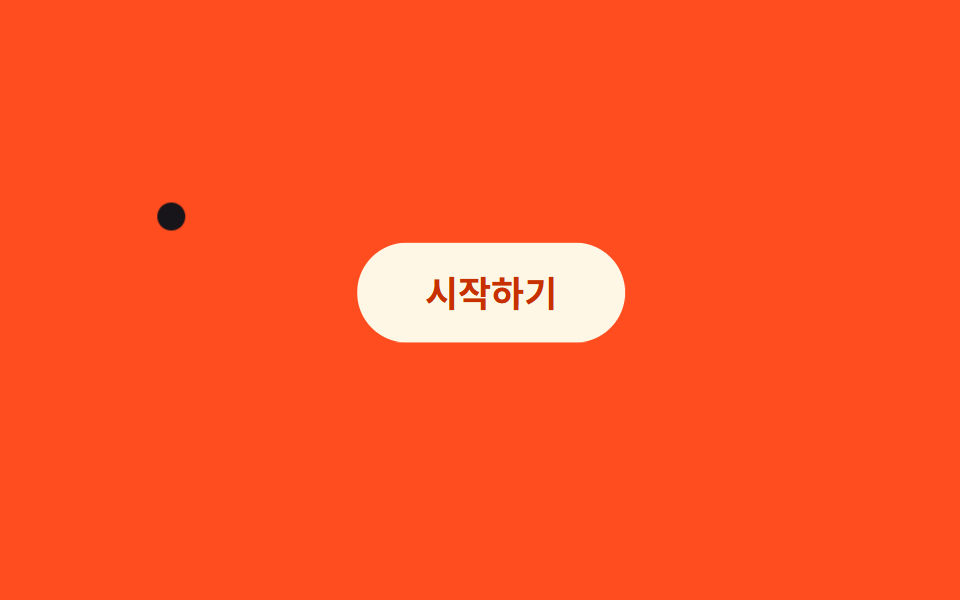
Khoảng cách giữa con trỏ và tâm nút được tính ra, rồi nút dịch nhẹ theo hướng đó, như thể bị một cục nam châm hút lại.
Dùng choNút CTA, các link ở header cần nổi bật
pointermove거리 벡터transform: translate
<main class="stage">
  <button class="btn is-demo" type="button">Bắt đầu</button>
  <div class="cursor is-demo" aria-hidden="true"></div>
</main>
@use "../../../../site/static/demo-tokens" as *;
$duration: $dur-loop; // 커서가 버튼을 스치는 한 바퀴
$easing: $ease-spring;
$color: $subject-cream; // 버튼 색
@include stage($stage-orange);
.stage { position: relative; overflow: hidden; cursor: none; }
.btn {
position: relative;
border: 0;
border-radius: $r-pill;
padding: clamp(12px, 3.4vw, 18px) clamp(26px, 7vw, 40px);
font-weight: 700; font-size: clamp(14px, 3.8vw, 18px); line-height: 1; font-family: inherit;
color: $subject-orange-deep; // AA: 크림 면 위 주황 글자 5.04:1
background: $color;
cursor: pointer;
transition: transform 160ms $easing; // 실제 조작에서 버튼이 끌려가는 부드러움
&.is-demo { animation: magnet-pull $duration $easing infinite; }
}
.cursor {
position: absolute;
top: 0;
left: 0;
width: 14px;
height: 14px;
margin: -7px 0 0 -7px;
border-radius: 50%;
background: $stage-ink;
pointer-events: none;
&.is-demo { animation: cursor-path $duration $easing infinite; }
}
@keyframes magnet-pull {
0%, 100% { transform: translate(0, 0); }
35% { transform: translate(12px, -8px); }
55% { transform: translate(0, 0); }
}
@keyframes cursor-path {
0% { transform: translate(30px, 150px); }
35% { transform: translate(150px, 60px); } // 버튼 근처를 스친다
70% { transform: translate(280px, 190px); }
100% { transform: translate(30px, 150px); }
}
@media (pointer: coarse) {
.cursor { display: none; }
.stage { cursor: auto; }
}
@media (prefers-reduced-motion: reduce) {
.btn.is-demo { animation: none; }
.cursor.is-demo { animation: none; transform: translate(30px, 150px); }
.btn { transition: none; }
}html, body {
margin: 0;
overflow: hidden;
}
.stage {
box-sizing: border-box;
min-height: 100vh;
display: grid;
place-items: center;
margin: 0;
background: #ff4d1f;
font-family: -apple-system, "Segoe UI", "Noto Sans KR", sans-serif;
padding: clamp(8px, 4vw, 24px);
}
.stage {
position: relative;
overflow: hidden;
cursor: none;
}
.btn {
position: relative;
border: 0;
border-radius: 999px;
padding: clamp(12px, 3.4vw, 18px) clamp(26px, 7vw, 40px);
font-weight: 700;
font-size: clamp(14px, 3.8vw, 18px);
line-height: 1;
font-family: inherit;
color: #c93000;
background: #fff7e6;
cursor: pointer;
transition: transform 160ms cubic-bezier(0.2, 0.8, 0.2, 1);
}
.btn.is-demo {
animation: magnet-pull 2s cubic-bezier(0.2, 0.8, 0.2, 1) infinite;
}
.cursor {
position: absolute;
top: 0;
left: 0;
width: 14px;
height: 14px;
margin: -7px 0 0 -7px;
border-radius: 50%;
background: #17141a;
pointer-events: none;
}
.cursor.is-demo {
animation: cursor-path 2s cubic-bezier(0.2, 0.8, 0.2, 1) infinite;
}
@keyframes magnet-pull {
0%, 100% {
transform: translate(0, 0);
}
35% {
transform: translate(12px, -8px);
}
55% {
transform: translate(0, 0);
}
}
@keyframes cursor-path {
0% {
transform: translate(30px, 150px);
}
35% {
transform: translate(150px, 60px);
}
70% {
transform: translate(280px, 190px);
}
100% {
transform: translate(30px, 150px);
}
}
@media (pointer: coarse) {
.cursor {
display: none;
}
.stage {
cursor: auto;
}
}
@media (prefers-reduced-motion: reduce) {
.btn.is-demo {
animation: none;
}
.cursor.is-demo {
animation: none;
transform: translate(30px, 150px);
}
.btn {
transition: none;
}
}// 실제 포인터가 버튼 반경 90px 안에 들어오면 거리에 비례해 버튼이 그쪽으로 끌려간다.
if (matchMedia('(pointer: fine)').matches) {
var stage = document.querySelector('.stage'), btn = document.querySelector('.btn'), cur = document.querySelector('.cursor');
stage.addEventListener('pointermove', function (e) {
cur.classList.remove('is-demo'); btn.classList.remove('is-demo');
var r = stage.getBoundingClientRect(), x = e.clientX - r.left, y = e.clientY - r.top;
cur.style.transform = 'translate(' + x + 'px,' + y + 'px)';
var br = btn.getBoundingClientRect(), cx = br.left - r.left + br.width / 2, cy = br.top - r.top + br.height / 2;
var dx = x - cx, dy = y - cy, dist = Math.hypot(dx, dy), pull = dist < 90 ? (90 - dist) / 90 : 0;
btn.style.transform = 'translate(' + (dx * pull * .35) + 'px,' + (dy * pull * .35) + 'px)';
});
}import { useRef, useState } from "react";
import type { CSSProperties, PointerEvent } from "react";
import styles from "./MagneticCursorButton.module.scss";
export type MagneticCursorButtonProps = {
label?: string;
radius?: number;
duration?: number;
easing?: string;
color?: string;
};
type Vars = CSSProperties & { "--duration"?: string; "--easing"?: string; "--color"?: string };
export default function MagneticCursorButton({
label = "시작하기",
radius = 90,
duration = 2000,
easing = "cubic-bezier(.2,.8,.2,1)",
color = "#fff7e6",
}: MagneticCursorButtonProps) {
const btnRef = useRef<HTMLButtonElement>(null);
const [demo, setDemo] = useState(true);
const [cur, setCur] = useState({ x: 30, y: 150 });
const [pull, setPull] = useState({ x: 0, y: 0 });
const move = (e: PointerEvent<HTMLDivElement>) => {
const r = e.currentTarget.getBoundingClientRect();
setDemo(false);
const x = e.clientX - r.left, y = e.clientY - r.top;
setCur({ x, y });
const br = btnRef.current!.getBoundingClientRect();
const cx = br.left - r.left + br.width / 2, cy = br.top - r.top + br.height / 2;
const dx = x - cx, dy = y - cy, dist = Math.hypot(dx, dy), p = dist < radius ? (radius - dist) / radius : 0;
setPull({ x: dx * p * 0.35, y: dy * p * 0.35 });
};
const vars: Vars = { "--duration": `${duration}ms`, "--easing": easing, "--color": color };
return (
<div className={styles.stage} style={vars} onPointerMove={move}>
<button
ref={btnRef}
type="button"
className={demo ? `${styles.btn} ${styles.isDemo}` : styles.btn}
style={demo ? undefined : { transform: `translate(${pull.x}px,${pull.y}px)` }}
>
{label}
</button>
<div
className={demo ? `${styles.cursor} ${styles.isDemo}` : styles.cursor}
style={demo ? undefined : { transform: `translate(${cur.x}px,${cur.y}px)` }}
aria-hidden="true"
/>
</div>
);
}03 Nút bị hút như nam châm — Diện tích đo được 4.833% · khung hình chuyển động 23/23Nguyên tác GODRICH · SCSS và React nằm trong tệp zip · 9 hiệu ứng custom cursor css — copy dán một dòng
Bài viết chứa demo này
 9 hiệu ứng custom cursor css — copy dán một dòngCustom cursor css là cách thay mũi tên mặc định của trình duyệt bằng một phần tử tự vẽ, bám theo toạ độ chuột thật qua p Xem tất cả demo trong bài này