09Sheet toàn màn hình trên mobile
Trên màn hình hẹp, thay vì dropdown, menu trượt lên thành sheet toàn chiều rộng từ dưới màn hình, đủ lớn để chạm bằng ngón tay.
Dùng choMenu điều hướng trên web mobile, menu overflow của header responsive
미디어쿼리env(safe-area-inset-bottom)전체 폭
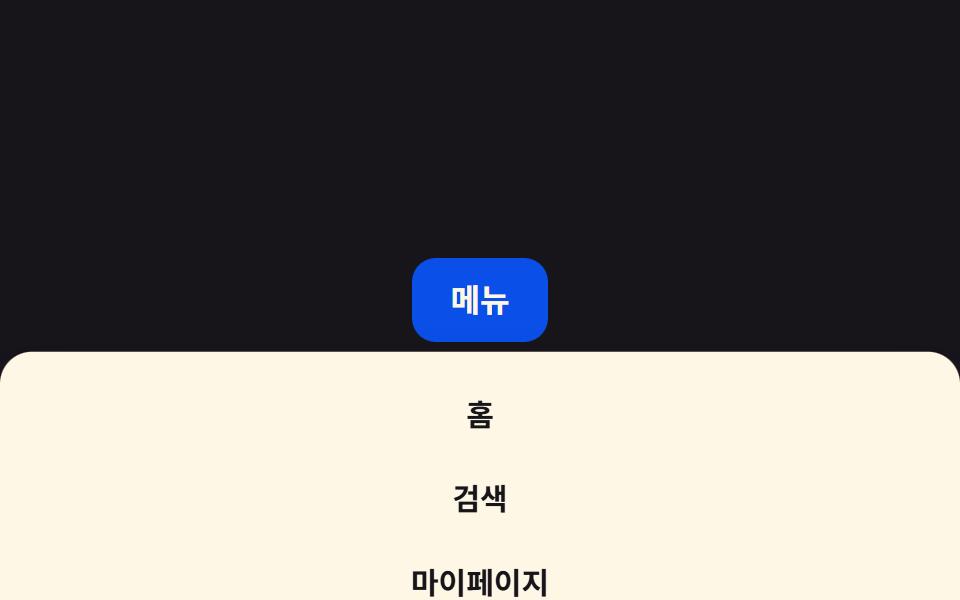
<main class="stage">
  <button class="menu__trigger is-demo" type="button" aria-expanded="false">Menu</button>
  <ul class="menu__sheet">
    <li><a href="#">Trang chủ</a></li>
    <li><a href="#">Tìm kiếm</a></li>
    <li><a href="#">Trang của tôi</a></li>
    <li><a href="#">Cài đặt</a></li>
  </ul>
</main>
@use "../../../../site/static/demo-tokens" as *;
$duration: $dur-base; // 시트가 올라오는 시간
$easing: $ease-out; // 시작 빠르고 끝은 부드럽게
$color: $subject-blue-deep; // 트리거 버튼 색 (크림 글자가 얹히므로 진한 파랑)
@include stage($stage-ink);
.stage { position: relative; overflow: hidden; } // 시트의 기준 — 닫힌 시트는 translateY(100%) 로 화면 아래에 있다.
// 열렸을 땐 시트가 무대 안에 완전히 들어오므로(위 계산: top 112 / bottom 300, 무대는 0~300) 잘리지 않는다.
// overflow:hidden 이 없으면 닫힌 상태의 화면 밖 188px 가 body.scrollHeight 를 밀어 올려 320px 재검증에서 넘침으로 잡힌다
.menu__trigger {
border: 0;
border-radius: $r-control;
padding: clamp(9px, 3vw, 13px) clamp(16px, 4vw, 22px);
font-weight: 700;
font-size: clamp(13px, 3.6vw, 16px);
line-height: 1;
font-family: inherit;
color: $subject-cream;
background: $color;
cursor: pointer;
}
.menu__sheet {
position: absolute;
left: 0;
right: 0;
bottom: 0;
margin: 0;
padding: 10px 10px calc(10px + env(safe-area-inset-bottom, 0px));
list-style: none;
background: $subject-cream;
border-radius: $r-card $r-card 0 0;
box-shadow: $shadow-raised;
transform: translateY(100%); // 화면 아래에서 전체 폭으로 올라온다
}
.menu__sheet li a {
display: block;
padding: clamp(9px, 2.6vw, 12px) 12px;
border-radius: $r-control - 4px;
color: $stage-ink;
text-decoration: none;
text-align: center;
font-weight: 600;
font-size: clamp(13px, 3.6vw, 15px);
line-height: 1.2;
font-family: inherit;
}
.menu__sheet li a:hover { background: rgba($stage-ink, .06); }
.menu__sheet.is-open { transform: translateY(0); transition: transform $duration $easing; }
.menu__trigger.is-demo ~ .menu__sheet { animation: sheet-loop $dur-loop $easing infinite; }
@keyframes sheet-loop {
0%, 30% { transform: translateY(100%); }
45%, 80% { transform: translateY(0); }
95%, 100% { transform: translateY(100%); }
}
@media (prefers-reduced-motion: reduce) {
.menu__sheet { transition: none !important; }
.menu__trigger.is-demo ~ .menu__sheet { animation: none; transform: translateY(100%); }
}
// 320px 에서도 넘치지 않게 — 좁은 화면일수록 오히려 이 패턴이 맞는 크기다
@media (max-width: 360px) {
.menu__sheet { padding-bottom: calc(8px + env(safe-area-inset-bottom, 0px)); }
}html, body {
margin: 0;
overflow: hidden;
}
.stage {
box-sizing: border-box;
min-height: 100vh;
display: grid;
place-items: center;
margin: 0;
background: #17141a;
font-family: -apple-system, "Segoe UI", "Noto Sans KR", sans-serif;
padding: clamp(8px, 4vw, 24px);
}
.stage {
position: relative;
overflow: hidden;
}
.menu__trigger {
border: 0;
border-radius: 12px;
padding: clamp(9px, 3vw, 13px) clamp(16px, 4vw, 22px);
font-weight: 700;
font-size: clamp(13px, 3.6vw, 16px);
line-height: 1;
font-family: inherit;
color: #fff7e6;
background: #0a4fe8;
cursor: pointer;
}
.menu__sheet {
position: absolute;
left: 0;
right: 0;
bottom: 0;
margin: 0;
padding: 10px 10px calc(10px + env(safe-area-inset-bottom, 0px));
list-style: none;
background: #fff7e6;
border-radius: 16px 16px 0 0;
box-shadow: 0 14px 24px rgba(23, 20, 26, 0.32);
transform: translateY(100%);
}
.menu__sheet li a {
display: block;
padding: clamp(9px, 2.6vw, 12px) 12px;
border-radius: 8px;
color: #17141a;
text-decoration: none;
text-align: center;
font-weight: 600;
font-size: clamp(13px, 3.6vw, 15px);
line-height: 1.2;
font-family: inherit;
}
.menu__sheet li a:hover {
background: rgba(23, 20, 26, 0.06);
}
.menu__sheet.is-open {
transform: translateY(0);
transition: transform 300ms ease-out;
}
.menu__trigger.is-demo ~ .menu__sheet {
animation: sheet-loop 2s ease-out infinite;
}
@keyframes sheet-loop {
0%, 30% {
transform: translateY(100%);
}
45%, 80% {
transform: translateY(0);
}
95%, 100% {
transform: translateY(100%);
}
}
@media (prefers-reduced-motion: reduce) {
.menu__sheet {
transition: none !important;
}
.menu__trigger.is-demo ~ .menu__sheet {
animation: none;
transform: translateY(100%);
}
}
@media (max-width: 360px) {
.menu__sheet {
padding-bottom: calc(8px + env(safe-area-inset-bottom, 0px));
}
}// 트리거를 클릭하면 열리고, 시트 바깥을 클릭하면 닫힌다. 데모(.is-demo)는 스스로 반복한다.
var t = document.querySelector('.menu__trigger'), s = document.querySelector('.menu__sheet');
t.addEventListener('click', function () {
t.classList.remove('is-demo');
t.setAttribute('aria-expanded', s.classList.toggle('is-open'));
});
document.addEventListener('pointerdown', function (e) {
if (s.classList.contains('is-open') && !s.contains(e.target) && e.target !== t) { s.classList.remove('is-open'); t.setAttribute('aria-expanded', false); }
});import { useEffect, useRef, useState } from "react";
import type { CSSProperties } from "react";
import styles from "./MobileFullSheetDropdown.module.scss";
export type MobileFullSheetDropdownProps = {
triggerLabel: string;
items: string[];
/** 시트가 올라오는 시간 (기본 300ms) */
duration?: number;
easing?: string;
color?: string;
};
type Vars = CSSProperties & { "--duration"?: string; "--easing"?: string; "--color"?: string };
export default function MobileFullSheetDropdown({
triggerLabel,
items,
duration = 300,
easing = "ease-out",
color = "#0a4fe8",
}: MobileFullSheetDropdownProps) {
const [open, setOpen] = useState(false);
const ref = useRef<HTMLDivElement>(null);
const vars: Vars = { "--duration": `${duration}ms`, "--easing": easing, "--color": color };
useEffect(() => {
function onDown(e: PointerEvent) {
if (ref.current && !ref.current.contains(e.target as Node)) setOpen(false);
}
document.addEventListener("pointerdown", onDown);
return () => document.removeEventListener("pointerdown", onDown);
}, []);
return (
<div className={styles.stage} ref={ref} style={vars}>
<button type="button" className={styles.trigger} aria-expanded={open} onClick={() => setOpen((v) => !v)}>
{triggerLabel}
</button>
<ul className={open ? `${styles.sheet} ${styles.sheetOpen}` : styles.sheet}>
{items.map((label) => (
<li key={label}><a href="#">{label}</a></li>
))}
</ul>
</div>
);
}09 Sheet toàn màn hình trên mobile — Diện tích đo được 62.561% · khung hình chuyển động 8/23Nguyên tác GODRICH · SCSS và React nằm trong tệp zip · 9 css dropdown menu animation — không JS, chỉ CSS
Bài viết chứa demo này
 9 css dropdown menu animation — không JS, chỉ CSSMột css dropdown menu animation là chuyển động khi menu điều hướng ẩn hiện, dựng bằng transition hoặc keyframes thuần CS Xem tất cả demo trong bài này